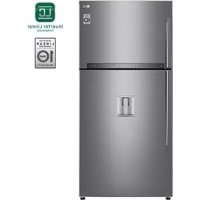
GTF916PZPZD - Fridge LG - Free user manual and instructions
Find the device manual for free GTF916PZPZD LG in PDF.


User questions about GTF916PZPZD LG
0 question about this device. Answer the ones you know or ask your own.
Ask a new question about this device
Download the instructions for your Fridge in PDF format for free! Find your manual GTF916PZPZD - LG and take your electronic device back in hand. On this page are published all the documents necessary for the use of your device. GTF916PZPZD by LG.
USER MANUAL GTF916PZPZD LG
Read this owner's manual thoroughly before operating the appliance and keep it handy for reference at all times.
EN ENGLISH ES ESPANOL IT ITALIANO SK SLOVENCINA
BG
БллтAPСКИ
FR
FRANÇAIS
MK
MAKEIOHCKN
SL
SLOVENsCINA
CZ CESTINA
HR HRVATSKI PT PORTUGUES
SQ SHQIP
EL
EAAHNIKA
HU
MAGYAR
RO
ROMÁNÁ
SR
SRPSKI
TABLE OF CONTENTS
This manual may contain images or content different from the model you purchased.
This manual is subject to revision by the manufacturer.
SAFETYINSTRUCTIONS 3
IMPORTANT SAFETY INSTRUCTIONS 3
Disposal of Your Old Appliance 11
INSTALLATION 12
Notes for Movement and Transport 12
Notes for Installation 12
Leg Adjustment 12
Dimensions and Clearances. 13
Ambient Temperature 13
OPERATION 14
Parts and Functions 14
Notes for Operation 16
Control Panel 18
Water Dispenser (Optional) 20
Moving Ice Maker 21
Fresh VegetableDrawer 22
Other Functions 22
SMART FUNCTIONS 23
Using LG SmartThinQ Application 23
Using Smart DiagnosisTM 25
MAINTENANCE 27
Notes for Cleaning 27
Cleaning the Door Basket 27
Cleaning the Shelf 28
Cleaning the Vegetable Printer 28
Cleaning the Water Dispenser (Optional) 29
TROUBLESHOOTING 30
The following safety guidelines are intended to prevent unforeseen risks or damage from unsafe or incorrect operation of the appliance.
The guidelines are separated into 'WARNING' and 'CAUTION' as described below.

This symbol is displayed to indicate matters and operations that can cause risk. Read the part with this symbol carefully and follow the instructions in order to avoid risk.

WARNING
This indicates that the failure to follow the instructions can cause serious injury or death.

CAUTION
This indicates that the failure to follow the instructions can cause the minor injury or damage to the product.
IMPORTANT SAFETY INSTRUCTIONS

WARNING
To reduce the risk of explosion, fire, death, electric shock, injury or scalding to persons when using this product, follow basic precautions, including the following:
Children in the Household
-
This appliance is not intended for use by persons (including children) with reduced physical, sensory or mental capabilities, or lack of experience and knowledge, unless they have been given supervision or instruction concerning use of the appliance by a person responsible for their safety. Children should be supervised to ensure that they do not play with the appliance.
-
If the appliance is equipped with a lock (some countries only), keep the key out of reach of children.
For use in Europe:
This appliance can be used by children aged from 8 years and above and persons with reduced physical, sensory or mental capabilities or lack of experience and knowledge if they have been given supervision or instruction concerning use of the appliance in a safe way and understand the hazards involved. Children shall not play with the appliance. Cleaning and user maintenance shall not be made by children without supervision.
Installation
- This appliance should only be transported by two or more people holding the appliance securely.
- Ensure that the socket outlet is properly grounded, and that the earth pin on the power cord is not damaged or removed from the power plug. For more details on grounding, inquire at an LG Electronics customer information centre.
- This appliance is equipped with a power cord having an equipment-grounding conductor and a grounding power plug. The power plug must be plugged into an appropriate socket outlet that is installed and grounded in accordance with all local codes and ordinances.
- If the power cord is damaged or the hole of the socket outlet is loose, do not use the power cord and contact an authorized service centre.
- Do not plug the appliance into a multi socket adapter which does not have a power cable(mounted).
- Do not modify or extend the power cable.
- Avoid using any extension cords or double adaptor. The appliance should be connected to a dedicated power line which is separately fused.
- Be careful not to point the power plug up or let the appliance lean against the power plug.
-
Install the appliance in a place where is easy to unplug the power plug of the appliance.
-
Do not use a multi socket outlet which is not properly grounded(ports). Upon using a properly-grounded multi socket outlet (portable), use a product with the current capacity of the power code rating or higher. Failure to do so may result in electric shock or fire due to the heat of multi socket outlet. The power may be shut off when the circuit breaker is operated.
Install the appliance on a firm and level floor.
-
Do not install the appliance in a damp and dusty place. Do not install or store the appliance in any outdoor area, or any area that is subject to weathering conditions such as direct sunlight, wind, or rain or temperatures below freezing.
-
Do not place the appliance in direct sunlight or expose it to the heat from heating appliances such as stoves or heaters.
- Be careful not to expose the rear of the appliance when installing.
- Be careful not to let the appliance door fall during assembly or disassembly.
-
Be careful not to pinch, crush, or damage the power cable during assembly or disassembly of the appliance door.
-
Do not connect a plug adapter or other accessories to the power plug.
Operation
- Do not use the appliance for any purpose (storage of medical or experimental materials or shipping) other than any domestic household food storage use.
-
In case of flood, disconnect the power plug and contact the LG Electronics customer information centre.
-
Unplug the power plug during a severe thunderstorm or lightening or when not in use for a long period of time.
- Do not touch the power plug or the appliance controls with wet hands.
-
Do not bend the power cable excessively or place a heavy object on it.
-
If water penetrates electrical parts of the appliance, disconnect power plug and contact an LG Electronics customer information centre.
-
Do not place hands or metallic objects inside the area emitting the cold air, cover or heat releasing grille on the back.
-
Do not apply excessive force or impact to the back cover of the appliance.
-
Do not put animals, such as pets into the appliance.
-
Be careful of nearby children when you open or close the appliance door. The door may bump the child and cause injury.
-
Avoid the danger of children getting trapped inside the appliance. A child trapped inside the appliance can cause suffocation.
- Do not place heavy or fragile objects, containers filled with liquid, combustible substances, flammable objects(such candles, lamps, etc.), or heating devices(such as stoves, heaters, etc.) on the appliance.
-
If there is a gas leakage (isobutane, propane, natural gas, etc.), do not touch the appliance or power plug and ventilate the area immediately. This appliance uses a refrigerant gas (isobutane,R600a). Although it uses a small amount of the gas, it is still combustible gas. Gas leakage during appliance transport, installation or operation can cause fire, explosion or injury if sparks are caused.
-
Do not use or store flammable or combustible substances (ether, benzene, alcohol, chemical, LPG, combustible spray, insecticide, air freshener, cosmetics, etc.) near the appliance.
-
Immediately unplug the power plug and contact an LG Electronics customer information centre if you detect a strange sound, odour, or smoke coming from the appliance.
-
Fill with potable water only into icemaker or dispenser water tank.
Maintenance
-
Disconnect the power cord before cleaning the appliance or replacing the inside lamp (where fitted).
-
Securely plug the power plug in the socket outlet after completely removing any moisture and dust.
- Never unplug the appliance by pulling on the power cable. Always grip the power plug firmly and pull straight out from the socket outlet.
-
Do not spray water or inflammable substances(toothpaste, alcohol, thinner, benzene, flammable liquid, abrasive, etc.) over the interior or exterior of the appliance to clean it.
-
Do not clean the appliance with brushes, cloths or sponges with rough surfaces or which are made of metallic material.
-
Only qualified service personnel from LG Electronics service centre should disassemble, repair, or modify the appliance. Contact an LG Electronics customer information centre if you move and install the appliance in a different location.
-
Do not use a hair drier to dry the inside of the appliance or place a candle inside to remove the odours.
-
Do not use mechanical devices or other means to accelerate the defrosting process.
Disposal
- When discarding the appliance, remove the door gasket while leaving the shelves and baskets in place and keep children away from the appliance.
- Dispose of all packaging materials (such as plastic bags and styrofoam) away from children. The packaging materials can cause suffocation.
Technical Safety
- Keep ventilation openings, in the appliance enclosure or in the built-in structure, clear of obstruction.
-
Do not use electrical appliances inside the refrigerator.
-
The refrigerant and insulation blowing gas used in the appliance require special disposal procedures. Consult with service agent or a similarly qualified person before disposing of them.
-
Refrigerant leaking out of the pipes could ignite or cause an explosion.
-
The amount of refrigerant in your particular appliance is shown on the identification plate inside the appliance.
-
Never start up an appliance showing any signs of damage. If in doubt, consult your dealer.
- This appliance is intended to be used in household and similar applications only. It should not be used for commercial, or catering purposes, or in any mobile application such as a caravan or boat.
- Do not store explosive substances such as aerosol cans with a flammable propellant in this appliance.
Risk of Fire and Flammable Materials
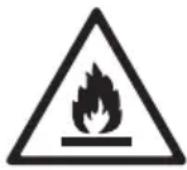
This symbol alerts you to flammable materials that can ignite and cause a fire if you do not take care.
- This appliance contains a small amount of isobutane refrigerant (R600a), but it is also combustible. When transporting and installing the appliance, care should be taken to ensure that no parts of the refrigerating circuit are damaged.
- If a leak is detected, avoid any naked flames or potential sources of ignition and air the room in which the appliance is standing for several minutes. In order to avoid the creation of a flammable gas air mixture if a leak in the refrigerating circuit occurs, the size of the room in which the appliance is used should correspond to the amount of refrigerant used. The room must be 1m^2 in size for every 8 g of R600a refrigerant inside the appliance.
- When positioning the appliance, ensure the supply cord is not trapped or damaged.
- Do not locate multiple portable socket-outlets or portable power supplies at the rear of the appliance.

CAUTION
To reduce the risk of minor injury to persons, malfunction, or damage to the product or property when using this product, follow basic precautions, including the following:
Installation
- Do not tilt the appliance to pull or push it when transporting.
- Make sure not to get a body part such as a hand or foot stuck while moving the appliance.
Operation
-
Do not touch frozen food or the metal parts in the freezer compartment with wet or damp hands. It may cause frostbite.
-
Do not place glass containers, bottles or cans (especially those containing carbonated drinks) in the freezer compartment, shelves or ice bin that will be exposed to temperatures below freezing.
-
The tempered glass on the front side of the appliance door or the shelves can be damaged by an impact. If it is broken, do not touch it with wet hands, as this may result in injury.
-
Do not hang from the appliance doors, storage room, shelf or climb up into it.
-
Do not store an excessive amount of water bottles or containers for side dishes on the door baskets. The basket may break or your hand may bump into the surrounding structure, causing injury.
-
Keep food organized inside the appliance.
- Prevent animals from nibbling on the power cable or water hose.
- Do not open or close the appliance door with excessive force.
- If the hinge of the product door is damaged or operates improperly, stop using the appliance and contact an authorized service centre.
-
Do not damage the refrigerant circuit.
-
Do not place any electronic appliance (such as heater and mobile phone) inside the appliance.
-
Do not clean glass shelves or covers with warm water when they are cold. They may break if exposed to sudden temperature changes.
-
Never eat frozen foods immediately after they have been taken out in the freezer compartment.
-
Do not use a thin crystal cup or chinaware when dispensing.
-
Make sure not to get a hand or foot stuck upon opening or closing the appliance door.
Maintenance
- Do not insert the shelves upside down. The shelves may fall, causing injury.
-
To remove frost from the appliance, contact an LG Electronics customer information centre.
-
Dispose of the ice inside the ice bin in the freezer compartment during an extended power outage.
Disposal of Your Old Appliance
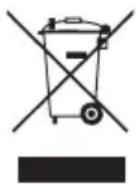
- This crossed-out wheeled bin symbol indicates that waste electrical and electronic products (WEEE) should be disposed of separately from the municipal waste stream.
- Old electrical products can contain hazardous substances so correct disposal of your old appliance will help prevent potential negative consequences for the environment and human health. Your old appliance may contain reusable parts that could be used to repair other products, and other valuable materials that can be recycled to conserve limited resources.
- You can take your appliance either to the shop where you purchased the product, or contact your local government waste office for details of your nearest authorised WEEE collection point. For the most up to date information for your country please see www/lg.com/global/recycling.
Notes for Movement and Transport
- Remove all food from inside the appliance. Then, transport the appliance only after fixing fragile parts such as shelves and the door handle with tape. Failure to do so may cause appliance damage.
- Pull the power plug out, insert and fix it into the power plug hook at the rear or on top of the appliance. Failure to do so may cause damage to the power plug or floor scratch.
- When transporting the appliance, more than two people should transport the appliance carefully. Dropping the appliance, which is extremely heavy, may cause personal injury or appliance failure.
- When transporting the appliance over a long distance, keep the appliance upright. The appliance may fall over, causing malfunctions. Never transport the appliance laying down as it can cause a refrigerant circulation malfunction when it is turned back on again.
Notes for Installation
Install the appliance on a solid and flat area.
If the appliance is installed on an uneven floor, it can cause vibration and noise causing the appliance to fall resulting in injury. It could also cause the doors not to close correctly and introduce moisture inside the unit during operation.
If the appliance front or rear is not level, adjust the front feet so that it can be corrected. Severe cases may need the floor to be packed out with strips of thin timber.
- Avoid placing the unit near heat sources, direct sunlight or moisture.
- Connect the power supply cord (or plug) to the outlet. Don't double up with other appliances on the same outlet.
- After connecting the power supply cord (or plug) to the outlet, Wait two or three hours before you put food into the appliance. If you add food before the appliance has cooled completely, your food may spoil.
After installing the appliance, connect the power plug into a socket outlet. Before moving and discarding the appliance, disconnect the plug from the socket outlet.
Leg Adjustment
To avoid vibration, the unit must be leveled.
If required, adjust the leveling screws to compensate for the uneven floor.
The front should be slightly higher than the rear to aid in door closing.
Leveling screws can be turned easily by tipping the cabinet slightly.
Turn the leveling screws counterclockwise to raise the unit, clockwise to lower it.

Dimensions and Clearances
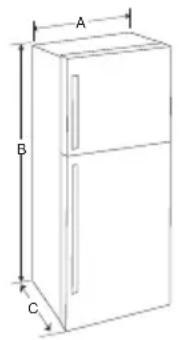
Too small of a distance from adjacent items may result in the degradation of freezing capability and increased electricity costs. Allow over 50mm of clearance from each adjacent wall when installing the appliance.
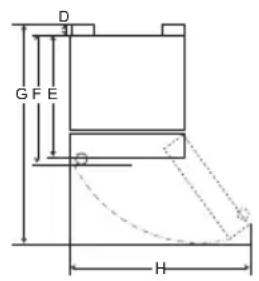
| - | Size | |
| Type (a) Type (b) | ||
| A 860 mm | 860 mm | |
| B 1840 mm | 1780 mm | |
| C 730 mm | 730 mm | |
| D 25 mm | 25 mm | |
| E 675 mm | 675 mm | |
| F 705 mm | 705 mm | |
| G 1493 mm | 1493 mm | |
| H 1486 mm | 1486 mm | |
NOTE
- There are 2 types of appliances. You can determine which type yours is by checking the size of B in the table.
Ambient Temperature
The appliance is designed to operate within a limited range of ambient temperatures, depending on the climate zone. Do not use the appliance at a temperature exceeding the limit. The internal temperature could be affected by the location of the appliance, the ambient temperature, the frequency of door opening and so on. The climate class can be found on the rating label.
| Climate Class | Ambient Temperature Range °C |
| SN (Extended Temperate) | +10 - +32 |
| N (Temperate) +16 - +32 | |
| ST (Subtropical) +16 - +38 | |
| T (Tropical) +16 - +43 | +10 - +43* |
*Australia, India, Kenya
NOTE
- The appliances rated from SN to T are intended to be used at an ambient temperature between 10^ and 43^ .
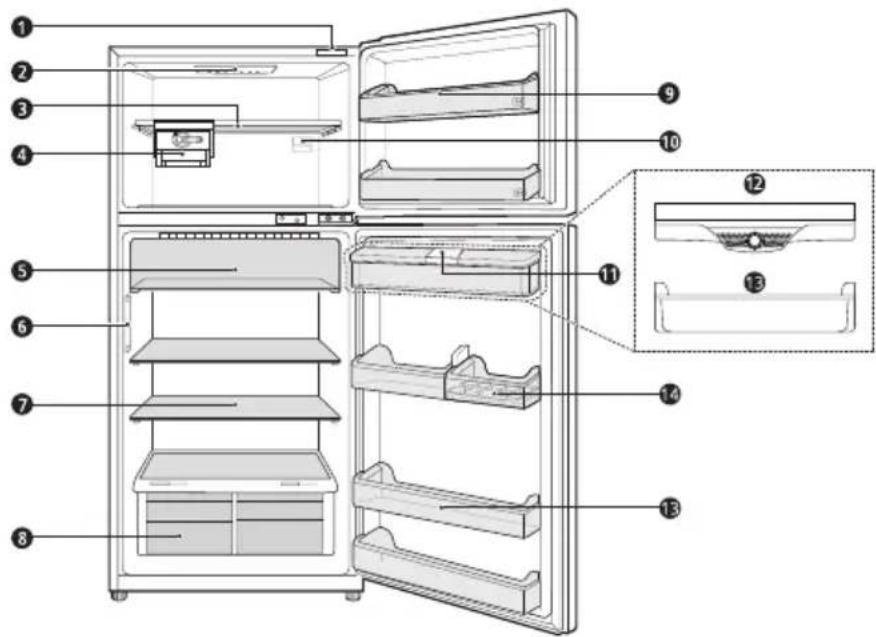
Parts and Functions
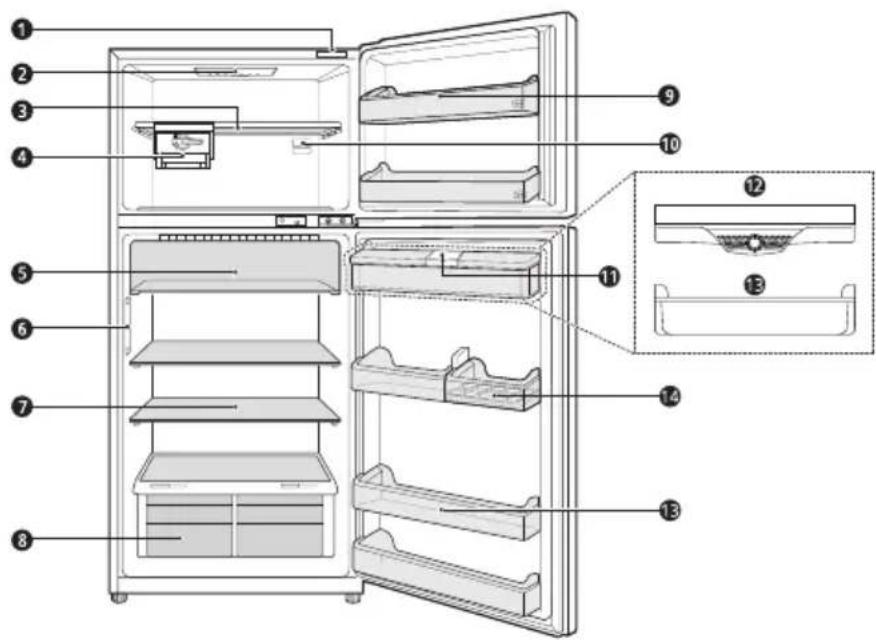
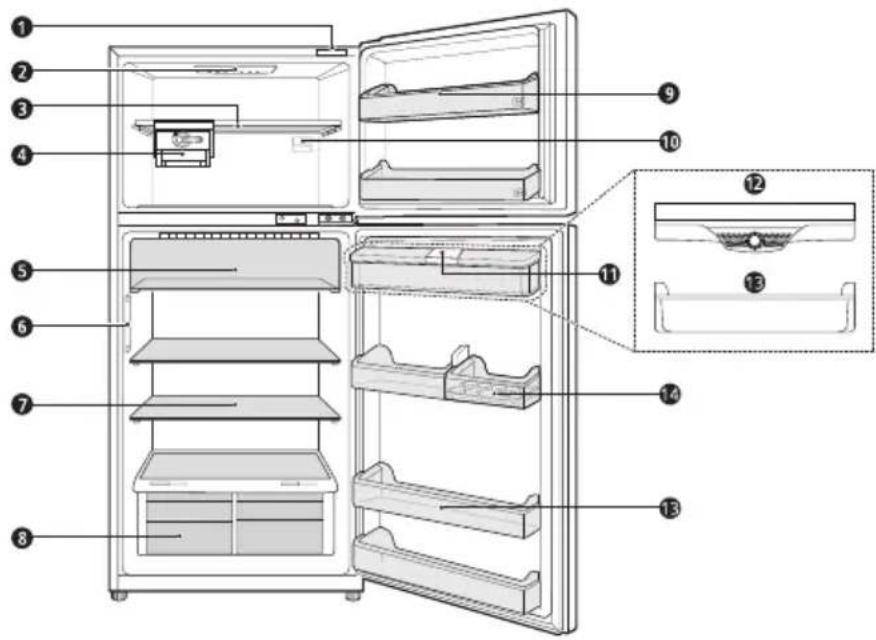
Smart Diagnosis Unit (^*)
Using this function when contacting LG Electronics customer information centre to help make an accurate diagnosis when the appliance operates abnormally or a failure occurs.
LED Lamp
The LED lamps inside the appliance light up when you open the door.
3 Freezer Shelf
This is where frozen foods such as meat, fish, and ice cream can be stored.
4 Moving Ice Maker
This is where ice is produced and stored.
- You can slide the ice maker along the shelf from side to side to any desired position.
⑤ Fresh Room Painter (^*)
This is where food items are stored at a colder temperature than the regular fridge area.
Door Cooling+ (*)
This is where cold air comes out to keep the fridge door basket cool.
Fridge Shelf
This is where refrigerated foods and other items are stored.
- The shelf height can be adjusted by inserting the shelf in another groove of different height.
- Store the foods with higher moisture content at the front of the shelf.
The actual number of shelves will differ from model to model.
Fresh Vegetable Printer
This is where fruits and vegetables are stored to help maintain freshness by adjusting the humidity controller.
- The appearance or components of the appliance may differ from model to model.
9 Freezer Door Basket
This is where small packages of frozen food can be stored.
10 Freezer Temperature Control Dial
This dial regulates the air flow to the freezer compartment by setting it to a suitable balance.
Water Dispenser Tank (^*)
This is where water to supply the dispenser.
IBDC Basket (^*)
The cold air from Door Cooling + directly comes into this basket.
Fridge Door Basket (^*)
This is where small packages of refrigerated foods, drinks and sauce containers are stored.
14 Movable Egg Tray
This is where eggs are stored.
- You can move it to and use it at a desired position as needed. However, do not use it as the ice bin or place it on the shelf on top of the fridge or the vegetables drawer.
NOTE
-
The 2-star section (**) basket or drawer can be used to store ice and food from -12 °C to -18 °C for short periods.
-
(^*) : This feature varies depending on the model purchased.
Notes for Operation
- Do not use the ice water dispenser tank for beverages other than drinking water.
- Users should keep in mind that frost can form. If the door is not closed completely, if the humidity is high during the summer, or if the freezer door is opened frequently.
- Ensure there is sufficient space between food stored on the shelf or door basket to allow the door to close completely.
- Opening the door lets warm air enter the appliance, and may cause the internal temperature to rise.
- Do not open or close the appliance door excessively.
The LED lamp is only intended for use in domestic appliances and is not suitable for household room illumination. - If you are leaving the appliance turned off for an extended period of time, remove all food and unplug the power cord. Clean the interior, and leave the doors slightly ajar to prevent mold from growing in the appliance.
Suggestion for Energy Saving
- Ensure there is sufficient space between stored foods. This allows cold air to be circulated evenly and lowers electricity bills.
- Store hot food only after it has cooled in order to prevent dew or frost.
- When storing food in the freezer compartment, set the freezer temperature lower than the temperature indicated on the appliance.
- Do not set the temperature of the appliance lower than needed. For ice making in normal climates, the freezer temperatures should be set to -18^ or colder.
- Do not put food near the temperature sensor of the fridge compartment. Keep a distance of at least 3cm from the sensor.
- Please note that a temperature rise after defrosting has a permissible range in the appliance specifications. If you wish to minimise the impact this may have on the food storage due to a temperature rise, seal or wrap the stored food in several layers.
- The automatic defrosting system in the appliance ensures that the compartment remains free of ice buildup under normal operating conditions.
Storing Foods Effectively
- Store frozen food or refrigerated food inside sealed containers.
- Check the expiration date and label (storage instructions) before storing food in the appliance.
- Do not store food for a long period of time (more than four weeks) if it spoils easily at a low temperature.
- Place the refrigerated food or frozen food in each fridge or freezer compartment immediately after purchasing.
- Avoid refreezing any food which has been completely thawed. Freezing any food which has been completely thawed again will lower its taste and nutrition.
- Do not wrap and store vegetables with newspaper. Printing material of newspaper or other foreign substances may smear and contaminate food.
-
Do not overfill the appliance. Fill less than 70% of the space. Cold air can not circulate properly if the appliance is overfilled.
Cool hot food before storing. If too much hot food is placed inside, the internal temperature of the appliance can increase and negatively affect other foods stored in the appliance.
If you set an excessively low temperature for food, it may become frozen. Do not set a temperature lower than the required temperature for the food to be stored correctly.
Always keep the appliance clean. -
If there are chill compartments in the appliance, do not store vegetables and fruits with higher moisture content in the chill compartments as they may freeze due to the lower temperature.
-
In the event of a blackout, call the electricity company and ask how long it is going to last.
-
You should avoid opening the doors, while the power is off.
- When the power supply gets back to normal, check the condition of the food.
Max Freezing Capacity
The Express Freeze function will set the freezer to its maximum freezing capacity.
- This generally takes up to 24 hours and automatically switches off.
- If the maximum freezing capacity is to be used, Express Freeze must be switched on for 2 hours before fresh produce is placed in the freezer compartment.
Maximum Storage
- To get better air circulation, remove the moving ice maker.
- If large quantities of food are to be stored, the moving ice maker can be taken out of the appliance and the food can then be stacked directly on the freezer shelves in the freezer compartment.
Control Panel Units and Functions

Fridge

Express Freeze
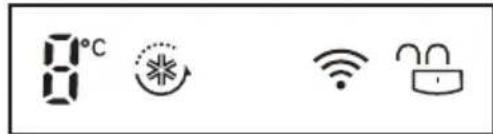

*Wi-Fi

Lock
*Extra Function: Hold 3 sec.
- The actual control panel may differ from model to model.
1 Fridge Temperature
- This sets the fridge target temperature.
2 Express Freeze
- This sets Express Freeze functions.
3 *Wi-Fi
- This sets the appliance to connect to your home's Wi-Fi network.
4 *Lock
This locks the buttons on the control panel.
Notes for Using the Control Panel
The control panel will turn on in any of the following cases.
- When the power is turned on
- When a button is pressed
-
When the appliance door (fridge compartment, freezer compartment) is opened
-
The control panel will turn off automatically for energy saving in any of the following cases.
-
When one minute has passed after turning on the power
- When no button operation is carried out for 20 seconds after a desired button is pressed
-
When 20 seconds has passed after the appliance door (fridge compartment, freezer compartment) is opened and closed
-
If there is any finger or skin contact to the control panel while cleaning it, the button function may operate.
Setting Wi-Fi (Optional)
The Wi-Fi button, when used with the LG SmartThinQ application, allows the refrigerator to connect to a home Wi-Fi network.
- The Wi-Fi icon shows the status of the refrigerator's network connection. The icon illuminates when the refrigerator is connected to the Wi-Fi network.
- Press and hold the Wi-Fi button for 3 seconds to connect to the network. The icon blinks while the connection is being made, then turns on once the connection is successfully made.
Setting the Fridge Temperature
- Press the Fridge button to adjust the temperature. The temperature can be adjusted from 0^ to 6^ .
Setting the Freezer Temperature
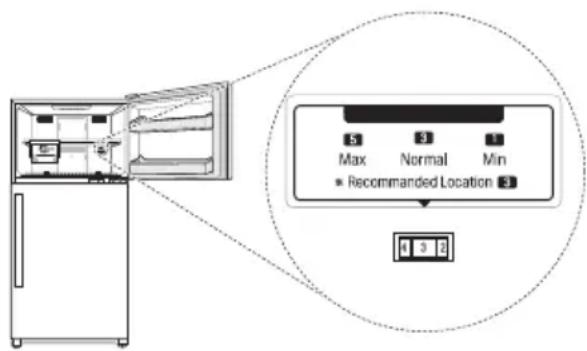
- The temperature can be adjusted from level 1 to level 8. Depending on Climate, level 3 is recommended.
- To lower the temperature in the freezer, turn the knob to the right and set to a higher number.
- To raise the temperature in the freezer, turn the knob to the left and set to a smaller number.
- Setting the dial at 6 8 will maintain a low temperature in the freezer. But, the appliance's cooling speed will be slowed down.
NOTE
- The actual inner temperature varies depending on the food status, as the indicated setting temperature is a target temperature, not actual temperature within the appliance.
- The default temperature setting may vary depending on the appliance.
- Wait until two or three hours have passed after connecting the appliance to the outlet before storing food in the appliance.
- The appliance can automatically detect problems during the operation.
- If a problem is detected, the appliance may not operate and an error code is displayed even when any button is pressed.
- When this occurs, do not turn off the power and immediately contact the LG Electronics customer information centre. If you turn off the power, the repair technician from the LG Electronics customer information centre may have difficulty finding the problem.
Setting Express Freeze
The function can quickly freeze a large amount of ice or frozen foods.
- When you press the Express Freeze button, the Express Freeze icon lights on the control panel.
- The function is enabled and disabled in turn each time you press the button.
The Express Freeze function automatically terminates after a specific period has passed.
Setting and Resetting Lock
This locks the buttons on the control panel.
- Press and hold the Lock button for 3 seconds. When the Lock function is set, all buttons are locked.
NOTE
- You must deactivate Lock function before you can access any other functions.
Water Dispenser (Optional)
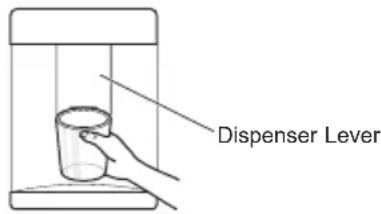
Press the lever of the water dispenser to get cold water.
CAUTION
- Keep children away from the dispenser to prevent children playing with or damaging the controls.
NOTE
If you open the freezer door while water is being dispensed, the water supply will stop.
- If you open the fridge door while water is being dispensed, dispensing will be paused.
- If the cup rim is small, water may splash out of the glass or miss it completely.
- Use a cup with a rim of over 68~mm in diameter when dispensing water.
Water Dispenser tank (Optional)
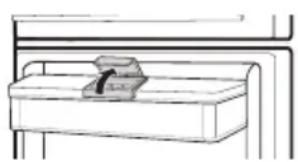
1 Open the cap (small cover) on the top of the water tank.
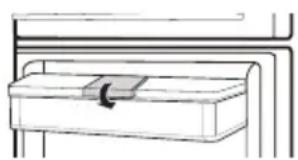
2 Fill the water tank with potable water and close the cap (small cover).
- The water tank can hold up to 6.0L .

CAUTION
Children should not be allowed near the dispenser tank. If the child drops the water dispenser tank while it is completely filled with water, injury may occur. Do not fill the water tank with drinks other than water or fill with hot water.
- Do not apply excessive force or impact when removing or assembling the water dispenser tank. Doing so can cause appliance damage or injury.
NOTE
- You can use the upper basket after removing the water tank cover if you need more door basket space. The rated Fridge internal volume is with the water tank removed.
- Before using the water dispenser tank after installing the appliance, it should be washed before filling it with water.
- Check if the water dispenser tank has been placed on the appliance correctly. If it is not assembled correctly, water may leak from the tank into the appliance.
- If there is no water in the water dispenser tank, the cold water function of the dispenser cannot be used. Check if there is water in the water dispenser tank and then fill it with water if there is not.
- Wait at least 15 seconds before removing the water tank after having dispensed water.
Sound from the water tank will be normal when supplying water to the dispenser. It is not a sign of malfunction.
Moving Ice Maker
To make ice cubes, fill the ice tray with potable water and insert in its position.
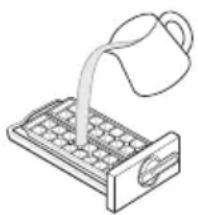
- Fill with potable water only.
-
If the Ice Tray is overfilled, the ice cubes may stick together and be difficult to remove.
-
Press the Express Freeze button on the control panel to make ice quickly.
-
Ice can be removed more easily by pouring water on the ice tray or immersing it in water and twisting the tray first.
- Do not store ice that is not completely frozen.
- You can remove the ice tray or ice cubes bucket to create more space inside the freezer compartment if you do not use it.
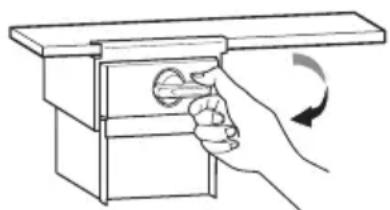
To remove ice cubes, hold the lever of the tray and turn it clockwise until it has twisted slightly to release the ice cubes. The ice cubes will then drop in to the ice cube box.

CAUTION
- Be careful not to twist the ice tray with force as it can be broken.
Fresh Vegetable Printer
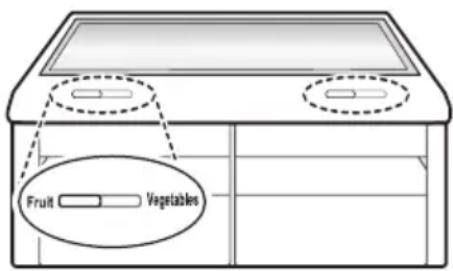
Vegetable compartment can adjust the humidity by moving the knob.
If moved to the left side, cover and tray are opened, and if moved to the right side, cover and tray are closed therefore, it can maintain the humidity.
Closed state is recommended for keeping vegetables, and open state is recommended for keeping fruits.
Other Functions
Door Open Alarm
The alarm sounds 3 times in 30 second intervals if the door (fridge compartment, freezer compartment) is left open or not completely closed for one minute.
- Contact the LG Electronics customer information centre if the alarm sound continues even after closing the door.
Failure Detection
The appliance can automatically detect problems during the operation.
-
If a problem is detected, the appliance may not operate and an error code is displayed even when any button is pressed.
-
When this occurs, do not turn off the power and immediately contact the LG Electronics customer information centre. If you turn off the power, the repair technician from the LG Electronics customer information centre may have difficulty finding the problem.
Using LG SmartThinQ Application
For appliances with the or go
Things to check before using LG SmartThinQ
1 Check the distance between the appliance and the wireless router (Wi-Fi network).
- If the distance between the appliance and the wireless router is too far, the signal strength becomes weak. It may take a long time to register or installation may fail.
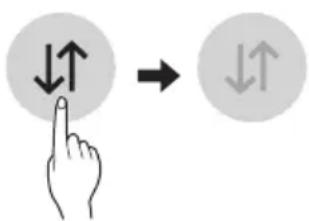
2 Turn off the Mobile data or Cellular Data on your smartphone.
- For iPhones, turn data off by going to Settings Cellular Cellular Data.
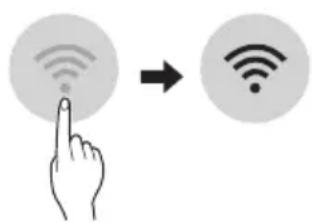
3 Connect your smartphone to the wireless router.
NOTE
To verify the Wi-Fi connection, check that Wi-Fi con on the control panel is lit.
- The appliance supports 2.4 GHz Wi-Fi networks only. To check your network frequency, contact your Internet service provider or refer to your wireless router manual.
- LG SmartThinQ is not responsible for any network connection problems or any faults, malfunctions, or errors caused by network connection.
- If the appliance is having trouble connecting to the Wi-Fi network, it may be too far from the router. Purchase a Wi-Fi repeater (range extender) to improve the Wi-Fi signal strength.
- The Wi-Fi connection may not connect or may be interrupted because of the home network environment.
- The network connection may not work properly depending on the Internet service provider.
- The surrounding wireless environment can make the wireless network service run slowly.
- The appliance cannot be registered due to problems with the wireless signal transmission. Unplug the appliance and wait about a minute before trying again.
- If the firewall on your wireless router is enabled, disable the firewall or add an exception to it.
- The wireless network name (SSID) should be a combination of English letters and numbers. (Do not use special characters.)
- Smartphone user interface (UI) may vary depending on the mobile operating system (OS) and the manufacturer.
- If the security protocol of the router is set to WEP, you may fail to set up the network. Please change it to other security protocols (WPA2 is recommended) and register the product again.
Wireless LAN Module Specifications
Wireless LAN Module Specifications
| Model LCW-004 | |
| Frequency Range | 2412 to 2472 MHz |
| Output Power(Max) | IEEE 802.11b:17.82 dBm IEEE 802.11g:17.72 dBm IEEE 802.11n:16.61 dBm |
Wireless function S/W version : V 1.0
For consideration of the user, this device should be installed and operated with a minimum distance of 20~cm between the device and the body.
Declaration of Conformity
CE
Hereby, LG Electronics declares that the radio equipment type Refrigerator is in compliance with Directive 2014/53/EU. The full text of the EU declaration of conformity is available at the following internet address:
http://www/lg.com/global/support/cedoc/cedoc#
LG Electronics European Shared Service Center B.V.
Krijgsman 1
1186 DM Amstelveen
The Netherlands
Installing LG SmartThinQ
Search for the LG SmartThinQ application from the Google Play Store or Apple App Store on a smart phone. Follow instructions to download and install the application.
Wi-Fi Function
Communicate with the appliance from a smart phone using the convenient smart features.
Firmware Update
Keep the appliance performance updated.
Smart Diagnosis™
If you use the Smart Diagnosis function, you will be provided with the useful information such as a correct way of using the appliance based on the pattern of use.
Settings
Allows you to set various options on the refrigerator and in the application.
NOTE
- If you change your wireless router, Internet service provider, or password, delete the registered appliance from the LG SmartThinQ application and register it again.
The application is subject to change for appliance improvement purposes without notice to users. - Functions may vary by model.
Connecting to Wi-Fi
The Wi-Fi button, when used with the LG SmartThinQ application, allows the appliance to connect to a home Wi-Fi network. The Wi-Fi icon shows the status of the appliance's network connection. The icon illuminates when the appliance is connected to the Wi-Fi network.
Initial Appliance Registration
Run the LG SmartThinQ application and follow the instructions in the application to register the appliance.
Re-registering the Appliance or Registering Another User
Press and hold the Wi-Fi button for 3 seconds to temporarily turn it off. Run the LG SmartThinQ application and follow the instructions in the application to register the appliance.
NOTE
- To disable the Wi-Fi function, press and hold the Wi-Fi button for 3 seconds. Wi-Fi icon will be turned off.
Open Source Software Notice
Information
To obtain the source code under GPL, LGPL, MPL, and other open source licenses, that is contained in this product, please visit http:// opensource.lge.com.
In addition to the source code, all referred license terms, warranty disclaimers and copyright notices are available for download.
LG Electronics will also provide open source code to you on CD-ROM for a charge covering the cost of performing such distribution (such as the cost of media, shipping, and handling) upon email request to opensource@lge.com. This offer is valid for a period of three years after our last shipment of this product. This offer is valid to anyone in receipt of this information.
Using Smart Diagnosis™
- For appliances with

Smart Diagnosis™ Through the Customer Information Centre
Use this function if you need an accurate diagnosis by an LG Electronics customer information centre when the appliance malfunctions or fails. Use this function only to contact the service representative, not during normal operation.
Display panel is on the Freezer door.
1 Close the Freezer and Fridge doors, then press and hold the Lock button to activate the lock function.
- If the display has been locked for over 5 minutes, you must deactivate the lock and then reactivate it.
2 Press and hold the Fridge button for three seconds or longer.
- The control panel will be turned off, and then "3" will be displayed on the fridge temperature display part.
3 Open both fridge door and freezer door, and then hold the phone on the upper right speaker hole.
- Position the phone so that its microphone is aligned with the speaker hole.
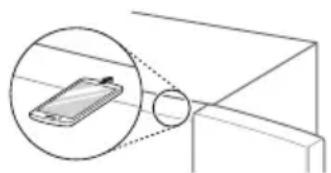
4 After the data transfer is complete, the service agent will explain the result of the Smart DiagnosisTM.
Display panel is inside the Fridge Room.
1 Open the fridge door.
2 Press and hold the Fridge button for three seconds or longer.
3 If the buzzer sounds 4 times, open the freezer door and hold the phone near the speaker hole.
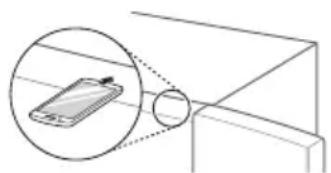
4 After the data transfer is complete, the service agent will explain the result of the Smart DiagnosisTM.
NOTE
- Position the phone so that its microphone is aligned with the speaker hole.
- The Smart Diagnosis™ sound is generated after pressing the Fridge button for three seconds.
- Hold the phone to the upper right speaker hole and wait while the data is transmitted.
- Do not take the phone off the speaker hole while the data is transmitted.
- The data transfer sound may be harsh to the ear while the Smart Diagnosis™ data is being transmitted, but do not take the phone off the speaker hole for accurate diagnosis until the data transfer sound has stopped.
- When the data transfer is complete, the transfer completion message is displayed and the control panel is automatically turned off and then on again after a few seconds.
Afterwards the customer information centre explains the diagnosis result.
- The Smart Diagnosis™ function depends on the local call quality.
- The communication performance will improve and you can transmit a better signal if you use a land line home phone.
- If the Smart Diagnosis™ data transfer is poor due to poor call quality, you may not receive the best Smart Diagnosis™ service.
Notes for Cleaning
- When removing a shelf or drawer from inside the appliance, remove all stored foods from the shelf or drawer to prevent injury or damage to the appliance.
- Otherwise, injury may occur due to the weight of stored foods.
- If cleaning the outside air vents of the appliance by means of vacuuming, then the power cord should be unplugged from the outlet to avoid any static discharge that can damage the electronics or cause an electric shock.
- Detach the shelves and drawers and clean them with water, and then dry them sufficiently, before replacing them.
- Regularly wipe the door gaskets with a wet soft towel.
- Door basket spills and stains should be cleaned as they can compromise storage ability of the basket and could even be damaged.
After cleaning, check if the power cable is damaged, warm or improperly plugged. -
Keep the air vents on the exterior of the appliance clean.
-
Restricted air vents can cause fire or appliance damage.
-
Waxing external painted metal surfaces helps provide rust protection. Do not wax plastic parts. Wax painted metal surfaces at least twice a year using appliance wax (or auto paste wax). Apply wax with a clean, soft cloth.
-
When cleaning the inside or outside of the appliance, do not wipe it with a rough brush, toothpaste, or flammable materials. Do not use cleaning agents containing flammable substances.
-
This may cause discoloration or damage to the appliance.
-
Flammable substances: alcohol (ethanol, methanol, isopropyl alcohol, isobutyl alcohol, etc.), thinner, bleach, benzene, flammable liquid, abrasive, etc.
-
For the appliance exterior, use a clean sponge or soft cloth and a mild detergent in warm water. Do not use abrasive or harsh cleaners. Dry thoroughly with a soft cloth.
- Never clean the shelves or containers in the dishwasher.
The parts may become deformed due to the heat.
- If the appliance is equipped with an LED lamp, do not remove lamp cover and LED lamp in any attempt to repair or service it. Please, contact the LG Electronics customer information centre.
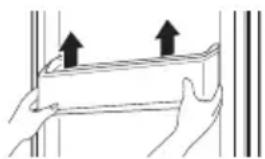
Cleaning the Door Basket
Removing the Fridge/Freezer Door Basket
Hold both edges of the basket and remove it by lifting it upward.
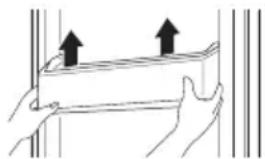
Refitting the Fridge/Freezer Door Basket
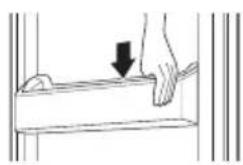
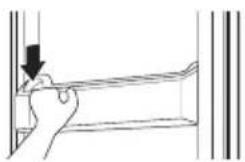
1 Hold both edges of the door basket, gently push one edge to assemble, and then in the same manner assemble the other edge.
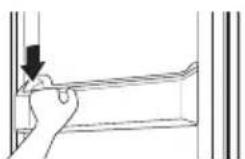
2 After assembling, tap the door basket gently to fix it horizontally.
Cleaning the Shelf
Removing the Fridge/Freezeer Shelf
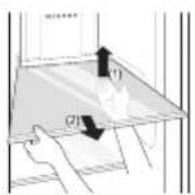
Remove the shelf by pulling it out while slightly lifting the rear edge of the fridge shelf.
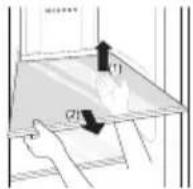
Refitting the Fridge/Freezer Shelf
Mount them in the reverse order of the removal process.
Cleaning the Vegetable. Drawer
Removing the Vegetable Printer
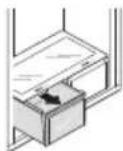
1 Remove the contents of the drawer. Hold the handle of the vegetable drawer and pull it out completely until it outward gently until it stops.
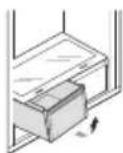
2 Lift the vegetable drawer up and remove it by pulling it out.
Refitting the Vegetable Printer
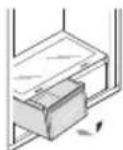
1 Place the drawer in the slide rails at a 45^ angle and gently push it back.
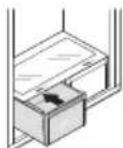
2 Insert the bottom of the vegetable drawer into its original position and gently push it back in while lowering it.
CAUTION
- Please note that injuries can be caused by the weight of stored foods when removing the vegetable drawer.
Cleaning the Water Dispenser (Optional)
Cleaning the Dispenser Tray
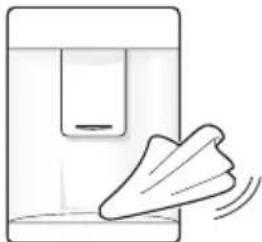
The dispenser tray may become wet easily due to spilled ice or water. Wipe the entire area with a damp cloth.
Cleaning the Water Outlet
Wipe the water outlet frequently with a clean cloth as it may get dirty easily. Please note that lint from a cloth may adhere to the outlet.
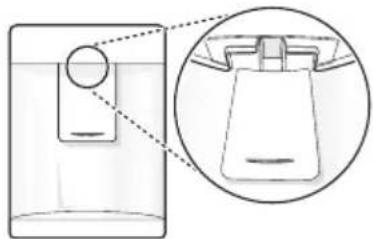
| Symptoms Reason Solution | |
| There is no refrigeration or freezing. | Is there a power interruption? · Check the power of other appliances. |
| If the power plug unplugged from the outlet? · Plug the power plug in the outlet properly. | |
| There is poor refrigeration or freezing. | Is the fridge or freezer temperature set to its warmest setting? · Set the fridge or freezer temperature to 'Medium'. |
| Is the appliance in direct sunlight, or is it near a heat generating object such as cooking oven or heater? · Check the installation area and reinstall away from heat generating objects. | |
| Did you store hot food without cooling it first? · Cool the hot food first before putting it in the fridge or freezer compartment. | |
| Did you put in too much food? · Maintain an appropriate space between food. | |
| Are the appliance doors completely closed? · Completely close the door and make sure that stored food is not obstructing in the door. | |
| Is there enough space around the appliance? · Adjust the installation position to make enough space around the appliance. | |
| The appliance contains a bad smell. | Is the fridge or freezer temperature set to 'Warm'? · Set the fridge or freezer temperature to 'Medium'. |
| Did you put in food with a strong smell? · Store foods with strong smells in a sealed containers. | |
| Vegetables or fruit may have spoiled in the drawer? · Throw away rotten vegetables and clean the vegetable drawer. Do not store vegetables too long in the vegetable drawer. | |
| The inside lamp in the appliance does not turn on. | Does the inside lamp in the appliance turn off? · It is not possible for customers to replace the inside lamp in the appliance as they are not serviceable. If the inside lamp does not turn on, please contact the LG Electronics customer information centre. |
| The appliance door is not closed tightly. | Is the appliance leaning forward? · Adjust the front feet to raise the front side slightly. |
| Were the shelves properly assembled? · Refit the shelves if needed. | |
| Did you close the door with excessive force? · If you apply too much force or speed when closing the door, it may remain briefly open before closing. Make sure that you do not slam the door closed. Close without force. | |
| There is condensation inside the appliance or on the bottom of the vegetable drawer cover. | Did you store hot food without cooling it first? |
| Did you leave the appliance door open? | |
| Do you open and close the appliance door too frequently? | |
| Did you put warm or moist food inside without sealing it in a container? | |
| Frost has formed in the freezer compartment. | Doors may not be closed properly? |
| Did you store hot food without cooling it first? | |
| Is the air entry or exit of the freezer compartment blocked? | |
| Is the freezer compartment overfilled? | |
| Frost or condensation has formed inside or outside the appliance. | Did you open and close the appliance door frequently or is the appliance door improperly closed? |
| Is the installation environment humid? | |
| The appliance is noisy and generates abnormal sounds. | Is the appliance installed on a weak floor or improperly leveled? |
| Does the rear of the appliance touch the wall? | |
| Are objects scattered behind the appliance? | |
| Is there an object on top of the appliance? | |
| The side or front of the appliance is warm. | There are anti condensation pipes fitted to these areas of the appliance to reduce condensation forming from around the door area. |
| There is water inside or outside of the appliance. | Is there water leakage around the appliance? |
| Is there water on the bottom of the appliance? | |
| Ice is not dispensed. | Is there ice in the ice bin? |
| Is the ice clumped in the ice bin? | |
| Unable to hear the sound of ice coming out? | |
| Is the ice path blocked? (You can check the ice passage by separating the ice bin.) | |
| Water does not come out. | The supply valve may be turned off? (For Plumbed models Only) |
| The water dispenser tank may be empty? (Non plumbed models only) | |
| Is the water supply valve closed? (For Plumbed models Only) | |
| Are you using unfiltered water? | |
| Water tastes strange. | Is the taste of water different when comparing it with the taste of water from the previous water purifier? |
| Has it been a long time since you installed and replaced the filter? |
| Symptoms Reason Solution | ||
| Water tastes strange. | Have you flushed out the filter properly in the initial stage after installing it? | When you install or replace the filter for the first time, you need to remove air and activated carbon residue from inside the filter. Use the appliance after dispensing and discharging approximately 5 litres of purified water from the dispenser by pressing the water dispensing lever.(Activated carbon is harmless to humans.) |
| Has the purified water or cold water not been used for an extended period of time? | The taste of old water may change due bacterial growth. Use the product after dispensing and discharging approximately 5 litres (approximately three minutes) from the water dispenser. | |
| Clicking noises | The defrost control will click when the automatic defrost cycle begins and ends. The thermostat control (or appliance control on some models) will also click when cycling on and off. | Normal Operation |
| Rattling noises | Rattling noises may come from the flow of appliance, the water line on the back of the unit (for plumbed models only), or items stored on top of or around the appliance. | Normal Operation |
| Appliance is not resting evenly on the floor. | Floor is weak or uneven or leveling legs need to be adjusted. See the Door Alignment section. | |
| Appliance with linear compressor was moved while operating. | Normal operation. If the compressor does not stop rattling after three minutes, turn the power to the appliance off and then on again. | |
| Whooshing noises | Evaporator fan motor is circulating air through the fridge and freezer compartments. | Normal Operation |
| Air is being forced over the condenser by the condenser fan. | Normal Operation | |
| Gurgling noises | Appliance flowing through the cooling system | Normal Operation |
| Popping noises | Contraction and expansion of the inside walls due to changes in temperature. | Normal Operation |
| Vibrating | If the side or back of the appliance is touching a cabinet or wall, some of the normal vibrations may make an audible sound. | To eliminate the noise, make sure that the sides and back do not make any contact with any wall or cabinet. |
| Your home appliance and smartphone is not connected to the Wi-Fi network. | The password for the Wi-Fi that you are trying to connect to is incorrect. | Find the Wi-Fi network connected to your smartphone and remove it, then register your appliance on LG SmartThinQ |
| Mobile data for your smartphone is turned on. | Turn off the Mobile data of your smartphone and register the appliance using the Wi-Fi network. | |
| The wireless network name (SSID) is set incorrectly. | The wireless network name (SSID) should be a combination of English letters and numbers. (Do not use special characters.) | |
| The router frequency is not 2.4 GHz. | Only a 2.4 GHz router frequency is supported. Set the wireless router to 2.4 GHz and connect the appliance to the wireless router. To check the router frequency, check with your Internet service provider or the router manufacturer. | |
| The distance between the appliance and the router is too far. | If the distance between the appliance and the router is too far, the signal may be weak and the connection may not be configured correctly. Move the location of the router so that it is closer to the appliance. | |
Memo
Memo
PbKOBOdCTBO 3A
EKCПLOATAЦЯ
XJIADINJHNKI
ΦPN3EP
IpooyetepebKOBODCTBOTO 3a ekcnnoataunnoPpO6Ho, npEn da pa6oTne C ypeDa, nro cxbxpaHraBaTe Ha ydo6Ho MRCTO 3a cnpaBKn NO BCsKO BpeMe.
www.lg.com
Toba pkoBOcTO BO MOKe Da cbDbpxa
H3o6paXeHnIu CbDbpxKaHne, pa3nUHO OT
MoEJa, KOITO CTe 3aKyNil.
PbKOBOIDCTBOTO NOJIeKHa peJaKUa O T npOn3BOIDNTeJIa.
MHCTPYKUN 3A BE3OJACHOCT. 3
BaxKn Hnctpykun 3a 6e3onacnoct. 3
I3XbBpIHe Ha cTapn ypei 11
MOHTIPAHE 12
Beneckn 3a npemecTbaHe n TpaHcnpOpTupaHe 12
BeneKNOTHOCHMOHTnpaHeTo 12
Harlache Ha kpaeta 12
Pa3mepn n OTCTOHHN 13
OkoHa TemnepaTypa 13
EKCPIIOATAUHA 14
Uactn n 14
Beneckn no ekcnnoataaeta 16
KoHTpoJIeH naHeI 18
Диспенерза ВODa (no n36op) 20
IodBxKeH KOHTeHep 3a nei 21
Yekmejke 3a npecn 3eJenHuyn 22
I3noJI3BaHe Ha npytn yHKcun 22
HHTENIHTHN FYHKUIN 23
I3noJI3BaHe Ha npInoJxHneTo LG SmartThinQ 23
I3noJI3BaHe Ha Smart DiagnosisTM 25
ПОДДРБЖKA 27
3a6eJekn OTHoH NoHCTBaHeTo. 27
*ABCtpaJIIM, INHIN, KeHH
3ABEJIEXKA
- YpeInte c KaTeropnO rSN do T ca прднa3HaueHn 3a n3NoJ3BaHe B TempepaTypeH Диana3OH Na OKOnHata cpeDa oT 10^ do 43^ .
UactnФункци
UyacTBk 3a INHTeINrEHTHa DnarHocTNka (^*)
I3noJ3BaHTo Ha Ta3n ФyHKUЯ npi CBbp3BaHe C cEHTbpa 3a KJIneHTcKa INΦopMaZna Ha LG Electronics nomara 3a I3BbPbBaHTo Ha ToUHa DnaarHocTnKa, KOraTO ypeDbT He pa6OTn HopMaJHO NII Bb3HnKHe NOBpeDa.
2 LED nHdkaTop
I3noJ3BaHeTo Ha Ta3n Функия npn CBbp3BaHe C ueHTbpa 3a KJIneHrTcKa INΦopMaцЯ Ha LG Electronics nomara 3a I3BbPbBaHeTo Ha ToUHa DnaarHocTnKa, KOraTO ypeIbT He pa6Otn HopMaHNO II IN Bb3HnKHe NOBpeDa
PaT BbB ppu3epa
ToBa e MRCTO, Ha KoETo MoRaT Da Ce CbXpaHraBt 3ampa3eHn XpaHn KaTo MeCo, p6a n cnaDone
4 NoidBnKeH KOHTHeP 3a JeI
ToBa e MЯcTOTO 3a npaBHe n CbXpaHЯBaHe HaJIeI.
- Mojete da nIb3rate KOHTeHepa 3a nei OT eHaT a DO pYrata CtpaHa Ha paTa do BCaKO XeJahO noIOXeHne.
⑤ Yekmeidxe 3a npecn npoodyktn
Tук се CBхранява xpaHa Ha NO-HИСКа TemпepаТура OT Ta3N B OБичaHOTо пocтраHCTBO Ha XnaДинИka.
OxJaXkaHe Ha BpaTaTa+ (^*)
ToBa e MЯCTOTO, OT KOETO n3JIH3a CtydeH Bb3dYx, KoiTO NOIDbPka KOWHnUcaTa Ha BpaTata Ha XnaIINHnKa CTydeHa.
PaT Ha XnaHnHa Ka
OxnaedHnTe xpaHn n dpynte npdykTn ce cbxpanBaT tyK
BucOuHata Ha paTAMoKe da 6bJe peryIupaHa ype3 BMbKbaHeTo Ha paTa B npYn XJIe6OBe Ha pa3JNUHa BUCOuHa.
- He cbxpaHraBaIte MaJIK 6yTnIKN uN Kyttn. EJeMeHTnte MoaT da naHaT n da npuHnHr HapaHbAHe nn nobpeDa Ha ypeDa.
-ДeистВИТЕЛНЯТ 6ро paФTOBE MOKE da ce pa3ПУСАВа пи pa3ПУHNTe MoDEJI.
8 YeKeMeJxke 3a npecn 3eJeHcyu
ToBa e MrcTO 3a CbXpaHHe Ha NIOIOBeTe I 3eJIeHcyUnte C cIeJI 3ana3BaHe Ha CBExKeCTTa IM NocpeDcTBOM perylnpAHe Ha KOHTpoJepa Ha BnaXHOCTTa.
BbHnHnT BvI NII KOMNoHEnTHe Ha ypea MoKe da ce pa3nUaBaT cnopeM oMeJa.
Kow Ha BpaTaHa φpnu3epa
Tyr MoraT da ce cbxpaHbAT MaKn OnaKOBKn 3aMpa3eHa XpaHa.
10 Lcnepe6nat 3a ynpabHeHne Ha TempeaTpyata Ha ppu3epa
To3n cnpep6nat perynpa noToKa Ha Bb3dyx B OTdeneHneTo Ha KaMepaTa Ype3 nocTabraHTo My Ha npDxoJa ca TeneH..
1 Pe3epBoa np Ha nucnEhcep a 3a BOda (^*)
ToBa e cBbT 3a BOna 3a DnCneHcepa.
IBDCKoHnua (^*)
CTydeHnT Bb3dyx OT OxnaXdaHe Ha BpaTaTa + nDa dIpeKTHo B Ta3N KOuHnua.
KoHnua Ha BpaTaTa Ha XnaIHHka
MaKnTe nakTeTa C oxlaeHn XpaHn, HAnITKn N cbIOBe cbc COCOBE Ce cbXpaHraBt TyK.
14 NoDbNkHa NoCTaBka 3a Rua
TkycecbxpaHbATra.
- Mojete da a npemeCTBaTe n da y n3noJ3BaTe ha xeJanaHO ot Bac noJoxeHne cnopeH nyJnte. He y n3noJ3BaIte KaTO cbd 3a Jeed n He y nocTabraIte Ha paΦTa Bbpxy XJaIINnHa KIn YekMeJxeto 3a 3eJIeHcyu.n.V
3A6EJIEXKA
KoHnIaTaNIIueKMeJxKeToHaOTJeJIeHHeToC23Be3m()Morat da ce n3noJ3BaT 3a cxbpaHHe Ha IeN XpaHa OT-12°C Do-18°C 3a KpaTKn nepNoi ot BpeMe.
· (^*) : Ta3n ΦyHKuYB aPnpa B 3aBNCUMOcT OT 3aKynHnMoJeJ.
*Extra Function: Hold 3 sec.
-ДиEcTBNTeHnIaR KOHTpOJIe H naHEn MoKe Ia ce pa3NlUaBa cnopeM MoEla.
1 Fridge Temperature (Temnepaotypa Ha xnaHnka)
Taka ce HacTroBa ZeneBaTa TEMpepaTypa Ha XnaJInHnKa.
2 Express Freeze (Ekcpnecho 3aMPa3BaHe)
OTyK ce 3aDaBaT cyHKunTe 3a ekCnpecHo 3aMPa3BaHe.
3 *Wi-Fi
- ToBa NaCTpoBa XnaIINHnKa Bn Da ce CbByKe c DomaHnTa Bn Wi-Fi Mpeka.
4*Lock(3aKnIOuBaHe)
OTTYK ce 3akJIOyBaT 6yToHnTe Ha KOHTpOJIHHaNaHeI.
LG Electronics European Shared Service Center B.V.
Krijgsman 1
1186 DM Amstelveen
HnepnHaHnna
CbaJIHe Ha KooHnUcaTa Ha BpaTaTa Ha XlaIaIIHnka/ΦpN3epa
XbaHeTe DbTa Kpa Ha KoUHnCaTa N a CbaTe Upe3 NOBUnrAHe Harope.
NoBtOpho NoctabYe Ha KoUHncaTaHa BpaTata Ha XnaDnHnka/ΦpN3epa
1 XbaheTe Dbata KpaHa KoUHnUcTa Ha BpaTata, BHIMATEJIHO HATNCHETe eINHnKpa, 3a Da ro crNoBeTe, CpeD KOeTo NO CbUma NaunH crNoBeTe n dpyrna Kpa.
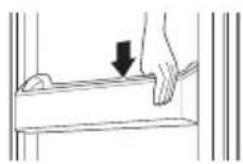
2 CnE crNo6BaHTo HaTnCHeTe BnMaTeNHO KOHNuTaHaBpaTata,3a da 3akpeNTe XOpN3OHTaIHo.
Почистван на paфта
CbaJHe Ha paTa Ha xJaIINHka/ #pN3epa
I3BaTe paTa, KaTo ro I3bPnate c Neko NOBnraHe Ha 3aHnMy Kpa.
NoBtOPO NoCTaBHe Ha paΦTa Ha XJaIJIHHka/ΦpN3epa
IocTaBete Ra o6paTeH peHa npOceCa Ha CBaJIHe.
*Extra Function: Hold 3 sec.
LG Electronics European Shared Service Center B.V.
Krijgsman 1
1186 DM Amstelveen
Nizozemsko
Instalace aplikace LG SmartThinQ
*Extra Function: Hold 3 sec.
O Tpaaymuatikoc nivakac eEyxou mtpei va diaapepi aT oovTeLo e oovTeLo.
Fridge Temperature (Oερμοκρασία ψυειου)
Etai puthetai eai n eepokpia-oTOxoc toupsiyeiou.
2 Express Freeze (Taexia Katáyuşη)
Eto puOicovtai oI aeitoupyiCs TaxeiaC Katauuyns.
*Wi-Fi
H IeIoupyia autn Tnpexei Tn duvatotnta ouvdeonc tou yuyeiou oTO biKtuO aupuATNC ouvdeonc Tou OTITIOU OAC.
4 * Lock (Kλεiδωμα)
ETOI KEAIDOWOV Ta KOUPTIa OTov TIVaKa EeYxou.
LG Electronics European Shared Service Center B.V.
Krijgsman 1
1186 DM Amstelveen
Oλανδια
EykataoTaon Tns εφαρογής LG SmartThinQ
Evnpomega loyioikou (firmware)
AiaTnpnoTe evnuepwoevn Tnv aToboo n Tc oukeunS.
Smart Diagnosis™
Eav xpnoiopoieite tn aeitoupyia Smart Diagnosis, 0a oac dooov xpnoiues pnpopoeic otwcs evac 0wotoc troiox npnnc ts oukeunc me bao n to 0tio xpnoans.
Puθμiεις
ZaC EITIPTeI VA opioTe DiaOpoe C TIAOyEc Yia To
yuEio KAI OTNV EFAPouYn.
ZHMEIΩSH
La类产品 can be found in the market.
- You can move it to and use it at a desired position as needed. However, do not use it as the ice bin or place it on the shelf on top of the fridge or the vegetables drawer.
NOTA
*Extra Function: Hold 3 sec.
LG Electronics European Shared Service Center B.V.
Krijgsman 1
1186 DM Amstelveen
The Netherlands
*Extra Function: Hold 3 sec.
2 Express Freeze (Congélation express)
LG Electronics European Shared Service Center B.V.
Krijgsman 1
1186 DM Amstelveen
Pays-Bas
Installation de LG SmartThinQ
VAZNE SIGURNOSNE UPUTE 3
Zbrinjavanje starog uredaja 11
POSTAVLJANJE 12
VAŽNE SIGURNOSNE UPUTE

UPOZORENJE
Kako biste smanjili opasnost od eksplozije, požara, smrti, strujnog udara, ozljede ili opekotina osoba prilikom upotrebe ovog proizvoda, slijedite osnovne mjere opreza, uključujuci sljedeće:
Djeca u kućanstvu
-
Ovim se urežajem ne bi trebale koristiti osobe (uključujuci djecu) smanjenih tjelesnih, osjetilnih ili mentalinih sposobnosti, ili s manjkom iskustva i znanja, osim ako ih osoba koja je odgovorna za njihovu sigurnost ne nadzire ili im daje upute u vezi s upotreptom urežaja. Djecu treba nadgledati kako bi se osiguralo da se ne igraju s urežajem.
-
Ako je urežaj opremljen bravom (samo u nekim zempljama), ključ držite izvan dosega djece.
Za uporabu u Europa:
*Extra Function: Hold 3 sec.
Stvarna upravljacka ploca moze se razlikovati od modela do modela.
Fridge Temperature (Temperatura hladnjaka)
- Ovim se postavlja ciljna temperatura hladnjaka.
2 Express Freeze (Brzo zamrzavanje)
- Ovime se postavljaju funkcije Brzog zamrzavanja.
3 *Wi-Fi
- Ovo postavlja hladnjak za spajanje na kućnu Wi-Fi mrežu.
4 * Lock (Zaštita)
- Ovime se zaključavaju tipke na upravljackoj ploci.
LG Electronics European Shared Service Center B.V.
Krijgsman 1
1186 DM Amstelveen
Nizozemska
Instaliranje aplikacije LG SmartThinQ
Potražite aplikaciju LG SmartThinQ u trgovinji Google Play & Apple App na pametnom Telefonu. Pratite upute za preuzimanje i instaliranje aplikacije.
Funkcija Wi-Fi
Komunicirajte s uredajem pomocu pametnog telefona koristeci prikladne pametne značajke.
Firmware Update (Ažuriranje
Firmware)
Azurira rad uredaja.
Smart Diagnosis™
The cold air from Door Cooling + directly comes into this basket.
*Extra Function: Hold 3 sec.
A tenyleges ellenorz o panel modellenkent kulonboz lehet.
LG Electronics European Shared Service Center B.V.
Krijgsman 1
1186 DM Amstelveen
Hollandia
LG SmartThinQ telepitése
*Extra Function: Hold 3 sec.
LG Electronics European Shared Service Center B.V.
Krijgsman 1
1186 DM Amstelveen
The Netherlands
Installare LG SmartThinQ
HanomeHH 3a MoHTaxa 12
Perynpahe Ha HoraIknite 12
ДиMuH3nI n Do3BoJI. 13
AmbeHTaHa TempepaTypa. 13
PABOTEIbe 14
Дeлови nФункци 14
Hanomehi 3a pa6oTeheTo 16
KoHTpOHa Ta6na 18
Дисpen3ep 3a Вoga (Изборно) 20
PpeMeCTyBaHe Ha JeDoMaTOT 21
Φnoka 3a CBex 3epeHcyk. 22
YnoTpe6a Ha npytn FyHKcunn 22
PAMETHN FYHKUIN 23
KopncTeHe Ha LG SmartThinQ anIIkaunjata. 23
Ynotpe6a Ha Smart DiagnosisTM 25
OOPKUBAHbE 27
HanomeHH 3a YnCTeHe 27
YncteHe Ha 3aNTNBkata Ha BpaTata. 27
YncteHe Ha noiuaTa 28
UncTeHe Ha fnoKaTa 3a 3eNeHcyk 28
YncteHe Ha IooepoT 3a BODa (OuioHaHNO) 29
PEWABAHEPNOBJIEMN 30
CJIeHnTe 6e36eHocn yNaTcTbA ce HameHeTn 3a da cnpeayat HepeBvIeHn pN3uCi nIi StTeTn OD He6e36eHNo IINI He npaBnHO KopncTeBe Ha npOn3BOIoT. YNaTcTBaTa ce noJeHn Ha 'PPEdUpPEdYBAHbE' n 'BHIMAHNE' KaKO wTO e OnnShaHo nOdoJy.

Oboj cHm60J O3HaCyBa npedMeTu n aKTNBHOCTN wTO MoKe Da npedn3BnKaaT pN3NK. IpoyntajTe ro BHMaTeJIHO DeJOT CO OBOJ cHm60J N cJeDeTe rN yNaTcTBaTa 3a da n36eHHeTe pN3NK.

PPEyPENEYBAHbE
Oba nokajyBa deKa HeNoHTyBaIbeTo Ha yNaTCTBaTa MoKe Da npedn3Bnka cepno3Ha nobpeDa nII CMPT.

BHIMAHHE
Ова пokajува дeca HeNoHTyBaHbeTo Ha yNaTCTBaTa можеда пpeДи3ВИКа Лесна NOВpeDA ИЛ МАla StTeTa Ha npOn3BODOT.
BAJHn B3BEOCHN yIATCTBA

PPEyPENEYBAHbE
3a da ce HaMaJI np3IKOT od NOxap, cTpyeH ydap nIIN IOBpeDN Ha IInca npn KopncTeHe Ha npOn3BOIoT, Tpe6a da ce NoHTyBaat OCHOBHnTe 6e36eHocn MePKn, BknyuBajKn rN CJIeHNTe.
ДецьдомakнсвOTO
-
Oboj anapat He e Hamehet 3a ynoTpe6a od cTpaHa Ha Iuca (Bknyubajkn Deua) co HamaJIeHn fN3NUK, CetINHN NIM MeHTaIHH CNOCO6HOCTN, INIc HO NCKyCTBO N 3HaEHe, OCBeH aKO Ce NOd HAD3Op INIaKO DoNBbaAT YNaTCTBa 3a yNoTpe6bata Ha anapatOT od IInCe KOeUTo e ODROBOPHO 3a HNBHATA 6e36eDnOCT. Deuata Tpe6a Da 6NuAt PoJ HAd3Op 3a da He Ce DO3BOJI Na CRPaAT Co anapatOT.
-
Ako ypeIOT e onpeMeH co 6paBa (cAmO BO HeKOn 3emJn), dpKeTe ro KnyOT noJaIeKy od doqat Ha deca.
3a ynoTpe6a Bo Ebpona:
Oboj anapat moxe da ro kopnctat deca noctapn od 8 rodnn I nuza co HamaJIeHn cTNIHN IIN MeHTaJIHn CnOCo6HOCTN IIN CO HeIOBOJHO NCKyCTBO I 3HaEHe, aKO CE NOJ HAD3Op IIN DoNBaaT yNatCTBa 3a yNtpe6a Ha anapatOT Ha 6e3BeDen HauH IN rI pa3bnpaAT onacHocHTte wTO MOxAT da npOn3Je3aT. Deca He CMeat da cn irpaat co anapatOT. YInCTeHbeto n OdpKvBaHbeto He CMeat da ro npabat deca 6e3 NaD3Op.
MOHTAXA
- Oboj anapaT Tpe6a Da ro npeneCyBaAT DBe nIIN NOBeKe INuca, KOnuTo uBpCTo Ke ro dpxkAT prn npeneCyBaHbeto.
- Пювереталлшт ekрот 3aстуja e правлино 3a3emjeидалл пнот 3a 3a3eMjyBaHbe Ha Ka6eNot 3aстуja e oштeteн Илл n3BaДeн od ппклуокOT 3aстуja. 3a nobeke detaln okoly 3a3emjyBaHbeto, obpaTeTe ce BO LcHTapOT 3a Инфopmaци 3a Клпенти на LG Electronics.
- Oboj anapat mopa da 6nnde onpeMeH co Ka6eJ 3a cTpyja, KoJTo nMa cnpoBOdNk 3a 3a3emjyBaHe i npKnyOc 3a 3a3emjyBaHe. PpIKnyOKOT mopa da 6nnde BknyeH BO COODBeTeH uTeKeP KOJTo e npABuINHO MOHTnpAH N 3a3emjeH BO CORIaCHOCT CO JOKaJIHnTe 3aKOHcKn peRyJaTnBn n ypeDn.
-Ако кабелOT 3a CTpyja e Oштeteн Или Sttekepot e Лабав BO OTBOPOT, He KOpINCTeTe Г КабелOT n CTanete Bo KOHTaKT co OBlaCTeh ZeHTap 3a cepBnC.
He npiknyuaybajte ro anapatOT Ha MytN-ppnknyuen aanTep, Kojsto Hema (MOHTnpaH) Ka6eI 3a HanojyBaHbe.
He moiΦnupajTe ro n He npoJxByaJte ro Ka6eIOT 3a cTpyja.
-Избернувajte користе на Кампо пюдожен Кабллллд boинадапгел. Anapatot trpe6а дбидповрзан co noce6ha Линида застура, за kojaшто Има 3ace6ен ocinгувач.
-Приклuyокот застура He смee Да биде Вклунец CO kaбелOT CBрten Harope И He доЗвolyвajte anapatot Дa ce notпира на рриклuyокот. - MoHTnpajTe ro anapaTOT Ha MeCTO oD KaIe 7TO JeCHO MoKe da ce NCKnyu npNKnyuOKOT 3a CTpyja Ha anapaTOT.
-He kopncTeTe MyIITN-mpNKnyeH WTeKeP, KoJTo He e Co npabINHO 3a3emjyBaHe (npenocen). Pn KOpncTeBeto Ha MyJIITn- pniknyeH WTeKeP (npenocen), KoJTo e CO npabINHO 3a3emjyBaHe, KopncTeTe To npoN3BOODT KoJTo e CO CTpyeH KaNaCHTET eHaKOB Ha HabeDeHNOT HAnOHCKN KOd NIIc CO NOBcOK. HeycnexOT Da Ce HApabN Toa Moxe Da DoBeDe Do CTpyeH Ydap NII NoXap, NopadN ToPInHaTa Ha MyJTn- pniknyHNoT WTeKeP. HanoHOT Moxe Da Ce Ncknyu Kora npeKnHyBaYOT Ke Ce aKTbVipa.
-МонтураJTе ro anapatOT ha CBpCT n paMeH noI.
-He noctabvbajTe ro anapatOT BO BnaJHa nI npaBnBa npocstopja. He noctabvbajTe ro n He cybajTe ro HaBOp, nI IN BO KaKBa 6nIO npocstopja NOJIOxHa Ha NaDBOpeuHn YcNoBn, KaKO ITO e DnpeKTHa COHYeBa CBETnHa, BeTep nIIN DOXd, nIIN TemnepaTypn IOd Hylata.
He noctabybajTe ro anapatOT ha dinpekTHa coHueBa CBetTnHa He n3nojkybajTe ro Ha TOnnHa od anapatN 3a rpeeHe, KaKo Ha npimep, wnpetn nn rpeaJIkn.
BHHMaBaJTe Da He ja cOrOJIte 3aHaTa CtpaHa Ha anapatOT npi MOHTaKaTa.
- 3a Bpeme Ha cKIOnyBaHbeto INIIN packKIOnyBaHbeto BHIMaBajTe da He BN paADHe BpaTaTa Ha anapatOT.
-При склonyваьetoи packlonybaheTo Ha BpaTata Ha anapatOT, BHIMaBaJte Da He ro npodynuTe, 3rmeuTe nIIN OwTeNTe Ka6enot 3a cTpyja.
He noBp3yBajTe ro npKnyHnot aanTep nIi Hekoja dpyra doaTHa onpeMa BO npKnyOkOT 3a cTpyja.
PA6OTEHe
-He KopinCTeTe ro npOn3BOJOT 3a dpyrH HameHn (3a ChyBaJIe MeDInuHcKn IIN eKcIepmEHTaJIH N MaTePnJaJI INI 3a TpaHCnOpT) OCBEN 3a HameHaTa BO DoMaKInHCTBa, OJHOCHO 3a CyBaJIe XpHaHa.
-Bo cnyuaj Ha nonnaBa, ncknyute Ro npnknyokot 3a ctpya n CTanete BO KOHTaKT co LcHapOT 3a INHOpMaunn 3a KopncnHa LG Electronics.
-Исклучete ro пиклуокOT od wTekep kora Иma синha bypa Или ГрмOTeBuци Или кORA He e BO yNtpe6a NOДОЛг ВрemeHcKInперiod.
-He donnpajte ro npiknyokot 3a ctpyja nJn KOHTpOJnte Ha anapaTOT co BnaJHn paue.
He npebntkybajTe ro ka6eIOT 3a cTpyja npemHory n He cTabajTe TeuKN npedMeTu Bp3 Hero.
-Ако habлес BOДа BO eLEKtpuHNTe DeJIOBи Ha anapatOT, ИСКЛучete ГпрИКЛучOKOT 3a CTpyja И CTanete BO KOHTaKT CO ZeHTapOT 3a Инфорmaци 3a Клиeenthа LG Electronics.
He ctabajte rna paueTe HNTy MetaJIHn PpeDMETN BO BHaTpeuHocTa Ond Koja n3IeYBa IaDHNOr BO3dUx, HNTy Ha KaNAKOT IJN 3aHaTa peWeTKa oN Koja ce ocNo6OdyBa TOnnHa.
He npimeHyBaJTe npeKymepHa cnla nn npNTUCOK Ha 3aHNOt kanak Ha anapatot.
He cTabajTe JINBO JINBOTHO BO BHaTpeHIOCTa Ha npOn3BOIoT. JINBOTHOTO MOKe Da ce 3aDyShn.
BnHmAbajTe Ha DeaTa BO 6n3Ha Kora ja OTbopate nIIN 3aTbopate BpataHa anapatot. Bpaata Moke da ro ydpn DeTeTo I da npedn3Bnka Nobpeda. He dozBOJyBaTe lyfeTo da ce HnShaat Ha Bpnte 6nJeKn Taka Moke ypeDTo da ce npebrtu I da npedn3Bnka cepno3Ha nobpeda.
-Избернуновajte ja onachocta od 3aTBOPaHbe Ha Deça BHaTpe BO anapatOT. Дete 3aTBOpeHO BO BHaTpeShHOCtA Na ПОНЗВODOT MOже да ce 3aДуши.
He cTabajTe TeuKn nn KpUINBn PpeDMETn, caOBn noHN Co TeuHOCT, IecHO 3aapanNBn MaTePNn, 3aapanNBn PpeDMETn (KaKO 1TO Ce CBeKn, NaM6n nTH.), nn rpejHn ypeDN (kako 1To ce neukn, rpeaIKn nTH.) Bp3 anapaTOT.
-Ако Има пotingуваъе на rat (и306yтан, поган, прюден rat nTH.), He Довпajte ja HHTy MaшиннаТа, HHTy пиКлучokOT 3a cTpyja и Ведим пotingу?
Овoj anapat кориссг rat сада сретдво 3a Ладеъ (и306yтан,R600a). Иako кориссг малу колочин rat, то e сених.
Истекуваъeto rat по Транспостп на apatOT, мontаши равoteъе може за пedingиЗВика пожар, ekplno3ия улл поvereда akо спotingиЗВикай nckpn.
He KopncTeTe He yBajTe 3aNaJIINBn IIn eKcNIO3NBn CynCTaHcnn (eTep, 6eH3eH, aIkoXoJ, XemkaIin, LPG, EKcNIO3NBn cPpeJOBn, INHceKTuCnDn, OCBexyBaun Ha BO3dYx KO3MeTnKa nTH.) Bo 6IINHa Ha anapaTOT.
- BeDHaHncknyeTe rO npNKnyuOKOT oD cTpyja n CTanete BO KOHTaKT co LcHTapOT 3a INΦopMaun 3a KJIneHTn Ha LG Electronics aKO OTKpIeTe HeBOo6nuaeHa 6yUaBA, MmPnc nJn YaI WTO DoaRa oN anapaTOT.
- Ctabajte BOda 3a ПиЕ№ ce mO BO aBTOMaTOT 3a Mpa3 ИлдиснзерOT 3a BOda.
OdpkUbaHe
-Иckлучete ro ka6eIOT 3a cTpyja npeДа ro chCTnte anapatot nII Na ja 3aMeHyBaTe CBetnIkaTa BHaTpe (kaDe wTo e BrpaIeHa).
-Бe3б endо вклуеTe ro npNKluyokOT 3a CTpyja BO wTekepot OTkaKo KOMJIeTHO CTe ja OTCTpaHnJe NOCTojHaTа BlaRa nI npaB.
- HnKorai He ncknyybajTe ro anapatOT od cTpyja co terHebe Ha Ka6eIot 3a cTpyja. Cekorai uBpCTo paKaJTe ro npNKnyOKOT 3a cTpyja n noterHete ro BO o6paTHa hAcoka od wTekepot.
-He npckajte Boda nnn 3anapnBm Maepnn (naCTa 3a 3abn, ankoXoJ, pa3peDyBaU, 6eH3nH, 3anapnBn TeuHOCTn, cpeIcTba 3a noInpaHBe nTH.) NaBnHaTppeShHaTa nnn HaIBOpeShHaTa cTpaHa Ha anapaTOT, 3a da ro nCunCTnte.
He yncTeTe ro anapaTOT co yeTKn, Kpnn nn cyHrepn co rpy6n NOBpUnHn nn konuTo ce n3pa6OteHN od MeTaJen MaTepnjaJ.
-Само Квалнофпунов по сервисае od Лемарота cepвс на LG Electronicsсмeeда ro packлonsува,_nonразы плю морицра anapatot. Стanedу bo kontrak co Лемарота Инфомаши 3a Клиенти на LG Electronicsaco ro npemectуba te плmoHTирате anapatot на дpyra lokaциJA.
He Kopnctete 3a cywebe koca 3a da ja ncyuHTe BHaTpeuHocTa Ha anapaTOT n Ha cTabajTe CBeKa BO BHaTpeuHocTa 3a da rN OTCTpaHnte Mnpn36nte.
He KopinCTeMeXaHnUKN ypeN nIIN dpYrN cpeDcTba 3a da ro 3a6p3aTe npoecOT Ha Odmp3HyBaHbe.
Фрвае
-При Фрлаве на anapatOT, ИЗвадеTe ja 3aNTINBkaTa OД ВpaTATA, a OCTabete Ги вантpe поицte и КорпITE, И джete Ги DeцаТа NOHaCTpaHa od anapatOT.
-OTcTpaHete rI cHTe MaTePnJaJI 3a NaKyBaHbe (kaKo Ha npIMep, PnaCTuHH KeCS n CTIpONOp) NoadJeKY oD decaTa. MaTePnJaJInte OD NaKyBaHbETo MoKe Da npEdn3BnKaat 3aDyShyBaHbe.
Texnuchka 6e36eHocT
- OTBOPITE 3a BeHTnlaZnaJb BO npocToP kaJe uTo e CmecTeH anapaTOT nIN BO Me6eIOT Bo KoJ e BrpaIeH He CMeaT da CoIpxaT HnKaKBr npenpeKn.
He Kopnctete eIektpuHn anapatn Bo pnxndepoT. - CpeiCTBOTO 3a IaIeIbe n racot 3a n3Olaunja wTo ce KopnctaT BO anapaTOT Tpe6a Da ce fPnat cnopei noc6Ho npOnuHn npoueDpyn. KoHcyIupajTe ce co cepBncep iNn cInuHO KBaIInKkyBaHO IInCe Ipei Da rN fPnnte.
- CpeiCTBO 3a JanaeHbe ITO H36nBa BO Mna3 OJ UeBknte MoKe da ce 3aapann nn da npedn3Bnka ekcnno3nja.
- KolnunhaTa Ha cpeCTBO 3a NaideHe BO BaUnOT anapat e npKaxan Ha nloaTa 3a ndeHTnФkaZna JBHaTpe BO anapaTOT.
- Hnkoraш He BknyuBajTe anapat KoJ nMa 3Haun Ha OwTeTyBaHbe. Ako ce comHeBaTe, KOHCyItnpajTe ce co npOdaBaUOT.
- Oboj anapat e Hamehet cmo 3a ynotpe6a BO domaknHCTBa n cnuHN HameH. He cmee da ce KopncTn 3a KomepunjaJHn nn yroCTnteNcKn HameH, HHTy naK Ha MObJHn npedMeTn, KaKBN ITO CE KapabAHN nn PIOBHN Objekt.
-He yubajte ekcnno3Bn cyntaHcu BO anapaTOT KaKbN To ce KOH3epBn Co aepocoJ wTO codpkaT 3anaJIINB rac.
AnapatOT eДи3ajHnpaH da pa6oTb BO orpaHnueh oncer Ha am6neHTaJIHn Tempepatyp, BO 3aBnCHOCt OK KIMMaTcKaTa 3OHa. He KopncTe Ro anapaTOT Ha Tempepatya WTo rO haDMnHyBa Toa orpaHnCyBaHe.
Ha BHaTpeuHnTe TemnepaTpyn MoKe Da BInjae Iokaunjata Ha anapatOT, am6nentaHnata TemnepaTypa, fpeKpEnzjuTa Ha OTbopaHeTo Ha BpaTata NTH.
KnImatckata Kna ca MoKe da ce Hajde Ha etNKeTata 3a OueHyBaHe.
| Климатская Клaca | Оncer наamyбиенталнатаTemпература °C |
| SN (ПробODEженисторoga) | +10 - +32 |
| N (Усторoga) +16 - +32 | |
| ST (Сунтponда) +16 - +38 | |
| T (Тропса) | +16 - +43 / +10 - +43* |
*ABCtpaJna, INdJa, KeHja
HANOMEHA
Anapatnte oueheTNO SN do T ce HameHeTn 3a ynoptpe6a ha co6ha temepatypa nomery 10^ n 43^
ДeJOВи n Функци
Smart djuarHocTnUka eHNHa (^*)
KopncTe ja obaa cyHKunja npn KOHTaKtnpaHbeto Ha LG Electronics nHcpOpMaucNcNOT ceHTap 3a Kopncnui, 3a da NOMORHe TE BO doNBaHbeto ppeu3Ha dJaHocTnka, aKO anapaTOT He paBOTn HopMaJIHO IIN aKO ce nojabn Heycnex Bo pa6oTeHbeto.
2 LED cBeTnIka
LED cbetnikte BO BHaTpeuHocTa Ha npOn3BooT ce naIat Kora ke ja OTBOpTe BpaTata Ha cpnxndepot.
3 Poiuca Bo 3aMp3HyBa4
Oba e npocstop kaTe wTo MoKe Da ce CyBa 3amp3HaTa XpaHa, KaKo Ha npimep, MeCo, p6a n cnaDoJIe.
MnpeMeecTyBaHe Ha JeDoMaTOT
Toa e mecToTo KaJe WTo ce npOn3VeDyBa n cKnaInpa neDoT.
- MojkeTe Da ro IIN3rte JeIeOMaTOT DoJX NOnIucaTa, Od eHa Ha Dpyra CtpaHa, Bo 6nNo Koja No3nju.
Φnoka 3a CBexn npoN3BOdN
Oba e mecToTo KaJe To npexpam6eHnte apTkn Ce cKnJaHpaat Ha nocTydeHa TemnepaTypa, od OHaa To e BO perynapHaTa NOBpHnHa Ha φpnKnEpoT.
6 NaedeHe Ha BpaTaTa+ (^*)
Oba e MeCTOTo KaIe ITO n3neryBa CTyIeH Bo3IyX, 3a da ja 3aIpxn IaIHa K0uHncaTa Ha BpaTata Ha pIxNKeIepOT.
7 Poiuca Ha pnxnep
Oba e mecTo KaIe ITO ce UyBa XpaHa BO pnxKnepoT.
BucnHa Ta HnIaTa MoKe Da ce peryInpa npeky BMeTHyBaHe Ha noIuata Bo npouen co pa3nUHa BucnHa.
XpaHata To codpxn NOBeKe Bnara CyBajTe ja Ha npedHnot den oD noNucaTa.
-БpojoT Ha noJnCi ce pa3IkyBa oD MoJeI do MoJeI.
Φnoka 3a cBex 3eJenHcyK
Obnde ce cknapa oOoJeTo n 3eJenHcyKOT 3a Tne da MoKe da ja 3aCyBaat CBoJaTa CBexHa npeky npncnoc6yBaHe Ha KOHTponata 3a BnaxHOCT.
AnapaTOTnIN DeIOBHTe Ha anapaTOT MoKe Da ce pa3NkYBaat OJ MoDen Do MoJeI.
Kopna Ha BpaTata Ha 3amp3HyBa4OT
Oba e meTo KaIe ITo MoKe Da ce CyBaat MaJI nakeTn CmP3HaTa XpaHa.
KoHTpOJIeH perynatop 3a TemnepaTypaTa Ha 3amp3HyBa4OT
Oboj kpykeh peryIaTop ro peryIina ppoTOKOT Ha BO3dyx BO OdJeIoT Ha 3amp3HyBaOT, nocTaByBajKn ro BO COoDbETHa paMHOTexka.
1 Pe3epBoap Ha do3epoT 3a BOda (^*)
Oba e MeCTOTo KaTe 1to ce HaOra BOnTa 3a Cha6DyBaHBe Ha Do3epoT.
IBDC KowHnua (^*)
CTydeHnOT Bo3dyx OJ NaedeHbeto Ha BpaTaTa+ DnpeKTHO BnEryBa BO OBaa KOuHNua.
Fridge Door Basket (^*)
This is where small packages of refrigerated foods, drinks and sauce containers are stored.
Movable Egg Tray
This is where eggs are stored.
- You can move it to and use it at a desired position as needed. However, do not use it as the ice bin or place it on the shelf on top of the fridge or the vegetables drawer.
HANOMEHA
-ДелOT co 2 sBe3dUnKn( 水水 ) KOpna HnN ΦnoKa wTo MoKe Da ce KopncTaT 3a cyBaHbe Mpa3 n XpaHa od -12°C Do -18°C 3a NOKpaTKn BpeMeHcKn nepNoi.
(^*) : OBaa KapaKTePncTnKa Bapnpa Bo 3aBnCHocT OJ KynEHNOT MoJeI.
HannomeHH 3a pa6oTeHeTo
He KopncTeTe ro pe3epBoaPot Ha nCnneH3epOT 3a IaHa BOa 3a NiJaNouOCBeH 3a BOa 3a PnHeB.
Kopncnnte Tpe6a da nMaat PpeBnD nKa MoKe Da ce fOpMnpa Mpa3 aKO BpaTata He e UeNoCHO 3aTBOpHa, aKO BnaXHoCTa e MHOry BnCoka BO TEkOT Ha JIeTOTO INN aKO BpaTata Ha 3aMp3HyBaVOT Ce OTBopa MHOry YecTo.
- IorpnkTe ce da nma doBOJHO npocTo Mery XpaHata wTO ce cyBa Ha noNtata N Kopnata Ha Bpata 3a da OBO3MOXHTe Bpata Ta CEIOCHO da ce 3aTbopa.
- OTbopaHbeto Ha BpaTaTa OBO3MOxyBa HABJIeYBaHBe TOnOJ BO3dUx BO anapaTOT M0Ke Da IpeiN3Bnka NOKaUyBaHbE Ha BHaTpewHaTa TempepaTypa.
He oTBopajTe ja n He 3aTbopajTe ja BpaTaTa Ha anapaTOT npekymepHo.
LED cBETnIrkata e HameHeTa cAmO 3a ynoTpe6a BO anapatu 3a DomakHCTBO u He e NoroHa 3a OCBeTnyBaHe Ha npocTopuN.
- Ako ro octabnte anapatot ncknyueh noDIOIROBpeMe,OTCTpaHete ja ceta xpaHa n 3BneyeTe ro ka6enot 3a HanojyBaHe. NcncTeTe ja BhatpeuHocTa u OCTaBeTe rBpaTte MaNky NOoTbOpeHn,3a da ce cnpeuNojaBaTa Ha MyBna BO anapatot.
PpeIIO3n 3a 3awTeDa Ha eHepriJa
- Iorpnjxte ce da nma doBOJHO npocTop mery xpaHata wTO ce cyBa. Oba oBO3MOxyBa naHnOT BO3dyx da cnpkyi npa pAMHomepHo, a co Toa n CMeTKnte 3a ctpya da bndat noHnCKn.
ToPnata xpaHa MoKe da ja cTaBnte Bo cpnxKnep, camo OTkako Ke ce n3nai, 3a da cnpeuHTe fOpMnpaHe poca nn mpa3.
Kora yBaTe HeKaOB ypeB BO 3aMp3HyBaOT, nocTaBeTe ja TempePaTypaHa 3aMp3HyBaOT NOHcKa OJ TempePaTypa HabeDeHa Ha anapaTOT.
He noctabybajte ja Temnepaypata Ha anapatot nOHscko od notpe6hTo. 3a npabebe mpa3 BO nOpaJa co HopMaJHa KIma, TemnepaTpnte Ha 3amp3HyBaBe Tpe6a da ce noctabat Ha -18 ^ IINnoHsckn.
He ctabajTe xpana BO 6n3Ha Ha ceH3OpOT 3a TeMneparatypa Ha pnxndepot. PactoJaHneTo od ceH3OpTe Tpe6a da 6nde MNmym 3 cm. - ИмajTe npedBnДЕкaNOKaUBaHBe Ha TemnepaTpataNo Odmp3HyBaHbe NMa Do3BOJeH ONcer HabeDen BO CneuФИKaUNITE Ha anapatOT. Ako cakate DaTo MInmMn3npate BnJaHNeTO WTO OBA MOKe DaTo NMa Bp3 YuBaHbETo XpaHa NopadN NOKaUBaHBe Ha TemnepaTpata, 3aneaTeTe ja INn Bp3eTe ja Kecata co XpaHa BO HEKoNky CnoEBN.
- CnCTEMOT 3a ABTomATcko Odmp3HyBaHbe BO anapaTOT,OCnIpyBa DeKa OndJeNt Ke OctaHe 6e3 co3daBaHbe Ha Mpa3,BO HopMaJIHN pa60THn ycIOBn.
EeKacHo cyBaHe xpaHa
- 3amp3HaTata nnn ONaJeHata xpaHa yBajTe ja BO 3aTBOpEHn caoBN.
- Поберете ro Pokot Ha Tpae He n etiketata (ynatCTBa 3a yBaHe) nped da ja cTabite xpaHaT a BO anapaTOT.
He cybajte xpana doIr nepnoD (nooIro od 4 HeJeN), aKO IecHO ce pacuynyBa npn Hncka TemnepaTypa.
CTabete ja onaedeHaTa Hn 3amp3HaTaTa XpaHa BO pnnKnepeo Tn 3amp3HyBaOT BeDnHn NO KynyBaHeTo. - I36erHyBajTe NOBtOpHo 3aMp3HyBaHBe Ha xpaHa Koja e celenoCHO Odmp3HaTa. NOBtOpHTo 3aMp3HyBaHBe Ha KaKaBa 6nlo XpaHa 7to e celenoCHO Odmp3HaTa Ke ro BLOuIN Hej3HHOT BKyc IN XpaHJIbA BpeDHOCT.
He ybajTe 3eJeHcyK 3aBNTkaH BO BeCHNK.
IeateH MaTepnjAn Kako BeCHNK IIn DpyrN
HaDBopeuH CyntTaHm MOKe da ja
KOHTAMHnPaat n pacnnat XpaHata.
He npenonHybajTe ro anapaTOT. HanonHete nomanky od 70% od npocstopoT. CtydeHnot BO3dyx He MOKe da cnpkyInpa npabnHo aKO 3amp3HybaOt e npenonHET. - Изандente ja xpaHaTа npedда ja ctabite BO 3amp3HyBauyot. Ако CTabITE roIeMa KoIuHnHa TOnJa XpHa BHaTpe, BHaTpeShHaTa TemNepaTypaHa anapaTOT MOKe Da ce 3roJIeMn I HeRaTHBHO DA BInjae Bp3 dpyrata XpaHa BO Hero.
- Ako nodecnte MHORY HnCKa Tempepatya, xpaHaTAMoKe Da 3amp3He. He noDecyBajTe Temepatypa NOHcKa OJ nOtp6HaTa TEMpepatya 3a npabunHO yBaHe Ha xpaHaTa.
- Cekoraw odpxkybajTe ro anapatot uct.
Ako anapaTOMa OndeN 3a NaDeHbe, He cyBaJte 3eNeHcyK N OBOUjce CO Noronema CODpxHa Ha Bnra BO HNB, 6ndeJKn MoKaT da 3amp3Hat nopadn NOHcKaTa TEMpepaTypa.
- Bo clyuaj Ha npeknH ha eNeKtpnHaTa eHepnJa, jaBete ce BO KOMnHaJata 3a eNeKtpnHa eHepnJa, n ppaajTe KOkY BpeMe Ke Tpae npeKnHot.
- I36eHryBajTe OTbopaHe Ha BpaTaTa,doNeKa HanojyBaHbETo e NCKnyeHo.
Kora HanojyBaHbeto Ke ce BpatN BO HopMaJa, npOBepTe ja coctojbata Ha xpaHaTa.
MaKcHmJaIeN KanaIuTet Ha 3aMp3HyBaIbe
- Φункцина за ekспесно 3amp3HyBa№, Ke ro NOCTaBn 3amp3HyBaHOT Ha HEROBNt MaKcImaJIeH KanaцntHa 3amp3HyBa№.
- 3a OBA oBnHc Ce nOtpe6Hn Do 24 Yaca, a noToa aBTOMaTcN Cc NCKnyyBa.
- Ako ce KOpNCtM MaKcMaJIHNoT KaIaIuTe 3a 3aMp3HyBaHBe, EKcPecHOTo 3aMp3HyBaHBe Mopa da 6nDe BknyeHo 2 Yaca PpeD da ce CTaBAt CBexn PpOdyKTN BO OdENoT Ha 3aMp3HyBaUOT.
MaKcImaJIHo cyBaHbe
3apaIINoIO6paUnpKyIauNjaHaBO3dyxOT, OCTpaHETe IIOBnKHNOTJeDMaT.
- Ako Tpe6a da ce cklaInpaat noroJeMn KOJIueCTBa XpaHa, NOdBIXKHNOt NeDOMaT MoKe Da ce N3BaDN OAnapaTOT, a XpaHATA MoKe Da ce CTaBn DInpeKTHO Ha noJInciTe Ha φpIXnDEpot, BO OndeJNot 3a 3amp3HyBaHe.
KoHTpoJHa Ta6Ja
EduHnN uΦyHKuNN

Fridge

Express Freeze
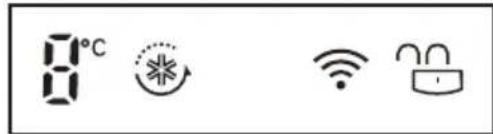

*Wi-Fi

Lock
*Extra Function: Hold 3 sec.
KoHTpOHaTa Ta6Na MoKe Da ce pa3NkyBa Od MoeI Do MoeI.
1 Fridge Temperature (TemnepaTypa Ha pnxnep)
Ja noDecyBa ceHaTa TempepaTpa Ha pnxnepoT.
2 Express Freeze (Ecknpecho 3amp3HyBaHe)
- I n noDecyBa cyHKuInTe 3a ekCnpecho 3amp3HyBaHe.
3 *Wi-Fi
Co Oba pprnKnepeoT ce noDecyBaHa nOBp3yBaHe co BaWata DomauHa Wi-Fi mpeka.
4*Lock(БраВа)
- Ⅱ3aknyyBa konuHbTa Ha KOHTpoHaTa Ta6Ja.
HanomeHn 3a ynoTpe6a ha KOHTpOHaTa Ta6Ja
- KoHTpOHaHata Ta6Ja Ke Ce BkIyUa ABToMaTcKn BO Koj 6nO od CneHInTe CnyuAn.
Kora e BknyeHa ctpyjata
Kora e donpeHo konue
Kora BpataHa anapaTOT (OndeJNot Ha 0pnKnIepOT, OndeJNot Ha 3amp3HyBaVOT) e OTBopeHa
- KoHTpoHaTa Ta6Ja Ke Ce NCKJyHn ABToMaTcKn 3a 3aTeJa Ha eHeprJia Bo Koj 6nlo oD CNeDHnTe cnyaH.
Kora e nomHaTa 1 MNHyTa NO BKnyyBaHBeTo Ha cTpyjata
Kora He e n3BpseHa onepaunja 20 cekyHn no npntncKaHe Ha cakaHTo KOnYe
Kora ce nomina 20 cekyHn no OTbopahe n 3aTbopaHe Ha BpaTaHa anapaTOT (OndeIOT Ha pnnKepeoT, OndeIOT Ha 3amp3HyBaOT)
Ako dojde do KOHTaKT MeIy npCT uIN KOxa co KOHTponHaTa Ta6na DoEka ja YnCTnte, MoKe da ce aKtNBupa fHyHKunjaTa Ha DonpeHOTo KOnYe.
IopecyBaHa 3a Wi-Fi (onuohnho)
KonyuTo Wi-Fi, kora ce KopnCTn co annkaunjata LG SmartThinQ, My OBO3MOxUBa Ha pRnKnepeoT noBp3yBaHe co domaunHaTa Wi-Fi mpeka.
- IkoHaTa Wi-Fi ro nokaxyBa cTatycot Ha MPexkHata KOHeKunja Ha φpnxnepoT. IkoHaTa CBETN Kora φpnxnepoTe nobp3aH co Wi-Fi MPexkata.
-ПиТиСHTeI 3aДрЖeTe ro KOnчeTo Wi-Fi 3 cekyHn 3a da ce NOBp3eTe Ha MpeXaTa. IkoHaTApenka DoJeka Tpae NOBp3yBaHbeto, a NotoA ce BKnPyUyBa wTom KOHeKUnjaTa e yCneuHO BocnoCTaBeHa.
IopdecyBaBe Ha TempepaTypaHa φprjxndepot
- PnTnCHTe ro KonueTo Fridge, 3a da ja npnlaOndte Tempepatypata. Tempepatypata moke da ce npnaOOn oD 0^ do 6^
IopecyBaBe Ha TemnepaTypaHa 3amp3HyBaQoT
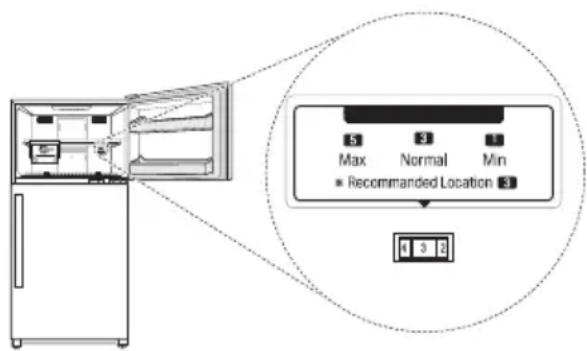
- TemnepaTypaTa MoKe Da ce npilarOuN OJ HNBO 1,do HNBO 8.Bo 3aBnchocT od KInMaTa,ce npenopayBa HNBO 3.
3aHaMaIyBaHBe Ha TeMnepaTypaTa BO 3aMp3HyBaYOT, CBpTeTe ro KonHeTo HAnecHO I NoDeceTe ro Ha NorOEm 6poj.
3a 3roIeMyBaHBe Ha TeMnepaTypaTb BO 3aMp3HyBaHT, CBpTeTe Ro KonHeTo HaneBO nNoDeceTe ro Ha nomAn 6poj.
Co noDecyBaHBeTo Ha KpyxHnOT peryIaTOp Ha 6~ 8, Ke ce odpxn HnCKa TemnepaTypa BO 3amp3HyBaUOT. Ho, Toa Ke DoBeDe Io 3ababyBaHe Ha 6p3nHaTa Ha IaedeHe Ha anapaTOT.
HANOMEHA
PeanHaTbHATpeuHa TemnepaTypa Bapupa BO 3aBnCHoCT Od CTatycOT Ha XpaHaTa,6ndejKn HabeJeHTo NOpecyBaHe 3a TemnepaTypa e UenHaTa TemnepaTypa, a He peanHaTa TemnepaTypa BO anapaTOt.
-Фа6рнкOTO NOdecyBaHHe Ha TempepaTypaMoKe Da ce pa3nkyBa 3abNCHO OД ypeDOT.
- Почекajte 2 до 3 уа с no Вклучваьeto Ha anapatot BO CTpyja педда CTabITE xpaHa BO Hero.
AnapaTOTMOKeaBtOMaTcKNJaOTKpNBa npo6JIeMn3aBpeMeHa pa6oTaTa.
Ako e OTKpneH npo6nem, anapaTOT npectaHyBa co pa6ota n ce nojabyba kOd 3a rpeuKa dypn i Kora Ke ce npntnche koe bno konue.
Bo BaKOB cIyuj, He IckIyUyBajTe ro od cTpyja n BeHaaw CTanete BO KOHTaKT co LcHApOT 3a INΦopMaun 3a KIneHTn Ha LG Electronics. Ako ro NCKIyUnTe OD cTpyja, cepBucepot OJ LcHApOT 3a INΦopMaun 3a KIneHTn Ha LG Electronics MoKe nOteuKO da ro HajDe np6NeMOT.
IopecyBaHe Ha ekCnpecho 3aMp3HyBaHe
CoФункида може да ce 3amp3he 6p30 roilema kOJIuHnHa mpa3 nIIN 3amp3HaTa xpaHa.
Kora Ke ro npTnCHete KOnHeTo Express Freeze, IKOHATA Express Freeze CBETHyBa Ha KOHTpOJHaTa Ta6Ja.
-Функида се BKnyuBa n ce NCKnyuBa cekoj naT KORA Ke ro npntncheTe konyeTo.
-ФункидаЕкпессноЗамрзныаье abTomatckn 3abpшува по odpeден nepnoД.
IopecyBaHe n peceTnpaHbe Ha 6paBaTa
Iи 3aknyBa konuHbTa Ha KOHTpoJHaTa Ta6Ja.
-ПиTNUCHETe 3aДРЖeTe ro KOnYeTo Lock Bo TeKOT Ha 3 cekyHn. KoraФункuJaTa 3a 3aKnyuBaHbe e nOdeceHa, CIne KOnuHb a ce 3aKnyuHn.
HANOMEHA
Mopate da ja deaekTnBupaTe FyHKunjaTa 3a 3aKnyBaHe, nped da MoKeTe da npncTannte Ha 6uNo koja dpyra fynKunja.
PpeMeCTyBaHe Ha JeDoMaTOT
3a Da Haprabnte KoCm Mpa3, NcNoHHeTe ro caD0T 3a BODa CO BODa 3a PHeHBe, IN BHeCeTe ro BO HeroBata No3njuja.
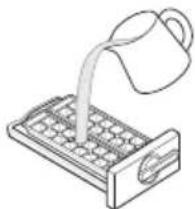
HanoJIHeTa camo co BOda 3a PnneBc.
Ako caIOT 3a neE npenOJIH, KoKInTe neI MoKe da ce 3anEnaT, n Ke 6nIe TeuKO da ce oTcpaHaT.
- PnntncheHa KonyeTo Express Freeze Ha KOHTpOJHaTa nIOuA, 3a 6p3o npaBeHe JIeI.
JeT NOeCHO MoKe Da ce OTCTpaHn aKO nCTypnte BOa Bp3 caOT 3a Jei, IIN aKO npBO rTO NOTNE BO BOa N rN3BNTkATE.
He yybajTe mpa3 wTo He e ueNocho 3aMp3HaT.
Mokete da ro otctpaHnte caDOT 3a nei nn Kofata 3a KoUKN Mpa3, 3a da co3daTe NOBeKe npocSTOP BO npocSTOPHa 3amp3HyBaHT, aKO He ro KopnCTNE nCTNOT.
3a oTcpaHyaBaHe Ha KOuKNTe Mpa3, DpKeTe ja paKaTata od caTOT 3a BODa N CBPTeTe ja BO npabeu Ha cTpeKNTe Ha YacOBHnKOT, ce DoJeKa He ce CBPTn MaKy, 3a Da rN OcNoBOn KoUkNTe Mpa3. KoUkNTe Mpa3 Toraw Ke naHaT Bo KyTuJaTa 3a KOUKN MPa3.
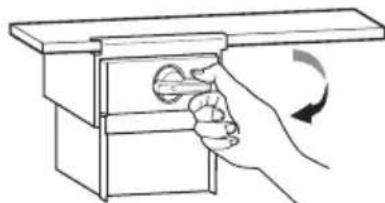
#
BHIMAHNE
He npebntkyBajTe ro cinnHO caT3a KOUKn Mpa3, 6nnejmoKe da ce ckpHn.
Фиoka 3a CBex 3eJIeHcyK
BnaJxHocTa BO OndeIOT 3a 3eIeHcyK MoKe Da ce npnilarOdi npeky BpTeHe Ha konUeTo.
Ako Tpe6a Da ce npemecTa HaneBO, NOKIoneuOT n caTc Ce OTbopaat n aKO Tpe6a Da ce npemecTa HaeCHO, NOKIoneuOT n caTc Ce 3aTbopaat, CO ITO MOKe Da CE ODPKn BnaXHOCTa.
3aTbOpehaTa noIox6a ce npenopayBa 3a yBaBe Ha 3eJeHcyk, a OTbOpehaTa 3a CyBaBe Ha OBOJpe.

Ynotpe6a Ha npyrn yHKcnn
Anapm 3a OTBopeHa BpaTa
Anapmot ce ornacyBa TpinaTn BO INHTepBaI Od 30
cekyHn aKO BpaTaTa (fprnxNep, 3aMp3HyBaU) e OCTaBeHa OTBOpeHa NIn aKO He e ueNoCHO
3aTBopeHa 1 MNHyTa.
CTanete BO KOHTaKT co LcHApOT 3a HOpMaun 3a KIneHTn Ha LG Electronics aKo anapmot npOJnn dypn n OTkako ke ce 3aTbOpn BpaTata.
OTKpNbBaHe deΦeKT
AnapaTOMoKe aBToMaTcKn Da oTKpNbA npo6JIeMn 3a BpeMe Ha pa6oTaTa.
Ako e oTKpneH npo6IeM, anapaTOT npecTaHyBa co pa6ota n ce nojabyBa kOd 3a rpeuKa dypn I Kora Ke ce npntnche koe bno konue.
Bo BaKOB cnyuj, He NCKnyuYbajTe ro od cTpyja n BeHaaw CTanete BO KOHTaKT co LcHTapOT 3a INΦopMaun 3a KIneHTn Ha LG Electronics. Ako ro NCKnyuNte OD cTpyja, cepBucepot OD LcHTapOT 3a INΦopMaun 3a KIneHTn Ha LG Electronics MoKe noteUko da Ro HajDe np6nemot.
KopncTeHe Ha LG SmartThinQ anIkaunjata
3a anapatn nn

Pabotn wTo Tpe6a Da ce npOBepaT nped KopncTeHbeto Ha LG SmartThinQ
1 IpoBepete ro pactoJaaneto nomey anapatot n 6e3xuHnoT pyTeP (Wi-Fi mpeXkata).
Ako e npereJemopactojahneto nomery anapatot n 6e3xHnOT pyTe,doara do cna6eehe ha cnHaIOT. MoKe da 6nDe notpe6en nooJIr BpemeHcN nepnoD 3a pernctpaunja,nn MoKe da DOBeDe Do HeycneuHa HcTaJauna.
2 Ncknyte rMo6nHnTe noaToCu nJn KeNCKnTe noaToCu Ha Baawot smartphone.
3a iPhones, ncknyete rnoTaToUte oDejkn BO PnIarOdyBaHa KeNcKn KeNcKn noTaToU.
3 Nobp3eTe ro BaIuNOT cMapTfoH co 6e3xuHnOpyTeP.
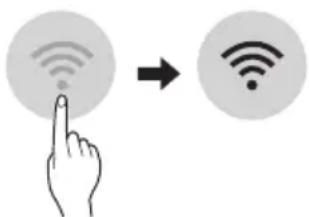
HANOMEHA
3a da ja notBpDnTe Wi-Fi KOHeKzunjata, npOBepTe daHn CBetn IKoHaTa Wi-Fi KOHTPOHnOT nAHeI.
AnapaTOT noDpKyBa eINHCTBHeo 2,4 GHz Wi-Fi MPexn.3a da ja npOBepnte ppeKBeHunjata Ha BaUATA MPexa, KOHTaKTnpajTe ro BAuNt O Ch6dyBauch CO INHTepHET ycnyr, INN NorIeHHeTe BO yNaTCTBOTO 3a BAuNtO 6e3Kmueh pyTep.
LG SmartThinQ He e oJroBOpen 3a 6nIoo KaKBN npo6IeMn OKOly KOHeKTnpaHbETo Ha MPexKaTa IIN KaBn I da 6nILO rpeuKN, DepeKTN IIN rpeuKN ppeDn3BVKaHN OJ KOHeKTnpaHbETo Ha MPexKaTA.
- Ako anapaTOT mma npo6IeMn OKoly KOHeKTIpaHBeTo Ha Wi-Fi mpeXaTa, moKe6n e npedaleky od pyTePoT. HababeT Wi-Fi 3acInyBauch (3acInyBaHa Ha DocPeNoT) 3a da ja na noDo6pnte jaunHaTa Ha Wi-Fi ciRHaNoT.
Wi-Fi KOHeKunjaTa MoXe6n He ce NOBp3yBa HmMoXe6n e npeKInHata nopadn ONkpyKyBaHbeto HaDOMaUnHata MpeXa.
- Мржноюрзуbahe мохоби Нема да paботи
правлно BO 3abuchoct OД пobajdepot на
Интepnet услгnte.
- OkonHTo 6e3xNHyo NOBp3yBaHBe MoXe6n npDoHecyBa 6e3xNHyHNot MpeJeh cepBc Da pa60Tb 6abHo.
AnapaTOT He MoKe Da ce perncTpupa,napaH npo6nemco npeHocot Ha 6e3KuHnot cHnA. N3BneTe ro Ka6eIOT od anapaToN nouekajTe OKony edHa MNHyTa, PpeN IOBTOpHO da ce obndeTe.
- Ako e OBO3MOXeH 3aUHTHINOT SnД Ha BaUNOT 6e3KuHep pyTep, OHeBO3MOXeTe ro nI IN DoJaTe NCKJyOK BO Hero.
- Imeto Ha 6e3xuHaTa Mpeka (SSID) Tpe6a da 6nde KOMbHaJia oA aHfNcKb 6yKBn 6pOEBn. (He KopncTeTe n CneunjahnHe KapakTepn)
- SmartphonekopischnuchnoT nHTeppejc (UI) moKe Da Bapupa, BO 3aBnCHoCT oD Mo6nHnOT onepaTHBeH cnCTem (OS) n npoun3BOAnTeJIoT.
- Ako 6e36eHOCnOT npoTOKoJ Ha pyTepoT e nocTaBeH Ha WEP, MoKe Da He ycneete BO nOdecyBaHeTo Ha MPekata. Be moIIme npomeHETe Ro Ha dpyrN 6e36eHOCn npoTOKoJn (Ce npenopayBa WPA2) n NOBTOpHo perncTpapajTe ro npOn3BOIoT.
CneunpkaunnHa 6eknHnot LAN MOdyn
CneuФикauи Ha 6exuHnot LAN moyI
| Моden LCW-004 | |
| Фразкове�ен oncer | 2412 до 2472 MHz |
| Излесна мозноct (мakc.) | IEEE 802.11b:17.82 dBm IEEE 802.11g:17.72 dBm IEEE 802.11n:16.61 dBm |
Be3KnHaФyHKnJaS/WBep3nJa:V1.0
3apaHrpnkata 3a KOpncnKOT, OoJ ypeI Tpe6a da ce nHCTaIIpa I da pa60Tu Ha MNHMajHa daJeuHa od 20 cm mery ypeDoT n TeNoTo Ha KopncnKOT.
Декларашиja 3a ycornaceHocta
CE
Co Oba, LG Electronics n3jabyBa DeKa TnNot Ha paIIO ONpeMaTa Ha ΦpIXNIDEpoT, e BO corIaCHOCT co DInpeKtNBata 2014/53/EU. LcIeONCHOT TEkCT Ha EU DeKnapauJata 3a ycorIaceHOCT, e DoCTaneH ha CJIeHNHa INTEPHT aDpeCa:
http://www-lg.com/global/support/cedoc/cedoc#
LG Electronics European Shared Service Center B.V.
Krijgsman 1
1186 DM Amstelveen
The Netherlands
Инста的答案 LG SmartThinQ
Iopapajte ja annkaunjata LG SmartThinQ ha Google Play Store & Apple App Store npeky bawnot cmaptfoh. CnepeTe nHCTpyKUnnte 3a npe3emaBe n HCTaInpaHe Ha annkaunjata.
Wi-Fi ΦyHKπJa
Komyu npajte co anapatot od cmapr Tepeoh co nOMOHa npakTuHnTe cMapr fynkun.
AxypnpaHe Ha pa6pnKu BprpaedHnot coTbep
PeIOBHO axypnpajTe rI nepΦopMaHcnte Ha anapaTOT.
Smart Diagnosis™
Ako ja kopncntte cyHKunjata Smart Diagnosis, Ke dobnete KopnCHN HOpMaun KaKbI uTo ce OHne 3a npabUNHnot hauHn Ha KopncTeHe Ha anapatOT Bp3 ochoba Ha uemaTa 3a ynoTpe6a.
POnecyBaHa
Bn OBO3MOxyBa Da n36peTe pa3nHn onuHn Ha cpnxKnepeoT n BO annkaunjata.
HANOMEHA
- Ako ro npomehnte cbojot 6e3xueh pytep, do6abvbaoyt ha nHTepHET ycnyr nn no3nKata, n36pnwete ro pernctppanhot anapat od annkaunjata LG SmartThinQ n nobtopho perncptpajte ro.
Anikajata noIpeKHa npomeH 3apanno6pyBaBe Ha anapaTOT,6e3 da nM ce daede npedynpdyBaBe Ha KOpncnUte. - KapakTePnCTnKInTe MoKe Da BapnPaaT Bo 3aBnCHOCT OJ MOJeIOT.
Pobp3yBaHbe co Wi-Fi
KoNeTo Wi-Fi, Kora ce KopnCTn co anJIkaunjaT a LG SmartThinQ, My OBO3MOxyBa Ha φpIXnJepOT nOBp3yBaHbe co domaunHaTa Wi-Fi mpeXa. IkoHaTa Wi-Fi ro nokKaYBa cTaTycot Ha MPexHaTa KOHeKuJa ha φpIXnJepOT. IkoHaTa CBeTn Kora φpIXnJepOT e Nobp3an co Wi-Fi mpeXaTata.
PpBnHa pernctpaunja Ha anapaTOT
CTapTyBajTe ja LG SmartThinQ annkaunjata n cnedeTe ng HnctpykunTe BO annkaunjata, 3a da ro pernctpupaTe anapaTOT.
Pobtopno pernctpnpahe Ha AnapaTOT
nI npere nctpnpahe Ha npyKopncnK
PnTnCHTe n npKTe r KOnHeTo Wi-Fi BO TeKOT Ha 3 cekyHnn, 3a npNBpeMeHO NCKnyuYBaHbe. CtapYbajte ja LG SmartThinQ anNkaunjata n cIeJe Tn INCTpykUnTe BO anNkaunjata, 3a da ro pernctpupaTe anapaTOT.
HANOMEHA
3a da ja OHeBO3MOXnTe yHKnJaTa Wi-Fi, npTnCHete n dpKeTe ro KOnyeto Wi-Fi BO TeKOT Ha 3ceyn. Wi-Fi nkoHaTa Ke ce ncknyu.
N3BecTyBaHBe 3a coΦTBep CO OTBOpEN KOД
3a da ro do6neTe n3BOpHnOT kOd cnopeGPL, LGPL, MPL u npTte JnueHcN 3a OTbOpEn n3BOpEN KOJ KOJ ce KOpIcTn Kaj OBOJ npOn3BoD, noceteJa cTpaHnUcaTa http://opensource.lge.com.
Iokpaj n3BOPHNOt KOJ,doCTaONn 3a npe3emahe ce
n cnte HabeJeHN OndepoN Ha IuueHua,
OndpeKyBaHa oD OndROBOPHOCT N N3BeCTyBaHa 3a
aBTopcKn npaba.
LGE nTo taKa Ke BV OBO3MOxN CNo6oDen KOD Ha CD-ROM 3a ueHa KoJa rN NOKPnBa TpoOouIte 3a TaKBoTo DoCTaBvBaHe (kako Ha np. TpoOou 3a MeDnymOT, npaTkata N MaHnPyNaTbH N TpoOou) No 6apahe npeky e-noTa Ha opensource@lge. com. Obaa noHyda e BAniHa BO nepnoD od Tpr RoDnHi No nocleHaTa Hsa Ha cnpoka Ha OBOJ npOn3Bod. Obaa noHyda BaxKn 3a cekoj npImaTeJ Ha OBne INΦopMaun.
Ynotpe6a Ha Smart Diagnosis™
3a anapatn


Smart Diagnosis™ ppeky ΚeHTapOT 3a INΦopMaçùn 3a KJIneHTN
ObaaФункиja KopncTe je ako Bn e Notpe6ha ToynaДиjarH03a od LcHTapOT 3a INHΦopMaqun 3a KIneHTn ha LG Electronics kora anapatot He pa60t npabuHNO nIIMma DeΦeKT. ObaaФункиja KopncTe je caMo pRn KOHTaKT CO npTeCTabHnK od cepBnCOT, a He npN HopMaHNo pa60teHe.
Плоча co ekpaHot ce haora Ha BpaTata od 3amp3HyBauch.
1 3aTbopeTe rBbpaTnTe 3aMp3HyBaU n ΦpIXnIep, a NotoA npITncHe T 3aApKeTe Ha Lock KOnYe 3a akTbnpaHBe Ha cyHKnJaTa 3a 3akJyBaHBe.
- Ako ekpaHOT e 3aKnyueH NOBeKe oD 5 MNHyTN, Mopate Da ro DeaAKTUBnPATE 3aKnyuBaHbETo I NtOa NOBTOpHO da ro aKTUBPate.
*Lock
2 PnTncHeTe n 3aDpxKeTe ro konyeTo Fridge TPN cekyHn nn noDoIro.
- KoHTpOHaTa PIOUa Ke Ce NCKnyu, a NoToa Ke ce npKaKe "3" Ha npKa3OT 3a TempepaTpa Ha pprKnIepoT.
3 OTbopete rH n BpaTata Ha cPnKnepeoT n BpTaTata Ha 3aMp3HyBaYOT, a NToa dPKeTe ro TeNefoHOT kaj OTbOpOT Ha rOpHNOT DeceH 3ByuHK.
- IocTabeTe ro TeNeFOHOt Taka uTo MmKpOFOHOt Da ce NopamHn CO OTBOPOT 3a 3ByuHnKOT.
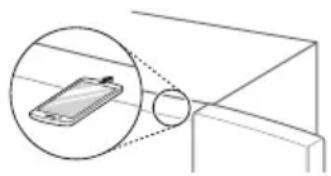
4 No 3aBpyBaBe Ha TpaHcpepoT Ha NdaToU, npetCTaBHnK Od cepBncOT Ke Bn IOn oJacn pe3yIITaNTe od Smart DiagnosisTM.
IIOyata co ekpaHOT ce haOra BHaTpe BO _PnXnEep co6a.
1 OToBopeTe ja BpaTaTa Ha 0pnKnepoT.
2 PnTncHeTe n 3aPKeTe ro konyeTo Fridge Tpu cekyHnn nn nooJno.
3 Ako cnjannuata 3Byu 4 nTu, OTbopeTe ja BpaTata Ha 3amp3HyBaOT u dpKeTe ro TeleepoHOT 6nCKy Do dynkata 3a 3ByuHK.
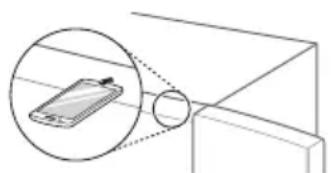
4 No 3aBpyBaHe Ha TpaHcpepOT Ha NdaToU, npetCTaBHnK OJ cepBncOT Ke Bn IOn objacn pe3yIITATNe OD Smart DiagnosisTM.
HANOMEHA
- NocTabete ro TelefoHOT Taka ITO MmKpOFOHOT da ce nopamHn CO OTBOPOT 3a 3ByHnKOT.
3ByKOT 3a Smart DiagnosisTM Ke ce ue, no npTnCKaHbeto Ha KonueTo Fridge BO TEkOT Ha Tpu CEkyHdN.
-Држete ro TelepoHOT ha rOpHnOT Decen OTBop 3a 3ByuHnikot nNoyekaTe DoEka Da ce npheecat NodaToUte.
He Tpraje ro TelefoHOT oTbOpot 3a 3ByuHnKOTdoEka Ce npeHecyBaat noTaToUte.
3ByKOT Ha TpaHcΦepoT Ha NODaTOU MoKe Da 6nDe octap 3a yBOTO DoEka Ce npehecyBaat NOdaToUnte, HO He TprajTe Ro TeNeΦoHOT OJ OTBOPOT 3a 3ByuHKnOT 3a Smart DiagnosisTM DOeKa He npeTaHe 3ByKOT Ha TpaHcΦepoT.
Kora TpaHcpepOT Ha noTaOuN Ke 3aBpuN,Ke ce npKaKae nopaka 3a 3aBpuHen TpaHcpep N KOHTPOJHaT aTabna ABTomatckn Ke Ce NCKnyu IN BKnyu NOBTOPO,NO HeKOJkyceKHyDn. IToTa CEHTAPOT 3a INΦopMaun 3a KIneHTN Ke rN o6jachn pe3yNTaTNTe OD DnjaIHO3ata.
-Функида Smart Diagnosis™ 3abncn OKBAJIHTOT Ha lokaJIHNO T NOBk.
KomyuHaJnajaKe 6nJe noo6pa n MoKeTe da emTuBaTe noo6ap cnHaJI aKO KOpNCHTe domaWeH oKceH TeNefoH.
Ako TpaHcpepOT Ha IoTaOuN 3a Smart DiagnosisTM e co cna6 KBaJInteT, MoKe Da He doBneTe Hajdo6pa ycnyra 3a Smart DiagnosisTM.
HanomeHi 3a YnCTeHe
Kora Bañnte noñuca nín φnoka od anapatot, n3BaTe ja ceñata xpaHa wTo e cknadnpaHa ha noñuca tna φnokata, 3a da cnpeHte nobpeda nIn oWtetyBaHe Ha anapatot.
-Bo cnpotnBHO,MOKe da dojde do nobpeda nopaDi TeKunHata Ha cknaDnpaHaTa XpaHa.
- Ako rHuCTnTe HaDbOpEWHnte OTBOpn 3a BeHTnlaunja Ha anapaTOT CO npabocMykAnka, Toraaw Tpe6a Da ro NCKnyuHnte OD cTpyja 3a da n36erHete CtaTnKo Ppa3HeBe KOeWTO MOKe Ja oWTeN eJKTPOHnKaTa HIn Da npedn3BnKa cTpyen ynap.
- ⅢBaTe Tn PONuTne NΦNOKnTe N NCnCTeTe Tn CO TOnJa BOa, a NoToa N36pnWeTe Tn IN BpaTe Tn Ha3aI.
- PeioBHO 6pniuTe ja 3anTnBkata Ha BpaTaTa co BnaKHa MEka Kpna.
- IcTeueHaTxApaHa n DaMKn Ha KopnTe oD BpaTaT Tpe6a Da ce YnCTaT 3aToa To r HoMaIyBaat KanauNTeTOT Ha YuBaHe Ha KopNaTa, Na Dypn MoKe n Da ja OwTeTAt.
- ПО чинецьeto, повере te Дали Кабелот 3астуja e oштeteн, толлллн He npabunho BKnyueH.
- OdpxyBaJTe rH uNCTn OTBOpNTe 3a BeHTuNaCuJa Ha HAnBOpeUHOCTa Ha anapaTOT.
- 3aTHaTn OTBOpn 3a BeHTuNaJia MoKe da npEiN3BnKaat Noxap nn Da ro OWTeTa anapaToT.
HaBOpEHNTe 06eHn MeTaNn NOBpHnH MoKe Da Ce NOMNAT CO BOCOK 3a Da Tn 3aHTNTte OD'prA. He NOMHyBajTe rN CO BOCOK PAnCTuHnTe DeNoBn. NOMHyBajTe rN CO BOCOK 06eHnTe MeTaNn NOBpHnH HajMaNky DBaNaTn RoDnHo KopNCTejKn BOCOK 3a anapatN (nn BOCOHa NaCTa 3a ABTomObUn). HaHeCeTe BOCOK Co YnCTa n MeKa Kpna.
Kora ke ja uCTte BHaTpeHocTa nn HauBopeuHocTa Ha anapatOT, He 6pnueTe ja co rpy6a Yetka, nacta 3a 3abn, nn He kon 3anannnMaTepnjann. He KopncTe TcpeDCTBaT a uCtHe KOn CoDPKAT 3anannnMaTepnn.
Toa Moxe Da npeun3Bnka npomeHa Ha 6ojaTa nn OwTeTyBaHe Ha anapaTOT.
- 3anaJIINBn MaTePnI: aNKoXoN (eTaHOn, MeTaHOJ, n3OpnpuI aNKoXoN, n3ObTyuI aNKoXoN nTH.), pa3peyBaU, cpeCTBO 3a 6enebe, 6eH3eH, 3anaJIINBa TeuHocT, abpa3INBn nTH.
3a HaBOpEshOCTa Ha anapaTOT, KopnCTeTe YnCT cyHep nn MeKa Kpna n 6nag DeTepreHT Bo TOnna BODa. He KopnCTeTe a6pa3nBn CpeDCTBa nn CNHN CpeDCTBa 3a YnCTeHe. TeMeJHo n3bpiWeTe ro Co MeKa Kpna.
- HnKoraw He MnjTe rI NOJIuNTe NJN caIOBNTe BO MaunHa 3a MneHBe caOBN.
-ДeJOBte MoKe Da ce DeΦopMnpaat nopadn TOnnHa.
- Ako anapaTOT e onpeMeH co LED cBeTNo, He BaDaTe ro KaNaKOT Ha cBeTnTo HHTy LED cBeTnO To BO o6nДa ro nonpaBaTe nnn cepBnCupate. Be MoInme CtaNeTe BO KOHTaKT Co UeHTapot 3a InΦopMauN 3a KIneHTn Ha LG Electronics.
YncTeHbe Ha 3aNTNBkata Ha Bpata
Baede He Ha Kopnata Od BpaTaHa npKndepOT/3aMp3HyBaQoT
Држete Гдвараза паьа на Корпа и ИЗВаде та щ подигajки ѳ Harope.
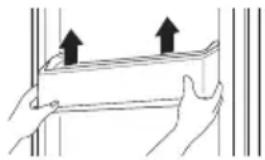
IOBTOPO MeTeHe Ha Kopnata Ob BpaTata Ha 0pnxKnepeoT/ 3aMp3HyBaQOT
1Држete rIN Dbata Kpaja Ha Kopnata Ha BpaTata, HeKHO TpyHeTe ro eHNOT pa6 3a Da ro COCTaBNTe, a Notoa Ha nCT NaHn N dpyrNt pa6.
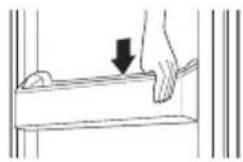
2 IocTaByBaHeTo, HeXHo NotChKHeTe ja Kopnata Ha BpaTata 3a da ja npuBpCTnte xopn3oHTaIIHO.
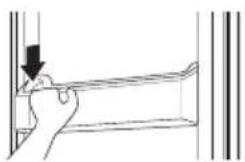
YnCTeHBe Ha noIucaTa BaJeBe noIuca od pRnxNdepot/ 3aMp3HyBaUOT
Otctpahe ja nonuata co Hej3nHO Bneyebe dokeka BO nCTo BpeMe ro noDnirate 3aHnot den Ha noNuaTa.
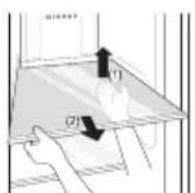
Повторно мостеье на полцату od Фриждерот/3amp3Hybaут
BrpaTe ro no o6paTeH peoCneI od BaJeHeTo.
YncteHe Ha nOKaTa 3a 3eJenHcyK
BaedeHaΦnoKaTa3a3eJeHcyK
1 ⅢBaTe ja coDpxHnata od φnoKaTa. DpxKeTe ja paKaTa Ha φnoKaTa 3a 3eNeHcyK n ⅢBneYe ta ueNoCHO HAnBOp DoEka He conpe HeXHo.
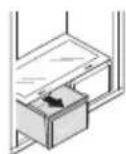
2 NOnnHHeTe ja qnoKaTa 3a 3eNeHyK HArope n 13BaJeTe ja NOBNeKyBajKn ja HaDbOp.
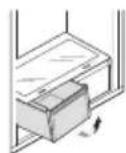
IIOBTOPO MeCTeHbe Ha 0nOKaTa 3a 3eJIeHcyK
1 Ctabete ja cnookaTa Ha IIN3raayKeTe uHHn, noa rOJ od 45^ , n HeXHo TpyHeTe ja Ha3aI.
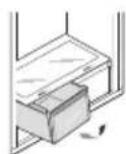
2 BmTeHeTo ro dHOTo Ha cnoKaTa 3a 3eNeHcyk BO HerOBaTa opnHaHa nOIOK6a N TpyHete ro Ha3ad cnUwTajKn ro HADony.
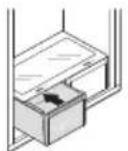

BHIMAHNE
- ИмajTe npeBnД eKa MoKe Da DojDe Do NobpeDa NopaDi TeKuHaTa Ha XpaHaTa npi BaDeHBeTo HaФnOKaTa 3a 3eJIeHcyK.
YncTeHbe Ha Do3epoT 3a B0da (OngNoHaJIHo)
YncTeIbe Ha TaUHaTa Ha dIncpeH3epoT
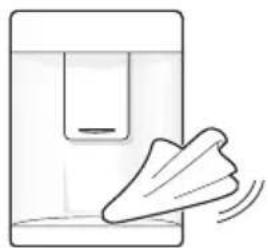
TaHaTHa Ha IucnEh3epOT MoKe Da 6nDe BOeHa npaHn NcTypeHnot Mpa3 nnn Boda. N36pniweTe ja ceNaT a NOBpHnHa CO BnAkhHa Kpna.
YnCTeHbHe Ha ODbODOT Ha Boda
YeCTo 6pIWeTe ro ODBOT Ha BODa co YnCTa Kpna, 6nDejkn IecHO ce BaNka. ImajTe npedBnD DeKa BnAkhHeHcTa OD KpNaTa MoKe Da ce 3aJenat Ha OTBOPOT.
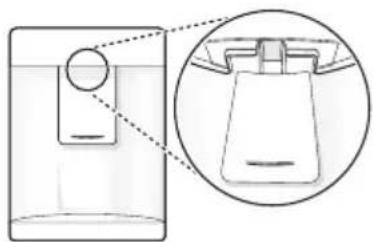
| Симпоми Пли | ЧИна Ршениe | |
| АразатOT He Лади или He 3amрзныв. | Далу Има пекин BO санбдуваьeto co stpyja? | П探测ete Г鞘юльец кaj другite anapatи. |
| ДалуЕ мсклунчел пеклунокот ЗА STРУДОД STKTEКЕТ? | Правлино Вклуне Г鞘юльец 3a STРУДОД STKTEКЕТ. | |
| Ладенье ял или 3amрзнывыteTo e слабо. | Далу Tempepatypata Na фриждерot улл замрзнывачot e поесена на незинOTO нajтponLO поесуваьe? | ПODEсеTe ja Tempepatypata Na Фриждерot или 3amрзнывачOT на „Сре dingо". |
| Далу anapatot e ИлQuestionн Директэн сончевс CBETПИнha ил e BO 6ллзига на подmet StTO Загрва, како на поимер, ретна или гралka? | П探测ete ja okolinasда Кадо StTo e MOHTINpAN pONI3BODOT И MOHTIPAJte ro погострана од подmetи StTo 3argpeBaAT. | |
| Далу Stte CTABILNE TOnla xpha Бez III NBDO DA ja ИлQuestione? | Т人民银行 за ja ИлQuestion TE TOnla TPha пrelд Ду lac STABITe BO ФриждерOT ул ЗамрзнывачOT. | |
| Далу Stte CTABILNE пемногу храна? | Одожьвajte COODBeTHO pactoJahme Mery хранatura. | |
| Далу ВразпITE Ha anapatot ce цeloscho 3aTВорец? | Целочи 3aTВорея jo вразatura и пrobерete Далухранatura He ja Блokира Вразatura. | |
| Далу Има doBoJIO NO prOCTOP okoу anapatot? | Писпособerte ja поожбatura на монтжа за ду hapавITE DoBOJNO prOCTOP Okoly anapatot. | |
| AnapatOT Има лош Мирис. | Далу Tempepatypata Na фриждерot улл замрзнывачot e поесена на „ToPINO“? | ПODEсеTe ja Tempepatypata Na ФриждерOT или 3amрзнывачOT на „Сре dingо". |
| Далу Stte CTABILNE xpha co силен Мирис? | Хранatura co силен Мирис чьвajte ja BO ЗТВорен сад. | |
| ЗеленчIKOT uIN OBOJIte moxe ce paclinapale BO ФиOKATA? | Фрлente Г скаланnot Зelenчuk И счис! ja ФиOKATA 3a Зelenчuk. He chyвajte ЗеленчIK ngemHory doJIoRO BO ФиOKATA 3a Зеленчuk. | |
| СvetлOTO BO ВНатршноCTa Ha anapatOT He ce пали. | Далу СvetлOTO BO BНатршноCTa Ha anapatot ce racn? | НебоМожно e Клиенте Ду Г ЗаменAT СvetлATA BO BНатршноCTA ha anapatOT, ЗатOA StTo Tne He CE NonpabaAT. Ако He CE пали СvetлOTO BO BНатршноCTA, CTanete BO KONTAKT CO LcENTAPOT 3a Инфорmaци 3a Клиенти Ha LG Electronics. |
| Вразата Ha прoin3ВODOT He ce 3aTВорацрsto. | Далу anapatot e Habalen нар徳? | Pergunayte Г поднite HoraLAn 3a Ду ja порднete Малky поднata STPana. |
| Далу поштое биile правлиho noctabevи? | Ако e по tradego, odnoBO noctabete Г палштое. | |
| Далу Вразatura StTo ja 3aTВориle уnotpebvyajki n pekumepna сила? | Ако пrimmeniteпpekumерна сила ул брзину等相关 BA TВораьe Ha bparata, bparata moote Ду octaNe КраТКО OTBOPeHaПрd Ду ce 3aTВори. Погижete De Ду He ja Tupykate Вразatura Многу силNo. 3aTВорeTe ja 6e3 пrimmena Ha силa. | |
| Симпоми Р pine | Чина Решениe | |
| Има кондения в Ватrelшноста на поюзворот илли на дото od kалakot на Фноката за зеленчк. | Далу сtle ставлие толлхахраha 6e3 npboда ja u3niladite? | • Треба правло ду щизалдente толлataххраhalпгдду щизалдente bo Фриждерот ллллзampзнывачот. |
| Далу сtle щocstавлие врата на anapatot otворета? | • Иako konduнзaujiata ке усчесни habрзовтоотakko ке щзворот врата наanapatot, можete ду щизыштete и co cyва крпа. | |
| Далу врата на anapatot щ отворот и ЗАВОРATE и ЗАВОРATE Mногу чесу? | • Кондениялда може ду ce Формиралораду раллka bo temператураюпдовершноста. Изbethштete щ влагата co cyва крпа. | |
| Далу сtle ставлие толлхалл влажнахраань Ватrelэп STAVOT, 6e3 ду щЗТВОРITE илл STAVOT BO CAD? | • Chubajte ja xphaнatable BO nokprienнлл Stavotenepenlad. | |
| Во Фриждерот се яma нафateho mpa3. | Вразите можеblне ce 3aTbopaatnpabilno? | • П robерете ду лл лесю差别ухраань Ватrelшноста на поюзворот щ blokирарытаму и поberете ду врата eцрсто 3aTbOpeн сад. |
| Далу сtle ставлие толлхахраань 6e3 npbo da щизалдente? | • Треба право ду щизалдente толлataххраhanрдду щизалдente bo Фриждерот ллллзampзнывачот. | |
| Далу e blokиран OTВOPOT 3a BVE3 ллnlnE3 Na Bo3dUxOT od 3amp3HyBaVOT? | • Потчдerte ce OTВOPOT 3a BVE3 ллnlnE3 Na Bo3dUxOT da He bide blokиран 3a da можеBo3dUxOT da zuRkUnpa BO BHTpeShocta. | |
| Далу зamр�ншноста наллу нанллу Anapatot. | • Ondжвajte coodbetno pactojahne Mefýхранatable. | |
| Мраз mlл кондения се Формирала в Ватrelшноста mlл нанллу нанллу Anapatot. | Далу сtle щOTВОрале и 3aTbOрале врата Многу чесу mlл дуЛь врата на anapatot e Henerrabilno 3aTbOpeн? | • Мраз mlл кондениялда може ду ce Формира akо BO BHTpeShocta наanapatot Hablneze BO3dUx OndaBop. |
| Далу e Blaxнha OKOLINHATA kaide shTo e MOHTIRpan anapatot? | • Кондениялда може ду ce поави нандворшноста на anapatot AO OKOLINHATA kaide shTo e MOHTIRpan e MHOrgу bLnackha mlll aKO e DeHOT BLnackhen, Ha primeper, akO BPHE. Изbethштete ja cocsema Blarata co cyba Крпа. | |
| Anapatot e bucheni поюзведу в Ненормаллп 3bvyи. | Далу anapatot e мontиран на Hectabileнн pod mlл на pod коj He e NHBellenpan? | • Мontирajte ro anapatot нацврст и pamenллд. |
| Далу зашилот ду од onanapatot ro doponpa smidot? | •Прис nocobete ja поожбата на мont taxа за нарави песвлно песвлостор okolyanapatot. | |
| Далу Има расфрлесно р�除metи 3ad anapatot? | • Изваде ти расфрлесно р�除metи за anapatot. | |
| Далу Има р�除metи над anapatot? | • Тгнete ro р�除metOT od rongnot del na anapatot. | |
| Симпоми Пли | ЧИна Рецни | |
| Стоанata ини подNICATA на anapatot e toponla. | Има севки постов кондения в градени на obnie повшини на anapatotсо селда се hamалу кондениялajашто се okoly nobршинatable на вразата. | • Севкatinga 3a Истутыбe торпина счinaюпомош ce спручва кондения, e мостирана на росторы се hamалу кондениялajа anapatot. Може д почьства对接а.deka e ocobesho чебка веда по мостаха на anapatot илв BOTekOT на летото.Бидete сгурни деса ова не e побLEM.Tуке Hормална с Coastojba. |
| Има ВODa BO BHaTPreShHocStа ини Надворшноctа на anapatot. | Далу Источенв ВODa OKoly anapatot? | • Роверетe далу ВODa Tcstekla od Лаваюни od дуro MeCTO. |
| Далу Има ВODa pod anapatot? | • Роверетe далу ВODa e od okmp3нataхрана илod skршени илспштenv cad. | |
| Нешлergув Mpa3. | Далу Има МраЗ BO koprata 3a Мра3? | • Роверетe далу Има МраЗ BO koprata 3a Мра3. |
| Далу Има Гтук mра3 BO koprata 3a Мра3? | • Двог'te ja koprata 3a Мра3 и постrecete ja.Фрlete Г остakotК Гтук Мра3 OТ calko Ke ja npostrecete koprata. | |
| He можete д чуete 3buk дeca Излergув Mpa3? | • 3aданzele Мра3 HanzmeMuHNo Odibipajte Г ржIMITE 3a КОДК Mра3 и SkPshEN Mра3 BO KONTPOJHINOT панел. | |
| Далу пATEKATA Na Mра3OT e 6blokirana? (Може д ro npoBepite Kanalot 3a Мра3 co odBojYBaIbe Na Koprata 3a Mpa3.) | • Доколу канalot e 6blokiranMuMeJa He Излergув Mра3 Na pabuInen HauN. Поверетe Г мра3OT и рedingho ChcTeTe ja naTeKaTaN Mра3OT. | |
| Нешлergув ВODa. | Далу сисунчenВentnilot 3a снабдувальco ВODa? (Само мodyл co BodOBODha Инсталциja) | • OTbopete Г вentilot 3a снабдувальco ВODa. |
| Можеби с пазенpezeрвогot 3a ВODa на dinchenhzerpot? (Само мodyл b63 BodOBODha Инсталциja) | • HanonHete Г pezeрвогot 3a ВODa на dinchenhzerpot. | |
| Далу сизвогenВentnilot 3a снабдувальco ВODa? (Само мodyл co BodOBODha Инсталциja) | • OTbopete Г вentilot 3a снабдувальco ВODa. | |
| Далу кориспite Heфилtrpuraнa ВODa? | • Heфилtrpuraнa ВODa може д сordжи Глема КОЛУнHa raZmHuN Teшки MeТалу инaddBopeшinCunstahци,TakaШTO Филтетм Роже д ca se 3aTHeПрedВPeme, b63 orljeHa JxWBOTNt Bek Ha Филтетр. | |
| Вodata Има чуden BKUC. | Далу BKUCOT Na ВODa tae pa3linyeh Bo cnped6a co Bkucot Na BODa tae on претхODHnOT сntem 3a поисье Na BODa? | • Далу поисье ВODa иллада ВODa He cte ja koprasteteп подоггВремechkinпераiod? |
| Далу с поисье ДоггВремe otkaCO TE rO MOHTIParne iЗ amehiNeФилтетр? | • Аку My e istechew Pokot NaФилтетр, можe da onadne KBaIIITETOT Na prochnctuyBaIeTo. Се пpenopaTuBa Филтетр д ra ЗамeHyBaTe corlaacno Paperiodot 3a ЗамeHyBaBe NaФилтетр. | |
| Симпоми Рли | ЧИна Ршениe | |
| Вodата иma chydен вкUC. | Далу стг яисяпakhanе Фллетор BO поочьата pha3а по неювOTO моHTираль? | ·КORA моHTирATE Или заменBURATE Фллетор 3a npвлат, траведа за яи OTстранITE ВОзduxOT И остаточite od akTIBEV jarlogen od Bharpeшноctа на Фллетор. Корисстete Г anaparot по Incpuyштоя и празнебе на okoly 5 лintр поочьата вдда од ДincpenH3ерOT co рпитискаль на рачкatable здincpenH3irpaье вдда. Актувиран (jarlogenOT He e shtehen 3a lyfeTo). |
| Далу поочьтенATA ВODа Или паднata вдда He cte ja корис themselves noDOLrВременckи пэрnod? | ·ВкUCOT Na OT stOToENATA ВODа може да ce пromehи поарду pa3mHOnKByBaHETO Naбakтори BO Hea. Корисстete Г поэвдот OTКAKO CTe ДincpenH3irpaLЕ И срразнichte okoly 5 лintр (okoly 3MinHyTu) Вдда од ДincpenH3ерOT. | |
| Бчава кako Тропkaль | КоHTролata Na Odmp3HyBaJIe KПИКИУВа KORA 3anoCHyBa I 3aBprUyBa ABOTMATCKNOT ZICKlucs Na Odmp3HyBaJIe. КоТролata Na TepMocSTATOT (Или КОТролata Na anaparot kaj Неко модел) Истота клИKHyBa Na поetokи И Na Kraj Na ZICKlucSOT. | ·Hopmalno pa60TeJIe |
| Бчава кako Svechkaль | Бчава кako Svechkaль може дa doaft od поTOKOT Na cpredSTBOTo 3a Лады, кOLOTO 3a ВODа Na 3aДнIOt DeI Na edinHicata (camo Mocheln co BODOBDA mHCTanaZuJa), Или odПрedmetn CTaBeHn Na rOpHnOt DeI Или okoly anaparot. | ·Hopmalno pa60TeJIe |
| Anaparot He cSton pamHo Na noDor. | ·Повот e cnaB Или Нрамен, Или пak HORAPKITe 3a NIVbElnPabJe TReBa dA ce prinaIaoDat. Поглendete BO oddeIOT 3a n3pamHyBaJIe Na Brpatata. | |
| Anaparot co Линeparen komпrecop cop поДвиЖил 3a Врeme Na p6oTeJIeTo. | ·Hopmalno pa60TeJIe. Ак кOMPrecopOT He piceTaHe Na SVEcKa IO 3MinHyTu, ИскPyчete ja Stropyjataи NOBTOPHO BkIyUeTe ja. | |
| Бчава кako ShuSKalbe | Motoporot Na BeHTINatOPOT Na ИспарувачOT ro zinrkuлиba Bo3dUnYOT NH3 ФржIDерOT И пergradite Na 3amp3HyBaUOT. | ·Hopmalno pa60TeJIe |
| Bo3dUnYnomHyBa Na dKONDEH3atOPOT CO nomoi Na BeHTINatOPOT Na KOHN3auZJa. | ·Hopmalno pa60TeJIe | |
| Бчава кako KIIOKOTeJIe | СрededвOTO 3a Лады Teue Ne3 систemOT 3a Лады | ·Hopmalno pa60TeJIe |
| Бчава кako Пуckaль | Собираьи иширеBE Na BHaTrpeShnITE sIdoBn nopadiппomEHи BO TempePapatypata. | ·Hopmalno pa60TeJIe |
| Вибрираль | АкStРанatura Или ЗаднOT DeI Na ФржIDерOT с DoOnIPA do opMap Или SiiD, Неко ИДНМANHITE Bv6RaцIMmoMe DaПрedit3BvkaaT 3bYk. | ·Здда ѳ селIMMHINATe БчавATA, рожевerte Дали STРANITEиЗаднOT DeI с DoOnIPAaT Do siiД Или opMap. |
| Симпоми Рлиа | Плознкata за Wi-Fi на koeшто ce обидува对接а за соврзete,е нетона. | •Нajдente ja Wi-Fi мрека та kojaшто e поврзана совISAИТ смартфочи и остразенета ja,а поюа рergintprupa对接у вайnot anapat на LG SmartThinQ. |
| МобiliansнITE падатои за вайnot смартфочи сь вklучени. | •Искльчete Г Мбиннite падатои на вайnot смартфочи рergintprupa对接у anapatot, корисейки ja Wi-Fi мрекада. | |
| Иmetо на бeзшичнытma对接а (SSID), не有很大 поставени. | • Иmetо на beзшичнытma对接а (SSID) trpebaда сбide komбинида ща anглесь укы и бroеви. (He copiastete Г спцилалнite karapakterni) | |
| Ф配电вениjsытабутс对接е He e 2,4 GHz. | • Плдраха на само 2,4 GHz Ф配电вениjsа на рут��. Поставete Г beзшичныт рут�� на 2,4 GHz и порзete对接а anapatot сбidekomбини对接у. 3a за ща поверпite Ф配电вениjsытабувач на рут��, рoверете кaj вайnot снabdubayч на InteRPHTУСFlyи, плкaj поизвODINTEЛOT на рут��. | |
| Пperolеме epacstoанною对我 anapatot и рут��. | • Ако有很大 поrelеме pactоанною对我 anapatot и рут��, сигнелот може за сбide с侣б и kohekenцяда може за He bide правлно конфигурпая.Променete ja lokaцида на рут��, за сбide полесь до anapatot. |
Белейки
Белейки
MANUAL DO UTILIZADOR
*Extra Function: Hold 3 sec.
LG Electronics European Shared Service Center B.V.
Krijgsman 1
1186 DM Amstelveen
Paises Baixos
Instalar a LG SmartThinQ
*Extra Function: Hold 3 sec.
- Panoul de control effectiv poate diferi de la model la model.
LG Electronics European Shared Service Center B.V.
Krijgsman 1
1186 DM Amstelveen
Olanda
Instalarea aplicatiei LG SmartThinQ
Firmware Update (Actualizare Firmware)
RIESENIE PROBLEMOV 30
*Extra Function: Hold 3 sec.
LG Electronics European Shared Service Center B.V.
Krijgsman 1
1186 DM Amstelveen
The Netherlands
This is where small packages of refrigerated foods, drinks and sauce containers are stored.
Movable Egg Tray
This is where eggs are stored.
- You can move it to and use it at a desired position as needed. However, do not use it as the ice bin or place it on the shelf on top of the fridge or the vegetables drawer.
OPOMBA
*Extra Function: Hold 3 sec.
LG Electronics European Shared Service Center B.V.
Krijgsman 1
1186 DM Amstelveen
Nizozemska
Namestitev LG SmartThinQ
Aplikacijo LG SmartThinQ poiscite v trgovini Google Play & Apple App na pametnem Telefonu. Sledite napravam za prenos in namestitev aplikacije.
Wi-Fi funkcija
Dispenseri Ujit (Opsional) 20
Akullberesi i levizshem 21
Sirtari i perimeve tefresketa 22
Pérdorimi i funkzionevé tjera 22
FUNKSIONET INTELIGJENTE 23
Pérdorimi i Aplikacionit LG SmartThinQ 23
Pérdorimi i Smart Diagnosis™ 25
MIREMBAJTJA 27
Shenime per pastrimin 27
Pastrimiikoshitderes 27
Pastrimi i raftit 28
Pastrimi i sirtarit te perimeve 28
Pastrimi i dispenserit te ujit (Fakultativ) 29
ZGJIDHJA E PROBLEMEVE 30
*Extra Function: Hold 3 sec.
- Paneli i kontrollit mund te ndryshojenga modeli ne model.
1 Fridge Temperature (Temperatura e Frigoriferit)
- Kjo e vendos frigoriferin nè temperaturén e synuar.
2 Express Freeze (Ngrirje Ekspres)
Kjo vendos funkionsenet Ngrirjes Ekspres.
3 *Wi-Fi
Kjo e cakton frigoriferin te lidhet me rrrjetin Wi-Fi te shtepise suaj.
4 * Lock (Kyc)
- Ky bllokon butonat ne panelin e kontrollit.
Shenime per perdorimin e panelit te kontrollit
- Paneli kontrollit do te ndizet ne ndonjë prejud rasteve te mëposhtme.
Kur energia ehte ndezur
Kur preket njebuton
Kur hapet dera e pajisjes (frigoriferi, ngriresi)
-
Paneli i kontrollit do te fiket vette per te kursyer energji ne një prej rasteve te mëposhtme.
-
Kur ka kaluar 1 minuţe pasi tăjetă ndezur energia.
- Kur nuk behet asnjē veprim butoni ār 20 sekonda pasi ďshte shtypur njē buton.
Kur kané kaluar 20 sekonda pasi hapet dhembylletdera pajisjes (frigoriferi, ngriresi) - Nese ka kontakt gishti oslelekure me panelin ekontroll ndersa e pastroni, funksioni i butonit mund te vihet ne pune.
Dispenseri i Ujit (Opsional)
Shtypni levén e dispensererit te ujit per te nxjerré ujè tê ftohtë.
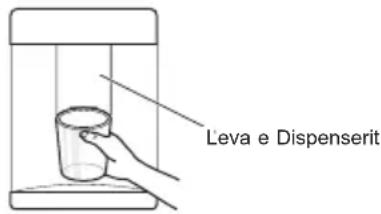
KUJDES
- Mbajini fēmijēl larg nga dispensereri per te mos i lejuar tē luajné ose tédemtojně kontrollet.
SHENIM
http://eeeglg.com/global/support/cedoc/cedoc#
LG Electronics European Shared Service Center B.V.
Krijgsman1
1186 DM Amstelveen
The Netherlands
Instalimi i LG SmartThinQ
Kerkoni aplikacionin LG SmartThinQ nga Google Play Store & Apple App Store nè një smartfon. Ndiqi udhézimet per te shkarkuar dhe instaluar aplikacionin.
Funkzioni i Wi-Fi
Komunikoni me pajisjen nga një Telefon inteligent duke pédorur veçorité e duhura inteligente.
VAŽNA BEZBEDNOSNA UPUTSTVA

UPOZORENJE
*Extra Function: Hold 3 sec.
Stvarna kontrlna tabla moze da se razlikuje od modela do modela.
LG Electronics European Shared Service Center B.V.
Krijgsman 1
1186 DM Amstelveen
Holandija
Instalacija aplikacije LG SmartThinQ
Pretražite aplikaciju LG SmartThinQ u radnji Google Play Store & Apple App Store putem pametnog Telefona.
Funkcija Wi-Fi
Mogucnost komunikacije sa uredajem putem pametnog Telefona primenom odgovarajucih pametnih fungcija.