HWN410 - Soundbar SAMSUNG - Free user manual and instructions
Find the device manual for free HWN410 SAMSUNG in PDF.



User questions about HWN410 SAMSUNG
0 question about this device. Answer the ones you know or ask your own.
Ask a new question about this device
Download the instructions for your Soundbar in PDF format for free! Find your manual HWN410 - SAMSUNG and take your electronic device back in hand. On this page are published all the documents necessary for the use of your device. HWN410 by SAMSUNG.
USER MANUAL HWN410 SAMSUNG
Thank you for purchasing this Samsung product.
To receive more complete service, please register
your product at www.samsung.com/register
SAFETY INFORMATION
SAFETYWARNINGS
TO REDUCE THE RISK OF ELECTRIC SHOCK, DO NOT REMOVE THE COVER (OR BACK). NO USER- SERVICEABLE PARTS ARE INSIDE. REFER SERVICING TO QUALIFIED SERVICE PERSONNEL.
| CAUTION RISK OF ELECTRIC SHOCK. DO NOT OPEN. | |
| This symbol indicates that high voltage is present inside. It is dangerous to make any kind of contact with any internal part of this product. | |
| This symbol indicates that this product has included important literature concerning operation and maintenance. | |
| Class II product: This symbol indicates that it does not require a safety connection to electrical earth (ground). | |
| AC voltage: This symbol indicates that the rated voltage marked with the symbol is AC voltage. | |
| DC voltage: This symbol indicates that the rated voltage marked with the symbol is DC voltage. | |
| Caution, Consult instructions for use: This symbol instructs the user to consult the user manual for further safety related information. | |
WARNING
- To reduce the risk of fire or electric shock, do not expose this appliance to rain or moisture.
CAUTION
- TO PREVENT ELECTRIC SHOCK, MATCH WIDE BLADE OF PLUG TO WIDE SLOT, FULLY INSERT.
- This apparatus shall always be connected to a AC outlet with a protective grounding connection.
- To disconnect the apparatus from the mains, the plug must be pulled out from the mains socket, therefore the mains plug shall be readily operable.
- Do not expose this apparatus to dripping or splashing. Do not put objects filled with liquids, such as vases on the apparatus.
- To turn this apparatus off completely, you must pull the power plug out of the wall socket. Consequently, the power plug must be easily and readily accessible at all times.
PRECAUTIONS
- Ensure that the AC power supply in your house complies with the power requirements listed on the identification sticker located on the bottom of your product. Install your product horizontally, on a suitable base (furniture), with enough space around it for ventilation (7 10~cm) . Make sure the ventilation slots are not covered. Do not place the unit on amplifiers or other equipment which may become hot. This unit is designed for continuous use. To fully turn off the unit, disconnect the AC plug from the wall outlet. Unplug the unit if you intend to leave it unused for a long period of time.
- During thunderstorms, disconnect the AC plug from the wall outlet. Voltage peaks due to lightning could damage the unit.
- Do not expose the unit to direct sunlight or other heat sources. This could lead to overheating and cause the unit to malfunction.
-
Protect the product from moisture (i.e. vases), and excess heat (e.g. a fireplace) or equipment creating strong magnetic or electric fields. Unplug the power cable from the AC wall socket if the unit malfunctions. Your product is not intended for industrial use. It is for personal use only. Condensation may occur if your product has been stored in cold temperatures. If transporting the unit during the winter, wait approximately 2 hours until the unit has reached room temperature before using.
-
The battery used with this product contains chemicals that are harmful to the environment. Do not dispose of the battery in the general household trash. Do not expose the battery to excess heat, direct sunlight, or fire. Do not short circuit, disassemble, or overheat the battery. Danger of explosion if the battery is replaced incorrectly. Replace only with the same or equivalent type.
ABOUT THIS MANUAL
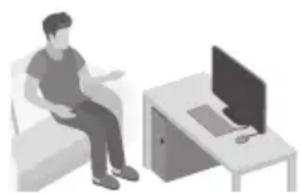
The user manual has two parts: this simple paper, USER MANUAL and a detailed FULL MANUAL you can download.

USER MANUAL
See this manual for safety instructions, product installation, components, connections, and product specifications.
FULL MANUAL
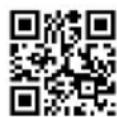
You can access the FULL MANUAL on Samsung's on-line customer support centre by scanning the QR code. To see the manual on your PC or mobile device, download the manual in document format from Samsung's website. (http://www.samsung.com/support)
Design and specifications are subject to change without prior notice.
CONTENTS
01 Checking the Components 2
Inserting Batteries before using the Remote Control (AA batteries X 2) 2
02 Product Overview 3
Front Panel / Right Side Panel of the Soundbar 3
Bottom Panel of the Soundbar 4
03 Connecting the Soundbar 5
Connecting Electrical Power 5
04 Connecting to your TV 6
Method 1. Connecting with a Cable 6
- Connecting using an Optical Cable 6
- Connecting a TV using an HDMI Cable
Method 2. Connecting Wirelessly 8
- Connecting a TV via Bluetooth 8
05 Connecting an External Device 10
Connecting using an Optical or Analogue Audio (AUX) Cable 10
Connecting using an HDMI Cable 11
06 Connecting a USB 12
07 Connecting a Mobile Device 14
Connecting via Bluetooth 14
Using the Samsung Audio Remote App 17
- Installing the Samsung Audio Remote App 17
- Launching the Samsung Audio Remote App 17
08 Using the Remote Control 18
How to Use the Remote Control 18
Adjusting the Soundbar volume with a TV remote control 21
Using the Hidden Buttons 22
Output specifications for the different sound effect modes 22
09 Installing the Wall Mount 23
Installation Precautions 23
Wallmount Components 23
10 Software Update 25
Updating Procedure 26
If UPDATE is not displayed 26
11 Troubleshooting 27
Licence 28
Open Source Licence Notice 28
14 Important Notes About Service 28
Specifications and Guide 29
Specifications 29
01 CHECKING THE COMPONENTS

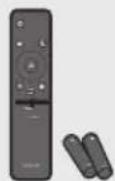
Soundbar Main Unit Remote Control / Batteries
1
2
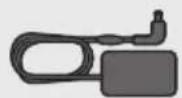
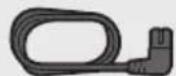
AC/DC Adapter (Main Unit) Power Cord
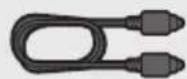
Optical Cable
(AC/DC Adapter)
- For more information about the power supply and power consumption, refer to the label attached to the product. (Label : Bottom of the Soundbar Main Unit)
- The power components are labelled (1, 2). For more information about power connections, see page 5.
- For Soundbar wall mounting components, see page 23.
- The Micro USB to USB adapter and HDMI cables are sold separately. To purchase, contact a Samsung Service Centre or Samsung Customer Care.
- The appearance of the accessories may differ slightly from the illustrations above.
Inserting Batteries before using the Remote Control (AA batteries X 2)
Slide the battery cover in the direction of the arrow until it is completely removed. Insert 2 AA batteries (1.5V) oriented so that their polarity is correct. Slide the battery cover back into position.
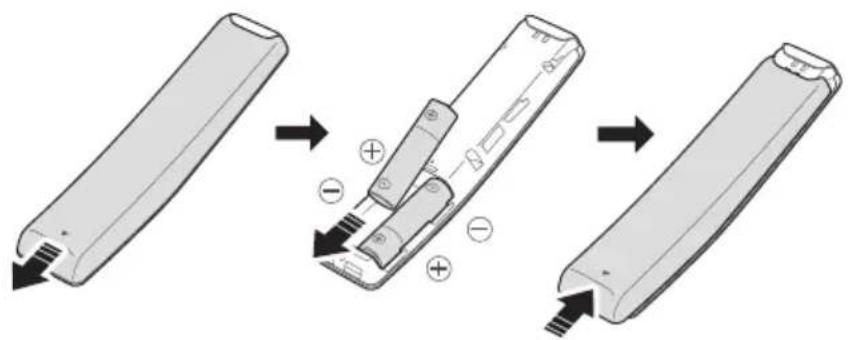
ENG-2
02 PRODUCT OVERVIEW
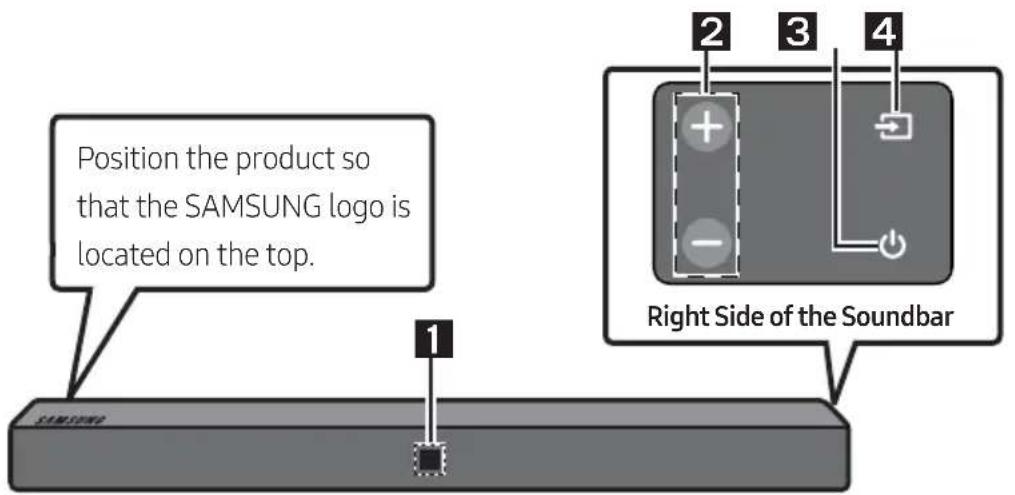
Front Panel / Right Side Panel of the Soundbar
| 1 | Display Displays the product's status and current mode. | |
| 2 | +/- (Volume) Button Adjusts the volume. · When adjusted, the volume level appears on the Soundbar's front display. | |
| 3 | ● (Power) Button Turns the power on and off. | |
| 4 | ● (Source) Button Selects the source input mode. | |
| Input mode Display | ||
| Optical Digital input D.IN | ||
| ARC (HDMI OUT) input | D.IN → TV ARC (Auto conversion) | |
| AUX input AUX | ||
| HDMI input HDMI | ||
| BLUETOOTH mode BT | ||
| USB mode USB | ||
| · To turn on “BT PAIRING” mode, change the source to “BT” mode, and then press and hold the (Source) button for more than 5 seconds. | ||
- When you plug in the AC cord, the power button will begin working in 4 to 6 seconds.
- When you turn on this unit, there will be a 4 to 5 second delay before it produces sound.
- If you want to enjoy sound only from the Soundbar, you must turn off the TV's speakers in the Audio Setup menu of your TV. Refer to the owner's manual supplied with your TV.
Bottom Panel of the Soundbar
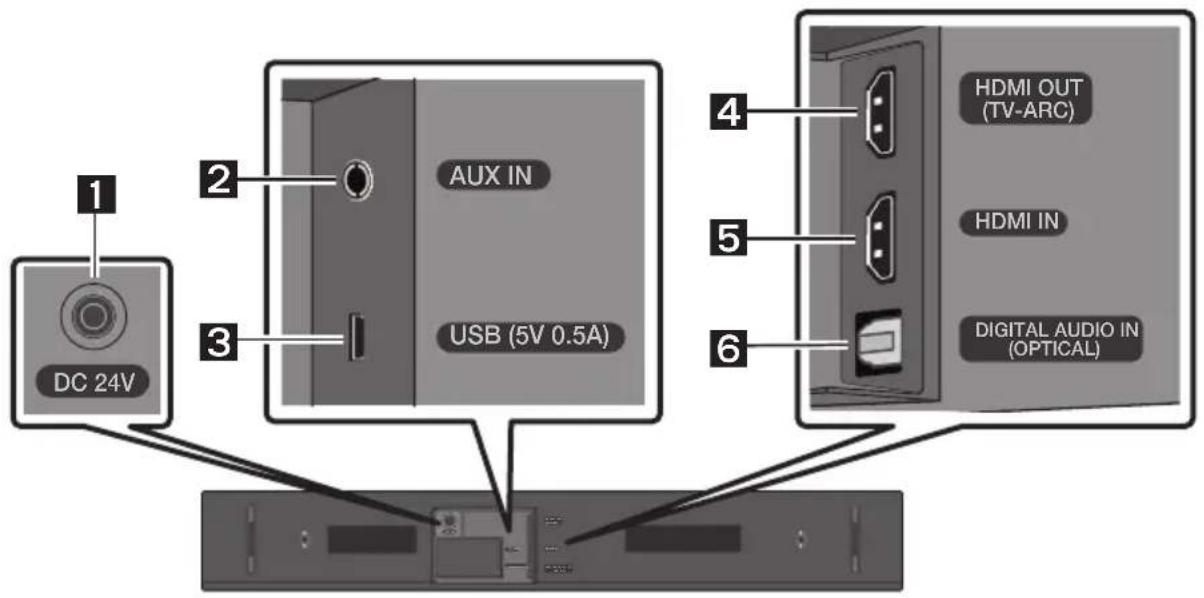
| 1 | DC 24V (Power Supply In) Connect the AC/DC power adapter. |
| 2 | AUX IN Connect to the Analogue output of an external device. |
| 3 | USB (5V 0.5A) Connect a USB device here to play music files on the USB device through the Soundbar. |
| 4 | HDMI OUT (TV-ARC) Connect to the HDMI (ARC) jack on a TV. |
| 5 | HDMI IN Inputs digital video and audio signals simultaneously using an HDMI cable. Connect to the HDMI output of an external device. |
| 6 | DIGITAL AUDIO IN (OPTICAL) Connect to the digital (optical) output of an external device. |
- When disconnecting the power cable of the AC/DC power adaptor from a wall outlet, pull the plug. Do not pull the cable.
- Do not connect this unit or other components to an AC outlet until all connections between components are complete.
03 CONNECTING THE SOUNDBAR
Connecting Electrical Power
Use the power components (1, 2) to connect the Soundbar to an electrical outlet in the following order:
Connect the power output cable to the power adapter, and then to the Soundbar.
Connect the power cord to a wall socket.
See the illustrations below.
- For more information about the required electrical power and power consumption, refer to the label attached to the product. (Label: Bottom of the Soundbar Main Unit)
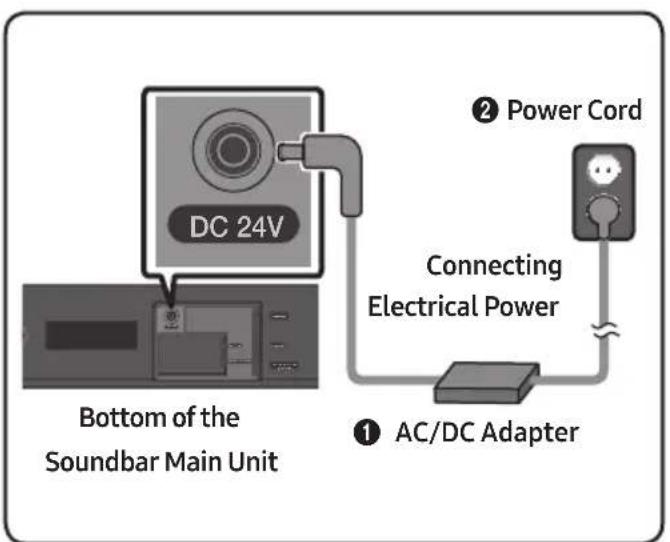
- Make sure to rest the AC/DC Adapter flat on a table or the floor. If you place the AC/DC Adapter so that it is hanging with the AC cord input facing upwards, water or other foreign substances could enter the Adapter and cause the Adapter to malfunction.
Expand to true wireless surround sound by connecting the Samsung Wireless Rear Speaker Kit (SWA-8500S) to your Soundbar (Sold separately). For more information, see the Samsung Wireless Rear Speaker Kit manual.
04 CONNECTING TO YOUR TV
Hear TV sound from your Soundbar through wired or wireless connections.
-
When the Soundbar is connected to selected Samsung TVs, the Soundbar can be controlled using the TV's remote control.
-
When you connect using an optical cable, this feature is supported by 2017 Samsung Smart TVs that support Bluetooth.
- This function also allows you to use the TV menu to adjust the sound field and various settings as well as the volume and mute.
Method 1. Connecting with a Cable
When the audio in a broadcast is encoded in Dolby Digital and the "Digital Output Audio Format" on your TV is set to PCM, we recommend that you change the setting to Dolby Digital. When the setting on the TV is changed, you will experience better sound quality. (The TV menu may differ depending on the TV manufacturer.)
Connecting using an Optical Cable
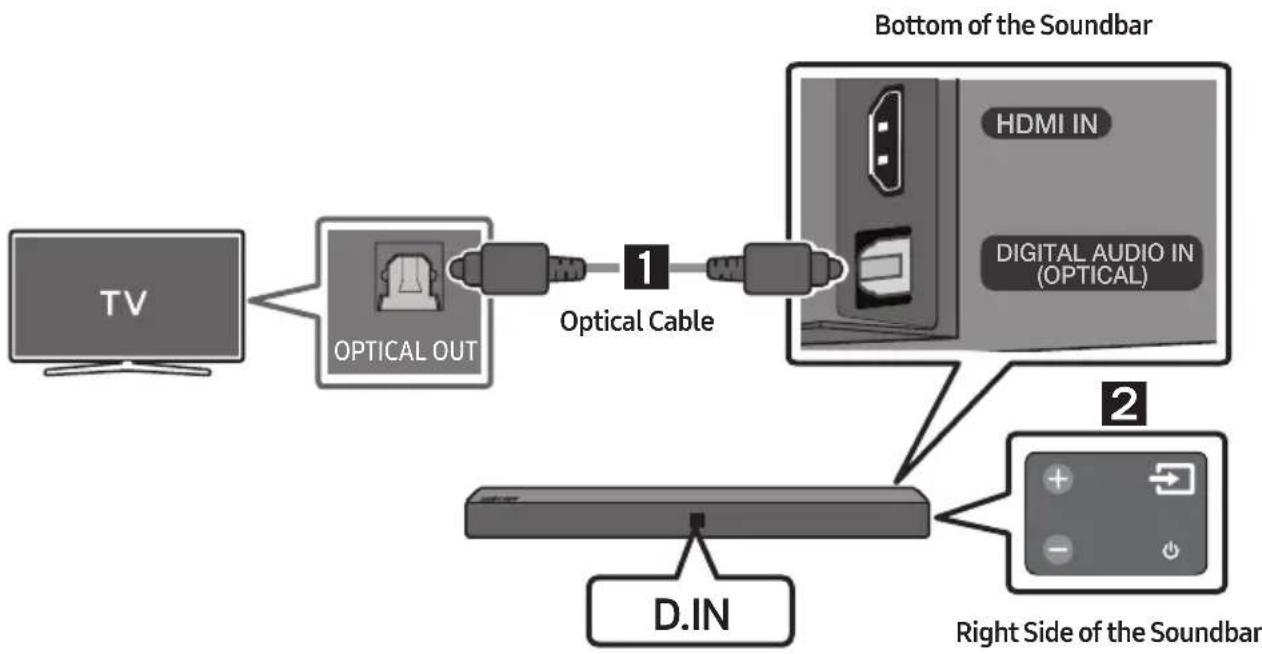
- Connect the DIGITAL AUDIO IN (OPTICAL) jack on the Soundbar to the OPTICAL OUT jack of the TV with a digital optical cable.
- Press the (Source) button on the right side panel or remote control, and then select the "D.IN" mode.
Auto Power Link
Auto Power Link automatically turns on the Soundbar when the TV is turned on.
-
Connect the Soundbar and a TV with a digital optical cable.
-
Press the Left button on the remote control for 5 seconds to turn Auto Power Link on or off.
-
Auto Power Link is set to ON by default.
(To turn off this function, turn off Auto Power on the Soundbar.)
- Depending on the connected device, Auto Power Link may not function.
- This function is only available in the "D.IN" mode.
Connecting a TV using an HDMI Cable
-
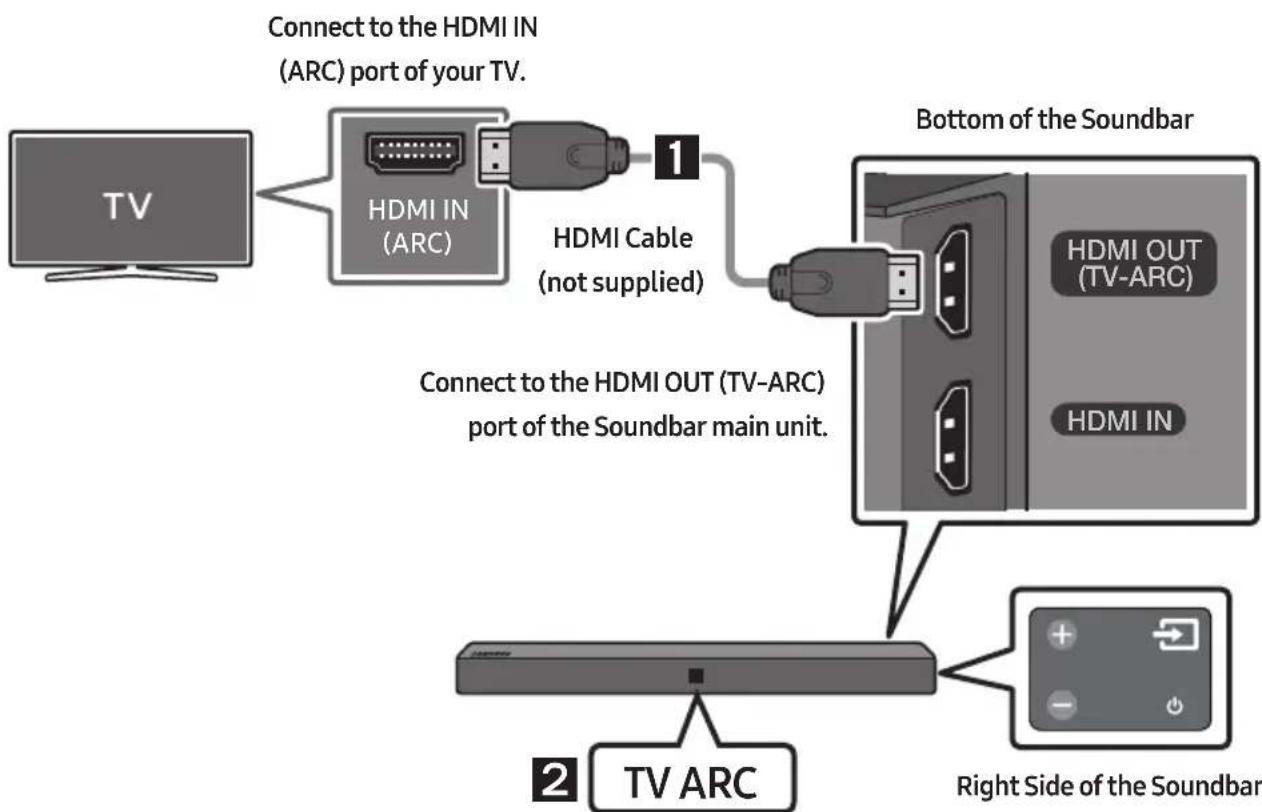
With the Soundbar and TV turned on, connect the HDMI cable (not supplied) as shown in the figure.
-
"TV ARC" appears in the display window of the Soundbar main unit and the Soundbar plays TV sound.
-
If TV sound is inaudible, press the (Source) button on the remote control or on the right side of the Soundbar to switch to "D.IN" mode. The screen displays "D.IN" and "TV ARC" in sequence, and TV sound is played.
-
If "TV ARC" does not appear in the display window of the Soundbar main unit, confirm that the cable is connected to the correct port.
- Use the volume buttons on the TV's remote control to change the volume on the Soundbar.
NOTES
- HDMI is an interface that enables the digital transmission of video and audio data with just a single connector.
- If the TV provides an ARC port, connect the HDMI cable to the HDMI IN (ARC) port.
-
We recommend you use a coreless HDMI cable if possible. If you use a cored HDMI cable, use one whose diameter is less than 14mm .
-
Anynet+ must be turned on.
- This function is not available if the HDMI cable does not support ARC.
Method 2. Connecting Wirelessly
Connecting a TV via Bluetooth
When a TV is connected using Bluetooth, you can hear stereo sound without the hassle of cabling.
- Only one TV can be connected at a time.

The initial connection
- Press the (Source) button on the right side panel or on the remote control, and then select "BT".
-
Change "BT" to "BT PAIRING".
-
When "BT READY" appears, press the PAIR button on the remote control or press and hold the (Source) button on the right side panel of the Soundbar for more than 5 seconds to display "BT PAIRING".
-
Select Bluetooth mode on the TV. (For more information, see the TV's manual.)
- Select "[AV] Samsung Soundbar Nxxx N-Series" from the list on TV's screen.
An available Soundbar is indicated with "Need Pairing" or "Paired" on the TV Bluetooth device list. To connect the TV to the Soundbar, select the message, and then establish a connection.
-
When the TV is connected, [TV Name] "BT" appears on the Soundbar's front display.
-
You can now hear TV sound from the Soundbar.
NOTE
- After you have connected the Soundbar to your TV the first time, use the "BT READY" mode to reconnect. See Page 9 for details.
If the device fails to connect
- If the previously connected Soundbar listing (e.g. "[AV] Samsung Soundbar Nxxx N-Series") appears in the list, delete it.
- Press the PAIR button on the remote control or in "BT" mode, press and hold the (Source) button for more than 5 seconds on the right side of the Soundbar to switch to "BT PAIRING" mode. Then, select "[AV] Samsung Soundbar Nxxx N-Series" from the TV's search list.
What is the difference between BT READY and BT PAIRING?
- BT READY: In this mode, you can search for previously connected TVs or connect a previously connected mobile device to the Soundbar.
- BT PAIRING: In this mode, you can connect a new device to the Soundbar. (Press the PAIR button on the remote control or press and hold the Source) button for more than 5 seconds on the right side of the Soundbar while in "BT" mode.)
NOTES
- If asked for a PIN code when connecting a Bluetooth device, enter <0000>.
- In Bluetooth connection mode, the Bluetooth connection will be lost if the distance between the Soundbar and the Bluetooth device exceeds 10 meters.
- The Soundbar automatically turns off after 5 minutes in the Ready state.
-
The Soundbar may not perform Bluetooth search or connection correctly under the following circumstances:
-
If there is a strong electrical field around the Soundbar.
- If several Bluetooth devices are simultaneously paired with the Soundbar.
-
If the Bluetooth device is turned off, not in place, or malfunctions.
-
Electronic devices may cause radio interference. Devices that generate electromagnetic waves must be kept away from the Soundbar main unit - e.g., microwaves, wireless LAN devices, etc.
Disconnecting the Soundbar from the TV
Press the (Source) button on the right side panel or on the remote control and switch to any mode but "BT".
- Disconnecting takes time because the TV must receive a response from the Soundbar. (The time required may differ, depending on the TV model.)
- To cancel the automatic Bluetooth connection between the Soundbar and TV, press the II (Play/Pause) button on the remote control for 5 seconds in "BT READY" status. (Toggle On → Off)
05 CONNECTING AN EXTERNAL DEVICE
Connect to an external device via a wired or wireless network to play the external device's sound through the Soundbar.
Connecting using an Optical or Analogue Audio (AUX) Cable
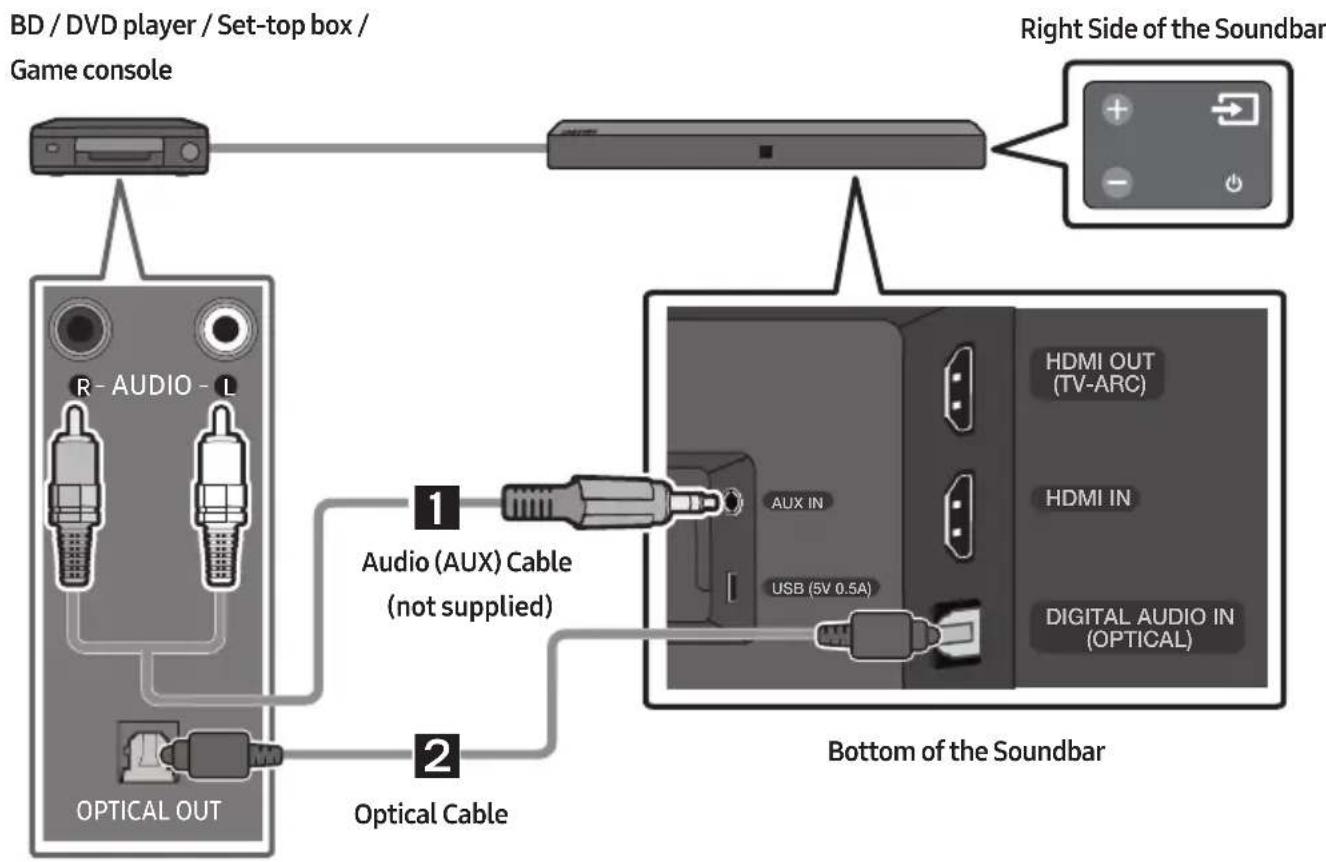
1 Audio (AUX) Cable
Connect AUXIN (Audio) on the main unit to the AUDIO OUT jack of the Source Device using an audio cable.
Select "AUX" mode by pressing (Source) button on the right side panel or on the remote control.
2 Optical Cable
Connect DIGITAL AUDIO IN (OPTICAL) on the main unit to the OPTICAL OUT jack of the Source Device using a digital optical cable.
2 Select "D.IN" mode by pressing the (Source) button on the right side panel or on the remote control.
Connecting using an HDMI Cable
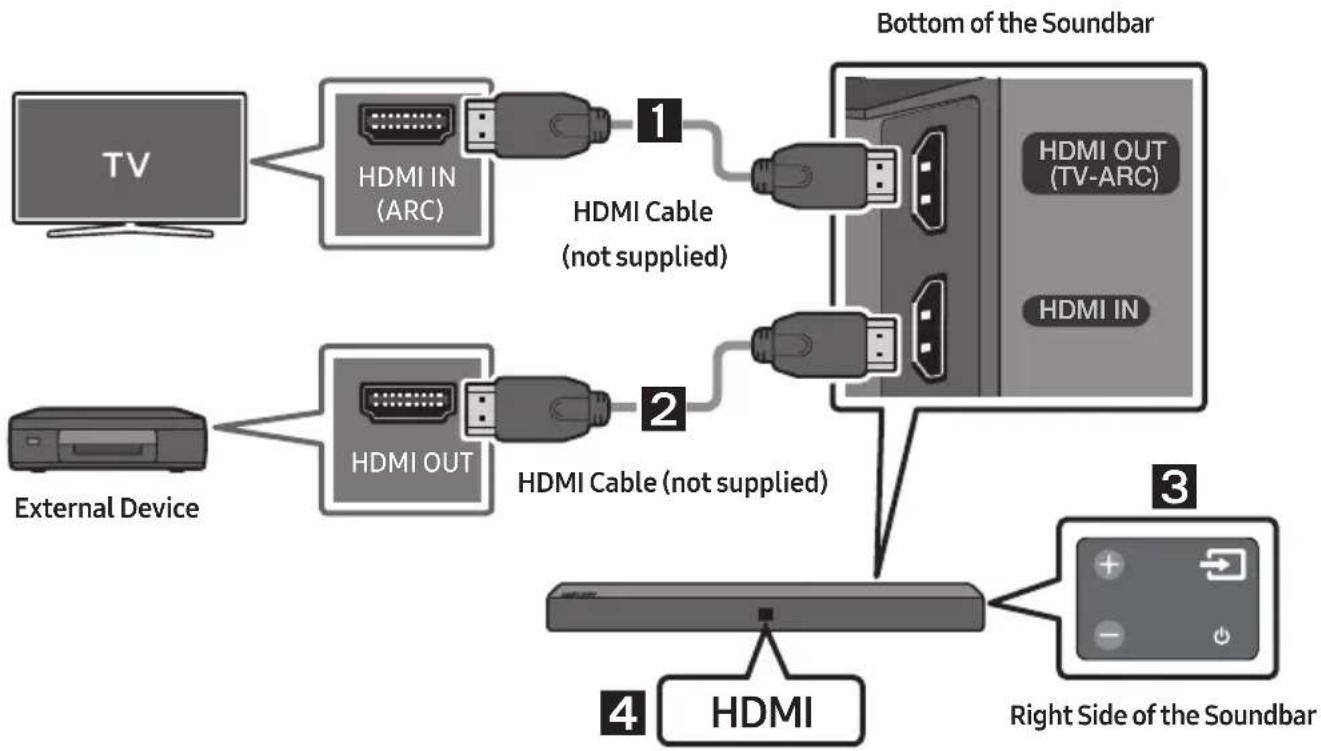
- Connect an HDMI cable (not supplied) from the HDMI OUT (TV-ARC) jack on the back of the product to the HDMI IN jack on your TV.
- Connect an HDMI cable (not supplied) from the HDMI IN jack on the back of the product to the HDMI OUT jack on your digital device.
- Press the (Source) button on the right side panel or on the remote control, and then select "HDMI".
- "HDMI" mode is displayed on the Soundbar display panel and sound plays.
06 CONNECTING A USB
You can play music files located on USB storage devices through the Soundbar.
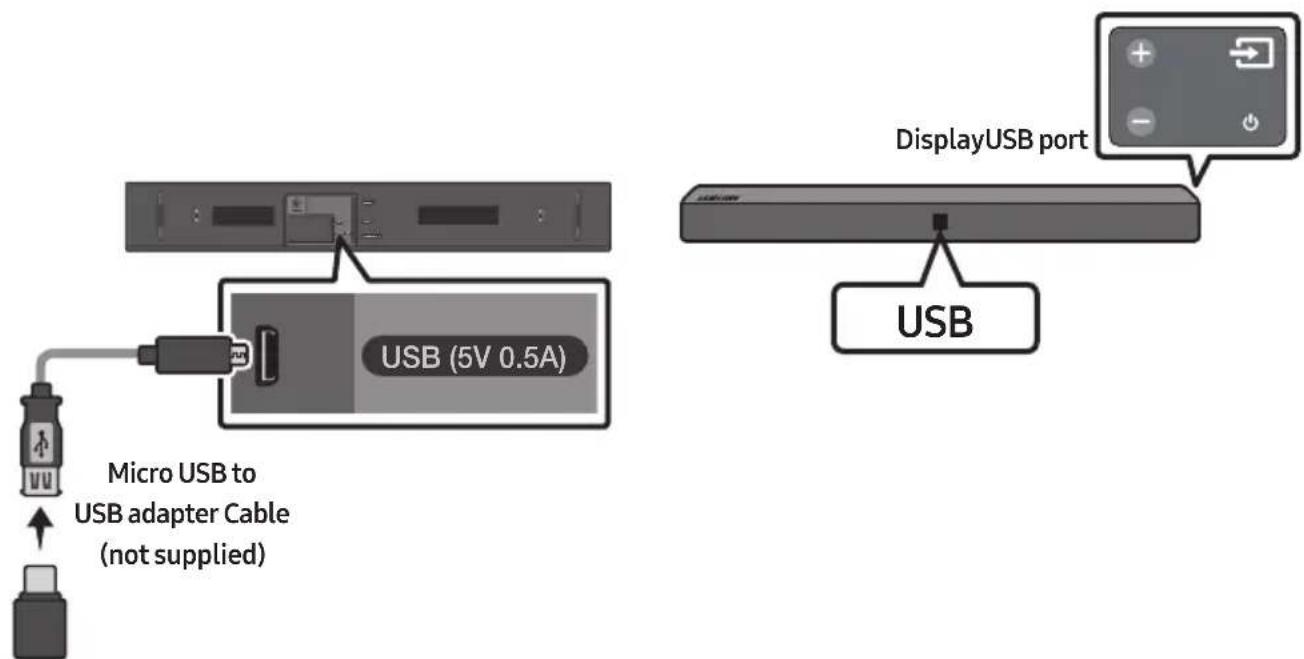
-
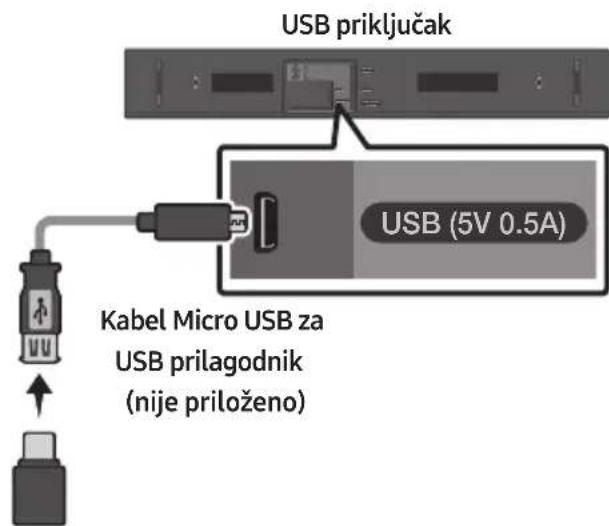
Connect a Micro USB to USB adapter cable with a male USB 2.0 Micro USB plug (Type B) on one end and a standard female 2.0 USB jack (Type A) on the other end to the micro USB jack on your Soundbar.
-
The Micro USB to USB adapter cable is sold separately. To purchase, contact a Samsung Service Centre or Samsung Customer Care.
-
Connect your USB device to the female end of the adapter cable.
-
Press the (Source) button on the right side panel or on the remote control, and then select "USB".
-
"USB" appears in the display screen.
-
Play music files from the USB storage device through the Soundbar.
-
The Soundbar automatically turns off (Auto Power Off) if no USB device has been connected for more than 5 minutes.
File Format Type Compatibility list
| Extension Codec Sampling | Rate Bitrate | ||
| *.mp3 MPEG 1 Layer2 16KHz | ~48KHz 80kbps~320kbps | ||
| MPEG 1 Layer3 16KHz ~ 48KHz 80kbps~320kbps | |||
| MPEG 2 Layer3 16KHz ~ 48KHz 80kbps~320kbps | |||
| MPEG 2.5 Layer3 16KHz ~ 48KHz 80kbps~320kbps | |||
| *.wma Wave_Style_MSAAudio1 16KHz ~ 48KHz 56kbps~128kbps | |||
| Wave_Style_MSAudio2 | 16KHz ~ 48KHz 56kbps~128kbps | ||
| *.aac | AAC | 16KHz ~ 96KHz | 48kbps~320kbps |
| AAC-LC | 16KHz ~ 96KHz | 128kbps~192kbps5.1ch 320kbps | |
| HE-AAC | 24KHz ~ 96KHz | 48kbps~64kbps5.1ch 160kbps | |
| *.wav | - | 16KHz ~ 48KHz | up to 3000kbps |
| *.ogg | OGG 1.1.0 | 16KHz ~ 48KHz | 50kbps~500kbps |
| *.flac | FLAC 1.1.0, FLAC 1.2.1 | 16KHz ~ 96KHz | up to 3000kbps |
- If there are too many folders and files stored on the USB device, it may take the Soundbar some time to access and play files.
07 CONNECTING A MOBILE DEVICE
Connecting via Bluetooth
When a mobile device is connected using Bluetooth, you can hear stereo sound without the hassle of cabling.
- You cannot connect more than one Bluetooth device at a time.
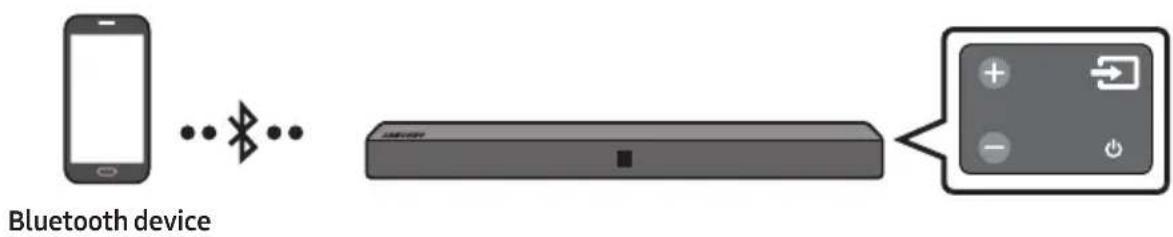
The initial connection
- Press the (Source) button on the right side panel or on the remote control, and then select "BT".
-
Change "BT" to "BT PAIRING".
-
When "BT READY" appears, press the PAIR button on the remote control or press and hold the (Source) button on the right side panel of the Soundbar for more than 5 seconds to display "BT PAIRING".
-
Select "[AV] Samsung Soundbar Nxxx N-Series" from the list that appears.
- When the Soundbar is connected to the Bluetooth device, [Bluetooth Device Name] "BT" appears in the front display.
- Play music files from the device, connected via Bluetooth, through the Soundbar.
NOTE
- After you have connected the Soundbar to your mobile device the first time, use the "BT READY" mode to reconnect. See Page 15 for details.
If the device fails to connect
- If a previously connected Soundbar listing (e.g. "[AV] Samsung Soundbar Nxxx N-Series") appears in the list, delete it.
- Press the PAIR button on the remote control or in "BT" mode, press and hold the Source) button for more than 5 seconds on the right side of the Soundbar to switch to "BT PAIRING" mode. Then, select "[AV] Samsung Soundbar Nxxx N-Series" from the Bluetooth device search list.
What is the difference between BT READY and BT PAIRING?
- BT READY: In this mode, you can search for previously connected TVs or connect a previously connected mobile device to the Soundbar.
- BT PAIRING: In this mode, you can connect a new device to the Soundbar. (Press the PAIR button on the remote control or press and hold the Source) button for more than 5 seconds on the right side of the Soundbar while in "BT" mode.)
NOTES
- If asked for a PIN code when connecting a Bluetooth device, enter <0000>.
- In Bluetooth connection mode, the Bluetooth connection will be lost if the distance between the Soundbar and the Bluetooth device exceeds 10 meters.
- The Soundbar automatically turns off after 5 minutes in the Ready state.
-
The Soundbar may not perform Bluetooth search or connection correctly under the following circumstances:
-
If there is a strong electrical field around the Soundbar.
- If several Bluetooth devices are simultaneously paired with the Soundbar.
-
If the Bluetooth device is turned off, not in place, or malfunctions.
-
Electronic devices may cause radio interference. Devices that generate electromagnetic waves must be kept away from the Soundbar main unit - e.g., microwaves, wireless LAN devices, etc.
- The Soundbar supports SBC data (44.1kHz, 48kHz).
- Connect only to a Bluetooth device that supports the A2DP (AV) function.
- You cannot connect the Soundbar to a Bluetooth device that supports only the HF (Hands Free) function.
-
Once you have paired the Soundbar to a Bluetooth device, selecting "[AV] Samsung Soundbar Nxxx N-Series" from the device's scanned devices list will automatically change the Soundbar to "BT" mode.
-
Available only if the Soundbar is listed among the Bluetooth device's paired devices.
(The Bluetooth device and the Soundbar must have been previously paired at least once.)
- The Soundbar will appear in the Bluetooth device's searched devices list only when the Soundbar is displaying "BT READY".
Soundbar cannot be paired to another Bluetooth device, while using the Bluetooth function.
Bluetooth Power On (SOUND MODE)
If a previously paired Bluetooth device tries to pair with the Soundbar when the Bluetooth Power On function is on and the Soundbar is turned off, the Soundbar turns on automatically.
- Press and hold the SOUND MODE button for more than 5 seconds on the remote while the Soundbar is turned on.
- "ON-BLUETOOTH POWER" appears on the Soundbar's display.
Disconnecting the Bluetooth device from a Soundbar
You can disconnect a Bluetooth device from the Soundbar. For instructions, see the Bluetooth device's user manual.
- The Soundbar will be disconnected.
- When the Soundbar is disconnected from the Bluetooth device, the Soundbar will display "BT DISCONNECTED" on the front display.
Disconnecting the Soundbar from the Bluetooth device
Press the (Source) button on the right side panel or on the remote control, and then change to any mode except "BT".
- Disconnecting takes time because the Bluetooth device must receive a response from the Soundbar. (Disconnection time may differ, depending on the Bluetooth device)
- When the Soundbar is disconnected from the Bluetooth device, the Soundbar will display "BT DISCONNECTED" on the front display.
NOTES
- In Bluetooth connection mode, the Bluetooth connection will be lost if the distance between the Soundbar and the Bluetooth device exceeds 10 meters.
- The Soundbar automatically turns off after 5 minutes in the Ready state.
More About Bluetooth
Bluetooth is a technology that enables Bluetooth-compliant devices to interconnect easily with each other using a short wireless connection.
- A Bluetooth device may cause noise or malfunction, depending on usage, if:
- A part of your body is in contact with the receiving/transmitting system of the Bluetooth device or the Soundbar.
- It is subject to electrical variation from obstructions caused by a wall, corner, or office partition.
- It is exposed to electrical interference from same frequency-band devices including medical equipment, microwave ovens, and wireless LANs.
- Pair the Soundbar with the Bluetooth device while they are close together.
- The further the distance between the Soundbar and Bluetooth device, the worse the quality is. If the distance exceeds the Bluetooth operational range, the connection is lost.
- In poor reception areas, the Bluetooth connection may not work properly.
- The Bluetooth connection only works when it is close to the unit. The connection will be automatically cut off if the Bluetooth device is out of range. Even within range, the sound quality may be degraded by obstacles such as walls or doors.
- This wireless device may cause electric interference during its operation.
Using the Samsung Audio Remote App
Installing the Samsung Audio Remote App
To control the Soundbar with your smart device and the Samsung Audio Remote app, download the Samsung Audio Remote app from the Google Play store.
Market search : Samsung Audio Remote

Launching the Samsung Audio Remote App
To launch and use the Samsung Audio Remote app, touch the Audio Remote icon on your smart device, and then follow the directions on the screen.
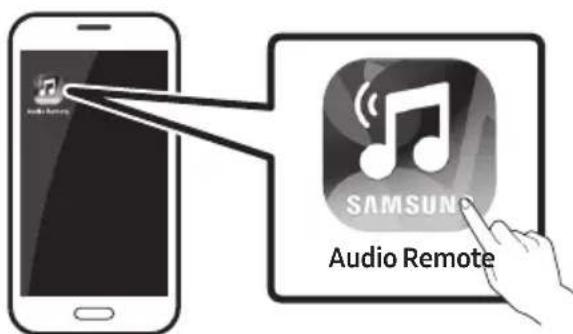
- The Samsung Audio Remote app is only compatible with Android mobile phones and mobile devices running Android OS 3.0 or later.
08 USING THE REMOTE CONTROL
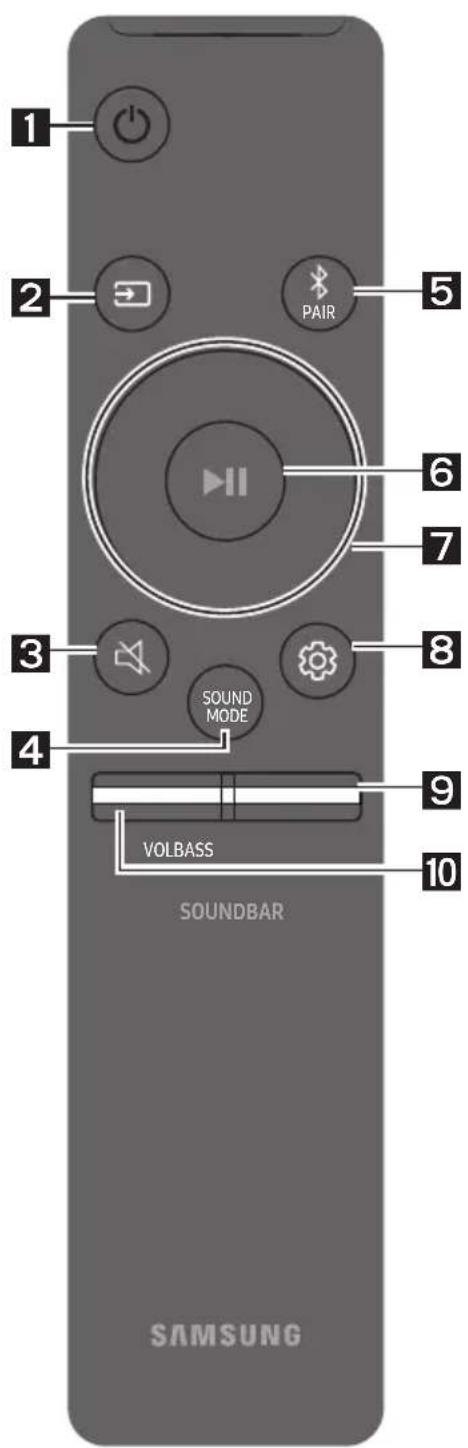
How to Use the Remote Control
| 1 | Power | Turns the Soundbar on and off. |
| 2 | Source | Press to select a source connected to the Soundbar. • BT PAIRING mode To turn on “BT PAIRING” mode, press and hold the (Source) button for more than 5 seconds. |
| 3 | Mute | Press the (Mute) button to mute the sound. Press it again to unmute the sound. |
| 4 | SOUND MODE | You can select the desired sound effect by choosing STANDARD or SURROUND. Select the “STANDARD” mode if you want to enjoy the original sound. • DRC (Dynamic Range Control) Lets you apply dynamic range control to Dolby Digital tracks. If you press and hold the SOUND MODE button while in standby mode, DRC (Dynamic Range Control) turns on or off. With the DRC turned on, loud sound is reduced. (The sound may be distorted.) • Bluetooth Power This feature automatically turns Soundbar on when receiving a connection request from a previously connected TV or Bluetooth device. The setting is On by default. • Press and hold the SOUND MODE button for more than 5 seconds to turn off Bluetooth Power function. |
| 5 | Bluetooth PAIR | Press the PAIR button. "BT PAIRING" appears in the Soundbar's display. You can connect to a new Bluetooth device in this mode by selecting the device from the Bluetooth device search list. |
| 6 | Play / Pause | Press the ➔ button to pause a music file temporarily. When you press the button again, the music file plays. • Auto Power Down Function The unit turns off automatically in the following situations. - D.IN / HDMI / BT / USB Mode: If there is no audio signal for 5 minutes. - AUX Mode: - If the Audio (AUX) Cable is disconnected for 5 minutes. - If there is no KEY input for 8 hours when the Audio (AUX) Cable is connected. (Auto Power Down function can be turned off only in that case.) - To turn off Auto Power Down function, while in "AUX" mode, press and hold the ➔ button for 5 seconds. "ON-AUTO POWER DOWN" / "OFF-AUTO POWER DOWN" appears on the display. |
| 7 | Up/Down/ Left/Right | Press the indicated areas to select Up/Down/Left/Right. Press Up/Down/Left/Right on the button to select or set functions. • Repeat To use the Repeat function in "USB" mode, press the Up button. • Music Skip Press the Right button to select the next music file. Press the Left button to select the previous music file. • Anynet+ / Auto Power Link You can turn Anynet+ and Auto Power Link on or off. Anynet+ and Auto Power Link are controlled by the Right and Left buttons respectively. - Anynet+: If the Soundbar is connected to a Samsung TV through an HDMI cable, you can control your Soundbar with a Samsung TV remote control. Press and hold the Right button for 5 seconds to toggle Anynet+ ON and OFF. - Auto Power Link: If the Soundbar is connected to your TV through a digital optical cable, the Soundbar can automatically turn on when you turn on your TV. Press and hold the Left button for 5 seconds to toggle Auto Power Link ON and OFF. - Anynet+ / Auto Power Link are set to ON by default. |
| ·Volume restriction function Because it may damage hearing when the power is turned on at high volumes, it adjusts the volume to 20 when the set volume is higher than 20. - The default value for Volume restriction is off. The set volume is maintained even when the power is turned off. - To change the setting, press and hold the Down button on the remote control for 5 seconds. With the volume restriction off, "V FREE" appears on the front display and with the function on, "V LOCK" appears. | ||
| 8 | Sound Control | You can select from TREBLE, AUDIO SYNC, REAR LEVEL, or REAR SPEAKER ON/OFF. ·To adjust the TREBLE volume, select Sound Control TREBLE, and then use the Up/Down buttons to adjust the volume within the -6 to +6 range. ·Press and hold the (Sound Control) button for about 5 seconds to adjust the sound for each frequency band. 150Hz, 300Hz, 600Hz, 1.2KHz, 2.5KHz, 5KHz, and 10KHz are selectable (Left/Right) and each can be adjusted to a setting between -6 ~ +6 (Up/Down). ·If the video and audio between the TV and your Soundbar are not synchronised, select AUDIO SYNC in Sound Settings, and then set audio delay between 0~300 milliseconds by using the Up/Down buttons. (Except "USB" mode) ·If surround speakers (not supplied) are connected, select REAR LEVEL and use the Up/Down buttons to adjust the volume within the -6 to +6 range. The REAR SPEAKER function can be turned ON/OFF by using the Up/Down buttons. ·AUDIO SYNC is only supported in some functions. |
| 9 | BASS | Push the button up or down to adjust the bass volume within the -6 to +6 range. To set the bass volume level to 0, press the button. |
| 10 | VOL | Push the button up or down to adjust the volume. ·Mute Press the VOL button to mute the sound. Press it again to unmute the sound. |
Adjusting the Soundbar volume with a TV remote control
Use the TV menu to set the TV speaker on a Samsung TV to external speakers. (For more information, see the TV's user manual.)
- After installing the Soundbar, you can adjust the Soundbar's volume using the IR remote control that came with a Samsung TV. (If you do not want to use this function, when the Soundbar is on, push the BASS button up and hold it for 5 seconds. "OFF-TV REMOTE" appears in the Soundbar's display and the function turns off.)
To adjust the volume using only the Samsung TV remote control, push the BASS button up and hold it for more than 5 seconds until "SAMSUNG-TV REMOTE" appears in the Soundbar display.
-
Each time you push the BASS button up and hold it for 5 seconds, the mode switches in the following order: "SAMSUNG-TV REMOTE" (Default mode) "OFF-TV REMOTE" "ALL-TV REMOTE".
-
To adjust the Soundbar volume with the remote control that came with a TV made by a third party manufacturer, turn the Soundbar on, push the BASS button up and hold it for 5 seconds ("OFF-TV REMOTE" appears on the Soundbar's display), release the BASS button, and then push the BASS button up and hold it again for more than 5 seconds. ("ALL-TV REMOTE" appears on the Soundbar's display.)
-
This function may not be available, depending on the remote control.
- Manufacturers supporting this function: VIZIO, LG, Sony, Sharp, PHILIPS, PANASONIC, TOSHIBA, GRUNDIG, Hisense, RCA
Using the Hidden Buttons
| Hidden Button | Reference page | |
| Remote Control Button Function | ||
| BASS | TV remote control On/Off (Standby) | page 21 |
| (Source) | BT Pairing page 18 | |
| ▶II (Play / Pause) | Auto Power Down On/Off (AUX mode) | page 19 |
| Initialise (Standby) page 26 | ||
| BT Ready page 9 | ||
| Left | Auto Power Link ON/OFF | page 19 |
| Right Anynet+ ON/OFF page 19 | ||
| Down | Volume restriction On/Off | page 20 |
| (Sound Control) | 7 Band EQ page 20 | |
| SOUND MODE | DRC ON/OFF (Standby) page 18 | |
| Bluetooth Power page 18 | ||
Output specifications for the different sound effect modes
| Effect | Input | Output | ||
| Except Wireless Rear Speaker Kit | Include Wireless Rear Speaker Kit | |||
| SOUND MODE | STANDARD | 2.0 ch | 2.0 ch 4.0 ch | |
| 5.1 ch | 2.0 ch 4.0 ch | |||
| SOUND MODE | SURROUND | 2.0 ch | 2.0 ch 4.0 ch | |
| 5.1 ch | 2.0 ch 4.0 ch | |||
- Samsung Wireless Rear Speaker Kit can be purchased separately. To purchase a Kit, contact the vendor you purchased the Soundbar from.
09 INSTALLING THE WALL MOUNT
Installation Precautions
Install on a vertical wall only.
- Do not install in a place with high temperature or humidity.
- Verify whether the wall is strong enough to support the product's weight. If not, reinforce the wall or choose another installation point.
- Purchase and use the fixing screws or anchors appropriate for the kind of wall you have (plaster board, iron board, wood, etc.). If possible, fix the support screws into wall studs.
Purchase wall mounting screws according to the type and thickness of the wall you want to mount the Soundbar on.
Diameter: M5
Length: 35mm or longer recommended.
- Connect cables from the unit to external devices before you install the Soundbar on the wall.
Make sure the unit is turned off and unplugged before you install it. Otherwise, it may cause an electric shock.
Wallmount Components

Wall Mount Guide
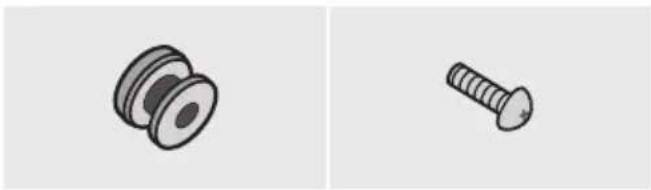

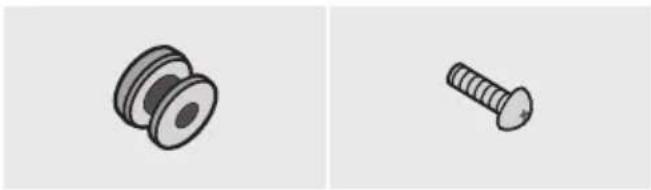
Holder-Screw (2 EA) Screw (2 EA)
Bracket-Wall Mount (2 EA)
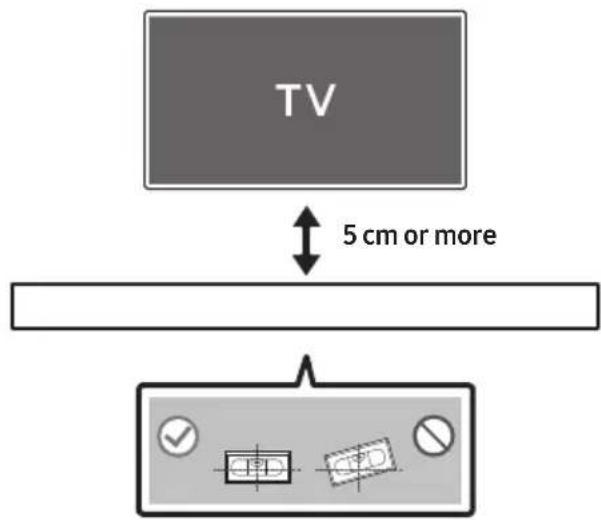
- Place the Wall Mount Guide against the wall surface.
The Wall Mount Guide must be level.
If your TV is mounted on the wall, install the Soundbar at least 5 cm below the TV.
-
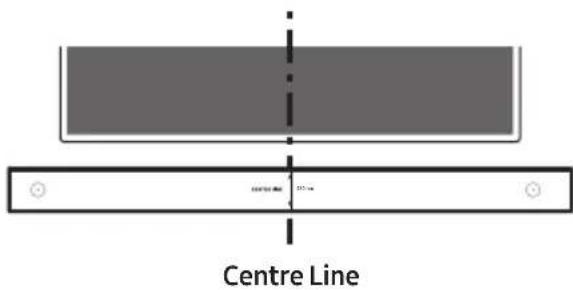
Align the Paper Template's Centre Line with the centre of your TV (if you are mounting the Soundbar below your TV), and then fix the Wall Mount Guide to the wall using tape.
-
If you are not mounting below a TV, place the Centre Line in the centre of the installation area.
- Use a sharp object, such as a pen or pencil, to mark the holes' positions, and then remove the Wall mount Guide.
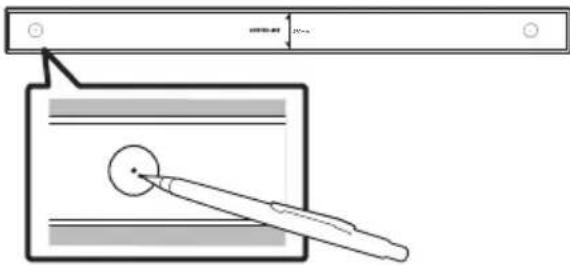
-
Using an appropriately sized drill bit, drill a hole in the wall at each marking.
-
If the markings do not correspond to the positions of studs, make sure you insert appropriate anchors or molliies into the holes before you insert the support screws. If you use anchors or molliies, make sure the holes you drill are large enough for the anchors or molliies you use.
-
Push a screw (not supplied) through each Holder-Screw, and then screw each screw firmly into a support screw hole.
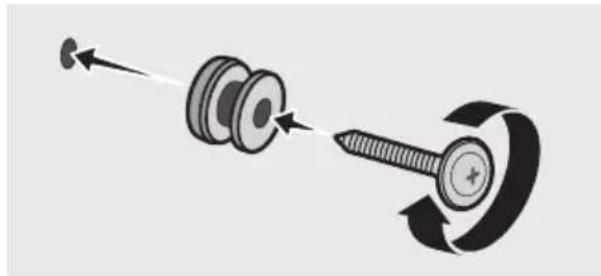
- Install the 2 Bracket-Wall Mounts in the correct orientation on the bottom of the Soundbar using 2 Screws.
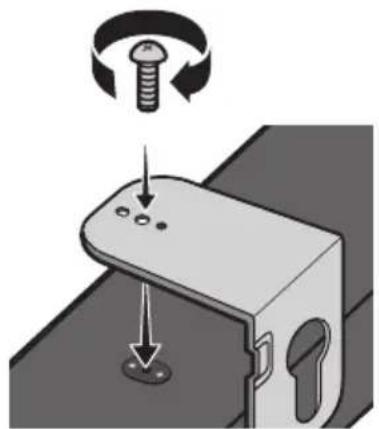
- When assembling, make sure the hanger part of the Bracket-Wall Mounts are located behind the rear of the Soundbar.
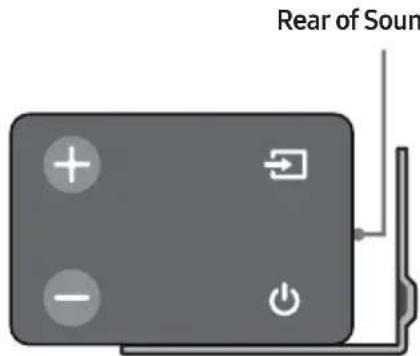
Right end of Soundbar
- Install the Soundbar with the attached Bracket-Wall Mounts by hanging the Bracket-Wall Mounts on the Holder-Screws on the wall.
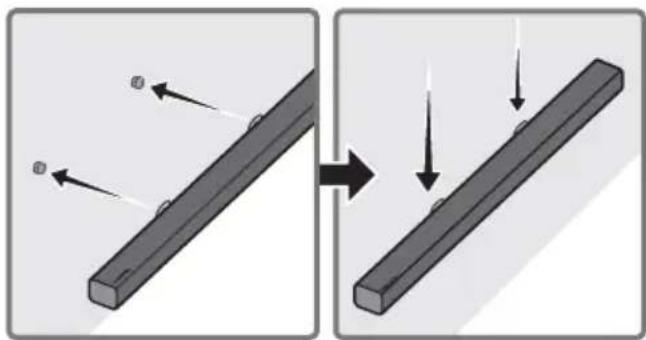
-
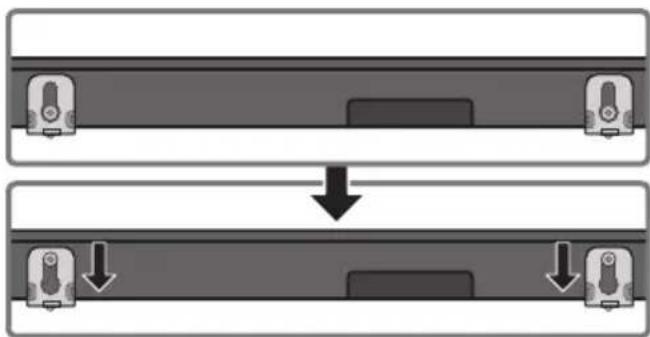
Slide the Soundbar down as shown below so that the Bracket-Wall Mounts rest securely on the Holder-Screws.
-
Insert the Holder-Screws into the wide (bottom) part of the Bracket-Wall Mounts, and then slide the Bracket-Wall Mounts down so that Bracket-Wall Mounts rest securely on the Holder-Screws.
10 SOFTWARE UPDATE
Samsung may offer updates for the Soundbar's system firmware in the future.
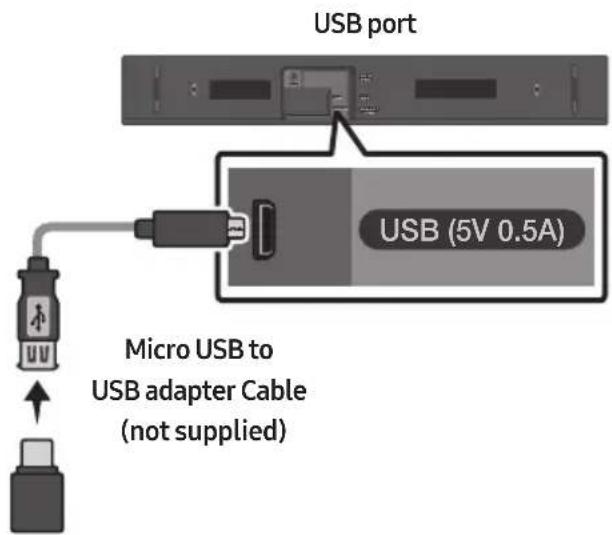
If an update is offered, you can update the firmware by connecting a USB device with the firmware update stored on it to the USB port on your Soundbar.
For more information about how to download update files, go to the Samsung Electronics website at (www.samsung.com Support). Then, enter or select the model number of your Soundbar, select the Software & Apps option, and then Downloads. Note that the option names can vary.
Updating Procedure
-
Connect a Micro USB to USB adapter cable with a male USB 2.0 Micro USB plug (Type B) on one end and a standard female 2.0 USB jack (Type A) on the other end to the micro USB jack on your Soundbar.
-
The Micro USB to USB adapter cable is sold separately. To purchase, contact a Samsung Service Centre or Samsung Customer Care.
-
Follow the steps below to download the product software:
Go to the Samsung website at (samsung.com) search for the model name - select the customer support option (the option name is subject to change) - Save the downloaded software to a USB stick and select "Extract Here" to unzip the folder.
- Turn off the Soundbar and connect the USB stick containing the software update to the female port on a Micro USB adapter cable. Connect the cable to the USB port on the Soundbar.
- Turn on the Soundbar. Within 3 minutes, "UPDATE" is displayed and updating begins.
-
When the update finishes, the Soundbar turns off. Press the button on the remote control for 5 seconds. "INIT" appears on the display and then the Soundbar turns off. The update is complete.
-
This product has a DUAL BOOT function. If the firmware fails to update, you can update the firmware again.
If UPDATE is not displayed
- Turn off the Soundbar, disconnect and then reconnect the USB storage device that contains the update files to the Soundbar's USB port.
-
Disconnect the Soundbar's power cord, reconnect it, and then turn on the Soundbar.
-
Updating firmware may not work properly if audio files supported by the Soundbar are stored in the USB storage device.
- Do not disconnect the power or remove the USB device while updates are being applied. The main unit will turn off automatically after completing the firmware update.
- After update is completed, the user setup in Soundbar is initialised. We recommend you write down your settings so that you can easily reset them after the update. If the software update fails, check if the USB stick is defective.
- Mac OS users should use MS-DOS (FAT) as the USB format.
- Updating via USB may not be available, depending on the USB storage device manufacturer.
11 TROUBLESHOOTING
Before seeking assistance, check the following.
The unit will not turn on.
Is the power cord plugged into the outlet?
Connect the power plug to the outlet.
A function does not work when the button is pressed.
Is there static electricity in the air?
Disconnect the power plug and connect it again.
Sound dropouts occur in BT mode.
See the Bluetooth connection sections on pages 8 and 14.
Sound is not produced.
Is the Mute function on?
Press the VOL button to cancel the function.
Is the volume set to minimum?
Adjust the Volume.
The remote control does not work.
Are the batteries drained?
Replace with new batteries.
Is the distance between the remote control and Soundbar main unit too far?
Move the remote control closer to the Soundbar main unit.
12 LICENCE

DOLBY
AUDIO
Manufactured under license from Dolby Laboratories. Dolby, Dolby Audio, Pro Logic, and the double-D symbol are trademarks of Dolby Laboratories.


2.0 Channel
For DTS patents, see http://patents.dts.com. Manufactured under license from DTS Licensing Limited. DTS, the Symbol, DTS in combination with the Symbol, and DTS 2.0 Channel are registered trademarks or trademarks of DTS, Inc. in the United States and/or other countries. © DTS, Inc. All Rights Reserved.

HIGH-DEFINITION MULTIVECOM INTERFACE
The terms HDMI and HDMI High-Definition Multimedia Interface, and the HDMI Logo are trademarks or registered trademarks of HDMI Licensing LLC in the United States and other countries.
13 OPEN SOURCE LICENCE NOTICE
To send inquiries and requests regarding open sources, contact Samsung via Email (oss.request@samsung.com).
14 IMPORTANT NOTES ABOUT SERVICE
- Figures and illustrations in this User Manual are provided for reference only and may differ from actual product appearance.
- An administration fee may be charged if either
(a) an engineer is called out at your request and there is no defect with the product (i.e. where the user manual has not been read).
(b) you bring the unit to a repair centre and there is no defect with the product (i.e. where the user manual has not been read).
- You will be informed of the administration fee amount before a technician visits.
15 SPECIFICATIONS AND GUIDE
Specifications
| Model Name HW-N400 | |
| USB 5V/0.5A | |
| Weight 3.0 kg | |
| Dimensions(W x H x D) 640.0 x 71.0 x 100.3 mm | |
| Operating Temperature Range +5°C to +35°C | |
| Operating Humidity Range 10 % ~ 75 % | |
| Supported play formats (DTS 2.0 sound is played in DTS format.) | LPCM 2ch, Dolby Audio™ (supporting Dolby® Digital), DTS |
| WIRELESS DEVICE OUTPUT POWER BT max transmitter power SRD max transmitter power | 100mW at 2.4GHz – 2.4835GHz 25mW at 5.725GHz – 5.825GHz |
| Overall Standby Power Consumption (W) 2.9W | |
| Bluetooth Port deactivation method | Press and hold the SOUND MODE button for more than 5 seconds to turn off Bluetooth Power function. |
NOTES
Samsung Electronics Co., Ltd reserves the right to change the specifications without notice.
Weight and dimensions are approximate.
- Hereby, Samsung Electronics, declares that this equipment is in compliance with Directive 2014/53/EU.
The full text of the EU declaration of conformity is available at the following internet address: http://www.samsung.com go to Support > Search Product Support and enter the model name.
This equipment may be operated in all EU countries.

(Applicable in countries with separate collection systems)
This marking on the battery, manual or packaging indicates that the batteries in this product should not be disposed of with other household waste at the end of their working life. Where marked, the chemical symbols Hg, Cd or Pb indicate that the battery contains mercury, cadmium or lead above the reference levels in EC Directive 2006/66.
If batteries are not properly disposed of, these substances can cause harm to human health or the environment.
To protect natural resources and to promote material reuse, please separate batteries from other types of waste and recycle them through your local, free battery return system.
Correct Disposal of This Product
(Waste Electrical & Electronic Equipment)
(Applicable in countries with separate collection systems)
This marking on the product, accessories or literature indicates that the product and its electronic accessories (e.g. charger, headset, USB cable) should not be disposed of with other household waste at the end of their working life. To prevent possible harm to the environment or human health from uncontrolled waste disposal, please separate these items from other types of waste and recycle them responsibly to promote the sustainable reuse of material resources.
Household users should contact either the retailer where they purchased this product, or their local government office, for details of where and how they can take these items for environmentally safe recycling.
Business users should contact their supplier and check the terms and conditions of the purchase contract. This product and its electronic accessories should not be mixed with other commercial wastes for disposal.
For information on Samsung's environmental commitments and product specific regulatory obligations e.g. REACH, WEEE, Batteries, visit:
http://www.samsung.com/uk/aboutsamsung/samsungelectronics/corporatecitizenship/data-corner.html
MeToI. Cbbp3BaHe uee3 Ka6eJ
- Cbbp3BaHe ue3 onTnueH ka6eI
- Cbbp3BaHe Ha TeleBn3Op Upe3 HDMI ka6eI
MeToI2.Be3KnUHO Cbbp3BaHe 8
- Cbbp3BaHe Ha TeleBn3Op Upe3 Bluetooth 8
05 Cbbp3BaHe Ha BbHsHo yctpoiCTBO 10
Cbbp3BaHe ype3 onTnueH nIaHaIaRoB ayDno (AUX) ka6eI 10
Cbbp3BaHe uepe3HDMI ka6eI 11
06 Cbbp3BaHe Ha USB 12
07 Cbbp3BaHe Ha Mo6nIHO yCTpoiCTBO 14
Cbbp3BaHe uee3 Bluetooth 14
I3noJI3BaHe Ha npInoJxHnETo Audio Remote Ha Samsung 17
-Инсталларе на пиюжениTo Audio Remote Ha Samsung 17
- CtapTupaHe Ha npiloxKeHneTo Audio Remote Ha Samsung 17
08 I3noI3BaHe Ha dInCTaHcNoHHoto ynpabLeHne 18
Kak da n3noJ3BaTe ndaHcHooHHoTo ynpabHeHne 18
HactpoBbHe Ha cnlaTa Ha 3Byka Ha Soundbar Upe3 nInctaHcNoHHO
ynpablenneHaTeleBn3Op 21
I3noJ3BaHe Ha cKpntte 6yToHn 22
I3xoJHn cneuΦHKaun 3a pa3JIuHHTe peKIM 3a 3ByKOb eKeTn 22
09 MoNTnpaHe Ha KOH3OJaTa 3a CTeHa 23
IpeiNa3HmepKn npMoHTaX 23
KOMnoHeHTn 3a CteHeH MOHTaX 23
KoMNoHeTn 3a CTeHeH MoHTaJx

Bodau 3a MOHTIPAHe Ha cTeHa
Ako He ce nokajke UPDATE
1.ИЗКЛЮЧЕ Soundbar,ИЗВадеTe И CBьржete OTHOBO USB CTиKa,КоИTO CBДьрЖа Файловete сaktyaJIиЗaци,КьМ USB npopta HaSoundbar.
2.ИЗклочete зхранвашия кавел на Soundbar, сдд това го CBьржete OTHOBOи ВКлочete Soundbar.
- Aktyализиранeto Na Фърмуера можende не павелно, акоayднофайLOBete подьржан OTSoundbar, ca сьхсан c USB стika.
He n3KlIOUBAIte 3axpaHbAHeTo n He otCTpaHbAaTe USB yCTpoiCTBOTO, JOKaTO ce aKtuaN3aunTe ce npnlaRaT. OCHOBnRT Moyn Ie ce n3KluOnn abTomatNo CneJ 3aBbPbBaHe Ha aKtuaN3aunTa Ha bPmyepa. - Cnéi KaTo aKtuaJIIN3aIyraTa 3aBbPShn, ce HnHnUaJIIN3Iupat Notpe6nteJcKInTe HacTpoNk Ha Soundbar. IpenOpbUBaMe Da cn 3aPiWte BaIInTe HacTpoNk, TaKa Ye IecHO da MoXeTe da rN Bb3CTaHOBInTe Cnéi aKtuaJIIN3aIyra.
Ako aKtyaIIN3aIyraHa coΦTyepa e HeycneuHa, npOBepTe daIIN USB cTnKbT He e deΦeKTeH.
→3aMeHeTe C HOBN 6aTeepuN.
Pa3ctoHHeTo MeKdy DnCTaHcNoHHTo ynpabNeHne N OCHOBHO To yCtpoiCTBO Ha Soundbar TBbpDe roJMy o n e?
Manufactured under license from Dolby Laboratories. Dolby, Dolby Audio, Pro Logic, and the double-D symbol are trademarks of Dolby Laboratories.

dtts
2.0 Channel
For DTS patents, see http://patents.dts.com. Manufactured under license from DTS Licensing Limited. DTS, the Symbol, DTS in combination with the Symbol, and DTS 2.0 Channel are registered trademarks or trademarks of DTS, Inc. in the United States and/or other countries. © DTS, Inc. All Rights Reserved.
HOODEFINITION MULTIMEDIA INTERFACE
The terms HDMI and HDMI High-Definition Multimedia Interface, and the HDMI Logo are trademarks or registered trademarks of HDMI Licensing LLC in the United States and other countries.
13 Белека 3A ЛицензA 3A OTBOPEH KOD
3a n3npaune Ha 3aNTBaHnI N 3aBKn BbB Bpb3Ka C n3TOuHnIte C OTBopeH KOd Ce CBpKTe cbc Samsung ype3 ImeJ (oss.request@samsung.com).
14BAJKH N BELEXKIN3A OBCIyXBAHETO
- Κифпге и Июстрацни Te B TOBa Рыковдъво 3a Notpeбпгела с Ппедoctавенсамо 3a Справka и могатда Се разлчавat OT DeиCTВИтELHЯ ИЗгелДи ИЗдениeto.
- Je da ce haucn TaKca 3a aDMHNCtpnpaHe, aKO:
(a) e n3BnKaH TexnK NO BaIe HAcToBaHe N HЯMa DeΦeKT B npOdykTa (T.e. He CTe npOyei npkoBOdCTBOTO 3a NOTpe6ntela)
(b) 3ahece Te ypeDa B cepBn3eH ceHTbp NHaMa DeΦeKT B npOdyKta (T.e. He cTe npOueI npKOBOcTBOTO 3a Notpe6ntela).
Cymata 3a Ta3n TaKca 3a aDMNHnCTpnpaHe
Ie BN 6bIe Cbo6uHa, npEi Da ce
INBbPun KaKBato I da e 6nlo pa6Ota nn
NoceUeHne BkBUn.
[Праин Ho n3Xbрл� He Ha 6aTePnIte B To3n npOdyKT]
(HaJIuHOBCTpaHn CbCcnCTeMn 3a pa3dEJIHO CMeTOcb6Hpae)
ToBa 6o3HaueHne Bbpyx 6aTePnraT, pBkoBOcTBOT OIN ONaKOBkata, NOKa3Ba, Ye 6aTePnnte B To3n npOdyKT He 6nBa Da ce n3XbPnT C dpyrnte 6bTOBn OTpaDbuN B KpaH Na TexHn POne3eH JxIBOT. KbJeTo ca MapKnpaHn, XmNuecknTe cMBoJn Hg, Cd nIi Pb NOKa3BaT, Ye 6aTePnTa cbDbpKa JxNBaK, KaDMn nIi ONOBO HaD KOHTpONHte HnBa B DInpeKtNb2006/66 Ha EO.
Ako 6aTeepnte He ce n3XbPnT npaBnH0, Te3n BeuecTba MoRaT da npedeN3BnKaT yBpeJdaHe Ha OBeuKOTo 3dpaBe nn Ha OKoJHaTa CpeJa.
3a da npednataHte npnpoHnTe pecypcn n 3a da cbdeiCTBaTe 3a MHOROKpaTHaTa ynoTpe6a Ha MaTePnaJHnTe pecypcn, MoIa OTdEJIaTe 6aTePnTe OTpyrIe BINOBe OTpAdbHn PPOyKtnn rPeuNKnPaIte NocpeIcTBom BaWata IokaHa cnCTema 3a 6e3PiATHO BpbUaHe Ha 6aTePNI.
IpaBnH0 TpeTnpaHe Ha n3denneto Cnei KpaHa eKcnnoatauOHnMy XNBOT (OtnaDbz, npedctabnaBaun eektpnuecko n eektpoHNO 60pydahe)
(HaJIuHOBCTpaHn CbCcnCTeMn 3a pa3deJIHO cmTeOcb6npaHe)
To3n 3HaK, nocTaBeH Bbpyx H3dJIeHTo, HeROBn npHaJLeJXHoCTN IIn neaTHn MaTePnaIa, O3HaJaBa, Ye npOyKbT n npHaJdJIeJXHOCTHte (HaIpIMep 3apJdHO yCTPOINCTBO, ClyuJALKn, USB ka6en) He 6nBa da ce n3XBbPnT 3aeIDHO cDpyrHTE 6INTOBN OTNaDbU, KORATO n3Teue ekCnloaTaUOnHHnT My JKBOT. OTdJIaYTe Te3n yCTPOINCTBA OT dpYrHTE BnIOBn OTNaDbU, nI npEJaBAITE 3a peuKlnpaHe. Cna3BaJKN TOBa npAByNo He n3JaRte Ha ONaCHO TdPaBETo HA dpyrN Xopa N ppeJNa3BaTe OKoJHaTa CpeDa ot 3AmBpcBaHe, PpeJIN3BnKaHO OT 6e3KoHTpoJHO n3XBbPJIaHE Ha OTNaDbU. OCBEN TOBa, INO6HO OTROBOPHO NOBeJeHne Cb3DaBA Bb3MOJHOCT 3a IOBTOPHO (ekOJIoRNUHO cb06pa3HO) IN3IOJ3BaHe Ha MaTePnaJInHe pecypcn.
ДомашнITE NOTpe6nteI Tp86Ba Да ce CBbpKAT C TbproBeca Ha Дpe6Ho, OT KOROTO ca 3aKyniNnI3dJIIneTO, ИИ NcBc CbOTBeTHaT MeCTHa DbpKABH a reHcIa, 3a Да ПОЛуЧТ ПОДрбHи HHTpyKcIIN KbdeN KORA MORAT DA 3aHeCaT Te3N UcTpoIcTBa 3a peuKJInpaHe, 6e3OncHO 3a OKOLHATA cpeIa.
KopnpaunBnnte noTpe6nten CneBa da ce CBpbka T doctabuKa cn n da npOBeprT yCNOBnTa Ha IdoRObopa 3a nokyNka. ToBa n3dene N HeROBte eNeKtpoHn PpHaadJeXHOCTn He 6nBa da ce cMeCTBat C dpyrnte OTNaDbuHa TbproBCKOTn PpeDnprTne.
3a INHOPMaIgN OTHOCHO aHraJIMeHTIe Ha Samsung no OTHOJIeHne Ha OKOIHaTc cpea nCpeuΦnHITe 3a npOyKta peRyIaTOpHn 3aIbJIxKeHn, NaPpIMep REACH, WEEE, 6aTePN, NocTeTe: http://www.samsung.com/uk/aboutsamsung/samsungelectronics/corporatecitizenship/data-corner.html
SIGURNOSNE INFORMACije
SIGURNOSNA UPOZORENJA
DA BISTE SMANJILI OPASNOST OD
ELEKTRICNOG UDARA, NE ODSTRANJUJE
POKLOPAC (ILI POLEDINU).
U UNUTRAŠNJOSTI NEMA DIJELOVA KOJE MOZE
SERVISIRATI KORISNIK. PREPUSTITE
SERVISIRANJE KVALIFICIRANOM SERVISNOM
OSOBLJU.
| 4 | OPREZ OPASNOST OD ELEKTRICNOG UDARA NE OTVARAJTE |
| 5 | Ovaj simbol znači da je struja u unutrašnjosti visokog napona. Opasno je dolaziti u bilo kakav doticaj s unutarnjim sklopovima proizvoda. |
| 7 | Ovaj simbol naznačuje da je uz urežaj priložena važna dokumentacija o njejgovom radu i odžavanju. |
| 10 | Proizvod II. razreda: Ovaj simbol označava da.nije potrebna sigurnosna veza s uzemljem. |
| ~ | AC napon: Ovaj simbol označava da nazivni napon označen navenimen simbolom predstavlja AC napon. |
| --- | DC napon: Ovaj simbol označava da nazivni napon označen navenimen simbolom predstavlja DC napon. |
| ai | Oprez, pogledajte upute za upotrebu: Ovaj simbol upićuje korisnika da potraži dodatne informacije u pogledu sigurnosti u korisničkom prisćniku. |
UPOZORENJE
- Da biste smanjili opasnost od požara ili elektricnog udara, ne izlažite uredaj kisi ili vlazi.
OPREZ
DA BISTE SPRIJEČILI ELEKTRICNI UDAR, NAMJESTITE ŠIROKE KONTAKTE UTIKAÇA U SIOK UTOR, UMETNUT DO KRAJA.
- Ovaj uredaj treba uvijek biti spojen na uticnicu izmjenične struje sa zašitnim uzemljenjem.
- Da biste isključili urežaj iz struje, morate izvuci utikač iz strujne utičnice. Stoga strujni utikač treba biti spreman za rad.
- Ne izlažite ovaj urešaj kapanju ili prskanjutekućina. Ne stavljajte predmete punetekućine, poput vaza, na urešaj.
- Da biste potpuno isključili ovaj uredaj, morate izvuci utikač za napajanje iz zidne uticnice. Stoga utikač mora uvijek biti lako dostupan.
MJERE OPREZA
SamsungUNCTS Samsung iPhone 5, 6, 7, 8, 9, 10, 11, 12, 13, 14, 15, 16, 17, 18, 19, 20, 21, 22, 23, 24, 25, 26, 27, 28, 29, 30, 31, 32, 33, 34, 35, 36, 37, 38, 39, 40, 41, 42, 43, 44, 45, 46, 47, 48, 49, 50, 51, 52, 53, 54, 55, 56, 57, 58, 59, 60, 61, 62, 63, 64, 65, 66, 67, 68, 69, 70, 71, 72, 73, 74, 75, 76, 77, 78, 79, 80, 81, 82, 83, 84, 85, 86, 87, 88, 89, 90, 91, 92, 93, 94, 95, 96, 97, 98, 99
Ako je ponudeno ažuriranje, možete ažurirati opremu povezivanjem uredaja USB na kojem je pohranjeno ažuriranje s priključkom za USB na vašem uredaju Soundbar.
Za vishe informacija o preuzimanju dokumenata za ažuriranje pogledajte mrežnu stranicu Samsung Electronics na (www.samsung.com Support). Poté zadejte nebo vyberte model vašeho zařizení Soundbar, vyberte možnost Software a aplikace a potom Ke staženi. Imajte na umu da se nazivi opcija mogu razlikovati.
Postupak ažuriranja
- Spojite kabel Micro USB za USB prilagodnik s muskim prikljuckom Micro USB 2.0 (tip B) s jederne strane i standardnim zenskim prikljuckom 2.0 USB (tip A) s druge strane s Micro USB prikljuckom na uredaju Soundbar.
- Kabel Micro USB za USB prilagodnik prodaje se zasebno. Za kupnju kontaktirajte Samsungov servisni centar ili korisničku podršku.
- Slijedite korake u nastavku kako bistepreuzeli softver proizvoda: ldite na mreznomjesto Samsung na adresi (samsung.com) pretražite naziv modela - odaberitemogucnost podrške za korisnika (nazivmogucnosti moze se promijeniti)
- Spremite preuzeti softver na USB uredaj za pohranu podataka i odaberite „lzdvojiti ovdje" kako biste raspakirali mapu.
- Iskljucite Soundbar i umetnite USB uredaj za pohranu podataka s ažuriranjem softvera uŽenski prikljucak na Micro USB kabelu s adapterom. Spojite USB kabel u USB prikljucak na sustavu Soundbar.
- Ukljucite Soundbar. Unutar 3 minute prikazuje se poruka „UPDATE" i ažuriranje započinja.
-
Kada je ažuriranje dovrseno, Soundbar se isključuje. Na daljinskom upravljac pritisnite i zadržite gumb 5 sekundi. Na załonu ce se prikazati „INIT" i zatim ce se Soundbar isključiti. Ažuriranje je završeno.
-
Ovaj proizvod ima funkcjju DUAL BOOT. Ako se firmver ne ažurira, možete ga ažurirati ponovno.
Manufactured under license from Dolby Laboratories. Dolby, Dolby Audio, Pro Logic, and the double-D symbol are trademarks of Dolby Laboratories.

dt
2.0 Channel
For DTS patents, see http://patents.dts.com. Manufactured under license from DTS Licensing Limited. DTS, the Symbol, DTS in combination with the Symbol, and DTS 2.0 Channel are registered trademarks or trademarks of DTS, Inc. in the United States and/or other countries. © DTS, Inc. All Rights Reserved.

HIGHOEPIINMULTMDAETTERFAE
The terms HDMI and HDMI High-Definition Multimedia Interface, and the HDMI Logo are trademarks or registered trademarks of HDMI Licensing LLC in the United States and other countries.
13 OBAVIJEST O LICENCIZA UPORABU SOFTVERA OTVORENOC KODA
Za slanje upita i zahtjeva u vezi otvorenih izvora obratite se tvrtki Samsung putem e-poste (oss.request@samsung.com).
14 VAŽNA NAPOMENA VEZANA UZ SERVIS
- Slike u ovom korisničkom priručniku služe kao samo kao referencei i mogu se razlikovati od stvarnog izgleda proizvoda.
- Moguca je naplata administrativne pristojbe u slučaju
(a) poziva inzenjera na vaš zahtjev, a nema oštećenja na proizvodu (tj. ako niste pročitali korisnički prirucnik)
(b) da做一些te Jedinicu na popravak u servis, a nema ostecenja na proizvodu (tj. akoniste procitali korisnicki prisucnik)
- S visinom administrativne pristojbe bit cete upoznati prise poduzimanja bilo kakvih radnji ili kućnog posjeta.
15 TEHNICKI PODACI I VODIC
Tehnicki podaci
| Naziv modela HW-N400 | |
| USB 5V/0,5A | |
| Težina 3,0 kg | |
| Dimenzije (Š x V x D) 640,0 x 71,0 x 100,3 mm | |
| Raspon radne temperature +5°C do +35°C | |
| Raspon vlažnosti 10% ~ 75% | |
| Podržani formati za reprodukciju (Zvuk DTS 2.0 se reproducira u formatu DTS.) | LPCM 2ch, Dolby Audio™ (podržava Dolby® Digital), DTS |
| IZLAZNA SNAGA BEŽICNOG UREDAJA | |
| Maks. snaga BT odašiljača | 100mW pri 2,4GHz - 2,4835GHz |
| Maks. snaga SRD odašiljača | 25mW pri 5,725GHz - 5,825GHz |
| Ukupna potrošnja energije u stanju mirovanja (W) | 2,9W |
| Bluetooth Način isključivanja ulaza | Pritisnite i držite gumb SOUND MODE dulje od 5 sekundi da biste isključili funkcjju Bluetooth Power. |
NAPOMENE
Samsung Electronics Co., Ltd prirzava pravo promjene specifikacija bez prethodne obavijesti.
- Težina i dimenzije su priblizni.
Manufactured under license from Dolby Laboratories. Dolby, Dolby Audio, Pro Logic, and the double-D symbol are trademarks of Dolby Laboratories.


2.0 Channel
For DTS patents, see http://patents.dts.com. Manufactured under license from DTS Licensing Limited. DTS, the Symbol, DTS in combination with the Symbol, and DTS 2.0 Channel are registered trademarks or trademarks of DTS, Inc. in the United States and/or other countries. © DTS, Inc. All Rights Reserved.

HIGHODEFINITION MULTIMEDIA INTERFAC
The terms HDMI and HDMI High-Definition Multimedia Interface, and the HDMI Logo are trademarks or registered trademarks of HDMI Licensing LLC in the United States and other countries.
13 POZNÁMKA K LICENCI OTEVRENEHO SOFTWARE
Das Benutzerhandbuch hat zwei Teile:这其中, there are two basic concepts. The first is the concept of a handbuch. It is a book that has been written by a number of authors and which includes a description of the basic concepts and their definitions. The second is a text about how to use these concepts.

BENUTZERHANDBUCH
Manufactured under license from Dolby Laboratories. Dolby, Dolby Audio, Pro Logic, and the double-D symbol are trademarks of Dolby Laboratories.


2.0 Channel
For DTS patents, see http://patents.dts.com. Manufactured under license from DTS Licensing Limited. DTS, the Symbol, DTS in combination with the Symbol, and DTS 2.0 Channel are registered trademarks or trademarks of DTS, Inc. in the United States and/or other countries. © DTS, Inc. All Rights Reserved.

HIGH-DEFINITION MULTIMEDIA INTERFACE
The terms HDMI and HDMI High-Definition Multimedia Interface, and the HDMI Logo are trademarks or registered trademarks of HDMI Licensing LLC in the United States and other countries.
13 BEKANNTMACHUNG ZU OPEN SOURCE LIZENZEN
Manufactured under license from Dolby Laboratories. Dolby, Dolby Audio, Pro Logic, and the double-D symbol are trademarks of Dolby Laboratories.

dt
2.0 Channel
For DTS patents, see http://patents.dts.com. Manufactured under license from DTS Licensing Limited. DTS, the Symbol, DTS in combination with the Symbol, and DTS 2.0 Channel are registered trademarks or trademarks of DTS, Inc. in the United States and/or other countries. © DTS, Inc. All Rights Reserved.

HIGHOEPIINMULTMDAETTERFAE
The terms HDMI and HDMI High-Definition Multimedia Interface, and the HDMI Logo are trademarks or registered trademarks of HDMI Licensing LLC in the United States and other countries.
13 AVATUD LÄHTEKOODI LITSENTSI TEATIS
Manufactured under license from Dolby Laboratories. Dolby, Dolby Audio, Pro Logic, and the double-D symbol are trademarks of Dolby Laboratories.

dtts
2.0 Channel
For DTS patents, see http://patents.dts.com. Manufactured under license from DTS Licensing Limited. DTS, the Symbol, DTS in combination with the Symbol, and DTS 2.0 Channel are registered trademarks or trademarks of DTS, Inc. in the United States and/or other countries. © DTS, Inc. All Rights Reserved.

HIGH-DEFINITION MULTIMEDIA INTERFACE
The terms HDMI and HDMI High-Definition Multimedia Interface, and the HDMI Logo are trademarks or registered trademarks of HDMI Licensing LLC in the United States and other countries.
13 AVIS DE LICENCE LIBRE
Mnwc eival evepyonolneyn n aeitoupyia oiyac;
Manufactured under license from Dolby Laboratories. Dolby, Dolby Audio, Pro Logic, and the double-D symbol are trademarks of Dolby Laboratories.


2.0 Channel
For DTS patents, see http://patents.dts.com. Manufactured under license from DTS Licensing Limited. DTS, the Symbol, DTS in combination with the Symbol, and DTS 2.0 Channel are registered trademarks or trademarks of DTS, Inc. in the United States and/or other countries. © DTS, Inc. All Rights Reserved.

HIGHOFFINIONMULTIMEDIAINTERSFAC
The terms HDMI and HDMI High-Definition Multimedia Interface, and the HDMI Logo are trademarks or registered trademarks of HDMI Licensing LLC in the United States and other countries.
13 EIDONOIHSEH TIA TIEADECIEXPHESI ANIGMIKOY ANOXTOY KQAIKA
Manufactured under license from Dolby Laboratories. Dolby, Dolby Audio, Pro Logic, and the double-D symbol are trademarks of Dolby Laboratories.

dt
2.0 Channel
For DTS patents, see http://patents.dts.com. Manufactured under license from DTS Licensing Limited. DTS, the Symbol, DTS in combination with the Symbol, and DTS 2.0 Channel are registered trademarks or trademarks of DTS, Inc. in the United States and/or other countries. © DTS, Inc. All Rights Reserved.

HIGH-DEFINITION MULTINODAL INTERFAE
The terms HDMI and HDMI High-Definition Multimedia Interface, and the HDMI Logo are trademarks or registered trademarks of HDMI Licensing LLC in the United States and other countries.
13 NYICT FORRASKODU LICENC MEGJEGYZES
Manufactured under license from Dolby Laboratories. Dolby, Dolby Audio, Pro Logic, and the double-D symbol are trademarks of Dolby Laboratories.


2.0 Channel
For DTS patents, see http://patents.dts.com. Manufactured under license from DTS Licensing Limited. DTS, the Symbol, DTS in combination with the Symbol, and DTS 2.0 Channel are registered trademarks or trademarks of DTS, Inc. in the United States and/or other countries. © DTS, Inc. All Rights Reserved.

HIGHODEFINITION MULTIMEDIA INTERFACE
The terms HDMI and HDMI High-Definition Multimedia Interface, and the HDMI Logo are trademarks or registered trademarks of HDMI Licensing LLC in the United States and other countries.
13 AVVISO DI LICENZA OPEN SOURCE
11 PROBLEMU NOVER'SANA
Manufactured under license from Dolby Laboratories. Dolby, Dolby Audio, Pro Logic, and the double-D symbol are trademarks of Dolby Laboratories.

dtts
2.0 Channel
For DTS patents, see http://patents.dts.com. Manufactured under license from DTS Licensing Limited. DTS, the Symbol, DTS in combination with the Symbol, and DTS 2.0 Channel are registered trademarks or trademarks of DTS, Inc. in the United States and/or other countries. © DTS, Inc. All Rights Reserved.

HIGHPDEFINITION MULTIMEDIA INTERFAC
The terms HDMI and HDMI High-Definition Multimedia Interface, and the HDMI Logo are trademarks or registered trademarks of HDMI Licensing LLC in the United States and other countries.
13 PAZINOJUMS PAR ATVERTA PIRMKODA LICENCI
Manufactured under license from Dolby Laboratories. Dolby, Dolby Audio, Pro Logic, and the double-D symbol are trademarks of Dolby Laboratories.


2.0 Channel
For DTS patents, see http://patents.dts.com. Manufactured under license from DTS Licensing Limited. DTS, the Symbol, DTS in combination with the Symbol, and DTS 2.0 Channel are registered trademarks or trademarks of DTS, Inc. in the United States and/or other countries. © DTS, Inc. All Rights Reserved.

HHDEFINITION MULTIMEDIA INTERFACE
The terms HDMI and HDMI High-Definition Multimedia Interface, and the HDMI Logo are trademarks or registered trademarks of HDMI Licensing LLC in the United States and other countries.
13 ATVIROSIOS PROGRAMINES JRANGOS LICENCIJOS PRANEŠIMAS
Noredami siusti uzklausas ir prasymus, susijusius su atviraja programine jranga, susisiekite su „Samsung" el. pastu (oss.request @samsung.com).
14 SVARBI PASTABA APIE TECHNINE PRIEŽIÜRÅ
Manufactured under license from Dolby Laboratories. Dolby, Dolby Audio, Pro Logic, and the double-D symbol are trademarks of Dolby Laboratories.

dt
2.0 Channel
For DTS patents, see http://patents.dts.com. Manufactured under license from DTS Licensing Limited. DTS, the Symbol, DTS in combination with the Symbol, and DTS 2.0 Channel are registered trademarks or trademarks of DTS, Inc. in the United States and/or other countries. © DTS, Inc. All Rights Reserved.

HIGHOEPIINMULTMDAETTERFAE
The terms HDMI and HDMI High-Definition Multimedia Interface, and the HDMI Logo are trademarks or registered trademarks of HDMI Licensing LLC in the United States and other countries.
13 INFORMACJA O LICENCJI OPEN SOURCE
Manufactured under license from Dolby Laboratories. Dolby, Dolby Audio, Pro Logic, and the double-D symbol are trademarks of Dolby Laboratories.


2.0 Channel
For DTS patents, see http://patents.dts.com. Manufactured under license from DTS Licensing Limited. DTS, the Symbol, DTS in combination with the Symbol, and DTS 2.0 Channel are registered trademarks or trademarks of DTS, Inc. in the United States and/or other countries. © DTS, Inc. All Rights Reserved.

HSH-DEFINITION MULTIMEDIA INTERPAGE
The terms HDMI and HDMI High-Definition Multimedia Interface, and the HDMI Logo are trademarks or registered trademarks of HDMI Licensing LLC in the United States and other countries.
13 NOTIFICARE DELICENTÄ OPEN SOURCE
Pentru a trimite intrebari si solicitari referitoare la software-ul open source, contacta Samsung prin e-mail (oss.request@samsung.com).
14 NOTÄ IMPORTANT DESPRE SERVICE
SIGURNOSNE INFORMACije
SIGURNOSNA UPOZORENJA
DA BISTE SMANJILI OPASNOST OD
ELEKTRICNOG UDARA, NE SKIDAJTE POKLOPAC (ILI ZADNJU PLOCU).
UNUTRA SE NE NALAZE DELOVI KOJI SE MOGU
SERVISIRATI. SERVISIRANJE POVERITE
KVALIFIKOVANOM OSOBLJU SERVISA.
| 4 | OPREZ OPASNOST OD ELEKTRICNOG UDARA. NE OTVARATI. | |
| 5 | Ovaj simbol ukazuje na to da je unutar urežaja prisutan visoki napon. Svaka vrsta kontakta sa unutrašnjim komponentama ovog uredaja predstavlja opasnost. | |
| 1 | Ovaj simbol ukazuje na to da se uz proizvod isporučuje važna dokumentacija koja se odnosi na rukovanje i održavanje. | |
| Proizvod klase II: Ovaj simbol označava da povezivanje na zašitno elektricno uzemljenje nilje neophodno. | ||
| ~ | Naizmenična struja: Ovaj simbol označava da naizmeničnu struju. | |
| = | Jednosmerna struja: Ovaj simbol označava da Jednosmernu struju. | |
| i | Oprez, videti uputstva za upotrebu: Ovaj simbol upićuje korisnika da u korisnčkom prisćniku pročita dodatne informacije u vezi sa bezbednosću. | |
UPOZORENJE
- Da biste smanjili opasnost od požara ili elektricnog udara, ne izlazite ovaj proizvod kiši ili vlazi.
OPREZ
Manufactured under license from Dolby Laboratories. Dolby, Dolby Audio, Pro Logic, and the double-D symbol are trademarks of Dolby Laboratories.

dtts
2.0 Channel
For DTS patents, see http://patents.dts.com. Manufactured under license from DTS Licensing Limited. DTS, the Symbol, DTS in combination with the Symbol, and DTS 2.0 Channel are registered trademarks or trademarks of DTS, Inc. in the United States and/or other countries. © DTS, Inc. All Rights Reserved.

HIGHE-DEFINITION MULTIMEDIA INTERFAGE
The terms HDMI and HDMI High-Definition Multimedia Interface, and the HDMI Logo are trademarks or registered trademarks of HDMI Licensing LLC in the United States and other countries.
13 OBAVEŠTENJE O LICENCI OTVORENOG IZVORNOG KODA
Svoje upite i zahteve u vezi sa otvorenim izvornim kodovima možete uputiti kompaniji Samsung putem e-poste (oss.request@samsung.com).
14 VAŽNA NAPOMENA O SERVISIRANJU
- Slike i ilustracije koje su upotrebljene u ovom korisničkom uputstvu date su samo kao reference i mogu se razlikovati od vašeg proizyoda.
- Administratrivni troškovi mogu biti naplaceni u sledecim slučaievima;
(a) tehnicar je pozvan u vaš dom na vaš zahtev i ako proizvod niece u kvaru (tj. ako niste pročitali ovo korisničko uputstvo),
(b) vi donesete uredj u servisni centar, a proizvod nije u kvaru (tj. ako niste pročitali ovo korisničko uputstvo).
- I znos tih administrativnih troškova bice vam saopsten pre obavljanba bilo kakvih radova ili kučne posete.
15 SPECifikACIJEVODIC
Specifikacione
| Naziv modela HW-N400 | |
| USB 5V/0,5A | |
| Težina 3,0 kg | |
| Dimenzije (Š x V x D) 640,0 x 71,0 x 100,3 mm | |
| Opseg radne temperature +5°C do +35°C | |
| Radni opseg vlažnosti vazduha 10% ~ 75% | |
| Podržani formati za reprodukciju (DTS 2.0 zvuk se reprodukuje u DTS formatu.) | LPCM 2ch, Dolby Audio™ (podržani Dolby® Digital), DTS |
| IZLAZNA SNAGA BEŽICNOG UREDAJA | |
| BT maks. snaga predajnika | 100 mW pri 2,4 GHz - 2,4835 GHz |
| SRD maks. snaga predajnika | 25 mW pri 5,725 GHz - 5,825 GHz |
| Ukupna potrošnja energije u režimu mirovanja (W) | 2,9W |
| Bluetooth Način deaktivacije porta | Pritisnite i zadržite dugme SOUND MODE tokom više od 5 sekundi;kako biste isključili funkcju Bluetooth Power. |
NAPOMENE
Samsung Electronics Co., Ltd zadrzava pravo da promeni specifikacije bez prethodne najave.
- Težina i dimenzije su priblizne.
- Ovim putem Samsung Electronics izjavljuje da je ova oprema u skladu sa direktivom 2014/53/EU.
Kompletan sadržaj EU deklaracije o usaglasenosti je dostupan na sledećoj internet adresi: http://www.samsung.com; idite na Podrška > Pretraga podrške za proizvode i unesite naziv modela.
11 RIESENIE PROBLEMOV
Manufactured under license from Dolby Laboratories. Dolby, Dolby Audio, Pro Logic, and the double-D symbol are trademarks of Dolby Laboratories.

dtts
2.0 Channel
For DTS patents, see http://patents.dts.com. Manufactured under license from DTS Licensing Limited. DTS, the Symbol, DTS in combination with the Symbol, and DTS 2.0 Channel are registered trademarks or trademarks of DTS, Inc. in the United States and/or other countries. © DTS, Inc. All Rights Reserved.

HIGH-DEFINITION MULTINODAL INTERFACE
The terms HDMI and HDMI High-Definition Multimedia Interface, and the HDMI Logo are trademarks or registered trademarks of HDMI Licensing LLC in the United States and other countries.
13 POZNÁMKA K LICENCIIS OTVORENÍM ZDROJOVÍM KÓDOM
Manufactured under license from Dolby Laboratories. Dolby, Dolby Audio, Pro Logic, and the double-D symbol are trademarks of Dolby Laboratories.

dtts
2.0 Channel
For DTS patents, see http://patents.dts.com. Manufactured under license from DTS Licensing Limited. DTS, the Symbol, DTS in combination with the Symbol, and DTS 2.0 Channel are registered trademarks or trademarks of DTS, Inc. in the United States and/or other countries. © DTS, Inc. All Rights Reserved.

HIGH-DEFINITION MULTIMEDIA INTERFACE
The terms HDMI and HDMI High-Definition Multimedia Interface, and the HDMI Logo are trademarks or registered trademarks of HDMI Licensing LLC in the United States and other countries.
13 OBVESTILO O ODPRTOKODNIH LICENCAH
© 2018 Samsung Electronics Co., Ltd. All rights reserved.
Contact SAMSUNG WORLD WIDE
If you have any questions or comments relating to Samsung products, please contact the SAMSUNG customer care Centre.
| Country | Contact Centre | Web Site |
| ■Europe | ||
| UK 0330 SAMSUNG (7267864) | www.samsung.com/uk/support | |
| IRELAND (EIRE) | 0818 717100 | www.samsung.com/ie/support |
| GERMANY 06196 | 77 555 77 | www.samsung.com/de/support |
| FRANCE 01 48 63 | 00 00 | www.samsung.com/fr/support |
| ITALIA 800-SAMSUNG (800.7267864) | www.samsung.com/it/support | |
| SPAIN 0034902172678 | www.samsung.com/es/support | |
| PORTUGAL 808 207 267 | www.samsung.com.pt/support | |
| LUXEMBURG 26103 710 | www.samsung.com/be_fr/support | |
| NETHERLANDS 088 90 90 100 | www.samsung.com/nl/support | |
| BELGIUM 02-201 | 24-18 | www.samsung.com/be/support (Dutch)www.samsung.com/be_fr/support (French) |
| NORWAY 815 56480 | www.samsung.com/no/support | |
| DENMARK 707 0970 | 970 | www.samsung.com/dk/support |
| FINLAND 030-6227515 | www.samsung.com/fi/support | |
| SWEDEN | 0771 726 786 | www.samsung.com/se/support |
| POLAND | 801-172-678* lub +48 22 607-93-33* (koszt polaczenia wedtug taryfya operadora) | http://www.samsung.com/pl/support/ |
| HUNGARY | 0680SAMSUNG (0680-726-7864) | www.samsung.com/hu/support |
| AUSTRIA | 0800-SAMSUNG (0800-7267864) [Only for Dealers] 0810-112233 | www.samsung.com/at/support |
| Country Contact Centre Web Site | ||
| SWITZERLAND | 0800 726 78 64 (0800-SAMSUNG) | www.samsung.com/ch/support (German)www.samsung.com/ch_fr/support (French) |
| CZECH | 800 - SAMSUNG (800-726786) | www.samsung.com/cz/support |
| SLOVAKIA | 0800 - SAMSUNG (0800-726 786) | www.samsung.com/sk/support |
| CROATIA | 072 726 786 | www.samsung.com/hr/support |
| BOSNIA | 055 233 999 | www.samsung.com/support |
| MONTENEGRO | 020 405 888 | |
| SLOVENIA | 080 697 267 (brezplažna stevilka) | www.samsung.com/si/support |
| SERBIA | 011 321 6899 | www.samsung.com/rs/support |
| ALBANIA 045 620 202 | www.samsung.com/al/support | |
| BULGARIA | *3000 Lěna в мржата0800 111 31, Бецлattа телегоннилини | www.samsung.com/bg/support |
| ROMANIA | *8000 (apel in retea)08008-726-78-64 (08008-SAMSUNG)Apel Gratisuit | www.samsung.com/ro/support |
| CYPRUS | 8009 4000 only from landline, toll free | www.samsung.com/gr/support |
| GREECE | 80111-SAMSUNG (80111 726 7864) onlyfrom land line(+30) 210 6897691 from mobile andland line | |
| LITHUANIA 8-800-7777 | www.samsung.com/lt/support | |
| LATvia | 8000-7267 | www.samsung.com/lv/support |
| ESTONIA | 800-7267 | www.samsung.com/ee/support |
