EasyManual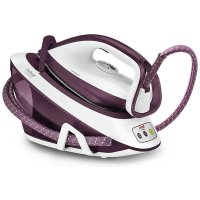
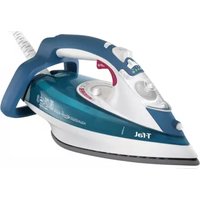
Liberty SV7010 - Iron TEFAL - Free user manual and instructions
Find the device manual for free Liberty SV7010 TEFAL in PDF.



| Technical specifications | Power: 2400 W |
|---|---|
| Steam output | Continuous output: 40 g/min, pressing function: 130 g/min |
| Water tank | Capacity: 1.6 L, removable tank |
| Soleplate | Ceramic soleplate, optimal glide |
| Additional features | Vertical steam, anti-scale, automatic shut-off |
| Usage | Ideal for all fabric types, easy use with 2.5 m cord |
| Maintenance | Clean the soleplate with a damp cloth, regular descaling recommended |
| Safety | Automatic shut-off after 8 minutes of no use, overheat protection |
| General information | Weight: 1.5 kg, dimensions: 30 x 15 x 20 cm |
Frequently Asked Questions - Liberty SV7010 TEFAL
User questions about Liberty SV7010 TEFAL
0 question about this device. Answer the ones you know or ask your own.
Ask a new question about this device
Download the instructions for your Iron in PDF format for free! Find your manual Liberty SV7010 - TEFAL and take your electronic device back in hand. On this page are published all the documents necessary for the use of your device. Liberty SV7010 by TEFAL.
USER MANUAL Liberty SV7010 TEFAL
Important recommendations Safety instructions
- Please read these instructions carefully before first use. This product has been designed for domestic indoor use only. Any commercial use, inappropriate use or failure to comply with the instructions, the manufacturer accepts no responsibility and the guarantee will not apply.
- Never unplug the appliance by pulling the power cord. Always unplug your appliance: - before filling the water tank. - before cleaning the appliance, - after each use.
- The appliance must be used and placed on a flat, stable, heat-resistant surface. When you place the iron on the iron rest, make sure that the surface on which you place it is stable.
- This appliance is not intended to be used by persons (including children) with reduced or impaired physical, sensory or mental capabilities or persons lacking appropriate knowledge or experience, unless a person responsible for their safety provides either supervision or appropriate instructions concerning use of the appliance prior to its use.
- Children should be supervised to ensure they do not play with the appliance.
- This appliance may be used by children aged 8 or over and persons lacking appropriate knowledge or experience or persons with reduced or impaired physical, sensory or mental capabilities provided that they have been thoroughly instructed regarding the3 use of the appliance, are supervised, and understand the risks involved. Children shall not play with the appliance. Cleaning and user maintenance shall not be made by children without supervision. Keep the iron and its cord out of reach of children less than 8 years of age when it is energized or cooling down.
- The surfaces of your appliance marked by this symbol can reach very high temperatures when functioning, which may cause burns. Do not touch the hot surfaces of the appliance (accessible metal parts and plastic parts adjacent to the metallic parts) until the appliance has completely cooled.
- Never leave the appliance unattended when it is connected to the mains. Before storing the appliance, once it is unplugged, please wait until it has cooled down (around 1 hour).
- Never fill your appliance directly from the tap.
- The cartridge cap must not be opened during use.
- The appliance must not be used if it has been dropped, if it has any visible damage, if it leaks, or if it functions abnormally in any way. Do not attempt to dismantle your appliance: have it examined at an Approved Service Centre to avoid any danger.
- Check the electrical power and steam cords for signs of wear or damage prior to use. If the electrical power cord or the water connection cord is damaged, it must be replaced by an Approved Service Centre to avoid any danger.
- All accessories, consumable goods and spare parts must be purchased exclusively from an Authorised Service Centre.
- For your safety, this device complies with applicable standards and regulations (Low Voltage Directives, Electromagnetic Compatibility, Environment, etc.)
- Your appliance is an electrical appliance: it must be used under normal conditions of use.
- It is equipped with a thermal fuse to avoid overheating.
- Always plug your steam generator: - Into an electrical system whose voltage is between 220 and 240 V.4 - Into an earthed electrical outlet. Any connection error may cause irreversible damage and voids the warranty. If you use an extension cord, ensure that the outlet is 16A bipolar with an earth conductor. Important notice for ≥ 2800W models only : Under unfavorable conditions, phenomena such as transient voltage drops or lighting fluctuations may occur. Therefore it is recommended to plug the iron into a power supply with a maximum impedance of 0,30 Ω. If necessary, the user can contact the electricity supplier for further information about the system impedance at the interface point.
- Fully unroll the electrical cord prior to plugging it into an earthed electrical outlet.
- Do not leave the power or steam cords close to or in contact with sources of heat or sharp edges.
- The sole plate of your iron and the iron rest on the base unit can reach extremely high temperatures, and can cause burns: do not touch them. Never touch the electrical power cords with the sole plate of the iron.
- Always use a vented/mesh ironing board to prevent water spots on clothes and to avoid hot steam venting sideways. Be careful of hot steam when ironing close to the edges of the board.
- Your appliance produces steam which may cause burns. - Handle the iron carefully, especially when ironing vertically. - Never iron a piece of clothing while it is worn by a person, but always when it is on a hanger. - Never iron while in a sitting position with one’s legs under the ironing board. - Never point the steam at people or animals.
- Never immerse your appliance iron in water or any other liquid. Never place it under a running tap.
- During first use, your appliance may give off smoke, an odour or a discharge of particles, but these phenomena are not harmful and will disappear. If you use the appliance for the first time, if you have replaced the anti calc cartridge or after filling the water tank, press the steam control button continuously for few minutes pointing it away from your linen, in order to prime the pump and obtain steam.
- When in use, your electric pump injects water into the iron solepate. It makes a noise but this is normal.
- Safety Instructions for the Anti-Scale Cartridge and the Collector (Depending on Model): - Not for drinking - Keep out of the reach of children - Dispose with household refuse - Keep in cool dry place Preparation What water may be used ? This appliance has been designed to be used with untreated tap water. Types of water not to use: In order to prevent your appliance life, you should not use water from clothes dryers, scented or softened water containing additives, water from refrigerators, batteries, air conditioners, rain water, boiled, filtered or bottled water. Do not use pure distilled nor pure demineralised water. All the type of water listed above may contain organic waste, mineral or chemical elements that can cause spitting, brown staining or premature wear of the appliance. Do not fill the water tank from the cartridge compartment. Cartridge Anti calc maintenance Do not put any descaling substances (vinegar,industrial descaling products, etc.) in the water tank or in the anti calc compartment, they could damage your appliance. Using the appliance without changing the cartridge can damage the appliance and stop its steaming performance. Press on the anti calc button only if you have changed the cartridge. To unsure the efficiency of the cartridge, please remove it from its plastic bag just before use. The international guarantee will not cover any damages which occurs as a result of using the appliance without changing the cartridge
- Prior to rinsing the collector (depending on the model), always wait until the appliance is cool and unplugged for over an hour to unscrew the collector. To perform this operation, the product must be near a sink, since some water may flow out when opening it. - Never operate the appliance without the scale collector. - Never fill the iron using the collector’s opening.5 Semi-automatic self-cleaning procedure* Never start the self-cleaning procedure when the appliance is on its base. Always place the iron on its cleaning stand, over a sink drain. Ensure that the scale collector* is installed in the iron and properly locked, prior to starting self-cleaning. Never touch the iron or its cleaning stand during self-cleaning. The cleaning accessory may still be hot; wait at least 15 minutes before handling it. The cleaning stand is only intended for self-cleaning. Never use this accessory as an iron holder during normal use. *depending on the model
Your appliance contains valuable materials which can be recovered or recycled.Leave it at a civic waste disposal centre. A problem with your appliance ? PROBLEMS CAUSES SOLUTIONSYour iron is producing little or no steam.You have just filled the tank or changed the anti-calc cartridge, or you have just started using it. Press the steam control button conti-nuously for few minutes pointing it away from your linen, in order to prime the pump.There is no anti calc cartridge in the appliance or it is not properly installed.Make sure the anticalc cartridge is installed and locked in its com-partment.Steam cannot be produced at the temperature you have selected. Set the thermostat control in the coloured zone (••• or MAX).The water tank is empty. Fill the tank. Water runs out of the holes of the soleplate.You are using steam for the first time or you have not used it for some time.Press on the steam control button away from your ironing board until the iron produces steam.The setting is not correct (1 dot / 2 dots) and the soleplate is not hot enough to produce steam.Set the iron at 3 dots (••• or MAX) and wait for the iron thermostat light to go out before activating the steam button again.Water streaks appear onthe linen.Your ironing board is saturated with water because it is not suitable for use with an appliance. Check that your ironing board is suitable. We recommend that you use a vented/mesh type ironing board.6 If you have any problems or queries please call our Customer Relations team first for expert help and advice