Ironman TW5K96400JV - Watch TIMEX - Free user manual and instructions
Find the device manual for free Ironman TW5K96400JV TIMEX in PDF.



| Product Type | Sports smartwatch |
| Brand | Timex |
| Model | Ironman Sleek™ 150 (TW5K96400JV) |
| Case dimensions | Approximately 45 mm diameter (estimated) |
| Weight | Approximately 50 g (estimated) |
| Display technology | Dot matrix LCD display with INDIGLO® night light and Tap Screen™ technology |
| Water resistance | Water resistant to 100 meters (328 feet) |
| Power | Internal lithium polymer battery, non-user-replaceable |
| Battery life | Varies with use; rechargeable via cable (not specified) |
| Main features | Chronograph with 99 laps and 50 split times, interval training, timers, target time, alarm, night mode, power save |
| Case material | Resin/plastic (not explicitly specified, estimated) |
| Strap | Resin strap (estimated) |
| Package contents | Watch, instruction manual, charging cable (likely) |
| Warranty | International one-year warranty against manufacturing defects |
| Care and cleaning | Rinse with fresh water after contact with salt water or sweat; do not submerge buttons |
| Safety | Do not open the case, do not expose to extreme temperatures, do not incinerate |
| Recycling | Recycle according to local regulations for electronic devices |
Frequently Asked Questions - Ironman TW5K96400JV TIMEX
User questions about Ironman TW5K96400JV TIMEX
0 question about this device. Answer the ones you know or ask your own.
Ask a new question about this device
Download the instructions for your Watch in PDF format for free! Find your manual Ironman TW5K96400JV - TIMEX and take your electronic device back in hand. On this page are published all the documents necessary for the use of your device. Ironman TW5K96400JV by TIMEX.
USER MANUAL Ironman TW5K96400JV TIMEX
Register your product at www.timex.com
IMPORTANT SAFETY INSTRUCTIONS AND WARNINGS 3
Introducing the Watch 3
Navigating the Menus 4
Setting Up the Watch 4
Running with a Chronograph 5
What are Lap and Split Times? 5
Running a Chronograph Workout 5
Using Target Times. 6
Using the Eat or Drink Timer 6
Run/Walk Training with Intervals 6
Benefits of Interval Training 6
Setting Up an Interval Workout 6
Running an Interval Workout 7
Running a Timer Workout 7
Setting Up a Timer Workout 7
Running a Timer Workout 7
Reviewing Workouts 7
Reviewing the Workout Summary 7
Locking or Unlocking a workout 7
Deleting a workout. 8
Resetting the Watch 8
Water Resistance 8
Other Safety And Precaution Notices 8
Timex® International Warranty 8
IMPORTANT SAFETY INSTRUCTIONS AND WARNINGS 3
Introducing the Watch 3
Navigating the Menus 4
Setting Up the Watch 4
Running with a Chronograph 5
What are Lap and Split Times? 5
Running a Chronograph Workout 5
Using Target Times 6
Using the Eat or Drink Timer 6
Run/Walk Training with Intervals 6
Benefits of Interval Training 6
Setting Up an Interval Workout 6
Running an Interval Workout 7
Running a Timer Workout 7
Setting Up a Timer Workout 7
Running a Timer Workout 7
Reviewing Workouts 7
Reviewing the Workout Summary 7
Locking or Unlocking a workout 7
Deleting a workout. 8
Resetting the Watch 8
Water Resistance 8
Other Safety And Precaution Notices 8
Timex® International Warranty 8
Thank you for purchasing the TIMEX IRONMAN Sleek™ 150 watch! Read this User Guide to learn more about this exciting product.
Be sure to visit http://www.Timex.com for the latest product information, instructional videos, and other features.
IMPORTANT SAFETY INSTRUCTIONS AND WARNINGS
- To prevent risk of fire, chemical burn, electrolyte leak, and/or injury from the unit's internal Lithium-polymer battery:
a. Do not attempt to remove the case-back or exterior shell of the unit, or to remove its non-user-replaceable battery.
b. Do not leave the unit exposed to a heat source or in a high-temperature location (such as in the sun or in an unattended vehicle). To prevent damage, store the unit out of direct sunlight.
c. Do not puncture or incinerate the unit.
d. When storing the unit for an extended time, keep it in the 32 to 77^ (0 to 25^ ) temperature range.
e. Charge the unit only within the 32 to 113^ (0 to 45^ ) temperature range.
f. Do not operate the unit outside the -4 to 131^ (-20 to 55^) temperature range.
g. Contact your local waste disposal department to properly recycle or dispose of the unit or its battery.
-
This unit is not a medical device and is not recommended for use by persons with serious heart conditions. Always consult your physician before beginning or modifying an exercise program.
-
Do not attempt to read the unit's display while moving: this is unsafe and distracting, and could result in an accident or collision. Read the display only when you can safely do so. See the instructions for details.
INTRODUCING THE WATCH
The TIMEX IRONMAN Sleek™ 150 watch operates through its control buttons, menu-driven interface, dot-matrix LCD display, and Timex Tap Screen™ technology.
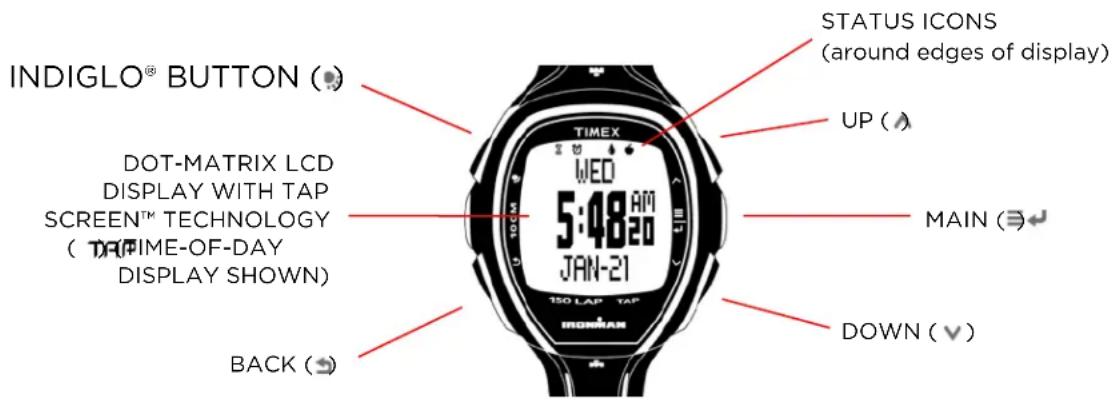
MAIN()
- Opens the main menu, selects a highlighted menu item, or selects the next screen item.
BACK()
- Returns to the previous level in the menu. Press repeatedly to return to the Time-of-Day display. Press and hold for four seconds to enter/exit Power-Saving mode.
UP/DOWN(A,V)
- Scrlls to select from displayed items, or rotates through available selections.
Press to activate the display's INDIGLO night-light for several seconds.
- Press and hold for four seconds (the watch beeps) to activate (or deactivate) Night Mode, feature in which any button press turns on the night-light for several seconds.
Press and hold for ten seconds to turn the night-light off.
DOT-MATRIX LCD DISPLAY WITH TAP SCREEN™ TECHNOLOGY (TAP)
- Tap the display with one or more fingers to start or stop timing when using the watch's Chronograph, Interval Timer, or Timer.
STATUS INDICATORS
Various status indicators appear in the watch display according to current function.
Row 1: (left to right): Chronograph, Timer Hourglass, Alarm Clock, Target Timer, Drink Timer, Eat Timer, Lock/Unlock.


TAP
Row 2: (left to right): Page Scroll, Run, Stop, Lap, Tap.
POWER-SAVING MODE
Press and hold BACK ( ) for four seconds to enter (or exit) Power-Saving mode. The display is off in this mode, but press any key to see the Time-of-Day display for several seconds.
NAVIGATING THE MENUS
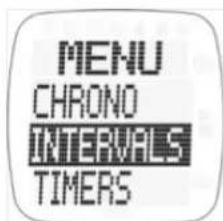
- Press MAIN to open the watch's main menu.
- Press UP or DOWN to highlight menu items.
- Press MAIN to select the highlighted item.
- Press BACK to exit, finish, or return to the previous menu (depending on the operation), or press repeatedly to return to the Time-of-Day display.

SETTING UP THE WATCH
Before you can use your watch, you need to set the time and date, and can also configure other watch behaviors.
- Press MAIN to open the watch's main menu.
- Use DOWN to highlight SETUP, and press MAIN to select.
- Press MAIN to select TIME, press MAIN again to select TIME 1, then press MAIN once more to select TIME.
NOTE: You can set TIME 2 to a different time zone, and toggle between time zones by pressing and holding UP
-
Use UP and DOWN to set the hour, then press MAIN to highlight minutes.
-
Use the same method to set minutes, seconds, and AM/PM.
- Press DOWN to highlight DATE, then press MAIN to select.
- Use UP , DOWN , and MAIN to set the month, day, and year.
- Press DOWN to highlight FORMAT, then press MAIN to select.
- Use UP , DOWN , and MAIN to set the hour and date formats.
- Press BACK repeatedly to return to the SETUP menu, use DOWN to highlight SYSTEM, then press MAIN to select.
- From the SYSTEM menu, you can set the force needed for tapping the display, enable the Eat Timer, Drink timers, hourly chime, and display contrast.
- Press BACK to exit, finish, or return to the previous menu (depending on the operation), or press repeatedly to return to the Time-of-Day display.
RUNNING WITH A CHRONOGRAPH
The watch's Chronograph function can record up to 99 laps and 50 split times, with a total time of nearly 100 hours.
WHAT ARE LAP AND SPLIT TIMES?
Pacing yourself is very important in a running or walking workout. Breaking your workout into small segments such as laps or splits can help you more easily achieve your overall target time.
Lap time is the length of an individual segment of your workout (usually a repeated segment, such as a lap around a track). Split time is the total elapsed time from the beginning of your workout through the current segment.
When you "take a split", you have completed timing one segment (such as one lap) of the workout, and are now timing the next segment.
This figure illustrates lap and split times for a typical workout in which four laps/splits were taken:

RUNNING A CHRONOGRAPH WORKOUT
- Press MAIN to open the main menu. Press MAIN again to select CHRONO.
- Press MAIN or tap the display to start the workout.
- Press DOWN or tap the display to mark the lap and split time (icon appears).
- Press UP to scroll through display configurations for lap number, split time, and lap time.
HINT: Tap firmly using as much of your fingertips as possible.
NOTE: If you are using Target Time (see below), the display will show AHEAD OF TARGET, ON PACE, or BEHIND TARGET, along with any time difference.
- Press UP or BACK 串 , or wait about eight seconds to return to the running Chronograph display.
- Press MAIN to pause the workout. Press MAIN or tap to resume, or press DOWN to SAVE or DISCARD the workout data.
USING TARGET TIMES
The watch's Target Time feature lets you set a target pace and optional target distance for your workout. When you take lap splits, the watch then sounds an alert and shows whether you are on, ahead of, or behind your target pace. Use this feature in a workout or a race to make sure you stay on your target pace.
- Press MAIN to open the main menu, then use DOWN and MAIN to select SETUP > TRG TIME.
- Use UP , DOWN , and MAIN to select, enable, and set TRG PACE (target pace), RANGE (+/- tolerance in the target pace), and TRG DIST (optional target distance).
NOTE: When target pace and target distance are entered, the watch displays the resulting total expected finish time for the workout as TRG TOTAL FINISH.
USING THE EAT OR DRINK TIMER
Use the watch's Eat Timer or Drink Timer to remind yourself to eat or drink a specific period after you begin a workout.
- Press MAIN to open the main menu, then use DOWN and MAIN to select SETUP > SYSTEM > EAT TIMER or DRINK TMR.
- Press UP or DOWN to select ON. Press MAIN to select.
- Use UP , DOWN , and MAIN to set the timer.
RUN/WALK TRAINING WITH INTERVALS
BENEFITS OF INTERVAL TRAINING
Interval workouts are powerful tools for targeting and training to improve running speed, endurance, and threshold. Periods of heavy activity such as running interspersed with recovery periods of lesser activity such as walking help you train longer and more intensely. Combining aerobic and anaerobic activity in this way helps you:
Target workouts for improving speed, cardiovascular and muscular endurance, and other qualities.
- Improve your body's processing of lactic acid.
- Reduce the risk of injury.
For best results, set up your interval workouts to train for a specific quality:
To train for endurance, you might set up a classic 1-mile repeat workout: three or four repetitions of a 1-mile interval at about half-marathon pace, each followed by a 1/4-mile walking recovery.
To train for speed, you might run sets of 4 x 400m: run a fast 400m interval at slightly more than race pace, followed by a 2-minute slow jog recovery, and repeat both intervals four times.
- To train for speed and endurance, consider the fartlek workout ("speed play" in Swedish), which combines periods of fast and slow running.
For details, see http://ironman.timex.com/fartleks-a-clever-and-fun-way-to-do-speedwork.
Your watch's interval timer can track times and distances for two workouts of up to eight intervals each. Each interval can be repeated up to 99 times.
SETTING UP AN INTERVAL WORKOUT
-
Press MAIN to open the main menu, then use DOWN and MAIN to select INTERVALS.
-
Use DOWN and MAIN to select SETUP, then WORKOUT 1 or WORKOUT 2.
- Use UP , DOWN , and MAIN to select, enable, and set WARMUP time, up to six intervals, and COOL DOWN time.
RUNNING AN INTERVAL WORKOUT
- Press MAIN to open the main menu, then use DOWN and MAIN to select INTERVALS > WORKOUT 1 or WORKOUT 2.
NOTE: You can also select INTERVALS > SETUP to configure WORKOUT 1 or 2 (see above).
- Press MAIN to begin timing the workout.
- The interval timer then begins. The alert sounds at the start of each new interval. Press UP to rotate through the available interval displays.
NOTE: Use the Drink Timer to remain properly hydrated through your workout.
RUNNING A TIMER WORKOUT
SETTING UP A TIMER WORKOUT
Use the watch's Timer for simple workouts of a preset length. You can also use the Timer for purposes such as tracking cooking times, watering the garden, and so on.
- Press MAIN to open the main menu, then use DOWN and MAIN to select TIMERS > SETUP > TIMER 1 or TIMER 2.
- Use UP , DOWN , and MAIN to set the timer.
RUNNING A TIMER WORKOUT
- Press MAIN to open the main menu, then use DOWN and MAIN to select TIMERS > TIMER 1 or TIMER 2.
NOTE: You can also select TIMERS > SETUP to configure TIMER 1 or 2 (see above).
- Press MAIN to display the timer, then press MAIN again to start the timer.
- Press MAIN to pause the workout, then use DOWN and MAIN to RESUME or RESET the timer.
REVIEWING WORKOUTS
The watch can store up to five Chronograph or Interval Timer workouts. You can then use the Review function to view the data and track your progress.
REVIEWING THE WORKOUT SUMMARY
- Press MAIN to open the main menu, then use DOWN and MAIN to select REVIEW.
- Use UP , DOWN , and MAIN to select the day and time of the workout to review.
- Use UP and DOWN to move through the data displays, or wait for the displays to cycle automatically.
- Press MAIN to LOCK or UNLOCK the workout. A locked workout cannot be overwritten.
LOCKING OR UNLOCKING A WORKOUT
- Press MAIN to open the main menu, then use DOWN and MAIN to select REVIEW.
- Use UP , DOWN , and MAIN to select the day and time of the workout to review.
- Press MAIN , then UP or DOWN to select LOCK or UNLOCK, then MAIN again to select.
DELETING A WORKOUT
- Press MAIN to open the main menu, then use DOWN and MAIN to select REVIEW.
- Use UP , DOWN , and MAIN to select the day and time of the workout to review.
- Press DELETE, then MAIN , then UP or DOWN to select YES, then MAIN again to delete the workout.
RESETTING THE WATCH
The watch can be returned to original factory settings by pressing and holding the UP , DOWN , BACK , and INDIGLO® buttons simultaneously for about four seconds.
NOTE: Resetting the watch deletes all of your settings and workout (even if locked).
WATER RESISTANCE
The TIMEX IRONMAN® Sleek™ 150 watch is water resistant to 100 meters (328 ft).
| Water-Resistance Depth | p.s.i.a. *Water Pressure Below Surface |
| 100m/328 ft | 86 |
*rounds per square inch absolute
WARNING: To maintain water resistance, do not press any buttons under water.
The watch is water-resistant only as long as its lens, push buttons, and case remain intact.
The watch should not be used for diving.
- Rinse the watch with fresh water after exposure to salt water or perspiration.
OTHER SAFETY AND PRECAUTION NOTICES
RECYCLE
Always return your used electronic products, batteries, and packaging materials to dedicated collection points.
TIMEX® INTERNATIONAL WARRANTY
Your TIMEX® watch is warranted against manufacturing defects by Timex Group USA, Inc. for a period of ONE YEAR from the original purchase date. Timex and its worldwide affiliates will honor this International Warranty.
Please note that Timex may, at its option, repair your watch by installing new or thoroughly reconditioned and inspected components or replace it with an identical or similar model.
IMPORTANT - PLEASE NOTE THAT THIS WARRANTY DOES NOT COVER DEFECTS OR DAMAGES TO YOUR WATCH:
1) after the warranty period expires;
2) if the watch was not originally purchased from an authorized Timex retailer;
3) from repair services not performed by Timex;
4) from accidents, tampering or abuse; and
5) lens or crystal, strap or band, watch case, attachments or battery. Timex may charge you for replacing any of these parts.
THIS WARRANTY AND THE REMEDIES CONTAINED HEREIN ARE EXCLUSIVE AND IN LIEU OF ALL OTHER WARRANTYES, EXPRESS OR IMPLIED, INCLUDING ANY IMPLIED WARRANTY OF MERCHANTABILITY OR FITNESS FOR PARTICULAR PURPOSE. TIMEX IS NOT LIABLE FOR ANY SPECIAL, INCIDENTAL OR CONSEQUENTIAL DAMAGES. Some countries and states do not allow limitations on implied warranties and do not allow exclusions or limitations on damages, so these limitations may not apply to you. This warranty gives you specific legal rights and you may also have other rights which vary from country to country and state to state.
To obtain warranty service, please return your watch to your local Timex affiliate or the Timex retailer where the watch was purchased, together with a completed original Watch Repair Coupon
if available, or a written statement identifying your name, address, telephone number and date and place of purchase. Timex will charge you for any postage and handling due on return shipments (this is not a repair charge) when completing service or repairs. NEVER INCLUDE A SPECIAL WATCHBAND OR ANY OTHER ARTICLE OF PERSONAL VALUE IN YOUR SHIPMENT.
For the U.S. and Canada please call 1-800-448-4639 for additional warranty information. For Brazil, call +11 2664 1001. For Mexico, call 01-800-01-060-00. For Central America, the Caribbean, Bermuda and the Bahamas, call (501) 370-5775 (U.S.). For Asia, call 852-2815-0091. For the U.K., call 44 020 8687 9620. For France, call 33 3 81 63 42 51. For Germany/Austria: +43 662 889 2130. For other areas, please contact your local Timex retailer or Timex distributor for warranty information.
If your Timex watch or product should ever need servicing, send it to Timex as set forth in the Timex International Warranty or addressed to: TG SERVICE CENTER, P.O. Box 2740, Little Rock, AR 72203. For service questions, call 1-800-328-2677 or custserv@timex.com
©2015 Timex Group USA, Inc. TIMEX, INDIGLO, SLEEK, TAPSCREEN and NIGHT-MODE are trademarks of Timex Group B.V. and its subsidiaries. IRONMAN® and MDOT are registered trademarks of World Triathlon Corporation. Used here by permission.
SOMMAIRE
CONSIGNES IMPORTANTES DE SECURITE ET MISES EN GARDE 11
LUZ NOCTURNA INDIGLO
HARDLOPEN MET EEN CHRONOGRAAF
3HaKOMCTBO C yacAMN 79
TOUeyHO-MATPNuHbIJK-UNCINJE CCEHCOPHO TEXHOJONEMTAP SCREENTM (TAP)
HaKMTe Ha dncnne OndHM nHn HeckoBKMn NaIbCaMn IhaHaJNaIOCTaHOBKn OTCyeTa BO Bpemr nONb3OBAHnpeKmOB XpoHorpaF, TaImeP nI TaImeP nHTepBaNoB.
UHdNKATOPbI CTATYCA
B COOTBECTBUN C TEKUeH ΦYHKUeH Na DnCnnee YacOB 6ydyT OTo6paXeHb pa3NnHbE INHnKaTopbl CTaTyca.
Pd1: (cneBa HanpaBo) XpoHOrpaΦ, necOuHbYe lacbTaImepa, 6yDnIbHnK, TaIMeP 3aDaHHoro BpeMeHn, TaIMeP nOTpe6JeHn HKnKocTn, TaIMeP nOTpe6JeHn Hn, 3a6NoKpObaTb/pa36NoKpObaTb TpeHnpOBky

Pád 2: (cneBa HappBo) IpoTncb No nepeuHIO CTpaHnCb, BKIOHTb/BbIbPaTb, OCTaHOBNTb, BpeMeHHo OTpe3OK, CEHCOPHAR TexHONOrn Tap.
PEXKUM COXPAHEHNA 3HEPNIH
HaKMTe n depKHTe HaxaToB TteHne YeTbIpe XceHyN KhoNky HA3A(D ,YTO6bl BOITN/BoHn N3 peXmacoxpaHHeN 3Hepn. B 3OM pexIme Dncnne yacob OTKnOyeH, Ho HaxaTne IIO60n KhoNk BNIOuHT pexIM BpemdHa HeckoJIbKO ceKyHd.
HABITALIMIO MEHIO
- HaxmTe MEHIO 4, yTo6bI OTKpbITb rnaBHOe MeHIO YacOB.
- Haxmai Te BBEPX Annn BHN3 VdIy BbIeHnnyHKTOB MeHO.
- Haxmte MEHIO 4TO6bBb6paTb BbIeHbI NyHKT.
- HaxmTe HA3Ad, yTo6bI BbIITN, 3aKOHHTb ININ BEpyTbC K IpeDbIyUeMy pa3JeIy MeHIO (B 3aBcIMOCnOT Bb6paHHORO DeIcTBn), ININ HaxmAJTe NOBTOPO DnB O3BaPauEHH N DCnJIeO "BpemdH".
HACTPOIKA YACOB
Ipeed nCnoB3oBaHnem YacOB Heo6xOIMO BbCTaBtB BpEmn DaTy, a TaKHe npOn3BeCTn DpyrHe NaCTpoiKn YacOB.
- Haxmnte MEHIO ,yTo6bIOTKpbITbTJabHObe MeHO yacOB.
2.ИспοльзуITE BHN3 √дя Быдениня рекима SETUP (Hactpoик),а зatem HaKMITE MEHIO ≡←,чTo6bl Bbl6paTb erO. - Haxmte MEHIO ≡ДЯ Bb6opa pexnma TIME (BpeM), ChOBa Haxmte MEHIO ≢ДЯ Bb6opa pexnma TIME1, 3aTeMa Haxmte MEHIO ≡eE pa3 Дя Bb6opa pexnma TIME.
IcnoB3yntaTaimepnOtpe6JIeHnNINKJIKOCTnDaHHbIXYacOB,TO6blHaONMHHTbBaOMHeo6XODMOCTnNoecTbNNINONITbuepe3onpeedeHHOBePMA NOCE NaHApA TpeHnpOBKn.
- Haxmnte MEHIO ≡, YTO6bI OTKpbITb OCHOBHOe MEHIO, 3aTeM Haxmnte BHN3 ∨ mEHIO ≡ ↓ДЯ Вьборapeхма SETUP (HacTpoKn) > SYSTEM (cncTeMa) > EAT TIMER (taIMep notpe6neHn niiu) nIN DRINK TMR (taIMep notpe6neHn xndKoctn).
- HaxmajTe BBEPX ANBHN3 VnBbHb6opa ON (BKn). Haxmte MEHO ≡ nIy Bb6opa.
3.ИспοльзуITE BBEPX A,BHIN3 Vn MEHIO ДЯн haCtpoKn TaMepa.