
T2N834 - Wristwatch TIMEX - Free user manual and instructions
Find the device manual for free T2N834 TIMEX in PDF.


| Product type | Wristwatch |
| Brand | Timex |
| Model | T2N834 |
| Movement | Analog quartz |
| Case diameter | 40 mm |
| Case thickness | 10 mm |
| Weight | 50 g |
| Case material | Stainless steel |
| Crystal | Mineral |
| Strap | Leather or metal (depending on version) |
| Power source | Button cell battery (CR2016 or equivalent) |
| Battery life | Approximately 2 years |
| Main functions | Hours, minutes, seconds, date, chronograph, alarm, backlight |
| Water resistance | 30 meters (3 ATM) - resistant to splashes |
| Care and cleaning | Clean with a soft, dry cloth. Avoid chemicals. |
| Safety | Do not expose to extreme temperatures. Keep out of reach of children under 3 years due to small parts. |
| Spare parts and repairability | Battery replacement by a watchmaker. Replacement straps available. |
| General information | 2-year warranty. Made in China. |
Frequently Asked Questions - T2N834 TIMEX
User questions about T2N834 TIMEX
0 question about this device. Answer the ones you know or ask your own.
Ask a new question about this device
Download the instructions for your Wristwatch in PDF format for free! Find your manual T2N834 - TIMEX and take your electronic device back in hand. On this page are published all the documents necessary for the use of your device. T2N834 by TIMEX.
USER MANUAL T2N834 TIMEX
T1002-24_W217_WEU_Cvr_Analog_1_Cover 3/9/10 10:19 AM Page cvr1
TIMEX
W217 WEU 111-095010

T1002-24_W217_WEU_Cvr_Analog_1_Cover 3/9/10 10:19 AM Page cvr3
English page 2
Français page 28
Congratulations on purchasing your TIMEX® watch.
Please read these instructions carefully to understand how to operate your Timex timepiece.
Your watch may not have all of the features described in this booklet.

For more information, please visit:
www.timex.com

T1002-24_W217_EN_WEU_analoglayout_4-3/9/10 10:20 AM Page ENii
ENGLISH
TABLE OF CONTENTS
2 How to Start Your Watch
3 Water and Shock Resistance
4 Indiglo® Night-Light
5 Date Models
7 Day/Date Models
8 Easy Set Alarm
12 Perpetual Calendar
15 Elapsed Time Ring
17 Tachymeter Ring
18 Compass Ring
19 How to Adjust Bracelet
21 Bracelet Link Removal
22 Battery
23 Warranty
T1002-24_W217_EN_WEU_analoglayout_4 3/9/10 10:20 AM Page 2
ENGLISH
HOW TO START YOUR WATCH
To start your watch remove the plastic guard from under the crown, then press the crown in against the case. The second hand will begin advancing in one-second intervals.
Some deep-depth water-resistant watches require the setting crown to be screwed in to secure water-resistance. If your watch case has a protrusion with screw threads, the crown must be screwed in after setting the watch.
To screw in, push the crown firmly against the threaded protrusion and hold in while turning the crown clockwise. Continue to screw in the crown until it is tight. You will need to unscrew the crown (counter-clockwise) before pulling it out the next time you want to set your watch.
ENGLISH
WATER AND SHOCK RESISTANCE
If your watch is water-resistant, meter marking (WR_M) is indicated.
| Water-Resistance Depth p.s | i.a. * Water pressure Below Surface |
| 30m/98ft60 | |
| 50m/164ft86 | |
| 100m/328ft160 | |
| 200m/656ft284 |
*pounds per square inch absolute
WARNING: TO MAINTAIN WATER-RESISTANCE, DO NOT PRESS ANY BUTTONS OR PULL OUT THE CROWN UNDER WATER UNLESS YOUR WATCH IS INDICATED AS 200 METER WATER-RESISTANT.
T1002-24_W217_EN_WEU_analoglayout_4 3:0/10 10:20 AM Page 4
ENGLISH
- Watch is water-resistant only as long as crystal, crown and case remain intact.
- Watch is not a diver watch and should not be used for diving.
- Rinse watch with fresh water after exposure to salt water.
- Shock-resistance will be indicated on the watch face or caseback. Watches are designed to pass ISO test for shock-resistance. However, care should be taken to avoid damaging the crystal.
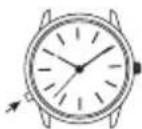
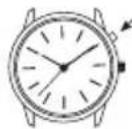
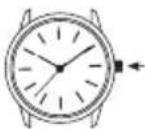
Press button or crown to activate light. Electroluminescent technology used in the INDIGLO® night-light illuminates entire watch face at night and in low light conditions.
4
ENGLISH
DATE MODELS
TO SET TIME:
1) PULL crown all the way out and turn to correct time.
2) Push crown in to restart. For screw-in setting crown, push crown in while turning CLOCKWISE to tighten.

Watches with date: Note correct time of day (A.M or P.M.) for proper date function.
TO SET DAY:
1) PULL crown to "middle" position and turn CLOCKWISE until correct day appears. If day does not change, pull crown to "out" position and turn CLOCKWISE or COUNTERCLOCKWISE through necessary number of 24 hour periods until correct day appears.
5
T1002-24_W217_EN_WEU_analoglayout_4 3:0/10 10:20 AM Page 6
ENGLISH
TO SET "QUICK DATE®" FEATURE:
3-Position Crown:
1) Pull crown to "Middle" position and turn CLOCK-WISE or COUNTERCLOCKWISE until correct date appears.
2-Position Crown:
1) Pull crown to "OUT" position and turn CLOCKWISE until date changes. Repeat until correct date appears. Adjust date when month has less than 31 days. Push crown in when finished.
Caution: Wearing or storing the watch with the crown in the "middle" position will cause damage to the movement. Always return the crown to the normal position, or if you wish to save the battery life while storing the watch, leave the crown in the "out" position.
The date function advances the date between the hours of 10 PM and 2 AM. Avoid setting the date during this timeframe. If you attempt to set the date during this time period, rotate the crown at a very slow rate to avoid damaging the watch.
ENGLISH
DAY / DATE MODELS
TO SET THE TIME:
1) PULL the crown out to the "C" position.
2) TURN the crown either way to the correct time.
3) PUSH in the crown to the "A" position.
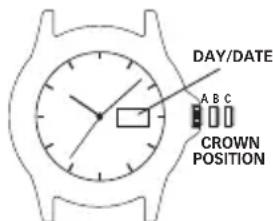
TO SET THE DATE:
1) PULL the crown out to the "B" position.
2) TURN the crown either way to the correct date.
3) PUSH in the crown to the "A" position.
TO SET THE DAY:
1) PULL the crown out to the "C" position.
2) TURN the crown either way for full 24 hour cycle to set day.
3) PUSH the crown in to the "A" position.
T1002-24_W217_EN_WEU_analoglayout_4 3/9/10 10:20 AM Page 8
ENGLISH
EASY SET ALARM

EASY SET ALARM WITH DATE & INDIGLO® NIGHT-LIGHT
1) From the "A" position, PUSH the TIMEKEEPING CROWN in (towards the watch case) to activate the INDIGLO® Night-Light and illuminate the watch dial.
ENGLISH
EASY SET ALARM DATE & TIME SETTINGS
TO SET THE DATE:
1) With the TIMEKEEPING CROWN in the "B" position TURN the TIMEKEEPING CROWN or TURNING RING in either direction to set the date.
TO SET THE TIME:
1) With the TIMEKEEPING CROWN in the "C" position TURN the TIMEKEEPING CROWN or TURNING RING in either direction to set the time.
EASY SET ALARM SETTINGS
1) Your easy set alarm watch is equipped with two types of alarms:
2) 12-Hour Alarm: rings OR vibrates twice per day at the desired hour and minute as long as the alarm is activated. (Alarm crown must be in "E" position.)
3) Hourly Alarm: rings OR vibrates every hour at the desired minute if activated. (Alarm crown must be in "F" position.)
T1002-24_W217_EN_WEU_analoglayout_4-3/9/10 10:20 AM Page 10
ENGLISH
TO SET THE 12-HOUR ALARM:
1) With the ALARM CROWN in the "D" position, TURN the ALARM CROWN or TURNING RING in either direction to set the hour and minute alarm markers. To activate the alarm to ring or vibrate at the desired time, PULL the ALARM CROWN out to the "E" position. A single beep sound and flash, OR a vibration will indicate that the 12-Hour Alarm is activated.
2) The alarm will sound and the dial will flash OR vibrate at the desired time (hour and minute) and will repeat every twelve hours unless the alarm is deactivated.
NOTE: Alarm is deactivated when the ALARM CROWN is in the "D" position.
If the alarm is not deactivated it will automatically stop ringing after 20 beeps and flashes OR stop vibrating, and will resume in 12 hours at the indicated time.
ENGLISH
TO SET THE HOURLY ALARM:
1) With the ALARM CROWN in the "D" position, TURN the ALARM CROWN or TURNING RING in either direction to set the minute alarm marker.
2) To activate the alarm to ring or vibrate at the desired minute, PULL the ALARM CROWN out to the "F" position. Three beeps sound and flash OR a vibration indicates the Hourly Alarm is activated.
3) The alarm will sound and the dial will flash OR vibrate at the desired minute and will repeat every hour on the specified minute unless the alarm is deactivated.
NOTE: Alarm is deactivated when the ALARM CROWN is in the "D" position. If the alarm is not deactivated it will automatically stop ringing after 20 beeps and flashes OR stop vibrating, and will resume again in one hour at the indicated minute.
T1002-24_W217_EN_WEU_analoglayout_4-3/9/10 10:20 AM Page 12
ENGLISH
PERPETUAL CALENDAR
Your Perpetual Calendar watch accurately keeps track of how many days are in each month. It also adjusts for leap years. The date on your watch (including the month and year) was preset at the factory to Eastern Standard Time, Greenwich Mean Time or Hong Kong Standard Time (depending on where you purchased your watch). You only need to adjust the time.
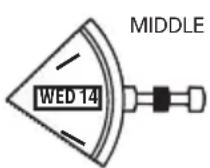
CHECK DATE
(FACTORY USE ONLY)

SET TIME
DAY, DATE
ENGLISH
TO SET TIME
To set time, simply pull crown all the way out and turn. Day and date change automatically when time is adjusted past midnight; there is no additional step for setting day or date. Push crown in when done.
After setting, if date changes at noon, time needs to be adjusted ahead or back 12 hours.
If crown is accidentally put in MIDDLE position and turned, date display will change temporarily, but date setting is unaffected. Simply pull crown all the way out and set time. Proper date display will resume.
7-YEAR BATTERY LIFE\* WITH FREE LIFETIME REPLACEMENT\*\*
If the battery needs to be changed, we recommend that only TIMEX replace it. Your watch will need to be recalibrated to correct time and date after changing the battery. To return your watch to Timex use a pre-paid shipper. To obtain a pre-paid shipper please call 1-800-448-4639 or visit the retailer where you purchased your watch or go to www.TIMEX.com. Please include the following with your watch to cover
T1002-24_W217_EN_WEU_analoglayout_4-3/10 10:20 AM Page 14
ENGLISH
postage and handling (this is not a repair charge); a U.S.\8.00 check or money order in the U.S.; a CAN\7.00 cheque or money order in Canada; In other countries Timex will charge you for postage and handling.
** Shipping & handling charges apply. *With normal usage.
NEVER INCLUDE A SPECIAL WATCHBAND OR ANY OTHER ARTICLE OF PERSONAL VALUE IN YOUR SHIPMENT.
ENGLISH
ELAPSED TIME RING
If your watch is equipped with a rotatable outer ring on the face, with numbers corresponding to minutes, you can use this Elapsed Time Ring to time an activity from the start, or to mark the ending time for the duration of an activity.
TO TIME AN ACTIVITY FROM THE START:
Set the Start/Stop triangle at the time (hour or minute) when you start the activity (As shown on the left in the illustration shown below). At completion, you can see how long the activity took.

15
T1002-24_W217_EN_WEU_analoglayout_4-3/9/10 10:20 AM Page 16
ENGLISH
TO MEASURE THE TIME REMAINING:
Set the triangle to the hour or minute position when you wish to complete the activity, and check the watch periodically for progress towards that goal.
In the illustration shown on the previous page on the right you can stop when the minute hand reaches the 20 minutes past the hour position.
ENGLISH
TACHYMETER RING
The tachymeter feature can be used to measure speed in miles per hour (MPH), nautical miles per hour (knots) or kilometers per hour (KPH) using the sweep second hand and the scale on the wall above the watch face. You need to know the actual distance you are covering in miles or km.
Start the chronograph with the second hand at zero (the twelve o'clock position). Within the first minute, the second hand will point to the rate for a one-mile (or one kilometer) course: if it takes 45 seconds, the hand will point to 80 at that position – 80 MPH or 80 KPH.
If within the first minute, a distance greater than one mile or kilometer is covered, multiply the tachymeter number by the distance to get the actual rate: if you went 1.2 miles in 45 seconds, multiply the 80 by 1.2 – 96 MPH.
T1002-24_W217_EN_WEU_analoglayout_4-3/10 10:20 AM Page 18
ENGLISH
COMPASS RING
If your watch is equipped with a movable ring around the dial marked at the letters "N", "E", "W", "S" (for the four compass directions) or compass degrees, you can use this fee to find an approximate comp directional reading.


1) Lay the watch on a flat surface, or hold it so that the face is parallel to the ground.
2) Locate the sun and point the hour hand at the sun.
3) In the A.M., rotate the ring until the "S" (south) marker is halfway between the hour hand and 12:00 (after the hour hand or within the shortest distance between the hour hand and 12:00).
4) In the P.M., rotate the ring until "S" is before the hour hand and halfway between the hour hand and 12:00.

ENGLISH
HOW TO ADJUST BRACELET
(Variations of the following bracelet sections apply to all watch models).
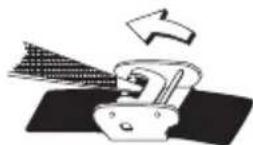
SLIDING CLASP BRACELET
1 Open locking plate.
2. Move clasp to desired bracelet length.
3. Exert pressure while holding locking plate and
slide clasp back and forth until it engages in grooves on underside of bracelet.
- Press locking plate down until it snaps closed. Clasp can be damaged if excessive force is used.
T1002-24_W217_EN_WEU_analoglayout_4-3/10 10:20 AM Page 20
ENGLISH
FOLDOVER CLASP BRACELET
- Find spring bar that connects bracelet to clasp.
- Using a pointed tool, push in spring bar and gently twist bracelet to disengage.
- Determine wrist size, then insert spring bar in correct bottom hole.
- Push down on spring bar, align with top hole and release to lock in place.

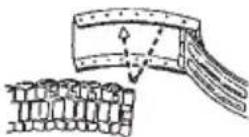
Fig. 2

ENGLISH
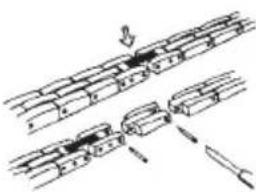
BRACELET LINK REMOVAL
REMOVING LINKS:
- Place bracelet upright and insert pointed tool in opening of link.
- Push pin forcefully in direction of arrow until link is detached (pins are designed to be diffi
- Repeat until desired number of links are removed.
RE-ASSEMBLY:
- Rejoin bracelet parts.
- Push pin back into link in opposite direction of arrow.
- Press pin down securely into bracelet until it is flush.

T1002-24_W217_EN_WEU_analoglayout_4-3/9/10 10:20 AM Page 22
ENGLISH
BATTERY
Timex strongly recommends that a retailer or jeweler replace battery. If applicable, push reset button when replacing battery. Battery type is indicated on caseback. Battery life estimates are based on certain assumptions regarding usage; battery life may vary depending on actual usage.
DO NOT DISPOSE OF BATTERY IN FIRE. DO NOT RECHARGE. KEEP LOOSE BATTERIES AWAY FROM CHILDREN.
ENGLISH
TIMEX INTERNATIONAL WARRANTY
Your TIMEX ^® watch is warranted against manufacturing defects by Timex Group USA, Inc. for a period of ONE YEAR from the original purchase date. Timex and its worldwide affiliates will honor this International Warranty.
Please note that Timex may, at its option, repair your watch by installing new or thoroughly reconditioned and inspected components or replace it with an identical or similar model. IMPORTANT — PLEASE NOTE THAT THIS WARRANTY DOES NOT COVER DEFECTS OR DAMAGES TO YOUR WATCH:
1) after the warranty period expires;
2) if the watch was not originally purchased from an authorized Timex retailer;
3) from repair services not performed by Timex;
4) from accidents, tampering or abuse; and
5) lens or crystal, strap or band, watch case, attachments or battery. Timex may charge you for replacing any of these parts.
THIS WARRANTY AND THE REMEDIES CONTAINED HEREIN ARE EXCLUSIVE AND IN LIEU OF ALL OTHER WARRANTIES, EXPRESS OR IMPLIED, INCLUDING ANY IMPLIED WARRANTY OF MERCHANTABILITY OR FITNESS FOR PARTICULAR PURPOSE. TIMEX IS NOT LIABLE FOR ANY SPECIAL, INCIDENTAL
T1002-24_W217_EN_WEU_analoglayout_4-3/10 10:20 AM Page 24
ENGLISH
OR CONSEQUENTIAL DAMAGES. Some countries and states do not allow limitations on implied warranties and do not allow exclusions or limitations on damages, so these limitations may not apply to you. This warranty gives you specific legal rights and you may also have other rights, which vary from country to country and state to state.
To obtain warranty service, please return your watch to Timex, one of its affiliates or the Timex retailer where the watch was purchased, together with a completed original Watch Repair Coupon or, in the U.S. and Canada only, the completed original Watch Repair Coupon or a written statement identifying your name, address, telephone number and date and place of purchase. Please include the following with your watch to cover postage and handling (this is not a repair charge): a US\8.00 check or money order in the U.S.; a CAN\7.00 cheque or money order in Canada; and a UK£2.50 cheque or money order in the U.K. In other countries, Timex will charge you for postage and handling. NEVER INCLUDE A SPECIAL WATCH-BAND OR ANY OTHER ARTICLE OF PERSONAL VALUE IN YOUR SHIPMENT.
For additional warranty information please call one of the numbers listed below:
Asia +852 27407311; Brazil +55 11 3068 3500; U.S. +1 800 448 4639; Canada 1 800 263 0981; the Caribbean,
ENGLISH
Bermuda and the Bahamas +1 501 370 5775 (U.S.); France +33 3 81 63 42 00; Germany/Austria +49 662 88921 30; Mexico and Central America 01 800 01 06000 (U.S.); Portugal +351 212 555 460; UK, Middle East and Africa +44 20 8687 9620
For other areas, please contact your local Timex retailer or Timex distributor for warranty information. In Canada, the U.S. and in certain other locations, participating Timex retailers can provide you with a postage-paid, pre-addressed Watch Repair Mailer for your convenience in obtaining factory service.
©2010 Timex Group USA, Inc. TIMEX and QUICKDATE are registered trademarks of Timex Group USA, Inc. INDIGLO is a registered trademark of Indiglo Corporation in the US and other countries.
T1002-24_W217_FR_WEU_T0507-18_TMX_Aalog1_FR.qxd 3/9/10 10:21 AM Page FRii
TIMEX
MONTRES TIMEX®
natural_image
Pure mechanical assembly diagram showing two parallel grooves with arrows indicating motion (no text or symbols)FRANÇAIS
PILE
natural_image
Pure mechanical assembly diagram showing shafts and fasteners without any text or symbolsNEDERLANDS
CONTROLLA DATA (SOLO PER L'USO IN FABBRICA)

IMPOSTARE L'ORA
IL GIORNO, LA DATA
ITALIANO
PER IMPOSTARE L'ORA
natural_image
Pure mechanical assembly diagram showing shafts and fasteners without any text or symbolsITALIANO
BATTERIA
- ENGLISH
- TABLE OF CONTENTS
- HOW TO START YOUR WATCH
- WATER AND SHOCK RESISTANCE
- DATE MODELS
- TO SET TIME:
- TO SET DAY:
- TO SET "QUICK DATE®" FEATURE:
- DAY / DATE MODELS
- TO SET THE TIME:
- TO SET THE DATE:
- TO SET THE DAY:
- EASY SET ALARM WITH DATE & INDIGLO® NIGHT-LIGHT
- EASY SET ALARM DATE & TIME SETTINGS
- EASY SET ALARM SETTINGS
- TO SET THE 12-HOUR ALARM:
- TO SET THE HOURLY ALARM:
- PERPETUAL CALENDAR
- TO SET TIME
- 7-YEAR BATTERY LIFE\* WITH FREE LIFETIME REPLACEMENT\*\*
- ELAPSED TIME RING
- TO TIME AN ACTIVITY FROM THE START:
- TO MEASURE THE TIME REMAINING:
- TACHYMETER RING
- COMPASS RING
- HOW TO ADJUST BRACELET
- SLIDING CLASP BRACELET
- FOLDOVER CLASP BRACELET
- BRACELET LINK REMOVAL
- REMOVING LINKS:
- RE-ASSEMBLY:
- BATTERY
- TIMEX INTERNATIONAL WARRANTY
- TIMEX
- MONTRES TIMEX®
- FRANÇAIS
- PILE
- NEDERLANDS
- ITALIANO
- PER IMPOSTARE L'ORA
- BATTERIA
Brand : TIMEX
Model : T2N834
Category : Wristwatch