
Expedition WS4 T49840 - Wristwatch TIMEX - Free user manual and instructions
Find the device manual for free Expedition WS4 T49840 TIMEX in PDF.


| Product Type | Multi-sport digital watch |
| Brand | Timex |
| Model | Expedition WS4 T49840 |
| Case dimensions | 50 mm wide, 15 mm thick |
| Weight | 80 g |
| Power | CR2032 battery (included) |
| Display | Digital LCD display with backlight |
| Main features | Altimeter, barometer, compass, thermometer, stopwatch, countdown timer, alarm, calendar |
| Water resistance | Up to 100 m (10 ATM) |
| Case material | Resin |
| Strap | Synthetic rubber |
| Crystal | Mineral |
| Operating temperature | -10 °C to 50 °C |
| Maintenance and cleaning | Clean with a soft, damp cloth. Avoid solvents. |
| Safety | Do not expose to extreme temperatures. Remove battery if not used for extended period. |
| Spare parts and repairability | Straps and batteries available. Repair by authorized center. |
| General information | Limited 2-year warranty. Made in China. |
Frequently Asked Questions - Expedition WS4 T49840 TIMEX
User questions about Expedition WS4 T49840 TIMEX
0 question about this device. Answer the ones you know or ask your own.
Ask a new question about this device
Download the instructions for your Wristwatch in PDF format for free! Find your manual Expedition WS4 T49840 - TIMEX and take your electronic device back in hand. On this page are published all the documents necessary for the use of your device. Expedition WS4 T49840 by TIMEX.
USER MANUAL Expedition WS4 T49840 TIMEX
![TIMEX E EXPEDITION. [WS4] WIDE SCREEN >>4 FUNCTION TMTM USER MANUAL >> TIMEX.COM](/content/2026/06/1256770/images/8e9de64dd21a549b3913dfd3ab1ece2dd2b6b282b51781638c91ea0bc9e30abe.jpg)
English page 1
Français page 51
Español página 99
TABLE OF CONTENTS
INTRODUCTION 5
TIMEX ^® EXPEDITION ^® WS4 ^™ 7
WATCH FEATURES....8
Time 8
Altimeter 8
Barometer....9
Temperature 9
Compass....9
Chronograph 9
Timer 10
Alarm 10
QUICK START....11
Setting the Time and Date....11
Calibrating the Compass 11
Calibrating Altitude or Barometer and Setting the Weather . . . . 12
INSTRUCTIONS....14
TIME MODE 14
Setting the Time and Measurements 14
Changing the Display 14
ALTIMETER MODE....15
Operating the Altimeter 15
Setting the Target Altitude or Altitude Alarm 16
BAROMETER MODE 19
Operating the Barometer....19
TEMPERATURE AND FORECAST 21
COMPASS MODE 23
Calibrating the Compass 23
Using the Compass 26
CHRONO MODE 27
Laps and Splits 29
REVIEW MODE....30
Reviewing Activity Data 30
TIMER MODE....32
Setting the Timer 32
Operating the Timer 33
ALARM MODE 34
Setting an Alarm 34
Operating the Alarm 35
CALIBRATION MODE 36
Setting and Calibrating Your Reference Points 38
INDIGLO ^® NIGHT-LIGHT 39
GLOSSARY 40
TIMEX INTERNATIONAL WARRANTY 43
INTRODUCTION
Some of the best places on the planet are the hardest to get to. Your new Timex ^® Expedition ^® WS4 ^™ watch will help you get there.
Equipped with essential outdoor features, the WS4 ^™ watch takes a fresh approach to wrist-top adventure instruments. The large, wide-screen dashboard displays key information at a glance, without flipping through modes.
The WS4 ^™ watch utilizes advanced sensors that have precision accuracy, and coupled with the intuitive user-interface, you can rely on it to give you all the right answers in even the most extreme conditions. The first few pages of the manual will get you started in minutes, and the rest provides an in-depth understanding of our most advanced outdoor instrument yet.
So whether you're taking to the trails, hitting the slopes or racing up twenty-three flights of stairs to see just how sensitive the altimeter is, get ready to venture out of bounds.
"Remember, your WS4 is no substitute for sound judgment. Sound judgment comes from experience, and the only way to gain experience is to put in the time. Enjoy your new instrument, yet keep in mind it is like a pet dog that needs exercise. Take it outdoors and put it and yourself through the paces."

-Conrad Anker
World-Renowned Mountaineer
Timex® Expedition® Brand Ambassador
TIMEX® EXPEDITION® WS4™


WATCH FEATURES
Time
- Hours, minutes, and seconds displayed in 12- or 24-hour format.
- Date displayed in MM-DD or DD.MM formats.
- Second time zone, with independent hours, minutes, date, and format settings.
• Hourly chime (optional). - Button beep (optional).
- Both a digital and an analog clock.
Altimeter
• Shows measurements in either feet or meters.
- Operating range from -1312 to 29,520 ft (-400 to 9000m)
- Tracks current, peak and accumulated altitude.
- Displays ascent and descent in a graph.
- Tracks time in and above target altitude (in Review Mode).
- Altitude alarm.
- Five user-set, customizable altitude reference points.
Barometer
- Tracks high, low and current pressure as well as sea level pressure.
- Displays sea level pressure changes in a graph.
- Operating range from 300 to 1100 mbar (9 to 32.5 inHg)
- Displays a weather forecast graphic.
Temperature
• Shows the temperature in either Celsius or Fahrenheit.
- Operating range from 14^ to 122^ F (-10^ to 50^)
Compass
- Includes the heading in both number format and a digital compass needle.
- Can be calibrated to a declination angle for maximum accuracy.
Chronograph
- Stopwatch feature that will time up to 100 hours and 99 laps.
- Option to display lap or split time in larger digits.
- During chronograph use, the WS4™ watch records key activity statistics that can be seen in Review Mode.
Countdown timer works up to 100 hours, with the option to repeat countdown up to 99 times. - Choose from daily, weekday, weekend, or weekly alarms.
- One-time backup alert if alarm is ignored.
Timer
Alarm
QUICK START
The next three pages will give you the basics you need to get your watch up and running in under 5 minutes. Continue reading for full instructions.
Setting the Time and Date
- Press MODE until time of day appears.
- Press and hold SET to start.
- Press START/SPLIT (+) or STOP/RESET (-) to increase or decrease setting values for time zone, time, date, sounds, and measurement units.
- Press MODE (NEXT) to advance to the next setting option.
- Press SET (DONE) to finish.
Calibrating the Compass
Prior to calibrating, remove the watch from your wrist, hold it in your hand, and choose a declination angle from the table on pages 24 and 25.
- Press MODE until COMPASS appears.
-
Press and hold SET to start.
-
Keeping the watch level and facing up, rotate it twice (taking at least 15 seconds per revolution) and then press MODE.
- Press START/SPLIT (+) or STOP/RESET (-) to increase or decrease setting values to match your chosen declination angle.
- Press MODE to advance to the next setting option.
- Press SET to finish.
If you see CAL OK at the end of the calibration process you have successfully calibrated the compass. If you see CAL FAIL, repeat the calibration process.
Calibrating Altitude or Barometer and Setting the Weather
You should calibrate either the Altimeter (HOME) or the Barometer (BARO), and the Weather Icon (WEATHER) prior to first use. You should calibrate the watch to the most accurate information you have.
- Press MODE until CAL appears.
- Press and hold SET to begin the calibration.
- Press START/SPLIT (+) or STOP/RESET (-) to scroll among the reference point settings and choose either HOME or BARO.
-
Press MODE (NEXT) to begin the setting process.
-
Press START/SPLIT (+) or STOP/RESET (-) to increase or decrease setting values.
- Press MODE (NEXT) to advance to the next setting option.
- Press SET (DONE).

- To complete calibration for the selected reference, hold STOP/RESET until watch beeps.
Once you have set the altitude or barometer, then you will need to synchronize the weather icon to current weather conditions.
- In CAL mode, press SET to begin calibration.
- Press START/SPLIT (+) or STOP/RESET (-) to scroll to WEATHER.
- Press MODE (NEXT) to begin the setting process.
- Press START/SPLIT (+) or STOP/RESET (-) to scroll among weather options.
- Press SET (DONE).

- To calibrate the weather to the preselected data, hold STOP/RESET until the watch beeps.
INSTRUCTIONS
TIME MODE
Your watch shows the time for two time zones. In this mode, you can also choose measurement units (i.e., feet or meters; Fahrenheit or Celsius) and pick from three different display options.
Setting the Time and Measurements
- Press MODE until time of day is displayed.
- Press and hold SET to start.
- Press START/SPLIT (+) or STOP/RESET (-) to increase or decrease setting values for time zone, time, date, sounds, and measurements.
- Press MODE (NEXT) to advance to the next setting option.
- Press SET (DONE) to finish.
Changing the Display
- Times Zones: Look at the other time zone by pressing START/SPLIT or switch time zones by holding START/SPLIT.
- When in Time of Day Mode, press STOP/RESET to choose among the following display options: Date, Altitude, or Barometric Pressure.
ALTIMETER MODE
Your watch allows you to track current, peak, and accumulated altitude as well as time spent at or above a target altitude. This mode also includes an alarm if you want to be alerted when you go above an altitude of your choosing. You should calibrate the altimeter before first use (see page 38).
Operating the Altimeter
Once in Altimeter Mode, the WS4 ^™ watch automatically scrolls through:
- PEAK: The highest reached altitude.
- ACC (accumulated): The total altitude change, taking both ascent and descent into account.
• CURR (current): The current altitude.

Note: If during a hike you climb 400 meters and descend 100 meters, then your accumulated altitude is 300 meters.
When the watch reaches the current altitude display you can also:

Press START/SPLIT: view numeric current altitude or graphic display of altitude over the last 36 hours.
Press and hold STOP/RESET: Reset accumulated altimeter statistics to zero to clear the memory.
Setting the Target Altitude or Altitude Alarm
Altimeter settings include:
- Target Altitude: If the chrono is running, the watch will track the time spent at or above this altitude in Review Mode.
- Altitude Alarm: Alerts you via an onscreen pop-up and an audible alarm that you have reached a pre-selected altitude.
"When the alarm beeps you know you've reached your set altitude. This quick reminder will allow you to assess your condition and decide if you are on track for a successful ascent."
-Conrad Anker
World-Renowned Mountaineer
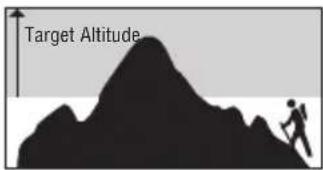

To set the Target Altitude or Altimeter Alarm:
- Press MODE until ALTI is shown.
- Press and hold SET to start.
-
Press START/SPLIT (+) or STOP/RESET (-) to increase or decrease setting values.
-
Press MODE (NEXT) to advance to the next setting option.
- Press SET (DONE) to finish.

NOTE: The altimeter will display in either FT (feet) or M (meters) depending on which display unit you chose in Time Mode. See page 14 for information on setting units of measurement.

ATTENTION: Your altimeter is sensitive to weather changes! Sudden changes in barometric pressure can change your altimeter reading by +/- 100 meters even if you have stayed in the same location. If possible, re-calibrate to a known altitude when drastic pressure changes occur.

You only need to calibrate barometer OR altimeter, since they rely on the same pressure. See Calibration Mode on page 36 for more information.
"Before I curl into my sleeping bag I note the current altitude and barometric pressure. In the few hours I sleep if I see a change in altitude or barometric pressure I can get an idea of the coming weather patterns."
As it is an inverse relationship between altitude and barometric pressure, if I wake at the same or lower elevation I can be confident the atmospheric pressure has remained constant. If I rise to a higher altitude I need to be aware as there is a chance a low pressure is moving in."
-Conrad Anker
World-Renowned Mountaineer
BAROMETER MODE
Your watch includes information about current and sea level pressure, high or low barometric information, and changes in sea level pressure over the most recent 36 hours. These features are useful for understanding changes in weather.
Operating the Barometer
Once in BARO Mode, the watch automatically scrolls through:
- Highest reached barometric pressure.
- Lowest barometric pressure.
- Current barometric pressure and the corrected sea level pressure.
When the watch reaches the current barometric display you can also:

Press START/SPLIT: Displays numeric current barometer reading or graphic display of the sea level pressure over the last 36 hours.
Press and hold STOP/RESET: Reset accumulated barometer statistics to zero to clear the memory.

NOTE: The barometer will display in either MB (millibars) or In Hg (inches of mercury) depending on which display unit you chose in Time Mode. See page 14 for information on setting units of measurement.
You only need to calibrate the barometer OR altimeter, since they rely on the same pressure. See Calibration Mode on page 36 for more information.
TEMPERATURE AND FORECAST
In TIME, ALTI, BARO, CHRONO, and TIMER Modes, your WS4 ^® watch includes information about temperature and forecast.
The watch can predict the weather based on historical air pressure trends. Generally, if the air pressure is rising, the weather situation is considered to be improving and is indicated by the sun icon. If the air pressure trend is falling, then the weather situation is worsening and is indicated by showing the clouds and/or precipitation icons.
When worn on your wrist, the temperature reading is affected by body heat and may differ from the actual temperature by 10 degrees or more. Long periods of exposure to direct sunlight may also affect accuracy. The watch can also measure the temperature in water, but make sure you don't press any watch buttons under water or this will compromise the watch's water-resistance.

NOTE: At low temperatures, the display could appear sluggish. Refer to page 9 for operating temperature range. Increase temperature surrounding watch to resume normal operation.
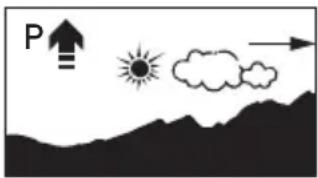


NOTE: For more accurate temperature readings, try wearing the watch outside your jacket or clipping it to your belt or pack (ideally in an area not constantly exposed to the sun). You can also remove the watch from your wrist and put in shade for 15 to 30 minutes.
For information on calibrating your weather icon see Calibration Mode on page 36.
COMPASS MODE
The WS4 ^™ watch includes an accurate digital compass that takes a reading every second when engaged and shows the compass reading as a number and a cardinal heading along with a virtual compass needle. You must calibrate the compass prior to first use and it's also a good idea to calibrate it periodically to maintain more accurate readings. For more information, see Calibration Mode on page 36.
Calibrating the Compass
When using the compass, it's important to keep your wrist at a level, horizontal position to help make compass readings more accurate.
For the most accurate readings, avoid calibrating the compass near large
metallic objects (such as electronics, cars, filing cabinets, and anything else metal) since magnetic force in these objects may interfere with the magnetic field and give you inaccurate compass readings. Note that the Indiglô night-light feature does not work while calibrating the compass.

Prior to calibrating the compass, remove the watch from your wrist, hold it in your hand and choose a declination angle from the table on the next page.
CITY DEC. ANGLE CITY DEC. ANGLE
| Amsterdam 0° W Chicago 3° W | ||
| Anchorage | 19° E Dallas | 3° E |
| Auckland 18° E | Denver | 9° E |
| Beijing | 3° W Dubai | 1° E |
| Berne | 0° E Hong Kong | 2° W |
| Bogota | 5° W Jerusalem 3° E | |
| Bozeman 13° E London | 1° W | |
| Buenos Aires | 8° W Los Angeles | 12° E |
| Calgary | 15° E Madrid | 1° W |
| Capetown | 23° W Mexico City | 5° W |
| Moscow 10° W Riyadh | 2° E | |
| Mt. Everest 0° W Rome | 1° E | |
| Mumbai | 0° W Seattle | 17° E |
| Munich | 1° E Seoul | 7° W |
| New York 12° W Sydney | 12° E | |
| Orlando | 5° W Tokyo | 6° W |
CITY DEC. ANGLE CITY DEC. ANGLE
For cities that do not appear on the table above, you can find your declination angle using the declination angle calculator at the URL listed below. Note that you will need to know the latitude and longitude of your location before you can calculate the declination angle at this website. Latitude and longitude information can be found on the internet.
http://www.ngdc.noaa.gov/geomagmodels/struts/calcDeclination
Once you know your declination angle:
- Press MODE until COMPASS is shown.
- Hold SET to start.
-
Keeping the watch level and facing up, rotate it twice (taking at least 15 seconds per revolution) and then press MODE.
-
Press START/SPLIT or STOP/RESET to increase or decrease setting values to match your chosen declination angle.
- Press MODE to advance to the next setting option.
- Press SET to finish.
If you see CAL OK at the end of the calibration process you have successfully calibrated the compass. If you see CAL FAIL, repeat the calibration process.

ATTENTION: Calibration may fail if you rotate the watch too quickly or take longer than one minute to complete. Calibration may also fail if you are near objects that are magnetic.
Using the Compass
After you have calibrated your compass, you will see the current compass heading, cardinal points, and the digital compass needle when you enter Compass Mode. After 30 seconds the compass reading times out and disappears from the watch display to preserve battery life. Press START/SPLIT to display the current heading for another 30 seconds.

TIP: Your watch would be a great tool for orienteering. You can use your compass to navigate way points and if you participate in an orienteering race, you can time yourself using the chronograph (see next section).
CHRONO MODE
Your watch includes a chronograph, which is a stopwatch function. The chrono can track up to 100 hours and 99 laps. The data you collect while running the chronograph can then be used to check your progress in Review Mode. (See page 30 for more information about Review Mode).
Most watch buttons have multiple functions in Chrono Mode. Use the table along with your watch to explore the options.
| BUTTON FUNCTIONS | |
| MODE | Enter or exit the mode. Quickly display a lap or split after pressing START/SPLIT when chrono is running. |
| STOP/RESET | Stop the chrono.Switch between altimeter or barometer display information (if chrono is at 00:00:00). |
| START/SPLIT | Start the chrono.Take a lap or split. |
| SET | Switch the lap and split display positions. |

NOTE: Your chronograph can be a good tool for mountain biking, skiing, or trail running. You can take splits at specified trail points along the way, periodically check your altimeter to see how high you've climbed or descended, and even check the barometer to
make sure bad weather is not approaching. Once you've finished, you can check out information about your activity in Review Mode.
Laps and Splits
When referring to lap times, this is the time for an individual segment of an activity. Split time is the entire time up to the current segment.


When the chrono is running, a bar is shown in chrono and time of day modes above the stopwatch icon.

ATTENTION: To save the life of your watch battery, when the chrono reaches 100 hours the watch will stop timing and the START/SPLIT button will not function.
REVIEW MODE
The Activity Review Mode on the watch captures lows, highs and adventure averages. Activity statistics are recorded while the chronograph is running and are then visible in Review Mode.
Reviewing Activity Data
- Press MODE until REVIEW is shown.
- Press START/SPLIT to scroll through the data.
-
Press and hold STOP/RESET to clear the most recent review information after you have finished reviewing it.
The following data is tracked in Review Mode: -
Minimum Altitude
- Total Ascent
- Total Descent
• Maximum Altitude
30
• Time Spent At or Above Target Altitude
- Altitude Graph (most recent 35 minutes)
• Highest Barometric Pressure
- Lowest Barometric Pressure
• Average Barometric Pressure
• Sea Level Pressure Graph (most recent 35 minutes)
- Highest Temperature
- Lowest Temperature
• Average Temperature
• Temperature Graph (most recent 35 minutes)

TIP: You can use Review Mode to relive your hike on the way home. Scroll through activity stats to let your friends know how high you climbed, how much time you spent above your target altitude, and even the temperature changes over the course of your hike. Even more, you can show them this information through a series of graphs that show altitude, barometric pressure, and temperature changes over time.

NOTE: Press and hold START/SPLIT to quickly scroll through all data.

ATTENTION: You will see the message NO DATA STORED if the Chrono has never been run.
TIMER MODE
Your WS4 ^™ watch includes a standard countdown timer that you can use for both outdoor and indoor activities. It can count down from a fixed time of up to 100 hours and can repeat a countdown up to 99 times.
Setting the Timer
- Press MODE until TIMER is shown.
- Press and hold SET to start.
- Press START/SPLIT (+) or STOP/RESET (-) to increase or decrease setting values for hours, minutes, seconds, and end action.
- Press MODE (NEXT) to advance to the next setting option.
- Press SET (DONE) to finish.
Operating the Timer
- Press START/SPLIT to start the timer or restart it after a pause.
- Press STOP/RESET to stop the countdown.
- Hold STOP/RESET to reset the timer to the start value.
- Hold STOP/RESET again to clear the timer to 0.
When the countdown reaches zero the watch will beep. You can press any button to silence the beep. If you set the timer to repeat at the end of the countdown, the repeat will continue until you press STOP/RESET. The display will show R and a number to indicate the timer is repeating and how many times it has repeated.

TIP: The timer might be useful when you want to be alerted at the halfway point of an activity. For example, you go out knowing you only have about two hours to spend on a hike. You set the timer for 60 minutes and when it beeps you know it's time to turn around and start heading back to the trail head. Timer information is not connected to Review Mode.

NOTE: While setting the timer, quickly scroll through the setting values by holding down START/SPLIT (+) or STOP/RESET (-).

When the timer is running, a bar is shown in timer and time of day modes above the timer icon.

If the timer is set to repeat, the bar is shown above the timer with arrow icon.
ALARM MODE
The WS4 ^™ watch includes an alarm that you can set to ring once, or at the same time every day, or only on weekends, weekdays, or even just one day a week.
Setting an Alarm
- Press MODE until ALARM is shown.
- Press and hold SET to start.
- Press START/SPLIT (+) or STOP/RESET (-) to increase or decrease setting values for hours, minutes, AM/PM and alarm type.
- Press MODE (NEXT) to advance to the next setting option.
- Press SET (DONE) to finish.

NOTE: When you set the alarm, you automatically turn it on.
Operating the Alarm
To turn an alarm on or off without initiating the setting process, press START/SPLIT when you enter ALARM MODE. The alarm will sound for 20 seconds when it reaches a scheduled alarm. Push any button to turn the alarm off. A one-time backup alarm will sound after 5 minutes if you don't turn the alarm off the first time it rings.
"The alarm clock is perhaps the simplest function on the WS4watch. Yet in it's simplicity it plays a very important part in the overall expedition. There is a comfort in hearing the 2 AM alarm wake me from my sleep. These predawn hours are the finest of the day. Crisp firm snow under foot, a few stars fading to dawn and the rhythm of your partners cadence are the intangible part of the expedition experience."
-Conrad Anker
World-Renowned Mountaineer

NOTE: While setting an alarm, quickly scroll through the setting values by holding down START/SPLIT (+) or STOP/RESET (-).
— The AM/PM value will (+) only appear if you have set the watch to display the 12-hour format.

When the alarm is armed, a bar is shown in alarm and time of day modes above the alarm icon.
CALIBRATION MODE
The WS4 ^™ watch has the ability to take extremely accurate measurements. You should calibrate either the Altimeter (HOME) or the Barometer (BARO), and the Weather Icon (WEATHER) prior to first use. And, as with any precision instrument, you should calibrate frequently to maintain accuracy.

NOTE: For the best accuracy, choose the calibration method based on the most accurate reference source available. For example, if you are standing at a trail head and know the correct altitude, then the most accurate calibration will be altitude. If you don't know your altitude, you can find out the current sea level pressure (published online or in a newspaper) and calibrate the sensor to barometric pressure.
The watch also has five Altitude Reference Points (REFERENCE HOME, REFERENCE BASE 1, REFERENCE BASE 2, REFERENCE BASE 3, and REFERENCE MAN-ALT) which allow you to set the altitude of a known location ahead of time, and then re-calibrate your watch at that point with one push of a button.


ATTENTION: Sudden changes in barometric pressure can impact your altimeter reading. If possible, re-calibrate to a known altitude when drastic pressure changes occur.
Setting and Calibrating Your Reference Points
- Press MODE until CAL is shown.
- Hold SET to begin the calibration.
- Press START/SPLIT (+) to scroll among the reference points (HOME ALTI, BASE 1 ALTI, BASE 2 ALTI, BASE 3 ALTI, MANUAL ALTI, BARO, and WEATHER).
- Press MODE (NEXT) to begin the setting process.
- Press START/SPLIT (+) or STOP/RESET (-) to increase or decrease setting values.
- Press MODE (NEXT) to advance to the next setting option.
- Press SET (DONE).

-
To complete calibration for the selected reference, press and hold STOP/RESET until watch beeps.
-
As your location changes, select a new reference and recalibrate by pressing and holding STOP/RESET.

Note: Use Manual-Altitude (MAN-ALT) for one-time, manual re-calibrations. Use Home Altitude and Base Altitude 1,2,3 to store altitude reference points that will be used multiple times.

Note: If you have already entered a reference point, you can quickly select that reference point and hold STOP/RESET to quickly calibrate.
In any mode, when you press the INDIGLO ^® button, the watch face will light up for easier viewing. You can also activate the Night-Mode ^® feature if you press and hold the INDIGLO ^® button until you hear a beep. The Night-Mode ^® feature is a very useful feature in low light conditions because it allows you to press any button to light the watch for 2 to 3 seconds. Once activated, the Night-Mode ^® feature stays active for 7 to 8 hours. If you want to deactivate the Night-Mode ^® feature before 7 to 8 hours have elapsed, press and hold the INDIGLO ^® button until you hear a beep.
GLOSSARY
This glossary provides definitions for some of the features and functions of the watch described throughout this manual.
Altimeter: An instrument used to determine the altitude of an object with respect to a fixed level. Typically altitude is measured with respect to sea level.
Analog: As it relates to a watch, analog tells time with the use of hands.
Barometer: A barometer measures atmospheric pressure and can help predict changes in weather.
Barometric Pressure: Air pressure as it relates to weather forecasts. Higher pressure usually indicates warmer and clearer weather while lower pressure typically indicates cloudy weather and a greater chance of precipitation.
Calibration: A technique to improve the accuracy of the compass, altimeter, barometer, and weather forecast, primarily by compensating for local conditions.
Chronograph: The chronograph records timed segments for the duration of your activity.
Declination: To account for the difference between true north and magnetic north,
a compass uses a declination angle setting. Westerly declinations are subtracted from the computed compass heading while easterly declinations are added. See the table on pages 24 and 25 for a list of declinations for major world cities.
Digital: As it relates to watches, digital tells time with the use of numbers.
In Hg: In Hg stands for Inches of mercury, which is a unit for measuring air pressure. One inch of mercury is equivalent to 33.86 millibars.
Lap: Lap time records the time or duration of individual segments of your activity.
Magnetic North: The direction of the earth's magnetic pole and the direction towards which a compass needle points, which differs from true north (see below). The difference between true north and magnetic north is used to calculate the declination angle used by the watch's compass.
MB: MB stands for millibars, which is a metric unit for measuring air pressure. One millibar is equal to .0295 inches of mercury.
Sea Level Pressure: Air pressure for a specific location adjusted for difference in the altitude of a location. Typically, local pressure will be lower than sea level pressure because air pressure decreases with altitude.
Split: Split time records the total elapsed time since the beginning of your current activity.
Taking a lap or split: When you take a lap or split, the chronograph records the time for the current segment and automatically begins timing a new one.
True North: The geographic north pole where all longitude lines meet. Maps are laid out with true north at the top. The difference between true north and magnetic north is used to calculate the declination angle used by the watch's compass.
TIMEX INTERNATIONAL WARRANTY
(U.S. - LIMITED WARRANTY)
Your TIMEX ^® watch is warranted against manufacturing defects by Timex Group USA, Inc. for a period of ONE YEAR from the original purchase date. Timex and its worldwide affiliates will honor this International Warranty.
Please note that Timex may, at its option, repair your watch by installing new or thoroughly reconditioned and inspected components or replace it with an identical or similar model. IMPORTANT — PLEASE NOTE THAT THIS WARRANTY DOES NOT COVER DEFECTS OR DAMAGES TO YOUR WATCH:
1) after the warranty period expires;
2) if the watch was not originally purchased from an authorized Timex retailer;
3) from repair services not performed by Timex;
4) from accidents, tampering or abuse; and
5) lens or crystal, strap or band, watch case, attachments or battery. Timex may charge you for replacing any of these parts.
THIS WARRANTY AND THE REMEDIES CONTAINED HEREIN ARE EXCLUSIVE AND IN LIEU OF ALL OTHER WARRANTIES, EXPRESS OR IMPLIED, INCLUDING
ANY IMPLIED WARRANTY OF MERCHANTABILITY OR FITNESS FOR PARTICULAR PURPOSE. TIMEX IS NOT LIABLE FOR ANY SPECIAL, INCIDENTAL OR CONSEQUENTIAL DAMAGES. Some countries and states do not allow limitations on implied warranties and do not allow exclusions or limitations on damages, so these limitations may not apply to you. This warranty gives you specific legal rights and you may also have other rights which vary from country to country and state to state.
To obtain warranty service, please return your watch to Timex, one of its affiliates or the Timex retailer where the watch was purchased, together with a completed original Watch Repair Coupon or, in the U.S. and Canada only, the completed original Watch Repair Coupon or a written statement identifying your name, address, telephone number, and date and place of purchase. Please include the following with your watch to cover postage and handling (this is not a repair charge): a US \8.00 check or money order in the U.S.; a CAN \7.00 cheque or money order in Canada; and a UK £2.50 cheque or money order in the U.K. In other countries, Timex will charge you for postage and handling. NEVER INCLUDE A SPECIAL WATCHBAND OR ANY OTHER ARTICLE OF PERSONAL VALUE IN YOUR SHIPMENT.
For the U.S., please call 1-800-328-2677 for additional warranty information. For Canada, call 1-800-263-0981. For Brazil, call +55 (11) 5572 9733. For Mexico, call 01-800-01-060-00. For Central America, the Caribbean, Bermuda and the Bahamas, call (501) 370-5775 (U.S.). For Asia, call 852-2815-0091. For the U.K., call 44 020 8687 9620. For Portugal, call 351 212 946 017. For France, call 33 3 81 63 42 00. For Germany/Austria, call +43 662 88921 30. For the Middle East and Africa, call 971-4-310850. For other areas, please contact your local Timex retailer or Timex distributor for warranty information. In Canada, the U.S. and in certain other locations, participating Timex retailers can provide you with a postage-paid, pre-addressed Watch Repair Mailer for your convenience in obtaining factory service.
©2009 Timex Group USA, Inc. TIMEX, E Logo, EXPEDITION and NIGHT-MODE are registered trademarks of Timex Group USA, Inc. in the U.S. and other countries. INDIGLO is a registered trademark of Indiglo Corporation in the U.S. and other countries. WS4 is a trademark of Timex Group B.V.
TABLE DES MATIÈRES
INTRODUCTION 51
LA MONTRE TIMEX® EXPEDITION® WS4™ 53
FONCTIONS DE LA MONTRE 54
Heure 54
Altimètre 54
Baromètre. 55
Température 55
Boussole 55
Chronographe 56
Minuterie. 56
Alarme 56
DÉMARRAGE RAPIDE 57
natural_image
Silhouette of a person climbing a mountain peak with a dashed horizontal line above (no text or symbols)http://www.ngdc.noaa.gov/geomagmodels/struts/calcDeclination

http://www.ngdc.noaa.gov/geomagmodels/struts/calcDeclination

LUZ NOCTURNA INDIGLO®
INTRODUÇÃO
natural_image
Silhouette of a person ascending a mountain peak with a dashed horizontal line above (no text or symbols)Para configurar a altitude alvo ou o alarme do altímetro:
natural_image
Simple diagram showing a sun, cloud, and mountain with an upward arrow labeled 'P' (no text or symbols beyond basic shapes)

http://www.ngdc.noaa.gov/geomagmodels/struts/calcDeclination

LUZ NOTURNA INDIGLO®
MODALITÀ ESAME....225
MODALITÀ TIMER....228
natural_image
Simple diagram showing a sun, cloud, and mountain landscape with an upward arrow labeled 'P' (no text or symbols beyond basic shapes)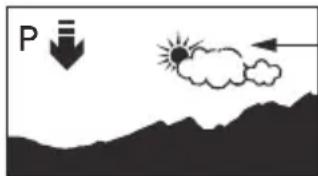


Timex® Expedition® Brand Ambassador
TIMEX® EXPEDITION® WS4™

UHR-EIGENSCHAFTEN
Uhrzeit
natural_image
Simple diagram showing a sun, cloud, and mountain silhouette with an upward arrow (no text or symbols)


(U.S.A. – BESCHRÄNKTE GARANTIE)
natural_image
Simple diagram showing a sun, cloud, and mountain with an upward arrow, no text or symbols present.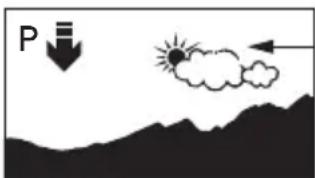
natural_image
Simple diagram showing a downward arrow labeled 'P' pointing to a cloud with a sun, above a mountain range (no text or symbols)
Mount Everest 0° W Rome 1° 0
http://www.ngdc.noaa.gov/geomagmodels/struts/calcDeclination

- TABLE OF CONTENTS
- INTRODUCTION
- WATCH FEATURES
- Time
- Altimeter
- Barometer
- Temperature
- Compass
- Chronograph
- Timer
- Alarm
- QUICK START
- Setting the Time and Date
- Calibrating the Compass
- Calibrating Altitude or Barometer and Setting the Weather
- INSTRUCTIONS
- TIME MODE
- Setting the Time and Measurements
- Changing the Display
- ALTIMETER MODE
- Operating the Altimeter
- Setting the Target Altitude or Altitude Alarm
- BAROMETER MODE
- Operating the Barometer
- TEMPERATURE AND FORECAST
- COMPASS MODE
- CITY DEC. ANGLE CITY DEC. ANGLE
- http://www.ngdc.noaa.gov/geomagmodels/struts/calcDeclination
- Using the Compass
- CHRONO MODE
- Laps and Splits
- REVIEW MODE
- Reviewing Activity Data
- TIMER MODE
- Setting the Timer
- Operating the Timer
- ALARM MODE
- Setting an Alarm
- Operating the Alarm
- CALIBRATION MODE
- Setting and Calibrating Your Reference Points
- GLOSSARY
- TIMEX INTERNATIONAL WARRANTY
- (U.S. - LIMITED WARRANTY)
- TABLE DES MATIÈRES
- LUZ NOCTURNA INDIGLO®
- INTRODUÇÃO
- LUZ NOTURNA INDIGLO®
- UHR-EIGENSCHAFTEN
- Uhrzeit
Brand : TIMEX
Model : Expedition WS4 T49840
Category : Wristwatch