ES8078 - Shaver PANASONIC - Free user manual and instructions
Find the device manual for free ES8078 PANASONIC in PDF.

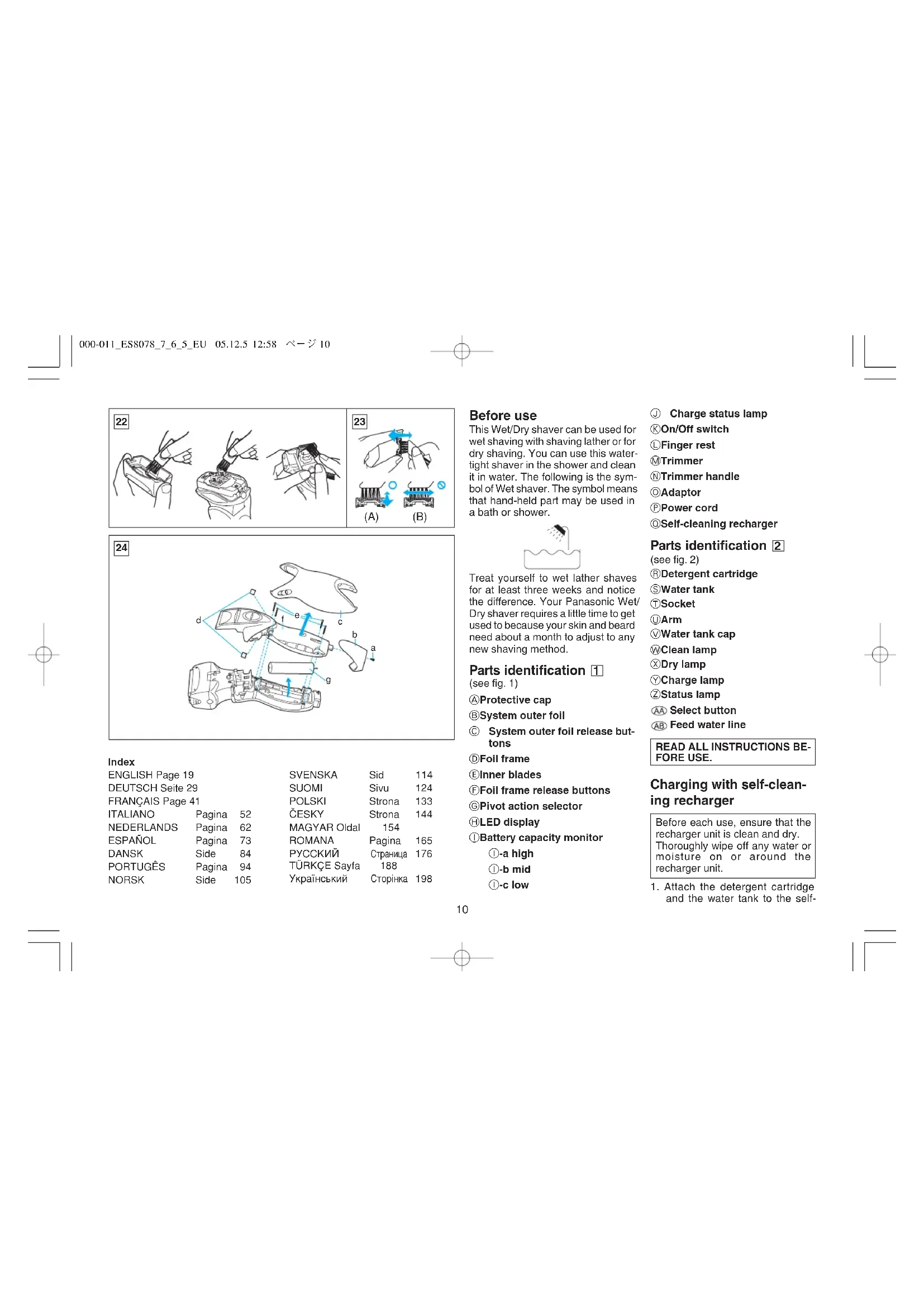


| Technical Features | Panasonic ES8078 electric shaver, double blade shaving technology, pivoting head for precise shaving. |
|---|---|
| Power Supply Type | Operates on rechargeable battery, 45 minutes of autonomy. |
| Usage | Suitable for dry and wet use, easy to clean under water. |
| Maintenance | Regular cleaning recommended, blades to be replaced every 12 months for optimal performance. |
| Safety | Equipped with an overload protection system, do not use in the shower. |
| General Information | 2-year warranty, lightweight for optimal handling. |
Frequently Asked Questions - ES8078 PANASONIC
User questions about ES8078 PANASONIC
0 question about this device. Answer the ones you know or ask your own.
Ask a new question about this device
Download the instructions for your Shaver in PDF format for free! Find your manual ES8078 - PANASONIC and take your electronic device back in hand. On this page are published all the documents necessary for the use of your device. ES8078 by PANASONIC.
USER MANUAL ES8078 PANASONIC
Wet/Dry Rechargeable Shaver Operating Instructions
Model No. ES8078
natural_image
Line drawing of a pair-skewed hairbrush (no text or symbols)Before operating this unit, please read these instructions completely.
3 ENGLISH
| Course selection indications | Time required (guide) | Course completion summary (※) | ||||||||
| Course | On self-cleaning recharger | Courses that can be changed halfway through | On self-cleaning recharger | On main unit | ||||||
| clean | dry | charge | clean | dry | charge | charge | ||||
| 1 | Charge | — | — | glow(Turns off after 6 secs.) | All courses2345 | Approx. 1 hour | — | — | — | Blinks red |
| 2 | Clean/Dry/Charge | glow | glow | glow | Course3 | Approx. 3 hours | blinks | blinks | blinks | Blinks red |
| 3 | Clean/Dry | glow | glow | — | Course2 | Approx. 3 hours | blinks | blinks | — | — |
| 4 | Dry/Charge | — | glow | glow | Courses235 | Approx. 2 hours 50 mins. | — | blinks | blinks | Blinks red |
| 5 | Dry | — | glow | — | Courses234 | Approx. 2 hours 50 mins. | — | blinks | — | — |
※ The displays on both the self-cleaning recharger and the main unit are the indications for the completion of each course as shown in the table above.
000-011_ES8078_7_6_5_EU
05.12.5
12:57
ページ3
DEUTSCH
natural_image
Line drawing of a mechanical device with a blue handle and internal structure (no text or symbols)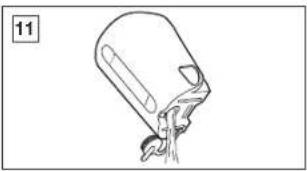
natural_image
Simple line drawing of a container with liquid and a handle, no text or symbols present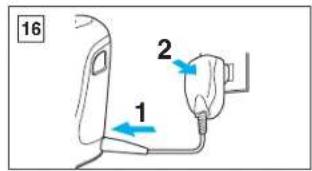

natural_image
Line drawing of a kettle with a blue arrow pointing to the side panel (no text or symbols)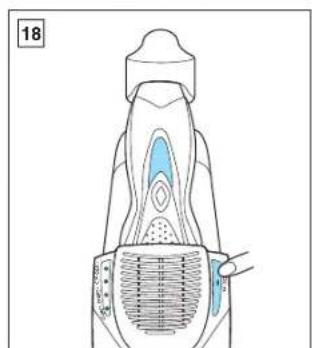
natural_image
Anatomical diagram of a human body part with highlighted internal structures (no text or labels)
Index
| ENGLISH Page 19 | SVENSKA | Sid | 114 | ||
| DEUTSCH Seite 29 | SUOMI | Sivu | 124 | ||
| FRANÇAIS Page 41 | POLSKI | Strona | 133 | ||
| ITALIANO | Pagina | 52 | ČESKY | Strona | 144 |
| NEDERLANDS | Pagina | 62 | MAGYAR Oldal | 154 | |
| ESPAÑOL | Pagina | 73 | ROMANA | Pagina | 165 |
| DANSK | Side | 84 | PYCCKIIЙ | Страница | 176 |
| PORTUGÊS | Pagina | 94 | TÜRKÇE Sayfa | 188 | |
| NORSK | Side | 105 | Український | Сторінка | 198 |
Before use
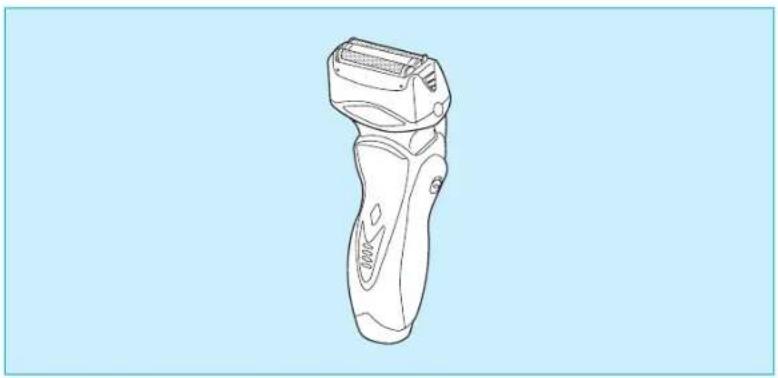
This Wet/Dry shaver can be used for wet shaving with shaving lather or for dry shaving. You can use this water-tight shaver in the shower and clean it in water. The following is the symbol of Wet shaver. The symbol means that hand-held part may be used in a bath or shower.
Treat yourself to wet lather shaves for at least three weeks and notice the difference. Your Panasonic Wet/Dry shaver requires a little time to get used to because your skin and beard need about a month to adjust to any new shaving method.
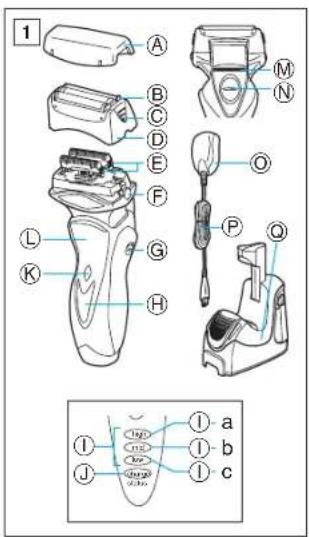
Parts identification 1
(see fig. 1)
ⒶProtective cap
System outer foil
© System outer foil release buttons
©Foil frame
EInner blades
⑤Foil frame release buttons
©Pivot action selector
HLED display
①Battery capacity monitor
①-a high
①-b mid
①-c low
① Charge status lamp
©On/Off switch
Finger rest
©Trimmer
⑨Trimmer handle
©Adaptor
©Power cord
@Self-cleaning recharger
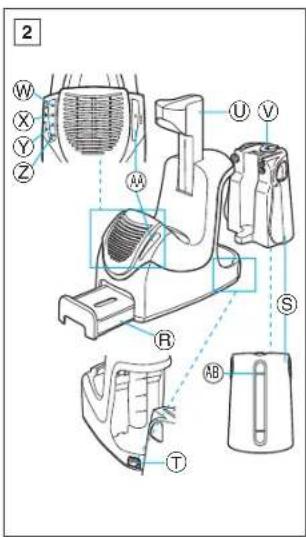
Parts identification 2
(see fig. 2)
®Detergent cartridge
⑤Water tank
①Socket
UArm
Water tank cap
©Clean lamp
☒Dry lamp
YCharge lamp
⑦Status lamp
AA Select button
AB Feed water line
READ ALL INSTRUCTIONS BEFORE USE.
Charging with self-cleaning recharger
Before each use, ensure that the recharger unit is clean and dry. Thoroughly wipe off any water or moisture on or around the recharger unit.
- Attach the detergent cartridge and the water tank to the self-
000-011_ES8078_7_6_5_EU
05.12.5
12:58
ページ 11
cleaning recharger securely (see fig. 13, 14, 15).
- Insert the appliance plug into the socket (see fig. 16-1).
- Firmly insert the adaptor into the AC outlet (see fig. 16-2). It will be adjusted automatically to voltages between 100-240V AC. In some areas, a special plug adaptor may be required.
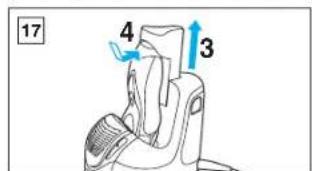
- Pull up the arm of the self-cleaning recharger until it clicks (see fig. 17-3).
- Remove the protective cap and set the shaver firmly onto the self-cleaning recharger until it clicks (see fig. 17-4).
- The Self-cleaning recharger is set on the [Charge] (Charge) cource when the shaver is set on.
- Do not push the arm downwards.
- Ensure that the outer foil does not get deformed or damaged when placing the shaver into the self-cleaning recharger.
Note
- Use the self-cleaning recharger in environments that do not exceed ambient temperatures of 15 to 35^ and humidity levels of 95% .
- If it is far below or over the appropriate temperature, the charging time may extend, or the Self-cleaning recharger may not function.
- In particular, low temperature may shorten the life span of the rechargeable battery. In this case, the charge status lamp blinks twice per second.
- When charging the shaver for the first time or when it has not been in
use for more than 6 months, the charge status lamp may not illuminate for a few minutes after operation. It will eventually illuminate if kept connected.
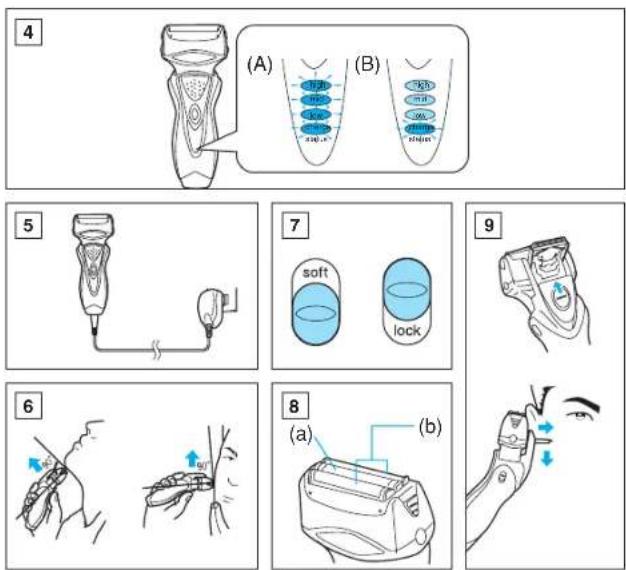
The charge status lamp will glow when the shaver is being charged. The battery capacity monitor will fully illuminate and the charge status lamp will blink after charging is completed (see fig. 4 (A)).
10 minutes after charging is completed, the battery capacity monitor will turn off and the charge status lamp will continue to blink (see fig. 4(B)).
You can fully charge the shaver in 1 hour if the LED display shows "low". The battery capacity monitor indicates the charge remaining in the battery in 3 levels (high/mid/low). The unit can be used once or twice more after "low" starts to blink. (Differs depending on usage.)
A full charge will supply enough power for approx. 14 shaves (3 minutes per shave for a normal beard). You can always connect your shaver to the self-cleaning recharger or the adaptor to maintain full battery capacity. This shaver cannot be over-charged.
Before travelling, charge it fully for 1 hour if you will not be taking the adaptor with you.
Charging without self- cleaning recharger
Connect the power cord to the shaver, and plug the adaptor to an
AC outlet (see fig. 5). The shaver will be adjusted automatically to voltages between 100-240V AC.
In some areas, a special plug adaptor may be required.
Using your shaver
Caution – The system outer foil is very thin and can be damaged if handled improperly. Before each use, always check the foil for damage. To avoid personal injury, do not use if the foil or other parts of the shaving head are damaged.
Push the On/Off switch to turn the shaver on.
If you push and hold the On/Off switch for more than 2 seconds, it will activate the turbo mode for "sonic" vibration cleaning. (see "Cleaning your shaver without the self-cleaning recharger") Shaving with "sonic" vibration may damage your skin. Please turn it off and on again to deactivate the turbo mode.
Do not place fingers on the On/Off switch during use.
This may cause the shaver to stop during use or change it to the "sonic" vibration cleaning mode. Place your finger on the finger rest during use.
Hold the shaver at a right angle (90°) to your skin (see fig. 6). Start out shaving by applying gentle pressure to your face. Stretch your skin with your free hand and move the shaver
back and forth in the direction of your beard. You may gently increase the amount of pressure as your skin becomes accustomed to this shaver. Applying excessive pressure does not provide a closer shave.
Pivot action selector (see fig. 7)
Use the pivot action selector to choose the shaving mode, [soft] (soft) and [lock] (lock) based on your shaving preference.
The pivot action can be changed whether the switch is turned on or off.
System outer foil (see fig. 8)
System outer foil has a slit blade (a) between 2 foils (b). They move up and down independently to follow the contours of your face.
The slit blade catches and cuts longer and lying hairs easily.
For wet shaving
Put a thin layer of shaving foam on your face which works as a lubricant. Shaving foam is the most suitable among many other shaving aids (gel, soap, cream, etc.). Do not put a thick layer of shaving foam as it may affect shaver's performance. If the shaving head is clogged with foam, simply rinse it under running water.
Using the trimmer
(see fig. 9)
Slide the trimmer handle up to open the trimmer.
Place the trimmer at a right angle to your skin and move it downward to trim sideburns.
Cleaning your shaver
①Cleaning with the self-cleaning recharger
Preparing the self-cleaning recharger
Warning – Do not wash or apply water to the adaptor or self-cleaning recharger. Failure to observe this may cause electric shock or result in short circuits.
- Detach the shaver and the appliance plug from the self-cleaning recharger.
- Fill the water tank with water.
1) Remove the water tank from the self-cleaning recharger (see fig. 10-1).
2) Open the water tank cap (see fig. 10-2).
3) Wash away the old cleaning liquid inside the water tank and rinse (see fig. 11).
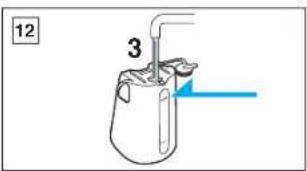
4) Pour tap water up until the feed water line (see fig. 12).
* Do not pour water over the water feed line in the tank. This may cause the cleaning liquid to spill.
-
Firmly shut the water tank cap and attach the tank to the self-cleaning recharger (see fig. 13).
-
Peel off the seals from the new detergent cartridge (two seals) (see fig. 14).
- Hold the detergent cartridge horizontally. (The detergent may spill if tilted excessively.)
-
Attach the detergent cartridge to the self-cleaning recharger (see fig. 15).
-
Do not use any solution other than the Panasonic Shaver self-cleaning recharger special detergent.
- Be sure to change the detergent cartridge and the cleaning liquid inside the water tank simultaneously.
Adding water, or changing just the detergent cartridge or the water, will result in deteriorated cleaning functions.
- When the self-cleaning recharger is operated, the concentrated detergent inside the cartridge will be diluted and the water inside the tank will become a cleaning liquid.
Cleaning your shaver
- Insert the appliance plug into the self-cleaning recharger socket (see fig. 16-1).
- Firmly insert the adaptor into the AC outlet (see fig. 16-2).
- Pull up the arm of the self-cleaning recharger until it clicks (see fig. 17-3).
- Remove the protective cap and set the shaver firmly onto the self-cleaning recharger until it clicks (see fig. 17-4).
- Ensure that the outer foil does not get deformed or damaged during setting.
- Before using the self-cleaning recharger, make sure the shaver has been rinsed
thoroughly with water if it has been washed with hand soap or any other detergent, and swish water off properly before setting the shaver into the self-cleaning recharger unit.
The presence of soap or any other detergent residue will contaminate the cleaning solution in the self-cleaning recharger unit and could lead to poor cleaning performance.
-
To clean the shaver, select either the [Clean/Dry/Charge] (Clean/Dry/Charge) course or the [Clean/Dry] (Clean/Dry) course. To dry the shaver after rinsing, select the [Dry/Charge] (Dry/Charge) course or the [Dry] (Dry) course (see fig. 18).
-
The [Charge] (Charge) course will begin immediately when the shaver is set onto the self-cleaning recharger.
• A total of five courses are available.
The display will alternate between [Clean/Dry/Charge] (Clean/Dry/Charge) → [Clean/Dry] (Clean/Dry) → [Dry/Charge] (Dry/Charge) → [Dry] (Dry) → [Charge] (Charge) whenever the select button is pressed.
- The course will start approximately six seconds after being selected.
* Press the select button within six seconds to choose a different course (see fig. 3).
WARNING – Do not remove the shaver from the self-cleaning recharger when courses that include the [Dry] (Dry) function are in use. A heater is used during the drying process, and this may result in the area around the blade becoming extremely hot and causing burns.
The course will be aborted if the power is cut off during cleaning. In this event, it is necessary to perform the [Clean/Dry/Charge] (Clean/Dry/Charge) or [Clean/Dry] (Clean/Dry) course once again from the beginning.
It will take about 3 hours to finish the [Clean/Dry/Charge] (Clean/Dry/Charge) or [Clean/Dry] (Clean/Dry) course.
The clean and dry lamp will blink after the [Clean/Dry/Charge] (Clean/Dry/Charge) or [Clean/Dry] (Clean/Dry) course is completed.
- The self-cleaning recharger is mainly designed to clean the blades (outer foil and inner blades). Areas that are not soaked into the cleaning liquid or around the surface of the liquid are not subject to cleaning.
Carry out brush cleaning or wash with water to remove beard trimmings in these areas.
Replacing the Detergent Cartridge Replace the Detergent Cartridge when it has reached the end of its service life. Normally, it is recommended to replace it every 30-40 days if used once every day. Use the below chart as a guide.
012-021_ES8078_7_6_5_EU
05.12.5
12:58
ページ 13
Note: In order to maintain maximum cleaning performance, it is important to replace the water in the water tank at the same time you replace the cartridge.
| Shaving | Cleaning Reusability | |
| 1 time/day | 1 time/day | approx. 30~40 times |
| 1 time/3 days | approx. 10~15 times | |
| 1 time/1week | approx. 4~7 times | |
It is recommended to clean the shaver with the self-cleaning recharger after every shave. Change the cartridges when the status lamp is illuminated. Before exchange, make sure to inspect the cartridges with following procedure.
Checking the status lamp
In cases when the status lamp blinks, carry out the following inspections.
- Is the detergent cartridge set properly?
→ Properly set the detergent cartridge (see fig. 15).
- Was the detergent cartridge detached during cleaning?
→ Reset the detergent cartridge.
After completing inspection and treatment
- Properly set the detergent cartridge to extinguish the status lamp and start each course.
In cases when the status lamp is illuminated, detach the shaver from the self-cleaning recharger and carry out the following inspections.
• Note that there are cases where the blade will be hot or wet if cleaning is not completed.
- Check to ensure that the clean lamp has been extinguished.
- Is the water tank and its cap set properly?
→Attach the water tank and its cap properly.
- Is the self-cleaning recharger tilted?
→Place the self-cleaning recharger on a horizontal surface.
When an abnormality has been corrected in accordance with the above two inspections.
- Hold down the select button for approximately two seconds to extinguish the status lamp and start each course.
When no abnormality was found after the above two inspections.
- It is time to replace the detergent cartridge and cleaning liquid inside the water tank. (The same cartridge has been used to clean approximately 30 \~ 40 days worth of beard shavings.)
→ Drain the old cleaning liquid inside the water tank and refill the tank with water. Additionally, replace the old detergent cartridge with a new one.
- If the status lamp blinks or illuminates again even after the inspections and treatments above have been carried out, contact an authorized service center.
② Cleaning your shaver without the self-cleaning recharger (see fig. 19)
Warning – To prevent electric shock or personal injury, turn the shaver off and disconnect the power cord from the shaver before cleaning with water.
With the system outer foil in place, apply some hand soap onto the outer foil.
Push the On/Off switch more than 2 seconds to activate the turbo mode for "sonic" vibration cleaning.
At the same time, the lamps of the Battery capacity monitor will flash around randomly.
Pour some water over the outer foil. After about 20 seconds, it will be automatically turned off, or you can turn it off by pushing the On/Off switch.
Remove the system outer foil and push the On/Off switch more than 2 seconds to activate the turbo mode for "sonic" vibration cleaning and clean it with running water.
Wipe off any moisture from the shaver with a dry cloth and dry it without the system outer foil.
Brush cleaning
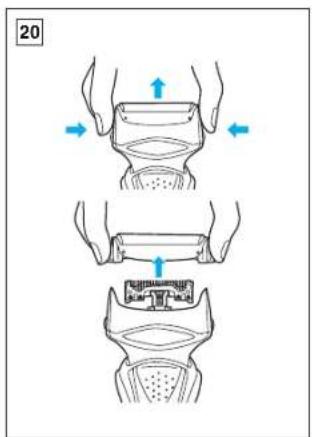
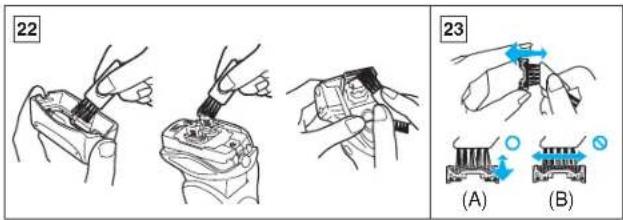
Squeeze the foil frame release buttons and lift the foil frame upward to remove it (see fig. 20). Remove the inner blades one at a time by grasping it firmly at both ends and pulling it straight away from the shaver. Clean the outer foils, the shaver body and the trimmer with the long brush (see fig. 22). Clean the inner blades with the short brush by moving it in the direction in fig. 23 (A). Do not move the brush in the direction in fig. 23 (B), as it will damage the inner blade, and its cutting performance. Do not use the short brush to clean the outer foils.
Replacing shaving head components
It is recommended that you replace the system outer foil at least once a year and the inner blade at least once every 2 years to maintain your shaver's cutting performance.
Replacing the system outer foil (see fig. 20)
Squeeze the system outer foil release buttons and lift the system outer foil upward to remove it. To insert the new system outer foil, press down until it snaps into place.
- Check that the gaps on both sides of the system outer foil release buttons and the system outer foil are equal. If they are not equal, there is a chance that the system outer foil will become detached during use, or shaving capabilities will be deteriorated.
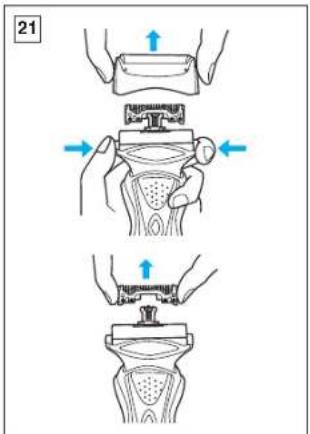
Replacing the inner blades (see fig. 21)
Squeeze the system outer foil release buttons and lift the system outer foil upward to remove it. Remove the inner blade one at a time by grasping it firmly at both ends and pulling straight away from the shaver. Do not touch the metal parts of inner blades.
To insert the new inner blade, hold the blade one at a time at both ends and press downward until it snaps into the shaver.
For environmental protection and recycling of materials
This shaver contains a Lithium-ion battery.
Please make sure that the battery is disposed of at an officially assigned location, if there is one in your country.
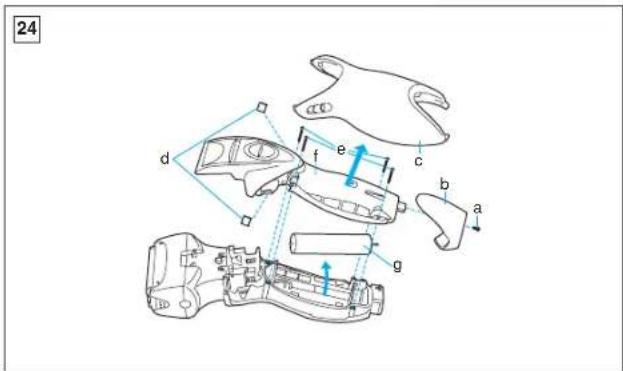
How to remove the built-in rechargeable battery before disposal of the shaver (see fig. 24)
WARNING – Do not attempt to replace the battery for the purpose of reusing the shaver. This could result in the risk of fire or electric shock.
The battery in this shaver is not intended to be replaced by consumers. However, the battery may be replaced at an authorized service center. The procedure described below is intended only for removal of the rechargeable battery for the purpose of proper disposal.
- Disconnect the power cord from the shaver when removing the battery.
- Remove the bottom cover screw (a).
- Remove the bottom cover (b).
- Slide the back panel (c) and remove it.
- Remove the housing clip (d).
- Remove the four housing screws (e).
- Remove the housing B (f).
- Lift the battery (g) and remove it.
Caution
- Do not charge the shaver, where it will be exposed to direct sunlight or a heat source, or where there is a lot of moisture.
- Use only the included adaptor RE-7-27 to charge the ES8078 shaver.
- Dry the shaver completely before charging it.
- Keep the adaptor away from water and handle it only with dry hands.
- Grip the adaptor when disconnecting it from an AC outlet; tugging on the power cord may damage it.
- Do not pull, twist, or severely bend the power cord.
- Do not wrap the power cord tightly around the appliance.
- If the power cord gets damaged, it alone cannot be replaced. Contact an authorized service center.
- Store the adaptor in a dry area where it will be protected from damage.
- The shaver and adaptor will become slightly hot during use or charging, however this is not a malfunction.
- In cases where static noise is emitted from the television during use charging or cleaning, connect the adaptor to a different outlet.
- Do not touch the edge (metal part) of the inner blade.
Failure to observe this may lead to hand injuries. - When the shaver is washed without the self-cleaning recharger, wash it in tap water. Do not use salt water or boiling water. Also, do not
use cleaning products that are designed for toilets, bathrooms or kitchen appliances. Do not submerge the shaver for a long time.
- Do not wipe any part of the shaver with thinner, benzine or alcohol. Clean it by using a cloth dampened with soapy water.
- Do not take the housing apart as this can affect the watertight construction.
- Do not clean with water when the shaver is connected to the power cord.
- When cleaning the shaver with water, do so with both the inner blades attached. (Doing so with only one of the inner blades attached makes an abnormal noise and may damage the shaver.)
- Do not detach the detergent cartridge or water tank during cleaning.
The cleaning liquid may spill, leading to malfunctions. - Set the self-cleaning recharger on a level and stable surface. The cleaning liquid may spill if the self-cleaning recharger is tilted.
- In cases where the cleaning liquid is spilled, wipe it immediately. Caution is necessary as the cleaning liquid may discolor leather products or flooring boards.
- The expiration date of the cleaning liquid is 6 months once it has been opened. Throw away the detergent cartridge and cleaning liquid inside the water tank if it will not be used for 6 or more months.
- Wash away the old cleaning liquid inside the water tank down the
drain. Dispose the used detergent cartridge as plastic waste.
- Keep the unit away from children.
- Keep instructions in a safe place.
- The adaptor is intended to be correctly oriented in a vertical or floor mount position.
This product is intended for household use only.
Airborne Acoustical
Noise: 67 (dB(A) re 1pW)
Information on Disposal for Users of Waste Electrical & Electronic Equipment (private households)

This symbol on the products and/or accompanying documents means that used electrical and electronic products should not be mixed with general household waste.
For proper treatment, recovery and recycling, please take these products to designated collection points, where they will be accepted on a free of charge basis. Alternatively, in some countries you may be able to return your products to your local retailer upon the purchase of an equivalent new product.
Disposing of this product correctly will help to save valuable resources and prevent any potential negative
012-021_ES8078_7_6_5_EU
05.12.5
12:58
ページ 15
effects on human health and the environment which could otherwise arise from inappropriate waste handling. Please contact your local authority for further details of your nearest designated collection point. Penalties may be applicable for incorrect disposal of this waste, in accordance with national legislation.
For business users in the European Union
If you wish to discard electrical and electronic equipment, please contact your dealer or supplier for further information.
Information on Disposal in other Countries outside the European Union
This symbol is only valid in the European Union. If you wish to discard this product, please contact your local authorities or dealer and ask for the correct method of disposal.
012-021_ES8078_7_6_5_EU
05.12.5
12:58
ページ 16
Vor dem Gebrauch
procesos que incluyen [Clean/Dry/Charge] (Limpiar/Secar/Cargar) → [Clean/Dry] (Limpiar/Secar) → [Dry/Charge] (Secar/Cargar) → [Dry] (Secar) → [Charge] (Cargar).
A [Clean/Dry/Charge] (Tisztítás/
Durum lambasini denetleme

- Wet/Dry Rechargeable Shaver Operating Instructions
- Before use
- Parts identification 1
- Parts identification 2
- READ ALL INSTRUCTIONS BEFORE USE.
- Charging with self-cleaning recharger
- Note
- Charging without self- cleaning recharger
- Using your shaver
- Pivot action selector (see fig. 7)
- System outer foil (see fig. 8)
- For wet shaving
- Using the trimmer
- Cleaning your shaver
- ①Cleaning with the self-cleaning recharger
- Preparing the self-cleaning recharger
- Checking the status lamp
- ② Cleaning your shaver without the self-cleaning recharger (see fig. 19)
- Brush cleaning
- Replacing shaving head components
- Replacing the system outer foil (see fig. 20)
- Replacing the inner blades (see fig. 21)
- For environmental protection and recycling of materials
- Caution
- Information on Disposal for Users of Waste Electrical & Electronic Equipment (private households)
- For business users in the European Union
- Information on Disposal in other Countries outside the European Union
- Vor dem Gebrauch
- Durum lambasini denetleme
Brand : PANASONIC
Model : ES8078
Category : Shaver