
ES-CM3A - Razor PANASONIC - Free user manual and instructions
Find the device manual for free ES-CM3A PANASONIC in PDF.


| Product Type | Electric Shaver |
| Model | ES-CM3A |
| Brand | Panasonic |
| Dimensions (approx.) | 5.5 x 2.0 x 1.5 inches (140 x 50 x 38 mm) |
| Weight (approx.) | 4.2 oz (120 g) |
| Power Source | Rechargeable battery (Li-ion) |
| Charging Time | 1 hour |
| Usage Time | 45 minutes |
| Blade System | Multi-Flex pivoting head with 3 blades |
| Cutting System | Wet/Dry operation (foil & trimmer) |
| Trimmer | Pop-up trimmer for sideburns and detailing |
| Waterproof | Yes, fully washable |
| Display | LED battery and charging indicator |
| Motor Speed | 13,000 RPM (approx.) |
| Included Accessories | Charging stand, cleaning brush, protective cap |
| Maintenance | Rinse under running water; replace foil and blades every 12-18 months |
| Safety Features | Auto-off after 10 minutes of inactivity, hypoallergenic foils |
| Repairability | Replacement foils and blades available; battery replaceable by service center |
| Warranty | 2 years limited manufacturer warranty |
Frequently Asked Questions - ES-CM3A PANASONIC
User questions about ES-CM3A PANASONIC
0 question about this device. Answer the ones you know or ask your own.
Ask a new question about this device
Download the instructions for your Razor in PDF format for free! Find your manual ES-CM3A - PANASONIC and take your electronic device back in hand. On this page are published all the documents necessary for the use of your device. ES-CM3A by PANASONIC.
USER MANUAL ES-CM3A PANASONIC
Operating Instructions (Household use) Rechargeable Shaver
Model No. ES-CM3A

English......3
Español......27
Panasonic®
Operating Instructions (Household use) Rechargeable Shaver Model No. ES-CM3A
Contents
Safety precautions...... 5
Important information .... 10
Parts identification 11
Charging....12
How to use 14
Cleaning 15
Replacing the system outer foil and the inner blades 18
Troubleshooting 20
Battery life....22
Removing and disposing of the built-in rechargeable battery 22
Specifications 25
Thank you for purchasing this Panasonic product. Before operating this unit, please read these instructions completely and save them for future use.
IMPORTANT SAFETY INSTRUCTIONS
When using an electrical appliance, basic precautions must always be followed, including the following:
Read all instructions before using this appliance.
DANGER
To reduce the risk of electric shock:
- Except when charging, always unplug this appliance from the electrical outlet immediately after using.
- Unplug this appliance before cleaning.
WARNING
To reduce the risk of burns, fire, electric shock, or injury to persons:
- This appliance is not intended for use by persons (including children) with reduced physical, sensory or mental capabilities, or lack of experience and knowledge, unless they have been given supervision or instruction concerning use of the appliance by a person responsible for their safety. Children should be supervised to ensure that they do not play with the appliance.
- Use this appliance only for its intended use as described in this manual. Do not use attachments not recommended by the manufacturer.
- Never operate this appliance when it has a damaged cord or plug, when it is not working properly, after it has been dropped or damaged, or after it has been dropped into water. Return the appliance to an authorized service center for examination and repair.
- Keep the cord away from heated surfaces.
- Never drop or insert any object into any opening.
- Do not use outdoors or operate where aerosol (spray) products are being used.
- Do not use this appliance with damaged shaving blades and/or foil, as it has the potential to result in facial injury.
- Always insert the USB cable into the appliance and the USB power adaptor first, then to outlet. To disconnect, turn all controls to "off" then remove plug from outlet.
SAVE THESE INSTRUCTIONS
4
The USB power adaptor is sold separately.
Safety precautions
To reduce the risk of electric shock, injury, fire, loss of life, and damage to property, always observe the following safety precautions.
Explanation of symbols
The following symbols are used to classify and describe the level of hazard, injury, and property damage caused when the notation is disregarded and improper use is performed.
| ⚠️ DANGER | Indicates potential hazard that will result in serious injury or death. |
| ⚠️ WARNING | Indicates potential hazard that could result in serious injury or death. |
| ⚠️ CAUTION | Indicates potential hazard that could result in minor injury or property damage. |
The illustrations in the manual may differ from the actual item.
WARNING
This product
This product has a built-in rechargeable battery. Do not throw into flame or heat. Do not charge, use, or leave in high temperature environments.
Doing so may cause overheating, ignition, or explosion.
Do not modify or repair.
Doing so may cause fire, electric shock, or injury. Contact an authorized service center for repair (battery change etc.).
Never disassemble except when disposing of the product.
Doing so may cause fire, electric shock, or injury.
Unplug the USB cable from the main body when cleaning.
Failure to do so may cause electric shock or injury.
WARNING
In case of an abnormality or malfunction
Immediately stop using this product and disconnect USB power adaptor if there is an abnormality or malfunction.
Failure to do so may cause fire, electric shock, or injury.
The main body, USB power adaptor or USB cable is deformed or abnormally hot.
The main body, USB power adaptor or USB cable smells of burning.
- There is abnormal sound during use or charging of the main body.
→ Immediately request inspection or repair at an authorized service center.
▶ Power supply
- Do not use this product beyond the rated values of the power supply.
- Doing so may cause fire.
- Fully insert the power plug of the USB power adaptor.
- Failure to do so may cause fire or electric shock.
▶ About the USB power adaptor and USB cable
- Do not connect or disconnect the USB power adaptor or USB cable to or from the power supply with a wet hand.
- Doing so may cause electric shock or injury.
- Do not charge this product when the USB power adaptor or USB cable is damaged or when the fitting into the household outlet is loose.
- Do not immerse the USB power adaptor or USB cable in water or wash it with water.
- Do not damage, modify, forcefully bend, pull, twist, or place anything heavy on the USB power adaptor or USB cable.
- Doing so may cause electric shock or fire due to a short circuit.
WARNING
- Do not charge this product using any USB cable other than the supplied USB cable. Also, do not use any other product with the supplied USB cable.
- Failure to do so may cause burns, electric shock or fire.
→ The USB cable provides the overheat protection function. If charging is abnormal or the USB plug (Type-C) heats up, disconnect the power supply, check the socket [A⑤], and remove any water or foreign objects from the socket.
- Use only with USB Power Source on a certified product, such as class 2 power supply.
- It is necessary to separately purchase a power adaptor if required to power this product. The Panasonic power adaptor ES-RU1-02 (Class 2 Power Unit) is recommended.
- Clean regularly to prevent dust from accumulating.
- Failure to do so may cause fire due to insulation failure caused by humidity.
→ Disconnect the USB power adaptor and wipe with a dry cloth.
▶ Preventing accidents
- Do not place within reach of children or infants. Do not let them use it.
- Doing so may cause an accident or injury due to accidental ingestion of the inner blade, cleaning brush, etc.
- If the oil is consumed accidentally, do not induce vomiting, drink a large amount of water, and consult a physician.
- If the oil comes into contact with eyes, immediately wash thoroughly with running water, and consult a physician.
- Failure to follow these instructions may result in physical problems.

CAUTION
▶ To protect the skin
- Check the system outer foil for any damage or deformation before use.
- Failure to do so may cause injury to skin.
- Do not forcefully press the system outer foil on the skin or lips. When there are small bumps on the face or the skin is injured, avoid direct contact with the system outer foil.
- Do not touch the blade section (metallic section) of the inner blade directly with your hands.
- Doing so may cause injury to skin or hand.
- Do not forcefully press the system outer foil. Do not touch the system outer foil with fingers or nails when in use.
- Do not use this product for any purpose other than shaving.
(For example, hair shaving)
- Failure to do so may cause injury to skin or reduce the life of the system outer foil.
▶ Note the following precautions
- Do not allow needles or any other foreign objects to adhere to the power plug of the USB power adaptor or the plugs of the USB cable.
- Doing so may cause electric shock or fire due to a short circuit.
- Do not charge when the socket is wet.
- Failure to do so may cause fire or electric shock.
- Do not share with your family or others.
- Doing so may result in infection or inflammation.
- Disconnect the USB power adaptor from the household outlet when not charging.
- Failure to do so may cause electric shock or fire due to electrical leakage resulting from insulation deterioration.
Handling of the removed battery when disposing

DANGER
- The rechargeable battery is exclusively for use with this product. Do not use the battery with other products.
- Do not charge the battery after it has been removed from this product.
- Do not throw into fire or apply heat.
- Do not hit, disassemble, modify, or puncture with a nail.
- Do not let the positive and negative terminals of the battery get in contact with each other through metallic objects.
- Do not carry or store the battery together with metallic jewellery such as necklaces and hairpins.
- Do not use or leave the battery where it will be exposed to high temperature environments, such as under direct sunlight or near other sources of heat.
- Never peel off the tube.
- Doing so may cause overheating, ignition, or explosion.

WARNING
• After removing the rechargeable battery, do not keep it within reach of children and infants.
- The battery will harm the body if accidentally swallowed. If this happens, consult a physician immediately.
- If the battery fluid leaks out and comes in contact with the eyes, do not rub the eyes, and thoroughly rinse with clean water, such as tap water.
- Failure to do so may cause eye injury. Consult a physician immediately.

CAUTION
- If the battery fluid leaks out and comes in contact with the skin or clothes, rinse off with clean water, such as tap water.
- Failure to do so may cause inflammation.
Important information
- This WET/DRY shaver can be used for wet shaving using shaving lather or for dry shaving. You can use this watertight shaver in the shower and clean with water. The following symbol means suitable for use in a bath or shower.

▶ To avoid product malfunction, deformation and aging, observe the following precautions:
- Do not drop this product or subject it to shock.
- Do not hit the system outer foil on any hard objects. • After use, store this product in a dry place.
- Do not store this product in a place with direct sunlight inside the carriage.
- Do not heat or dry this product with a hair dryer.
- When carrying or storing this product, always attach the protective cap.
Notes
- Charge this product correctly according to these Operating Instructions. (See page 12 "Charging".)
- This product contains a battery that is only replaceable by skilled persons. Please contact an authorized service center for the details of repair.
Parts identification

A Main body
① Protective cap ② System outer foil ③ Foil frame ④ Foil frame release buttons ⑤ Socket (Type-C) ⑥ Socket cover ⑦ Outer foil section ⑧ System outer foil release buttons ⑨ Inner blades ⑩ Power Switch ⑪ Charge status indicator (red)
B USB cable
⑫ USB plug (Type-C) ⑬ USB plug (Type-A) ⑭ Cord
Accessories
© Cleaning brush
D Oil
Charging
- Before charging, make sure that this product is powered off.
- Do not charge when the socket is wet. Wipe the socket when it is wet before charging.
- Open the protective cap to check that the charge status indicator lights on, and then install the protective cap to avoid damaging the system outer foil.
![graph TD A["Device 2"] --> B["Port 1"] B --> C["Port 1"] C --> D["Port 1"] D --> E["Port 1"] style A fill:#f9f,stroke:#333 style E fill:#bbf,stroke:#333](/content/2026/06/1383384/images/64aa74b97cc817b3e5c04af12c03267042ee13cf35b68051b7a07dbbe9749dba.jpg)
- Insert the USB cable into the main body and the USB power adaptor.
- Connect the USB power adaptor to a household outlet.
- After charging, remove the USB cable and attach the socket cover.
- Charging is completed after approx. 1 hour. The charging time may be shortened, depending on the remaining battery level.
- Be sure to close the socket cover when using or washing.
▶ Display of the charge status indicator during charging
| Charging in progress Lights on | |
| Charging complete Lights off | |
| Charging abnormal Blink | twice every second |
▶ When the battery capacity is low
- When this product is in use, the charge status indicator blinks once a second.
- When this product is powered off, the main body generates a prompt tone.

▶ How to confirm that charging is completed
- If the USB plug (Type-C) is removed and inserted back to charge this product again right after charging is completed, the charge status indicator turns on and then off in about 5 seconds.
Notes
- You cannot operate this product while charging.
- This product may be charged with adaptors other than the specified one, but Panasonic's specified adaptor with splash-resistant design should be used to ensure safety. The Panasonic's specified adaptor is not completely waterproof, so do not immerse the adaptor in water.
- This product uses a Li-ion battery. Therefore, the service life of the battery will not be affected even if it is charged after each use.
- When this product is used for the first time or when it has not been used for more than 6 months, the charging time may differ and the charge status indicator may not light on immediately. However, it will light on as the charging proceeds.
- If this product has not been used for a long time, the battery performance may be degraded. Therefore, if this product has not been used for more than half a year, please fully charge the battery once every half a year.
- If an ineligible power supply is used for charging or such problems as poor contact of the USB cable occur, the charging time may become longer and this product may even be damaged.
- This product can be used for approximately 60 minutes after it is fully charged. (Based on dry-shave usages in an ambient temperature range of 20°C (68 °F) - 30 °C (86 °F).)
The available days depend on the usage conditions: beard thickness, pressure applied to the skin, and use of wet shaving.
- If there is noise from the radio or other sources while this product is used or charged, move this product to a different location or charge it with another household outlet.
How to use
To power on/off:
Touch point A with a finger until the white indicator lights on, slide your finger from point A to point B, and stop at point B for a moment.
You can also slide your finger from point B to point A.

Tips for Use:
- Finish your sliding within 1 second.
- During sliding, do not allow other fingers to touch the area of the power switch.
- Wearing gloves or wet hands may affect the touch sensing effect.
This product comes with a “shaving sensor”, which automatically adjusts the shaving force depending on the beard thickness. This product increases the shaving force in areas with dense beard and reduces the force in areas with sparse beard to reduce the burden on the skin.
■ The following can be used during wet shaving:
| Shaving agent | Shaving foam | √ |
| Shaving gel | √ | |
| Shaving cream | × | |
| Facial cleanser | Cleansing foam (without facial scrub) | √ |
| Cleansing foam (including facial scrub) | × | |
| Cleansing soap | √ | |
| Bathing soap | Liquid | √ |
| Foam | √ |
■ How to improve the shaving effect
- Apply the whole system outer foil perpendicularly against the skin and shave by slowly sliding this product over the face against the grain of the beard. • To prevent damaging the system outer foil, do not shave with only a part of the system outer foil.
- The beard under the chin and around the throat can be shaved better by stretching the skin so the beard will stand.


Notes
- It is recommended to clean this product after each use. • After wet shaving, clean the main body with water and then apply oil on the system outer foil.
Cleaning
- Power off this product and unplug the USB cable from the main body.
- Check that the socket cover is closed.
1 Apply a small amount of hand soap and water on the system outer foil.
Power on this product, leave it run for 10 to 20 seconds, and then power it off.
2 Press the foil frame release buttons to remove the outer foil section.
(See pages 18 and 19) Clean this product with running water.
• After rinsing with water, wipe off any excess water with a dry cloth.


3 Store this product after drying it.
1 Remove the outer foil section and the shell, thoroughly dry the main body.
- Leave this product dry in the shade, out of direct sunlight.
2 After this product is dried completely, install the outer foil section and the shell onto the main body.
- Refer to pages 18 and 19 and the following schematic diagram for the method of installation and removal.

- Perform the following operations after installing the outer foil section onto the main body:
To disassemble the shell (a):
① Hold the enclosure and forcefully squeeze both sides of the enclosure.
② Hold the gray part in the figure with the other hand and gently pull it upwards.
③ Pull the enclosure down.

To install the shell (a):
① Attach the socket cover onto the hole of the shell (a).
② Attach the shell (a) onto the main body until a “click” sound is heard while keeping the trademark on the shell (a) on the same side as the power switch.

4 Lubricate this product.
• To maintain comfortable shaving on a long-term basis, it is recommended to use the included oil.
① Apply a drop of oil onto the system outer foil. ② Power on this product and leave it run for approximately 5 seconds. ③ Power off this product and wipe off any excess oil from the system outer foil with a soft cloth.

Notes
- Be careful not to hit this product on the sink or any other objects while draining the water. Failure to do so may cause malfunction.
- Do not use any other cleaning agents than hand soap. Doing so may cause malfunction.
- Do not clean this product with thinner, gasoline, alcohol, or other chemicals. Doing so may cause cracking or discoloration of this product. The enclosure can be cleaned with a soft cloth moistened with tap water or soap solution.
Cleaning with the brush
▶ Clean the system outer foil and the main body using the long brush.

▶ Clean the inner blades using the short brush by moving it in the direction shown in the right figure (A).
- Do not move the short brush in the (B) direction. Doing so may damage the inner blades and thus affect their sharpness.
- Do not use the short brush to clean the system outer foil.
(A)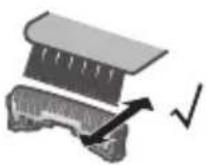
(B)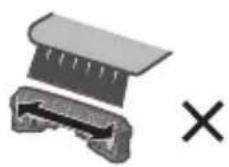
Replacing the system outer foil and the inner blades
- It is recommended to replace the system outer foil once a year and the inner blades once every two years.
▶ Replacement parts
Replacement parts are available at your dealer or Service Center.
| Replacement parts for ES-CM3A | System outer foil WE | S9087 |
| Inner blades WES9068 | ||
▶ Outer foil section
How to remove
Press the foil frame release buttons to lift and remove the outer foil section.
How to install
Turn the foil frame mark (✗) to the front, and securely attach the outer foil section onto the main body until a "click" sound is heard.


▶ System outer foil
How to remove
Press the system outer foil release buttons and pull down the system outer foil.
How to install
Align the foil frame mark (Δ) with the system outer foil mark (Δ), and securely attach them together until a “click” sound is heard.
- Do not press the system outer foil release buttons with excessive force.
Doing so may bend the system outer foil, preventing complete attachment to the foil frame.
- The system outer foil cannot be reversely installed.
- When installing the system outer foil into the main body, ensure that the system outer foil is inserted into the foil frame.
Inner blades
How to remove
Remove one inner blade at a time.
Do not touch the edges (metallic section) of the inner blades to avoid injury.
How to install
Insert one inner blade at a time until they are fixed in position.
Note
Do not throw away the foil frame.


Troubleshooting
| Problem Action | |
| The shaving sensor does not respond. (The driving sound does not change.) | Depending on the beard thickness or the amount of beard trimmings in the outer foil section, the shaving sensor may not react. This is not a sign of malfunction. |
| Depending on the amount of foam or the type of shaving agent, the shaving sensor may not react. This is not a sign of malfunction. | |
| When the remaining battery level is too low, charge this product. | |
| Apply oil. (See page 17) | |
| The shaving sensor responds even though this product is not in contact with the skin. | Clean the beard trimmings from the system outer foil and inner blades. (See pages 15~18) |
| Replace the system outer foil or inner blades once they reach their service life. | |
| This product cannot be charged. | The recommended ambient temperature for charging is 10 °C (50 °F) to 35 °C (95 °F). |
| Check whether the USB cable is securely connected to the power supply. If the above measures are inapplicable, remove the USB cable and insert it again. | |
| If the USB plug (Type-C) heats up, disconnect the power supply, check the socket [A5], and remove any water or foreign objects from the socket. | |
| The power switch cannot be operated. | The foam of shaving agent or hand soap may be attached in the area of the power switch. Rinse the foam thoroughly before operating the switch. |
Problem Action
| Operating time is short after charging. | Apply oil. |
| The battery has reached the end of its life. (approx. 3 years) | |
| This can be improved by cleaning this product after each shaving. | |
| This product does not operate even after charging. | The recommended ambient temperature for using the product is not lower than 5 °C (41 °F). |
| The battery has reached the end of its life. (approx. 3 years) | |
| When the power supply is connected, this product does not operate. | |
| The driving sound changes while shaving. | The shaving sensor is operating. The driving sound changes depending on the beard thickness. |
| A loud sound is heard. | Apply oil.When there is no oil on the blades, the blades will not move smoothly and require more power. |
| When the magnetic levitation motor is driven, a high-pitched running sound is heard. This is not a sign of malfunction. | |
| Check that the blades are properly attached. | |
| Clean the system outer foil with the cleaning brush. (See pages 17 and 18) | |
| An odor is smelt from the blades. | This can be improved by cleaning this product after each shaving. |
| Shavings fly around. | This can be improved by cleaning this product after each shaving.Clean the inner blades with the cleaning brush when shavings are adhering to the inner blades. |
Problem Action
The system outer foil is overheated.
The shaving performance deteriorates.
Apply oil. Replace the system outer foil if it is damaged or deformed. (See pages 18 and 19) This can be improved by cleaning this product after each shaving. Replace the system outer foil or inner blades once they reach their service life. Apply oil.
If the problems still cannot be solved, contact the store where you purchased this product or a service center authorized by Panasonic for repair.
Battery life
Approximately 3 years. If the operating time is significantly shorter even after a full charge, the battery has reached the end of its life. (The battery life may change due to usage and storage conditions.)
Removing and disposing of the built-in rechargeable battery
ATTENTION:
A lithium ion battery that is recyclable powers the product you have purchased. Please call 1-800-8-BATTERY for information on how to recycle this battery.

This product has a built-in rechargeable battery. Be sure to remove the battery before disposing of this product.
- The battery is to be disposed safely.
- This figure must only be used when disposing of this product and must not be used to repair it.
- If you dismantle this product yourself, it will no longer be waterproof, which may cause it to malfunction.
- We recommend seeking the advice of a dealer or Panasonic's authorized service center before deciding to dispose of this product, so as to extend the service life of this product as much as possible.
- If you decide to dispose of this product but do not want to disassemble this product by yourself to remove the battery, we recommend taking this product to Panasonic's authorized service center which will remove and recycle the battery.
▶ How to remove the built-in rechargeable battery
- Power off this product before removing the battery. Turn on the power and keep the power on until the battery is completely discharged.
- Follow Steps ① to ⑪ as illustrated to disassemble this product and remove the battery with a screwdriver.
- During disassembly, take care not to short circuit the positive and negative terminals of the removed battery and insulate the terminals by applying tape to them.
- If you cannot remove the battery, please contact an authorized service center.
English![graph TD A["1: Air intake"] --> B["2: Air intake with exhaust"] B --> C["3: Air intake with exhaust"] C --> D["4: Air intake with exhaust"] D --> E["5: Air intake with exhaust"] E --> F["6: Air intake with exhaust"] F --> G["7: Air intake with exhaust"] G --> H["8: Air intake with exhaust"] H --> I[…](/content/2026/06/1383384/images/5d122fb4754f6984de744e916e88a0e3782f7be2ae2e7bdbe46dd2ec398b9ce1.jpg)
Specifications
| Output rating of applicable adaptor (sold separately) | 5.0 V --- 1.0 AIn compliance with Class 2 power supply with 5.0 V --- 1.0 A |
| Charging time Approx. 1 hour | |
This product is intended for household use only.
Federal Communication Commission Interference Statement
This equipment has been tested and found to comply with the limits for a Class B digital device, pursuant to Part 15 of the FCC Rules. These limits are designed to provide reasonable protection against harmful interference in a residential installation. This equipment generates, uses and can radiate radio frequency energy and, if not installed and used in accordance with the instructions, may cause harmful interference to radio communications. However, there is no guarantee that interference will not occur in a particular installation. If this equipment does cause harmful interference to radio or television reception, which can be determined by turning the equipment off and on, the user is encouraged to try to correct the interference by one of the following measures:
- Reorient or relocate the receiving antenna.
- Increase the separation between the equipment and receiver.
- Connect the equipment into an outlet on a circuit different from that to which the receiver is connected.
- Consult the dealer or an experienced radio/TV technician for help.
FCC Caution: To assure continued compliance, install and use in accordance with provided instructions. Any changes or modifications not expressly approved by the party responsible for compliance could void the user's authority to operate this equipment.
This device complies with part 15 of the FCC Rules. Operation is subject to the following two conditions:
(1) This device may not cause harmful interference, and (2) this device must accept any interference received, including interference that may cause undesired operation.
Personal Care & Beauty Care Products
FOR USA ONLY
30-Day Quality Satisfaction Guarantee
If you are dissatisfied with any Panasonic Personal Care & Beauty Care Products for any reason, simply return it to the place of purchase with a dated proof of purchase, in the original packaging, with all accessories, parts and instructions, within 30 days of the date of purchase, for a full refund. Abuse or misapplication of this product voids the guarantee.
PRODUCT REGISTRATION
(U.S. customers only)
Go to www.shop.panasonic.com/register and register your product now to receive these benefits:
Safety Notification
We contact our customers in case of recall
Owner Verification
Proof of purchase in case of product theft or loss
Efficient Warranty Service
In case there is a problem with your product
Special Offers and Promotions from Panasonic
FOR YOUR CONVENIENCE, WE HAVE ESTABLISHED A TOLL-FREE (IN USA ONLY) NATIONAL ACCESSORY PURCHASE HOT LINE AT 1-800-332-5368.
Panasonic®

Notas
Outer foil
How to remove it
Panasonic Corporation of North America
Two Riverfront Plaza, Newark, NJ 07102-5490
Service • Assistance • Accessories
https://shop.panasonic.com/personal-care
https://shop.panasonic.com/support
https://www.panasonic.com
© Panasonic Corporation 2024
Printed in China
Printed in China
E EN, ES
ES9700CM3A1551 Y0224-0


- PANASONIC®
- CONTENTS
- IMPORTANT SAFETY INSTRUCTIONS
- DANGER
- TO REDUCE THE RISK OF ELECTRIC SHOCK
- WARNING
- TO REDUCE THE RISK OF BURNS, FIRE, ELECTRIC SHOCK, OR INJURY TO PERSONS
- SAVE THESE INSTRUCTIONS
- SAFETY PRECAUTIONS
- EXPLANATION OF SYMBOLS
- THIS PRODUCT
- IN CASE OF AN ABNORMALITY OR MALFUNCTION
- POWER SUPPLY
- ABOUT THE USB POWER ADAPTOR AND USB CABLE
- PREVENTING ACCIDENTS
- CAUTION
- TO PROTECT THE SKIN
- (FOR EXAMPLE, HAIR SHAVING)
- NOTE THE FOLLOWING PRECAUTIONS
- HANDLING OF THE REMOVED BATTERY WHEN DISPOSING
- IMPORTANT INFORMATION
- PARTS IDENTIFICATION
- A MAIN BODY
- B USB CABLE
- ACCESSORIES
- © CLEANING BRUSH
- D OIL
- CHARGING
- DISPLAY OF THE CHARGE STATUS INDICATOR DURING CHARGING
- WHEN THE BATTERY CAPACITY IS LOW
- HOW TO CONFIRM THAT CHARGING IS COMPLETED
- NOTES
- HOW TO USE
- TO POWER ON/OFF
- TIPS FOR USE
- HOW TO IMPROVE THE SHAVING EFFECT
- CLEANING
- APPLY A SMALL AMOUNT OF HAND SOAP AND WATER ON THE SYSTEM OUTER FOIL
- PRESS THE FOIL FRAME RELEASE BUTTONS TO REMOVE THE OUTER FOIL SECTION
- STORE THIS PRODUCT AFTER DRYING IT
- LUBRICATE THIS PRODUCT
- CLEANING WITH THE BRUSH
- REPLACING THE SYSTEM OUTER FOIL AND THE INNER BLADES
- SYSTEM OUTER FOIL
- INNER BLADES
- NOTE
- PROBLEM ACTION
- BATTERY LIFE
- REMOVING AND DISPOSING OF THE BUILT-IN RECHARGEABLE BATTERY
- ATTENTION
- THIS PRODUCT HAS A BUILT-IN RECHARGEABLE BATTERY. BE SURE TO REMOVE THE BATTERY BEFORE DISPOSING OF THIS PRODUCT
- HOW TO REMOVE THE BUILT-IN RECHARGEABLE BATTERY
- FEDERAL COMMUNICATION COMMISSION INTERFERENCE STATEMENT
- PERSONAL CARE & BEAUTY CARE PRODUCTS
- FOR USA ONLY
- DAY QUALITY SATISFACTION GUARANTEE
- PRODUCT REGISTRATION
- SAFETY NOTIFICATION
- OWNER VERIFICATION
- EFFICIENT WARRANTY SERVICE
- NOTAS
- OUTER FOIL
Brand : PANASONIC
Model : ES-CM3A
Category : Razor