
ES8103S - Razor PANASONIC - Free user manual and instructions
Find the device manual for free ES8103S PANASONIC in PDF.


| Product type | Electric shaver |
| Brand | Panasonic |
| Model | ES8103S |
| Dimensions (approx.) | 15 x 5 x 5 cm |
| Weight (approx.) | 200 g |
| Power source | Rechargeable lithium-ion battery |
| Charging time | Approximately 1 hour |
| Runtime | Approximately 45 minutes |
| Input voltage | 100-240 V AC, 50/60 Hz |
| Number of blades | 3 stainless steel blades |
| Cutting system | Arc cutting action (Arc Foil) |
| Pivoting head | Yes |
| Washable | Yes |
| Charging indicator | Yes |
| Blade replacement indicator | Yes |
| User manual included | Yes |
| Warranty | 2 years |
| Country of manufacture | Japan |
| Spare parts available | Shaver heads, blades, foils |
| Noise level (approx.) | 60 dB |
Frequently Asked Questions - ES8103S PANASONIC
User questions about ES8103S PANASONIC
0 question about this device. Answer the ones you know or ask your own.
Ask a new question about this device
Download the instructions for your Razor in PDF format for free! Find your manual ES8103S - PANASONIC and take your electronic device back in hand. On this page are published all the documents necessary for the use of your device. ES8103S by PANASONIC.
USER MANUAL ES8103S PANASONIC
Rechargeable Shaver Rasoir rechargeable
natural_image
Exterior view of a Panasonic electric shaver with blue and white body (no text or symbols visible)IMPORTANT SAFETY INSTRUCTIONS
When using an electrical appliance, basic precautions should always be followed, including the following:
Read all instructions before using this appliance.
DANGER To reduce the risk of electric shock:
- Do not reach for an appliance that has fallen into water. Unplug immediately.
- Charger unit is not for immersion or for use in shower.
- Do not place or store appliance where it can fall or be pulled into a tub or sink. Do not place in or drop into water or other liquid.
- Except when charging, always unplug this appliance from the electrical outlet immediately after using.
- Unplug this appliance before cleaning.
- Do not use an extension cord with this appliance.
WARNING To reduce the risk of burns, fire, electric shock, or injury to persons:
-
Close supervision is necessary when this appliance is used by, on, or near children or invalids.
-
Use this appliance only for its intended use as described in this manual. Do not use attachments not recommended by the manufacturer.
- Never operate this appliance if it has a damaged cord or plug, if it is not working properly, if it has been dropped or damaged, or dropped into water. Return the appliance to a service center for examination and repair.
- Keep the cord away from heated surfaces.
- Never drop or insert any object into any opening.
- Do not use outdoors or operate where aerosol (spray) products are being used or where oxygen is being administered.
- Do not use this appliance with damaged shaving blades and/or foil, as facial injury may occur.
- Always attach plug to appliance first, then to outlet. To disconnect, turn all controls to "off" then remove plug from outlet.
SAVE THESE INSTRUCTIONS
SPECIFICATIONS
Power source: 100-240 V AC, 50-60 Hz
(Automatic voltage conversion)
Motor voltage: 3.6 V DC
Charging time: 1 hour
This product is intended for household use only.
Important
▶ Before use
This Wet/Dry shaver can be used for wet shaving with shaving lather or for dry shaving. You can use this watertight shaver in the shower and clean it in water. The following is the symbol of Wet shaver. The symbol means that the hand-held part may be used in a bath or shower.

Treat yourself to wet lather shaves for at least three weeks and notice the difference. Your Panasonic Wet/Dry shaver requires a little time to get used to because your skin and beard need about a month to adjust to any new shaving method.
▶ Using the shaver
Caution - The outer foil is very thin and can be damaged if not used correctly. Check that the foil is not damaged before using the shaver. Do not use the shaver if the foil etc. is damaged as you will cut your skin.
▶ Charging the shaver
Do not use any power cord or AC adaptor other than one specifically designed for this model. Plug in the adaptor into a household outlet where there is no moisture and handle it with dry hands. The shaver may become warm during use and charging. However, this is not a malfunction. Do not charge the shaver where it will be exposed to direct sunlight or other heat sources. Hold the adaptor when disconnecting it from the household outlet. If you tug on the power cord, you may damage it. The supply cord cannot be replaced. If the cord is damaged, the appliance should be scrapped.
Adequate ambient temperature for charging is 15-35 °C (59-95 °F).
If the indicators on the LCD panel do not glow, wait for a short while until it glows.
The adaptor is intended to be correctly oriented in a vertical or floor mount position.
▶ Cleaning the shaver
Warning - Disconnect the power cord from the shaver before cleaning it to prevent electric shock. Keep both the inner blades inserted. If only one of the inner blades is inserted, the shaver may be damaged. If you clean the shaver with water, do not use salt water or hot water. Do not soak the shaver in water for a long period of time. Wipe it with a cloth dampened with soapy water. Do not use thinner, benzine or alcohol.
▶ Storing the shaver
Disconnect the power cord when storing the shaver. Do not bend the power cord or wrap it around the shaver. This appliance is not intended for use by persons (including children) with reduced physical, sensory or mental capabilities, or lack of experience and knowledge, unless they have been given supervision or instruction concerning use of the appliance by a person responsible for their safety. Children should be supervised to ensure that they do not play with the appliance. Keep these operating instructions in a safe place.
Parts identification
A


E
A Protective cap
B Outer foil section
① Foil frame
② System outer foil
③ System outer foil release buttons
C Inner blades
D Main body
④ Foil frame release buttons
⑤ Finger rest
⑥ Pivot action selector
⑦ OFF/ON switch
⑧ LCD panel
⑨ Appliance socket
⑩ Trimmer
⑪ Trimmer handle
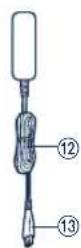
E Adaptor (RE7-40)
⑫ Power cord
⑬ Appliance plug
Charge
Charging
1 Insert the appliance plug into the shaver.
2 Plug in the adaptor into a household outlet.
- The indicators on the LCD panel glow and charging starts.
- Charging is completed when the indicators on the LCD panel blink. (Max. 1 hour later)

natural_image
Simple line drawing of a handheld device connected to a power outlet (no text or symbols)- If the shape of the plug does not fit the power outlet, use an attachment plug adaptor of the proper configuration.
Reading the LCD panel
The LCD panel shows the remaining battery capacity from 0% to 100%, in 10% increments.
While charging

The indicators glow.
After charging is completed

The indicators blink once every second.
10 minutes after charging is completed

The indicators blink once every 2 seconds.
When the battery capacity is low

- You can shave 1 to 2 times after "10%" appears. (This will differ depending on usage.)
"10%" appears and links.
- A full charge will supply enough power for approx. 14 shaves of 3 minutes each.
▶ Using the trimmer
Slide the trimmer handle up. Place at a right angle to your skin and move downwards to trim your sideburns.

Shave
Using the shaver
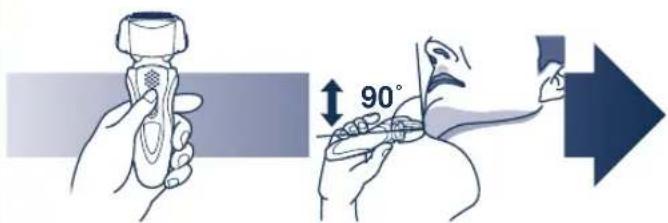
1
Press the OFF/ON switch.
2
Hold the shaver as illustrated above and shave.
- Start out shaving by applying gentle pressure to your face. Stretch your skin with your free hand and move the shaver back and forth in the direction of your beard. You may gently increase the amount of pressure as your skin becomes accustomed to this shaver. Applying excessive pressure does not provide a closer shave.
▶ Pivot action selector
Use to select "SOFT" (soft) or "LOCK" (lock). You can change the pivot action whether the shaver is turned on or off.


Clean
Cleaning

We recommend that you clean your shaver with the self-cleaning recharger or the "sonic" vibration turbo-cleaning mode when the faucet symbol appears on the LCD panel.
- Disconnect the power cord from the shaver.
- Apply some hand soap and some water to the outer foil.
- Press the OFF/ON switch for more than 2 seconds to activate the turbo mode for "sonic" vibration cleaning.
• (11) appears on the LCD panel.
• After about 20 seconds, it will be automatically turned off, or you can turn it off by pressing the OFF/ON switch. - Remove the outer foil section and press the OFF/ON switch for more than 2 seconds to activate the turbo mode for "sonic" vibration cleaning and clean it with running water.
- Wipe off any drops of water with a dry cloth.
- Remove the outer foil section to allow it to dry completely.
Caution for turbo mode
- Shaving in turbo mode may damage your skin. Turn the shaver off and then on again to cancel turbo mode.
- Do not place your fingers on the OFF/ON switch while using the shaver. This may cause the shaver to turn off or enter turbo mode. Place your fingers on the finger rest while using the shaver.
Replacing the system outer foil and the inner blades
system outer foil once every year
inner blade once every two years
▶ Replacing the system outer foil
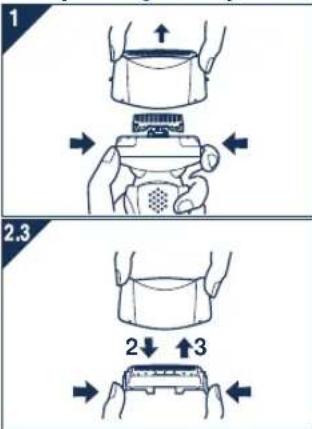
- Press the foil frame release buttons and lift the outer foil section upwards as illustrated.
- Press the system outer foil release buttons and pull down the system outer foil as illustrated.
- Insert the system outer foil until it clicks.
• Always attach the system outer foil in proper direction.
• Always insert the system outer foil to the foil frame when attaching to the shaver.
▶ Replacing the inner blades


- Press the foil frame release buttons and lift the outer foil section upwards as illustrated.
- Remove the inner blades one at a time as illustrated.
- Do not touch the edges (metal parts) of the inner blades to prevent injury to your hand.
- Insert the inner blades one at a time until they click as illustrated.
Removing the built-in rechargeable battery
ATTENTION:
The lithium ion battery you have purchased is recyclable. Please call 1-800-8-BATTERY for information on how to recycle this battery.

WARNING for Lithium Battery:
Fire, explosion, and severe burn hazard. Do not crush, disassemble, heat above 100°C (212°F), or incinerate.
Remove the built-in rechargeable battery before disposing of the shaver. Do not dismantle or replace the battery so that you can use the shaver again. This could cause fire or an electric shock. Replace it at an authorized service center.
- Disconnect the power cord from the shaver when removing the battery.
- Perform steps ① to ⑤ and lift the battery, and then remove it.

FOR YOUR CONVENIENCE, WE HAVE ESTABLISHED A TOLL-FREE (IN USA ONLY) NATIONAL ACCESSORY PURCHASE HOT LINE AT 1-800-332-5368.
IN CANADA, CONTACT PANASONIC CANADA INC. AT THE ADDRESS OR TELEPHONE NUMBER ON THE BACK PAGE.
CONSIGNES DE SÉCURITÉ IMPORTANTES
natural_image
Simple line drawing of a handheld device connected to a power outlet (no text or symbols)natural_image
Illustration of a hand holding a device with arrows indicating movement or assembly (no text or symbols)
POUR PLUS DE RENSEIGNEMENTS, COMMUNIQUER AVEC L'UNE DES SUCCURSALES MENTIONNÉES À L'ENDOS DU MANUEL. POUR LE CANADA, CONTACTER L'UNE DES SUCCURSALES DE VENTE INDIQUÉES AU DOS.
natural_image
Simple line drawing of a handheld device connected to a power outlet (no text or symbols)Acerca del panel LCD
natural_image
Illustration of a hand holding a small device with arrows indicating movement or assembly (no text or symbols)
Panasonic Consumer Electronics Company
One Panasonic Way 2F-3 Secaucus, NJ 07094
IN PUERTO RICO CONTACT:
Panasonic Puerto Rico, Inc.
San Gabriel Industrial Park 65th Infantry Avenue KM9.5
Carolina, Puerto Rico 00630
IN CANADA CONTACT:
AU CANADA, CONTACTER:
Panasonic Canada Inc.
5770 Ambler Drive, Mississauga, Ontario L4W 2T3
(905) 624-5010
En México:
Mexico, D.F, C.P.03200 R.F.C PME-780907754 Tel: 54-88-10-00
Service • Assistance • Accessories
- IMPORTANT SAFETY INSTRUCTIONS
- DANGER To reduce the risk of electric shock:
- WARNING To reduce the risk of burns, fire, electric shock, or injury to persons:
- SAVE THESE INSTRUCTIONS
- Important
- ▶ Before use
- ▶ Using the shaver
- ▶ Charging the shaver
- ▶ Cleaning the shaver
- ▶ Storing the shaver
- Parts identification
- Charge
- Charging
- Reading the LCD panel
- ▶ Using the trimmer
- Shave
- Using the shaver
- 1
- 2
- ▶ Pivot action selector
- Clean
- Cleaning
- Caution for turbo mode
- Replacing the system outer foil and the inner blades
- ▶ Replacing the system outer foil
- ▶ Replacing the inner blades
- Removing the built-in rechargeable battery
- ATTENTION:
- CONSIGNES DE SÉCURITÉ IMPORTANTES
- Acerca del panel LCD
- IN PUERTO RICO CONTACT:
- IN CANADA CONTACT:
- AU CANADA, CONTACTER:
- En México:
- Service • Assistance • Accessories
Brand : PANASONIC
Model : ES8103S
Category : Razor