
Lamdash ES-TLVFE - Razor PANASONIC - Free user manual and instructions
Find the device manual for free Lamdash ES-TLVFE PANASONIC in PDF.
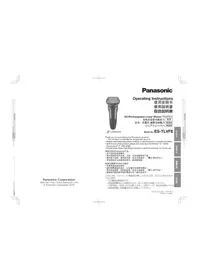


| Product Type | Electric Shaver |
| Brand | Panasonic |
| Model | Lamdash ES-TLVFE |
| Power Source | Rechargeable Battery |
| Battery Type | Li-ion 1.2V Ni-MH |
| Charging Time | 1 hour |
| Usage Time | 45 minutes |
| Waterproof | Yes, Wet/Dry usage |
| Cleaning | Washable under running water |
| Blade System | Multi-Flex 3D pivoting head |
| Trimmer | Pop-up precision trimmer |
| Display | LED Battery indicator |
| Dimensions (approx.) | 16 x 7 x 4 cm |
| Weight (approx.) | 200 g |
| Included Accessories | Cleaning brush, protective cap, charging cable |
| Color | Black/Silver |
| Warranty | 2 years |
Frequently Asked Questions - Lamdash ES-TLVFE PANASONIC
User questions about Lamdash ES-TLVFE PANASONIC
0 question about this device. Answer the ones you know or ask your own.
Ask a new question about this device
Download the instructions for your Razor in PDF format for free! Find your manual Lamdash ES-TLVFE - PANASONIC and take your electronic device back in hand. On this page are published all the documents necessary for the use of your device. Lamdash ES-TLVFE by PANASONIC.
USER MANUAL Lamdash ES-TLVFE PANASONIC
Panasonic Corporation
Web site: http://www.panasonic.com
© Panasonic Corporation 2019
Panasonic®
LAMDASH
Operating Instructions
Instruction Manual
Instruction Manual
Instruction Manual
AC/Rechargeable Linear Shaver Household
Rechargeable Linear Shaver for Household Use
AC/Rechargeable Linear Shaver for Household Use
Linear Shaver for Household Use
Model No. ES-TLVFE
Thank you for purchasing the Panasonic product.
• This product is intended for household use only.
- Please read these instructions carefully to use the product correctly and safely.
- Before using this product, please give your special attention to "Safety Precautions" (P. EN2–EN6).
- Please keep these Operating Instructions and the warranty for future use.
Thank you for purchasing a Panasonic product.
· This product is intended for household use only.
For Proper Use of This Product .....EN6
Parts Identification and Functions . . . EN7
Preparing the Shaver for First-time Use....EN9
How to Use....EN11
Cleaning the Shaver ..... EN14
Replacing the System Outer Foil and the Inner Blades ..... EN16
Battery Replacement ..... EN17
Q&A......EN17
Before Requesting for Repair ..... EN18
Parts Sold Separately ..... EN20
Specifications....EN20
Disposing of This Product ..... EN21
Table of Contents
Safety Precautions SC2
Preparation for Proper Use of This Product....SC6
Part Identification and Functions ..... SC7
Preparation for First Use of the Shaver....,SC9
Usage Instructions.....SC11
Cleaning the Shaver....SC14
Replacing the Outer Foil and Inner Blades.....SC16
Replacing the Battery....SC17
Troubleshooting....SC17
Before Requesting Repairs....SC18
Parts Sold Separately .... SC20
Specifications .... SC20
Disposal of this product ..... SC21
Table of Contents
Safety Precautions TC2
Proper Use of This Product ..... TC6
Parts Description and Functions TC7
Preparing the Shaver for First Use .... TC9
How to Use .... TC11
Cleaning .... TC14
Replacing the Outer Foil and Inner Blades .... TC16
Replacing the Battery .... TC17
Q&A .... TC17
Before Requesting Repairs .... TC18
Parts to Be Purchased Separately ..... TC20
Specifications .... TC20
Dispose of this product TC21
Table of Contents
Safety Precautions JP2
Usage Notes JP6
Names and Functions of Parts……JP7
Preparation for First Use……JP9
How to Use JP11
Maintenance JP14
Replacing the Filter JP16
Replacing the Battery JP17
Q&A JP17
Before Requesting Repairs……JP18
Optional Accessories JP20
Ratings and Specifications JP20
Disposing of the Product JP21
Safety Precautions Please observe
To reduce the risk of injury, loss of life, electric shock, fire, and damage to property, always observe the following safety precautions.
The following symbols are used to classify and describe the level of hazard, injury, and property damage caused when the denotation is disregarded and improper use is performed.

DANGER
Denotes a potential hazard that will result in serious injury or death.

WARNING
Denotes a potential hazard that could result in serious injury or death.

CAUTION
Denotes a hazard that could result in minor injury or property damage.
■ The following symbols are used to classify and describe the type of instructions to be observed.

This symbol is used to alert users to a specific operating procedure that must not be performed.

This symbol is used to alert users to a specific operating procedure that must be followed in order to operate the unit safely.
Illustrations for safety precautions may vary from actual product.

WARNING

Disconnect the AC adaptor when cleaning the shaver with water.
(Failure to do so may cause electric shock or injury.)

Power supply

- Do not connect or disconnect the adaptor to a household outlet with a wet hand. (Failure to do so may cause electric shock or injury.)
- Do not use the product in the bath or shower.
- Do not immerse the AC adaptor in water or wash with water.
- Never use the appliance if the AC adaptor is damaged or if the power plug fits loosely in a household outlet.
- Do not damage the cord or the power plug.
Do not damage, modify, forcefully bend, pull, twist, or bundle the cord. Also, do not place anything heavy on or pinch the cord.
(Doing so may cause electric shock or fire due to a short circuit.)
- Do not use in a way exceeding the rating of the household outlet or the wiring. (Exceeding the rating by connecting too many power plugs to one household outlet may cause fire due to overheating.)
Safety Precautions continued

WARNING
Power supply

- Do not use anything other than the supplied AC adaptor for any purpose. Also, do not use any other product with the supplied AC adaptor. [P. EN8] (Doing so may cause burn or fire due to a short circuit.)

- Always ensure the appliance is operated between 110-240 V AC. - Fully insert the adaptor.
(Failure to do so may cause fire or electric shock.)
● Regularly clean the power plug and the appliance plug with a dry cloth to prevent dust from accumulating.
(Failure to do so may cause fire due to insulation failure caused by humidity.)
● The supply cord cannot be replaced.
If the cord is damaged, the AC adaptor should be scrapped.
(Failure to do so may cause an accident or injury.)
This product

- Do not throw into fire or apply heat.
- Do not charge, use or leave in a high temperature environment (dashboard, etc.).
( Since this product has a built-in rechargeable battery, doing so may cause overheating, ignition or explosion.)
- Do not modify or repair.
(Doing so may cause fire, electric shock, or injury.)
- Please contact an authorized service center (described in the warranty) for repair or battery replacement.
● Never disassemble except when disposing of the product.
(Doing so may cause fire, electric shock, or injury.)
In case of an abnormality or malfunction

- Immediately stop using and remove the adaptor if there is an abnormality or malfunction.
(Doing so may cause fire, electric shock, or injury.)
• The main unit, adaptor or cord is deformed or abnormally hot.
• The main unit, adaptor or cord smells of burning.
- There is an abnormal sound during use or charging of the main unit,
adaptor or cord.
→ Immediately request inspection or repair at an authorized service center (described in the warranty).

WARNING
Preventing accidents

- Do not place within reach of children or infants. Do not let them use it.
(Doing so may cause an accident or injury due to accidental ingestion of parts or accessories, etc.)

- If oil is consumed accidentally, do not induce vomiting, drink a large amount of water and contact a physician.
- If oil comes into contact with eyes, wash immediately and thoroughly with running water and contact a physician. (Failure to follow these instructions may result in physical problems.)
- This appliance is not intended for use by persons (including children) with reduced physical, sensory or mental capabilities, or lack of experience and knowledge, unless they have been given supervision or instruction concerning use of the appliance by a person responsible for their safety. Children should be supervised to ensure that they do not play with the appliance.
(Doing so may cause an accident or injury.)


CAUTION

Check the system outer foil for cracks or deformations before use.
(Failure to do so may cause injury to the skin.)


Do not forcefully press the system outer foil. Also, do not touch the system outer foil with fingers or nails when in use. (Doing so may cause injury to skin or reduce the life of the system outer foil.)
System outer foil

Protecting the skin

- Do not use excessive pressure to apply the system outer for inner blades to your skin or lip, etc.
- Do not apply the system outer foil directly to blemishes or injured skin.
- Do not touch the blade section (metallic section) of the inner blade.
(Doing so may cause injury to skin or hand.)

EN4
Safety Precautions continued

CAUTION
Protecting the skin

- Do not use the shaver to cut hair in locations other than the beard (such as the hair on the head).
(Failure to do so may cause injury to skin or reduce the life of the system outer foil.)

- Attach the protective cap when carrying or storing the shaver.
(Failure to do so may cause injury to skin or reduce the life of the system outer foil.)

Protective cap
Note the following precautions

- Do not wrap the cord around the adaptor when storing.
(Doing so may cause the wire in the cord to break with the load, and may cause fire due to a short circuit.)
- Do not plug in the power plug or appliance plug with metal objects such as hairpins or dust attached.
(Doing so may cause electric shock or fire due to a short circuit.)
- Do not disconnect the adaptor or the appliance plug by holding onto the cord. (Failure to do so may cause electric shock or injury.)
- Do not share your shaver with your family or other people.
(Doing so may result in infection or inflammation.)
- Do not drop or hit against other objects.
(Doing so may cause injury.)

- Disconnect the adaptor from the household outlet when not using.
(Failure to do so may cause electric shock or fire due to electrical leakage resulting from insulation deterioration.)
Handling of the removed battery when disposing

DANGER

- The rechargeable battery is exclusively for use with this appliance. Do not use the battery with other products.
- Do not charge the battery after it has been removed from the product.
- Do not throw into fire or apply heat.
- Do not hit, disassemble, modify, or puncture with a nail.
- Do not let the positive and negative terminals of the battery come in contact with each other through metallic objects.
- Do not keep the battery together with metallic jewelry such as hairpins.
- Do not use or leave the battery where it will be exposed to high temperatures, such as under direct sunlight or near other sources of heat.
- Never peel off the tube.
(Doing so may cause overheating, ignition, or explosion.)

WARNING

- Do not place it within reach of children and infants. (The battery will harm the body if accidentally swallowed.) →If this happens, consult a physician immediately.

- If the battery leaks and the liquid gets in your eyes, wash thoroughly with clean water such as tap water without rubbing. (Failure to do so may cause eye damage.) - Receive medical attention immediately.

CAUTION

- If the battery leaks and the liquid adheres to your skin or clothes, wash it off with clean water such as tap water. (Failure to do so may cause a skin rash, etc.)
For Proper Use Of This Product
• The following symbol indicates that a specific detachable power supply unit is required for connecting the electrical appliance to the supply mains. The type reference of power supply unit is marked near the symbol.

Do not bring the system outer foil into contact with hard object.
(Doing so may damage the blades as they are very thin and deform easily.)
Do not dry the main unit with a dryer or a fan heater. (Doing so may cause malfunction or deformation of the parts.)
Do not leave the shaver exposed to direct sunlight with the outer foil section detached.
( Doing so may deteriorate the waterproof rubber and degrade waterproof function, which may cause to malfunction.)
Store the shaver in a place with low humidity after use. (Failure to do so may cause malfunction due to condensation or rust.)



Parts Identification and Functions![Protective cap. Smooth rollers make the shaver slide on the skin more smoothly. Foil frame. System outer foil. Power switch: You can lock the power switch when necessary, such as when carrying the shaver around. [P. EN12] When cleaning the shaver with water, you can set it to the sonic vibration cle…](/content/2026/06/1332504/images/2f0214cf239b49e52dc5b4cfd20c7ee60662a638667a78faef509b55a3385e61.jpg)
EN7
Lamp display
Battery capacity lamp Indicates the remaining battery capacity
20 to 100 % (in units of 20 %) You can shave 2 to 3 times once the remaining battery capacity reaches 20 %.
Display example (60 % charged)

Blink when the shaver is in the sonic vibration cleaning mode [P. EN14]

Blink outward from the center

LAMDASH AI indicator Blinks during use [P. EN11]
Switch lock lamp Indicates the power switch lock status [P. EN12]
English
AC adaptor
Model number: RE7-87 Power plug

Accessories


PouchBrush Oil
EN8
Preparing the Shaver for First-time Use
Charging the shaver
- Set the power switch to off beforehand.
● Wipe off any water droplets on the appliance socket.

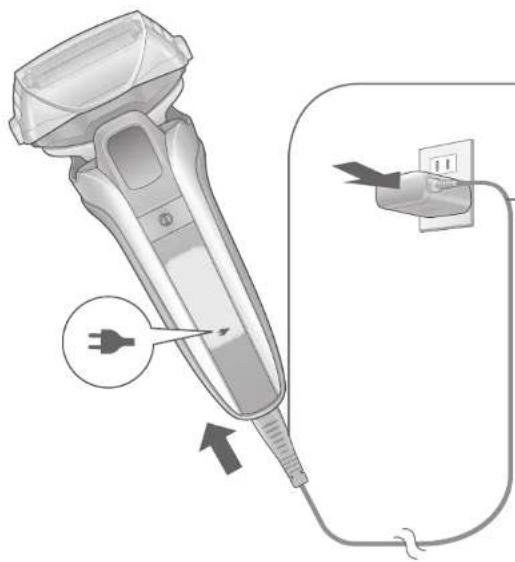
1 Insert the appliance plug into the shaver.
2 Plug in the adaptor into a household outlet. (The charge status lamp glows)
Charging is completed after approx. 1 hour.
3 When the charge status lamp turns off Disconnect the adaptor.
Notes
- When charging the shaver for the first time or when it has not been in use for more than 6 months, the charging time may change or the charge status lamp may not glow for a few minutes. (It will eventually glow if kept connected.)
- If the temperature is outside the recommended charging temperature range (10 °C - 35 °C), the charging time may be longer, or may blink rapidly and charging may fail.
The shaver can be used for approximately 2 weeks with a full charge. (Based on one 3-minute dry-shave usages per day in an ambient temperature range of 20°C - 30°C.)
- Depends on beard thickness, force applied to the skin, and frequency of use of sonic vibration cleaning mode.
- If the shaver causes noise on radios, etc. during charging/use, change the location.
English The Name: 1125, T.2724 The Name: 1125, T.2724
How to Use
Shaving the beard

The appliance may not operate in an ambient temperature lower than approximately 5 °C. Shaving foam, gel, soap, etc. cannot be used. The sonic vibration cleaning mode is activated when the power switch is pressed for more than 2 seconds while the shaver is not operating (the switch lock is unlocked). You cannot shave in this mode. [P. EN14]
Tips for better shaving
Apply the whole system outer foil perpendicularly against the skin and shave by slowly gliding the shaver over the face against the grain of the beard.
The beard under the chin and around the throat can be shaved better by stretching the skin so the beard will stand.
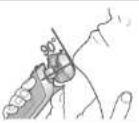

To prevent damage to the system outer foil Do not shave with only a part of the blade.

Locking/unlocking the power switch
■ Locking the power switch

• The shaver will stop operating. Locking is completed Release ① (Turns off after about 5 seconds)
■ Unlocking the power switch
Unlocking operation: Press and hold for 2 seconds or more (until the indicator turns off). Unlocking is completed when the indicator turns off. The shaver starts operating.
English

■ When the lock indicator blinks and the shaver does not operate
The power switch is locked.
■ When the remaining battery capacity is low
Beep sounds indicate the remaining battery capacity is low when the power switch is turned off.
You can shave even with the AC adaptor connected.
● The battery will drain even when using the shaver with the AC adaptor connected. If there is no remaining battery capacity, charge the shaver for at least one minute and then shave. (Since the movement of the blade weakens and the shaver may stop.)
Continued to the next page
EN12
How to Use (continued)
Shaving the beard (continued)
- Using the trimmer

Slide the trimmer handle up to the position. Press ① and use.

● To return the trimmer to its original position, slide the trimmer handle down while pressing the top knob.
Switching the foil frame movement ● To fix the foil frame
■ To apply the shaver closely to the skin (It prevents leaving beard unshaved)

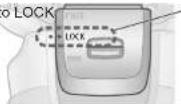

Tips for better usage
Gently apply the cutting edge at a right angle and move it from top to bottom slowly
Trimming sideburns Pre-shave of long
beards
EN13
Cleaning the Shaver
We recommend cleaning the shaver after each use.
Cleaning the shaver with water
● Turn the shaver off and disconnect the AC adaptor.
1
Rinse the system outer foil with water, and apply hand soap or cleaning solution (sold separately). [P. EN20]

2
Make foaming in sonic vibration cleaning mode.
(To suppress the spatter of bubbles)
①
Press
2 seconds
(The sonic vibration cleaning mode is activated.)
After about 20 seconds, sonic vibration cleaning mode stops automatically.

After about 20 seconds, sonic vibration cleaning mode stops automatically.
Continued to the next page

EN14
Cleaning the Shaver continued
Cleaning the shaver with water continued
3 Remove the outer foil section [P. EN16] and rinse under running water
![PANASONIC Lamdash ES-TLVFE - Remove the outer foil section [P. EN16] and rinse under running water - 1](/content/2026/06/1332504/images/9d2d82641ba31d71223ad929349e9015cbc2237cb4b189046b89f2db059c07d3.jpg)
Splashing is reduced by rinsing the shaver in sonic vibration cleaning mode. ● After rinsing with water, shake the shaver up and down for a few times to remove excess moisture and then wipe off any drops of water with a dry cloth.
rinse under running water
- Splashing is reduced by rinsing the shaver in sonic vibration cleaning mode. ● After rinsing with water, shake the shaver up and down a few times to remove excess moisture, then wipe off any water drops with a dry cloth.

4 Dry the shaver.
- Allow the shaver to dry in the shade.
- Remove the outer foil section to dry the shaver more quickly.

5 Apply oil.
(It will keep the movement of the blade smooth and maintain a comfortable shave.) ① Apply oil to the system outer foil and the trimmer.
② Press ①, wait for about
5 seconds, and then press to stop the shaver.
● Wipe off any excess oil from the system outer foil.
Important
- When shaking the shaver to remove water, be careful not to hit the main body on the sink or any other objects. (Failure to do so may cause malfunction.)
- Do not wipe with thinners, benzine, alcohol etc. (Doing so may cause malfunction, or cracking or discoloration of the parts.) → Wipe with diluted soapy water.
- Do not use cleaning agents other than hand soap or cleaning solution (sold separately). (Failure to do so may cause malfunction.)
Cleaning with the brush
Remove the outer foil section and the inner blades [as described below], and use the brush to remove any beard trimmings.
- Do not use any brush other than the one provided.
■ Cleaning with the long brush

Cleaning with the short brush

(Perpendicular motion might dull the blades or damage the brush)
Important
- If you do not clean the parts marked with ○, they may clog with beard trimmings and abnormal noise may occur. In this case, clean with water and the brush.

Clean here!! We recommend cleaning the shaver after each use.
Replacing the System Outer Foil and the Inner Blades
To maintain a comfortable shave, we recommend replacing the system outer foil every 1 year, and inner blades every 2 years.

Do not throw away the foil frame.
Removing and attaching the blades
![graph TD A["Outer foil section"] --> B["Press the left and right buttons"] C["System outer foil"] --> D["Press the left and right buttons"] E["Attaching"] --> F["Push evenly on the right and left (Until it clicks)"] G["Inner blades"] --> H["Hold the side of inner blade and then remove/attach it one…](/content/2026/06/1332504/images/d385d6ac20114250a035f2a9ed0907cfb935368d5702fe10a3942d58ab567b3d.jpg)
* When removing the system outer foil, do not press the buttons with excessive force. (Doing so may bend the system outer foil, preventing complete attachment to the foil frame.)
EN16
Battery Replacement
Please consult the authorized service center (described in the warranty).
(If you dismantle the shaver yourself, it will no longer be waterproof, which may cause it to malfunction.)
Battery life
Approximately 3 years.
The battery may have reached the end of its operating life if the operating duration decreases drastically, even after a full charge.
(The operating life of the battery may differ depending on usage or storage conditions.)
Q&A
| Battery | Question | Will the battery deteriorate if not used for an extended period of time? |
| Answer | The battery will deteriorate if not used for over 6 months, so make sure to perform a full charge at least once every 6 months. | |
| Question | Can I charge the shaver after every use? | |
| Answer | The battery used is a lithium-ion, so charging after every use will have no effect on battery life. | |
| Others | Question | Why should the adaptor be disconnected after charge? |
| Answer | Charging the battery for more than 1 hour will not affect battery performance, but disconnect the adaptor for safety and to save energy. | |
| Question | What is the constituent of the dedicated oil? | |
| Answer | Constituent of the oil is liquid paraffin. | |
| Question | Why does the appliance beep after switched off? | |
| Answer | The sound indicates that the remaining battery capacity is running low. Please charge the shaver. |

EN17
Before Requesting for Repair
Please check pages EN18 to EN19 before requesting for repair.
| Problem Action | ||
| Operation and function | The power switch does not turn ON | ● Is the power switch locked?(blinks) [P. EN12] |
| The LAMDASH AI does not respond (The driving sound does not change) | ● Depending on the beard thickness or the amount of beard trimmings in the foil frame, the LAMDASH AI may not react.● The LAMDASH AI may not respond when the remaining battery capacity is low.→ Charge the shaver. [P. EN9]● The blades might not be sufficiently oiled.→ Apply oil. [P. EN15] | |
| The LAMDASH AI responds even though the shaver is not in contact with the skin (The driving sound changes) | ● Have beard trimmings accumulated in the main unit?→ Use the brush to clean the main unit. [P. EN16]→ When the shaver is extremely dirty, remove the outer foil section and wash with water. [P. EN14 - EN15]● Are the blades due to be replaced? [P. EN16 - EN20] | |
| Charging | The battery drains quickly after charging | ● The blades might not be sufficiently oiled.→ Apply qR.EN15]● Are you performing maintenance each time the shaver is used? [P. EN14 - EN16]● Has the battery reached the end of its life? [P. EN17] |
| Shaver does not operate even after charging | ● Use the appliance in an ambient temperature approximately 5 °C or higher.● Has the battery reached the end of its life? [P. EN17]( In this case, the shaver will not work even if you turn on the power switch with the AC adaptor connected.) | |
Continued to the next page
EN18
Before Requesting for Repair continued
| Problem Action | ||
| Sound/Smell | The driving sound changes while shaving | ● The LAMDASH AI is operating. The sound changes depending on the beard thickness.[P. EN11] |
| Makes a loud sound | The blades will not move smoothly when there is no oil on the blades, requiring more power.→ Apply oil. [P. EN15]● The shaver makes a high-pitched sound due to the linear motor drive. Confirm that the blades are properly attached.● Is the system outer foil dirty?→ Use the brush to clean the main unit.[P. EN16] | |
| The odor is getting stronger | ● Are you performing maintenance each time the shaver is used? [P. EN14 - EN16] | |
| Others | Shavings fly out in all directions | ● Are you performing maintenance each time the shaver is used? [P. EN14 - EN16]→ Clean the inner blades with the brush when shavings are adhering to the inner blades. [P. EN16] |
| System outer foil gets hot | ● The blades might not be sufficiently oiled.→ Apply[RoEN15]● Is the system outer foil damaged or deformed?→ Replace the system outer foil.[P. EN16 · EN20] | |
| You do not get as close a shave as before | ● Are you performing maintenance each time the shaver is used? [P. EN14 - EN16]● Are the blades due to be replaced?[P. EN16 · EN20]● The blades might not be sufficiently oiled.→ Apply[RoEN15] | |
If the problems still cannot be solved even after performing the above actions.
Please contact an authorized service center (described in the warranty).
EN19
Parts Sold Separately
● These optional replacement products are only available in Japan.

Specifications
| Power source type | Charging/AC Mass | Main body (excluding protective cap) About 200 g | |
| Rated voltage | AC110 - 240 V 50 - 60 Hz | Power consumption | Approx. 9 W (when using 110 V AC) |
| Rated Current | 180 mA | ||
| Charging time | Approx. 1 hour (Room temperature: 10 °C-35 °C) | Approx. 10 W (with AC 110 V while charging) | |
| Battery | Lithium-ion battery (600 mAh) |
This product has an A-2 plug for AC110-240 V. For regions that do not use an A-2 plug, please provide your own plug adaptor.
| Inspection | Check your Linear Shaver for long life! | ||
| Are any of the following abnormalities present | The cord or adaptor is abnormally hot.There is abnormal sound or vibration during use.The main unit or AC adaptor is deformed or smells of burning. | Stop useTo prevent an accident, unplug the adaptor and be sure to request inspection from an authorized service center (described in the warranty). | |
EN20
Disposing of This Product
For environmental protection and recycling of materials
This product contains a Li-ion battery.
Please make sure that the battery is disposed of at an officially designated location, if there is one.
Remove the built-in rechargeable battery before disposing of the product.
Please make sure that the battery is disposed of at an officially designated location, if there is one. This figure must only be used when disposing of the product, and must not be used to repair it.
If you dismantle the product yourself, it may cause a malfunction.
■ Removing the battery
1 Press the power switch to turn on the power and then keep the power on until the battery is completely discharged. 2 Use a screwdriver to disassemble the shaver in the order shown in the figure below (numbers ① through ⑤), and then remove the battery. 3 Apply tape to the positive and negative battery terminals for insulation. (To prevent shorting of the terminals) - Do not disassemble the shaver when it is connected to the AC adaptor.

EN21
Safety precautions, please observe.
[Non-Text]
[Non-Text]
[Non-Text]
[Non-Text]
[Non-Text]
[Non-Text]
[Non-Text]
[Non-Text]
[Non-Text]
[Non-Text]
[Non-Text]
[Non-Text]
[Non-Text]
[Non-Text]
[Non-Text]
[Non-Text]
[Non-Text]
[Non-Text]
[Non-Text]
[Non-Text]
[Non-Text]
[Non-Text]
[Non-Text]
[Non-Text]
[Non-Text]
[Non-Text]
[Non-Text]
[Non-Text]
[Non-Text]
[Non-Text]
[Non-Text]
[Non-Text]
[Non-Text]
[Non-Text]
[Non-Text]
[Non-Text]
[Non-Text]
[Non-Text]
[Non-Text]
[Non-Text]
[Non-Text]
[Non-Text]
[Non-Text]
[Non-Text]
[Non-Text]
[Non-Text]
[Non-Text]
[Non-Text]
[Non-Text]
[Non-Text]
[Non-Text]
[Non-Text]
[Non-Text]
[Non-Text]
[Non-Text]
[Non-Text]
[Non-Text]
[Non-Text]
[Non-Text]
[Non-Text]
Therefore, m = 3/11
[Non-Text]
[Non-Text]
[Non-Text]
[Non-Text]
[Non-Text]
[Non-Text]
[Non-Text]
[Non-Text]
[Non-Text]
[Non-Text]
[Non-Text]
[Non-Text]
[Non-Text]
[Non-Text]
[Non-Text]
[Non-Text]
[Non-Text]
[Non-Text]
[Non-Text]
[Non-Text]
[Non-Text]
[Non-Text]
[Non-Text]
[Non-Text]
[Non-Text]
[Non-Text]
[Non-Text]
[Non-Text]
[Non-Text]
[Non-Text]
[Non-Text]
[Non-Text]
[Non-Text]
[Non-Text]
[Non-Text]
[Non-Text]
[Non-Text]
[Non-Text]
Usage Instructions (continued)
Shaving (continued)
■ When using the trimmer
2. Lather up in the sonic cleaning mode.
(Reduces splattering of foam)
① Press and hold ① for 2 seconds or more.
(Enters sonic cleaning mode)

It stops automatically after about 20 seconds.
- To stop midway,
Press ①.
Continued on next page
SC14
Cleaning the shaver (continued)
Cleaning the shaver with water (continued)
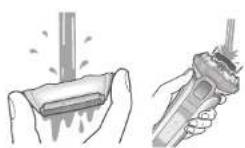
3 Remove the outer foil unit and rinse with tap water [see page SC16].
4 Air-dry the shaver.
SC21
Safety precautions: Please observe the following.
4 Air-dry the shaver.
TC21
Safety precautions: Be sure to follow these instructions.
1 Insert the appliance plug into the main unit.
Allow to dry naturally.
- Dry in the shade.


- PANASONIC CORPORATION
- PANASONIC®
- OPERATING INSTRUCTIONS
- TABLE OF CONTENTS
- SAFETY PRECAUTIONS PLEASE OBSERVE
- POWER SUPPLY
- SAFETY PRECAUTIONS CONTINUED
- WARNING
- THIS PRODUCT
- IN CASE OF AN ABNORMALITY OR MALFUNCTION
- PREVENTING ACCIDENTS
- CAUTION
- PROTECTING THE SKIN
- NOTE THE FOLLOWING PRECAUTIONS
- HANDLING OF THE REMOVED BATTERY WHEN DISPOSING
- DANGER
- FOR PROPER USE OF THIS PRODUCT
- LAMP DISPLAY
- AC ADAPTOR
- ACCESSORIES
- PREPARING THE SHAVER FOR FIRST-TIME USE
- CHARGING THE SHAVER
- NOTES
- HOW TO USE
- SHAVING THE BEARD
- TIPS FOR BETTER SHAVING
- LOCKING/UNLOCKING THE POWER SWITCH
- HOW TO USE (CONTINUED)
- SHAVING THE BEARD (CONTINUED)
- TIPS FOR BETTER USAGE
- CLEANING THE SHAVER
- CLEANING THE SHAVER WITH WATER
- CLEANING THE SHAVER WITH WATER CONTINUED
- REMOVE THE OUTER FOIL SECTION [P. EN16] AND RINSE UNDER RUNNING WATER
- RINSE UNDER RUNNING WATER
- DRY THE SHAVER
- APPLY OIL
- IMPORTANT
- CLEANING WITH THE BRUSH
- CLEANING WITH THE LONG BRUSH
- CLEANING WITH THE SHORT BRUSH
- REPLACING THE SYSTEM OUTER FOIL AND THE INNER BLADES
- REMOVING AND ATTACHING THE BLADES
- BATTERY REPLACEMENT
- BATTERY LIFE
- BEFORE REQUESTING FOR REPAIR
- BEFORE REQUESTING FOR REPAIR CONTINUED
- PARTS SOLD SEPARATELY
- SPECIFICATIONS
- DISPOSING OF THIS PRODUCT
- REMOVING THE BATTERY
- SAFETY PRECAUTIONS, PLEASE OBSERVE
- USAGE INSTRUCTIONS (CONTINUED)
- SHAVING (CONTINUED)
- CLEANING THE SHAVER (CONTINUED)
- CLEANING THE SHAVER WITH WATER (CONTINUED)
- REMOVE THE OUTER FOIL UNIT AND RINSE WITH TAP WATER [SEE PAGE SC16]
- AIR-DRY THE SHAVER
- SAFETY PRECAUTIONS: PLEASE OBSERVE THE FOLLOWING
- SAFETY PRECAUTIONS: BE SURE TO FOLLOW THESE INSTRUCTIONS
- ALLOW TO DRY NATURALLY
Brand : PANASONIC
Model : Lamdash ES-TLVFE
Category : Razor