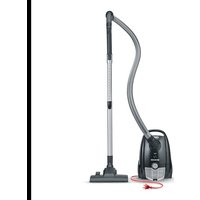
BC 7048 - Vacuum Cleaner SEVERIN - Free user manual and instructions
Find the device manual for free BC 7048 SEVERIN in PDF.



User questions about BC 7048 SEVERIN
0 question about this device. Answer the ones you know or ask your own.
Ask a new question about this device
Download the instructions for your Vacuum Cleaner in PDF format for free! Find your manual BC 7048 - SEVERIN and take your electronic device back in hand. On this page are published all the documents necessary for the use of your device. BC 7048 by SEVERIN.
USER MANUAL BC 7048 SEVERIN
We hope you will enjoy your high-quality SEVERIN product and thank you for placing your trust in us.
Get to know the wide range of SEVERIN products; visit us at
www.severin-floorcare.com.
Management and employees
of SEVERIN Floorcare GmbH
About this instruction manual
This instruction manual includes important tips for your safety and the use of the device. Failure to observe the instruction manual can result in personal injuries or damage to the device. Keep the instruction manual in a safe place. When passing the device on to a third party, also include the instruction manual. Read the instruction manual completely before initial use of the device.
Illustrated Quick Start Guide included
This instruction manual comes with an Quick Start Guide that provides you with additional tips for the use and care of the device.
If needed, this instruction manual and the Quick Start Guide can be downloaded online free of charge at www.severin.com.
Contents
1 Technical data. 16
2 Safety instructions. 17
3 Vacuum cleaning. 20
4 Cleaning and maintaining the device 22
5 Spare parts/accessories. 23
6 Troubleshooting by yourself 24
7 Disposal 25
8 Warranty 25
1 Technical data
| Item number: BC7048 |
| Model name: S>POWER® zelos |
| Sound power level: 74 dB(A) |
| Power input: 650 W |
| Voltage/Frequency: 220 - 240 V~; 50/60 Hz |
| Protection class: II |
| Length of connection cable: approx. 6 m |
| Weight: approx. 4.8 kg |
| Dust bag volume approx. 3 L |
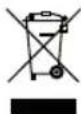
Marking on the device:

The device conforms with all EU directives that are binding for CE certification.
The device must be disposed of separately from household waste at a proper disposal site.
Scope of delivery
Vacuum cleaner
Handle with suction hose
Telescopic tube
1 dust bag in the device, 1 dust bag in the box
Switchable floor nozzle
Hard floor nozzle
- Crevice nozzle, upholstery nozzle, furniture brush
Storage bag
2 Safety instructions
Certain groups of persons
This device may only be operated by children over the age of 8 and by persons with reduced physical, sensory or mental capacities or a lack of experience and/or knowledge if they are supervised or have been instructed about the safe use of the device and are aware of the dangers associated with its use.
Children are not allowed to play with the device or stand or sit on it. Cleaning and user maintenance may not be performed by children without supervision.
- Keep children under the age of 8 away from the device and the connection cable.
The packaging material must not be used for play. There is a risk of suffocation.
Power supply
Since the device is operated with electrical current, there is a danger of electric shock.
Therefore:
- Connect and start up vacuum cleaner only in accordance with the information on the type plate (underside of the device).
Check the device and connection cable for possible damage before use. Never operate a defective device or a device with a defective connection cable.
SAFETY INSTRUCTIONS
- Never try to repair the device or its connection cable yourself. To prevent hazards, repairs to the device and the connection cable may only be performed by our customer service. Arrange repair of a defective device with a specialist dealer or contact SEVERIN customer service (see contact information in appendix to this instruction manual or at www.severin.de).
- Do not immerse the device in water or other liquids or treat it with liquids. Do not operate the device outdoors or in rooms with high humidity. Do not handle the power plug with wet hands.
Make sure that the connection cable is not kinked, pinched or run over and that it does not come in contact with sources of heat, humidity and sharp edges. Make sure that the connection cable does not become a trip hazard. - Do not pull or transport the device using the connection cable. When disconnecting the power plug from the socket, always pull directly on the power plug.
- Do not use extension cables. If this is unavoidable, use only GS-tested, simple extension cables (no multiple sockets) designed for the device's power consumption.
Before cleaning or maintaining the device, as well as before changing accessories, switch off the device and disconnect the power plug from the socket.
Intended use
The device must only be used domestically. In this regard, use it only to vacuum dry, normally soiled floors or, depending on the accessories, furniture and upholstery. Any other use is deemed improper and is forbidden.
In order to prevent injuries, fires and damage, the device must not be used to vacuum:
People, animals and plants. Always keep nozzles and suction openings away from all body parts, hair and clothing. Do not vacuum near the head.
- Glowing, burning or smouldering particles (such as ash, coal, charcoal, cigarettes, matches).
Explosive or highly flammable substances or toners.
Water and other liquids, e.g. wet carpet cleaning agents.
Sharp objects, such as glass splinters, nails or construction waste.
If the device is defective
Have a defective device repaired by a specialist dealer or customer service (see contact information in appendix to this instruction manual or at www.severin.de).
VACUUM CLEANING
3 Vacuum cleaning
Installation or replacement of accessories
Only install device parts when the power plug has been disconnected from the socket.
Only use undamaged nozzles. Damaged nozzles can scratch surfaces.
For additional installation tips, see Quick Start Guide Installation.
When vacuuming
Make sure that you are always over the device, especially when vacuuming stairs. Otherwise the device may fall down and cause injuries.
Only use the device with a dust bag and the filters.
Follow the cleaning and maintenance instructions of the floor covering, carpet or furniture manufacturer!
Never pull out the connection cable beyond yellow marking. If the blue marking is visible, press the cable rewind button to retract the connection cable to the yellow marking. Otherwise, the connection cable may be overstrained and damaged.
Light on the power regulator lights up green: The device is switched on and the filters are clean.
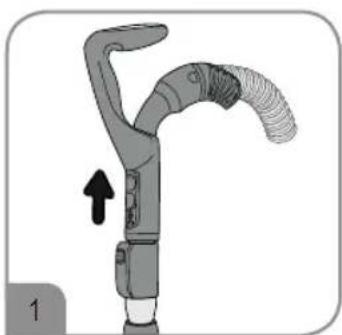
When retracting the connection cable, hold the power plug in your hand and guide it in the winding direction. Otherwise the connection cable may lurch, injure persons nearby, become a trip hazard or pull over objects.
Always ensure that the nozzle suitable for the surface is in place and the correct suction power is set.
If an object has accidentally been suctioned up, quickly actuate the bypass vent on the handle (Fig. 1) to reduce the suction power. For additional tips on operation, see Quick Start Guide Operation.
Setting the suction power
The power controller can be set stepplessly. The power regulator position should be adjusted according to the floor to be cleaned:
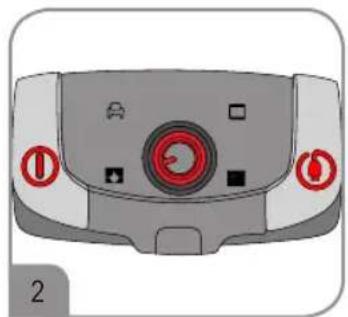
maximum power: for hard floors, heavily soiled carpets high power: for carpets, rugs and such like
moderate power: for upholstered furniture, upholstery and mattresses minimum power: for curtains, drapes and such like
Changing the dust bag
Before changing the dust bag, switch off the device and disconnect the power plug from the socket.
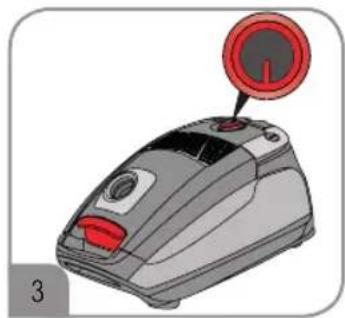
Latest point at which to change the dust bag:
as soon as the suction power noticeably decreases
as soon as the light on the power regulator lights up red (Fig. 3),
before prolonged storage or
before shipment.
The dust bag and its contents can be disposed of in normal household waste unless it contains dirt that is forbidden in household waste.
Only use dust bags of the same type:
Either from the Severin range of spare parts:
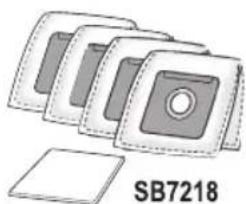
Severin dust bag set (4 dust bags + 1 motor filter)
Art.No.:SB7218
Or from the Swirl range of accessories: Swirl
Y101 MicroPor Plus
Swirl, Y 101 and MicroPor are registered trademarks of a company of the Melitta Group and are not connected to SEVERIN in any way.
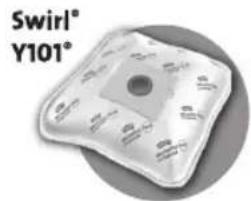
It is recommended that the filters be cleaned as well at this time ("4 Cleaning and maintaining the device" on page 22).
With regard to changing the dust bag, see also Quick Start Guide Cleaning and maintenance.
CLEANING AND MAINTAINING THE DEVICE
4 Cleaning and maintaining the device
Before changing or cleaning the filters, switch the device off and disconnect the power plug from the socket.
Clean the filters no later than when the light on the power regulator lights up red (Fig. 3).
Cleaning the motor filter
The motor filter is comprised of a washable fleece. However, it cannot be washed in the dishwasher or washing machine.
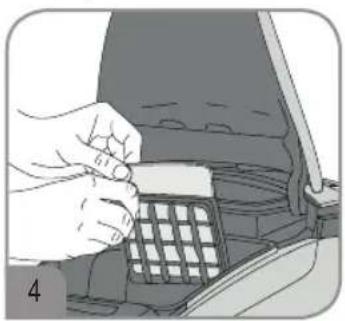
- Open the cover of the device and remove the dust bag ("Changing the dust bag" on page 21).
- Push up the filter holder and remove the motor filter (Fig. 4).
- Rinse the motor filter out thoroughly under running water (max. 40^ ) (Quick Start Guide, Detail).
-
Let the motor filter dry for approx. 24 hours at room temperature after cleaning. Wait until the motor filter is completely dry before reinserting it. Otherwise germs and mould may form.
-
Reinsert the motor filter in the filter holder and insert the holder into the housing in the direction of the arrow.
If the filter is damaged or deformed, replace the filter with a new one ("5 Spare parts/accessories" on page 23).
With regard to cleaning the motor filter, see also Quick Start Guide Cleaning and maintenance.
Cleaning the exhaust filter
The exhaust filter cannot be washed! The exhaust filter must only be cleaned dry by tapping it out and carefully brushing it out.
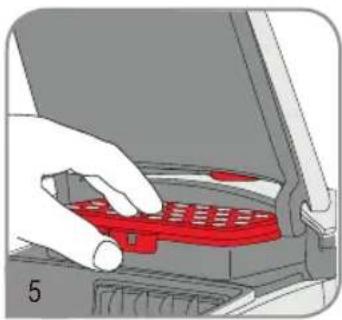
- Unlock the exhaust filter (Filter, 5) and remove it.
- First knock out the exhaust filter and then brush it carefully with a soft brush (e.g. with the furniture brush provided) (Quick Start Guide, Detail
- Reinsert the exhaust filter in the device and press on it until it audibly locks in place.
If the filter is damaged or deformed, replace the filter with a new one ("5 Spare parts/accessories" on page 23).
With regard to cleaning the exhaust filter, see also Quick Start Guide Cleaning and maintenance.
Cleaning the device
Before cleaning, switch off the device and disconnect the power plug from the socket.
The housing and connection cable must not be handled with liquids or immersed in liquids for reasons of electrical safety. Wipe the housing with a slightly damp cloth and then rub it dry.
Do not use any sharp, abrasive cleaning agents or hard brushes for cleaning.
Storing the device
Store the device and accessories in a cool, dry place out of the reach of children.
The additional nozzles can be stored in the storage bag.
For additional tips on storage, see Quick Start Guide Operation.
5 Spare parts/accessories
You can easily order spare parts or accessories online at www.severin.de in the Service Ersatzteil-Shop (Spare parts shop) menu.
| Order number Accessories/spare part | |
| SB7218 | Dust bag set (4 dust bags + 1 motor filter) |
| ZB7223 | Filter set (1 motor filter + 1 exhaust filter) |
| PB7217 | Parquet nozzle (XL hard floor nozzle with extra long bristles) |
| TB7215 Mini turbo brush with rotating bristles | |
| ZB7214 Long, flexible crevice nozzle | |
TROUBLESHOOTING BY YOURSELF
6 Troubleshooting by yourself
It is important to change the dust bag in good time and use this opportunity to check the filters, cleaning them in the process if they are soiled, so that no problems arise. However, if you encounter problems with the device, use the following table to determine whether you can solve the problem yourself.
Before troubleshooting, switch off the device and disconnect the power plug from the socket.
| Problem Cause/Solution | |
| Light on the power regulator lights up red | The dust bag needs to be replaced or the filters are soiled ("Changing the dust bag" on page 21, "Cleaning the motor filter" on page 22, "Cleaning the exhaust filter" on page 22). |
| An odour develops or dust escapes from the device during vacuuming | It is likely that the dust bag or parts of the accessories were not correctly installed or closed after cleaning or replacement. Check all parts for correct seating. |
| The device suddenly stops vacuuming | The integrated overheating protection has tripped (possibly due to an overfilled dust bag or soiled filter). In this case, proceed as follows: 1. Switch off the device. 2. Disconnect the power plug from the socket. 3. Eliminate the cause of the overheating (either replace the dust bag ("Changing the dust bag" on page 21) or clean the filter ("Cleaning the motor filter" on page 22, "Cleaning the exhaust filter" on page 22); it is also possible that there is clogging that needs to be rectified). 4. Be sure to include the suction hose, nozzle and telescopic tube when searching for the cause of the overheating. 5. Close the device again and reattach all accessories. 6. Wait about 45 minutes. After the device has cooled down, it can be switched on again. |
| The device hardly picks up any dirt and/or the suction power noticeably decreases | The dust bag needs to be replaced ("Changing the dust bag" on page 21). It is recommended that the filters be cleaned as well at this time ("Cleaning the motor filter" on page 22, "Cleaning the exhaust filter" on page 22). |
| The set suction power may not be appropriate for the type of floor. Set the correct suction power ("Setting the suction power" on page 21). | |
| The device hardly picks up any dirt and/or the suction power noticeably decreases | The attached nozzle may not be suitable for the floor to be cleaned. Select and attach the correct nozzle. |
| When the floor nozzle is attached, the “carpet/hard floor” selector is in the wrong position for the particular type of floor. Select the correct switch position. | |
| The cover of the device cannot be closed | The dust bag is protruding and preventing the cover from being closed completely. Be sure to have fully inserted the dust bag in the device. |
If this table does not help, please contact our customer service. The contact information can be found in the appendix to this instruction manual or at www.severin.de.
7 Disposal
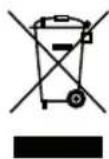
Devices marked with this symbol must be disposed of separately from household waste. These devices contain valuable raw materials that can be recycled. Proper disposal protects the environment and the health of your fellow men. Your local authorities or dealer can provide information about proper disposal.
8 Warranty
The legal warranty rights with respect to the seller and any seller warranties are unaffected by the following warranty conditions.
If repair should be necessary, contact our customer service via telephone or e-mail. The contact information can be found in the appendix to this instruction manual.
In case of a warranty claim, you can also contact the dealer directly.
In addition, SEVERIN grants a manufacturer's warranty of two years from the date of purchase. During this period, we will eliminate all defects caused by material or production faults that significantly compromise the function free of charge. Other claims are excluded.
Excepted from the warranty are: Damage that is due to non-observation of the instruction manual, improper handling or normal wear; also easily-breakable parts such as glass, plastic or light bulbs. If the device is tampered with by persons not authorised by SEVERIN, this will render the warranty null and void.
Remerciements
Chere cliente, cher client,
www.severin-floorcare.com.
www.severin-floorcare.com.
www.severin-floorcare.com.
www.severin-floorcare.com.
1 Angel Kanchev, 5th floor
1000 Sofia, Bulgaria
Tel.: +359 2 973 11 31, 973 55 33
Fax: +359 2 944 96 49
E-Mail: vihra.ko leva@pirita.bg
Czech Republic
BVZ Commerce s.r.o.
Parkerova 618
CZ 25067 Klecany
Tel.: +420 233 55 94 74
Fax: +420 233 55 81 59
Danmark
F&H of Scandinavia A/S
Gl. Skivevej 70
DK-8800 Viborg
Tel.: +45 8928 1300
Fax: +45 8928 1301