BTS Elysium S1 - Loudspeaker ECG - Free user manual and instructions
Find the device manual for free BTS Elysium S1 ECG in PDF.



| Product Type | Wireless Bluetooth Speaker |
| Brand | ECG |
| Model | BTS Elysium S1 |
| Dimensions (H x diameter) | 40 x 99 mm |
| Weight | 280 g |
| Power Source | Built-in 1000 mAh battery, recharge via USB (5V/1A recommended) |
| Charging Time | 5 to 6 hours with 5V/1A adapter |
| Playback Time | Approximately 7 hours at 70% volume |
| Bluetooth Version | 4.2 with stereo A2DP support |
| Main Functions | Bluetooth wireless playback, hands-free function, TWS (stereo pairing of 2 speakers), Micro SD player (MP3/WMA/APE/FLAC up to 32 GB), voice assistant, IPX4 water resistance, passive subwoofer |
| Protection Rating | IPX4 (splash resistant) |
| Connectivity | Micro USB port (charging and card reader), Micro SD slot |
| Voice Assistant | Voice announcements of modes and actions (can be disabled) |
| TWS Function | Pairing of two BTS Elysium S1 speakers for stereo playback |
| Care and Cleaning | Clean with a damp cloth, do not use liquid or spray products |
| Safety | Do not open the casing, avoid heat sources, do not expose to excessive humidity, use only the recommended adapter, unplug during thunderstorms |
| Spare Parts and Repairability | No user-serviceable parts; any repairs should be carried out by an authorized service center |
| General Information | Compliant with directive 2014/53/EU; declaration of conformity available at www.ecg-electro.eu |
Frequently Asked Questions - BTS Elysium S1 ECG
User questions about BTS Elysium S1 ECG
0 question about this device. Answer the ones you know or ask your own.
Ask a new question about this device
Download the instructions for your Loudspeaker in PDF format for free! Find your manual BTS Elysium S1 - ECG and take your electronic device back in hand. On this page are published all the documents necessary for the use of your device. BTS Elysium S1 by ECG.
USER MANUAL BTS Elysium S1 ECG
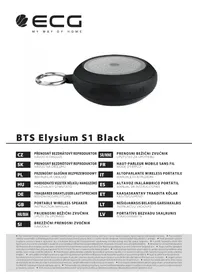
BTS Elysium S1 Black
CZ
PRENOSNY BEZDRATOVY REPRODUKTOR NAVOD K OBSLUZE
SR/MNE
PRENOSNI BEZICNI ZVUCNIK UPUTSTVO ZA UPOTREBU
SK
PRENOSNY BEZDROTOVY REPRODUKTOR
NAVOD NA OBSLUHU
FR
HAUT-PARLEUR MOBILE SANS FIL MODE D'EMPLOI
PL
PRZENOSNY GLOSNIK BEZPRZEWODOWY INSTRUKCJA OBSLUGI
IT
ALTOPARLANTE WIRELESS PORTATILE MANUALE DI ISTRUZIONI
HU
HORDOZHATO VEZETEK NELKULI HANGSZORHOASZNALATI UTMUTATIO
ES
ALTAVOZ INALÁMBRICO PORTÁTÍL MANUAL DE INSTRUCCIONES
DE
PORTABLE WIRELESS SPEAKER INSTRUCTION MANUAL
LT
NEsIOJAMASIS BELAIDIS GARSIAKALBIS INSTRUKCIU VADOVAS
HR/BIH
PRIJENOSNI BEZICNI ZVUCNIK UPUTE ZA UPORABU
LV
PORTATIVSBEZVADUSKALRUNIS ROKASGRAMATA
SI
BREZZICNI PRENOSNI ZVOCNIK NAVODILA
BEZPEČNOSTNI POKNY
Read carefully and save for future use!
Before you begin using the device, read this manual carefully and follow the instructions provided here. Keep this manual for future reference.
- Follow all warnings on the product and in the documentation supplied with the appliance.
- Do not use liquid cleaners or spray cleaners for cleaning. Use wet cloth for cleaning.
Use only accessories recommended by the manufacturer. Otherwise there is a risk of injury or damage to the device.
- Do not place the device on unstable surfaces (stands, carts, tables, holders, etc.). The device could fall and could cause serious injury to a child or an adult and damage the appliance.
- Place the device on a horizontal, flat and firm surface with good ventilation. Do not cover the air vents. Doing so may damage the device by overheating. Do not place the device in a confined space with poor ventilation, for example, in glass cabinets or on tight shelves.
- The appliance should be powered only from a power sources indicated on the product label. If you are unsure of your power network parameters, consult your vendor or your electricity provider.
- The power adapter cord should be led so as to avoid stepping on the cord or its excessive straining or pinching. Pay special attention to places where then cord exits from the appliance and close to the plug. If the device is not used for long periods, unplug the power cord. Unplug the power supply also during a thunderstorm to prevent damage by lightning.
- The electrical outlet has to be constantly accessible.
- Do not overload electrical outlets by plugging in too many appliances.
- Protect the device against infiltration of liquids or foreign objects and do not insert any object into the ventilation openings, with potentially hazardous contact with voltage inside the device.
- Do not open the device box. There are no elements inside that can be configured by the user. Have a qualified service technician perform repairs on the device.
- Do not expose batteries to excessive temperatures, e.g. direct sunlight, fire etc.
- In the following cases, unplug the device and contact a qualified service:
- The power cord was damaged.
- The device was infiltrated by a foreign object or liquid, or it was exposed to rain or water.
- The appliance does not operate normally in accordance with the manual. Set only the elements described in the operating manual.
-
The device has significant functionality changes, indicating a need for service.
-
Do not expose the device to heat sources such as radiators, heating or other heat-producing appliances such as amplifiers.
Changes or modifications not expressly approved by the responsible authority can lead to loss of authorization to use the device. - Excessive sound can cause hearing damage.
DESCRIPTION
GB
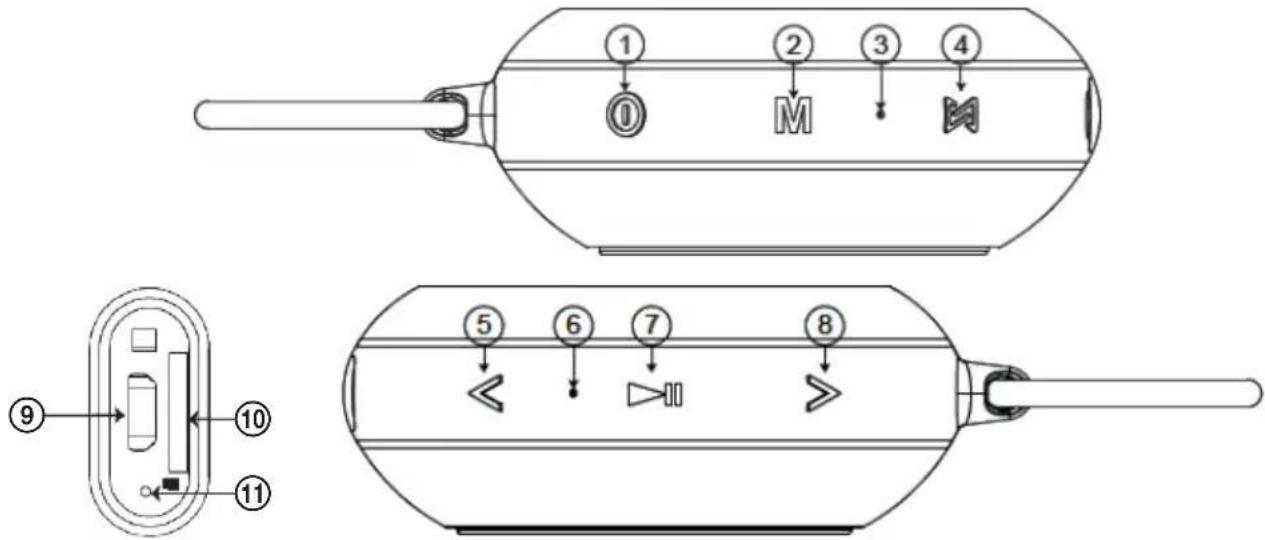
- Long press: turn speaker ON/OFF
- Brief press: switching modes
Long press: Turn the voice guide on/off
- Microphone
- Short press: enable/disable TWS
Long press: delete stored TWS pairing
- Brief press: previous track
Long press: decrease volume - Power On Indicator
- Brief press: play/pause, answering an incoming call / ending a call
Double short press: radial previously called number
- Brief press: next track
Long press: increase volume - Charging connector
- Micro SD memory card slot
- Charging indicator
Features
- Wireless music playback (Bluetooth 4.2 stereo) and hands-free function
- Powerful amplifier with DSP (Digital Signal Processor)
TWS support - pairing 2 of the same speakers delivers a stereo sound experience - Playback from a 32GB Micro SD memory card with MP3/WMA/APE/FLAC formats support
Passive subwoofer - Memory card reader and charging via the same USB cable
- Splashproof - IPX4 protection
Voice guide - for changing modes and overall control
Package contents
Wireless Bluetooth speaker, Micro USB cable, Operating Manual, carabiner
USING THE SYSTEM
Before using the device for the first time, fully charge the integrated battery.
If you do not plan to use the speaker for a longer period of time, charge the device once a month to prevent
the surfacing of problems or damage caused by an excessively discharged battery.
1. Turn the speaker ON/OFF
Long press ① for 2 seconds to turn the speaker ON or OFF.
2. Bluetooth mode
1) Bluetooth pairing
When switched on, the LED indicator flashes. Next, enable Bluetooth on your mobile phone or other device and initiate the search for Bluetooth devices. BTS Elysium S1 is offered, which you connect. Once connected, the speaker announces "Device paired" (Device paired) and the LED indicator turns blue.
2) Wireless music playback
Simply start the playback on your mobile phone or music player and listen to music from your speaker.
3) Hands-free paired with your mobile phone
Accepting an incoming call
Short press ⑦ to accept an incoming call.
Hang up
Short press ⑦ again to hang up.
Redial
Double press ⑦ to initiate a call to the previously called number.
Private call
Press briefly the button ⑤ or ⑧ to be able to switch between the speaker and the phone during a call.
Reject an incoming call
Long press ⑦ to reject an incoming call.
4) Disconnect an existing Bluetooth connection
The speaker will automatically pair with the last known Bluetooth device. Long press ② to disconnect from the current Bluetooth connection, the speaker will indicate "Device disconnected". The speaker is then ready to be paired with another device.
3. Play music from the micro SD card
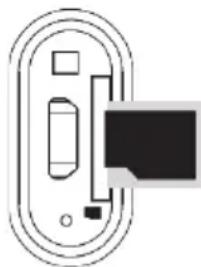
After inserting the micro SD card (see fig.) into the speaker and briefly pressing the button ② the speaker switches to playback mode from the memory card and plays music directly from the micro SD card. The speaker will indicate "Memory card mode" before playing. Long press the button ② to switch on or off the voice guide.
4. Voice guide
Once enabled, the speaker plays information regarding the current playback mode, e.g.:
Bluetooth mode (Bluetooth mode), device paired (device paired), device disconnected (device disconnected), etc.
You can turn off the voice guide by long pressing the button ②.
5. TWS (Stereo playback)
Turn ON two BTS Elysium S1 speakers and switch both into Bluetooth mode.
When you press briefly the button ④ one of the speakers starts search for the other speaker BTS Elysium S1 and the other speaker will be connected automatically. The LED indicator in the ④ button of the second paired speaker lights up orange. After a successful pairing, the LED indicator ④ of the speaker playing the left channel turns blue and the LED indicator ④ of the speaker playing right channel turns orange.
Next, enable Bluetooth on your mobile phone or other player and initiate the search for Bluetooth devices. "BTS Elysium S1" appears, connect the speakers.
Notes
- You can use this function only with both speakers BTS Elysium S1.
- Both paired speakers can be disconnected from your mobile phone/player by short pressing ④. The speaker will indicate "TWS disconnected".
- Long press ④ on any of the speakers to disable TWS. The speaker will indicate "TWS Cleared".
Note:
- Two adapters are required for powering the speakers, one adapter for each.
- Before pairing speakers to use the TWS feature, none of the speakers must be paired with any device.
- If any of the two speakers is paired with another BTS Elysium S1 speaker, first cancel this connection, otherwise the speakers can not be paired. Long press ④ on each speaker to cancel the existing TWS link.
6.Card reader
Insert your Micro SD card into the speaker and switch OFF. Connect the speaker to the computer via USB cable. After the speaker switches to memory card mode, files can be read and written to the computer from the Micro SD card.
Note: The necessary computer driver is installed when using this feature for the first time.
7. Intelligent energy-saving feature
The speaker turns off automatically if you press the button ⑦ in the playback mode to pause the playback for longer than 10 minutes.
Note:Longpress ⑦ again to switch the speaker ON again.
GB
8. Charging
If the speaker battery is nearly empty, the speaker will report it with the message "out of battery" (empty battery). Charge the battery using the USB adapter. During charging, the orange LED indicator lights up. When the charging is finished that orange indicator turns off.
Notes:
- Only use a quality adapter to charge the speaker.
We recommend using an adapter with the following parameters: 5V / 1A full charge takes about 4 hours. - Always charge the speaker immediately after the speaker indicates the battery is empty.
- The speaker can also be charged with a lower charging current. The charging cycle can take a very long time when the battery is charged via standard USB port with a current of 500mA .
TROUBLESHOOTING
| Problem Solution | |
| The speaker cannot connect to the Bluetooth device and play music. | 1. Check the specifications / manual of the Bluetooth device (mobile phone or computer) and make sure the device supports A2DP stereo audio transmission. If the device does support A2DP, enable A2DP stereo mode. 2. Make sure the speaker is in Bluetooth mode. If there are many Bluetooth devices in your vicinity, it can be difficult to find the correct device. In such a case, turn off all other devices. |
| The micro SD card does not work. | 1. Make sure that the Micro SD card is in good condition. Check the audio files for supported format: MP3/WMA/WAV/APE/FLAC. 2. In addition to the above mentioned, there may be a problem with Micro SD card compatibility. When formatting the Micro SD card or USBB flash drive, we recommend using a FAT 32 file format. |
| The speaker does not play any sound and does not respond to pressing of any button. | The most likely cause is an internal speaker system defect. Try long-pressing ⑦ and hold the button for 8 seconds. This resets the speaker. |
TECHNICAL SPECIFICATIONS
Bluetooth version: 4.2
Power: DC 5 V / 1 A (Max)
Impedance: 4 Ω
Power: 5 W
Integrated battery: 1000 mAh
Size: 40(V)× 99()mm
Charging time: 5-6 hours (using the adapter 5V / 1A )
Playing time: 7 hours at 70% volume
Weight: 280g
USE AND DISPOSAL OF WASTE
Wrapping paper and corrugated paperboard - deliver to scrapyard. Packing foil, PE bags, plastic elements - throw into plastic recycling containers.
PRODUCT DISPOSAL AFTER END OF LIFE
Disposal of electric and electronic equipment (valid in EU member countries and other European countries with an implemented recycling system)
The represented symbol on the product or package means the product shall not be treated as domestic waste. Hand over the product to the specified location for recycling electric and electronic equipment. Prevent negative impacts on human health and the environment by properly recycling your product. Recycling contributes to preserving natural resources. For more information on the recycling of this product, refer to your local authority, domestic waste processing organization or store, where you purchased the product.
Hereby, K+B Progres, a.s. declares that the radio equipment type ECG BTS Elysium S1 is in compliance with Directive 2014/53/EU. The full text of the EU declaration of conformity is available at the following internet address: www.ecg-electro.eu.
The operating manual is available on internet at www.ecg-electro.eu.
Changes of text and technical parameters are reserved.

08/05

SIGURNOSNE UPUTE
Alimentation: DC 5 V / 1 A (Max)
Impedance:4Ω
Puissance:5W
Integretais akumulators: 1000 mAh
Izmeri: 40 (V) × 99 (Ø) mm
Uzlades laiks: 5-6 stundas (izmantojot adapteri 5V / 1 A)
Atskanoosanas laiks: 7 stundas ar 70% skajumu
Svars: 280 g
250 69 Klicany, Czech Rep. e-mail: ECG@kbexpert.cz

K+B Progres, a.s.
U Expertu 91 tel.: +420 272 122 111
250 69 Klicany, Czech Rep. e-mail: ECG@kbexpert.cz

250 69 Klicany, Czech Rep. e-mail: ECG@kbexpert.cz

K+B Progres, a.s.
U Expertu 91 tel.: +44 776 128 6651 (English)
250 69 Klicany, Czech Rep. e-mail: ECG@kbexpert.cz

K+B Progres, a.s.
U Expertu 91 tel.: +44 776 128 6651 (English)
250 69 Klicany, Czech Rep. e-mail: ECG@kbexpert.cz

K+B Progres, a.s.
U Expertu 91 tel.: +420 272 122 111
250 69 Klicany, Czech Rep. e-post: ECG@kbexpert.cz

K+B Progres, a.s.
U Expertu 91 tel.: +420 272 122 111
250 69 Klicany, Czech Rep. el. pastas: ECG@kbexpert.cz

K+B Progres, a.s.
U Expertu 91 tel.: +420 272 122 111
250 69 Klicany, Czech Rep. e-pasts: ECG@kbexpert.cz




- BTS Elysium S1 Black
- BEZPEČNOSTNI POKNY
- Read carefully and save for future use!
- DESCRIPTION
- Features
- Package contents
- USING THE SYSTEM
- Turn the speaker ON/OFF
- Bluetooth mode
- 1) Bluetooth pairing
- 2) Wireless music playback
- 3) Hands-free paired with your mobile phone
- Accepting an incoming call
- Hang up
- Redial
- Private call
- Reject an incoming call
- 4) Disconnect an existing Bluetooth connection
- Play music from the micro SD card
- Voice guide
- TWS (Stereo playback)
- Notes
- Note:
- 6.Card reader
- Intelligent energy-saving feature
- Charging
- Notes:
- TROUBLESHOOTING
- TECHNICAL SPECIFICATIONS
- USE AND DISPOSAL OF WASTE
- PRODUCT DISPOSAL AFTER END OF LIFE
- SIGURNOSNE UPUTE
Brand : ECG
Model : BTS Elysium S1
Category : Loudspeaker