
CDR 888 USB - Loudspeaker ECG - Free user manual and instructions
Find the device manual for free CDR 888 USB ECG in PDF.


| Product type | Speaker with radio, CD player, cassette and USB |
| Brand | ECG |
| Model | CDR 888 USB |
| Dimensions (W x D x H) | 300 × 295 × 134 mm |
| Weight | 1.65 kg |
| Mains power supply | AC 230–240 V ~50 Hz |
| Battery power | 6 C-type batteries (not supplied) |
| Total power | 15 W |
| Output power (RMS) | 2 × 1.5 W |
| Speakers | 4 Ω |
| FM frequency range | 88–108 MHz |
| Supported formats | WMA, MP3, CD-R/RW |
| Maximum USB capacity | 32 GB |
| Standby consumption | < 0.5 W |
| Main functions | FM radio, CD player, cassette deck, AUX input, USB port, headphones |
| Care and cleaning | Clean with a damp cloth, do not use abrasive products. Clean cassette heads with alcohol or a special product. |
| Safety | Double insulation, do not open the casing, avoid contact with water, risk of laser when opened |
| Repairability | Repair only by qualified personnel. No user-serviceable parts. |
| General information | 148-page manual available in several languages |
Frequently Asked Questions - CDR 888 USB ECG
User questions about CDR 888 USB ECG
0 question about this device. Answer the ones you know or ask your own.
Ask a new question about this device
Download the instructions for your Loudspeaker in PDF format for free! Find your manual CDR 888 USB - ECG and take your electronic device back in hand. On this page are published all the documents necessary for the use of your device. CDR 888 USB by ECG.
USER MANUAL CDR 888 USB ECG
natural_image
White ECG portable radio with LCD display and speaker grille (no visible text or symbols on device body)CDR 888 USB
CZ
RADIOMAGNETOFON S CD/USB NÁVOD K OBSLUZE
SK
RÁDIOMAGNETOFÓN S CD/USB NÁVOD NA OBSLUHU
PL
RADIOMAGNETOFON Z CD/USB INSTRUKCJA OBSŁUGI
HU
RÁDIÓMAGNETOFON CD ÉS USB LEJÁTSZÓVAL HASZNÁLATI ÚTMUTATÓ
DE
CLASS 1 LASER PRODUCT
natural_image
Line drawing of a portable device with a cable and plug inserted into the base (no text or symbols)
natural_image
Two electronic devices connected by a cable, one with a display and the other with a control panel (no visible text or symbols)Použití sluchátek

flowchart
graph TD
    A["REPEAT1\n0:1"] --> B["OPAKOVAT 1 OPAKOVAT VŠE"]
    C["REPEATALL\n0:1"] --> D["NORMÁLNÍ REPRODUKCE"]
    B --> D
Magnetofon
Přehrávání kazet
CLASS 1 LASER PRODUCT
natural_image
Line drawing of a portable electronic device with cable and plug, no text or symbols present
Použitie slúchadiel

natural_image
Line drawing of a device with a plug inserted into a housing (no text or symbols)
Używanie słuchawek

CLASS 1 LASER PRODUCT
Az elemek kezelése
natural_image
Line drawing of a portable electronic device with cable and plug, no text or symbols present
natural_image
Two connected electronic devices with cables, one showing a display and the other displaying a control panel (no text or symbols visible)
natural_image
Line drawing of a device with a plug inserted into a housing, showing internal components and wiring (no text or symbols)
natural_image
Two electronic devices connected by a cable, one with a display and the other with a control panel (no text or symbols visible)
flowchart
graph LR
    A["REPEAT1\n0:1"] --> B["REPEATALL\n0:1"]
    B --> C["NORMALE WIEDERGABE\n0:1"]
    D["WIEDERHOLEN 1 ALLES WIEDERHOLEN"] --> A
    E["NORMALE WIEDERGABE"] --> C
Tonbandgerät
Kassettenwiedergabe
Lagerung von CDs
The lightning symbol warns the user about dangerous voltage inside the device box, which could cause injury by shock upon coming into contact with the internal elements of the device.

CAUTION
To reduce the risk of fire or electric shock, do not remove the cover of the device. Have a qualified service technician perform repairs on the device.

WARNING
The exclamation mark alerts the user to important operational instructions in the manual.

WARNING
The device, including accessories. should not be exposed to dripping or splashing water and objects, containing liquids should not be placed on it, e.g. vases. You will reduce the risk of electric shock or damage to the device.

To prevent possible hearing damage, avoid prolonged listening at high volume.
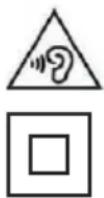
Appliance Protection Class II with double insulation. This device may not be grounded.
WARNING: DANGEROUS RADIATION
When you open the covers and remove the safety fuse, you can be exposed to invisible and dangerous laser radiation. Avoid direct exposure to the laser beam.

CLASS 1 LASER PRODUCT
Read carefully and keep for future use!
- Before plugging the device in and starting using it, please read this manual thoroughly and follow the provided instructions. Keep this manual for future reference.
- Follow all warnings on the product and in the documentation supplied with the appliance.
- Unplug the device before cleaning. Do not use liquid cleaners or spray cleaners for cleaning. Use wet cloth for cleaning.
- Use only accessories recommended by the manufacturer. Otherwise there is a risk of injury or damage to the device.
- Do not use the device near water and in wet locations such as near a pool, bathtub, kitchen sink, in a damp cellar, laundry room and so on. The device must not be exposed to dripping or splashing water, do not place containers filled with liquids on the device.
- Do not place the device on unstable surfaces (stands, carts, tables, holders, etc.). The device could fall and could cause serious injury to a child or an adult and damage the appliance. Use only stands, carts or tables and holders recommended by the manufacturer or sold with the product. Any mounting should respect the manufacturer's instructions and mounting materials recommended by the manufacturer should be used. Transport the appliance on a cart with extreme caution – sudden stops, sudden changes of direction or uneven surfaces may cause the appliance to tip-over.
- Place the device on a horizontal, flat and firm surface with good ventilation. Do not cover the air vents. Doing so may damage the device by overheating. Do not place the device in a confined space with poor ventilation, for example, in glass cabinets or on tight shelves.
-
The appliance should be powered only from a power sources indicated on the product label. If you are unsure of your power network parameters, consult your vendor or your electricity provider. In case of power supply from batteries, follow the instructions in the manual.
-
The power cord should be led so as to avoid stepping on the cord or its excessive straining or pinching. Pay special attention to places where then cord exits from the appliance and close to the plug. If the device is not used for long periods, unplug the power cord. Unplug the power supply also during a thunderstorm to prevent damage by lightning.
- The electrical outlet has to be constantly accessible.
- Do not overload electrical outlets by plugging in too many appliances.
- Protect the device against infiltration of liquids or foreign objects and do not insert any object into the ventilation openings, with potentially hazardous contact with voltage inside the device.
- Do not open the device box. There are no elements inside that can be configured by the user. Have a qualified service technician perform repairs on the device.
- Do not expose batteries to excessive temperatures, e.g. direct sunlight, fi re etc.
- Replace batteries only with batteries of the same type and with correct polarity. Otherwise there is a risk the system may explode.
- In the following cases, unplug the device and contact a qualified service:
• The power cord was damaged
• The device was infiltrated by a foreign object or liquid, or it was exposed to rain or water.
- The appliance does not operate normally in accordance with the manual. Set only the elements described in the operating manual.
- The device has significant functionality changes, indicating a need for service.
- Do not expose the device to heat sources such as radiators, heating or other heat-producing appliances such as amplifiers.
- Changes or modifications not expressly approved by the responsible authority can lead to loss of authorization to use the device.
- Excessive sound pressure from earphones can cause hearing damage.
- The type label is located on the bottom side of the device.
DESCRIPTION
Main elements [A]
- Handle
- CD tray door
- Volume control - setting the volume of the device
- Radio tuner
- Control panel of the tape player
- Cassette door
- Functions selector - switches between modes CD/USB, AUX, TAPE (OFF) a TUNER
- Headphones jack
- External input AUX
- USB connector
- STOP button – stopping playback
- RETURN button – Skip back to the beginning of the track or to previous track. Fast rewind in the track
Control panel of the tape player [B]
- PAUSE button – pause playback
- STOP/EJECT button – stop playback, opening of the door of the cassette space.
-
Forward button
-
MODE button - repeat mode of CD tracks or music files. Programming of the order of the tracks
- PLAY/PAUSE/USB button – pause and resume playback. Long hold toggles between CD and USB modes
- FORWARD button – skip ahead to the next track. Fast forward in the track
- +10 button – Skip ahead during playback of MP3 by 10 tracks.
- FM antenna
- AC power – for connection of the power cord
-
Battery compartment
-
Rewind button
- PLAY button – start playback
- REC button – tape recording
PRIOR TO USE
Unpacking the device
- Remove carefully the device from the box and dispose of all the packaging material. Make sure that the box contains all the parts:
- Appliance
- AC power cord
-
Operating manual
-
If any part is missing, contact your vendor. We recommend to keep the original box and packaging materials for possible future use. The original packaging is the best way to protect the appliance during transport from damage. In case of disposal of packaging materials, follow local regulations on environmental protection.
- Remove from the device all stabilizing and descriptive labels. Do not remove warning labels or device type label.
Placement and installation of the device
- Before connecting to electricity, make sure that the voltage in your electrical network matches the data on the type plate.
- When plugging and unplugging the power cord, hold the plug, never pull the cord itself.
- When the power cord of the device is plugged into the outlet, the device is under voltage, even when it is off.
- Do not place the device in an environment with excessive dust to prevent dirt accumulating on the player's heads.
- Humidity condensation: If the unit is moved from a cold to a warm location or used in too wet locations it may cause condensation in the device, which will negatively affect its performance. In this case, remove the disc and leave the unit for about 1 hour undisturbed until the moisture evaporates.
Power
Whenever possible, power the device from the electrical outlet, you will save the batteries life.
Inserting the batteries
Before you insert batteries, do not forget to unplug the power cord from the outlet.
-
Open the battery compartment and insert six batteries, type C (not supplied) with the correct polarity indicated by the symbols (+) and (-) into the compartment.
-
Return the cover of the battery compartment and make sure the batteries are properly and firmly in place. The device is now ready for use.

natural_image
Diagram of a battery pack assembly with two rows of batteries and a central motor (no text or labels)Handling the batteries
- Improper use can cause corrosion or battery leakage and subsequent damage to the device or personal injury.
- When inserting the batteries, observe polarity (+ and -) marked inside the compartment.
- Use only batteries recommended in this manual.
- Do not combine old and new batteries or batteries of various types.
- Do not throw old batteries in general household waste. Ensure their disposal in accordance with local laws.
AC power supply

Before changing or disconnecting the power supply, always make sure that the device is properly turned off.
-
Check that the local network voltage corresponds to the values on the type label. Otherwise, contact your vendor or a service center.
-
Place the device so that the electrical outlet is easily accessible.
-
Plug the power cord in the jack AC INPUT\~ and plug the other end in the electrical outlet. The device is now connected and ready for use.
-
To completely switch off the appliance, unplug the power cord from the electrical outlet.

natural_image
Line drawing of a portable device with a cable and plug, no text or symbols present
If you want to disconnect the device from electricity, always unplug the power cord from the electrical outlet. If you would unplug the power cord from the device only and leave it connected to the network, this could result in serious harm to small children.
Connection of external devices
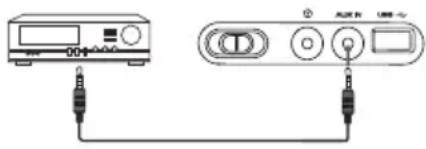
You can connect an external audio device to the jack AUX IN on the device using cable with 3,5 mm connectors (not supplied).
natural_image
Two electronic devices connected by a cable, one with indicator lights and the other with a display (no visible text or symbols)Using headphones
Before connecting the headphones, lower the volume of the device. After you connect the headphones, increase the volume until required level. The built-in speakers will be automatically disconnected after you connect the headphones.


Prolonged exposure to loud music may cause hearing damage. When using headphones, avoid prolonged listening to loud music.
USING THE SYSTEM
Turning the device on/off and function selection
-
If you want to turn on the device and select a desired music source, switch the selector FUNCTION to position CD/USB, AUX IN or TUNER.
-
If you want turn off the device, switch the selector FUNCTION to position TAPE (OFF).

- Of you want to prevent wasting energy, switch the selector FUNCTION after each use to position TAPE (OFF).
- If the device is more than 15 minutes inactive, it will automatically switch to standby mode. Press▶LAY/PAUSE to resume its activity.
Volume control
Set volume using VOLUME control.
Radio reception
- Switch selector FUNCTION to position TUNER.
- By turning TUNING tune in a station.
For better reception
FM: This device is equipped with an FM antenna attached to the back of the device. This telescopic antenna can be extended and rotated to a position with the best reception.
USB playback
- Switch the selector FUNCTION to position CD/USB.
- Press and hold ▶I PLAY/PAUSE/USB, until the display shows USB.
- Press ▶|| PLAY/PAUSE/USB to start playback.
- Controlling playback is the same as when playing CDs.
Note:
- The device supports USB memory devices with capacity up to 16 GB.
- Do not use extension cables to connect USB memory devices. Interference induced in an extension cable could prevent the transmission of data.
- We cannot guarantee compatibility with USB drives from all manufacturers, even if though they declare compliance with USB 1.1 / 2.0.
CD playback
• The CD player plays discs of Audio Disc format, including MP3 discs and CD-R and CD-RW discs.
- You cannot play in this device CD-ROM, CD-I, CDV, VCD, DVD or computer CD discs.

This unit may not play some CDs of some producers with encoded copyright protection.
- Switch the selector FUNCTION to position CD/USB.
-
Open the cover of the CD compartment and insert a CD label side up. Carefully close the cover of the CD compartment. The display shows total number of tracks on the disc.
-
During disc loading, the display will fl ash "-" symbol.
- If there is no disc is inserted, the display shows "no".
-
If the CD space cover is not closed, the display shows "-" symbol.
-
Press ▶II PLAY/PAUSE to start playback. The display shows the number of the currently played track.
-
If you want to pause the playback, press ▶PLAY/PAUSE. The display will flash symbol ▶together with the number of the current track. Resume playback by pressing again ▶PLAY/PAUSE.
-
If you want to stop CD playback, press.
Total number of tracks

Different track selection
Press shortly for to select previous or next tracks.
Finding a particular point in a track
- Press and hold or during playback. The CD begins to play at an increased speed.
- When you find the desired part, release ◀◀ or ▶▶. Normal playback will resume.
Programming the order of tracks
You can create a program consisting of up to 20 CD / 99 MP3 tracks. Before you start programming, do not forget to press the button ■ STOP, to make sure that the previous program is deleted.
- While the player stopped, press and hold MODE to activate the programming mode. The display shows indicators "00" and "PROG".

-
Using ◀◀ and ▶▶ buttons, select the desired number of a track.
-
Press MODE to save the desired track in the program.
-
Repeat the steps 2 and 3 to enter next tracks of the program. When the program memory is full, the display shows all programmed tracks.
-
If you want to play the programmed tracks, press ▶|| PLAY/PAUSE. The display shows indicator "PROG". If you want to view the total number of programmed tracks, press ◀◀. ▶▶
Deleting program
You can erase the memory contents of the player in the stop mode by opening the CD compartment cover, or switching selector FUNCTION to a different position. Indicator "PROG" disappears.
Repeat Mode
You activate a repeated playback of one track or of the entire disc.
- Press once during playback the button MODE to repeat one track. The indicator "REPEAT 1" lights up. - Press twice MODE to activate repeated playback of the entire disc. The indicator "REPEAT ALL" lights up.
- If you want to resume normal playback, press repeatedly MODE until the indicator "REPEAT" disappears from the display.

flowchart
graph TD
    A["REPEAT1\n0:1"] --> B["REPEATALL\n0:1"]
    B --> C["NORMAL PLAYBACK\n0:1"]
    D["REPEAT 1 REPEAT ALL"] --> A
    E["NORMAL PLAYBACK"] --> C
Cassette player
Playing cassettes
- Switch the selector FUNCTION to position TAPE (OFF).
- Press ■▲ to open the door of the cassette compartment, insert the cassette and close the door.
- Press◀ to start playback.
- Pause playback by pressing. Press the button again to resume playback.
- If you want to stop playback, press ■▲.
Fast forward/rewind
- Press ◀◀▶▶, until you reach the desired point.
- Press ■ ▲ to stop fast rewind.

- If you press the button ■▲ during playback, at the end of the cassette the button ◀ automatically springs up and the device switches off.
- The device does not switch off at the end of the cassette when you fast forward. Do not forget to turn it off by pressing ▪ ▲ .
General information about cassette recording
- Recording is permissible only if in this recording are not violated copyright or other rights of third parties.
- The tape recorder of this device is not suitable for recording tapes of IEC type II (Chrome), or IEC IV (METAL). Use for recording on cassette tapes the IEC type I (NORMAL) on which the recording tabs are not broken.
- The optimum recording level is adjusted automatically. The setting of VOLUME control does not affect the volume of the recording.
• Recording is not possible for the first 7 seconds and the last 7 seconds of the tape (bootable tape). - To protect a recording on tape from accidental erasure, break off the left tab (when looking at the side you want to protect). This will disable recording on this side of the tape. If you want to record on this side again, cover the tab hole with adhesive tape.
Recording from the radio
- Tune in the desired radio station.
- Press ■ ▲ on the control panel to open the door of the cassette compartment.
- Insert a cassette into the cassette compartment and close the door.
- Press in the same time the buttons and on the control panel. Recording starts.
- If you want to pause recording, press on the control panel of the tape recorder button II. Press again II to resume the recording.
- Is you want to stop recording, press on the control panel of the tape recorder button ■▲.
Recording from CD
- Move the FUNCTION selector in the position CD/USB.
- Insert the CD you want to record.
- Insert a cassette into the cassette compartment and close the door.
- Press in the same time the buttons and on the control panel. Recording starts.
- If you want to pause recording, press on the CD control panel the button ▶II PLAY/PAUSE. The recording level is adjusted automatically.
- Is you want to stop recording, press on the control panel of the tape recorder button ■▲.
MAINTENANCE
Cleaning the device

Make sure that the device is entirely switched off before cleaning.
- Clean the surface of the device using lightly wet cloth.
- Do not use cleaning agents containing alcohol, ammonia or abrasives ingredients.
- Do not use cleaning sprays on the device or in its vicinity.
Handling discs
- Do not touch the media side of the disc.
- Do not stick any labels on a disc.
Cleaning discs
- Fingerprints and dust on a disc may cause a deterioration in the quality of playback. Keep the discs always clean. Wipe the disc with a fine cloth from the center towards the edge.
- If the disk cannot be cleaned with a dry cloth, use a damp cloth and then wipe dry.
- Do not use solvents such as paint thinner or benzine, commercially available cleaners or anti-static spray, you could damage the disc.


Disc storage
Do not store discs in places exposed to direct sunlight or near a heat source.
Do not store discs in locations exposed to dust and moisture, such as a bathroom or near a humidifier.
Storing discs vertically in a box, laying the discs on each other or placing foreign objects on unboxed discs can cause their deformation.
Cleaning the tape player
Use cotton swabs dipped in alcohol or special cleaning solution for cleaning tape heads.
- Press ■▲ to open the door of the cassette tape compartment.
- Press ◀ and clean the rubber pressure roller (A).
- Press II and clean the magnetic heads (C) and axle (B).
- Press ■▲ after cleaning.
Note:
Tape recorder can also be cleaned with a special cleaning cassette.

TROUBLESHOOTING
Problems may often be caused by some small things. The following table provides tips for solving common problems.
| PROBLEM CAUSE / SOLUTION | |
| No sound/power • | The volume is not set. Adjust the volume.The power cord is not properly plugged in. Plug in the power cord properly.Empty/incorrectly inserted batteries. Insert fresh batteries correctly.The CD contains data other than music fi les. Try using buttonsl skipping to audio fi les.Make sure that the mode switch is set to correct position. Besides tape player mode, the TAPE (OFF) position means also that the device is turned off. |
| The CD display does not work properly / no reaction to controls | There has been an electrostatic discharge. Turn the device off and unplug from the socket. Switch it on after a while.CD is not inserted. Insert CD.The CD is heavily scratched or dirty. Change or clean the disc, see “Maintenance”.Fogged laser lens. Wait until the humidity evaporates.CD-R/CD-RW disc is empty or not enclosed. Use only the enclosed CD-R / CD-RW discs or suitable CD Audio discs.Make sure that the CD is not encrypted with copyright protection technologies, as some of these discs do not meet the standards of the CD format.Switch the selector in the position TAPE (OFF) and then back in the CD position or TUNER. |
| The CD skips tracks | CD disc is damaged or dirty. Replace or clean the disc.A program is active. Deactivate program.Badly scratched or dirty disc may cause a malfunction. |
| Bad sound quality from the cassette | Dust and dirt on the cassette player heads. Clean the cassette mechanics, see the section “Maintenance”.You are using unsuitable types of cassettes (METAL, CHROME). Use only standard cassettes of IEC type I (NORMAL) for recording. |
| The recording does not work | The cassette tabs are broken. Seal the tab opening with adhesive tape. |
| Bad reception of FM radio | Make sure that the antenna is correctly set.Reception quality can deteriorate due to electrical interference. Move the device away from interference sources (especially motors, transformers, etc.) |
TECHNICAL DATA
| Model CDR 888 USB | |
| Power | Power: AC 230–240 V ~50HzBatteries: 9 V (6× type C, nor included) |
| Power input 15 W | |
| Power input OFF < 0.5 W | |
| Frequencies range FM 88–108 MHz | |
| Supported formats: WMA, MP3, CD-R/RW | |
| Max. USB capacity 32 GB | |
| Autostop semi-autostop | |
| Output power (RMS) 2× 1.5 W | |
| Speakers | 4 Ω |
| Dimensions (W × D × H) | 300 × 295 × 134 mm |
| Weight | 1.65 kg |
USE AND DISPOSAL OF WASTE
Wrapping paper and corrugated paperboard – deliver to scrapyard. Packing foil, PE bags, plastic elements – throw into plastic recycling containers.
DISPOSAL OF PRODUCTS AT THE END OF LIFETIME
Disposal of electric and electronic equipment (valid in EU member countries and other European countries with an implemented recycling system)
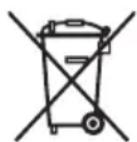
The represented symbol on the product or package means the product shall not be treated as domestic waste. Hand over the product to the specified location for recycling electric and electronic equipment. Prevent negative impacts on human health and the environment by properly recycling your product.
Recycling contributes to preserving natural resources. For more information on the recycling of this product, refer to your local authority, domestic waste processing organization or store, where you purchased the product.
This product complies with EU directive requirements on electromagnetic compatibility and electrical safety.

08/05

The instruction manual is available at website www.ecg-electro.eu.
Changes in text and technical parameters reserved.
SIGURNOSNA UPOZORENJA

Oznaka visokog napona upozorenje je korisnicima da unutar uređaja postoje dijelovi pod visokim naponom koji mogu dotaknuti stijenku kućišta s unutrašnje strane i dovesti do električnog udara.

UPOZORENJE
Kako bi se smanjio rizik od požara ili strujnog udara, nemojte skidati poklopac. Popravke povjerite isključivo kvalifi ciranim osobama.

UPOZORENJE
Uskličnik upozorava korisnika na važne upute u priručniku.

UPOZORENJE
Uređaj i pribor ne bi trebali biti izloženi kapljicama ili mlazovima tekućine, te stavljati posude s tekućinom na njih, kao što su to vaze. Tako ćete smanjiti rizik od strujnog udara ili oštećenja uređaja.

Kako biste spriječili oštećenje sluha, izbjegavajte dugotrajno slušanje pri visokoj glasności.

CLASS 1 LASER PRODUCT
Rukovanje baterijama
- Nepravilno korištenje može izazvati koroziju ili curenja baterije i posljedično oštećenje uređaja ili ozljede.
- Pri umetanju baterija vodite računa o polaritetu (+ i -) naznačenom u pretincu za baterije.
- Koristite samo baterije koje su preporučene u ovom priručniku.
- Nemojte istovremeno umetati stare i nove baterije ili baterije različitih tipova.
- Stare baterije nemojte bacati u komunalni otpad. Osigurajte njihovo zbrinjavanje u skladu s lokalnim propisima.
natural_image
Line drawing of a device with a plug inserted into a housing, connected to a cable (no text or symbols)
Isključujete li uređaj iz električne mreže, uvijek izvucite utikač iz zidne utičnice. Odspojite li mrežni kabel iz uređaja, a ostavite li ga spojenog u električnu mrežu, moglo bi doći do ozbiljne povrede male djece.
HR/BIH
natural_image
Two electronic devices connected by a cable, one displaying a display and the other showing a control panel with buttons (no text or symbols visible)Upotreba slušalica

Čuvanje diskova
Nemojte spremati diskove na mjesta izložena suncu ili blizu izvora topline.
Nemojte spremati diskove na mjesta izložena prašini i vlagi, kao što su to kupaonice ili blizu ovlaživača.
Čuvajte diskove okomito, u kutiji. Polaganje na bok ili stavljanja predmeta na diskove koji nisu u kutiji može uzrokovati izobličenja.
Čišćenje kazetofona
Koristite štapić s pamukom umočenim u alkohol ili posebnu otopinu za čišćenje glave kazetofona.
-
Pritiskom tipk ▲ otvorite vrata pretinca za kazete.
-
Pritisnike ◀ i očistite gumeni valjak za pritisak trake (A).
-
Pritisnite II i očistite magnetsku glavu (C) i osovinicu (B).
-
Nakon čišćenja pritisnite . ■ ▲
Napomena:
CLASS 1 LASER PRODUCT
Pozorno preberite in shranite za nadaljnjo uporabo!
Rokovanje z baterijami
natural_image
Line drawing of a portable electronic device with cable and plug, no text or symbols present
SI
Uporaba slušalk

Shranjevanje diskov
CLASS 1 LASER PRODUCT
SR/MNE
Pažljivo pročitajte i sačuvajte za kasniju upotrebu!
- Pažljivo pročitajte ovaj priručnik pre nego što uključite i pokrenete uređaj, i sledite uputstva koja su u njemu navedena. Priručnik čuvajte za slučaj da vam zatreba u budućnosti.
- Pridržavajte se svih upozorenja na proizvodu i na dokumentaciji koju ste dobili uz njega.
- Pre čišćenja, isključite uređaj iz napajanja! Ne koristite sredstva za čišćenje u tečnom obliku ili u spreju. Za čišćenje koristite vlažnu krpu.
- Koristite samo onaj pribor koji je odobrio proizvođač. U suprotnom postoji opasnost od povreda ili oštećenja.
- Nemojte koristiti u blizini vode ili u vlažnim prostorima, kao što su bazeni, kade, sudopere, vlažni podrumi, praonice veša i slično. Uređaj se ne sme izlagati kapanju ili prskanju vode, na njega nemojte stavljati posude napunjene tečnošću.
- Uređaj nemojte stavljati na nestabilne površine (police, kolica, stolove, nosače i slično). Uređaj bi u tom slučaju mogao pasti, a to može da dovede do ozbiljnih povreda dece ili odraslih i do oštećenja uređaja. Koristite samo one police, stalke, stolove i nosače koje preporučuje proizvođač ili se prodaju s proizvodom. Prilikom montaže, nužno je poštovati uputstva proizvođača i za instalaciju ne smeju da se koriste materijali koje proizvođač nije preporučio. Kad je uređaj smešten na stočić sa točkićima, pazite kako ga prevozite – naglo zaustavljanje ili promena smera kretanja i neravna površina mogu da izazovu prevrtanje stočića.
- Uređaj postavite na vodoravnu, ravnu i čvrstu površinu s dobrom ventilacijom. Nikada nemojte pokrivati ventilacione otvore, jer to može izazvati kvar zbog pregrevanja. Uređaj nemojte stavljati u zatvorene prostore s nedovoljno ventilacije kao što su ormari, vitrine ili police s nedovoljno prostora.
- Uređaj smete da priključite samo na izvor napajanja koji odgovara veličinama navedenim na natpisnoj pločici. Ako niste sigurni koje su karakteristike vaše električne mreže, posavetujte se s vašim prodavcem
ili distributerom električne energije. U slučaju napajanja uređaja baterijama postupite prema uputstvima u priručniku za upotrebu.
- Kabl za napajanje treba položiti tako da se onemogući spoticanje o njega, previše snažno zatezanje ili priklještenje. Posebnu pažnju obratite na mesta na kojima kabl izlazi iz uređaja i iz utičnice. Ako uređaj nećete koristiti dulje vreme, odvojite kabl za napajanje. Uređaj isključite iz električne mreže i u slučaju nevremena da ne bi došlo do oštećenja izazvanog udarom munje.
- Električna utičnica mora biti uvek lako dostupna.
- Nemojte izazivati preopterećenje električne utičnice priključivanjem prevelikog broja uređaja.
- Uređaj obavezno zaštitite od prodora tečnosti i stranih predmeta, i nemojte stavljati nikakve predmete u ventilacione otvore, jer postoji opasnost od dodira s naponima koji mogu predstavljati opasnost.
- Ne otvarajte kućište uređaja. Unutra se ne nalaze delovi koje bi korisnik mogao sâm da podešava. Popravke poverite isključivo kvalifi kovanim osobama.
- Ne izlažite baterije povišenoj toploti poput sunca, vatre i slično.
- Baterije zamenite samo baterijama istog tipa i pazite na polaritet. U suprotnom, postoji opasnost od eksplozije.
-
U dole navedenim slučajevima isključite uređaj iz električne mreže i obratite se ovlašćenom servisu:
-
Došlo je do oštećenja kabla za napajanje
- U uređaj je prodrla tečnost ili neki strani predmet, ili je uređaj bio izložen kiši ili vodi.
- Uređaj ne funkcioniše normalno kako je opisano u uputstvu za upotrebu. Podešavajte samo one elemente koji su navedeni u uputstvu.
-
Na uređaju je uočljiva značajna promena u radu koja ukazuje na to da je potrebno izvršiti servisiranje.
-
Uređaj nemojte izlagati delovanju izvora toplote kao što su radijatori, grejalice ili drugi uređaji koji proizvode toplotnu energiju (npr. pojačala).
- Izmene ili modifi kacije koje nisu izričito odobrene mogu dovesti do gubitka prava na korišćenje uređaja.
- Preterani zvučni pritisak iz slušalica može prouzrokovati oštećenje sluha.
- Natpisna pločica je smeštena na donjoj strani uređaja.
OPIS UREĐAJA
Glavni delovi [A]
- Ručka
- Vrata odeljka za CD
- Kontrola jačine zvuka – podešavanje jačine zvuka uređaja
- Podešavanje frekvencije
- Upravljački panel kasetofona
- Vrata odeljka za kasete
- Prekidač za funkcije – pomoću njega birate CD/USB, AUX, TAPE (OFF) i TUNER
- Utičnica za slušalice
- Linijski ulaz AUX
- USB konektor
- Taster STOP – zaustavlja reprodukciju
- Taster NAZAD – preskočite na početak pesme ili na prethodnu. Brzo vraćanje u istoj pesmi
natural_image
Line drawing of a portable device with a cable and plug, no text or symbols present![ECG CDR 888 USB - Glavni delovi [A] - 1](/content/2026/05/1092578/images/d7f5f32ef36607dcab09ab6ea217007f01593b4cc241834ad2b693de5600c3d4.jpg)
Ako uređaj isključujete iz električne mreže, obavezno izvucite utikač iz utičnice. Ako kabl za napajanje isključite samo iz uređaja, a ostavite ga uključenog u mrežu, može doći do ozbiljnih povreda male dece.
natural_image
Two electronic devices connected by a cable, one with a display and the other with a control panel (no visible text or symbols)
Skladištenje diskova
CLASS 1 LASER PRODUCT
Manipulation des piles
natural_image
Line drawing of a portable electronic device with a plug and cable, no text or symbols present
natural_image
Pure electrical circuit lines without any symbols
flowchart
graph TD
    A["REPEAT1\n0:1"] --> B["REPETER TOUT\n0:1"]
    B --> C["LECTURE NORMALE\n0:1"]
    D["REPETER 1"] --> A

Magnétophone
Lecture de cassettes
CLASS 1 LASER PRODUCT
natural_image
Line drawing of a portable device with a cable and plug, no text or symbols present
natural_image
Two connected electronic devices with cables, one showing a display and the other displaying a control panel (no text or symbols visible)
CLASS 1 LASER PRODUCT
natural_image
Line drawing of a portable electronic device with cable and plug, no text or symbols present
Uso de auriculares

CLASS 1 LASER PRODUCT
ET
natural_image
Line drawing of a portable electronic device with cable and plug, no text or symbols presentnatural_image
Two electronic devices connected by a cable, one with a display and the other with a control panel (no visible text or symbols)
Plaatide hoidmine
CLASS 1 LASER PRODUCT
natural_image
Line drawing of a portable device with cable and plug, no text or symbols present
natural_image
Two connected electronic devices with cables, no visible text or symbolsAusinių naudojimas

CLASS 1 LASER PRODUCT
LV
natural_image
Line drawing of a device with a cable and plug, no text or symbols present
natural_image
Two connected electronic devices with connectors, one showing a display and the other displaying a control panel (no text or symbols visible)Austinu lietošana

LV
Disku glabāšana
PEČAT I POTPIS PRODAVATELJA
K+B Progres
PROIZVAJALEC ali DAJALEC GARANCIJE:
K+B Progres, a.s.; MBS: 61860123
250 69 Klíčany, Czech Rep. e-post: ECG@kbexpert.cz
LT
K+B Progres, a.s.
U Expertu 91 tel.: +420 272 122 111
250 69 Klíčany, Czech Rep. el. paštas: ECG@kbexpert.cz
LV
K+B Progres, a.s.
U Expertu 91 tel.: +420 272 122 111
250 69 Kličany, Czech Rep. e-pasts: ECG@kbexpert.cz


- CDR 888 USB
- Použití sluchátek
- Magnetofon
- Přehrávání kazet
- Použitie slúchadiel
- Używanie słuchawek
- Az elemek kezelése
- Tonbandgerät
- Kassettenwiedergabe
- Lagerung von CDs
- CAUTION
- WARNING
- WARNING: DANGEROUS RADIATION
- Read carefully and keep for future use!
- DESCRIPTION
- Main elements [A]
- Control panel of the tape player [B]
- PRIOR TO USE
- Unpacking the device
- Placement and installation of the device
- Power
- Inserting the batteries
- Handling the batteries
- AC power supply
- Connection of external devices
- Using headphones
- USING THE SYSTEM
- Turning the device on/off and function selection
- Volume control
- Radio reception
- For better reception
- USB playback
- Note:
- CD playback
- Different track selection
- Finding a particular point in a track
- Programming the order of tracks
- Deleting program
- Repeat Mode
- Cassette player
- Playing cassettes
- Fast forward/rewind
- General information about cassette recording
- Recording from the radio
- Recording from CD
- MAINTENANCE
- Cleaning the device
- Handling discs
- Cleaning discs
- Disc storage
- Cleaning the tape player
- TROUBLESHOOTING
- USE AND DISPOSAL OF WASTE
- DISPOSAL OF PRODUCTS AT THE END OF LIFETIME
- SIGURNOSNA UPOZORENJA
- UPOZORENJE
- Rukovanje baterijama
- HR/BIH
- Upotreba slušalica
- Čuvanje diskova
- Čišćenje kazetofona
- Napomena:
- Pozorno preberite in shranite za nadaljnjo uporabo!
- Rokovanje z baterijami
- Uporaba slušalk
- Shranjevanje diskov
- Pažljivo pročitajte i sačuvajte za kasniju upotrebu!
- OPIS UREĐAJA
- Glavni delovi [A]
- Skladištenje diskova
- Manipulation des piles
- Magnétophone
- Lecture de cassettes
- Uso de auriculares
- ET
- Plaatide hoidmine
- Ausinių naudojimas
- LV
- Austinu lietošana
- Disku glabāšana
- PEČAT I POTPIS PRODAVATELJA
- K+B Progres
- LT
Brand : ECG
Model : CDR 888 USB
Category : Loudspeaker