
BTS K1 - Speaker ECG - Free user manual and instructions
Find the device manual for free BTS K1 ECG in PDF.


| Product Type | Portable Wireless Speaker |
| Brand | ECG |
| Model | BTS K1 |
| Dimensions | 186 mm (height) x 64 mm (diameter) |
| Weight | 441 g |
| Battery Capacity | 3.7 V / 2200 mAh Li-Ion |
| Charging Time | About 4 hours (using 5 V / 1 A adapter) |
| Playback Time | Up to 7 hours at 70% volume |
| Power Supply | DC 5 V / 1 A (max) |
| Bluetooth Version | 4.2 |
| Output Power | 4.5 W × 2 |
| Impedance | 4 Ω |
| FM Frequency Range | 87.5 – 108 MHz |
| Audio Inputs | AUX-IN (3.5 mm), Micro SD card |
| Wireless Features | Bluetooth stereo, hands-free, TWS (true wireless stereo) |
| Supported Audio Formats (Micro SD) | MP3, WMA, WAV, APE, FLAC |
| Voice Guide | Yes (mode announcements) |
| Package Contents | Speaker, Micro USB cable, AUX-IN cable, Operating manual |
| Cleaning | Use a damp cloth; do not use liquid or spray cleaners |
| Safety | Read manual before use; do not open; avoid water and excessive heat |
| Spare Parts / Repairability | No user-serviceable parts; contact qualified service for repairs |
Frequently Asked Questions - BTS K1 ECG
User questions about BTS K1 ECG
0 question about this device. Answer the ones you know or ask your own.
Ask a new question about this device
Download the instructions for your Speaker in PDF format for free! Find your manual BTS K1 - ECG and take your electronic device back in hand. On this page are published all the documents necessary for the use of your device. BTS K1 by ECG.
USER MANUAL BTS K1 ECG
natural_image
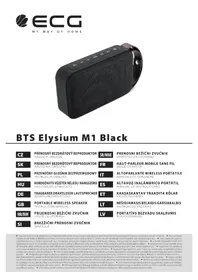
Black cylindrical smartphone with visible buttons and charging cable (no text or symbols on body)BTS K1
CZ
PŘENOSNÝ BEZDRÁTOVÝ REPRODUKTOR NÁVOD K OBSLUZE
HR/BIH
PRIJENOSNI BEŽIČNI ZVUČNIK UPUTE ZA UPORABU
SK
PRENOSNÝ BEZDRÔTOVÝ REPRODUKTOR NÁVOD NA OBSLUHU
SI
BREZŽIČNI PRENOSNI ZVOČNIK NAVODILA
PL
PORTABLE WIRELESS SPEAKER INSTRUCTION MANUAL
LV
PORTATIVS BEZVADU SKALRUNIS ROKASGRAMATA
BEZPEČNOSTNÍ POKYNY
Read carefully and keep for future use!
- Before you begin using the device, read this manual carefully and follow the instructions provided here. Keep this manual for future reference.
- Follow all warnings on the product and in the documentation supplied with the appliance.
- Do not use liquid cleaners or spray cleaners for cleaning. Use wet cloth for cleaning.
- Use only accessories recommended by the manufacturer. Otherwise there is a risk of injury or damage to the device.
- Do not place the device on unstable surfaces (stands, carts, tables, holders, etc.). The device could fall and could cause serious injury to a child or an adult and damage the appliance.
- Place the device on a horizontal, flat and firm surface with good ventilation. Do not cover the air vents. Doing so may damage the device by overheating. Do not place the device in a confined space with poor ventilation, for example, in glass cabinets or on tight shelves.
- The appliance should be powered only from a power sources indicated on the product label. If you are unsure of your power network parameters, consult your vendor or your electricity provider.
- The power adapter cord should be led so as to avoid stepping on the cord or its excessive straining or pinching. Pay special attention to places where then cord exits from the appliance and close to the plug. If the device is not used for long periods, unplug the power cord. Unplug the power supply also during a thunderstorm to prevent damage by lightning.
- The electrical outlet has to be constantly accessible.
- Do not overload electrical outlets by plugging in too many appliances.
- Protect the device against infiltration of liquids or foreign objects and do not insert any object into the ventilation openings, with potentially hazardous contact with voltage inside the device.
- Do not open the device box. There are no elements inside that can be configured by the user. Have a qualified service technician perform repairs on the device.
- Do not expose batteries to excessive temperatures, e.g. direct sunlight, fire etc.
- In the following cases, unplug the device and contact a qualified service:
• The power cord was damaged.
- The device was infiltrated by a foreign object or liquid, or it was exposed to rain or water.
- The appliance does not operate normally in accordance with the manual. Set only the elements described in the operating manual.
- The device has significant functionality changes, indicating a need for service.
- Do not expose the device to heat sources such as radiators, heating or other heat-producing appliances such as amplifiers.
- Changes or modifications not expressly approved by the responsible authority can lead to loss of authorization to use the device.
- Excessive sound can cause hearing damage.
DESCRIPTION The complete User's Manual is available at www.ecg-electro.eu.
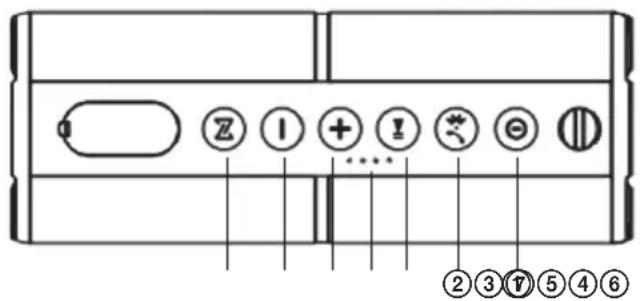
- Long press: turn speaker ON/OFF Brief press: switching mode between Bluetooth and radio
- Short press: turn Bluetooth ON / accept incoming phone call / hang up phone
Long press: disconnect paired device/incoming call rejection
Double short press: redial previously called number
-
Short press: PLAY / PAUSE
-
Short press: next track/ next FM channel/ switching call between the phone and the wireless speaker
Long press: increase volume
Double brief press: changing folder
- Short press: previous track/previous FM channel/switching call between the phone and the wireless speaker
Long press: decrease volume
Double brief press: changing folder
- TWS (True wireless stereo)
Short press: enable/disable TWS
Long press: delete stored TWS pairing
-
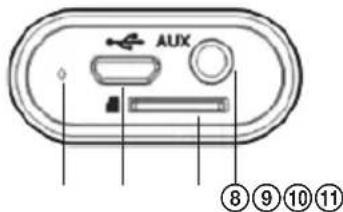
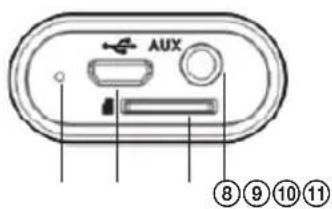
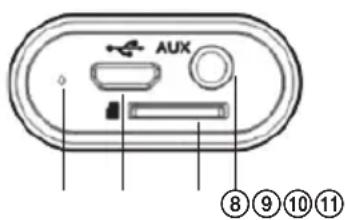
Battery charge level indicator
-
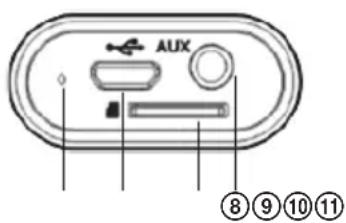
Analogue input AUX
-
Micro SD memory card slot
-
Charging connector
-
Reset
Features
- Wireless music playback (Bluetooth 4.2 stereo) and hands-free function
• Powerful amplifier with DSP (Digital Signal Processor) - Analogue input AUX-IN – available to use as an external computer speaker, mobile phone, PSP/MP3/MP4 player etc.
- TWS support – pairing 2 of the same speakers delivers a stereo sound experience
- Micro SD memory card playback
- FM radio with integrated antenna, station auto-tune support
- Memory card reader and charging via the same USB cable
- Voice guide – for changing modes and overall control
Package contents
Wireless Bluetooth speaker, Micro USB cable, AUX-IN cable, Operating manual
USING THE SYSTEM
Before using the device for the first time, fully charge the integrated battery.
If you do not plan to use the speaker for a longer period of time, charge the device once a month to prevent problems of damage caused by an excessively discharged battery.
1. Turn the speaker ON/OFF
Long press ① for 2 seconds to turn the speaker ON or OFF.
After being turned OFF and ON again, the speaker remembers the settings, playback mode and volume from the previous session.
After each charging cycle, the volume is adjusted up to 40% of the maximum volume.
2. Bluetooth mode
1) Bluetooth pairing
Turn ON the speaker and enter Bluetooth mode, the LED indicator will begin flashing. Next, enable Bluetooth on your mobile phone or other device and initiate the search for Bluetooth devices. The BTS K1 device will appear among the available devices. Connect to this device. Once connected, the speaker will indicate "Device paired" and the LED indicator will stop flashing.
Short press ② to quickly enable Bluetooth.
2) Wireless music playback
Simply start the playback on your mobile phone or music player and listen to music from your speaker.
3) Hands-free paired with your mobile phone
Accepting an incoming call
Short press ② to accept an incoming call.
Hang up
Short press ② again to hang up.
Redial
Double press ② to initiate a call to the previously called number.
Private call
Press ④ or ⑤ to switch between speaker and phone during a call.
Reject an incoming call
Long press ② to reject an incoming call.
4) Disconnect an existing Bluetooth connection
The speaker will automatically pair with the last known Bluetooth device. Long press ② to disconnect from the current Bluetooth connection, the speaker will indicate "Device disconnected". The speaker is then ready to be paired with another device.
3. Voice guide
Once enabled, the speaker plays information regarding the current playback mode, e.g.: Bluetooth mode, Aux in mode, device paired, device disconnected etc.
4. TWS (Stereo playback)
Turn ON two BTS K1 speakers and switch both into Bluetooth mode.
Short press ⑥ on one of the speakers to begin searching the second BTS K1 speaker. During the search a beep sounds and the speaker LED flashes alternately orange and blue. Both speakers are automatically paired. After a successful pairing of the speaker that plays the left channel, the LED flashes blue and on the speaker playing the right channel the LED is orange.
Next, enable Bluetooth on your mobile phone or other player and initiate the search for Bluetooth devices. "BTS K1" appears, connect the speakers. When the left channel speaker is connected, it announces "Device paired" and the LED will stop and will light up blue. You can then begin playing music on the Bluetooth speakers in stereo mode.
Both paired speakers can be disconnected from your mobile phone/player by short pressing ⑥. The speaker will indicate "TWS disconnected".
Long press ⑥ on any of the speakers to disable TWS. The speaker will indicate "TWS Cleared".
Note:
- Two adapters are required for powering the speakers, one adapter for each.
- Before pairing the speakers to use the TWS feature, none of the speakers must be paired with any other device. After pairing, the indicator on one of the speakers lights up blue and the other orange.
- If either of the two speakers is paired with another BTS K1 speaker, you must first unpair this connection; otherwise you will not be able to pair the speaker. Long press ⑥ on each speaker to delete the existing TWS connection.
5. Playing music from micro SD card
After inserting your Micro SD card into the speaker, short press ① to switch the speaker into memory card playback mode and play music directly from the Micro SD card. The speaker will indicate "Memory card mode" before playing.
Note: In the memory card playback mode you select next/previous folder by pressing the button ④/⑤ briefly twice.
6. AUX IN mode
Connect the speaker to an audio source (PC, MP3MP4, mobile phone) via 3.5mm audio cable. Short press ① to enter "AUX IN" mode (speaker indicates "AUX IN"). Music begins to play from the audio source.
Notes:
- If you are connecting the speaker to a computer with a 3.5 mm audio cable, we recommend using a genuine adapter (5 V / 1 A) to charge the speaker instead of the computer USB port. Powering the device from the computer may be insufficient.
- Short press ③ to lower the music volume. The source of music continues to play the music at a lower volume.
7. FM tuner
Short press ① to initiate FM mode (the speaker indicates "Mode FM"). Then in the mode press briefly the buttons ⑤ / ④ tu tune to the previous/next channel.
8. Card reader
Insert your Micro SD card into the speaker and switch OFF. Connect the speaker to the computer via USB cable. After the speaker switches to memory card mode, files can be read and written to the computer from the Micro SD card.
Note: The necessary computer driver is installed when using this feature for the first time.
9. Intelligent energy-saving feature
The speaker automatically switches OFF in the following cases:
- If it is muted, paused or waiting in Bluetooth mode for pairing more than 10 minutes.
Note:Longpress① again to switch the speaker ON again.
10. Charging
If the speaker battery is almost empty, the speaker will indicate "battery low". Immediately charge the battery using the USB adapter. When fully charged, all 4 battery charge indicators light up.
Notes:
- Only use a quality adapter to charge the speaker.
• We recommend using an adapter with the following parameters: 5 V / 1 A, full charge takes about 4 hours. - Always charge the speaker immediately after the speaker indicates the battery is empty.
- The speaker can also be charged with a lower charging current. The charging cycle can take a very long time when the battery is charged via standard USB port with a current of 500 mA.
TROUBLESHOOTING
| Problem Solution | |
| The speaker cannot connect to the Bluetooth device and play music. | 1. Check the specifications / manual of the Bluetooth device (mobile phone or computer) and make sure the device supports A2DP stereo audio transmission. If the device does support A2DP, enable A2DP stereo mode.2. Make sure the speaker is in Bluetooth mode. If there are many Bluetooth devices in your vicinity, it can be difficult to find the correct device. In such a case, turn off all other devices. |
| The micro SD card does not work. | 1. Make sure that the Micro SD card is in good condition. Check the audio files for supported format: MP3/WMA/WAV/APE/FLAC.2. In addition to the above mentioned, there may be a problem with Micro SD card compatibility.When formatting the Micro SD card or USB flash drive, we recommend using a FAT 32 file format. |
| The speaker does not play FM stations. | 1. Make sure the speaker is in an area covered by FM signal.2. Adjust the speaker orientation to improve the antenna direction.This may improve reception quality.3. Make sure that you have launched in FM mode the automatic search of FM channels by pressing briefly the button 4 or 5. |
| The speaker is stuck, no buttons are responding. | Use a pointy object to reset the speaker – see the “reset” jack 11 next to the charging connector. |
TECHNICAL SPECIFICATIONS
Bluetooth version: 4.2
Power: DC 5 V / 1 A (Max)
Power: 4.5 W ×2
Analogue input AUX IN: 3.5 mm
Impedance 4 Ω
FM frequency range: 87.5–108 MHz
Integrated battery: 3,7 V / 2200 mAh, Li-Ion
Size: 186 mm ∅ 64 mm
Charging time: about 4 hours (using a 5V / 1A adapter)
Playing time: 7 hours at 70 % volume
Weight: 441 g
USE AND DISPOSAL OF WASTE
Wrapping paper and corrugated paperboard – deliver to scrapyard. Packing foil, PE bags, plastic elements – throw into plastic recycling containers.
DISPOSAL OF PRODUCTS AT THE END OF LIFETIME
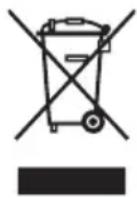
Disposal of electric and electronic equipment (valid in EU member countries and other European countries with an implemented recycling system)
The represented symbol on the product or package means the product shall not be treated as domestic waste. Hand over the product to the specified location for recycling electric and electronic equipment. Prevent negative impacts on human health and the environment by properly recycling your product.
Recycling contributes to preserving natural resources. For more information on the recycling of this product, refer to your local authority, domestic waste processing organization or store, where you purchased the product.
This product complies with EU directive requirements on electromagnetic compatibility and electrical safety.
08/05

The instruction manual is available at website www.ecg-electro.eu.
Changes in text and technical parameters reserved.
SIGURNOSNE UPUTE
250 69 Kličany, Czech Rep. e-post: ECG@kbexpert.cz
LT
K+B Progres, a.s.
U Expertu 91 tel.: +420 272 122 111
250 69 Kličany, Czech Rep. el. paštas: ECG@kbexpert.cz
LV
K+B Progres, a.s.
U Expertu 91 tel.: +420 272 122 111
250 69 Klíčany, Czech Rep. e-pasts: ECG@kbexpert.cz

- BTS K1
- BEZPEČNOSTNÍ POKYNY
- Read carefully and keep for future use!
- DESCRIPTION The complete User's Manual is available at www.ecg-electro.eu.
- Features
- Package contents
- USING THE SYSTEM
- Turn the speaker ON/OFF
- Bluetooth mode
- 1) Bluetooth pairing
- 2) Wireless music playback
- 3) Hands-free paired with your mobile phone
- Accepting an incoming call
- Hang up
- Redial
- Private call
- Reject an incoming call
- 4) Disconnect an existing Bluetooth connection
- Voice guide
- TWS (Stereo playback)
- Note:
- Playing music from micro SD card
- AUX IN mode
- Notes:
- FM tuner
- Card reader
- Intelligent energy-saving feature
- Charging
- TECHNICAL SPECIFICATIONS
- USE AND DISPOSAL OF WASTE
- DISPOSAL OF PRODUCTS AT THE END OF LIFETIME
- SIGURNOSNE UPUTE
- LT
- LV
Brand : ECG
Model : BTS K1
Category : Speaker