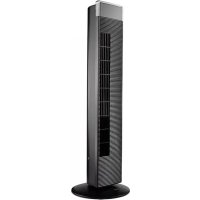
FS 91 T - Fan ECG - Free user manual and instructions
Find the device manual for free FS 91 T ECG in PDF.



| Brand | ECG |
| Model | FS 91 T |
| Product type | Tower fan |
| Power supply | 220-240 V ~ 50 Hz |
| Rated power | 65 W |
| Noise level | 60.5 dB |
| Remote control | Yes, with CR2032 battery (included) |
| Remote control range | 6 m |
| Number of speeds | 3 (low, medium, high) |
| Airflow modes | Normal, Summer, Night |
| Timer | 1, 2, 4, or 8 hours |
| Horizontal oscillation | 80° |
| Ionization | Yes |
| Display | LED |
| Vertical tilt | Manual louver adjustment |
| Rear grille | Removable for cleaning |
| Assembly | Tool-free |
| Maintenance | Clean with dry soft cloth |
| Safety | Do not cover, do not immerse in water |
| Intended use | Household and similar |
Frequently Asked Questions - FS 91 T ECG
User questions about FS 91 T ECG
0 question about this device. Answer the ones you know or ask your own.
Ask a new question about this device
Download the instructions for your Fan in PDF format for free! Find your manual FS 91 T - ECG and take your electronic device back in hand. On this page are published all the documents necessary for the use of your device. FS 91 T by ECG.
USER MANUAL FS 91 T ECG
VENTILATOR SA STALKOM
UPUTEZAUPORABU
VENTILATORE A COLONNA
VENTILATOR SA STALKOM
UPUTSTVO ZA UPOTREBU
ENIADANEIOANEMIHTHPA
ETXEPIIIO OADHGN
A
B
C
D
SAFETY INSTRUCTIONS
Read carefully and save for future use!
Warning: The safety measures and instructions, contained in this manual, do not include all conditions and situations possible. The user must understand that common sense, caution and care are factors that cannot be integrated into a product. Therefore, these factors shall be ensured by the user/s using and operating this appliance. We are not liable for any damages caused during shipping, by incorrect use, voltage fluctuation or the modification or adjustment of any part of the appliance. To protect against the risk of fire or electric shock, basic precautions must be taken while using electrical appliances, including the following:
- Make sure the voltage in your outlet corresponds to the voltage provided on the appliance label and that the socket is correctly grounded. The outlet must be installed according to valid electro technical EN standard.
- Never use the appliance if the power cable is damaged, if the appliance fell or does not operate properly. All repairs, including cord replacements, must be carried out at a professional service centre! Do not remove the protective covers from the appliance; there is a risk of electric shock!
- Protect the device against direct contact with water and other liquids, to prevent potential electric shock.
- Do not use the appliance outdoors or in wet environments or touch the power cord or the appliance with wet hands. Risk of electric shock.
- Pay closer attention when using the fan near children!
- Place the fan out of the reach of other objects so as to ensure free circulation of air necessary for its correct operation. Never cover the fan openings!
- Do not use this fan with a program, timer, independent remote control system or any other device, which switches the fan on
automatically. Risk of fire if the fan is covered or incorrectly positioned.
- Do not use the appliance in the immediate vicinity of places, where heat is accumulated (near the stove, heater etc.).
- Never place the fan on a soft surface such as a bed, sofa, etc. It must be placed on a firm, level surface.
- If an unusual smell or smoke begins to come from the appliance, disconnect the appliance immediately and visit a service centre.
- Do not turn the appliance on or off by plugging or unplugging the power cord. Always switch off the fan using the main switch first, and then pull the power cord out of the outlet.
- Leaving the fan cord connected to outlet unattended is not recommended. Disconnect the cord from the electrical outlet prior to any maintenance. Do not remove the power cord from the outlet by yanking the cord. Unplug the power cord from the outlet by grasping the plug.
- Do not allow the power cord to touch hot surfaces or run the cord over sharp edges.
- Do not stick your fingers or some objects in the fan openings.
- Use the fan only in accordance with instructions in this user manual. The manufacturer is not liable for any damage caused by the improper use of this appliance.
-
This appliance is intended for household use and similar areas, including:
-
kitchenettes in shops, offices and other work places
- appliances used by guests in hotels, motels and other residential areas.
-
appliances used in bed and breakfast residences
-
This appliance may be used by children under 8 years of age and older and persons with reduced physical, sensory or mental capabilities or lack of experience and knowledge if supervised or instructed to use the appliance in a safe manner and understand the potential hazards. Children shall not play with the appliance.
Cleaning and maintenance operations must not be carried out by children unless supervised by an adult.
Make sure that the power cable or extension cord can not be accidentally pulled out of the socket during operation.
Use the handle to carry the appliance.
Do not immerse in water!
Warning: To prevent overheating, do not cover the fan.
DANGER FOR CHILDREN: Children must not play with the packaging material. Do not let children play with the plastic bags. Risk of suffocation.
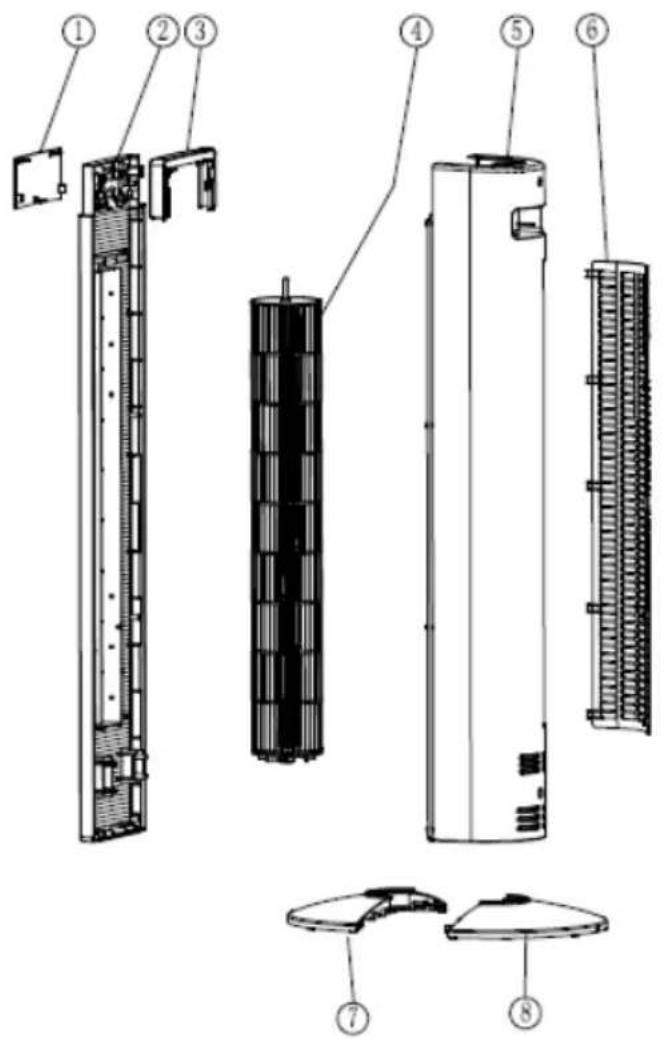
DESCRIPTION
A Fan
- Display
- Front cover with the mechanism for vertical setting of slats.
- Transparent decorative part
-
Inner slats drum
-
Back cover with compartment for remote control
- Rear grill
- Front part of the base
- Back part of the base
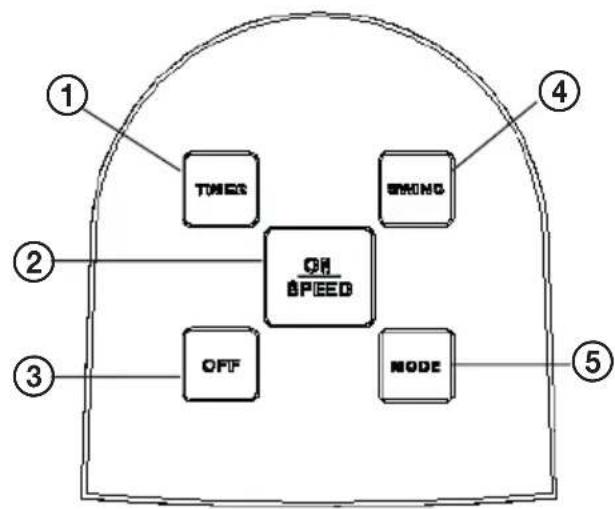
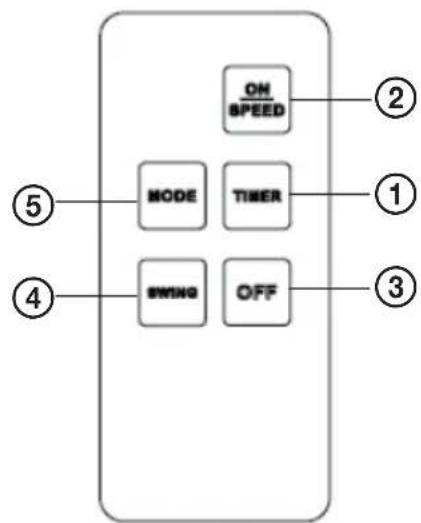
B C Control panel and remote control
- Timer button
- On/Speed selection button
-
Off button
-
Oscillation button
- Mode selection button
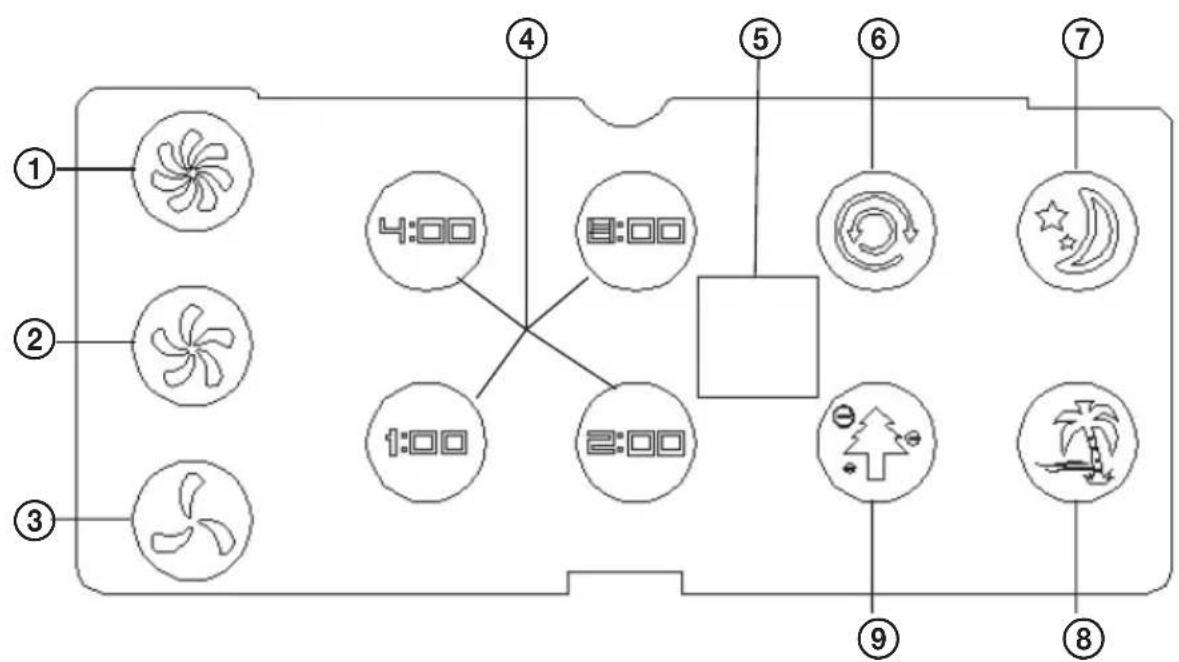
Display
- High fan speed
- Medium fan speed
- Low fan speed
- Timer display
-
IR receiver
-
Oscillation
- Night mode
8.Summer mode - Norma mode and ionization (active in all modes)
ADVANTAGES OF THE APPLIANCE
- Ionization technology for air purification
- Timer adjustable for 1, 2, 4 or 8 hours
Horizontal oscillation in 80^ range -
LED display
-
3 speeds and 3 air flow modes
- Remote control with a range of 6m
- Easy assembly without need for tools
- Removable back grill, easy cleaning
INSTALLATION
Attention: The fan may be used only if it is properly and completely assembled, including the base and the guard grill. If you have any doubt, have the appliance inspected or assembled by a qualified professional.
Insert the bottom pin of the vertical component in the central opening of the base and secure it with plastic nut. You have to tighten the nut firmly to prevent swaying.
USE
Make sure prior to each use that the fan is in good condition and the power cord is not damaged. The appliance must not be used when the power cord is damaged.
The function of the fan can be controlled using either the buttons on the control panel or the remote control. You have to point the remote control at the control panel. Before you use the remote control insert a coin battery (CR2032 3V). Keep proper polarity of the battery. If the appliance is not used for long periods, remove the battery from the remote control.
Connect the unit to the power supply with corresponding voltage and frequency (220V ~ 240V, 50Hz).
Button functions:
(The buttons on the remote control have the same function as the buttons on the appliance)
ON/SPEED ②
Start the appliance by pressing ON/SPEED. After turning it on you can use other functions buttons. You can use this button to set the air flow speed during operation. Press to switch speeds in the following order: low -> medium -> high -> low -> etc.
TIMER ①
Press TIMER button to enter the timer setting mode.
At factory setting there is no set timer period. You can set period 1h, 2h, 4h, 8h by pressing this button. The set period is indicated on the display. After the set time passes the appliance goes into standby mode.
MODE⑤
When you press the MODE button, you switch operation modes in following order: normal -> summer -> night -> normal -> etc. LED indicates the current mode.
NORMAL: the device runs according to current setting and constant fan rotations.
SUMMER: the motor will work automatically in alternating cycles of high-medium-low rotations as shown on the following diagram.
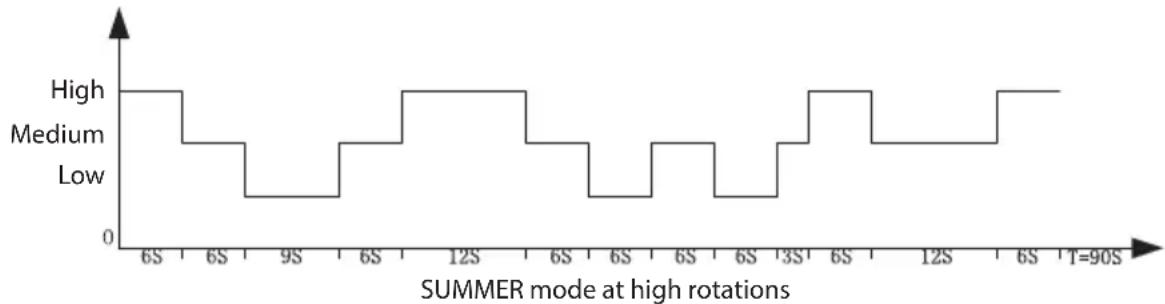
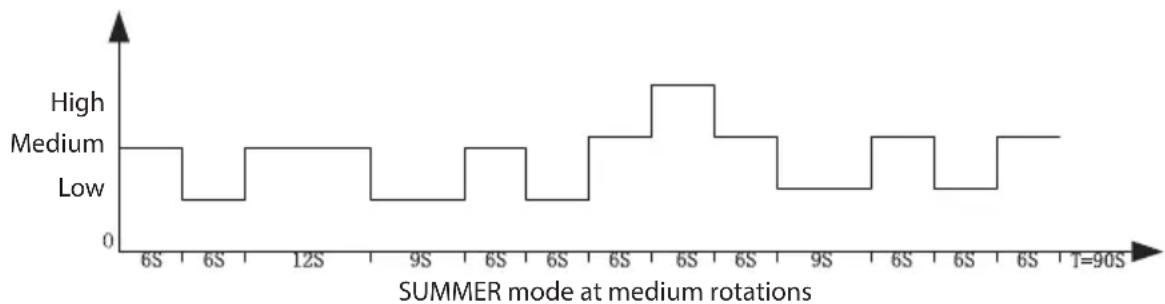
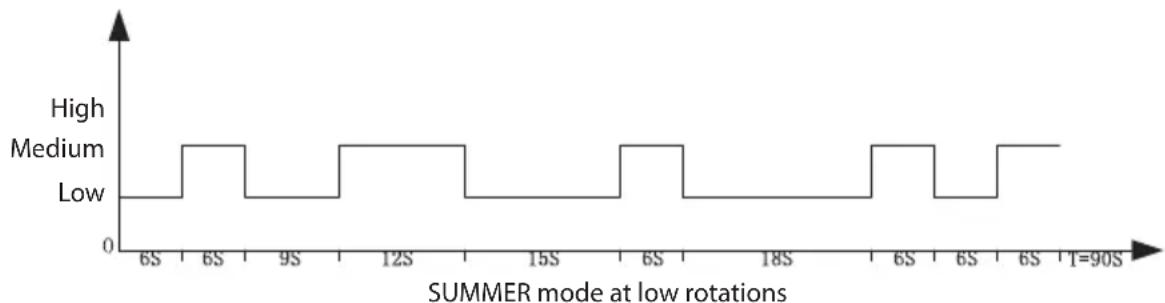
NIGHT: Program SLEEP is a combination of the SUMMER mode and gradual reduction of the fan speed.
- When you set high speed, the fan will run in the first 30 minutes in SUMMER mode at high speed. It will reduce speed after 30 minutes to medium and after next 30 minutes the fan moves to low speed in the SUMMER mode, where it remains until shutoff.
- When you set medium speed, the fan will run the first 30 minutes in the SUMMER mode at medium speed. In the next 30 minutes it switches to low rpm in the SUMMER mode where it remains until shutoff.
- When setting a low speed, the SLEEP mode is the same as the SUMMER mode at low rpm.
SWING ④
Press the button SWING once. The fan starts to oscillate in the horizontal plane and the LED indicator lights up. Press again to switch off the oscillation.
Note: Using tabs protruding on the front cover you can mechanically set the vertical incline of the inner slats.
OFF ③
Press OFF button to turn off the appliance and the fan stops.
When you are not using the device, always unplug the power cord from the electrical outlet.
CLEANING AND MAINTENANCE
- Before cleaning pull out the plug of the power cord from the outlet!
- Use soft, dry cloth for cleaning. Do not use solvents or other chemicals.
- Make sure that no liquid enters the device.
If the fan is not used for long time, it is necessary to protect it from dust and moisture. We recommend that you store it in its original packaging.
In the event of a malfunction or an unusual odor, unplug the appliance from the power supply and have it checked by an authorized service center. - Check it once a week and using a vacuum cleaner clean the back grill of the fan.
We recommend to keep the packaging for possible transportation or storage of the fan.
TECHNICAL SPECIFICATIONS
Nominal voltage: 220 - 240V 50Hz
Nominal input power: 65 W
Noise level: 60.5 dB
Remote control: Coin battery (CR2032 3V included)
WARRANTY: The following situations void the warranty:
Incorrect or inappropriate handling of the device, failure to observe safety measures applicable to the device, the use of force, alterations or repairs made by a party other than authorized service center.
Components subject to normal wear and tear are not covered under warranty.
USE AND DISPOSAL OF WASTE
Wrapping paper and corrugated paperboard - deliver to scrapyard. Packing foil, PE bags, plastic elements - throw into plastic recycling containers.
DISPOSAL OF PRODUCTS AT THE END OF LIFETIME
Disposal of electric and electronic equipment (valid in EU member countries and other European countries with an implemented recycling system)
The represented symbol on the product or package means the product shall not be treated as domestic waste. Hand over the product to the specified location for recycling electric and electronic equipment. Prevent negative impacts on human health and the environment by properly recycling your product.
Recycling contributes to preserving natural resources. For more information on the recycling of this product, refer to your local authority, domestic waste processing organization or store, where you purchased the product.
This product complies with EU directive requirements on electromagnetic compatibility and electrical safety.
The instruction manual is available at website www.ecg-electro.eu.
Changes in text and technical parameters reserved.


08/05

SICHERHEITSHINWEISE
250 69 Klicany, Czech Rep. e-post: ECG@kbexpert.cz
Espanol
K+B Progres, a.s.
U Expertu 91 tel.: +44 776 128 6651 (English)
250 69 Kličany, Czech Rep. e-mail: ECG@kbexpert.cz
Fran
K+B Progres, a.s.
U Expertu 91 tel: +44 776 128 6651 (English)
250 69 Klicany, Czech Rep. e-mail: ECG@kbexpert.cz
Hrvatski
K+B Progres, a.s.
U Expertu 91 tel.: +420 272 122 111
250 69 Klicany, Czech Rep. e-mail: informacije@kbprogres.cz
Bosanski
K+B Progres, a.s.
U Expertu 91 tel.: +420 272 122 111
250 69 Klicany, Czech Rep. e-mail: informacije@kbprogres.cz
Italiano
K+B Progres, a.s.
1U Expertu 91 tel.: +44 776 128 6651 (English)
250 69 Klicany, Czech Rep. e-mail: ECG@kbexpert.cz
Latviešu valoda
K+B Progres, a.s.
U Expertu 91 tel.: +420 272 122 111
250 69 Klicany, Czech Rep. e-pastes: ECG@kbexpert.cz
Lietuviu kalba
K+B Progres, a.s.
U Expertu 91 tel.: +420 272 122 111
250 69 Klicany, Czech Rep. el.pastas: ECG@kbexpert.cz
Magyar
K+B Progres, a.s.
U Expertu 91 tel.: +420 272 122 111
250 69 Klicany, Czech Rep. e-mail: ECG@kbexpert.cz
Polski
K+B Progres, a.s.
U Expertu 91 tel.: +420 272 122 111
250 69 Klicany, Czech Rep. e-mail: ECG@kbexpert.cz
Slovencina
250 69 Klicany, Anokpatia Tnc Toexiac
mλ: +420 272 122 111
e-mail: ECG@kbexpert.cz
The manufacturer takes no responsibility for printing errors contained in the product's user's manual. Der Importeur haftet nicht fur Druckfehler in der Bedienungsanleitung des Produkts. Vyrobce neruci za tiskovo chyby obašeni v navodu k použiti vyrobku. Tootja ei vastuta toote kasutusjuhendis leiduvate trkivigade eest. El fabricante no asume nguna responsabilitad por erre os impresion en el manual del usuario del producto. Le fabricant ne peut etre tenu responsable des ercurs d'impression contenues dans le mode d'emplai du produit. Proizvo'dne snosi odgovornost za tiskarske greke u uputama. Il prodttore non sare ritenuto responsabile per eventuali errdi stampa containuti nel manuale d'uso del prodotto. Raotajs neuznemas atbildibu par drukas kjdam ierices rokasagramata. Gamintojas neapsima ataksombyes del spausdiniou klaidu, pasitaikanciu gaminio naudotojo vadove. A gyartó nem fele a termek hasznalati utmutatójban fellehtó nyomdahibakert. Producent ne pono si opodwiedzianosci bledy drukarskie w instrukci obslugi produktu. Dovozca neruci ztačové chyby obsiahnutev naupozitie vryobku. Proizvojalec neja mci za morebitne tiskovne napake v navodilzh za uporabo izdeka. Proizvo'dac ne preuzima nikaku od govornost za stam parske grese nadržane u uputstu v za upotrebu proizvoda. O katokuaotnc devppeki kaia uetovny ta turopapikoc opáματou πο περίκονται οτο εγερίδιο xphotn tou πορίοντος

- SAFETY INSTRUCTIONS
- Read carefully and save for future use!
- Do not immerse in water!
- DESCRIPTION
- A Fan
- B C Control panel and remote control
- Display
- ADVANTAGES OF THE APPLIANCE
- INSTALLATION
- USE
- Button functions:
- ON/SPEED ②
- TIMER ①
- MODE⑤
- SWING ④
- OFF ③
- CLEANING AND MAINTENANCE
- TECHNICAL SPECIFICATIONS
- USE AND DISPOSAL OF WASTE
- DISPOSAL OF PRODUCTS AT THE END OF LIFETIME
- Disposal of electric and electronic equipment (valid in EU member countries and other European countries with an implemented recycling system)
- SICHERHEITSHINWEISE
- Espanol
- Fran
- Hrvatski
- Bosanski
- Italiano
- Latviešu valoda
- Lietuviu kalba
- Magyar
- Polski
- Slovencina
Brand : ECG
Model : FS 91 T
Category : Fan