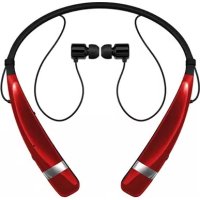
Tone Pro HBS760 - Wireless Headphones LG - Free user manual and instructions
Find the device manual for free Tone Pro HBS760 LG in PDF.




| Product Type | Wireless headset (Bluetooth stereo earphone) |
| Brand | LG |
| Model | Tone Pro HBS760 |
| Bluetooth Technology | 4.1 (headset / hands-free / A2DP profiles) |
| Battery | Lithium-polymer 3.7V / 210 mAh |
| Standby Time | Up to 540 hours |
| Talk Time | Up to 16 hours |
| Music Playback Time | Up to 10.5 hours |
| Charging Time | Less than 2 hours |
| Dimensions (L x W x H) | 138 x 171 x 16.2 mm |
| Weight | 34.2 g |
| Equalizer | Bass Boost, Normal, Treble Boost |
| aptX Technology | Yes |
| Multipoint Function | Simultaneous connection of two phones |
| Vibrator | Yes, can be enabled/disabled with volume+ slider |
| Voice Command | Voice dialing and SMS reading (Tone & Talk) |
| Microphone | With mute function |
| Indicator Light | Red (charging <80%), purple (charging ≥80%), blue (connected/charged) |
| Box Contents | Gel ear tips (S, M, L), USB cable, user guide, WEEE card |
| Operating Temperature | -10 °C to 60 °C |
| Care and Cleaning | Do not use water, alcohol, or benzene |
| Safety | Prevention of hearing loss risk, do not use while driving |
| Spare Parts | Gel ear tips available in three sizes |
| Warranty | 1 year (limited) |
Frequently Asked Questions - Tone Pro HBS760 LG
User questions about Tone Pro HBS760 LG
0 question about this device. Answer the ones you know or ask your own.
Ask a new question about this device
Download the instructions for your Wireless Headphones in PDF format for free! Find your manual Tone Pro HBS760 - LG and take your electronic device back in hand. On this page are published all the documents necessary for the use of your device. Tone Pro HBS760 by LG.
USER MANUAL Tone Pro HBS760 LG
Contact office for compliance of this product :
LG Electronics Inc.
EU Representative, Krijgsman 1,
1186 DM Amstelveen, The Netherlands
English

LG TONE PRO
HBS-760 User Manual
Bluetooth® Stereo Headset
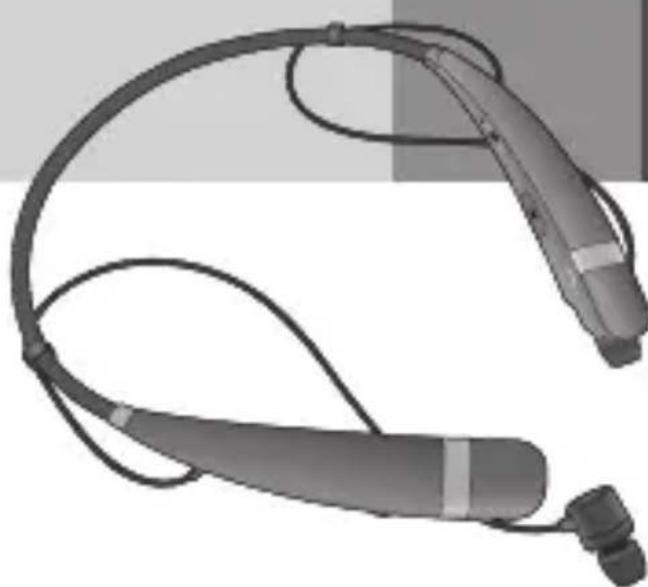
All rights reserved.
LG Electronics Inc., 2015
Note: For the best performance and to prevent any damage to, or misuse of the HBS-760, please read all of the information carefully prior to using the HBS-760.
Any modifications or changes to this manual due to typographical errors or inaccuracies of stated information shall only be made by LG Electronics Inc.
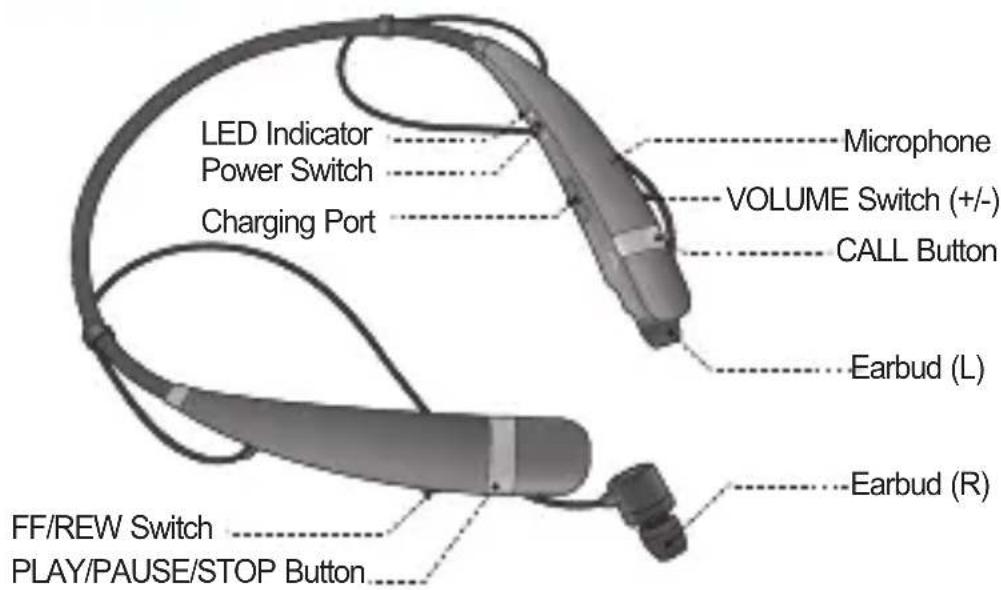
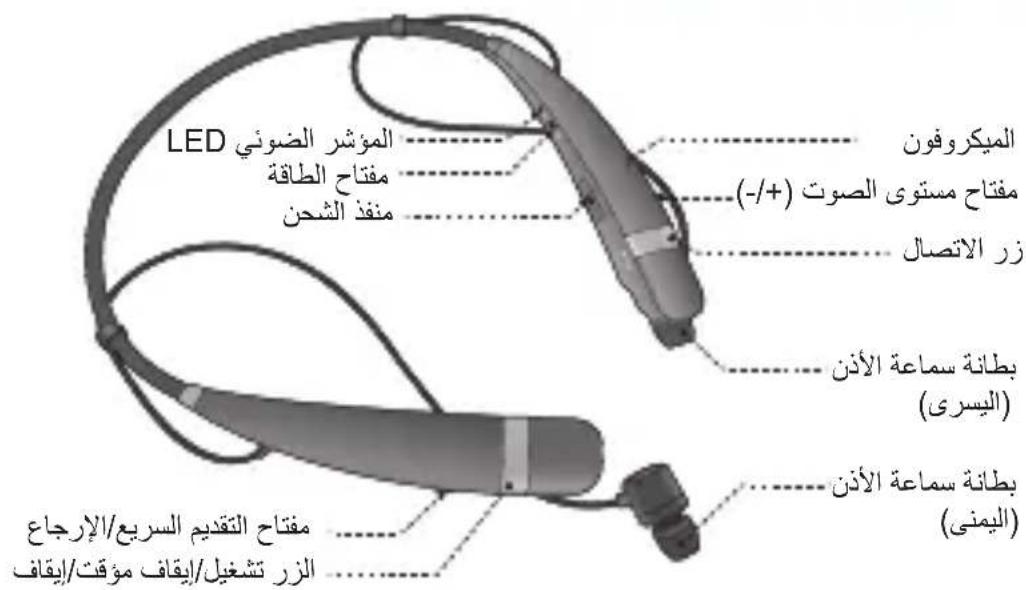
Description of parts
Package Contents



Extra Ear Gels (small & large)
USB Charging Cable WEEE Used Manual
(Europe Only)
- The medium size Ear Gels are equipped to the product.
Specifications
| Item Description | |
| Bluetooth® specification | 4.1 (Headset / Hands-Free / A2DP Profiles) |
| Battery | Battery 3.7 V / 210 mAh Li-Polymer |
| Standby time / Talk Time Up to 540 hours / Up to 16 hours | |
| Music play time Up to 10.5 hours | |
| Charging time Less than 2 hours | |
| Charging rated input DC 4.75 V ~ 5.6 V, 400 mA | |
| Operation temperature -10°C ~ 60°C | |
| Dimension / weight 138 mm (W) x 171 mm (L) x 16.2 mm (H)/34.2 g | |
How to Use
Power On / Power Off
- Slide the Power switch to the ON or OFF position.
Charging
- When the charger is connected (with the power on or off) the headset will turn off.
- While charging, the LED indicator will show a solid red light and then change to violet when charged 80% and above.
- When charging is completed, the LED indicator will show a solid blue light.
Low Battery
- An announcement will be made once every 2 minutes.
- If the battery is not charged, the headset will turn off.
Battery Status Alert
- Slide the VOLUME switch to the - position for 1 second.
| Battery Status High | Medium Low | ||
| Voice Prompt Battery | High Battery | Medium Battery Low | |
| LED Indicator | Blinking Blue | Blinking Violet | Blinking Red |
How to Use
Pairing
- Before using the headset for the first time, you must pair it with a Bluetooth-enabled handset.
Easy Pairing (First Time Pairing)
-
Slide the Power switch to the ON position to turn on the HBS-760. When the headset enters Pairing Mode, the LED indicator will show a solid blue light.
-
Using your handset, find the Bluetooth Menu and search for or add new devices.
-
Select LG HBS760 from the list of devices and pair it with your handset.
-
If asked for the Pass/PIN code please enter 0000 (4 Zeros).
-
Note : If your handset supports Secure Simple Pairing (SSP), you will not need to enter Pass/PIN code.
- Once pairing has completed successfully, you will hear "Your headset paired."
The HBS-760 will automatically turn off if not paired within 3 minutes.
Manual Pairing (Pairing with another phone or re-pairing)
- With the power off, press the CALL button and slide the Power switch to the ON position at the same time for 2 seconds.
- When the headset enters Pairing Mode, the LED indicator will show a solid blue light. After the procedure repeat Easy Pairing steps 2 through 3.
Multi-connection
Advanced Multipoint
The HBS-760 is capable of having two devices connected to the headset at the same time. This will give you the freedom of using call waiting between calls on both of your connected phones.
Connection
- Pair the headset with one of your Bluetooth-enabled handsets (see the pairing instructions on page 4).
- Turn off the headset.
- With the power off, press the CALL button and slide the Power switch to the ON position at the same time for 2 seconds to enter Manual Pairing mode.
- Pair and connect the headset with your other Bluetooth-enabled handset. (this will be your primary handset).
- Once this handset is paired and connected, go back and connect the originally paired handset to the headset. This will now be your secondary handset.
- NOTE: When the HBS-760 is connected to two handsets at the same time (Multipoint), the headset calling functions will work with the primary handset.
- NOTE: In case of failure to connect to the primary phone through Easy Pairing HBS-760 will enter pairing mode.
Calling Function
- Voice Dialing and Last Number Redial features work with the primary handset (or handset which made the last outgoing call).
Call Waiting
- While speaking on an active call, press the CALL button for 1 second to switch to an incoming call.
- To switch between 2 active calls, press the CALL button for 1 second.
- To terminate the active call or both calls at once, briefly press the CALL button.
- If both handsets are receiving an incoming call, the headset will default to the primary device.
How to Use
Auto Reconnect
- The headset and handset will automatically reconnect when the HBS-760 is turned back on while in range.
- The secondary handset need to be connected via selecting LG HBS760 from the list of devices at Bluetooth menu.
Out of range
- If the paired devices are separated by a range of 10 meters (33 feet) or more, the headset and handset will disconnect and HBS-760 will vibrate to alert.
- If vibrate is set to off by sliding the VOLUME switch to the + position and hold for 2 seconds, HBS-760 will not vibrate.
- If the headset and handset do not automatically reconnect when they are back within the required range, briefly press the CALL button on the HBS-760 to reconnect manually.
- It is possible to use these functions only when your handset supports them. For further information about using these features, please consult your handset's user manual.
- While in multi-connection and streaming, the inactive paired device, which is out of range, will be disconnected. The HBS-760 will alert once with no attempt to reconnect.
Calling
Answering a call / Ending a call
- When there is an incoming call, the headset will ring and vibrate.
- HBS-760 will not vibrate if vibration function is on 'off'.
- Briefly slide the VOLUME switch to the - position to stop the vibration.
- Briefly press the CALL button.
Transferring a call
- While on a call on your handset, press the PLAY/PAUSE/STOP button twice on the HBS-760 to transfer the audio either from headset to handset or from handset to headset.
How to Use
Voice dialing
- Briefly press the CALL button to activate Voice Command.
Note: If the handset does not support Voice Dialing, it is possible that performing this action will activate Last Number Redial.
Last number radial
- Press and hold the CALL button for 1second to activate Last Number Redial.
The headset will beep, and call the last number dialed.
Call waiting
- Answer a second call without hanging up the first call by pressing the CALL button for 1 second (you will hear a beep). Press the CALL button for 1second to turn to the original call.
- Briefly press the CALL button to terminate the active call or both calls at once. (subject to handset's support)
Rejecting a Call
- Press the CALL button for 2 seconds when the handset rings.
Mic Mute
- Slide the VOLUME switch to the + position and the FF/REW switch to the REW position at the same time for 1 second to mute/unmute the Mic during conversation.
- Precaution : For your safety, do not operate microphone mute during driving.
Volume control
- Slide the VOLUME switch to the + or - position.
Audio streaming controls
- PLAY: Briefly press the PLAY/PAUSE button.
- PAUSE : Briefly press the PLAY/PAUSE button.
- STOP : Press and hold the PLAY/PAUSE button.
- NEXT SONG: Briefly slide the FF/REW switch to the FF position.
- PREVIOUS SONG : Briefly slide the FF/REW switch to the REW position.
- FAST FORWARD : Slide and hold the FF/REW switch to the FF position.
- REWIND : Slide and hold the FF/REW switch to the REW position.
How to Use
Equalizer
- While playing music, press the PLAY/PAUSE/STOP button twice to switch between Bass Boost (default), Normal, and Treble Boost.
- The bass coming from the speakers can vary as a result of the size of the ear gel that is being used.
aptX®
- The HBS-760 features aptX® technology that ensures audio content transmitted via Bluetooth is instant and crystal-clear.
- aptX is automatically enabled as long as the source device supports it.
Vibrate Control
- To activate or deactivate the Vibrate function, slide the VOLUME switch to the + position for 2 seconds. You will hear "Vibrate on" or "Vibrate off" when it is activated or deactivated.
- When the HBS-760 is set to vibrate off, the headset will not vibrate when receiving an incoming call or when it is out of range.
- By powering the unit off and then powering the unit back on, the vibration functionality will be activated.
Tone & TalkTM
The HBS-760 Bluetooth headset supports SMS reading on Android TM based devices.
To download the application, search for Tone & Talk in Google Play TM * or scan the QR code. Follow the installation instructions.
- Google Play is a trademark of Google, Inc.

Tone & TalkTM
| Function Action | |
| Current time alert Slide the FF/REW switch to the FF position for 1 second. | |
| Read latest SMS or MMS Slide the FF/REW switch to the REW position for 1 second. | |
| Designated contact | Press the CALL button twice (select Designated contact and set the telephone number from Headset call settings menu of Tone & TalkTM). |
| Favorite contacts | 1. Press the CALL button twice. 2. Select the name to call by sliding the FF/REW switch for 1 second. 3. Press the CALL button twice to call (select Favorite contacts and set telephone number from the Headset call settings menu of Tone & TalkTM). |
| Call logs | 1. Press the CALL button twice. 2. Select the name to call by sliding the FF/REW switch for 1 second. 3. Press the CALL button twice to call (select Call logs and set the telephone number from the Headset call settings menu of Tone & TalkTM). |
LED Indicator
| Function | HBS-760 Status Action | |
| Operating | Pairing mode The blue Headset / hands-free profile connectedCall connected The blue | LED light stays on.The blue LED light flickers 1 time.The red LED light stays on and changes to violet when charged 80% and above.The blue LED light stays on. |
| Charging | Charging complete | The red LED light stays on and changes to violet when charged 80% and above. |
Troubleshooting
| Issue Possible problem Resolution | ||
| Does not turn on | Check whether the battery of the HBS-760 is fully charged. | Charge the battery. |
| Unable to communicate with the LG Bluetooth Headset HBS-760 | Check whether the handset supports the headset or hands-free Bluetooth profiles. | Determine whether your handset supports the headset or hands-free Bluetooth profiles. |
| Check whether the battery of the HBS-760 is low. | Charge the battery. | |
| Unable to pair the HBS-760 with the Bluetooth device | Check and make sure the headset is on. | Slide the Power switch to the ON position to turn on the headset. |
| Check and make sure the headset is placed in pairing mode. | With the power off, press the CALL button and slide the Power switch to the ON position at the same time for 1 second to place the headset in Manual Pairing mode. | |
| Low sound (speaker) | Check the speaker volume. Increase the volume level. | |
Precautions
Do not drop the unit from high places.
Do not modify, repair, or take apart.
Do not expose directly to water, alcohol, benzene, etc., for cleaning.
Do not expose directly to flammables.
Do not place or keep the unit near flammables.
Keep unit away from humidity & dust.
Do not place heavy objects on the unit.
Only use the headset with an original LG charger, otherwise it may be damaged.
- Changes or modifications not expressly approved by the party responsible for compliance could void the user's authority to operate the equipment.
- There is a risk of explosion if the battery is replaced by an incorrect type.
- Dispose of used batteries according to the instructions.
- The neck strap is made of a shape memory alloy. However, bending the neck strap repeatedly is not recommended.
- This product contains small parts, including earphones, ear buds, and cables. Keep out of reach of children.
- If you have an implanted medical device, consult with a doctor prior to using this product.
- Always unplug the charger from the wall socket after the device is fully charged to save unnecessary power consumption of the charger.
- Li-ion Battery is a hazardous component which can cause injury.
- Battery replacement by non-qualified professional can cause damage to your device.
- Do not replace the battery by yourself. The battery can be damaged, which can cause overheat and injury. The battery must be replaced by the authorized service provider. The battery should be recycled or disposed separately from household waste.
Declaration of Confirmation
FCC NOTICE TO USERS :
This device complies with part 15 of the FCC rules.
Operation is subject to the following two conditions:
(1) This device may not cause harmful interference and
(2) This device must accept any interference received, including interference that may cause undesired operation.
IMPORTANT NOTE :
To comply with the FCC RF exposure compliance requirements, no change to the antenna or the device is permitted. Any change to the antenna or the device could result in the device exceeding the RF exposure requirements and void user's authority to operate the device.
CE NOTICE TO USERS :
Hereby, LG Electronics declares that this HBS-760 is in compliance with the essential requirements and other relevant provisions of Directive1999/5/EC. A copy of the Declaration of Conformity can be found at http://www/lg.com/global/declaration
Bluetooth® is a registered trademark of Bluetooth SIG, Inc. worldwide.

Bluetooth C∈0168
FCC ID: BEJHBS760QD 66100
Additional Information
1. Radio frequency exposure
This Bluetooth® Stereo Headset HBS-760 is a radio transmitter and receiver. When in operation, it communicates with a Bluetooth® equipped mobile device by receiving and transmitting radio frequency (RF) electromagnetic fields (microwaves) in the frequency range 2.4 to 2.4835 GHz.
Your Bluetooth® Headset is designed to operate in compliance with the RF exposure guidelines and limits set by national authorities and international health agencies when used with any compatible LG Electronics mobile phone.
Additional Information
2. Potentially explosive atmosphere
Turn off your electronic device when in any area with a potentially explosive atmosphere. It is rare, but your electronic device could generate sparks. Sparks in such areas could cause an explosion or fire resulting in bodily injury or even death. Areas with a potentially explosive atmosphere are often, but not always, clearly marked.
3. Battery information
A rechargeable battery has a long service life if treated properly. A new battery or one that has not been used for a long period of time could have reduced capacity the first few times it is used. Do not expose the battery to extreme temperatures, never above +60^(+140^) or below -10^(14^) . For maximum battery capacity, use the battery in room temperature. If the battery is used in low temperatures, the battery capacity will be reduced. The battery can only be charged in temperatures between +10^(+50^) and +45^(+113^) .
Removal of waste batteries and accumulators (Product with embedded battery ONLY)
-
In case this product contains a battery incorporated within the product which cannot be readily removed by end-users, LG recommends that only qualified professionals remove the battery, either for replacement or for recycling at the end of this product's working life. To prevent damage to the product, and for their own safety, users should not attempt to remove the battery and should contact LG Service Helpline, or other independent service providers for advice.
-
Removal of the battery will involve dismantling of the product case, disconnection of the electrical cables/contacts, and careful extraction of the battery cell using specialized tools. If you need the instructions for qualified professionals on how to remove the battery safely, please visit http://www.lge.com/global/sustainability/environment/takeback-recycling.
Additional Information
4. Recycling the battery in your Bluetooth Headset
The battery in your Bluetooth® Headset must be disposed of properly and should never be placed in municipal waste.

Disposal of waste batteries/accumulators
1 This symbol may be combined with chemical symbols for mercury (Hg), cadmium (Cd) or lead (Pb) if the battery contains more than 0.0005% of mercury, 0.002% of cadmium or 0.004% of lead.
2 All batteries/accumulators should be disposed separately from the municipal waste stream via designated collection facilities appointed by the government or the local authorities.
3 The correct disposal of your old batteries/accumulators will help to prevent potential negative consequences for the environment, animal and human health.
4 For more detailed information about disposal of your old batteries/accumulators, please contact your city office, waste disposal service or the shop where you purchased the product.
5. Conditions
- The warranty is valid only if the original receipt issued to the original purchaser by the dealer, specifying the date of purchase and serial number, is presented with the product to be repaired or replaced. LG Electronics reserves the right to refuse warranty service if this information has been removed or changed after the original purchase of the product from the dealer.
- If LG Electronics repairs or replaces the product, the repaired or replaced product shall be warranted for the remaining time of the original warranty period or for ninety (90) days from the date of repair, whichever is longer. Repair or replacement may involve the use of functionally equivalent reconditioned units. Replaced parts or components will become the property of LG Electronics.
- This Warranty does not cover any failure of the product due to normal wear and tear, or due to misuse, including but not limited to use in other than the normal and customary manner, in accordance with instructions for use and maintenance of the product. Nor does this warranty cover any failure of the product due to accident, modification or adjustment, acts of God or damage resulting from liquid.
- This warranty does not cover product failures due to improper repair installations, modifications or service performed by a non-LG Electronics authorized person. Tampering with any of the seals on the product will void the warranty.
Limited Warranty
SUBJECT TO THE CONDITIONS OF THIS LIMITED WARRANTY, LG ELECTRONICS WARRANTY THIS PRODUCT TO BE FREE FROM DEFECTS IN DESIGN, MATERIAL AND WORKMANSHIP AT THE TIME OF ITS ORIGINAL PURCHASE BY A CONSUMER, AND FOR A SUBSEQUENT PERIOD OF ONE (1) YEAR. SHOULD YOUR PRODUCT NEED WARRANTY SERVICE, PLEASE RETURN IT TO THE DEALER FROM WHOM IT WAS PURCHASED OR CONTACT YOUR LOCAL LG ELECTRONICS CONTACT CENTER TO GET FURTHER INFORMATION.
Important safety information
Avoiding hearing damage
Permanent hearing loss may occur if you use your Handsfree car kit at a high volume. Set the volume to a safe level. You can adapt over time to a higher volume of sound that may sound normal but can be damaging to your hearing. If you experience ringing in your ears or muffled speech, stop listening and have your hearing checked. The louder the volume, the less time is required before your hearing could be affected. Hearing experts suggest that to protect your hearing:
- Limit the amount of time you use Headset at high volume.
- Avoid turning up the volume to block out noisy surroundings.
- Turn the volume down if you can't hear people speaking near you.
Please refer to your handset user guide for more information on how to adjust listening levels on your handset.
Using headsets safely
Use of Headset to listen to music while operating a vehicle is not recommended and is illegal in some areas. Be careful and attentive while driving. Stop using this device if you find it disruptive or distracting while operating any type of vehicle or performing any other activity that requires your full attention.
MEMO
Čestina

LG TONE PROTM
LG Electronics Inc., 2015
Poznamka: K dosaženi nejlepsiho vykonu, prevalci poskozeni a naspravnego pouzivani sluchatek HBS-760 si pred pouzitim sluchatek HBS-760 pozorné prostudujte vsechny informace.
Begr oneself garanti
UNDERLAGT BETINGELSERNE FOR DENNE BEGRÄENSEDE GARANTI STÄR LG ELECTRONICS INDE FOR, AT DETTE PRODUKT IKKE, HAR NOGEN FEJL ELLER MANGLER I DESIGN, MATERIALE OG UDFÖRELSE PÅ DET OPRINDELIGE KØBSTIDSPUNKT OG ET (1) ÅR FREM. I TILFÄELDE AF, AT DIT PRODUKT FÄR BRUG FOR SERVICE, DER ER UNDERLAGT GARANTIEN, SKAL DU RETURNERE DET TIL FORHANDLEREN ELLER KONTAKTE DIT LOKALE LG ELECTRONICS-SERVICECENTER FOR AT FÄ YDERLIGERE OPLYSNINGER.
LG Electronics Inc., 2015
Tuxov tpotntoioeic n aaayec oe auto to
EyXeipioAoYwTutOpyaikWvAaWv n avakpiBieiw
OTIC avaepoEvEc TAnpoopoeic mTOpov va
πpayμaToToiθouv móvo aTó Tny LG Electronics Inc.
περιγραφή των μερών
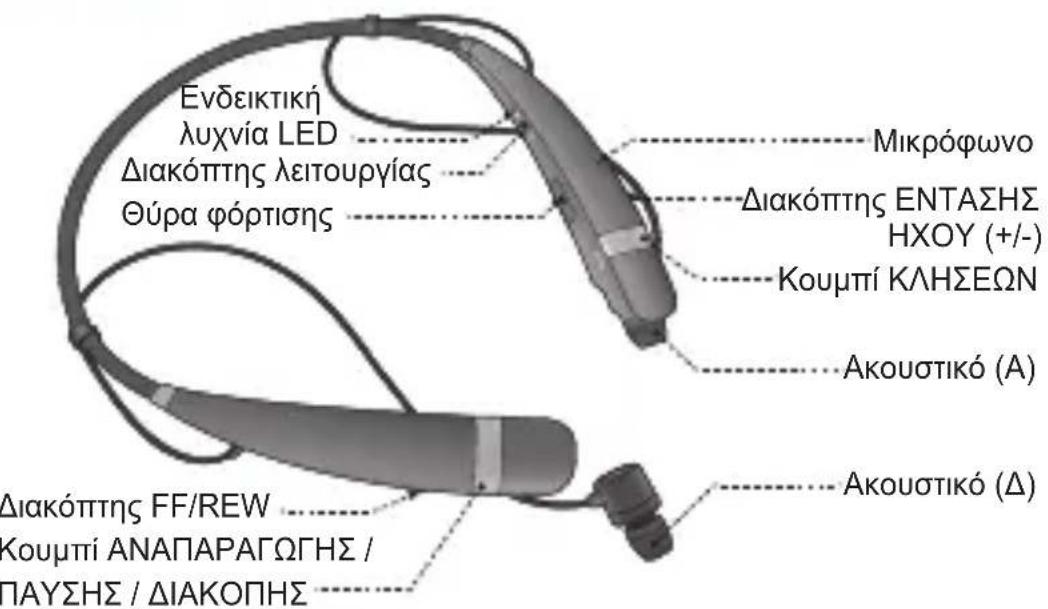
LG Electronics Inc., 2015
LG Electronics Inc., 2015
LG Electronics Inc., 2015
LG Electronics Ticaret A.S.
Kaptanpasa Mah. Piyalepasa Bulvar N0: 73
Ortadoogu Plaza Kat 7 ve 8 Okmeydani / SIsLIISTANBUL 34384
Tel : (0212) 3145252
Fax:(0212)2226144
Vergi No: Bogazici Kurumlar Vergi Dairesi 6080467738
Cagm Merkezi:444-6-543

GARANTI BELGESI
KULAKLIK
BELGE NO :103080
BELGE ONAY TARIHI :01.07.2011
BELGE YENILEMETARIHI:03.07.2013
LG Electronic Inc., LG Drive Towers 201
Taee-dang.Yanxueangn-6b
1001Xnne 156-72
1d:82-2-377-1114

TMA
2017年1月1日星期一
Ving No.100431 697-487
MALIN
CINH 001AK1K
MAHKA SI 10
MOOEL
BANDAOLVE SERINO
TESLMTARHIVEYER
GAJANTSURES2YL
AZAM TAMIR SURESI:2018 GUNO
SATICIFIRMANIN
ONWAN
ADRES
TELEFONU
TELEFAKSI
FATURA TARHI VE NO.
TARH-MZA-KASE
NOTE
繁體中文

LG TONE PROTM
HBS-760用户手册
蓝牙TM 立體聲耳機
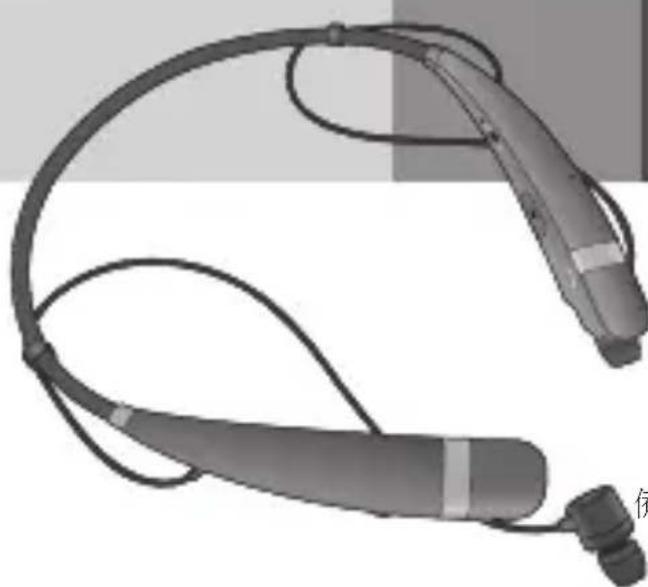
保留一切權利。
LG Electronics Inc., 2015
LG Electronics Inc., 2015
HBS-760 jll aclld JgJgJgJgJgJgJgJg
J 5 ool j 8 y 10al 11 10ol 11 11
logall
LG Electronics Inc.
1 1
Ailallllglaleallggyagclgdo
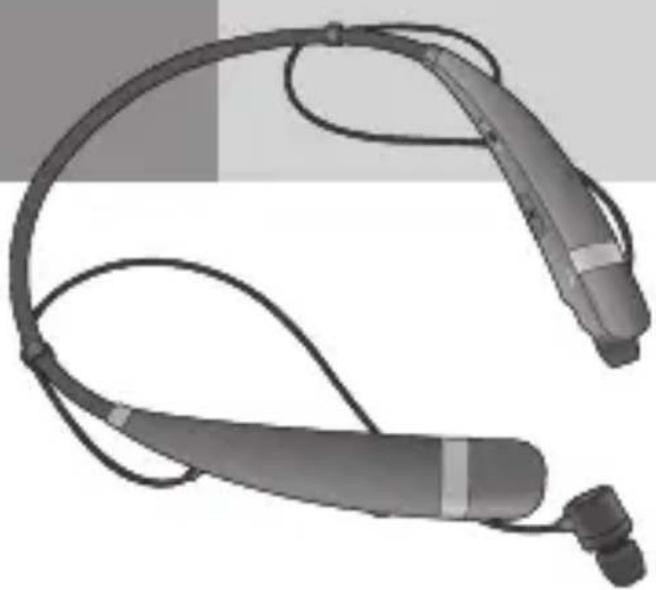
boll

WEEE
(1)

USB
aajai


()
i 1
algal
a aalaae aalaae ae aae aee
.
) .Laguayu yuuiy jaiy,Bluetooth 12000000000000000000000000000000000000
()
120 1
.5
Jaoi, (blal) aai jy jn b HBS-760 wll Jail alil sie: aldo
aaiiie 1
HBS-760 1
1
Juaai
a 1
(。julal Jolal
aolal jil
. 1000000000000000000000000000000000000000000
aalaaalaae aee
aill So jll gle ojua aal bai alai iil
J 1
gilaJuaIj 1
Jn Jn Jn Jn Jn Jn Jn Jn Jn Jn Jn Jn Jn Jn Jn Jn Jn Jn Jn Jn Jn Jn Jn Jn Jn Jn Jn Jn Jn Jn Jn Jn Jn Jn Jn Jn Jn Jn Jn Jn Jn Jn Jn Jn Jn Jn Jn Jn Jn Jn Jn
Jaiji jbi
.Bluetooth aG HBS760 8
jbi 2
J 10 4
HBS-760 wJll aclaw jiei, gll wJll aclaw
- 1
.HBS-760
a 1
HBS-760 11111111111111111
a
iillipia iio 1
Jaiy jbi jj gao jg jn jn jn jn jn jn jn jn jn jn jn jn jn jn jn jn jn jn jn jn jn jn jn jn jn jn
HBS-760 8Jll
JU
aollso 1gj/ aollso 2
jgi g wlll aclaw jjw g aalSg gic
HBS-760 wJl J
jiaaiy1iay- gaoall ydiagaoaigao
aalalallalalalalalalalalalalalalalal
()
(aill)
aillso
i 1
g 1111111111111111111
aaiiie i j 1j/
slll jgssll gai k jy y 1111111
Gall Gsinny
-+jgall gss
yalic
i 1
i 1
i 1
aai aaii
1
a a a a a a a a a a a a a a a a a a a a a a a a
e 1
()
ailll aall yuusg ydu
aaii i 1

aptX
Jbbln 80 HBS-760 wJrJg
a. i. 1
Laee Jn Jn Jn Jn Jn Jn Jn Jn Jn Jn Jn Jn Jn Jn Jn Jn Jn Jn Jn Jn Jn Jn Jn Jn Jn Jn Jn Jn Jn Jn Jn Jn Jn Jn Jn Jn Jn Jn Jn Jn Jn Jn Jn Jn Jn Jn Jn Jn Jn Jn J
jia 2
a eaae aal + gaoall 1gss sss
Aaaii clll g Aaiii iic jiljaiy I Jaiy ai y jaiy
HBS-760 wJll aclaw jnnn
Jai jbi Jia Lao g j
j1 jai jai g jai jai puiu 1i jai jai oie 1g oia jai jai
Tone & TalkTM


SMS Jlls rJr Bluetooth jjHBS-760 wJl lAeLau Tone & j. AndroidTM Jzilll pJz j 1e .Qr Jz J* Google Play TM iTalk Google, Inc. Jy Jy Jy Google Play
Tone & Talk™
| الجaises الحرفidos | |
| الجaises الحرفidos | |
| . . . . . . . . . . . . . . . . . . . . . . . . . . . . . . . . . . . . . . . . . . . . . . . . . . . . . . . . . . . . . . . . . . . . . . . . . . . . . . . . . . . . . . . . . . . . . . . . . . . . . . . . . . . . . . . . . . . . . . . . . . . . . . . . . . . . . . . . . . . . . . . . . . . . . . . . . . . . . . . . . . . . . . . . . . . . . . . . . . . . . . . . . . . . . . . . . . . . . . . . . . ? . . . . . . . . . . . . . . . . . . . . . . . . . . . . . . . . . . . . . . . . . . . . . . . . . . . . . . . . . . . . . . . . . . . . . . . . . . . . . . . . . . . . . . . . . . . . . . . . . . . 2 . . 2 . 2 2 2 2 2 2 2 2 2 2 2 2 2 2 2 2 2 2 2 2 2 2 2 2 2 2 2 2 2 2 2 2 2 2 2 2 2 2 2 2 2 2 2 2 2 2 2 2 2 2 2 |
aaii iia jia jia jia jia jia jia jia jia jia jia
JiauuiUaillalglalljikjglaiy
Juaauiu 1
j 1
jckai ale aiai elai jai
Lg 1
jiesll jiee piinell
y
Jiaia Jia jia jia jia jia jia jia jia jia jia jia jia jia jia jia jia jia jia jia jia jia jia jia jia jia jia jia jia jia jia jia jia jia jia jia jia jia jia jia jia jia jia jia jia jia jia jia jia jia jia
aaii iiaii
FCC
.FCC 15 j
i
(aaa aaaa aay baaagaaa)
JLGLGgssgagglgagglgagglgagglgagglgagglgagglgagglgagglgagglgagglgagglgagglgagglgagglgagglgagglgagglgagglgagglgagglgagglgagglgagglgagglgagglgagglgagglgagglgagglgagglgagglgagglgaggl
Bluetooth@aagd aal aalee aee 4
aalee eae aegaae gaae aee aee aee aee aee aee aee aee
y
1
0.004% 0.002% 0.0005%
2
J 1 J 1 J 1 J 1 J 1 J 1 J 1 J 1 J 1 J 1 J 1 J 1 J 1 J 1 J 1 J 1 J 1 J 1 J 1 J 1 J 1 J 1 J 1 J 1 J 1 J 1 J 1 J 1 J 1 J 1 J 1 J 1 J 1 J 1 J
LG Electronics (Levant) - Jordan
Abdali Project, Rafik Al-Hariri Avenue, The Boulevard, Central Square, 5th Floor
- LG TONE PRO
- HBS-760 User Manual
- Bluetooth® Stereo Headset
- Description of parts
- Package Contents
- Specifications
- How to Use
- Power On / Power Off
- Charging
- Low Battery
- Battery Status Alert
- Pairing
- Easy Pairing (First Time Pairing)
- Manual Pairing (Pairing with another phone or re-pairing)
- Multi-connection
- Advanced Multipoint
- Connection
- Calling Function
- Call Waiting
- Auto Reconnect
- Out of range
- Calling
- Answering a call / Ending a call
- Transferring a call
- Voice dialing
- Last number radial
- Rejecting a Call
- Mic Mute
- Volume control
- Audio streaming controls
- Equalizer
- aptX®
- Vibrate Control
- Tone & TalkTM
- LED Indicator
- Troubleshooting
- Precautions
- Declaration of Confirmation
- FCC NOTICE TO USERS :
- IMPORTANT NOTE :
- CE NOTICE TO USERS :
- Bluetooth C∈0168
- Additional Information
- Radio frequency exposure
- Potentially explosive atmosphere
- Battery information
- Removal of waste batteries and accumulators (Product with embedded battery ONLY)
- Recycling the battery in your Bluetooth Headset
- Disposal of waste batteries/accumulators
- Conditions
- Limited Warranty
- Important safety information
- Avoiding hearing damage
- Using headsets safely
- LG TONE PROTM
- Begr oneself garanti
- περιγραφή των μερών
- GARANTI BELGESI
- KULAKLIK
- MALIN
- SATICIFIRMANIN
- boll
- aajai
- gilaJuaIj 1
- JU
- yalic
- aptX
- jia 2
- Tone & Talk™
Brand : LG
Model : Tone Pro HBS760
Category : Wireless Headphones