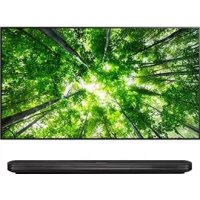
42PC1RVA - Television LG - Free user manual and instructions
Find the device manual for free 42PC1RVA LG in PDF.



| Product type | Plasma TV |
| Brand | LG |
| Model | 42PC1RVA |
| Screen size (diagonal) | 42 inches (106 cm) |
| Approximate weight | 28 kg (without stand) |
| Approximate dimensions (W x H x D) | 105 x 70 x 10 cm (without stand) |
| Power supply | AC 220-240 V, 50/60 Hz |
| Power consumption | Approximately 280 W (according to specifications) |
| Connectivity | SCART (AV1/AV2), Component, HDMI, S-Video, Audio/Video input, RS-232C, variable audio output, RF antenna |
| Special features | Teletext (SIMPLE, TOP, FASTEXT), memory up to 100 channels |
| OSD menu languages | French, Arabic, Hebrew and others (depending on country) |
| Screen maintenance | Clean with a soft damp cloth (warm water + dish soap), wring out before |
| Cabinet maintenance | Soft, dry, lint-free cloth |
| Safety | Earthing mandatory; do not open; avoid moisture and heat sources |
| Repairability | Entrust to authorized technical service; do not repair yourself |
| Spare parts | Not supplied; contact after-sales service |
| Supplied accessories | Remote control, batteries, CD-ROM with user manual, stand (depending on model) |
| User manual | Available on CD-ROM (PDF format) and online |
Frequently Asked Questions - 42PC1RVA LG
User questions about 42PC1RVA LG
0 question about this device. Answer the ones you know or ask your own.
Ask a new question about this device
Download the instructions for your Television in PDF format for free! Find your manual 42PC1RVA - LG and take your electronic device back in hand. On this page are published all the documents necessary for the use of your device. 42PC1RVA by LG.
USER MANUAL 42PC1RVA LG
0 cover-en rev03 0/33/65 2:47 PM Page 1
LCD TV | PLASMA TO OWNER'S MANUAL

LG Electronics Inc.
e
Extended Owner's Manual that contains advanced features of these LG TV
sets is located on CD-ROM in electronic version.
To read it You need to open chosen files by using Personal Computer (PC) equipped with CD-ROM drive.
P/NO:MFL30477001(0607-REV02)
Printed in Korea


SAFETYINSTRUCTIONS
- Please read these safety precautions carefully before using the product.
In this manual, the illustration may be somewhat different from your product because it is just example to help the instruction.
WARNING If you ignore the warning message, you may be seriously injured or there is a possibility of accident or death.
CAUTION If you ignore the caution message, you may be slightly injured or the product may be damaged.
Precaution in Installing the Product
WARNING
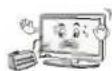
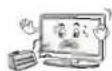
Keep away from heat sources like electrical heaters.
Electrical shock, fire, malfunction or deformation may occur.
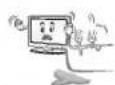
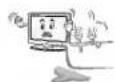
Do not use the product in damp place such as a bathroom or any place where it is likely to get wet.
- This may cause a fire or could give an electric shock.
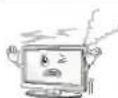
If you can smell smoke or other odors or hear a strange sound unplug the power cord and contact the service center.
- If you continue to use without taking proper measures, electrical shock or fire can occur.
CAUTION
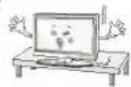
Install the product on a flat and stable place that has no risk of dropping the product.
If the product is dropped, you may be injured or the product may be broken.
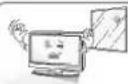
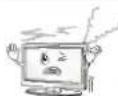
Keep the product away from direct sunlight.
The product can be damaged.

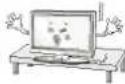
Do not place the product in a built-in installation such as bookcase or rack.
- Ventilation required.
Electrical Power Related Precautions
WARNING
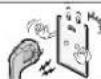
Make sure to connect the power cable to the ground ed current.
- You may be electrocuted or injured.
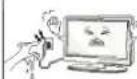
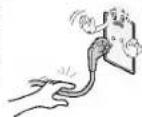
Do not touch the power plug with wet hands. Additionally, it the cord pin is wet or covered with dust, dry the power plug completely or wipe dust off.
- You may be electrocuted due to excess moisture.
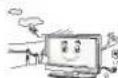
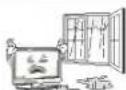
During a thunder or lightning storm, unplug the power cable or signal cable.
- You may be electrocuted or a fire can break out.
CAUTION
Protect the power cord from physical or mechanical abuse, such as being twisted, kinked, pinched, closed in a door, or walked upon. Pay particular attention to plugs, wall outlets, and the point where the cord exits the appliance.
Precautions in Moving the Product
WARNING
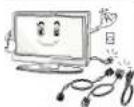
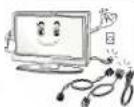
Make sure to turn off the product.
Make sure to remove all cables before moving the product.
- You may be electrocuted or the product can be damaged.
CAUTION
Do not shock the product when moving it.
- You may be electrocuted or the product can be damaged.
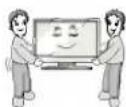
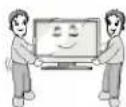
Make the panel face forward and hold it with both hands to move.
- If you drop the product, the damaged product can cause electric shock or fire. Contact with the service center for repair.
Precautions in Using the Product
WARNING
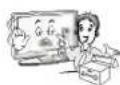
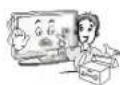
Do not disassemble, repair or modify the product at your own discretion.
-
Fire or electric shock accident can occur.
-
Contact the service center for check, calibration or repair.
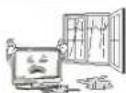
To reduce the risk of fire or electric shock, do not expose this apparatus to rain or moisture.
Apparatus shall not be exposed to dripping or splashing and no objects filled with liquids, such as vases, shall be placed on the apparatus.
CAUTION
Refer all servicing to qualified service personnel. Servicing is required when the apparatus has been damaged in any way, such as power supply cord or plug is damaged, liquid has been spilled or objects have fallen into the apparatus, the apparatus has been exposed to rain or moisture, does not operate normally, or has been dropped.
INTRODUCTION
HSIN3
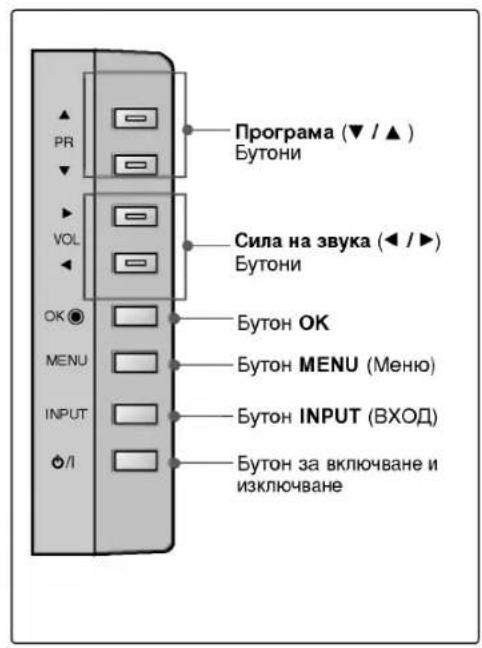
CONTROLS
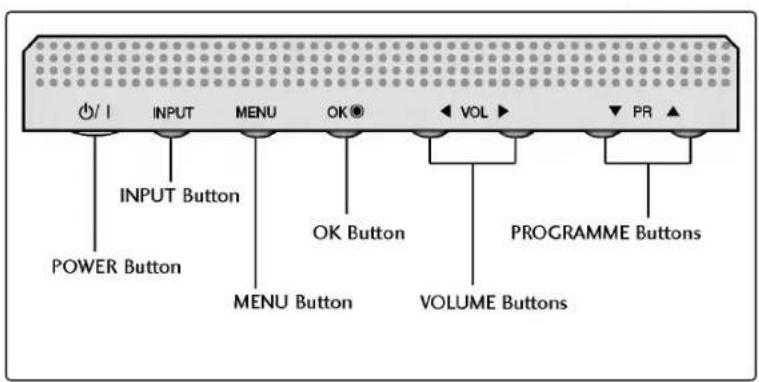
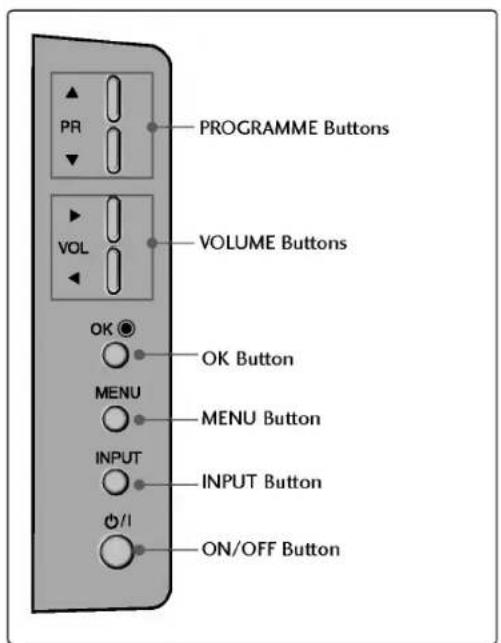
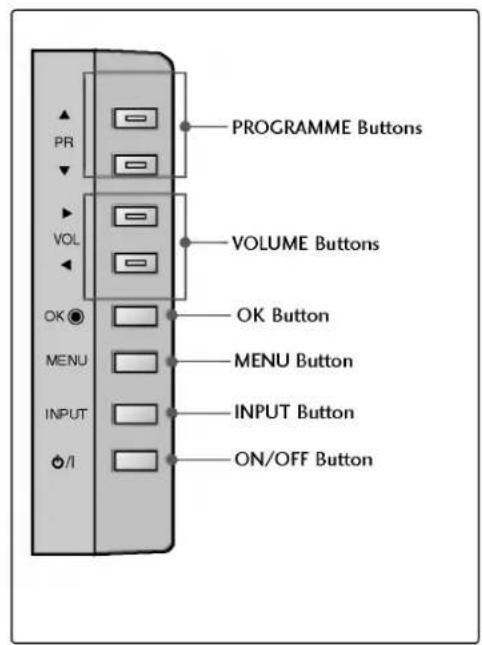
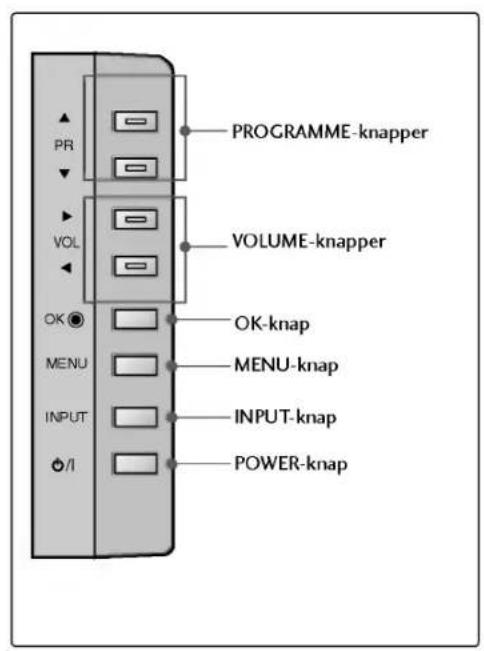
This is a simplified representation of the front panel. Here shown may be somewhat different from your TV.
Front Panel Controls
CONNECTION OPTION
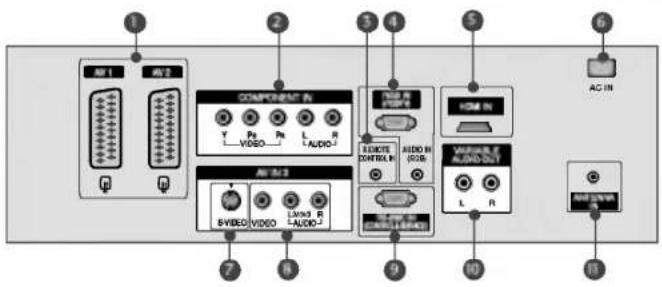
This is a simplified representation of the back panel. Here shown may be somewhat different from your TV.
Back Connection Panel
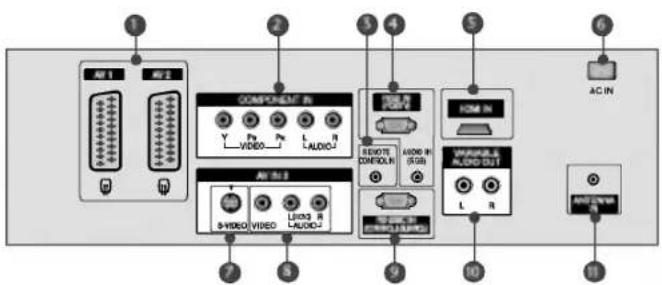
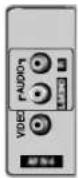
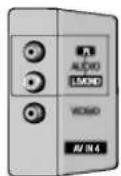
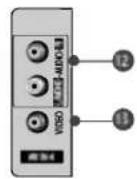
Euro Scart Socket (AV1/AV2)
Connect scart socket input or output from an external device to these jacks.
Component Input
Connect a component video/ audio device to these jacks.
Remote Control Port
Connect your wired remote control here.
RGB/Audio Input
Connect the monitor output from a PC to the appropriate input port.
HDMI Input
Connect a HDMI signal to HDMI port with HDMI cable.
Power Cord Socket
This TV operates on an AC power. The voltage is indicated on the Specifications page. Never attempt to operate the TV on DC power.
S-Video Input
Connect S-Video out from an S-VIDEO device.
Audio/Video Input
Connect audio/video output from an external device to these jacks.
RS-232C Input (CONTROL&SERVICE) Port
Connect the serial port of the control devices to the RS-232C jack.
Variable Audio Output
Connect an external amplifier or add a subwoofer to your surround sound system.
Antenna Input
Connect over-the-air signals to this jack.
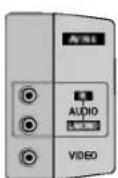
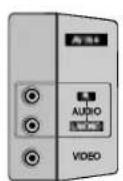
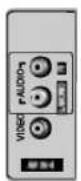
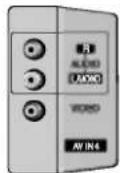
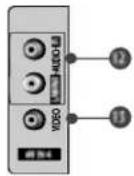
AUDIO Input
Connections are available for listening stereo sound from an external device.
VIDEO Input
Connects the video signal from a video device.
INTRODUCTION
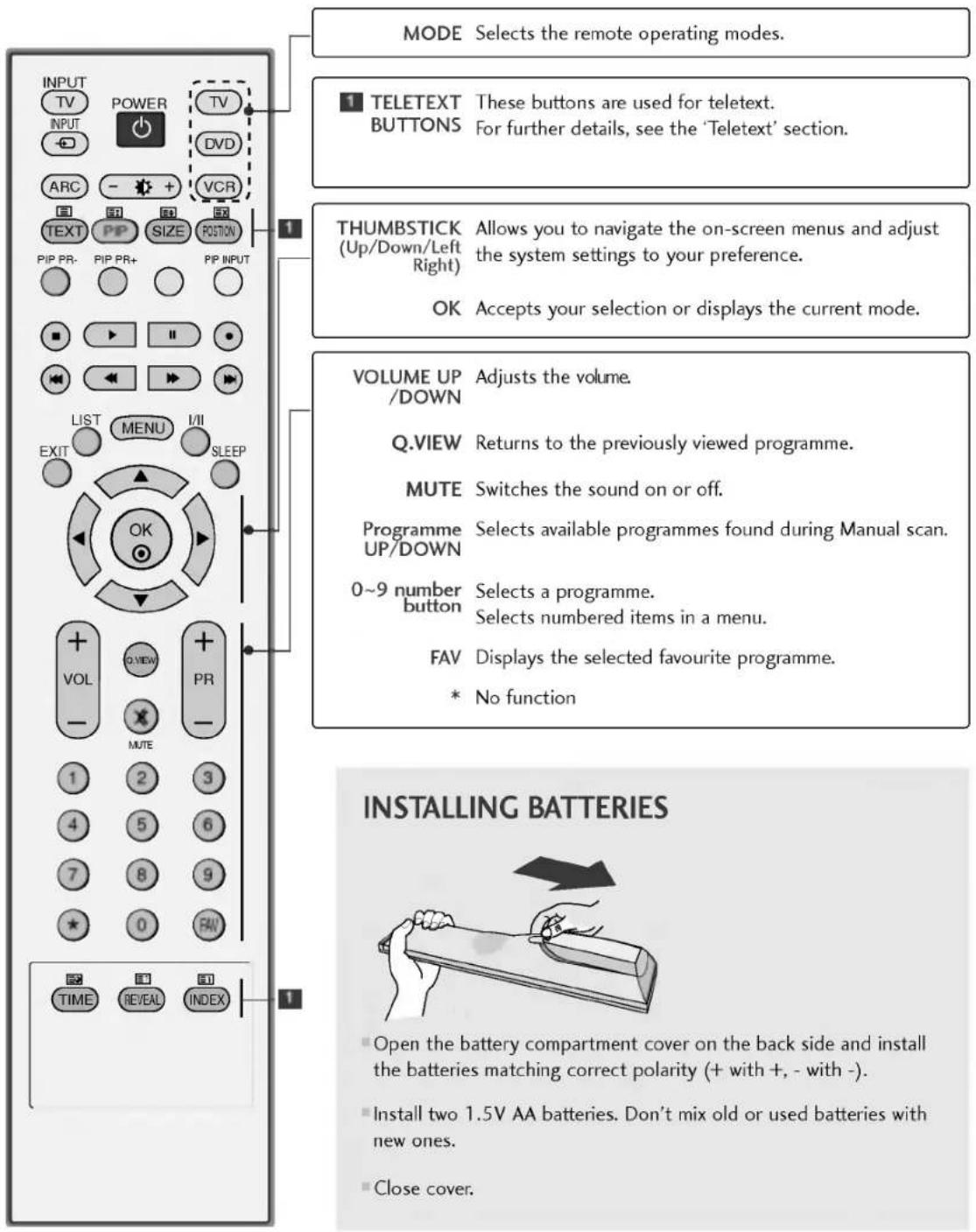
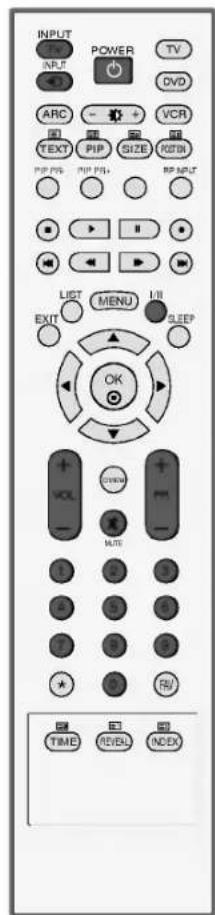
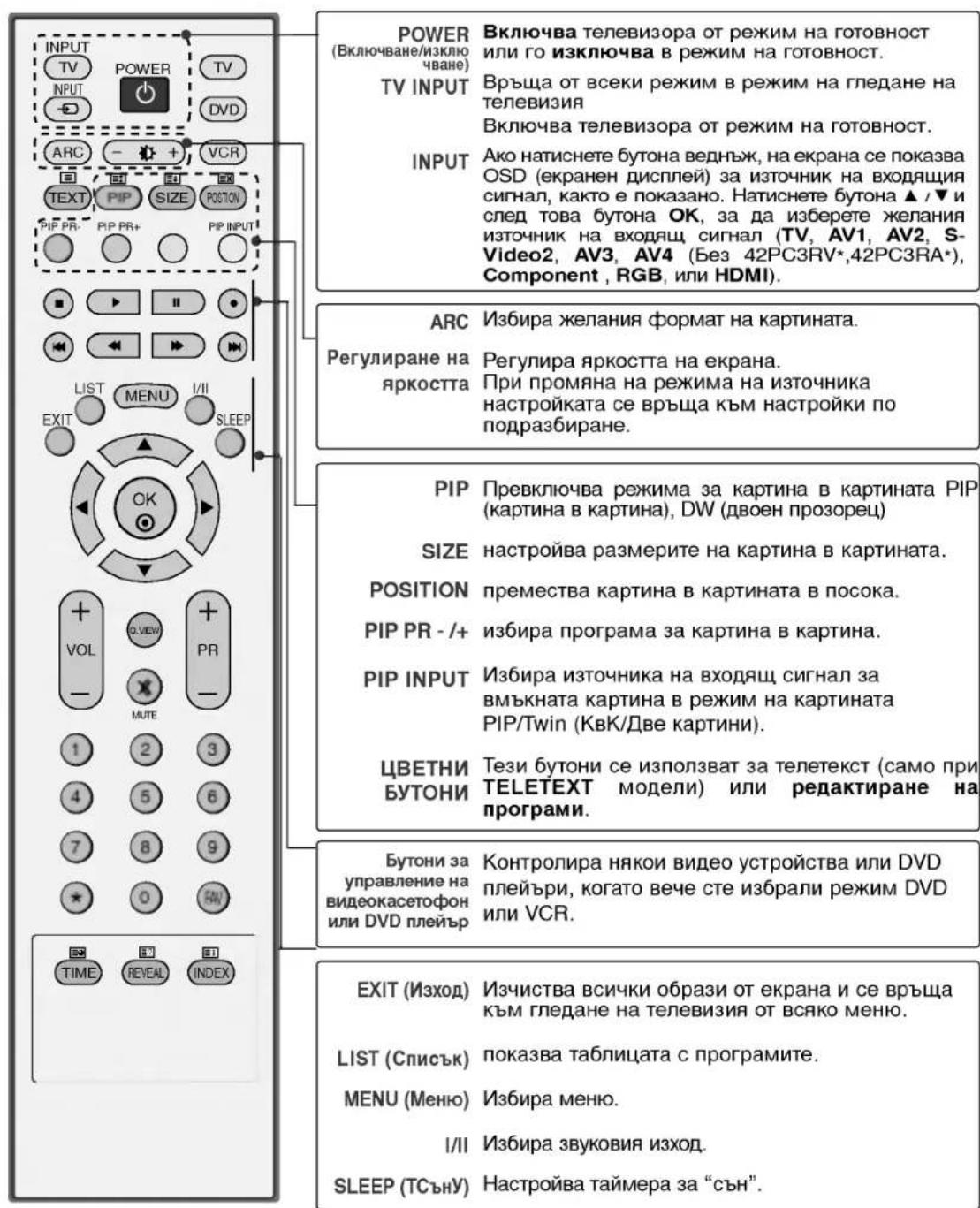
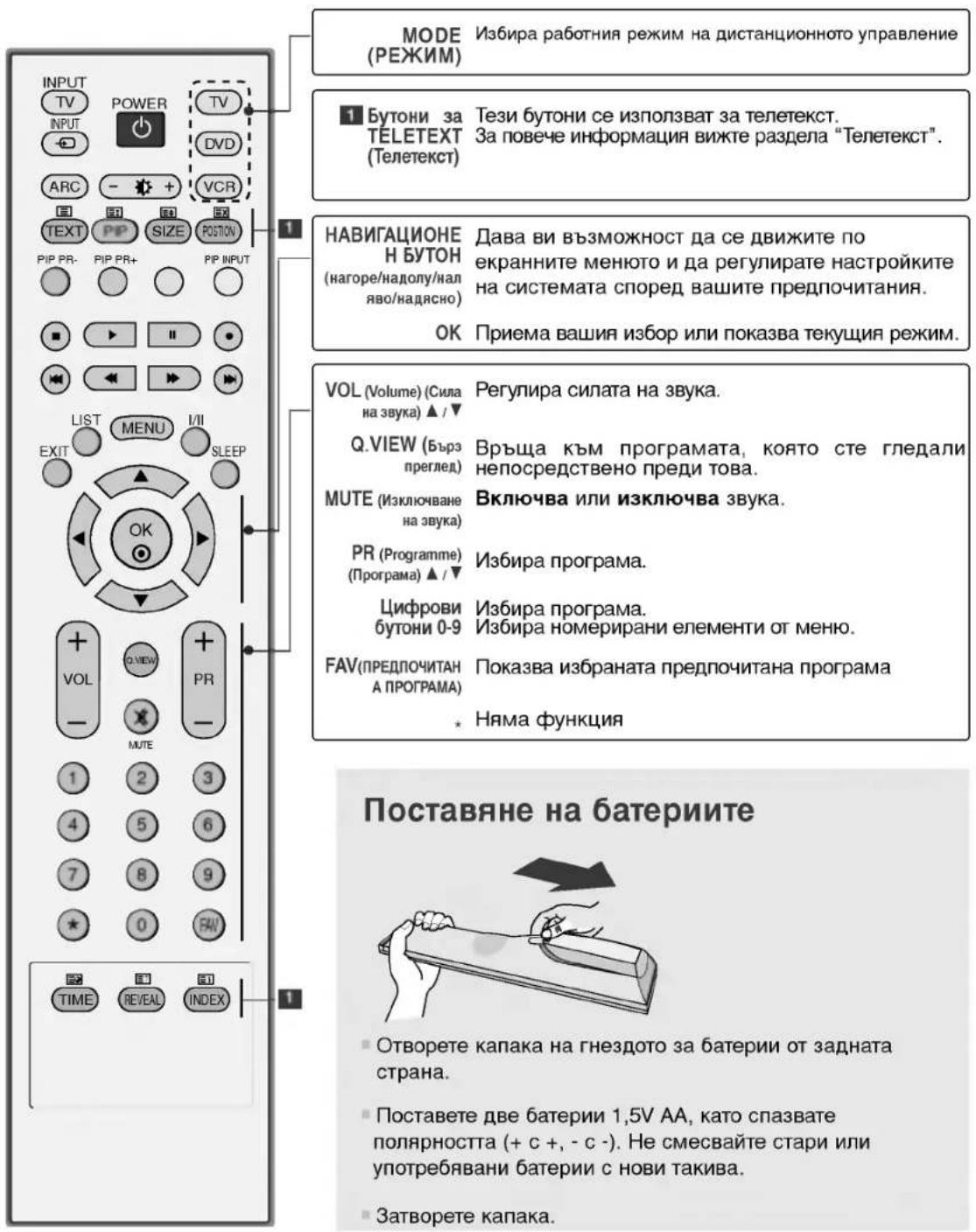
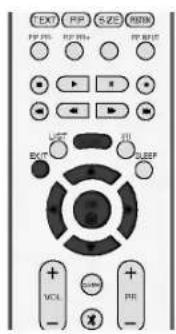
REMOTE CONTROL KEY FUNCTIONS
When using the remote control, aim it at the remote control sensor on the TV.
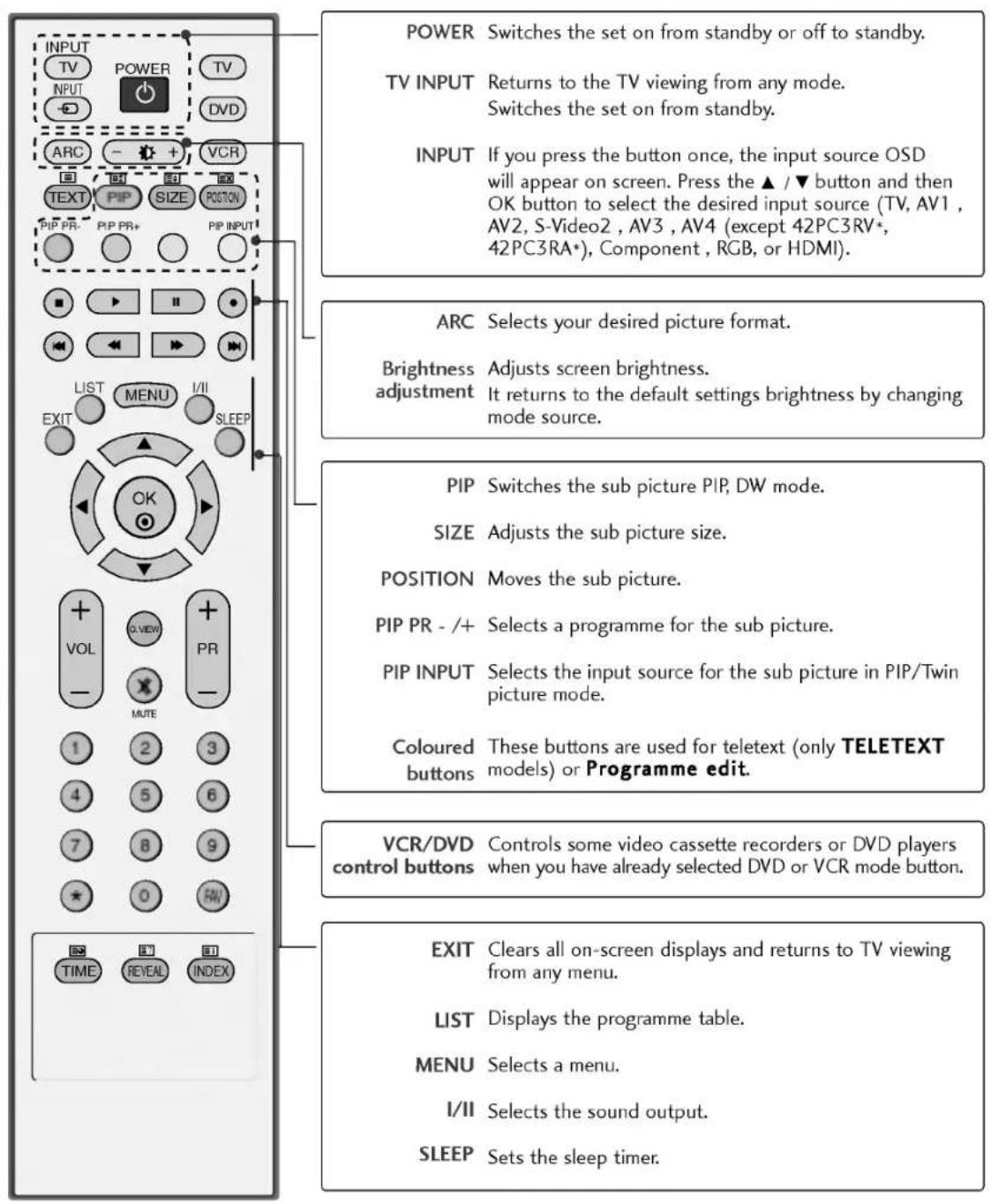
INSTALLATION
STAND INSTALLATION
This feature is not available for all models.
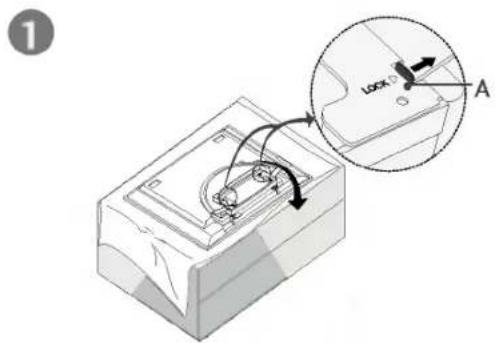
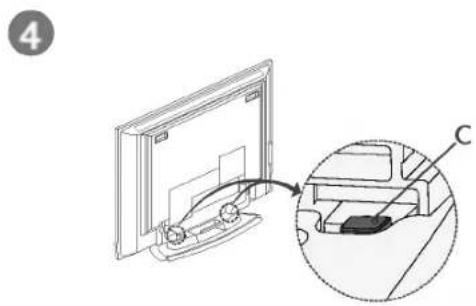
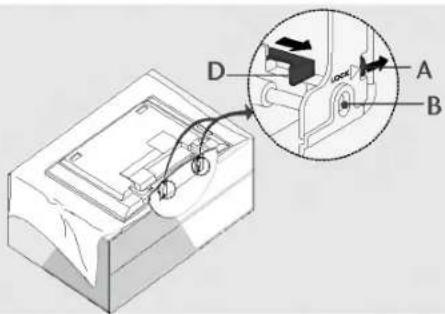
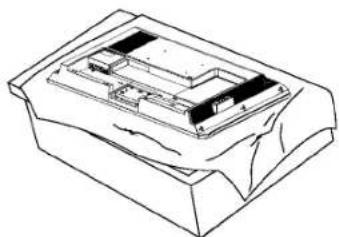
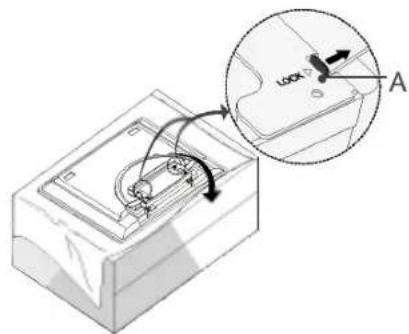
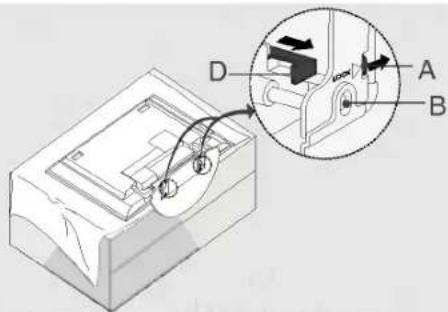
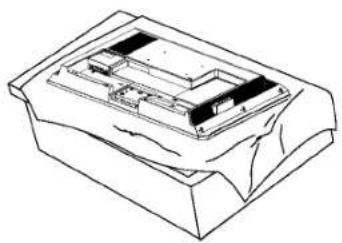
Place the set with the screen facing down on a cushion or soft cloth as shown in Figures 1. Before unfolding the stand, please make sure two locks (A) on the bottom of the stand push outward.
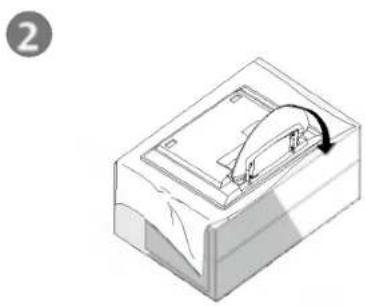
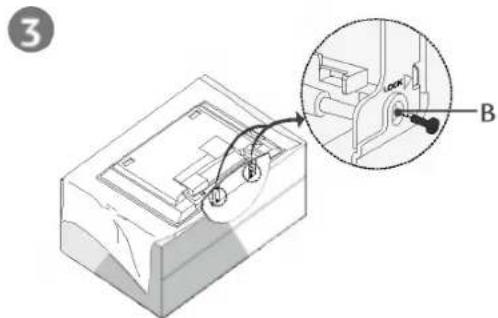
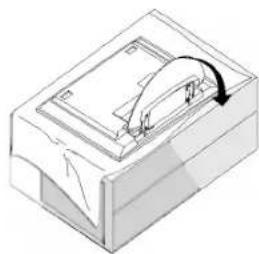
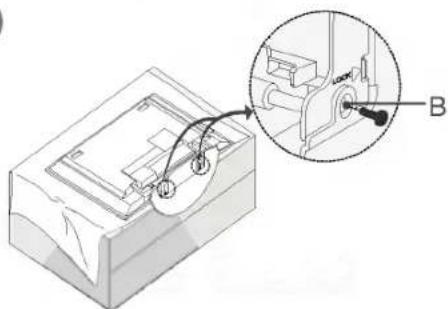
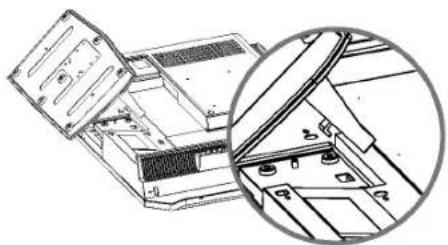
Pull the stand out as shown above in Figures 2 ~ 3. After unfolding the stand, please insert and tighten the screws in the holes (B) on the bottom of the stand.
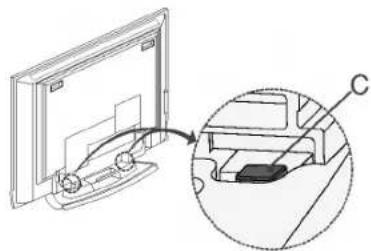
- When connecting cables to the set, Do not disengage the lock (C).
This may cause the set to fall, causing serious bodily injury and serious damage to the set.
NOTE
Figures shown here may be slightly different from your set.
When closing the stand for storage
First remove the screws in the holes (B) on the bottom of the stand. And then pull two Hooks (D) of the stand bottom and fold the stand into the back of the set.
After folding, push two Locks (A) of the stand bottom outward.
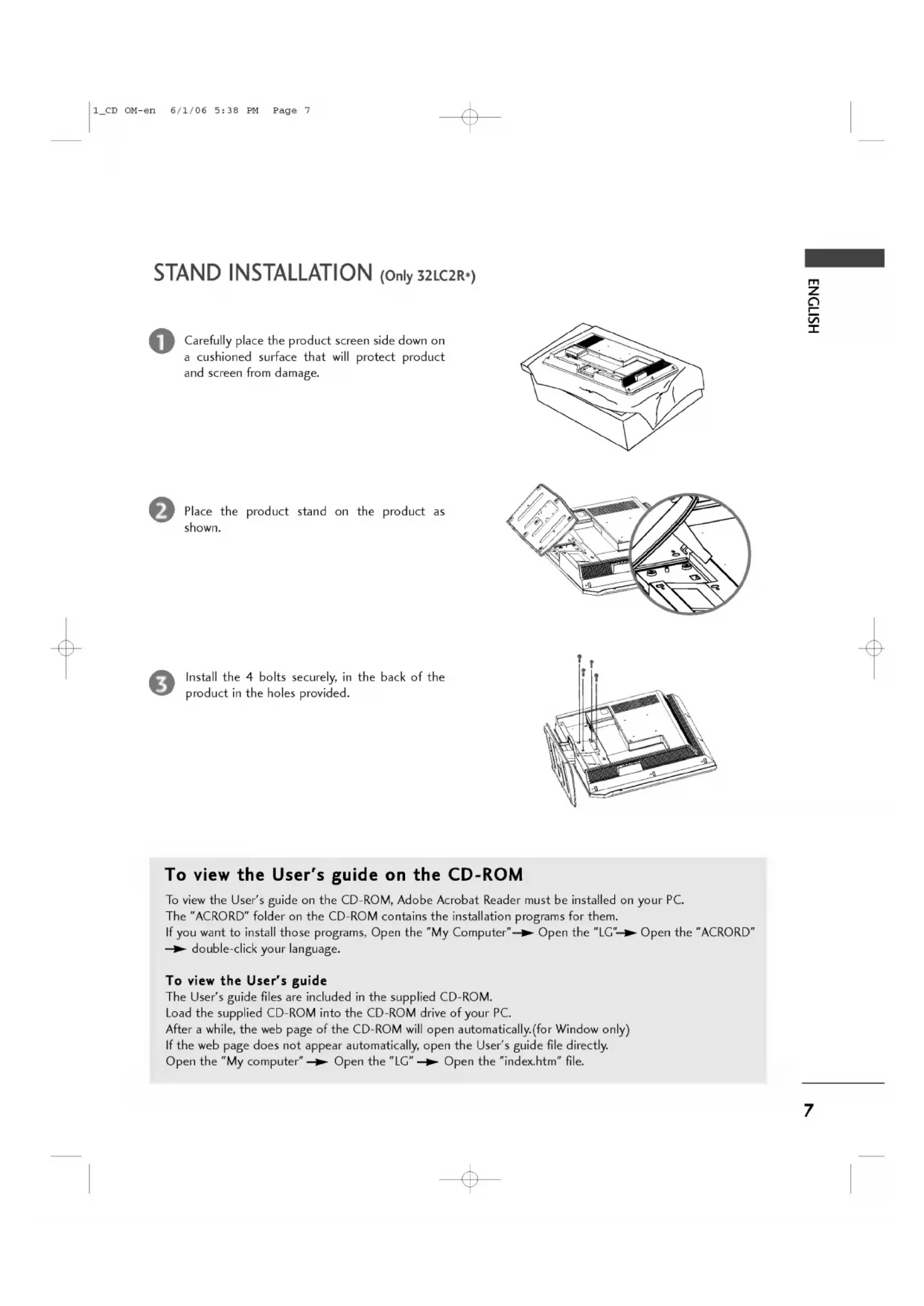
STAND INSTALLATION (Only 32LC2R+)

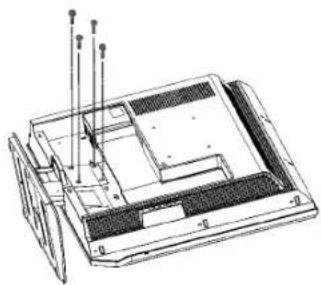
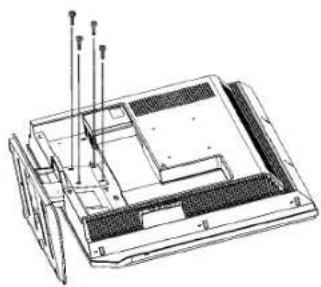
Carefully place the product screen side down on a cushioned surface that will protect product and screen from damage.

Place the product stand on the product as shown.
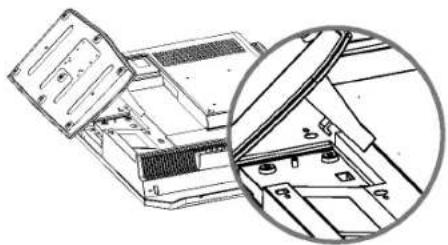

Install the 4 bolts securely, in the back of the product in the holes provided.
To view the User's guide on the CD-ROM
To view the User's guide on the CD-ROM, Adobe Acrobat Reader must be installed on your PC. The "ACRORD" folder on the CD-ROM contains the installation programs for them. If you want to install those programs, Open the "My Computer" Open the "LG" Open the "ACRORD" double-click your language.
To view the User's guide
The User's guide files are included in the supplied CD-ROM. Load the supplied CD-ROM into the CD-ROM drive of your PC. After a while, the web page of the CD-ROM will open automatically.(for Window only) If the web page does not appear automatically, open the User's guide file directly. Open the "My computer" Open the "LG" Open the "index.htm" file.
INSTALLATION
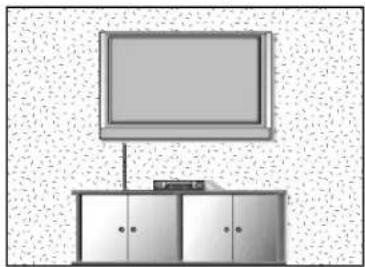
The TV can be installed in various ways such as on a wall, or on a desktop etc.
The TV is designed to be mounted horizontally.
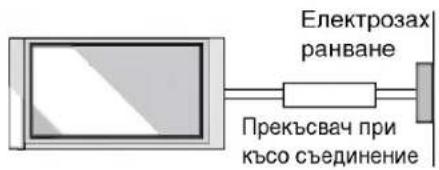
GROUNDING
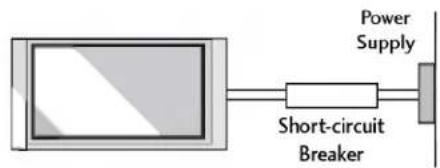
Ensure that you connect the earth ground wire to prevent possible electric shock. If grounding methods are not possible, have a qualified electrician install a separate circuit breaker. Do not try to ground the unit by connecting it to telephone wires, lightening rods, or gas pipes.
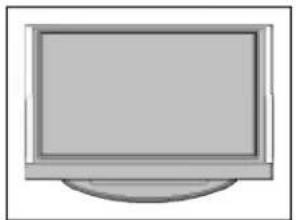
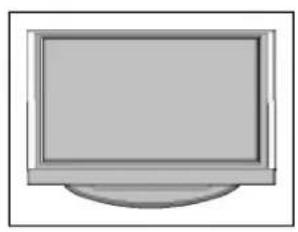
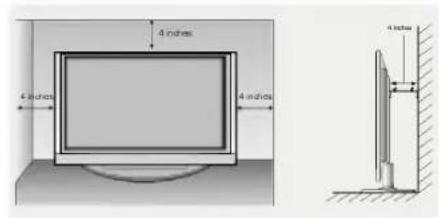
Desktop Pedestal Installation
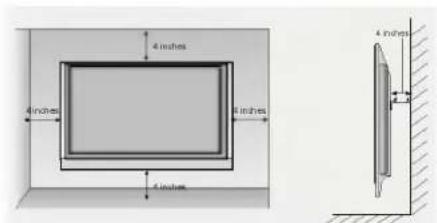
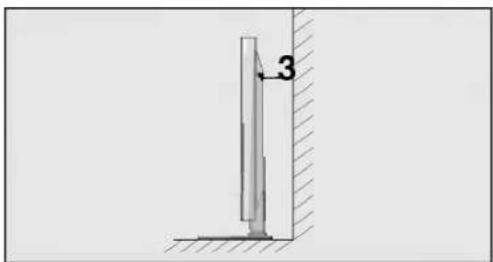
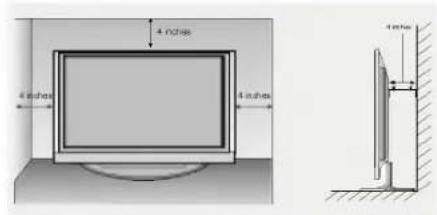
For proper ventilation, allow a clearance of 4^ on each side and from the wall.
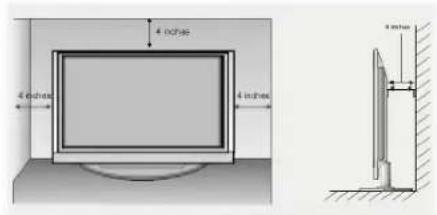
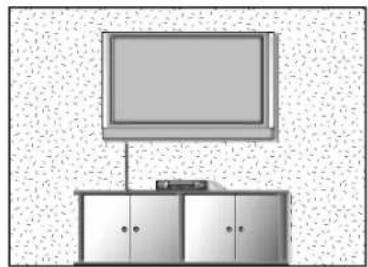
Wall Mount: Horizontal installation
For proper ventilation, allow a clearance of 4^ on each side and from the wall. Detailed installation instructions are available from your dealer, see the optional Tilt Wall Mounting Bracket Installation and Setup Guide.
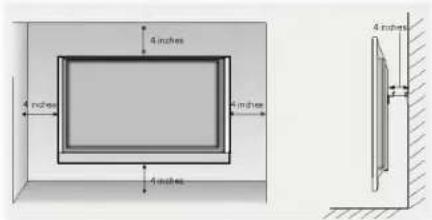
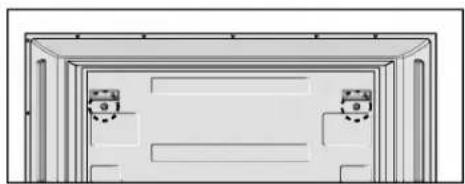
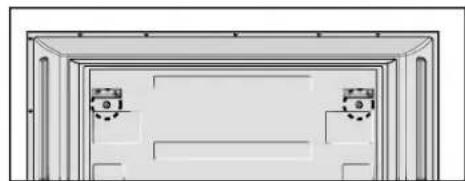
Remove two screws of the backside of the set before installing the wall mounting bracket.
HOW TO JOIN THE PRODUCT ASSEMBLY TO THE WALL TO PROTECT THE SET TUMBLING
Set it up close to the wall so the product doesn't fall over when it is pushed backwards.
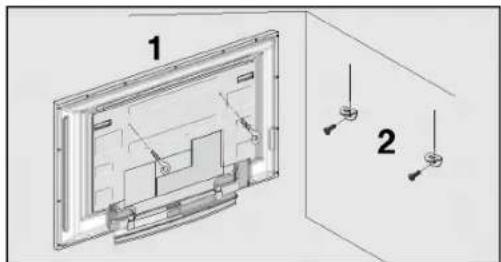
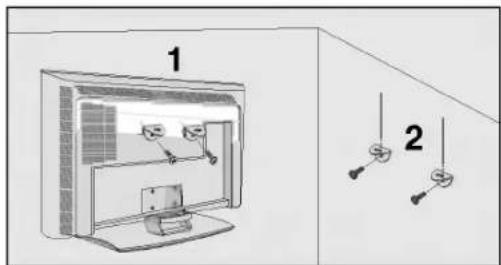
The instructions shown below is a safer way to set up the product, which is to fix it on the wall so the product doesn't fall over when it is pulled in the forward direction. It will prevent the product from falling forward and hurting people. It will also prevent the product from damage caused by fall. Please make sure that children don't climb on or hang from the product.
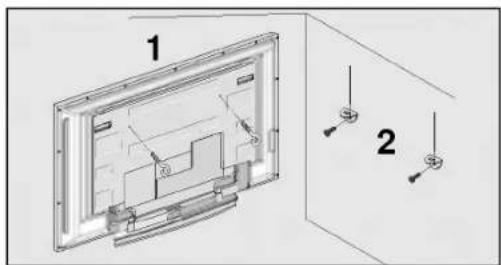
42PC1RV, 42PC3RV, 42PC3RA*
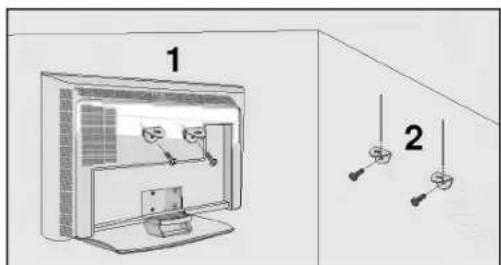
26LC2R*, 27LC2R*, 32LC2R*, 32LC3R*
Use the eye-bolts or TV brackets/bolts to fix the product to the wall as shown in the picture. (If your product has the bolts in the eye-bolts position before inserting the eye-bolts, loosen the bolts.) * Insert the eye-bolts or TV brackets/bolts and tighten them securely in the upper holes.
Secure the wall brackets with the bolts (not provided as parts of the product, must purchase separately) on the wall. Match the height of the bracket that is mounted on the wall.
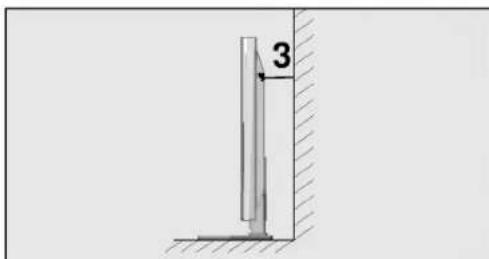
Use a sturdy rope (not provided as parts of the product, must purchase separately) to tie the product. It is safer to tie the rope so it becomes horizontal between the wall and the product.
NOTE
When moving the product to another place undo the ropes first.
Use a product holder or a cabinet that is big and strong enough for the size and weight of the product.
To use the product safely make sure that the height of the bracket that is mounted on the wall is same as that of the product.
CONNECTIONS & SETUP
To prevent the equipment damage, never plug in any power cords until you have finished connecting all equipment.
ANTENNA CONNECTION
For optimum picture quality, adjust antenna direction.
An antenna cable and converter are not supplied.
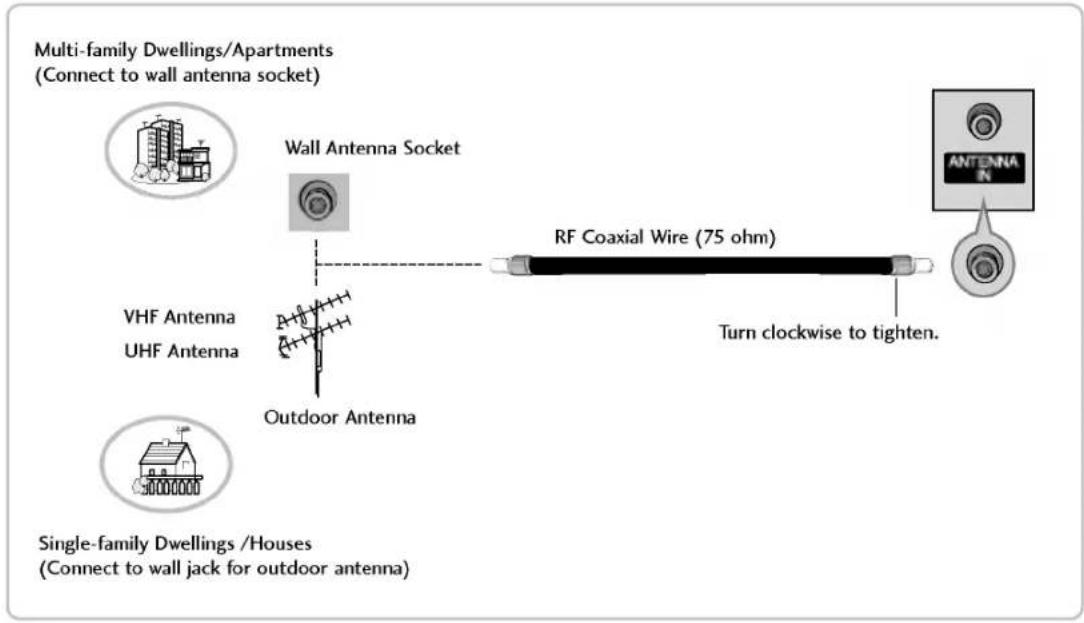
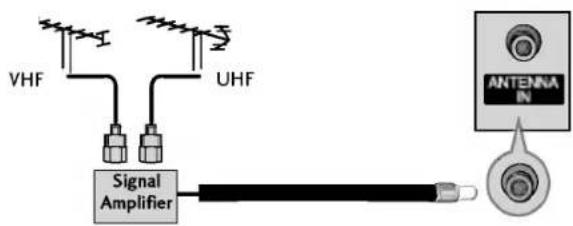
In poor signal areas, to get better picture quality, install a signal amplifier to the antenna as shown to the right.
If signal needs to be split for two TVs, use an antenna signal splitter for connection.
TURNING THE TV ON
If your TV will be turned on, you will be able to use its features.
Turning on the TV

First, connect power cord correctly.
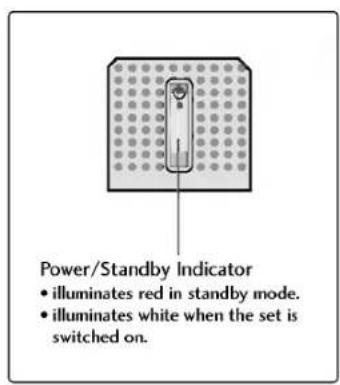
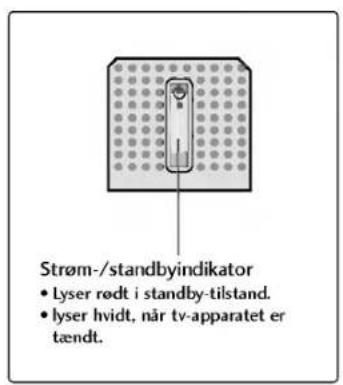
At this moment, the TV switches to standby mode.
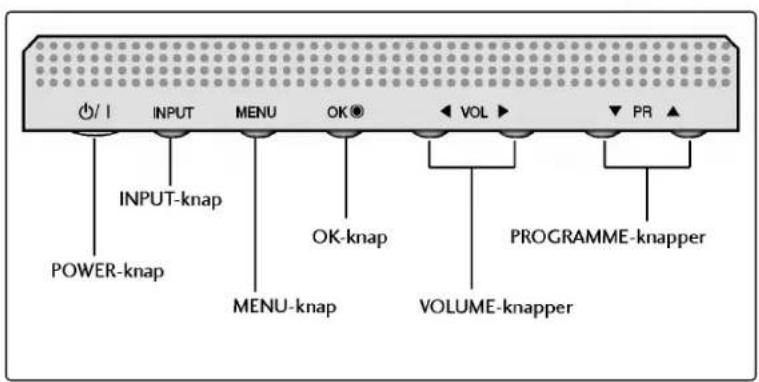
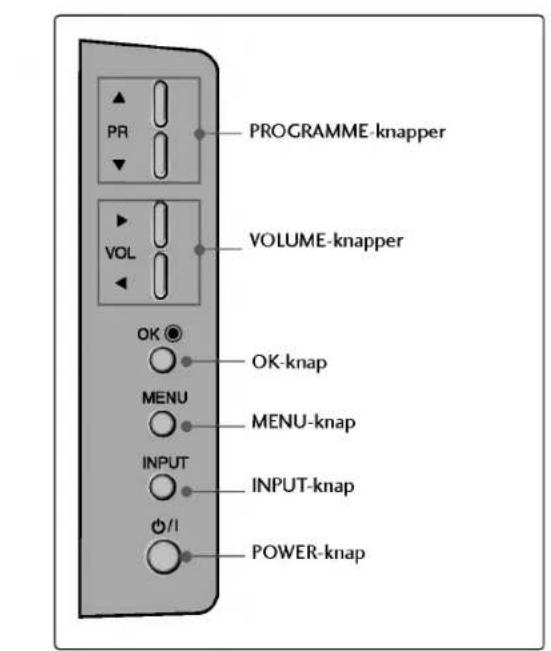
In standby mode to turn TV on, press the /1 , INPUT, PR / button on the TV or press the POWER, TV,
INPUT, PR +/-, Number(0~9) button on the remote control and then the TV will switch on.
Volume Adjustment

Press the VOL +/- button to adjust the volume.

If you want to switch the sound off, press the MUTE button.
You can cancel this function by pressing the MUTE, VOL +/- or I/II button.
Programme selection

Press the PR +/- or NUMBER button to select a programme number.
NOTE
If you intend to be away on vacation, disconnect the power plug from wall power outlet.
CONNECTIONS & SETUP
On-Screen Menu Language / Country Selection
Installation guide menu appears on TV screen when it is turned on for the first time.

Press the / / / button and then, OK button to select your desired language.

Press the / / button and then, OK button to select your country.
- If you want to change Language/ Country selection

Press the MENU button and then use / button to select the Special menu.

Press the button and then use / button to select Language. The menus can be shown on the screen in the selected language. Or, Press the button and then use / button to select Country.

Press the button and then use / button to select your desired language or country.

Press the OK button

Press the EXIT button to return to normal TV viewing.

NOTE
If you don't finish set up Installation Guide by pressing EXIT button or time out of OSD (On Screen Display) display, it will continuously appear until completing set up whenever the set is turned on.
If you select wrong local country, the teletext may not appear correctly on the screen and some problem may happen during teletext operation.
Arab and Hebrew are added to Country of Installation Guide according to the countries which using Arab and Hebrew languages.
SPECIAL FUNCTIONS
TELETEXT
This feature is not available in all countries.
Teletext is a free service broadcast by most TV stations which gives up-to-the-minute information on news, weather, television programmes, share prices and many other topics.
The teletext decoder of this TV can support the SIMPLE, TOP and FASTEXT systems. SIMPLE (standard teletext) consists of a number of pages which are selected by directly entering the corresponding page number. TOP and FASTEXT are more modern methods allowing quick and easy selection of teletext information.
Switch on/off
Press the TEXT button to switch to teletext. The initial page or last page appears on the screen.
Two page numbers, TV station name, date and time are displayed on the screen headline. The first page number indicates your selection, while the second shows the current page displayed.
Press the TEXT or EXIT button to switch off teletext. The previous mode reappears.
SIMPLE Text
Page selection
Enter the desired page number as a three digit number with the NUMBER buttons. If during selection you press a wrong number, you must complete the three digit number and then re-enter the correct page number.
The PR + / - button can be used to select the preceding or following page.
TOP Text
The user guide displays four fields-red, green, yellow and blue at the bottom of the screen. The yellow field denotes the next group and the blue field indicates the next block.
■ Block / group / page selection
With the blue button you can progress from block to block.
Use the yellow button to proceed to the next group with automatic overflow to the next block.
With the green button you can proceed to the next existing page with automatic overflow to the next group. Alternatively the PR+ button can be used.
The red button permits to return to previous selection. Alternatively the PR- button can be used.
Direct page selection
Corresponding to the SIMPLE teletext mode, you can select a page by entering it as a three digit number using the NUMBER buttons in TOP mode.
FASTEXT
The teletext pages are colour coded along the bottom of the screen and are selected by pressing the corresponding coloured button.
Page selection
Press the button to select the index page.
You can select the pages which are colour coded along the bottom line with the same coloured buttons.
Corresponding to the SIMPLE teletext mode, you can select a page by entering its three digit page number with the NUMBER buttons in FASTEXT mode.
The PR + / - button can be used to select the preceding or following page.
TV MENU Setting up TV stations
ON SCREEN MENUS SELECTION AND ADJUSTMENT
Your TV's OSD (On Screen Display) may differ slightly from what is shown in this manual. The OSD mainly use pictures for the 42PC1RV, 42PC3RV, 42PC3RA*.
Press the MENU button and then / button to display each menu.
Press the button and then / button to select a menu item.
Change the setting of an item in the sub or pull-down menu with / button. You can move to the higher level menu by pressing the OK or MENU button.
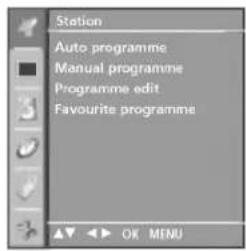
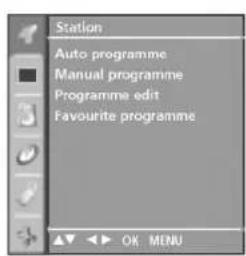
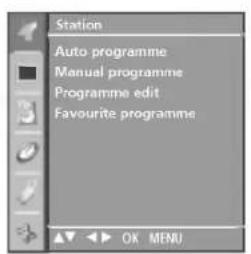
Station menu

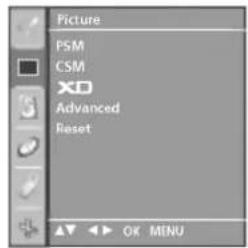
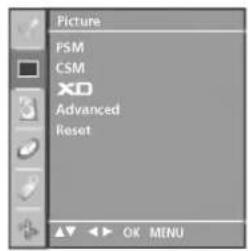
Picture menu

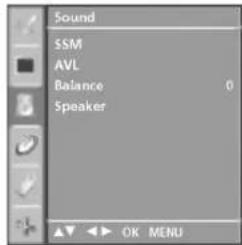
Sound menu
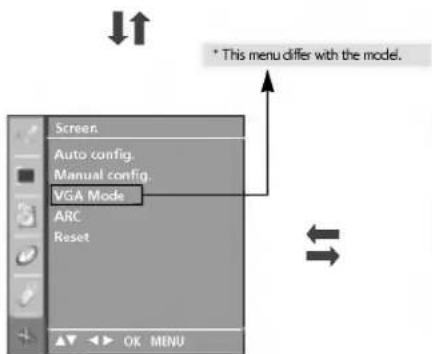
Screen menu
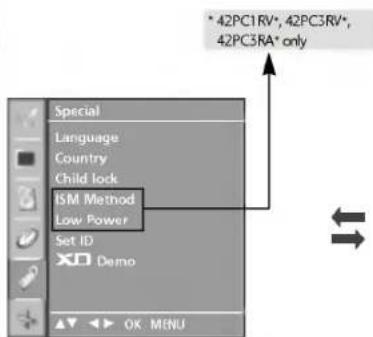
Special menu

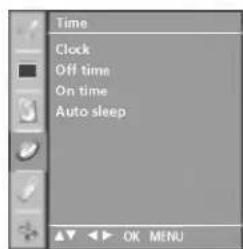
Time menu

NOTE
a. The OSD (On Screen Display) function enables you to adjust the screen status conveniently since it provides graphical presentation.
b. In this manual, the OSD (On Screen Display) may be different from your TV's because it is just example to help the TV operation.
c. In the teletext mode, menus are not displayed
AUTO PROGRAMME TUNING
Up to 100 TV stations can be stored by programme numbers (0 to 99). Once you have preset the stations, you will be able to use the PR + / - or NUMBER buttons to scan the stations you have programmed. Stations can be tuned using automatic or manual modes.
All stations that can be received are stored by this method. It is recommended that you use auto programme during installation of this set.

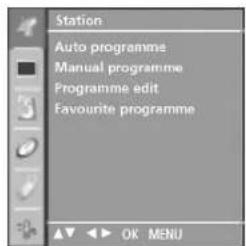
Press the MENU button and then / button to select the Station menu.

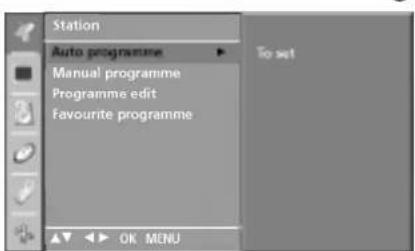
Press the button and then / button to select Auto programme.

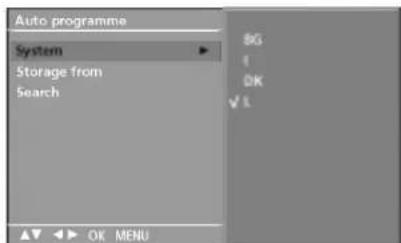
Press the button and then / button to select System.

Press the / button to select a TV system menu; BG: PAL B/G, SECAM B/G (Europe / East Europe / Asia / New Zealand / M.East / Africa / Australia) I: PAL I/II (U.K. / Ireland / Hong Kong / South Africa) DK: PAL D/K, SECAM D/K (East Europe / China / Africa / CIS) L: SECAM L/L' (France) M: (USA / Korea / Philippines) (option)

Press the / button to select Storage from.

Press the button or NUMBER buttons to select the beginning programme number. If you use NUMBER buttons, any number under 10 is entered with a numeric '0' in front of it, i.e. 05^ for 5.

Press the / button to select Search.

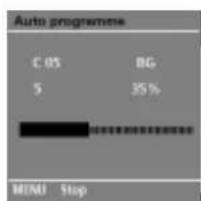
Press the button to begin auto programming. All receivable stations are stored. The station name is stored for stations which broadcast VPS (Video Programme Service), PDC (Programme Delivery Control) or TELETEXT data. If no station name can be assigned to a station, the channel number is assigned and stored as C (V/UHF 01-69) or S (Cable 01-47), followed by a number.
To stop auto programming, press the MENU button. When auto programming is completed, the Programme edit menu appears on the screen. See the Programme edit section to edit the stored programme.

Press the EXIT button to return to normal TV viewing.
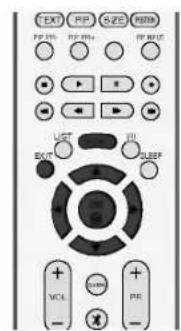
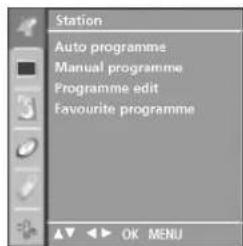
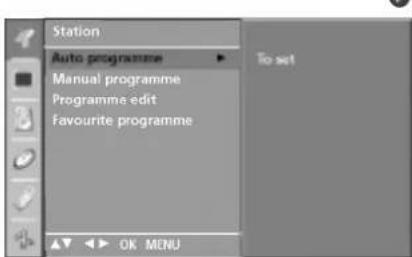
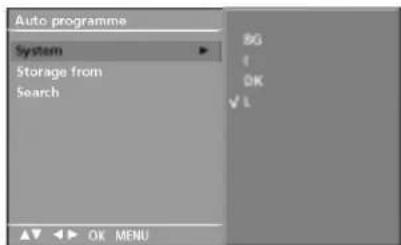
34567
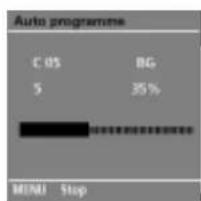
APPENDIX
TROUBLESHOOTING CHECKLIST
| The operation does not work normally. | |
| The remote control doesn't work | ■ Check to see if there is any object between the product and the remote control causing obstruction. ■ Are batteries installed with correct polarity (+ to +, - to -)? ■ Correct remote operating mode set: TV, VCR etc.? ■ Install new batteries. |
| Power is suddenly turned off | ■ Is the sleep timer set? ■ Check the power control settings. Power interrupted ■ No broadcast on station tuned with Auto off activated. |
| The video function does not work. | |
| No picture & No sound | ■ Check whether the product is turned on. ■ Try another channel. The problem may be with the broadcast. ■ Is the power cord inserted into wall power outlet? ■ Check your antenna direction and/or location. ■ Test the wall power outlet, plug another product's power cord into the outlet where the product's power cord was plugged in. |
| Picture appears slowly after switching on | ■ This is normal, the image is muted during the product startup process. Please contact your service center, if the picture has not appeared after five minutes. |
| No or poor color or poor picture | ■ Adjust Color in menu option. ■ Keep a sufficient distance between the product and the VCR. ■ Try another channel. The problem may be with the broadcast. ■ Are the video cables installed properly? ■ Activate any function to restore the brightness of the picture. |
| Horizontal/vertical bars or picture shaking | ■ Check for local interference such as an electrical appliance or power tool. |
| Poor reception on some channels | ■ Station or cable product experiencing problems, tune to another station. ■ Station signal is weak, reorient antenna to receive weaker station. ■ Check for sources of possible interference. |
| Lines or streaks in pictures | ■ Check antenna (Change the direction of the antenna). |
| The audio function does not work. | |
| Picture OK & No sound | Press the VOL+/- (or Volume) button. Sound muted? Press MUTE button. Try another channel. The problem may be with the broadcast. Are the audio cables installed properly? |
| No output from one of the speakers | Adjust Balance in menu option. |
| Unusual sound from inside the product | A change in ambient humidity or temperature may result in an unusual noise when the product is turned on or off and does not indicate a fault with the product. |
| There is a problem in PC mode. (Only PC mode applied) | |
| The signal is out of range. | ■ Adjust resolution, horizontal frequency, or vertical frequency. ■ Check the input source. |
| Vertical bar or stripe on back-ground & Horizontal Noise & Incorrect position | ■ Work the Auto configure or adjust clock, phase, or H/V position. |
| Screen colour is unstable or single colour | ■ Check the signal cable. ■ Reinstall the PC video card. |
MAINTENANCE
Early malfunctions can be prevented. Careful and regular cleaning can extend the amount of time you will have your new TV. Be sure to turn the power off and unplug the power cord before you begin any cleaning.
Cleaning the Screen

Here's a great way to keep the dust off your screen for a while. Wet a soft cloth in a mixture of lukewarm water and a little fabric softener or dish washing detergent. Wring the cloth until it's almost dry, and then use it to wipe the screen.

Make sure the excess water is off the screen, and then let it air-dry before you turn on your TV.
Cleaning the Cabinet
To remove dirt or dust, wipe the cabinet with a soft, dry, lint-free cloth.
Please be sure not to use a wet cloth.
Extended Absence
CAUTION
If you expect to leave your TV dormant for a long time (such as a vacation), it's a good idea to unplug the power cord to protect against possible damage from lightning or power surges.
LG Electronics Inc.
S_3 = 7 · 2^3

LG
Connect your wired remote control here.
Entree RGB/Audio
L :SECAM L/L' (France)
For optimum picture quality, adjust antenna direction.
An antenna cable and converter are not supplied.
Wandmontage: horizontal installation
THAEOPAESHLCD THAEOPAESHPLASMA
O△HΓIEΞ XΕΙΡΙΣΜΟΥ
MONTEEA
MONTEA THAEOPA2EQN
THAEOPA2EON
PLASMA
LCD
42PC1RV*
26LC2R*
42PC3RV*
27LC2R*
42PC3RA*
32LC2R*
32LC3R*
Iapakaloue diaaote npoekta auto to yxepidio niv n Ieaupyia tnc oukeunc oac.
BG: PAL B/G, SECAM B/G (Eupwn/AvatoAikn Eupwn/Aoi/Ae Znλavδia/M.
AvatoAappik/AuotpaAia)
A hangero beallitasat a VOL + / - gomb megnyomasavalvegezheti el.

L :SECAM L/L' (France)
BG: PAL B/G, SECAM B/G (Europa/Kelet Europa/Azsa/Ui Zeland/Kozep Kelet/Afrika/Ausztralia)
I : PAL I/II (Egyesult Kiralysag/Irorszag/Hong Kong/Del Afrika)
DK: PAL D/K, SECAM D/K (Kelet Europa/Kina/Afrika/CIS)
M: (USA / Korea / Philippines) (option)

Modely LCD TV Modely plazmovych TV
26LC2R 42PC1RV
27LC2R 42PC3RV
32LC2R 42PC3RA
32LC3R*
PRED POUZIVANIM PRISTROJA SI STAROSTLVO
PRECITAJTE TENTO NAVOD NA POUZIVANIE A USCHOVAJTE HO PRE PRIPAD POTREBY.
POZNACTE SI OISLO MODELU A SERIOVE OISLO PRISTROJA. POZRITE SI STITOK NA ZADNEJ STRANE KRYTU A V PRIPADE OPRAVY POSKYTNITE INFORMACIE Z NEHO SVOJMU
PREDAJCOVI.
- Mohl by vaz zaidhniuf elektricky prad alelo by saproduct
- mahol pokdikf.
Pri premiesthovani uchopte produkt tak, aby panel smeroval dopredu, prichom ho drzte oboma rukami. - Ak vam spadne, poskodny produkt by mohol spoosob zaah elektrikym prudom alho pojar. Ak je potrebna oprava, kontaktuji stevnié streskido.

BG: PAL B/C, SECAM B/G (Europe / East Europe / Asia / New Zealand / M.East / Africa / Australia)
I: PAL I/II (U.K. / Ireland / Hong Kong / South Africa)
DK: PAL D/K, SECAM D/K (East Europe / China / Africa / CIS)
L:SECAM L/L' (France)
M: (USA / Korea / Philippines) (option)
MOEN TEJEBN3OPNCTEHQKPC TALEH DNCNIEI
MODEJI N TELEBUN3OPN CIIA3MEH INCINJEI
26LC2R*
42PC1RV*
27LC2B
42PC3RV*
32LC2R
42PC3RA*
32LC3R*
MOn, npOHTe BHHMaTeHToBa pKOBODCTBO, npEn Da BKnIOHTe TeneBn3opa. 3ana3e ro 3a cnPBAKB.
3aannne HOMepa Ha Modena I cepinHHH OMEp Ha TeJeBn3opa.
BnKTe HaIina Cbpy JauHTo Kaanue I ro cbo6eTe Ha npOaBaHa, Korato Bn NotpH6Ba cepBn3.
Pa3shpeHo pBkoBOcTBo 3a CO6CTBeHnKa, KOeTO cbIbPka DonbJIHnTeJIHn FOyHKuHn Ha Te3n TeJeBn3Opn LG ce HAMnpa Ha CD-ROM-a B eJektpoHHa φopMa.
3a da ro npoyeTe, Heo6xOIMO e da OTBOpHTe n36paHn faiNoBe ot Baunr KOMNtbp cah6dE h CbC CD-ROM yctpoIcTBO.
14_CD OM-bu 5/27/06 11:06 AM Page 2
Yka3aHn 3a 6e30nacHOCT
- Mon, npOyTeTe BnMaTeHNo Te3n PpeNa3Hm MepK, Ppeu Da nonBaTe npOyKta.
IIOOMU HA YK3AHAHTA.
PNEVDYIPEXKDEHNE BHIMAHIE
Ako He obphete BHMaHHe Ha npdynpdttnHO cbOeHHe, MOke cepno3HO da noctpaTe, a MOke da HMA BepoTHOCOT 3nONyKA INN CmBPT. Ako He obphete BHMaHHe Ha cbOeHHe 3a BHMaHHe, MOke neKo da noctpaTe HIN npoykTb da ce nobpeD.
PpeNa3Hm MepKn npn HnctaInpaHe Ha npodykta
I PEPDYNPPEKDEHNE
IpbKte npOykta daHcHOTNtOHnHa TOnHHa, HApIMep OTONINTEHNH ypeH. Te Morat da DoeBdE do TKOB yadap, NoKap, NOpeDa NIN DAFOPMauH.
He non3aIte npOyKta bB BnAaXHa NOMeUeHH, KATO 6BaHn HApNmEe, INH Ha MeCTa, KbTeo MMA BEPOHRTOCT To Da C9 N3MKoP. -To8a MoKe Ta pHnnn NOKap KIN da Boede Do TKOB yIAP.
Ako yoeuata MnHc HnMn HnHa HeuO pyrO nnnyBate CTpaHH uMoBE, hBaDeTe 3axpaHauK BaeN oT KOnkTA Ce OBeaTe BepKB3A. Ako npoJbIckn da nonBate npDyTK, 6e3 da BEMeTE CBoTBHTHe MepK, MoKe Da NocEnBa TOKOB yapn noNopak
BHIMAHNE
VHCTaIpaIte npOyKTA Ha paBHO nCTaBIOH MPOTO, KbTeo HMA OANCHOCT O TnAae. -Ako npOyKToBbe3Ncychat,MOKe Da ce HapAHIne nn da ro Cynite.
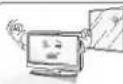
He n3naarne npodykra Ha npka cnbHcBeBa CBETnHa. -TMOKE da ro nopepa

He noctabnIte npodykTa BbB BrpaedHa
Hhctanaqna, HanpImep 6n6nToTeKa Hn
CEKIO.
- Ho0xOIMMa e BHTnlaqna.
PpeIpa3Hm MepKn IIO OTHoWeHne Ha eJIeKtpo3aXpaHbHaHTo
1PENEYIPPEKDEHNE

3aepaaabnnt Ka6e TaPbBa Da 6b6e CbpaHKnB3
3a3eHa Bepira.
-MoKe Da Ba Ydaop TOK mnn da Ce HapHnre.
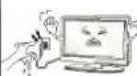
He nnae 10 c mokpn pue. OceBn Toa, aKu ndHa 10ncena e MOKbpnn 3anpauen, nocywete 10ncenra 4nno nn 3b6pne npxa. -Pekomepnata anara moke da npinnn TOKB yap.
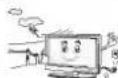
No Bpeme Ha rpoMeBTHHbApyr HKnHHe3axpaHbAAHnAHTEHnHkKaen. -Moxe da yu npn ToK nna Pa36yXne noxap.
BHIMAHNE
3aJIITETe KABEOTI OF M3HcEKM INM MEKAHCHY
yepkdaJIaN DEJTHBA KATO YCKBaHE, NpEBbAHe,
PpELLIBaHE, 3ATmKCAHcB C BPTA HACTbNA
OObLlAte OCO6BO BHUMAHTH HA UENICNTTE,
KOHTAKTITNE TOHKATA, OT KOITTO KABeJIb KIN43A
ypeDA.
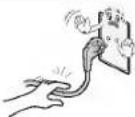
IpeDn3HmepKn npn MeCTeHa npOyKta
I PENEYIPPEKDEHNE
IpykTbT P86ba Da 6bJe N3KIOUeHO.
Pepda da MeCTNEIpykTA, BCHKN KaBEN
TP86ba Da6bNatB4aENH.
-MoKe Da Ba ydpn ToK mnn npOyKT Ta ce nOBepn
BHUMAHNE
He ynpnne npoykta, KOrato ro MeCTHte. -Moke da Ba ydpn TOK nn npoykTb Ta ce nOBpe.
PAnenbI rpn6ba da 6bue 06bphat Hanpe n da Ce dbpnx C Dbe pue npn MecTeHe. -Ako NanyChene npOyKTA, NopeDnHrN TnpOyKT MOKe Da npEa3Bka ToKOB yap nnn nokap C BpKte Ce CbC cepBa3a peMOT
Ppea3HmepKn npn noJ3BaHe Ha npodykta
I PEPDYNPPEKDEHNE
He paaHbAe, He pemOHpAe Hne npabete npnBBOIN NmMEHEHNO npOpykTA.
-TO8A MOKJ DE IpeD3BKA NOKAP INI JIJIONIOYKA OT KOYOK VADJ.
C-BjFpKeCe CbC BcBpBa3a 3a npBoBeK, KaBnBpRapHe pnnOMT.
3aHaHAMnIte ONACHOCTTA O NcHAP KIN TOKOB
ynap, He 1AraIae Toba YCTPOJNCTBO HA IbXk INN
Bnara.
YctpoiCTbTO He 6bHa da 6bDa 13naraHO Ha KANKIN
PiBCK IN HIKAKBn PbHn C THeOCTn PpEDmEi,
BaHn HApHMeR, He 6bHa da 6bDat nOCTABHH Bbpy
Hero.
BHIMAHNE
3aBCKAKBn pemOHTHn DeHIOCTn CeObpaIte KEMKANMIXUAPAH CepBENHEN PEPCOAH.C epBxHO 06cnyKaBaHe e HeoBXoDmIO, KOATO anapatBe b6nn NOpeHn No HRAKbTB HauHH HAnpIMeep NOpeHn 3axpaHbau KaBen INn UenCen, M3TEKTA NtEOCH NTn NnADHn NPEDMeTn B anapata, anapatBe b6nn M3NOXeH NaBkDn INn BNATA, He apotn HopMaHnNo nE 6bn M3YCKaH.
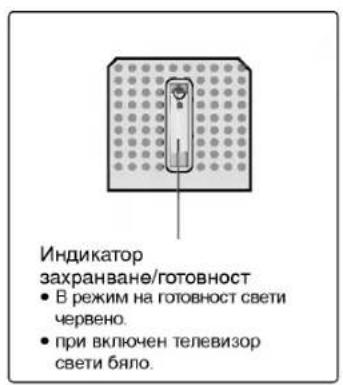
yBOD
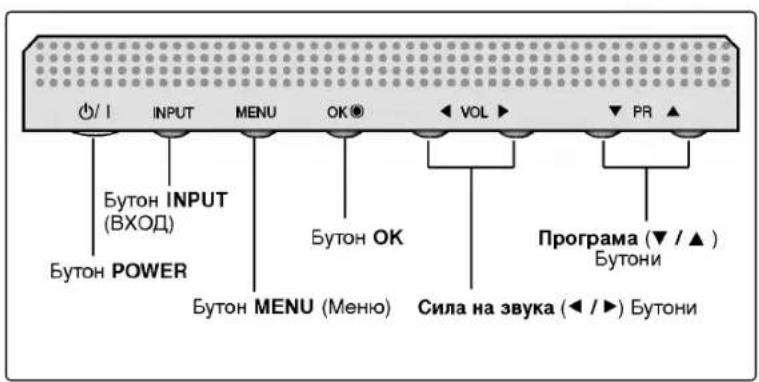
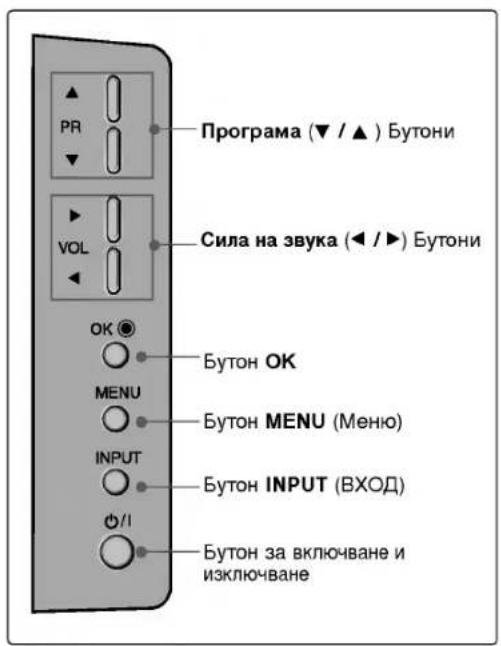
PEYJATOPN
ToBa e onpocTeHo n3o6paXeHne Ha npedHnnaHen. Ioka3aHTo TyK MoKe da ce pa3nuaBa DOHaKbDe OT Baunr TeNeBu3Op.
PerynaTopnHa npedHnaHeI
Bb3MOXHOCTN 3A CBbP3BAHE
ToBa e onpocTeHO npEeCTaBHe Ha 3aHOTo Ta6No. POKa3aHOTo TyK MOKe Da e B IN3BeCTHa CTeneH pa3nUHO OT ToBa HA BaUNA TENEuBn3Op.
Bb3MOxHOCtN 3a Cbbp3BaHe Ha 3aHnnaHn
έнэзdo Euro Scart (AV1/AV2)
KbM Te3n rHe3da MoKeTe Da CbBp3BaTe ype3 Scart BxOJaU INN INXoJau CNHAn KbM BBHJHO YCTPOICTBO.
BxOJ 3a KOMnHOeHTHO BnDEo
Kbmt3n rHe3da MoKeTe da CbPKeTe yCTPOIcTBOC KOMNHOHTeAynO/BnEO CnHAn.
I Nopt Remote Control (DnctaHcnoHNO ynpablenne)
TyrkCBpKTeBaWToIINCTaHIOHOynpabHeHcKa6en.
Bxoq RGB/Audio (RGB/Aydo)
Cbpxkete HxOaunn CnHnHa Ha KOMNtBpeh MOHITOP KbM CbOTBETHn NOP3a BXoAUN, CnHnA.
HDMI (NHTepcnc 3a Meu C Bucoka pa3neIteHa cnoc6hct)
CbbpxteHDMICnHaJI KbM HDMI nopT qpe3 HDMI ka6en.
THe3do 3a Ka6en 3a eJEnKtpo3axpaHbAne To3n TeBn3Op pa60n C npOMeHNHB TOK. HanpeXeHNEto e yka3aHO Ha cTpaHnCATA cbc CneuNkauNTa. Hkora He ce ONNTBaTe da N3non3Be TneBn3Opa Cbc 3axpaHbAe C NOCTOHAHE TOK.
BxoD S-Video
3a Cbbp3BaHe Ha n3xoJaCnHAn S-Video ot S-VIDEO yctpoCTBO.
Bxod Audio/Video (Aynio/Bnneo)
KbM Te3n rHe3da MoKeTe Da CbBp3BaTe 4pe3 ayIO/BNdeo IxOJa, CNrHAn OT BbHuHO yCTPOICTBO.
RS-232C BXOJEN (KOHTPON/CEPBN3) IOPT
CbpxTe cepHnHn NOP Ha ynpaBnBaUcToYcTpoIcTBo KbM RS-232C KOHeKTopaHa TeneBnOpa.
M3XoJ 3a npOMeHnB ayDnO cnHnA
Cbpxe TbHnE h ycnBATEI INI IO6aBETc b6ybp KbMaBaTa CNTEMA 3a CbpayH,3BYK.
BxOД3aANTeHa
CbpxTe eHnHte CnHAnn KbM TOBa rHe3do.
AUYNO BXOJ
NMa Bb3MOXHOCTn 3a Cbbp3BaHe 3a npocnyuBaHe Ha CTpeo 3ByK OT BbHsHo yCTPOIcTB0.
BnDEO BXOJ
CbP3Ba BnDcEO CnHaJ ON BnDeo yCTpOJCTBO..
yBOI
Функцин Ha 6byToHnte Ha nCTaHcNoHHoto ynpabIeHne
Korato n3non3BaTe dncTaHnOHHoTo ynpaBneHHe, HacOyBaTe ro KbM ceH3opa Ha TeneBn3opa.
MOHTAX
MOHTAX HA CTOIKA
Ta3n cyHKUH He e HauuHa 3a BCnKn CtpaHn.
1
2
3
4
IocTabete TeneBn3opa C eKpaHa HaOny Bbpxy Bb3PnaBHnca Nm MEka Kbpna, KaKTo e NOKa3aHO Ha Dnpya 1.
PpeIa pa3rbpHete cToikkata,yBepTe ce,ye JBete 3aknouaKn (A)OTdoNHaTa CtpaHa Ha CTOnkata ca n36yTaHn HABbH..
N3terIeTe cToKata, KaKTo e noka3aHo no-rope Ha Dnypn 2\~3.
Cnep KaTo pa3rbpHete cTOnKaTa, MoNn PbXHete n 3aterHeTe BnHTOBete B dynKnte (B) Ha donHaTa. qact Ha cTOnKaTa.
Korato Cbbp3BaTe Ka6eInTe KbM cToiKaTa, HE OCBO6oxJaBaIte 6nOKuPoBkata (C).
Toba MoKe Da DoBeHe Do NaHa He Ha anapaTa, CepNo3Hn TeneCHn HapaHbHaHn N nobpeHn Ha anapata.
BENEKKA
Tyr moke da e noka3aHo Heo no-pa3nHoo OT Baunr TeneBn3Op.
Korato 3aTbapHe cToiKaTa 3a cbXpaHHe
IbpoN3BaTe BnHTOBeOT DynKIne (B) B DonHaT aact Ha cToiKa. Cne TOBa n3TerHete DBeTe KyKn (D) OT OJHATA qACT Ha cToiKa t N r CrbHeTe KbM TbpaHa TeneBnOpa.
CneI KaTo R crbHete, 6yTHeTe HABbH DBeTe 3aKJIouaJIKN (A) B DonHaT a Yact Ha cToiKaTa.
MOHTAX HA CTOIKA (MoHTax Ha CToIka 3a 32LC2R*)

IocTaBete BnMaTeHNo TeNeBu3Opa c ekpaHa HaOny Bbpy MeKa NOBbpxHocT, KOrTo 3aNa3N TeNeBu3Opa n EkpaHa ot nobpeda.

IocTabete cToiKaTa Ha TeJIeBn3Opa KaKTo e NOKa3aHO.

3aterheDobpe4-Te60nTaHaTbp6aHa TeBUN3OpaBNpeBnDEHHTeOTBOpN.
3a da pa3rIeIate PbKOBOCTBOTO 3a notpe6nteH or CD-ROM ncka
3a da paarnte PkoBOnCTBOTo 3a noTpe6nten O T CD-ROM ncka, HbBaHn nepcoHaJIeH KOMIOIbtp Tp6Ba Da mHa NcTaHpaH Adobe Acrobat Reader.
PAnka YACORDT Ha CD-ROM nIcKa cIbIbPa IINCTaIIauHnHIne nporpaMn 3a pa3nnHIne e3n.
Ako Xenaete da INCTaIInPate Te3n nporpaMn, OTBopete My Computer OTBopete "LG" OTBopete "ACRORDT" UpaKHeTe DBykPatHO BbPx BAuNIA e3NK.
3a da pa3nneata PkoBOnCTBoto 3a nortpe6nten
AaIOBETe Ha PbKOBOCTBOTO 3a NOTpe6HTENr Ca BKNIOUeHN B IOCTABEHN CD-ROM Dnck. IocTabete DoCTABEHN CD-ROM nck B CD-ROM yctpoIcTBoTo HA BAUNI nepcoHaneH KOMnIOTpbp.
CneiMaNkoye6ctpaHnUataHaCD-ROMdNcKaueceOTBOpAABToMaTHuHO (camo 3aWindows). Akoye6CTpaHnUataHeceNoBnABToMaTHyO,OTBopTe paIHaPbKOBODCTBOrO3aNotpeBnten InpKeTHo.OTBopTe My Computer OTBopTe LG OTBopTe paIN "index.htm".
MOHTAX
TeNEBn3OpbT MoKe Da 6bJe MOHTupaH No pa3NmHn HaHH, HAnpMep, Ha CTeHa, Bbpxy bIpo np.
TeneBn3OpbTe npedHa3HaueH 3a XOpN3OHTaJIe H MoTHaK.
3A3EMRAHE
YBepTe ce, ye Cbbp3BaTe KNuca 3a 3a3eMBAHe, 3a da npedOTbpaTne TOKOB ynap. Ako He e Bb3MOxHO da CE HnpaBN 3a3eMBAHe, NOBkaTe KBaNΦuPah ENEKTPoTeXnK Da INHCTaInpa OTdEeN PpeKbCBaH Baeprata. He ce ONNTBaIte Da 3a3eMnte anapata Upe3 Cbbp3BaHe KbM TeNeΦoHH NaBei, rpbMOOTBOU INI rA3OpBOU.
MOHTAK HA HACTOHATA CTOKA
3a da nma do6po oxnaKdahe, ocTaBepea3cTOrHne 10 cm MeKdy BCAKa cTpaHa n CTeHaTa.
CTeHEH MOHTaX: XOpN3OHTaJIHO NOCTaBAHe
3a da nma do6po oxlaXdaHe, ocTaBeTe pa3ctOHHne 10 cm MeKdy BCaKa cTpaHa n CTeha. TIOpObHn yka3aHn 3a NOCTABAHeto MOKeTe Da NOnyHTe OT BaHn TBpROBeu. BxKTe DOnbHnHTeJIHOTo PbKOBoDcTB O "IOCTABHHe HacTpOka Ha HAKnHOHeHata KOH3OJa 3a CTehE MoHTaK".
CbaTe BbTa BnHa Ha Tbp6a Ha anapata
Ipei Da MOHTnPate KOH3OJaTa 3a MOHTaX Ha
CTeHa.
Kak da ce MOHTnpa KOMnIeKTBt Ha ypeDa KbM CTehata, 3a da ce npedna3n anapata ot ppeo6pbuahe
HCTanipaTe ro B 6n3ocT do cTeHa, Taka ye ypeBt da He naDHe, ako 6bne 6yThat Haazd.
B INHCTpykunnte no-donye daenno 6e3onaceh hauin 3a nHctanipane Ha ypea, KOIto ce c bctoB 3akpenBahe 3a cteHaTata, Taka ye ypebTa Da He naHe, aKO 6bJe 6yTHaB NOcoka H3ad. Taka ue ce npedotBpaTn Na anaHeTo Ha ypea Hnpei, KoETO MOKe Da DOBeEdo HapaHBAhe Ha xopa. Taka ue ce n36erHe i Nobpea Ha ypea npi EBEHTyaHNO naAHe. IorpnKete ce da HMa Bb3MoXHOCT dca Da ce KaBAT Bbpxy ypea nn Da YBCBAT HA Hero.
42PC1RV*, 42PC3RV*, 42PC3RA*
26LC2R*, 27LC2R*, 32LC2R*, 32LC3R*
1 Ⅰ3no3BaIte 6oTobete c yxo Hn KOH3OnITE/6oTobete 3a TeNEBn3opa, 3a da 3akpenite ypeda KbM cTeHaTa, KaKTo e Noka3aHo Ha NIOCTpaunra. (Ako np BaaHn anapat nMa 6oTObe NoctabEHn Ha MecTaHa 6oTobete c yxo npEdu Na ca noCTabeHN 6oTobete c yxo, pa3BnIte rN.) * PbXHETe 6oTobete c yxo Hn KOH3OnITE/6oTobete 3a TeNEBn3opa n rN 3aTeHHeTe 3dpabo B roPHnte dynkn.
3aKpeHTe cTeHHITE KOH30JIc 6oNTOBete 3a CTeHata (He ca npnIOKeHN KATO qACT OT H3dENHeTO, Tp8Ba Da ce KYNAT OTeHNO). Tp8Ba Da harnacnte BncoHATA cbO6pa3HO KOH30JATA, MOHTnpaHa Ha CTeHata.
3nnon3BaIte 3npaBO Bxke (He e npnoKeHO Kato qact O n3dneHTo, Tp6Ba da ce Kynn otJeHNO), 3a Da BbpxKete ypeHa. No-6e3oNaCHO e da BbpxKete BbxKeto NO TaKbB HauHH, ye da 3actaHe XOpu3OHTanHO Mekdy CTeHata uypeHa.
BENEKKA
Korato npemecTBate ypea Ha npyro Macto, npbBO OTkayete Bbxketa.
H3non3BaIte noCTaBka 3a anapatypa Hn WkaΦ, KOITc Ca IOCTaTbUHO rOJIeMn I 3dpaBN, 3a da H3dbpKAT pa3Mepa n TERNO Ha npOyKTA.
3a da n3nnon3BaTe ypea 6e3oNaCHO, ce norpnke Te Ternoto, Koeto MoKe da n3dbpxKa KOH30nata, da e cbuTo, KaTTo TernTo Ha ypea.
CБьР3BAHЯИ HACTPOIKN
3a da n36eHete nobpeHa ycToPcTBaT, He BKnIOuBaIte HnKaKbN 3axpaHbauN Ka6en, npEn da cTe npNKIOUHNI Cbbp3BaHTo Ha BCNUKyCToPcTBa.
Cbbp3BaHe Ha aHTeHa
PerynpuaTe nocokata Ha aHTeHaTa 3a Ha-Do6po KaueCTBO Ha o6pa3a.
AHTeHn Ka6en n npoe0pa3yBaTeH He ca BKnIOueHn B IOCTaKaTa.
MHorofoamnHnnKnnna
(CBp3BaHe cbc cTeHHTo aHTeHHo rHe3do)
BkIIOUbaHe/IM3KJIIOUbaHe
HaTnCHETe 6yToH TEXT, 3a Da BkIIOHtE TeneTeKCTa. Ha ekpaha nIIN3a IbPbATA INI NocNepHATA cTaPAHua. Ha 3arNaBHH peH Ha ekpaha INIIN3aHOMepata Ha IBe cTpaHmU, IMETO HA TEENBMOHNHA KaHAn, DAtaTa H acBt. TbpBHT HOpem Ha cTpaHnca yKa3Ba Baunr h36Op, DOKATO BTOPIR NOKA3Ba HOMepa Ha TeKyuata cTpaHn.
HaTnCHete 6yToH TEXT nnEXIT,3a Da N3KJIIOHTe TEnTeKCTa. IOnBABa Ce npEdoHNrTpeKIM.
TeJTeKCT SIMPLE
I36op Ha cTpaHnua
C uΦpOBITE 6yTOH BBeTeTe XeJIaHr HOMep Ha CTpaHua, CbCTOu Ce OT Tpru cΦpn. Ako npn H36op HATNCHEtE rpeWHa cΦpa, Tp6Ba Da dOnuWeTe TpuuΦpeHr HOpE, CneI KOEt OTHoBO da BBeTe IpaBnHr HOpE Ha CTpaHua.
C6ytoHaPR+/-MOKe da ce 36epe npedxohata nnn cneBaata ctpaHua.
TOP TeKCT (Ta3n xapaKTePncTnka He ce npedna 3a BCnck CTpaHn)
Yka3aTeIAT HMa YeTnpi NOneta - YepBeHO, 3eneHO, XbIIO n CnHbO B DonHata cact Ha ekpaHa. XbIITOT One o6o3HaHaba cneBaAua t rpyna, a CnHbOTO - CneBaun 6nok.
N36op Ha 6IOK /rpyna/ cTpaHnua
CbcsHH6yToH MoKeTe da ce npuBKBaTe 06nok do 6nok.
C KBJTN6 ByTOH Ce PnDnBxBATE NO CNEBaAaTa rpya C ATOMaTHNO npExBpIHe KBM CNEBaAua 6nK.
3 Cbc 3eHn6 ByTOH Ce npDnBnKbATE Do CNEBbAaTa CTpaHnua, aKO NMa TaKaBa, c ABToMaTHHO npExBbPnHe KbM CneBbAaTa rpyna. MoKe Da n3non3BaTe n 6yTOH PR+.
C C yepBHeH 6yToH c BpTaTe KbM npeXoHn36Op. MoKe da n3non3BaTe n 6yToH PR-
DnpeKeTeH n36Op Ha cTpaHnla
KaTo n npTeTeKCT peXmAs SIMPLE moKeTe da n36epTe cTpaHua, KaTo BbBeTe TpuuPpeH HOpE C uΦpOBeNTe 6yToHn B peXm TOP.
FASTEXT
TeTETKCT CTPaHnUHTe Ca KOINpaHN B UBT B DOHATA YAcT Ha ekpaHa N Ce H36NpaT C HAITCKAHe Ha CbOTBETHN URBETEH 6yTOH.
I36op Ha cTpaHnua
HaHtnche6ytoh E1,3a da n36epete yka3aTeNA.
MoKTe Da n36napeCTpaHnUyKa3aHn B CBAr Ha DOJHnA peD, C 6yTOHN B CbUuN CBAr.
KaKTo I npI TeTeKeCT peKmMa SIMPLE MoXeTe Da n36epTe cTpaHnua, KaTO BbBeJeTe TpuuΦpeH Homep C uΦpOBeNTe 6yToHn B peKm FASTEXT.
C6byToHa PR+/- MoKe Ia ce n36epe npexxOHaTa nn cneBaAata CtpaHua.
TELEBn3NOHHO MEHIO HactpoikaHa TeneBn3noHHnte KaHaJI
I36op npereynipaHe Ha ekpaHHmehoTa
OSD (EkpaHHnT nncnne) Ha Baunr TeneBn3Op MoKe Da ce pa3NuaBA OT NOKa3aHOTo B TOBa pkoBOJCTBO.
OSD (EkpaHHHnT nCnne) n3non3Ba Kaptnn 3a 42PC1RV, 42PC3RV, 42PC3RA*.
HaTnchete 6yToH MENU (MeHIO), cneI Koeto 6yToH ▲ /▼, 3a da BnITe BCaKO MeHIO.
2 HatncheTe 6ytoh ▶, cnei Koeto 6ytoh ▲ /▼, 3a da n36epete KOMnHOeHT OT MeHOTO.
3 IpnOMeHETe HAcTpoKaTa B NOIMeHHTO uNn NaDauTo MeHIO C 6yToH / ▶. MoKeTe Da MInHeTe Ha MeHIO Ha No-BuCOKO HnBO, KaTO HaTuChETe 6yToHa OK nnMENU (MeHIO).
MehIO STATION (CtAHnA)

MeHHIO PICTURE (06pa3a)

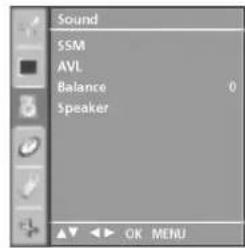
Mehio Sound (aydno)

TOba MeHO 6 pa3NnHoo 3a pa3NnuHHTe MOeHN.
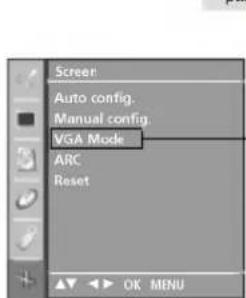
MeHIO SCREEN (EkpaH)

-Cam03a42PC1RV,42PC3RV,42PC3RA
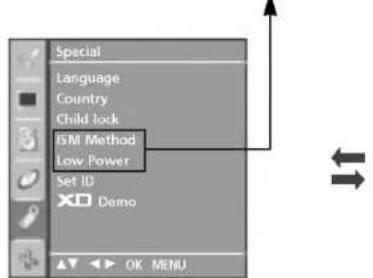
MeHIO SPECIAL (CneuaJIHo

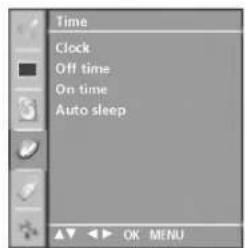
Mehio Time (Bpeme)
Bélejexka
a.ФнкинTa OSD (EkpaHEn nicnneBn daBa Bb3MoXHocT da perynpate ydo6Ho cboTHMeTo Ha ekpaHa, TbN KATO npedCTaBA HOpMaunrTA B rpaΦnueH BnD.
b. B TOBA pBKOBOCTBO OSD (EkpaHEn DnCnne) MoKe Da ce pa3NnuBa OTO BA HA BAUN TeneBn3Op, 3aUTo TOBa e cAmO npMep B NOMou Ha pa6oTata C TeNeBn3opa.
c. B pexkM TeTeKCT He n3n3aT MeHToTa.
ABTOMATNUHa HacTroPoiKa Ha nporpaMnte
Ha HOMepa Ha nporpaMte (0-99) Morat da ce 3anaMeTAT DO 100 TeJeBn3NoHH KaHana.
Cne KaTo 3aJaTe KaHaJIte, c PR + / - mIuΦpOHTe 6byoH ue MoKeTe da npErJekDaTe npOrpaMnPaHNTe KaHJI.
KaHaJIte MOrat Da ce HAcTpoaB aBbOMaTHueH mN pBuH peKMM.
NoTo3nHaunHc 3anaMetraBATBCNknpneMaHn KaHn.
PpenOpbYBaMe BN npn HnCTaInpaHe Ha TeneBn3opa Da
n3non3BaTe aBTOMaTHHOTnpoPamnpaHe.
HaTnCHETe 6yToH MENU (MeHIO), CneI KOeTO 6yToH ▲/ V, 3a da n3bepete MeHIO Station (CTaHnI).
HaTnCHete 6yToH ▶, cIeI KoEto 6yToH ▲/▼, 3a da n36peTe Auto programme (aBTOMaTHUHO nporpaMnpaHe).
3 HATINCHETe 6yToH ▶, cnei Koeto 6yToH ▲/▼, 3a da n36peTe System (CnCTema).
HATINCHETe6yToHaA/,3aJaN36peTeMeHIO3a TENEBU3NOHACNTema;
BG : PAL B/G, SECAM B/G (Ebpona/M30THA Ebpona / Asia / New Zealand / M.East / Africa / Australia)
PAL/II(BenikobpntaHmIIpnaHn/Hong Kong/South Africa)
DK : PAL D/K, SECAM D/K (M304Ha Ebpona / China / Africa / CIS)
L :SECAM L/LX (ΦaHUNA)
M : (USA / Korea / Philippines) (Onu)
5 HATNCHETe / 6yToH,3a da n36epete Storage from (3aIamETBAHe OT).
HaTnchete 6yToHa PR />(IPOIgPAMA)nnu nIePBOInTe 6yToHn,3a Da I3BepeTe HOMepa Ha HauHnata npOrpama.AKo I3non3BaTe UePPOBInTe 6yToHn,Homepata no10 ce BbBexDatc "O"OTnped, HAnp."05"3a 5.
7 HaTncheTeA/ 6yToH,3a da n6epeTe Search.
HaTnchTe 6yToH , 3a da cTapTpTaTe aBtOMaTHUHOTOpnporpaMupaHe.
BcHKn npHeMaHH npOrpaMn ce 3anaMetraBt. Pn KaHnn, KOHTO nIbYBaT VPS (Video Programme Service - yclya 3a BIndeonporpamnpaHe), PDC (Programme Delivery Control - KOnTpON Bbpxy npEoCTabReHTo Ha nporpaMn) nTeTeKCT, ce 3anaMetraBn HmEtO Ha KaHaN.AkHO hKaHaN He ce DaJe HMe, ToI NOnyUbaH OMeH n Ce 3anaMetraBkaTO C (V/UHF 01-69) nnS (Cable 01-47) nIIoc Homepa.
3a da npeycTaHOBITE ABTOMaTHHOTOp nporpaMnpaHe, HATNCHETe 6yToH MENU (MeHIO).
Cnei npNKIOUbaHe Ha aBToMaTHuHOTo nporpaMnPaHe, Ha ekPapa Ce noRABa MeHIO Programme edit (npOMHa Ha nporpama). 3a npOMHa Ha 3anaMeteHa nporpama BwKTe pa3dE "PpOMHa Ha nporpama".
HaTnCHTe 6yToH EXIT, 3a da Ce BbPHeTe KbM TeneBn3NoHHata nporpama.
2
8
ПРИLOЖЕΗΝΕ
CnncbK 3a npOBepka npn OTCTpaHBAhe Ha Hen3npaBHOCTN
| YctpoiCTBOTO He pa60Tu HOpMaIIHO. | |
| ДистанцioHOTO уразавлие He pa60Tu | П探测ete ддд Нма НякьВ п探测п Можду рoюкta и ДистанцioHOTO уразавлиe, КОТо Дд п探测и НддИ. Спазда Ндд e порства на bateрпite (+КьM+, -КьM-)? |
| Зада徳л e правлниот ржим на pa60Tu: TV (Телевизор), VCR (Виdeo) и np.? | |
| Сложete Новы bateрпи. | |
| УстриSTBOTo ВHE3aIHo Cse ИЗКЛЮЧВa | Вклочен лe таймерът за сьн? |
| П探测ete на探测кite за контpon на зхранвано. П探测ьсваны Зхранвано | |
| Нама п探测а bene на станця, нас | |
Функцитata 3a BVDEO He pa6oTN
TEXHINUECKO OBCJYKBAHE
PaHHnTe NOBpeHn MORa Tda 6bDat npedOTBpateHn. BHMaTeHnOto npEDBOHO NOUcTBaHe MoKe da yIbNKn BpeMeTo, npe3 Koeto ue noJI3BaTe HOBn Cn TeNEBn3Op. PpOBepe TaAn CTne I3KIOuHIn eNEKtpo3axpaHbAHeto n CTe I3BaDnn KaBeNa npEe Da 3anoHete NoUcTBAHeTO.
NouchBaHe Ha ekpaHa

ETo KAK Da npednAte ekpaHa CN OT npax 3a nBecTHo BpeMe. HAMOKpTe MEka KbPna Cbc CmEc OT XnAka Boga N MaNKO OMEKOTHTe Nn pnpapat 3a MneHe Ha cbdoBe. NcTtckaTe KbpnPATA DOkATO OCTaH NoHT cyxa, N 36bPwTe C He ekpaHa.

Ybepete ce, Ye Ha ekpaHa He e OCTaHaJa BODa, N OCTaBeTe TeneBn3Opa Da N3cbxHe Ha Bb3dyxa PpeDn Da rO BKIOUHTe.
NouchBaHe Ha Kopnyca
3a da npemaxhe 3am bpca He npax, n36bpwe Te Kopnyca C Meka cyxa Kbpna, KOrTO He OCTaBA Bnakha.
He n3non3BaIe MeKpa Kbpna.
Pnp npOdbJXKntEnHO OTCbCTBne

BHIMAHNE
Ako ouakBaTe, Ye TeIeBn3OpBt BN npOdbKnTeHNO BpeMe HMa da 6bJe n3non3BaH (HaNPmep NO BpeMe Ha OTnyck), Do6pe e Da ro n3KIOUHTe OT KOHTaKTa, 3a da u36erHete IOBpeDN OTMbHNN INI TOKOBu YdapN.
LG Electronics Inc.
s.37

LG
LCD-TV | PLASMA-TV BRUKSANVISNING
LCD-TV, MODELL
PLASMA-TV, MODELLER
26LC2R*
42PC1RV*
27LC2R*
42PC3RV*
32LC2R*
42PC3RA*
32LC3R*
L :SECAM L/L (tillval)
BG: PAL B/C, SECAm B/G (Europa/Öst-Europa)
I : PAL I/II (Storbritannien/Irland)
DK :PAL D/K, SECAM D/K (Öst-Europa)
M : (USA / Korea / Filippinerna) (tillval)

Tryckp /tangenten for att valja Lagring frn.

LCD-TV | PLASMA-TV ETJENINGSVEJLEDNING
LCD-TV
PLASMA-TV
MODELLER
MODELLER
26LC2R*
42PC1RV*
27LC2R*
42PC3RV*
32LC2R*
42PC3RA*
32LC3R*
Knapper pa frontpanelet
TILSLUTNINGSMULIGHEDER
For proper ventilation, allow a clearance of 4^ on each side and from the wall.
Vægmontering: Vandret installation
18_CD OM-fi 5/27/06 11:13 AM Page 2
KÄYTTÖTURVAOHJEET
KAUKOSÄÄTIMEN NÄPPÄINTOIMINNOT
20_CD OM-lith 5/27/06 11:32 AM Page 2
SAUGOS INSTRUKCIJOS
STATION (stoties) meniu
