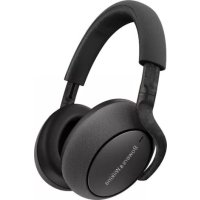
PX7 - Earphones BOWERS & WILKINS - Free user manual and instructions
Find the device manual for free PX7 BOWERS & WILKINS in PDF.



| Product type | Over-ear Bluetooth wireless headset |
| Weight | 310 g |
| Battery life | Up to 30 hours (with ANC and Bluetooth) |
| Full charging time | Up to 3 hours |
| Battery type | Rechargeable Lithium Polymer |
| Bluetooth version | Bluetooth 5.0 |
| Supported Bluetooth codecs | aptX Adaptive, aptX HD, aptX Classic, AAC, SBC |
| Speakers | 2 x 43.6 mm full-range |
| Frequency response | 10 Hz – 30 kHz |
| Input impedance | 20 kOhms |
| Distortion (THD) | < 0.3% (1 kHz / 10 mW) |
| Microphones | 4 mics for noise cancellation + 2 mics for telephony (CVC2) |
| Key features | Adaptive noise cancellation, Ambient sound transmission, Wear sensors, App control |
| Included accessories | 3.5 mm audio cable (1.2 m), USB-A to USB-C cable (1.2 m), Carry case |
| Mobile app | Bowers & Wilkins Headphones (iOS and Android) |
| Care and cleaning | Soft, slightly damp microfibre cloth, do not use abrasive products |
Frequently Asked Questions - PX7 BOWERS & WILKINS
User questions about PX7 BOWERS & WILKINS
0 question about this device. Answer the ones you know or ask your own.
Ask a new question about this device
Download the instructions for your Earphones in PDF format for free! Find your manual PX7 - BOWERS & WILKINS and take your electronic device back in hand. On this page are published all the documents necessary for the use of your device. PX7 by BOWERS & WILKINS.
USER MANUAL PX7 BOWERS & WILKINS
PX7 Wireless Headphones
Welcome to Bowers & Wilkins and PX7
Thank you for choosing Bowers & Wilkins. When John Bowers first established our company, he did so in the belief that imaginative design, innovative engineering and advanced technology were keys that could unlock the enjoyment of audio in the home. His belief is one that we continue to share and inspires every product we design, tailored for new audio experiences outside of the home.
The Bowers & Wilkins PX7 are high performance over-ear headphones designed to deliver the highest quality mobile personal audio experience combined with the convenience of wireless operation and the serenity of noise-cancellation. This manual will tell you everything you need to know to get the most from your PX7 headphones.
Your PX7 can play music streamed wirelessly from your mobile phone, tablet or computer via Bluetooth, or conventionally connected by a jack cable to a suitable analogue headphone output. PX7 can also play audio via a USB connection from a computer and can be used for wireless telephony.
PX7 Real World Listening features include our latest innovations in Adaptive Noise Cancellation, Ambient Pass-Through and enhanced Wear Sensing technologies. Our latest generation noise cancellation feature was designed from the ground up with intelligent environment sensing capabilities, automatically selecting the appropriate type of noise cancellation best suited to your surrounding environment, its only goal is to deliver an uncompromised listening experience. Ambient Pass-Through enables external sounds, such as conversation or safety announcements, to be heard clearly without any need to remove the headphones. The Wear Sensing feature enables PX7 to respond naturally, pausing and resuming the music simply by lifting either earpiece on or off your ear. These features can be enabled and further customised via the Bowers & Wilkins Headphone App available for free on iOS and Android devices.
PX7 incorporates a rechargeable battery pack. When fully charged, depending on the degree of Bluetooth, Adaptive Noise Cancellation and Ambient Pass-Through use, the battery pack can provide up to 30 hours of continuous wireless media streaming with noise cancellation enabled at average playback volume levels.
1.PX7 Carton Contents
PX7 headphones
Storage case
USB-C charging cable
3.5mm audio cable
Document pack
2. Getting to know your PX7
2.1 Switching Headphones On and Off
Diagram 1 illustrates power switch functionality.
Switching On
The Power Switch is located on the right earpiece.
Slide the Power Switch up to the middle position, An audible cue will be presented and the LED indicator will light up in either green, amber or red displaying the current charge level.
Switching Off
Slide the Power Switch to the bottom position.
An audible cue will be presented and the
headphones will power down when the LED
indictor is no longer lit.
2.2 Headphone Controls
Diagram 2 illustrates the headphone controls. The following buttons on the right earpiece are used to for media playback:
Function Action
| Play or pause | Press the Multi-function button once. |
| Play to next track | Press the Multi-function button twice in quick succession.Note: functionality dependent on source device. |
| Play previous track | Press the Multi-function button three times in quick succession.Note: functionality dependent on source device. |
| Increase Volume Press the Volume + button. | |
| Lower Volume Press the Volume - button. | |
The following buttons on the right earpiece are used for phone call functionality:
Function Action
| Answer or end call | Press the Multi-function button once. |
| Answer an incoming call | When incoming call occurs, press the Multi-function button once. |
| Decline an incoming call | When incoming call occurs, hold the Multi-function for 2 seconds. |
| Switch between two calls | With two calls active, press the Multi-function button twice. |
| Merge two calls | With two calls active, hold the Multi-function button for 1 second. |
| Toggle mute | While on a call, press the Multi-function button three times. |
2.3 Status Indicator
The status LED indicator is located on the right earpiece, Diagram 3 explains the illumination states.
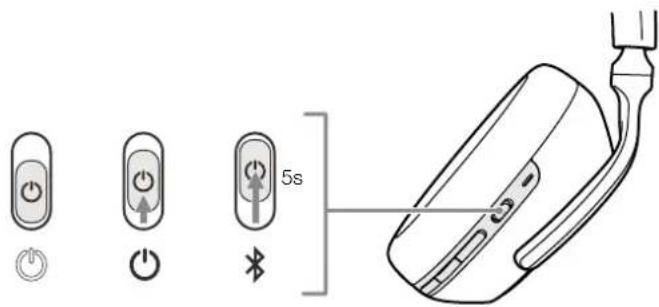
Diagram 1
Power switch functionality
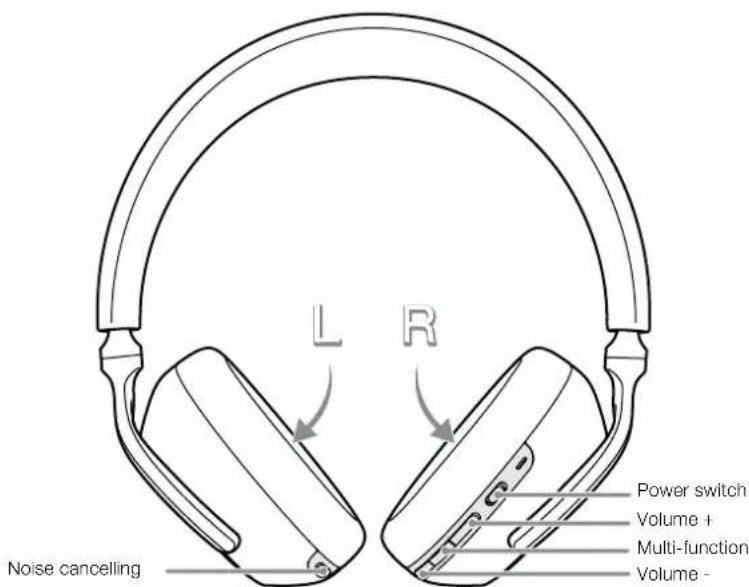
Diagram 2
Headphone controls
Illumination Operational state
| White Battery charge > 30% |
| Amber Battery charge between 30% and 10% |
| Red Battery charge < 10% |
| Red flashing Battery charge insufficient for headphone operation |
| Blue flashing Pairing mode enabled |
| Blue (2 sec solid) Pairing successful |
| Blue flashing (calls) Incoming call |
| Green flashing Rapid charging |
| Green solid Battery charge full, trickle charging |
Diagram 3
Status indicator illuminations
3. Intelligent Features
3.1 Adaptive Noise Cancellation
Noise cancellation is a series of advanced technologies that aids in removing undesired noise from the surrounding environment.
PX7 features our latest innovations in adaptive noise cancellation, this includes intelligent sensing that adapts noise cancellation and tuning best suited to your surrounding environment. As your surroundings change, noise cancellation will auto adapt to complement your new environment.
The Noise Cancellation button on the left earpiece is used to cycle between the following modes, see Diagram 2 for button location:
Mode Application
| High | Suitable for consistently noisy environments such as an airplane cabin. |
| Low | Suitable for environments where you need awareness of your surroundings. |
| Auto | Intelligently adapts noise cancellation best suited to your current environment. |
| Off Turns off the noise cancellation feature. | |
3.2 Ambient Pass-Through
PX7 features ambient pass-through which lets some external noise from the surrounding environment, such as safety announcements or conversations, to be heard without taking the headphones off.
The Noise Cancellation button on the left earpiece also controls this feature, see Diagram 2 for button location.
Function Action
| Enable ambient pass-through | Press and hold the Noise Cancellation button for 2 seconds. |
| Disable ambient pass-through | With ambient pass-through enabled, either hold down or single press the Noise Cancellation button for 2 seconds, the headphones will return to the previous noise cancellation mode |
The level of ambient pass-through can be further customised to suite your needs using the Bowers & Wilkins Headphones App.
3.3 Wear Sensors
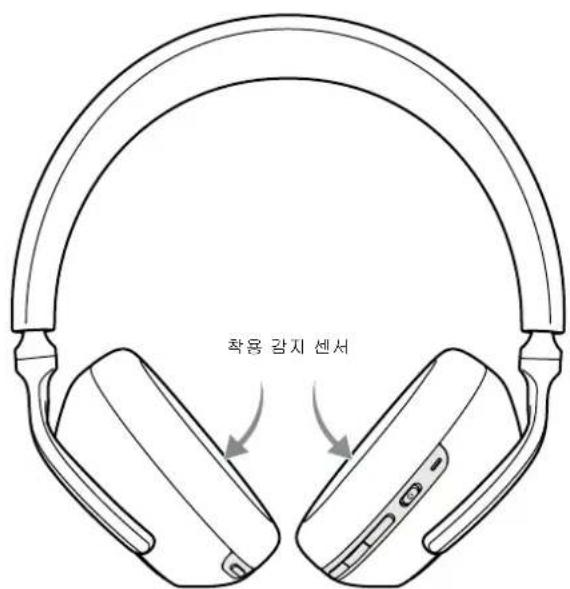
PX7 incorporate our latest enhanced wear detection sensors in both earpieces, see Diagram 4, enabling intelligent battery conservation by entering standby when removed from the head. When worn again, PX7 automatically wakes and connects to the last connected Bluetooth device.
During media playback, PX7 will auto pause when either earpiece is lifted from the ear. Playback will auto resume when the earpiece is placed back on the ear. Auto resume has been further optimised so it is ready only when you are. This means the headphone will not attempt to resume playback during following conditions:
- Headphone powers on from the off state.
- Headphone wakes from the standby state.
- Headphone reboots (such as after a factory reset).
Wear sensor and standby can be adjusted using the Bowers & Wilkins Headphones App.
Note: Take care when wearing your headphones; hair or accessories trapped between your ears and the earpieces, or wearing glasses that distort the profile of your ears, may interfere with the performance of the proximity sensors.
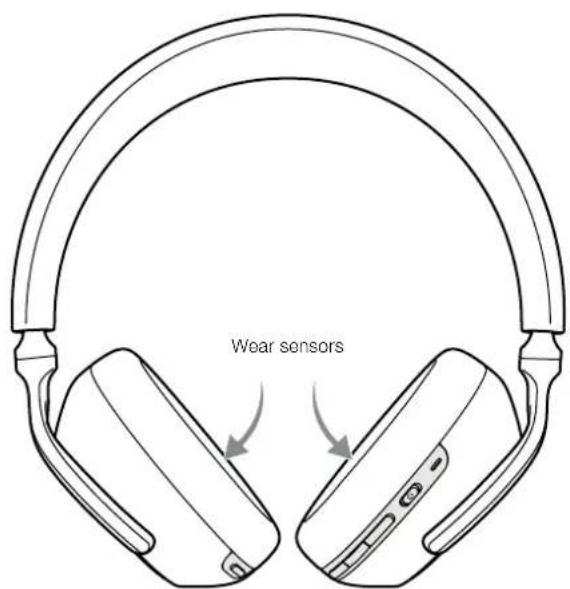
Diagram 4
Wear sensor location
4. Battery Charging and Power Saving
Your PX7 comes with the battery partially charged may be used immediately. For best practice we recommend to fully charge the headphones before first use. Please allow up to 3 hours for full charge. The headphones can be used while charging.
To charge:
- Please use the supplied charging cable and connect the USB-A plug to a wall charger or a powered computer USB-A socket.
- Then connect the USB-C end to the headphones USB-C socket
Note: During charging, the headphone indicator will flash green. When fully charged, the indicator will remain illuminated. See Diagram 3 for status indicator details.
4.1 Standby Power Saving
PX7 wear detection sensors intelligently conserve power. When taken off your head, PX7 will automatically enter standby which will pause media playback, disconnect Bluetooth and switch to a low power state.
When worn again, PX7 will wake and reconnect to the last connected Bluetooth source. Note that both earpieces must detect wear for proper functionality. If wear sensors are disabled using the app, this feature will also be disabled.
With the app, you can customise how long the headphones will wait before switching to auto standby, please see Standby Timer under Settings in the app.
5. Wearing Your Headphones
Wearing your headphones correctly will help ensure the best possible experience. See Diagram 6.
- Identify the left and right earpieces by finding the identification legends located on the interior of eachearpiece.
- Wear the headphones accordingly with the headband adjusted so that the they rest comfortably on your head.
Note: Wearing glasses that distort the profile of your ears may interfere with headphone performance. Similarly, hair trapped between your ears and the headphone ear-pieces may interfere with the wear sensor performance.
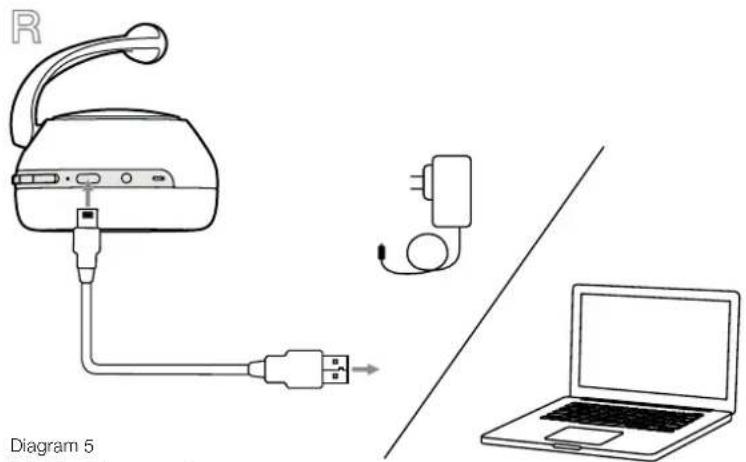
Diagram 5
USB-C cable connection
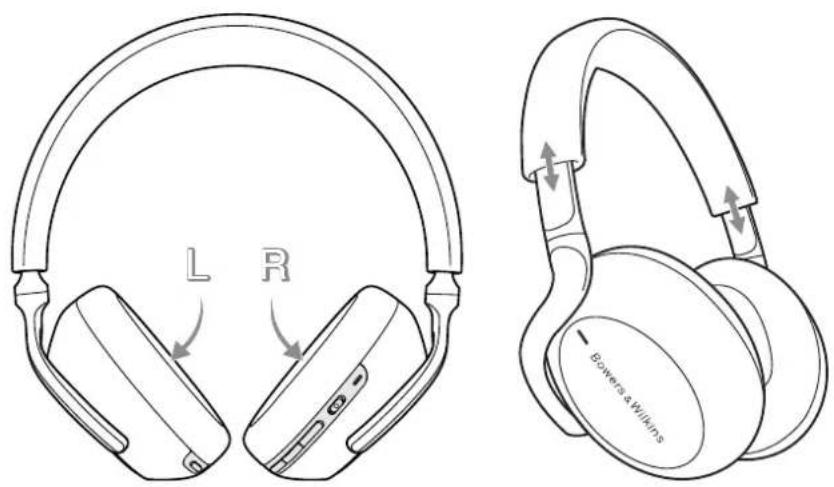
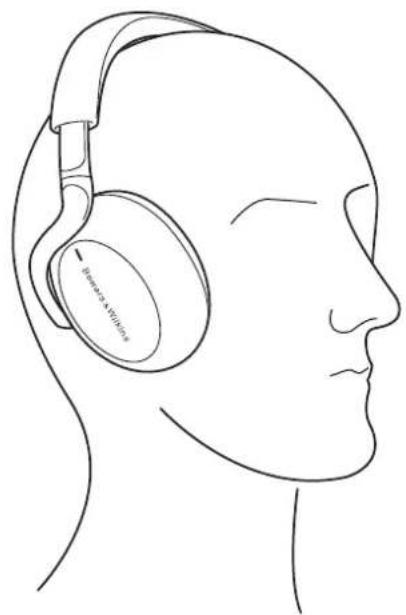
Diagram 6
Wearing your headphones
6. Bluetooth Connection
6.1 Pairing
PX7 is designed to stream media wirelessly from Bluetooth audio devices, such as smartphones, tablets or personal computers. To do so, the headphone and device (source) must first be paired.
- The first time you switch on your headphones, Bluetooth pairing mode will be enabled, the indicator will flash blue. If pairing mode is not enabled, please slide and hold the power switch to the upper (Bluetooth Icon) position for 5 seconds, let go when the indicator blinks blue and when an audible cue is presented.
- Ensure the Bluetooth feature is enabled on the audio device, PX7 will appear in the discovery list, select it to pair.
- The indicator will flash blue while pairing is in progress, this will change to solid blue and an audible cue presented when pairing is successful.
Your headphones will remember up to eight paired Bluetooth devices. Repeat the above steps to pair more devices.
Note: Your headphones will automatically exit Bluetooth pairing mode if no device is paired within 5 minutes. If pairing fails, the indicator will rapid flash blue, please try pairing again.
6.2 Multiple Bluetooth Connections
PX7 can connect up to two devices at the same time, but note that you can only play audio or take calls from one device at a time.
To switch between two devices:
- Pause audio on the first device, or use the PX7 multi-function button.
- Play audio from the second device and the headache will switch over.
When streaming audio, receiving a call on the second device will automatically pause playback and the call will be routed automatically to your headphones. Ending the call will automatically resume playback from the first device.
6.3 Disconnect from a Device
You can quickly disconnect PX7 from a device by sliding the Power Switch to the upper (Bluetooth Icon) position two times in quick succession, an audible tone will be presented indicating successful disconnection.
Alternatively, you can manage connection in further detail using the Bowers & Wilkins Headphones app under Connections.
6.4 Setting Up Headphones with the App
The Bowers & Wilkins Headphones app provides extended setup and adjustments to features such as Adaptive Noise Cancellation, Ambient Pass-Through, and Wear Sensors. The app also provides further customisations such as voice prompt, standby time, connection management and headphone software updates. The app is available as a free download on iOS and Android devices.
To add your headphones:
- From your mobile device, download and install the Bowers & Wilkins Headphones app.
- Launch the app, then read and follow the instructions pertaining app notification and permissions.
- After reaching the main screen, simply tap + and following the in-app instructions.
6.5 Headphone Software Updates
Bowers & Wilkins will occasionally make available software updates that refine and optimise the performance of your headphones or add new features.
The Bowers & Wilkins Headphones app will notify you when a software update is available, tap on the notification and the follow in-app instructions.
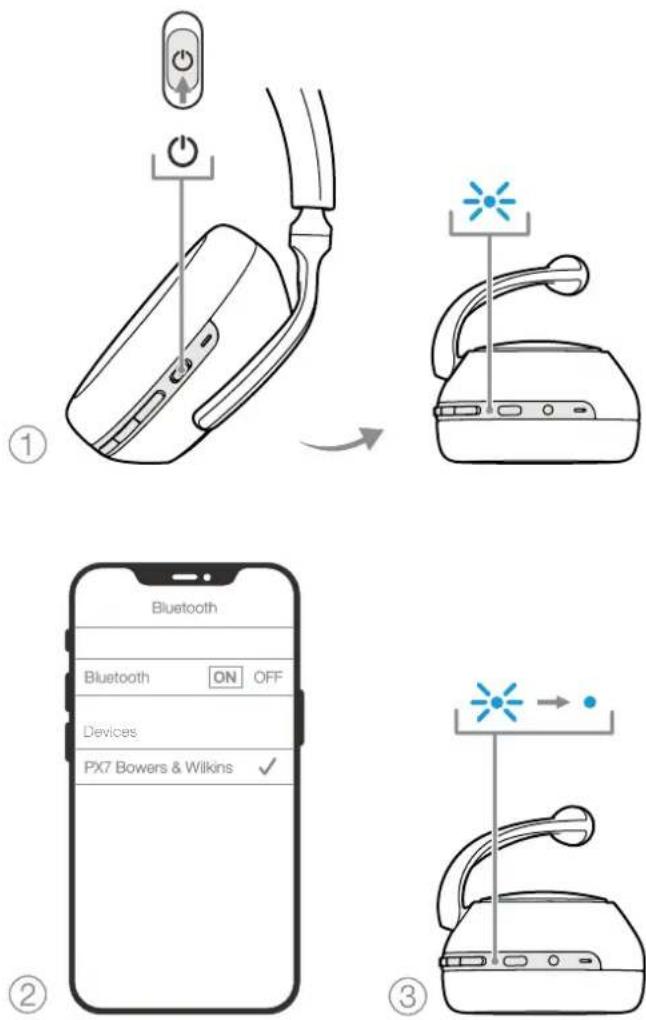
Diagram 7 Bluetooth pairing
7. Auxiliary Connection
In addition to Bluetooth, your PX7 can also connect to audio sources using the supplied 3.5mm audio or USB cables.
7.1 Connecting with the 3.5mm Audio Cable
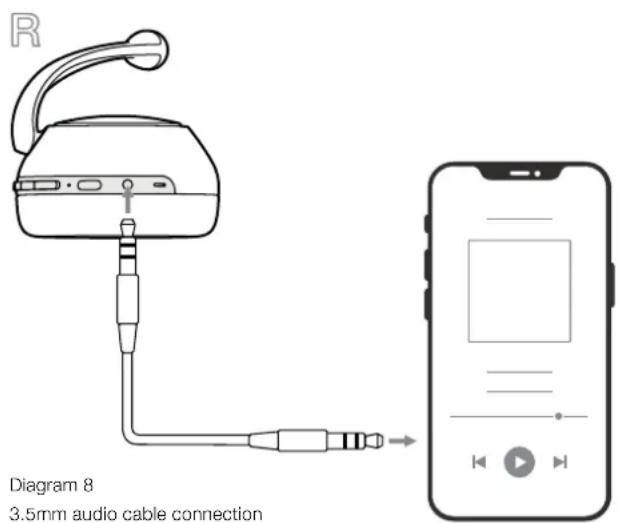
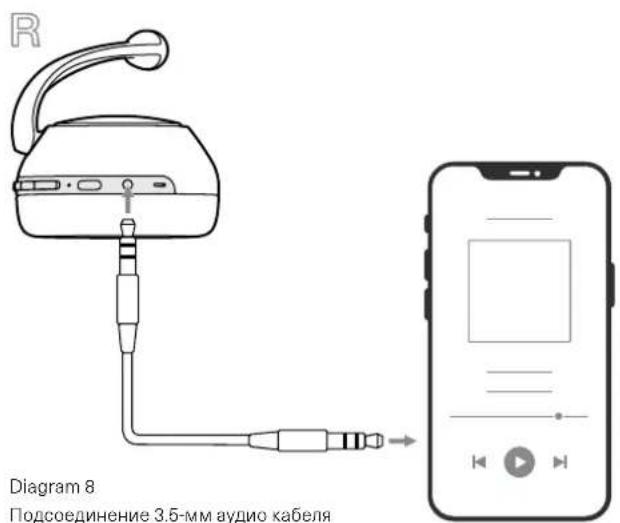
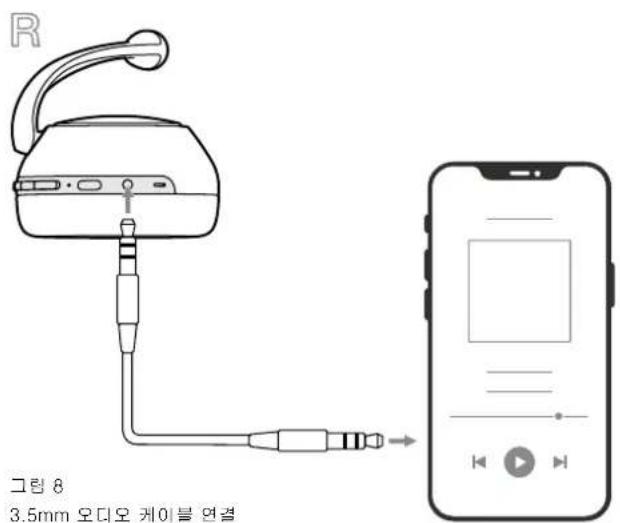
The 3.5mm audio cable enables your PX7 to be used with a device supporting an analogue output such as a conventional headphone socket on smartphones or tablets, or a traditional hi-fi system. See Diagram 8.
- Insert the 3.5mm audio cable into the headache 3.5mm socket on the right ear piece.
- Take the other end and insert into the appropriate socket on your device.
- Your PX7 will automatically disconnect from any Bluetooth devices.
Note: Your headphones must have sufficient charge and switched on to play audio from an analogue source device. The volume and play/ pause buttons will not function when using the 3.5mm interface.
7.2 Connecting with the USB Cable
USB connection enables your PX7 to function as a USB sound output device when connected to a capable computer.
- Insert the USB-C end into the PX7 USB-C socket on the right ear piece.
- Take the USB Type A end and insert into the appropriate socket on your computer.
- PX7 will automatically disconnect from any Bluetooth devices.
- Find and select your headphones from the computer's audio output control panel.
Note: When connected to an capable computer USB port, the headphone battery will also charge.
8. Power Cycle and Reset
8.1 Power Cycle
You can power cycle your PX7, simultaneously hold the Volume + and Volume - buttons for 10 seconds until the indicator LED extinguishes, let go when the indicator lights up again. Rebooting your headphones will not reset their internal settings or clear the paired device history.
8.2 Reset to Default
You can clear the paired device history and restore all settings to their defaults. With PX7 powered on, simultaneously hold the Volume +, Volume - and Noise Cancellation buttons for 10 seconds until the indicator LED extinguishes, let go when the indicator lights up again, the headphones will be ready to pair to a device. Alternatively, you can reset from the Bowers & Wilkins Headphones app, please see Reset under Settings in the app
9. Care & Maintenance
9.1 Storing Your PX7
Taking care of your PX7 will ensure they continue to deliver the best performance and experience.
When not used, stow your headphones using the included storage pouch. It is recommended the headphones are first powered off:
- Retract the headband on each side so they are in the smallest position.
- With the buttons facing you, rotate the earpieces inwards so they lay flat.
- Place the headphones in to the storage case.
9.2 Cleaning Your PX7
Your PX7 can be cleaned by a soft, damp microfiber cloth, gently wipe or dab clean.
The fabric on PX7 have been specially coated with moisture and stain repellent. If dirt, stain or fibre residue accumulate on the fabric surface, please clean as instructed above.
- Do NOT aggressively rub or use an abrasive tool to clean, especially the fabric.
- Do NOT use paper towels, napkins or tissue as they will leave residue.
- Do NOT use cleaning detergents, soapy water, polish or chemical cleaners.
- Ensure that no moisture get inside the earpieces, buttons and interface ports.
10. Support
Should you require further help or advice regarding your PX7 please visit the Headphones support site here www.bowerswilkins.com/support.
Environmental Information
This product complies with international directives, including but not limited to the Restriction of Hazardous Substances (RoHS) in electrical and electronic equipment, the Registration, Evaluation, Authorisation and restriction of Chemicals (REACH) and the disposal of Waste Electrical and Electronic Equipment (WEEE). Consult your local waste disposal authority for guidance on how properly to recycle or dispose of this product.
Specifications
Wearing Style Bluetooth Wireless Over-Ear Headphones
Technical Features Adaptive Noise Cancellation
Ambient Pass-Through
Wear-Detection Sensor
Bluetooth® audio - Bluetooth 5.0 with aptX™ Adaptive
USB-C charging & audio interface
3.5mm auxiliary audio interface
Bluetooth Codes aptXTM Adaptive
aptXTM HD
aptX™ Classic
AAC
SBC
Bluetooth Profiles A2DP v1.3.1
AVRCP v1.6.1
HFP v1.7.1
HSP v1.2
BLE GATT (Generic Attribute Profile)
Drive Units 2 x 0 43.6mm full range
Microphones 4x mics for ANC
2x mics for telephony (CVC2 - Clear Voice Communication v2)
Frequency Range 10Hz to 30kHz
Input Impedance 20 kOhms
Distortion (THD) < 0.3% (1kHz/10mW)
Battery Type Rechargeable Lithium Polymer
Battery Life & Charging 30 hrs Bluetooth with ANC, 5hrs with 15min charge
Inputs Bluetooth, 3.5mm stereo jack, USB-C audio
In Box Accessories 1.2m stereo audio cable, 1.2m USB-A to USB-C cable, Storage Case
Weight 310 grams
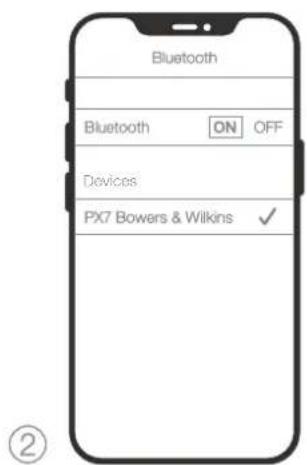
Figure 7 Jumelage Bluetooth
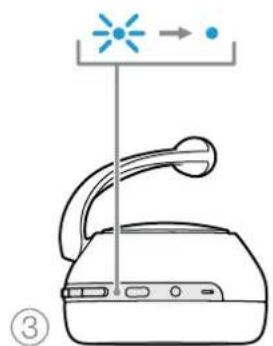
Ambient Pass-Through
Naherungssensor
Bluetooth Codesc aptXTM Adaptive
aptXTM HD
aptXTM Classic
AAC
SBC
Bluetooth Profile A2DP v1.3.1
AVRCP v1.6.1
HFP v1.7
HSP v1.2
BLE GATT (Generic Attribute Profile)
Distorsione (THD) <0.3% (1 kHz/10 mW)
3.1 Adaptive Noise Cancellation
3.2 Ambient Pass-Through
Ambient Pass-Through
Draagsensor
Bluetooth® audio - Bluetooth 5.0 met aptXTM Adaptive
USB-C Iaad- & audio-ingang
2.1 BkHIOeHHe/ByIKHOeHHe HayHIMKOB
Ha Diagram 1 nokaaHbI cyHKmCdBHXHO nepeKIOHATena Power (BKn/BkN).
BkIouyHeH
IpeKnHcPb Power pacrnooxh Ha npabOy aUaKc Hayunko.CuBnHe IepKoHnBn HpTaanH CpeDHeNoXeHae.HayunHKnNJdant BnykOB OOrHan, a CBeTOIOHDn HNDNKATOp 3aOpTOn AteEHm, XeHTMnn NKPachMb UTeOM, OTobpaXar Tekuym npoeBb 3apda.
BbIKIOeHne
CpBnHBe BkHKeHATEB NHTAHRA H KHee NOXeHHe. HayuHKnO ANrB MNDyT 3KkoBc CnHnA BkHIOHATc, aCBTOJNOHbMHKATOP NORACHET.
2.2 YnpabHeHne HayuHkamn
Ha Diagram 2 noka3aHb opraHb ynpabneHnHauyuHKAMn. DnIyprabneHn Bocipow3BeHnemayno no Bluetooth moKHO nCNOB3CBATcpekyoKe HKNKn Ha npabO hKNe HauHHKOe
ΦyHKUH DeNCTBne
| Восчимаusbeyende (Play) wii niay3a (Pause) | Haxmite Ha MHOROФYHKUCHAHBJHJIO KONKY ODINH paa. |
| Перейнк восчимаusbeyende следуочero tpeka | Haxmite bbyctpo 2 pata Ha MHOROФYHKUCHAHBJHJIO KONKY, ПОПМЕЧЕС: bbyJOJIHJENHE 3OTN KOMAДБЛ 3BAMCNY OT NCTOCHNK |
| Перейнк восчимаusbeyende предуочero tpeka | Haxmite bbyctpo 3 pata Ha MHOROФYHKUCHAHBJHJIO KONKY, ПОПМЕЧЕС: bbyJOJIHJENHE 3OTN KOMAДБЛ 3BAMCNY OT NCTOCHNK |
| ПовсimbетгомКоctь СпуньгомКоctь HaxмITE Ha KONKY Volume + | |
TnTepeohhixpa3IOOBPOBNCIOJIbSyTE CIEpyIOUe KHOIKH HAPBOB YAIIKE HAYIHNKOB:
ФУHKUNAДeINCTBNE
YpoaeBcKo3HOrO npOnyCkOxpyKaouHx 38kyOB MoKHO HAcTpOHTb NO BauMeBy BkyCy, NcIIObayr npInooe Bowers & Wilkins Headphones Apo.
3.3 CencopbI cIeKeHHa 8a DnKHeHARMM
B PX7yctahOBHeHb HauHn HOBeHme, ynyHWeHHie ceeooepcKHe3a 3dEeKHeHMe BnaDaeLb, npHem H aoeBx yuHbXaHuaK, cm.Diagram4. OHn HOMaIOT, BO-epBXx, kOHOIMtB xapd akMyunTOp, nepeoDA HayuHKn B pexkM OxJAHn standby npn CHRTN IN C rONBOBc. Ecn HaeBtB Nx o6paTHo, PX7 abmatoHneKn npOBykDaTOr n COeMHIOrTOC nocJeHM CONPekHHBM Bluetooth yctpoiCTOB.
Bxode 0ocpnn3BeHn HcToHHNk, PX7 ABOMATuNECKn DEaIaOT Naay pni NoJHHTnn BBepx NIObN iYunbX uAweK. BocpnOnBaDEHe ABOMATuNECKn BO3oBHOBnT, cCNI HAeTb CC6pHIO.PpoUpya ABOMATuNECKrO BO3oBHOBnHn DOJIONHIEbHO OTIMMIAIPPOBAH, TAK YTO HAYUHNIK PocbnakTCoTtolK TOda, KOra Bbl rTOCBbl, OTO OHNAeT, QTH ON He ByyITnBcBOSOBCnB, BOCpnONBaDEHe B CJIeDyUQnx yCIOHnX:
1.HayuHnKBAI KIOAOTCINNIOHOCTBO BUKIOHCHOHOOCTOBHIA
2. HayuHnK npocBnaTcR nCocToHHnstandby.
3. HayuHnKnepeepzaykaiTcna (HaepnMep, noce 6bpcaa Hactpoek Kdaepnhm yTaHOBkam).
CeoOpOJI cKeHnEa 3a DBeKHeHMA m peKHM standby MoXHO HAcTPOITcNOnbEyr npInoxeHne Bowers & Wilkins Headphones App.
PpmeHaeBbte BnMMATEbHb:BOJcBbMnA
aKecCcyapb,3aXabTe MExky bauuMm yuAMn
aKaMn HAYuHNKOB,aTakke DyKKN OOKOB MOTY
nckAaRbpOoBbaWIMyewn NOMeWATb paoTe
ceHCOP0 np6mKehn.
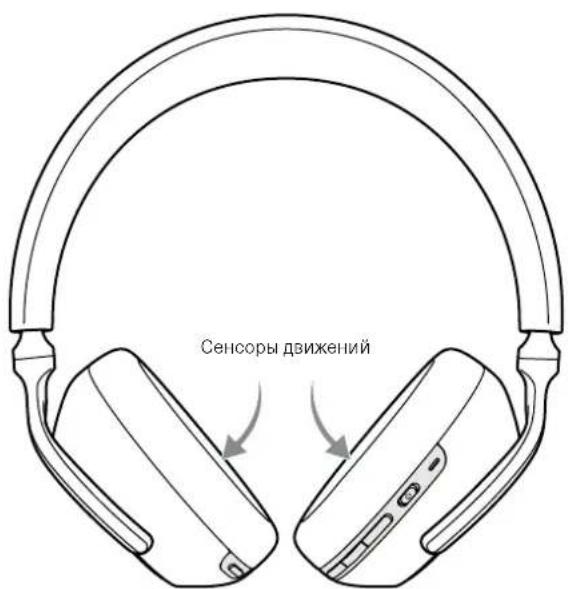
Diagram 4 CencopbclxeHn3aDbxHnMn
4.3apraKaakKymyTopaNkoHOMMn 3Heprnn
HayuHnK P7X noCTaAIAOTc C aCTHNO 3apaxeHHBM
kkyMnyIATOPOM IN MxMOHO HIOBbOBAIbCp3ay
Xe. OJHAKo DnA yuMxpeyblTbO XeJIaTe bHO
noHIOCTb aApIITb AKyMnyIATOp, npExJe cemHX
npBmPaa CnyuATb. NotpeSyetcr Do 3VacOBd
noHIOs aapIKn, OJHAKo PX7 BOnlne MoXHO HAAYtB
CnyuATb IN Rpoceccs aapIKn.
ДлгЗардк:
- IinoIb3y npinnaraeMn Ka6eB, nooCoeHNHTero KAKTHINHOmy USB paaHem: nio6 KOJIbIOTePHOMN IOPTY USB-A, nio6 K aIaItepy Jm 3apAKn USB yOtpoNCTB.
- 3aTeB BCTABSTE USB-C ITEKep Ka6eR II pa3bEM USB-C HHa HayuHnKax.
IpymueaHc:BXoae3apnKnHnDkaTOpHayuHKnOB 6ydtMRatb3eHbUMCETOM.PnONHOI 3aepke HnDkaTOpBytNocToHHIO CBeHTBCB 3eHbIM.CM.Diagram 3,rgnePnBedeHaHnDkaUaC oCoTHA HCBTOJOMLED HnDkaToppa.
4.13koHOMMn3heprnBpekmE Standby
DAtHKnO6hApyeHn DInBeHn BlaIeBLa PX7 HINTENCKTAYNLHOKCHOMNTHECPHN. KOrDa Bt CHMABET HAYHNIKn CTOJIOBb, PX7 ABOITAMTHueCKN NEpEXoAPB T PEXMM OXkDAHnA, KOtOpBn IPOCTAHARINNAET IOCNPOK3BEHNE MYNbTMENJa, OTKIOAeBT LeBcooth n nepeKIOAeTcR B pekm HnKKT OHePRONCTPeBNeHn.
PnnoTOpOCHOMJyEBAHN HAYUHKN PX7IPOCBNAIOCTCR
HOBA NOKNIHOCTOR KNOEHDHEMyBbPAHOMY
MCTOHNYLBEeHToB.O6patrte BHHMAHNE,40o6e
HaWN HAYUNKO8DOnKHB6OBHApYKTHb DnKHeHN
TnPABINbHOpaBOBy. EcNl DaTHNK DnBKeHN
OTKNUHcHcNo nMOuBoIpoNtOKeHN,3aFyHKNJ
TaKke BydET OTKNUOeHa.
C NOMOIOIIOPINIOKENH BBI MOKATE HACTPOINB BPEM-KAKDIOHO HAYUHNK BYDYTJDAHBpePeNPEKNIQCHENMBPCKIMABOTMATNUCKOROOKADHNAcm.TaMeP OXMDAHN- Standby Timer a pasdene Settings B pNOIOKENH.
5. KaK Hocntb HayuHnKn
PnBnHbHOe HcNtB0BaHHe HAYHIOKOB HOMOKeT 6oeBneHbpeaHaMQHXNOHORo NOTEHuaJ. CM.Diagram 6.
- Chayana, onpeenite neyko npabyo haukna HanyuKOB. HauinmoxHOHnHa Haukne BHTpeHHeH qactnOronOBs.
2.HaHBe HauHHKn HraTouy, OpyrinyuropBaorOroBbTe KaToBb KaJdA HaKa yD6Ho CuaJaHaYXOM.
IpymouHHe:OChnNCKaKaUcne IpocnB BaWnx yuMOTy NOMeBAt KauCteBTHNO paBoTe HAYUNKOB.ToHO TAK Xe BONoCb3,3axaTbe MExyD yuAMN uAkwAMN HAYUNKOB MOrY TCLOXHNb paBOyT CEHCOPB PNDNkHexHn.
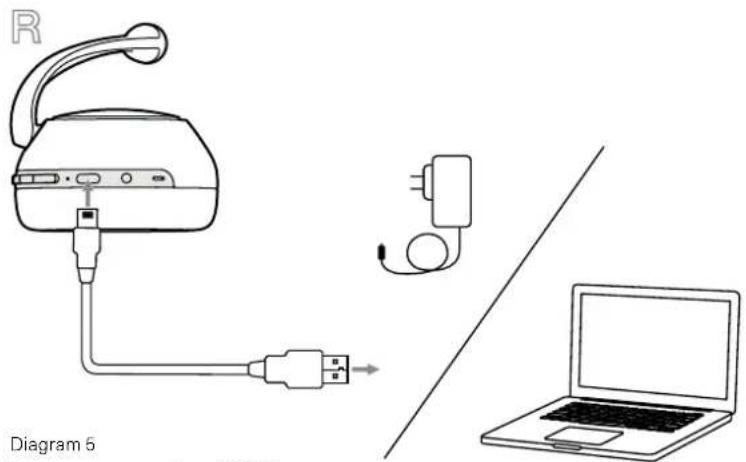
Diagram 6
PogcoeHNHeHneKabEn USB-C
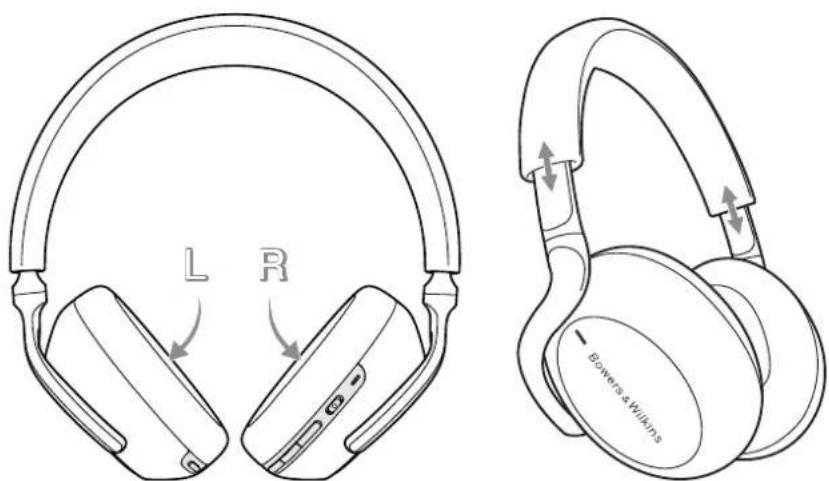
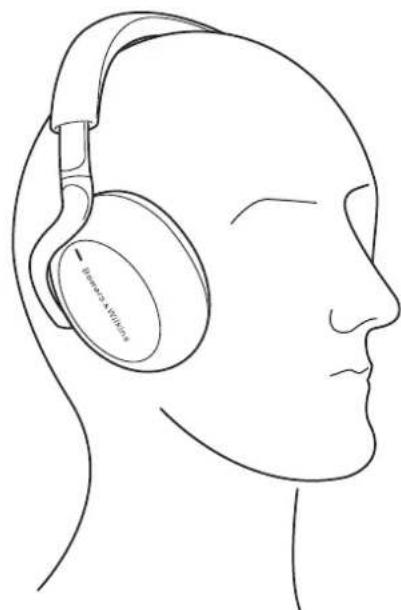
Diagram 6
Kak Hocntb Haywnkn
6. Bluetooth coeMHenne
6.1 ConpnaKeHne HayuHnKOB
HayuHKPX7peHnHa3aHbIyB6ecipOBIOH
peepaNoTOKBOrO aymo c Bluteoth yCtpoCTB,
TAKXKACMPTOOH,IIAHWEETMBNNEpcoAHbIbIe
KOMBIOTepbl.130TOGCHAAJIHeo6xoJIMO
BbONHTBcOPaKeHHe HAYuHKOB uYcTPOCTBA
(NGTOHHKA).
- Korda Bb BKKHTe HayWNKx P7X nepBb p3, OH np3y B0yTb pEKMM cONPKEHn NO Bluetooth, nNIMKATOp np 30m HAHET MIRTaB CINHM LcETOM, Ecm pEXMM cONPKEHn HC 3anyCTnICr Cam, noKaJyIcTa, cDnHBtBe BcPcx (B ctopoHy CmBOnla Bluetooth) uDepkxtte NpckKnOHaTcNb NITahra Power B TcCHNC 5CEkyH-110Ka INHKTAPOT He HauHHTMBA CINHM LcETOM, eP3aDCCTCR 3ByKOBo CINHL
2.Y6eINTecb,TOyFikLlBlueoothakTNBPOBaHa HaayuOyycpOCTBE,KoTgA Px7noBtOrB CnNcKcOBhApYckHbXyCpOHTB,BiOcPntcN XI HJIN CONPHKHeHH. - VUHAKATOP HAYUNKOB BYETMIRABTHCNHM,IOKA cponpaxehne npopdojkaetn nepekJIOHTCH HA HENpepbHbN CNHm, KOrda coeHNHcHE bYdET yCTAHOBHeHO.HayuHKn npri stOM BldaIy 3ByKOBO CNHAI, KOrDa cponpaxehne yCTAHOBHeO.
BaiH HuyuHK MoYr 3aHOMHbIO BocBMn CompaXeHNHX Bluetooth yctpoCTB. NoTOpHTe YkaAHHBe BIIe WlIIN PNOcNeyOuNX CompaXeHN C JpyHMn yctpoCHBAH.
PpimmeyHae BecnpoBnhe HuyuHmK PXT
aOMATNHeckn BbMyTnE pKaMa Bleepoth
cOpARHEW, cOIN B TeCHNE 5 MMyTH He ydaCTOR
cOpRyh IN C OHNIM YCPOCTOB. EChN
cOpARHEW He bdyET CYAHOsNEHO, INMkATOP
bdyET qACTO BCbIXBAHT BebIM ZBeTOM, NpOpyTe
noBTOPIH pOLODyUPcOPARHEW Eue pa3.
6.2 CoeHHeHne c HeckoBkMn Bluetooth yCTpoHCTBaMn.
MOxHO IOIOeMHHTK PX7 cpa3y Iba coIpaKeHHbIX yctPOCTBa, HO IMMeTBe TNeDy,TO Bc CMoxTe CNYaTb My3bIKY INI PnHIMAtB TeNEOHHe 3BOHKToLbKO CNOHORTOyPONCTA OHOHBpeMeHHO.
PepeknueHmMekjdyJyBmyyctpoaTbMaN
1.CdclnTcayhyHaNcPBOOMyCTOBNNMIOJIbayTeMHOrOgHyKNUHOHbIbHyKOHTKy.
2.3anyCTNCBOONPONBDECnHEHBTOPOM yCTPOICTBE,N HAYUHNK CAMN INPEEKIOHATCR HA HTO
PnnoTOKOBnpepaueayno,nonyehne TcFOHOHO BbOBA HbTOPOeYCTPOCTBO AOTOMATNECKN PnIOCTAOHOBn BOICpNO3BDEHnE n 3BOHC6yDnET AOTMATNECKN nepepeEnB aauu HayuHKn. Iocn 3aBCpWENH BA3OBA npONsOJcT AOTMATNECKOE 8030HOBJHE NOCpPOK3BDEHN C nepBOrO yTOPOCTBA.
6.3 OTKIOUOHeHne OYCTPOINCTBa
Tc6b0rOeHNHtB Bluetooth ycptocnTO pX7, C8nHtBe 2 p3a 6oCTPO B8Px nepeKIOHATENB nHTAHNn Power (u ctopohy cmmbona Bluetcooth) - noce storo paadaactc 3BkoobcmHan, noTbpexdakoun pa3pba coeHNHn.
KpOme TOrO, Bm MoKeTe BoOne NoDpoHo UynPABnTb CooJIHHeHEM, NcIIOBBya PnpIOXeHne Bowers & Wilkins Headphones app apaane Connections.
6.4 HactpoKa HayshnKOB c nomoubIO npnoKeHH
PpnooxHe Bowers & Wilkins Headphone app
ObeCneuBaeT paucnEeHbIe Bo3mOxHcctNa HAcTpKn
U npAebnH, B ToM nOpue dny FyKnM Adaptive Noise
Cancellation, Ambient Pass-Through uWear Sensors.
PpnooxHe TAKKE oBeCneuBae TaonoiHtenuhle
HaCTPoKn, TaKe KaK rOnocBaN oNocka3Ka, BpeMn Io nepeXoJ a PeknO mOxuaJaHn stadyb, ynpaBneHne
oeDInHeMe N oOBHeNe N pOrpaMMHO
ObceCneuHry HaunikOB. PpnooxHe DoctynoB
KaHeCTBe BeCnnaTHoarpyaKn HaYcToPcIbTaBx iOS n Android.
Hro6bIdo6aBnTBBaunHayuHNK:
- C Baewero MOBUNHoro yOtpoNCTBA, cKaaHHTe nYcTaHOBtPe npUloKeHne Bowers & Wilkins Headphones.
2.3aynctte npnlokehme, a 3atem yntaTe yk38HnM N CIEyTbe IHCTpyKLM, OTHOCHMRC Kp3peHnM N yBcDmEHNrMa daHHoro nnpnoKeHH.
3.10CNO DOCTXKENI RANBHOI XKPHa, npcoTO KOCHINTECB MBOIA +n, CIEyIe NTCHpyKUIM, NOBRAIOUMCM B PIVNOXEXHIN.
6.5 06HOBJIeHNr nporpaMMHO o6ecneeyHn HayuHKOB
BpmeOT BpemH Bowers & Wilkins 6ydt Binyckatb 6OBHOENrInpaMMHOrO 6oCnEHN, KOTOpB yUYHJAOT N OITNMM3NYPHT PABOTY BAHX HAYHNIKONIK JO DOABNNKT HOBIE FyHKIN.
PpnoXeBnE Bowers & Wilkins Headphones yedomnt Bac, KORda CTaHcTocDyHO 6oOBnCHNe pnpamMHorO 6oeBHeHAR, NocE STOro HAXMNE Ha YBaDcmHne n CnEyJyHeNtCpKUAMB PpnoXeHnE.
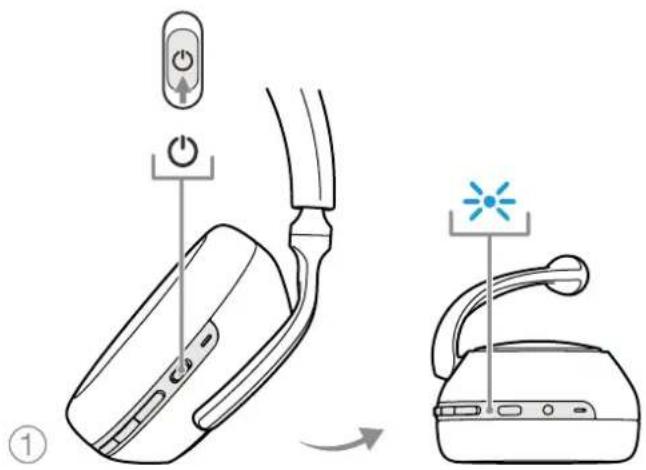
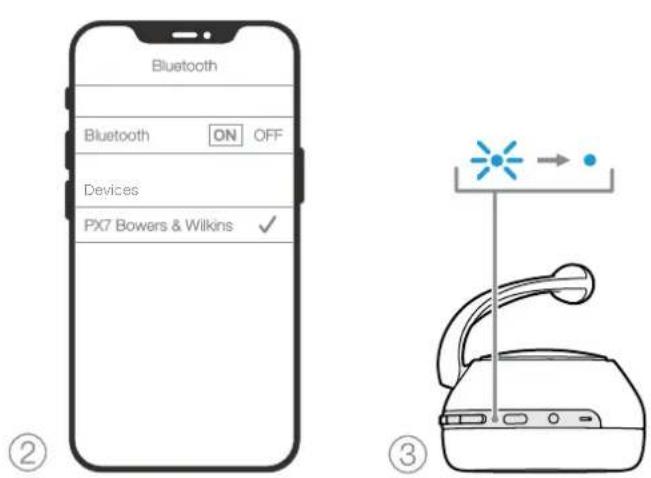
Diagram 7 Bluetooth conpxeHne
7.BcnomoratEnbHbe coeHHnHeHn
KpOme paOToBt uepee Bluetooth, PX7 MOxHO TaKKe
NcDOeHNHb K nTOCHNY ky ayno, nCnlohay
npnnaermae oy ayno kaebc c 3.5-MM paabemom Nn
USB kaebb.
7.1 CoeHHeHne c nOmoBIO 3.5-MM ayDnO ka6eIa
3.5 MM ayuio Ka6enb no3boBnert nCIOBbOaBt BauH PX7cYCTPOJHOOM, NOpePXMBAoMm HAnorO8bl BxIOepe3 oBHyoe rHe3doNayuHKnOB, HApnpMe, HA cMaPTFOhXnIaHuaTeax, mHa TaipDIOHHbX hi-fi CnTeMax.CM.Diagran 8.
1.BCTaBtBe3,5MMayDnOKa6eB 3,5MMpa3bEMHa npaoiYauKeHayuHKnOB.
2.BoBMMTEpyron KOHcN BCTABBe COOTBeTCTByOuIN pa3bEm Ha BAaew yctPOIcTBe.
3.Ba\PX7ABTOMATNHeCKNOTKNHOHcTaO TIO6bX Bluetooth yCTPOINCTB.
IpMCHHcBaHn HauHHKn DIOHNHbIMeTb
OCTaTOHc 3apn H6blpeKNOHcHbHa
BOPOPMAEEDENBAAyCycPOAeTBNA
AHOROBOr NOCTOHKa. KHOKNpyINPOBKn
rPOMOKoN n Play/Pause - aocnpOMAEEDHne/Hay3a
He 6dyT paoTb npn IcnoNb3OBaHN 3-5-MM
INTePFeHcA.
7.2 CoeHHHeHne c nOmoaBIO USB Ka6eIa
USBceEINHEHNE NsOaONET HAYHNIKAm PX7 pa6oTbK BKAcCTBe BxOHO OYctpoICTBa, npNIOKNIOCHHN K IOXIOBEMGY KOMBIOTepy.
- B05MHTe KOHc USB-C aYdmo KabEINn AKKypaTHo
BCTABTe erO bTn3do USB-C a npaaon qauke
HayuHnKOB PX7. - PoooeHnHeIpyroKoehKa6eA USB Type A K COOTBCTCTByOuCMY Hc3dy Ha BAOWOMKOMNbOTpc
3.PX7ABOTOMATUNHECKNOTKNHOHATOROTIO6OBRuToothycptpoCTBA.
4.HaHnTe HbBepHTe HayuHmKn mCmOKa B nHaHnn ynpabHeHnaayMo bXoDm KOMIbIcTepe.
PnmeaHm. npn noNIOHN H N KOMBHTOpy C USB-noprr, AKNyMnHrnp Hnyprn HayuHKnOB 6yET TAKKE No3apRkTeBc.
8. BbIKIOueHne/BKIOueHne n 6poc Hactpoek
8.1BbIKIOHHe/BKIOHOHe
Bb MoXCTo BkIOHHTb, a 3aTCM BHOB BKIOHHTb CBOHAYIHKN PX7, oHIOBPEHmHO HAXAB uJyepxAB KHONK Volume +Volumeb TeueHne 10 cekyHn,doTexnop, nOKA INHDAKATOP He noracET, nooe tOro OTRyTNTe KHOIK N INHDAKATOP CHOHa aTropITc. Pepeaarpyka BaIHX HAYIHKOH Bo e6pocnIX BX BYHTpeHnHe HaCtPouKn H He OHCTNT CNIOCK COpPaeHHbIX yctpOCTH.
8.2 C6poc K 3HaueHnM No ymoJauHnIO
Bb MoXcTe OHCTnTB NCTOpIO COmpKHeHHbIX yCTPoHCTB
N BOCCTBOHNTBE BCE HACPTOpIK NOYMOLHAnIO.
Pp IN KIOUeHHbIX PX7 OIOBpeMeHIO yDEpknBaIe
KHONK Volume + ,Volume- n Noise Cancellation
(UMMOJADJIENIA) B TceHne 10 cekyH, noKa
CBtOIOINIOHNIKaTQP He NoCAtET, 3aTEM OTNyCTte
NX, NKoDA INIKATQP 3aRopNTC CHOA, HAYUNIK
CHOBa ByDyt rTOBNI K CONPKeHIO C yCTPOHCTOM.
Kpome aTOrO, c6pocNTb HAcTpoIK Bbl MxKeTe C
nomouu npnpoxEHnB Bowrs & Wilkins Headphones,
noXaYncta, CMOTpnte nykT Reset a pasane Settings
npinoXeHn
9. YxOaI O6cnyKuBaHne
9.1 XpaHeHne PX7
YxOa3BaHnnmHaayHnKamnPX706ceNHTnpDnHnme CamoIyHrero KcBCTBA BocpOu3BdEHNbAunXhBnTBeTHeHn.
Ecln HAYUHKHNE HINOLB3YOTCR, CNPCHTE INX II npnanaemycmyo CmOyI pyxpeHn. PekomEndyTeTc CHaHaA BIKIOOHITb HAYUHKM:
1.Y6cpnte cTOnOBcCKaxdoCTopoHb,TAKTO60B OHbIMBCAMOMKOMIaIKHOMIOIXEHIN.
2. Korda KaonKa 6paenbK BAM, noepHnTe qaikn HanyuHKoB BuTyb, TaK YTObO OHJexaJIPOBO
3. TomecntHe HuyuHnK B Cymouky dIy xpaheHHN.
9.2OuHcTKaBAuNXPX7
BAnM PX7 MOKHO HCHOTMB MOKOH MMKPOBOKONKOHNO KAHIO,NPOCTO AKKypaTHO INPOTePoBx IM NIMIPOMKHYHCTO KTAHO.
Tkaih Ha PX7 meei cneuaibho nokpbtnn 13
3aunbl ot bna n rps. Ecm npss, nrrn Hn
OCTaKN HtOK Oe Xe HakannBbAorToH NaOBepxHOOT
TKAH, noKjyActa, cncntte ee TaK kyaKa3ao BnIbe.
HEcpeyertepoecnoheTbHINNOPOB30BAtb 6paasnblbe cpeCTBaDnCHCTKn,OCOeHNIO TKAHN.
HEHcnoIbSyteBymaxhhe nnonTeHa,caPefTKn nnCaFCTK
HEHNOBb3yIeYCHTIIuepecpctBa,MlbHyO body, noippoBOHHe mnpDpyncXmHnckne cpctDBA.
Ybmdtcb,HTBnara He nonana BHTpb HAYHNIKOB,KHOIOK INHTepchBHX NOPo3
10.Подзжka
ECN BAM Tpe6yTcI NMOUb NIN COEB JINBNAEJIeB E PXT, noXaYnCTa, nocTeNT caNT nOePckn Headphones www.bowerswilkns.com/support.
3KoIornuecka HOpMaun
3TOTnpdykTCOOTBCTByETMekxHapDnHbIM
dpeKTHBAM, BKIOAAB, HOEpaHmNBAeBC
OrpAHmHEmoAncbHXBeueCTB(Restriction of
Hazardous Substances-RoHS)B anektpneckom n
aNeKTPCHOMobOpdyOBaHH, peNcTpaun, ouEHke,
ABTOPMAUNoRpaHmHNHaNCNtBcBAHHe
XMMCCKX BSeceCTREACH)YdANChNEOTXPoB
aNeKTPcHecKOHO anektpcoHHoroObOpdyOBaHH (WEEE).
IPOKCHUYTIpyTECb CBAHM MocTHbIM oprAHOM NOyTHINAAUMOTXODMBI NOyUeHNPOKMOHDAuON O
TOM,KAK IpABINbHO PeuKNIPoBaTb Nn yTNININPOBaTb
3TOTnOoDKT.
Texnueckne xapakTepcntkN
CTmblHoWENH3aKpbTbIe 6ecnpoBOnHbIe HayuHNKc Bluteoth
DocnHbA AaunBHe UyMOnoDabHe -Adaptive Noise Cancelling
CKBO3HOn nponyck okpykaioux 3bykoB - Ambient Pass-Through
CencopBnXeHn-Wear-Detection Sensor
Bluetooth® ayuno - Bluetooth 5.0 capX™ Adaptive
Popt USB-C nna 3apn n ayu no cnHa
3.5mm ayuio BxoAUX
Bluetooth kodek aptX™ Adaptive
aptXTM HD
aptX™ Classic
AAC
SBC
Bluetooth npoФmU A2DPv1.3.1
AVBCPv1.6.1
HFPv1.7.1
HSPy1.2
BLE GATT (Generic Attribute Profile)
HAMK2x43.6MM,NOHOmana30HHbE
Mkpoohb4xMknpoohAANC
2x MMKpOoHa JnTnePohnn (CVC2-Clear Voice Communication v2)
Hnanaohyacto10T-30K
BxOHHIIMnDAnC 20KOM
UckaeHHN(THD)<0.3%(1KΓL,10MBt)
AkkymyantopIITnMeBO-nOMpeHbI
Bpma pa6o 30acob Bluetooth c ANC,5acoc noce 15 mHyt 6bctpoaep
Bxodbl Bluetooth,3.5-crepeo paabeM,USB-C pna aymo
Ppnaembeakceccyapbl 1.2 Mcrepeaayno kaebb,1.2M USB-A-USB-CkaebcmyoKa pxaHn
Bec 310r
Kaωoopiατε στην Bowers & Wilkins kal ta akouotικa PX7
Zac euxapiotoue nou eIaleEate tyn Bowers & Wilkins. O John Bowers 1bpue Tnv Etaepia mac me Tnv neoioon oti n euphiavtaoTn oxediaon, n kaivotouia otnv avantuEknai n Eeliyevn texvoLoyia thav ta kleidia nou 0a aovayv veouc kououc anolauong tou nxou oTo stl. Autnv tnV niOtn Tou ouvexizoue va moipaQpaote kal eumvei kaThe npoiov nou oxediacoue, Ppooapuooeyia vecnntikec empiiec ektoC onitou.
Ta Bowers & Wilkins PX7 εival akouotiká κεφañç vψηλç anóðoŋc, oxéδiaσéva wotε va oac napéxouv tnv kaúτepn duvatn nxtiκ ᵠπερia yia φopntéc ouokéuεc, σε ouvδuaσo με tnv avεon tnc aoupuatnc λεitoupyiac kau tnyalvn tnc Εóuδεtερωoç θορúβou. ζε auto to éyxeipidio θa μaθετe oλa oσa πpèπει va γνωpiζετ, γia va aξiοποησετ ΘO επακpo Ta akouotiká PX7.
Ta akouotiká PX7 μπopouv va avanapayouv aoupuatn po nouoiknc aio to kivnto tnoéwvo, to tablet n tov unoloyiotn oac eow Bluetooth n eovc kaωdiou ouβaṭiKa ouδeδεμevou m βuσa σ εia katαλnλn avaloyik n édo akouotikw. Ta PX7 μπopouv επionc va avanapayouv nxo eow ouδeonc USB ano evav unoloyoiotn, kaθwca va xρησμoioŋθouv yia aoupuatn tnoεφωvia.
Oi duvatoTntc Real World Listening (PpaymuTikn akpoaon)Twv akouotikwv PX7 TepiaaBavovuTvC TELAutaicmuac KaVOTUIEC OTIC TEXVOLOYIEC Adaptative Noise Cancellation (Ppooapauoortk n Eosdtepwn Opuou), Ambient Pass-Through (AeEauon hXou PEPiAALovTOC) kai BELTIomegaevn TExvoLoyia Wear Sensing (Avxveun xphoc). H TELAutaia mAc YEvia TEXVOLOYIAc EosdtepwnC TOpBou OXEBIAOTNKe aTo mDvkiB AOn mE EUnveC duvaTNTc avixveunnc PEPiAALovTOC, yia autouatm EINAOyN TOU KAATALNau TUPOU EosdtepwnC TOpBou TIOVAI KALUTPOC yia To NPeipalAAov OAC, M Anokleiotko otxo va npexei mia anapamlln emepiaakpoaonc. H duvaTOTTa Ambient Pass-Through (AeEauon hXou PEPiAALovTOC) eITpTei va akouyovta Kaopapexoi nxol oUZNTnoic n avakoivwoeic aOphiiaac, Xwpic va xpeiaZetai va aphipeoov ta akouotka. H duvaTOTTa Wear Sensing (Avxveun xphoc) EITpTei OTA PX7 va avtanokpivovtai M Phoikotna, paymuToiWvTac naon kal ouvexion tnc mouokn c otav avaoKwveTe eva ano ta akouotka ano to auit oac. Autec olduvatotntc mTopoovva evpyoioTHouv kai va ppoapmuooTuV PepaTepw meowtnc EFapuoync Bowers & Wilkins Headphones nou eivai dtaheoiu n Dwpdv o Se Ookeuec me Lloupyko ouotma iOS kai Android.
FlapapopphiTHD<0.3%1kHz/10mW
Turoc matapiac Enavaopctoepvni thou noaepouoc
D拉伊浦二卜 2xΦ43.6mmFullson
4本
| High | HiHiHiHiHiHiHiHiHiHiHiHiHiHiHiHiHiHiHiHiHiHiHiHiHiHiHiHiHiHiHiHiHiHiHiHiHiHiHiHiHiHiHiHiHiHiHiHiHiHiHiHiHiHiHiHiHiHiHiHiHiHiHiHiHiHiHiHiHiHiHiHiHiHiHiHiHiHiHiHiHiHiHiHiHiHiHiHiHiHiHiHiHiHiHiHiHiHiHiHiMiMiMiMiMiMiMiMiMiMiMiMiMiMiMiMiMiMiMiMiMiMiMiMiMiMiMiMiMiMiMiMiMiMiMiMiMiMiMiMiMiMiMiMiMiMiMiMiMiMiMiMiMiMiMiMiMiMiMiMiMiMiMiMiMiMiMiMiMiMiMiMiMiMiMiMiMiMiMiMiMiMiMiMiMiMiMiMiMiMiMiMiMiMiMiMiMiMiMiMi MiMiMiMiMiMiMiMiMiMiMiMiMiMiMiMiMiMiMiMiMiMiMiMiMiMiMiMiMiMiMiMiMiMiMiMiMiMiMiMiMiMiMiMiMiMiMiMiMiMiMiMiMiMiMiMiMiMiMiMiMiMiMiMiMiMiMiMiMiMiMiMiMiMiMiMiMiMiMiMiMiMiMiMiMiMiMiMiMiMiMiMiMiMiMiMiMiMiMiMiMirr |
| Low | You're going to die tomorrow. You're going to die tomorrow. You're going to die tomorrow. You're going to die tomorrow. You're going to die tomorrow. You're going to die tomorrow. You're going to die tomorrow. You're going to die tomorrow. You're going to die tomorrow. You're going to die tomorrow. You're going to die tomorrow. You're going to die tomorrow. You're going to die tomorrow. You're going too late. |
| Auto | You're already in the car, and you don't have to wait for it. You're already in the car, and you don't have to wait for it. You're already in the car, and you don't have to wait for it. You're already in the car, and you don't have to wait for it. You're already in the car, and you don't have to wait for it. You're already in the car, and you don't have to wait for it. You're already in the car, and youdon't have to wait for it. You're already in the car, and you don't have to wait for it. You're already in the car, and you don't have to wait for it. You're already in the car, and you don't have to wait for it. You're already in the car, and you don't have to wait for it. You're already in the car, and you don't have to wait for it. You's not in the car. You're not in the car. You're not in the car. You're not in the car. You're not in the car. You're not in the car. You're not in the car. You're not in the car. You're not in the car. You're not in the car. You're not in the car. You're not in the car. You're not in the car. You're not in the 30-sec. time. You're not in the 30-sec. time. You're not in the 30-sec. time. You're not in the 30-sec. time. You're not in the 30-sec. time. You're not in the 30-sec. time. You're not in the 30-sec. time. You're not in the 30-sec. time. |
Bowers & Wilkins Headphones Appserthoug
孕的:德三元将普击孕的之士,贝O 01HsS宰iE用云K如韵I山K安藻T行,贝贝 贝贝贝贝贝贝贝贝贝贝贝贝贝贝贝贝贝贝贝贝贝贝贝贝贝贝贝贝贝贝贝贝贝贝贝贝贝贝贝贝贝贝贝贝贝贝贝贝贝贝贝贝贝贝贝贝贝贝贝贝贝贝贝贝贝贝贝贝贝贝贝贝贝贝
4
中
4. 画图法
PX7是贝T拉如日早本的春正子云
音速将之
藥藻藻藻藻藻藻藻藻藻藻藻藻藻藻藻藻藻藻藻藻藻藻藻藻藻藻藻藻藻藻藻藻藻藻藻藻藻藻藻藻藻藻藻藻藻藻藻藻藻藻藻藻藻藻藻藻藻藻藻藻藻藻藻藻藻藻藻藻藻藻藻藻藻藻藻藻藻藻藻藻藻藻藻藻藻藻藻藻藻藻藻藻藻
5. 三元函数
电三云日 电
Bowers & Wilkins Headphones App 1
6.4 云王三
PX7E DTHH HJH 100000000000000000000000000000000000000000000000000000000000000000000000000000
世界
B&WJH 100000000000000000000000000000000000000000000000000000000000000000000
吉
德三元电
吉
HH H
链接:https://www.qlz.com/Bluetooth v5.0 aptX Adaptive
USB-C 电电电电电电电电电电电电电电电电电电电电电电电电电电电电电电电电电电电电电电电电电电电电电电电电电电电电电电电电电电电电电电电电电电电电电电电电电电电电电
3.5mm异心O20010
Bluetooth CoMx Aptx-Adaptive
Aptx-HD
Aptx-Classic
ACC
SBC
Bluetooth 2D
AVRCPv1.6.1
HFPv1.7.1
HSP v1.2
BLE GATT (Generic Attribute Profile)