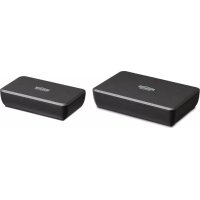
Surround Anywhere 221 - Receiver MARMITEK - Free user manual and instructions
Find the device manual for free Surround Anywhere 221 MARMITEK in PDF.



User questions about Surround Anywhere 221 MARMITEK
0 question about this device. Answer the ones you know or ask your own.
Ask a new question about this device
Download the instructions for your Receiver in PDF format for free! Find your manual Surround Anywhere 221 - MARMITEK and take your electronic device back in hand. On this page are published all the documents necessary for the use of your device. Surround Anywhere 221 by MARMITEK.
USER MANUAL Surround Anywhere 221 MARMITEK
Digital Wireless Surround Sender
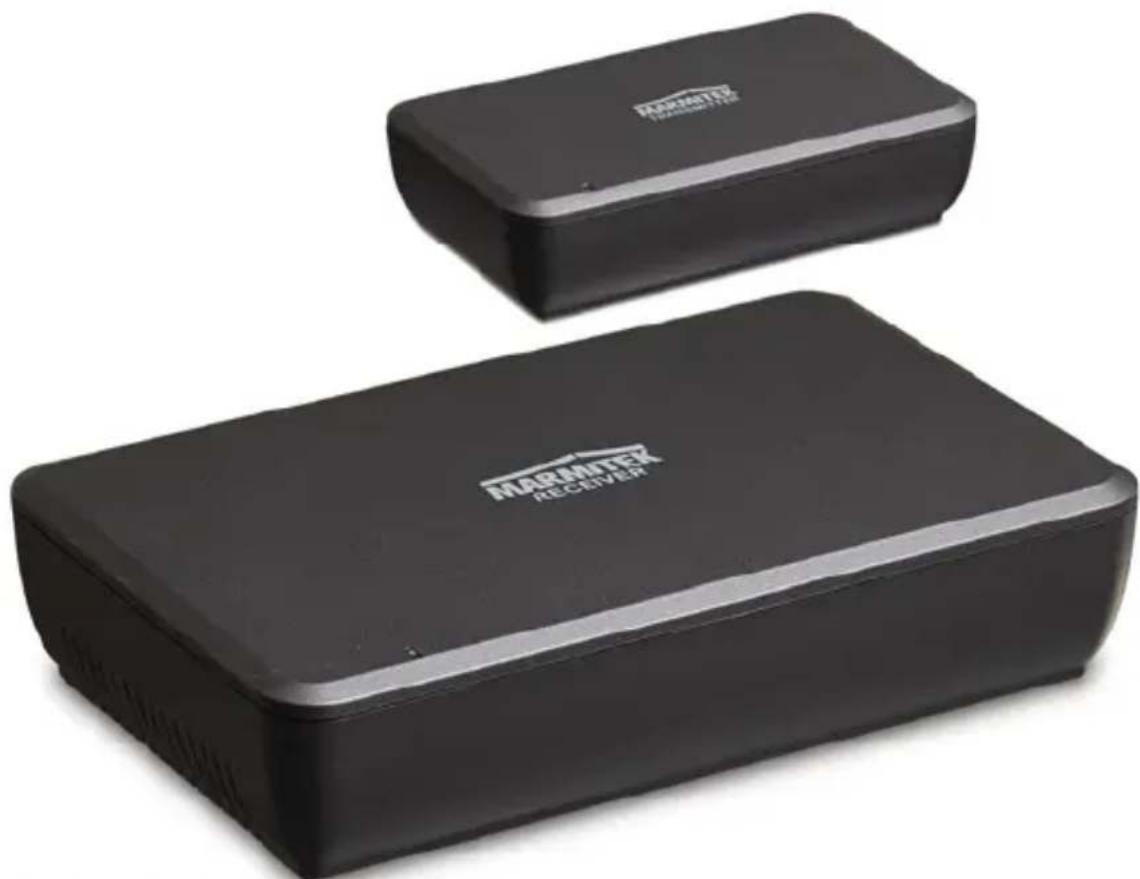
natural_image
Two black rectangular devices labeled 'MARATEK RECOVERY' with white branding, placed side by side (no additional text or symbols visible)USER MANUAL 3
1 Table of contents ...... 3
2 Safety instructions....4
3 Your product .... 5
3.1 Introduction 5
3.2 Package contents....5
4 Product overview 6
4.1 LED status 7
5 Getting started 7
5.1 Precautions 8
5.2 Installation....9
5.2.1 Transmitter (TX) 9
5.2.2 Receiver (RX)....10
5.2.3 Power supply 10
5.3 Switching on.... 11
5.4 Pairing....11
6 Use....12
7 Product details 12
7.1 Technical specifications .... 12
8 Frequently asked questions (FAQs).... 13
9 Notification 13
9.1 Declaration of Conformity.... 13
9.2 Recycling 14
9.3 Copyrights....14
2 Safety instructions
Please read these instructions thoroughly before you use the device and keep them for future reference.
- Only for indoor use.
- Do not use the product in a damp environment or near water.
- Do not expose the product to extremely high or low temperatures, strong light sources or direct sunlight.
- This product is not a toy. Keep out of reach of children.
- Avoid using headphones/speakers with the volume turned up for an extended period of time. Doing so may damage your hearing. It is advisable to keep the volume at a moderate level at all times.
- Connect the adapter to the mains only after you have verified that the line voltage corresponds to the value specified on the type plates.
- Never connect an adapter or power cord when it is damaged. In that case, contact your supplier.
- Disconnect the AC/DC power adapter from the mains when this device is not in use for prolonged time.
- Never open the product: the device may contain parts with deadly voltage.
• Repairs or service should only be performed by qualified personnel. - Improper use, self-installed modifications or repairs will void any and all warranties.
- Marmitek does not accept any product responsibility for incorrect use of the product or use other than for which the product is intended.
- Marmitek does not accept liability for any consequential damage other than the legal product responsibility.
3 Your product
3.1 Introduction
Congratulations on your purchase of the Marmitek Surround Anywhere 221! It allows you to easily connect your rear surround speakers wirelessly to your surround set. The built-in amplifier in the receiver allows you to simply use your existing (passive) surround speakers. The uncompressed digital transfer creates a sound that surpasses CD quality, without any interference or delay. Since your surround is used to control the sound, everything is taken care of after installation.
Marmitek products are manufactured with the utmost precision and are of high quality.
Surround Anywhere 221:
• Digital Wireless Surround Sender
- Make your existing rear surround-speakers wireless
- Connect your surround set's existing rear speakers wirelessly; no loose cables trailing through your living room.
- The uncompressed digital link provides better than CD-quality sound, without interference or delay.
- Improved 2.4GHz technology prevents interference with your existing Wi-Fi equipment, allowing them to work perfectly side-by-side in the same area.
- Transmitter and receiver are paired (secure pairing), enabling you to use multiple sets in the same area (6 max).
- The receiver's built-in amplifier provides plenty of power for your rear speakers.
- Because of the direct connection to your surround set's speaker output, the speaker volume will automatically correspond to the surround set's volume.
- Volume control on the receiver ensures the right balance between front and rear speakers.
3.2 Package contents
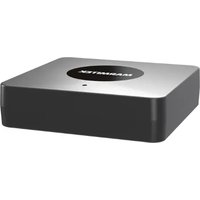
A. 1x Surround Anywhere 221 audio transmitter
B. 1x Surround Anywhere 221 audio receiver
C. 1x power adapter, 5V
D. 1x power adapter, 18V
E. 2x short speaker cable
F. 1x user manual
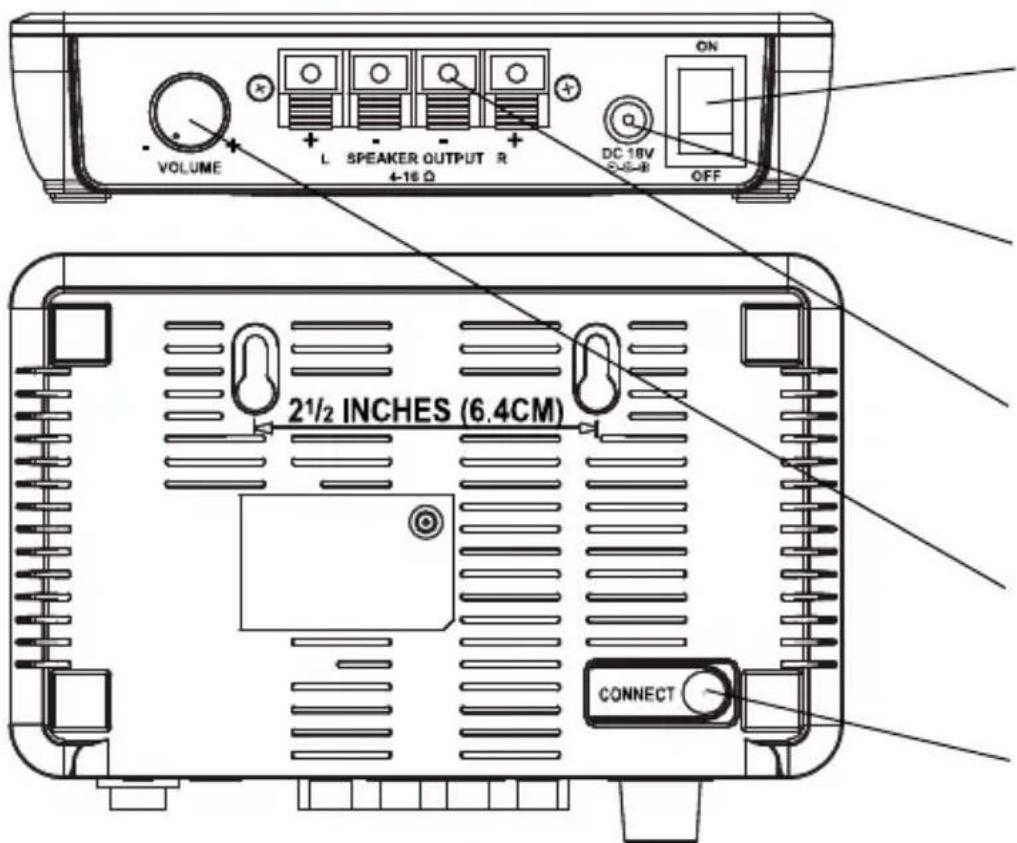
4 Product overview
A
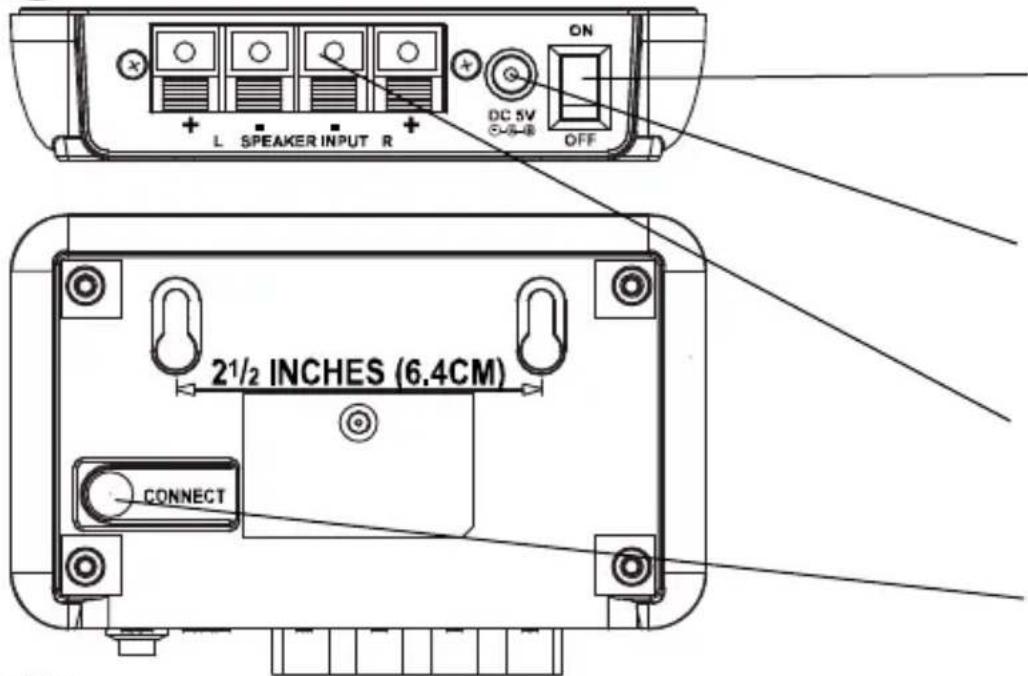
Surround Anywhere 221 audio transmitter
text_image
L SPEAKER INPUT R ON DC 5V OFF 2½ INCHES (6.4CM) CONNECTOn/off button
DC power supply
Speaker cable connector
Pairing button
B
Surround Anywhere 221 audio receiver
text_image
VOLUME L SPEAKER OUTPUT R 4-16 Ω DC 18V OFF 2½ INCHES (6.4CM) CONNECTOn/off button
DC power supply
Speaker cable connector
Volume control
Pairing button

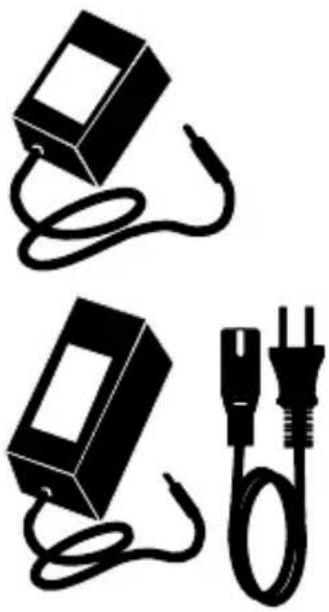
5V adapter
Powers the audio transmitter.

18V adapter
Powers the audio receiver.

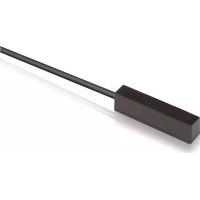
Speaker cable
Enables you to connect the audio transmitter to your surround set.
natural_image
Two black electrical components with wires, one rectangular and one plug, shown without any text or symbols.4.1 LED status
| LED status | Description |
| Blue LED lit continuously | Paired |
| Blue LED on 0.5s, off 0.5s | On, not connected |
| Blue LED on 0.2s, off 0.2s | Pairing mode |

natural_image
Pure electrical circuit lines without any symbols5 Getting started
Please take the following steps before using the product:
• Precautionary measures:
• Installing transmitter (TX)
• Installing receiver (RX)
- Connecting power supply
- Switching on Surround Anywhere 221
- Pairing transmitter and receiver
- Enjoy!
We will now explain this step by step.
5.1 Precautions
The Surround Anywhere 221 is a wireless speaker system with a 2 x 25 Watt RMS D-type amplifier. It allows you to wirelessly connect your surround set's rear speakers.
An amplifier's speaker output is potentially high enough to cause damage. Please ensure that the output cannot short circuit.
Please ensure that your surround set is switched off before you start the installation. This is to prevent unwanted sounds or even short-circuiting a speaker output.
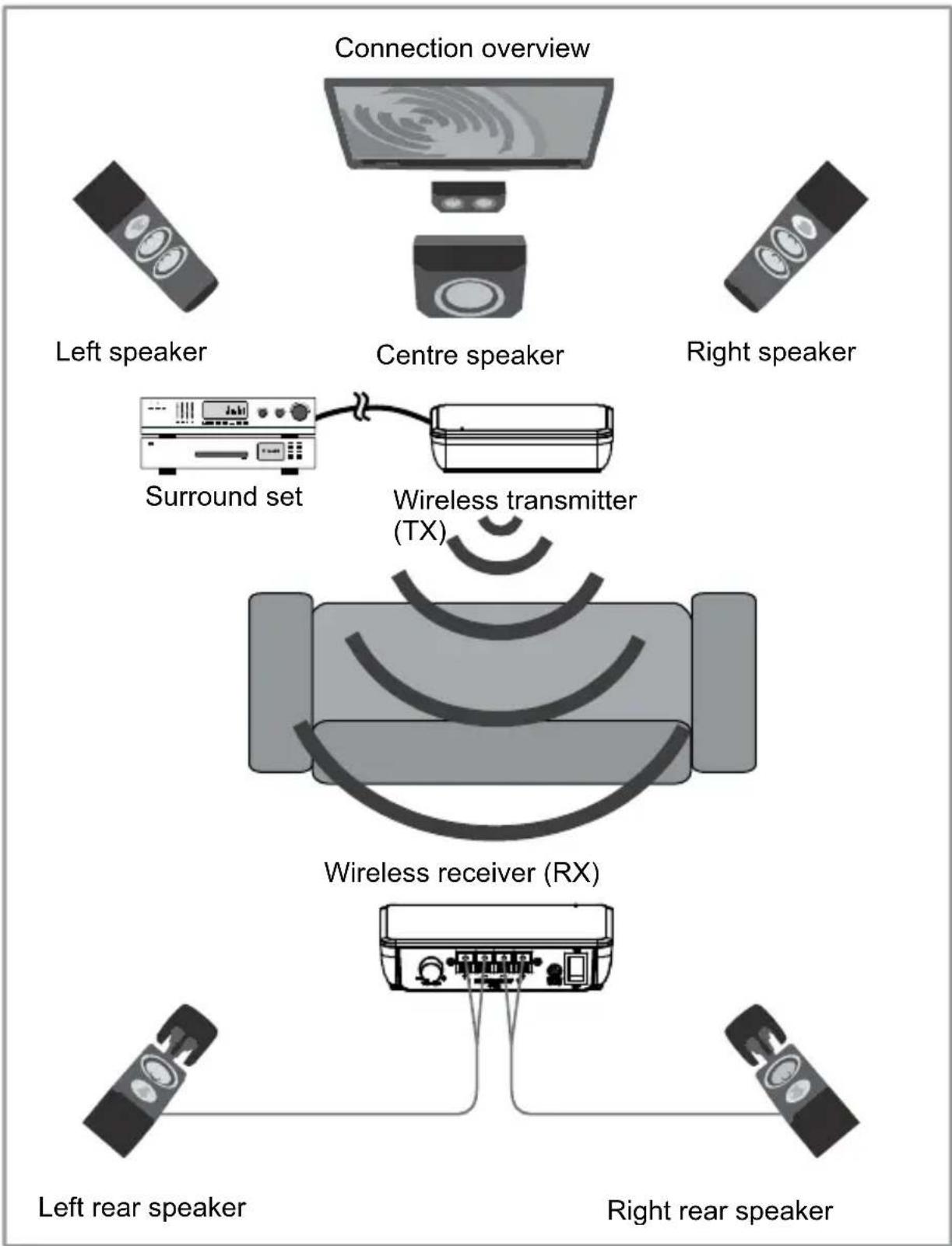
flowchart
graph TD
    A["Left speaker"] --> B["Surround set"]
    C["Right speaker"] --> B
    D["Left rear speaker"] --> E["Wireless receiver (RX)"]
    F["Right rear speaker"] --> E
    G["Centre speaker"] --> H["Wireless transmitter (TX)"]
5.2 Installation
5.2.1 Transmitter (TX)
Using the supplied short speaker cables, the transmitter is connected to 2 speaker outputs on the surround set.
Surround set connection panel
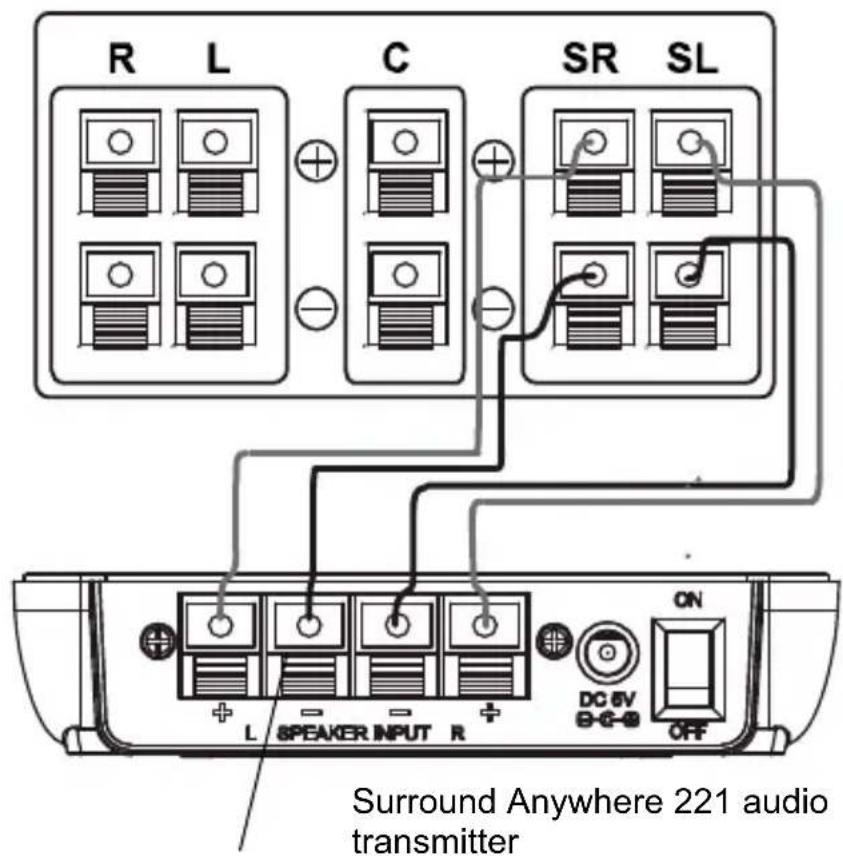
text_image
R L C SR SL L SPEAKER INPUT R ON DC 6V - G-0 OFF Surround Anywhere 221 audio transmitter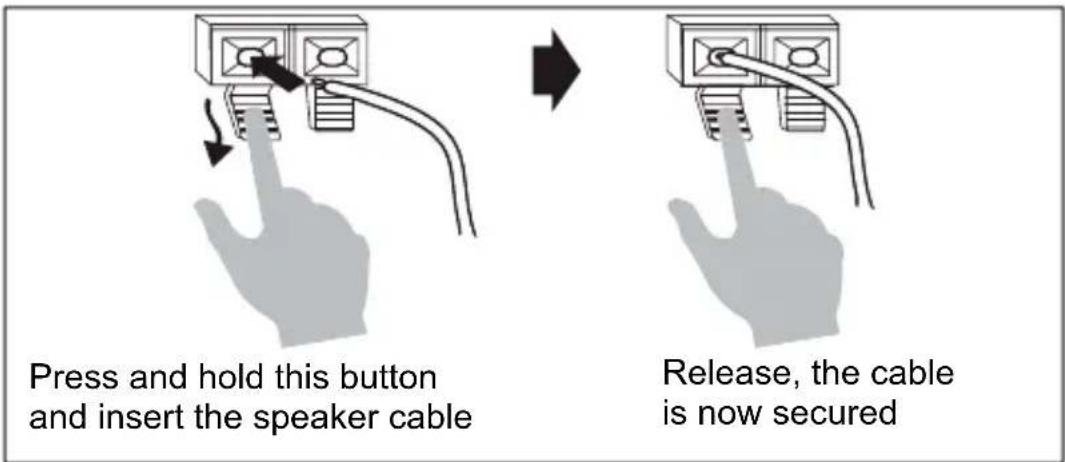
text_image
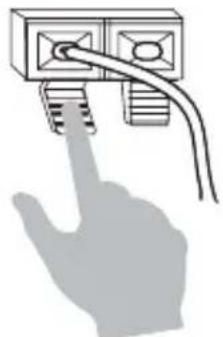
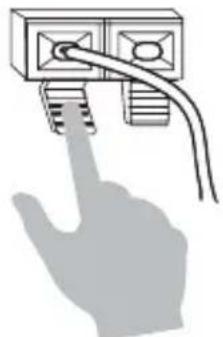
Press and hold this button and insert the speaker cable Release, the cable is now secured- Place the transmitter near the surround set.
- Follow the above diagram to connect the speaker cable between the surround set and transmitter for both left and right. Please observe the correct polarity.
5.2.2 Receiver (RX)
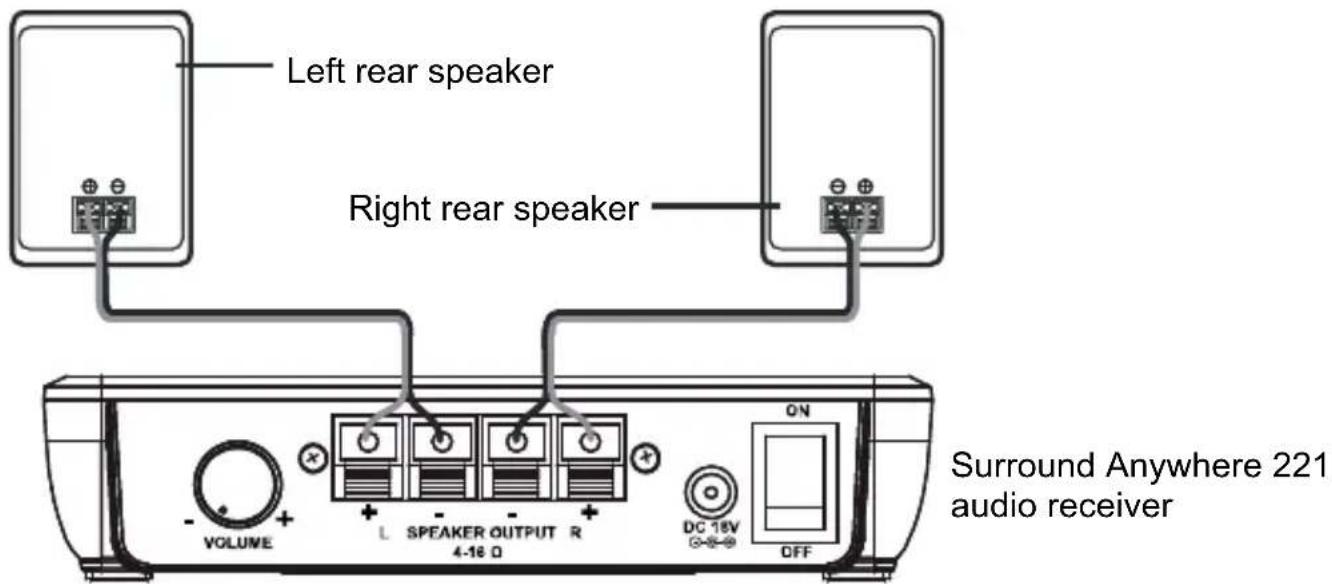
Using standard speaker cables (not supplied), the receiver is connected to regular passive speakers. When connecting the speakers, please observe the correct polarity.
text_image
Left rear speaker Right rear speaker VOLUME L SPEAKER OUTPUT R 4-16 Ω DC 18V OFF ON Surround Anywhere 221 audio receiver- Place the receiver near the rear speakers.
- Follow the above diagram to connect the speaker cable between the receiver and speakers for both left and right.
5.2.3 Power supply
text_image
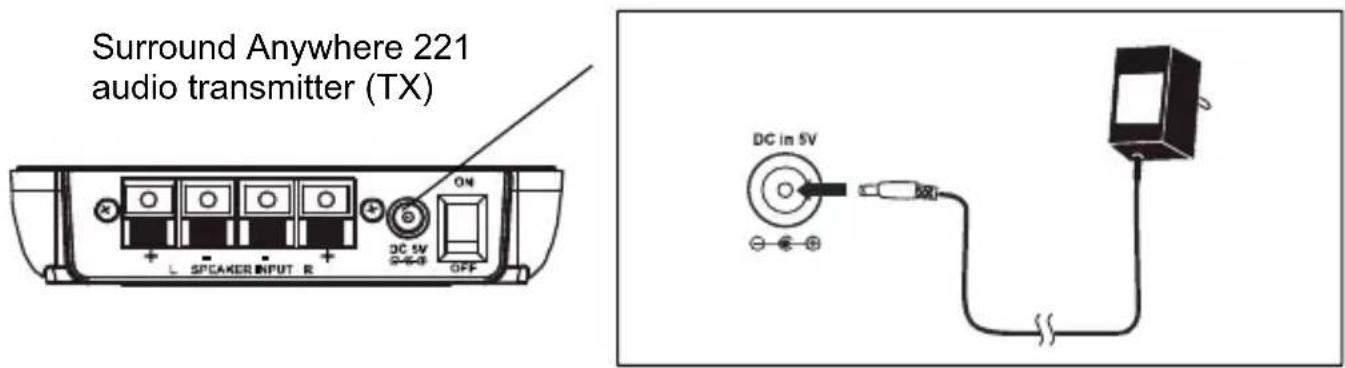
Surround Anywhere 221 audio transmitter (TX) L SPEAKER INPUT R DC 5V OFF DC in 5VPlease ensure that the ON/OFF switch on the audio transmitter is in the off position.
Connect the 5V power adapter (C) to the audio transmitter and a power outlet.
text_image
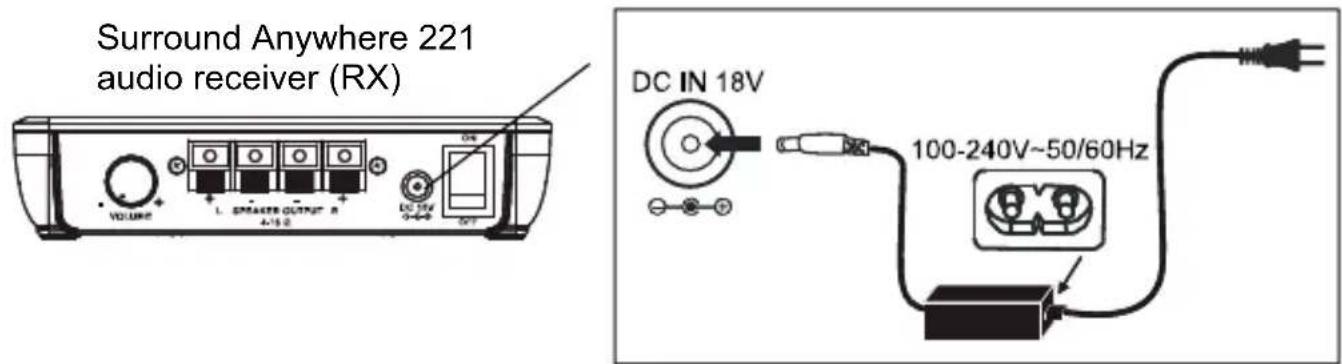
Surround Anywhere 221 audio receiver (RX) DC IN 18V 100-240V~50/60HzPlease ensure that the ON/OFF switch on the audio receiver is in the off position. Connect the 18V power adapter (D) to the audio receiver and a power outlet.
5.3 Switching on
Once all the connections are done, you can start using the Surround Anywhere 221. First, turn on your surround set and play a DVD or Blu-ray disc with 5.1 channel sound at low volume. Please ensure that the volume button on the Surround Anywhere receiver (RX) is approximately in the middle position. Always turn on the transmitter first. The blue LED will now start to flash slowly. Turn on the receiver. The LEDs on both the transmitter and the receiver will now be blue continuously, indicating that they are paired. Now, adjust the volume on the Surround Anywhere receiver (RX) as required.
5.4 Pairing
The Audio Anywhere 221 transmitter and receiver are already paired. If the LEDs on the transmitter and receiver continue to blink slowly, you can pair the set again.
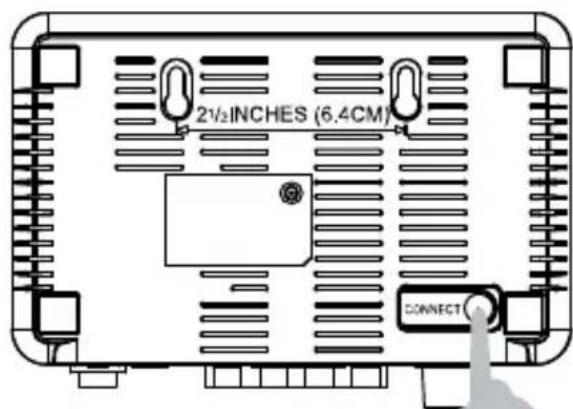
At the back of the receiver, press the pairing button for a few seconds. The LED will now flash quickly.
text_image
2½INCHES (6.4CM) CONNECTThen, also press the pairing button at the back of the transmitter for a few seconds. The transmitter will now instantly connect to the receiver, and the LEDs will light up continuously.

text_image
2½ INCHES (6.4CM) CONNECT6 Use
The Surround Anywhere 221 has no auto standby mode. If the set is left idle for an extended period, switch it off like this: always first switch off the receiver, followed by the transmitter (if necessary). This is to avoid a pop coming from the speakers. If you want to switch the set back on, always first switch on the transmitter and then the receiver.
7 Product details
7.1 Technical specifications
Transmitter
Supply voltage 230VAC +10% -15% 50Hz, 5V/600mA
Idle power consumption < 0.5W
Audio transmission method Digital
Transmitter frequency 2.4GHz
Connection with receiver Secure ID Pairing
Sample frequency 48KHz
Audio Input Level (Max) 11 V (RMS ) @ 120 ohm
Transmitter operating range max. 30 m line of sight, max 10 m through walls and ceilings
Weight 100 grams.
Size 120 x 82 x 30 mm
Receiver
Supply voltage 230VAC +10% -15% 50Hz, 18V/3600mA
Idle power consumption < 2.5W
Output power 2 x 50 W (2 x 25W RMS)
Frequency response 20Hz - 20kHz @ 8 Ohms
Signal-to-noise ratio 80 dB (Transmitter / Amplifier, A-weighted)
Total harmonic distortion < 0.5% @ 1 W
Overall audio latency <=20ms
Power efficiency 78%
Channel separation >=50dB
Weight 200 grams.
Size 155 x 110 x 35 mm
Operation temperature 0 \~ +50°C
In order to continue improving the product, Marmitek reserves the right to change specifications and/or designs without prior notice.
8 Frequently asked questions (FAQs)
The LED remains off after the transmitter / receiver is switched on
Check the power outlet and the power supply.
Check the power supply's voltage.
No audio at receiver side
- Check that the blue LED is lit continuously.
- Adjust the receiver's volume control.
- Does the rear surround speaker have a signal?
Audio is distorted or too low
- Adjust the volume control of the surround set until no more clipping occurs.
- Adjust the volume control of the receiver until no more clipping occurs.
Do you have any other questions that have not been resolved by the above information? Please go to www.marmitek.com
9 Notification
9.1 Declaration of Conformity

Hereby, Marmitek BV declares that this Surround Anywhere 221 ^™ is in compliance with the essential requirements and other relevant provisions of the following Directives:
Directive 2014/53/EU of the European Parliament and of the Council of 16 April 2014 on the harmonisation of the laws of the Member States relating to the making available on the market of radio equipment and repealing Directive 1999/5/EC.
Directive 2011/65/eu of the European parliament and of the council of 8 June 2011 on the restriction of the use of certain hazardous substances in electrical and electronic equipment.
Commission Regulation (EC) No 278/2009 of 6 April 2009 implementing Directive 2005/32/EC of the European Parliament and of the Council with regard to eco-design requirements for no-load condition electric power consumption and average active efficiency of external power supplies.
You can read the full Declaration of Conformity at http://www.marmitek.com
9.2 Recycling

Environmental Information for Customers in the European Union.
European Directive 2002/96/EC requires that the equipment bearing this symbol on the product and/or its packaging must not be disposed of with unsorted municipal waste. The symbol indicates that this product should be disposed of separately from regular household waste streams. It is your responsibility to dispose of this and other electric and electronic equipment via designated collection facilities appointed by the government or local authorities. Correct disposal and recycling will help prevent potential negative consequences to the environment and human health. For more detailed information about the disposal of your old equipment, please contact your local authorities, waste disposal service, or the shop where you purchased the product.
9.3 Copyrights
Marmitek is a trademark of Germatron B.V. Surround Anywhere 221 ^™ is a trademark of Marmitek B.V. All rights reserved. Every effort has been made to ensure that the information in this manual is accurate. Marmitek is not responsible for printing or clerical errors. Copyright and all other proprietary rights in the content (including but not limited to model numbers, software, audio, video, text and photographs) rests with Marmitek B.V. Any use of the Content, but without limitation, distribution, reproduction, modification, display or transmission without the prior written consent of Marmitek is strictly prohibited. All copyright and other proprietary notices shall be retained on all reproductions. Other company and product names mentioned herein may be trademarks of their respective companies. Mention of third-party products is for informational purposes only and constitutes neither an endorsement nor a recommendation. Marmitek assumes no responsibility with regard to the performance or use of these products.
Marmitek BV - PO Box 4257 - 5604 EG Eindhoven The Netherlands
Surround Anywhere 221:
natural_image
Simple black-and-white illustration of a USB drive with a coiled cable (no text or symbols)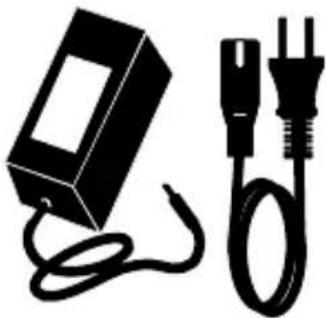
natural_image
Black-and-white illustration of a battery connected to a wire and a plug (no text or symbols)natural_image
Simple diagram of a circular object with three diagonal lines extending outward (no text or symbols)4.1 LED Anzeige
text_image
R L C SR SL L SPEAKER INPUT R ON DC 6V -0-0 OFF Surround Anywhere 221 Audiosender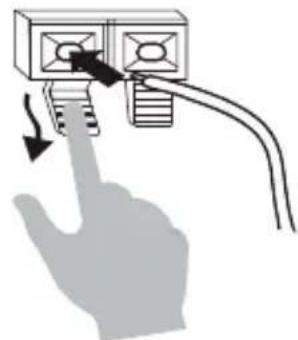
natural_image
Hand inserting a plug into a wall-mounted device with a cable (no text or symbols visible)natural_image
Hand inserting a cable into an electrical outlet (no text or symbols visible)text_image
Surround Anywhere 221 Audiosender (TX) L SPEAKER INPUT R DC in 5V DC 5W OFFSurround Anywhere 221:
text_image
VOLUME L SPEAKER OUTPUT R 4-16 Ω DC 18V S-5-8 OFF 2½ INCHES (6.4CM) CONNECTBouton marche/arrêt
Alimentation DC
natural_image
Simple black-and-white illustration of a USB drive with a coiled cable (no text or symbols)
natural_image
Black-and-white illustration of a battery and two plug cables (no text or symbols)
Câble d'enceinte
natural_image
Simple line drawing of a circular object with three diagonal lines extending outward (no text or symbols)natural_image
Hand inserting a device into a wall-mounted panel with arrows indicating insertion (no text or symbols)
natural_image
Hand inserting a cable into an electrical socket (no text or symbols visible)Surround Anywhere 221:
natural_image
Two black electrical components with wires, one connected to a plug and the other attached (no text or symbols visible)
natural_image
Pure electrical circuit lines without any symbols4.1 Señal LED
Surround Anywhere 221:
text_image
VOLUME L SPEAKER OUTPUT R 4-16 Ω DC 18V OFF 2½ INCHES (6.4CM) CONNECTTasto di accensione
AlimentazioneDC
natural_image
Two black electrical components with wires, one rectangular and one plug, shown without any text or symbols.
natural_image
Pure electrical circuit lines without any symbols4.1 Stato LED
text_image
R L C SR SL L SPEAKER INPUT R ON DC 5V -0-0 OFF trasmettitore audio Surround Anywhere 221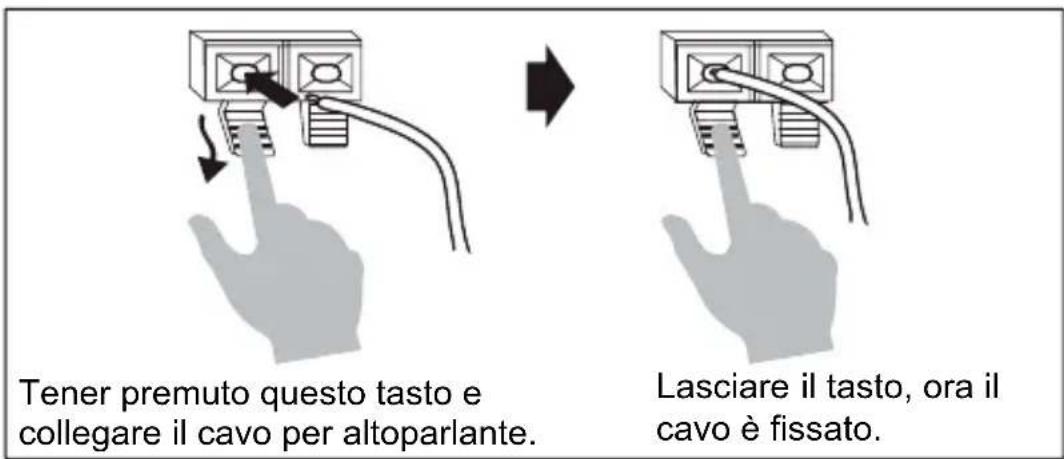
text_image
trasmettitore audio Surround Anywhere 221 (TX) L SPEAKER INPUT R DC 5V OFF DC in 5Vtext_image
VOLUME L SPEAKER OUTPUT R 4-16 Ω DC 18V OFF 2½ INCHES (6.4CM) CONNECTAan/uit knop
DC voeding
natural_image
Simple black-and-white illustration of a rectangular device with a coiled cable (no text or symbols)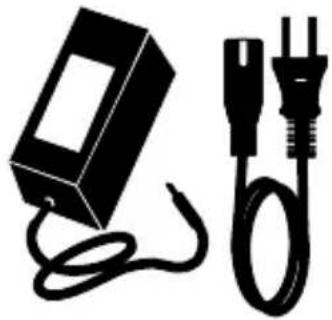
natural_image
Black-and-white illustration of a battery and two electrical plugs (no text or symbols)
natural_image
Simple line drawing of a circular object with three diagonal lines extending outward (no text or symbols)4.1 Led status
text_image
R L C SR SL L SPEAKER INPUT R ON DC 6V B-C-B OFF Surround Anywhere 221 audio zender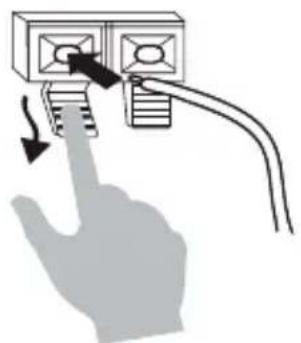
natural_image
Hand inserting a device into a wall-mounted panel with arrows indicating insertion (no text or symbols)