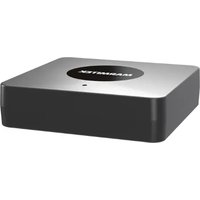
BoomBoom 55 HD - Bluetooth audio transmitter MARMITEK - Free user manual and instructions
Find the device manual for free BoomBoom 55 HD MARMITEK in PDF.


User questions about BoomBoom 55 HD MARMITEK
0 question about this device. Answer the ones you know or ask your own.
Ask a new question about this device
Download the instructions for your Bluetooth audio transmitter in PDF format for free! Find your manual BoomBoom 55 HD - MARMITEK and take your electronic device back in hand. On this page are published all the documents necessary for the use of your device. BoomBoom 55 HD by MARMITEK.
USER MANUAL BoomBoom 55 HD MARMITEK
Bluetooth transmitter - AptX high resolution audio
aptX Low Latency
aptX HD
aptX
aptX adaptive
AAC
SBC
text_image
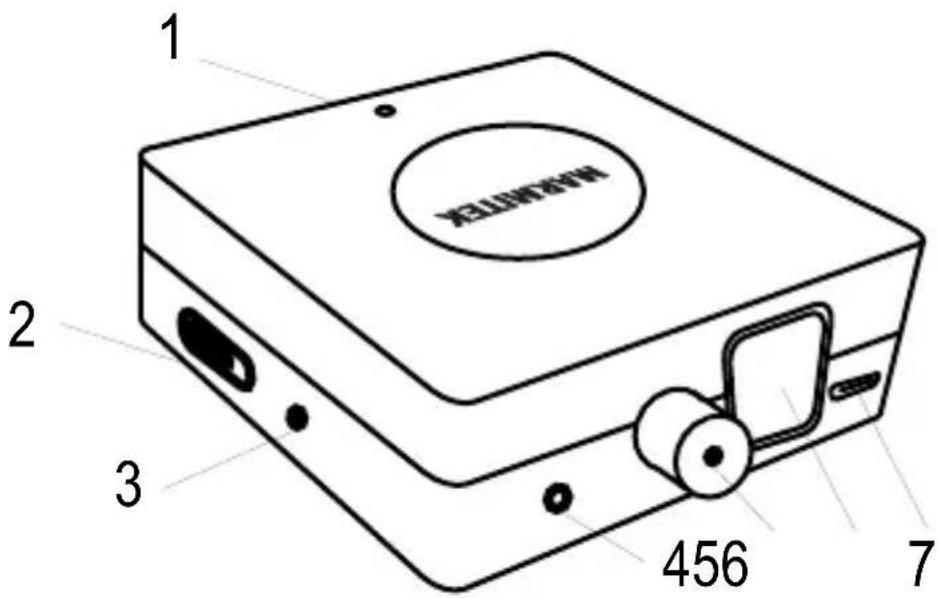
1 2 3 456 7Set content
1 x BoomBoom 55 HD
1 x jack cable
1 x USB-C cable
1 x user guide

text_image
QR code image containing encoded data, no visible human-readable textAudio
English
Safety Instructions
Please read these instructions thoroughly before you use the device and keep them for future reference.
- Only for indoor use.
- Do not use the product in a damp environment or near water.
- Do not expose the product to extremely high or low temperatures, strong light sources or direct sunlight.
- This product is not a toy. Keep out of reach of children.
- Avoid using headphones/speakers with the volume turned up for an extended period of time. Doing so may damage your hearing. It is advisable to keep the volume at a moderate level at all times.
- Never open the product: the device may contain parts with deadly voltage.
- Repairs or service should only be performed by qualified personnel.
- Improper use, self-installed modifications or repairs will void any and all warranties.
- Marmitek does not accept any product responsibility for incorrect use of the product or use other than for which the product is intended.
- Marmitek does not accept liability for any consequential damage other than the legal product responsibility.
Introduction
This Bluetooth audio transmitter allows you to play audio from any sound source through headphones or audio receivers that are equipped with Bluetooth technology. You can then control the audio using your sound source (e.g. TV) or audio receiver (Bluetooth headset).
The BoomBoom 55 HD has a range of approximately. 10 metres, enabling you to enjoy your music in the same or adjoining room.
Product overview
- LED status
- On/Off switch
- Pairing button
- Analog audio in
- Coax digital in
- Toslink digital in
LED status
| LED | Status / Codec |
| Blue, flashing quickly | Pairing mode |
| Blue, flashing slowly | Searching for last device |
| Yellow, ON | aptX |
| Red, ON | aptX HD |
| Green, ON | aptX Low Latency |
| Magenta, ON | aptX adaptive |
| White, ON | AAC |
| Blue, ON | SBC |
Connecting to your tv or sound system
For best results, connect the BoomBoom 55 HD to the digital audio output (toslink or coaxial) of your TV or audio system:
- Connect your digital audio cable (not included) to the digital audio output of your TV or audio system
- Connect the other end of the audio cable to the correct BoomBoom 55 audio input (5 or 6)
- If your TV or audio system does not have a digital audio output, you can also connect the BoomBoom 55 HD to the analogue audio output or headphones-out:
- Connect the supplied AUX audio cable to the audio output of your TV or audio system
- Connect the other end of the audio cable to the BoomBoom 55 audio input (4)
- Connect the supplied USB power cable to the BoomBoom 55 HD's POWER jack (7) and to the USB power adapter and plug it into the wall outlet
Pairing
- Make sure your Bluetooth headphones are close to the BoomBoom 55 HD. The best distance is about 1 metre.
- Put your Bluetooth headphones in pairing mode (please refer to your headphones' user manual).
- Set the BoomBoom 55 HD's switch (2) to ON.
- Long press the pairing button (3) until the LED will start to quickly flash blue.
- The BoomBoom 55 HD will now be automatically paired with your headphones. Once the pairing has been established, the LED on the BoomBoom 55 will light up continuously (this may take a while) in the color of the Codec connection.
Codec connection
When the BoomBoom 55 HD is paired, the LED color indicates the used codec. By short pushing the pairing button, you can select another codec supported by your connected device.
Pairing a second Bluetooth device
With the BoomBoom 55 HD, you can pair two Bluetooth receivers at the same time.
After pairing the first Bluetooth device, select the Codec you want to use. (must be supported by your second receiver)
Put the second device in pairing mode.
Long press the BoomBoom 55 HD's pairing button until the LED will start to quickly flash blue.
The pairing with the first Bluetooth device will be momentarily interrupted, after which both Bluetooth devices will be paired with the BoomBoom 55 HD. This can take up to two minutes. Note: You can only change the codec when only one device is connected.
Deleting paired devices from memory
To delete previously paired devices from the memory, proceed as follows:
Turn off the BoomBoom 55 HD.
Press and hold the pairing button for 9 seconds.
Switch on the BoomBoom 55 HD.
Release the pairing button after 3 seconds.
All previously paired devices are now erased.
Technical specifications
Supported Codec SBC, AAC, aptX, aptX Low Latency, aptX HD, aptX Adaptive
Frequency Response 10Hz to 22kHz.
Audio Latency SBC, 170 ms - 270 ms
AAC, 90 ms - 150 ms
aptX, 60 ms - 80 ms
aptX Low Latency, 32 ms - 40 ms
Support Multiple Connect Up to 2 devices simultaneously.
Bluetooth version V5.2
Range Up to 10 meters with Class 2> <2
connection
Audio Stereo
Operation Temperature 0°C to +50°C
Storage Temperature -20°C to +70°C
Power supply 100 - 240 VAC 50/60 Hz, 5 VDC
USB-C adapter (not included) or via
USB-C cable (included)
Declaration of Conformity

Hereby, Marmitek BV, declares that the
BoomBoom 55 HD is in compliance with the essential
requirements of the 2014/53/EU Directives. Full Declaration of Conformity is available at
http://www.marmitek.com/en/declarations-of-conformity/
Nederlands
Ondersteunde codec SBC, AAC, aptX, aptX Low Latency, aptX HD, aptX Adaptive
Frequentiebereik 10Hz to 22kHz.
Audio vertraging SBC, 170 ms - 270 ms
AAC, 90 ms - 150 ms
aptX, 60 ms - 80 ms
aptX Low Latency, 32 ms - 40 ms
Support multiple Connect tot 2 apparaten
Bluetooth-versie V5.2
aptX Low Latency, 32 ms - 40 ms
Codec supporté SBC, AAC, aptX, aptX Low Latency, aptX HD, aptX Adaptive
aptX Low Latency, 32 ms - 40 ms
aptX HD, aptX Adaptive
aptX Low Latency, 32 ms - 40 ms
Codec supportato SBC, AAC, aptX, aptX Low Latency, aptX HD, aptX Adaptive
aptX Low Latency, 32 ms - 40 ms
http://www.marmitek.com/it/declarations-of-conformity/

natural_image
Abstract black bar pattern on white background (no text or symbols)audio
25020697/20231218 | BoomBoom 55 HD™
all rights reserved © MARMITEK
stay connected marmitek.com