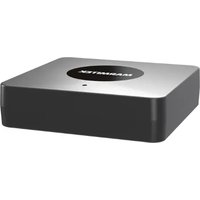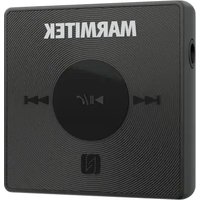
BoomBoom 76 - Receiver MARMITEK - Free user manual and instructions
Find the device manual for free BoomBoom 76 MARMITEK in PDF.


User questions about BoomBoom 76 MARMITEK
0 question about this device. Answer the ones you know or ask your own.
Ask a new question about this device
Download the instructions for your Receiver in PDF format for free! Find your manual BoomBoom 76 - MARMITEK and take your electronic device back in hand. On this page are published all the documents necessary for the use of your device. BoomBoom 76 by MARMITEK.
USER MANUAL BoomBoom 76 MARMITEK
Bluetooth receiver auto - Portable - Battery
Package content
1 x BoomBoom 76
1 x Mini jack cable
1 x USB-A to USB-C cable
1 x Quick install guide
English
Safety Instructions
Please read these instructions thoroughly before you use the device and keep them for future reference.
- Only for indoor use.
- Do not use the product in a damp environment or near water.
- Do not expose the product to extremely high or low temperatures, strong light sources or direct sunlight.
- This product is not a toy. Keep out of reach of children.
- Avoid using headphones/speakers with the volume turned up for an extended period of time. Doing so may damage your hearing. It is advisable to keep the volume at a moderate level at all times.
- The built-in rechargeable battery is not replaceable. Do not remove or replace the battery. Dispose of unit properly. Do not dispose unit in trash or fire.
- Never open the product: the device may contain parts with deadly voltage.
- Repairs or service should only be performed by qualified personnel.
- Improper use, self-installed modifications or repairs will void any and all warranties.
-
Marmitek does not accept any product responsibility for incorrect use of the product or use other than for which the product is intended.
-
Marmitek does not accept liability for any consequential damage other than the legal product responsibility.
Introduction
With the stereo Bluetooth receiver BoomBoom 76, you can control incoming and outgoing phone calls while you listen to music in stereo from your phone or from another device. Such a device must support Bluetooth, for example, a computer or a portable music player. During a call, the music pauses automatically and starts playing again when the call ends.
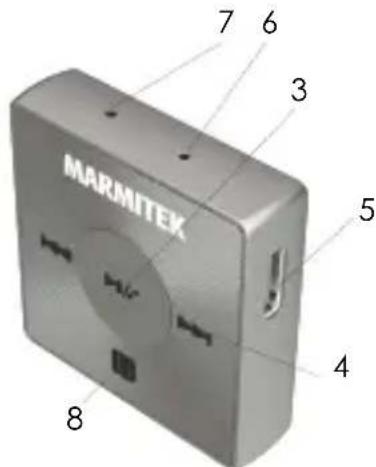
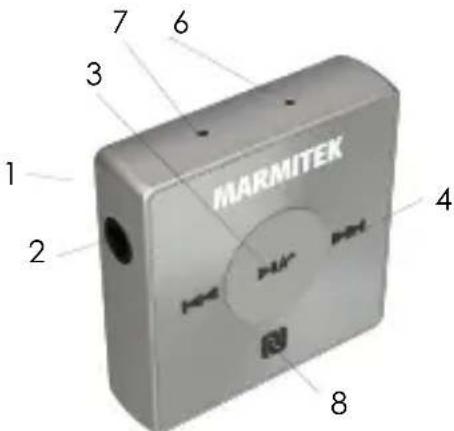
Product overview
- AUX line out
3.5mm output for wired headphones / speakers.
- Volume down / Track backward button
Decreases volume as well as goes back to the previous track.
- Multifunction button
e.g. power on/off, pairing mode, play/pause.
- Volume up / Track forward button
Increases the volume / advances the music track.
- USB-C jack
Connect the charging cable to charge the battery.
- LED indicator
Indicate mode and function of the BoomBoom 76.
- Built-in microphone
For speaker phone use.
- NFC detection area
Swipe this area during NFC transactions.
Charging the battery
Before using the BoomBoom 76 for the first time, you need to charge the receiver for 2-3 hours with the included USB-C charging cable.
To charge the battery
- Plug the charger into a power outlet.
- Plug one end of the USB cable into the charger (or into the USB port of a computer).
- Plug the other end of the cable into the USB-C port on your BoomBoom 76.
Note: The LED indicator stays red when charging and it will turn off when the BoomBoom 76 is fully charged.
To turn on/off the receiver
Press and hold button (3) until the LED flashes blue and a sound is heard.
Pairing the receiver with your phone
You can pair the receiver with your phone manually or by using NFC. After successful pairing, the receiver connects automatically to the phone as soon as the receiver is turned on and within range.
To manually pair the receiver with your phone
- Make sure your mobile phone is Bluetooth-enabled and the Bluetooth function is activated.
- Receiver: Make sure the BoomBoom 76 is off.
Press and hold the MFB button (3) until the LED indicator flashes in red and blue alternatively.
- Phone: Scan for Bluetooth devices, then select "BoomBoom 76" in the available devices list.
- Follow the pairing instructions that appear on your phone. If a passcode is required, enter "0000".
Note: For some mobile phones, when they are re-started, the BoomBoom 76 connects with the mobile phone automatically.
To pair the receiver with your mobile phone via NFC
- Make sure that the NFC function of you mobile phone is turned on and that the phone screen is active.
- Turn on the BoomBoom 76.
- Place your phone over the receiver so that the NFC detection area of each device touches the other.
- Follow the pairing instructions that appear on your phone. If a passcode is required, enter "0000".
Note: The BoomBoom 76 will automatically turn off if no paired device is in range for 5 minutes when operated on the battery.
All the pairing information will be stored even after the power is turned off.
Adjust the volume
- During a call or listening to music, long press button (2) to decrease the volume.
- To increase the volume, long press button (4).
Resetting the receiver
Reset the receiver if it behaves unexpectedly. Resetting the receiver will remove all information about paired devices.
To reset the receiver
In standby mode, press button (2), (3) and (4) simultaneously until the LED flashes in red and blue alternatively and a "beep" sound is heard, then release your hand.
Wearing instructions
Although the clip is fixed and cannot be rotated, the device can be turned left or right depending on how it is clipped to your garment. To get the best performance from a Bluetooth receiver when using it outdoors, it is highly recommended that you carry your phone on the same side of your body as the receiver unit.
Call handing
With a built-in microphone, the BoomBoom 76 enables you to receive and make calls while listening to music when paired with a Smartphone.
1. Answer a call
The LED flashes in blue and the incoming call signal "Ding-
Dong" will be heard. Press and release button (3) once to answer a call.
- End a call
Press and release button (3) once during the call.
- Decline a call
Press and hold button (3) and release it after a long beep. The incoming call is declined.
- To mute the microphone during a call
Press button (2) and (3) simultaneously and release it until a "Ding-Dong" sound is heard to mute the microphone during a call. Repeat above procedure to cancel mute.
- To transfer a call
Press and hold button (3) for 3 seconds during a call to transfer a call to your mobile phone. Repeat above procedure to transfer the call from your mobile phone to the receiver.
Listening to music
To listen to music:
- Open the media player in your phone.
- Press button (3) to play the music on the receiver. To pause the music, press button (3) again.
To move between tracks:
When listening to music, press button (2) and (4) once for tracking control.
To control the volume
Press and hold the button (2) and (4) to decrease and increase the volume when listening to music.
Frequently asked questions
Music does not play in the receiver
- Make sure your phone or other device is paired with the receiver. You may have to restart the media player and select to use the receiver.
- Make sure the correct music source is selected.
The receiver turns off automatically
The battery level is too low. The receiver beeps approximately 10 minutes before it turns off. Charge the receiver.
Unexpected behavior
Restart the receiver.
No connection to your phone
Make sure the receiver is charged and within range of the phone. A maximum distance of 10 meters (33 feet), with no solid objects in between, is recommended.
Check the Bluetooth setting in the phone, and reset if necessary.
Pair the receiver with the phone again.
I cannot answer a call
Make sure your phone supports the Bluetooth hands free profile.
Technical specifications
Bluetooth
Supported Bluetooth profiles A2DP
AVRCP
HFP
HSP
Supported Codec SBC, aptX, AAC
Audio Latency SBC, 170 ms - 270 ms
AAC, 90 ms - 150 ms
aptX, 60 ms - 80 ms
Pair memory up to 8 devices
Support NFC (Near Field Yes
Communication)
Bluetooth Version V5.0
Chip Qualcomm CSR8645
Range Up to 10 meters with Class 2> <2
connection
Range Up to 15 meters with Class 2 > < 1
connection
Sensitivity -42 dB +/- 3dB
Directional Sensitivity omni-directional
Connections
Interface audio output Jack 3.5 mm stereo
Phone Functions
answer call, end call
Audio Functions
Volume+, Volume-, Next song, Previous song, Power
Light Indicator
2 color LED (Blue/Red)
Size (L x W x H)
35.1 × 35 × 14.2 ~mm
Weight
14 grams
Operation Temperature
0 +50^ C
Power
Type-C USB or battery
Battery
-
Li-ion
-
Battery Voltage
-
Battery Capacity
-Stand-by Time
-Working Time
-Charging Time
Energy Saving
3.7 V
120 mA h
up to 120 hours
up to 8 hours
2 hours
switches off automatically if there is no connection for 5 minutes.
Declaration of Conformity
CE Hereby, Marmitek BV, declares that the BoomBoom 76 is in compliance with the essential requirements of the 2014/53/EU Directives. Full Declaration of Conformity is available at http://www.marmitek.com/en/declarations-of-conformity/
Nederlandsls
all rights reserved © MARMITEK
stay connected marmitek.com