AS9000 - Voice recorder OLYMPUS - Free user manual and instructions
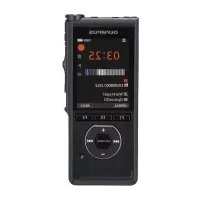
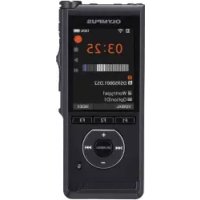
Find the device manual for free AS9000 OLYMPUS in PDF.



User questions about AS9000 OLYMPUS
0 question about this device. Answer the ones you know or ask your own.
Ask a new question about this device
Download the instructions for your Voice recorder in PDF format for free! Find your manual AS9000 - OLYMPUS and take your electronic device back in hand. On this page are published all the documents necessary for the use of your device. AS9000 by OLYMPUS.
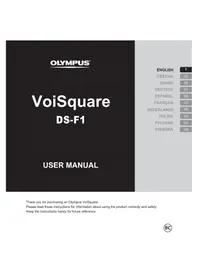
USER MANUAL AS9000 OLYMPUS
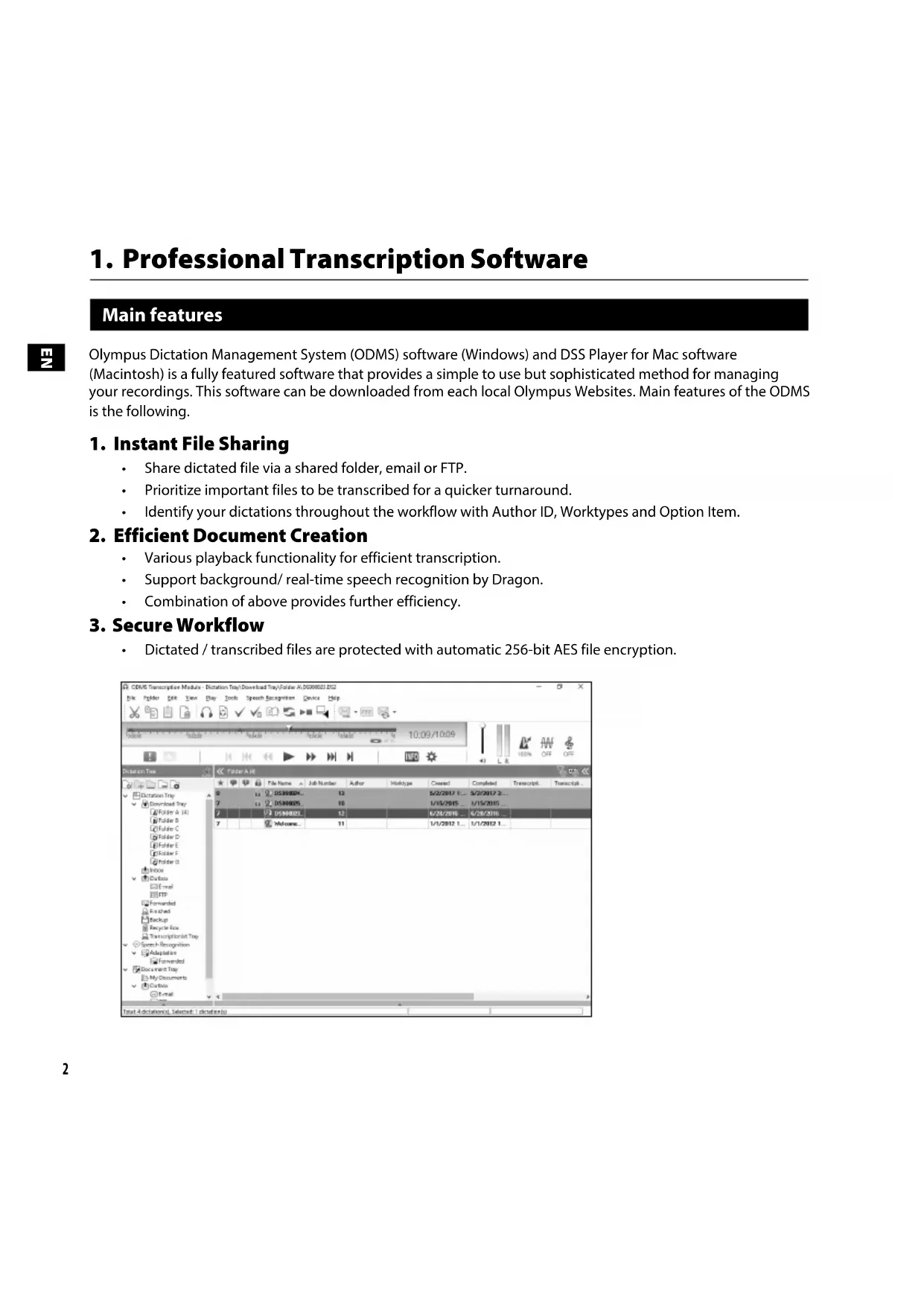
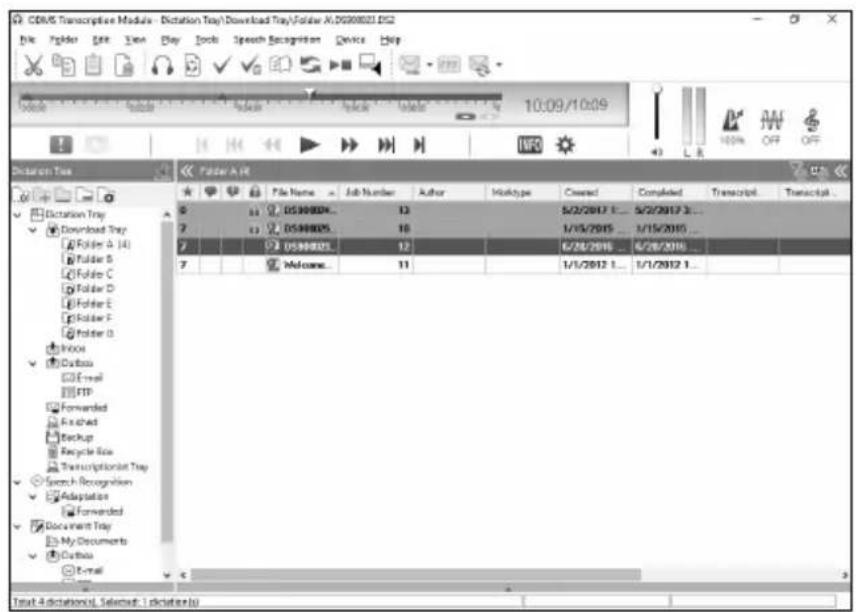
Olympus Dictation Management System (ODMS) software (Windows) and DSS Player for Mac software (Macintosh) is a fully featured software that provides a simple to use but sophisticated method for managing your recordings. This software can be downloaded from each local Olympus Websites. Main features of the ODMS is the following.
1. Instant File Sharing
- Share dictated file via a shared folder, email or FTP.
Prioritize important files to be transcribed for a quicker turnaround.
Identify your dictations throughout the workflow with Author ID, Worktypes and Option Item.
2. Efficient Document Creation
- Various playback functionality for efficient transcription.
Support background/ real-time speech recognition by Dragon.
Combination of above provides further efficiency.
3. Secure Workflow
- Dictated / transcribed files are protected with automatic 256-bit AES file encryption.
1. Professional Transcription Software
Using online help
For information on the ODMS and DSS Player for Mac usage and features, please refer to the online help.
To start online help:
ODMS (Windows)
While the ODMS is running, select the [Help] menu, [Contents].
2 While the ODMS is running, press F1 on the keyboard.
DSS Player for Mac (Macintosh)
While DSS Player for Mac is running, select DSS Player help] from the [Help] menu.
Note:
The online help will be available after the ODMS and DSS Player for Mac installation.
Download the software
In order to download the software, please access the website in your respective region.
http://www.olympus.eu/sds-downloads/
(Europe, Middle east and Africa)
https://www.olympusamericaprediction.com/odms-r7
(The Americas)
https://www.olympus.com.au/support/
(Oceania)
OS compatibility
For information on the latest OS upgrades compatibility, please visit the Olympus Web page.
2. Connecting the RS31H footswitch
1 Connect the footswitch cable to the USB adapter cable.
2
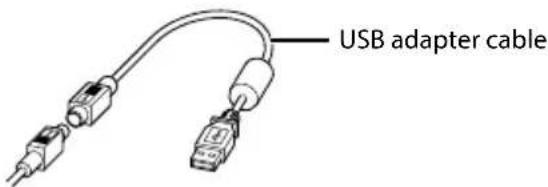
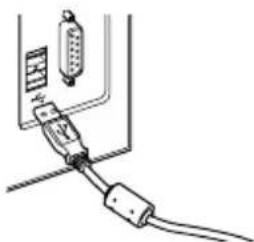
2 Connect the USB adapter cable to the PC's USB port.
3. Connecting the E102 headset
The E102 is a stereo headset. When playing stereo sound, wear the set properly, observing the L and R markings.
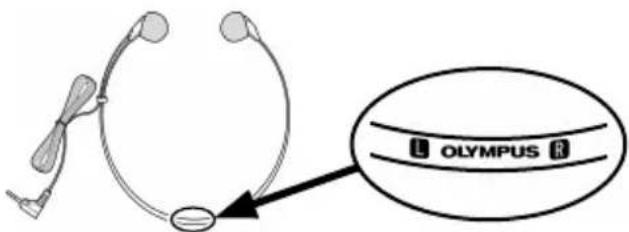
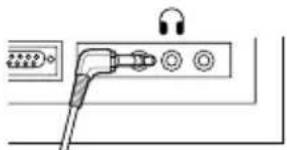
Plug the headset into the PC'searphone terminal
Note:
If your PC does not have a terminal marked with , plug the headset into a terminal marked with or .
For customers in North and South America
FCC Notice
- This equipment has been tested and found to comply with the limits for a Class B digital device, pursuant to Part 15 of the FCC Rules. These limits are designed to provide reasonable protection against harmful interference in a residential installation.
- This equipment generates, uses, and can radiate radio frequency energy and, if not installed and used in accordance with the instructions, may cause harmful interference to radio communications.
However, there is no guarantee that interference will not occur in a particular installation. If this equipment does cause harmful interference to radio or television reception, which can be determined by turning the equipment off and on, the user is encouraged to try to correct the interference by one or more of the following measures:
Reorient or relocate the receiving antenna.
Increase the separation between the equipment and receiver.
Connect the equipment into an outlet on a circuit different from that to which the receiver is connected.
Consult the dealer or an experienced radio/TV technician for help.
Only the OLYMPUS-supplied USB cable should be used to connect the equipment to USB enabled personal computers (PC).
- Any unauthorized changes or modifications to this equipment would void the user's authority to operate it.
For customers in USA
Declaration of Conformity
Model Number: RS31H
Trade Name: OLYMPUS
Responsible Party: OLYMPUS AMERICA INC.
Address: 3500 Corporate Parkway, P.O. Box 610, Center Valley, PA 18034-0610, U.S.A.
Telephone Number: 484-896-5000
Tested To Comply With FCC Standards FOR HOME OR OFFICE USE
This device complies with Part 15 of FCC Rules.
Operation is subject to the following two conditions:
(1) This device may not cause harmful interference, and
(2) This device must accept any interference received, including interference that may cause undesired operation of this device.
For customers in Canada
CANICES-3 (B)/NMB-3 (B)
For customers in Europe

The "CE" mark indicates that this product complies with the European requirements for safety, health, environment and customer protection. CE-mark products are for sale in Europe.

This symbol [crossed-out wheeled bin WEEE Annex IV] indicates separate collection of waste electrical and electronic equipment in the EU countries. Please do not throw the equipment into the domestic refuse. Please use the return and collection systems available in your country for the disposal of this product.
Trademarks and registered trademarks
- Microsoft and Windows are registered trademarks of Microsoft Corporation.
Macintosh and Mac OS are trademarks or registered trademarks of Apple Inc. - Dragon Naturally Speaking is registered trademark of Nuance Communications, Inc.
Other product and brand names mentioned herein may be the trademarks or registered trademarks of their respective owners.

DSS Player pro Mac (Macintosh)
https://www.olympus.com.au/support/
(Oceanie)
Kompatabilitas OS
Adresa: 3500 Corporate Parkway, P.O. Box 610, Center Valley, PA 18034-0610, USA
Telefonni císlo: 484-896-5000
V souladusstandards FCC
PRODOMÁCINEBO KANCELÁRSKÉPOUZITI
https://www.olympus.com.au/support/
(Oceanien)
OS-kompatilitet
Adresse: 3500 Corporate Parkway, P.O. Box 610, Center Valley, PA 18034-0610, U.S.A.
Telefonnummer: 484-896-5000
Afprovet og fundet i overensstemmelse med FCC-standarder
TIL PRIVAT BRUG ELLER ERHVERVSBRUG
https://www.olympus.com.au/support/
(Ozeanien)
Address: 3500 Corporate Parkway, P.O. Box 610, Center Valley, PA 18034-0610, U.S.A.
Telefonnummer: 484-896-5000
https://www.olympus.com.au/support/
(Oseania)
OS-yhteensopivuus
Osoite: 3500 Corporate Parkway, P.O. Box 610, Center Valley, PA 18034-0610, U.S.A
Puhelinnummero: 484-896-5000
https://www.olympus.com.au/support/
(Océanie)
DSS Player per Mac (Macintosh)
https://www.olympus.com.au/support/
(Oceania)
Indirizzo: 3500 Corporate Parkway, P.O. Box 610, Center Valley, PA 18034-0610, U.S.A.
Per clienti in Canada
CANICES-3 (B)/NMB-3 (B)
"Mac'' (Macintosh) skirtas "DSS Player"
Kol veikia Mac „DSS Player“, [], meniu* [Help] pasirinkite [DSS Player help].
Pastaba:
Internetis Žinynas bus pasiekiamas po ODMS ir „Mac" skirto „DSS Player" jdiegimo.
Programines jrangos atsisiuntimas
Noredami atsisiusti programine jrang, apsilankykite atitinkamo regiono interneto svetaineje.
http://www.olympus.eu/sds-downloads/
(Europa, Artimieji Rytai ir Afrika)
https://www.olympusamericaprediction.com/odms-r7
(Amerika)
https://www.olympus.com.au/support/
(Okeanija)
OS suderinamumas
Informacja apie paskutinius OS atnaujinimus galite rasti apsilanse „Olympus" internetinexe svetainęje.
2. RS31H kojinio jungiklio prijungimas
Prijunkite kojinio jungiklio laida prie USB adaptorio liao.
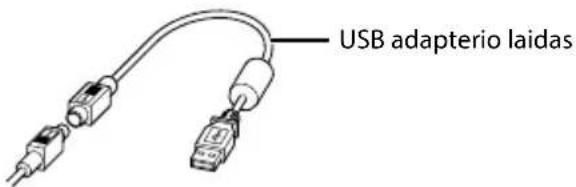
2 Prijunkite USB adapterio laida prie kompiuterio USB preevado.
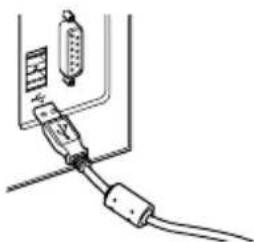
5
3. E102 ausiniu prijungimas
E102 yra stereofonines ausines. Stereofoninio garso atkurimo metu teisingai uszidekite ausines, atkreipkite demesj i L ir R zymes.
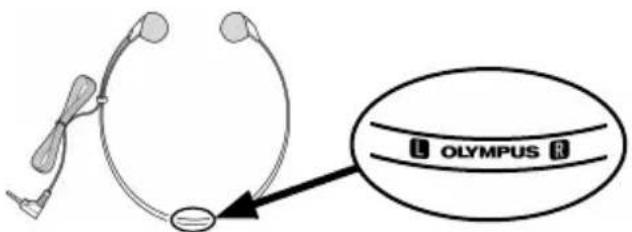
Prijunkite ausines prie kompiuterio ausiniu lizdo
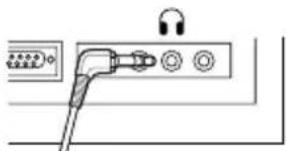
Pastaba:
Jeigu jusy kompiuterye nera lizdo, pazymeto , prijunkite ausines prie lizdo, pazymeto arba .
Adreas: 3500 Corporate Parkway, P.O. Box 610, Center Valley, PA 18034-0610, JAV
TelefonNumeris:484-896-5000
Patikrinta pagal FCC standartus
NAUDOTI NAMUOSE ARBA BIURE
Mac (Macintosh) programma DSS Player
Kad ir palaista Mac programma DSS Player, izvēnlē [Help] atlasiet [DSS Player help].
Piezime.
Tiešsaistes palidziba bus pieejama pec ODMS un Mac programmas DSS Player instalëšanas.
Programmataras lejupieladësana
Lai lejupieladetu programmaturu, atveriet sava regiona timekla vietni.
http://www.olympus.eu/sds-downloads/
(Eiropa, Tuvie Austrumi un Afrika)
https://www.olympusamericaprediction.com/odms-r7
(Amerika)
https://www.olympus.com.au/support/
(Okeanija)
OS saderiba
Informaciju par jaunako OS jauninajumu saderibu skatiet Olympus timekla lapa.
Adrese: 3500 Corporate Parkway, P.O. Box 610, Center Valley, PA 18034-0610, ASV
Talruna numurs: 484-896-5000
Pärbaudits un atzits par atbilstigu FCC standartiem LIETOSANAI MAJAS VAI BIROJA
Si erice atbilst FCC noteikumu 15.dajai.
Lietojot 1erici, jaievero divi talak minetie nosacijumi.
1) Siierice nedrikst radit kaitigus traucejumus.
2) Sai ieriei ir jauztver jebkadi sanemtie traucejumi, pat tadi, kas var izraisit nevelamu sis ierieces darbibu.
Klientiem Kanadā
CANICES-3 (B)/NMB-3 (B)
Klientiem Eiropa

"CE" zime norada, ka sis izstradajums atbilst Eiropas drosibas, veselibas, apkartejas vides un pirceja aizsardzibas prasibam. Izstradajumi ar CE markejumu ir paredzeti pardosanai Eiropa.

Sis symbols [parsvitrota atkritumu tvertne uz riteniem, WEEE IV pielikums] nozime atsevisku elektriska un elektroniska aprikojuma atkritumu savaksanu ES valstis. Neizmetiet sadu aprikojumu majsaimniecibas atkritumu tvertnes. Si produkta izmeşanai izmantojiet savavsti pieejamās atkritumu apsaimniekošanas un savakšanas sistemas.
Preçu zimes un registretās préçu zimes
- Microsoft un Windows ir registretas Microsoft Corporation precu zimes.
Macintosh un Mac OS ir Apple Inc. registretas precu zimes. - Dragon Naturally Speaking ir Nuance Communications, Inc. registretata precu zime.
Citi seit minétie produktu un zimolu nosaukumi var but attieigo ipasnieku precu zimes vai registretas precu zimes.

1. Professionele transcriptiesoftware
https://www.olympus.com.au/support/
(Oceanie)
Adres: 3500 Corporate Parkway, P.O. Box 610, Center Valley, PA 18034-0610, U.S.A.
Telefoonnummer: 484-896-5000
https://www.olympus.com.au/support/
(Oceania)
Adres: 3500 Corporate Parkway, P.O. Box 610, Center Valley, PA 18034-0610, USA.
Telefon: 484-896-5000
https://www.olympus.com.au/support/
(Океань)
COBmectnMoctb c OC
HOpMaun O CoBmecTmocTn CaKtyaIbHbIMn 6HOBHeHnMa Nc npuBeHa Ha Be6-cainOlympus.
Ampec: 3500 Corporate Parkway, P.O. Box 610, Center Valley, PA 18034-0610, U.S.A.
Ten.: 484-896-5000
IpoBepenoHa cooTBeCTBne cTaHapTaFCC
JlRA DOMAUHErO INN OΦUCHORO NcPOJb3OBAHn
To yctpOncBO yDobNetBOPreT acTe 15 npaBn FCC.
Kcnnyatauny yctpOncBa nOpnaaet noD cneyuOnne
ycNoBnA.
(1) 3To yCTpOINCTBO He DOJXHO Bbl3bIBaTb BpeDOHOCHbIX NOMEX.
(2) 3To yCTpoiCTBO DOJINKHO BbIDepxNBaTb IIO6bie NOMEXN, B T. Y. INBODIJIe K HENpaBUNbHOI pa6Ote daHHoro yCTpoiCTBa.
DSS Player for Mac (Macintosh)
Välj[Hjälp für DSS Player] frän [Hjälp]-menyn medan DSS Player für Mac körs.
Obs!
https://www.olympus.com.au/support/
(Oceanien)
OS-kompatilitet
Adress: 3500 Corporate Parkway, P.O. Box 610, Center Valley, PA 18034-0610, U.S.A.
Telefonnummer: 484-896-5000
For customers in North America
The AS-9000 is part of the Olympus Professional Dictation System. Your certified professional dealer has been fully trained on the entire Olympus Professional Dictation range, including dictation, transcription devices and software. For technical assistance and guidance relating to installation and set up, please contact your professional dealer from whom you purchased the system.
For customers in Europe
Professional dictation devices from Olympus are distributed via specially trained and educated partners.
Therefore please contact your local Certified Olympus Partner for Professional Audio Systems to get highly qualified support in your language.
Find your local partner with our Dealer Locator on www.olympus-europa.com/voice
Telephone support (only English speaking):
United Kingdom: 0845 521 8588 (Monday - Friday 8 am - 5 pm GMT)
Republic of Ireland: 00441582483320 (Monday - Friday 8 am - 5 pm GMT)
Europe, Middle East, Russia & Africa: 00 800 7000 1000* (Monday - Friday 9 am - 6 pm CET)
E-mail (only English speaking)
help@opdsupport.com
Hardware repair
Please contact our customer support center below
audio.repair.uk@olympus.eu
Free number: 00 800 - 67 10 84 00*
Charged number +49 40-237 73 899
(Monday-Thursday 8 am -5 pm/Friday 8 am-3:30 pm GMT)
- 00800-calls are free of charge.
Only valid for Germany, Austria, Netherlands, Belgium, France, Italy, Denmark, Switzerland, Portugal, Norway, Sweden, Finland, Spain, Czech, Republic, Hungary, Poland, Iceland, Bulgaria, Israel, Latvia, Lithuania, Estonia, Russia, South Africa.
Some phone service providers do not permit access to 00800 numbers or require an additional prefix. Charges may apply here. Please contact your service provider directly for more details.
OLYMPUS
OLYMPUS CORPORATION
2951 Ishikawa-machi, Hachioji-shi, Tokyo 192-8507, Japan
http://www.olympus.com
OLYMPUS AMERICA INC.
3500 Corporate Parkway, P.O. Box 610, Center Valley, PA 18034-0610, U.S.A.
E-mail: Audio@olympus.com
http://www.olympusamerica.com
OLYMPUS EUROPA SE & CO. KG
(Premises) Wendenstrasse 14-18,20097 Hamburg, Germany
Tel. +49 40 - 23 77 3-0
(Goods delivery) Modul H, Willi-Bleicher Str. 36, 52353 Duren, Germany
(Letters) Postfach 10 49 08, 20034 Hamburg, Germany
http://www.olympus-europa.com
OLYMPUS AUSTRALIA PTY LTD.
Level 4, 97 Waterloo Road, Macquarie Park NSW 2113
Tel: +61 2 9886 3992
http://www.olympus.com.au