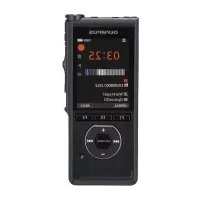
AS7000 - Voice recorder OLYMPUS - Free user manual and instructions
Find the device manual for free AS7000 OLYMPUS in PDF.



| Product Type | Professional voice recorder with transcription system |
| Brand | Olympus |
| Model | AS7000 |
| Compatible Operating System | Windows XP SP3, Server 2003/2008, Mac OS X 10.4.11 - 10.7 |
| Supported Audio Formats | DSS, DSS Pro, WMA, MP3, WAV/AIFF |
| Included Software | ODMS (Windows), DSS Player (Macintosh) |
| Transcription Functions | Background playback, pedal control, adjustable speed, tone control, noise cancellation |
| Speech Recognition | Compatible with Dragon NaturallySpeaking 10.0 SP1+ (Windows only) |
| File Management | Sort by sender, automatic email/FTP sending, file/document association |
| Network Functions | Passive and SSL FTP support, Citrix, Terminal Service (Windows) |
| Display Requirements | 1024x768 pixels, 65,536 colors (Windows), 32,000 colors (Mac) |
| USB Port | 1 free port or more |
| Compatible Devices | RS31 pedal (USB), E62 headphones |
| Power Supply | Via USB (pedal and software) |
| Standards and Certifications | CE, WEEE, Category B (Canada) |
| Maintenance | Clean with a soft, dry cloth. Avoid solvents. |
| Support | Contact your authorized professional dealer |
Frequently Asked Questions - AS7000 OLYMPUS
User questions about AS7000 OLYMPUS
0 question about this device. Answer the ones you know or ask your own.
Ask a new question about this device
Download the instructions for your Voice recorder in PDF format for free! Find your manual AS7000 - OLYMPUS and take your electronic device back in hand. On this page are published all the documents necessary for the use of your device. AS7000 by OLYMPUS.
USER MANUAL AS7000 OLYMPUS
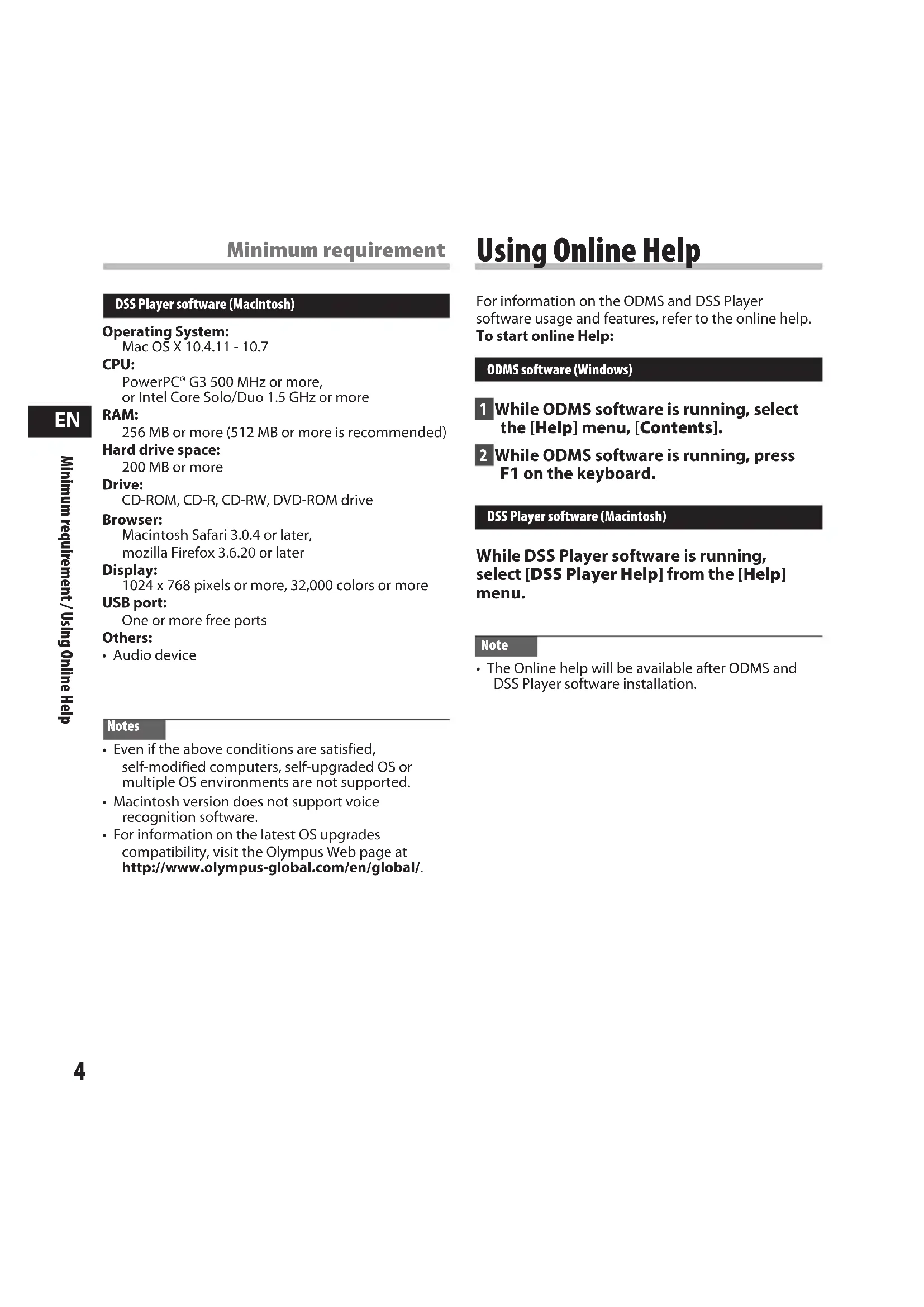
PC TRANSCRIPTION KIT
AS-7000
INSTRUCTIONS
ENGLISH 2
FRANÇAIS ......7
ESPAÑOL 13
DEUTSCH 19
ITALIANO 25
РУССКИЙ 31
Transcription Module Features
- Plays DSS, DSS Pro, WMA, MP3 and WAV/AIFF audio formats in the background when another application is running, such as a word processor.
- Enables foot switch control of the playback process.
- Transcription can be done by combining the playback sound with the adjustable playback speed, tone control, and noise cancellation. However, it is not possible to playback while setting the playback speed and noise cancellation simultaneously with the Macintosh version.
- Receives dictation files and sends created document files by e-mail or FTP.*
- Expand FTP support to include Passive mode and SSL.*
- Sorts received dictation files by sender, and automatically sends created document files.*
- Manages created document files in association with dictation files.*
- Voice recognition of dictation files is possible with the Dragon Naturally Speaking 10.0 SP1 and later.*
• Supports Citrix and Terminal Service.* - Search filter to the List View pane columns.*
- Audio capture function for the line-in recording.*
• Automatic software update through Internet.* - Background dictation notification support.*
- 2 modes/views of operation for Transcribe bar.*
- Transcribing time left indicator instead of time commenced.*
* Windows only
Trademarks and registered trademarks
- Microsoft and Windows are registered trademarks of Microsoft Corporation.
• Macintosh is a trademark of Apple Inc. - Intel and Pentium are registered trademarks of Intel Corporation.
- Dragon NaturallySpeaking is registered trademark of Nuance Communications, Inc.
Other product and brand names mentioned herein may be the trademarks or registered trademarks of their respective owners.

Minimum requirement
ODMS software (Windows)
Operating System:
For Stand-Alone:
Microsoft® Windows® XP:
Professional / Home Edition SP3 x86
Professional / Home Edition SP2 x64
Microsoft® Windows Vista®:
Ultimate / Enterprise / Business / Home
Premium / Home Basic SP2 (both x86/64)
Microsoft® Windows 7®:
Ultimate / Enterprise / Professional / Home
Premium (both x86/64)
For Workgroup:
Microsoft® Windows® XP:
Professional SP3 x86
Professional SP2 x64
Microsoft® Windows Vista®:
Ultimate / Enterprise / Business SP2 (both x86/64)
Microsoft® Windows 7®:
Ultimate / Enterprise / Professional (both x86/64)
Microsoft® Windows® Server 2003 SP2 (both x86/64)
Microsoft® Windows® Server 2003 R2 SP2 (both x86/64)
Microsoft® Windows® Server 2008 SP2 (both x86/64)
Microsoft® Windows® Server 2008 R2 (both x86/64)
CPU:
Microsoft® Windows® XP / Vista / 7: 1 GHz or higher
Microsoft® Windows® Server 2003: 1 GHz or higher
Microsoft® Windows® Server 2008: 2 GHz or higher
RAM:
Microsoft® Windows® XP:
256 MB or more
Microsoft® Windows Vista®:
1 GB or more
Microsoft® Windows 7®:
1 GB or more (32 bit) / 2 GB or more (64 bit)
Microsoft® Windows® Server 2003:
256 MB or more
Microsoft® Windows® Server 2008:
2 GB or more
Hard drive space:
2 GB or more
Browser:
Microsoft Internet Explorer 6.0 or later
Drive:
CD-ROM, CD-R, CD-RW, DVD-ROM drive
Display:
1024 x 768 pixels or more, 65,536 colors or more
(16,770,000 colors or more is recommended)
USB port:
One or more free ports
Others:
With the Dictation Module, Transcription Module:
A Microsoft WDM- or MME-compliant and
Windows-compatible sound device.
Minimum requirement
DSS Player software (Macintosh)
Operating System:
Mac OS X 10.4.11 - 10.7
CPU:
PowerPC ^® G3 500 MHz or more, or Intel Core Solo/Duo 1.5 GHz or more
RAM:
256 MB or more (512 MB or more is recommended)
Hard drive space:
200 MB or more
Drive:
CD-ROM, CD-R, CD-RW, DVD-ROM drive
Browser:
Macintosh Safari 3.0.4 or later, mozilla Firefox 3.6.20 or later
Display:
1024 x 768 pixels or more, 32,000 colors or more
USB port:
One or more free ports
Others:
- Audio device
Notes
- Even if the above conditions are satisfied, self-modified computers, self-upgraded OS or multiple OS environments are not supported.
- Macintosh version does not support voice recognition software.
- For information on the latest OS upgrades compatibility, visit the Olympus Web page at http://www.olympus-global.com/en/global/.
Using Online Help
For information on the ODMS and DSS Player software usage and features, refer to the online help. To start online Help:
ODMS software (Windows)
1 While ODMS software is running, select the [Help] menu, [Contents].
2 While ODMS software is running, press F1 on the keyboard.
DSS Player software (Macintosh)
While DSS Player software is running, select [DSS Player Help] from the [Help] menu.
Note
- The Online help will be available after ODMS and DSS Player software installation.
Connecting the RS31 Foot Switch
Windows / Macintosh
Connecting to a USB Port
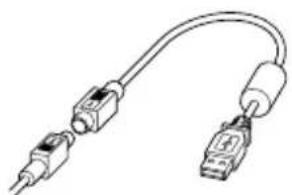
1 Connect the foot switch cable to the USB adapter cable.
natural_image
Pure electrical connector diagram without any text or symbolsUSB adapter
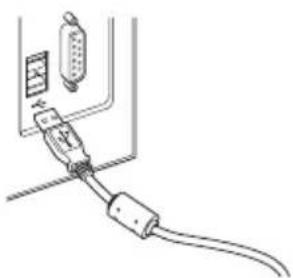
2 Connect the USB adapter cable to the PC's USB port.
natural_image
Line drawing of a cable connector with connectors and cables (no text or symbols)Note
- The RS31 foot switch works only with the ODMS and DSS Player.
Connecting the E62 Headset
The E62 is a stereo headset. When playing stereo sound, wear the set properly, observing the L and R markings.
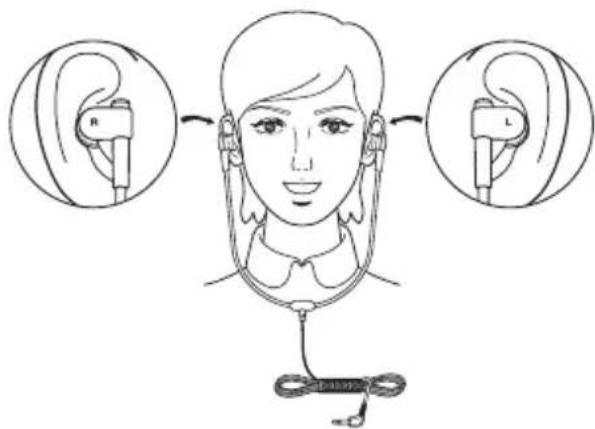
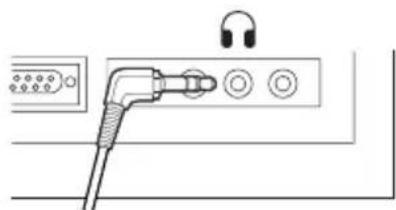
Plug the headset into the PC's earphone terminal

natural_image
Pure electrical circuit lines without any symbolsNote
- If your PC does not have a terminal marked with plug the headset into a terminal marked with or ←.
Technical assistance and support
The AS-7000 is part of the Olympus Professional Dictation System. Your certified professional dealer has been fully trained on the entire Olympus Professional Dictation range, including dictation, transcription devices and software. For technical assistance and guidance relating to installation and set up, please contact your professional dealer from whom you purchased the system.
KIT DE TRANSCRIPTION PC
AS-7000
MODE D'EMPLOI
Professional / Home Edition SP2 x64
Microsoft® Windows Vista®:
Ultimate / Enterprise / Business / Home
Premium / Home Basic SP2 (tous deux x86/64)
Microsoft® Windows 7®:
Ultimate / Enterprise / Professional / Home
Premium (tous deux x86/64)
Professional SP3 x86
Professional SP2 x64
Microsoft® Windows Vista®:
Ultimate / Enterprise / Business SP2
(tous deux x86/64)
Microsoft® Windows 7®:
Ultimate / Enterprise / Professional
(tous deux x86/64)
Microsoft® Windows® Server 2003 SP2
(tous deux x86/64)
Microsoft® Windows® Server 2003 R2 SP2
(tous deux x86/64)
Microsoft® Windows® Server 2008 SP2
(tous deux x86/64)
Microsoft® Windows® Server 2008 R2
(tous deux x86/64)
CPU:
Microsoft® Windows® XP / Vista / 7:
1 GHz ou plus
Microsoft® Windows® Server 2003:
1 GHz ou plus
Microsoft® Windows® Server 2008:
2 GHz ou plus
RAM:
Microsoft® Windows® XP:
256 Mo ou plus
Microsoft® Windows Vista®:
1 Go ou plus
Microsoft® Windows 7®:
natural_image
Pure electrical connector diagram without any text or symbolsL'adaptateur USB
natural_image
Line drawing of a cable connector with connectors and a switch (no text or symbols)Remarque
natural_image
Pure electrical circuit lines without any symbolsRemarque
Professional / Home Edition SP2 x64
Microsoft® Windows Vista®:
Ultimate / Enterprise / Business / Home
Premium / Home Basic SP2 (ambos x86/64)
Microsoft® Windows 7®:
Ultimate / Enterprise / Professional / Home
Premium (ambos x86/64)
Professional SP3 x86
Professional SP2 x64
Microsoft® Windows Vista®:
Ultimate / Enterprise / Business SP2 (ambos x86/64)
Microsoft® Windows 7®:
Ultimate / Enterprise / Professional (ambos x86/64)
Microsoft® Windows® Server 2003 SP2 (ambos x86/64)
Microsoft® Windows® Server 2003 R2 SP2 (ambos x86/64)
Microsoft® Windows® Server 2008 SP2 (ambos x86/64)
Microsoft® Windows® Server 2008 R2 (ambos x86/64)
CPU:
Software DSS Player (Macintosh)
Sistema operativo:
Mac OS X 10.4.11 - 10.7
CPU:
Software DSS Player (Macintosh)
natural_image
Pure electrical connector diagram without any text or symbolsAdaptador USB
natural_image
Line drawing of a cable connector with connectors and cables (no text or symbols)Nota
natural_image
Pure electrical circuit lines without any symbolsNota
Professional / Home Edition SP2 x64
Microsoft® Windows Vista®:
Ultimate / Enterprise / Business / Home
Premium / Home Basic SP2 (x86 und x64)
Microsoft® Windows 7®:
Ultimate / Enterprise / Professional / Home
Professional SP3 x86
Professional SP2 x64
Microsoft® Windows Vista®:
Ultimate / Enterprise / Business SP2 (x86 und x64)
Microsoft® Windows 7®:
Ultimate / Enterprise / Professional (x86 und x64)
Microsoft® Windows® Server 2003 SP2 (x86 und x64)
Microsoft® Windows® Server 2003 R2 SP2 (x86 und x64)
Microsoft® Windows® Server 2008 SP2 (x86 und x64)
Microsoft® Windows® Server 2008 R2 (x86 und x64)
CPU:
DSS Player-Software (Macintosh)
Betriebssystem:
Mac OS X 10.4.11 - 10.7
CPU:
DSS Player-Software (Macintosh)
natural_image
Pure electrical connector diagram without any text or symbolsUSB-Adapterkabel
natural_image
Line drawing of a cable connector with connectors and a plug (no text or symbols)Hinweis
natural_image
Pure electrical circuit lines without any symbolsHinweis
Professional / Home Edition SP2 x64
Microsoft® Windows Vista®:
Ultimate / Enterprise / Business / Home Premium / Home Basic SP2 (x86/x64)
Microsoft® Windows 7®:
Ultimate / Enterprise / Professional / Home Premium (x86/x64)
Professional SP3 x86
Professional SP2 x64
Microsoft® Windows Vista®:
Ultimate / Enterprise / Business SP2 (x86/x64)
Microsoft® Windows 7®:
Ultimate / Enterprise / Professional (x86/x64)
Microsoft® Windows® Server 2003 SP2 (x86/x64)
Microsoft® Windows® Server 2003 R2 SP2 (x86/x64)
Microsoft® Windows® Server 2008 SP2 (x86/x64)
Microsoft® Windows® Server 2008 R2 (x86/x64)
CPU:
Microsoft® Windows® XP / Vista / 7: 1 GHz o superiore
Microsoft® Windows® Server 2003: 1 GHz o superiore
Microsoft® Windows® Server 2008: 2 GHz o superiore
RAM:
Microsoft® Windows® XP:
256 MB o superiore
Microsoft® Windows Vista®:
1 GB o superiore
Microsoft® Windows 7®:
1 GB o superiore (32 bit) /
2 GB o superiore (64 bit)
Microsoft® Windows® Server 2003:
256 MB o superiore
Microsoft® Windows® Server 2008:
2 GB o superiore
DSS Player software (Macintosh)
Sistema operativo:
Mac OS X 10.4.11 - 10.7
CPU:
PowerPC® G3 500 MHz o superiore, o Intel Multicore da 1,5 GHz o superiore
RAM:
DSS Player software (Macintosh)
natural_image
Pure electrical connector diagram without any text or symbolsAdattatore USB
natural_image
Line drawing of a cable connector with two connectors and a display panel (no text or symbols)Nota
natural_image
Pure electrical circuit lines without any symbolsNota
Professional / Home Edition SP2 x64
Microsoft® Windows Vista®:
Ultimate / Enterprise / Business / Home
Premium / Home Basic SP2 (для x86/x64 систем)
Microsoft® Windows 7®:
Ultimate / Enterprise / Professional / Home
Premium (для x86/x64 систем)
For Workgroup:
Microsoft® Windows® XP:
Professional SP3 x86
Professional SP2 x64
Microsoft® Windows Vista®:
Ultimate / Enterprise / Business SP2 (для x86/x64 систем)
Microsoft ^® Windows 7 ^® :
Ultimate / Enterprise / Professional (для x86/x64 систем)
Microsoft® Windows® Server 2003 SP2
natural_image
Pure electrical connector diagram without any text or symbolsАдаптер USB
natural_image
Line drawing of a cable connector with connectors and a switch (no text or symbols)Примечание
natural_image
Pure electrical circuit lines without any symbolsПримечание
For customers in North and South America:
Declaration of Conformity
Model Number : RS31
Trade Name : DIGITAL VOICE RECORDER
Responsible Party : OLYMPUS IMAGING AMERICA INC.
Address : 3500 Corporate Parkway, P.O. Box 610, Center Valley, PA 18034-0610, U.S.A.
Telephone Number : 1-888-553-4448
This device Complies with Part 15 of the FCC Rules. Operation is subject to the following two conditions: (1) This device may not cause harmful interference, and (2) this device must accept any interference received, including interference that may cause undesired operation.

Tested To Comply
With FCC Standards
FOR HOME OR OFFICE USE
Canadian RFI:
This digital apparatus does not exceed the Class B limits for radio noise emissions from digital apparatus as set out in the Radio Interference Regulations of the Canadian Department of Communications.
For customers in Europe:

“CE” mark indicates that this product complies with the European requirements for safety, health, environment and customer protection.

This symbol [crossed-out wheeled bin WEEE Annex IV] indicates separate collection of waste electrical and electronic equipment in the EU countries. Please do not throw the equipment into the domestic refuse. Please use the return and collection systems available in your country for the disposal of this product.
Applicable Product: RS31
Shinjuku Monolith, 3-1 Nishi-Shinjuku 2-chome, Shinjuku-ku, Tokyo 163-0914, Japan.
Tel. +81 (0)3-3340-2111
http://www.olympus.com
OLYMPUS IMAGING AMERICA INC.
3500 Corporate Parkway, P.O. Box 610, Center Valley, PA 18034-0610, U.S.A. Tel. 1-888-553-4448
http://www.olympusamerica.com
OLYMPUS EUROPA HOLDING GMBH
(Premises/Goods delivery) Wendenstrasse 14-18, 20097 Hamburg, Germany.
Tel. +49 (0)40-237730
(Letters) Postfach 10 49 08. 20034 Hamburg, Germany.
http://www.olympus-europa.com
OLYMPUS IMAGING AUSTRALIA PTY LTD.
82 Waterloo Rd, North Ryde NSW 2113, Australia
TEL:(61)2-9886-3999
http://www.olympus.com.au


- PC TRANSCRIPTION KIT
- AS-7000
- INSTRUCTIONS
- Transcription Module Features
- Trademarks and registered trademarks
- Minimum requirement
- ODMS software (Windows)
- Operating System:
- For Stand-Alone:
- For Workgroup:
- CPU:
- RAM:
- Hard drive space:
- Browser:
- Drive:
- Display:
- USB port:
- Others:
- DSS Player software (Macintosh)
- Notes
- Using Online Help
- Note
- Connecting the RS31 Foot Switch
- Connecting to a USB Port
- Connecting the E62 Headset
- Technical assistance and support
- KIT DE TRANSCRIPTION PC
- MODE D'EMPLOI
- Remarque
- Software DSS Player (Macintosh)
- Sistema operativo:
- Nota
- DSS Player-Software (Macintosh)
- Betriebssystem:
- Hinweis
- Примечание
- For customers in North and South America:
- Declaration of Conformity
- Canadian RFI:
- For customers in Europe:
- OLYMPUS IMAGING AMERICA INC.
- OLYMPUS EUROPA HOLDING GMBH
- OLYMPUS IMAGING AUSTRALIA PTY LTD.
Brand : OLYMPUS
Model : AS7000
Category : Voice recorder