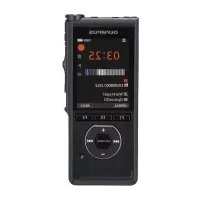
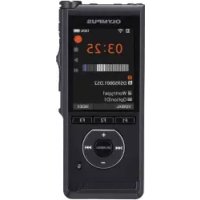
DS9000 - Voice recorder OLYMPUS - Free user manual and instructions
Find the device manual for free DS9000 OLYMPUS in PDF.



| Product type | Digital voice recorder |
| Brand and model | Olympus DS-9000 |
| Dimensions | 120.8 mm × 49.8 mm × 18.6 mm (excluding protrusions) |
| Weight | 90 g (battery included) |
| Power supply | Lithium-ion battery LI-92B (3.6 V); external power: USB or AC adapter (5 V DC) |
| Recording formats | DS2 (Digital Speech Standard Pro), Linear PCM, MP3 |
| Internal memory | 2 GB NAND Flash |
| External memory | SD/SDHC card up to 32 GB |
| Display | TFT color LCD 6.1 cm (240 × 320 pixels) |
| Speaker | Built-in dynamic speaker 11 × 15 mm |
| Microphones | Built-in main microphone (D) and 2nd built-in microphone (G) |
| Outputs | Headphone jack 3.5 mm; EAR jack 3.5 mm; built-in speaker |
| Main functions | Recording, playback, microphone modes (Dictation 1, Dictation 2, Conference), VCVA (voice activation), file creation, USB transfer, management via ODMS |
| Maintenance and cleaning | Cleaning possible with 70% ethanol or isopropanol (disinfectant solution); do not clean the docking station with alcohol |
| Safety | Usage precautions (battery, charger, adapter); avoid extreme temperatures, humidity, shocks; use only Olympus accessories |
| Spare parts and repairability | Replaceable LI-92B battery; docking station (optional); AC adapter (model A517); repair by Olympus authorized center |
| Operating temperature | 0 °C to 42 °C (operation); 5 °C to 35 °C (charging) |
| General information | ODMS software (Olympus Dictation Management System) downloadable; Windows and Mac compatibility |
Frequently Asked Questions - DS9000 OLYMPUS
User questions about DS9000 OLYMPUS
0 question about this device. Answer the ones you know or ask your own.
Ask a new question about this device
Download the instructions for your Voice recorder in PDF format for free! Find your manual DS9000 - OLYMPUS and take your electronic device back in hand. On this page are published all the documents necessary for the use of your device. DS9000 by OLYMPUS.
USER MANUAL DS9000 OLYMPUS
-
Thank you for purchasing an Olympus digital voice recorder. Please read these instructions for information about using the product correctly and safely.
To ensure successful recording, we recommend that you test the record function and volume before use. -
If there are additions and/or modifications of functions due to firmware update, contents may differ. For the latest information, please visit Olympus website.
- This manual is a basic version. Please download the complete advanced manual from the OLYMPUS website.
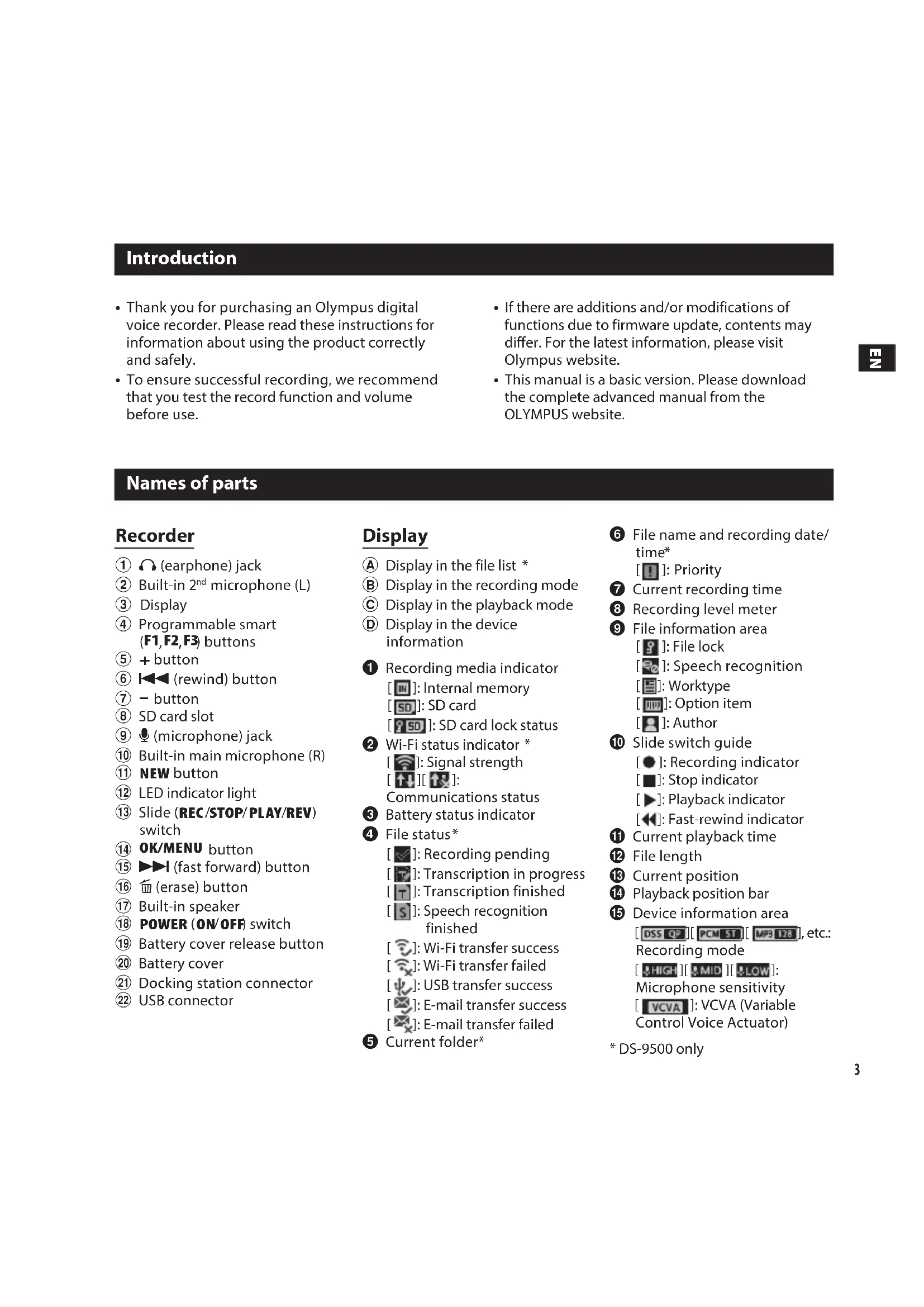
Names of parts
Recorder
① (earphone) jack
② Built-in 2^nd microphone (L)
③ Display
④ Programmable smart (F1,F2,F3) buttons
⑤ + button
⑥ (rewind) button
⑦ - button
⑧ SD card slot
(9) (microphone) jack
10 Built-in main microphone (R)
⑪ NEW button
⑫ LEDindicatorlight
⑬ Slide (REC/STOP/PLAY/REV) switch
14 OK/MENU button
15 fast forward) button
16 (erase) button
17 Built-in speaker
18 POWER (ON/OFF) switch
19 Battery cover release button
20 Battery cover
Docking station connector
2 USB connector
Display
A Display in the file list *
Display in the recording mode
Display in the playback mode
Display in the device information
Recording media indicator
[网]: Internal memory
SD: SD card
SD: SD card lock status
Wi-Fi status indicator *
[ ]: Signal strength
[1]银:
Communications status
3 Battery status indicator
4 File status
[ ]: Recording pending
[ ]: Transcription in progress
[ ]: Transcription finished
[S]: Speech recognition finished
[ ]:Wi-Fi transfer success
[ ]: Wi-Fi transfer failed
[ ]: USB transfer success
[ ]: E-mail transfer success
[ ]: E-mail transfer failed
Current folder
File name and recording date/time*
7 Current recording time
Recording level meter
9 File information area
9: File lock
2: Speech recognition
[ ]:Option item
10 Slide switch guide
[ ]: Recording indicator
[ ]: Stop indicator
[ ]: Playback indicator
1 Current playback time
12 File length
13 Current position
14Playback position bar
15 Device information area
[DSSQP][PCMST][MP3128],etc: Recording mode
HIGH][MID][$LOW]:
Microphone sensitivity
Control Voice Actuator)
- DS-9500 only
1. Use your recorder

Getting Started
Charge the battery
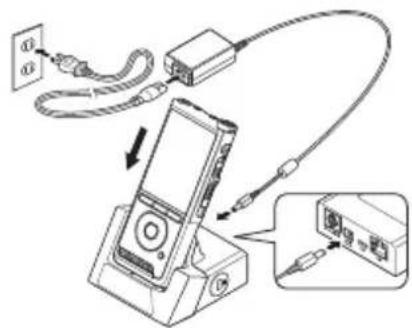
Charge using the docking station
Plug the AC adapter into a household power outlet and connect the power plug to the recorder via the docking station. Always turn off the recorder before you connect power.
- The docking station and AC adapter are included with the DS-9500, and sold separately for the DS-9000.
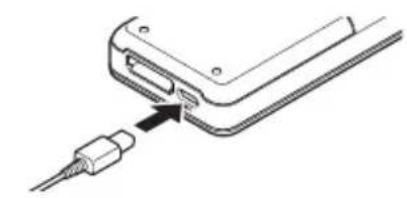
Charge using the USB cable
Verify that the recorder is in stop mode. Connect the USB cable to the recorder.
Turn the power on
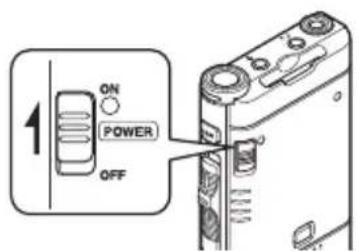
Move the POWER switch to ON position to activate the recorder.
Recording
1 Press the NEW button to create a new file.
2 Move the slide switch to the REC position to start recording.
3 Move the slide switch to the STOP position to stop recording.

2. Recommended settings for the microphone modes
To achieve high-quality audio recordings, select from the three microphone modes which best matches to your usage or environment.
Dictation 1 is recommended for recording in quiet environment. Dictation 2 narrows the directionality of the recording in order to capture the voice of the speaker. This is effective when recording in noisy environment. The Conference mode records in high quality stereo which is useful when recording multiple number of users in a conference room.
| Mic Mode Envinonment Recommended Recording Style Mic Sense |
| Dictation 1 Quet Environment Freestyle (including Classic Dictation Style) Variable |
| Dictation 2 Noisy Environment Classic Dictation Style Variable |
| Conference Conference room Laid down on the table Intelligent Auto |
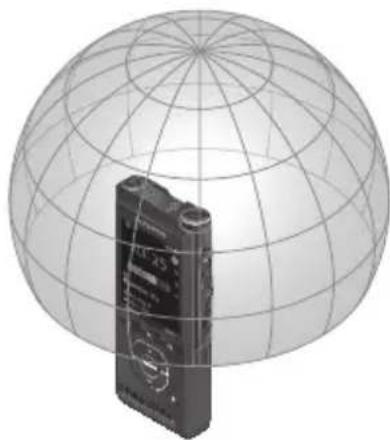
Freestyle
The recorder can be held in any way but the distance from the microphone to your mouth should stay within the area shown in the diagram.
Classic Dictation Style
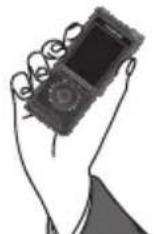

Hold the recorder as you see in the diagram and speak into the main microphone.

Laid down on the table
Place the recorder on the table for conference recording. Point the microphone towards the speaker.
Note:
When the Mic mode is set to the Conference Mode, Mic Sense will be fixed to the Intelligent Auto Mode. In this mode, recording levels are automatically adjusted to match the volume of the sound source. When the input is loud, the recorder reduces the input level, and vise versa for lower input level to always provide an even level of volume.
3. How to share the dictation file via Wi-Fi (DS-9500 only)
#
Sharing dictation files via Wi-Fi
By using Wi-Fi, you can share dictation files with transcriptionists at any time and from any location without needing to return to the office.
By connecting to a wireless LAN access point in your office, you can send dictation files to the local folder on your own PC.
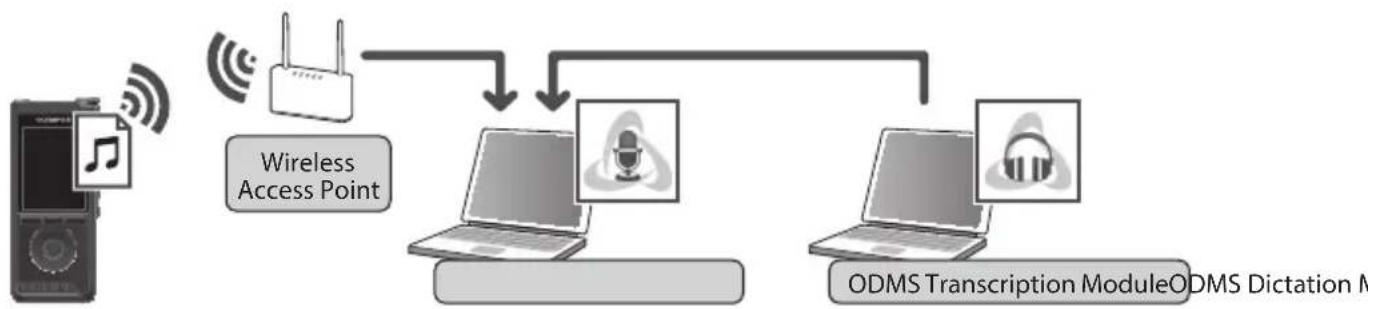
When you are traveling outside of your office, you can connect to your smartphone via tethering and send your dictation files as an attached file to your email.
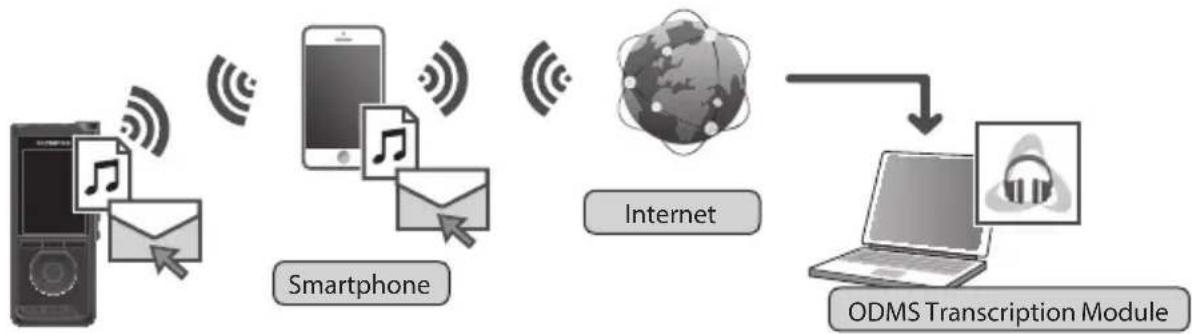
Network settings
In order to connect the recorder to a wireless LAN access point or smartphone, you will need to configure the network information in ODMS* in advance. Follow the directions in the ODMS Setup Wizard to configure the setting information.
- For details, refer to "4. Olympus Dictation Management System (ODMS)".
Send dictation file
Turn the recorder Wi-Fi to [On]
From [Device Menu] > [Wi-Fi] > [On/Off], select [On].
Note that Wi-Fi consumes battery power. If not in use, remember to turn it [off].
![OLYMPUS DS9000 - Turn the recorder Wi-Fi to [On] - 1](/content/2026/03/456456/images/50c8e4027393125f50bc4bd3ee6e3b47219713ee37db1884193fbbfb17d4418d.jpg)
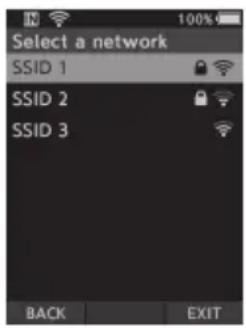
Select the access point
From [Device Menu] > [Wi-Fi] > [Select a network], select the access point to connect to.
- Access points configured in ODMS, and detected access points available for connection are displayed.
- Enter the password in case the password for selected access point had not been set.
- For connections to smartphones, ensure that tethering is first enabled on the smartphone. Enter the password configured from your smartphone.
Send the dictation file
After dictation is completed, press F3 (SEND) button.
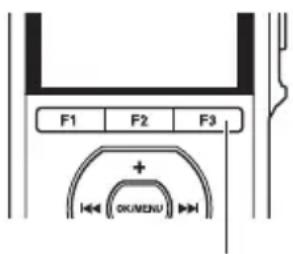
F3 (SEND) button
3. How to share the dictation file via Wi-Fi (DS-9500 only)
2
2 Select [to Folder] or [by E-mail].
- If you select [to Folder], the dictation file will be sent to the folder specified in ODMS.
![OLYMPUS DS9000 - Select [to Folder] or [by E-mail]. - 1](/content/2026/03/456456/images/3c8a2fe0d924e2c5ad9cff7acdc0d22814d38c51dc8d8b513d2b632cb90d5473.jpg)
- If you select [by E-mail], addresses which had been previously registered will be displayed. Select the address which you wish to send to. E-mail addresses can be registered in ODMS, or from the recorder by selecting [Device Menu] > [by E-mail] > [Delivery address] > [Add].
![OLYMPUS DS9000 - Select [to Folder] or [by E-mail]. - 2](/content/2026/03/456456/images/8441cac9c47adf84321dd15bbe30e8b45fdb1db4735589959e3e744b914975d8.jpg)
3 Select [Yes] to confirm.
![OLYMPUS DS9000 - Select [Yes] to confirm. - 1](/content/2026/03/456456/images/e64bec03353149f5e3a0758e680ccf56fb7e638e99b43308bf8dd2bc32e43891.jpg)
4. Olympus Dictation Management System (ODMS)*
ODMS is a fully featured software that provides a simple to use but sophisticated method for managing your recordings. This software can be downloaded from each local Olympus Websites. Main features of the software is the following.
1. Instant File Sharing
- Share dictated file via a shared folder, email or FTP.
- Prioritize important files to be transcribed for a quicker turnaround.
- Identify your dictations throughout the workflow with Author ID, Worktypes and Option Item.
2. Efficient Document Creation
- Various playback functionality for efficient transcription.
- Support background/ real-time speech recognition by Dragon.
- Combination of above provides further efficiency.
3. Secure Workflow
- Dictated / transcribed files are protected with automatic 256-bit AES file encryption.
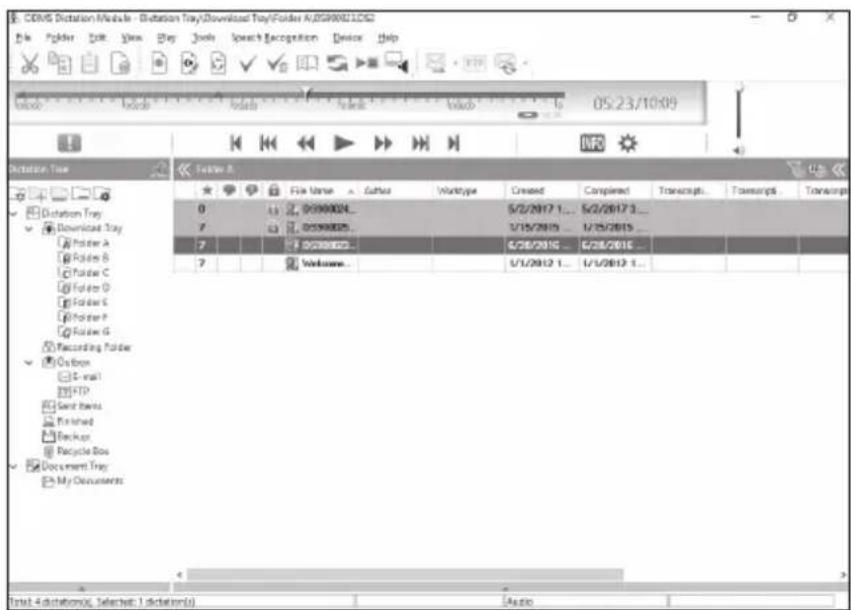
In order to download the software, please access the website in your respective region.
http://www.olympus.eu/sds-downloads/ (Europe, Middle east and Africa)
https://www.olympus.com.au/support/ (Oceania)
- Box content differs depending on the version you purchased.

Safety precautions
Before using your new recorder, read this manual carefully to ensure that you know how to operate it safely and correctly. Keep this manual in an easily accessible location for future reference.
The warning symbols indicate important safety related information. To protect yourself and others from personal injury or damage to property, it is essential that you always read the warnings and information provided.

Danger
If the product is used without observing the information given under this symbol, serious injury or death may result.

Warning
If the product is used without observing the information given under this symbol, injury or death may result.

Caution
If the product is used without observing the information given under this symbol, minor personal injury, damage to the equipment, or loss of valuable data may result.
Convention used in this manual
- The word "card" is used to refer to the SD card.
- The word "ODMS" is used to refer to the Olympus Dictation Management System in Windows environment.
- The word "DSS Player" is used to refer to the DSS Player for Mac in Apple Macintosh environment.
- This manual shows the English on screen display in the illustrations and explanations. You can select the display language for this recorder.
Caution for usage environment
- To protect the high-precision technology contained in this product, never leave the recorder in the places listed below, no matter if in use or storage:
- Places where temperatures and/or humidity are high or go through extreme changes. Direct sunlight, beaches, locked cars, or near other heat sources (stove, radiator, etc.) or humidifiers.
- Near flammable items or explosives.
- In wet places, such as bathrooms or in the rain.
In places prone to strong vibrations. -
Never drop the recorder or subject it to severe shocks or vibrations.
-
The recorder may malfunction if it is used in a location where it is subject to a magnetic/electromagnetic field, radio waves, or high voltage, such as near a TV set, microwave, video game, loud speakers, large monitor unit, TV/radio tower, or transmission towers. In such cases, turn the recorder off and on again before further operation.
- Avoid recording or playing back near cellular phones or other wireless equipment, as they may cause interference and noise. If you experience noise, move to another place, or move the recorder further away from such equipment.
- Do not use organic solvents such as alcohol and lacquer thinner to clean the unit.
Warning regarding data loss
- Recorded content in memory may be destroyed or erased by operating mistakes, unit malfunction, or during repair work. It is recommended to back up and save important content to other media such as a computer hard disk.
- Any liability for passive damages or damage of any kind occurred due to data loss incurred by a defect of the product, repair performed by the third party other than Olympus, an Olympus authorized service station or any other reason is excluded from the Olympus liability.
Handling the recorder
Warning
- Keep the recorder out of the reach of children and infants to prevent the following dangerous situation that could cause serious injury:
- Accidentally swallowing the battery, cards or other small parts.
- Accidentally being injured by the moving parts of the recorder.
- Do not disassemble, repair or modify the unit yourself.
- Use SD and SDHC memory cards only. Never use other types of cards. If you accidentally insert another type of card into the recorder, contact an authorized distributor or service center. Do not try to remove the card by force.
- Do not operate the unit while operating a vehicle.
Caution
- Stop using the recorder immediately if you notice any unusual odors, noise, or smoke around it.
- Never remove the battery with bare hands, which may cause a fire or burn your hands.
- Do not leave the recorder in places where it may be subject to extremely high temperatures. Doing so may cause parts to deteriorate and, in some circumstances, cause the recorder to catch fire. Do not use the charger or AC adapter if it is covered. This could cause overheating, resulting in fire.
-
Handle the recorder with care to avoid getting a low-temperature burn.
-
When the recorder contains metal parts, overheating can result in a low-temperature burn. Pay attention to the following:
- When used for a long period, the recorder will get hot. If you hold on to the recorder in this state, a low-temperature burn may be caused.
- In places subject to extremely cold temperatures, the temperature of the recorder's body may be lower than the environmental temperature. If possible, wear gloves when handling the recorder in cold temperatures.
Battery handling precautions
Danger
- The recorder uses a special lithium ion battery from Olympus. Charge the battery with the specified AC adapter or charger. Do not use any other AC adapters or chargers.
- The battery should never be exposed to flame, heated, short-circuited or disassembled.
- Never heat or incinerate battery.
Take precautions when carrying or storing batteries to prevent them from coming into contact with any metal objects such as jewelry, pins, fasteners, etc. - To prevent causing battery leaks or damaging their terminals, carefully follow all instructions regarding the use of batteries. Never attempt to disassemble a battery or modify it in any way, solder, etc.
If battery fluid gets into your eyes, flush your eyes immediately with clear, cold running water and seek medical attention immediately.
Warning
- Keep batteries dry at all times.
- If rechargeable batteries have not been recharged within the specified time, stop charging them and do not use them.
- Do not use a battery if it is cracked or broken.
- Never subject batteries to strong shocks or continuous vibration.
- If a battery leaks, becomes discolored or deformed, or becomes abnormal in any other way during operation, stop using the recorder.
- If a battery leaks fluid onto your clothing or skin, remove the clothing and flush the affected area with clean, running cold water immediately. If the fluid burns your skin, seek medical attention immediately.
- Keep batteries out of the reach of children.
-
If you notice anything unusual when using this product such as abnormal noise, heat, smoke, or a burning odor:
-
Remove the battery immediately while being careful not to burn yourself, and;
- Call your dealer or local Olympus representative for service.
Caution
-
The bundled/included rechargeable battery is exclusively for use with Olympus digital voice recorder DS-9500/DS-9000.
-
There is a risk of explosion if the battery is replaced with the incorrect battery type.
- Dispose of the used battery following the instructions.
- Please recycle batteries to help save our planet's resources. When you throw away dead batteries, be sure to cover their terminals and always observe local laws and regulations.
- Always charge a rechargeable battery when using it for the first time, or if it has not been used for a long period.
- Rechargeable batteries have limited lifetime. When the operating time becomes shorter even if the rechargeable battery is fully charged, replace it with a new one.
Docking station
Danger
- Never disconnect the AC adapter or power cord with a wet hand. This may cause electric shock or injury.
- Only use the dedicated AC adapter with the docking station. Using it in combination with other AC adapters may cause overheating, fire, or malfunction.
Warning
- Never disassemble, modify, or repair the docking station yourself. This may cause fire, electric shock, or injury.
-
Never use the docking station in locations where it might come into contact with liquids. Getting the docking station wet may cause fire or electric shock.
-
Do not drop the docking station or allow it to suffer extreme shocks. This may cause damage, or fire or electric shock.
- Do not touch the connector or insert the metal wires or similar object into any of the plugs. This may cause fire, or electric shock.
Caution
- Unplug the AC adapter or power cord from the docking station and AC outlet when not using for extended periods of time. If this precaution is not followed and the docking station is damaged then fire may occur.
- The docking station (CR21) is designed specifically for Olympus DS-9500/DS-9000. Do not use with other products.
ACadapter
Danger
- The supplied power cord is specific for the AC adapter only. Do not use the power cord for other product. Also, do not use a power cord of other product for the AC adapter.
- Be sure to use the AC adapter with the proper voltage (AC 100 - 240 V). Using it with other voltage levels may cause fire, explosion, overheating, electric shock or injury.
- For safety, be sure to unplug the AC adapter from the outlet before performing maintenance or cleaning. Also, never plug in or disconnect the power plug with a wet hand. This may cause electric shock or injury.
Warning
- Do not attempt to disassemble, repair or modify the AC adapter in any way.
- Keep foreign objects including water, metal, or flammable substances from getting inside the product.
- Do not moisten the AC adapter or touch it with a wet hand.
- Do not use the AC adapter in the vicinity of flammable gas (including gasoline, benzine and lacquer thinner).
- Always stop recording before connecting or disconnecting the power supply plug.
- When the AC adapter is not in use, disconnect the power supply plug from the power outlet.
- Use only power supply of the correct voltage, as indicated on the adapter.
In case:
... the internal parts of the AC adapter are exposed because it has been dropped or otherwise damaged:
... the AC adapter is dropped in water, or if water, metal flammable substances or other foreign objects get inside it:
you notice anything unusual when using the AC adapter such as abnormal noise, heat, smoke, or a burning odor:
- do not touch any of the exposed parts;
- immediately disconnect the power supply plug from the power outlet, and;
- call your dealer or local Olympus representative for servicing.
Continued use of the AC adapter under these circumstances could result in electric shock, fire or injury.
Caution
- Do not use the AC adapter if the power plug is damaged or the plug is not completely connected to the outlet. This may cause fire, overheating, electric shock, short circuit or damage.
- Unplug the AC Adapter from AC outlet when not using. If this precaution is not followed, fire, overheating or electric shock may occur.
- Make sure to hold the plug when removing the power plug from the outlet. Do not bend the cord excessively or put heavy objects on it. This may cause fire, overheating, electric shock or damage.
LCD monitor
- The LCD used for the monitor is made with high-precision technology. However, black spots or bright spots of light may appear on the LCD Monitor. Due to its characteristics or the angle at which you are viewing the monitor, the spot may not be uniform in color and brightness. This is not a malfunction.
Memory Card
Warning
- Do not touch the card contacts. This may damage the card.
-
Do not place the card in locations with static electricity.
-
Store the card in a location that is out of the reach of children. In case of accidental ingestion, consult a physician immediately.
Wi-Fi Function (For DS-9500)
- When using the recorder in a medical institution, follow the instructions of that medical institution.
- Turn OFF the power of the recorder when near electronic equipment that handles high-precision control or weak signals. The electronic equipment may malfunction or otherwise be adversely affected.
- Keep a distance of at least 22 cm from the location where a pacemaker is implanted. Electric waves from this recorder could affect the operation of a pacemaker.
- Turn OFF the recorder power when on airplane. Security of the service could be affected.
- The Wi-Fi function of the device is designed to be used in the following regions.
>America:
United states, Canada
Europe:
Austria, Belgium, Bulgaria, Croatia, Cyprus, Czech Republic, Denmark, Estonia, Finland, France, Germany, Greece, Hungary, Ireland, Italy, Latvia, Lithuania, Luxemburg, Malta, Netherlands, Poland, Portugal, Romania, Slovakia, Slovenia, Spain, Sweden, United Kingdom
>Oceania:
Australia, New Zealand Do not use the Wi-Fi function of the
device in regions other than those mentioned above. Also do not use the Wi-Fi function outside of the country or region of purchase. Using the function could violate the radio signal restrictions in that country. We will assume no responsibility whatsoever for the use of this technology.
- Communication may be affected if there are reinforced structures, metal or concrete between the device and the Wi-Fi access point.
- Communication performance may be affected if the device is used near a microwave, cordless telephone set, or device that uses the 2.4GHz frequency band at the same time. When using the device, keep a sufficient distance away from such equipment.
- To the extent possible, try not to use the device near mobile phones, televisions, or radios. Mobile phones, PHS, TV sets, and radios use different frequencies than the device but electromagnetic waves generated from Wi-Fi products including this device could generate noise in audio or video images.
Notes on security when using Wi-Fi products
- With a Wi-Fi connection, information is exchanged wirelessly and as long as radio signals reach the unit, flexible connection is possible. However, because radio signals can penetrate through obstacles (wood, glass, etc.), if there is no security-related setting, the following problems could occur.

- A malicious third party intentionally intercepts radio signals to spy on communication content.
- Unauthorized intrusion causes the leaking of important information.
- Intercepted communication contents are rewritten and transmitted.
- Destructive computer viruses are released that can destroy data or systems.
- Should a problem occur for an inevitable reason due to the specifications of the Wi-Fi connection, we assume no responsibility whatsoever for any damage incurred.
Recorder care using alcohol disinfectant solution
Cleanable with the following substance.
- Ethanol for disinfection (76.9 to 81.4 v/v%)
Isopropanol for disinfection (70 v/v%)
Note:
The docking station cannot be cleaned with alcohol disinfectant solution.
For customers in Europe

The "CE" mark indicates that this product complies with the European requirements for safety, health,
environment and customer protection. CE-mark products are for sale in Europe.

This symbol [crossed-out wheeled bin WEEE Annex IV] indicates separate collection of waste electrical and electronic equipment in the EU countries. Please do not
throw the equipment into the domestic refuse. Please use the return and collection systems available in your country for the disposal of this product.

This symbol [crossed-out
wheeled bin Directive
2006/66/EC Annex II]
indicates separate collection of waste batteries in the EU
countries. Please do not throw the batteries into the domestic refuse. Please use the return and collection systems available in your country for the disposal of the waste batteries.
(For DS-9500)
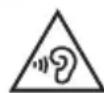
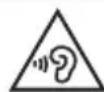
To prevent possible hearing damage, do not listen at high volume levels for long periods.
Hereby, Olympus Corporation declares that the radio equipment type DS-9500 is in compliance with Directive 2014/53/EU.
The full text of the EU declaration of conformity is available at the following internet address: http://www.olympus-europa.com/
SAR testing has been done at a distance of 0cm from the body and the head.
This product supports wlan.
Radio function of this equipment is not allowed to use in the geographical area within a radius of 20km from the centre of NyAlesund on Svalbard.
Copyright and trademark information
- SD and SDHC are trademarks of SD Card Association.
- Wi-Fi is a registered trademark of the Wi-Fi Alliance. The Wi-Fi CERTIFIED logo is a certification mark of the Wi-Fi Alliance.
All other brand or product names in this manual are the trademarks or registered trademarks of their respective owners.



CERTIFIED

The software in DS-9500 and DS-9000 may include third party software.
Any third party software is subject
to the terms and conditions, imposed by the owners or
licensors of that software, under which software is provided to you.
Those terms and other third party software notices, if any, may be found in the software notice PDF file stored at
http://www.olympus.co.jp/en/support/imgg/digicamera/download/notice/notice.cfm
Specifications
General points
■ Recording format DS2 (Digital Speech Standard Pro)
Linear PCM (Pulse Code Modulation)
MP3 (MPEG-1 Audio Layer3)
Storage
Internal NAND FLASH memory: 2 GB
SD/SDHC card: Supports 4 GB to 32 GB
- Some recording media memory capacity is used as a management area, so the actual usable capacity will always be slightly less than the displayed capacity.
Display
Size: 2.4 inches
Resolution: 240× 320 pixels
Type: TFT color LCD
Speaker
Built-in 11× 15mm dynamic speaker
Maximum working output
320 mW (8Ω speaker)
Maximum headphone output
≤ 150 mV (conforms to EN 50332-2)
Wireless standards (DS-9500 only)
IEEE802.11 b/g/n/a/ac
56 mW or less
for indoor use only (5180 - 5320 MHz)
Firmware Ver.1.0 or later
The communication speed and distance may vary depending on
ambient conditions such as the radio environment, obstacles and installation environment.
Security
WEP, WPA/WPA2 Personal, WPA/WPA2 Enterprise
For customers in Europe
2412-2472MHz
5180-5320MHz
5500-5700MHz
5745-5825MHz
For customers in Oceania
2412-2472MHz
5180-5320MHz
5500-5580MHz
5660-5700MHz
5745-5825MHz
MIC jack
3.5 ~mm impedance 2 k
EARjack
03.5 mm impedance 8 Ω or more
Power source
Standard voltage: 3.6V
Battery: Lithium-ion battery (LI-92B)
External power supply: USB connection, AC adapter (A517) (DC5V)
External dimensions
120.8mm× 49.8mm× 18.6mm (Not including largest projection)
Weight
90 g (including battery)
Operating temperature
During operation: 0^ to 42^ (32^ to 107.6^)
Charging: 5^ to 35^ (41°F to 95°F)
Specifications and design are subject to change without notice.
Uvod
https://www.olympus.com.au/support/
(Oceanie)
(Gaelder for DS-9500)
WEP, WPA/WPA2 Personal, WPA/WPA2 Enterprise
Mikrofonstik
3,5 mm, impedans 2 kΩ
Ørestik
3,5 mm Ø, impedans 8 Ω allermere
Strømforsyning
Standardspaending:3,6 V Batteri: Litiumionbatteri (LI-92B)
Ekstern strømforsyning: USB-tilslutning, AC-adapter (model A517; DC5V)
Udvendige mål
120,8mm× 49,8mm× 18,6mm (Inkluderer icike den laengste, udstikkende del)
Vægt
90 g (med batteri)
Brugstemperatur
Underbrug: 0^ til 42^
(32°F til 107,6°F)
Opladning: 5^ til 35^ (41^ til 95^)
https://www.olympus.com.au/support/
Ozeanien
en/support/imsg/digicamera/
download/notice/notice.cfm
Technische Daten
Allgemeine Hinweise
Aufnahmeformat
Linear PCM (Pulse-Code
Modulation)
MP3 (MPEG-1 Audio Layer3)
Speicher
Internet NAND FLASH-Speicher:2 GB
https://www.olympus.com.au/support/
(Oceania)
Linear PCM (Pulse Code Modulation)
MP3 (MPEG-1 Audio Layer3)
Almacenamento
Memoria flash NAND interna: 2 GB
Tarjeta SD/SDHC: de 4 GB a 32 GB
Resolution: 240 × 320 pixels
Tip: LCD TFT a color
Altavoz
Altavoz dinamico integrado de 11× 15mm
WEP, WPA/WPA2 Personal, WPA/WPA2 Enterprise
Conector de micro
3,5 mm de diametro, impedancia de 2 kΩ
Conector de auriculares
https://www.olympus.com.au/support/
(Oseania)
Linear PCM (Pulse Code Modulation)
MP3 (MPEG-1 Audio Layer3)
Muisti
https://www.olympus.com.au/support/
(Océanie)
LPCM (Linear Pulse Code Modulation)
MP3 (MPEG-1 Audio Layer3)
■ Media de stockage
Mémoire NAND FLASH
interne: 2 Go
Carte SD/SDHC: compatible
de 4 Go à 32 Go
WEP, WPA/WPA2 Personal, WPA/WPA2 Enterprise
Prise microphone
https://www.olympus.com.au/support/ (Oceania)
WEP, WPA/WPA2 Personal, WPA/WPA2 Enterprise
Jack microfono
3,5 ~mm , impedenza 2 k
Jack cuffie
3,5 ~mm , impedenza 8 o piu
Alimentazione
https://www.olympus.com.au/support/
(Okeanija)
WEP, WPA/WPA2 Personal, WPA/WPA2 Enterprise
MIClizdas
3,5 mm skersmens; pilnutine varza - 2 kΩ
EAR lizdas
3,5 mm skersmens; pilutiné varza - 8 Ω ar daigiau
Maitinimo šaltinis
Standartine jtampa:3,6 V Baterija:liciojonu (LI-92B) Isorinis maitinimo saltinis:USB juntgis, kintamosios sroves adapteris A517) (nuolatine srové - 5V)
■ Isorinai matmenys
120,8mm× 49,8mm× 18,6mm (be išikišimi)
Svoris
90 g (su baterija)
Darbiné temperature
Veikimo metu: nuo 0^ iki 42^ (nuo 32^ iki 107,6 F) Ikrovimo metu: nuo 5^ iki 35^ (nuo 41^ iki 95^
https://www.olympus.com.au/support/ (Okeanija)
en/support/imgg/digicamera/
download/notice/notice.cfm
Tehniskie datum
Vispārīgie punkti
WEP, WPA/WPA2 Personal, WPA/WPA2 Enterprise
Ligida(Mikrofons)
03,5 mm, 2 kΩ pretestiba
Ligzda EAR (Austinas)
03,5 mm, 8 Ω vai lielaka pretestiba
Barosanas avots
Standarta spriegums: 3,6 V
Akumulators: litija jonu akumulators (LI-92 B)
Arejais barosanas avots: USB savienojums, mainstravas adapteris (A517) (5 V lidzstrava)
Arejie izmeri
120,8mm× 49,8mm× 18,6mm (neieklaujot lielako izvirzijumu)
Svars
90 g (ieskaitot akumulatoru)
Darba temperatura
Daribas laika: no 0^ lidz 42^ (no 32^ lidz 107,6 F)
Uzlades laika: no 5^ lidz 35^ (no 41^ lidz 95^
Tehniskie dati un icerces dizains var tikt mainiti bez iepriekseja pazinojuma.
Introductie
2 Selecteer [Naar map] of [Per e-mail].
https://www.olympus.com.au/support/
(Oceanie)
Firmwareversie 1.0 of later
WEP, WPA/WPA2 Personal, WPA/WPA2 Enterprise
(Variable Control Voice
Actuator)
https://www.olympus.com.au/support/
(Oceania)
WEP, WPA/WPA2 Personal, WPA/WPA2 Enterprise
Gniablo
Ha3BaHncaOCTaBbIX YacTei
ДИКTOФОH
① Pa3bEm (ДянHayшнков)
② BCTpoeHHbI 2MVKpOΦOH (L)
③ Ducnnei
④Поррамміруемьі
нHTЕЛДЕКТУАЛБНБИЕ KНОПК
(F1, F2, F3)
⑤ Khonka+
⑥ KhoNka (nepeMoTka Ha3aD)
⑦ KhONka-
⑧ Pa3bEmДЯКapTbI NaMaTnSD
9 Pa3bem (JNRA MKNPOOHa)
10 BCTpoeHHbIO OCHOBHO MKNKPOOH (R)
11 KhoNka NEW
12 CBeToNDnOHDhINHnDKaTOP
13 NpeeknioyateIb (REC/STOP/PLAY/REV)
14 KhONka OK/MENU
15 KhoNka I (nepeMoTka Bnepe)
16 KhoNka (CTepetb)
17 BcTpoeHHbI dHaMnK
18 NpeeknouateIb POWER (ON/OFF)
19 Khonka pa36JIOKnpOBKn KpbiHKn 6aTapeHORO OTCeka
20 KpbiWka 6aTapeHoro OTecka
21 Pa3bem DnI NOdkIOUeHINK DOK-CTAHUN
22 USB-pa3bem
Ducnnne
A OTo6paXeHne cncsKa aaiNoB*
B DucnneB pekmE 3aHNC
C DnncnEINBpeXnme BOCnpOn3BeDeHn
OTo6paKeHHe HΦOpMaUIN 06 yCTpoIcTBe
1 INHdkaTOp HocntTeJn Dn 3anCn
[ ]: BHyTppeHHnnaMaTb SD: KapTa namrtn SD
SD: CtaTyc 6nokupOBkn KapTb namrtn SD
2 HndkaTop Wi-Fi noKnIoueHnna
[15]MOUHOCTb CnHana [14][18]:
CtatycO6MeHa daHHbIMN
3 INHdNkAtOp ypoBHa 3apJa6aTapeu
4 Cratyc faina
[B]:BbIOnHЯETcpaacwnΦpOBka
[ ]:PacuHΦpOBka 3aBepseHa
[s]:Pacno3HaBaHnepeu 3aBepweHO
[ ]: Ycneu no nepeaNo no Wi-Fi
[ ]: Own6ka nepedaun no Wi-Fi
[虫]:ycneshno nepedaohuepe3 USB
[ ]: YcneuHno nepeaHNo no 3JIeKTPoHHo NouTe
[ ]: Own6ka nepedaun no 3JneKtpoHHNo nOte
5 Tekyuzaanka*
6 Imra faJna n daTa/BpeMa 3aunCn*
7ДлnteьHOCbTeKUeien3aHnCn
8 Ⅲmepnte lypoBn3aINcN
9 06NaCTb uHΦopMaunu o faJe
[ ]: Tn pa6oTbi
10 Onzni nepeknouateTn
:Инданкатор заимсн
[ ]:ИнданkaTop octaHOBKN
[ ]:Индикатор BOCPON3BedeHnA
nepemotkn Ha3aI
1 Tekyuüee BpemBocnpoun3BeDeHn
12 IpoOJONKInTeBbHocTb aaiIa
13 Tekyüee noJoxeHne
14 ⅢkaI npOJKeHnBOCnpOu3BeHeHn
15 O6naCTb HΦOpMaqun o6 yCTpoiCTBe
DSSQP[PCMST][MP3128]N.T.D:PexKIM 3aINCU
[high][MID][LOW]
UyBCTBNTeNbHOCTb MUKpOoHa
aBTOMaTnueckoro TOnOCOBOrO ynpabLeHn)
Khonka F3 (OTNPABNTb)
https://www.olympus.com.au/support/
(Ökeahn)
*CoepKIMoe ynaKOBKn 3aBnCt OT npNo6peTeHHo Bamu Bercn.
Mepbl npedocTopoXHoctn
Ipepe npBbIM nCNoJb3ObaHnem
dNKTOoHaBHnMaTeNbHO
npouTnte daHHoe pyKOBoDCTBO,
yTO6bl O3NaKOMuTbcra C
HΦopMaueNe O npaBnblHom
n 6e3OnaChOM nCNoJb3OBAHm.
XpaHne pyKOBoDCTBO B
JIerKoDoCTynHom MecTe.
Ppeynpejdaiouim CNMBOL yKa3bIbAeT Ha BaXHyIO uHOpMaunIO, CBraaHHyO C 6e3oNaChocTBIO. YTo6bl 3aunITb Ce6n I npTuNX JIOJeN OT TpaBM n PnpuHHeHn BpeDa NmUyIeCTBy BaxHO BcERDa UHTaB pnpBeHhble 3deCb PpeynpeJxDeHn N HOpMaunIO.

Onacho
IcnoJb3ObaHnue n3denn6e3 O3HaKOMJIeHnC nHΦOpMaunne, 06o3HaueHHoN 3TNM CmMBONOM, MOKeT npuBecTN K cepbe3HbIM TpaBMam nn CmePTN.

PpeynpekdeHne
IcnoJb3ObaHne n3dEIny 6e3 O3HaKOMJIeHHC INHΦOpMaJIeN, O6O3HaueHHoN 3TNM CmMBOLOM, MOKeT npuBecTu K TpaBMam NnCmePTn.

OctopoXHo
NcNoIb3OBaHHe n3denn6e3 O3HaKOMJIeHN CnHOpMaJne, 06O3HaueHHo 3TUM CmBOLOM, MOKeT PnIBeCTN K MeIKM TpaBMam, NOBpeXKeHIO 06OpyDobAHn INI NOTepe BaXhblX DaHHblX.
CokpaueHn, nCnoJb3yeMbIe B daHHOM pyKOBODCTBe
CNoBOMKapTa063HaayetcKaPta narnTSD.
ПОД «ODMS» поразумеветс
Систema упраьеня дiktовам
Olympus в сpene Windows.
- Пд «DSS Player» поразумеветаю DSS Player严禁 Macв срени Apple Macintosh.
B DaHHOM pyKOBOdCTBe npuBeHebl N3O6paXeHn INoRcHEnn K 3KpaHaM Ha pycckom RaIbke. DnkTOfoH OCHaueH BO3MOxHOCTbO BbI6opa Ra3bkaA KpaHa.
IpeoctepexeHneB OTHOWeHNu ycNoBn MCNoJb3OBaHn
ДЯЗаuntbIВICOKOTEXHONOHHyBX 3JIEMeHTOB,COePkauxxCB DaHHOMN3dENH,NHKOrda He OCTaBnTeDnKToΦOH BMeCTax, NpeuNCHeHbIX HNXe,HN DnN CNOJb3OBaHnHnDnXpaHEnH.
- Mecta,ДЯ KOTopbIX xapaKTePbI NOBbIeHHbI TeMnepaTpbi N/ INN BnAxxHOCTb ININ INx pe3KnE nepenAbI.ПОДnpRmblIMC OJIHeuHbIMN LyuAMN,Ha INJXKe, B 3AkpytOM aBTOMo6nIe, B6In3N INhBX INCTOChNKOB TEnla (nInTa,OborpBeTaN U.T.D.) INN yBnAxxHHTeNe BO3Dyxa.
B6n3n NnerKOBocnnaMeHAnuXcNnn B3pbIBaTbIX 3neMeHTOB.
BycnoBnX nobbiueHHoBnAaXHOCTn,HaNPmep B BaHHOKOMHaTe nIIN NOI DOxKdEM.
BMeTax,Γe BO3MOxHo 6pa3OBaHne CnIbHbIX Bn6paui.
HnkOrda He poHnTe DnKTofoH nHe NpOBepraTe BO3deIcTBnO ydApHbIX Harpy3OK nnBnB6paun.
Bpa6ote DnKToOHa MoryT Ha6nDaTbCHeNCnPabHOctn B Cnyae erO nCNoJb3OBaHNB MeCTax, rDe OH 6yDet NOpBepKeH BO3DeIcTBIO MaHTNThbIX/ 3NeKTPOMaHTNThbIX NOJIe, paNOBOHNI BBICOKOHO HApJxKeHn, HAnpImep BO3ne TeNEu3Opa, MKNPOBONHOBOn neu, BNdeONrPoBOI pncTabKn, MoUHbIX KOHOHK, MOHTOPa C 60JbShm 3KpaHOM, TJe-/paNObBiXkoN nn Onopbl NHHN 3NeKTPonepeJa. B Taknx Cnyaax BbIKNoChte IN CHOBA BKIOUHTe DnKToOhopeNdAJIbHeINM NcNOJIb3OBaHNEM.
CTapaItecb He BbIIOJIHrTb 3aINCb IIN BOCpON3BedeHne B6NI3N COTOBbIX TeIeOHOOB INI INHORO 6ecnpoBOJHO O6OpyIDoBaHnI, NCKOJIbKy TaKoe O6OpyIDoBAHne MOKeT Bbl3BaTb NORBHeHne NOMex INIyMOB.
He nCnoB3yIe opraHnueckne pactbOpnten, TaKne KaK cnnpT nn pa36abntel naKa dJa Ounctkn n3dJIy.
PpeynpeKdHneB OTHoWeHn nOtepnDaHHbIX
CoxpaheHHO B namrTn coepKIMOe MOKeT 6bITb yHNUTOXKeHO IIN CTePTo BBNdy fYHKUHOHaBbIX OUn6OK, HncnpabHocTeB pa6ote u3dJIa NII BO BpeMpeMOHTbIX pa6OT. PekomeHyETcCo3DaBaTb pe3epBHeI KOHN U COxpaHrTB BaKHbIe DaHHBe Ha DpyrNX HOCHTeJHX, HApIMeP Ha JxecTKOM DCCK KOMNbBoTepa.
KOMnHaHrOlympus He Hecet OTBETBeHHoCTn 3a NaCCNBbIe IINI JIO6bIe INIbe NOBpeXKeHnRA, BO3HNKUHe NO pNcHHe NOTepn DaHHbIX BnDy DeEeKTA n3dEInra, peMOHTa, BblONHeHHOrTo TpeTbei CTOpOHoi (He KOMnHaHnei Olympus), yNOJHOMOeHHbIM KOMnHaHnei Olympus cepBnCHbIM NyHKTom IIN BBNDy IIO6bIX dpyrNX pNcHn.
06paueHne c dNKTOoHOM
!PpeynpeXdHne
XpaHnTe DnKToΦOH B MecTe, He DoCTyNHom DnI DeTei, BO n36exKaHne nepeuNCleHHbIX HnIXe ONaCHbIX CITyaCm, KOtOpbie MOrYT npNBcETN K cepbe3HbIM TpaBMam.
1.CnyaHnoe 3aIaTbIbAHne 6aTapei, KapT ININ HbIX MEIKNX Detalei.
2.CnyaHoe TpaBMnpoBaHne DBNKUYUIMMCYACTM NIKTOOHa.
He bItaItecb caMOCTOATEbHO pa36npaTb,peMOHTIpOBaTb IIN MOINuPPOBaTb daHHoe yCTPOICTBO.
IcnoB3yTe TOnbKO KapTbI namrSD u SDHC.HnKOrHa He nCNoB3yTe KapTbI dpyrOro Tnna. Ecn Bbl CnyaHNO BCTaBnIN B DnKToOH KapTy dpyrOro Tnna, 06paTntecb K OphiuaNBHomy dNCTpN6bHTOpy NnB CepBnCHbI ueHtp.He nbTaayTeCbNBeueb KapTy HacnblHo.
He noIb3yIteCb yCTpOciCTBOM BO BpeMa ynpaBnEHHra TpaHCnOpTHbIM CpeiCTBOM.
OctopoXHo
HemeJeHHo npeKpaTnTe NCNoJIb3OBAHne dIKTOfoHa npn BO3HNIKHOBeHN HEO6bYHOrO 3aNaXa, yMa mI NblbMa n3 Kopnyca.
HnKorda He n3BneKaaTe 6atapeIO rOJIbIMpyKaAMN,3TO MOKeT npIBeCTN K BO3RopaHIO NIN OKOry KOJny PK.
He octablaIte DnKTofoH B MeCTax, TnOH MoKet 6bITb NOBBepKeH BO3DeIcTBNIO Upe3MePHO BbICOKNX TEMNEpATyp.3TO MoKet npNBecTI K NOBpeJdeHNIO DetaleN, B HeKOtOpbIX Cnyuayx, K BO3rOpaHNI OIKtofoHa. He nCNoJIb3yUte 3apRdHoe yCTpoiCTBO IIN AC aadantep, eCNI OH Yem-JIn6o HaKpbTb. 3TO MoKet npNBecTI K NepeReBy I NoCneDyUoSeMy BO3rOpaHNI.
- O6paauTecb cДNKTOΦOHOM octopoXHNO BO 36eKaHne Hn3KoTeMnepaTyphbIX OXOROB.
- Ecln DukTofoH coepKnt MeTalIuueckne DeTaII, INx NpeperBeB MoXeT CTaTb npUHHoH Hn3KOTempePaTyPHorO OxKora. O6paTInTe BHMaHne Ha cnedyUooee:
-ПиИСПОЛБЗOBAHINВTeueHneДIITeNBHOBVPeMHNДIKTOΦOHHarpeBaetc.YdepKnBaTakOJHarpeTbIДNKTOΦOH,BblMOKeTeIOnyUHTb HN3KOTempeTpHbIOKOR.
BycnoBnx ype3bUaHNO Hn3Knx TemnepaTpymnpaKopnyCa DnKTOOHa MOKeT 6bITb HnKe TemnepaTpyo OKpyKaIOSei Cpebl. IIO BO3MOXHOCTN, npn NCNoJIb3OBaHN NkTOOHa B XONODE HaDeBaTe NpueATKn.
Mepblnpedoctopox-Hoctn npu o6paueHmC 6aTapeiKaMn
Onacho
B DnKTofoHe nCnoJb3yeTcnaHnHaJIHTn-NOHHa6aTapeI npOn3BOCTBa KOMNaHnOlympus.3apJaTe 6aTaapeo C NMOUb CneuaHbHO3apdHoro yCTpoiCTBa nn AC aanTepa.He nCnoJb3yIte HnKaKne dpyrne AC aanTepbI nn 3apdHbIe yCTpoiCTBa.
BaTapeHcneJeYeNTnoBepraTb BO3dEICTBnIOOTKpbIToroORHNAI KOPOTKOrO 3aMbIKAHN,HarpeBaTb IIN pa36npaTb.
HnKOrda He HaraeBaTe Ne He Cxiratne 6aTapeio.
Co6IIOaIte MepbI npedocTopoKHOCTn npu TpaHCnpTIpOBKe IINxpaHeHH 6aTapeB BO n36ekaHne IX KOHTaTa C MeTaNueCKMn PpeMeTaMn, TaKIMN KAK IOBeJIInPbIe yKpaSeHnA, 3aCTeXKn, MOHN N T.Ⅱ.
Bo n36eKaHHe yTeueK KnDkoCTn 13 6aTapeu nn NOBpeKdEHHN IX KOHTaKTOB BHIMaTeIbHO CneDuYte BCEM INHCTpyKUHM NO NCNoJb3OBAHNIO 6aTapeu. HNKOrda He nbTaIaTeCb pa3o6paTb 6aTapeo nn KaKIM-JIn6o 6pa30m ee MoINΦnUPOBaTb, 3aAnBaTb u T.D.
- Pn nopaHn XnKoCTn 6aTapeB rIa3a, HEmeIeHHO npomOnTe nx uCTOn XoIoHO BDoN HesAmEInTeJbHO 6paTntec 3a MeDnHcKoI NOMOu.
!PpeynpeXdHne
-
Bepernte 6atapen ot BnaH.
Ecnn akkymnyarTophhe 6atapen He 3apjkaHOTc3a onpepehenHoe Bpem, npekpaTnte nx 3apjkaTb N 60nbwe He nCNOJb3yUte.
He nCnoB3yIe 6aTapeIO,ecn OHa TpeCHyBwA nn CnOMaHHa.
He npBepraTe 6atapen cnHbM ynapHbIM Harpy3kAm nI npOIOJKNTEbHOMY BO3eCTBIO Bn6paui.
EcnBBOBpMa pa60tbyyctpoiCTBa npOxCoNTyTeuKa JnKoCTn n3 6aTapei,6aTapeo6ecuBeuHaetc,deOpMnpuyETc nnHn H6JIoDaIOTcNHBie HapUweHn, PpeKpaTnteNCNoJb3OBaHne DIKTOfoHa.
Пипonaдани КДКОТИЗ 6ат ape Ha OdeKdy ИИн KOKy, CHIMITE OdeKdy IN HEMeДлEHNO pOMOHTe NopaKeHHbI yUaCTOK YICTOx XOLOHON pTOUHO BDOJ.
XpaHnte 6batapeB MeCTax, HEOCTynhblx DnIaTei.
-Пиобаружehи KaKux-JI60 Hapyшен npn nCNoB3OBAHIN n3dJIy,HaNPmep Heo6bUHoro 乌Ma,Tenla,DbIma nn3anaxa rapi: -
HemeHnHO n3BneKeTe 6atapeio, co6JIIOJdA OTOPOXHOCTb, YTO6bl He o6KeYBC;
- 06paTntecb K MeCTHOMy DnInepy nn npedctabTeIOlympus dI npoBeHeHnO bcnyKuBaHn.

OctopoxHo
BxOJaA B KOMnNeKT aKkymyTOpHa 6aTape nPeHa3HaYeHa NCKIIOHTeHbNO DnNcNoB3OBaHnC cNΦpOBbIM dNKToΦOHOM Olympus Moen DS-9500/DS-9000.
Bcnyae 3ameHb6aTaepKnHa npryu6aTaepKy HenoDxOJaero Tnna BO3HnKaet Pnck B3pbIbA.
- Ytunn3npynte Otpa6oTaHHy6batapeo,co6nOdaaCOOTBeTCTByUOuNE INHCTpyKuIN.
- Yttnn3npynte 6aTaapeKn, UTo6bI coxpaHnTb pecypcbI Hauwei nlaHeTb. BbIbpaCbIBaer N3pacXoOBoAHbIe 6aTaapeKn, 3aKpOte INN pIoJXnTeNbHbIe NOTpuCaTeNbHbIe BbIOBdI N 063aTeNbHO Co6JIoudaIte MeCTHbIe IpaBUNa N NOLOXKeHN.
Bcerda3apkaiteakkymyIaTOPbIe 6atapeKn neped nepbbim Ucnonb3OBAHEmnnnoocne dInTeJbHOrXpaHeHn.
- AkkymnyITopHbIe 6aTapeiKn ImeIOT orpaHnueHHbI cPOK cnKbI. KOrda Bpemra p6oTbI OT 6aTapeek cokpaUaetc,JaXe npIN ONHom 3apJe AKKymyITopHO 6aTapeiKn, ZameHnte 6aTapeiKy Ha HOByIO.
DOK-CTaHcua


Onacho
HnKorda He otKniouae AC aanTep nn Hyp 3neKTponntAHn BnaJXbIM pykAM. 3To MoXeT Bbl3BaTb yap 3neKTpnueCKM TOKOM nn TpaBMy.
IcnoJb3ynte cdoK-ctaHneMe TOnbKO CNEUaJIbHO npedHa3NaueHHbA AC aJaTep. IcnoJb3ObaHne dpyrnx AC aJaTepOB MOKeT pInBecTN K nepepeBy,Bo3ropaHIO INI HapyeHnM B pa6Ote.

PpeynpejckdneHne
HnKorda He pa36upaite, He MoDnΦuCyIte N He peMOHTnpyIte DOK-CTAHIO
caMOCTOReTbHO.3TO MOKET BbI3BaTb BO3RopaHne,ydap 3NEKTpUeCKIM TOKOM NINTPaBMY.
He nCnOJb3yInTe DOK-CTAHUIO B MeCTax, rDe OHa MOKeT KOHTaKTIpOBaTb C JxNkIOCTaMn. HamokaHne DOK-CTaHcIM MoKeT npINBeCTn K BO3rOpAHIO INu yApy 3JIeKtPnueCKm TOKOM.
He poHnTe DOK-CTAHUIO UIN He DonyckaIte Ype3MePbIX ydpHbIX Harpy3OK.3TO MOKeT PpNBecTI K NOBpeKDeHIO, BO3ropaHIO UIN ydApY 3JIeKTPNueCKIM WOKOM.
He npkacaTecb K coeHnHTeIO H He BCTaBnIte MeTaIIuNueCKne IPOBOJa IIN INHbIe IpeMTeBpa3BeMbI.3TO MoKeT pInBecT N BO3rOpaHnIO INI ydApY 3JIeKTPnueCKmTOKOM.

OctopoxHo
Ecn yctpoCTBO He nCnOJb3yeTcA DJIroe Bpme,OTKJIIOUHTe AC aanTep nnu Hyp 3NEKTPOINTAHNA OT DOK-CTaHcnn N p03eTKN NEpeMeHHORo TOKa. Pn HecO6JIQDeHN 3ToI Mepbl npedocTOPOXHOCTN IN NOBpeKdEHN DOK-CTaHcNN MOxET npOn3OHTN BO3rOpAHne.
-Дok-стань(CR21)npedhaHaYeHcneuaNbHO nla dNkofoHOBOlympus DS-9500/DS-9000.He nCnoJb3yIte ee cdpyrIMn yCTpoiCTBaMn.
ACaanTep

Onacho
-ПoctabnembвКOMPnkeKte
Hyp 3neKtpoNTaHnna
npedha3Haueh CneuaNaIbHO dna
AC aanTepa. He nCnoNb3ynte
Hyp 3neKtpoNTaHn daDpyrnx
yctpoiCTB. TakaKe He nCnoNb3ynte
Whypbl 3neKtpoNTaHnO t Dpyrnx
yctpoiCTB dna AC aantpea.
- 06ecnebyte nCnoB3ObaHne AC aanTepa B yCNOBnX DOnyCTmOro HanpJxHeNna 3NeKtpocetN (OT 100do240B nepeMeHHoro ToKa). NcnoB3ObaHne npn dpynx
ypoBnHnpanpKeHHMOKET npNBecTN K BO3rOpAHIO, B3pbBy, neperpeBy, ydpay 3eKtpueckm TOKOM nI TpaBme.
- U3 coo6paKeHn 6e30aChOCTn OTKJIouaIte AC aadantep ot po3eTkn nepeI npOBedeHnem TexHnueCKOrO o6ClyJXnBaHnI nn OuHcTkn. HnKOrHa He noDKnIOuaIte N He OTKIIouaIte pa3bEm 3NeKTPoNITaHnI MOKpbIMn pyKaAMN. 3TO MoKET pNBecrN K ydpy 3NEKTPuYeCKIM TOKOM IIN TpaBMe.

PpeynpekdeHne
He bTaItecb KaKIM-Ni6o cnoc6om pa36npaTB, peMOHTnPOBaTB nIM moNfNpOBAb AC aJaantep.
He donyckaTe nonadHnBHytpb n3dEtnna NOCTOPOHnXnpeDMToB, BKJIOUaB BDOy,MeTALNueCKne npeDMtblNNIJIeKOBOCnAmEHaIOuNEcBeueCTBa.
HeMoHTeACaAnTepnHe TporaiTe erO MOKpbIMpyKaAM.
He nCnoB3yIe AC aanTep B6n3n rOIOUHX ra0B (B TOM YNCNE 6EH3Ha u pa36aBntEJI naKOB).
Bcerda octaHabnBaIte 3aIncb nepei noKIOUeHEm IIN OTKIOUeHEm pa3beMa 3NeKTpONITAHIA.
Korda AC aanTep He
HcnoB3yeTc, OTKNoHTe pa3bem
JNeKTpOHTaHn OT p03ETK.
IcnoJIb3yIte TOnIbKO ICTOCHNIKIITaHnC COOTBETCTBYIOUIMyPOBHeH HApJxKeHn, KaYKa3aHOHa aadantpe.
B cnyuae:
...noBpeKeHn BHyTreHHnx deTanei AC aanTepa B pe3yIbTaTe naeHn nn Horo BO3dECTBn:
naeHnA C aanTepa B BOy nnn noanaHnB OdbI, MeTannuecknx npEmTOB, NkROBOCnnaMeHIOxxCBeueCTB nn DpynX IOCTOPoHHnx npEmTOB BHtpb aanTepa:
...06HapyKeHHa KaKx-Jn6o HApyuHn npu nCNoJb3OBAHn AC aanTepa, Hanpumep Heo6bUHOrO wyma, Tnla, DbIma nn 3anaxa rapu:
- He npikacaiTecb K nobpejKeHHbIM DeTaIaM;
- HemeJHHe OTKIouHTe pa3bEm 3NeKTPoNTaHnO Tp03eTKn;
- 06paTntecb K dIepey Inn MeCTHOMy npEcdTaBnTeIIO Olympus IIN pIOBedeHnO bcnyKnbAHn. IPOdoJIKNtIeHoe NcNOb3OBaHne AC aAnItepa B TaKnx YcNoBnX MOKeT nPUBeCTn K ydpy 3NeKTpUYeCKIM TOKOM, BO3RopaHIO IIN TpaBMe.

OctopoXHo
He nCnoB3yIte AC aanTep, ecn pa3bem 3neKtpoNTaHnIOBpeXdeHnn BnIka He NIOHOCTbO BXoINT B pO3eTK.3To MOKeT npNBecTN K BO3rOpAHIO, neperpeBy, ydApy 3neKtpuYeCKIM TOKOM, KOPOTKOMY 3ambKaHNIO NIOBpeXdeHIO yCTpoIcTBa.
- OTKIIOUaHNe AC aadantep ot po3eTKn nepemehHoro TOKa, KOrda OH He nCNoIb3yETcH. Heco6JIouDeHne 3ToI MEPbl npedocTopoJXHOCTN MOKeT npIBeCTN K Bo3rOpAHIO, nepepeBy IINN ydapY 3NeKTPnueCKM TOKOM.
- PnO tKIOUeHn pa3bema 3NeKTpOnuTAHN O T pOzETKn DePknTeCb pyKoN 3a BNky. He nepeRn6aNte uHyp N He CTabBe Ta H Hero TKeJIbe IpeMeTbI. 3To MOKeT npNBecTN K Bo3roPaHIO, NepeReBy, ydApy 3NeKtpuYeCKM TOKOM nIN NOBpeXDeHIO yCTPOJCTBa.
KK-MOHHTOP
KK-3KpaH MOHITOPa N3rOToBHeC pIMeHnEM BbICOKOTUhIXTexHOIOrn. Tem He MeHee, HaMOHITOpE MOrTy NOBtbcTcAtemhIE NN CBeTlbie 6Nkn.B 3aBNCMOCn OT XapAKTePncTIKNNyTla, PND KOTOpbIM BcCMOTpnte Ha MOHITOp, 6NIKN MOrTy
IMeTb pa3HbIe UCBET IyRPKoCTb.3TO HE ABJIaTcH HeCNpPaBHOCTbIO.
Kapta namatn

PpeynpeKdene
He npikacaiTecb K KOHTaTm KapTb.3TO MOKeT CTAb PnUHOn NOBpeKdEHn KaPbI.
He xpaHnTe KapTy B MeCTax CKONJIeHnCaTNUeCKOTo 3NeKTPnueCTBa.
XpaHnte KapTy B MeCTax, HeoctyNbIX IJIaTeTn. B Cnyuae HnpedHamepeHHoro 3aRNaTbIBAHn HMeDInHHO 6paTtTEcb K BpaUy.
ФункциЯWi-Fi(дуюмсь DS-9500)
-ПиИСПОЛБ3OBAHINДIKTOФОHA BMeHnHcKOMyUpeXdEHnN co6IJaIteMHCTpyKuIN3TOrO ypeXdEHn.
- OTKIouaIte nITaHne dIKTofoHa npn HaxoXeHnn B6n3n 3NeKtpoHHoro 06OpyIOBaHn, KOTopooe Tpe6yeT BICOKOTOHOrO KOHTpOra nn IMeet Cna6bI cnHaal. INaue Moryt Ha6NIOdaTbcR c6onBpa6ote nn NIIhIE HeKeNaTeNbHbe HApUSeHn INeKtpoHHoro 06OpyIOBaHn.
Держnte yctpoiCTBOHa paCtOHHn He MeHee 22 cm OT MeCTa NmPnaHTaCnN KapINOCTMMyJrTOpa. 3NeKTPnuCeCKne BOJIhbl, nCnyckaembIe DaHHbIM NIKToΦoHOM, MOryT HApUwAtb pa60Ty KapINOCTMMyJrTOPOB.
- OTKIQUaHTe IINKToΦoH B camOJeTAX. Bo3MOxHo HApUSeHne 6e3OnacHOCTn pa60TbI.
ΦyHKnJaWi-Fi yCTpoiCTBa MoKeT NcNoJIb3OBA TbCB B CNeDyUOuX perHOHax.
Amepka: CUSA, KaHada
Ebpona:
Abctpna,BeIbrrnBolrnapnXopBaTnKnp,YexnDaHn,3ctOnn,UnnHnndn,OpahncreMaHaHn,Ipeu,Benrpn,UnpaHn,ITaHn,LatBn,InTba,IIokcem6pyr,MalbTa,HudepnaHdbI,PiBsha,NoptyraHn,PymbiHn,CnoBaKn,CnoBHeHn,UcnHn,UbceHn,Benko6puTahnn
>OkeaHn:
Abctpailna, HOBa 3eJahnna
Ncnojbl3yte fynkunio Wi-Fi tonbko
B pernoHax, nepeuNCneHHbIX Bblwe.
Takke orpaHmYbTe MCNOJb3OBaHne
fynKUnn Wi-Fi cTpaHoi mnn
perNoHOM, B KOTopo(-om) 6blno
npno6peTeHO yCTpoICTBO.
NcnoJb3OBaHne daHHo fynKUnn
MOKeT HapUHTb 3aKOHOdaTeNbCTBO
OTHCNTelbHO paDIOOAcTOT B
KOHKeTHO CTpAne.MbHe HeCem
OTBeTCTBeHHOCTn 3a NcNoJb3OBaHne
DaHHoTexHOJOnn.
BnomeueHnXcKeJe3o6eToHHbIMM,MeTaNIIuYeCKMN NIN 6eTOHHbIMN KOHCTpyKUaMn CBa3b MeJkyCTPOICTBOM N TOyKO JOCTyNaWi-Fi MoKeT 6bIb HapyuHa.
CBy3b MoKet 6bItb HapuSha npn nCNoB3OBAHm yCTpoiCTBa BO3JIe MKNPOBOJHOBbIX neey, 6ecIPOBOdHbIX TelefoHOB nn yCTpoiCTB,pa6oTaIOxN B dHaana3OHe YaCTOT 2,4Tc. NcNoB3yInTe yCTpoiCTBO Ha DOCTaTOHOM paCCTOAHm OT TaKOrO o6OpyOBAHn.
- EcnB03MOXHO, He nCnOJIb3yIte yCTPOINCTBO BO3JIe MO6nJIbHbIX TeNEFOHOB, TENEBU3OPOB INn paNIO. Mo6nJIbHbIe TEneFOHbI, PHS, TENEBU3Opbl INpaNIO INCNOJb3yIOT OTINuHbIE OYCTPOINCTBa YAcTOTbl, HO 3NeKTPOMaHNTHBiE BOINbl, reHepnpuyEmble yCTPOINCTBaMn C cyHKUeW-Fi, BkLIouaJaHnoe yCTPOINCTBO, MOrTy rHepePpOBaTb NCKaKeHne ayDINO INN BuJeO DaHHbIX.
PpimMeaHne o 6e3oNaC-HocTn npu nCnoJb3OBAHN uCTpoiCTB c FyHKun e Wi-Fi
Yepe3 coeHHeHne Wi-Fi OcyuIeCTBnIeTc86cnpOBOHaJnpeDaa DaHHbIX. TaKKe ecIn C yCTPOINCBOM BO3MOXHa paINO CBa,IOCTyNHa YCTAHOBKa r6KOro coeHNHeHry. OHaKo, TaK KaP aNOCrHaNbMoYr PpeOJOnEBaT npEnrTCTBn (depeBo,CTKIO n.T.n.) pN OTCyTCTBn HAcTpoek 6eONaCHOCTn MOyr BO3HNKHyt b CneDuOUIne npo6JIembl.
3JIoHaMepeHHbI nepeXBaT paHocrHaIOB IJIa OTcJIeKINBaHn COePJKMOrO C cJIeJIbIO UINHOHaJa.
- HecaHKUHOHPOBaHHoe BMeWateBCTBO N yTeuKN BaXHOI NHΦOpMaζN.
- Ppe3aIncb n nepeada naepexBaueHHbx daHHbx.
- DectpyKTHBbIe KOMTbIOpTePbIe Bnpycbl, CNOco6HbIe yHNHTOxNtB DaHHble nCnCTEmbl.
- PnB03HKnHOBeHn HeyctpaHmblx npo6neM BCJeCTBHe CNeuΦnKaUe Wi-Fi coeHHeHn, MbI He Hecem OTBeTCTBeHHOCTN 3a BO3MOXHbI yep6.
YxOa 3a AnKToΦoHOM C NcNoJIb3OBAHNMe De3nHΦuNpUoNx pAcTBOpOB Ha cInpTOBoO OCHOBe
OuNCTky MoXHO IPOBOIDNTb C NcNoJIb3OBaHnEM Yka3aHHbIX HnHex BeueCTB.
3TaHOnIaIe3nHΦeku(76,9-81,4%o6.)
- ɪənɒpənəHŋ ἀŋ ἀeʒɪNΦeKúŋ (70% o6.)
PpmeaHne.
Ie3nHfNcnpuyuue paCTbOpbHa cnInpTOBOO OCHOBE 3anpeaetCnONJb3OBaTb DnA OUnCTKN DOKCTAHU.
Bce npoue 6peHdbi n Ha3BaHnna npOyKTOB, yNOMaHyTbe B HactoIeM pyKOBoODCTBE, ABJIOTc TOBapHbIMN 3HaKaMN ININ 3apeINCTpnpoBAHHbIMN TOBapHbIMN 3HaKaMN N/INN TOBapHbIMN 3HaKaMN IN COOTBeTCTByIOuNX BnaJeBueB.



CERTIFIED

IporpaMMHoe oecneueHne B
DnKTooHax DS-9500 n DS-9000
Mozet cOepKaTb IIO CTOpOHnx
npOn3BOUInTeNe.
JIoo6e IO cTOpOHnx
npOn3BOUInTeNe dOJXHo
HCNoIb3OBaTbcra B COOTBeTCTBnn
C yCNOBnMn, ONpeJeHHbIMn
Blaednbzamn nn Nnueh3napAmn
DaHHoro PO,B pAMkax KOTopbIX
3TO IO npdeocTabnre CaBAM.
3TN yCNOBnA, a TaKKe nHbIe npMueaHnK pnpGpAMMaCTopoHNHX npOn3BODnteNe,ecn TaKOBBe IMeIoTcR,MOXHoHaHTN B paIne B fOpMaTe PDF c npMueaHnMa K npOrpaMMHomO便秘neHIO Ha caTHe http://www.olympus.co.jp/en/support/imsg/digicamera/download/notice/notice.cfm
Cneunkaun
06uue cBeHnna
DopMaT 3annCn
JIiHeHnA UKM (mmybCHOKOIOBaMoDyIaIaI)
MP3 (MPEG-1 Audio Layer3)
XpaHeHne
BHyTreHHHJ Neu-namrTb NAND:2ΓB
KapTa namrTn SD/SDHC: noDnepKnBaet O4do 32
*B HeKoTOpbIX HocnteJIaX EMKOCTb NaMaTn NcNoIb3YeTcKa KAc 0bNaCTb ynpaBHeHn, NoTOMy aKTNuCeCKaE MKOCTb BcERda HEMHO MeHbWe OTo6paKeHHoH.
Ducnnei
Pa3Mep:2,4ДIOIma
Pazpeшени: 240 × 320 римс.
Tun: ζβeTHoT TFT XX-Kdncnnei
DnHaMK
BcTpoEHbI
3JIeKTPoDnHaMnueckn
rPOMKOrOBOpuTeNb 11X15MM
MaKcMmaJIbHaJa pa6Ouaa MoUHOCTb
320 MBT (ДиНамИК 8 OM)
MakcunmaJIbHoe HanpJxKeHne BbIXOda dJa HayuHnKOB
≤ 150MB (coorlacho EN 50332-2)
Ctahdaptbl 6ecnpoBdoHO CB3N
WEP, WPA/WPA2 Personal, WPA/WPA2 Enterprise
Pa3bemДЯМКрофona
Диametp3,5MM,ПОнhoe conpoTNBJIeHne 2 KOM
Pa3bemДЯHayushnKOB
Диаметр 3,5 MM, nonHoe copotublenne 8 Om nnn 60nee
IcToUHMK NITaHnA
CtaHapTHe HnprJKeHne:3,6B BaTape: nITn-NOHna (LI-92B) BHeWN NCTOuHNK nITaHn: AC aanTep c USB-pa3bemom (A517;5B noct. toka)
BheuHne pa3Mepbl
120,8MM×49,8MM×18,6MM (6e3camoB6onbwoB bICTyauouey actn)
Bec
90r(BKJIIOUaJa 6aTapeHO)
Pa6o7a TemnepaTypa
BoBpempa6oTb:0°C-42°C (32°F-107,6°F)
BoBpeM3apAaKn:5°C-35°C(41°F-95°F)
TexHueckXapaKTepcntuNn Dn3aH MOrYT MeHrTcBc 6e3 npEbpntbHorO yBeOMLeHn.
Inledning
https://www.olympus.com.au/support/
(Oceanien)
WEP, WPA/WPA2 Personal, WPA/WPA2 Enterprise
MIC-uttag
Diam. 3,5 mm impedans 2k
EAR-uttag
Diam. 3,5 mm impedans 8 Ω
eller mer
Strömkälla
Standardspanning: 3,6 V Batteri: Lithiumjonbatteri (LI-92B)
For customers in Europe
Professional dictation devices from Olympus are distributed via specially trained and educated partners. Therefore please contact your local Certified Olympus Partner for Professional Audio Systems to get highly qualified support in your language. Find your local partner with our Dealer Locator on www.olympus-europa.com/voice
Telephone support (only English speaking):
United Kingdom: 0845 521 8588 (Monday - Friday 8 am - 5 pm GMT)
Republic of Ireland: 00 44 1582 483320 (Monday - Friday 8 am - 5 pm GMT)
Europe, Middle East, Russia & Africa: 00 800 7000 1000* (Monday - Friday 9 am - 6 pm CET)
E-mail (only English speaking)
help@opdsupport.com
Hardware repair
Please contact our customer support center below
audio.repair.uk@olympus.eu
Free number: 00 800 - 67 10 84 00*
Charged number +49 40-237 73 899
(Monday-Thursday 8 am -5 pm/Friday 8 am-3:30 pm GMT)
- 00800-calls are free of charge.
Only valid for Germany, Austria, Netherlands, Belgium, France, Italy, Denmark, Switzerland, Portugal, Norway, Sweden, Finland, Spain, Czech, Republic, Hungary, Poland, Iceland, Bulgaria, Israel, Latvia, Lithuania, Estonia, Russia, South Africa.
Some phone service providers do not permit access to 00800 numbers or require an additional prefix. Charges may apply here. Please contact your service provider directly for more details.
| BE | BG | CZ | DK | DE | EE | IE | EL | ES | FR | HR | IT | CY | LV | LT | LU |
| HU | MT | NL | AT | PL | PT | RO | SI | SK | FI | SE | UK | IS | NO | CH | LI |
EN: For indoor use only (5180 - 5320 MHz)
Level 4, 97 Waterloo Road, Macquarie Park NSW 2113
Tel: +61 2 9886 3992
http://www.olympus.com.au


- Names of parts
- Recorder
- Display
- Use your recorder
- Getting Started
- Charge the battery
- Charge using the docking station
- Charge using the USB cable
- Turn the power on
- Recording
- Recommended settings for the microphone modes
- Freestyle
- Classic Dictation Style
- Laid down on the table
- Note:
- How to share the dictation file via Wi-Fi (DS-9500 only)
- #
- Sharing dictation files via Wi-Fi
- Network settings
- Send dictation file
- Turn the recorder Wi-Fi to [On]
- Select the access point
- Send the dictation file
- Select [to Folder] or [by E-mail].
- Select [Yes] to confirm.
- Olympus Dictation Management System (ODMS)*
- Instant File Sharing
- Efficient Document Creation
- Secure Workflow
- Safety precautions
- Danger
- Warning
- Caution
- Convention used in this manual
- Caution for usage environment
- Warning regarding data loss
- Handling the recorder
- Battery handling precautions
- Docking station
- ACadapter
- In case:
- LCD monitor
- Memory Card
- Wi-Fi Function (For DS-9500)
- >America:
- Europe:
- >Oceania:
- Notes on security when using Wi-Fi products
- Recorder care using alcohol disinfectant solution
- For customers in Europe
- (For DS-9500)
- Copyright and trademark information
- Specifications
- General points
- Storage
- Speaker
- Maximum working output
- Maximum headphone output
- Wireless standards (DS-9500 only)
- Security
- For customers in Oceania
- MIC jack
- EARjack
- Power source
- External dimensions
- Weight
- Operating temperature
- Uvod
- (Gaelder for DS-9500)
- Mikrofonstik
- Ørestik
- Strømforsyning
- Udvendige mål
- Vægt
- Brugstemperatur
- Technische Daten
- Allgemeine Hinweise
- Aufnahmeformat
- Speicher
- Almacenamento
- Altavoz
- Conector de micro
- Conector de auriculares
- Muisti
- Jack microfono
- Jack cuffie
- Alimentazione
- MIClizdas
- EAR lizdas
- Maitinimo šaltinis
- ■ Isorinai matmenys
- Svoris
- Darbiné temperature
- Tehniskie datum
- Vispārīgie punkti
- Ligida(Mikrofons)
- Ligzda EAR (Austinas)
- Barosanas avots
- Arejie izmeri
- Svars
- Darba temperatura
- Introductie
- Selecteer [Naar map] of [Per e-mail].
- Ha3BaHncaOCTaBbIX YacTei
- ДИКTOФОH
- Ducnnne
- Mepbl npedocTopoXHoctn
- Onacho
- PpeynpekdeHne
- OctopoXHo
- CokpaueHn, nCnoJb3yeMbIe B daHHOM pyKOBODCTBe
- IpeoctepexeHneB OTHOWeHNu ycNoBn MCNoJb3OBaHn
- PpeynpeKdHneB OTHoWeHn nOtepnDaHHbIX
- 06paueHne c dNKTOoHOM
- !PpeynpeXdHne
- Mepblnpedoctopox-Hoctn npu o6paueHmC 6aTapeiKaMn
- DOK-CTaHcua
- PpeynpejckdneHne
- ACaanTep
- B cnyuae:
- KK-MOHHTOP
- Kapta namatn
- PpeynpeKdene
- ФункциЯWi-Fi(дуюмсь DS-9500)
- Ebpona:
- >OkeaHn:
- PpimMeaHne o 6e3oNaC-HocTn npu nCnoJb3OBAHN uCTpoiCTB c FyHKun e Wi-Fi
- YxOa 3a AnKToΦoHOM C NcNoJIb3OBAHNMe De3nHΦuNpUoNx pAcTBOpOB Ha cInpTOBoO OCHOBe
- PpmeaHne.
- Cneunkaun
- 06uue cBeHnna
- DopMaT 3annCn
- XpaHeHne
- Ducnnei
- DnHaMK
- MaKcMmaJIbHaJa pa6Ouaa MoUHOCTb
- MakcunmaJIbHoe HanpJxKeHne BbIXOda dJa HayuHnKOB
- Ctahdaptbl 6ecnpoBdoHO CB3N
- Pa3bemДЯМКрофona
- Pa3bemДЯHayushnKOB
- IcToUHMK NITaHnA
- BheuHne pa3Mepbl
- Bec
- Pa6o7a TemnepaTypa
- Inledning
- MIC-uttag
- EAR-uttag
- Strömkälla
- Telephone support (only English speaking):
- E-mail (only English speaking)
- Hardware repair
Brand : OLYMPUS
Model : DS9000
Category : Voice recorder