
EY6813 - Drill PANASONIC - Free user manual and instructions
Find the device manual for free EY6813 PANASONIC in PDF.



| Brand | Panasonic |
| Model | EY6813 |
| Product type | Cordless hammer drill |
| Rated voltage | 24 V DC |
| No-load speed (slow mode) | 0 – 520 rpm |
| No-load speed (fast mode) | 0 – 950 rpm |
| Impact rate (soft mode) | 0 – 3,100 bpm |
| Impact rate (hard mode) | 0 – 4,600 bpm |
| Max. drilling diameter (concrete) | 20 mm |
| Max. drilling diameter (steel) | 13 mm |
| Max. drilling diameter (wood) | 27 mm |
| Weight (with Ni-MH battery) | 4.35 kg |
| Weight (with Ni-Cd battery) | 4.2 kg |
| Dimensions (L x W x H) | 316 x 206 x 74 mm |
| Battery type | Ni-MH EY9210 or Ni-Cd EY9116 |
| Compatible charger | EY0214 or EY0110 (depending on version) |
| Main functions | Drilling, hammer, rotation right/left, variable speed |
| Safety | Auxiliary handle, switch lock, overload protection, emergency stop |
| Maintenance and cleaning | Clean with a soft, dry cloth; do not use solvents |
| Included accessories | Drill chuck, auxiliary handle, depth gauge, dust collector (depending on version) |
| Warranty | Consult an authorized dealer |
Frequently Asked Questions - EY6813 PANASONIC
User questions about EY6813 PANASONIC
0 question about this device. Answer the ones you know or ask your own.
Ask a new question about this device
Download the instructions for your Drill in PDF format for free! Find your manual EY6813 - PANASONIC and take your electronic device back in hand. On this page are published all the documents necessary for the use of your device. EY6813 by PANASONIC.
USER MANUAL EY6813 PANASONIC
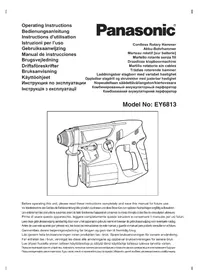
Cordless Rotary Hammer
Cordless Rotary Hammer
Cordless Rotary Hammer
Cordless Rotary Hammer
Cordless Rotary Hammer
Cordless Rotary Hammer
Cordless Rotary Hammer
Rechargeable impact drill with variable speed Rechargeable impact drill and screwdriver with adjustable speed 1 Adjustable speed/cordless/rotary hammer Combination cordless hammer drill Combination cordless hammer drill
Model No: EY6813
Before operating this unit, please read these instructions completely and save this manual for future use.
Index
English: Page 4
German: Page 14
French: Page 22
Italian: Page 30
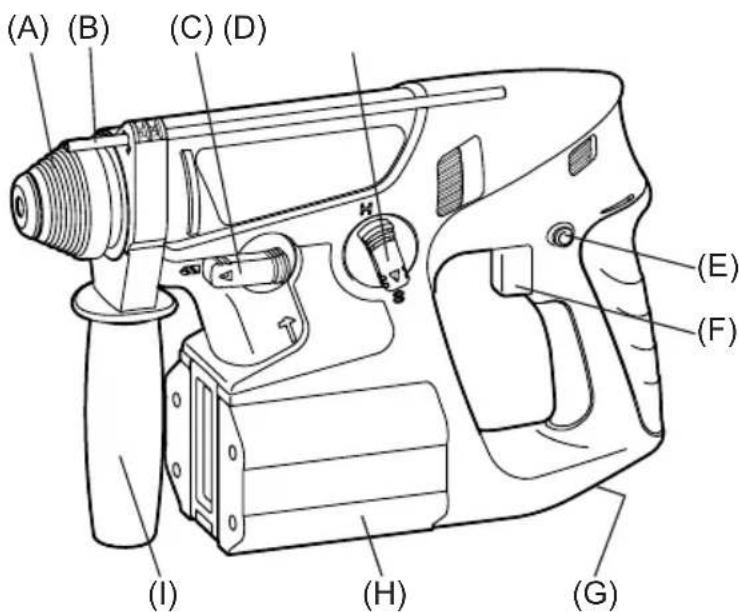
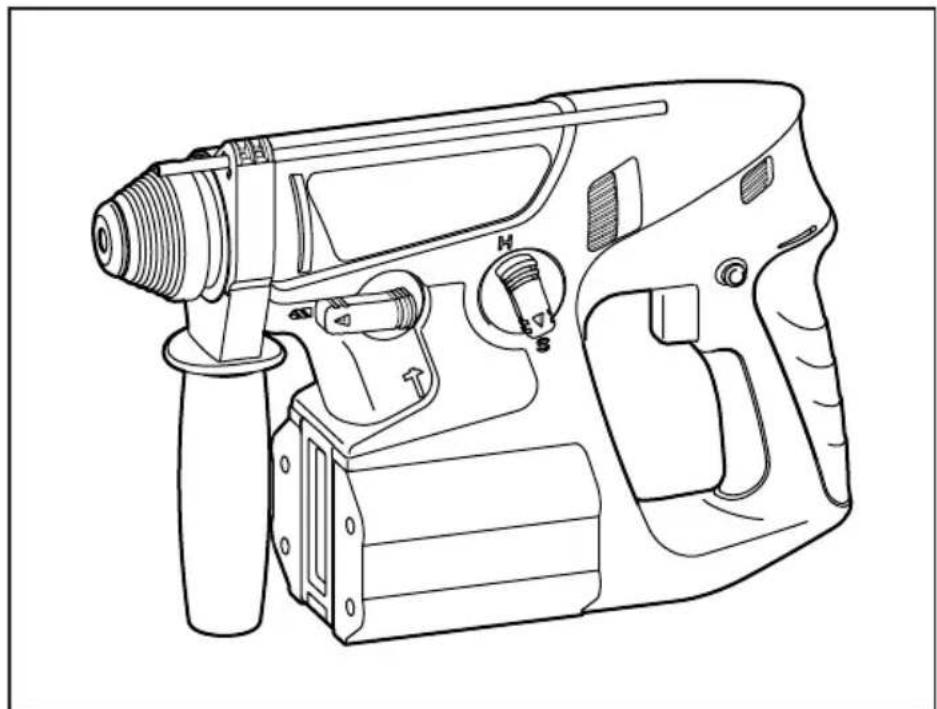
| (A) | ChuckFutterMandrindomandrinoBoorkopPortabrocaBorepatronChuckChuckKiinnitslaite3aximnoi natpon3atncknii natpon | (B) | Depth gaugeBohrtiefenanschlagJauge de profondeurCalibro di profonditàDieptemeterCalibre de profundidadDybdemälerDiupmätureDybdemälerSvyvysmittariГлобиномерГлобиномер |
| (C) | Hammering/drilling switching leverZum Umschalten zwischen normalem Bohren und SchlagbohrenCommutateur martelage/perforationLeva di commutazione martellatura/perforazioneKeuzehendel normala boren/klopborenPalanca de conmutacion de martillo/taladroHamrings/borings omskiftningsgrebOmkopplare mellan slagborr/vanlig borrSlag/bor omskifterVasaran/poran kytkentävipuРыаг песeklnoуеня долбени/cwbepenhyBaxilb песemikanhЯ doxbannя/cwbedniinna | (D) | Speed/Blow Mode selection leverGeschwindigkeit/Blasen-ModuswahlhebelLevier de selection de vitesse/mode de soufflerieLeva di selezione velocità colpoSnelheid/klopfunctie-keuzehendelPalanca del selector de velocidad/modo de solpadorHastighedsvælger/BlaeserfunktionsvælgerValjare für hastiget/slaglajeVelger for hastiget/blösingNopeuden/iskumuondon valintavipuРыаг blybopa skoroctni/ydapaBaxilb bvibopy uzbidkostri/ydapy |
| (E) | Forward/Reverse leverVorwarts/Rückwärts-HebelLevier d' inversion marche avant-marche arriereLeva di avanzamento/inversioneVoorwaarts/achterwaarts-hendelPalanca de avance/inversionGreb til forlaens/bagliens retiningRiktningsomkopplareForover/Revers bryterEteinpain/taaksepainvipuРыаг песeklnoуеня bnepeud/HazadBaxilb песemikanhЯ bnepeud/Hazad | (F) | Variable speed control triggerBetriebsschalterGächette de commande de vitesseGrilletto di controlledo velocità variableStartschakraar variabile nselheidDisparador del control de velocidcd variableKontroludløser for variabel hastighedSteglós varvitalsreglierareHovedbryter, trinlósNopeudensäätoktykinПerekknouateIb terpugnilobovknipere-menhenoi skopoctnIperemikau peryllobanHH 3mHNOI sbvndkosti |
| (G) | Release leverEntriegelungshebelLevier de dégagementLeva di rilascioOntgrendelknopPalanca de liberaciónUdløsergrebLossad hāvarmLønsnespakeVapautetu vipuРыаг освобожденияВaxilb bviibinyhengnay | (H) | Battery packAkkupackBatterieBlocco batteriaAkkuBateria recargable EY9210 (Ni-MH): EY6813 NQKW BatteriERY9116 (Ni-Cd): EY6813 FQW BatteripaketBatteriAkkuBatapeiHb 6 blockBatapeiHb 6 block |
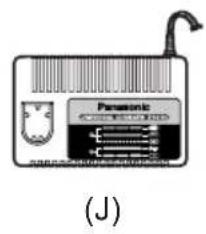
| (I) | Support handleZusatzgriffManche de supportManiglia di sostegnoSteungreePango de soporteHjælpenthandtagStödhandtagStøttehandtukTukikahyaПов徴жваюцая руковда Пidtrpmučuça rykoRTka | (J) | Battery chargerLadegerätChargeurCaricabatterieAkkuladerCargador EY0214: EY6813 NQKW Oplader EY0110: EY6813 FQW LaddareLadeapparatLataaja3apdHoe yctrocbTBO3apdHoe yctrocbTBO3apdHoe yctrocbTBO3apdHoe yctrocbTBO3apdHoe yctrocbTBO3apdHoe yctrocbTBO3apdHoe yctrocbTBO3apdHoe yctrocbTBO3apdHoe yctrocbTBO3apdHoe yctrocbTBO |
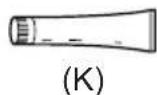
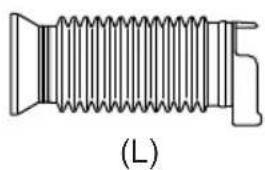
| (K) | GreaseSchmierungGraisseLubricanteVetGrasaSmørefedtFettSmørefettRasvaCmaizaMactnilo | (L) | Dust collection cup (EY9X004)Staubsmammelbehalter (EY9X004)Collecteur de poussière (EY9X004)Coppa di raccoglamento della polvere (EY9X004)Stofzak (EY9X004)Fuelle recollector de polvo (EY9X004)Stavopsamler (EY9X004)Dammuppsamlingskopp (EY9X004)Stovopsamsamlingskopp (EY9X004)Polynkeräyskuppi (EY9X004)Пьлесборник (EY9X004)Пилозбирник (EY9X004) |
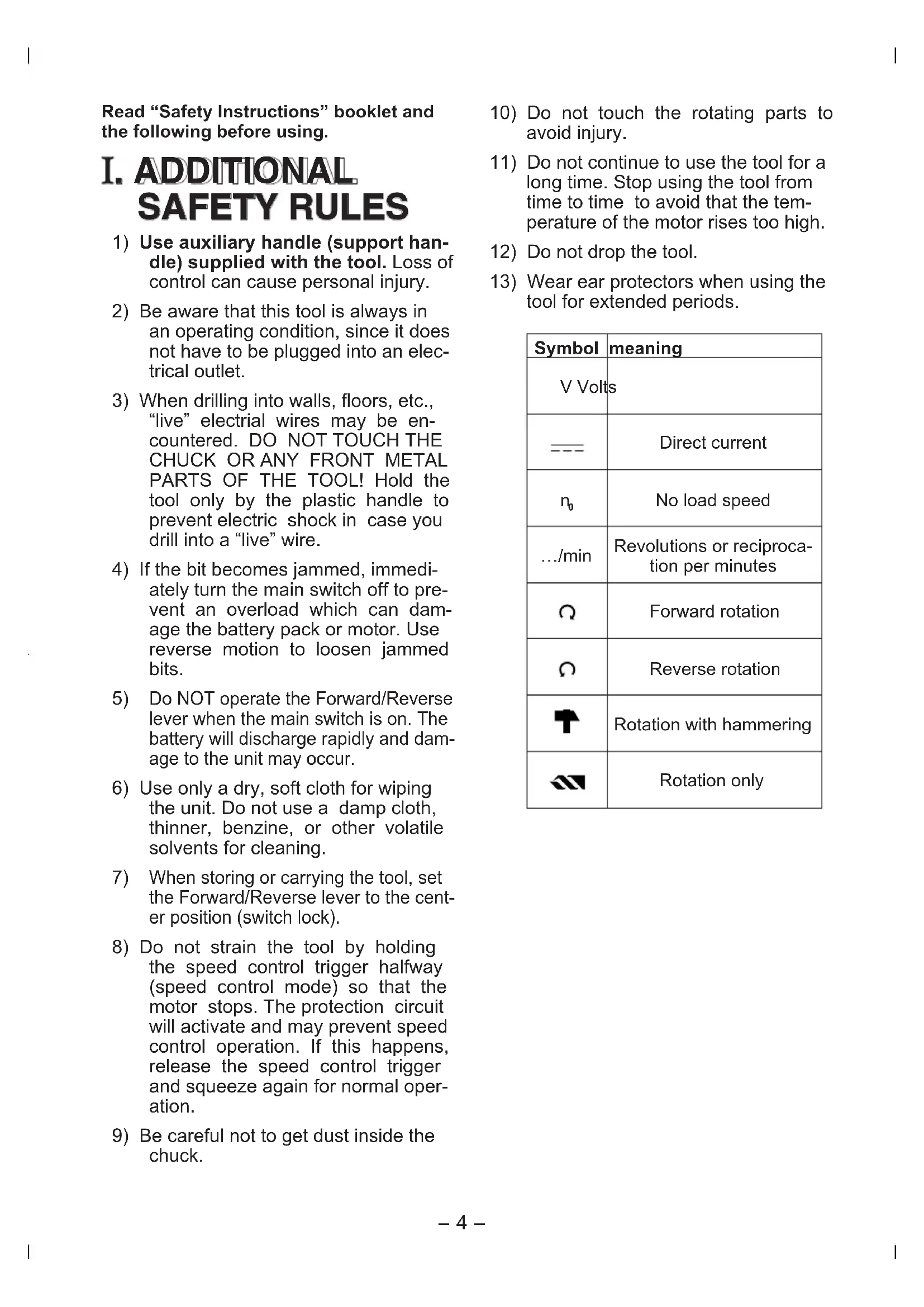
Read "Safety Instructions" booklet and the following before using.
I. ADDITIONAL SAFETY RULES
1) Use auxiliary handle (support handle) supplied with the tool. Loss of control can cause personal injury. 2) Be aware that this tool is always in an operating condition, since it does not have to be plugged into an electrical outlet. 3) When drilling into walls, floors, etc., "live" electrical wires may be encountered. DO NOT TOUCH THE CHUCK OR ANY FRONT METAL PARTS OF THE TOOL! Hold the tool only by the plastic handle to prevent electric shock in case you drill into a "live" wire. 4) If the bit becomes jammed, immediately turn the main switch off to prevent an overload which can damage the battery pack or motor. Use reverse motion to loosen jammed bits. 5) Do NOT operate the Forward/Reverse lever when the main switch is on. The battery will discharge rapidly and damage to the unit may occur. 6) Use only a dry, soft cloth for wiping the unit. Do not use a damp cloth, thinner, benzine, or other volatile solvents for cleaning. 7) When storing or carrying the tool, set the Forward/Reverse lever to the center position (switch lock). 8) Do not strain the tool by holding the speed control trigger halfway (speed control mode) so that the motor stops. The protection circuit will activate and may prevent speed control operation. If this happens, release the speed control trigger and squeeze again for normal operation. 9) Be careful not to get dust inside the chuck.
10) Do not touch the rotating parts to avoid injury. 11) Do not continue to use the tool for a long time. Stop using the tool from time to time to avoid that the temperature of the motor rises too high. 12) Do not drop the tool. 13) Wear ear protectors when using the tool for extended periods.
| Symbol | meaning |
| V Volts | |
| --- | Direct current |
| n0 | No load speed |
| .../min | Revolutions or reciprocation per minutes |
| Ω | Forward rotation |
| ∅ | Reverse rotation |
| T | Rotation with hammering |
| ΔN | Rotation only |
II. OPERATION
Chuck … (A)
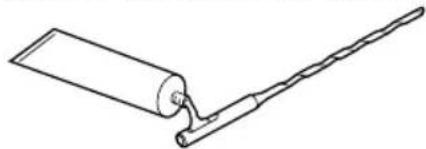
NOTE: Grease for bit Grease the oval indentation on the bit with the supplied grease at least once a month.
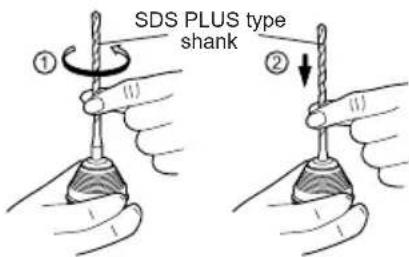
1. To mount the bit
1-1. Insert a bit into the mounting hole, and turn it slightly to locate an engaged position.
1-2. At the engaged position, push the bit as far as it goes. Make sure that the bit is fixed by pulling it.
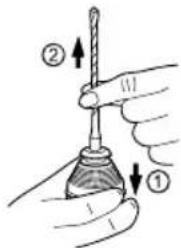
2. To dismount the bit
2-1. Depress the chuck cover and pull the bit.
Forward/Reverse lever… (E)
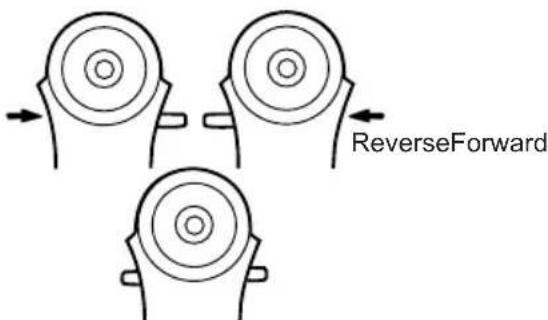
- Be sure to set the switch in the center to lock it after use.
- Operate the Forward/Reverse lever after the motor rotation is completely stopped.
Hammering/drilling switching lever ... (C)
Speed/Blow Mode selection lever ... (D)
- There are four modes available with the combination of Hammering/drilling switching lever and Speed/Blow Mode selection lever.
Select the suitable mode for application.
- Operate the mode change after the motor rotation is completely stopped.
| Position of switching lever | Speed/Blow Mode selection lever | Recommended application |
| (Rotation with hammering) | Hard blow hammering mode | This mode has hard blow hammering which is suitable for concrete drilling. •Concrete drill |
| Soft blow hammering mode | This mode is suitable for concrete drilling with smaller diameter drill, or for drilling into soft base material. •Small diameter concrete drill | |
| (Rotation only) | High speed drilling mode | This mode is suitable for metal drilling with high speed rotation. •Metal drill •Metal hole saw |
| Slow speed drilling mode | This mode is suitable for wood drill with high torque. •Wood drill |
Variable speed control trigger ... (F)
To set the center of a hole, pull the trigger slightly to start the drill rotation slowly.
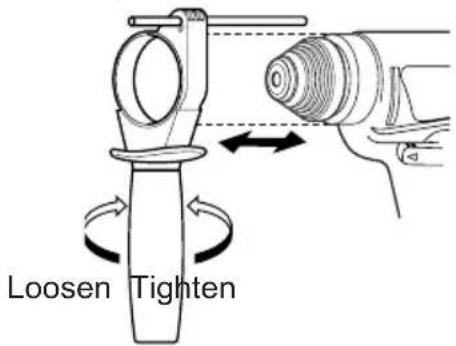
Support handle ... (I)
Place the support handle at your favorite position and tighten the handle securely.
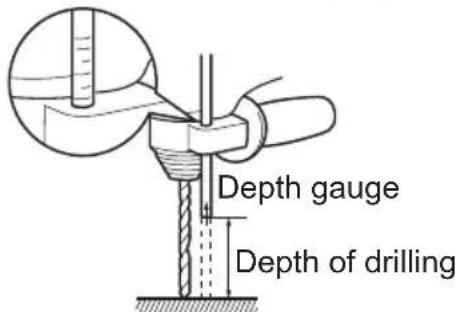
Depth gauge … (B)
Loosen the support handle and adjust the depth gauge at your favorite depth.
After adjusting, tighten the support handle and fix depth gauge.
Battery pack ... (H)
For Appropriate use of Battery Pack Ni-MH Battery pack EY9210
- Charge the battery pack fully before storage in order to ensure a longer service life.
-Ni-Cd Battery pack EY9116
- Discharge the battery pack empty before storage in order to ensure a longer service life.
- The ambient temperature range is between 0°C (32°F) and 40°C (104°F). If the battery pack is used when the battery temperature is below 0°C (32°F), the tool may fail to function properly. In that case, charge the battery until charging is completed for appropriate functioning of the battery.
Battery pack life
The rechargeable batteries have a limited life. If operation time becomes extremely short after recharging, replace the battery pack with a new one.
NOTE: Use under extremely hot or cold conditions will reduce operating capacity per charge.
Battery Recycling
For environmental protection and recycling of materials, be sure that it is disposed of at an officially assigned location, if there is one in your country.
ATTENTION:
Ni-Cd Battery pack EY9116
This appliance contains Nickel-Cadmium. Battery must be recycled or disposed of properly.
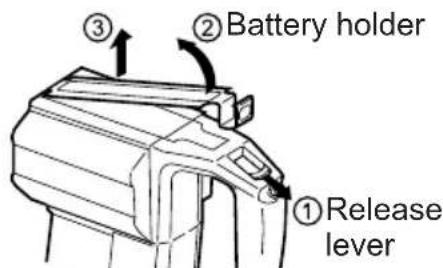
Release lever … (G)
- Battery pack Installation and Removal
-For removal
Pull the release lever to free the battery holder.
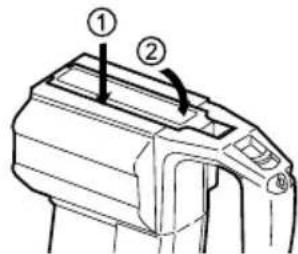
-For installation
Fit the battery holder unit it clicks in position.
Battery charger… (J)
NOTE: Charge a new battery pack, or a battery pack that has not been used for a prolonged time, for about 24 hours to bring the battery up to full charge.
- Plug the charger into an AC outlet.
- Insert the battery pack firmly into the charger.
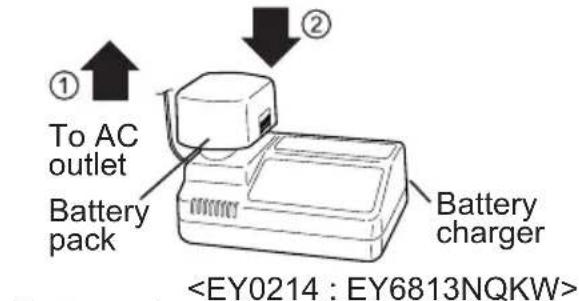
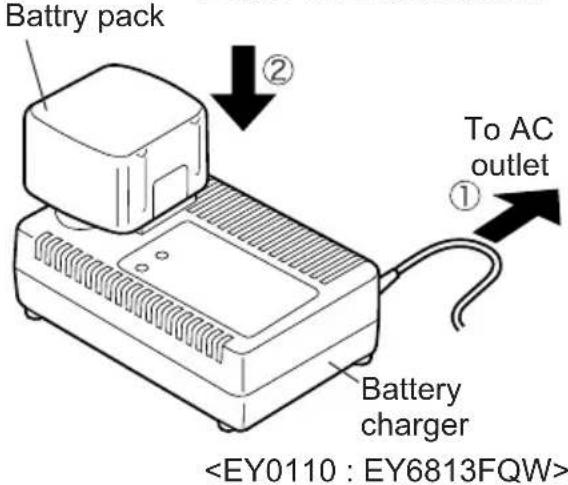
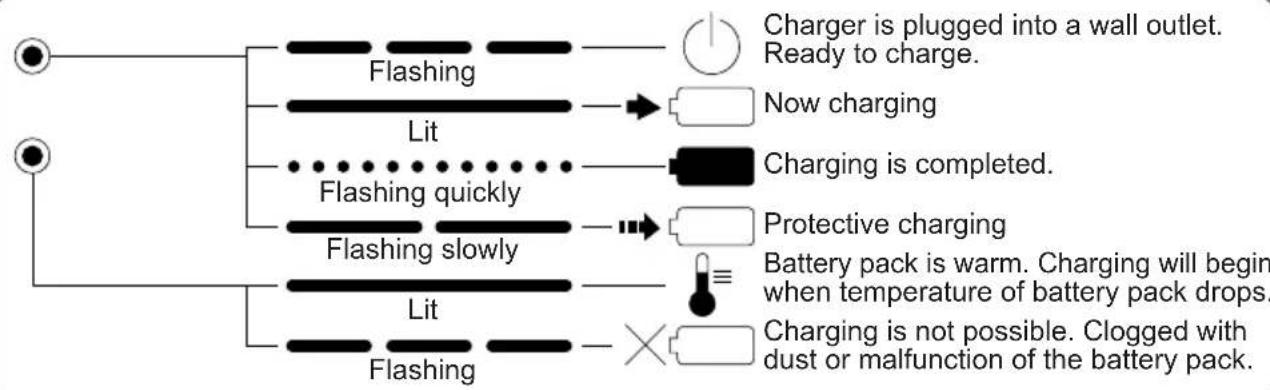
- During charging, the charging lamp will light up.
When the charge is completed, an internal electronic switch will automatically be triggered to prevent overcharging.
- Charging will not occur if the battery pack is warm (for example, immediately after heavy-duty operation). The orange standby lamp will light up until the battery becomes cool. Charging will then begin automatically.
- When charging is completed, the charging lamp will start flashing quickly.
- When the battery pack has not been used for a long time, the charging lamp starts flashing slowly to indicate protective charging. Protective charging takes longer to fully charge the battery pack, than the standard charging time. (Max. charging time is approx. 90 minutes.)
- If a fully charged battery pack is inserted into the charger again, the charging lamp may light up. After several minutes, the charging lamp may flash quickly to indicate the charging is completed.
- If the charging lamp does not light immediately after the charger is plugged in, or if after the standard charging time the lamp does not go off, consult an authorized dealer.
NOTE: When a cold battery (of about 5°C (41°F) or less) is to be charged in a warm room, leave the battery in the room for at least one hour and charge it when it has warmed up to room temperature. (Failing to do so may result in less than a full charge.)
Cool down the charger when charging more than two battery packs consecutively.
Do not insert your fingers into the contact hole when holding the charger or any other occasions.
CAUTION: Do not use power source from an engine generator.
- Do not cover vent holes on the charger and the battery pack.
- Unplug the charger when not in use.
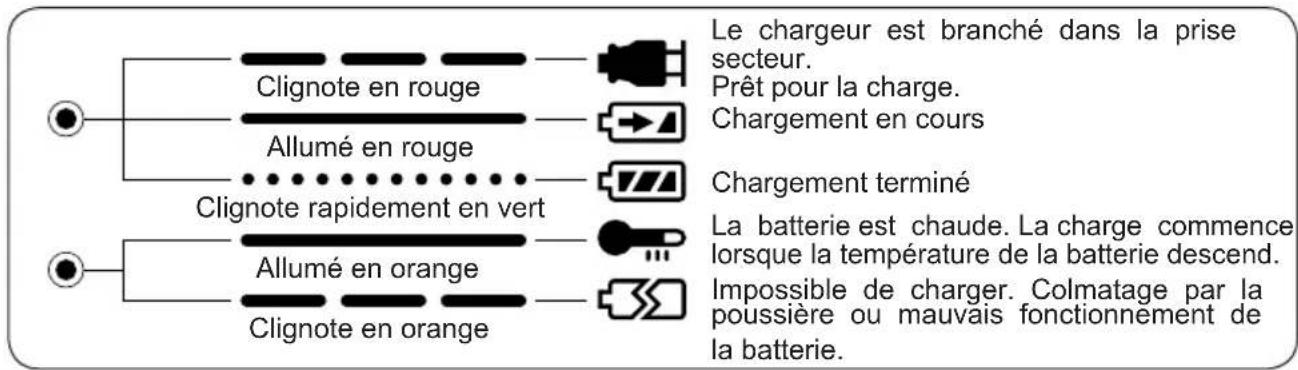
LAMP INDICATIONS
EY0214: EY6813NQKW
EY0110: EY6813FQW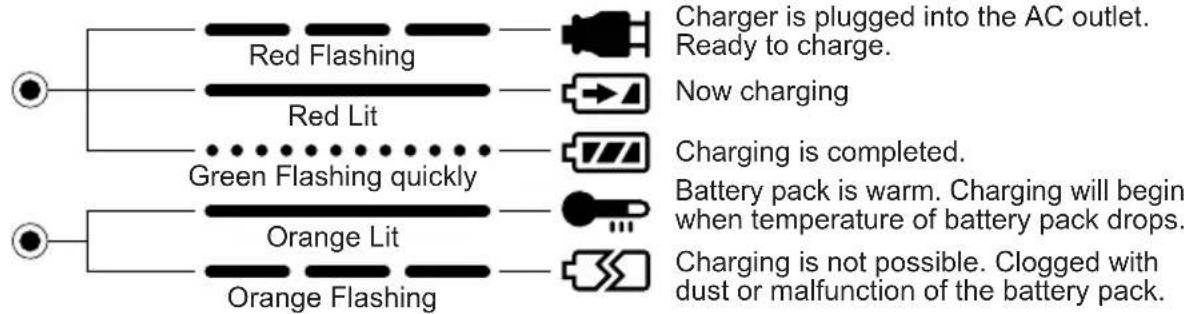
Dust Collection Cup (EY9X004) ... (L)
- Drill bits with a diameter of 20 mm or more cannot be inserted through the dust collection cup.
- Do not use the tool for cutting materials other than concrete, mortar, and other ceramic materials. If used for cutting metal materials, the dust collection cup may be damaged by the heat from metal chips.
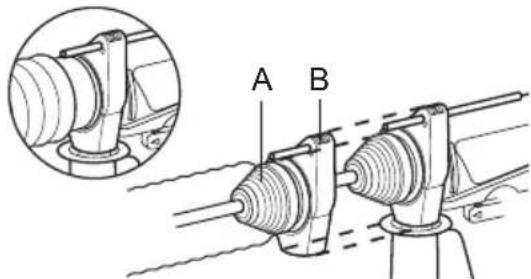
- Install a drill bit.
- Pass the drill bit through A and fix the cup at B by matching it with the shape of the support handle.
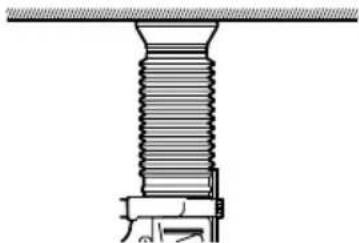
Operation
Keep the dust collection cup in close contact with the wall surface during operation.
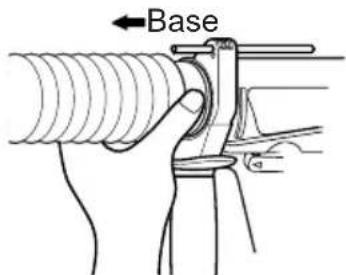
Removal
Hold the base of the dust collection cup for removal.
Please remove it after thoroughly getting rid of the dust in the dust collection cup.
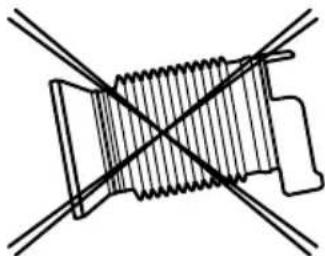
Storage
Do not store the dust collection cup in a compressed position. If kept in a compressed position, it may be impossible to return to the original shape.
III. MAINTENANCE
Use only a dry, soft cloth for wiping the unit. Do not use a damp cloth, thinner, benzine, or other volatile solvents for cleaning.
IV. ACCESSORIES
| Optional attachment | Can be used in: | ||
| Hammer- ing mode | Drilling mode | ||
| Drill chuck EY9HX400E | No Yes | dia.1.5mm 13mm (1/16 ~1/2") Wood drill Metal drill ※Don't in hammering mode. | |
| Hammer chuck EY9HX401E | Yes Yes | dia.2.5mm 13mm (3/32 ~1/2") Masonry drill bit with straight shank (for bricks, mortar, cinder block, Aired Light Concrete drilling only) Wood drill Metalwork drill | |
| Chiseling attachment EY9HX402E | Yes No | Light weight chiseling. •Peeling off tiles •Making ditch for plumbing •Basement trimming | |
V. USAGE SUGGESTION
- If there isn't enough force pushing down on the bit, the hammer may not be able to blow in hammering mode.
This is to prevent the hammering mode from operating with no load. Press down harder on the bit to engage the hammer and cause it to blow.
Always be sure to press down with enough force when working.
- In winter or in other situations where the temperature of the unit is low (5°C or below), the blow of the hammering mode may be weaker than normal at the beginning stage.
This is because the grease becomes stiffer in low temperatures, increasing friction.
If this should happen, operating hammering mode with no load for approximately 30 seconds and repeat this 3 times. This will restore its blowing power.
VI. SPECIFICATIONS
Main Unit (EY6813)
| Maximum Drilling Diameter | Concrete | 20mm (25/32") |
| Steel | 13mm (33/64") | |
| Wood | 27mm (1-1/16") | |
| Motor Voltage DC Motor 24V | ||
| Speed At No Load (RPM) | Slow Mode 0 520 /min (rpm) | |
| High Mode 0 950 /min (rpm) | ||
| Blows Rate Per Minute (BPM) | Soft Mode | 0-3100 /min (bpm) |
| Hard Mode 0 4600 /min (bpm) | ||
| Weight (with battery pack) | 4.35 kg (9.6 lbs) EY6813NQKW / 4.2 kg (9.3 lbs) EY6813FQW | |
| Dimensions (L×W×H) | 316×206×74 mm(12-28/64"×8-7/64"×2-58/64") | |
Battery Pack
| Battery included | EY9210 : (EY6813NQKW) Ni-MH Battery | EY9116 : (EY6813FQW) Ni-Cd Battery |
| Voltage | 24 V DC (1.2 V × 20 cells) | |
Battery Charger
| Model EY0214 : EY6813NQKW | |||||||
| Electrical rating See the rating plate on the bottom of the charger. | |||||||
| Weight 0.97 kg | , (2.14 lbs.) | ||||||
| Charging time | 7.2V 9.6 | V 12V 15.6V | 18V 24V | ||||
| 1.2Ah | EY9065 | EY9080 | EY9001 | ||||
| EY9066 | EY9086 | EY9006 | |||||
| 20min. | |||||||
| 1.7Ah | EY9180 | EY9101 | |||||
| EY9182 | 25min. | ||||||
| 2.0Ah | EY9168 | 30min. 30min. | EY9106 | EY9136 | EY9116 | ||
| 30min. 30min. | 30min. 30min. | EY9107 | EY9117 | ||||
| 3.0Ah | EY9200 | EY9230 | EY9210 | ||||
| 45min. 45min | |||||||
| 3.5Ah | EY9201 | EY9231 | |||||
| 55min. | |||||||
| Model EY0110 : EY6813FQW | |||||||
| Electrical rating See the rating plate on the bottom of the charger. | |||||||
| Weight 0.78 kg | , (1.72 lbs.) | ||||||
| Charging time | 7.2V 9.6 | V 12V 15.6V | 18V 24V | ||||
| 1.2Ah | EY9065 | EY9080 | EY9001 | ||||
| EY9066 | EY9086 | EY 9006 | |||||
| 20min. | |||||||
| 1.7Ah | EY9180 | EY9101 | |||||
| EY9182 | 25min. | ||||||
| 2.0Ah | EY9168 | 30min. 30min. | EY9106 36 | EY9116 | |||
| 30min. 30min. | 30min. 60min. | EY9117 | |||||
| 3.0Ah | EY9200 | EY9230 | EY9210 | ||||
| 45min. 90min | |||||||
| 3.5Ah | EY9201 | EY9231 | EY9251 | ||||
| 55min. 65min | |||||||
NOTE: This chart may include models that are not available in your area. Please refer to the catalogue.
Charging time: Approximate one full charging time. May be different on battery pack condition.
ONLY FOR U.K.
VII. ELECTRICAL PLUG INFORMATION
FOR YOUR SAFETY PLEASE READ THE FOLLOWING TEXT CAREFULLY
This appliance is supplied with a moulded three pin mains plug for your safety and convenience.
A 3 amp fuse is fitted in this plug.
Should the fuse need to be replaced please ensure that the replacement fuse has a rating of 3 amp and that it is approved by ASTA or BSI to BS1362.
Check for the ASTA mark or the BSI mark on the body of the fuse.
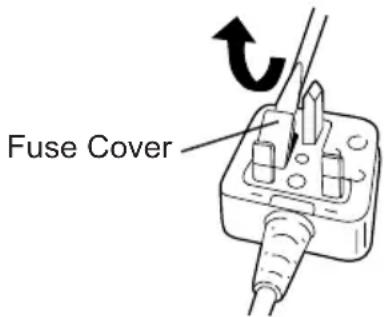
If the plug contains a removable fuse cover you must ensure that it is refitted when the fuse is replaced.
If you lose the fuse cover the plug must not be used until a replacement cover is obtained.
A replacement fuse cover can be purchased from your local Panasonic Dealer.
IF THE FITTED MOULDED PLUG IS UN-SUITABLE FOR THE SOCKET OUTLET IN YOUR HOME THEN THE FUSE SHOULD BE REMOVED AND THE PLUG CUT OFF AND DISPOSED OF SAFELY.
THERE IS A DANGER OF SEVERE ELECTRICAL SHOCK IF THE CUT OFF PLUG IS INSERTED INTO ANY 13 AMP SOCKET.
If a new plug is to be fitted please observe the wiring code as shown below.
If in any doubt please consult a qualified electrician.
IMPORTANT: The wires in this mains lead are coloured in accordance with the following code:
Blue: Neutral
Brown: Live
As the colours of the wire in the mains lead of this appliance may not correspond with the coloured markings identifying the terminals in your plug, proceed as follows.
The wire which is coloured BLUE must be connected to the terminal in the plug which is marked with the letter N or coloured BLACK.
The wire which is coloured BROWN must be connected to the terminal in the plug which is marked with the letter L or coloured RED.
Under no circumstances should either of these wires be connected to the earth terminal of the three pin plug, marked with the letter E or the Earth Symbol.
How to replace the fuse: Open the fuse compartment with a screwdriver and replace the fuse and fuse cover if it is removable.
This apparatus was produced to BS800.
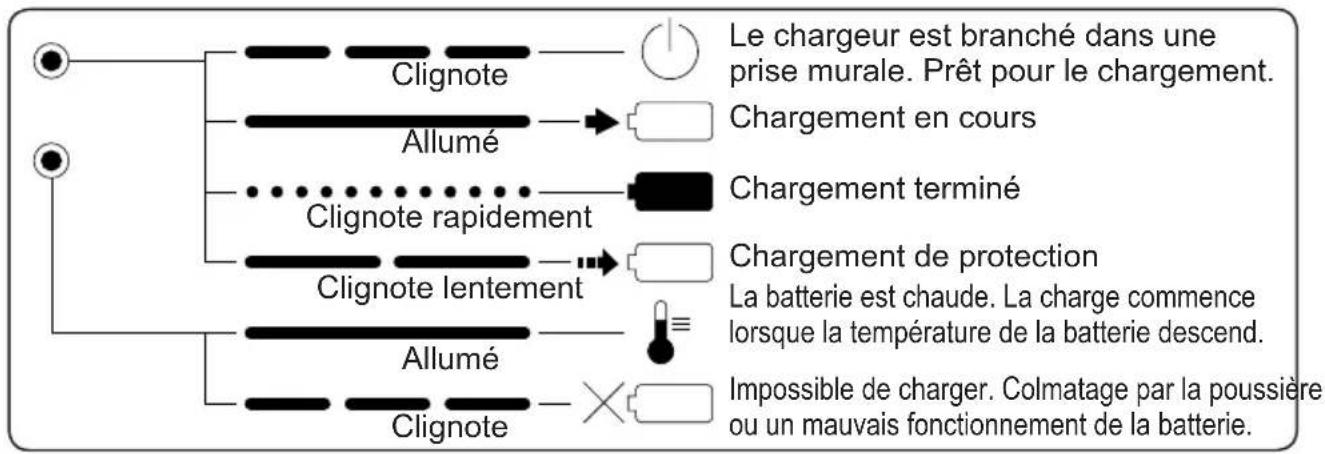
INDICATIONS DU TEMOIN
EY0214: EY6813NQKW
EY0110: EY6813FQW
Working with the switch before the motor has completely stopped.
Drilling/driving mode selection switch ... (C)
Speed/impact selection lever ... (D)
1. Four modes are possible when combining the drilling/driving mode selection switch and the speed/impact selection lever.
Select the appropriate mode for your application.
Battery pack service life
Battery packs have a limited service life. If after repeated charging the operating time becomes excessively short, replace the battery pack with a new one.
NOTE: Use in very hot or very cold conditions reduces the operating time per charge.
Battery disposal
For environmental protection
When disposing of materials, ensure that recycling is carried out officially at a designated location, if such exists in your country.
WARNING:
Nickel-cadmium battery pack EY9116
This device contains nickel and cadmium. The battery must be disposed of or recycled properly.
Release lever ... (G)
- Installing and removing the battery pack
Pull the battery release lever to release the battery holder.
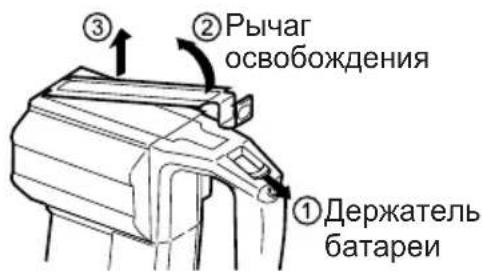
Install the battery holder so that it clicks into place.
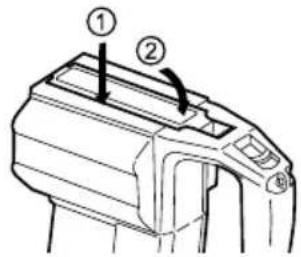
Charging device... (J)
NOTE:
Charge new
batteries or a battery pack that has not been used for an extended period of time for 24 hours to bring the battery to full charge.
- Plug the charging device into an AC outlet.
2. Insert the battery pack firmly into the charging device.
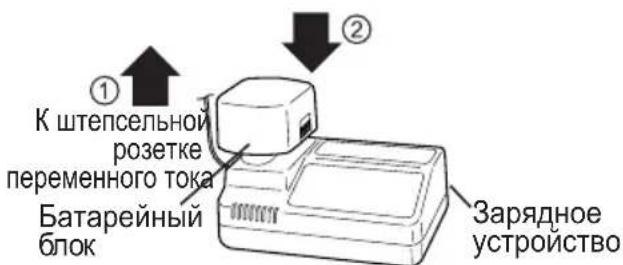
Battery pack
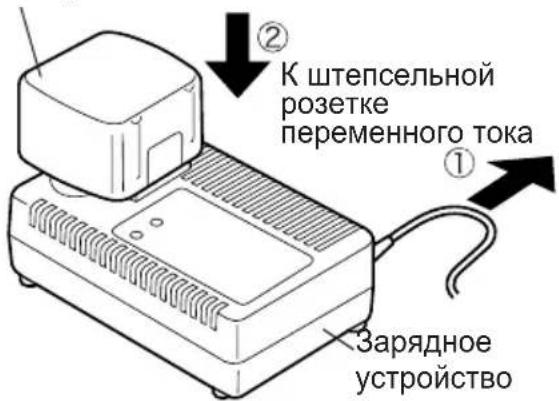
3. During charging, the charging lamp will light up.
After charging is complete, an internal electronic switch will automatically activate to prevent overcharging.
Charging will not occur if the battery pack is too hot (for example, immediately after operation under heavy load). The orange standby lamp will remain lit until the battery cools down. Then charging will begin automatically.
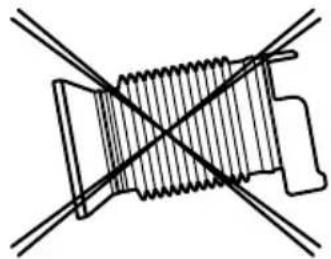
Do not store the dust blower in a compressed position. If you keep it in a compressed position, it may be impossible to return it to its original shape.
III. MAINTENANCE
To clean the device, use a dry, soft cloth. Do not use a wet cloth, thinner, benzene, or volatile solvents.
IV. ACCESSORIES
MAIN UNIT (EY6813)
to an authorized service center.
NOTES:
- If the cold battery (with a temperature of approximately 5°C (41°F) or less) is to be charged in a warm environment, leave the battery in a warm room for about one hour and then charge it after it has warmed up to room temperature. (If this is not done, it may lead to undercharging, and the battery may not charge fully.) - Cool down the charger after consecutive charging of more than two battery packs.
Do not insert your fingers into the contact openings when holding the charger, as well as in other cases.
WARNING:
Do not use as a power source for a motor generator. Do not block the ventilation openings of the charger or the battery pack. Unplug the charger from the outlet when it is not in use.
LIGHT INDICATORS
EY0214: EY6813NQKW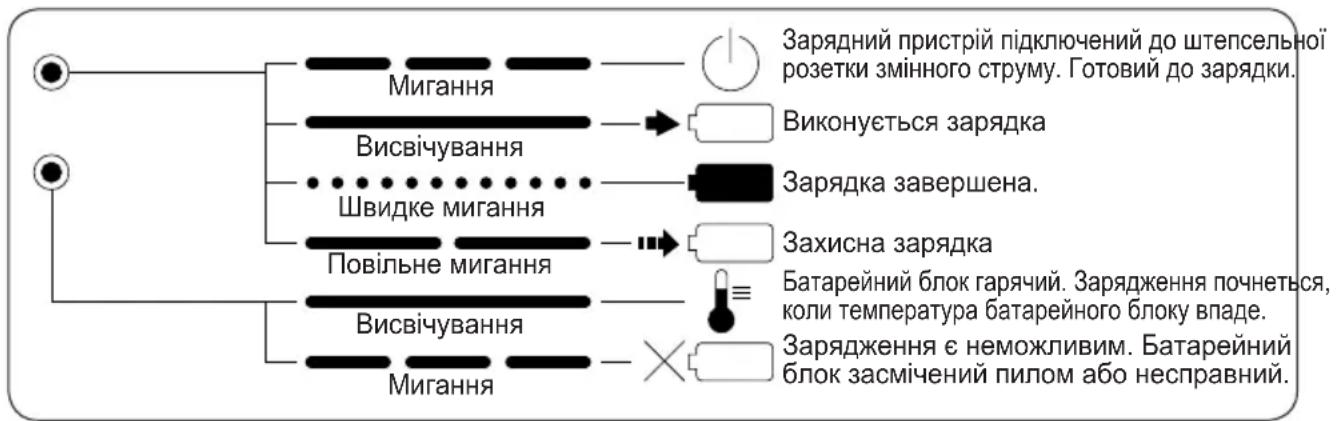
EY0110: EY6813FQW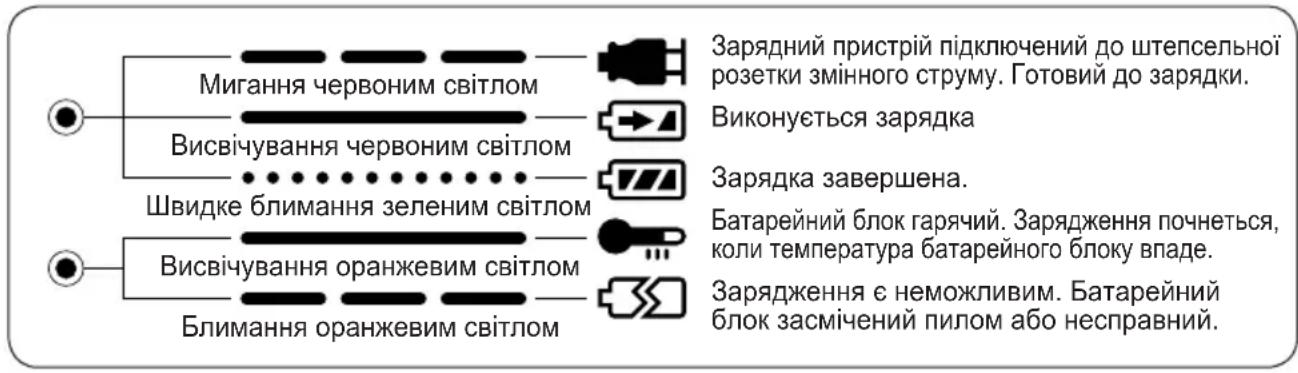
III. MAINTENANCE
To clean the device, use a dry, soft cloth. Do not use a wet cloth, thinner, benzene, or volatile solvents.
Matsushita Electric Works, Ltd.
Osaka, Japan


- INDEX
- ADDITIONAL SAFETY RULES
- OPERATION
- CHUCK … (A)
- TO MOUNT THE BIT
- TO DISMOUNT THE BIT
- FORWARD/REVERSE LEVER… (E)
- HAMMERING/DRILLING SWITCHING LEVER ... (C)
- SPEED/BLOW MODE SELECTION LEVER ... (D)
- VARIABLE SPEED CONTROL TRIGGER ... (F)
- SUPPORT HANDLE ... (I)
- DEPTH GAUGE … (B)
- BATTERY PACK ... (H)
- BATTERY PACK LIFE
- BATTERY RECYCLING
- ATTENTION
- RELEASE LEVER … (G)
- BATTERY CHARGER… (J)
- LAMP INDICATIONS
- DUST COLLECTION CUP (EY9X004) ... (L)
- REMOVAL
- STORAGE
- MAINTENANCE
- ACCESSORIES
- USAGE SUGGESTION
- SPECIFICATIONS
- MAIN UNIT (EY6813)
- BATTERY PACK
- ONLY FOR U.K
- ELECTRICAL PLUG INFORMATION
- FOR YOUR SAFETY PLEASE READ THE FOLLOWING TEXT CAREFULLY
- INDICATIONS DU TEMOIN
- EY0214: EY6813NQKW
- EY0110: EY6813FQW
- DRILLING/DRIVING MODE SELECTION SWITCH ... (C)
- SPEED/IMPACT SELECTION LEVER ... (D)
- BATTERY PACK SERVICE LIFE
- BATTERY DISPOSAL
- WARNING
- RELEASE LEVER ... (G)
- CHARGING DEVICE... (J)
- NOTE
- NOTES
- LIGHT INDICATORS
Brand : PANASONIC
Model : EY6813
Category : Drill