TYST20K - TV PANASONIC - Free user manual and instructions
Find the device manual for free TYST20K PANASONIC in PDF.



| Product type | Plasma TV |
| Brand | Panasonic |
| Model | TYST20K |
| Display technology | Plasma |
| Resolution | Full HD (1920x1080) |
| Screen size | 42 inches (estimated) |
| Power supply | 220-240 V, 50/60 Hz |
| Required ventilation space | 10 cm on sides, 7 cm at rear |
| Operating ambient temperature | Below 40°C |
| Chassis cleaning | Soft dry cloth; diluted neutral detergent if necessary |
| Pedestal cleaning | Soft dry cloth; do not use benzene or thinner |
| Pedestal installation | Two persons required; tightening torque 1.5 to 1.8 N·m |
| Supplied parts | Base stand, vertical supports (L/R), screws M5X14 and M5X30, wire clip, anti-rotation belts, anti-rotation screws, wood screws |
| Anti-rotation | Fix to wall or base using supplied belts and screws |
| Safety precautions | Do not disassemble the pedestal, do not stand on it, do not use if deformed |
| Exposure | Avoid direct sunlight and heat sources |
| Repairability | Index not provided |
Frequently Asked Questions - TYST20K PANASONIC
User questions about TYST20K PANASONIC
0 question about this device. Answer the ones you know or ask your own.
Ask a new question about this device
Download the instructions for your TV in PDF format for free! Find your manual TYST20K - PANASONIC and take your electronic device back in hand. On this page are published all the documents necessary for the use of your device. TYST20K by PANASONIC.
USER MANUAL TYST20K PANASONIC
Do not disassemble or modify the pedestal.
- Doing so may cause the unit to fall over and become damaged, which may result in personal injury.
CAUTION
Do not use any plasma displays other than those given in the catalogue.
- Doing so may cause the unit to fall over and become damaged, which may result in personal injury.
Do not climb on or hang from the pedestal or attached equipment.
- Doing so may cause the unit to fall over and become damaged, which may result in personal injury. (Be particularly careful that young children obey this caution.)
Do not use the pedestal if it has become bent or deformed for any reason.
- Doing so may cause the unit to fall over and become damaged, which may result in personal injury.
Do not block the ventilation holes. When using the pedestal, do not block the space between the bottom surface of the plasma display and the floor surface.
- Otherwise heat may build up inside and cause a fire.
Do not use in places with high humidity
- After prolonged use, the pedestal may warp or become deformed, reducing its strength. This may lead to the unit falling over and becoming damaged, which may also result in personal injury.
When installing the plasma display, ensure there is at least a 10 cm (3.9 inches) space above and to the sides of, and a 7 cm (2.8 inches) space to the rear of the plasma display.
- Failing to do so may result in a fire.
Two people are required to install and remove the display from the pedestal.
- The plasma display may fall and cause injury.
During setting-up, make sure that all screws are securely tightened.
- If assembly is not performed correctly, the pedestal will not be able to support the weight of the display. This may result in the display falling over and becoming damaged, which may result in personal injury.
For installation, use the special-purpose constituent parts.
- Otherwise, the plasma display may fall off the wall and/or be damaged, possibly causing injury.
Set up on a stable, level surface.
- Failure to do so may cause the unit to fall over and become damaged, which may result in personal injury.
Keep the unit away from direct sunlight and heating equipment.
- Failure to do so may cause warping, deformation, or degradation of materials which may result in a loss of strength that may cause the equipment to fall over or break and cause injury.
Use the overturn/fall-prevention accessory to secure the Plasma Display.
- If an earthquake occurs or children climb onto the pedestal with the Plasma Display installed, the unit may overturn or fall over, resulting in personal injury.
Notes on installing the pedestal
For the plasma display power supply plug, use a power supply outlet that can be reached easily.
Ensure good air flow so that the ambient temperature does not exceed 40^ (104^) . Failure to do this may cause heat to build up inside the plasma display, resulting in malfunction.
Requests regarding handling
1) Exercise care when selecting the location for the plasma display because it may discolor or deform due to light or heat if it is placed where it is exposed to direct sunlight, or near a heater.
2) Clean the pedestal by wiping it with a soft, dry cloth (such as cotton or flannel). If the bracket is very dirty, remove the dirt using a neutral detergent diluted in water, and then wipe it clean with a dry cloth. Do not use benzene, thinner, or furniture wax as this may cause the coating to peel. (For information on cleaning the plasma display, see the plasma display's instruction manual. If using a chemically-treated cloth, follow the instructions supplied with the cloth.)
3) Do not affix adhesive tape or stickers to the product. Doing so may dirty the surface of the pedestal. Do not allow long-term contact with rubber, vinyl products or the like. (Doing so will cause deterioration.)
4) The panel of the plasma display is glass. Do not subject it to a strong force or impact.
Caution:
This pedestal is intended for only Panasonic plasma display models (See page 57).
Use with other apparatus is capable of resulting in instability causing possible injury.
PROFESSIONAL INSTALLATION IS REQUIRED.
PANASONIC DISCLAIMS ANY PROPERTY DAMAGE AND/OR SERIOUS INJURY, INCLUDING DEATH
RESULTING FROM IMPROPER INSTALLATION OR INCORRECT HANDLING.
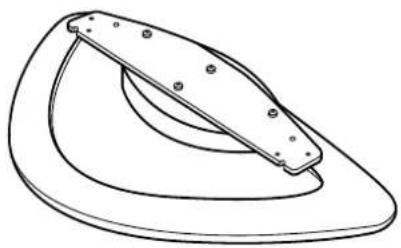
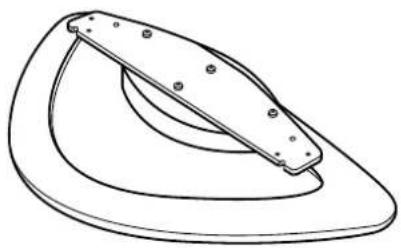
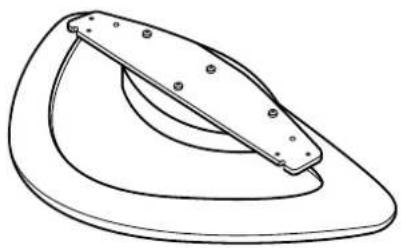
Stand base (1)
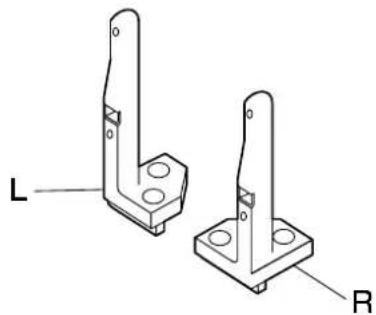
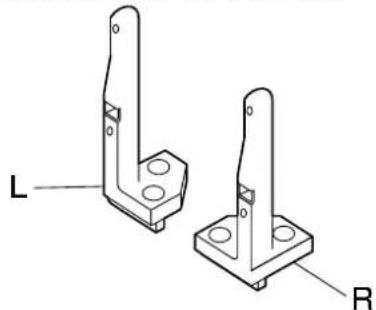
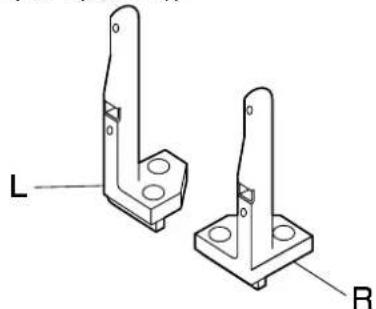
⑧ Stand pole (One for each side, L(left) and R(right))
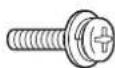
C
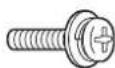
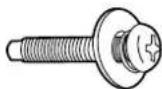
M5X14 M5X30
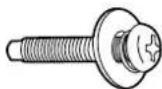
Unit installation screw (4) StandEpactimstation screw (4)
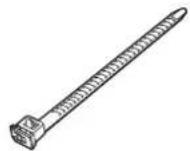
Overturn-prevention parts
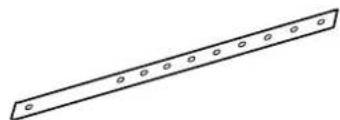
① Overturn-prevention belt (2)

② Screw (2)

③ Wood screw (2)
[The images shown in this manual are for illustrative purpose only.]
Assembly Procedure
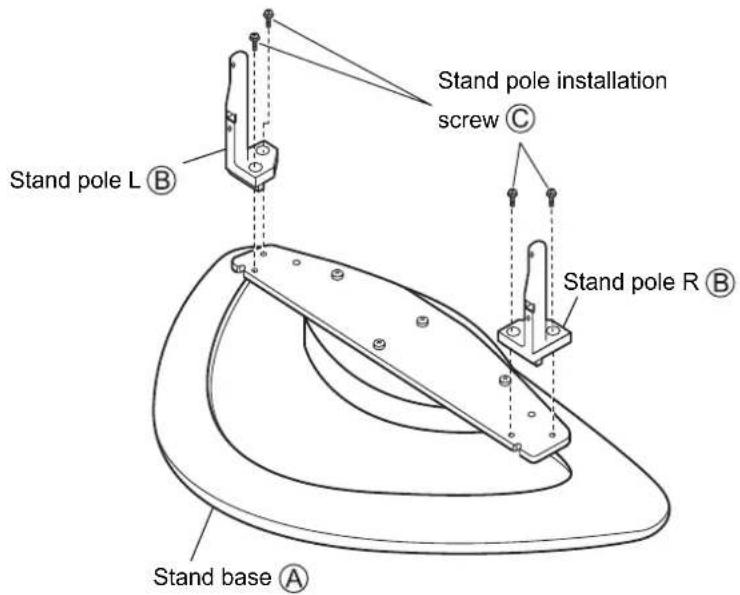
1. Assemble the Pedestal
- Make sure you do not scratch the surface of the stand base.
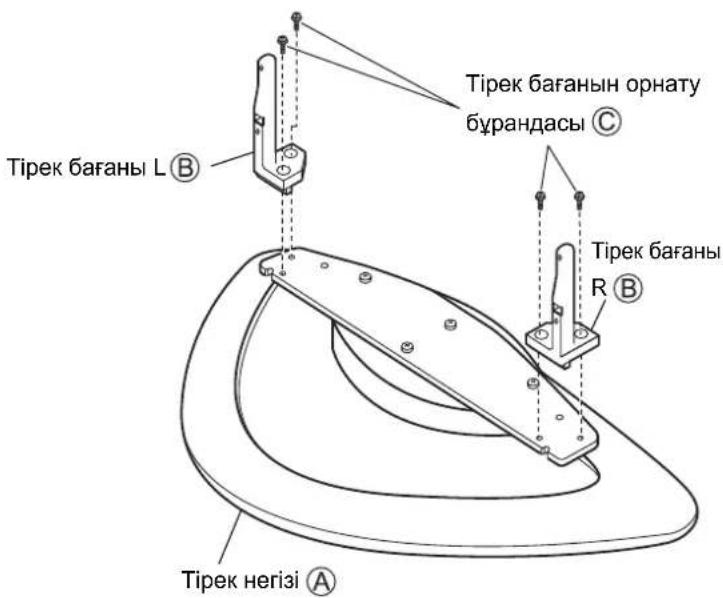
Align stand base with the stand poles the left and right sides, and use the stand pole installation screws (4 screws) to attach the stand poles as shown in the diagram.
(Tightening torque: 1.5 to 1.8 N·m)
2. Install the Plasma Display
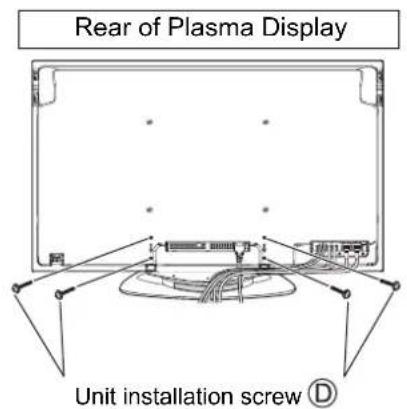
Place the assembled pedestal with the rear side (side with the model nameplate attached) facing towards yourself, align the plasma display with the stand poles, insert the stand poles into the plasma display, and insert and tighten the unit installation screws (4 screws).
(Tightening torque: 1.5 to 1.8 N·m)
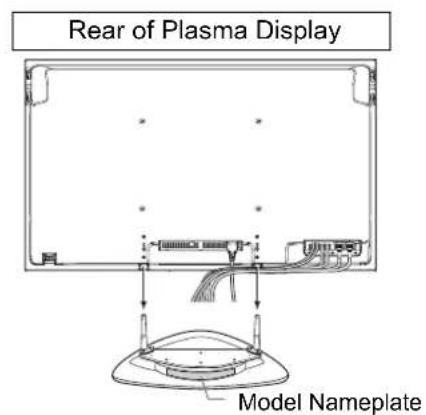
With the side that has the model nameplate attached facing you, insert the stand poles as far as possible into the plasma display.
3. Connecting Additional Equipment and the Power Cord
- For details on wiring connections, see the instruction manual of the plasma display.
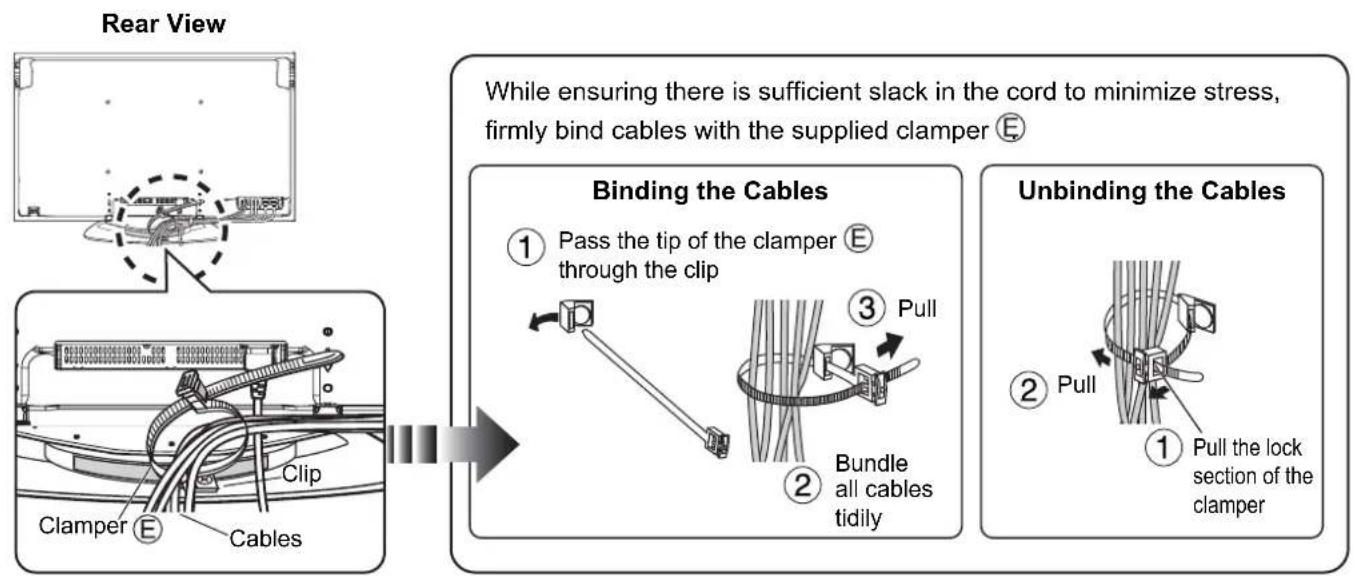
- Connect the necessary wiring for the additional equipment, pass a clampper (1 clampper) through the clip on the rear of the stand base, and bunch together all of the cords and cables as shown in the diagram.
- Do not bunch the power cord together with other cords and cables.
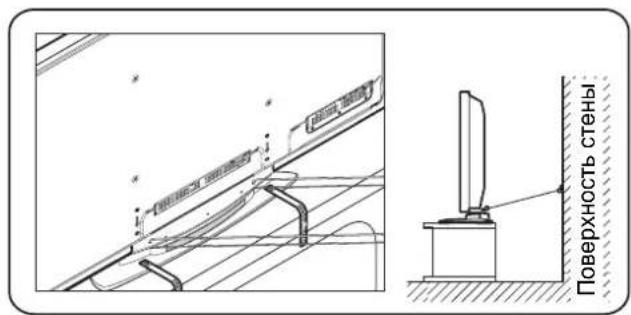
4. Plasma Display Overturn-Prevention
- Anchor the plasma display to both the base and the wall surface.
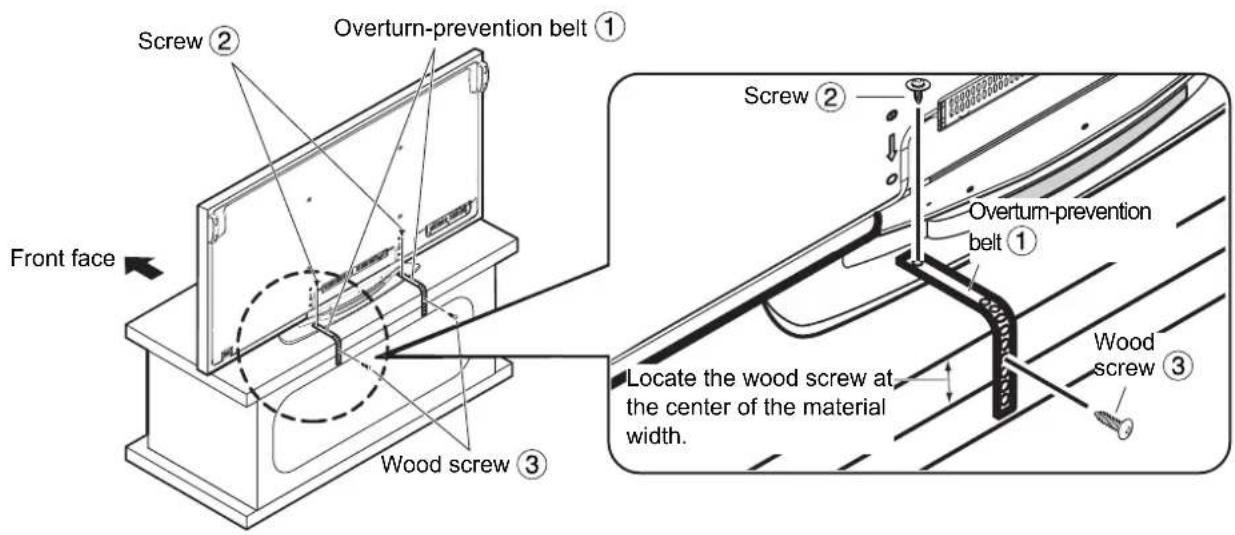
① Anchoring to the base
Attach the overturn-prevention belts 12 belts) to the pedestal using screws 2 screws) through the screw holes at both sides of the rear of the pedestal, and use the wood screws 2 screws) to anchor to the base.
When attaching to the base, insert the wood screws into the prepared holes.
If there are no prepared holes, drill new holes to the center of the base board width.
(Screw brightening torque: 1.2 to 1.5N· m
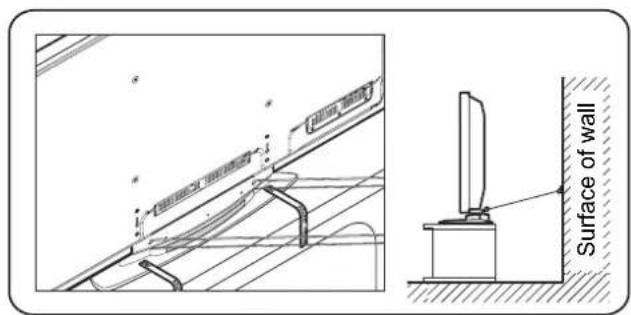
② Anchoring to the wall
Pass sturdy string, wire, or other such commercially available item through the holes at both sides of the rear of the pedestal, and anchor the string etc. to a secure wall or pillar.
[For safety reasons, always use the overturn/fall prevention accessories]
The equipment may overturn in the event of an earthquake etc. Therefore, always use the overturn/fall prevention accessories.
The details in this section indicate how to reduce any damage or injury caused by this equipment overturning or falling due to an earthquake. However, there is no guarantee that the overturn/fall prevention accessories will be effective in all earthquake situations.
Warning
He pa36npaTe n He moHcnpyTe noCTaBky.
B npotnbHOM cnyae yctpoNCTBO MOKET ynaCTb n nobpeuTbcra, n 3TO MOKET npNBecnK TpaBme.
ПЕДОCTЕРЖЕнE
He nCnONb3yIe nJa3MeHHbIe dncJIeN, OTJNuAIOUmec rO npBBeHHbIX B KaTaNore.
B npotnBHom cnyae ycTpoNCTBO MOKeT yNaCTb N NOBpeNtBCr, IN 3TO MOKeT pInBecTe K TpaMe.
He B36npaTecb Hne NOBcainTe Ha NoCTabKe IIN npKpenJIeHHOM o6OpydoBaHnn.
B npotnbHOM cnyae yctpoiCTBO MOKet ynaTb NIOBpeuTbcR, n 3TO MOKET npNBecrN K TpaBME. (Oco6eHHo CneDHTe 3a TEM, UTo6bl MaIeHbKne dTeN CNEOBAIN daHHOMy npedoctepekeHIO.)
He nCnoNb3yIte noDCTaBky, KOtOpA no KaKoJ-Ni6o npuHne NcKpNBHeHa nn deOpMnPoBaHa.
B npotnBHom cnyae yctpoiCTBO MOKeT ynaCTb IN NOpeuTbcra, IN 3TO MOKeT pInBeCTn K TpaBMe.
He 6nokpyte BENTINIOHHbIe OTBepTna. Pnp nCNoJIb3OBaHnn NODCTaBKn He 3aKpbIBaHTe npoctpaHCTBO MEXdy HIXKeN NOBepxHOCTbO PIIa3MeHHORo DcNlner I NOBepxHOCTbO NOJa.
B npoTnBHOM cnyae TEIIO MOKET HAKONITbC BHyTpN N Bbl3BaTb NOxap.
He nCnoJb3yIe B MecTax C BBICOKO BJIaXHOCTbIO.
- Iocne IInTeBHOIOIcNOb3OBAHnIOIOCTaBkMOKET NCKPNBtBCrIINIOeOpMnPOBaTbC, IeIPOuHOCTb yMeHbWNTcR. 3TO MOKET CTAb PpUHHoN PAeHn IINIOBpeXdHn YcTPOJCTBa, YTO MOKET PpNBecTn K TpaBMe.
Pn yctahOBKe nla3MeHHoro duCnner y6eDntecb, YTO octaETcK KAK MNHmym 10 cm CBO6oHoro npoctpaHCTBa CBepxu N no 6okam, a TaKke 7cm CBO6oHoro npoctpaHCTBa No3aDu nla3MeHHoro duCnner.
- HecobioheHne 3TNx peKomeHdaun MOXeT NOBJeY 3a CO6o B03HNKHOBeHne NoXapa.
YTo6bI yCTaHOBt b ChrTb ducnne c nOcTaBKn, Heo6xOuMo Dba YeIOBeKa.
-Плэзменидиспей может уразь,чTO может саыnpсинов BO3нк霍BERHЯТраBM.
Bo BpeMa yctaHOBKn y6eHNTecb TOM, YTO BCE BNHTbHaJeXHO 3aBNHcHbI.
- Ecni c6opka BbINOJIHHeHa HeKOppeKTHO, NOcTAbKa He CMOKeT BblEepKaTb Bec DnCnPe. 3TO MOKeT CTaTb npuHOn I naeHn I NOBpeJdeHn DnCnIe, YTO MOKe TpNBecTu K TpaBMe.
ДлЯ BынОнHeHЯ YcTaHOBKИ NcNoJIb3yIte CneuaJaNbHbIe KOMNoHEHTbl.
B npotNBOM cnyae nla3MeHHbI dncnne MoKet ynaCTb CO CTehb N/IN MoKet 6bITb NOBpeXdeH, YTO, BO3MOXHO, npuBeTe K TpaBME.
YcTaHOBnTe Ha yCTOuHBOB rOpN3oHTaJIbHOJ NOBepxHOCTn.
HeBbIOnJIHeHne 3TOro Tpe6OBaHnRA MoKcET CtaTb npuHHoN pAeHnR nIN NOBpeXdEHNr yCTpOcTBA, YTO MOKeT npuBecTN K TpaBMe.
Depknte annapat noaIbwe ot npamoro coHneHoro CBeta n HarpeBaTeNbIx np6opOB.
- HeBbINOJIHeHHe 3TOrO Tpe6oBaHnM MoKET CTaTB npuHHoN NCKpNBHeHn, DeOpMaun HJIN pa3pyeHn MaTePnAIOB, YTO MOKET pIpuBecTN K IOTepe IPOUHOCTN IN Bbl3BaTb NaDeHne INI IIOLOMKy O6OpyDObAHn IN CTaTB npuHHoN TpaBMbl. IcNoJIb3yIte npHaADNeXHoCTn DnI npEDoTBAuSeHn NaDeHn/ONpOKNbIBaHn, YTo6bI 3aKpeNTb Pna3MeHHbI dncnJe.
- Pn 3emIeTpcEHH nIN B cIyae, KOrda DeTN 3a6npaIOcra Ha NOCTaBky C yCTaHOBNEHHbIM IIna3MeHHbIM DInCnIeEM, ycTpoIcTBo MOKeT nepeBepHyTbcr INN yNaCTb, YTO MOKeT pInuBecT N TpaBMe.
PpIMeHaHn OTHoCHTeIbHO yCTaHOBKn NOcTaBKn
IcnoJIb3yIteIgIeTcEJIbHOB BnIKN UHpya NITaHnI PIIa3MeHHOr DcNJIe JERKOIOCTUHyO CETeByIO PO3ETKY.
OBeCneBte XopoUyO BeHTnIaIcIIO, YTo6bI TeMnpaTpyo OkpykaIoIe CpeIbI He npEbbIaIa 40 ^ C B npOTNBOM clyae 3TO MOKET pINBECTN K HAKONJIeHIO TENJa BHYTpN INa3MeHHOrO DInCIIe, YTO MOKET BB3BaTb HEnCnPaBHOCTb.
ПразвILA образсаня
1)PnBbIbope MeCTa IINr NpA3MeHHOrO DcCnpe Heo6xOdmo Co6hOdaTb OCTOpoxHocTb,NOTOMy UTO OH MOKET IN3MeHNtB CBT INJN DeOpMnPOBaTbCg IN3-3a BO3DeIcTBn CBETA INJN TEJIa, ECJN OH paCNOJOKeH IOJ PnRbIM COJIHeHbIM CBETOM INJN OKONO O6OrpeBaTeJI.
2)ДяочntкпpoTnрTpaTe NOCTabKMyrKoCxyOuTkAHyIO (HAnpMep, XNONKOBo NnФlaHeJeBO).EcIn NOCTaBc CINbHO 3aRpy3HeHa, ydaJIte 3arpy3HeHne C NOMOUsbHO HeITpaJbHOrO MOUeRo cpeIcTBa, pactBopeHHoro B BoE, a 3aTeM npOTPe HauNcTO cyxOu TkaHbIO. He nCNoJb3yIte 6eH3nH, pAcTBOpHTeJI b NN Me6eNbHyO BAKCy, TAK KAK OHN MoYr NOBpeDnTb NOKpbItne.
(OTHOCHTeBHO INHOpMaUOn O UNCtKe INa3MeHHoro DnCnpecm. INHCTpyKuNo IO 3KnPyTaAUmIIa3MeHHORO DnCnpeJ. Ppi nCNOb3OBaHN XmMueckn 06pa6oTahHO TkAHN CneDyTe INHCTpyKuN, NOCTABnREMOI CTKaHBIO.)
3) He npikpennna Te Ha n3dne Nkeykyo neHTy uHn HAKNeKn. TaKne DeNCTBnM OMyr TnpNBecTn K 3aRpa3HeHnIO NOBepxHOCTn NOCTabKn. He donyckaiTe DnITeNbHOrO KOHTa C pe3nHO, n3dennm n3 BnHnIa nIIN C YEM-TO NoDObHbIM. (TaKne DeNCTBnI pNBeDyT K NOBpeJKeHnIO.)
4) NaheIb nla3MeHHoro dncnner cdeHa n3 cTeKna. He npiknaIbIaBaiTe K He ype3MepHyo cny I He noDBeprAte ee ydapam.
ПЕДОCTЕРEXЕнUE:
3Ta nOCTaBAk ppeHa3HauHa TOnbKO DnIg MoJeN PnA3MeHNbIX DnCnIeB Panasonic (CM. cTpaHcy 57).
NcNoJIb3OBAHHe C dpyHM N yCTpOJCTBaMIMoKET pINBeCTN K HeyCTOnHBOCTN, YTO, BO3MOKHO, pInBeTeK T TpaBMe.
TPEBETCIIPOFCECNHOJbHARYCTAHOBKA.
KOMIIAHN PANASONIC HE HECET OTBETCTBEHHOCTH HN 3A KAKOI UUEPB N/NI CEPbE3HbIE TPABMbI, BKIOUcAR CMEPTb, INPOIN3OUEIDWNE BCIEDCTBNE HENPABUNbHOY YCTAHOBKN IINI HENIPABUNbHOrO O5PAuEHn.
OCHOBAHNE NOCTABKN (1)
B CToiKa nOCTaBKn (No OndHn JnKaxdoN CTOpOnbI, L(neBa) n R(npaBa))
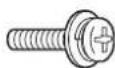
UCTaHOBOHbI BnHT CTOIKN NOCTaBKn (4)
M5X14 M5X30
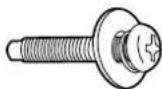
UCTaHOBOUHbI BnHT yctpoiCTBa (4)
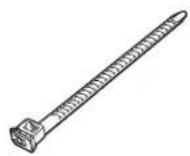
EΦKcnpyiooee npncnoc6neHn(1)
Kpenne HnnaMeHHoTIO nCnJIe K OCHOBaHnIO N K NOBepxHOCTn CTHebl.
① KpenJIeHne KOCHOBaHnIO
PnKpeHne pemHn Dn npedotbpaueHn OnpoknbBaHn ① (2 pEmH) K NOCTaBKe C NOMOuBBO BHTOB
② (2 BnHTa), npOeB INx B OTBepCTnA C o6eNx CTOPOH Ha 3aDHe NpHEIN NOCTABKN I C NOMOsbIO wypnoB
③ (2 wypyna) npnkpene nK oCHOBaHIO.
PnKpEnHmK OCHOBAHIO BCTaBtE WpynbI B NOrTOBHeHbIe OTBepctna.
B cnuyae oTcYCTBnRA NOIROTOBHeHHbIX OTBepCTNI pOcBepNITe HOBbIE OTBepCTNI NOCEPeDInHe IINPNHbI NaHEII OCHOBAHnA.
(BuHTbI ② KpyTAAH MOMeHT: ot 1,2 Do 1,5 H·M)
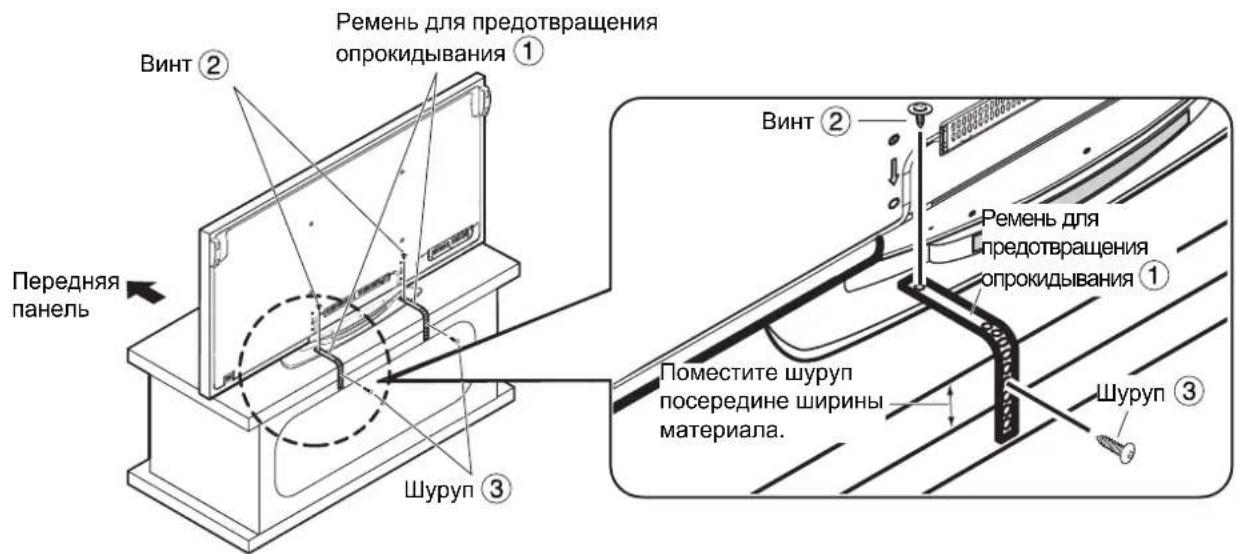
② KpenneHneKCTeHe Ipnocntte npouhyu BepBky, npoBOI nHoe DocTyHoe B npOdaKe NOo6Hoe npncno6JeHne uepe3 OTBepctnNo oBeIM CTOpOHAM Ha 3aDHe NaneNIOcTbKIn n 3akpenTe BepBky n T.I. Ha HAdEckHOI cTeHe nIIN OOnpe.
[B uejx 6e3onacnoctn Bcerda nCnoJb3yIte npHaJnxHocTn dJa npedotBpaueHn onpOKnDbIbAHn/naDeHn]
O6opydoBaHne MoKet OnpOKHyTbC B CnUyae 3eMJIeTpceHn n T.I. I03ToMy BCerda nCNoB3yTe npHaIeXHOCTn DnI npEoTbpaueHn OnpOKNbBaHn/naDeHn.
※Инфорmaц,在pmbeHnBbDAHHoPaaDene,yka3bBaet,KACHNbPNCNOBpeXdeHnINTPaBMbI BCNECTBnE OPOKnDbBAHn/naDeHnOBOpYOBaHn Pn3ZmTePrcEHn.ODnako B cnyae 3emNetprceHn 3ΦΦeKTHBHOCTb npHaJIeXHoCTeI nIpyoTbpaueHn OPOKnDbAHAHn/naDeHn He rapaHTnpyeTc.
AБАЛAHьI3
TipeKti KInHayFa Hemece e3repTyre 60ImaIdbI.
MyhbiH HETNkEciHde KpybIJfBiHbI Kylan KeTyi XHe 3aKbIMaHybl bIKTmAn, 6yI deHe JapaKaTaHa eKeNyi MymKiH.
ECKEPTY
Katanorta KepcetinreHHen 6acka nna3MaBik dncnneJlepdi naDanaH6aHbI3.
-
MyhbiH hTeNkeCHe KypblfBiHbH Kylan KeTyi XeHe 3aKbIMdaHybl bIKTmAn, 6yI DeHe JkapaTaHa eKeenyi MymKiH. Tipeke Hemece 6ekitiren KypblfBiHbH yctHe WbiryFa Hemece acbnyra 6oImaDbI.
-
MyhbiH HHTNKeCiHHe KpybIYbIHbIKyIaN KeTyI XeHE 3aKbIMdaHybl bIKTmAn, 6yI DeHe JapaKaTaHa eKeNy i MymKiH. (Ocipece KiuKeHTaBnapDbH 6yI cKaTaHdbIpdybl eCKepyIH KaDaFaHaHaB13.)
Tipek MaibickaH HeMece KaNbI 6y3bnFaH 6oNca, Ohbl KaHaI Da 6ip MaKcaTTa naIdaNaHyra 6oImaIbI.
MyHbIH HHTNKeCiHde KpyblfbiHbIKyIaKTeYi XHe 3aKbIMaHyblbIKTmAn,6yJI deHe JapakatbHa eKeenyi MymKiH.
Kei kiperin Teciktepi Xaybin TacTamaHb3. TipeKti nainanahy Ke3Inde Pna3MaIbIK dncnneiH ToMeHri 6eti meH eeden 6etihapacbiHaFbI KeHicTikTi Xaybin TacTamaHb3.
- Olan etneren karaa iinhe kby naia 60bn, eptti h bifyiba ceben 6onyb MymkH.
XorapblbIraIbI opbiHdapna naIdaIah6aHbI3.
¥3aK yaKbIT naJaIahFaHHaKeiH TipeK KcAcbIn HeMece KaIbS, MblTbIbFbI a3aIObMyMKIN. MyHbIH HtNkeciHde KpbInfbl Kynan KeTyI HeMece 3akBIMdaHybl MyMKIN, 6yI, coHda-ak, deHe XapaKaTaBHa eKeYi bIKTMaI.
Pna3MaNbIK DnCnJIeNi opHaty 6apbcBHa da OHbIH yCTiHeH, KaHbIHah 10 cm, an apTKbI 6etiHeH 7 cm aWbIK KeHicTik 6OlybHa Ke3 KETKI3iHi3.
- Kaandbipmafah karaandaepT wbybMYMKIH.
Dncnnei tipeke opHaTy XeHe anbIn TacTay ywiH eKi aam KaXeT.
MbIKTbI, Teric Xepre opHaTbIHbI3.
MHybOpbHdAmay HtJXeicHde Kypblfbl Kylan KeTyi Hemece 3aKbIMdaHybl MymKiH, 6yI, coHa-ak, deHe JapaKaTbHa eKeYi bIKTuman.
KypbIINfbHbTIkeNei KYN Ke3iHeH XeHe Kb3DbipfbIHTapHaayJaK yCTaHbI3.
MHybOpbHdAmay KcAHa, KaNbHbH 63bIyBaHa Heme Ce MaepnAnapBbH 63bIyBaHa XeHe 6epikTtIH KOfanybHa eKJIy MykIH, MyHbH HETNXeCiHde KpybIFbl KJlan Hemece cbHbIN, DeHe JapaKaTaH KeTTipy BiKTmAnl.
IJa3MaJIbIK DnCnNeiDi 6eKiTy ywiH ToHKeptneTih/KyIaTnaIbIH KepeK-JapaKaTapDbI naJaIaHaBHiB3.
Kep ciikihici 6onran karaa Hemece 6ana nap Ina3maIbIK dncnne opHaTbIraH tipeke uBiratbH 6oica, KpbInfTeHkepin Hemece Knan Ketin, Dehe JapakatbHa akenyi MymkiH.
Tipekti opnaty 6oBbHwa eckepTnelep
Пламыдспгелди Куаташасу wih KOn OhaижetetiH 3JNEKtp po3ETkacbH naДаланынБI3.
CbipTkbi TemnepaTpaHbIH 40 ^ C -Tah acnayby yuhi OHbIH kakcbj KeJedtiyih KAMtamacbi3 etiH3.
Thnne, nna3MaBbIK dncnneiH iuiHde Kbl3y naia 60nbH, OHbH 63bIybiHa ce6en 60nybl MymkH.
KoIdaHy HycKaynapbI
1)Плasmальдиспелдиopьн TaHdaHан Ke3e aba 60nbHb3,ce6e6i Kyn caynci ticene Tycetin Jxepre Hemece KblItkBikka XakBn KOblIca, Ohbl Tci Ohbl Ketyi Hemece NiwiH 6y3blNybl MymkiH.
2) TipeKti KymcaK, Kprak Wy6epeKeHn (MbicaIb, MaKaTahemece pnaHnb) Ta3anaHb3. Erep KpoHHTeH eTe lac 6onca, cyda epitirreH beiTapan Ta3apKbIu KpaJMeH IacbH Ta3apTbIN, Kprak Wy6epeKeHn KprfaTbHbI3. BeH3HH, epitkiu Hemece XHa3 yekicii naiDalaanhaBis, eHTkeHi onap KPOHHTeHHiH 6etHe 3nAH KeTIpyi MyMkiH.
(Плазмалык диспелейд таалay typalbaknapaTbI Плазмалык диспелейн naДаланушь HcKaynblHaH KapaHbI3. Erep xIMmaJIbIK KOJMeH eHdelenReH mata naДаланbIJa, mAtamH 6ipre 6epinreH HyckaynapdbOpbIHDaHbI3.)
3) Jeinim 6aynbHemece xancbipMaHb 6yibIMfa 6ekTneH3. ByI tipeK 6etIH nactaybi MyMKIN. Pe3nHa, BHHIn eHimdepeImeHemece 6acka yKcac HApcepeMeH y3ak yakbit 6oBbX KaHacbin TypybHa kon 6epMeH3. (MyHdai apekeTTep 3akbIMapra aKeenei.)
4)Пазmaльбдиспгейн панелшынданжасалг.Оогн kaTы Кш hemecс coKKы Turi36eH3.
ECKEPTY:
ByTIpeK TeK Panasonic nna3MaBik Dncnnei MoedeIbepimEn naDanaHyf aPhaIHaN (57-6eTTI kapaHb3). Baca KypblfBImen naDanaHy TpaKaCbI3bIKKa eKein, aamdbj kapaKaTayfa ce6en 6onybl MymkiH.
KOCIBN OPHATY KAKET ETJIEJI.
PANASONIC KOMПАнИСсbl IYРБIC EMEC OPHATY HEMECE IYPBIC EMEC IAIДАЛAHY CAJIДAPыIHAN BOJFAH KE3 KEJIГEH MYJIIKKE KEJIIGEH 3IЯн JXÖHE/HEMECE AByIP JAKAPKATTAP, COHBiH IISHIINDE ΘIIM JAFDAIJIAPbI YUH JXAYAN BEPMeI.
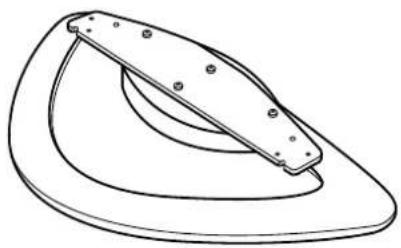
A TipeK Heri3i (1)
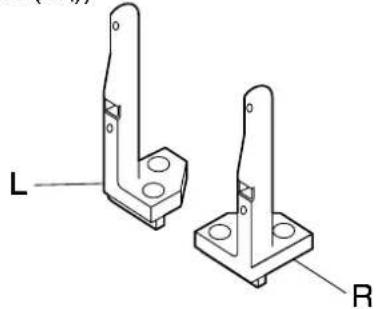
TipeK 6araHbI (Op6ip XaRbHa 6ipeydeH, L (coI) XeHe R (OH))
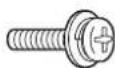
TipeK 6aHaBbH opHaTy 6ypaHdacbl (4)
M5X14 M5X30
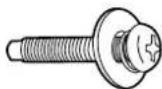
KypbIFbIHbOpHaTy 6ypaHdaCbI (4)
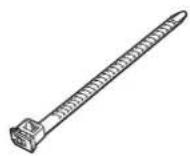
E Bekitkiu (1)
TeHkepydEn caKtay 6eKeTepi
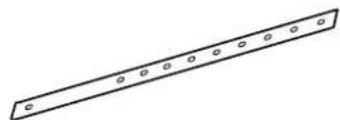
① Těнкеуdeen calkay 6enirì (2)

②Буразда (2)

③ BypaHdaJIbI were (2)
[OcbyHcyckaynbikTaBb CypETep TeK Mbican peTInHe KepCetinIreH.]
KinhakTay npoceDypacbl
1. TipeKTi XnHaKtay
- TipeK Heri3i 6eTIHc bIbIMaybHa Ke3 JeTki3iHi3.
TipeK Herizih OH XHe cOJ KArbIHAn TipeK
6araHdapbIMeH B TypaIaNbI3 XHe TipeK
6araHdapbIH cxemaJa KepcetIInreHdei 6eKiTy
yWIn TipeK 6araHdapbIH opHaTy 6ypaHdApbIH
C (4 6ypaHda) naIdaIaNbIHbI3.
(Bekity 6arblt1: 1.5-1.8 H*M)
He Bn6bpaTecb Ta He nobcauTe Ha niDcTaBci a6o npKpInJeHomy o6laHaHHI.
- Y npotnbHomy BnnaKny npncTpmi MoKe Bnactn 3a3HaTu yWkoJxHeHH, i ce MoKe npn3BecTn do TpaBM. (Oco6nBO CTeXte 3a Tm, uo6 MaNeHbKi dITN DoTPmyBaJnCra boro 3acTepeKeHH.)
He BnKOpncToBnyTe NiDcTAbky, 0o 3 JKOi-He6yDb npuynHc KcpnbHeHa a6o deOpMoBaHa.
- Y npOTnBHomy BnnaKny npNCTpi MoKe Bnactn 3a3HaTn yuKOxHHeHH, i ce MoKe npN3BeCTn Do TpaBMn.
He 6nokyTe BeHTnlaiHi OTbOp. Ppi BnKOpNCTaHHi niCTaBKn He 3akpNaBe TnpocTip Mx HxHbOIO NOBepxHeo nna3MOBO DncJIe NOBepxHeo nIDJOrn.
- IhaKwe TeNIO MOKe HAKONNUHTNCy UcepeuHi NcpiuHHTN NOxExy.
He BnKOpncTOByuTe NiDcTaBky y Micx i3 BnCOKoBONorictHO.
- Picnra Tpnbalno BnKOpncTahnnn i nd TaBka MoKe cKnBntnc a60 deOpmyBaTnc, i ii miHicTB 3MeHunTbc. Lc MoKe CTaTn npuHHo naIHnA 60 yHKoDkeHHn pncTpO, uO MoKe npn3BecTu Do TpaBMn.
Pid yac BCTaHOBHeHHnna3MOBOro DnCnIe nepeKoHaTeC, 0o 3aJIuWaeTbc Ra K MIniMym 10 cm BilbHoro npocTopy 3Bepxy Ta 3 6okIB, a TAKOx 7cm BinbHoro npocTopy no3aDy nna3MOBOro DnCnIe.
- HeDToPImaHHI cxpeKomeHdaIIMoKe cnpuHHTn IOXeKy.
BCTaHOBHeHH Ta demoHTaxy dncnner 3 niDcTaBKn notpi6Ho He MeHwe DBox oci6.
- IhaKwe pna3MOBn Dncnne MoKe Bnactn i 3aBdaTn TpaBMn.
PiD yac BCTaHOBHeHHn iDCTaBn HadiHn 3aTMyTe yci rBnHTn.
- 36npaHHBnKoHaHe HekopekTHO, nCtBaKa He 3MOKe BnTpMaTu Bary nCnIe. Lc MOKe cTaTu npuHIO naIHn y uKOxHn DnCnIe, 10 MOKe pN3BeCTn Do TpaBMn.
BukopncObyte dny yctaHOBKn cneuaJIbHi cklaIobi qactHHN.
- HeDToPMaHnI ziei BmOtn MoKe Ipn3BecTNo npaiHH nla3MOBO rncnner 3i CTIN Ta/a5o NOrO yuKoJKeHH, 3aBdAOnH TpaBMN JIOHNi.
BctaHOBIIOte niDCTABky Ha ctiKk Ta pibHi nobepxHi.
- HeDToPmHaHnI cIx peKOMeHdaIIM MoKe cTaTn pIpuHIO naIHnA 6o yUkoJKeHHa npICTpO, IIO MOKe PpN3BecTn Do TpaBMn.
TpMaIte npucptiayKaHauJaI BiD onaJIIOBaJIbHOro 6NaHaHHra Ta He NiDaBaTe NOro BnINBy npAIMX COHauHNx npomeHIB.
- HeDToPmAMHnI ciE BIMOrn MoXe CnpuHHTn CKpBHeHH, DeOpMyBaHHa 6o noripueHHa KocTi MaTepiAIB, 10 np3BeDe Do BtpaTn MiHcOCTi, BHacLiIDOK Yoro ObnaHaHH MoXe Bnactn a6o 3JMaTaNc Ta 3abDaTn TpaBMn.
BukopncToBnyTe doaTkOBI akcecyapn dna 3akpinHeHH nla3MOBro dncnner Ta yHnKHeHH noiHaHH/nepeKnDaHH.
- Y pa3i 3emnepcy a60 konn maneHbki dItu 3aana3aybHa niCTaBky 3 BCTaHOBNEHM nna3MOBm DNcPHeM, npncptpi MoKe nepeKHyTncb a60 bNaCTn, 1o MOKe CTaTI pNCHIO TpaBMyBaHH.
Ppimitkn 0do BnKOpncTahHn iDcTabKn
Tencelb shHypa xNBHeHH nla3MOBOrO dncnJe noBHeN JeKo dcTaBAtNo eJekTpnuHOi po3eKn.
Cπiδ 3a6e3neuHTn HOpMaIbHy BeHTnJIaζIIO, ΜOδ TempepaTy y npMmIeHHi He nepeBnUyBaN a40°C
HeDToPIMMaHnIyBcTeNdoHaKoNnueHnTEnIa BcepeHnI nla3MOBOI dncJIe I cnpuHHTn Ioro HeCnpaBHicTB.
PekomeHdaucii CTOCOBHO NOBOJXeHHa
1)YBaXHo BnBupaTe Micue dIy BCTaHOBJIeHHN PIIa3MOBOI DcINPeIe, OCKIbKn BHaCInIOK II CBITNa a6o Tenna (y pa3i po3MIeHHN no6bn3y HarpBaJIbHnx npnaadIB a6o nD pRmMm COHryHM IpomHHM) BiH MoKe BtpaTtN KOIp Yn DeOpmyBatncb.
2) YnCTbTe NiCTaBky M'AKOIO cyxio TKaHINHO (HaNPKnaI, 6aOBHraHO a6o fnaHeJeBOIO). KUIO nIDCTaBky CnIbHO 3a6pyDHeHO, 3MNIte 6pyd BOHNIM PO3HNOM HeITpAlbHoro MNHOrO 3acOBy, a NOTIM BnTpiTB NIDCTaBky cyxio TKaHINHO. He BNOPNCOTyTE 6eH30J, PO3HNHk A6o BICK dN Ma6nIB, TOMy IIX 3aCTOCYBaHHMOKe Pn3BcETn DO BiDnyuEHHaFap6n NOKPITTT.
(IIo6 di3HaTnca, k uCTnTn PIAa3MOBn DnCnnei, nB. IHcTpkyio do nCnpei. Ipn BnkOpncTaHHi ximiuHO 0bpo6NeHoi TKaHHN CNoaTky yBaXHo npOHTaTe IHcTpkyuio do Hei.)
3) He npinkpinyte nky ctpky nu hainkn do Bnpo6y. Lc moke npn3Bectn do 3a6pydneHH naBepxhi niCTabKn. 3anobiraute npBaIOMy KOHTaKTy npncTpo 3 rymOBUM, BiHIOBUM Ta noi6HMn Bnpo6amn. (Le npn3Bepe do noripweHH BlaactnbocTe npncTpo1.)
4)Пань пладього диспегязрбениа 3i ckna. He дokладаite Do Hei habmipHy cnly Ne niДдаваTe ii ydapam.
3ACTEPEXKEHH:
LniDCTabKa npn3HaueHa Iwne dIy nla3MOBx DncnneB Panasonic (INB. cTOp. 57).
BnKOpNCtAHH 3 iHIMM nPnCTpOAM MoKe Pn3BecT Do HeaIiHOI fikCaJI, IIO MOKe CnpuHHTn pN3IK OTpMaHH TpaBM.
MOHTAX IOBUNHEH BIKOHYBATNC CNEUJAICTAMN.
KOMNAHIA PANASONIC HE HECE BIDNOBIDAJbHOCTI 3A bYb-RAI NOLIKOJXEHN BJIACHOCTI
TA/ABO CEPIO3HI TPABMI, BKIIOUACHOI CMEPTb, IIO E HACNIIDKOM HEBIIOIBHOHOTAXY ABO HENPABINbHORO OBCJYTOBYBAHHRA.
OCHOBa nIDCTABKN (1)
B CtiKa nicCTabKn (No odHn dN KoxHoCTopoHn, L (niba) i R (npaba))
MOHTaXHn rBnHT CTiIKn nIDCTaBKn (4)
M5X14 M5X30
MOHTaXHHI rBnHT npncTpOIO (4)
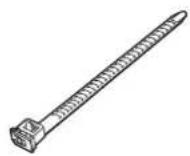
EΦikcyuyn npuctpi (1)
ДеталдязANO6irahняnepeknndaHHIO
① PemihbДЯЗANO6iraHHN nepeKeiHaHHIO (2)
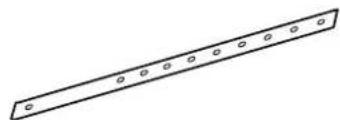
② ΓΒΝΗΤ (2)

③ Llypyn (2)

[3o6paekenny y cboMy nocihny noaotbcra nIe 3 iHcTpaTHBOIO MeTOIO.]
Прочтура збиганна
- IpekeKaHaTeCra, 10 He noOpPraNaTe NOBepXHIO OCHOBn iDCTABKn.
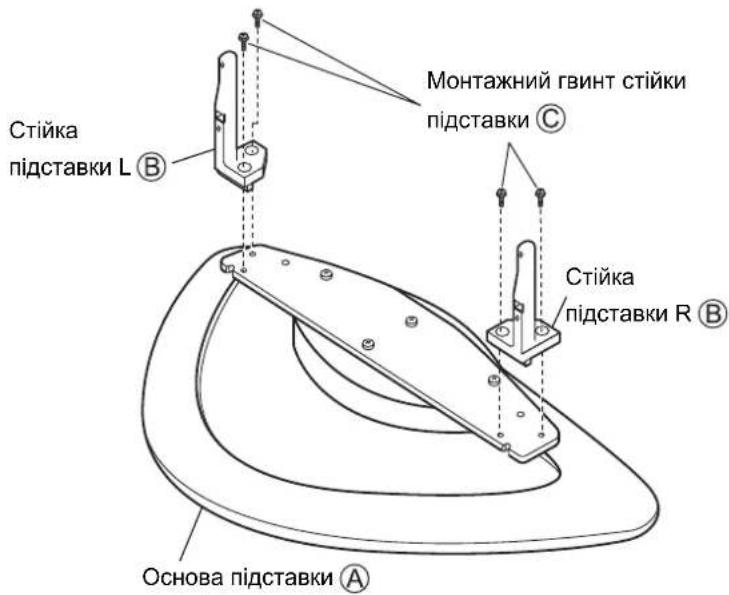
Y3roBte OCHOBy nIDCTABKN A 3i CTiHKAMn
niDCTABKN B nIBOPuy i npabopuy Ta 3a
DOIOMOROMO MONTAKHNX TBHNTIB CTIKN
niDCTABKN C (4 TBHNTN) npKpiniTb CTIKN
niDCTABKN, YK NOKa3aHO Ha MaJIHOHky.
(MoMeHT 3aTAYBaHHr:1,5-1,8 H·M)
2. BctaHOBJIeHHI pIa3MOBOrO dIscnJIeA
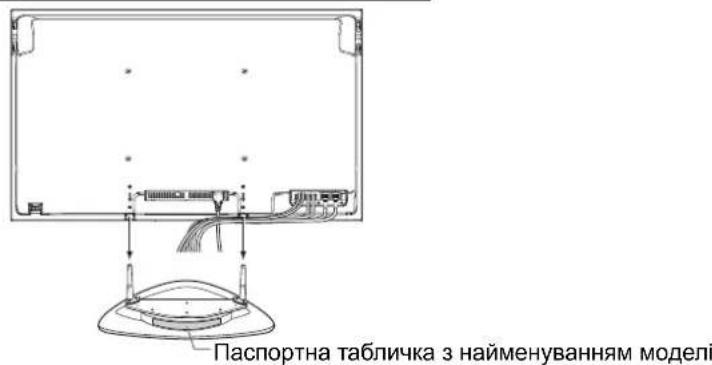
BctaHObIb 3i6paHy niCTabKy TaK, 0o6 3aHa nCTopoHa (Ta CTopoHa, Ha kY npNKpInHe nacnOpTHa TabNcKa 3 NaMeHyBaHHM MoEJI) DnBuNaCra Ha Bac, y3roDbTe Pna3MOBn DnCnne 3i CTiKaAMn NiDCTABKN, BCTaBTe CtiKu NiDCTABKN B Pna3MOBn DnCnne, a NOTIM BCTaBTe 3aTARHIb MOHTAXHi rBnHTn pnpCTpoO (4 rBnHTn). (Moment 3aTayBaHH: 1,5-1,8 H·M)
3aHa nHaHb nHa3MoBOrO dncnner
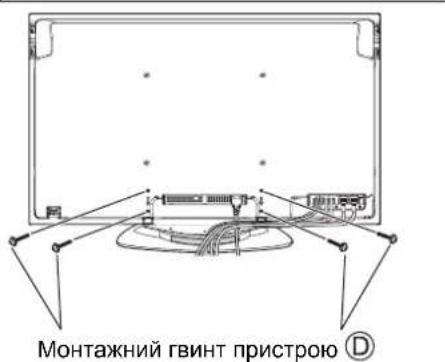
3aHnnaHeIb nna3MOBOrO dncnn
NobepHyBn CTopoHOIO 3 nacnpTOHO TabnKoO 3 HaMeHyBaHHM Moeni Do Ce6e, BCTaBe CTiKN NiIDCTaBN JaHaNdi B Pna3MOBn DnCnJe.
3.ПриедногддakOBOrOобаднгИshypa KINBneHHN
-ITRAOTPIMAHHNOKIIaHOI INFOOPMAUII npo NIKNIOHEnH IpOIB 3BepHbCnOnciHaKa 3 EKnNpyatau II nna3MOBOrO DnCnner.
-Приедни Te HeobxdiHi dpoTn DoDAtKOBOrO obnaHaHHa, npOnyctIb fikcyuohn npucptpi (1 fikcyuohn npucptpi) uepe3 3atNcKaH Ha 3aHni CTOpOHIO OCHOBN iDCTABKN 36epitb y nyok Bci uHpyn Ka6eni, kN oka3aHo Ha MaJIIOHky.
He 36npaTe B npok pa3om 3 iHnmmKa6eJMa m nHypam m Hhyp xNBneHHra.
Bunla33aDy
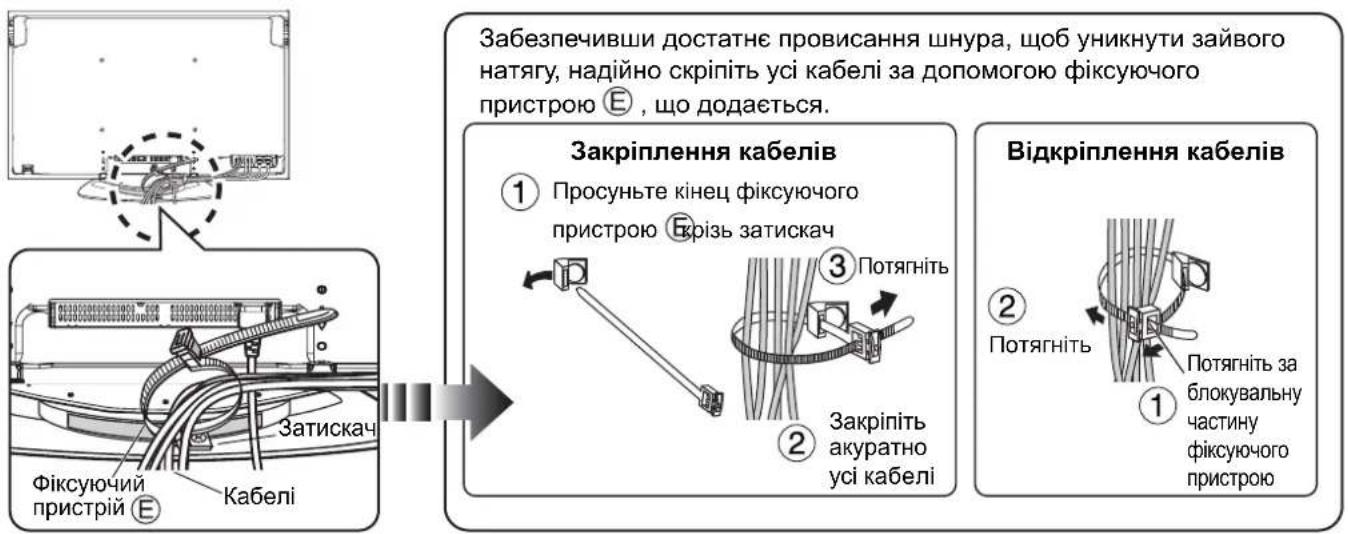
4. 3anobiraHHnpeKndaHHo nla3MOBOrO dinCnpe
KpinneHHHnn3MOBOrO dncnnerdo OCHOBn n do nobepxhi CTIN.
① KpinnneHnO oCHOBn
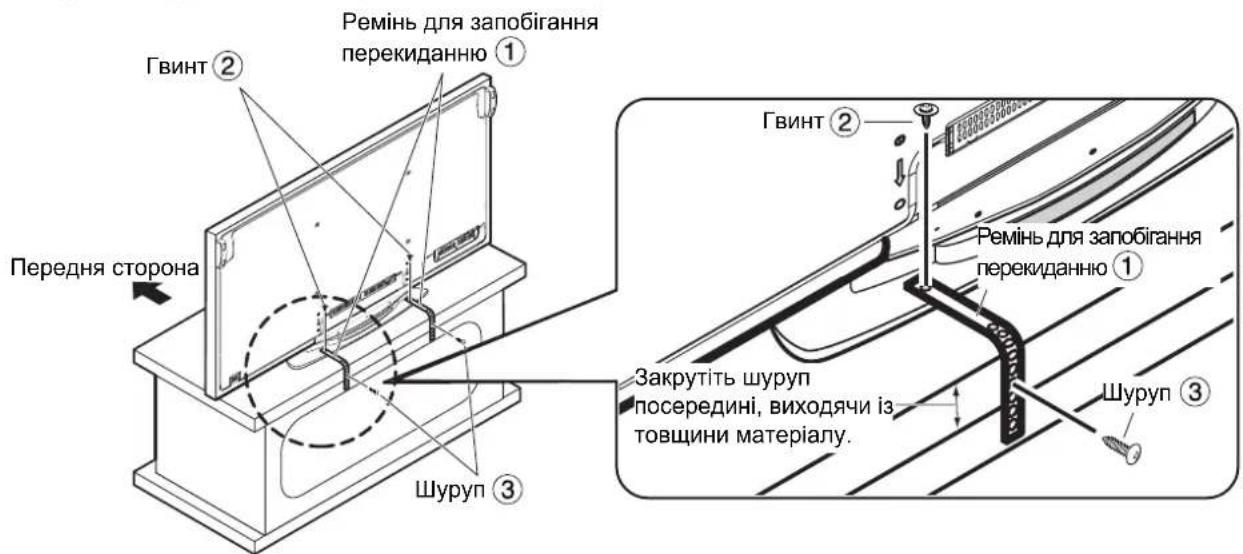
PpKpinitb pemehi nra 3anobiraHnnepeKnadHHIO ① (2 pemehi)do niCTaBkn 3a donomoro 1RHTiB
(2 rBnHTn), npocmKHyBwn ix B oTBOpn no 6oBnBa 6okn Ha 3aHni naHeni niCTabKn 3a donomoroh wypynib (3) (2 wypynn) npnkpiinb ix do ochobn.
PnKpInnHnIO OCHOBN BCTaBTE WypynB N iNDROBHeHi OTbOpN.
Y Bnnaiky BiDcyTHOcTi niIroTOBneHx OTbOpIB npocBepdntb HOBI OTbOpNIOcepeHni UnpHn NaHeni OCHOBN. (BnHTn ② MOMENT 3aTaryBaHH: 1,2-1,5 H·M)
② KpinneHHn do ctiHn
PponyctiB miCyMoTy3ky,dpit a6o iHwe doCTynhe B npOdaKy noDi6He 06naHaHHn Kpi3b OTBOPn NO 06nDa 6okn Ha 3aHi nAnei niCTabKn 3akpiniTb MoTy3ky TooHa HadiHn CTHI a6o onopi.
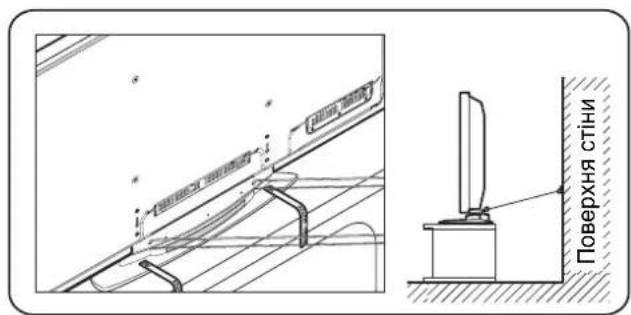
[3 MeToIO 3a6e3neueHn8 6e3neKn 3aBKnBn BnKOpNCToByTe akcecyapn dIra 3an06irAHnNepeKnDaHHo/naDiHHIO]
O6nHaHnH MoKe nepeKHyTcR y BnAky 3emIepcy Toio. Tomy 3aBKn BnKOpncToByTe akceCyapn dna 3anobirAHnnepeKnDaHHo/naDHHIO.
Ihopmaiz, HabeheHa B cboMy po3di, yka3ye, k3Hn3HTn p3NK yskOxehna a6o TpaBMn BhaCniok nepeKndaHHa/naiHHa oBnaHaHH np3eMntpyci. Ondak y BnAky 3emNepcy efeKTNBHicb akceCyapIB dny 3ano6irAHnnepeKdaHHo/naiHHo He rapaHTyctcb.
警告
請勿拆卸或改裝底座。
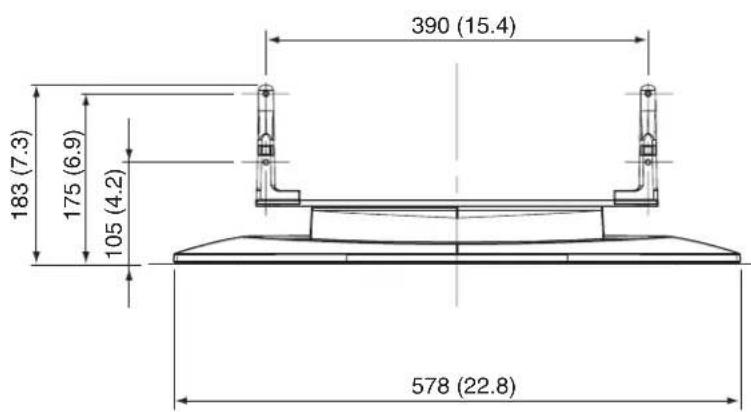
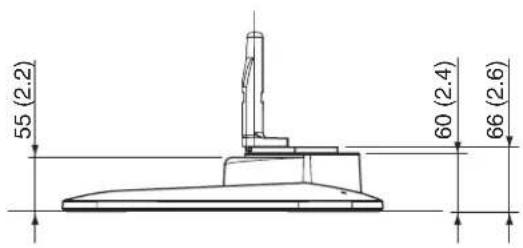
External dimensions drawing
Cbiptkbl eJwemdep cb136acbl
KpecnenHj 30BhiHimn po3mipamn
外觀尺寸圖
单位:mm
Unit: mm (inches)
Einheit: mm
Eenheid: mm
Unita: mm
Unite: mm
Unidad: mm
Enhet: mm
Enhed: mm
EDNHNUMb:MM
BipJik:MM
OdHHuBmipy:MM
單位:毫米
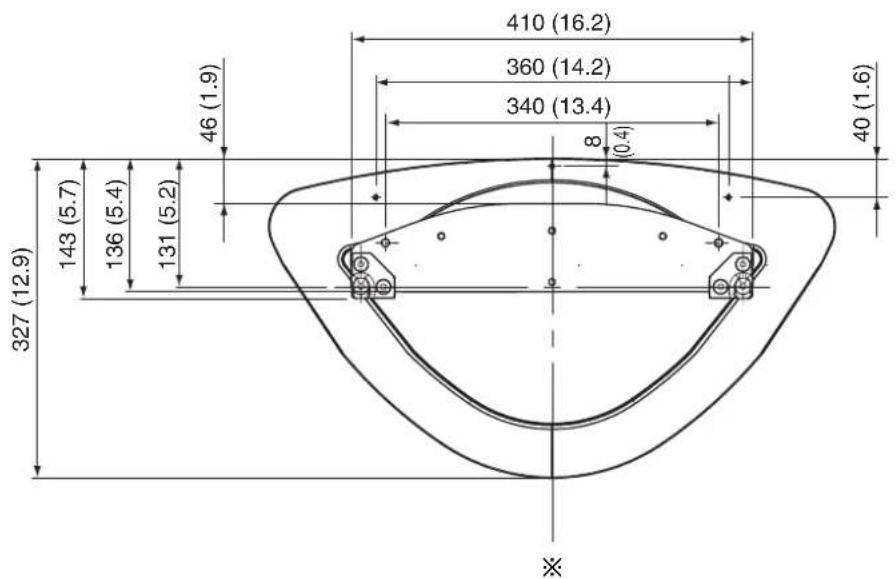
※前
Front
Vorderseite
Voorkant
Parte anteriore
Avant
Partedelantera
Framsida
Front
IpeepnA cToPOHa
AaBbI
Pepedni6ik
前面
Panasonic Corporation
Web Site: http://panasonic.net