
TYWK103PV9 - Television PANASONIC - Free user manual and instructions
Find the device manual for free TYWK103PV9 PANASONIC in PDF.
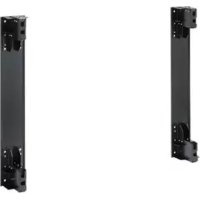



| Product Type | Wall mounting bracket for plasma TV |
| Brand | Panasonic |
| Model | TYWK103PV9 |
| Use | Vertical wall mounting |
| Bracket weight | Approximately 25 kg |
| Wall fixing points | 16 locations |
| Wall fixing type | Bolts nominal diameter 12 mm (not supplied) |
| Required clearance above and on sides | 30 cm minimum |
| Required clearance below | 15 cm minimum |
| Required clearance at rear | 20 cm minimum |
| Maximum ambient temperature | 40 °C |
| Recommended number of people for installation | 4 people |
| Maintenance | Wipe with a soft, dry cloth; use diluted neutral detergent if necessary. Do not use solvents. |
| Safety | Installation by a qualified professional is mandatory. Do not install in damp, dusty places or places exposed to excessive heat. |
| Supplied parts | Wall mounting bracket Base (L) and Base (R), hexagon socket assembly screws, spring washers, base cleats (x4) |
Frequently Asked Questions - TYWK103PV9 PANASONIC
User questions about TYWK103PV9 PANASONIC
0 question about this device. Answer the ones you know or ask your own.
Ask a new question about this device
Download the instructions for your Television in PDF format for free! Find your manual TYWK103PV9 - PANASONIC and take your electronic device back in hand. On this page are published all the documents necessary for the use of your device. TYWK103PV9 by PANASONIC.
USER MANUAL TYWK103PV9 PANASONIC
Precautions with regard to setting up
WARNING
Ensure that the installation location is strong enough to support long-term use.
- If its strength becomes insufficient over the course of long-term use, the display may drop, possibly causing injury.
Installation and removal should only be carried out by a qualified technician.
- If the bracket is installed incorrectly, the display may fall down and personal injury may result.
Make sure that all safety factors regarding strength of installation are observed.
If the installation strength is insufficient, the display may fall down and personal injury may result.
Do not install in places which are unable to bear loads.
- If the strength of the installation surface is insufficient, the display may fall down and personal injury may result.
CAUTION
Do not install in places which are subject to humidity, dust, oil fumes, water vapour or excessive heat.
These can have adverse effects on Plasma Display operation, and fire or electric shocks may result.
Do not use any displays other than those given in the catalogue.
- Otherwise the unit may be dropped and become damaged, and personal injury may result.
Do not install the Plasma Display face up, sideways, or upside down.
- Doing so may cause heat to build up inside the display, and fire may result.
When installing or removing the plasma display, use a lowering device (machine), and ensure that the work is done by at least four persons.
If four people are not present, the display may be dropped, and personal injury may result.
Leave a space of at least 30 cm (11.8") at the top, left, and right, at least 15 cm (5.9") at the bottom, and at least 20 cm (7.9") at the rear.
- The plasma display unit has air blow and air suction holes on the bottom and rear. Covering these may result in a fire.
Requests regarding handling
1) Exercise care when selecting the location for the display because it may discolor or deform due to light or heat if it is placed where it is exposed to direct sunlight, or near a heater. 2) For cleaning, wipe the display using a soft dry cloth (made of cotton or flannel). If the unit is extremely soiled, first wipe off soiling with a neutral detergent diluted in water, and then wipe with a dry cloth. Do not use cleaners such as benzene, thinner, or furniture wax because they may cause paint peeling. (If using a chemical wiping cloth, follow any precautions included.) 3) Do not affix adhesive tape or stickers to the product. Doing so may dirty the surface of the wall-hanging bracket. 4) Take care during installation as shocks can cause 'panel cracks' to the plasma display unit.
PROFESSIONAL INSTALLATION IS REQUIRED.
PANASONIC DISCLAIMS ANY PROPERTY DAMAGE AND/OR SERIOUS INJURY, INCLUDING DEATH RESULTING FROM IMPROPER INSTALLATION OR INCORRECT HANDLING.
TY-WK103PV9 Wall-hanging bracket (Vertical mounting type)
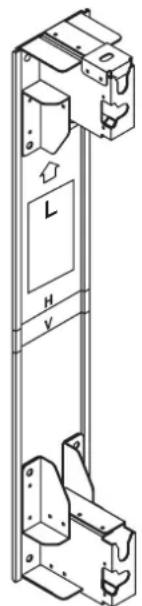
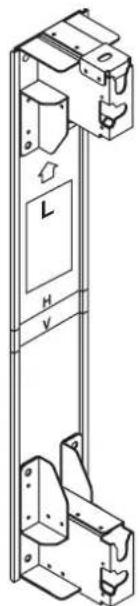
Wall-hanging bracket Base unit (L) (1)
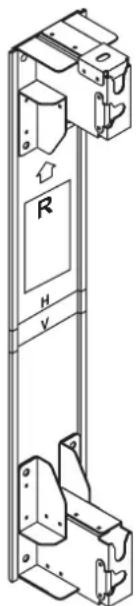
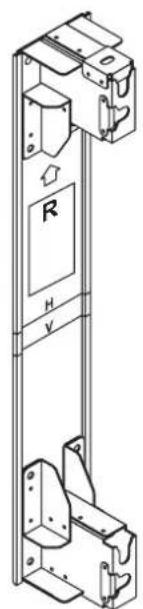
Wall-hanging bracket Base unit (R) (1)
Points to note during installation
- The wall-hanging bracket is for use in installing the Plasma Display to a vertical wall for viewing purposes. Do not use it for any type of installation other than vertical wall installation.
- To ensure correct, problem-free operation of the Plasma Display, do not install the Display in any of the following places.
Near sprinklers or fire/smoke detectors; where there is a risk of exposure to vibration or impact; near high-voltage wires or dynamic power supplies; near sources of magnetism, heat, water vapor, or soot; locations exposed to air blown from heating equipment; where droplets of condensation from an air conditioner or other unit may form.
- When installing this wall-hanging bracket unit, use a fixing method appropriate to the type of wall.
- Use commercially available bolts with a nominal diameter of 12 mm that are suited to the wall material (steel frame, concrete, etc.) you are fitting the bracket to.
- Fit so there is no contact between the attachment bolts or power cord and any metal inside the wall.
- Insert the power cord plug for the Plasma Display into a wall outlet which is close and easily accessible.
- Provide adequate ventilation so that the temperature around the display does not rise above 40°C (104°F). If there is insufficient movement of the air inside the display, heat may build up inside the display, and fire may result.
- Spread a soft blanket or cloth over the floor so that the plasma display and floor will not be marked or scratched during the assembly and installation work.
- When screwing down the parts, ensure that the screws are neither insufficiently tightened nor over tightened.
- Take sufficient care to ensure safety around you when performing the assembly and installation work or while moving about during the course of the work.
1. Confirm the strength of the installation location.
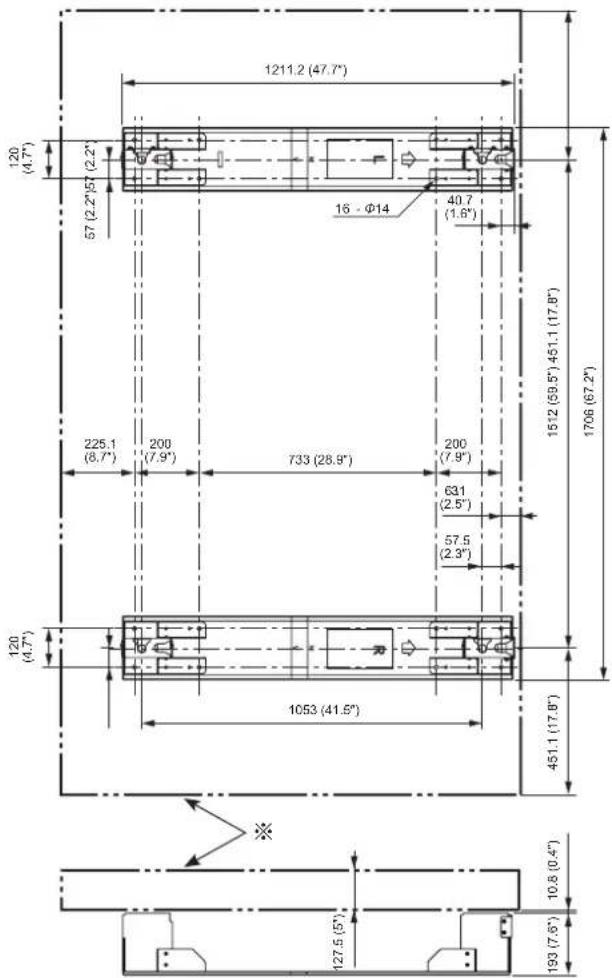
① The weight of the wall-hanging bracket is approximately 25 kg (55.1 lbs.). For the weight of the plasma display attached to the wall-hanging bracket, please see the manual for the plasma display. ② Check the wall strength at the 16 attachment locations by referring to the dimension drawing of the wall-hanging bracket, and provide adequate reinforcement if strength is not sufficient.
Wall attachment holes (16 locations)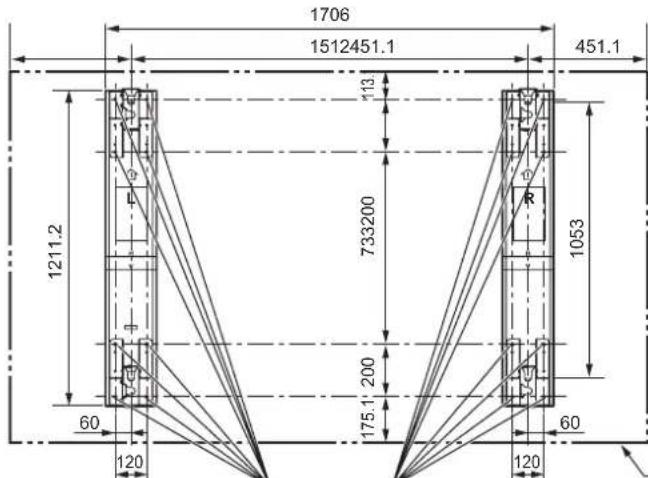
Caution
- The wall-hanging bracket has attachment holes provided in 16 locations. Be absolutely sure to attach each bracket in all 16 locations.
- Refer to pages 63 and 64 for the detailed dimensions that apply when installing the plasma display.
Plasma display external dimensions
2. Install the wall-hanging bracket to the wall.
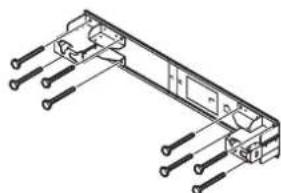
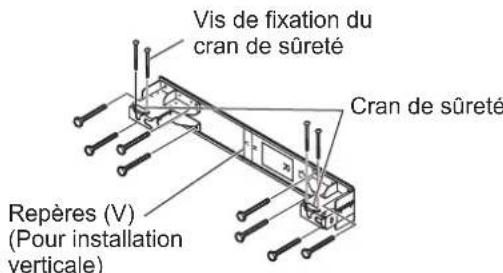
① Based on the dimension drawing, find the positions of the holes which will be used to mount the brackets on the wall, and mount the brackets on the wall. (When installing the brackets horizontally) Mount the wall-hanging brackets with the arrows marked on them pointing up. Mount the end of the bracket marked "L" on the left and the end marked "R" on the right. (When installing the brackets vertically) Mount the end of the bracket marked "L" at the top and the end marked "R" at the bottom. ③ Use commercially available bolts or nuts with a nominal diameter of 12 mm to secure the brackets at all 16 mounting holes.
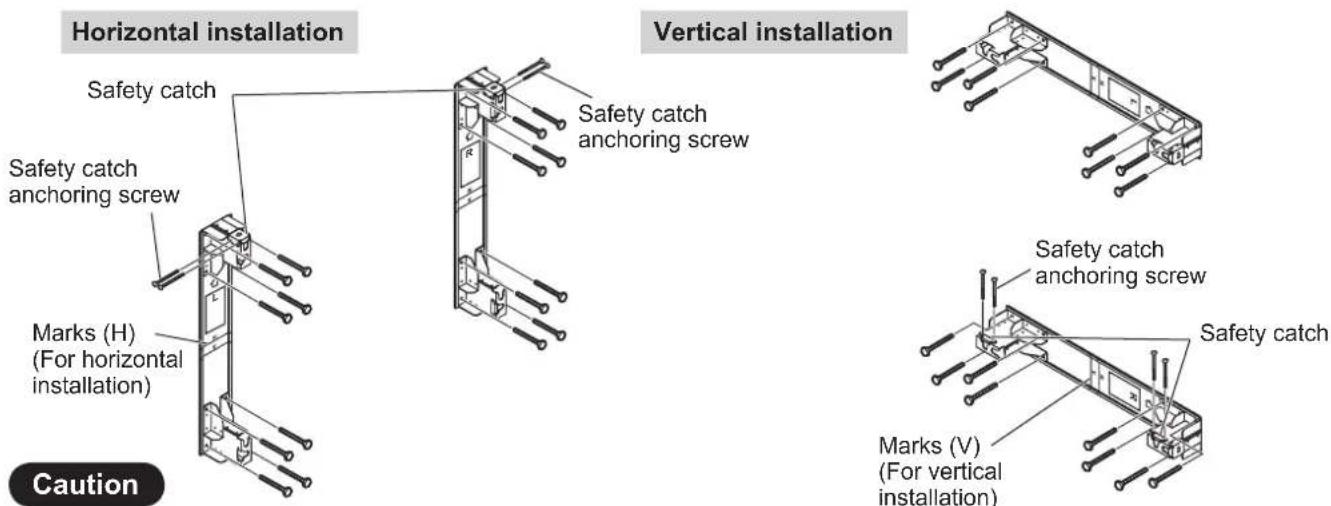
- Use commercially available bolts with a nominal diameter of 12 mm that are suited to the wall material.
- Check the strength of the mounting bolts, and use bolts which are strong enough.
Note
- The marks indicate the center line of the Plasma Display. It is recommended that you leave a maintenance space of at least 70 cm (27.6") behind the plasma display.
3. Prepare the Plasma Display.
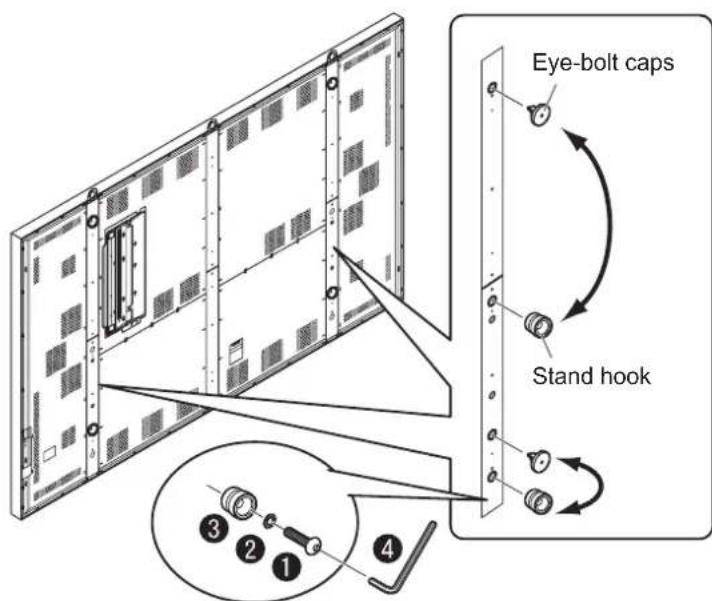
① Remove the eye-bolt caps (x 4) at the left and right of the rear panel. ② Attach the stand hooks wherever the eye-bolt caps were removed. ③ Attach the eye-bolt caps wherever the stand hooks were removed.
| 1 | Hexagon socket head button bolt |
| 2 | Spring washer |
| 3 | Stand hook |
| 4 | Allen key (provided with plasma display) |
4. Install the display to the wall-hanging bracket.
Horizontal installation Vertical installation catch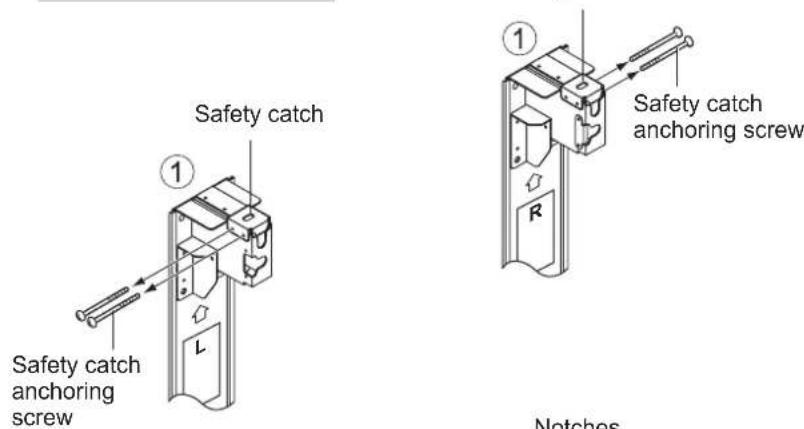
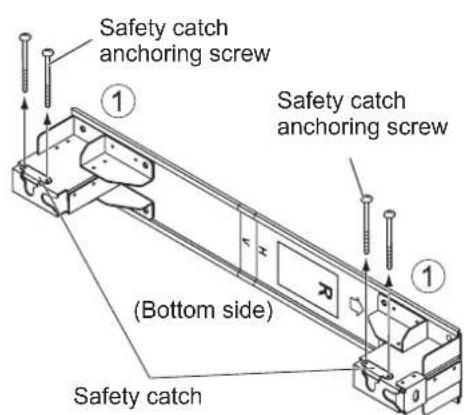
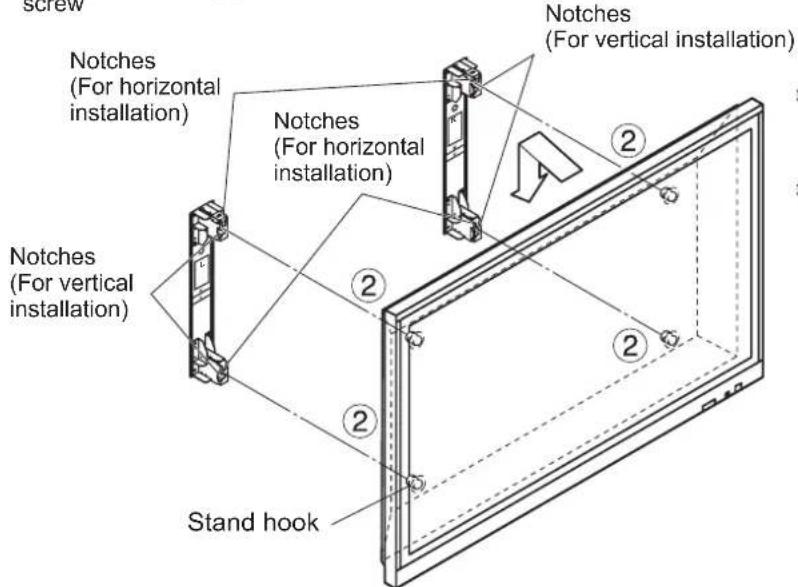
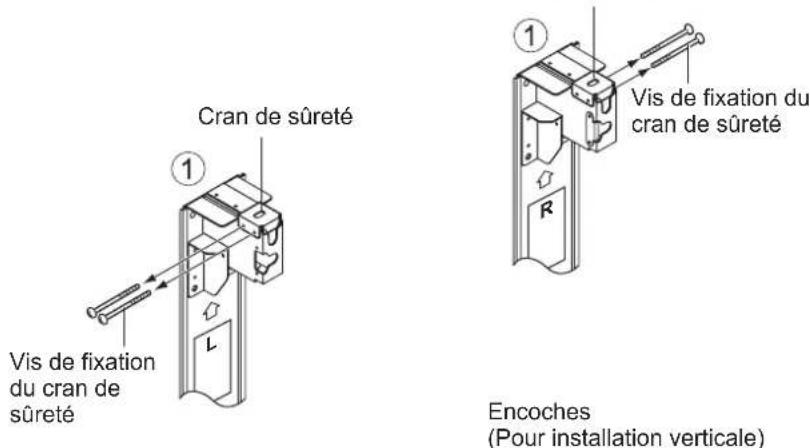
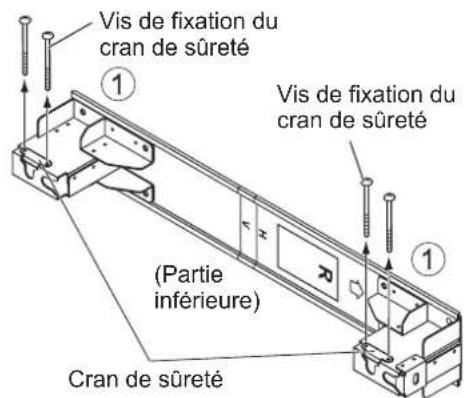
① Remove the safety catch anchoring screw, and remove the safety catch. ② Insert the stand hooks (x4) on the display into the notches of the wall-hanging brackets, and lower the display straight down.
Installation procedure
5. Securing the display.
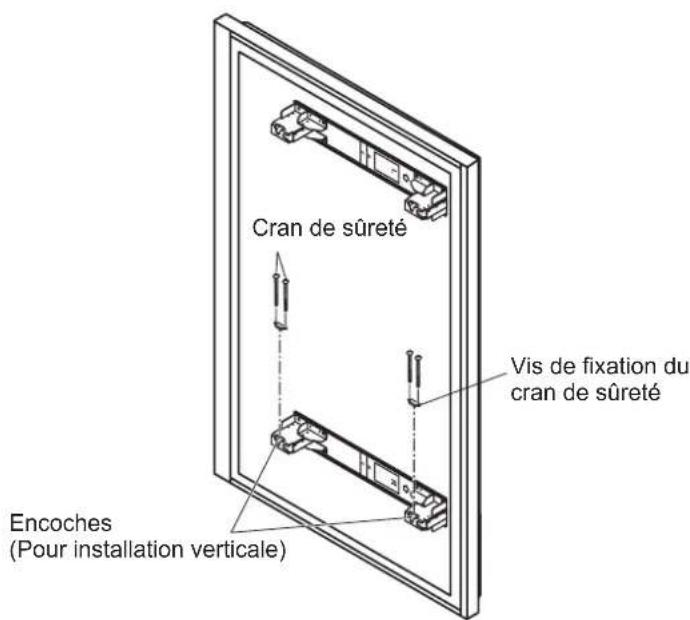
Securely tighten the safety catches (x2) which were removed previously, using the safety catch anchoring screws.
Horizontal installation Vertical installation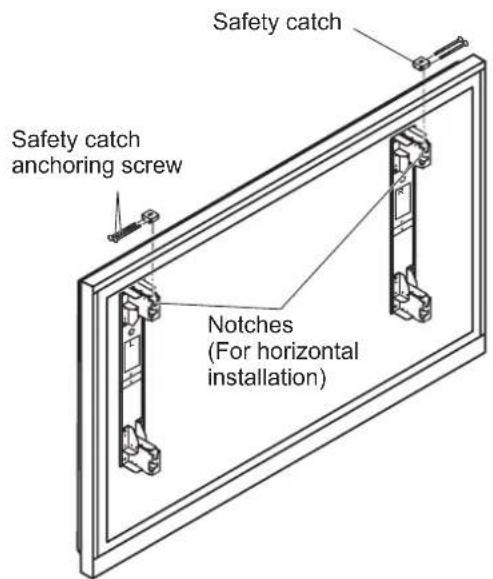
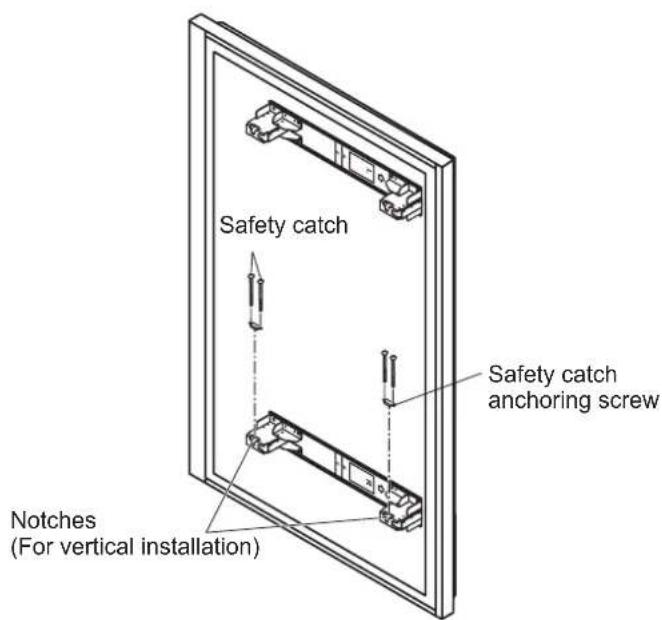
Caution
- Be sure to tighten the left and right safety catches to prevent the display from detaching from the wall-hanging bracket.
Removing the display
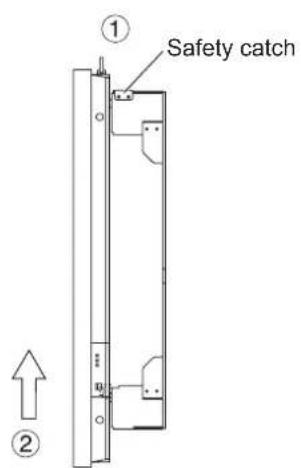
① Remove the safety catches (x2) which were attached to the wall-hanging brackets. ② Lift the display straight up.
Note
- To remove the display, lift it about 60 mm.
WARNING
Installation horizontal installation vertical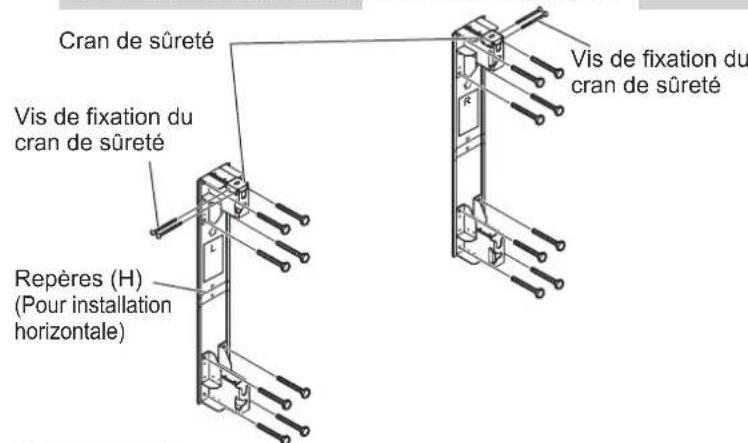
Attention
Installation horizontal Installation verticals

Installation horizontal installation vertical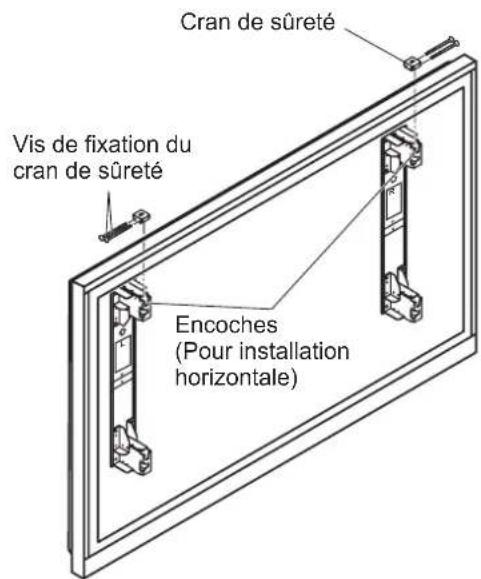
Attention
The plasma display panel is a device listed in the catalog.
- Improper installation of this device may lead to damage and malfunction of the device, as well as injury to personnel. Do not install the plasma display panel on a ceiling, wall, or floor that is sloped. This can cause heat buildup inside the display, which may result in a fire. When installing or removing the plasma display panel, use the lifting mechanism (mount) and be careful to follow the safety instructions.
- If you make any changes to the device, the display may fall and cause injury.
When installing the display, maintain a clearance of at least 30 cm from the top, left, and right sides, and at least 15 cm from the bottom and 20 cm from the rear of the display.
The plasma display has ventilation holes on the bottom and rear. Covering these holes can cause a fire.
Installation and service
1) Carefully choose the location for installing the display, as it may lose color or become deformed if exposed to heat or direct sunlight. 2) Clean the display with a soft dry cloth (cotton or flannel). If the dirt is stubborn, first wipe with a neutral detergent diluted with water, then wipe with a dry cloth. Do not use volatile solvents such as benzene, thinner, or furniture polish, as their use may damage the surface. (When using chemically treated cloths, follow the instructions provided with them.) 3) Do not touch the screen with sharp objects. This may scratch the surface of the plasma display. 4) Be especially careful during installation, as impacts may cause cracks in the plasma display.
Installation must be performed by qualified technicians. Panasonic Corporation is not responsible for any damage to property or serious injury, including death, resulting from improper installation or incorrect servicing.
TY-WK103PV9 Wall-mounting bracket (for vertical mounting)
Wall-mounting bracket base (L) (1)
Wall-mounting bracket base (R) (1)
Important precautions to consider during installation
This wall-mounting bracket is designed to securely attach the plasma display in a vertical position for viewing. Do not mount it in any other position than vertical. Ensure normal and uninterrupted operation of the plasma display; it is not recommended to install the display in the following locations:
- Near sprinklers or fire/smoke detectors in areas where there is a risk of fire or smoke. - Near high-voltage wires or power supply blocks. - Near sources of magnetic fields, heat, steam, or moisture. In places where the ambient temperature may exceed the specified operating temperature, or where condensation may form on the display or other equipment.
When installing the plasma display, use the mounting method that best suits the specific type of surface. Use the provided bolts with a nominal diameter of 12 mm, suitable for the material of the wall (metal, concrete, etc.), to secure the bracket. - Position the bracket so that the mounting bolts or their anchors do not protrude from the inner surface of the wall. - Not far from the place where the plasma display is installed, it is necessary to provide a power outlet with easy access for connecting the power cord. It is necessary to ensure normal ventilation so that the temperature in the room where the display is installed does not exceed 40 °C. If there is insufficient air circulation, the display may accumulate a lot of heat, which can lead to fire. - Keep the gap between the wall or fabric and the display at least 10 cm so that during assembly and installation the display and its components are not damaged. - When tightening the parts, do not tighten the screws too much, but also do not allow insufficient tightening. - When performing work on assembly and installation, pay special attention to the safety of the workplace.
Wall-hanging bracket (Vertical mounting type)
Wall-hanging bracket (Vertical mounting type)
Wall-hanging bracket (Vertical mounting type)
External dimensions drawing
External dimensions drawing
Horizontal installation
Horizontal installation
Horizontal installation
External dimensions of the plasma display
External dimensions of the plasma display
Unit: mm
Unit: mm (inches)
Unit: mm
Unit: mm
Unit: mm
Unit: mm
Unit: mm
Unit: mm
Unit: mm
Unit: mm
Unit: mm
Unit: mm
Wall-hanging bracket (Vertical mounting type)
Wall-hanging bracket (Vertical mounting type)
External dimensions drawing
Vertical installation
Vertical installation
Vertical installation
Vertical installation
Vertical installation
Vertical mounting
Vertical installation
Vertical installation
Vertical mounting
Vertical installation
Mounting tolerance
Mounting tolerance
Mounting tolerance
Mounting tolerance
Mounting tolerance
Mounting tolerance
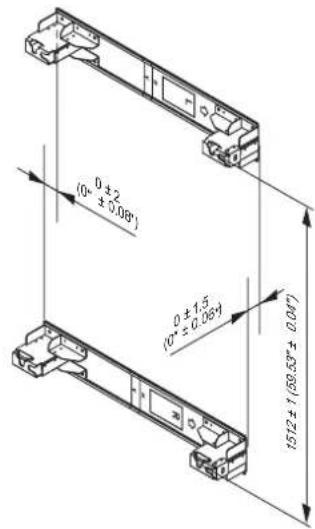
Plasma display external dimensions
Matsushita Electric Industrial Co., Ltd.
Web Site: http://panasonic.net/
- PRECAUTIONS WITH REGARD TO SETTING UP
- WARNING
- CAUTION
- REQUESTS REGARDING HANDLING
- TY-WK103PV9 WALL-HANGING BRACKET (VERTICAL MOUNTING TYPE)
- POINTS TO NOTE DURING INSTALLATION
- CONFIRM THE STRENGTH OF THE INSTALLATION LOCATION
- INSTALL THE WALL-HANGING BRACKET TO THE WALL
- NOTE
- PREPARE THE PLASMA DISPLAY
- INSTALL THE DISPLAY TO THE WALL-HANGING BRACKET
- INSTALLATION PROCEDURE
- SECURING THE DISPLAY
- REMOVING THE DISPLAY
- ATTENTION
- INSTALLATION AND SERVICE
- TY-WK103PV9 WALL-MOUNTING BRACKET (FOR VERTICAL MOUNTING)
- IMPORTANT PRECAUTIONS TO CONSIDER DURING INSTALLATION
- EXTERNAL DIMENSIONS DRAWING
- UNIT: MM
- WALL-HANGING BRACKET (VERTICAL MOUNTING TYPE)
- VERTICAL INSTALLATION
- MOUNTING TOLERANCE
- MATSUSHITA ELECTRIC INDUSTRIAL CO., LTD
Brand : PANASONIC
Model : TYWK103PV9
Category : Television