Empire - Turntable GPO - Free user manual and instructions
Find the device manual for free Empire GPO in PDF.



User questions about Empire GPO
0 question about this device. Answer the ones you know or ask your own.
Ask a new question about this device
Download the instructions for your Turntable in PDF format for free! Find your manual Empire - GPO and take your electronic device back in hand. On this page are published all the documents necessary for the use of your device. Empire by GPO.
USER MANUAL Empire GPO
IMPORTANT SAFETY INSTRUCTIONS FOR AUDIO PRODUCTS
When using electrical products, basic precautions should always be followed including:
-
Read Instructions - All the safety and operating instructions should be read before the product is operated.
-
Retain Instructions - The safety and operating instructions should be retained for future reference.
-
Heed Instructions - All warnings on the product and in the operating instructions should be adhered to
-
Follow Instructions - All operating and user instructions should be followed.
-
Cleaning - Unplug this product from the wall outlet before cleaning. Do not use liquid cleaners or aerosol cleaners. Use a damp cloth for cleaning.
-
Attachments - Do not use attachments not recommended by the product manufacturer as they may cause hazards.
-
Water and Moisture - Do not use this product near water-for example, near a bath tub, wash bowl, kitchen sink, or laundry tub, in a wet basement, or near a swimming pool, etc.
-
Accessories - Do not place this product on an unstable surface. The product may fall, causing serious injury to a child or adult and serious damage to the product.
-
Transporting - This product should be moved with care to avoid damage or injury.
-
Ventilation - Slots and openings in the cabinet are provided for ventilation, to ensure reliable operation of the product and to protect it from overheating. These openings must not be blocked or covered. The openings should never be blocked by placing the product on a bed, sofa, rug, or similar surface. This product should not be placed in a built-in installation such as a bookcase or rack unless proper ventilation is provided or the manufacturer's instructions have been adhered to.
- Power Sources - This product should be operated only from the type of power source indicated on the marking label. If you are not sure of the type of power supply to your home, consult your product dealer or local power company. For products intended to operate from battery power, or other sources, refer to the operation instructions.
- Power - Cord Protection - Power-supply cords should be routed so that they are not likely to be trapped in any way.
- Lightning - For added protection for this product during a lightning storm, or when it is left unattended and unused for long periods of time, unplug it from the wall outlet and disconnect the antenna or cable system. This will prevent damage to the product due to lightning and power-line surges.
-
Power Lines - An outside antenna system should not be located in the vicinity of overhead power lines or other electric light or power circuits, or where it can fall into such power lines or circuits. When installing an outside antenna system, extreme care should be taken to keep from touching such power lines or circuits as contact with them might be fatal.
-
Overloading - Do not overload wall outlets, extension cords, or integral convenience receptacles as this can result in a risk of fire or electric shock.
- Object and Liquid Entry - Never push objects of any kind into this product through openings as they may touch dangerous voltage points or short-out parts that could result in a fire or electric shock. The apparatus shall not be exposed to dripping or splashing, and on object filled with liquids such as a vase of flower, shall be placed on the apparatus.
- Technical support – for any technical questions, please contact Protelx Ltd on 0845 521 4095. If you require a refund or replacement, please contact the retailer that you purchased the unit from. Providing your product is within it's warranty period, a replacement will be sent out to you, providing that this is a product fault and not user error.
- Heat - The product should be situated away from heat sources such as radiators, heat registers, stoves or other products (including amplifiers) that produce heat.
PRECAUTIONS
Safety Information-caution:
- In order to shut off the power of this product completely, unplug the power cord from the wall outlet. Be sure to unplug the unit if you do not intend to use it for an extended period of time, such as on a vacation.
- Use of controls, adjustments and performance of procedures other than those specified herein may result in hazardous radiation exposure.
- To prevent electric shock, match wide blade of plug to wide slot, fully insert.
- If this product develops trouble, contact qualified service centers, and do not use the product in defective states.


SAFETY PRECAUTIONS
WARNING:
To reduce the risk of fire or electric shock, do not expose this appliance to rain or moisture.
CAUTION:
Use of controls or adjustments or performance of procedures other than those specified may result in hazardous radiation exposures.
CAUTION
RISK OF ELECTRIC SHOCKS -DO NOT OPEN!
To reduce the risk of electric shock, do not remove cover or back.
No user serviceable parts inside. Refer servicing to qualified service personnel.
The light flash with arrowhead symbol, within an equilateral triangle, is intended to alert user to the presence of non-insulated "dangerous voltage" within the product's enclosure that may be of sufficient magnitude to constitute risk of electric shock to persons.
The exclamation point within an equilateral triangle is intended to alert user to the presence of important operating and maintenance (servicing) instructions in the literature accompanying the appliance.
(See markings on the back of the unit.)
SAFETY CAUTION:
The normal function of the product may be disturbed by strong Electro-Magnetic Interference.
If so, simply reset the product to resume normal operation by following the instruction manual.
In case the function could not resume, please use the product in other location.


BEFORE USE
- Choose unit installation location carefully. Avoid placing it in direct sunlight or close to a source of heat. Also avoid locations subject to vibrations and excessive dust, cold or moisture. Keep away from sources that hum, such as transformers or motors.
- Do not open the cabinet as this might result in damage to the circuitry or electrical shock, if a foreign object should get into the set, contact your dealer.
- Be sure not to handle record with dirty fingers. Never play a record that has a crack on the surface.
- When removing the power plug from the wall outlet, always pull directly on the plug, never pull the cord.
- To protect the stylus, don't forget to put on the white protective needle cover after use.
- Do not attempt to clean the unit with chemical solvents as this might damage the finish. Use a clean, dry cloth.
- In order to shut off the power to this product completely, unplug the power cord from the wall outlet. Be sure to unplug the unit if you do not intend to use it for an extended period of time, such as a vacation.
- Keep this manual in a safe place for future reference.
HOW TO REPLACE THE TURNTABLE STYLUS (NEEDLE)
Removing old stylus
- Set a screwdriver at the tip of the stylus and push down in the direction "A".
- Remove the stylus by pulling it forward and down.
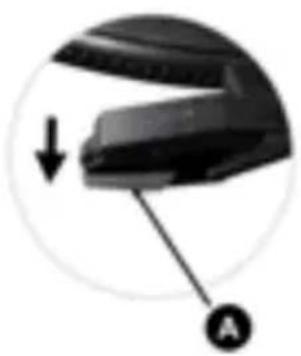
Installing a new stylus
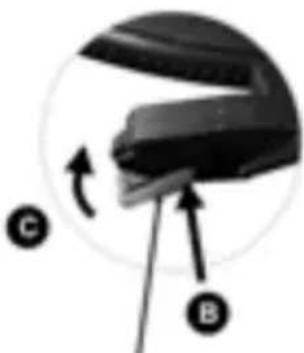
- Hold the tip of the stylus and insert the other edge by pressing in the direction "B".
- Push up in the direction "C" until it locks at the tip.
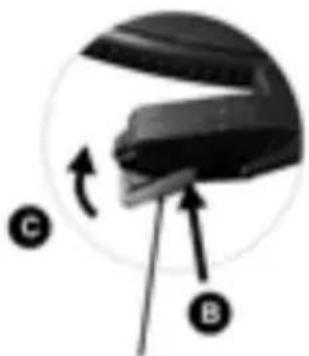
Guide Fines (inside)
LAYOUTS
- Stereo led indicator
- Power led indicator
- Power/volume knob
- Function selector knob
- Dial knob
- Dial scale
- Turntable shaft
- Turntable platter
9.45Rpm adaptor - Lift lever
- Tone arm rest and lock
- Speed selector
- Auto stop on/off switch
- Stylus
- Tone arm
- Ac power cord
- Internal speaker on/off switch
- Fm pigtail antenna
- External speaker jack
- Rca line out jack
21 Line-in jack - Earphone jack

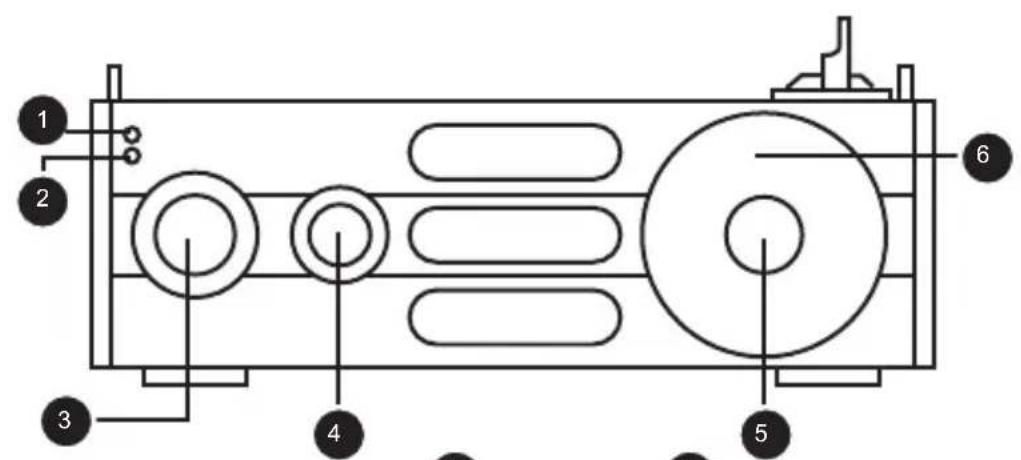
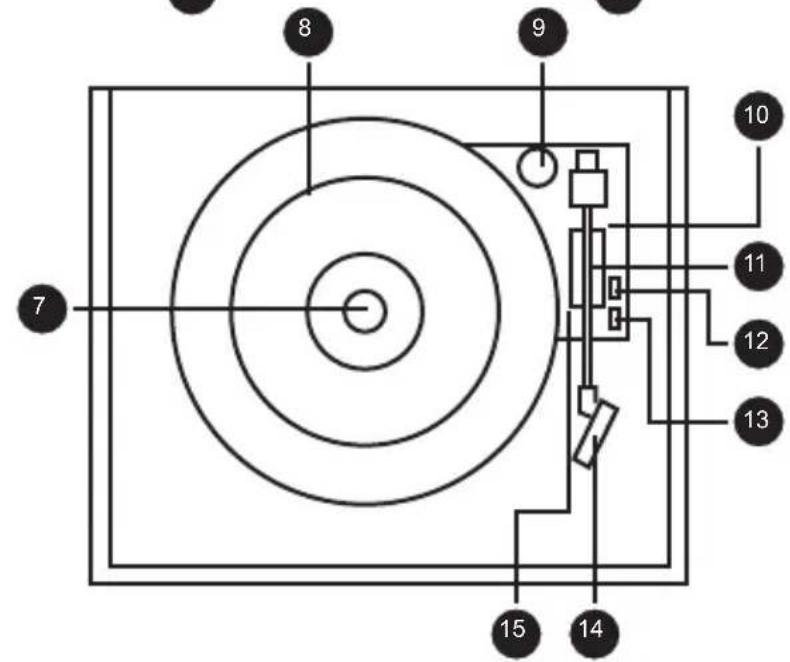
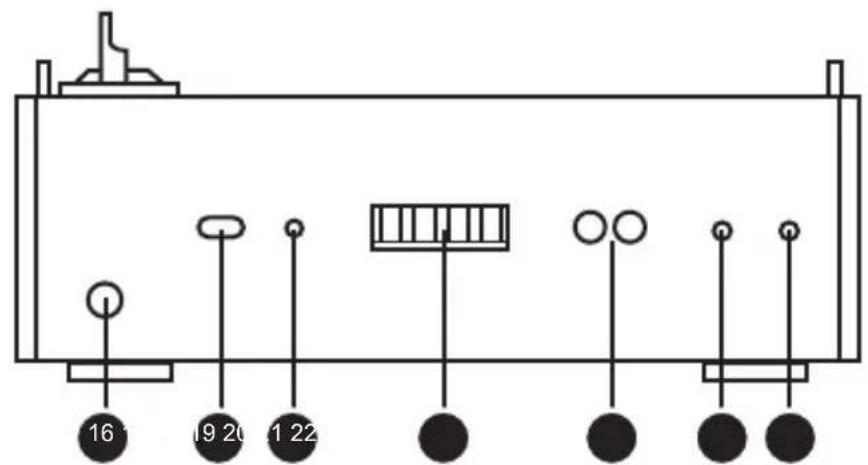
PARTI:MAINFUNCTION
Connect the AC plug to the household outlet.
RADIO FUNCTION
- Rotate the POWER/VOLUME knob clockwise until hear a "click" sound to turn on the unit. The Power led light indicator will lights up in Red color.
- Select the AM or FM frequency by turning the FUNCTION SELECTOR KNOB. The dial led light will lights up.
- Select your desire radio station by tuning the DIAL KNOB.
- Turn the POWER/VOLUME knob to adjust the volume level.
Remark: For better FM reception, extends the pigtail FM antenna
PHONOGRAPH FUNCTION
- Rotate the POWER/VOLUME knob clockwise until hear a "click" sound to turn on the unit.
- Select Phono by turning the FUNCTION SELECTOR KNOB
- Put a record on the turntable. Remember to use the speed selector to find the right speed setting for your record.
- Remove the white plastic needle cover. Keep the needle cover in a safe and accessible place for future use.
- Release the tone arm by unlock the tone arm lock.
- Lift the tone arm by pushing back the lift lever backward.
- Gentle moves the tone arm toward the turntable. Then, push forward the lift lever, the tone arm will gently descend onto the record and start playback.
- To pause or stop playing, you need to lift and move the tone arm back to the tone arm rest manually.
NOTE:
You're strongly recommended to play records with transparent dust cover closed. Also, please don't place anything on top of dust cover especially playing a record.
LINE OUT
- Connect the RCA line out jacks to auxiliary input sockets of your home amplifier device. Make sure to match the socket colors with the jack colors.
- Connect the unit's power cord to the household outlet. Also, power on your amplifier device and adjust its volume level.
LINE IN
- Rotate the POWER/VOLUME knob clockwise until hear a "click" sound to turn on the unit.
- Select LINE IN by turning the FUNCTION SELECTOR KNOB.
- Connect the RCA line out jacks to auxiliary input sockets of your home amplifier device. Make sure to match the socket colors with the jack colors.
EARPHONE JACK
To listen music from earphone/headphone, connect your earphone/ headphone into the earphone jack.
EXTERNAL SPEAKER JACK
To play with external speakers, connect the external speaker wires to the external speaker jack, which locate at the back of the unit
INTERNAL SPEAKER ON/OFF SWITCH
To select playback from internal speaker, slide the switch to "On" position.
WARNING! RISK OF HEARING DAMAGE
- Set a low volume on the playback device before you connect the headphones to the sound source.
- Avoid excessive volumes, particularly over extended periods or in the case of frequent use. Excessive volume can result in permanent hearing damage.
RE-MARK:
ERP2 mode: When the unit does not receive any Audio signal from Phono and Line-in in around 10 minutes, the unit will automatically enter standby mode. In order to re-activate the unit, please turn off the unit and turn on again to resume normal operation.
| PROBLEM CAUSE SOLUTION | ||
| THE WHOLE UNIT | ||
| Power does not come on when the unit is switch on. | Unit is unplugged. | Connect the unit to the AC power supply. |
| No sound comes out of the speakers. | The volume is turned down (to MIN). | Adjust the volume. |
| The input selector does not match the playback source. | Re-select the desired input source. | |
| The sound is noisy. | The unit is too close to a TV set or another similar appliance. | Turn off the TV or other appliance, and relocate the unit. |
| The unit has no response. | External factors such as ESD (Electro-stat-ic discharge) affect the unit. | Remove the power cord and all power supply device, then re Plug in the unit after one minute. |
| PHONO PLAYER | ||
| The sound is noisy when playing the record. | The stylus is not placed in the middle center. | Place the stylus in the middle center. |
| The sound is noisy when used for a period of time. | The stylus is damaged. | Please change a new stylus. |

If you have tried our trouble shooting points and you are still having problems, please contact Protlex Ltd on the customer service line: 0845 521 4095


SPECIFICATION
RADIO section
AM band frequency 520-1620 KHz
FM band frequency 87.5-108 MHz
AMPLIFIER section
Output Power 0.8W + 0.8W
Frequency Response 50 TO 20,000 Hz (+3, -2dB)
PHONOGRAPH section
Motor DC servo motor
Drive system Belt drive
Speeds 33-1/3 rpm, 45 rpm and 78 rpm
Wow & Flutter Less than 0.35% (WTD)
S/N ratio More than 35 dB
Cartridge type Ceramic stereo cartridge
Stylus
Output level 130mV (± 50mV1kHz - 10dB)
SPEAKER SYSTEM section
Type
Impedance
Input Power Max.3W
TL3034
1-way
8ohm
GENERAL
Power requirements AC 230 50Hz
Power consumption 9W
Dimensions (WxHxD) 316 x285 x150 mm
Weight 2.55kg (approx.)
Standard accessories Instruction Manual 45 RPM Adaptor
- As a result of continual improvements, design, specification and manual are subject to change without prior notice.



VOORZORGSGMAATREGELEN:
Guide Points (Inside)
ESQUEMAS
Hereby ProtelX, declares that this equipment (GPO Empire) is in compliance with the essential requirements and other relevant provisions of Directive, you can access a copy of this certificate on www.gporetro.com/Certificate-of-Conformity
DE
ProTelX Ltd, Unit 6, Park 17 Industrial Estate, Moss Lane,
Whitefield, Manchester, M45 8FJ UK