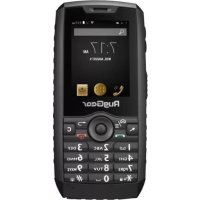
RG160 - Smartphone RugGear - Free user manual and instructions
Find the device manual for free RG160 RugGear in PDF.



| Product Type | Rugged smartphone |
| Brand | RugGear |
| Model | RG160 |
| Dimensions | Approximately 150 x 80 x 20 mm (estimated) |
| Weight | Approximately 250 g (estimated) |
| Display | Not specified (physical keyboard with cursor) |
| Power | Removable lithium-ion battery, charging via micro USB |
| First charge | 12 hours recommended |
| SIM cards | Standard dual SIM |
| External storage | MicroSD up to 32 GB |
| Connectivity | Micro USB, 3.5mm headphone jack |
| Keyboard | Physical keys, navigation, PTT, volume |
| Special functions | PTT button, mouse cursor activation/deactivation, keypad lock via * key |
| Operating temperature | -10°C to +55°C |
| SAR (head) | 0.85 W/kg |
| SAR (body) | 1.42 W/kg |
| Waterproofing | Resistant to water and dust (sealed cover and ports) |
| Warranty | See www.ruggear.com/warranty-terms/ |
Frequently Asked Questions - RG160 RugGear
User questions about RG160 RugGear
0 question about this device. Answer the ones you know or ask your own.
Ask a new question about this device
Download the instructions for your Smartphone in PDF format for free! Find your manual RG160 - RugGear and take your electronic device back in hand. On this page are published all the documents necessary for the use of your device. RG160 by RugGear.
USER MANUAL RG160 RugGear
Unit 1301, 13/F., Wing Tuck
Commercial Centre
Hong Kong
www.RugGear.com
OVERVIEW
USB CHARGING

1
2
RugGear®
EN
English
Thank you for your purchase of our popular RG160 essential rugged phone. This user manual is based on all the phone default settings.
Uploading, downloading or synchronizing will be charged by SIM provider.
1. Safety information
- Do not use your phone in the gas station or near fuel or chemicals.
- Do not use a damaged power cable, charger or sockets.
Do not touch the powercable to remove the charger. - Do not pull the cable to remove the charger.
Use only the charger supplied with the product. - Do not use a battery that is leaking or damaged.
The detailed safety instructions and manuals can be found under www.ruggear.com/support.
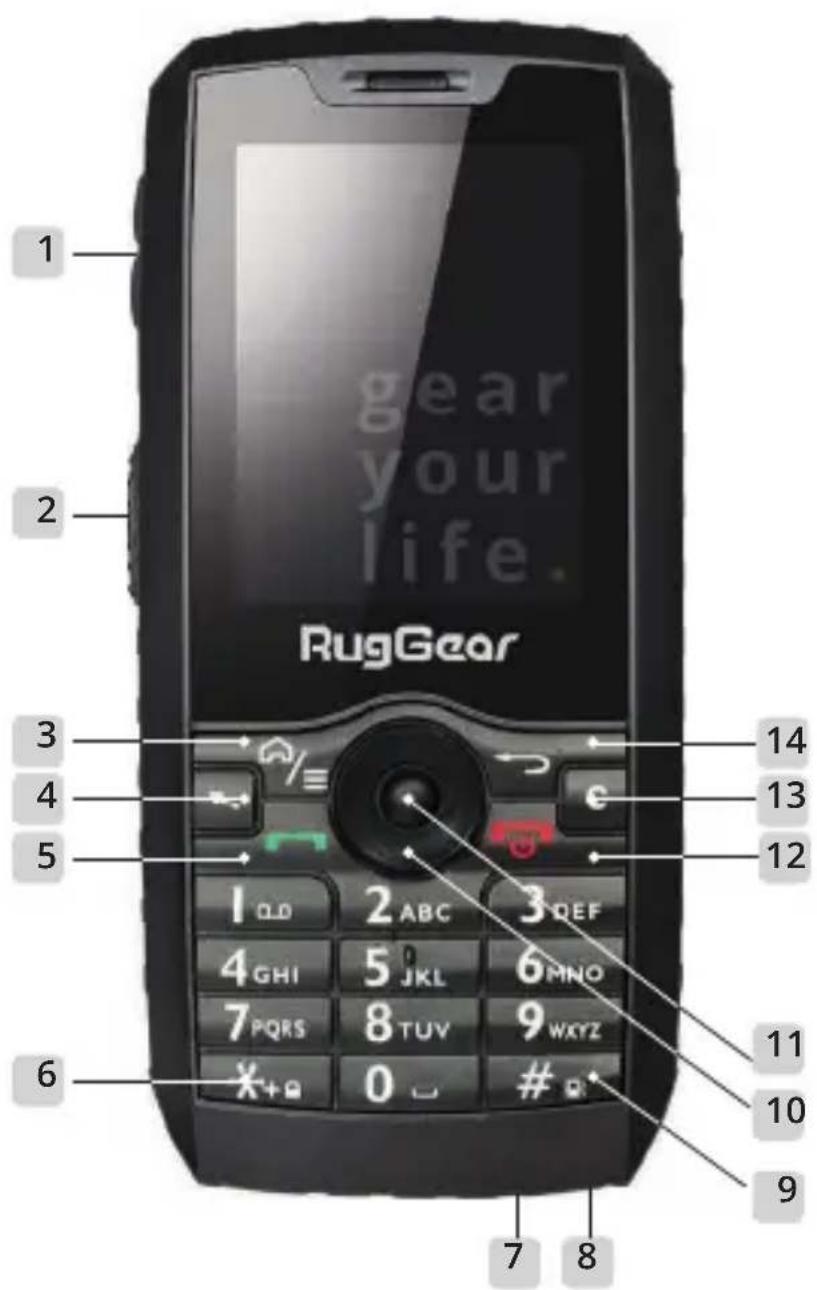
2. Keys and special features
- Volume key Volume up/down.
- PTT key or custom key Use it to set up a shortcut for an app and as Push-To-Talk key.
-
Menu/Home key Briefly press to open the application menu or to start the phone. Press and hold to go back to the standby interface.
-
Mouse cursor Press it briefly to move the mouse pointer.
- Answer key Use it to place a call and answer the phone.
- Star key To activate and deactivate the key lock.
- Micro USB For charging and to connect to external USB devices.
- Earphone jack To connect an earphone with 3,5 mm jack.
-
key Long press to set the device to silent mode.
- Navigation key Use it to move the cursor around the screen.
- OK To confirm the chosen window.
- On/Off power key Long press to power ON/OFF the device. To terminate a call and direct return to the home screen.
- Delete key Use to move characters entered in a field.
- Back key Use it to return to the submenu.
3. Installation of SIM/microSD card
The device is designed to fit two standard SIM cards and one microSD card.
3.1. Unfasten the screws on the battery cover and lift it carefully to open the compartment.
3.2. Insert the microSD card and the SIM cards into the corresponding slots. The device supports up to 32Gb with a memory card.
4. Installing an uninstalling the battery
4.1. Turn off the phone.
4.2. Unfasten the battery screws on the battery cover and lift it carefully to open the compartment.
4.3. Insert the phone battery, aligning the contacts on the until with the connectors inside the compartment.
4.4. Then, place the battery cover and press it down carefully until it locks into place.
4.5. Fasten the screws on the battery cover.
Note
Make sure the battery cover, cover screws, earphone and USB plugs are firmly fastened to prevent water and dust from entering the phone.
- Do not remove the USB cable while copying fi les on USB mode. Exit the USB mode fi rst and then remove the USB cable to prevent losing data.
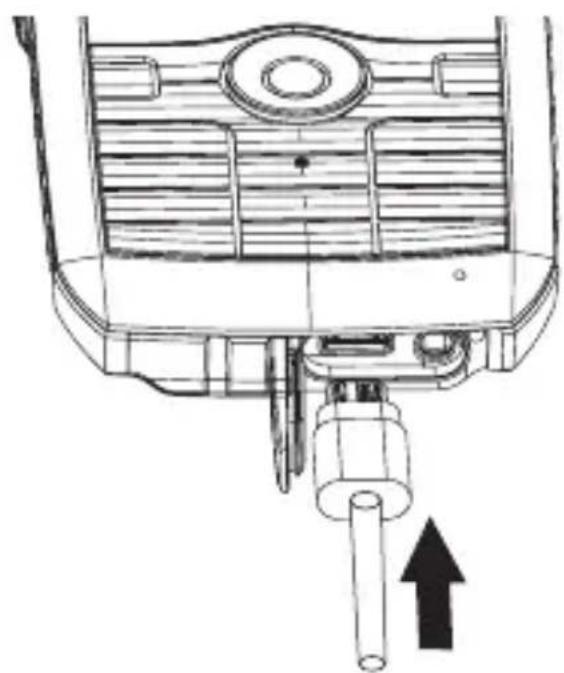
5. Charging your phone
5.1. Open the rubber plug on the bottom of the phone.
5.2. Connect the USB cable into the USB port on your phone.
5.3. You must fully charge your phone for 12 hours prior to using it for the first time.
6. Caution
It is recommended to use the type of battery specified by the manufacturer. The use of a different type may cause the battery to explode.
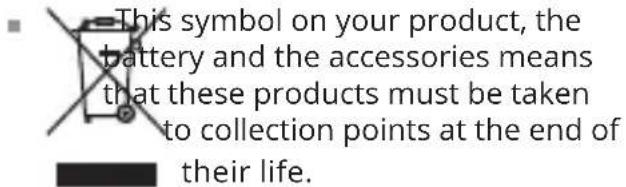
- Dispose of used batteries at directed place.
The normal operating temperature of your phone is -10°C to +55°C.
- Do not use the phone at temperatures outside the range specified.
This device contains magnets that may interfere with medical devices and equipment.
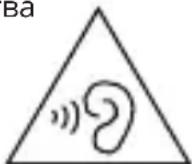
To avoid hearing impairments, you should not increase the volume and only use the device with very high volume for a restricted time.
EN
Note
- Adapter shall be installed near the equipment and shall be easily accessible.
The product shall only be connected to a USB interface of version USB2.0.
Use careful with the earphone maybe possible excessive sound pressure from earphones and headphones can cause hearing loss.
Caution:
Risk of explosion if battery is replaced by an incorrect type. Dispose used batteries according to the instructions.
| Frequency bands | Maximum output power |
| GSM 900 | 34dBm |
| DCS 1800 | 30dBm |
| WCDMA 900 | 24dBm |
| WCDMA 2100 | 23dBm |
| WiFi | 18dBm |
| BT | 8dBm |
7. Information concerning SAR certification (Specific Absorption Rate) CE SAR
The SAR limit of Europe is 2.0W / kg . The device has also been tested against this SAR limit. The highest SAR value reported under this standard during product certification for use at the ear is 0.85W / kg and when properly worn on the body is 1.42W / kg . This device was tested for typical body-worn operations with the back of the handset kept 5mm from the body. The device complies with RF specifications when the device used at 5mm from your body. The use of belt clips, holsters and similar
accessories should not contain metallic components in its assembly. The use of accessories that do not satisfy these requirements may not comply with RF exposure requirements, and should be avoided.
8. FCC/IC information
This device complies with Part 15 of the FCC Rules and with Industry Canada licence-exempt RSS standard(s). Operation is subject to the following two conditions: (1) this device may not cause harmful interference, and (2) this device must accept any interference received, including interference that may cause undesired operation.
Changes or modifications made to this equipment not expressly approved by RugGear Ltd. may void the FCC authorization to operate this equipment.
This equipment has been tested and found to comply with the limits for a Class B digital device, pursuant to Part 15 of the FCC Rules. These limits are designed to provide reasonable protection against harmful interference in a residential installation. This equipment generates, uses and can radiate radio frequency energy and, if not installed and used in accordance with the instructions, may cause harmful interference to radio communications. However, there is no guarantee that interference will not occur in a particular installation. If this equipment does cause harmful interference to radio or television reception, which can be determined by turning the equipment off and on, the user is encouraged to try to correct the interference by one or more of the
following measures:
- Reorient or relocate the receiving antenna.
- Increase the separation between the equipment and receiver.
- Connect the equipment into an outlet on a circuit different from that to which the receiver is connected.
- Consult the dealer or an experienced radio/TV technician for help.
Specific Absorption Rate (SAR) information:
This Mobile Phone meets the government's requirements for exposure to radio waves. The guidelines are based on standards that were developed by independent scientific organizations through periodic and thorough evaluation of scientific studies. The standards include a substantial safety margin designed to assure the safety of all persons regardless of age or health.
FCC/ISED RF Exposure Information and Statement:
The SAR limit of FCC (ISED) is 1.6W / kg averaged over one gram of tissue. Device types: One Glass (FCC ID: ZLE-RG160) has also been tested against this SAR limit. The highest SAR value reported under this standard during product certification for use at the ear is 0.97W / kg and when properly worn on the body is 1.36W / kg . This device was tested for typical body-worn operations with the back of the handset kept 10mm from the body. To maintain compliance with FCC RF exposure requirements, use accessories that maintain a 10mm separation distance between the user's body and the back of the handset. The use of belt clips, holsters and similar accessories should not contain metallic components in its assembly. The use of accessories that do not satisfy these requirements may not comply with FCC RF exposure requirements, and should be avoided.
9. EU-Declaration of Conformity
The EU-declaration of conformity can be found on the homepage at www.ruggear.com
10. Reservation
All rights reserved. Misprints, errors and modifications excepted.
11. Warranty
- For European customers please check: https://ruggear.com/warranty-terms/
For Customers in the Americas please check: https://ruggear.com/terms-and-conditions-americas/
- For FCC information, please go to www.RugGear.com and find it under the "Support" section.
EN
Deutsch
For European customers please check: https://
ruggear.com/warranty-terms/
For Customers in Americas please check: https://
ruggear.com/terms-and-conditions-americas/
ruggear.com/warranty-terms/
For kunder i Amerika kan du tjekke: https://ruggear.
com/terms-and-conditions-americas/
For FCC-oplysninger kan du gà til www.RugGear.
com og finde den under "Support" sektionen.
DA
Français
Ioppo6hble nHctpyKuN no 6e3oNaChOCTn INHcTpyKuN NO 3KcPnyatauM MoXHO HaHTN B pa3dene www.ruggear.com/support 3aRpy3KN.
2. Khonkn n cneuaNbHbIe yHKcNn
- PerylaTOp rpomKocTn rPOMKOCTb BBePx / BHn3.
- KnaBnua PTT / Klnou KIneHt a MoxketncnoJIb3OBAtbcra IJa npUloXeHn npUloXeHnIa KaK KOnka PTT.
- Khonka MeHIO / Doma KopotKoe HaxaTne dny OTKpbITnMa MeHIO npInOKeHHN nn dny 3anycka
TelefoHa.ДиTeIbHoe HaxaTne IЯ BO3BpaTa B TnaBHOe MeHo.
- Khonka Mblu BkHouaet n OTKHouaET Kypcop MbIuN.
- Khonka OTBeta 4To6bl yCTaHOBnTB coeHHeHne N OTBetNTb Ha 3BOHOK.
- KhoNka «3Be3da» BkIIOueHne n OTKIoUeHne 6IOKIpOBKn KlaBnaTypbl.
- Micro USB Дя зараздки И подючени К Вөшнүм USВ-устрочтбам.
- Pa3bemДЯ HayuHnKOB IЯ NOdkNoueHn pa3bema 3,5 MM.
-
Khonka HaxMnte n ydepxnBaITe, uTo6bI OTKJIIOuHTb yCTpOietBO.
- KlaBnHa Habnraun Nepemueaet Kypcop Ha 3KpaH.
- NpTBePKeHne NcNoJIb3yeTcra IaI npTBePKeHnBbIbpaHHoro OKHa.
- Khonka nHTaHnA DInTeJIbHoe HaKaTne dIy BKNIOueHnA / BBIKIOueHnA TeJefoHa.3aBepuNTe TReEfoHHbIE 3BOHKN IN BepHNTecb Ha rJaABhbl NkpaH.
- Khonka ydaileHnЯ ydaileHnЯ He npaBnIbHo BBeDeHHbIX CnMBOJOB.
- Khonka «Ha3aД» Ha3aД K npeDbIyUeMy ekpaHy.
3. YcTaHOBka SIM-KapTbI / KapTbI naMaTn microSD
YcIpoiCTBO npEHa3NaueHo IJIyX CTaHApTHbIX SIM-kaPTn OJHOJ KApTbIMicroSD.
3.1. OTBepHnTe BnHTbI KpePJIeHnKpbIuKN aKKymJrTopa n aKKypaTHo NOpHMnTe ee, yTo6bl OTKpbITb OTceK.
3.2.YcTaHOBnTe KapTu nAmrTu microSD u SIM-KapTbI B COOTBeTCTByUOuNe pa3bEmbl. UcToPiCTBO noDaePknBaet KApTbI microSD o6bemom do 32 T6.
4. YctaHOBka n ChrTne aKKymyIaTopa
4.1. BbIKIOHTeTeIeOH.
4.2. OTBepHnTe BnHTbI KpePnEHHa KpbIuKn
RU
aKKymyIaTopa N aKKypaTHo NOdHmnte ee, UTo6bl OTkpblbOTcK.
4.3. YcTaHOBnTe aKKymyIaTOp TelefoHa, CoBMeCTnB KOHTaKTbI aKKymyIaTopa C KOHTaKTaMn pa3beMa OTceKa.
4.4. 3aTeM yCTaHOBnTe Ha MeCTO KpbIuKy aKKMyJIrTopa N aKKypaTHo HaxMtTe Ha Hee, 4TO6bI 3aKpeNITb Ha MeCTe.
4.5. 3aTaNHTe BnHTbI KpbIuKn aKKyMylrTopa.
Приимechие
y6eHntecb, yTO KpbIuKa aKKymJlTopa, BnHTbIKpbIuKn, 3aIlyuKn pa3beMa HayuHnKOB n pa3beMaUSB HadexHo 3akpenHebl, uTo6bl npedOTbpaTNTbnonadaHne BlaRn NblIN BHyTpB TelefoHa.
3aPpeaaetcHnMaTbKa6eBUSBBOBpeM KOnnpoBaHnaΦaIIOB BpeKIme USB.ChaQana BbIaNTe n3peXnMa USB,a 3aTe m ChnMnte Ka6eBb USB,HTo6bl npedotBpaTtB noTepO daHHbx.
5.Заряда телега
5.1. OtkpoTe pe3nHOByIO npo6ky B HnxHne Yactn TelefoHa.
5.2.YcTaHOBnTe Ka6eIb USB B pa3bEm USB TelefoHa.
5.3.пердпервимИспользованем Teleфон Heo6xOДМО ПОПHOCТБIO 3apdntbВ TeueHne 12 yacob.
6. BhIMaHne
PekomeHnyetcNcNoIb3OBAb aKKymyJrTOJIbKO ToI MapKn, KOTopa yKa3aHaU3rOToBnTeJeM. NcNoIb3ObaHne aKKymyJrToPaApyrOro Tnna MoKeT npNBecTn K erO B3pbBy.
YtunnaaKkyMylTopaOcyIeCTBnEeTCB CneuaNbHbIX MeCTax.
-Дианазон pa6очnx Temператур Teleфona: ot -10do +55^
3anpeaetcncnojb30BaTb TelefoH npn TemnepaTypax, BbIXOJaXx 3a npedeJIyKa3aHHOro dnaNa3OHa.
B coctab daHHoro yCTpoiCTBa BXoJrMaHnHTbI, KOtOpblc MOryT BnraTb Ha pa6OTu MeuNCHcknx yCTpoiCTB n 6OpydoBaHn.
YTo6bI He TpaBMnpoBaTb opraHbI clyxa, Heo6xOaIMO OrpaHnUHTb rPOMKOCTb N BKJIIOuAtb YcTPOJCTBO Ha NoIHyTO rPOMKOCTb TOJIbKO B TeueHne OrpaHnUeHHoro BpeMeHN.
-Даннай пiktогамma Ha Teleфоhe 03начаet,чTo aKKymлгтОпинадлжнoctи посе 3aВершени срoka ekCnIyatauIN Heo6xOДIMO nIN3npoBaTb B CneцальHBix MeCTax.
Приимechanicals
- UcTaHOBnTe aDAnTeP B6Iu3n ycTpoNCTBa B DoCTyHOM MecTe. NOpKJIouaNe Te TeneoH ToIbKO K nHTeppeCy USB 2.0. Bo BpeMa NOkLIOueHnna HayuHNKOB y6eINTEcb, YTO
ypoBeHb 3Byka He ycTaHOBHeN CInuKOM BbICOKO, UTo6bl He nobpeiNbOpraHbI cnyxa.
7. Информацnia o ceptификачи SAR (Specific Absorption Rate - Ydeьнь уровень полошени)
MaKcImaJIbHbIe 3HaueHnra SAR 3Toi MoJeN I yCIOBnA, B KOTOpbIX OH 6bln OnpedeJeH: SAR (y roJIOBbl) 0.85 BT/kr SAR (HOseHne Ha TeNe) 1.42 BT/kr
8.Инфорmaцяо Tpe6oBaHnIx ΦeapedaIbHoN KOMnCCn CBa3N (FCC)/ npomblJeHHbIX cTaHdapTOB KaHaDbI (IC)
Hactoue yctpoCTBO COOTBeTCTBye Tpe6ObaHnM
Yactn 15 PpaBnI ΦedepaJbHOJ KOMnCCnCBr3N
(FCC) n cTaHdapTOB IuIeH3nPoBaHn YpOBHei
PpHnHaemoro CunHaJa (RSS), npImeHReMbIX B
PpOMblJeHHocT KaHaDbI.
3KcnpnyataaIyDonyckaetcB CneIyOuix yCNOBnX: (1) daHHOe ycTpoNCTBO He RAJIeTc npUHHo HOnachbIX NOMex, n (2) daHHOe ycTPOCTBO He HaxODNTc NOB03dEINCTBnEM NOMEX, BKIOUaY IOMExn, KOtOpBIE MOrTy 6bITb npUHHo HEnpaBnIbHO pa6Obl.
ImMeHeHn IIn MoNphiKaun BHeceHHbIe B KOHCTpyKcNIO O6OpyDoBaHN 6e3 npMOro pa3peWeHn KOMnAHn RugGear Ltd. MOryt npNBecTN K OT3bIBy cepTnphiKATA FCC c pa3peWeHnEM Ha 3KcNpLyatauNo daHHoro 6OpyDoBaHN.
9.Дeкларачи coOTbETCTBnE EC
Декларацию coOTBeTCTBnЯ EC можно haHTn Ha nepBoi CTpaHnue Be6-caIta www.ruggear.com

10. OroBopka
Bce npaba 3aunuhebI. OneayTK, oun6kn n I3MeHeHn NCKJIouYeHbI.
11. rapaHTnA
www.ruggear.com/support 下载。
2.按键和特殊功能
. www.ruggear.com/support
aai 2
Jai/1 1
JJIJIJIJIJIJIJIJIJIJIJIJIJIJIJIJIJIJIJIJIJIJIJIJIJIJIJIJIJIJIJIJIJIJIJIJIJIJIJIJIJIJIJIJIJIJIJIJIJIJIJIJIJIJIJIJIJIJIJIJIJIJIJIJIJIJIJIJIJIJIJIJIJIJIJIJIJIJIJIJIJIJIJIJIJIJIJIJIJIJIJIJIJIJIJIJIJIJIJIJIJ
.PTT
aaii 3
aill lll 12 gall alg b jai bai aill cui
i
glal gagj 4
aallll 5
.6
USB USB 7
3.5 8
j#
aaiie 10
.11
J 12
J 13
.14
SIM/microSD .3
. microSD 1
3.1
aIball Sim microSD 3.2 32 32
4
.4.1
4.2
4.3
4.4
aillso
4.5
边
1 1
USB
.USB 1
USB USB
sta 5
.5.1
USB USB 5.2
alil 12 15 5.3
.04
.6
i 1
a
-10 1
+55
aill 1
y
Cull
g j 1000
gss
220 = 112
i 1
sloy 1
a


ab = 12
gJy jLgall Jyjll gall
USB jay sila Jgog yag yag
Ig yall gssnnn piaa n a Sli
Jclaw sgsie ayl lgl
Sawlaol wll Caleaw
SAR 8gagaaagaa.7 (Jaua Juaa)
jlll lgl 122all jao yj 122 122 122 122 122 122 122 122 122 122 122 122 122 122 122 122 122 122 122 122 122 122 122 122 122 12
https://ruggear.com/warranty-terms
:i 1
https://ruggear.com/terms-and-conditions-americas
www.RugGear.com FCC
a4 = a1 + 3 = 4
EU Declaration of Conformity for
Radio Equipment Directive (RED) 2014/53/EU
Power Idea Technology (Shenzhen) Co., Ltd. hereby, declare that the essential
requirements set out in the Radio Equipment Directive (RfD) 2014/53/FU have been fully fulfilled on our product with indication below:
Product Name: WCDMA Digital Mobile Phone
Model / Brand Name: RG160, RG400 / RugGcar
- Adapter
Manufacturer: SHENZHEN HUNTKEY ELECTRIC CO., LTD.
Model No:HKC0055010-3D
Input: 100 - 240V ,50 / 60Hz,0.2A
Output: 5.0Vdc, 1A
- Adapter
Manufacturer: SHENZHEN RUIDE ELECTRONIC INDUSTRIAL CO.,LTD
Model No : RD0501000-USBA-18OG
Input: 100-240V-, 50/6011z, 0.25A
Output: 5.0Vdc, 1A
Battery Mode:BI360CI
Manufacturer : Power Idea Technology (Shenzhen) Co., Ltd.
Output: DC 3.7V - 1800mAh
Hardware version: V1.3
Software version: RG160_Oversea_B_C0_V02_20170614
USB: Shenzhen Dechangsheng Electronic Technology Co., Ltd.
Micro 5PIN/1M
Earphone: Shenzhen Dechangsheng Electronic Technology Co., Ltd/ RG160
The following standards have been applied for the investigation of compliance:
Draft ETSI EN 301489-1 V2.2.0 (2017-03)
Draft ETSI EN 301 489-17 V3.2.0 (2017-03)
Draft ETSI EN 301 489-19 V2.1.0 (2017-03)
Draft ETSI EN 301 489-52 V1.1.0 (2016-11)
Final draft ETSI EN 303 345 V1.1.7 (2017-03)
Final draft ETSI EN 301 489-3 V2.1.1 (2017-03)
ETSI EN 300 328 V2.1.1 (2016-11)
ETSI EN 303 413 V1.1.1 (2017-06)
ETSI EN 301 511 V12.5.1 (2017-03)
ETSIEN301908-1V11.1.1(2016-07)
ETSI EN 301 908-2 V11.1.1 (2016-07)
EN 60950-1:2006+A11:2009+A1:2010+A12:2011+A2 2013
EN 50360:2001+A1:2012 EN 50566:2013
EN 50332-1:2013: EN 50332-2:2013
And apply notified body assessment:
Notified Body number 0700
PHOENIX TESTLAB GmbH
Königswinkel 10
D-32825 Blomberg
Germany
Furthermore, the ISO requirement for the in-process quality control procedure as well as the manufacturing process has been reached. The technical document as well as the test reports will be kept for a period at least 10 years after the last product has been manufactured at the disposal of the relevant national authorities of any Member State for inspection.
Detail contact information for this declaration has been listed below as the window of any issues relevant for this declaration.
European Representative Manufacturer Contact
Company:
Address:
Name/Title:
Tel. No.:
Fax No.:
E-Mail:
Signature
Date
Company: Power Idea Technology (Shenzhen) Co., Ltd.
Address: 4th Floor, A Section, Languang Science & technology Building, No.7Xinxi RD, Hi-Tech Industrial Park North, Nanshan District,
ShenZhen, P.R.C.
Name/Title: alex.ma /manager
Tel. No.:86-0755-86220211
Fax No.:86-0755-862
E-Mail: alex.ma@pwidca.com

Signature
Datic2017-10-27

gear your life.
RugGear Ltd.
Unit 1301, 13/F., Wing Tuck Commercial Centre,
177 Wing Lok Street Sheung Wan, Hong Kong
Hong Kong
www.RugGear.com