Body Fat Scale AH100 - Scale HUAWEI - Free user manual and instructions
Find the device manual for free Body Fat Scale AH100 HUAWEI in PDF.



| Product type | Connected body fat scale |
| Brand | Huawei |
| Model | Body Fat Scale AH100 |
| Power supply | 4 AAA batteries (LR03) |
| Connectivity | Bluetooth (2.4 GHz, max power 20 dBm) |
| Main functions | Weight, body fat percentage, muscle mass, body water mass, bone mass, basal metabolic rate, protein percentage, visceral fat level |
| User capacity | Up to 10 members |
| Display | Digital LCD screen |
| Dimensions (approx.) | 30 x 30 x 2.5 cm |
| Weight (approx.) | 1.5 kg |
| Operating temperature | 5 °C to 40 °C |
| Storage temperature | 0 °C to 50 °C |
| Cleaning and maintenance | Soft dry cloth; do not use chemicals |
| Safety | Do not use on soft surface; prohibited for pacemaker wearers and pregnant women; keep out of reach of children |
| Regulatory compliance | FCC Part 15 Class B, CE (Directive 2014/53/EU), IC CAN ICES-3 (B)/NMB-3(B) |
| Platform material | ITO glass |
| Auto power off | After 30 seconds of inactivity |
| Weight units | kg or lb (adjustable in app) |
| Included accessories | 4 AAA batteries, user manual |
| Measurement reminders | Programmable via app (with repeat option) |
Frequently Asked Questions - Body Fat Scale AH100 HUAWEI
User questions about Body Fat Scale AH100 HUAWEI
0 question about this device. Answer the ones you know or ask your own.
Ask a new question about this device
Download the instructions for your Scale in PDF format for free! Find your manual Body Fat Scale AH100 - HUAWEI and take your electronic device back in hand. On this page are published all the documents necessary for the use of your device. Body Fat Scale AH100 by HUAWEI.
USER MANUAL Body Fat Scale AH100 HUAWEI
Huawei Body Fat Scale User guide
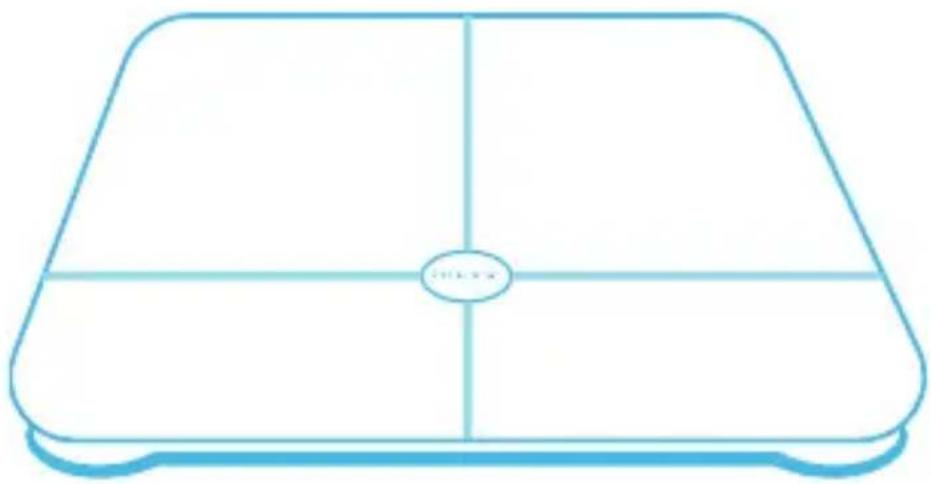
All pictures and illustrations in this guide, including but not limited to the phone color, size, and display content, are for your reference only. The actual product may vary. Nothing in this guide constitutes a warranty of any kind, express or implied.
Please visit http://consumer.huawei.com/en/support/hotline/ for recently updated hotline and email address in your country or region.
Model: AH100
Contents
English 1
Francais 18
Deutsch 33
Italiano 48
Espanoll 63
Portugues 78
Nederlands 92
Čestina 107
Magyar 121
Polski 135
Româna 150
Slovencina 164
mnu 178
Türkce 195
Pycckn 209
English

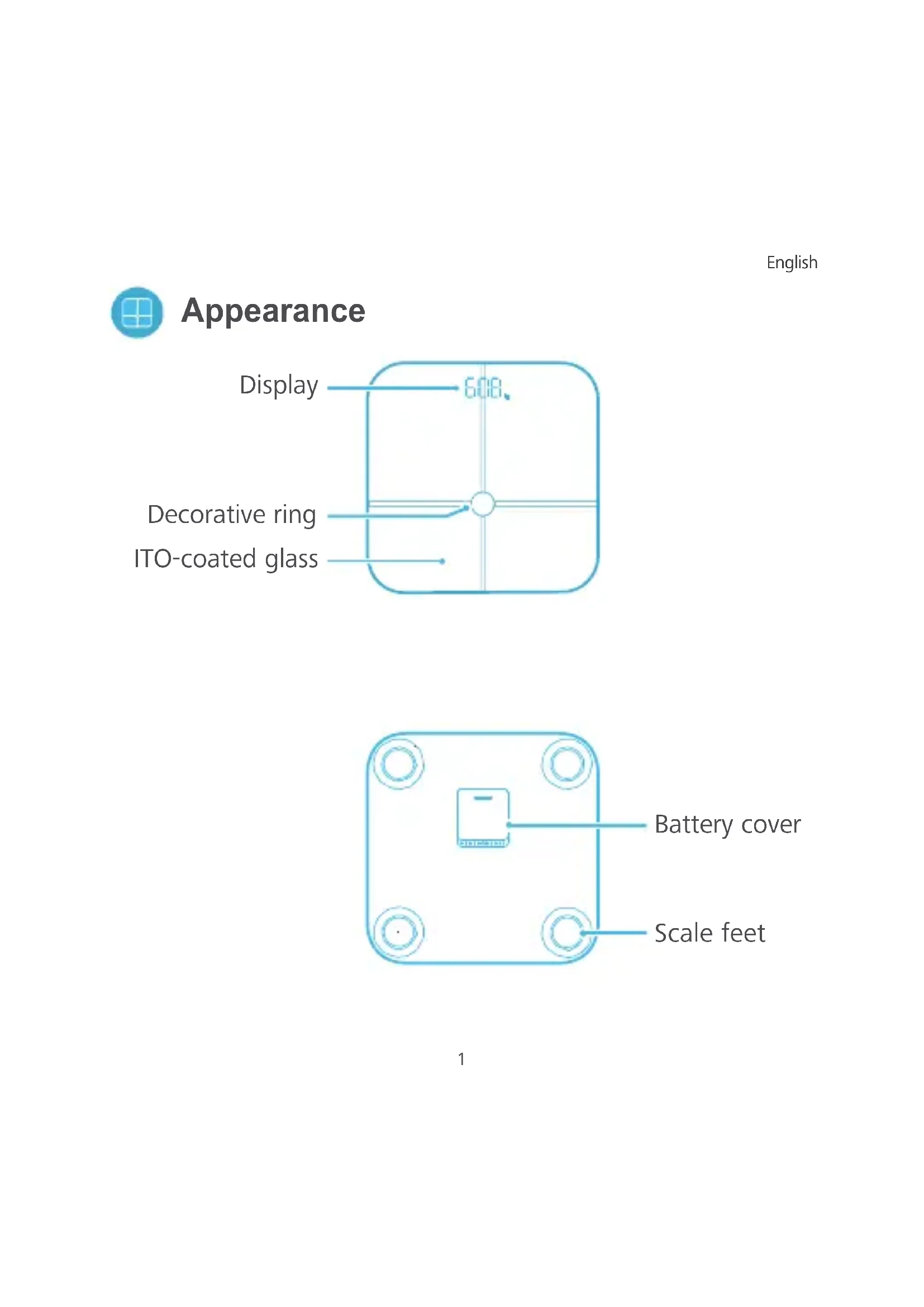
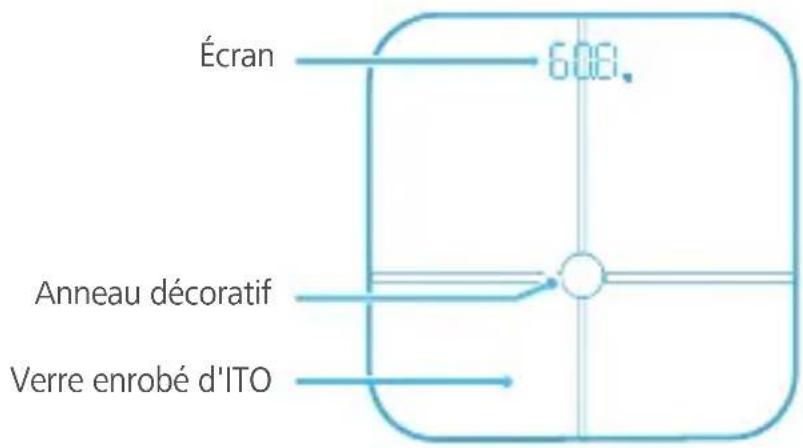
Appearance
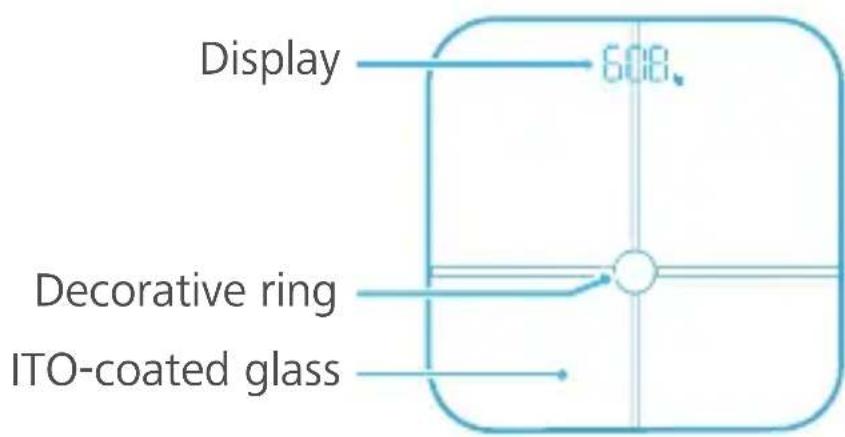
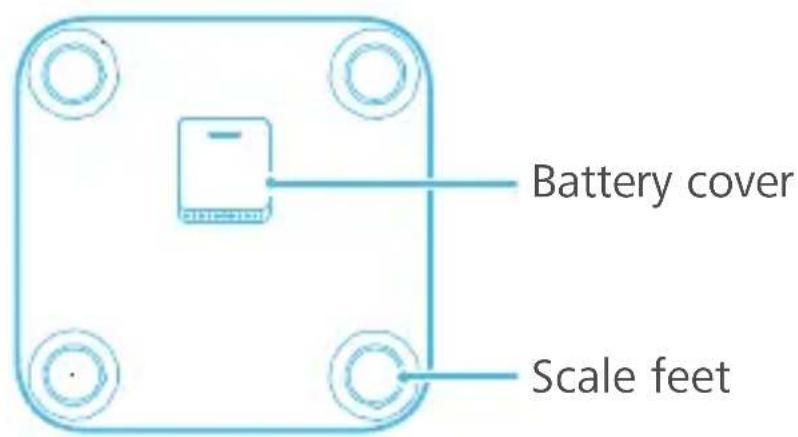

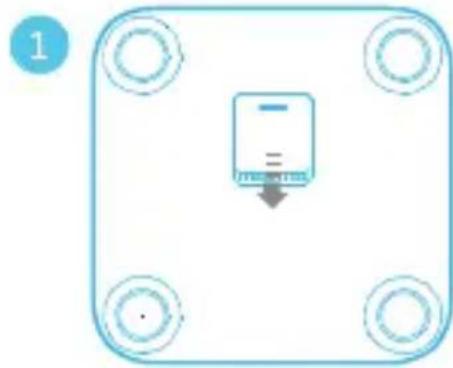
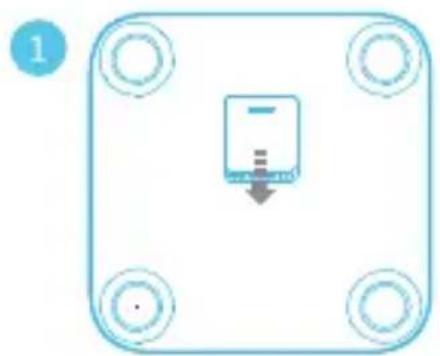
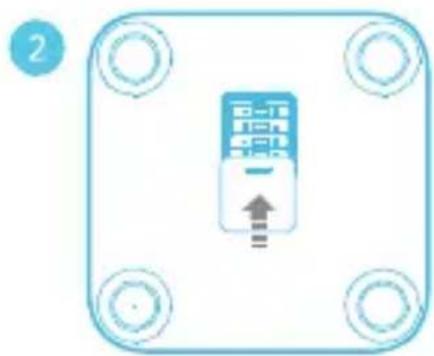
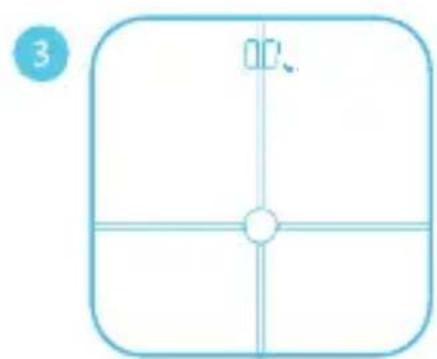
Install the battery to power on the scale
Open the battery cover on the bottom of the scale. Install four AAA batteries, then close the battery cover. The scale will power on automatically and will appear on the display. Place the scale on the floor and the will be displayed.
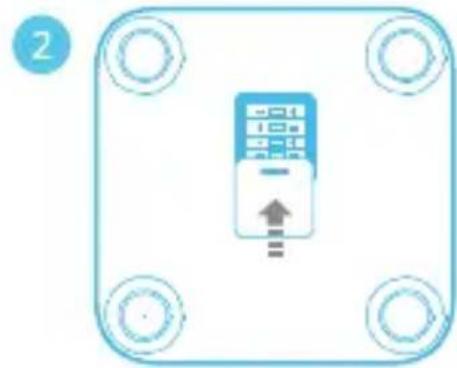
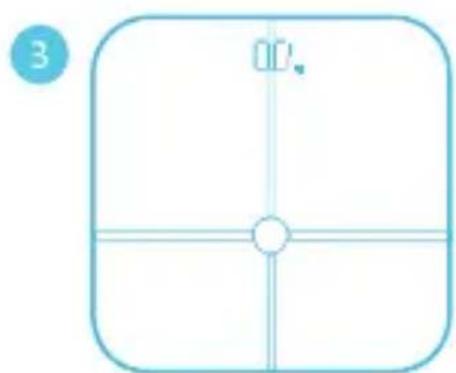

If the battery level is low, Lo will be displayed on the display. Replace the battery as soon as possible.

Download and install the app
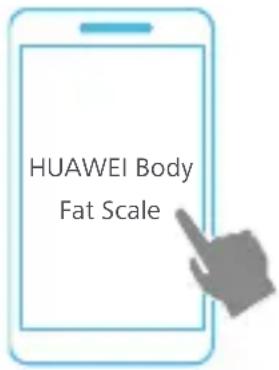
Search for Huawei Body Fat Scalein Google Play or the Apple App Store to download the app.
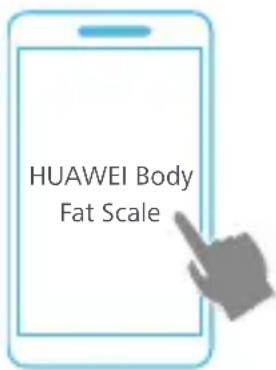

Pair your phone with the scale
- Activate the scale
Gently step on the scale with one foot. The display will turn on, indicating that the scale is activated.
- Open the Huawei Body Fat Scale app, and enable Bluetooth on your phone when prompted.
- Touch Associate device and follow the onscreen instructions to pair your phone with the scale.

Enter personal information
After pairing your phone with the scale, open the Huawei Body Fat Scaleapp. The Add memberdialog box will pop up. Enter your basic information, such as gender, date of birth, height, and profile photo. Then touch Done.

Please enter your personal information correctly as the accuracy of the health and fitness data measured by the scale is affected by age and height.

Start measurement
- Place the scale on a hard, level surface. Do not place it on a soft, uneven surface such as a mat or carpet.
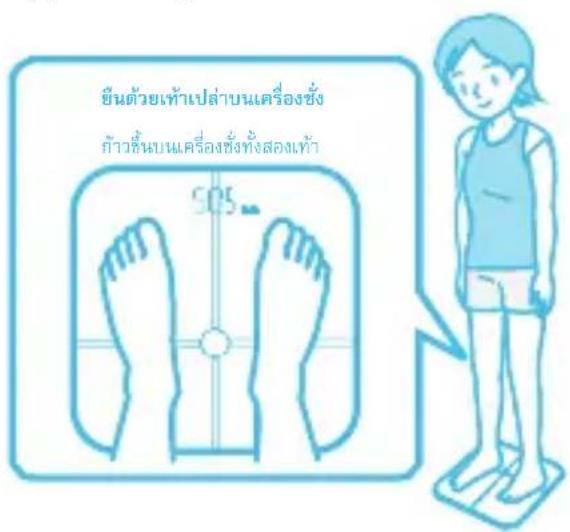
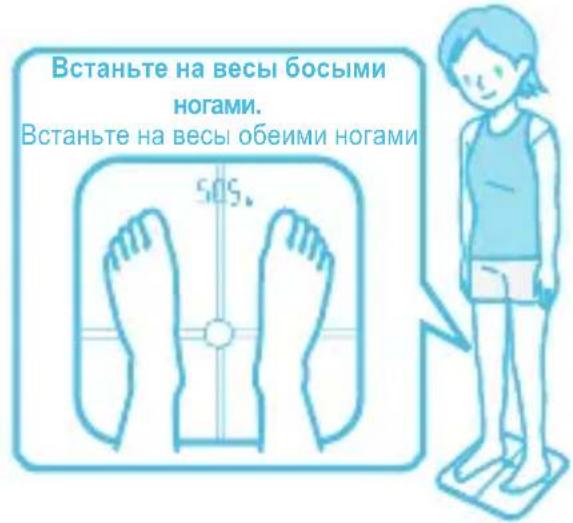
- Wear light, loose-fitting clothes and stand barefooted on the scale.
- Weigh yourself at the same time each day if possible.
Online measurement
- Open the app and touch in the upper left corner of the app's home screen. Select yourself from the member list.
- Make sure that your feet are clean and dry. Place one foot on the scale and remove it when the display turns on. The scale will automatically connect to the app and the Bluetooth icon will appear on the display.
- Stand up straight on the scale to begin measurement.
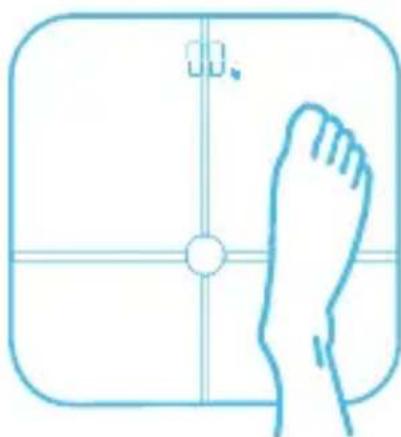
- When the weight reading stops changing, it will blink three times and then stay on the display.
Measure other health and fitness data: Stay on the scale after measuring your weight. The display will show to indicate that your body fat percentage is being measured. When the display alternates between your weight and body fat percentage, the measurement is complete.
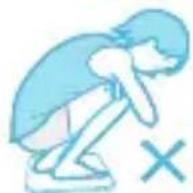
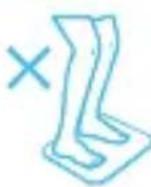
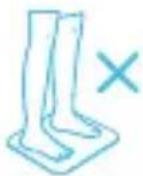
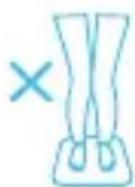
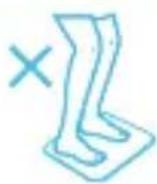
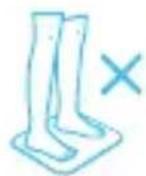
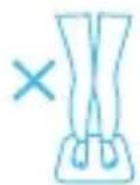
Incorrect postures
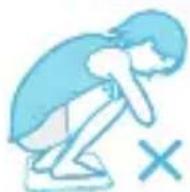
Squatting Bending the knees
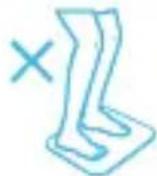
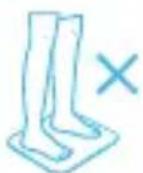
Raising the sole of the feet off the ITO-coated glass
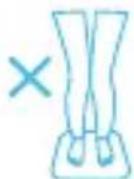
Keeping the knees together
After measurement, you can go to the app to view data such as body fat percentage, BMI, muscle mass, hydration, bone mass, BMR, protein, and visceral fat rating.
Offline measurement:
After you have performed an online measurement, you can measure your weight and body fat percentage directly on the scale even if the scale is not connected to the app. The data will be synced to the app the next time the scale connects to the app.
If your personal information is entered in two different phones and you have performed an online measurement before, will be displayed on the scale after offline measurement.
If two people with a weight difference of less than 2kg use the same scale, will be displayed for one person.


View past data
Past data is stored in the app.
- Touch to select a member, and touch Trends to view the member's historical data curve for each indicator, including weight, body fat percentage, and muscle mass. You can also view changes on a daily, weekly, monthly, and yearly basis.
- Touch History in the upper right corner to enter the history screen. You can view your historic data here. Select an entry to view more detailed information.
- To delete data, touch History in the upper right corner to enter the history screen. If you are an Android user, touch and hold the data you want to delete, then touch OK If you are an iOS user, swipe left to delete the data.

Settings
Open the app and touch

in the upper right corner for more settings.
Set the weight unit
Toggle on the LB or KG switch to set the weight unit as LB or KG.
Add or delete member
- Touch the profile photo and then touch Add member to add new members and fill in their personal information. Touch Done to save.
- Touch the profile photo to modify member information or delete a member.

Maximum members: 10
Set an alarm

Alarms can only be set when the scale is connected to the app and is displayed on the scale.

In the app, go to Reminders > to set an alarm. Your scale will sound an alarm to remind you to weigh yourself at the scheduled time.
When Snooze is enabled, your scale will remind you again 5 minutes later if you do not weigh yourself when the alarm goes off.
Target weight
TouchTarget weight to set a target weight.
Unpair the scale and phone
SelectMy devices > Device management and touch DISASSOCIATE to unpair the scale from the phone.

Smart power-off
- When 00 is displayed, the scale will enter standby mode automatically if no operations are performed for 30 seconds.
- After you complete a measurement, your weight and body fat percentage will be displayed alternately on the display. The scale will then enter standby mode automatically.
- After you complete a measurement, the scale will power off automatically if no operations are performed for a period of time.

Suitability
This device is mainly for family use. The scale will provide you with various health and fitness data, including weight, body fat percentage, hydration, BMR, visceral fat rating, muscle mass, bone mass, and BMI, obtained through body-sign and bio-impedance analysis.
Body fat percentage data may differ from typical values for the following groups of people:
Young people under the age of 18
People over the age of 65
People with fever, osteoporosis, and edema
People who are currently receiving artificial dialysis
Pregnant women
Professional athletes
It is recommended that you use the data for reference only.

This appliance may not be suitable for use by people (including children) with physical or mental disabilities, or who lack relevant knowledge and experience, unless they have received supervision or instruction on the use of the appliance from a person responsible for their safety.
Children should be supervised to ensure that they do not play with this appliance.
Safety information
Before you use the device, read the following precautions carefully to ensure optimal product performance and to avoid danger or violation of laws and regulations.
Electronic devices
Do not use this device in areas where the use of wireless devices is prohibited, as it may interfere with other devices or present other hazards.
Interference with medical equipment
- Follow rules and regulations set forth by hospitals and health care facilities. Do not use your device where prohibited.
- The device generates radio waves which may affect the normal operation of implantable medical devices or personal medical equipment such as pacemakers, cochlear implants, and hearing aids. When using the device, maintain a distance of at least 15cm from such implanted medical devices.
Potentially explosive areas
- Do not use your device where flammables or explosives are stored (in a gas station, oil depot, or chemical plant, for example). Using your device in these environments increases the risk of explosion or fire. Follow the instructions indicated in text or symbols.
- Do not store or transport your device in containers with flammable liquids, gases, or explosives.
Battery safety
- Remove the battery if the device has not been used over 3 months to avoid battery leakage, which could be harmful to the human body and cause damage to the device.
-
If the battery displays color changes, deformation, overheating, stop using the device and replace the battery.
-
Do not attempt to burn the battery as it may explode.
- Dispose of the battery in accordance with local regulations. Do not dispose of the battery in normal household waste. Improper battery disposal is dangerous and could cause an explosion.
- Keep the battery out of reach of children and pets to prevent the risk of serious injury or battery explosion.
- Do not drop, squeeze, or pierce the battery. If excessive pressure is applied to the battery, the battery may short circuit or overheat.
- Do not use a damaged battery or charger.
Usage environment
- Avoid dusty, damp, or dirty environments. Avoid magnetic fields. Using the device in these environments may result in circuit malfunctions.
- Use your device where the ambient temperature is between 5^ and 40^ . Store your device and accessories where the ambient temperature is between 0^ and 50^ . Extreme heat or cold may damage the device.
- Keep your device away from fire or heat sources, such as electric heaters, ovens, microwave ovens, stoves, or water heaters.
- Keep the device out of reach of children and pets to prevent them from accidentally swallowing and choking on the small parts of the device. Biting or swallowing the device could lead to serious injury.
- Do not use the device on a wet or slippery surface.
- Do not use this device when your body or feet are wet, so as to prevent accidental slipping, inaccurate data measurement, or damage to the device.
Maintenance
- Keep the device and its accessories dry. Do not use external heat sources, such as microwave ovens or hair dryers to dry the device.
-
Do not expose the device and its accessories to extreme temperatures as this could cause the device to malfunction, catch fire, or even explode.
-
Protect your device and accessories from severe impacts or vibrations to avoid damaging the device and its accessories and causing the device to malfunction.
- Before you clean or maintain the device, stop using it, close all related apps, and disconnect all cables.
- Do not use strong chemicals, detergents, or other chemical agents to clean the device or its accessories. Use a clean, soft, and dry cloth to clean the device and its accessories.
- Do not dismantle the device or accessories. This will void the warranty and release the manufacturer from liability for damage. In case of any device malfunction, please contact an authorized service center.
- If the display is damaged due to external impact, do not touch or try to remove the damaged glass. Stop using the device and contact an authorized Customer Service Center for assistance.
Disposal and recycling information
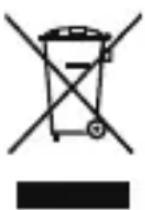
The crossed-out wheeled-bin symbol on your product, battery, literature or packaging reminds you that all electronic products and batteries must be taken to separate waste collection points at the end of their working lives; they must not be disposed of in the normal waste stream with household garbage. It is the responsibility of the user to
dispose of the equipment using a designated collection point or service for separate recycling of waste electrical and electronic equipment (WEEE) and batteries according to local laws.
Proper collection and recycling of your equipment helps ensure electrical and electronic equipment (EEE) waste is recycled in a manner that conserves valuable materials and protects human health and the environment, improper handling, accidental breakage, damage, and/or improper recycling at the end of its life may be harmful for health and environment. For more information about where and how to
drop off your EEE waste, please contact your local authorities, retailer or household waste disposal service or visit the website http://consumer.huawei.com/en/.
Reduction of hazardous substances
This device and its electrical accessories are compliant with local applicable rules on the restriction of the use of certain hazardous substances in electrical and electronic equipment, such as EU REACH, RoHS and Batteries (where included) regulations. For declarations of conformity about REACH and RoHS, please visit our web site http://consumer.huawei.com/certification.
EU regulatory conformance
Statement
Hereby, Huawei Technologies Co., Ltd. declares that this device is in compliance with the essential requirements and other relevant provisions of Directive 2014/53/EU.
The most recent and valid version of the DoC (Declaration of Conformity) can be viewed at http://consumer.huawei.com/certification.
This device may be operated in all member states of the EU.
Observe national and local regulations where the device is used.
This device may be restricted for use, depending on the local network.
Restrictions in the 2.4 GHz band:
Norway: This subsection does not apply for the geographical area within a radius of 20km from the centre of Ny-Alesund.
Frequency Bands and Power
(a) Frequency bands in which the radio equipment operates: Some bands may not be available in all countries or all areas. Please contact the local carrier for more details.
(b) Maximum radio-frequency power transmitted in the frequency bands in which the radio equipment operates: The maximum power for all bands is less than the highest limit value specified in the related Harmonized Standard.
The frequency bands and transmitting power (radiated and/or conducted) nominal limits applicable to this radio equipment are as follows: Bluetooth: 20 dBm.
FCC Regulatory Compliance
FCC statement
This equipment has been tested and found to comply with the limits for a Class B digital device, pursuant to Part 15 of the FCC Rules. These limits are designed to provide reasonable protection against harmful interference in a residential installation. This equipment generates, uses and can radiate radio frequency energy and, if not installed and used in accordance with the instructions, may cause harmful interference to radio communications. However, there is no guarantee that interference will not occur in a particular installation. If this equipment does cause harmful interference to radio or television reception, which can be determined by turning the equipment off and on, the user is encouraged to try to correct the interference by one or more of the following measures:
--Reorient or relocate the receiving antenna.
--Increase the separation between the equipment and receiver.
--Connect the equipment into an outlet on a circuit different from that to which the receiver is connected.
--Consult the dealer or an experienced radio/TV technician for help.
This device complies with Part 15 of the FCC Rules. Operation is subject to the following two conditions: (1) this device may not cause harmful interference, and (2) this device must accept any interference received, including interference that may cause undesired operation.
Caution: Any changes or modifications to this device not expressly approved by Huawei Technologies Co., Ltd. for compliance could void the user's authority to operate the equipment.
Industry Canada compliance
IC Statement
This device complies with CAN ICES-3 (B)/NMB-3(B).
This device complies with Industry Canada licence-exempt RSS standard(s). Operation is subject to the following two conditions: (1) this device may not cause interference, and (2) this device must accept any interference, including interference that may cause undesired operation of the device.
Legal Notice
Copyright © Huawei Technologies Co., Ltd. 2017. All rights reserved.
No part of this manual may be reproduced or transmitted in any form or by any means without prior written consent of Huawei Technologies Co., Ltd. and its affiliates ("Huawei").
The product described in this manual may include copyrighted software of Huawei and possible licensors. Customers shall not in any manner reproduce, distribute, modify, decompile, disassemble, decrypt, extract, reverse engineer, lease, assign, or sublicense the said software, unless such restrictions are prohibited by applicable laws or such actions are approved by respective copyright holders.
Trademarks and Permissions


HUAWEI are trademarks or registered trademarks of Huawei
Technologies Co., Ltd.
The Bluetooth® word mark and logos are registered trademarks owned by Bluetooth SIG, Inc. and any use of such marks by Huawei Technologies Co., Ltd. is under license.
Other trademarks, product, service and company names mentioned may be the property of their respective owners.
Notice
Some features of the product and its accessories described herein rely on the software installed, capacities and settings of local network, and therefore may not be activated or may be limited by local network operators or network service providers.
Third-Party Software Statement
Huawei does not own the intellectual property of the third-party software and applications that are delivered with this product. Therefore, Huawei will not provide any warranty of any kind for third party software and applications. Neither will Huawei provide support to customers who use third-party software and applications, nor be responsible or liable for the functions or performance of third-party software and applications.
Third-party software and applications services may be interrupted or terminated at any time, and Huawei does not guarantee the availability of any content or service. Third-party service providers provide content and services through network or transmission tools outside of the control of Huawei. To the greatest extent permitted by applicable law, it is explicitly stated that Huawei shall not compensate or be liable for services provided by third-party service providers, or the interruption or termination of third-party contents or services.
Huawei shall not be responsible for the legality, quality, or any other aspects of any software installed on this product, or for any uploaded or downloaded third-party
works in any form, including but not limited to texts, images, videos, or software etc. Customers shall bear the risk for any and all effects, including incompatibility between the software and this product, which result from installing software or uploading or downloading the third-party works.
This product is based on the open-source Android™ platform. Huawei has made necessary changes to the platform. Therefore, this product may not support all the functions that are supported by the standard Android platform or may be incompatible with third-party software. Huawei does not provide any warranty or representation in connect with any such compatibility and expressly excludes all liability in connection with such matters.
DISCLAIMER
ALL CONTENTS OF THIS MANUAL ARE PROVIDED "AS IS". EXCEPT AS REQUIRED BY APPLICABLE LAWS, NO WARRANTYES OF ANY KIND, Either EXPRESS OR IMPLIED, INCLUDING BUT NOT LIMITED TO, THE IMPLIED WARRANTYES OF MERCHANTABILITY AND FITNESS FOR A PARTICULAR PURPOSE, ARE MADE IN RELATION TO THE ACCURACY, RELIABILITY OR CONTENTS OF THIS MANUAL.
TO THE MAXIMUM EXTENT PERMITTED BY APPLICABLE LAW, IN NO EVENT SHALL HUAWEI BE LIABLE FOR ANY SPECIAL, INCIDENTAL, INDIRECT, OR CONSEQUENTIAL DAMAGES, OR LOSS OF PROFITS, BUSINESS, REVENUE, DATA, GOODWILL SAVINGS OR ANTICIPATED SAVINGS REGARDLESS OF WHETHER SUCH LOSSES ARE FORSEEABLE OR NOT.
THE MAXIMUM LIABILITY (THIS LIMITATION SHALL NOT APPLY TO LIABILITY FOR PERSONAL INJURY TO THE EXTENT APPLICABLE LAW PROHIBITS SUCH A LIMITATION) OF HUAWEI ARISING FROM THE USE OF THE PRODUCT DESCRIBED IN THIS MANUAL SHALL BE LIMITED TO THE AMOUNT PAID BY CUSTOMERS FOR THE PURCHASE OF THIS PRODUCT.
Import and Export Regulations
Customers shall comply with all applicable export or import laws and regulations and be responsible to obtain all necessary governmental permits and licenses in order to export, re-export or import the product mentioned in this manual including the software and technical data therein.
Privacy Policy
To better understand how we protect your personal information, please see the privacy policy at http://consumer.huawei.com/en/privacy-policy/index.htm.
Français

Apparance
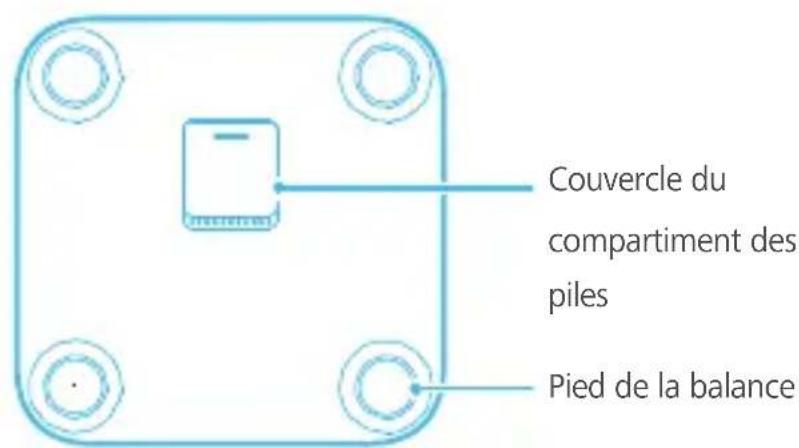

http://consumer.huawei.com/pt/privacy-policy/index.htm.
Declaratie de conformitate FCC (Federal Communications Commission)
1 4 nnnn nn nnnn nnnn nnnn nnnn nnnn nnnn nnnn nnnn nnnn nnnn nnnn nnnn nnnn nnnn nnnn nnnn nnnn nnnn nnnn nnnn nnnn nnnn nnnn nnnn nnnn nnnn nnnn nnnn nnnn nnnn nnnn nnnn nnnn nnnn nn

nnaaannnnnnaeauo 0 7nnaaennnnaa

nnaa
Huawei Body Fat Scale Google Play Apple App Store

nun nwnnnn 0
1.
1007 11111111111111111111111111
- Huawei Body Fat Scale
a
3.

n 1
Huawei Huawei Huawei Body Fat Scale nao hou "Ww" wu wun uuyu wun uwn uwn uun
HnHnHnHnHnHnHnHnHnHnHnHnHnHnHnHnHnHnHnHnHnHnHnHnHnHnHnHnHnHnHnHnHnHnHnHnHnHnHnHnHnHnHnHnHnHnHnHnHnHnH

H
mnnnnae
mnnnnae
2008年全国卷1
y
1
Nannnnn nn nnnnnae nn nnnn nnnnnn nn nnnnnn nn nnnn nnnn nnnn nnnn nnnn nnnn nnnn nnnn nnnn nnnn nnnn nnnn nnnn nnnn nnnn nnnn nnnn nnnn nnnn nnnn nnnn nnnn nnnn nnnn nnnn nnnn nnnn nnnn nnnn nnnn nnnn nnnn nnnn nnnn nn
a
y
yoyan yunynnnnuyuynnnynnny
yuyaaunauuuaou uuuuwwwnnnaaannnn

a
- nnnnnaaunnnnnnnnnn nn. 2 nn.

nueyaaeun
yannnnnny
1 1
- 1
Android

n
n nn nnnn nn nnnnnnnnnnnnnnnnnnnnnnnnnnnnnnnnnnnnnnnnnnnnnnnnnnnnnnnnnnnnnnnnnnnnnnnnnnnnnnnnnnnnn
nnnnnnnnnnnnnnn
“l”“n"“n"“n"“n"“n"“n"“n"
nwnnnnnnnnn
Wnwnnnn
1 10
nnaanannnnn
1
nwnnnnnae nannnnnnae > 1000000000000000000000000000000000000000000000000000000000000000000000000000000

n
00: 1nun nnnnnaaannnnaanennn nnnuuynnnyn 30
- nnnnnn nn nnnnnnnnnnnnnnnnnnnnnnnnnnnnnnnnnnnnnnnnnnnnnnnnnnnnnnnnnnnnnnnnnnnnnnnnnnnnnnnnnnnnnnnnnnnnnnnnnnnnnnnnnnnnnnnnnnnnnnnnnnnnnnnnnnnnnnnnnnnnn
-

H
unnnnnaaannnnnnnnnnnnnnnn
yBMRnwnnuovovnuu,naananaa BMI yannnnnnaanennnnnnnnnnnnnnnnnnnnnnnnnnnnnnnnnnnnnnnnnnnnnnnnnnnnnnnnnnnnnnnnnnnnnnnnnnnnnnnnnnnnnnnnnnnnnnnnnnnnnnnnnnnnnnnnnn
18
65
a
nnnnn
y

()
y
nonnnn nn nnnn
W
a
y
Jnunnnnnnnnnnaeauwnnnnnaaannnnaanennn
- 15.
1
- 1000000000000000000000000000000000000000000000000000000000000000
nnaannuuunnnnne
- nnnnnn nn nnnn 3
- 1
- a 1
- ounnau uunuouuuuunnnn nn nnnnnnnnnnnnnnnnnnnnnnnnnnnnnnnnnnnnnnnnnnnnnnnnnnnnnnnnnnnnnnnnnnnnnnnnnnnnnnnnnnnnnnnnnnnnnnnnnnnnnnnnnnnnnnnnnnnnnnnnnnnnnnnnnnnnnnnnnnnnnnn
01
aannnnnnae
nnaananaananaananaananaananaananaananaananaananaananaananaananaananaananaananaananaananaananaananaananaananaananaananaananaananaananaananaananaananaananaananaananaananaananaananaananaananaananaananaananaananaananaananaananaananaananaananaananaananaananaanaraannnnnnnnnnnnnnnnnnnnnnnnnnnnnnnnnnnnnnnnnnnnnnnnnnnnnnnnnnnnnnnnnnnnnnnnnnnnnnnnnnnnnnnnnnnnnn
- YTo6bI Haatb N3MepeHnA, BCTaHbTe Ha BEcbl N BblprrMNTecB.
Pn noJyehn cTaNbHbIX noka3aHn 3NaueHne Beca MmHET TpN pa3a n 3aTeM 3aQNKcnpyeTc.
I3MepenHe Ipynx MeDnCINHCKNX noka3aTeJe: He CXOInde C BEcOB nocLe 3aBepWeHnA N3MepENn BEca. Ha 3KpaHecob NOBNTc8eryuyn CNMBoN , KOTOpbI yka3bIBaet Ha To, YTO B daHHbIM MOMENT BblIOJHReTcN 3MepEnHe npoceHTa Jnpa.IocNe 3aBepWeHn A N3MepENn Ha 3KpaHecydet nonepemHo
OTo6paKaTbcB Baw BeC n npoent Jnpa B opraHn3Me.
HekoppeKTHbIe n03bl

CndeHne Ha KOpToUkax
KoJIeHn coHyTbI
CTyHnI NOHrTbI HAD CTEKJOM
KoJIeHn COMKHyTbI
Iocne 3aBepHEnn H3MepeHn B npJIOxKeHn MOXHO NOCMOTpeTb IpoeHT Jnpa n IpoceHTHOe COePkaHne BOdbI B OprAHN3Me, INTEHCNBHOCTb OCHOBHOrO O6MeHa BeueCTB, yPOBeHb BnCsepaJIbHOrO KInpa, MblSeuHyo Maccy, CTeneHb MNHePAJIa3aun KocTHOH TKAHN, COePkaHne 6eJIka, INDeKc MaCCbI TeJa N dpyrHe NOKa3aTeJI.
OФлайн-измерения
Iocne BbIOJIHeHn OHnaH-N3MepeHn MoXHO N3MepaTb BeC n IpOeHT Xnpa HeNOCpeDCTBeHNO Ha Becax, DaXe ecn BeCbl He NODKJIOUeHbIK npNJIOXeHIO. DAnHbIe 6ydyT CInxPOHn3IupoBaHbIC npNJIOXeHNem npcNeDuOuem NOkJIIOUeHn K Hemy BeCOB.

- Ecnn Ba7a nIuHna IHΦopMaun yKa3aHa Ha dByx pa3hbx TeIeΦoHax I Bby yKe BbInOnHnOHNaH-N3MepeHn, nocne oPnaH-n3MepeHn Ha 3KpaHe BecOB 6ydet OTO6paXaTbcr CIMBOJ
- Ecni Dba Nolb3OBaTeJc pa3HnueB Bece MeHee 2 Kr NcNoJIb3yIOT OdHn BeCbl, Ha 3KpaHe dJIra ODHoro n3 HNX 6yDet OTO6paKaTbcr CmBOJ.

Пресмотрастори
Icstopn n3mepen coxpaHareTcB npnloXeHN.
Haxmte Ha 3haok , yTo6bI BbI6paTb Nolb3OBaTeJIa, 3aTeM Haxmte TeHdEHHu, yTO6bI NOCMOPTeB KpNByU IN3MeHeHnK kAxDOrO NOKa3aTeJIa, BKIOUHa BEc, IpoeHT JnPa N MblSeHyU Maccy. TaKke MoXHo npocMatpNbA Tb IN3MeHnN IO DnM, HeJeJAM, MeCzam N rOdaM.
Haxmte NctopnB B Bepxhem npabom yrny, yTo6bI nepeiTu B pa3deI apxNBbIX 3aIncen. Bbl6epTe 3aIncsbc, yTo6bI nocmotpeTb 6oJee npdpo6HyIO INΦopMaunio.
-УдалNTы днltь,нжмte NcTOpN B BepxHem npabOM yrny
Зкраи и пердnte в pa3deI apxNBbIX 3anicei.Еси Bbl nCnoNb3yeTe
Телфон Ha Плatфopme Android,нжмte И уdEpXnBaIte dAnHbIe,
КOTOpBie XOTITE ydaNTb,Зatem habmte OK.Еси Bbl nCnoNtB3yeTe
Телфон Ha Плatфopme iOS,провдnte BJIeBO,УTO6bl ydaNTb daHHbIe.

Hac troponk
OTKpoTe npnIOxHne n HaxMnte B pa3dIHaCTpOeK.

B BepxHem npabom yrny, YTO6bI nepeiTN
Hactpoika edHHuI N3MepeHnBeCa
BbIbepeTe yHT nJn Kr
PekomeHdyetcIncnoIb3OBaTbpe3yIbTaTbI I3MepeHnI nIcPaBKn.

- Huawei Body Fat Scale User guide
- Contents
- Appearance
- Install the battery to power on the scale
- Download and install the app
- Pair your phone with the scale
- Enter personal information
- Start measurement
- Online measurement
- Incorrect postures
- Offline measurement:
- View past data
- Past data is stored in the app.
- Settings
- Set the weight unit
- Add or delete member
- Set an alarm
- Target weight
- Unpair the scale and phone
- Smart power-off
- Suitability
- Safety information
- Electronic devices
- Potentially explosive areas
- Battery safety
- Usage environment
- Maintenance
- Disposal and recycling information
- Reduction of hazardous substances
- EU regulatory conformance
- Statement
- Restrictions in the 2.4 GHz band:
- Frequency Bands and Power
- FCC Regulatory Compliance
- FCC statement
- Industry Canada compliance
- IC Statement
- Legal Notice
- Trademarks and Permissions
- Notice
- Third-Party Software Statement
- DISCLAIMER
- Import and Export Regulations
- Privacy Policy
- Français
- Apparance
- Declaratie de conformitate FCC (Federal Communications Commission)
- nnaa
- nun nwnnnn 0
- n 1
- mnnnnae
- nueyaaeun
- n
- Wnwnnnn
- H
- a
- y
- 1
- nnaannuuunnnnne
- aannnnnnae
- HekoppeKTHbIe n03bl
- OФлайн-измерения
- Пресмотрастори
- Hac troponk
- Hactpoika edHHuI N3MepeHnBeCa
Brand : HUAWEI
Model : Body Fat Scale AH100
Category : Scale