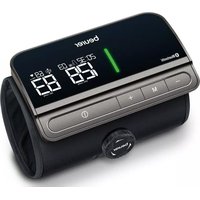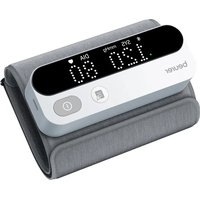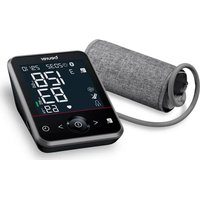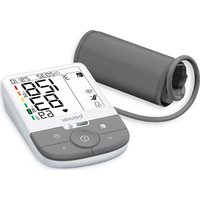
BM 54 - Blood pressure monitor BEURER - Free user manual and instructions
Find the device manual for free BM 54 BEURER in PDF.



User questions about BM 54 BEURER
0 question about this device. Answer the ones you know or ask your own.
Ask a new question about this device
Download the instructions for your Blood pressure monitor in PDF format for free! Find your manual BM 54 - BEURER and take your electronic device back in hand. On this page are published all the documents necessary for the use of your device. BM 54 by BEURER.
USER MANUAL BM 54 BEURER
Quelle: WHO, 1999 (World Health Organization)
Read these instructions for use carefully and keep them for later use, be sure to make them accessible to other users and observe the information they contain.
Dear customer,
Thank you for choosing a product from our range. Our name stands for high-quality, thoroughly tested products for applications in the areas of heat, weight, blood pressure, body temperature, pulse, gentle therapy, massage, beauty, baby and air.
With kind regards, your Beurer team
Table of contents
- Included in delivery.. 20
- Signs and symbols 21
- Intended use 22
4.Warnings and safety notes 22 - Device description 24
- Initial use 25
- Usage 27
- Cleaning and maintenance 33
- Accessories and replacement parts 33
10.What if there are problems? 34 - Disposal 34
- Technical specifications 35
13.Warranty/service. 36
1. Included in delivery
Check that the exterior of the delivery cardboard packaging is intact and make sure that all contents are present. Before use, ensure that there is no visible damage to the device or accessories and that all packaging material has been removed. If you have any doubts, do not use the device and contact your retailer or the specified Customer Service address.
1 x Blood pressure monitor
1 x Upper arm cuff
4 x 1.5V LR03 AAA batteries
1 x Storage bag
1 x Instructions for use
1 x Quick Start Guide
2. Signs and symbols
The following symbols are used on the device, in these instructions for use, on the packaging and on the type plate for the device:
| WARNING Warning notice indicating a risk of injury or damage to health | |
| IMPORTANT Safety note indicating possible damage to the device/accessory | |
| Note Note on important information | |
| Observe the instructions for use | |
| Application part, type BF | |
| Direct current | |
| Disposal in accordance with the Waste Electrical and Electronic Equipment EC Directive - WEEE | |
| Do not dispose of batteries containing hazardous substances with household waste |
| PAP 21 | Dispose of packaging in an environmentally friendly manner |
| Manufacturer | |
| Storage/Transport | Permissible storage and transport temperature and humidity |
| Operating | Permissible operating temperature and humidity |
| IP21 | Protected against solid foreign objects 12.5 mm in diameter and larger, and against vertically falling drops of water |
| SN | Serial number |
| €0483 | The CE labelling certifies that the product complies with the essential requirements of Directive 93/42/EEC on medical devices. |
3. Intended use
The BM 54 upper arm blood pressure monitor is intended for home use and serves as a non-invasive way of measuring and monitoring arterial blood pressure and pulse values in adults with an upper arm circumference of 22 - 44cm
As a result, you can quickly and easily measure your blood pressure and pulse and view various average values from previous measurements. The recorded measurements are classified and evaluated graphically. A symbol in the display also warns of possible existing cardiac arrhythmia.
4.Warnings and safety notes

Notes on use
- In order to ensure comparable values, always measure your blood pressure at the same time of day.
- Do not take a measurement within 30 minutes of eating, drinking, smoking or exercising.
- Before the initial blood pressure measurement, make sure always to rest for about 5 minutes.
- Furthermore, if you want to take several measurements in succession, make sure always to wait for at least 1 minute between the individual measurements.
- Repeat the measurement if you are unsure of the measured value.
-
The measurements taken by you are for your information only – they are no substitute for a medical examination! Discuss the measured values with your doctor and never base any medical decisions on them (e.g. medicines and their dosages).
-
Using the blood pressure monitor outside your home environment or whilst on the move (e.g. whilst travelling in a car, ambulance or helicopter, or whilst undertaking physical activity such as playing sport) can influence the measurement accuracy and cause incorrect measurements.
- Do not use the blood pressure monitor on newborns or patients with preeclampsia. We recommend consulting a doctor before using the blood pressure monitor during pregnancy.
- Cardiovascular diseases may lead to incorrect measurements or have a detrimental effect on measurement accuracy. The same also applies to very low blood pressure, diabetes, circulatory disorders and arrhythmias as well as chills or shaking.
- This device is not intended for use by people (including children) with restricted physical, sensory or mental skills or a lack of experience and/or a lack of knowledge, unless they are supervised by a person who is responsible for their safety or are instructed by such a person in how to use the device. Supervise children around the device to ensure they do not play with it.
- The blood pressure monitor must not be used in connection with a high-frequency surgical unit.
- Only use the device on people that have the upper arm circumference specified for the device.
- Please note that when inflating, the functions of the limb in question may be impaired.
- During the blood pressure measurement, the blood circulation must not be stopped for an unnecessarily long time. If the device malfunctions remove the cuff from the arm.
-
Avoid any mechanical restriction, compression or bending of the cuff line.
-
Do not allow sustained pressure in the cuff or frequent measurements. The resulting restriction of the blood flow may cause injury.
- Make sure that the cuff is not placed on an arm in which the arteries or veins are undergoing medical treatment, e.g. intravascular access or intravascular therapy, or an arteriovenous (AV) shunt.
- Do not use the cuff on people who have undergone a mastectomy.
- Do not place the cuff over wounds as this may cause further injury.
- Place the cuff on your upper arm only. Do not place the cuff on other parts of the body.
- Please note that data can only be transferred and stored when your blood pressure monitor is supplied with power. As soon as the batteries are empty, the blood pressure monitor loses the date and time.
- To conserve the batteries, the blood pressure monitor switches off automatically if you do not press any buttons for 30 seconds.
- The device is only intended for the purpose described in these instructions for use. The manufacturer is not liable for damage resulting from improper or incorrect use.

Notes on storage
-
The blood pressure monitor is made from precision and electronic components. The accuracy of the measured values and service life of the device depend on its careful handling:
-
Protect the device from impacts, moisture, dirt, marked temperature fluctuations and direct sunlight.
-
Do not drop the device.
- Do not use the device in the vicinity of strong electromagnetic fields and keep it away from radio systems or mobile telephones.
- Only use the cuff included with the delivery or original replacement cuffs. Otherwise incorrect measured values will be recorded.

Notes on handling batteries
- If your skin or eyes come into contact with battery fluid, rinse the affected area with water and seek medical assistance.
- Choking hazard! Small children may swallow and choke on batteries. Therefore, store batteries out of the reach of small children.
- Observe the plus (+) and minus (-) polarity signs.
- If a battery has leaked, put on protective gloves and clean the battery compartment with a dry cloth.
- Protect batteries from excessive heat.
Risk of explosion! Do not throw batteries into a fire.
- Do not charge or short-circuit batteries.
- If the device is not to be used for a relatively long period, take the batteries out of the battery compartment.
- Use identical or equivalent battery types only.
Always replace all batteries at the same time.
- Do not use rechargeable batteries.
- Do not disassemble, open or crush the batteries.

Notes on electromagnetic compatibility
- The device is suitable for use in all environments listed in these instructions for use, including domestic environments.
- The use of the device may be limited in the presence of electromagnetic disturbances. This could result in issues such as error messages or the failure of the display/device.
- Avoid using this device directly next to other devices or stacked on top of other devices, as this could lead to faulty operation. If, however, it is necessary to use the device in the manner stated, this device as well as the other devices must be monitored to ensure they are working properly.
- The use of accessories other than those specified or provided by the manufacturer of this device can lead to an increase in electromagnetic emissions or a decrease in the device's electromagnetic immunity; this can result in faulty operation.
- Failure to comply with the above can impair the performance of the device.
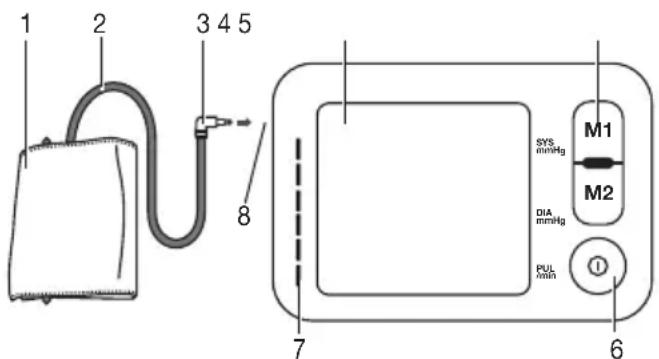
5. Device description
- Cuff
- Cuff line
- Cuff connector
- Display
- Memory buttons M1/M2
- START/STOP button ①
- Risk indicator
- Connection for cuff connector (left-hand side)
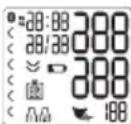
Information on the display:
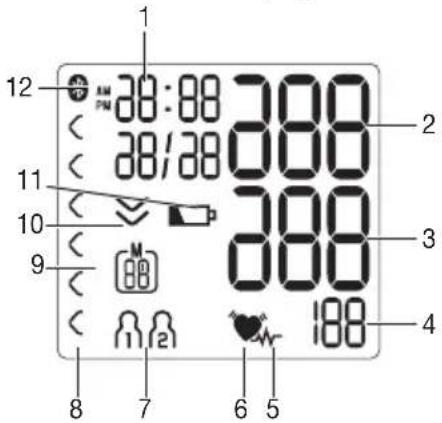
- Time/date
- Systolic pressure
- Diastolic pressure
- Calculated pulse value
5.Cardiac arrhythmia symbol - Pulse symbol
- User memory
- Risk indicator
- Number of memory space/memory display for average value (A), morning (B), evening (C)
- Release air (arrow)
- Battery display symbol
- Symbol for Bluetooth® transfer
System requirements for the "beurer HealthManager" app
- iOS ≥ 10.0 / Android™ ≥ 5.0
-Bluetooth 假 24.0
List of compatible devices:

6. Initial use
6.1 Inserting the batteries
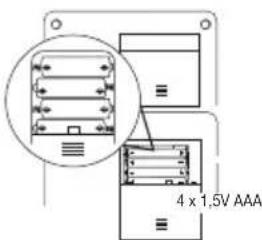
- Remove the battery compartment lid on the rear of the device.
- Insert four 1.5 V AAA (alkaline type LR03) batteries. Make sure that the batteries are inserted the correct way round in accordance with the markings. Do not use rechargeable batteries.
- Close the battery compartment lid again carefully.
- All display elements are briefly displayed, 20 oh flashes in the display. Now set the date and time as described below. If the battery replacement symbol permanently displayed, you can no longer perform any measurements and must replace all batteries. Once the batteries have been removed from the device, the date and time must be set again. Any saved measured values are retained.
6.2 Setting the hour format, date, time and Bluetooth
It is essential that you set the date and time. Otherwise, you will not be able to save your measured values correctly with a date and time and access them again later.
There are two different ways to access the menu from which you can adjust the settings:
- Before initial use and after each time you replace the battery: When inserting batteries into the device, you will be taken to the relevant menu automatically.
- If the batteries have already been inserted: With the device switched off, press and hold the START/ STOP button for approx. 5 seconds.
In this menu you can adjust the following settings in succession:

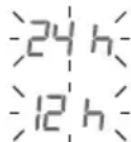
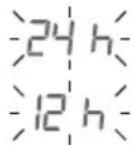
Hour format
The hour format flashes on the display.
- Select the desired hour format using the M1/M2 memory buttons and confirm with the START/STOP button①
If you press and hold the M1 or M2 memory button, you can set the values more quickly.
Date
The year flashes on the display.
- Select the year using the M1/M2 memory buttons and confirm with the START/STOP button ①
The month flashes on the display. - Select the month using the M1/M2 memory buttons and confirm with the START/STOP button ①
The day flashes on the display. - Select the current day using the M1/M2 memory buttons and confirm with the START/STOP button ①
If you have set the 12h hour format, the month is displayed before the day.
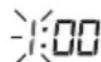
The hours flash on the display.
- Select the current hours using the M1/M2 memory buttons and confirm with the START/STOP button①
The minutes flash on the display.
- Select the current minutes using the M1/M2 memory buttons and confirm with the START/STOP button①

Bluetooth®
The Bluetooth® symbol flashes on the display.
- Use the M1/M2 memory buttons to select whether automatic Bluetooth® data transfer is to be activated (Bluetooth® symbol flashes) or deactivated (Bluetooth® symbol is not shown) and confirm with the START/STOP button ①
① Bluetooth® transfers will reduce the battery life.
7. Usage
Ensure the device is at room temperature before measuring. The measurement can be performed on the left or right arm.
7.1 Attaching the cuff
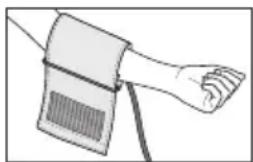
Place the cuff onto the bare upper arm. The circulation of the arm must not be hindered by tight clothing or similar.
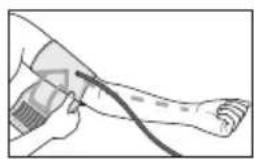
The cuff must be placed on the upper arm so that the bottom edge is positioned 2 - 3cm above the elbow and above the artery. The line should point to the centre of the palm.
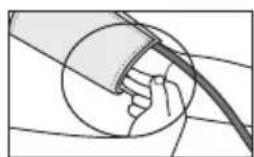
Now tighten the free end of the cuff, but make sure that it is not too tight around the arm and close the hook-and-loop fastener. The cuff should be fastened so that two fingers fit under the cuff.
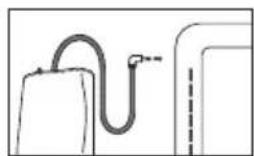
Now insert the cuff line into the connection for the cuff connector.
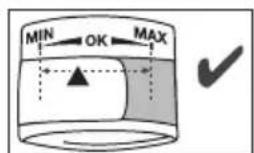
The cuff is suitable for you if the index mark (s within the OK range after fitting the cuff.
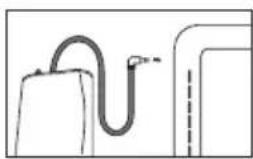
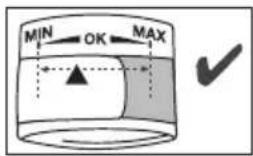
If the measurement is performed on the right upper arm, the line should be located on the inside of your elbow. Ensure that your arm is not pressing on the line.
Blood pressure may vary between the right and left arm, which may mean that the measured blood pressure values are different. Always perform the measurement on the same arm. If the values between the two arms are significantly different, please consult your doctor to determine which arm should be used for the measurement.
Important: The device may only be operated with the original cuff. The cuff is suitable for an arm circumference of 22 to 44~cm
7.2 Adopting the correct posture
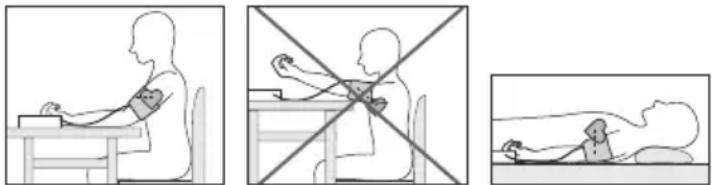
- Before the initial blood pressure measurement, make sure always to rest for about 5 minutes. Otherwise deviations can occur.
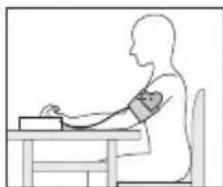
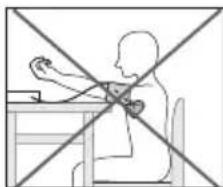
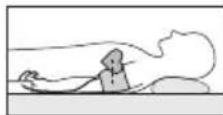
- You can take the measurement while sitting or lying. Always make sure that the cuff is at heart level.
- To take your blood pressure, make sure you are sitting comfortably with your arms and back leaning on something. Do not cross your legs. Place your feet flat on the ground.
- To avoid falsifying the measurement, it is important to remain still during the measurement and not to speak.
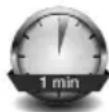
- Wait for at least 1 minute before taking another measurement.
7.3 Taking a blood pressure measurement
As described above, attach the cuff and adopt the posture in which you want to perform the measurement.
- Press the START/STOP button to start the blood pressure monitor. All display elements are briefly displayed.
The blood pressure monitor will begin the measurement automatically after 3 seconds.
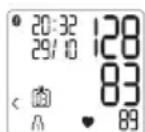
You can cancel the measurement at any time by pressing the START/STOP button
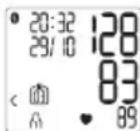
As soon as a pulse is found, the pulse symbol will be displayed.
- Systolic pressure, diastolic pressure and pulse measurements are displayed.
- E_r appears if the measurement could not be performed properly (see chapter "10. What if there are problems?"). Repeat the measurement.

-
Now select the desired user memory by pressing the M1 or M2 memory buttons. If you do not select a user memory, the measurement is stored in the most recently used user memory. The relevant symbol appears on the display.
-
Press the START/STOP button to switch off the blood pressure monitor. The measurement is then stored in the selected user memory.
- If the device is not switched off manually, it will switch off automatically after 30 seconds.
If Bluetooth® data transfer has been activated, then after having confirmed the user memory by pressing the START/ STOP button the data is transferred to the "beurer HealthManager" app (see chapter "7.6 Transferring measurements").
When connecting for the first time, a randomly generated six-digit PIN code is displayed on the device, and at the same time an input field appears on the smartphone in which you must enter this six-digit PIN code. After successfully entering the code, the device will be connected to your smartphone.
- The Bluetooth® symbol on the display flashes and the blue LED lights up. The blood pressure monitor now attempts to connect to the app for approx. 30 seconds.
- The Bluetooth® symbol stops flashing as soon as a connection is established. All measurement data is automatically transferred to the app. Once the data has been successfully transferred, the device switches off. If the data transfer was unsuccessful, the blue LED goes out and "E" appears on the display.
Measurement
- If a connection to the app cannot be established after 30 seconds, the Bluetooth® symbol goes out and the blood pressure monitor switches off automatically after 3 minutes.
Please note that you must add the blood pressure monitor to "My devices" in the "beurer HealthManager" app to enable data transfer. The "beurer HealthManager" app must be activated to allow data transfer. If the latest data is not displayed on your smartphone, repeat the data transfer as described in chapter 7.6.
If you forget to turn off the blood pressure monitor, it will switch off automatically after approx. 30 seconds. In this case too, the value is stored in the selected or most recent user memory and the data is transferred if Bluetooth® data transfer has been activated.
- Wait for at least 1 minute before taking another measurement.
7.4 Evaluating the results
Cardiac arrhythmia:
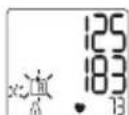
This device can identify potential disruptions of the heart rhythm when measuring and, if necessary, indicates this after the measurement with the symbol
This can be an indicator for arrhythmia. Arrhythmia is a condition in which the heart rhythm is abnormal because of flaws in the bioelectrical system that regulates the heartbeat. The symptoms (skipped or premature heart beats, pulse being slow or too fast)
can be caused by factors such as heart disease, age, physical make-up, excess stimulants, stress or lack of sleep. Arrhythmia can only be determined through an examination by your doctor. If the symbol is shown on the display after the measurement has been taken, repeat the measurement. Please ensure that you rest for 5 minutes beforehand and do not speak or move during the measurement. If the symbol appears frequently, please consult your doctor.
Self-diagnosis and treatment based on the measurements can be dangerous. Always follow your doctor's instructions.
Risk indicator:
The measurements can be classified and evaluated in accordance with the following table.
However, these standard values serve only as a general guideline, as the individual blood pressure varies in different people and different age groups etc.
It is important to consult your doctor regularly for advice. Your doctor will tell you your individual values for normal blood pressure as well as the value above which your blood pressure is classified as dangerous.
The classification on the display and the scale on the device show which category the recorded blood pressure values fall into. If the values of systole and diastole fall into two different categories (e.g. systole in the 'High normal' category and diastole in the 'Normal' category), the graphical classification on the device always shows the higher category; for the example given this would be 'High normal'.
| Blood pressure value category | Systole (in mmHg) | Diastole (in mmHg) | Action | |
| Level 3: severe hypertension | red ≥180 | ≥110 | Seek medical attention | |
| Level 2: moderate hypertension | orange | 60-179100 | -109 | Seek medical attention |
| Level 1: mild hypertension | yellow 1 | 40-15990 | 99 | Regular monitoring by doctor |
| High normal green | green 130 | -13985-89 | Regular monitoring by doctor | |
| Normal green | 120-129 | 80-84 | Self-monitoring | |
| Optimal green | <120<80 | Self-monitoring | ||
Source: WHO, 1999 (World Health Organization)
7.5 Displaying and deleting measured values
The results of every successful measurement are stored together with the date and time. The oldest measurement is overwritten in the event of more than 60 measurements.
- Using the memory button M1 or M2, select the desired user memory when the device is switched off.
- To view the measurements for user memory, press the M1 memory button.
- To view the measurements for user memory, press the M2 memory button.
R flashes on the display.
The average value of all saved measured values in this user memory is displayed.
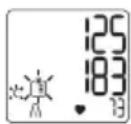
If Bluetooth is activated (the symbol flashes on the display), the blood pressure monitor attempts to connect to the app. If you press the M1 button in the meantime, the transfer is cancelled and the average values are displayed. If you press the M2 button, the transfer is cancelled and the measurement data of user memory is displayed. The symbol is no longer shown. The buttons are deactivated as soon as a connection is established and the data is transferred.
- Press the relevant memory button (M1 or M2)
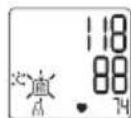
flashes on the display.
The average value of the morning measurements for the last 7 days is displayed (morning: 5 a.m. - 9 a.m.).
- Press the relevant memory button (M1 or M2).
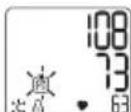
Pf flashes on the display.
The average value of the evening measurements for the last 7 days is displayed (evening: 6 p.m. - 8 p.m.).
- If you press the relevant memory button (M1 or M2) again, the last individual measurement is displayed (in this example, measurement 03).
- If you press the relevant memory button (M1 or M2) once more, you can view all previous individual measurements.
-
To switch the device off again, press the START/STOP button ①
You can exit the menu at any time by pressing the START/STOP button -
To clear the relevant user memory, you must first select a user memory.
- Start the retrieval of the average measured values. R flashes on the display and the average value of all saved measured values in this user memory is displayed.
- Press and hold the memory button M1 or M2 for 5 seconds depending on the user memory you are in.
All the values in the current user memory are deleted.
- To clear individual measurements from the relevant user memory, you must first select a user memory.
- Start the retrieval of the individual measured values.
- Press and hold the memory button M1 or M2 for 5 seconds (depending on the user memory you are in).
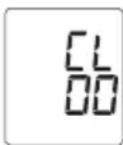
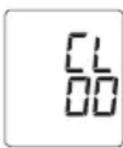
- The selected value is deleted. The device briefly displays CL00.
- If you would like to delete other values, repeat the process described above.
You can switch off the device at any time by pressing the START/STOP button.
7.6 Transferring measurements
Transfer via Bluetooth® low energy technology
It is also possible to transfer the measured values saved on the device to your smartphone using Bluetooth® low energy technology.
You will need the "beurer HealthManager" app for this. The app is available free of charge on the Apple App Store and from Google Play.
Proceed as follows to transfer values:
If Bluetooth® is activated in the settings menu, the data is transferred automatically after the measurement. The 8symbol appears in the top left of the display (see chapter "7.3 Taking a blood pressure measurement").
When connecting for the first time, a randomly generated six-digit PIN code is displayed on the device, and at the same time an input field appears on the smartphone in which you must enter this six-digit PIN code. After successfully entering the code, the device will be connected to your smartphone
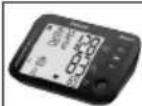
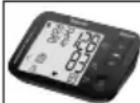
Step 1:BM 54
Activate Bluetooth® on your device (see chapter "6.2 Setting the hour format, date, time and Bluetooth®").

Step 2: "beurer HealthManager" app
In the "beurer HealthManager" app, add the BM 54 under "Settings/My devices".
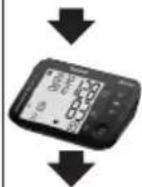
Step 3:BM 54
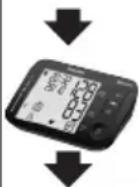
Take a measurement.
Step 4:BM 54
Data transfer immediately following a measurement:
- If Bluetooth® data transfer has been activated, the data is transferred after having confirmed the user memory by pressing the START/STOP button ①
Step 4:BM 54
Data transfer at a later point:
- Go to memory mode (chapter 7.5). Select the desired user memory. The Bluetooth® transfer starts automatically.
The "beurer HealthManager" app must be activated to allow data transfer.
If your smartphone has a protective cover, remove this to ensure that there is no interference during the transfer. Begin the data transfer in the "beurer HealthManager" app.
8. Cleaning and maintenance
- Clean the device and cuff carefully using a slightly damp cloth only.
- Do not use any cleaning agents or solvents.
- Under no circumstances hold the device and cuff under water, as this can cause liquid to enter and damage the device and cuff.
- If you store the device and cuff, do not place heavy objects on the device and cuff. Remove the batteries. The cuff line should not be bent sharply.
9. Accessories and replacement parts
Accessories and replacement parts are available from the corresponding service address (according to the service address list). Please state the corresponding order number.
| Designation Item number and/or | order number |
| Universal cuff (22-44 cm) 163.952 |
10. What if there are problems?
| Error message | Possible cause Solution | |
| Erl | Unable to record a pulse. | Please wait one minute and repeat the measurement. Ensure that you do not speak or move during the measurement. |
| Er2 | You moved or spoke during the measurement. | |
| Er3 | The cuff was not attched correctly. | Please observe the information in chapter “7.1 Attaching the cuff”. |
| Er4 | An error occurred during the measurement. | Please wait one minute and repeat the measurement. Ensure that you do not speak or move during the measurement. |
| Error mes-sage | Possible cause Solution | |
| Er5 | The inflation pres-sure is higher than 300 mmHg. | Please take another measurement to check whether the cuff can be correctly inflated.Make sure that neither your arm nor other heavy objects are pressing on the line, and that the line is not bent. |
| Er6 | The batteries are al-most empty. | Insert new batteries into the device. |
| Er7 | Unable to transfer the data via Bluetooth®. | Please observe the information in chapter “7.6 Transferring measurements”. |
11. Disposal
Disposing of the batteries
-
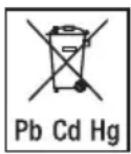
Empty, completely flat batteries must be disposed of through specially designated collection boxes, recycling points or electronics retailers. You are legally required to dispose of the batteries.
-
The codes below are printed on batteries containing harmful substances: Pb = Battery contains lead, Cd = Battery contains cadmium, Hg = Battery contains mercury
Repairing and disposing of the device
- Do not repair or adjust the device yourself. Proper operation can no longer be guaranteed in this case.
- Repairs must only be carried out by Customer Services or authorised retailers.
- Do not open the device. Failure to comply will invalidate the warranty.
- For environmental reasons, do not dispose of the device in the household waste at the end of its useful life. Dispose of the device at a suitable local collection or recycling point in your country. Dispose of the device in accordance with EC Directive - WEEE (Waste Electrical and Electronic Equipment). If you have any questions, please contact the local authorities responsible for waste disposal.
12. Technical specifications
Model no. BM 54
| Measurement method | Oscillometric, non-invasive blood pressure measurement on the upper arm |
| Measurement range | Cuff pressure 0-250 mmHg, systolic 50-250 mmHg, diastolic 30-200 mmHg, pulse 40-180 beats/minute |
| Display accuracy Systolic ± 3 mmHg, diastolic ± 3 mmHg, pulse ± 5 % of the value shown | |
| Measurement uncertainty | Max. permissible standard deviation according to clinical testing: systolic 8 mmHg / diastolic 8 mmHg |
| Memory 2 x 60 memory spaces | |
| Dimensions L 139 mm x W 94 mm x H 48 mm | |
| Weight 360 g (without batteries, with cuff) | |
| Cuff size 22 to 44 cm | |
| Permissible operating conditions | + 5°C to + 40°C, 15-93% relative humi-dity (non-condensing) |
| Permissible storage conditions | -25°C to + 70°C, ≤ 93% relative humidi-ty, 700-1060 hPa ambient pressure |
| Power supply 4x 1.5 V | --- AAA batteries |
| Battery life Lasts for approx. 200 measurements depending on the blood pressure and inflation pressure as well as the number of Bluetooth® connections. | |
| Classification Internal supply, IP21, no AP or APG, continuous operation, application part type BF | |
| Data transfer viaBluetooth®wireless technology | The blood pressure monitor uses Bluetooth®low energy technology, 2402 MHz – 2480 MHz frequency band, max. 4 dBm transmission power, compatible with Bluetooth®4.0 smart-phones/tablets |
The serial number is located on the device or in the battery compartment.
Technical information is subject to change without notification to allow for updates.
- This device complies with the European standard EN60601-1-2 (in compliance with CISPR 11, IEC 61000-4-2, IEC 61000-4-3, IEC 61000-4-8) and is subject to special precautionary measures with regard to electromagnetic compatibility. Please note that portable and mobile HF communication systems may interfere with this device.
- The device complies with the EU Medical Devices Directive 93/42/EEC, the German Medical Devices Act (Medizinproduktgesetz) and the standards EN1060-1 (Non-invasive sphygmomanometers - Part 1: General requirements), EN1060-3 (Non-invasive sphygmomanometers - Part 3: Supplementary requirements for electro-mechanical blood pressure measuring systems) and IEC 80601-2-30 (Medical electrical equipment - Part 2 - 30: Particular requirements for the basic safety and essential performance of automated non-invasive sphygmomanometers).
- The accuracy of this blood pressure monitor has been carefully checked and developed with regard to a long useful life. If the device is used for commercial medical purposes, it must be
regularly tested for accuracy by appropriate means. Precise instructions for checking accuracy may be requested from the service address.
- We hereby confirm that this product complies with the European RED Directive 2014/53/EU. The CE Declaration of Conformity for this product can be found under: www.beurer.com/web/we-landingpages/de/cedclarationofconformity.php.
13. Warranty/service
Beurer GmbH, Söflinger Straße 218, 89077 Ulm, Germany (hereinafter referred to as "Beurer") provides a warranty for this product, subject to the requirements below and to the extent described as follows.
The warranty conditions below shall not affect the seller's statutory warranty obligations which ensue from the sales agreement with the buyer. The warranty shall apply without prejudice to any mandatory statutory provisions on liability.
Beurer guarantees the perfect functionality and completeness of this product.
The worldwide warranty period is 5 years, commencing from the purchase of the new, unused product from the seller.
The warranty only applies to products purchased by the buyer as a consumer and used exclusively for personal purposes in the context of domestic use.
German law shall apply.
During the warranty period, should this product prove to be incomplete or defective in functionality in accordance with the following provisions, Beurer shall carry out a repair or a replacement delivery free of charge, in accordance with these warranty conditions.
If the buyer wishes to make a warranty claim, they should approach their local retailer in the first instance: see the attached "International Service" list of service addresses.
The buyer will then receive further information about the processing of the warranty claim, e.g. where they can send the product and what documentation is required.
A warranty claim shall only be considered if the buyer can provide Beurer, or an authorised Beurer partner, with
- a copy of the invoice/purchase receipt, and
the original product.
The following are explicitly excluded from this warranty:
- deterioration due to normal use or consumption of the product;
- accessories supplied with this product which are worn out or used up through proper use (e.g. batteries, rechargeable batteries, cuffs, seals, electrodes, light sources, attachments and nebuliser accessories);
products that are used, cleaned, stored or maintained improperly and/or contrary to the provisions of the instruc
tions for use, as well as products that have been opened, repaired or modified by the buyer or by a service centre not authorised by Beurer;
- damage that arises during transport between manufacturer and customer, or between service centre and customer;
- products purchased as seconds or as used goods;
- consequential damage arising from a fault in this product (however, in this case, claims may exist arising from product liability or other compulsory statutory liability provisions).
Repairs or an exchange in full do not extend the warranty period under any circumstances.
FRANÇAIS

Chere cliente, cher client,
Source: WHO, 1999 (World Health Organization)
www.beurer.com/web/we-landingpages/de/cedclarationofconformity.php.
13. Garantie/maintenance
Fuente: WHO, 1999 (World Health Organization)
Paso 2: App "beurer HealthManager"
Fonte: WHO, 1999 (World Health Organization)
Passo 2: App "beurer HealthManager"
Kaynak: WHO, 1999 (World Health Organization)
1 np6op dny n3MepeHnKpoBanyo daBneHn
1 MaHKeTa IJIa I3MepeHnI KPOBHOr O daBHeHnB INeBuOJ apTePmN
4 6aTapeiKn AAA (TnL R03),1,5 B
1cymkaIxpaHnH
1 INCHtpkykunno npumHeHHIO
1 kpaTkoe pyKOBOCTBO NOJIb3ObaTeIa
2.ПОЯСHEняКСИМВOLДАМ
Ha npnbope, B nHCTpykunn no npmeneHHIO, Ha ynaKOBKe n Ha
phiMeHHoT TaJIuUe npnbopa NCNoJb3yIOTc CneDyUOuNE
CIMBOJI:
I Bpemr Heo6xOIMO yCTaHaBJIbBaTb 3aHOBO. CoXpaHeHHbIE B namrtn pe3yJbTaTbI n3MepeHn He nCye3aOT.
6.2 Hactpoika yacoBoro ofoPMata, daTbI, BpeMeHn n Bluetooth®
O63aTeIbHo yCTaHOBnTE DaTy n BpEmr. ToIbKO TaK MoXHo KOppeKTHO COxpaHrTb N3MepeHHbIe 3HaueHnC DaToN IN BpEmEHm N NO3Ke BbIBOAnTb INx Ha DnCnJIeN.
MeHIO DnBbINONHeHn HaCTpoeK Bbl3bIbAeTcNByMn cnoco6amn.
-ПередпервимИСПОЛБ3OBaHиЕМ И ПОСле кжdoJ 3aMeHbI
6aTapeeK:
после установки батAPEeK в пибор Bы abTomatUcheckи
пonaдае В COOTBETCTBYUоjee MeHIO.
- Ecnn 6aataeyn yxe yctahOBHebl: npn BbIKNoeHHOM npn6ope haxMMTe KhoNky BKJ. / BbIKN. ① ydepXnBaInTe ee haxaToB Tteehne 5 ceKyHd.
B 3TOM MeHIO Bbl MoXeTe NocJeIOBaTeJIbHO BblNOJHnTB CneIyUOuNe HAcTpoiKn:

Ha dncnlee 3amiraeT opmat BpeMeHn.
C NOMOuBIO KHOIOK COXpAHEN M1/M2 BbIbepnTe JKeJaEMbI YacOBoi FOpmAT I NOITBePdnte BblOp HaxKaTNEM KHOIKN BKJ./BbIKJ. ①
YdepnBna HkaToN KhoNky CoxpanHeM M1nnM2,MOKHO 6bICTpee HaCTpOuTb 3HaueHn.
Ha nscnnee 3amraet Hndkaucna roda.
C NOMOJIbIO KHOJOK COXpAHENM M1/M2 BbIePITe rOg INoTBePdTe BbI6Op HaxkaTneM KHONK BKN./BblKI. ①
Ha dncnlee 3amraet nHdkaunm Mecya.
C NOMOUIKHOK COXPAHnM1/M2 BbI6epnte HxKhBmecuNIOdTBePnTe Bbl6op HaKaTne KONKn BKJ./BblKJ.①
Ha nncnlee 3amirae Hndkauny Dna.
C nOMOJIbIO KHOJOK COXpaHEnHa M1/M2 BbI6epnte DeHb I NOITBepdTe BbI6Op HaxKaTHeM KHONK BKJ./BbIKJ. ①
I Pn BbIbope 12-ycaBOrO foOpMaTa BpeMeHn 3HaueHne Mecra 6ydt OTo6paKaTbcnpeed 3HaueHem nHr.
Ha nscnlee 3amiraeT INHnKauqnaYacOB.
C NOMOJIbIO KHOJOK COXpAHEnIaM1/M2 BbI6epNTe HxKbIyacN NOITBePdnte Bbl6Op HaxKaTneM KHONKn BKJ./BblKJ. ①


Ha dncnlee 3amirae T Hndkaun MnHyT.
C NOMOU KHONOK COXPAHEH M1/ M2 BbI6epuTe HxKHOe 3HaueHne MNHyT IN IOITBepuTe BbI6Op HxKaTNem KHONKN BKJ./BbIKJ. ①

Ha dncnnee 3amiraet cmbon Bluetooth®.
C NOMOJIbK HONOK COXpaHEnM M1/M2 MoXHO BKNIOHTb (3AMURAET CUMBOIN Bluetooth) nJU OTKIOUHTb (CIMBOIN Bluetooth He 6ydt OTOBpaKaTcra Ha DCNCEE) aBTOMaTIueCKyIO AKTNBAUHO nepeaHn DaHHbIX Bluetooth. IJRA NOITBepxKeHn BAIBopa HaxMMTe KHOIKY BKJ./BbIKI
I npn nepeaue daHbIX c nOMOuBIO BleTooth pacxoyetc3apRd 6atapeKn.
7.Ппимеоннe
InpoBeHnI 3MepeHn TemepaTpy np6opa DoJxHa COOTBEcTBOBaT KOMHaTHOi. I3MepeHne MoXHO OcyueCTBnTb Ha JbeOn nI npaBo pyke.
7.1 HaKaJaIbIbAHHe MaHXKeTbI
HANOKIne MaHKeTHa O6HaeHnyo pyky BblIe IOKT. KpOBOcHa6XeHne pyKn He D0JIxHO 6bITb HApUSeHO n3-3a CnIIKOM y3KOJ OeKDbI N T. P.
HaKaJaBaIe MaXKeTy Ha NneO TaK, YTo6bI ee HxKHi KpaI paCnOlaRanCBAIe JIOKTeBOrO CrIbA u apTePmHa 2-3 CM. UJahr DoJxKeH 6bITb HApBaJIeH B CTOPOHy JaDOHn NO CEHTpy.
ПлOTн, HO He cIIMKOM Tyro OebpHITc CBObOHyB KOHeC MaHKeTbI BOKpyrPykn n 3acterHnTe C NOMOuBIO3actexKn-lnyuKn.MaHKeTa DOnxHa npIneraTb TaK, YTo6bI NOd Hee MoXHo 6blno npocuHyT bDa naJbua.
BCTaBtE UHaH MaXKeTbI B pa3beM IJIa WTeKepa MaXKeTbI.
MaHxeta Bam noXoNT, ecn nocne ee HanoXeHna OTMeTKa HndekCa (HaxoNTcB NpeDenax Dnana30Ha OK.
Ecnn n3mepenHe BbIOJHReTcHa npabOM nneYe, WnaHr Donxeh HaxoNDbcra Ha BHyTppeHHeN CTOPOHe JOKT. PocneDte 3a Tem, yTo6bl pyKa He Iekana Ha WnaHre.
IaBHeHne B IeBOH n npaBoH pyKe MoKcET OTnUaTbcra, YTO 06bAcHReT Bo3MOxHOe pa3JInuHne B pe3yIbTaTAX N3MepeHn. BcerDa npoBOdnte N3MepeHne Ha OndHn TOn Jxpe pyKe.
Ecn pa3nue B pe3yntatax CnNkOM BeNko, Heo6xOIMO 06cyntb C Bpaqom, Ha KaKo pyKe 6ydyT npOBODtbcr n3MepeHn.
BHHMaHHe: np6op pa3peWaeTc nCNoJIb3OBAbToJbKO C opnHaJIbHbIM MaHKeTaM. MaHKeTa paccHTaHa Ha pyKy C OKpyxHOCTbIO IIeua 22-44 cm.
7.2 PpaBnIbHoe nIoXeHne TeHa
IpeepnepBbIM n3MepeHem KPOBraHO rDaJIeHrO OTdbixaTe B TeueHne pTm MNHyT! B IpOTuBHOM cLyuae BO3MOxHbI OTKIOHeHH pe3yNbTaTOB n3MepeHn.
BbMOKeTe npoBOuNTb N3MepeHne B NOIOKeHn CNDa HJN JexKa. O6raTeNbHO CneIeTe 3a TeM, YTO6bl MaHXKeTa HaxOuINacb Ha yPOBHe cepua.
-ДяИЗМерени КрOBЯногдавлЕнгсддзмteуdo6hoe noJoxeHne.CnHa n pykn DoJxHbI mTe b onopy. He ckpeuBaHTe HOrn. NocTabBe CTynHnPoBHO Ha non.
- UTo6bl n36ExKaTb NCKaXeHnpe3yJbTaTOB, BO BpeMn3MepeHn CJIeDyET BcEY C6B CNOKOHO He pa3rOBApNBaTb.
- Ipeep noBTOPbHIM n3MepeHnEM NOdoxKdTe He MeHee MInHyTb!
7.3 ⅢmepeHne KpoBraHoro daBneHna
HanoKTe MaHKeTy, KaK OnUcaHo BblJe, N 3aMnte ydo6-Hoe dIy I3MepeHnI NOJoxHeIe.
KPOBraHOrO DaBHeHnA HAXMITE KHOKNy BKN./BblKl. Ha KopotKoe BpemHa Dncnnee OTo6pa3rTcBce 3JeMeHTbl.
Ipoceccn3mpehenHaHHeTcraBtOMaTnuecknYepe3 3cekyHdbI.
13MepeHHe MoXHO npeBaTb B JIO6OIMoMeHT,HaKaB KHONky BKJ./BblKJ. ①
KakToJIbKO np6op pacno3Haet nyIbc, OTo6pa3ntcra CmBOJnyIbca
- OTo6pa3raTcpe3yIbTaTbI n3MepeHnCnCTOnuYeCKOro DaBJeHn, DnaCTOnuYeCKOro DaBJeHn I NyIbca.
- Er noBnreTc, ecn n3MepeHne 6bIIO npoN3BeHeO HeaJIeXaUIM o6pa3OM (cm. rIaby 10 «To DeIaTb npn BO3HnKHObeHn npo6Iem?»). NOBtOpnte n3MepeHne.

Tepe npn nomoKhoNOK coxpaHHeM1 nn M2 BbI6epnte noIb3OBaTeBckyIO naMaTb. EcnB He Bbl-6paNN noIb3OBaTeBckyIO naMaTb, To pe3yIbTaT n3MepeHn 6yDet COxpaHEn B noJIb3OBaTeBckOKn paTn nocJeHrno Iob3OBaTeJHa DnCnnee NoRbTccoOTBeTCTByUoN CmMB0NJ
BbIKIOHTe np6Op nI3MepeHnKPOBHOr daJIeHn, Haxab KHOkY BKJ./BbIKJ. ①. Pe3yJbTat n3-MepEHn COxpaHITcB BbIBpaHHo NOB3OBATeJBCKOn IaMrtn.
- Ecnn Bbl He oTKIIOHTe npi6op, To uepe3 30 cekyHd OH BBIKIIOHTc CaMOCToTERTbHO.
EcnnakTNBnPOBaHa cyHKnIepeDayn daHHbIX yepe3
BluetoothTO NocLe NOdTBePckDeHnnoJb3OBAteNbCKoN
namrtn HaKaTneM KOnKn BKN./BblKn. ① NaHcHTcR nepeDaay DaHHbIX B
npInoxHebeurer HealthManager (cm.rnaBy 一 7 . 6 NepeDaay n3MepeHHbIX 3Naehn>
Ipi npBOM coeHHeHH Ha np6ope 6ydt noka3aH cnuyauHO CReHepnpoBaHHb IseCTn3HaayhBn PIH-KoD, OndOBpeMeHHo Ha cMapTfohe NORBNTcR NOJIe dJa BBoDa 3TORO INH-KoDa. Iocne ycNeuHoro BBoDa np6op coeHNrEeTc Co cMapTfoHOM.
Ha nncnnee mnaeT cunboi Bluetooth, u ropnt roIy6oB CBeToDIO. B TeueHne 30 cekyn npu6op IaI N3MepeHnKPOBHOrO daBHeHn yCTaHbINBaET CBA3b C npUINOKeHnEM.
Kak TOnbKO coeHHeHne 6yTe yCTaHOBNeHO, CmBOJ Bluetooth" nepeTaHET MuaTb. Bce pe3yIbTaTbI n3MepeHnABTomatUeCKN nepeAIOTCB INpINOKeHne. NocIe ycneHoi nepeDaun daHHbIX np6Op OTKJIIOHaTcR. Ecn nepeDau daHHbIX He ydaIacb, rony6oCBeTOIOI. NorachET Ha dncnlee NOBtCra CmBOJ
EcnnB TeueHne 30 ckynd np6op He cMOxKet yCTaHOBnTB coeHHeHne C npJIOXeHnEM, CmBOJ Blu- eoth" norachET n np6Op Iry m3MepeHn KPOBnHO daBHeHn OTKJIIOHTcYpe3 MInHyTbI.
UyTnte, yTo npepaHn daHHbIX Heo6xOIMo do6aBnTB np6op nI3MpeHnKPOBHO rDaBHeHnBaPazDen «Mon ycTpoNCTBa» B npINOKeHN beurer HealthManager. npepaHn daHHbIX Heo6xOIMo 3aIycNTb npINOKeHne beurer HealthManager. Ecn TeKyuNe daHHbIe He oTO6paXaIOrTa Ha BaWeM cMapTfoH, NOBTopTe nepeaHy daHHbIX B COOTBeTCTBnC yKa3aHnMa rIaBbl 7.6.
EcNn Bbl 3a6ynde Te BbIKIOuHTb np6Op dIry I3MepeHnKPOBraHO DaBJIeHnO h BbIKIOUHTc aBTOMaTNUeCKnnpimepHo uepe3 30 ckyHd. B 3tOM cIyueae n3MepeHHoe3NaueHne TaXke coxpaHNTcB Bbl6paHHo nnnoCNEHeNCNoB3OBaHHo NlB3OBaTeJIbCKo NAmrTn, a daHHbIe npn AKTINBIPoBaHHo fynHKun nepeaHn daHHbIX uepe3Bluetooth@ 6ydt nepenecHbl.
- Npeed NOBTOpHbIM 3MepeHnem NOdoXdTe He MeHee MmHyTb!
7.4 OueHka pe3yNbTaTOB
HapyuHHe cepdeHoro pntMa
JaHHbI npH6Op BO BpEmn3MpeHnMoKET ONpeDenITb BO3MOXHbIe HApUeHnCepDeuHOro pHTMa n NocJe n3MepeHn COO6aet O IN HAJIuHn CmMBOLOM
3TO MOKET yka3bBaTb Ha apNTMIO. ApNTMn - 3TO 6OJIe3Hb, npN KOtOp0B03HnKaet aHOMaJIbHbI CepDeuHbI pNTM, Bbl3BaHHbI OUn6kAMn B 6No3NeKtpnueCKoC nCTeMe, peryInpuyUoJe 6BeHne cepDua.CmNTombl (HepaBHomepHoe nn yUaUeHHoe cepdue6neHne, MeJEnHbI nn CnUWKOM 6bICTpbI pylbc) MOrTy 6bITb Bbl3BaHbI 3a6OJIeBAHnMn cepDua, BO3pactOM, PpePacNOJoxEHHocTbIO K COOTBETCTByIOUM 3a6OJIeBAHnM, Ype3MePbHIM yNtpe6JIeHemK oPe, HNKOTHa n ANKOJrA, CTpeccOM Nn HeOCTaTkom ChA. ApNTMn MOKET 6bITb BblBHeHa TOJbKO B pe3yJbTaTe ObCJeIOBaHNy Bpaua.
Ecn nocne nepBoro n3MepeHna Ha nncnnee OTObpaKaetc CmBOI OOBOTpNE u3MepeHne. ObpatITE BHMaHne Ha To, YTO B TeueHne 5 MNHyT nepei n3MepeHnem HeJIb3aAHMaTbcr AKTHBHOJ DeAteJIbHOCTbIO, a BO BPEMn N3MepeHn HJIb3ra ROBOPuTB HIN DBURA tbc. Ecn CmBOI OABBnEeTcR yactO, O6patNTecb K BpaCy.
CamaHnOCTnKa n camolueHne Ha oCHObe pe3yIbTaTOB m3MepeHnMoryT 6blb onaChbl. O6raTeJIbHO cNeyIte peKOMeHdaunm CBOero Bpau.
Hdkatoppcka
OueHITpe3yIbTaTbI 3MpeHIMMOXHO C NOMOIO TaBNIUcbl, IpeCTaBHeHHOH HIXe.
3Tn cTaNdapThbIe 3NaueHnraBJIyOTcN NCKJIIOHTeJbHO O6UIMOpneHTnpaMn, NOCKoJIbKy INHINBUNyaJIbHbIe NOKa3aTeJIKNKPOBHaHOrO DaBJIeHn y pa3JIuHbIX JIOJe, BO3pAcTHbIX rpynnN T. n. BapbIpyOTcR.
Baxho peryIapHO KOHCyIbTnipoBaTbcra C BpaOm. BpaOpneIHT, KaKNe NOKa3aTeIN KPOBHorO daBHeHna RbJIOTcI DaIba Bac HopMaIbHbIMu, a KaKNe - onaChbIMn.
Градацяна диспeeишкала на приборе рokаьот, в КAKOM ДИАПАЗОЕ НАХODHTСЯМЕРЕНоу Давлени.ЕсниЗачEHнСИСТOLИЧECKOTOДИСТOLIЧECKOTOДавлениHaxODTCSВа3HBxДИАПAZOHAX(HaNPIMeP,CNTOLICHCOEДавлениБвICOKOE BДONYCTUMbIX ПpeДELAX,aДИСТOLICHCOEHopMaIbHoE),TO rpaФИСECHOE DELEHNE Ha pRbOpe BCERda6byET OTOБРЖATb BOLEE BvICOKOE PpeDEnbl,KaK B ONICAHNOMПИМЕ:ВБICOKOE BДONYCTUMbIX PpeDEnax.
NCTOCHM: WHO, 1999 (World Health Organization)
Pe3yIbTaTbKaKdOrO yCneUHOro n3MepeHn coXpaHryIOCTc C yka3aHHeM DaTbI N BpeMeHn n3MepeHn. Korda KOJIueCTBO COxpaHeHHbIX pe3yIbTaTOB n3MepeHn npebblaaet 60,6one paHHne daHHBe nepe3anncbIAoiTCra.
C NOMOJIbIO KHOJOK COXpaHEnH M1 nnM2 BbI6epnte HyxHyIO NOJIb3OBaTeJIbCKyIO naMaTb 1,KOrda npI6Op BbIKIOueH.
-Дя npocmOTpa pe3yIbTaTOB n3MepeHn, coXpaHeHHbIX B NOJIb3OBAteJIbCKoI NaMRTn, HaxMITE KHOJKy coXpaHeHn M1.
-ДяпрсмOTpa pe3yЛьТаTOB ИЗМереHи, coхраHeHHbIX B NOJIb3OBAteJIbCKоI NaMЯТИ, HaxMITE KHOKNy coхраHeHЯ M2.
Ha nucnnee 3amiraet R.
OTo6pa3ntcpeDHee 3HaueHne Bcex coXpaHeHHbIX B daHHo NOIb3OBaTeNbckO namrtn pe3yIbTaTOB u3MepeHn.
EcnuBluetooh aKTHBnpoBaH (Ha dncnlee oTo6paxaetcMnraOuCmB0n np6op nI3MepeHnKPOBHOrO daJIeHnNbITaeTcYCTAHOBtB coeHNHeHc npINOxKeHnEM. HaxaTNem KONKn M1 Bbl MoXeTe npepBaTb nepeDauy daHHbIX, Ha dncnlee oTo6pa3rTc CpeHnne 3NaueHnry. HaxaTNem KONKn M2 Bbl MoXeTe npepBaTb nepeDauy daHHbIX, Ha dncnlee oTo6pa3rTc pe3yNbTaTb N3MepeHnnoJb3OBaTeJbCKo nnAmy TcCMBOI cye3Het c dncnJe. KHONK CTaHOBRTc HEAKTUBHbIMN NOcNe yCTaHOBKn CoeHNHeHn N B pOnceCe nepeDaun DaHHbIX.
- Haxmte COOTBETCTBYUyIO KHONky coxpaHeHn (M1 nn M2)
Ha nciJee 3amiraet
OTo6pa3ntcpeDHee 3NaueHne pe3yNbTaTOB yTpEHHx n3MepeHn 3a nocJeHnE 7 dHei (ytpo:5:00-9:00).
- Haxmte COOTBETCTBYUky KHOIIky COxpaHeHn (M1 nn M2).
Ha nciiee 3amraet
OTo6pa3ntcpeDHee 3NaueHne pe3yIbTaTOB BeuepHnx n3MepeHn 3a NocJeHne 7 Hei (Beep:18:00-20:00).
- Pn NOBtOpHOM HaxKaTIN COOTBeTCTByUoIeKHOJKn (M1 nn M2) Ha DnCnJIee OTo6pa3ntcpe3yJIbTaT NocJeHrO n3MepeHnR (B KaueCTBe npImepa nCNoJIb3yeTcra n3MepeHne 03).
- Ecnn eue pa3 haXaTb KhoNky coXpaHeHn (M1 nn M2) moxHo npocMOptb BCE pe3yIbTaTbI OTdneBhbIX n3MepeHn.
- YTo6bI BHOBb BbIKJIIOuHTb npu6Op, HaxMITE KhoNky BKJ./BbIKJ. ①
BbIITN3 MeHIO MOXHO BJIIO6OE BpeM, HxKaB KHONKy BKJ./BblKJ. ①
- 4To6bI ydaJIbTb coOpexKIMoe NOIb3OBAteJIbCKoI naMrtN, cHaJana BbIbepnTe Tpe6yEmyIO NOLb3OBAteJIbCKyIO nAMrTb.
3anyctnte 3anpoc cpehnx pe3yIbTaTOB n3MepeHn. Ha dincnillee 3amirgaet H n OTO6pa3NTcR cpeHee 3haueHne BCEX COxpaHeHHbIX B daHHo N0lb3OBAteNbCKo nAmrTn pe3yIbTaTOB n3MepeHn. - YdepXnBaIte HaxaToB TeueHne 5 CekyHd KHOkKy COxpaHeHmM1 nn M2 B 3aBnCIMoCTn OT TO, B KaKo IOnb3OBaTEJbCKoPiMaTn Bby HaxOInTeCb.
Bce 3naeHn TaKyuIe I noJIb3ObaTeIbckoI naTn 6yDyt ydaJeHbl.
-Дя удаленя OTдьнбix pe3yntaTOB n3MepeHn COOTBeTCTByIOUe NOJb3OBaTeJIbCKOЯMaRTN ChauJaBA BbI6epHTe NOJb3OBaTeJIbCKYIOЯMaRTb.
3anycntte 3anpoc pe3yIbTaTOB OTdJIbHbIX n3MepeHn.
- Haxmte KhoNky coXpaHeHnM1 nn M2 n ydepXuBaIte ee haxaToB TeueHne 5 ceKyHd (B 3abucmOCTn OT TO, B KaKoI NOJIb3OBaTeJIbCKoI naMrtu Bbl HaxoDITecb).
BbI6paHHbpe3yNbTaTn3MpeHn86yTeYdaJIeH. Ha nucnnee Ha HeKOTOpoe Bpem OTo6pa3ntc 3HaueHne CLO
- Ecni BbI xOTiTE ydAINb IpyrIe pe3yIbTaTbI N3MepeHn, NOBTOPe DeICTBn, ONNCaHHBe BblE.
BbI BJIIO6oe Bpem MoKeTe BbIKJIIOHTb npIN6Op HaxKaTneM KHOIIK INBKL./BbIKL.
7.6. Npepaape3yNbTaTOB n3MepeHn
IpeepaHa 3MepeHHbIX 3HaueHm C nCnOJIb3OBaHHeM TexHOIOrNl Bluetooth® low energy technology
Y Bac ectb BO3MOxHOCTb IpeHeCTn 3MepeHHbIe n coXpaHHeHbIe Ha np6ope 3HaueHnHa cMapTfoH npn Tomooun Bluetooth® low energy technology.
Bam nohaobntc npnloxhebeurer HealthManager. Eromko 6ecnlaTHO ckaaTb B Apple App Store n Google Play. I napeHocaa daHHbIX bInONHITe CneIyUOnne neCTBna.
EcN B MeHIO HAcTpoE kAaTNBnPoBaHa cyHKuYn Bluteoth,TO nocJe npoBeHeHn I3MepeHn nepeJaHa daHHbIX npOn3OyIeT aBTOMaTnueckn. B JEBOM BepXHe m yIy dncIe NpOBTuC nMBOJ Cm. rIaby «7.3 U3MepeHne KPOBHOrO daBneHn»).
① Пи пьвом-coeINHeHnHa np6bpe 6ydt noka3aH cnyaHc creHepuPoBaHHbI WeCTn3HaUHbI PnH-KoD, OndOBpeMeHHO Ha cMapTfohe NOBtCn NOJI dNBA BBOda 3TorO pIH-KoJa. Iocne ycneuHoro BBOda np6bOp coeINHЯETcAo CMapTfoHOM.
Liar 1:BM54
AknBpyTe Bluetooth® Ha cBOeM npnbope (cm. rnaBy «6.2 HacTpoJa yacOBoro foOpMaTa, daTbI, BpeMeHn n Bluetooth®»).


Iar 2: npinoxeHne «beurer HealthManager» Добавte BM 54 B npinoxeHne «beur HealthManager»В pa3dene «Hac troйКИ/Mon yctpoiCTBa>.
Uar 3:BM54 IpoBvTe u3MepeHne.
Liar 4:BM54
Ipeepa daHbix cpa3y nocne n3mepenia:
ecn aKTHBnOBAHa cyHK- Cnna nepeaH daHHbIX yepe3 Bluetooth,TO nocne NOITBePxxDeHnnoJIb3OBaTeJIbCKoI NaMAtn HaxKaTHe KHOKN BKJ./BbIK. ① HaHTcN nepeaHa daHHbIX.
Uar 4:BM54
Ipeepa daHbIX BdpyroE Bpemr:
IpeiDNTe BpeKIM Bbl3OBA DaHHbIX N3 NaMaTn (rna7.5).Bb6epnte HxKHyIO NOJb3OBaTeJIbCKyIO NaMBy. IpeJa4aDaHHbIX Ypee3 Blueteoth HaHHeTc aBTOMaTnueCKN.
i InpeaHdAHHbIX Heo6xOIMo 3aNyCTNTb npinoKeHne beurer HealthManager.
YTo6bI oBecneuTb nepeauy daHbIX 6e3 nomex, CHIMITE yexoI co cMaprfoHa, ecn OH eCTb. 3aNyctnte nepeauy daHbIX B npiloxhen beurer HealthManager.
8. Ouchstka n yxoid
Oueta Te npnbop mHaXKeTy c octopoXHocTbIO. NcnoIb3ynte ToIbKO cnerka yBnaXhHeHHyo calfeTKy.
He nCnOJIb3yIte YIcTaeJIe CpeCDTa bIIN paCTBOpITeJI.
- Hn B Koem Cnyuae He onyckaTne npnbop mHaXKeTy B Body, TAK KaN nonaHHe BObI npNBeTe K nobpeKJeHIO npnbopa n MaHKeTbI.
- Ppi XpaHeHn Ha np6ope n MaXKeTe He DoJXHbI CToRbT TaXeJIbe IpeMTebl. 3BNeKnte 6aTaapeuKn. HeIb3r CInUkOM cnJIbHO CrIbAtb UJHaHr MaXKeTbI.
9. Akceccyapbl 3anachbIe deTJIIN
AkeccyapbI 3anachbe DeTaNMOxHOp npoobpeCTn B cepBnchbIX ceHTpax (coJIaCHO CnCKy cepBnchbIX ceHTPOB). YkaJnte COOTBeTCTByUOuH NHomep IJa 3aKa3a.
| Наменованne | Артыкуньни Homep ини Homeр дд зakаза |
| Универальна манжета (22-44 см) | 163.952 |
- YTo DeJaTb npn BO3HKnHOBeHm npo6Jem?
Zródlo: WHO, 1999 (World Health Organization)
The Bluetooth® word mark and logos are registered trademarks owned by Bluetooth SIG, Inc. and any use of such marks by Beurer GmbH is under license. Other trademarks and trade names are those of their respective owners.
Apple and the Apple logo are trademarks of Apple Inc., registered in the U.S. and other countries. App Store is a service mark of Apple Inc., registered in the U.S. and other countries.
Google Play and the Google Play logo are trademarks of Google LLC.
Android is a trademark of Google LLC.

Beurer GmbH • Söflinger Straße 218 • 89077 Ulm, Germany • www.beurer.com
www.beurer-blutdruck.de · www.beurer-gesundheitsratgeber.com · www.beurer-healthguide.com

0483