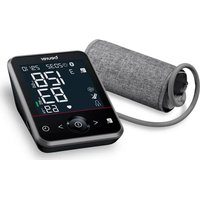
BM 64 - Blood pressure monitor BEURER - Free user manual and instructions
Find the device manual for free BM 64 BEURER in PDF.


| Product type | Upper arm blood pressure monitor |
| Brand | Beurer |
| Model | BM 64 |
| Dimensions (L x W x H) | 143 x 105 x 60 mm |
| Weight | Approx. 450 g (without batteries, with cuff) |
| Power supply | 4 AA 1.5V batteries (included) or USB-C power adapter (not included) |
| Compatible arm circumference | 22 to 42 cm |
| Measurement method | Non-invasive oscillometric |
| Measurement range - Systolic pressure | 50 to 280 mmHg |
| Measurement range - Diastolic pressure | 30 to 200 mmHg |
| Measurement range - Pulse | 40 to 199 beats/minute |
| Accuracy - Pressure | ± 3 mmHg |
| Accuracy - Pulse | ± 5% of displayed value |
| Memory | 2 x 120 memory slots (2 users) |
| Connectivity | Bluetooth® (2.400-2.483 MHz) |
| Main functions | Cardiac arrhythmia detection, atrial fibrillation (AFIB) detection, color-coded risk indicator, multi-measurement (average of 3 measurements), hemodynamic stability diagnosis (HSD) |
| Display | Screen with date, time, systolic/diastolic pressure, pulse, risk indicator, positioning and rest indicators |
| Cleaning and care | Clean with a slightly damp cloth; do not use detergent or immerse in water |
| Available replacement parts | Universal cuff (ref. 164.503), EU power adapter (072.78) or UK (072.79) |
| Warranty | See warranty card provided |
Frequently Asked Questions - BM 64 BEURER
User questions about BM 64 BEURER
0 question about this device. Answer the ones you know or ask your own.
Ask a new question about this device
Download the instructions for your Blood pressure monitor in PDF format for free! Find your manual BM 64 - BEURER and take your electronic device back in hand. On this page are published all the documents necessary for the use of your device. BM 64 by BEURER.
USER MANUAL BM 64 BEURER
EN Upper arm blood pressure monitor Instructions for use......21
natural_image
Illustration of an open book with a folded corner and horizontal lines, no text or symbols presentEN Unfold page 3 before reading the instructions for use.
Read these instructions for use carefully. Observe the warnings and safety notes. Keep these instructions for use for future reference. Make the instructions for use accessible to other users. If the device is passed on, provide the instructions for use to the next user as well.
CONTENTS
- Included in delivery 21
- Signs and symbols....21
- Intended use 23
- Warnings and safety notes....24
- Device description....26
- Usage 26
6.1 Initial use....26
6.2 Before the blood pressure measurement .....27
6.3 Taking a blood pressure measurement....28
6.4 Evaluating the results....29
6.5 Displaying and deleting measured values ....31
- Cleaning and maintenance....33
- Accessories and/or replacement parts ....33
- Troubleshooting....33
- Disposal 34
- Technical specifications ....34
- Guarantee/service 35
1. INCLUDED IN DELIVERY
Check that the exterior of the cardboard delivery packaging is intact and make sure that all contents are included in the delivery. Before use, ensure that there is no visible damage to the device and accessories and/or replacement parts, and that all packaging material has been removed. If you have any doubts, do not use the device and contact your retailer or the specified Customer Services address.
• Blood pressure monitor
• Upper arm cuff (22-42 cm)
- Instructions for use
- Quick guide
- Blood pressure pass
- Batteries, see chapter "Technical specifications"
- USB-C cable
- Storage bag
2. SIGNS AND SYMBOLS
The following symbols are used on the device, in these instructions for use, on the packaging and on the type plate for the device:
WARNING
Indicates a potentially impending danger. If it is not avoided, death or serious injury will occur.
CAUTION
Indicates a potentially impending danger. If it is not avoided, slight or minor injuries may occur.

Product information
Note on important information

Observe the instructions
Read the instructions before starting work and/or operating devices or machines

Disposal in accordance with the Waste Electrical and Electronic Equipment EC Directive – WEEE

Do not dispose of batteries containing harmful substances with household waste

Manufacturer

CE labelling
This product satisfies the requirements of the applicable European and national directives.

Dispose of packaging in an environmentally friendly manner

Marking to identify the packaging material.
A = material abbreviation, B = material number: 1-7 = plastics, 20-22 = paper and cardboard

Separate the product and packaging elements and dispose of them in accordance with local regulations.

Protected against solid foreign objects 12.5 mm in diameter and larger

Direct current
The device is suitable for use with direct current only

Unique device identifier (UDI)
Identifier for unique product identification

Batch designation

Item number

Serial number

Medical device

Type BF applied part
Galvanically isolated applied part (F stands for “floating”); meets the requirements for leakage currents for type B

Temperature range

Humidity range

Atmospheric pressure limitation

Importer symbol
| # | Type number |
| Date of manufacture |
3. INTENDEDUSE
Intented purpose
The blood pressure monitor (hereinafter, device) is intended for the fully automatic, non-invasive measurement of arterial blood pressure and pulse values on the upper arm.
It is designed for self-measurement by adults in a domestic environment.
Intended users
The blood pressure measurement is suitable for adult users whose upper arm circumference is within the range printed on the cuff.
Clinical benefits
The user can record their blood pressure and pulse values quickly and easily using the device. The recorded values are classified according to internationally applicable guidelines and evaluated graphically. Furthermore, the device can detect any irregular heart beats that occur during measurement and inform the user via a symbol in the display. The device saves the recorded measurements and can also output average values of previous measurements. The recorded data can provide healthcare service providers with support during the diagnosis and treatment of blood pressure problems, and therefore it plays a part in the long-term monitoring of the user's health.
Indications
In the event of hypertension or hypotension, the user can independently monitor their blood pressure and pulse values at home. However, the user does not need to be suffering from hypertension or arrhythmia in order to use the device.
Contraindications
WARNING
- Do not use the blood pressure monitor on newborns, children or pets.
- Persons with reduced physical, sensory or mental capabilities should be supervised by a person responsible for their safety and receive instructions from that person on how to use the device.
- Do not use the device if you are using electrical implants (e.g. pacemakers).
- Do not use the device if you have metal implants.
- Do not use the cuff on people who have undergone a mastectomy or who have had their lymph nodes removed.
- Do not place the cuff over wounds as this may cause further injury.
- Make sure that the cuff is not placed on an arm whose arteries or veins are undergoing medical treatment, e.g. intravascular access or intravascular therapy, or an arteriovenous (AV) shunt.
- Do not use the device on people with allergies or sensitive skin.
Undesirable side effects
- skin irritation
- negative impact on blood circulation
4. WARNINGS AND SAFETY NOTES
General warnings
WARNING
- The measurements you take are for your information only – they are not a substitute for a medical examination! Discuss your measured values with your doctor and never make your own medical decisions based on them (e.g. regarding medicine doses).
- The device is only intended for the purpose described in these instructions for use. The manufacturer is not liable for damage resulting from improper or incorrect use.
- Using the blood pressure monitor outside your home environment or while on the move (e.g. while travelling in a car, ambulance or helicopter, or while undertaking physical activity such as playing sport) can influence the measurement accuracy and cause incorrect measurements.
- Cardiovascular diseases may lead to incorrect measurements or have a detrimental effect on measurement accuracy.
- Do not use the device at the same time as other medical electrical devices (ME equipment). This could cause the measuring device to malfunction and/or an inaccurate measurement.
- Do not use the device outside of the specified storage and operating conditions. This could lead to incorrect measurements.
- Only use the cuffs included in delivery or described in these instructions for use with the device. Using a different cuff may lead to inaccurate measurements.
- Note that when inflating the cuff, the functions of the limb affected may be impaired.
-
Do not perform measurements more frequently than necessary. Due to the restriction of blood flow, some bruising may occur.
-
Blood circulation must not be stopped for an unnecessarily long time during the blood pressure measurement. If the device malfunctions, remove the cuff from the arm.
- Place the cuff on the upper arm only. Do not place the cuff on other parts of the body.
- The air line poses a risk of strangulation for small children.
- Small parts may present a choking hazard for small children if swallowed. They should therefore always be supervised
- Keep packaging material away from children. There is a risk of suffocation.
- Keep away from children, pets and pests.
- Do not drop, step on or shake the device.
- Do not disassemble the device as this may cause damage, faults and malfunctions.
- Do not modify the device.
- If you have any of the following conditions, it is essential you consult your doctor before using the device: Cardiac arrhythmia, circulatory problems, diabetes, pregnancy, pre-eclampsia, hypotension, chills, shaking
- To rule out a difference between sides, the measurement should initially be taken on both arms.
General precautions
CAUTION
- The blood pressure monitor is made from precision and electronic components. The accuracy of the measurements and service life of the device depend on its careful handling.
- Protect the device and its mains adapter from impacts, humidity, dirt, marked temperature fluctuations and direct sunlight.
- Ensure the device is at room temperature before taking a measurement. If the measuring device has been stored close to the maximum or minimum storage and transport tempera-
tures and is placed in an environment with a temperature of 20 °C , it is recommended that you wait approx. 2 hours before using the measuring device.
- Do not use the device in the vicinity of strong electromagnetic fields and keep it away from radio systems or mobile telephones.
- We recommend removing the batteries if the device is not going to be used for a prolonged period of time.
- Avoid any mechanical restriction, compression or bending of the cuff line.
Notes on handling batteries
WARNING
- If your skin or eyes come into contact with battery fluid, rinse the affected areas with water and seek medical assistance.
- Choking hazard! Small children may swallow and choke on batteries. Therefore, store batteries out of the reach of small children.
- Seek medical attention immediately if swallowed.
- Risk of explosion! Do not throw batteries into a fire.
- If a battery has leaked, put on protective gloves and clean the battery compartment with a dry cloth.
- Do not disassemble, open or crush the batteries.
- Observe the plus (+) and minus (-) polarity signs.
CAUTION
- Protect batteries from excessive heat.
- Do not charge or short-circuit the batteries.
- If the device is not going to be used for a long period of time, remove the batteries from the battery compartment.
-
Use identical or equivalent battery types only.
-
Always replace all batteries at the same time.
- Do not use rechargeable batteries.
Notes on electromagnetic compatibility
CAUTION
- The device is suitable for use in all environments listed in these instructions for use, including domestic environments.
- The device may not be fully usable in the presence of electromagnetic disturbances. This could result in issues such as error messages or the failure of the display/device.
- Avoid using this device directly next to other devices or stacked on top of other devices, as this could lead to faulty operation. If, however, it is necessary to use the device in the manner stated, this device as well as the other devices must be monitored to ensure they are working properly.
- The use of accessories and/or replacement parts other than those specified or provided by the manufacturer of this device could lead to an increase in electromagnetic emissions or a decrease in the device's electromagnetic immunity; this can result in faulty operation.
- Keep portable RF communication devices (including peripheral equipment, such as antenna cables or external antennas) at least 30 cm away from all device parts, including all cables included in delivery.
- Failure to comply with the above can impair the performance of the device.
5. DEVICE DESCRIPTION
The associated drawings are shown on page 3.
1 Cuff
3 Cuff connector
5 Connection for mains adapter
7 Settings button
9 Memory button


Information on the display
11 Symbol for Bluetooth® connection
13 Systolic pressure
15 Risk indicator
17 Cardiac arrhythmia symbol 🙏️
Pulse symbol ♥
19 User memory 12
21 Cuff position control Jok
23 Memory display: average value AVG morning evening
25 Low battery indicator
12 Time and date
14 Diastolic pressure
16 Calculated pulse value
18 AFib AFIB
20 Resting indicator display
[Unreadable]
22 Multiple measurement
x3
24 Memory space number
6. USAGE
6.1 Initial use
Inserting the batteries
- Remove the battery compartment cover on the back of the device A
- Insert the batteries (see chapter "Technical specifications"). Insert the batteries, making sure the polarity is correct according to the label A
- Close the battery compartment cover.
If the symbol is displayed and does not disappear, measurement is no longer possible. Replace all the batteries. Once the batteries have been removed from the device, the date and time must be set again. Any saved measured values are retained.
Operation with the mains part
You can also operate this device with a mains part (not included in delivery). However, before connecting the device with the mains part, please ensure that you have removed the batteries from the device. During mains operation, there must not be any batteries in the battery compartment, as this could damage the device.
- To avoid any potential damage, the device may only be operated with a mains part that meets the specifications described in the chapter "Technical specifications".
• Furthermore, the mains part must only be connected to the mains voltage that is specified on the type plate. - Insert the mains adapter into the connection provided for this purpose on the rear side of the blood pressure monitor [5].
- Then insert the mains plug of the mains part into the mains socket.
• After using the blood pressure monitor, unplug the mains part from the mains socket first and then disconnect it from the
blood pressure monitor. As soon as you unplug the mains part, the blood pressure monitor loses the date and time setting but the saved measured values are retained.
Adjusting the settings
Make sure that the device's settings have been set correctly so you can make full use of all its functions. Otherwise you will not be able to save your measured values with the date and time and access them later.
There are two different ways to access the settings menu:
- Before initial use and after each time you replace the battery: When inserting batteries into the device, you will be taken to the relevant menu automatically.
- If the batteries have already been inserted: With the device switched on, press and hold ⏻ for approx. three seconds.
Set these settings in the order shown below:
| Hour format | → | Date | → | Time | → | Bluetooth® |
Press Ⓞ to confirm your selection each time.
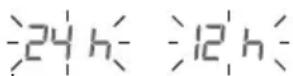
Time format
Time format flashes:
- Press < / > to select the time format
Date
The year flashes:
- Press < / > to select the year
The month flashes:
- Press < / > to select the month
The day flashes:
- Press < / > to select the day
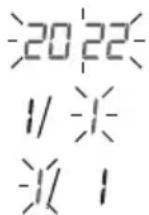
If the time format is set to the 12-hour format, the order in which the day and month are displayed is reversed.
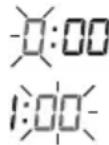
Time
The hour flashes:
- Press < / > to select the hour
The minutes flash: - Press < / > to select the minutes
Bluetooth®
The Bluetooth ^® symbol flashes on the display.
- Press < / > to select whether automatic Bluetooth® data transfer is activated (bt on) or deactivated (bt off) and confirm this by pressing
Bluetooth ^® data transfers will shorten the battery life.
6.2 Before the blood pressure measurement
General rules when measuring your own blood pressure
- In order to generate an informative profile of changes in your blood pressure that can be used for comparisons, you should measure your blood pressure regularly and always at the same time of day.
Measure your blood pressure twice a day: once in the morning after getting up and once in the evening. - Always perform the measurement when you are sufficiently physically rested. Avoid taking measurements at stressful times.
- Do not take a measurement within 30 minutes of eating, drinking, smoking or exercising.
-
Before the initial blood pressure measurement, make sure always to rest for about 5 minutes.
-
If you want to take several measurements in succession, always make sure that you leave 5 minutes between each measurement.
- Repeat the measurement if you have doubts about the measured value.
Attaching the cuff
You can measure your blood pressure on either arm. Some deviations between the values in the right and left arm are perfectly normal. Always perform the measurement on the arm with the higher blood pressure values. Consult your doctor about this before starting self-measurement.
• Always measure your blood pressure on the same arm.
- Only use the device with the cuff supplied, based on your upper arm circumference.
- Before taking the measurement, check the fit using the index mark described below.
-
Expose your upper arm. The circulation of the arm must not be hindered by tight clothing or similar.
-
Place the cuff with the bottom edge approx. 2-3 cm above your elbow. Adjust the device so that the mark ▼ and the cuff line are directly over the artery B. The cuff should be fastened so that two fingers fit under the cuff when it is closed B.
-
Now insert the cuff line into the connection for the cuff connector.
-
The cuff is suitable for you if the index mark ▼ is within the OK range after fitting the cuff.
Adopting the correct posture
- Sit in a comfortable upright position when taking the blood pressure measurement. Lean back so that your back is supported.
- Place your arm on a surface D.
- Place your feet flat on the ground next to one another.
- The cuff must be level with your heart.
- Stay as still as possible during the measurement and do not talk.
Selecting the user
This device has two users with 120 memory spaces each in order that you can save measurements from two different people separately from each other.
If multiple people are using the device, make sure that the correct user has been selected before each measurement:
- Use the slider 10 to set the desired user.
6.3 Taking a blood pressure measurement
Requirement: cuff attached, user selected.
Measurement
- Press ⚪All display elements are briefly displayed.
- The start screen welcomes you for selected 1 or for selected 2 . From this start screen you can access all menu items, e.g. user memory.
- Press again to start the measurement. The cuff inflates itself automatically. The measurement process starts. displayed as soon as a pulse is detected.
To cancel the measurement, press Ⓐ
- The systolic pressure, diastolic pressure and pulse measurements are displayed. The cuff position control symbol is displayed throughout the entire measurement. If the cuff is too loose, and will be displayed. In such cases, the measurement is cancelled after approx. 15 seconds and the device switches itself off.
E_r is displayed if the measurement could not be performed properly. In this case, please refer to the “Troubleshooting” section.
If necessary, re-attach the cuff after 1 minute.
The device switches off automatically after approx. 30 seconds. The value is saved to the selected or most recently used user.
Multiple measurement
- Press ⚪All display elements are briefly displayed.
- The start screen welcomes you for selected _1 or for selected _2 . From this start screen you can access all menu items, e.g. user memory.
- Multiple measurement can be selected by pressing < or >. flashes on the display. To start the measurement, confirm with ①.
The cuff inflates itself automatically. The measurement starts.
- The device displays the first measurement cycle for 3 seconds and then performs a regular measurement that is repeated three times. In the second and third cycle, a 30-second countdown is also displayed, indicating the time to wait until the next measurement.
To cancel the measurement, press Ⓞ.
- After the third measurement, the average measurement of systolic pressure, diastolic pressure and pulse is displayed and indicated with -x3
The cuff position control symbol 📄 is displayed throughout the entire measurement. If the cuff is too loose, 📄 and Er3 will be displayed. In such cases, the measurement is cancelled after approx. 5 seconds and the device switches itself off.
E_r is displayed if the measurement could not be performed properly. In this case, please refer to the “Troubleshooting” section.
If necessary, re-attach the cuff after 1 minute.
The device switches off automatically after approx. 30 seconds. The value is saved to the selected or most recently used user.
6.4 Evaluating the results
General information about blood pressure
-
Blood pressure is the force with which the bloodstream presses against the arterial walls. Arterial blood pressure constantly changes in the course of a cardiac cycle.
• Blood pressure is always stated in the form of two values: -
The highest pressure is the systolic blood pressure. This occurs when the heart muscle contracts and blood is pumped into the blood vessels.
- The lowest pressure is the diastolic blood pressure. This occurs when the heart muscle has completely relaxed again and the heart is filling with blood.
- Fluctuations in blood pressure are normal. Even during repeat measurements, there may be considerable differences between the measured values. One-off or irregular measurements therefore do not provide reliable information about the actual blood pressure. Reliable assessment is only possible when you perform the measurement regularly under comparable conditions.
Cardiac arrhythmia
The device can identify heart rhythm abnormalities during the blood pressure measurement. If 🎨 is displayed after the measurement, this indicates that an irregularity has been detected in your pulse.
Repeat the measurement if 📁 is displayed.
When assessing your blood pressure, only use the results that have been recorded without any irregularities in your pulse.
Consult your doctor if 📄 is displayed frequently. Only they can determine, through an examination, whether there is an abnormality.
Risk indicator
| Measured blood pressure value range | Classification | Risk indicator colour | |
| Systolic (in mmHg) | Diastolic (in mmHg) | ||
| ≥ 180 ≥ 110 | Stage 3 high blood pressure (severe) _1 | Red | |
| 160 – 179 | 100 – 109 | Stage 2 high blood pressure (moderate) _1 | Orange |
| 140 – 159 | 90 – 99 | Stage 1 high blood pressure (mild) _1 | Yellow |
| 130 – 139 | 85 – 89 High normal | 1 | Green |
| 120 – 129 | 80 – 84 Normal | 1 | Green |
| < 120 < 80 Optimal | 1 | Green | |
| < 90 < 60 Low blood pressure | 2 | Orange | |
1 Source: WHO, 1999 (World Health Organization)
2 Source: National Health Service, 2023
The risk indicator 15 indicates which category the recorded blood pressure values fall into. If the measured values are in two different categories (e.g. systolic pressure in the “high normal” range and diastolic pressure in the “normal” range), the risk indicator always indicates the higher range – “high normal” in the example described.
Note that these default values are for general guidance only, as individual blood pressures may vary.
Please note that self-measurement at home usually results in values lower than those recorded at a doctor's surgery. Consult your doctor at regular intervals. Only they are able to give you personal target values for controlled blood pressure, particularly if you are receiving medical therapy.
Low blood pressure
WARNING
Low blood pressure (hypotension) can be a health hazard and cause dizziness or fainting. Blood pressure is considered low if systolic and diastolic pressure are below 90/60 mmHg (source: National Health Service, 2023).
Seek medical attention if you suddenly suffer from low blood pressure.
Atrial fibrillation
Atrial fibrillation is one of the most common forms of cardiac arrhythmia and is characterised by an irregular heartbeat associated with an increased risk of stroke, heart failure and other heart complications.
While the final diagnosis of atrial fibrillation can only be made by a medical examination, the Beurer AFIB technology of this device enables it to be detected with a high level of accuracy. During the blood pressure measurement, possible atrial fibrillation is detected and displayed after the measurement with the ASY symbol in combination with the symbol. If arrhythmias, such as atrial fibrillation, are present, the displayed blood pressure value may be incorrect. If the AFIB symbol is displayed after a blood pressure measurement, repeat the measurement. Rest for 5 minutes beforehand. Do not move or speak during the measurement. If
the symbol appears for the first time and more frequently, please promptly consult your doctor. If you have previously been diagnosed with atrial fibrillation, follow your doctor's instructions regarding what to do in the event that AFIB is detected by the device.
Do not perform self-diagnosis and self-treatment based on the measurements, but rather always follow the doctor's instructions.
Resting indicator (using HSD diagnostics)
One of the most common errors made when taking a blood pressure measurement is not ensuring that the user's circulatory system is sufficiently at rest when taking the measurement. In this case, the measured systolic and diastolic blood pressure values do not represent the blood pressure at rest. However, it is this blood pressure at rest that should be used to assess the measured values.
This blood pressure monitor uses integrated haemodynamic stability diagnostics (HSD) to measure the user's haemodynamic stability when taking the blood pressure measurement. This enables it to indicate whether the blood pressure was taken when the user's circulatory system was sufficiently at rest.
 | The measured blood pressure value was obtained when the user's circulatory system was sufficiently at rest and reliably represents the blood pressure at rest. |
 | Indicates that the value was obtained when the user's circulatory system was not sufficiently at rest. The blood pressure values measured in this case generally do not represent the blood pressure at rest. The measurement should therefore be repeated after a period of physical and mental rest lasting at least 5 minutes. |
| No resting indicator symbol is displayed | During the measurement it was not possible to determine whether the user's circulatory system was sufficiently at rest. In this case too, the measurement should be repeated after a period of rest lasting at least 5 minutes. |
The user's circulatory system not being sufficiently at rest can be the result of various factors, such as physical stress, mental strain/distraction, speaking or experiencing cardiac arrhythmia during the measurement.
In an overwhelming number of cases, HSD will give a very good guide as to whether the user's circulatory system is rested when a blood pressure measurement is taken.
However, certain patients suffering from cardiac arrhythmia or chronic mental conditions may remain haemodynamically unstable even in the long-term, something which persists even after repeated periods of rest. The accuracy of the results for the blood pressure at rest is reduced in these users.
Like any medical measurement method, the precision of HSD is limited and it can lead to incorrect results in some cases. Nevertheless, the blood pressure measurements taken when the user's circulatory system is sufficiently at rest represent particularly reliable results.
6.5 Displaying and deleting measured values
User
The results of every successful measurement are saved with the date and time. If there are more than 120 measurements, the oldest measurements are deleted.
Press 📄 on the start screen and select the desired user using the slider.
Average value
Bluetooth ^® activated in the display: Measurement data is transferred automatically.
AVG is displayed:
The average value of all this user's saved measured values is displayed.
- Press >.

AIS displayed:
The average value of the morning measurements for the last 7 days is displayed (morning: 5:00–9:00).
- Press >.

AVG displayed:
The average value of the evening measurements for the last 7 days is displayed (evening: 18:00–20:00).
Individual measured values
- If you press > again, the last individual measurement is displayed.
- If you press </> again, you can view the individual measured values.
- To switch the device off again, press ⏻ for approx. 2 seconds.
Press Ⓐ to exit the menu.
Deleting measured values
- To delete all of a user's saved measured values, go to the respective user memory.
The display shows AVG and the average value of all stored measured values of this user.
- Press and hold < and > for approx. 5 seconds.
CL01 for X for appears in the display. All values of the selected user are deleted.
The device switches off automatically.
Reset the device to factory settings
- To delete all saved measured values and settings, select the user memory.
Press >. The display shows AVG.
- Press and hold < and > for approx. 15 seconds.
CL appears in the display. All data stored on the device is deleted; the device is reset to factory settings. The device switches off automatically.
Transfer of measured values
Transfer via Bluetooth®
- Download the free beurer HealthManager Pro / beurer HealthManager app from the Apple App Store or Google Play.

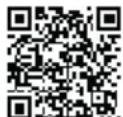
Click here for the beurer HealthManager Pro app
- Activate Bluetooth® in your smartphone's settings.
- Start the app.
- Select BM 64 in the app and follow the instructions.
- When connecting for the first time, a six-digit PIN code will be displayed on the device. Enter the PIN code on the smartphone. After the code has been successfully entered, the device will be connected to the smartphone.
List of system requirements and compatible devices
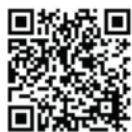
* This product satisfies the requirements of the applicable European directives.
7. CLEANING AND MAINTENANCE
- Clean the device and cuff carefully using only a slightly damp cloth.
- Do not use any cleaning solutions or solvents.
- Under no circumstances hold the device or cuff under water, as this can cause liquid to enter and damage the device and cuff.
- If you store the device and cuff, do not place heavy objects on the device and cuff. The cuff line should not be bent sharply.
- Remove the batteries if the device is not going to be used for a long period of time.
8. ACCESSORIESAND/OR REPLACEMENT PARTS
Accessories and/or replacement parts are available at www.beurer.de, under "Service". Please state the corresponding order number.
| Designation Item number and/or order number | |
| Universal cuff 164.503 | |
| Mains adapter (EU) 072.78 | |
| Mains adapter (UK) 072.79 | |
9. TROUBLESHOOTING
| Error message | Possible cause S | Solution |
 | Unable to record a pulse. | Please wait one minute and re-peat the measurement. Ensure that you do not speak or move during the measurement. |
 | The measured blood pressure is outside the measurement range. | |
  | There is a pneumatic system error. | Repeat the measurement.Ensure that the cuff line is correctly connected and that you do not move or speak. |
 | An error oc-curred during the measurement. | Please wait one minute and re-peat the measurement. Ensure that you do not speak or move during the measurement. |
 | The inflation pressure is higher than 300 mmHg. | Please take another measure-ment to check whether the cuff can be correctly inflated. Make sure that neither your arm nor other heavy objects are press-ing on the line, and that the line is not bent. |
| Er6 | There is a system error. | If this error message appears, please contact Customer Services. |
| Error message | Possible cause Solution | |
| Er7 | There are problems with the connection between the smartphone/tablet and the app. | Switch off the main unit, close the app and first deactivate Bluetooth® on your smartphone/tablet before reactivating the function. Try to establish the connection again. |
| The batteries are nearly flat. | Insert new batteries into the device. | |
10. DISPOSAL
Repairing and disposing of the device
- Do not repair or modify the device yourself. Proper operation can no longer be guaranteed in this case.
- Do not open the device except for the battery compartment. Failure to comply will invalidate the warranty.
- Repairs must only be carried out by Customer Services or authorised retailers. Before making a complaint, first check the batteries and replace them if necessary.
- The device must not be disposed of with household waste.
Dispose of the device at a suitable local collection or recycling point in your country. Dispose of the device in accordance with EC Directive – WEEE (Waste Electrical and Electronic Equipment). Please contact the local authorities responsible for waste disposal if you have any questions regarding disposal.
Disposal of the batteries
• Used, completely discharged batteries must not be disposed of with household waste. Dispose of the batteries in specially
designated collection boxes, at recycling points or at electronics retailers. You are legally required to dispose of the batteries correctly.
- The codes below are printed on batteries containing harmful substances:
- Pb = battery contains lead
- Cd = battery contains cadmium
- Hg = battery contains mercury

11. TECHNICAL SPECIFICATIONS
Type BM 64
| Measurement method | Oscillometric, non-invasive blood pressure measurement on the upper arm |
| Measurement range | Cuff pressure 300 mmHg, systolic pressure 50 – 280 mmHg, diastolic pressure 30 – 200 mmHg, pulse 40–199 beats/minute |
| Display accuracy | Systolic pressure ± 3 mmHg, diastolic pressure ± 3 mmHg, pulse ± 5% of the displayed value |
| Measurement uncertainty | Max. permissible standard deviation according to clinical testing: systolic pressure 8 mmHg, diastolic pressure 8 mmHg |
| Memory 2 x 120 memory spaces | |
| Dimensions L 143 mm x W 105 mm x H 60 mm | |
| Weight Approx. 450 g (without batteries, with cuff) | |
| Cuff size 22 to 42 cm upper arm circumference | |
| Operating conditions | + 10 °C to + 40 °C, < 90 % relative humidity, 800 – 1050 hPa ambient pressure |

| Storage conditions | -20 °C to + 55 °C, < 90% relative humidity (non-condensing) |
| Power supply | 4x1.5V — — — AA batteries |
| Battery life Lasts for approx. 300 measurements depending on the blood pressure and inflation pressure as well as the number of Bluetooth® connections | |
| Expected service life | At least 20.000 measurements |
| Classification Internal power supply, IP20 no AP or APG, continuous operation, type BF applied part | |
| Data transfer via Bluetooth® wireless technology | The device uses Bluetooth®, Frequency band 2.400 – 2.483 GHz, max. transmission power 5 dBm, |
The serial number is located on the device or in the battery compartment.
Technical specifications are subject to change without notification to allow for updates.
- This device conforms with the European standard EN 60601-1-2 (in accordance with CISPR-11, IEC 61000-3-2, IEC 61000-3-3, IEC 61000-4-2, IEC 61000-4-3, IEC 61000-4-4, IEC 61000-4-5, IEC 61000-4-6, IEC 61000-4-7, IEC 61000-4-8, IEC 61000-4-11) and is subject to particular precautions with regard to electromagnetic compatibility. Please note that portable and mobile HF communication systems may interfere with this device.
- The accuracy of this blood pressure monitor has been carefully checked and developed with regard to a long useful life. If the device is used for commercial medical purposes, it must be regularly tested for accuracy by appropriate means. Pre-
cise instructions for checking accuracy may be requested from the service address.
Mains part
Model no. LXCP12X-050100BG
| Input | 100–240V, 50–60 Hz, 0.5A max |
| Output 5 V DC, 1 A, in conjunction with Beurer blood pressure monitors only | |
| Manufacturer Shenzhen longxc power supply co., Ltd. | |
| Protection This device is double protected and has a pri- mary-side cutout switch which disconnects the device from the mains in case of malfunction.Ensure that you have removed the batteries from the battery compartment before you use the mains part. | |


| Housing and protective covers | The housing of the mains part protects users from touching live parts or parts that could be live (for example with their fingers, or with a needle or checking hook).The user must not touch the patient and the output connector of the AC/DC mains part at the same time. |
12. GUARANTEE/SERVICE
Further information on the guarantee and guarantee conditions can be found in the guarantee leaflet supplied.
Notification of incidents
For users/patients in the European Union and identical regulation systems (EU Medical Device Regulation (MDR) 2017/745), the following applies: If during or through use of the product a major incident occurs, notify the manufacturer and/or their representative of this as well as the respective national authority of the member state in which the user/patient is located.
FRANÇAIS

Instructions relatives aux piles
AVERTISSEMENT
1 Source : WHO, 1999 (World Health Organization)
_2 Source: National Health Service, 2023
Transmission via Bluetooth®
Fabricant Shenzhen Longxc Power Supply Co., Ltd
"beurer HealthManager Pro"

8. ACCESSORI E/O RICAMBI
The Bluetooth ^® word mark and logos are registered trademarks owned by Bluetooth SIG, Inc. and any use of such marks by Beurer GmbH is under license. Other trademarks and trade names are those of their respective owners.
Apple and the Apple logo are trademarks of Apple Inc., registered in the U.S. and other countries. App Store is a service mark of Apple Inc., registered in the U.S. and other countries.
Google Play and the Google Play logo are trademarks of Google LLC.
Android is a trademark of Google LLC.

Beurer UK Ltd., Suite 16, Stonecross Place, Stonecross Lane North WA3 2SH Lowton, United Kingdom

Beurer GmbH • Söflinger Str. 218 • 89077 Ulm, Germany • www.beurer.com www.beurer-gesundheitsratgeber.com • www.beurer-healthguide.com
CE0483

- CONTENTS
- INCLUDED IN DELIVERY
- SIGNS AND SYMBOLS
- WARNING
- CAUTION
- Product information
- Observe the instructions
- CE labelling
- Direct current
- Type BF applied part
- INTENDEDUSE
- Intented purpose
- Intended users
- Clinical benefits
- Indications
- Contraindications
- Undesirable side effects
- WARNINGS AND SAFETY NOTES
- General warnings
- General precautions
- Notes on handling batteries
- Notes on electromagnetic compatibility
- DEVICE DESCRIPTION
- Information on the display
- USAGE
- Initial use
- Inserting the batteries
- Operation with the mains part
- Adjusting the settings
- Time format
- Date
- Time
- Bluetooth®
- Before the blood pressure measurement
- General rules when measuring your own blood pressure
- Attaching the cuff
- Adopting the correct posture
- Selecting the user
- Taking a blood pressure measurement
- Measurement
- Multiple measurement
- Evaluating the results
- General information about blood pressure
- Cardiac arrhythmia
- Low blood pressure
- Atrial fibrillation
- Resting indicator (using HSD diagnostics)
- Displaying and deleting measured values
- User
- Average value
- AVG is displayed:
- AIS displayed:
- AVG displayed:
- Individual measured values
- Deleting measured values
- Reset the device to factory settings
- Transfer of measured values
- Transfer via Bluetooth®
- CLEANING AND MAINTENANCE
- ACCESSORIESAND/OR REPLACEMENT PARTS
- TROUBLESHOOTING
- DISPOSAL
- Repairing and disposing of the device
- Disposal of the batteries
- TECHNICAL SPECIFICATIONS
- Mains part
- GUARANTEE/SERVICE
- Notification of incidents
- FRANÇAIS
- Instructions relatives aux piles
- AVERTISSEMENT
- Transmission via Bluetooth®
- ACCESSORI E/O RICAMBI
Brand : BEURER
Model : BM 64
Category : Blood pressure monitor