CMBT2 - Hi-fi system Humantechnik - Free user manual and instructions
Find the device manual for free CMBT2 Humantechnik in PDF.



User questions about CMBT2 Humantechnik
0 question about this device. Answer the ones you know or ask your own.
Ask a new question about this device
Download the instructions for your Hi-fi system in PDF format for free! Find your manual CMBT2 - Humantechnik and take your electronic device back in hand. On this page are published all the documents necessary for the use of your device. CMBT2 by Humantechnik.
USER MANUAL CMBT2 Humantechnik
GB Operation Instructions
Communication system Bluetooth Headset
Frequency hopping 79 channels
Modulation: GFSK (Gaussian Frequency Shift Keying)
We would like to congratulate you on purchasing your new CM-BT2 Bluetooth headset communications system.
You have bought a state-of-the-art, highly reliable electronic device. Please read these operating instructions carefully. They explain how to start up the device and describe all the system options and functions.
Contents
General Information
Bluetooth radio technology 17
Package contents 17
First-Time Operation
Description of the operating elements 18/19
Charging the CM-BT2 with the power supply 20
Charging the CM-BT2 with the 12 V plug-in charger 20
Charging the CM-BT2 via the USB port on a computer 21
CM-BT2< operating time 21
Switching the CM-BT2 on / off 22
Pairing the CM-BT2 with a compatible telephone 22
Disconnecting the CM-BT2 from the telephone 23
Reconnecting the CM-BT2 with the telephone 24
Basic Operation
Making and answering calls 24
Using the CM-BT2 as music headphones with the
telephone 24
Adjusting the listening volume 25
Connecting the CM-BT2\~ to a compatible computer 26
Neckloop Safety Closure 26
Appendix
Safety notes 27
Maintenance and care 27
Environmental notes/disposal 28
Warranty 28
Specifications 29
English 16
General Information
Bluetooth radio technology
Bluetooth is a radio technology that makes it possible to connect compatible communications devices together without wires.
To establish and maintain a connection via Bluetooth, it is not necessary to have a clear line of vision between the devices (e.g. telephone and headset).
However, the distance between the devices must not exceed ten meters.
Obstacles - such as walls or other electronic devices - may cause the connection to experience interference, which can diminish reception quality.
The CM-BT2 headset complies with Bluetooth Specification 2.1 and supports the following profiles:
- Headset (HSP) with talk / music output
- Hands-free (HFP) wireless telephony
- Advanced Audio Distribution (A2DP) stereo headphones
- Audio/Video Remote Control (AVRCP)
Please contact the manufacturers of your other devices to find out if they are compatible with the CM-BT2 .
The use of Bluetooth radio technology may be restricted in some areas.
Please contact your local authorities or service provider for more information.
Package contents
Please check that all of the following items are included:
- CM-BT2« headset with teleloop
- USB charging cable
- 12 V plug-in charger
- Power supply
- Operating instructions
- Guarantee card
Please contact the specialist dealer or the manufacturer directly should any of the items be missing.
First-Time Operation
Description of the operating elements
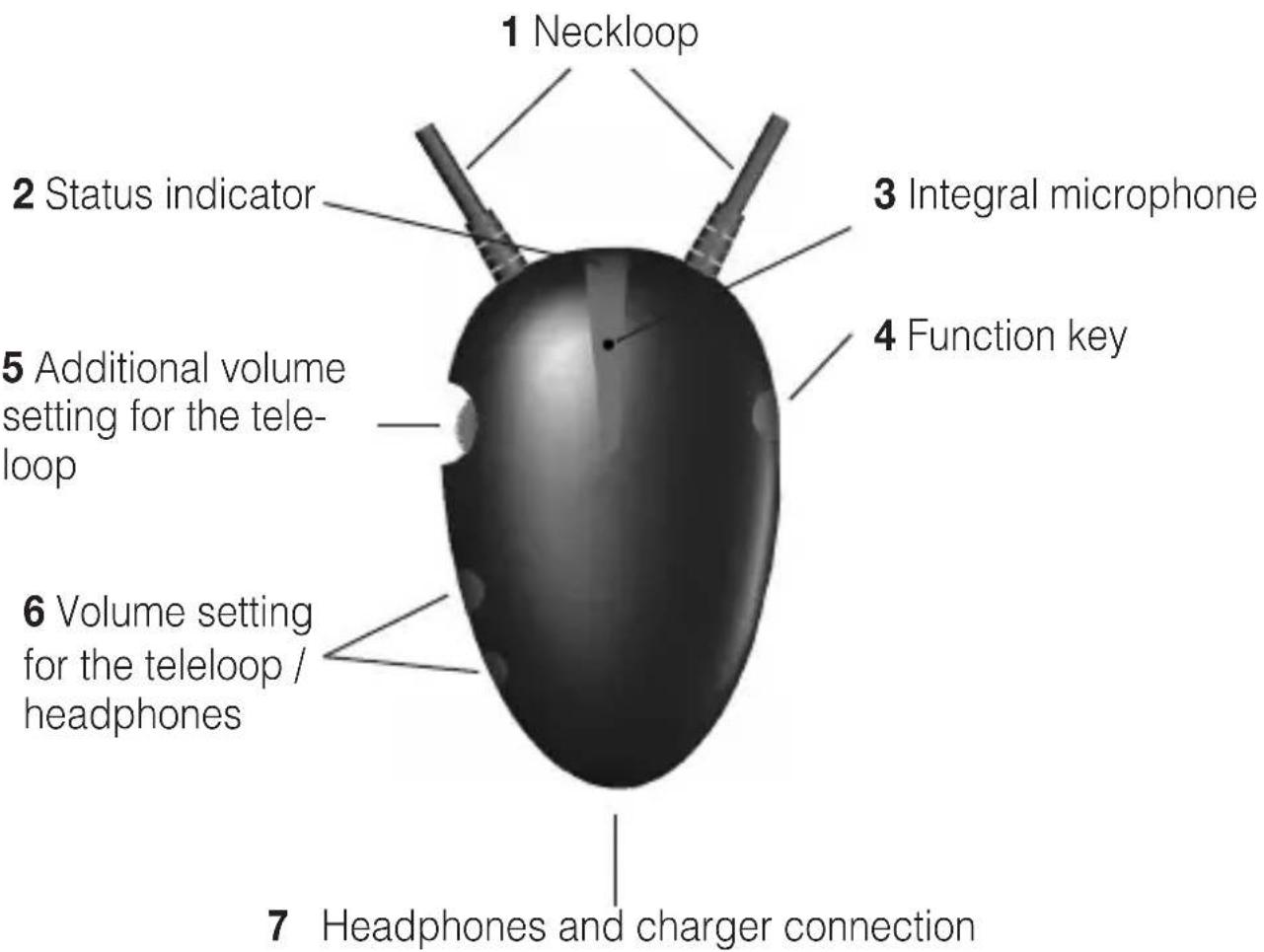
1 Neckloop
2 Status indicator
- Red light is visible CM-BT2 is switched off
- Red light flashes slowly Warning: battery low
- Blue/red light flashes alternately Pairing mode
- Blue light flashes every 3 seconds Connection attempt
- Blue light is visible for 1 second every 5 seconds Connection made with device
3 Integral microphone
4 Function key
Switching the CM-BT2 on / off Call answer / call termination key Pairing key
5 Additional volume setting for the neckloop
The volume of the neckloop can be increased independently using this control dial.
6 Volume setting for the neckloop / headphones
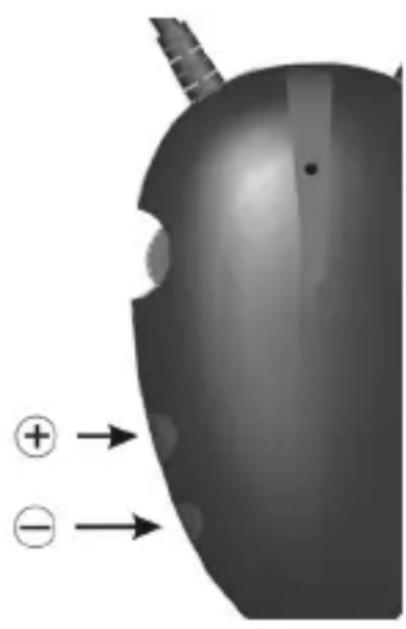
The volume of the neckloop/headphones can be adjusted with both of these keys.
7 Headphones and charger connection
This 3.5 mm jack can be used to connect the headphones or charge the CM-BT2 with the charging cable.
Charging the CM-BT2
The CM-BT2 has an integral, rechargeable lithium polymer battery. Prior to initial use, it is recommended that the CM-BT2 is fully charged.
Please note that the «CM-BT2« cannot be used whilst it is being charged
Charging the CM-BT2 with the power supply
Connect the enclosed USB charging cable to the CM-BT2 using the charger connection 7. Connect the other end of the USB charging cable to the enclosed power supply. Insert the power supply into a 230V plug socket.
The CM-BT2 is fully charged when the status indicator has gone out.

Charging the CM-BT2 with the power supply
Connect the enclosed USB charging cable to the CM-BT2 using the charger connection 7. Connect the other end of the USB charging cable to the enclosed power supply. Insert the power supply into a 230V plug socket.
The CM-BT2 is fully charged when the status indicator has gone out.

Charging the CM-BT2 via the USB port on a computer
Connect the enclosed USB charging cable to the CM-BT2 using the charger connection 7. Connect the other end of the USB charging cable to the USB port on your computer. The CM-BT2 is fully charged when the status indicator has gone out.
CM-BT2 operating time
In normal use, the «CM-BT2« has 3 hours of talk time and up to 120 hours of standby time.
When the battery is discharged, the red status indicator flashes slowly and the «CM-BT2« needs to be charged
Note:
The operating duration is dependent on the way in which the CM-BT2 is used and on how high the volume is set.
Charging will take longer if the CM-BT2 has not been used for a long time and the battery has discharged itself.
Switching the CM-BT2 on/off
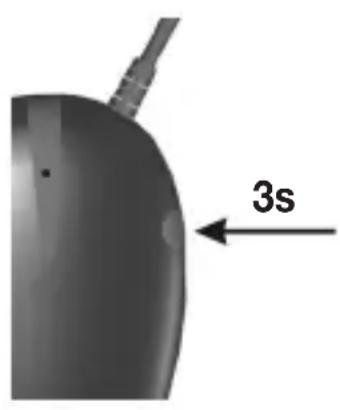
Press the function key 4 for approx. 3 seconds until the blue status indicator lights up. The teleloop/ headphones emit an audible signal to indicate that the CM-BT2 is now switched on. If there is a paired device nearby, the CM-BT2 will automatically connect to this device.
To switch off, press the function key 4 for approx. 3 seconds until the red status indicator lights up. The teleloop/headphones emit an audible signal to indicate that the CM-BT2 is now switched off.
Pairing the CM-BT2 with a compatible telephone
Before you can use the CM-BT2 with the telephone, it has to be added to the device list in the telephone. To do so, follow the instructions in the telephone operating manual explaining how to activate Bluetooth.
- Switching the telephone on.
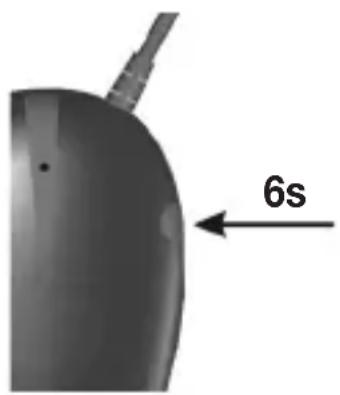
- Press the function key 4 on the CM-BT2 for approx. 6 seconds until the blue and red status indicator flashes alternately. The CM-BT2 remains in pairing mode for 2 minutes.
-
Activate the Bluetooth function on the telephone and start to search for Bluetooth devices. Instructions on how to do this can be found in the operating instructions for your telephone.
-
Select the CM-BT2 from the list of devices that are found. If necessary, enter the password ,0000" to pair the CM-BT2 and the telephone and establish a connection.
- If the pairing is successful, the blue status indicator on the CM-BT2 flashes four times quickly and the teleloop and head phones emit an audible signal.
For some telephones, it might be necessary to make the connection manually once the headset has been registered.
For more information, refer to your telephone's operating manual. You only have to register the CM-BT2 on the telephone once. After that, the CM-BT2 will be recognized automatically.
The CM-BT2 is connected to the telephone when the blue status indicator lights up for 1 second every 5 seconds.
The CM-BT2 will now appear in the menu of your telephone that displays all the Bluetooth devices that are currently paired with the telephone.
Disconnecting the CM-BT2 from the telephone
Perform one of the following steps to terminate the connection between the «CM-BT2« and the telephone (e.g. when you want to connect another Bluetooth device to the telephone):
- Switch the CM-BT2 off.
- Terminate the connection to the CM-BT2 in the telephone's Bluetooth menu.
- Move the CM-BT2 to a position more than 10 meters away from the telephone.
Please note: You do not have to delete the CM-BT2 from the telephone's list of compatible devices to terminate the connection.
Reconnecting the «CM-BT2« to the telephone
The blue status indicator flashes slowly as soon as the CM-BT2 becomes disconnected from the telephone, for example, if the distance between them is too great.
Once the CM-BT2 and the telephone are within range of one another again, the CM-BT2 reconnects automatically or can be reconnected by pressing the function key once. The blue status indicator flashes for 1 second every 5 seconds and the teleloop/headphones emit an audible signal when the connection is re-established.
Basic operation
Making and answering calls
To make a call, ensure that the telephone is connected to the CM-BT2 and make the call as normal.
To make a call, press the function key 4 briefly.
To end a call, use the buttons on the telephone or press the function key on the CM-BT2 .
Using the CM-BT2 as music headphones with the telephone
If there is a music player integrated in your telephone, you can also use the CM-BT2 to listen to music. As soon as an incoming call is detected, the music will be interrupted, the CM-BT2 will ring and you can press the function key 4 to answer the call. The music will continue to play once you have ended the call.
Adjusting the listening volume
Press the ^ 一 + ^ 一 button on the volume keys 6 repeatedly to increase the volume.
The neckloop/headphones emit an audible signal when the maximum volume is reached.
Press the - button on the volume keys 6 repeatedly to decrease the volume.
The neckloop/headphones emit an audible signal when the lowest volume is reached.
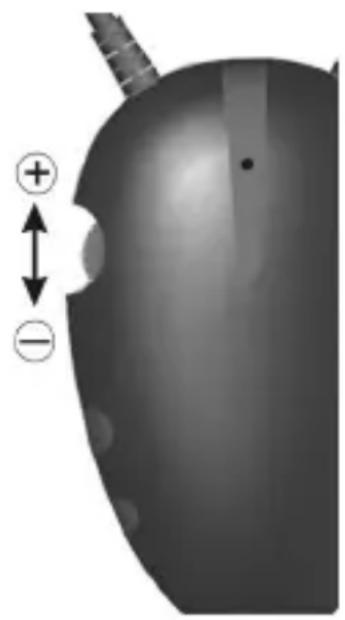
The CM-BT2 has an additional volume setting 5 to increase the volume of the neckloop independently. Turn the control dial on the additional volume setting to adjust the volume.
The additional volume setting only works with the neckloop and has no impact on the output of the headphones.
Before you use the CM-BT2 always make sure that the volume is set to a comfortable level to prevent any injury that excessive volume might cause. Always set the volume to a low level.
Connecting the CM-BT2 to a compatible computer
-
Switch your computer on and ensure that the Bluetooth hardware on the computer is activated. Switch on the «CM-BT2«.
-
Press the function key 4 on the CM-BT2 for approx. 6 seconds until the blue and red status indicator flashes alternately. The CM-BT2 remains in pairing mode for 2 minutes.
-
Run the Bluetooth software on the computer. Follow the software instructions to connect the CM-BT2 .
-
Select the CM-BT2 from the list of devices that are found. If necessary, enter the password 0000'' to pair the CM-BT2 and the computer and establish a connection.
-
If the pairing is successful, the blue status indicator on the «CM-BT2« flashes four times quickly and the teleloop and headphones emit an audible signal.
We regret that we are not able to provide telephone support for any problems you may encounter when operating this device with your PC
Neckloop Safety Closure
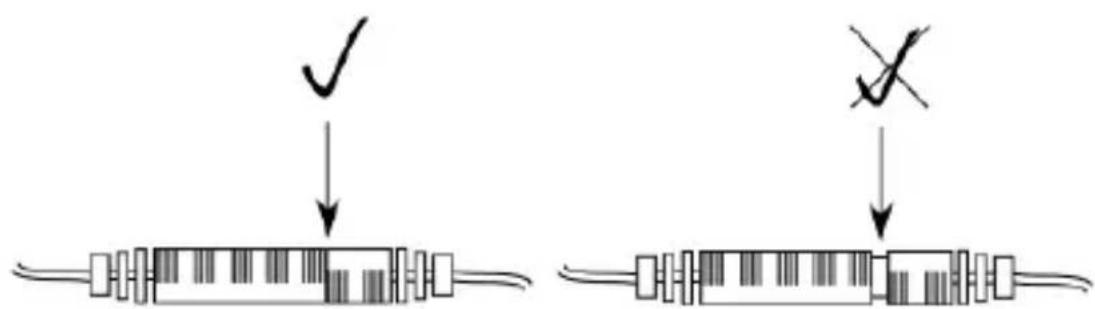
Please make sure that the safety closure of the neckloop is completely closed, to ensure that it functions properly.
Appendix
Safety notes
The CM-BT2 has been built using state-of-the-art technology and in accordance with recognized saftey standards.
Please note the following safety instructions:
-
Never expose the device to the following:
-
Sources of heat
- Direct sunlight
-
Moisture / dampness
-
Protect the device against contact with water, dust, harsh fluids and steam.
- Only plug the connection cord into the corresponding jack.
- Connect only approved accessories.
- No changes to the communications system, neither technical nor non technical, are permitted.
- The CM-BT2 communications system contains small parts that could be easily swallowed. Keep out of the reach of children under 3 years of age.
The manufacturer cannot be held liable for any damages or personal injury whatsoever caused by the inappropriate use or misuse of the device.
Maintenance and care
The CM-BT2 headset does not require any maintenance. If the unit does become dirty, simply wipe it clean with a soft, damp cloth. Never use spirits, thinners or other organic solvents.
Do not set up the CM-BT2 where it will be exposed to full sunlight for long periods.
In addition, it must be protected against excessive heat, moisture and severe mechanical shocks.
Note: This product is not protected against splash water. Do not place any containers filled with water, such as flower vases, or anything with an open flame, such as a lit candle, on or near the product.
Disposal of used electric and electronic units (applicable in the countries of the European Union and other European countries with a separate collection system). The symbol on the product or
the packaging indicates that this product is not to be handled as ordinary household waste but has to be returned to a collecting point for the recycling of electric and electronic units.
You protect the environment and health of your fellow men by the correct disposal of this products. Environment and health are endangered by a faulty disposal. Material recycling helps to reduce the consumption of raw material. You will receive further information on the recycling of this product from your local community, your communal disposal company or your local dealer.
Rechargeable battery
The rechargeable battery that comes with the device can be recycled. Please dispose of this rechargeable battery in receptacles designed for that purpose or return it to a retail outlet. Dispos only of those batteries that have been completely discharged to ensure environmental protection.
Warranty
This product is very safe to operate and provides highly reliable service. Should a malfunction occur despite the unit having been set up and operated correctly, please contact your dealer. This warranty covers the repair of the product and returning it to you free of charge. It is essential that you send in the product in its original packaging, so do not throw away the packaging. The warranty does not apply to damage caused by incorrect handling or attempts to repair the unit by people not authorised to do so (destruction of the seal on the unit). Repairs will only be carried out under warranty if the complete warranty card is returned accompanied by a copy of the dealer's invoice/till receipt. Always specify the product number in any event.
Technical data:
Model name: CM-BT2 headset
Bluetooth version: Bluetooth Specification Version 2.1
Frequency band: 2.4Ghz ISM Spectrum
Frequency hopping 79 channels
Modulation: GFSK (Gaussian Frequency Shift Keying)
Bluetooth profiles: Headset (HSP) talk / music output
Hands-free (HFP) wireless telephony
Advanced Audio Distribution (A2DP) stereo
headphones
Audio/Video Remote Control (AVRCP)
Operating range: 10m
Standby time: up to 120 hrs
Talk time: up to 3 hrs with teleloop
up to 13 hrs with headphones
Charging time: 3 hrs
Weight: 49 g
Dimensions: 48 mm x 76 mm

This telephone satisfies the following EU directives:
- 2002/95/EG RoHS directive
- 2002/96/EG WEEE directive
- 1999/5/EG R&TTE directive
- 2004/108/EG EMC directive
- 2006/95/EG Low voltage directive
Compliance with the directives listed above is confirmed by the CE seal on the telephone.
CE compliance declarations are available on the Internet at www.humantechnik.com.
Technical specifications subject to change without notice.
in procedure de charge.
Frequency hopping 79 channels
Modulation : GFSK (Gaussian Frequency Shift Keying)
Dimensions: 48 mm x 76 mm

-
2002/95/CE Directive RoHS
-
2002/96/CE Directive WEEE
-
1999/5/CE Directive R&TTE
-
2004/108/CE Directive CEM
-
2006/95/CE Directive basse tension
Frequency hopping 79 channels
Modulation: GFSK (Gaussian Frequency Shift Keying)
A Anything's done.
A thing is done.
A thing is done.
Frequency hopping 79 channels
Modulazione: GFSK (Gaussian Frequency Shift Keying)
Profili Bluetooth: HSP uscita vocale/musica tramite head set
HFP telefonia cordless
A2DP auricolari stereo
For other service-partners in Europe please contact:
Humantechnik Germany
Tel.: ++49 76 21-95689-0
Fax.: ++49 76 21-956 89-70