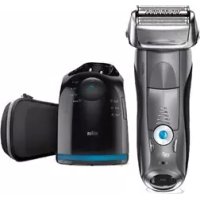
USER MANUAL Series 7 7850CC BRAUN
(Sharecall charged at local rates)
www.service.braun.com
English
Our products are designed to meet the highest standards of quality, functionality and design. We hope you enjoy your new Braun Shaver.
Read these instructions completely, they contain safety information. Keep them for future reference.
Warning
Your shaving system is provided with a special cord set, which has an integrated Safety Extra Low Voltage power supply. Do not exchange or tamper with any part of it, otherwise there is risk of an electric shock. Only use the special cord set provided with your appliance.
If the appliance is marked = 492 , but can use it with any Braun power supply coded 492-XXXX.
Do not shave with a damaged foil or cord.
This appliance is suitable for cleaning under running water and use in a bathtub or shower. For safety reasons it can only be operated cordless.
This appliance can be used by children aged from 8 years and above and persons with reduced physical, sensory or mental capabilities or lack of experience and knowledge if they have been given supervision or instruction concerning the safe use of the appliance and understand the hazards involved. Children shall not play with the appliance. Cleaning and user maintenance shall not be made by children unless they are older than 8 years and supervised.
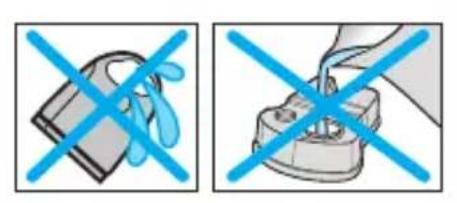
To prevent the cleaning fluid from leaking, ensure that the Clean&Renew station is placed on a flat surface. When a cleaning cartridge is installed, do not tip, move suddenly or transport the station in any way as cleaning fluid might spill out of the cartridge. Do not place the station inside a mirror cabinet, nor over a radiator, nor place it on a polished or lacquered surface.
The cleaning cartridge contains a highly flammable liquid so keep it away from sources of ignition. Do not smoke near the station. Do not expose to direct sunlight for long periods of time.
Do not refill the cartridge and use only original Braun refill cartridges.
Description
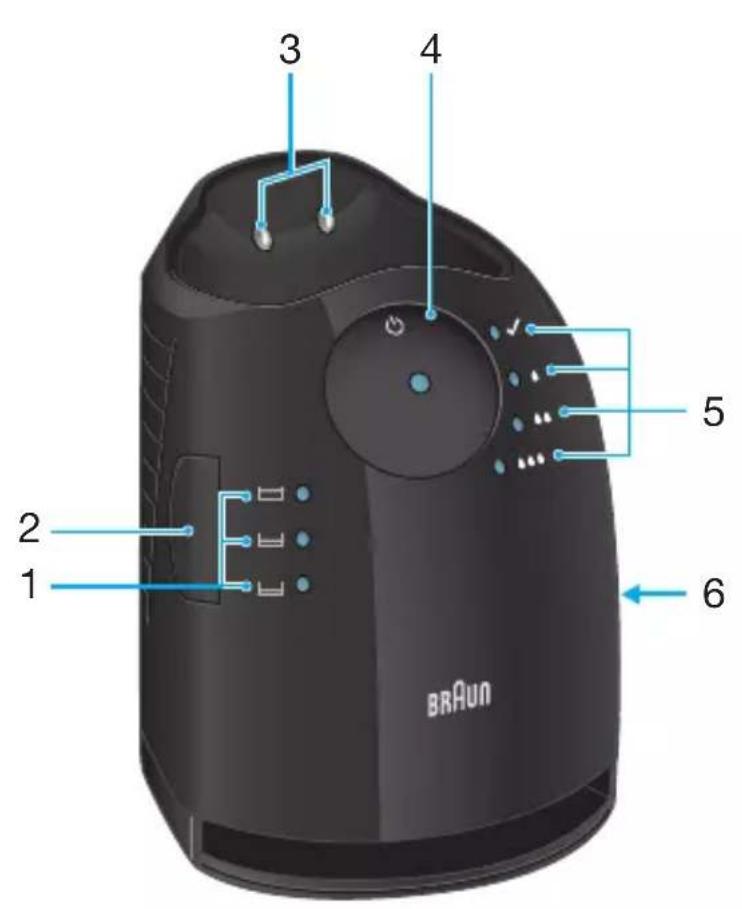
Clean&Renew station
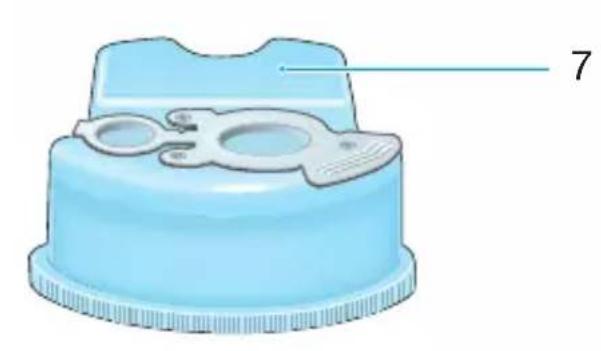
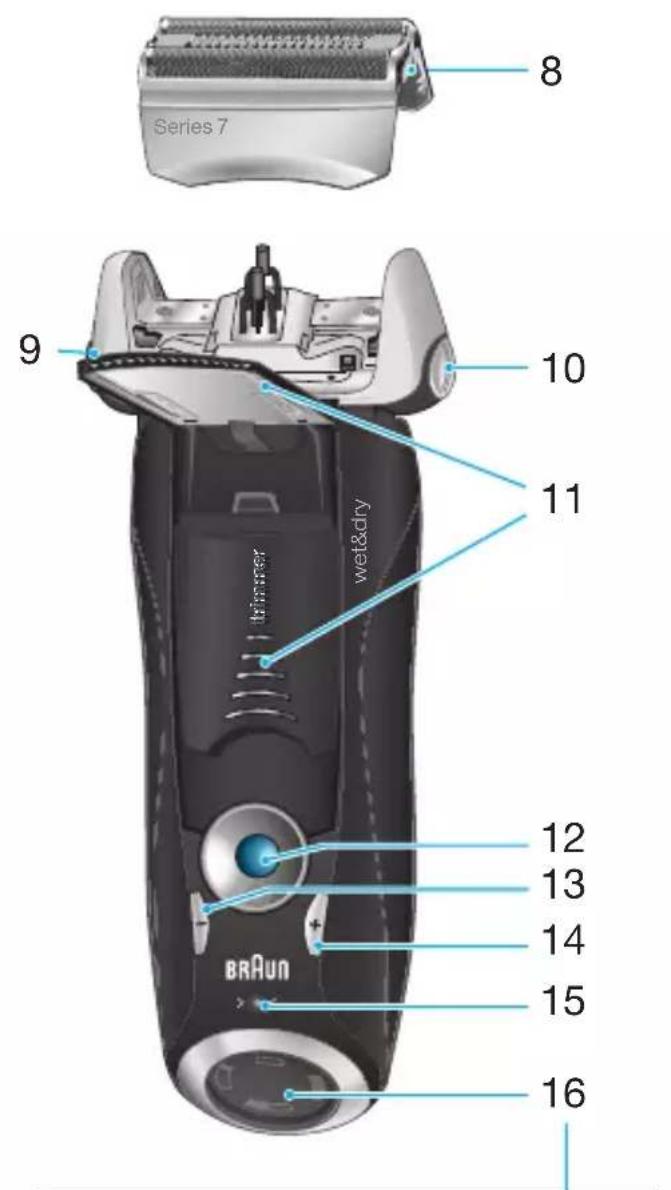
1 Cleaning fluid display 2 Lift button for cartridge exchange 3 Station-to-shaver contacts 4 Start button 5 Cleaning program indicators 6 Station power socket 7 Cleaning cartridge
Shaver
8 Foil & Cutter cassette 9 Cassette release button 10 Shaver head lock switch
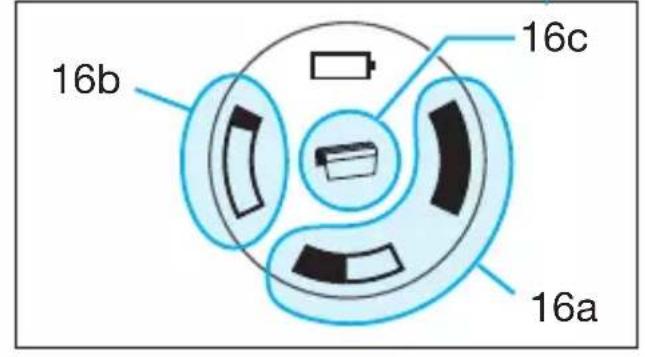
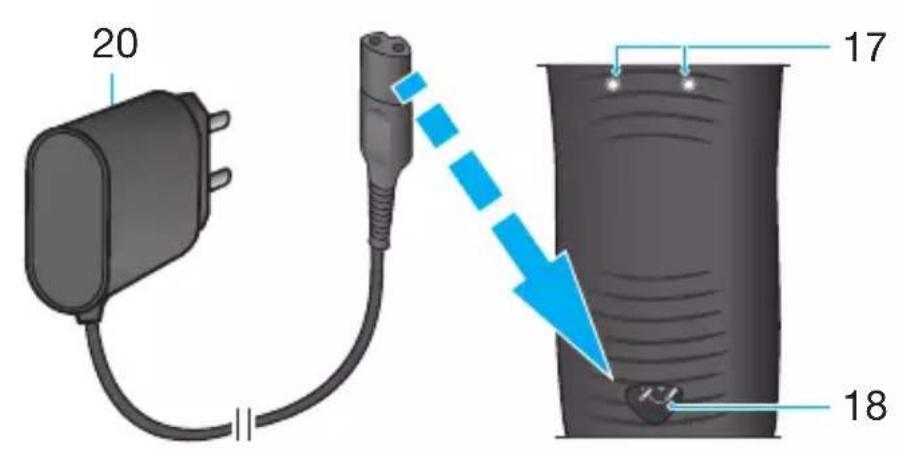
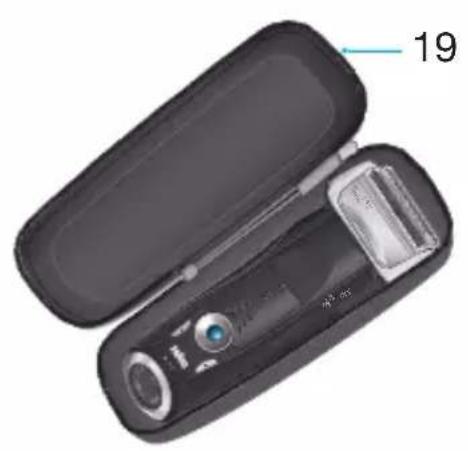
11 Pop-out long hair trimmer 12 On/off switch 13 - setting button (sensitive) 14 + setting button (intensive) 15 Reset button 16 Shaver display 16a Charging lights (green) 16b Low -charge light (red) 16c Replacement symbol 17 Shaver-to-station contacts 18 Shaver power socket 19 Travel case 20 Special cord set (design can differ)
Before shaving
Prior to first use you must connect the shaver to an electrical outlet using the special cord set (20) or alternatively proceed as below.
Installing the Clean&Renew station
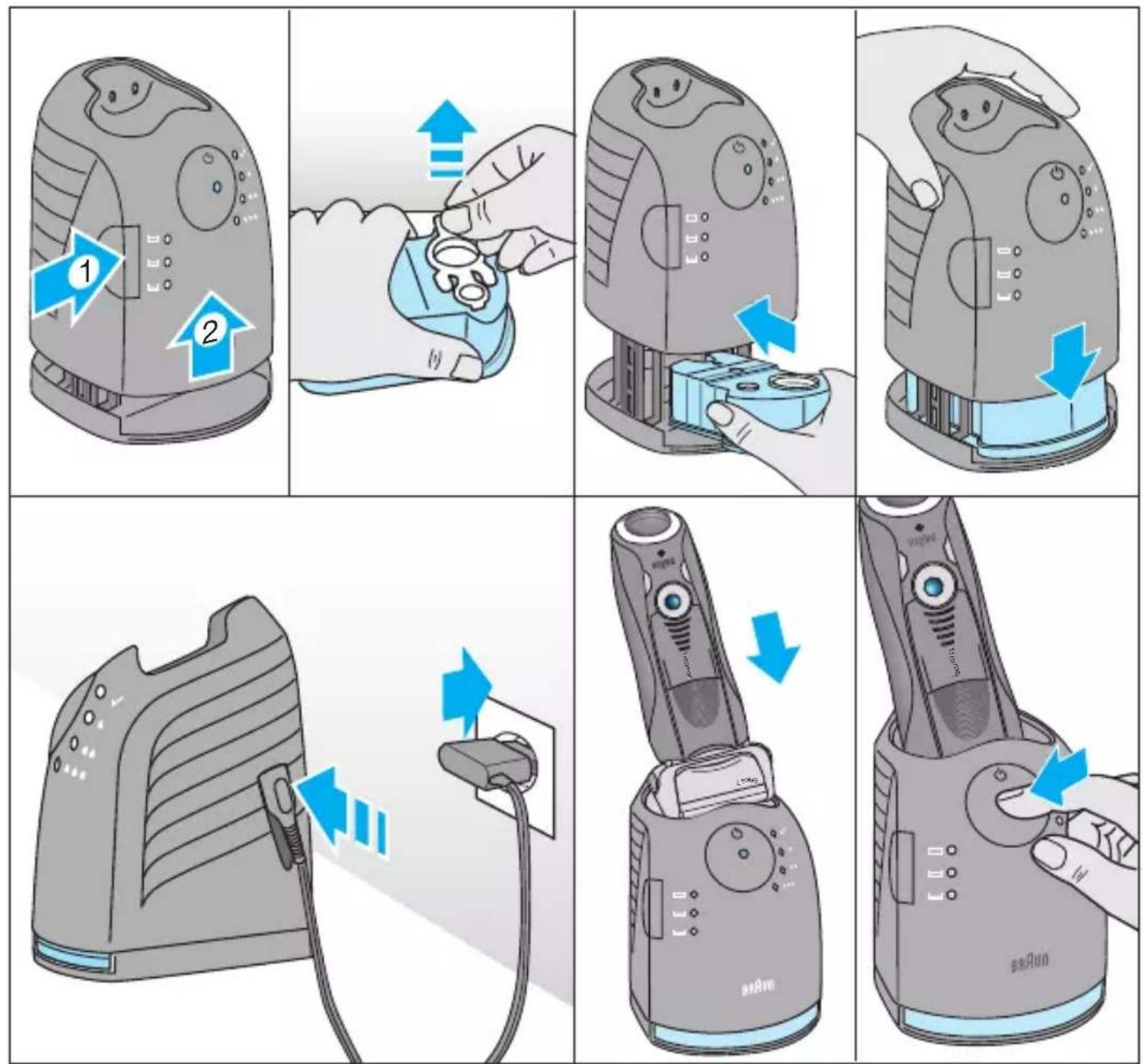
- Press the lift button (2) to open the housing.
- Hold the cleaning cartridge (7) down on a flat, stable surface (e.g. table).
- Carefully remove the lid from the cartridge.
- Slide the cartridge into the base of the station as far as it will go.
- Slowly close the housing by pushing it down until it locks.
- Using the special cord set (20), connect the station power socket (6) to an electrical outlet.
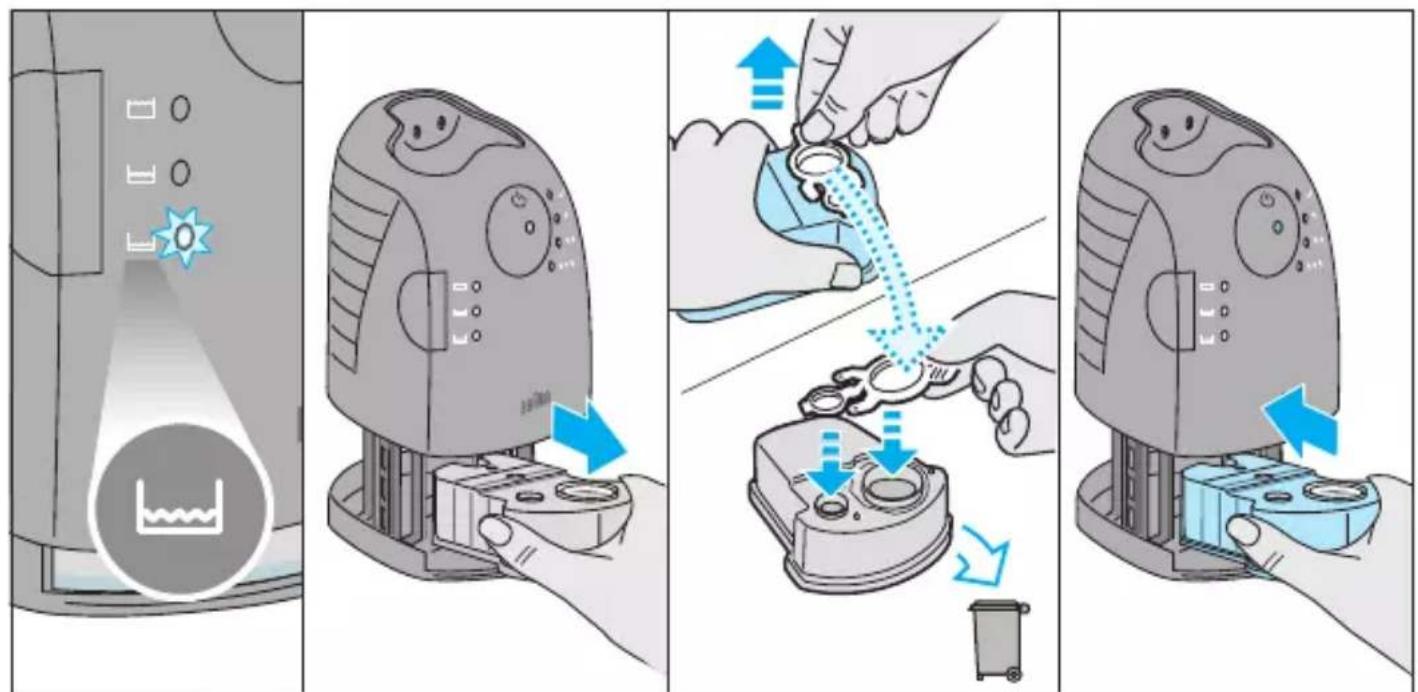
The cleaning fluid display (1) will show how much fluid is in the cartridge:
Up to 30 cleaning cycles available; up to 7 cleaning cycles remaining; new cartridge required.
Charging and cleaning the shaver
Insert the shaver head with the front showing and released head lock (10) into the Clean&Renew. The contacts (17) on the back of the shaver will align with the contacts (3) in the cleaning station. Important: The shaver needs to be dry and free from any foam or soap residue!
If required, the Clean&Renew station will automatically charge the shaver. The hygiene status of the shaver will also be analyzed and one of the following cleaning program indicators (5) will light up:
✓ shaver is clean; short economical cleaning required; normal level of cleaning required; high intensive cleaning required.
If the station selects one of the required cleaning programs, it will not start unless you press the start button (4). For best shaving results, we recommend cleaning after each shave.
Each cleaning program consists of several cycles, where cleaning fluid is flushed through the shaver head. Depending on your Clean&Renew Station model and/or program selected, the cleaning time takes up to 16 minutes. Leave the shaver in the station for drying. It takes several hours until remaining moisture evaporates depending on the climatic conditions.
When the program is finished, the blue indicator will light up.
Stand-by mode
10 minutes after completing the charging or cleaning session, the Clean&Renew station switches to the stand-by mode: The indicators of the Clean&Renew station turn off.
Shaver display
The shaver display (16) shows the charge status of the battery.
Charging lights (16a)
The green charging lights show the charge status of the batteries. The green charging light blinks when the shaver is being charged or switched on. When the battery is fully charged, all green charging lights shine permanently, provided the shaver is connected to an electrical outlet.
Some minutes after completing the charging, the shaver switches to the stand-by-mode: The display turns off.
Low-charge light (16b)
The red low-charge light flashes when the battery is running low. The remaining battery capacity is sufficient for 2 to 3 shaves.
- A full charge will take about 1 hour and provides up to 50 minutes of cordless shaving time. This may vary according to your beard growth and environmental temperature. 5-minute quick charge is sufficient for a shave.
- Recommended ambient temperature for charging is 5°C to 35°C. The battery may not charge properly or at all under extreme low or high temperatures. Recommended ambient temperature for shaving is 15°C to 35°C. Do not expose the shaver to temperatures higher than 50°C for extended periods of time.
Using the shaver
How to use
Press the on/off switch (12) to operate the shaver:
- The pivoting shaver head and floating foils automatically adjust to every contour of your face.
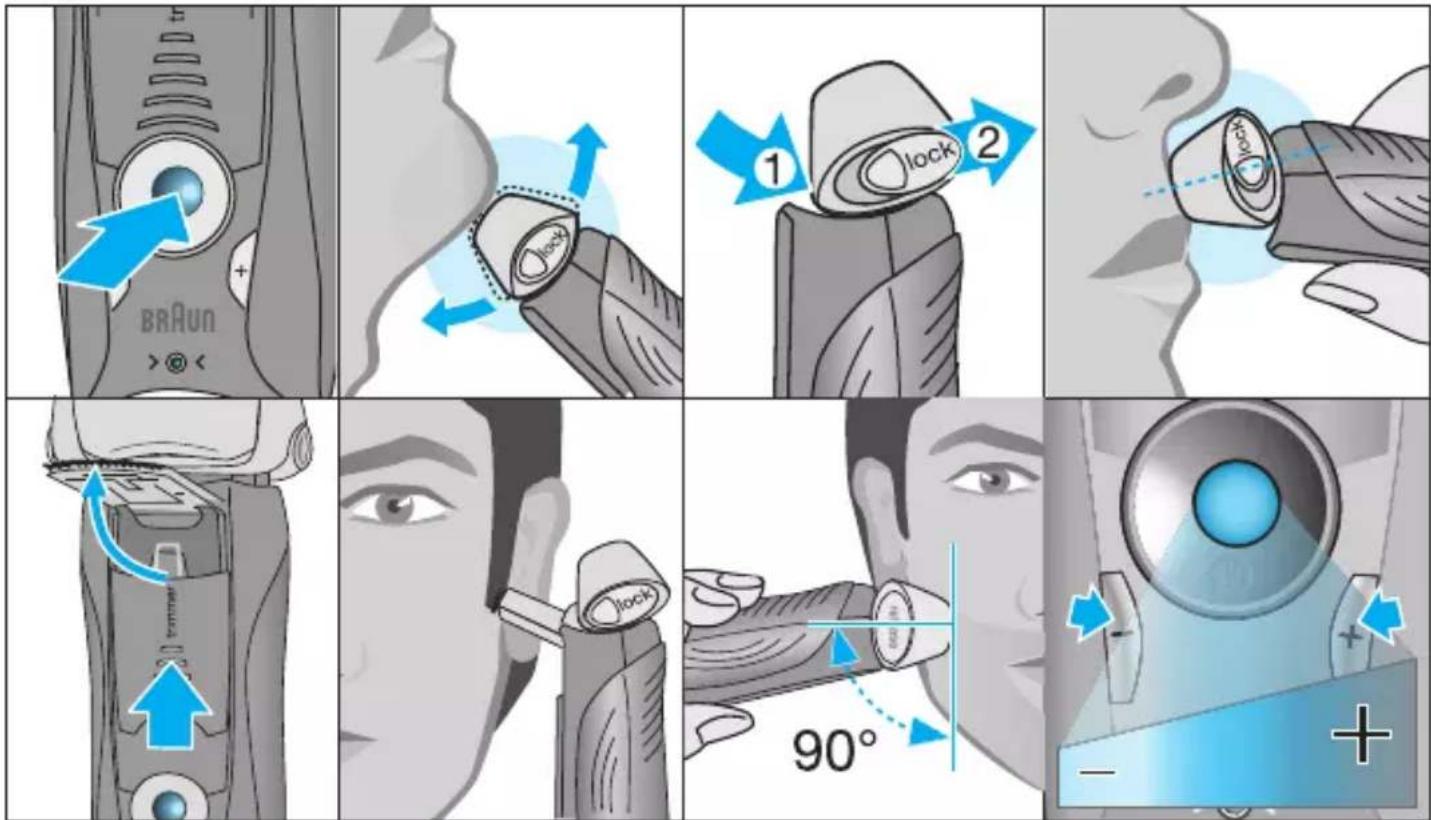
- To shave hard to reach areas (e.g. under the nose), first slide the shaver head to the back position, afterwards move the head lock switch to the back. The pivoting head is locked at this angle.
- To trim sideburns, moustache or beard, slide the pop-out long hair trimmer (11) upwards.
Tips for the perfect dry shave
For best shaving results, Braun recommends you follow 3 simple steps:
- Always shave before washing your face.
- At all times, hold the shaver at right angles (90°) to your skin.
- Stretch your skin and shave against the direction of your beard growth.
Personalizing your shaver
By holding down the accelerator button -/+ (13) or (14) you can adjust the shaving power to your individual needs in the different areas of your face from sensitive to intensive. The pilot light in the on/off switch (12) changes within the following range:
(-) sensitive shave
green
(+) intensive shave
For a thorough and fast shave we recommend the green (intensive) setting.
When switching on next time, the last used setting will be activated.
Cleaning
Automatic cleaning
After each shave, return the shaver to the Clean&Renew station and proceed as described above in the section «Before shaving». All charging and cleaning needs are then automatically taken care of. With daily use, a cleaning cartridge should be sufficient for about 30 cleaning cycles.
The hygienic cleaning cartridge contains ethanol or isopropanol (specification see cartridge), which once opened will naturally evaporate slowly. Each cartridge, if not used daily, should be replaced after approximately 8 weeks to ensure optimal disinfection.
The cleaning cartridge also contains lubricants, which may leave residual marks on the outer foil frame after cleaning. However, these marks can be removed easily by wiping gently with a cloth or soft tissue paper.
Manual cleaning
Cleaning under running water:
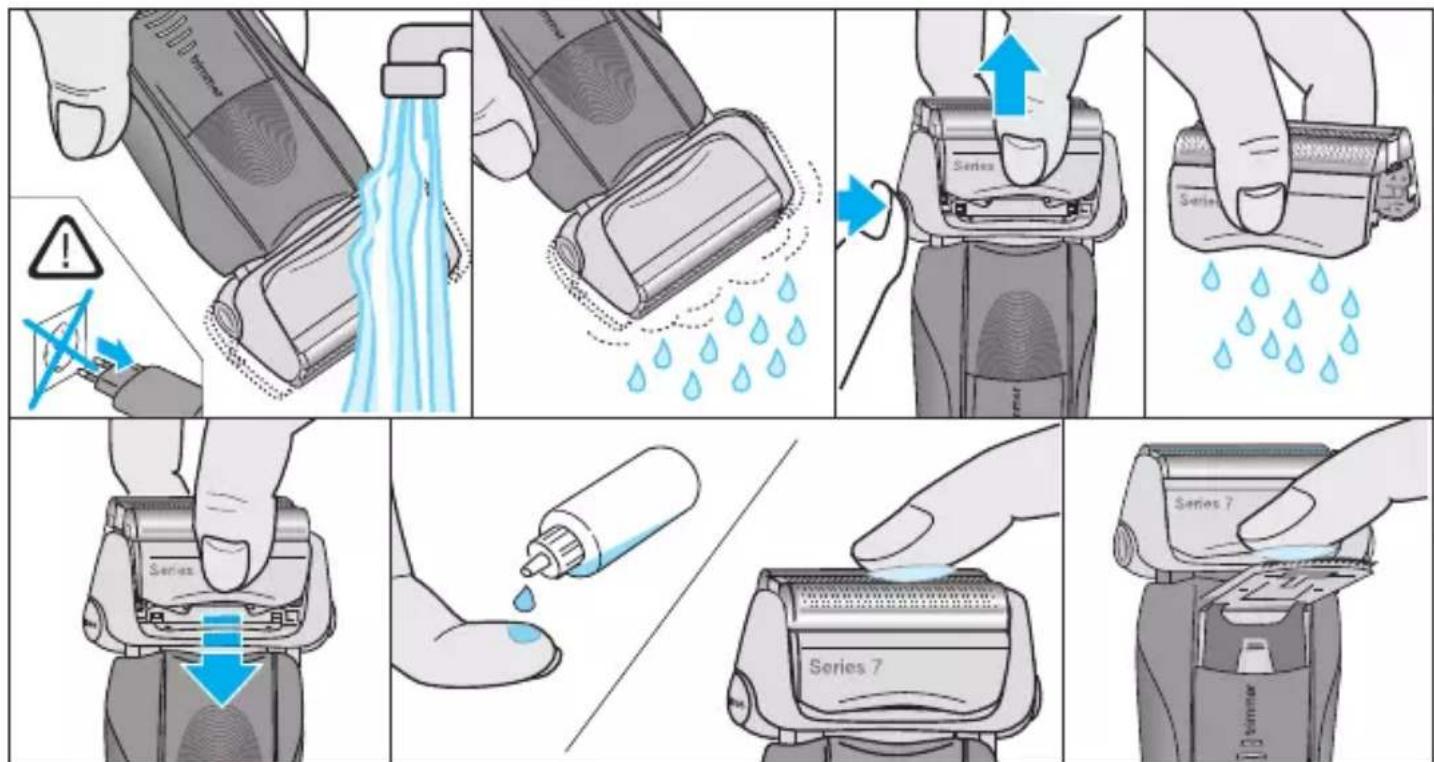
- Switch the shaver on (cordless) and rinse the shaver head under hot running water until all residues have been removed. You may use liquid soap without abrasive substances. Rinse off all foam and let the shaver run for a few more seconds.
- Next, switch off the shaver, press the release button (9) to remove the Foil & Cutter cassette (8) and let it dry.
- If you regularly clean the shaver under water, then once a week apply a drop of light machine oil (not included) on top of the Foil & Cutter cassette and the long hair trimmer.
The shaver should be cleaned after each foam usage.
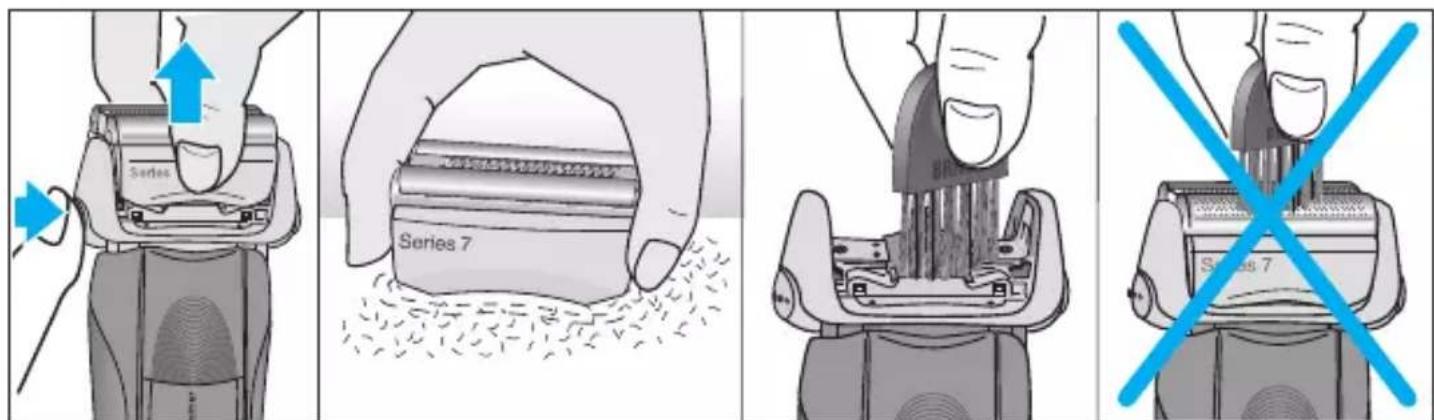
Cleaning with a brush:
- Switch off the shaver. Remove the Foil & Cutter cassette (8) and tap it out on a flat surface. Using a brush, clean the inner area of the pivoting head. However, do not clean the cassette with the brush as this may damage it.
Cleaning the housing
From time to time clean the housing of the shaver and the Clean&Renew station with a damp cloth, especially inside the cleaning chamber where the shaver rests.
Replacing the cleaning cartridge
After having pressed the lift button (2) to open the housing, wait for a few seconds before removing the used cartridge to avoid any dripping. Before discarding the used cartridge, make sure to close the openings using the lid of the new cartridge, since the used cartridge will contain contaminated cleaning solution.
Keeping your shaver in top shape
Replacing the Foil & Cutter cassette/ reset
To maintain 100% shaving performance, replace the Foil & Cutter cassette (8) when the replacement symbol (16c) lights up on the shaver display (after about 18 months) or when the cassette is worn. The replacement symbol will remind you during the next 7 shaves to replace the Foil & Cutter cassette. Then the shaver will automatically reset the display.
After you have replaced the Foil & Cutter cassette, use a ball-pen to push the reset button (15) for at least 3 seconds to reset the counter. While doing so, the replacement light blinks and goes off when the reset is complete. The manual reset can be done at any time.
Accessories
Available at your dealer or Braun Service Centres:
- Foil & Cutter cassette 70S/70B
- Cleaning cartridge Clean&Renew CCR
Environmental notice
Product contains batteries and/or recyclable electric waste. For environment protection, do not dispose of in household waste, but for recycling take to electric waste collection points provided in your country.
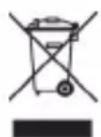
The cleaning cartridge can be disposed of with regular household waste.
Subject to change without notice.
For electric specifications, see printing on the special cord set.
Trouble-Shooting
| Problem: Possible reason: Remedy: | |
| SHAYER |
| Unpleasant smell from the shaver head. | 1. Shaver head is cleaned with water.
2. Cleaning cartridge is in use for more than 8 weeks. | 1. When cleaning the shaver head with water only use hot water and from time to time some liquid soap (without abrasive substances).
Remove Foil & Cutter cassette to let it dry.
2. Change cleaning cartridge at least every 8 weeks. |
| Battery performance dropped significantly. | 1. Foil and cutter are worn which requires more power for each shave.
2. Shaver head is regularly cleaned with water but not lubricated. | 1. Renew Foil & Cutter cassette.
2. If the shaver is regularly cleaned with water, apply a drop of light machine oil on top of the foil once a week for lubrication. |
| Shaving performance dropped significantly. | 1. Foil and cutter are worn.
2. Personal setting of shaving performance has been changed.
3. Shaving system is clogged. | 1. Renew Foil & Cutter cassette.
2. For a thorough and fast shave we recommend the green (intensive) setting.
3. Soak the Foil & Cutter cassette into hot water with a drop of dish liquid. Afterwards rinse it properly and tap it out. Once dry apply a drop of light machine oil on the foil. |
| Shaver turns off with fully charged battery. | Foil and cutter are worn which requires more power than the motor can deliver. The appliance turns off. | - Renew Foil & Cutter cassette.
- Regularly oil the shaving system, especially when cleaning with water only. |
| Battery segments in the display are skipped with decreasing battery capacity. | Foil and cutter are worn which requires more power for each shave. | - Renew Foil & Cutter cassette.
- Regularly oil the shaving system, especially when cleaning with water only. |
| Shaving parts have been changed recently but replacement symbol lights up. | Reset button has not been pushed. | - Push the reset button for at least 3 seconds to reset the counter. |
| Shaver head is damp. | 1. Drying time after automatic cleaning was too short.
2. Drain of the Clean&Renew station is clogged.
3. Cleaning cartridge has been used for quite a while. | 1. Clean directly after shaving to allow enough time for drying.
2. Clean the drain with a wooden toothpick. Regularly wipe the tub clean.
3. The ethanol/isopropanol proportion has decreased while the oil proportion has increased. Remove residue with a cloth. |
CLEAN&RENEW STATION
| Cleaning does not start when pressing the start button. | 1. Shaver is not placed properly in the Clean&Renew station.
2. Cleaning cartridge contains not enough cleaning fluid (display lights red).
3. Appliance is in stand-by mode. | 1. Insert shaver into the Clean&Renew station (contacts of the shaver need to align with contacts in the station).
2. Insert new cleaning cartridge.
3. Press start button again. |
| Increased consumption of cleaning fluid. | Drain of the Clean&Renew station is clogged. | - Clean the drain with a wooden toothpick.
- Regularly wipe the tub clean. |
Guarantee
We grant a 2 year guarantee on the product commencing on the date of purchase.
Within the guarantee period we will eliminate any defects in the appliance resulting from faults in materials or workmanship, free of charge either by repairing or replacing the complete appliance at our discretion.
This guarantee extends to every country where this appliance is supplied by Braun or its appointed distributor.
This guarantee does not cover: damage due to improper use, normal wear and tear (e.g. shaver foil or cutter block) as well as defects that have a negligible effect on the value or operation of the appliance. The guarantee becomes void if repairs are undertaken by unauthorised persons and if original Braun parts are not used.
To obtain service within the guarantee period, hand in or send the complete appliance with your sales receipt to an authorised Braun Customer Service Centre (address information available online at www.service.braun.com).
For UK only:
This guarantee in no way affects your rights under statutory law.
Clean&Renew station
Clean&Renew station
1 Cleaning liquid level display 2 Slide button for cartridge replacement 3 Electrical contacts for shaver 4 Start button 5 Cleaning program indicators 6 Power connector for cleaning station 7 Cleaning cartridge
Shaver
8 Foil and cutter cartridge 9 Release button for cartridge 10 Shaver head lock 11 Slide-out long hair trimmer
12 Main switch 13 Adjustment button - (gentle shave) 14 Adjustment button + (intensive shave) 15 Reset button 16 Shaver display 16a Charging lights (green) 16b Charging/low (red) 16c Replacement symbol 17 Electrical contacts for cleaning station 18 Power connector for shaver 19 Travel pouch 20 Special power cord (version may vary)
Before shaving
Before first use, connect the shaver to the electrical outlet using the special power cord (20), or proceed as follows:
Installing the Clean&Renew cleaning station
- Press the release button (2) to open the cover.
- Place and hold the cleaning cartridge (7) on a flat and stable surface (for example, a table).
- Carefully remove the cap from the cartridge.
- Insert the cartridge into the base of the station until it stops.
- Slowly close the cover by pressing it until it clicks into place.
- Using the special power cord (20), connect the plug of the cleaning station (6) to the electrical outlet.
Clean&Renew unit
1 Cleaning fluid indicator 2 Release button for cartridge replacement 3 Contacts where the shaver connects to the unit 4 Start button 5 Cleaning program indicators 6 Unit socket 7 Cleaning fluid cartridge
Shaver
8 Foil and cutter block cassette 9 Cassette release button 10 Shaver head lock switch
11 Pop-up trimmer for long hairs 12 On/off switch 13 - settings button (sensitive) 14 + settings button (intensive) 15 Reset button 16 Shaver display 16a Charging indicator(s) (green light) 16b Low battery indicator (red light) 16c Replacement indicator 17 Contacts where the shaver connects to the unit 18 Shaver socket 19 Travel case 20 Special connection cable (design may differ from that shown)
Before shaving
Before first use, connect the shaver to the electrical outlet using the special connection cable (20) or do the following:
Installing the Clean&Renew unit
- To open the housing, press the release button (2).
- Place the cleaning cartridge (7) on a flat and stable surface (e.g., a table).
- Carefully remove the cartridge cap.
- Insert the cartridge fully into the base of the unit.
- Slowly close the housing by pushing down until everything snaps into place.
- Connect the unit to the electrical outlet using the low-voltage connection cable (20), which you must first plug into the unit's socket (6).
The cleaning fluid indicator (1) will show the amount of fluid in the cartridge:
up to 30 cleaning cycles available, up to 7 cleaning cycles remaining, a new cartridge is needed.
Charging and cleaning the shaver
Insert the shaver head with the head lock released (10) into the Clean&Renew unit so that the front of the shaver faces you. The contacts (17) on the back of the shaver will align with the contacts (3) in the cleaning unit. Important: The shaver must be dry and free of foam or soap residue!
If necessary, the Clean&Renew unit will automatically start charging the shaver. It will also analyze the cleanliness status of the shaver and one of the following cleaning program indicators (5) will light up:
shaver is clean, short economical cleaning needed, normal cleaning level needed, intensive cleaning needed
If the unit selects one of the required cleaning programs, it will not start until you press the start button (4). For best shaving results, we recommend cleaning after every shave.
Each cleaning program consists of several cycles during which the cleaning fluid passes through the shaving head. Depending on the model of the Clean&Rnew unit and the selected program, the cleaning time can take up to 16 minutes. Leave the appliance in the unit to dry. Note that it may sometimes take a few hours for all moisture to evaporate into the air, depending on climatic conditions. After that, the appliance is ready for use.
When the program has finished, the blue ✓ indicator will light up.
Standby mode
10 minutes after charging or cleaning has finished, the Clean&Rnew unit switches to standby mode: the indicators on the Clean&Rnew unit then switch off.
Shaving appliance display
Display (16) Shows the battery charge level.
Charging indicator(s) (16a)
The charging indicator lights up when the battery is being charged.
The charging indicator flashes when the battery is almost empty. The remaining battery charge is sufficient for 2 to 3 shaves.
Information on disposal
Using the shaver
How to use
Press the on/off button (12) to activate the shaver:
Personalize the shaver
By pressing and holding the speed +/- buttons ((13) and (14)) you can adjust the shaving power to suit your personal preferences or for different areas of the face, from sensitive to intensive shaving. The indicator light on the on/off button (12) changes within the following ranges:
(-) gentle shaving
light/dark - green
(+) intensive shaving
For a smooth and quick shave, set the adjustment to green light (intensive shaving). When you switch on, the last used setting will be activated.
Cleaning
Automatic cleaning
After every shave, the cleaning station automatically performs the cleaning and drying procedure described above in the "Quick shave" section. All necessary cleaning and drying actions will be performed automatically. With daily use, the cleaning cassette should last for about 30 cleaning cycles.
The cleaning cassette contains ethanol or isopropanol (see the cassette for specifications), which must be allowed to evaporate after the rinse cycle is opened. If not used daily, each cassette should be replaced at least every 8 weeks to ensure optimal disinfection.
The cleaning cassette also contains lubricating fluids for the shaving system, which may leave some residue on the shaving head after cleaning. These residues can be removed easily with a gentle wipe with a damp cloth.
Rinsing
Station cleaning and charging
1 Cleaning fluid status screen 2 Cartridge change button 3 Station contacts for connection with the shaver 4 Start button 5 Cleaning program indicators 6 Power socket for station 7 Cleaning cartridge
Shaver
8 Cassette for shaving head and cutter 9 Cassette release button 10 Shaver head lock 11 Trimmer for long hairs
12 Cutter 13 "-" button (sensitive mode) 14 "+" button (intensive mode) 15 Reset button 16 Shaver screen 16a Charging indicator (green) 16b Low charge indicator (red) 16c Shaving cassette replacement indicator 17 Shaver contacts for connection with the station 18 Power socket for shaver 19 Storage and travel lock 20 Special power cords (may differ in appearance from the illustration)
Before first use, plug the razor into an electrical outlet using the provided power cable (20); an alternative method may also be used:
Installing the cleaning station
- Press the cartridge release button (2) to open the cartridge compartment.
- Place the cleaning cartridge (7) on a flat, horizontal surface (e.g., a table).
- Carefully remove the cartridge cap. Insert the cartridge into the base of the station housing until it stops. Close the compartment, pressing it gently until you hear a click. Using the provided cable (20), connect the station's power connector (6) to an electrical outlet.
On the cleaning liquid status screen (1), the remaining liquid quantity in the cartridge will be displayed:
After 30 cleaning cycles, the cleaning cartridge must be replaced.
Charging and cleaning the razor
Place the razor upside down into the cleaning station, having first removed the protective cap (10). The contacts (17) on the underside of the razor will align with the contacts (3) on the cleaning station. Important: The razor must be dry and free of any shaving residue!
If necessary, the cleaning station will automatically charge the razor. It will also perform a hygiene analysis of the razor and one of the following cleaning program indicators (5) will light up:
Cleaning not required | Quick eco clean required | Normal clean required | Intensive deep clean required
After selecting the desired cleaning program, it will start only after you press the start button (4). For better results, it is recommended to clean the razor after every shave.
Each cleaning program consists of several cycles, during which the head is rinsed with cleaning liquid. Depending on the model of your Clean&Renew device and the selected cleaning program, cleaning may take up to 16 minutes. Leave the razor in the device for a period that may last several hours (the evaporation rate of moisture depends on climatic conditions). After this, the razor is ready for further use.
After the program ends, the indicator will turn off.
After 10 minutes from the end of the charging and cleaning procedure, the cleaning and charging station switches to cooling mode: the indicators of the cleaning and charging station go out.
Shaver screen
The display (16) shows the charge status of the battery.
Battery charge level indicator light (16a)
The green indicator light shows the battery charge level. The indicator flashes green when the shaver is in charging mode, and also when it is switched on. When the battery is fully charged, all the indicator lights of the charge level indicator are lit continuously, without flashing, when the shaver is connected to the power supply.
A few minutes after the battery is fully charged, the shaver switches to cooling mode: the screen will turn off.
Low battery charge level indicator light (16b) The red indicator light starts flashing when the battery charge level is low, indicating the need to end the shaving process. When this happens, the remaining charge allows you to perform 2-3 shaving procedures.
Charging the battery
Depends on the characteristics of your hair and the ambient temperature. For one shaving procedure, a short 5-minute charge is sufficient.
- It is recommended to charge the device at an ambient temperature of 5°C to 35°C. At extremely high or low temperatures, battery charging may be slower or may not occur at all. It is recommended to use the device for shaving at a temperature of 15°C to 35°C. Do not expose the shaver to temperatures above 50°C for extended periods.
Troubleshooting
| Henschpab-HOCThb: | Возможная обчuna: Меры no устраенью: |
| БРИТВА |
| Hendri�пьий 3anax, indyший OT rolobkin rolibby. | 1. Головka бритbingл prombyta boДой. | 1.При помьванни г olobки бритbingл boДой IncpoльзуITE толбко Теллую boDу и, Время OT bpe-MEHи, НEMHOrO КДКОГМыla (6e3 abpa3INBbIX BeIeCTB).Сни-MITE бритberнуну сетку и ржу-Ший SFLOK и дайу Em ВсICoxHyTb. |
| 2.Чис taxий карtrпдж ИсплъЗовалы в точenvе срoka,Preвъшадцero 8 Heideь. |
| 3amehу чincstяшero karpttriДжа Следует проворпь минимуm pa3В 8 Heideь. |
| ПОНЗВОДN-ТELБНOCТБаKKумлЯТорacSУСЕСТВЕнHOСИХЕА. | 1. Дя каж do n proze undbyIбрNTь TRe6ByETcra NObl-шенио КOLичEcTBo 3Hep-гИN BCJIeDCTBVE ИЗHOCA cETKN I pexyuzero 6LOKa.2.ПромыВka roJOBKINбрNTbI BODo INPOBO-DITcRpeYJrPNO, Ho 6e3 CMa3bIBAHnI. | 1. 3amehnte kaccety c cetko n pexyuizim 6lOKom.2. Ecln Bbl pegyarpo n prombyBaete 6pntby BOdo, pa3 в HeJeIO HaHOCITE kaJIIO CBETLOrO MaunH-HORO MacJa Na BeRpX CETKn dIЯ eCMA3bIBAHnI. |
| ФФфektiv-NCHOTb 6prNTbyaСUSECTBENHOСИХЕА. | 1. ИЗошени сетка n pexyu-zim 6lOK.2. Измены персонльные NaCTPoRkn 3ФфektIVBHO-CTN 6prNTbY.3.Засореа 6pntVBeHHa NcStema. | 1. 3amehnte kaccety c cetko n pexyuizim 6lOKom.2. Дя ТшатelьHOrO n 6blcTporo 6pNTbЯ peKOMeHDoBan 3eJIeHbI (InTeHCINBHy) peKIM.3. 3amoyite kaccety c 6pntBENHO cETKO n pexyuizim 6lOKom B TEPLO Bode C KaJIeN cpeIcTBAДЯ МБТЯ NOcUdBi. Пocle 3amay-BAHry TцatelbH O npOMoIte ee n CTpIXHnTE OCTaTKe BOdu. Пocle BbICbIXaHry NaHecITe Ha cETKy KaJIIO CBETLOrO MaunHNO MAcJa. |
| БрNTBa OTKIIIO-UaETcprnI PONHOCTbUZapJxehHOMaKKuMylATope. | HeIoCTaTOUHЯ MOUHCTb DBrAteYI NO prUnHne I3Hoca 6peUoSei cETKN I pexyuzero 6LOKa. ИЗdelene OKJIIOuAETcR. | - 3amehnte kaccety c cetko n pexyuizim 6lOKom.- Perglyarpo Cma3bIBaaiTe 6pntBEN-HUO cNCTEmy, OCobEnHO ecIin DЯe eprombIBaHry INCNoIb3YeTcR TOJbKO BODa. |
| OTCyTCTBYOTceMentbI aKKy-MyJYTopaHa3KpaIe, ChI-Jxeha emKoCTb aKKuMylATope. | Дя кajdo n proze undpyIbрNTbI TRe6ByETcRA NOblIseH-HOE KOLiueCTBO 3HeprNIN BCJIeDCTBVE I3Hoca cETKN I pexyuzero 6LOKa. | - 3amehnte kaccety c cetko n pexyuizim 6lOKom.- Perglyarpo Cma3bIBaaiTe 6pntBEN-HUO cNCTEmy, OCobEnHO ecIin DЯe eprombIBaHry INCNoIb3YeTcR TOJbKO BODa. |
| ПрOBeDEHa3aMeHa DeTa-ЛeN 6prNTbI, HOcIMBOJ 3aMeHbI He rachet. | He haxata KNOpKa c6bOca. - | Дя obHyIeHnIa ChEtUkka yIdepxNi-BaIte KHNOpKc c6bOca haxaToB TceHne MINHmym 3-x cekynd. |
| Влajхость
Головки
бричы. | 1. ПосLEавTomатиеско
ЧИСТКИ БРИТВА He усpeя
прOCoxHуТь.
2. 3асорен CTOK StaHцIN
ОчИСТКИ ИЗAPДКИ.
3.ЧИСТЯш的职业
ИСПОЛБЗOBалCSВ Точень
ДOLЛГО Врemeи. | 1. OсушесТВ liaTe чИСТКУ сраЗу
посLEа БPИТь, УTOБы БрИТВа
усpeя прOCoxHуТь.
2. Сnomошью 3убочистkn рpoч-
stITE CTOK. Perуларно прOTи-
paIJte emKOSTь доиста.
3. Содерханце отahOLA/n3Oppona-
HOla ChN3nILOCb, a codepχани
масla уВелчилесь. YdaJInte
OCTaTKI C NOMOШь TkaHIи. |
Cleaning and charging station
All other requirements, including claims for damages, are excluded unless liability is established by law.
Claims arising from a commercial contract with the seller are not covered by this warranty.
Warranty does not cover:
- Defects caused by force majeure; - Use for professional purposes; - Violation of the requirements of the operating instructions; - Incorrect installation of the supply voltage (if required); - Introduction of technical changes; - Mechanical damage; - Damage caused by animals, rodents, and insects (including cases of rodents and insects inside the devices); - For devices operating from batteries, - work with used or damaged batteries, any damage caused by used or leaking batteries (we recommend using only batteries protected against leakage); - For devices - crushed or torn grid.
Attention! The original warranty card must be filled out when contacting the service center for warranty repair. After the repair, the warranty card will be filled in with the original repair sheet with the service center stamp and signed by the consumer upon receipt of the device from repair. Require the date of return from repair to be entered; the warranty period is extended by the time the device is in the service center.
In case of difficulties with the warranty service or after-sales service, please report this to the Braun information service by phone 8-800-200-20-20 (call from Russia is free).
Ukrainian
Operating instructions
Our products are manufactured in accordance with the highest quality standards, functionality, and design. We hope you will enjoy your new Braun shaver.
Please read the instructions carefully. They contain important safety information. Keep them for future reference.
Dear
STANCE CLEAN & RENEW
Country of origin: Germany
Year of manufacture
To determine the year of manufacture, refer to the 3-digit production code located near the type plate. The first digit of the production code refers to the last digit of the year of manufacture. The next two digits refer to the calendar week in the year of manufacture. Example: "427" - The product was manufactured in week 27 of 2014.
Lilai Lai
eai
| .بbooَفَعَلُمَالْحَسَنَهِّةَبْعَدُمَلَهِّةَبْعَدُمَلَهِّةَبْعَدُمَلَهِّةَبْعَدُمَلَهِّةَبْعَدُمَلَهِّةَبْعَدُمَلَهِّةَبْعَدُمَلَهِّةَبْعْدُمَلَهِّةَبْعَدُمَلَهِّةَبْعَدُمَلَهِّةَبْعَدُمَلَهِّةَبْعَdُمَلَهِّةَبْعَdُمَلَهِّةَبْعَdُمَلَهِّةَبْعَdُمَلَهِّةَبْعَdُمَلَهِّةَبْعَdُمَلَهِّةَبْعَdُمَلَهِّة·.1
.
.
.
.
.
.
.
.
.
.
.
.
.
.
.
.
.
.
.
.
.
.
.
.
.
.
.
.
.
.
.
.
.
.
.
.
.
.
.
.
.
.
.
.
.
.
.
.
.
.
.
.
.
.
.
.
.
.
.
.
.
.
.
.
.
.
.
.
.
.
.
.
.
.
.
.
.
.
.
.
.
.
.
.
.
.
.
.
.
.
.
.
.
.
.
.
.
.
.
.
-
.
.
.
.
.
.
.
.
.
.
.
.
.
.
.
.
.
.
.
.
.
.
.
.
.
.
.
.
.
.
.
.
.
.
.
.
.
.
.
.
.
.
.
.
.
.
.
.
.
.
.
.
.
.
.
.
.
.
.
.
.
.
.
.
.
.
.
.
.
.
.
.
.
.
.
.
.
.
.
.
.
.
.
.
.
.
.
.
.
.
.
.
.
.
.
.
.
.
.
?
.
.
.
.
.
.
.
.
.
.
.
.
.
.
.
.
.
.
.
.
.
.
.
.
.
.
.
.
.
.
.
.
.
.
.
.
.
.
.
.
.
.
.
.
.
.
.
.
.
.
.
.
.
.
.
.
.
.
.
.
.
.
.
.
.
.
.
.
.
.
.
.
.
.
.
.
.
.
.
.
.
.
.
.
.
.
.
.
.
.
.
.
.
.
.
.
.
.
.
•.
•
•
•
•
•
•
•
•
•
•
•
•
•
•
•
•
•
•
•
•
•
•
•
•
•
•
•
•
•
•
•
•
•
•
•
•
•
•
•
•
•
•
•
•
•
•
•
•
•
•
• |