
SBCHC8350 - Hi-Fi System PHILIPS - Free user manual and instructions
Find the device manual for free SBCHC8350 PHILIPS in PDF.


| Brand | Philips |
| Model | SBCHC8350 |
| Product Type | Hi-Fi Chain / FM Wireless Audio System |
| Carrier Frequency (transmitter) | Channel 1: 863.5 MHz / Channel 2: 864.5 MHz |
| Carrier Frequency (headphone) | 863.2 to 864.7 MHz (manual tuning) |
| Modulation | FM (frequency modulation) |
| Transmission Range | Up to 100 meters, omnidirectional (360°) |
| Audio Input Level | 200 mVrms (1 kHz sine) |
| Transmitter Power Supply | 12 V DC / 200 mA, Philips SBC CS030/00 mains adapter |
| Headphone Power Supply | 2 rechargeable NiCd LR03/AAA batteries, 550 mAh |
| Battery Charging Time | Approximately 16 hours for full charge |
| Frequency Range (headphone) | 10 - 19,000 Hz |
| Signal-to-Noise Ratio | Greater than 55 dB (A-weighted) |
| Total Harmonic Distortion | Less than 0.5% |
| Channel Separation | Greater than 30 dB |
| RF Output Power | Less than 10 mW |
| Audio Input | 3.5 mm stereo jack (6.35 mm adapter included) |
| Main Features | FM wireless transmission, automatic on/off, LED charge indicator, battery charging via transmitter, channel selection (2 channels) |
| Included Accessories | FM transmitter SBC HC8352, FM headphone SBC HC8355, mains adapter, 2 NiCd batteries, jack adapter, antenna tube |
| Maintenance | Clean with a slightly damp cloth; do not use alcohol, thinner, or abrasive products |
| Safety | Do not expose to moisture, rain, excessive heat, or direct sunlight; do not attempt to repair yourself |
| Environment | Recyclable packaging; dispose of used batteries according to local regulations |
Frequently Asked Questions - SBCHC8350 PHILIPS
User questions about SBCHC8350 PHILIPS
0 question about this device. Answer the ones you know or ask your own.
Ask a new question about this device
Download the instructions for your Hi-Fi System in PDF format for free! Find your manual SBCHC8350 - PHILIPS and take your electronic device back in hand. On this page are published all the documents necessary for the use of your device. SBCHC8350 by PHILIPS.
USER MANUAL SBCHC8350 PHILIPS
Wireless FM Stereo Headphone
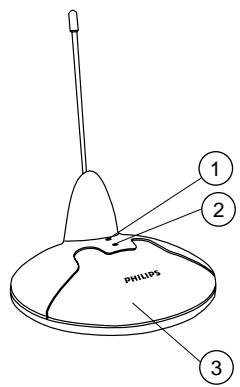
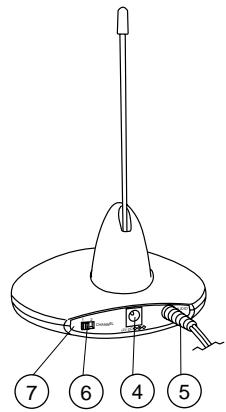
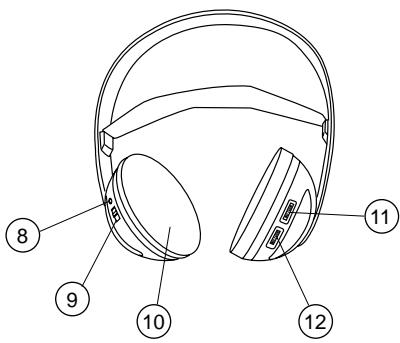
Figure 2
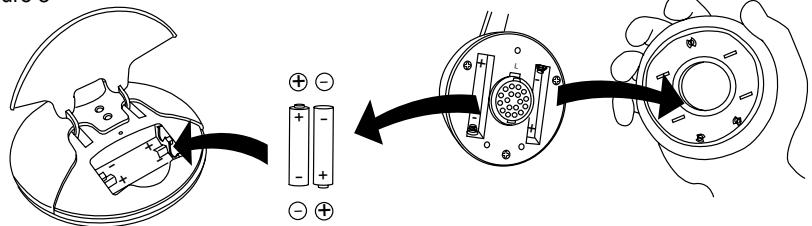
Figure 3
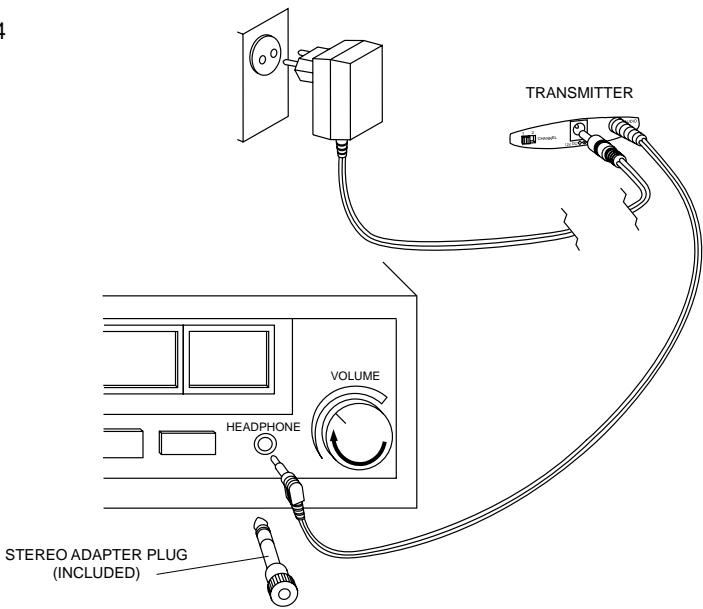
Figure 4
Index
| English | English-4 | Svenska-60 | Svenska |
| Français | Français-11 | Norge-67 | NgoN |
| Espanol | Espanol-18 | Suomi-74 | Suomi |
| Deutsch | Deutsch-25 | Püccskn-81 | Püccskn |
| Nederlands | Nederlands-32 | Polski-88 | Polski |
| Italiano | Italiano-39 | Magyar-95 | Magyar |
| Portugues | Português-46 | Türkçe-112 | Türkçe |
| Dansk | Dansk-53 | Ελληνικά-119 | Ελληνικά |
Introduction
General information
Congratulations!
You have just bought the most sophisticated FM wireless stereo sound system. This system uses the latest FM wireless technology, which gives you complete freedom of movement while enjoying your favorite music and movies. No more inconvenience from cables or headphone wires! To ensure you get the best performance from your FM wireless stereo sound system please read this manual carefully.
IMPORTANT
Read these instructions. All the safety and operating instructions should be read before using the wireless headphone system.
Check if the voltage indicated on the type plate of the adapter corresponds to the local mains voltage before connecting to the mains power supply.
Remove the batteries from the headphone's battery compartment and disconnect the adapter from the mains if the system is not in use for a long period.
Prevent fire or shock hazard: do not expose this equipment to humidity, rain, sand or excessive heat caused by heating equipment or direct sunlight.
Radio equipment for wireless audio applications is not protected against disturbance from other radio services.
IMPORTANT
Before using the FM headphone for the first time, please ensure that the batteries are fully charged for about 16 hours. This will guarantee a longer operating lifetime of the batteries.
Benefits of Philips latest RF/FM wireless technology
Wireless transmission
The FM transmitter transmits the stereo audio signal from your audio or video source to your FM headphone without wires.
Wide transmission range
Your FM headphone can receive signals up to 100 meters away.
High-frequency radio system
The FM headphone set uses a high radio frequency as the signal carrier, ensuring a very clear, sharp reception.
Automatic power on/off indicator
The FM transmitter automatically switches on and starts transmitting when audio signals are detected at the audio input (red LED). When no audio signals are detected the FM transmitter automatically switches off after a few minutes.
Rechargeable system
The FM transmitter recharges the
headphone's built-in rechargeable LR03/ AAA
NiCd batteries. Just place the batteries in the
transmitter's battery compartment. The green
LED lights up during charging.
Easy transmission
The FM headphone is able to receive signals from the transmitter, even through barriers such as doors, walls and windows.
Multiple headphones with one transmitter
An additional number of headphones and/or wireless speakers can be used with a single transmitter if they:
- operate in the 864 MHz band
- can detect a 19 kHz pilot tone.
Please consult the appliance's electrical specification sheets for confirmation on compatibility.
Kit contents
This FM headphone system consists of the following accessories:
1 x SBC HC8352 FM transmitter
1 x SBC HC8355 FM headphone
1 x SBC CS030/00 12Volt / 200mA AC/DC adapter (for UK: SBC CS030/05 12 Volt/ 200 mA AC/DC adapter)
2 x rechargeable batteries LR03/AAA (NiCd), 550 mAh
1 x 3.5 mm plug to 6.3 mm stereo adapter plug
1 x antenna tube
Transmitter (figure 1)
1 Recharging indicator - the green LED lights up during recharging. Completely flat batteries will be fully charged after about 16 hours.
2 Power indicator - lights up when audio signals are detected at the audio input.
3 Recharging compartment - just place the batteries in the transmitter's battery compartment. The green LED lights up during recharging.
4 DC power - connect to the 12 Volt/200 mA AC/DC adapter
5 3.5 mm stereo headphone audio input - connects your FM transmitter to an audio source
6 Channel switch - select one of 2 channels for best reception. We advise you to select channel 1 as a first option.
7 Controls plate
Headphone (figure 2)
8 Power indication - lights up when in use.
9 Power On/Off - slide the switch to the on or off position to switch the headphone on/off.
10 Battery compartment - remove the earmcushion, take out the batteries and put them in the transmitter's recharging compartment for recharging.
11 Volume - adjust volume to your desired listening level.
12 Tuning - turn the tuning wheel until the signal is at its clearest.
Installation
Transmitter power supply
IMPORTANT
Use only Philips SBC CS030/00
12 Volt/200 mA AC/DC adapter.
(For UK, use only Philips SBC CS030/05)
1 Make sure the adapter's rated voltage corresponds to the mains socket voltage.
2 Connect the DC connector of the AC/DC adapter to the 12 Volt DC power input connector located at the rear of the transmitter.
3 Connect the 12 Volt/200 mA AC/DC adapter to the mains socket.
- Always disconnect the AC/DC adapter if the transmitter is not to be used for a long period of time.
4 Insert the antenna tube in the hole, located on the top of the transmitter. Ensure that the wire which is hanging out of that hole, is guided in the antenna tube.
- Installing the antenna tube correctly, will improve the transmission range.
Headphone power supply
IMPORTANT
Use only rechargeable LR03/AAA NiCd batteries (preferably Philips).
Do not use NiMH batteries or alkaline batteries as these may damage your FM wireless system!
1 Check if the power button of the FM headphone is in the on position.
2 To recharge the headphone's built-in rechargeable LR03/AAA NiCd batteries, open the headphone's battery compartment. Take out the batteries and put them in the transmitter's recharging compartment for recharging.
Notes:
Completely flat batteries need approximately 16 hours to recharge.
Always remove the batteries if the headphone is not to be used for a long period of time.
Batteries contain chemical substances, so they should be disposed of properly.
Environmental Information
All redundant packing material has been omitted. We have done our best to make the packaging easily separable into two materials: cardboard and polyethylene
Your unit consists of materials which can be recycled if disassembled by a specialized company. Please observe the local regulations regarding the disposal of packing materials, exhausted batteries and old equipment.
Headphone battery replacement (figure 3)
IMPORTANT
Use only rechargeable LR03/AAA NiCd batteries (preferably Philips).
Do not use NiMH batteries or alkaline batteries as these may damage your FM wireless system!
1 Remove the earcushions.
2 Take out the batteries and dispose of them properly.
3 Insert new batteries. Only use LR03/AAA NiCd batteries (preferably Philips).
4 Make sure the batteries are correctly inserted as indicated by the engraved symbols in the battery compartment.
5 Put the earcushions back on the earshell.
IMPORTANT
Before using the FM headphone for the first time, please ensure that the batteries are fully charged for about 16 hours. This will guarantee a longer operating lifetime of the batteries.
Connecting the FM transmitter to a headache output of an audio source (figure 4)
1 Connect the 3.5mm stereo plug of the stereo audio cable to the headphone output of an audio source, such as TV, HiFi or PC.
- In case your audio source has a 6.3mm headphone output, use the supplied 3.5mm to 6.3 mm stereo adapter plug.
2 Switch on your audio source and carefully increase the volume of the audio source. The red power indication LED of the transmitter lights up if receiving an audio signal.
3 Switch on the headphone. You may hear a hissing sound through the headphone if the headphone is not yet properly tuned to the transmitter.
4 To tune, turn the tuning wheel until the signal is at its clearest.
5 Adjust the volume to the desired level with the headphone volume control.
Basic operation
When the FM transmitter is connected to a headphone output of an audio source.
1 Switch on your audio source and carefully increase the volume of the audio source. The red power indication LED of the transmitter lights up if receiving an audio signal.
2 Switch on the headphone. You may hear a hissing sound through the headphone if the headphone is not yet properly tuned to the transmitter.
3 To tune, turn the tuning wheel until the signal is at its clearest.
4 Adjust the volume to the desired level with the headphone volume control.
Troubleshooting
If a fault occurs, first check the points listed below before taking the set for repair.
If you are unable to remedy a problem by following these hints, consult your dealer or service centre.
WARNING: Under no circumstances should you try to repair the set yourself, as this would invalidate the warranty.
| Problem | Remedy |
| No sound | - Check if the AC/DC adapter is fully inserted into the AC outlet and that its DC connector is properly inserted into the 12 Volt DC input connector located at the rear of the transmitter.- Check if the headphone's on/off switch is in the on position.- Headphone batteries running low. Remove the earmcushions.Take out the batteries and put them in the transmitter's recharging compartment for recharging.(See Headphone power supply)- Check if the audio source is switched on and tuned to a channel with audio.- Volume not adjusted. Adjust the volume on the audio source/ headphones to a higher level.- Adjust the headphone's tuning frequency. Turn the tuning wheel until the signal is at its clearest.- Make use of the HC8352 transmitter. Some transmitters already built into other equipment may not be compatible with the HC8355 headphone because of the advanced technologies used in the HC8355 headphones. |
| Distorted sound | - Adjust the headphone's tuning frequency. Turn the tuning wheel until the signal is at its clearest.- Adjust the transmitter's frequency. Select any of the 2 channels of the transmitter. Next adjust the headphone's frequency by turning the tuning wheel until the signal is at its clearest.- Headphone batteries running low. Remove the earmcushions. Take out the batteries and put them in the transmitter's recharging compartment for recharging.(See Headphone power supply) |
Troubleshooting
| Distorted sound | - Check the volume on audio source/ headphone is not set at too high a level. Reduce the volume.- Distance from the transmitter is too large. Move closer to the transmitter.- Interference from fluorescent lamps/ other radio sources. Move transmitter or headphone elsewhere/ change the transmitter's channel.- Make use of the HC8352 transmitter. Some transmitters already built into other equipment may not be compatible with the HC8355 headphone because of the advanced technologies used in the HC8355 headphone. |
| Maintenance | - If the headphone will not be used for a long time, please remove the batteries to prevent leakage and corrosion.- Only replace the batteries with LR03/AAA NiCd batteries (preferably Philips).- Do not leave the headphone near heat sources. Do not expose to direct sunlight, excessive dust, moisture, rain or any kind of mechanical shock.- Do not use alcohol, thinner or petroleum-based substances to clean the headphone or transmitter. Use a slightly dampened chamois cloth to clean the housing.- Do not use cleaning agents containing alcohol, spirits, ammonia or abrasives as these may harm the housing. |
Hearing Safety! Continuous use at a high volume may permanently damage your hearing.
Specifications
Regulations
| System: | Radio Frequency (RF) |
| Carrier Frequency: (Transmitter HC8352) | Channel 1: 863.5 MHz Channel 2: 864.5 MHz |
| Carrier Frequency: (Headphone HC8355) | 863.2 to 864.7 MHz (Manual tuning) |
| Modulation: | Frequency Modulation (FM) |
| Radiated Output Power: | <10m Watt |
| Effective Transmission Range: | up to100 meters, omni directional (360°) |
| Input level: | 200 mVrms (1 kHz sine wave) |
| Power supply – transmitter: | 12Volt / 200 mA DC, centre positive |
| Power supply – headphone: | 2 x LR03 (AAA) batteries (NiCd) |
| Frequency range (Headphone): | 10 – 19,000 Hz |
| Signal/Noise ratio: | >55 dB (1 kHz sine wave , A-weighted) |
| Distortion: | < 0.5% THD |
| Channel separation: | >30 dB |
European Regulations
This product has been designed, tested and manufactured according the European R&TTE Directive 1999/5/EC.
Following this Directive, this product can be brought into service in the following states:
R&TTE Directive 1999/5/EC
B
DK
E X
GR X
F√
IRL
1x
NL
A
P√
SU
s√
UK
N√
D
CH
This product complies with class 3 requirements as set down in ETS 300 445.
Felicitations!
Spcifications
Régulations
| B | ✓ | DK | ✓ | E | X | GR | X | F | ✓ |
| IRL | ✓ | I | X | L | ✓ | NL | ✓ | A | ✓ |
| P | ✓ | SU | ✓ | S | ✓ | UK | ✓ | N | ✓ |
| D | ✓ | CH | ✓ |
| B | ✓ | DK | ✓ | E | X | GR | X | F | ✓ |
| IRL | ✓ | I | X | L | ✓ | NL | ✓ | A | ✓ |
| P | ✓ | SU | ✓ | S | ✓ | UK | ✓ | N | ✓ |
| D | ✓ | CH | ✓ |
Transmissor (figura 1)
7 Placa de comandos
| B | ✓ | DK | ✓ | E | X | GR | X | F | ✓ |
| IRL | ✓ | I | X | L | ✓ | NL | ✓ | A | ✓ |
| P | ✓ | SU | ✓ | S | ✓ | UK | ✓ | N | ✓ |
| D | ✓ | CH | ✓ |
Stort transmissionsomrade
Transmitter (figur 1)
| B | ✓ | DK | ✓ | E | X | GR | X | F | ✓ |
| IRL | ✓ | I | X | L | ✓ | NL | ✓ | A | ✓ |
| P | ✓ | SU | ✓ | S | ✓ | UK | ✓ | N | ✓ |
| D | ✓ | CH | ✓ |
Dette produit overholder klasse 3 kravene, der er fastsat i ETS 300 445.
Inledning
Allman information
Grattis!
| B | ✓ | DK | ✓ | E | X | GR | X | F | ✓ |
| IRL | ✓ | I | X | L | ✓ | NL | ✓ | A | ✓ |
| P | ✓ | SU | ✓ | S | ✓ | UK | ✓ | N | ✓ |
| D | ✓ | CH | ✓ |
AByTOMaTHUeCKn HAnKKaTOP NHTAHNBAK/BBIKA
TpahcmntTep FM aBTomatnueckn BkIoouaetcnaHaHaeT nepeaay npn IOCTyIaehnn 3ByKObIx CNHaALOB Ha 3ByKOBOB BXoA (KpaChbIn HAniKaTOP). Ipn OTCyTCTBmN 3ByKObIX CNHaALOB TpaHcmtTep FM aBTomatnueckn OTkIoouaetcyepe3 HeckoAbo MNHT.
CnCTema 3apAKn
TpaHcMnTTep FM 3apJkae T BCTpoEHbIe B HayuHNIK6aTapei LR03/AAA NiCd. IpOcTo yCTaHOBnTe 6aTapei BO tDeAeHne DAn 6aTapei TpaHcMnTTepa.Bo BpeM a3apAKn 6yAdET ropeTb 3eAeHbI INHdNKaTOP.
Постая поедауа
Baun HaynHK FM Moryt noyHaTb CnHaBb OT TpaHcMNTTepa DaKe cKBo3b TaKne npErpaDb, KaK dBepu, CTeHb N OKHa.
HeckoaIbKO hayuHnKOB npn OaHOM TpaHcMntTepe
C OaHIM TpaHCMTTepom MOxHO
NCIOA3OBA Tb HECKoAko HayuHINKOB N/AN
6ecpOBOAoHbIX DNHaMnKOB, ECAN OHN: -pa6oTAOT B NOoCe 864 MfU
-MoYrPiuHmMaTb KOHTPOAbHbI CNFHa1 19 KfU.
AЯ npOBePKO CBMeCTMIOCTN CM 3aekTpueckne XapaKTepnCTKIN yCTpOJCTBa.
CocTAb KOMIIaEkTa
Baunn HauuHnKn FM mMeIOT cAeDyIOUne npHaAaExHNOCTN
I x TpaHcMnTtep SBC HC8352 FM
I X Hayshniki SBC HC8355 FM
I x aanTep SBC CS030/00 12 B/200 mA nepeMeH/NoCT
2xakmyaTOpHbIe 6aTapei LR03/AAA (NiCd),550mAh
IXepexOaHk3,5MMHa6,3MMCTepeo
IXaHTeHHa
TpaHcMMTrep (phc.1)
7 OpraHbI ynpabAeHnHaHayuHHKn (pnc.2)
I INHnKaTOp 3apAKn - BO BpEma 3apAKn 6yTeT ropeTb 3eAeHbI CN△, IIOAnHOCTbO CEbUne 6aTaPeN 3apAiaOTcB TeueHne 16 yacob.
2 INHANKATOP NHTAHN -3aropaTc npn IIOJyueHn 3ByKObblxCINHaONB Ha 3ByKObOM BXOe.
3 OTaIeHHe DAn nepe3apAKn - IpoCTO yCTaHOBHTe 6aTapeN B OTaIeHHe. AIA 6aTapeN TpaHCmTTepa. Bo Bpemr 3apAkn 6ydt ropeTb 3eAeHbI CnA,
4Питанн eocToHHbIM TOKOM -noKIOHTe aAnTep 12 B/200 mA noCT/npemeh Toka
5 3ByKOBoB BxOa AAn Ctepeo HayuHnKOB 3,5 MM - NOkAIOyaeT TpaHCmTTep FM K 3ByKObOMy NCTouHnky
6 NpekAIOUaTeAb KaHaAOB -BbIbepnTe OINH 32 KaHaOB ABy yAyUeHnI npInema. B KaueCTBe nepBOrO BbIbopa peKomeHdyem KaHaI I.
8 INHANKaTOp nHTaHHa - TOpNT BO BpeMa NCIOAusbOBAHHa.
9ПитайнБКВ/Бык-пepeMeCTIte BblKIOUaTeAeB INOLOXeHnE BkN Nn BbIKA DЯ BKIOUeHnN Nn BblKIAOuHnN HayuHnKOB.
10 Otcek Aa 6aTapei - CHIMnTe NOdyuueKn Aya yUwe, BbHbTe 6aTapeu n YcTaHOBnTe INX B OTEcK 3apAKn Ha TpaHCmTTepe Aa 3apAKn.
I I POMKOCTb -OTpeYAnpyTe yPOBeHb I POMKOCTb DO HJXHOrO 3HaueHnA.
12 HactpoKa -noBepHnTe pyKu NaCTpOIKNdo NOUyeHnY uCtTO CnHaAa.
3aMeHa 6aTapeH HayuHnKOB (pnc.3)
BAXHOE 3AMEYAHNE
HcnoAb3yTe ToAbo
aKKyMyAToPbIe 6aTapeN LR03/AAA
NiCd (KeaTeAbHo Philips).
He HcnoAb3yTe 6aTapeN NiMH Hn
uEaoHybe, T.K. 3TO MOKeT nobpegntb
BaWy 6ecnpoBogHyIO cnCTemy FM!
CHIMITE NODUJSEUKN AYUJEI.
2 BbHbTe 6aTapeu N BbI6pOcNte ux DOANKbIM O6pa3OM.
3 YcTaHOBnTe HObIe 6aTapeN. NcNoA3yNeToAko LR03/AAA NiCd (KeAteHo Philips).
4 Y6eIHTecbBTOM,HTO 6aTapeYCTaHOBAEHbIB COOTBECTBnC BbIrpaBnPOBaHHbIMn Ha OTceKe A8aTaapei CmBOAmn
5 UCTaHOBInTe IOndyUeKn DAn yUeN Ha MecTo.
BAXHOE 3AMEYAHNE
Ipege hncnoAb3OBAHHeM HuyuHNKOB FM B nepBbI pa3 o6ecneneyBte Hx noAHyIO 3apgky B TeueHne 16 yacob. 3To yBeaunBaet cpoK CAYX6bl 6atapei.
ПоДКИОЧЕТРаHСМЛТЕРAFM K BыхOу HayшнкOB 3ВУКОВOrO nCTOчнka (pnc.4)
I PaoKauOHTe Ctepeo pa3bE M 3,5MM Ctepeo 3ByKOBOrKa6eAa K BbIXOaD HyuHnIOB 3ByKOBOr NCTOCHNka, HAp., TeaeBn3Opa, HiFi nn KomnIOTepa.
- EcaBaa3ByKOBOINCTOCHNKIMeET BbIXoA DAHAYUHNKOB 6,3MM, IcnoAb3yIte NepexoADNK 3,5MM Ha 6,3 MM.
2 BkIoUHTe 3ByKOBoI NCTOCHIK I NOCTeHNO YBeAInbTe YpOBeHb. KpaChbI INADKAtOp CIN, nITaHn TpaHCmTTepa 3arOpNTcR, kOrdaHa HeRo NOCTyNt CINHaI.
3 BkIoUHTe HayuHnIKn. Bbl MoKeTe ycIbIwaTb IINHeHne,ecm HauHnIKn eue He NOaCTPoeHbI K TpaHCmTTepy.
4 Tenepb Otperepymnyte qactoty HayshnKOB NOBOPOTOM pyky hactpoiKn DO NOyueHn yNCTORO cnHaHa.
5 OTPeynpyTe yPOBHeNb DO Heo6xOAMoTO 3HaueHnC POMOJIbIO KOHTPOA r yPOBHa HayuHnKOB.
OchOBhble onepaunn
Korda TpaHCMnTTep FM noAKnOyEHN K BbIXoAHyuHHIOB 3ByKOBOrO nCTOCHNka.
BkIoUHTe 3ByKOBoI nCTOuHnIK I NocTepeHHo YBeAunbTe yPoBeHb. KpaChbI INHAnKaTOp CIN, nITaHnI TpaHCmNTTepa 3aOpNTcR, kOrdaHa HeRo NOCTyNt CInHaI.
2 BkIoUHTe HayuHnKn. Bbl MoKeTe ycBbIaTb uHneHne,ecn HauHnKn eue He NOdCTPoeHbI K TpaHcMntTepy.
3 Tenepb OtpereympuIte HaCTOty HauSHIKOB NOBOPOTOM pykU NaCTPOKIN DO NOLYeHnA NCTORO CnHaHa.
4 OtpereyIpyIte ypoBeHbdo Heo6xOAMOTO 3HaueHnC IMOUbIO KOHTPOAAYPOBHNrPOMKOCTb HayuHNIKOB.
Pn HncnpabHoctn nepeg TeM, KAc Hectu yCtpoiCTBO B peMOHT ChaAa npOBepbTe npBegehhble Hxke nyHKtbl.
Ecan c nomoubIO 3THx yka3aHn Bam He ygaocb ycTpaHntb HencnpabHoctb, CBXHTecc b CaWM gnaepom Hn OTgeAm pemOHta.
IPEyIpyEKAEHNE: Hn B Koem cayae He nbitaTecb peMOHTpOBaTb yctpoiCTBO CAMn, T.K. 3TO aHHyAmpyet rapaTHIO.
3To n3geane pa3pa6oTaHo, n3roTOBaEHO nnpOBeHOB COOTBeTCTBHN C Ebponenckon gnpeKTHBOR R&TTE 1999/5/EC.
B cootbetCTBnC 3TOI gHpeKTHBOH 3TO H3geAHe MOXHO HCIOAb3OBaTb B Caegyiox.
R&TTE Directive 1999/5/EC
| B | ✓ | DK | ✓ | E | X | GR | X | F | ✓ |
| IRL | ✓ | I | X | L | ✓ | NL | ✓ | A | ✓ |
| P | ✓ | SU | ✓ | S | ✓ | UK | ✓ | N | ✓ |
| D | ✓ | CH | ✓ |
AahHoe n3geAne cooTBcTBye Tpe6OBaHHaM Kaac yka3aHO B ETS 300 445.
Gratulacje!
R&TTE Directive 1999/5/EC
| B | ✓ | DK | ✓ | E | X | GR | X | F | ✓ |
| IRL | ✓ | I | X | L | ✓ | NL | ✓ | A | ✓ |
| P | ✓ | SU | ✓ | S | ✓ | UK | ✓ | N | ✓ |
| D | ✓ | CH | ✓ |
R&TTE Directive 1999/5/EC
| B | ✓ | DK | ✓ | E | X | GR | X | F | ✓ |
| IRL | ✓ | I | X | L | ✓ | NL | ✓ | A | ✓ |
| P | ✓ | SU | ✓ | S | ✓ | UK | ✓ | N | ✓ |
| D | ✓ | CH | ✓ |
| B | ✓ | DK | ✓ | E | X | GR | X | F | ✓ |
| IRL | ✓ | I | X | L | ✓ | NL | ✓ | A | ✓ |
| P | ✓ | SU | ✓ | S | ✓ | UK | ✓ | N | ✓ |
| D | ✓ | CH | ✓ |
- Wireless FM Stereo Headphone
- Index
- Introduction
- General information
- Congratulations!
- IMPORTANT
- Benefits of Philips latest RF/FM wireless technology
- Wireless transmission
- Wide transmission range
- High-frequency radio system
- Automatic power on/off indicator
- Rechargeable system
- Easy transmission
- Multiple headphones with one transmitter
- Kit contents
- Transmitter (figure 1)
- Headphone (figure 2)
- Installation
- Transmitter power supply
- Headphone power supply
- Environmental Information
- Headphone battery replacement (figure 3)
- Connecting the FM transmitter to a headache output of an audio source (figure 4)
- Basic operation
- Troubleshooting
- European Regulations
- Felicitations!
- Transmissor (figura 1)
- Placa de comandos
- Stort transmissionsomrade
- Transmitter (figur 1)
- Inledning
- Allman information
- Grattis!
- AByTOMaTHUeCKn HAnKKaTOP NHTAHNBAK/BBIKA
- CnCTema 3apAKn
- Постая поедауа
- HeckoaIbKO hayuHnKOB npn OaHOM TpaHcMntTepe
- CocTAb KOMIIaEkTa
- TpaHcMMTrep (phc.1)
- OpraHbI ynpabAeHnHaHayuHHKn (pnc.2)
- 3aMeHa 6aTapeH HayuHnKOB (pnc.3)
- BAXHOE 3AMEYAHNE
- ПоДКИОЧЕТРаHСМЛТЕРAFM K BыхOу HayшнкOB 3ВУКОВOrO nCTOчнka (pnc.4)
- OchOBhble onepaunn
- Gratulacje!
Brand : PHILIPS
Model : SBCHC8350
Category : Hi-Fi System