
SBCHC070 - Bluetooth speaker PHILIPS - Free user manual and instructions
Find the device manual for free SBCHC070 PHILIPS in PDF.


| Product type | Infrared (IR) wireless headphone |
| Technology | Infrared (IR) |
| Modulation | Frequency modulation (FM) |
| Effective range | 7 meters |
| Carrier frequency (headphone) | 2.3 MHz (left), 2.8 MHz (right) |
| Signal-to-noise ratio | Greater than 60 dB (1 kHz, A-weighted) |
| Distortion | Less than 1% THD |
| Channel separation | Greater than 30 dB |
| Input level | 300 mVrms (1 kHz, sine wave) |
| Transmitter power supply | 12 V / 200 mA DC (center positive) |
| Headphone power supply | 2 NiCd LR03/AAA 1.2 V batteries |
| Recommended battery type | NiCd LR03/AAA (preferably Philips) |
| Initial charging time | 16 hours for a full charge |
| Included accessories | IR transmitter SBC HC072, IR headphone SBC HC075, AC/DC adapter 12 V/200 mA (SBC CS030/00), 3.5 mm to 6.3 mm stereo adapter plug, charging cable (45 cm) |
| Compatibility | Headphone output of an audio source (TV, hi-fi system, PC, etc.) |
| Intended use | Wireless listening to music and movies |
| Safety precautions | Do not expose to moisture, excessive heat or direct sunlight. Prolonged use at high volume can damage hearing. |
| Maintenance and cleaning | Clean with a soft, slightly damp cloth. Do not use alcohol, thinner, or abrasive products. |
| Disposal | Follow local regulations for used batteries and electronic equipment. |
| Spare parts and reparability | NiCd LR03/AAA batteries, power adapter (SBC CS030/00), ear cushions. Do not attempt to repair yourself as this will void the warranty. |
Frequently Asked Questions - SBCHC070 PHILIPS
User questions about SBCHC070 PHILIPS
0 question about this device. Answer the ones you know or ask your own.
Ask a new question about this device
Download the instructions for your Bluetooth speaker in PDF format for free! Find your manual SBCHC070 - PHILIPS and take your electronic device back in hand. On this page are published all the documents necessary for the use of your device. SBCHC070 by PHILIPS.
USER MANUAL SBCHC070 PHILIPS
Wireless IR Stereo Headphone
Let's make things better.
Index
| English | English | 4 | Svenska | 52 |
| Français | François | 10 | Norge | 58 |
| Espanol | Espanol | 16 | Suomi | 64 |
| Deutsch | Deutsch | 22 | Russký | 70 |
| Nederlands | Nederland | 28 | Polski | 76 |
| Italiano | Italiano | 34 | Magyar | 82 |
| Portugues | Português | 40 | Türkçe | 88 |
| Dansk | Dansk | 46 | Еλληνικá | 94 |
Congratulations!
You have just bought the most sophisticated InfraRed (IR) wireless stereo sound system. This system uses the latest IR wireless technology, which gives you complete freedom of movement while enjoying your favorite music and movies. Without the inconvenience of cables or headphone wires! To ensure you get the best performance from your IR wireless stereo sound system please read this manual carefully.
IMPORTANT
Read these instructions. All the safety and operating instructions should be read before using the wireless headphone system.
Check if the voltage indicated on the type plate of the adapter corresponds to the local mains voltage before connecting to the mains power supply.
Remove the batteries from the headphone's battery compartment and disconnect the adapter from the mains if the system is not in use for a long period.
Prevent fire or shock hazard: do not expose this equipment to humidity, rain, sand or excessive heat caused by heating equipment or direct sunlight.
IMPORTANT
Before using the IR headphone for the first time, please ensure that the batteries are fully charged for about 16 hours. This will guarantee a longer operating lifetime of the batteries.
Benefits of Philips latest RF/FM wireless technology
Wireless transmission
The IR transmitter transmits the stereo audio signal from your audio or video source to your IR headphone without wires.
Wide transmission range
Your IR headphone can receive signals up to 7 meters away.
Easy transmission
High frequency IR waves carry the audio signal to ensure clear and sharp reception.
Multiple headphones with one transmitter
An additional number of headphones can be used with a single transmitter if they operate on the same frequency.
Please consult the appliance's electrical specification sheets for confirmation on compatibility.
Kit contents
This IR headphone system consists of the following accessories:
1 × SBC HC072 IR transmitter
1×SBC HC075 IR headphone
1 × SBC CS030/00 12 Volt/200 mA AC/DC adapter (for UK: SBC CS030/05
12 Volt/200 mA AC/DC adapter)
2× rechargeable LR03 AAA (NiCd) batteries
1 × 3.5 mm plug to 6.3 mm stereo adapter plug
1 recharge cable (45 cm)
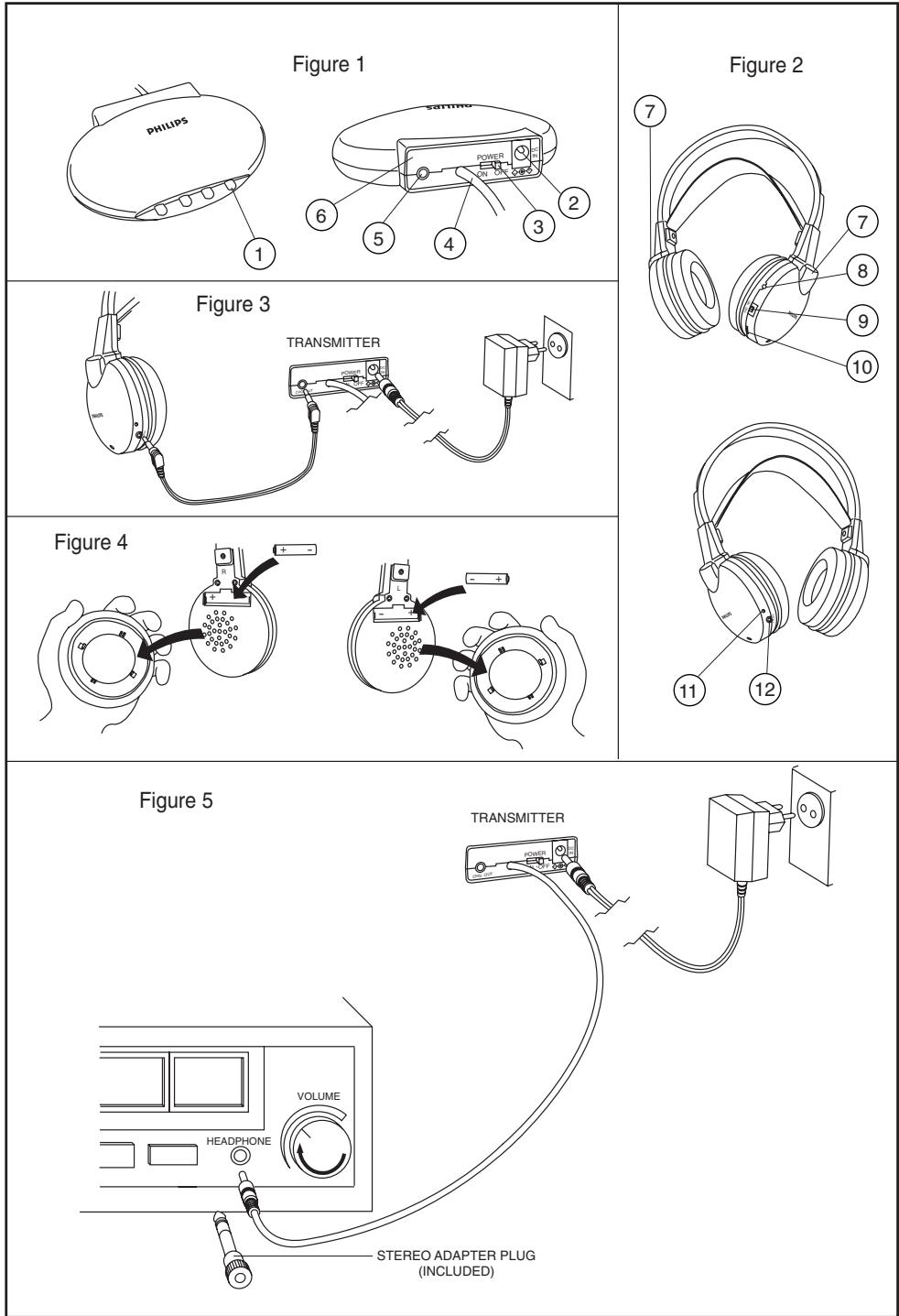
Transmitter (figure 1)
6 Controls plate
1 IR transmitting LEDs - transmit audio signal to IR headphone.
2 DC power - connect to the 12 Volt/ 200 mA AC/DC adapter.
3 Power switch - power on/off switch.
4 3.5 mm stereo headphone audio input - connects your IR transmitter to an audio source.
5 Recharging input - connect the recharge cable to the input.
Headphone (figure 2)
7 IR sensors - to receive IR waves from the transmitter
8 Power indication - lights up when in use.
9 Power On/Off - slide the switch to the on or off position to switch the headphone on/off.
10 Volume - adjust volume to your desired listening level.
11 Recharging indicator - lights up when the recharging cable is connected between the headphone and the IR transmitter. Completely flat batteries will be fully charged after about 16 hours.
12 Recharging input (figure 3) - connect the recharging cable to the transmitter. The recharging indicator on the headphone must switch on, indicating that the headphone is being recharged.
Transmitter power supply IMPORTANT
Use only Philips SBC CS030/00
12 Volt/200 mA AC/DC adapter.
(For UK version: SBC CS030/05
12 Volt/200 mA AC/DC adapter)
1 Make sure the adapter's rated voltage corresponds to the mains socket voltage.
2 Connect the DC connector of the AC/DC adapter to the 12 Volt DC power input connector located at the rear of the transmitter.
3 Connect the 12 Volt/200 mA AC/DC adapter to the mains socket.
- Always disconnect the AC/DC adapter if the transmitter is not to be used for a long period of time.
Environmental Information
All redundant packing material has been omitted. We have done our best to make the packaging easily separable into two materials: cardboard and polyethylene
Your unit consists of materials which can be recycled if disassembled by a specialized company. Please observe the local regulations regarding the disposal of packing materials, exhausted batteries and old equipment.
Installation
Audio Connections
Headphone power supply IMPORTANT
Only use LR03/AAA NiCd batteries (preferably Philips).
1 Check if the power button of the IR headphone is in the on position.
2 Ensure the batteries are put in the battery compartment correctly according to the engraved polarity symbols.
3 To recharge the headphone's rechargeable LR03/AAA NiCd batteries, connect the charge cable between the headphone and the transmitter (figure 3).
Note:
Completely flat batteries need approximately 16 hours to recharge.
Always remove the batteries if the headphone is not to be used for a long period of time.
Batteries contain chemical substances, so they should be disposed of properly.
Headphone battery replacement (figure 4)
IMPORTANT
Only use LR03/AAA NiCd batteries (preferably Philips).
1 Remove the earmcushions.
2 Take out the batteries and dispose of them properly.
3 Insert new batteries. Only use LR03/AAA NiCd batteries (preferably Philips).
4 Make sure the batteries are correctly inserted as indicated by the engraved symbols in the battery compartment.
5 Put the earcushions back on the earshells.
IMPORTANT
Before using the IR headphone for the first time, please ensure that the batteries are fully charged for about 16 hours. This will guarantee a longer operating lifetime of the batteries.
Audio Connections
Connecting the IR transmitter to a headache output of an audio source (figure 5)
1 Connect the 3.5mm stereo plug of the stereo audio cable to the headphone output of an audio source, such as TV, HiFi or PC.
- In case your audio source has a 6.3mm headphone output, use the supplied 3.5mm to 6.3 mm stereo adapter plug.
2 Switch on your audio source and carefully increase the volume of the audio source.
3 Switch on the headphone.
4 Adjust the volume to the desired level with the headphone volume control.
Basic operation
When the IR transmitter is connected to a.
headphone output of an audio source.
1 Switch on your IR transmitter and place it at the same height or slightly higher than the reception height of the IR headphone.
2 Position the LED's towards the listening area, ensuring that there are no obstacles in between transmitter and headphone.
3 Switch on the headphone.
4 Switch on your audio source and carefully increase the volume of the audio source.
5 Adjust the volume of the IR headphone to the desired level with the headphone volume control.
IMPORTANT
Because IR light travels in a straight line, place the IR transmitter at the same height, or slightly higher than the reception height of the IR headphone.
High IR light content such as sunlight and bright incandescent indoor lighting may degrade the audio signal and cause interference. If you experience such problems, simply move the system to a darker area.
Troubleshooting
If a fault occurs, first check the points listed below before taking the set for repair.
If you are unable to remedy a problem by following these hints, consult your dealer or service centre.
WARNING: Under no circumstances should you try to repair the set yourself, as this would invalidate the warranty.
| Problem | Remedy |
| No sound | - Check if the AC/DC adapter is fully inserted into the AC outlet and that its DC connector is properly inserted into the 12 Volt DC input connector located at the rear of the transmitter.- Check if the headphone's on/off switch is in the on position.- Headphone batteries running low. (See Headphone power supply)- Check if the audio source is switched on.- Volume not adjusted. Adjust the volume on the audio source/ headphone to a higher level.- Make use of the HC072 transmitter. Some transmitters already built into other equipment may not be compatible with the HC075 headphone because of the advanced technologies used in the HC075 headphone. |
| Distorted sound | - Headphone batteries running low. (See Headphone power supply)- Check the volume on audio source/ headphone is not set at too high a level. Reduce the volume.- Distance from the transmitter is too large. Move closer to the transmitter.- Interference from fluorescent lamps/ other radio sources. Move transmitter or headphone elsewhere.- Make use of the HC072 transmitter. Some transmitters already built into other equipment may not be compatible with the HC075 headphone because of the advanced technologies used in the HC075 headphone. |
Troubleshooting
Specifications
Maintenance
- If the headphone will not be used for a longer time, please remove the batteries to prevent leakage and corrosion.
- Only replace the batteries with LR03/AAA NiCd batteries (preferably Philips).
- Do not leave the headphone near heat sources. Do not expose to direct sunlight, excessive dust, moisture, rain or any kind of mechanical shock.
- Do not use alcohol, thinner or petroleum-based substances to clean the headphone or transmitter. Use a slightly dampened chamois cloth to clean the housing.
- Do not use cleaning agents containing alcohol, spirits, ammonia or abrasives as these may harm the housing.
Hearing Safety! Continuous use at a high volume may permanently damage your hearing.
| System: | Infra Red (IR) |
| Modulation: | Frequency Modulation (FM) |
| Effective Transmission Range: | 7 meters |
| Input level: | 300 mVrms (1 kHz sine wave) |
| Power supply – transmitter: | 12Volt / 200 mA DC, centre positive |
| Power supply – headphone: | 2 × 1.2 V LR03 (AAA) batteries (NiCd) |
| Carrier Frequency (Headphone): | 2.3 Mhz (L), 2.8 Mhz (R) |
| Signal/Noise ratio: | >60 dB (1 kHz sine wave , A-weighted) |
| Distortion: | < 1%THD |
| Channel separation: | >30 dB |
Felicitations!
2 × piles rechargeables LR03/AAA (NiCd)
Stort transmissionsomrade
Transmitter (figur 1)
3ByKOBbIe COeAnHeHnA
3ByKObbie COeAHHHeHn
ПОДКИОЧЕТанCMNTTeРа IR K Bыхоу HayшнкOB 3ByKOBOrO nCTOчнka (pnc.5)
I IopKIOUHTe Ctepeo pa3bE M 3,5MM Ctepeo 3ByKOBOrO Ka6eA K BbIXOy HayuHnKOB 3ByKOBOrO NCTOuHnKa,HaP, TeAEBn3Opa,HiFi nn KOMNtOepa. -EcAn BaA 3ByKOBoN NCTOuHnK Imeet BbIXoA DA HAYuHnKOB 6,3MM, INcnoAbyTe PepexoADnK 3,5MM Ha 6,3 MM.
2 BkAIOHTe 3ByKOBOH NCTOCHN K IOCTeNEHHO YBeAHbTe yPoBeHb.
3 BkAIOUHTe HayuHnIKI.
4 OtperyuynTe ypoBeHb Do Heo6xOAMORO 3HaueHnC POMOIO KOHTPOA yPOBHA HayuHnKOB.
OchOBhble onepaunn
Korda TpaHCMNITep IR NOAQUOH K BbIXOy HayuHNIKOB 3BYKOBOI NCTOHHKa.
BkAIOHTe TpaHcMNTTep IR nIomeCTnTe ero Ha OdHaKOBOB BbICOTe HNHeCKoAkoB Bblwe c BbICOTOn npEMa HayuHKOB IR.
2 HanpaBbTe CnA, B CTOpOHy 3Ohbl cyuHaHn, oBeCneHv OBCTBVe npenTCTBm MeKdy TpaHcMHTepOM HauShNkAmi.
3 BKIAOHTe HayHNIK.
4 BkAIOUHTe 3ByKOBOINCTOCHN KIPOCTeHNO yBeAMNbTe yPoBeHb.
5 OTPeyuynyTe ypoBeHb AO He6xOAMoO 3HaueHnC PMOUbIO KOHTPOA YPOBn rPOMKOCTb HayuHnKOB.
BAXHO
BcAegCTBne TOrO, qTo AyuH IR nepemeauotc no npmoi, nomecnte TpaHcMHTep IR ha ognHakoboi BBICOTe HAN HeCKoAbo KBIwe C BBICOTOI npMa HayuHnKOB IR. ITOUHK C BbICOKHM cogePaxHem Ayuei IR, Hanp, COAnHeuHbIe Auyu N JApKoe OCBeUeHne AAMnAmn HAKaAHBaHHa, MoKeT NOBAHrTa Ha 3ByKOBo CHRHaN Bbl3BaTb nomExn. Ppr BO3HNKHOBeHn TAKHX np6Aem npocTo nepMeCTtE ChCTeMy B MeHee OCBeUeHHoe MeCTo.
YcTpaHHe HeNCnPaBHOCTe
Pn HncnpabHoctn nepeg TeM, KAc Hectu yCtpoiCTBO B peMOHT ChaAanpOBepbTe npBegehhble Hxke nyHKTbl.
Ecan c nomoosbIO 3THX yka3aHn Bam He ygaocb ycTpaHntb HencnnpabHoctb, CBXHTecb C BAsm gnaepom Hn OTgeAm pemOHTa.
IPEyIpyEKAEHNE: Hn B Koem cayue He nbitaTecb peMOHTnpoBaTb yctpoiCTBO CAMn, T.K. 3TO aHHyAnpyet rapaTHIO.
| ПюбLEMа | Устраенье |
| ОсустваET 3Byk | - Пюверытправлиьосты подемочение залида пост/перемен пitaимя К вixody переменно пitaимя и пдаличения erо разьема постонно пitaимя К вхуdy 12 В на за干嘛 сменке траимптоpe. - Пюверыт Величесны поожение вixлоча Hayшников. - Батарей hayшников сада (см ПITAиме hayшников) - Убелtenсь в TOM, чTO 3BykOBОй Истонник Величес. - Урочьн he оtrpeуширован. Отразушируи Звукового Истонник До 60ал - Исплз Встpoehные В дуг оборud Траим Мог Б С В И М М M M M M M M M M M M M М M M M M M M M M M M M M M M M M M M M M M M M M M M M M M M M M M M M M M M M M M M M M M M M M M M N N N N N N N N N N N N N N N N N N N N N N N N N N N N N N N N N N N N N N N N N N N N N N N N N N M M M M M M M M M M M M M M M M M M M M M M M M M M M M M M M M M M M M M M M M M M M M M M M M M H H H H H H H H H H H H H H H H H H H H H H H H H H H H H H H H H H H H H H H H H H H H H H H H H H M M M M M M M M M M M M M M M M M M M M M M M M M M M M M M M M M M M M M M M M M M M M M M M M M F F F F F F F F F F F F F F F F F F F F F F F F F F F F F F F F F F F F F F F F F F F F F F F F F F M M M M M M M M M M M M M M M M M M M M M M M M M M M M M M M M M M M M M M M M M M M M M M M M M L M M M M M M M M M M M M M M M M M M M M M M M M M M M M M M M M M M M M M M M M M M M M M M M M M G G G G G G G G G G G G G G G G G G G G G G G G G G G G G G G G G G G G G G G G G G G G G G G G G G M M M M M M M M M M M M M M M M M M M M M M M M M M M M M M M M M M M M M M M M M M M M M M M M M R R R R R R R R R R R R R R R R R R R R R R R R R R R R R R R R R R R R R R R R R R R R R R R R R R M M M M M M M M M M M M M M M M M M M M M M M M M M M M M M M M M M M M M M M M M M M M M M M M M I I I I I I I I I I I I I I I I I I I I I I I I I I I I I I I I I I I I I I I I I I I I I I I I I I M M M M M M M M M M M M M M M M M M M M M M M M M M M M M M M M M M M M M M M M M M M M M M M M M T T T T T T T T T T T T T T T T T T T T T T T T T T T T T T T T T T T T T T T T T T T T T T T T T T M M M M M M M M M M M M M M M M M M M M M M M M M M M M M M M M M M M M M M M M M M M M M M M M M P P P P P P P P P P P P P P P P P P P P P P P P P P P P P P P P P P P P P P P P P P P P P P P P P P M M M M M M M M M M M M M M M M M M M M M M M M M M M M M M M M M M M M M M M M M M M M M M M M M m m m m m m m m m m m m m m m m m m m m m m m m m m m m m m m m m m m m m m m m m m m m m m m m m m M M M M M M M M M M M M M M M M M M M M M M M M M M M M M M M M M M M M M M M M M M M M M M M M M Y Y Y Y Y Y Y Y Y Y Y Y Y Y Y Y Y Y Y Y Y Y Y Y Y Y Y Y Y Y Y Y Y Y Y Y Y Y Y Y Y Y Y Y Y Y Y Y Y Y X X X X X X X X X X X X X X X X X X X X X X X X X X X X X X X X X X X X X X X X X X X X X X X X X X Y Y Y Y Y Y Y Y Y Y Y Y Y Y Y Y Y Y Y Y Y Y Y Y Y Y Y Y Y Y Y Y Y Y Y Y Y Y Y Y Y Y Y Y Y Y Y Y Y y y y y y y y y y y y y y y y y y y y y y y y y y y y y y y y y y y y y y y y y y y y y y y y y y y Y M N A L E Y M A L E Y M A L E Y M A L E Y M A L E Y M A L E Y M A L E Y M A L E Y M A L E Y M A L E Y M A L E Y M A L E Y M A L E Y M A L E Y M A L E Y M A L E Y M A L E Y M A L E Y M A L E Y M A L E Y M A L E Y |
YcTpaHHeNHeHc.
TexHn. xapaKTepeNCTnKN
yxoA
- EcHn HayuHnKHe 6yDyT NcNoA3OBaTbCra DOAroe Bpem, ydaNTe 6aTapeN dIpypeoTbpaueHn Kopp03n n npOteKn.
- 3aMeHnTe 6aTapeu TOnbko Ha 6aTapeu LR03/AAA NiCd (XeAteMbHO Philips).
-He octaBnIe HayuHnKn OKOAnToNIO bIX NCTOuynIKOB.He nOaBepraIte BO3eIcTBIO COaHeyHbIX AUYeI, I36bITOUHOI PbIaN BlaIg, DOxJa IAM MexaHnueckm ydaPam.
-ДЯ OЧNTКИ HayшнIKOB ИАТраHCMNITTeРа He ИСПОЛБ3YIte CПИТ, paCTBOPNTeIи IИСубСТанICИН ОСHOBE 6eH3IHa. ИСПОЛБ3YIte CJIeRka BλaЖHyIO MЯгКЮ TKaHb ДЯ OЧNTКИ KOPPyCa. - He nCnoB3yIe aReHToB, coDepeJkaUx amMnAk, cInpT, nn a6pa3Nbbl, UTO MOKeT IOBpeAdntb KOpNyc.
БezonaachocTb AЯ opraHOB cayxa! HenpepbIBHoe npocAyuBaHne Ha BbICOKOM ypoBHe moKet Heo6paTmO NOBnAryt b Ha Bauchyx.