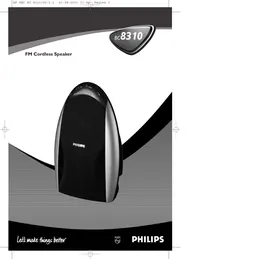
SBCBC8310 - Bluetooth speaker PHILIPS - Free user manual and instructions
Find the device manual for free SBCBC8310 PHILIPS in PDF.

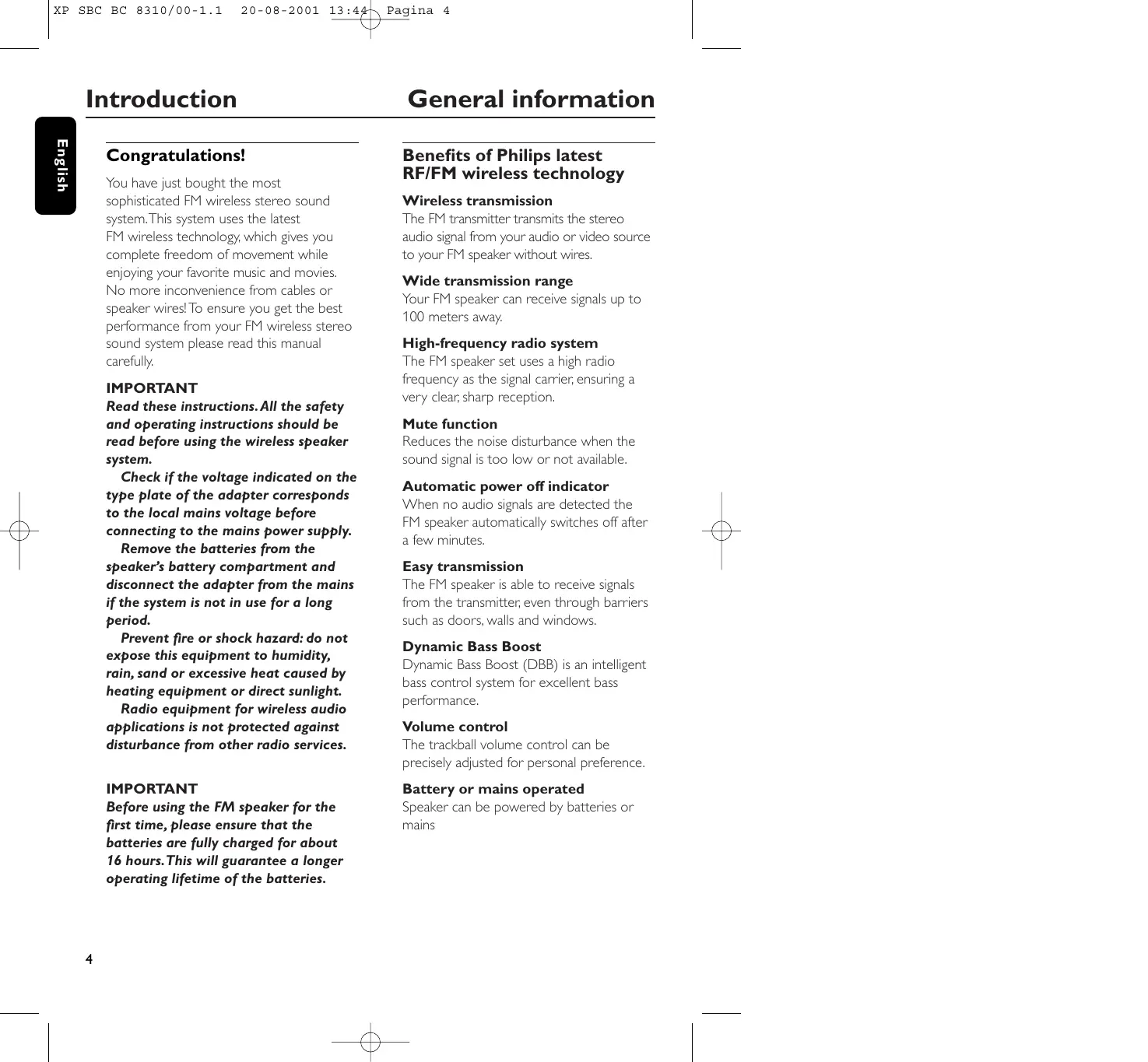


| Product type | Wireless FM audio speaker |
| Brand | PHILIPS |
| Model | SBCBC8310 |
| Dimensions (approx.) | 25 x 15 x 10 cm |
| Weight (approx.) | 1 kg |
| Power supply | 8 x NiCd LR6/AA rechargeable batteries or 9V/1000mA mains adapter |
| Battery life | Up to 16 hours after full charge |
| Charging time | Approximately 16 hours for a full charge |
| Transmission technology | Wireless FM, frequency 863.2 – 864.7 MHz |
| Maximum range | Up to 100 meters (omnidirectional) |
| Frequency response | 10 – 20,000 Hz |
| Signal-to-noise ratio | > 60 dB |
| Total harmonic distortion | < 10% |
| Channel separation | > 30 dB |
| Main functions | Wireless FM transmission, Dynamic Bass Boost (DBB), mute, automatic shutdown, battery charge indicator |
| Controls | Volume, tuning, DBB on/off, power, L/L+R/R selection |
| LED indicators | Power, charging, battery status (3 levels), DBB |
| Connectivity | 3.5 mm audio input (via FM transmitter sold separately) |
| Transmitter compatibility | Philips SBC HC 8372 (sold separately) |
| Maintenance and cleaning | Clean with a soft, slightly damp cloth. Avoid alcohol, solvents, and abrasive products. |
| Safety | Do not expose to moisture, rain, excessive heat, or direct sunlight. Disconnect during prolonged non-use. |
| Spare parts / repairability | Replaceable NiCd LR6/AA rechargeable batteries. Do not attempt to repair yourself. |
| General information | Complies with European R&TTE directive 1999/5/EC. Class 3 according to NET 300 445. |
Frequently Asked Questions - SBCBC8310 PHILIPS
User questions about SBCBC8310 PHILIPS
0 question about this device. Answer the ones you know or ask your own.
Ask a new question about this device
Download the instructions for your Bluetooth speaker in PDF format for free! Find your manual SBCBC8310 - PHILIPS and take your electronic device back in hand. On this page are published all the documents necessary for the use of your device. SBCBC8310 by PHILIPS.
USER MANUAL SBCBC8310 PHILIPS
Let's make things better.
Index
| English | English | 4 | Svenska | 68 |
| Français | François | 12 | Norge | 76 |
| Español | Espanol | 20 | Suomi | 84 |
| Deutsch | Deutsch | 28 | Russký | 92 |
| Nederlands | Nederland | 36 | Polski | 100 |
| Italiano | Italiano | 44 | Magyar | 108 |
| Portugues | Português | 52 | Türkçe | 116 |
| Dansk | Dansk | 60 | Еλληνικá | 124 |
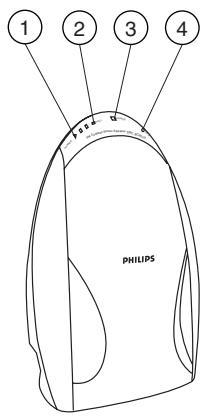
Figure 1
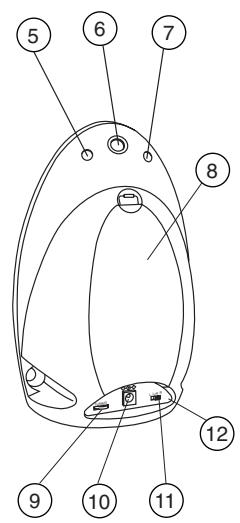
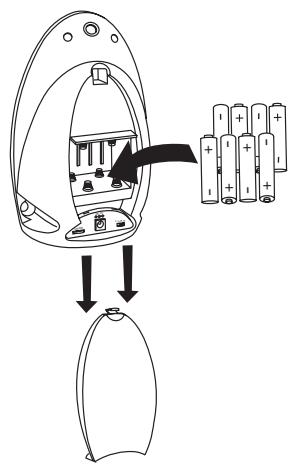
Figure 2
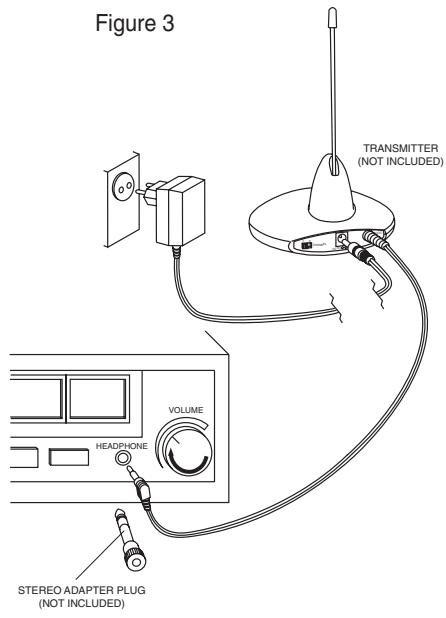
Figure 3
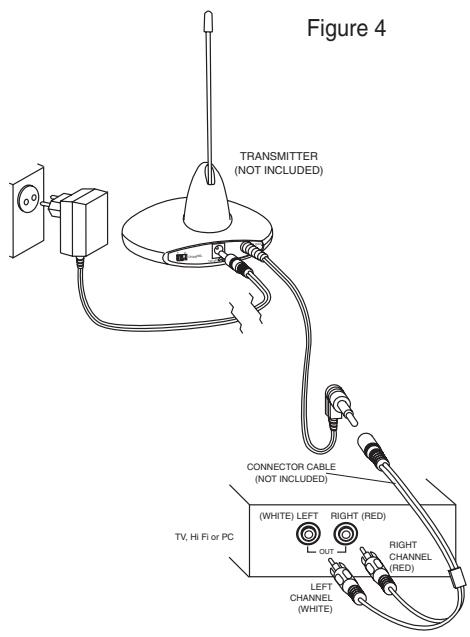
Figure 4
Congratulations!
You have just bought the most sophisticated FM wireless stereo sound system. This system uses the latest FM wireless technology, which gives you complete freedom of movement while enjoying your favorite music and movies. No more inconvenience from cables or speaker wires! To ensure you get the best performance from your FM wireless stereo sound system please read this manual carefully.
IMPORTANT
Read these instructions. All the safety and operating instructions should be read before using the wireless speaker system.
Check if the voltage indicated on the type plate of the adapter corresponds to the local mains voltage before connecting to the mains power supply.
Remove the batteries from the speaker's battery compartment and disconnect the adapter from the mains if the system is not in use for a long period.
Prevent fire or shock hazard: do not expose this equipment to humidity, rain, sand or excessive heat caused by heating equipment or direct sunlight.
Radio equipment for wireless audio applications is not protected against disturbance from other radio services.
IMPORTANT
Before using the FM speaker for the first time, please ensure that the batteries are fully charged for about 16 hours. This will guarantee a longer operating lifetime of the batteries.
Benefits of Philips latest RF/FM wireless technology
Wireless transmission
The FM transmitter transmits the stereo audio signal from your audio or video source to your FM speaker without wires.
Wide transmission range
Your FM speaker can receive signals up to 100 meters away.
High-frequency radio system
The FM speaker set uses a high radio frequency as the signal carrier, ensuring a very clear, sharp reception.
Mute function
Reduces the noise disturbance when the sound signal is too low or not available.
Automatic power off indicator
When no audio signals are detected the FM speaker automatically switches off after a few minutes.
Easy transmission
The FM speaker is able to receive signals from the transmitter, even through barriers such as doors, walls and windows.
Dynamic Bass Boost
Dynamic Bass Boost (DBB) is an intelligent bass control system for excellent bass performance.
Volume control
The trackball volume control can be precisely adjusted for personal preference.
Battery or mains operated
Speaker can be powered by batteries or mains
Battery condition indicator
Indicates the energy level of the rechargeable batteries during operation. 3 levels indicate the condition of the rechargeable batteries. 3 LED's: batteries full, 2 LED's: batteries half full, 1 LED: batteries empty.
Multiple speakers with one transmitter
An additional number of wireless speakers can be used with a single transmitter if they: - operate in the 864 MHz band - can detect a 19 kHz pilot tone.
Please consult the appliance's electrical specification sheets for confirmation on compatibility.
Kit contents
This FM speaker system consists of the following accessories:
1 × SBC BC8310 FM speaker
1 × SBC CS020/00 9 Volt/1000 mA AC/DC adapter
8 × rechargeable batteries LR6/AA (NiCd), 1000 mAh
Speaker (figure 1)
1 Charge indication LED - lights up when batteries are being charged.
2 Battery condition indicator - 3 levels indicate the condition of the rechargeable batteries. 3 LED's: batteries full, 2 LED's: batteries half full, 1 LED: batteries empty.
3 Power indication LED - lights up when speaker is switched on.
4 Dynamic Bass Boost indicator - lights up when DBB is switched on
5 Dynamic Bass Boost on/off push the button to switch on/off
6 Volume control – adjust volume to your desired listening level
7 Power On/Off - push the button to switch the speaker on/off.
8 Battery cover
9 Tuning - turn the tuning wheel until the signal is at its clearest.
10 DC power - connect to the 9 Volt/1000 mA AC/DC adapter
11 L/ L+R/ R switch - switch the L/ L+R /R switch to L+R when only using one speaker. Switch to L or R for left or right use when using two speakers.
12 Controls plate
Installation
Transmitter power supply
IMPORTANT
Use only Philips SBC CS030/00 12 Volt/ 200 mA AC/DC adapter
1 Make use of the Philips SBC HC 8372 FM wireless transmitter. This transmitter can be purchased separately.
2 Make sure the adapter's rated voltage corresponds to the mains socket voltage.
3 Connect the DC connector of the AC/DC adapter to the 12 Volt DC power input connector located at the rear of the transmitter.
4 Connect the 12 Volt/200 mA AC/DC adapter to the mains socket. Always disconnect the AC/DC adapter if the transmitter is not to be used for a long period of time.
Speaker power supply
IMPORTANT
Use only rechargeable LR6/AA NiCd batteries (preferably Philips).
Do not use alkaline batteries as these may damage your FM wireless system!
1 Remove the isolating sheet from the battery compartment.
2 Check if the power button of the FM speaker is in the on position.
3 When the sound quality of the FM speaker degrades, it indicates that the batteries are running low.
- To recharge the speaker's built-in rechargeable LR6/AA NiCd batteries, connect to the 9 Volt/1000 mA AC/DC adapter.
4 During charging, the green charge indication LED will light up. As soon as the batteries are fully charged, the green charge indication LED will switch off.
5 During operation, the remaining battery energy is indicated by the battery condition indicator. 3 levels indicate the condition of the rechargeable batteries.
- 3 LED's = batteries full,
- 2 LED's = batteries half full,
- 1 LED = batteries empty.
Notes:
Completely flat batteries need approximately 16 hours to recharge.
Always remove the batteries if the speaker is not to be used for a long period of time.
Batteries contain chemical substances, so they should be disposed of properly.
Environmental Information
All redundant packing material has been omitted. We have done our best to make the packaging easily separable into two materials: cardboard and polyethylene
Your unit consists of materials which can be recycled if disassembled by a specialized company. Please observe the local regulations regarding the disposal of packing materials, exhausted batteries and old equipment.
Speaker battery replacement (figure 2)
IMPORTANT
Use only rechargeable LR6/AA NiCd batteries (preferably Philips).
Do not use alkaline batteries as these may damage your FM wireless system!
1 Remove the battery cover.
2 Take out the batteries and dispose of them properly.
3 Insert new batteries. Only use LR6/AA NiCd batteries (preferably Philips).
4 Make sure the batteries are correctly inserted as indicated by the engraved symbols in the battery compartment.
5 Replace the battery cover.
IMPORTANT
Before using the FM speaker for the first time, please ensure that the batteries are fully charged for about 16 hours. This will guarantee a longer operating lifetime of the batteries.
Audio Connections
Option 1 (figure 3)
Connecting the FM transmitter SBC HC 8372 to a headphone output of an audio source
1 Connect the 3.5mm stereo plug of the stereo audio cable to the headphone output of an audio source, such as TV, HiFi or PC.
- In case your audio source has a 6.3 mm headphone output, use the 3.5 mm to 6.3 mm stereo adapter plug.
2 Switch on your audio source and carefully increase the volume of the audio source. The red power indication LED of the transmitter lights up if receiving an audio signal.
3 Switch on the speaker: You may hear a hissing sound through the speaker if the speaker is not yet properly tuned to the transmitter.
4 To tune, turn the tuning wheel until the signal is at its clearest.
5 Adjust the volume to the desired level with the speaker volume control.
Audio Connections
Option 2 (figure 4)
Connecting the FM transmitter to a line output of an audio source, e.g. REC OUT, LINE OUT.
1 Connect the 3.5mm stereo plug of the stereo audio cable (15 cm) to the FM transmitter's 3.5 mm audio input.
2 Connect the 2 RCA plugs of the stereo audio cable to a line output (REC OUT or LINE OUT) of an audio source, e.g.TV, HiFi or PC:
- Check if the red RCA plug (right channel) is connected to the right channel (red) of the audio source.
- Check if the white RCA plug (left channel) is connected to the left channel (white) of the audio source.
3 Switch on your audio source. The red power indication LED of the transmitter lights up if receiving an audio signal.
4 Switch on the speaker: You may hear a hissing sound through the speaker if the speaker is not yet properly tuned to the transmitter.
5 To tune, turn the tuning wheel until the signal is at its clearest.
6 In case the line output of the audio source has an adjustable output level, adjust the line output level of the audio source to the highest acceptable undistorted level.
7 Adjust the volume to the desired level with the speaker volume control.
Basic operation
When the FM transmitter is connected to a: - line output of an audio source, such as REC OUT or LINE OUT or - headphone output of an audio source.
1 Switch on your audio source and carefully increase the volume of the audio source. The red power indication LED of the transmitter lights up if receiving an audio signal.
2 Switch on the speaker: You may hear a hissing sound through the speaker if the speaker is not yet properly tuned to the transmitter.
3 To tune, turn the tuning wheel until the signal is at its clearest.
4 Adjust the volume to the desired level with the speaker volume control.
If a fault occurs, first check the points listed below before taking the set for repair.
If you are unable to remedy a problem by following these hints, consult your dealer or service centre.
WARNING: Under no circumstances should you try to repair the set yourself, as this would invalidate the warranty.
| Problem | Remedy |
| No sound | - Check if the AC/DC adapter is fully inserted into the AC outlet and that its DC connector is properly inserted into the 12 Volt DC input connector located at the rear of the transmitter.- Check if the speaker's on/off switch is in the on position.- Speaker batteries running low. Connect to the 9 Volt/1000 mA AC/DC adapter.(See Speaker power supply)- Check if the audio source is switched on and tuned to a channel with audio.- Volume not adjusted. Adjust the volume on the audio source/ speaker to a higher level.- Adjust the speaker's tuning frequency. Turn the tuning wheel until the signal is at its clearest.- Make use of the HC8372 transmitter. Some transmitters already built into other equipment may not be compatible with the BC8310 speaker because of the advanced technologies used in the BC8310 speaker. |
| Distorted sound | - Adjust the speaker's tuning frequency.Turn the tuning wheel until the signal is at its clearest.- Adjust the transmitter's frequency.Select any of the 2 channels of the transmitter.- Speaker batteries running low.Connection to the 9 Volt/1000 mA AC/DC adapter.(See Speaker power supply)- Check the volume on audio source/ speaker is not set at too high a level. Reduce the volume. |
Troubleshooting
| Distorted sound | – Distance from the transmitter is too large. Move closer to the transmitter. – Interference from fluorescent lamps/ other radio sources. Move transmitter or speaker elsewhere/ change the transmitter's channel. – Make use of the HC8372 transmitter. Some transmitters already built into other equipment may not be compatible with the BC8310 speaker because of the advanced technologies used in the BC8310 speaker. |
| Maintenance | – If the speaker will not be used for a longer time, please remove the batteries to prevent leakage and corrosion. – Only replace the batteries with LR6/AA NiCd batteries (preferably Philips). – Do not leave the speaker near heat sources. Do not expose to direct sunlight, excessive dust, moisture, rain or any kind of mechanical shock. – Do not use alcohol, thinner or petroleum-based substances to clean the speaker or transmitter. Use a slightly dampened chamois cloth to clean the housing. – Do not use cleaning agents containing alcohol, spirits, ammonia or abrasives as these may harm the housing. |
Hearing Safety! Continuous use at a high volume may permanently damage your hearing.
Specifications
Regulations
| System: | Radio Frequency (RF) |
| Carrier Frequency: (Speaker) | Tunable 863.2 to 864.7 MHz |
| Modulation: | Frequency Modulation (FM) |
| Radiated Output Power: | <10m Watt |
| Effective Transmission Range: | up to 100 meters, omni directional (360°) |
| Input level: | 350 mVrms (1 kHz sine wave) |
| Power supply – transmitter: | 12Volt / 200 mA DC, centre positive |
| Power supply – speaker: | 8 × LR6 (AA) batteries (NiCd) |
| Frequency range (Speaker): | 10 – 20,000 Hz |
| Signal/Noise ratio: | > 60 dB (1 kHz sine wave , A-weighted) |
| Distortion: | < 10%THD |
| Channel separation: | > 30 dB |
European Regulations
This product has been designed, tested and manufactured according the European R&TTE Directive 1999/5/EC.
Following this Directive, this product can be brought into service in the following states:
R&TTE Directive 1999/5/EC
B√
DK
E X
GR X
F√
IRL
1x
NL
A V
P V
SU
s√
UK
N√
D V
CH√
This product complies with class 3 requirements as set down in ETS 300 445.
Introduction
Dynamic Bass Boost - suramplification des graves
1 × adaptateur CA/CC 9 Volt/1000 mA
SBC CS020/00
8 × piles rechargeables LR6/AA (NiCd), 1000 mAh
Enceinte (figure 1)
8 Capot piles
Specifications
Régulations
| B | ✓ | DK | ✓ | E | X | GR | X | F | ✓ |
| IRL | ✓ | I | X | L | ✓ | NL | ✓ | A | ✓ |
| P | ✓ | SU | ✓ | S | ✓ | UK | ✓ | N | ✓ |
| D | ✓ | CH | ✓ |
Dynamic Bass Boost -
| B | ✓ | DK | ✓ | E | X | GR | X | F | ✓ |
| IRL | ✓ | I | X | L | ✓ | NL | ✓ | A | ✓ |
| P | ✓ | SU | ✓ | S | ✓ | UK | ✓ | N | ✓ |
| D | ✓ | CH | ✓ |
| B | ✓ | DK | ✓ | E | X | GR | X | F | ✓ |
| IRL | ✓ | I | X | L | ✓ | NL | ✓ | A | ✓ |
| P | ✓ | SU | ✓ | S | ✓ | UK | ✓ | N | ✓ |
| D | ✓ | CH | ✓ |
Dette Produkt overholder klasse 3 kravene, der er fastsat i ETS 300 445.
Inledning
Allman information
Grattis!
4 Dynamic Bass Boost indicator
tennes nár DBB blir skrudd pa
5 Dynamic Bass Boost av/ pä -trykk pä
knappen for Å sla av/ pá
6 Volumkontroll - juster volumet til det
nivãet du ønsker
| B | ✓ | DK | ✓ | E | X | GR | X | F | ✓ |
| IRL | ✓ | I | X | L | ✓ | NL | ✓ | A | ✓ |
| P | ✓ | SU | ✓ | S | ✓ | UK | ✓ | N | ✓ |
| D | ✓ | CH | ✓ |
Dette Produktet er i overensstemmelse med kravene i klasse 3 i henhold til ETS 300 445.
Onnittelumme!
| B | ✓ | DK | ✓ | E | X | GR | X | F | ✓ |
| IRL | ✓ | I | X | L | ✓ | NL | ✓ | A | ✓ |
| P | ✓ | SU | ✓ | S | ✓ | UK | ✓ | N | ✓ |
| D | ✓ | CH | ✓ |
AnHAMMKMOKeTpa6oTaTbOT6aTapeNNTOTcETN
HdkaTop coctoHHaTaapei
Yka3bIbaeT ypoBHe 6aTapey BO BpeMra6oTbI.3 ypoBHa COCTOHN6 6aTape:CN3-6aTaepn POHOCbIO 3apJKeHbI,2 CN-6aTaepn 3apJKeHbI HApNOOBHy, CN1-6aTaepn ceN.
HeckoaBko AnHaMnKOB npH OaHOM TpaHCMTTpe
C OaHIM TpaHCMTTepOM MOxHO
HcIIOAb3OBAbT HeCKoAko 6ecIpOBAoHbIX
AnHaMnKOB, eCAH OH:
-pa6oTaIoT B nIoOce 864 MfU
-MOT pINHMaTb KOHTPOAbHbI CNHaI
19 KfU.
AЯ npOBePKO CBMECTMIOCTN CM 3aekTpueckne XapaKTepnCTNK yCTpOInCTBa.
CoCTaB KOMIIaEkTa
3Ta CNTema DnHaMnKOB FM COCTOIT N3 CLeAUYUxX yacte:
IXINHaMnK FM SBC BC8310
I x aanTep SBC CS020/00 9 B/1000 mA nepemeH/NoCT
8xakmyaTOpHbIe 6aTapei LR6/AA (NiCd),1000 mAh
AMHAMK(pnc.1)
8 Kpbioka 6aTaapeHoro otceka
I INHAnKaTOp 3apAKn CnA- 3aRopaTeC npi 3apAKe 6aTapei.
2 NnKaTOp CoCToHnna 6aTapei- 3 ypoBnCocToHnna 6aTapei: CN,3-6aTapei nOAnocTbIO 3apJKeHbl, 2 CN-6aTapei 3apJKeHbl HaNoLoBnHy, CN,1-6aTapei ceN.
3 INHANKaTOP nHTaHnA CnA 3aropaetc npN BkIoUHeHIn dHaMnKa.
4 INHANKaTOP AnHAMueCKOrO 6yCTepa HXHHx YactOT - 3aropaetc npn BKAIOeHHOM DBB
5 BkIoUeHne/BBkIoUeHne AnHaMnueckoro 6yCTepa HxHHnx qactOT - HaKmITE KHOIky ,ABy BkIoUeHry/BBkIoUeHry
6 KoHTpoAb yPoBnA -OTpeympuYTe yPoBeHb DO yDo6HOro yPoBnA AINPOCSUHNBaHn
7 BKAIOUeyHne/BBKIAIOUeyHne KHOKN - HAKMITE KHOIky DAy BKAIOUeyHry/ BBKIAIOUeyHry DAHNAMiKa.
9 HacTpoKa - NOBepHnTe pyuKy NaCTPOKIN DO NOLUyeHnYIcTOrO CInHaAa.
10Питаннoe NOCTOHHbIM TOKOM -noDAKIAUOTe aAanTep 9 B/1000 mA noCT/npeMeH ToKa
11 BbIKIOUaTeb L/L+R/R -peekuOHTe BbIKIOUaTeb L/L+R/RHaL+R npn nCPOAb3OBAHm TObKO OdHOroDnHaMnKa. PeekuOHTe Ha Lnn R dAnCPOAb3OBAHm AeBOrO nn npaBOrO DnHaMnKa.
12 OpraHbI ynpaBHeHn
3ByKOBbIe COeAnHeHnA
BapnaHT 2 (pnc.4)
IIOKIAIOHTe TpaHCMTTep FM K ANHeHOMY BbIXOy 3BYKOBOr OCTouHHKa,HaNP.,REC OUT, LINE OUT.
I OaKIAOHTe Ctepeo pa3bE M 3,5 MM 3ByKOBOrO Ctepeo Ka6eA (15 cm) K 3ByKOBOmy BXOy TpaHCMnTTepa FM 3,5 MM.
2 PaoKIOHnTe 2 pa3bEMa RCA CoeMHInTeAho KabeAa KAnHeHOMy BbIXOy (REC OUT nn LINE OUT) 3ByKOBOrIO nCTouHnKa, HAp., TeAebu3Opa, HiFi nn KomMbIOTepa:
- PpOBepbTe npaBnAhBOcTb NOkAUOeHINKpaCHOro pa3bEma RCA (npaBbI KaHa)K BepHOMy KaHaLy (kpachBi) 3ByKOboRIOCTOuHHka.
- PpOBepbTe npaBnAbHocTb IOnkAIOUeHnRA 6eIoro pa3bEma RCA (AeBbI KaHa) (6eBbI 3ByKOBOrO nCTOCHNka.
3 BkAIOHTe 3ByKOBOH NCTOCHNK. Iprn npIeMe 3ByKOBOrO CnHaHa 3aROpNTcKpaChbI INAnKaTOp PntaHnCnD, TpaHCmTTepa.
4 BkIOUHTe AnHAMIK. EcAn DnHAMIK eue He oTperyuropoBaH, Bbl MoXeTe ycBbIaTb 1nnneHne.
5 Tenepb Otperepymnyte YaCTOTy HayuHnKOB NOBOPOTOM pykU NaCTPOKIN DO NOyueHnY NCTOTO CnHaHa.
6 ECANHHeHbBbIXo3ByKOBOrO NCTOCHNka HMeet peYnpyEmbBbIXoD, OTpeYnpyTe ANHeHbBbIXoD DO camoro BbICOKOrO HeINCKaJXeHHORO ypOBHra.
7 OtpreIpyuIte ypoBeHb DO Heo6xoAMoTO C IOMOJIIO KOHTPOAуPOBHa.
OchOBhble onepaunn
Korda TpaHcMnTTep FM noAKnOuCh K:
-ʌnHeɪHOMy BbIXOу 3ByKOBOr O NCTOuHnKa,
HaNP., REC OUT nʌn LINE OUT nʌn
- BbIXOу HayUHnKOB 3ByKOBOr NCTOuHnKa.
BkUOHTe 3yKOBOI NCTOCHN I NOCTeHNO YBEANuTe yPOBeHb. PnI npIeMe 3yKOBOrO CnHaA 3aROpNTcK paChbI INAnKaTOp nITaN HcN TpaHCmTTepa.
2 BkauHte DnHaMk. EcAn DnHaMk eue He oTperyuropoBaN, Bbl MoXeTe ycblIaTb shiHneHne.
3 Tepeb Otperyuynye TaCTOy HauHHIOB NOBOPOTOM pykny HaCTpoKn DO IOAUYeHnY NCTORO CnHaHa.
4 OtprepyuPyTe ypoBeHdo Heo6xOaMOrO C IOMoUIO KOHTPOAуPoBHa.
YcTpaHHe HeNCnPaBHOCTeI
Pn HncnpabHoctn nepeg TeM, KAK HeCTyCtpoiCTBO B peMOHT CHaHaA npOBepbTe npBegehHbIe HNKe nyHKTbl.
Ecan c nomoubIO 3THx yka3aHHn Bam He ygaaoocb ycTpaHntb HencnpabBHOCTb, CBXHTecb C BauHM gnaepom Hn OTgeAm pemOHTa.
IPEyIpyEKAEHNE: Hn B Koem cayae He nbitaTecb peMOHTnoBaTb yctpoiCTBO CAMH, T.K. 3TO aHHyAnpye rapaTHIO.
3To n3geane pa3pa6oTaHo, n3roTOBaEHO nnpOBeHOB COOTBeTCTBnC Ebponenckon gnpeKTHBOR R&TTE 1999/5/EC.
B cootbetCTBnC 3TOI gHpeKTHBOJ 3TO H3geAHe MOXHO HCNOAb3OBaTb B CaegyIOxN.
R&TTE Directive 1999/5/EC
| B | ✓ | DK | ✓ | E | X | GR | X | F | ✓ |
| IRL | ✓ | I | X | L | ✓ | NL | ✓ | A | ✓ |
| P | ✓ | SU | ✓ | S | ✓ | UK | ✓ | N | ✓ |
| D | ✓ | CH | ✓ |
AahHoe n3geAne cooTBcTBye Tpe6OBaHHaM Kaac yka3aHO B ETS 300 445.
Gratulacja!
1 x Gósnik FM, SBC BC8310
1 x zasilacza prădu stațego 9 V/1000 mA SBC CS020/00
8 × akumulatorków 1000 mAh typu LR6/AA (NiCd)
Gtosnik (rysunek 1)
R&TTE Directive 1999/5/EC
| B | ✓ | DK | ✓ | E | X | GR | X | F | ✓ |
| IRL | ✓ | I | X | L | ✓ | NL | ✓ | A | ✓ |
| P | ✓ | SU | ✓ | S | ✓ | UK | ✓ | N | ✓ |
| D | ✓ | CH | ✓ |
1 x SBC BC8310 FM speaker
1 x zasilacza prădu stațego 9 V/1000 mA SBC CS020/00
8 × akumulatorków 1000 mAh typu LR6/AA (NiCd)
R&TTE Directive 1999/5/EC
| B | ✓ | DK | ✓ | E | X | GR | X | F | ✓ |
| IRL | ✓ | I | X | L | ✓ | NL | ✓ | A | ✓ |
| P | ✓ | SU | ✓ | S | ✓ | UK | ✓ | N | ✓ |
| D | ✓ | CH | ✓ |
Dynamic Bass Boost (DBB) mückembel bass performansi[in akilli bass kontrl systeidir.
Ses kontrol
I × SBC CS020/00 9 Volt/1000 mA AC/DC adaptor
8× sarj edilebilir piller LR6/AA (NiCd), 1000 mAh
Hoparlor (sekil I)
- 3 LED = piller dolu,
- 2 LED = piller yan dolu,
- I LED = piller bos.
Notlar:
| B | ✓ | DK | ✓ | E | X | GR | X | F | ✓ |
| IRL | ✓ | I | X | L | ✓ | NL | ✓ | A | ✓ |
| P | ✓ | SU | ✓ | S | ✓ | UK | ✓ | N | ✓ |
| D | ✓ | CH | ✓ |
I x nxiio FM SBC BC8310
I x TpofooToiko SBC CS020/00
9 Volt/1000 mA ACDC
Πλήκτρα ρύθμιοης
| B | ✓ | DK | ✓ | E | X | GR | X | F | ✓ |
| IRL | ✓ | I | X | L | ✓ | NL | ✓ | A | ✓ |
| P | ✓ | SU | ✓ | S | ✓ | UK | ✓ | N | ✓ |
| D | ✓ | CH | ✓ |




- INDEX
- CONGRATULATIONS
- IMPORTANT
- BENEFITS OF PHILIPS LATEST RF/FM WIRELESS TECHNOLOGY
- WIRELESS TRANSMISSION
- WIDE TRANSMISSION RANGE
- HIGH-FREQUENCY RADIO SYSTEM
- MUTE FUNCTION
- AUTOMATIC POWER OFF INDICATOR
- EASY TRANSMISSION
- DYNAMIC BASS BOOST
- VOLUME CONTROL
- BATTERY OR MAINS OPERATED
- BATTERY CONDITION INDICATOR
- MULTIPLE SPEAKERS WITH ONE TRANSMITTER
- KIT CONTENTS
- SPEAKER (FIGURE 1)
- INSTALLATION
- TRANSMITTER POWER SUPPLY
- SPEAKER POWER SUPPLY
- ENVIRONMENTAL INFORMATION
- SPEAKER BATTERY REPLACEMENT (FIGURE 2)
- AUDIO CONNECTIONS
- OPTION 2 (FIGURE 4)
- CONNECTING THE FM TRANSMITTER TO A LINE OUTPUT OF AN AUDIO SOURCE, E.G. REC OUT, LINE OUT
- BASIC OPERATION
- EUROPEAN REGULATIONS
- INTRODUCTION
- DYNAMIC BASS BOOST - SURAMPLIFICATION DES GRAVES
- ENCEINTE (FIGURE 1)
- 8 CAPOT PILES
- INLEDNING
- ALLMAN INFORMATION
- GRATTIS
- ONNITTELUMME
- HDKATOP COCTOHHATAAPEI
- HECKOABKO ANHAMNKOB NPH OAHOM TPAHCMTTPE
- COCTAB KOMIIAEKTA
- AMHAMK(PNC.1)
- 8 KPBIOKA 6ATAAPEHORO OTCEKA
- 3BYKOBBIE COEANHEHNA
- BAPNAHT 2 (PNC.4)
- IIOKIAIOHTE TPAHCMTTEP FM K ANHEHOMY BBIXOY 3BYKOBOR OCTOUHHKA,HANP.,REC OUT, LINE OUT
- OCHOBHBLE ONEPAUNN
- YCTPAHHE HENCNPABHOCTEI
- GRATULACJA
- GTOSNIK (RYSUNEK 1)
- SES KONTROL
- HOPARLOR (SEKIL I)
- ΠΛΉΚΤΡΑ ΡΎΘΜΙΟΗΣ
Brand : PHILIPS
Model : SBCBC8310
Category : Bluetooth speaker