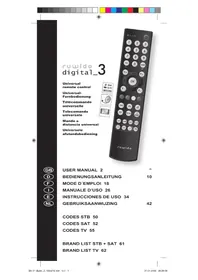
m_4 - Remote control Ruwido - Free user manual and instructions
Find the device manual for free m_4 Ruwido in PDF.


| Product type | Universal remote |
| Brand | Ruwido |
| Model | m_4 |
| Power supply | 2 lithium CR2032 batteries (3V) |
| Dimensions (approx.) | 200 x 50 x 25 mm |
| Weight (with batteries) | Approximately 100 g |
| Internal memory | Keeps programming when changing batteries |
| Infrared range | Approximately 10 m |
| Input protection | 5 seconds between each programming step |
| Display | LED indicator (confirmation and status) |
| Programming modes | Manual (4-digit code), automatic by brand (3-digit code), automatic search, learning (detection) |
| Main functions | Control TV, STB (satellite/DVB-T), DVD/Blu-ray, AUX; volume, channels, menu, teletext, recording, playback, navigation |
| Key lock | Yes (code 0006) |
| Code lock | Yes (code 0007) |
| Reset | Yes (code 0000) |
| Maintenance and cleaning | Clean with a soft, dry cloth; do not use abrasive products |
| Safety | Complies with WEEE directives; batteries must be disposed of according to local regulations |
| Spare parts / Repairability | Replaceable batteries; no spare parts available; in case of defect, contact the dealer |
| Warranty | 2 years from date of purchase |
| General information | Website: www.ruwido-consumer.com; phone support: 00800 31133113 (toll-free number) |
Frequently Asked Questions - m_4 Ruwido
User questions about m_4 Ruwido
0 question about this device. Answer the ones you know or ask your own.
Ask a new question about this device
Download the instructions for your Remote control in PDF format for free! Find your manual m_4 - Ruwido and take your electronic device back in hand. On this page are published all the documents necessary for the use of your device. m_4 by Ruwido.
USER MANUAL m_4 Ruwido
Universal remote control
We congratulate you on the purchase of a ruwido universal remote control. Your new remote control replaces the original remote control of your TV, the remote control of your satellite receiver or DVB-T / cable box (also referred to as STB in the following) as well as that of your Bluray or DVD player / recorder.
Read all instructions carefully and retain the instructions for reference at a later date. Further information and additional instructions can be obtained at www.ruwido-consumer.com. If you have any questions you can call us on the ruwido information line 00800 31133113 at any time.
You can program your remote control using the operating instructions and the associated code and brand list, via the following methods:
a) by manual programming, by entering a four digit code from the code list,
b) by automatic programming, depending on the brand, by entering the three digit code from the brand list
c) by an automatic searching
d) or by programming the original remote control codes.
We recommend starting by using the manual programming method (a).
Inserting and replacing the batteries
Your m_4 remote control is powered by two 3-Volt lithium batteries (CR 2032). Insert the batteries in accordance with the markings on the battery compartment. Please take extra care to ensure correct polarity. Dispose of the old batteries in accordance with local regulations.
Note
Your m_4 has an internal memory to make sure that the programming is retained after changing the batteries.
We recommend that you always use new batteries. Never combine old and new batteries because the performance of your remote control and the service life of the batteries will be negatively affected.
General information
Your m_4 is fitted with a 5 second protection mechanism. When programming, you must press a button within a period of 5 seconds, otherwise the remote control reverts back to its regular operating mode.
Note A:
A short double flash of the signal LED confirms the input, a long flash indicates cancellation. If you enter a code number incorrectly, press any key and wait for a long flash of the signal LED. You can then continue entering according to the instructions.
Functional Description
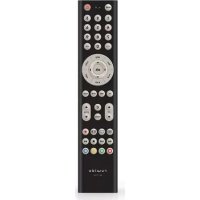
| Icon TV Function STB Function | |||
| shift | No Function No Function No Function | ||
| On / Off, standby On / Off, standby On / Off, standby | |||
| Signal LED Signal LED Signal LED | |||
| av | AV AV AV | ||
| f av | List of favourites List of favuities | ||
| ePg | Electronic TV programme Electronic TV programme | ||
| info | Info Info Display | ||
| Cursor up Cursor up Cursor up | |||
| Cursor down Cursor down Cursor down | |||
| Cursor left Cursor left Cursor left | |||
| Cursor right Cursor right Cursor right | |||
| ok | OK OK OK | ||
| a/d | Switching between the analogue and digital tuner | Audio | |
| exit | Exit Exit Return | ||
| opt | Opt Opt Setup | ||
| tv | Switching to the TV mode (Television) | ||
| stb | Switching to the STB mode (SAT receiver or DVB-T / cable box) | ||
| dvd | Switching to the DVD mode (DVD / Bluray player or recorder) | ||
| aux | Switching to the AUX mode (any TV, STB, DVD or other appliance) | ||
| vol▲ | Volume+ | Volume+ | Volume+ |
| Mute | Mute | Mute | |
| prog▲ | Programme+ Programme+ | Programme+ | |
| vol▼ | Volume- | Volume- | Volume- |
| menu | Menu | Menu | Menu |
| prog▼ | Programme- Programme- | Programme- | |
| Switch video text on | Switch video text on | Subtitle | |
| Switch video text off | |||
| 16:9 Display format | |||
| Recording | Recording | ||
| Reverse | Reverse to title | ||
| II | Play(press briefly) / Pause(press for longer time) | Play(press briefly) / Pause(press for longer time) | |
| Stop Stop | |||
| Fast-forward | Skip title | ||
| Red | Red | ||
| Green | Green | ||
| Yellow | Yellow | ||
| Blue | Blue | ||
Manual Programming
1) Switch on your TV, satellite receiver or your DVB-T / cable box (STB) and your DVD / Bluray player or recorder (DVD).
2) Page to the brand of your appliance under "TV" or "STB" in the list of codes. One or more 4-digit codes are displayed for each brand.
Note:
On our website www.ruwido-consumer.com you can use the code search function in the support area to enter your set model number directly in order to obtain the appropriate code. This will save you having to test several codes.
3) Press and hold the (v) (sUb), (dvd) or (nux) button depending on the level that you would like to programme, until the signal LED (G) fl ashes twice.
4) Use the number keys to enter the first four-digit code from the code list for the brand that you have selected. The signal LED (G) fl ashes twice to indicate that the code has been accepted.
5) Test the functionality of your remote control using the standby button (a) and then with the buttons 1 to 47 (according to the function description table).
6) If the equipment does not respond or only partially to the button commands, repeat the steps 3 to 5 using the next code from the list of codes.
7) If the equipment responds properly to all functions, your m_4 is programmed correctly and can be used. Please make a note of the code used for reference.
My programming codes to use:
| TV STB DVD AUX | |||
Automatic programming according to the brand
Alternatively, or if in case of manual programming the correct code for your equipment cannot be found, you may use the automatic search for brand for programming.
1) Switch on your TV, satellite receiver or your DVB-T / cable box (STB) and your DVD / Bluray player or recorder (DVD).
2) Page to the brand of your equipment under the relevant „TV“, „STB“ or „DVD“ section in the list of brands given in the Appendix of this manual. There is a 3-digit brand code for each brand.
3) Press and hold the TV, STB (stb), DVD (dvd) or AUX (aux) button depending on the level that you wish to programme until the signal LED (D) flashes twice.
4) Using the numeric buttons, enter the code 1003 for TV, the code 3003 for STB or the code 5003 for DVD.
The signal LED (O) flashes twice in order to confirm that the search mode has been activated.
5) Use the number keys to enter the three-digit brand code from the brand list for the brand that you have selected. The signal LED (D) flashes twice to indicate that the code has been accepted.
6) For TV and STB, hold the standby button (b) or, for DVD, the stop button (c) of your m_4 pressed until the equipment switches off or, in the case of the DVD, playback stops. This step may take several minutes.
7) As soon as the equipment responds, press the OK button to confirm the programming and hold it until the signal LED (0) flashes twice.
8) Test the functionality of your remote control using the standby button (a) and then with the buttons 1 to 47 (according to the function description table).
9) If the equipment responds properly to all functions, your m_4 is correctly programmed and can be used.
Note:
It could happen, that during the search process, the m_4 finds several codes to which your TV set responds, but where all buttons do not function for each code. In this case, the search process should be re-started (steps 3 to 9) until you obtain the best code. Re-starting the search process starts at the last saved programming.
Automatic search feature
Alternatively, or if either in case of manual programming or with automatic programming, the correct code for your equipment cannot be found, you may use the automatic search feature.
1) Switch on your TV, satellite receiver or your DVB-T / cable box (STB), your DVD / Bluray player or recorder (DVD) and your audio equipment.
2) Press and hold the TW, STB (stb), DVD (dvd) or AUX (aux) button depending on the level that you wish to programme until the signal LED (D) flashes twice.
3) Using the numeric buttons, enter the code 1001 for TV, the code 3001 for STB or the code 5001 for DVD. The signal LED (b) flashes twice
4) For TV and STB, hold the standby button (b) or, for DVD, the stop button (c) of your m_4 pressed until the equipment switches off or, in the case of the DVD, playback stops. This step may take several minutes.
5) As soon as the equipment responds, press the OK button to confirm the programming and hold it until the signal LED (O) flashes twice.
6) Test the functionality of your remote control using the standby button (a) and then with the buttons 1 to 47 (according to the function description table).
7) If the equipment responds properly to all functions, your m_4 is correctly programmed and can be used.
Note
It could happen, that during the search process, the m_4 finds several codes to which your TV set responds, but where all buttons do not function for each code. In this case, the search process should be re-started (steps 2 to 7) until you obtain the best code. Re-starting the search process starts at the last saved programming.
Code reader
The code reader can be used to display the codes that you have found in the search process so that you can make a note of them:
1) Press and hold the TV (v), STB (stb), DVD (vd) or AUX button depending on the level that you wish to programme until the signal LED (D) fl ashes twice.
2) Use the number buttons to enter the code 0 0 0 2. The Signal LED() fl ashes twice again.
3) Push 1 and count the number of times the Signal LED flashes; this is the first number.
4) Push 2 and count the number of times the Signal LED flashes; this is the second number.
5) Push 3 and count the number of times the Signal LED flashes; this is the third number.
6) Push 4 and count the number of times the Signal LED flashes; this is the fourth number.
Note
The Signal LED does not flash if the number is 0. The steps 3 to 6 can be carried out in any order and as many times as may be required.
Learn feature
Alternatively, or if either in case of manual programming or with automatic programming, the correct code for your equipment cannot be found, you may use the learn feature.
The learn feature may also be used if certain button functions of the original remote control are not included in the database.
Positioning the m_4 and original remote control (Range test)
In order to ensure that the remote control can receive the signal, both remote controls should be placed opposite one another with their transmission diodes facing each other. The distance between both remote controls should not be greater than 5cm .
You may use the range test to determine the optimal position for learning the codes:
1) Press and hold the TV (v), STB (stb), DVD (dv) or AUX (aux) button depending on the level that you wish to programme until the signal LED (fl) flashes twice.
2) Enter the code 0 0 1 1 using the numeric buttons. The signal LED flashes twice again.
3) Now, the signal LED lights up in orange and displays the quality of the signals received. Now place the original remote control and press and hold any button on it. Change the distance to the m_4 remote control until the signal LED lights up in green.
Note :
Orange light indicates readiness and that the m_4 is not receiving any signal. If the signal LED lights up in red, it means that the signal is too weak (too far away) or too strong (too near). If the signal LED lights up in green, it indicates optimal signal quality (optimal alignment for learning).
4) To end the range test, press the TW(), STB (stb), DVD (dvd) or AUX (aux) button that had been pressed earlier.
Note
The optimal alignment depends on the transmission strength of the signals by the original remote control and, hence, it may vary for each remote control. This is why you need to carry out the range test with each remote control from which you would like to learn in order to determine the optimal alignment for it.
Learning - Basic
1) Press and hold the TV, STB (stb), DVD (dvd) or AUX (aux) button depending on the level that you wish to programme until the signal LED (O) flashes twice.
2) Enter the code 0 0 0 9 using the numeric buttons. The signal LED flashes twice again.
3) Now, the signal LED lights up in green.
4) Press the button on the m_4 remote control that you would like to teach, e.g., standby()
5) The signal LED lights up in orange and indicates that the m_4 remote control is ready to learn.
6) Press and hold the desired button on the original remote control until the green signal LED goes off.
Note:
Orange light indicates that the m_4 is not receiving any signal.
If the signal LED lights up in red, it means that the signal is too weak (too far away) or too strong (too near).
7) You may repeat the steps 3 to 6 to teach (or programme) other buttons. To save and end the learning function, press the TV (tv), STB (stb), DVD (dvd) or AUX (aux) button that had been pressed earlier.
Note
If the buttons that have been learnt do not work properly with your equipment, or particularly if only every second button that you press works, please carry out Advanced Learning.


Learning - Advanced
1) Press and hold the TV (v), STB (stb), DVD (vd) or AUX (aux) button depending on the level that you wish to programme until the signal LED (D) flashes twice.
2) Enter the code 0 0 1 0 using the numeric buttons. The signal LED flashes twice again.
3) Now, the signal LED lights up in green.
4) Press the button on the m_4 remote control that you would like to teach, e.g., standby()
5) The signal LED lights up in orange and indicates that the m_4 remote control is ready to learn.
6) Press and hold the desired button on the original remote control until the green signal LED goes off.
Note:
Orange light indicates that the m_4 is not receiving any signal. If the signal LED lights up in red, it means that the signal is too weak (too far away) or too strong (too near).
7) Press and hold the same button on the original remote control once again until the green signal LED goes off.
8) You may repeat the steps 3 to 7 to teach (or programme) other buttons. To save and end the learning function, press the TV (tv), STB (stb), DVD (dvd) or AUX (aux) button that had been pressed earlier.
Operating the volume control on the TV or satellite receiver or the DVB-T / cable box (STB) or DVD player / recorder
By default, the volume and mute controls are operated on the satellite receiver or DVB-T / cable box or DVD player / recorder.
If you would like to operate these controls on the TV, please carry out the following steps.
1) Press and hold the TV button(), until the signal LED (Φ) ashes twice.
2) Enter the code 0 0 0 4 using the numeric buttons. The signal LED flashes twice again.
If you would like to restore the volume control functions again to the satellite receiver or the DVB-T / cable box (STB) or the DVD player / recorder, please carry out the following steps.
1) Press and hold the TV button ( ) until the signal LED ( ) flashes twice.
2) Enter the code 0 0 0 5 using the numeric buttons. The signal LED flashes twice again.
Disabling buttons
You have the option of disabling individual functions or features that are not required on the m_4 remote control.
1) Press and hold the TV (v), STB (stb), DVD (dv) or AUX (aux) button, depending on the function or feature that you would like to disable, until the signal LED (O)) fl ashes twice.
2) Enter the code 0 0 0 6 using the numeric buttons. The signal LED flashes twice again.
3) Press all those buttons whose function or feature you would like to disable one after another.
4) Press the level button used in step 1 to save the results.
Note
The numeric and level buttons cannot be disabled.
Note
If you would like to enable the buttons that you have disabled, please reset the remote control completely. See function „Delete Settings (Reset)“
Code block
In order to prevent inadvertent programming of the m_4 remote control you can enable the codes to be blocked.
1) Press and hold the TV button ( ) until the signal LED ( ) flashes twice.
2) Enter the code 0 0 0 7 using the numeric buttons. The signal LED flashes twice again.
3) The remote control is now blocked against reprogramming
Note
You can recognise that the code block is active (enabled) if the signal LED () of the m_4 remote control fl ashes long once and not twice briefly y when trying to programme it.
Note A:
Repeat the steps 1 to 3 if you wish to disable the code block once again.
Delete settings (Reset)
1) Press and hold the TV button ( ) until the signal LED ( ) flashes twice.
2) Using the numeric buttons, enter the code 0 0 0 0. The signal LED (⑥) flashes twice in order to confirm that the m_4 remote control has been reset.
Note
When you use the "Delete Settings (Reset)" function, your m_4 remote control loses all its programming and is restored to its condition at the time of delivery.
Note on environmental protection
After the implementation of the European Directive 2002/96/EU in the national legal system, the following applies:
Electrical and electronic devices may not be disposed of with domestic waste. Consumers are obliged by law to return electrical and electronic devices at the end of their service lives to the public collecting points set up for this purpose or point of sale. Details to this are defi ned by the national law of the respective country. This symbol on the product, the instruction manual or the package indicates that a product is subject to these regulations. By recycling, reusing the materials or other forms of utilising old devices, you are making an important contribution to protecting our environment.
GUARANTEE
Your remote control is guaranteed for a period of two years from the date of purchase. Please consult the dealer in the event of a guarantee claim.