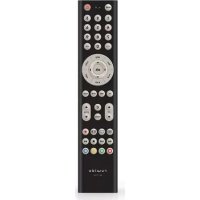
Digital 3 - Remote control Ruwido - Free user manual and instructions
Find the device manual for free Digital 3 Ruwido in PDF.


| Product Type | Universal Remote Control |
| Brand | Ruwido |
| Model | Digital 3 |
| Dimensions (approx.) | 150 x 50 x 20 mm |
| Weight (with batteries) | Approximately 80 g |
| Power Source | 2 alkaline AAA/LR03 batteries (1.5 V) |
| Operating Modes | STB, SAT, TV |
| Infrared Range | Up to 10 meters |
| Main Functions | On/Off, digits 0-9, volume +/-, channel +/-, menu, cursor, OK, back, info, EPG, mute, teletext, FLOF colors, key lock, code search, code programming |
| Code Memory | Retained after battery change |
| Maintenance | Wipe with a soft, dry cloth. Do not use abrasive products. |
| Safety | Observe battery polarity. Do not mix old and new batteries. Remove batteries if leaking. |
| Spare Parts | Batteries only. Device not user-serviceable. |
| General Information | Universal remote control replacing original remotes for STB, SAT and TV receivers. Programmable via 3-digit codes. |
Frequently Asked Questions - Digital 3 Ruwido
User questions about Digital 3 Ruwido
0 question about this device. Answer the ones you know or ask your own.
Ask a new question about this device
Download the instructions for your Remote control in PDF format for free! Find your manual Digital 3 - Ruwido and take your electronic device back in hand. On this page are published all the documents necessary for the use of your device. Digital 3 by Ruwido.
USER MANUAL Digital 3 Ruwido
Universal remote control
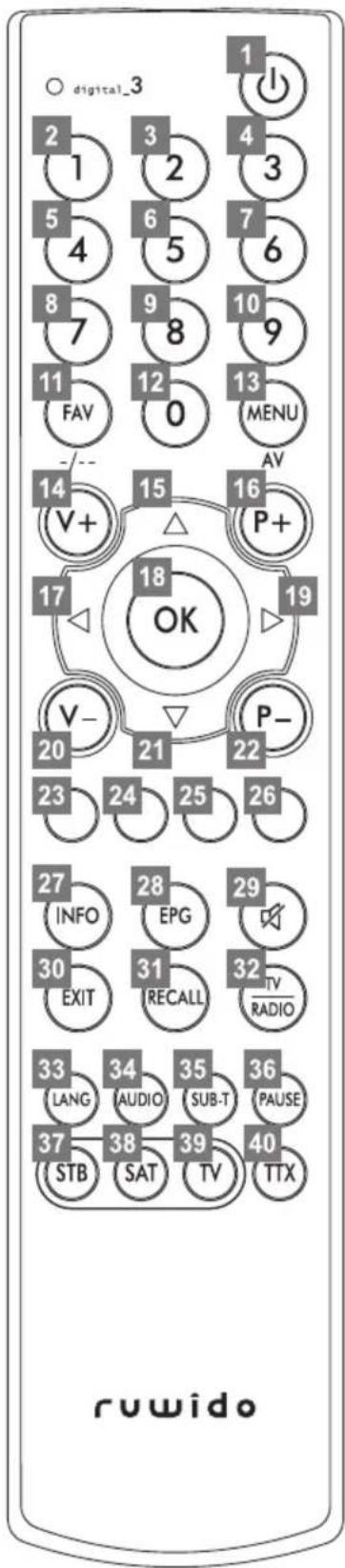
The STB/SAT/TV database contains following functions:
| Key Print STB and SAT Function | ||||
| LED Mode Indication | STB green SAT red | orange | ||
| 1 | ➊ | Standby (On/Off) Standby (On/Off) | ||
| 2 | 1 | 1 | 1 | |
| 3 | 2 | 2 | 2 | |
| 4 | 3 | 3 | 3 | |
| 5 | 4 | 4 | 4 | |
| 6 | 5 | 5 | 5 | |
| 7 | 6 | 6 | 6 | |
| 8 | 7 | 7 | 7 | |
| 9 | 8 | 8 | 8 | |
| 10 9 9 9 | ||||
| 11 FAV | - / - - | FAV | - / - - | |
| 12 0 0 0 | ||||
| 13 MENU | AV | Menu | AV | |
| 14 V + | Volume + | Volume + | ||
| 15 | ▲ | Cursor up | Cursor up | |
| 16 P + | Program/Channel + | Program/Channel + | ||
| 17 ◀ | Cursor left | Cursor left | ||
| 18 OK | OK | OK | ||
| 19 ▶ | Cursor right | Cursor right | ||
| 20 V - | Volume - | Volume - | ||
| 21 | ▼ | Cursor down | Cursor down | |
| 22 P - | Program/Channel - Program/Channel - | |||
| 23 | ● | red | red | |
| 24 | ● | green | green | |
| 25 | ● | yellow | yellow | |
| 26 | ● | blue | blue | |
| 27 INFO | Info | |||
| 28 EPG | EPG | |||
| 29 | ➌ | Mute | Mute | |
| 30 EXIT | Exit | Teletext off | ||
| 31 RECALL | Back | |||
| 32 TV / RADIO | TV / Radio | |||
| 33 LANG | Language | |||
| 34 AUDIO | Audio | |||
| 35 SUB-T | Sub-T | |||
| 36 PAUSE | Pause | |||
| 37 STB | Switch: to STB Mode and Program key STB Codes (DB) | |||
| 38 SAT | Switch: to SAT-Mode and Program key SAT Codes (DB) | |||
| 39 TV | Switch: to TV Mode and Program key TV Codes (DB) | |||
| 40 | TTX | Teletext on | Teletext on | |

GB
USER MANUAL
ruwido digital\_3 Universal remote control
Congratulations on purchasing this high performance digital_3 remote control. Great care has been taken of the design and manufacture of this product and in normal use it will give many years of satisfying service. The following pages describe how to get the best from your new remote control, but if in doubt please contact your retailer.
About your digital\_3 remote control
With your new digital_3 remote control you can not only control all functions of your STB or SAT receiver, but also the core functions of your TV set.
How does the digital\_3 remote control work?
By pressing any button on the remote control a command is been sent to the device being controlled, using an infrared beam. At the front of this command is a 3-digit code, which is unique to that particular unit. This means that when you point a controller at the TV, for example, the VCR will not respond!
The set-up of your remote control requires the programming of this unique 3-digit-code.
The 10-second rule
The digital\_3 remote control initially needs your assistance to work properly.
All programming is based on the 10-second rule: every step in these instructions must be completed within 10 seconds after the previous step. Otherwise, the remote control returns to standard operating mode. This rule ensures that your digital_3 remote control is not reprogrammed by another user by accident.
Inserting and changing the batteries
Your digital_3 remote control is powered by two alkaline 1.5 V batteries (IEC LR 03, AAA). Wherever possible, ensure that new batteries are used.
Never mix old and new batteries together as this will effect the performance of the remote control and shorten the battery life.
Please note:
Insert the batteries following the markings inside the battery compartment.
Immediately dispose of any leaking batteries.
Dispose old batteries as per manufacturer's instruction.
Testing digital\_3 remote control the for operation
Once the batteries have been inserted, press any button to ensure that the green LED flashes; this confirms correct insertion of the batteries. If for any reason there is no response from the remote control please check the battery insertion or the condition of the batteries. If during operation the operating range diminishes the batteries may need to be replaced. Your digital_3 remote control has an inbuilt special feature which allows you to change batteries without losing pre-programmed information. After replacing the batteries all programmed functions will continue working as before.

USER MANUAL
ruwido digital\_3 Universal remote control
A. Key assignment
The digital_3 remote control has three operating modes, the STB mode, SAT mode and TV mode. Pressing the keys "STB", "SAT" or "TV" select the particular mode. A LED shows the activated mode (green for STB, red for SAT and orange for TV). All modes STB, TV and SAT are pre-programmed by factory settings.
STB and SAT mode
The STB and SAT mode contain following functions:
- Power / Standby
- Numbers 0 to 9
- Channel +/-
- Volume +/-
• FLOF colours (red, green, yellow and blue)
- Teletext on/off
- Mute - Info - EPG
- List
- Back
- Menu
- Exit
• OK
- Cursor
- TV/Radio
- Recall
- FAV
• LANG
- SUB-T
- Pause
- Audio


TV mode
The TV mode contains following functions:
- Power / Standby
- Numbers 0 to 9
• AV
- / - -
- Channel +/-
• Volume +/-
• OK
- Cursor
• FLOF colours (red, green, yellow and blue)
- Teletext on
- Teletext off
- Mute
GB
USER MANUAL
ruwido digital\_3 Universal remote control
B. Setup of the STB, SAT and TV mode
- Insert two new 1.5V AAA/LR03 batteries (correct position is indicated at the base of the battery slot).
- Switch on your device (to programme the remote control for the TV set, ensure that the television shows a picture).
- Look at your TV set and find out which brand it is i.e. Mitsubishi, Sony, Panasonic etc.
- Look up the brand name in your code list section. You will find one or more 3 digit codes for your TV brand.
- Press the TV key and keep it pressed until the green LED flashes twice in quick succession (after approx. 3 seconds).
- Within 10 seconds of seeing the 2 flashes above, enter the 3 digit code for your device.
- After you have entered the code the green LED will flash twice, indicating that the code has been accepted by your digital_3 remote control. This does not necessarily mean it is the correct code for your model of device.
- Press the standby key to check whether your digital_3 remote control is working properly. If your TV is thereby not set to standby mode, refer to the next code in the list and repeat the programming procedure from step 3.
- If your TV is set to standby check all other functions of the TV. If certain functions are not available or not working properly, refer to the next code in the list and repeat the programming procedure from step 3.

To program the STB mode please proceed as described in the programming instructions for television sets, but instead of "TV" key use the "STB" key as well as the codes from the STB section.
To program the SAT mode please proceed as described in the programming instructions for television sets, but instead of "TV" key use the "SAT" key as well as the codes from the SAT section.

C. Brand code scan
If the listed codes are not working or if the manufacturer of your device is not listed, you have the option to search for a suitable code by means of the brand code scan.
- Insert the batteries (correct position is indicated at the base of the battery slot).
- Switch on your TV set.
- Press the TV key and keep it pressed until the green LED flashes twice in quick succession (after approx. 3 seconds).
- Within the next 10 seconds enter the code 0 0 3, the green LED flashes twice again.
- Within the next 10 seconds enter the 3 digit brand code of your device, the green LED flashes twice, in case a wrong code was entered the red LED lights up for two seconds.
- After the LED has flashed twice, press the Standby key and keep it pressed until the device has switched off. During the code scan, the LED flashes every 2 seconds, this indicates that the automatic scan is in progress. After the device has switched off, switch it on again to check the other functions of the device. If all functions work as desired, press the "OK" key to save the found code.
- If certain functions are not available or not working properly, repeat the code scan procedure (steps 2 to 6) until you have found the best code.

USER MANUAL
ruwido digital\_3 Universal remote control
After all saved codes have been scanned by your digital_3 remote control, the red LED flashes five times and the code scan quits.
To start the brand code scan for the STB and SAT mode please proceed as described in the brand code scan for television sets, but instead of “TV” key use the “STB” or “SAT” key as well as the brand codes from the STB/SAT section.
D. Complete code scan
If neither the listed codes are working nor the brand code scan did find the desired code or if the manufacturer of your device is not listed, you have the option to let the digital_3 remote control find a suitable code by means of the complete code scan.
- Insert the batteries (correct position is indicated at the base of the battery slot).
- Switch on your TV set.
- Press the TV key and keep it pressed until the green LED flashes twice in quick succession. (after approx. 3 seconds).
- Within 10 seconds of seeing the 2 flashes above, enter the code 0 0 1, the green LED flashes twice again.
- After the LED has flashed twice, press the Standby key and keep it pressed until the device has switched off. Please consider that the complete code scan can take up to ten minutes. During the code scan, the LED flashes every 2 seconds, this indicates that the automatic scan is in progress. After the device has switched off, switch it on again to check the other functions of the device. If all functions work as desired, press the "OK" key to save the found code.
- If certain functions are not available or not working properly, repeat the code scan procedure (steps 2 to 5) until you have found the best code.
After all saved codes have been scanned by your digital_3 remote control, the red LED flashes five times and the code scan quits.
To start the complete code scan for the STB and SAT mode please proceed as described in the complete code scan for television sets, but instead of “TV” key use the “STB” or “SAT” key as well as the brand codes from the STB/SAT section.
GB
USER MANUAL
ruwido digital\_3 Universal remote control
E. Identifying the 3 digit code
To identify the currently programmed 3 digit code, please follow the steps below.
- Press the TV key and keep it pressed until the green LED flashes twice in quick succession. (after approx. 3 seconds).
- Within 10 seconds of seeing the 2 flashes above, enter the code 0 0 2, the green LED fl ashes twice again.
- To identify the currently saved code, press the number key "1" for the first digit, "2" for the second digit and "3" for the third digit. After each digit key has been pressed, count the number of times the LED fl ashes.
Please note:
If the LED does not flash after you have pressed one of the above selection keys, the respective code digit is 0.
Example:
- Press key "1" for hundreds. The LED flashes three times. The first digit of your 3-digit code is thus 3.
- Press key "2" for tens. The LED flashes once. The second digit of your 3-digit code is thus 1.
- Press key "3" for units. The LED flashes six times. The third digit of your 3-digit code is thus 6.
In this example, the code is thus 316.

We recommend that you write down the codes for your devices in the respective field in this manual so that they are available in case you need to re-program your digital_3 remote control. The programmed codes retain in the memory even in case of a battery change.

To identify the code for the STB and SAT mode please proceed as described above for television sets, but instead of "TV" key use the "STB" or "SAT" key.
Write down the 3-digit codes here:
| STB | |||||
| SAT | |||||
| TV |
F. Reset
This functionality resets all settings to the factory settings.
Press the TV key and keep it pressed until the LED flashes twice in quick succession (after approx. 3 seconds). Within 10 seconds of seeing the 2 flashes above, enter the code 0 0 0, the LED flashes twice again. After this procedure the TV mode of the digital_3 remote control is reset to the factory settings.
To reset the STB and SAT mode please proceed as described for resetting the TV mode, but instead of "TV" key use the "STB" or "SAT" key.
GB
USER MANUAL
ruwido digital\_3 Universal remote control
G. Additional functions
Single key lock
After a successful programming (STB, SAT or TV mode) certain keys can be locked. (Protection against faulty operation)
- Press the TV key and keep it pressed until the green LED flashes twice in quick succession. (after approx. 3 seconds).
- Within 10 seconds of seeing the 2 flashes above, enter the code 0 9 9, the green LED flashes twice again.
- Now you can deactivate single keys by pressing them. (The LED flashes at each key press, to confirm the input).
- After deactivating the last desired key press "TV" in order to complete the procedure.
If no button is pressed within 10 seconds after the previous step, the remote control returns to standard operating mode (the red LED flashes up for two seconds).
To apply the single key lock for the STB and SAT mode please proceed as described for the TV mode, but instead of "TV" key use the "STB" or "SAT" key.
Only the function „Reset“ (Code 0 0 0) cancels the single key lock.
Please note:
After a reset, the code needs to be programmed again.

Following keys are excluded from the single key lock procedure:
- Standby
- Numbers 0 to 9
- Cursor
- P + / P_-
• V+ / V− - Mode keys (STB / SAT / TV)

Code lock
After a successful programming (STB, SAT or TV mode) each mode can be protected, so that your remote control is not reprogrammed by another user by accident.
- Press the TV key and keep it pressed until the green LED flashes twice in quick succession (after approx. 3 seconds).
- Within 10 seconds of seeing the 2 flashes above, enter the code 0 8 8, the green LED fl ashes twice again.
Now the TV mode is protected against reprogramming by accident.
To remove the code lock follow the same procedure (unlocking).
- Press the TV key and keep it pressed until the green LED flashes twice in quick succession (after approx. 3 seconds).
- Within 10 seconds of seeing the 2 flashes above, enter the code 0 8 8, the green LED fl ashes twice again.
Now the TV mode can be programmed.
To apply the code lock for the STB and SAT mode please proceed as described for the TV mode, but instead of "TV" key use the "STB" or "SAT" key.

BEDIENUNGSANLEITUNG
ruwido digital\_3 Universal-Fernbedienung
10


BEDIENUNGSANLEITUNG
ruwido digital\_3 Universal-Fernbedienung
Note on environmental protection:
After the implementation of the European Directive 2002/96/EU in the national legal system, the following applies:
Electrical and electronic devices may not be disposed of with domestic waste. Consumers are obliged by law to return electrical and electronic devices at the end of their service lives to the public collecting points set up for this purpose or point of sale. Details to this are defined by the national law of the respective country. This symbol on the product, the instruction manual or the package indicates that a product is subject to these regulations. By recycling, reusing the materials or other forms of utilising old devices, you are making an important contribution to protecting our environment.
D