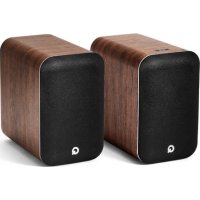
M20 HD - Loudspeaker Q-ACOUSTICS - Free user manual and instructions
Find the device manual for free M20 HD Q-ACOUSTICS in PDF.



| Brand | Q-ACOUSTICS |
| Model | M20 HD |
| Product Type | Wireless stereo amplified speaker system |
| Speaker Type | 2-way reflex (anti-resonant) |
| Output Power | 2 x 32 W (< 1 % THD) |
| Frequency Response | 20 Hz - 20 kHz (± 0.5 dB, flat DSP) |
| Frequency Response (free field, -6 dB) | 55 Hz - 22 kHz |
| Wired Connectivity | Analog input (phono/3.5 mm), Toslink optical input, USB-B input, subwoofer output |
| Wireless Connectivity | Bluetooth 5.0 with aptX HD, aptX Low Latency, AAC, SBC |
| Supported Audio Formats (USB/optical) | Up to 24-bit / 192 kHz |
| Built-in Equalizer | 3 adjustable positions (max, central, min) for bass adjustment |
| Auto Standby Function | After 20 minutes of inactivity |
| Dimensions (W x H x D) | 250 x 682 x 290 mm (per speaker) |
| Weight of Active Speaker | 5.5 kg |
| Weight of Passive Speaker | 5.1 kg |
| Power Supply | 100-240 V, 50-60 Hz |
| Maximum Power Consumption | 125 W |
| Standby Power Consumption | < 0.5 W |
| Included Accessories | 4 m speaker cable, 2 power cables (EU/UK), foam bungs, remote control with batteries, user manual |
| Warranty | 1 year (extendable to 2 years upon registration) |
| Care and Cleaning | Clean with a soft, dry cloth only |
| Safety | Double insulation class II, do not expose to water, disconnect during thunderstorms |
Frequently Asked Questions - M20 HD Q-ACOUSTICS
User questions about M20 HD Q-ACOUSTICS
0 question about this device. Answer the ones you know or ask your own.
Ask a new question about this device
Download the instructions for your Loudspeaker in PDF format for free! Find your manual M20 HD - Q-ACOUSTICS and take your electronic device back in hand. On this page are published all the documents necessary for the use of your device. M20 HD by Q-ACOUSTICS.
USER MANUAL M20 HD Q-ACOUSTICS
EC DECLARATION OF CONFORMITY
M 20 conforms with the following EEC Directives, their supporting Statutory Instruments and relevant Standards, where applicable as follows:
EC Council Directive on electromagnetic compatibility 2004/108/EC
Applicable standards with amendments: EN55032, EN55035
EC Low Voltage Directive 2006/95/EEC
Applicable standard with amendments: EN62368
EU Wireless: EN300328, EN301489, IEC62321
Stage 1 of annex II of Commission regulation (ErP) EC no. 1275/2008
Contents
Safety Information 1
Important information - please read carefully. 1
Correct disposal of this product 1
Service. 2
Important notice for UK users. 2
Notes 2
FCC Statement (For US Customers) 2
Industry Canada Statement (for Canadian Customers) 2
Introduction 3
Package contents 3
Feature summary. 4
Wired connectivity. 4
Wireless connectivity 4
Acoustic. 4
Remote batteries. 4
Key 5
Speaker rear connections and controls 5
Speaker controls. 6
Remote control. 6
Operation 7
Connecting between the speakers. 7
Speaker positioning and assembly 7
Adjusting the EQ switch. 7
Auto standby 7
Playing audio using Bluetooth 8
Clearing the Bluetooth pairing list 8
Playing audio using optical digital. 8
Playing audio using analogue 8
Playing audio using USB 8
LED states 9
Specification 9
Amplifier performance. 9
Speakers 9
Power 9
Bluetooth® 9
Dimensions 9
Weight 9
Accessories 10
Warranty 10
Contact 10
Head office 10
Knowledge base 10
Service information 10
Important information - please read carefully

This symbol indicates that there are important operating and maintenance instructions in the literature accompanying this unit.
This symbol indicates that dangerous voltage constituting a risk of electric shock is present within this unit.

This equipment is a Class II or double insulated electrical appliance. It has been designed in such a way that it does not require a safety connection to electrical earth.
Read and keep these instructions.
Heed all warnings and follow all instructions.
Do not use this apparatus near water.
Clean only with a dry soft cloth.
Do not block any ventilation openings.
Install in accordance with the manufacturer's instructions.
Do not install near any heat sources such as radiators, heat registers, stoves, or other apparatus (including amplifiers) that produce heat.
Protect the mains power cord from being walked on or pinched, particularly at plugs, convenience receptacles, and the point where they exit from the apparatus.
Use only attachments/accessories specified by the manufacturer.
Use only with the cart, stand, tripod, bracket, or table specified by the manufacturer, or sold with the apparatus. When a cart is used, use caution when moving the cart/apparatus combination to avoid injury from tip-over.
Unplug this unit during lightning storms or when unused for long periods of time.
Do not defeat the safety purpose of the polarized or grounding type plug. A polarized plug has two blades with one wider than the other. A grounding type plug has two blades and a third grounding prong. The wider blade or the third prong are provided for your safety. If the provided plug does not fit into your outlet, consult an electrician for replacement of the obsolete outlet.
No naked flame sources such as candles should be placed on the product.
Batteries (a battery pack or installed batteries) shall not be subject to excessive heat such as sunshine, fire or the like.
Take note of all warnings on the appliance, under no circumstances disassemble the unit or remove covers to prevent the risk of fire or electrical shock.
The mains operating voltage of this unit is marked on a rating plate on the back of the unit. Before connecting to mains power, check that the voltage is the same as your mains supply.
Caution: Changes or modifications not expressly approved by the manufacturer could void the user's authority to operate this device.
Caution: Usage of controls or adjustments or performance of procedures other than those specified herein may result in hazardous exposure.
Warning: The AC Input connector is used as a safety disconnect device. It must be easily accessible after installation.
Warning: To reduce the risk of fire or electrical shock, do not expose this product to rain or moisture. The product must not be exposed to dripping and splashing and no object filled with liquids such as a vase of flowers should be placed on the product.
To avoid the danger of suffocation, keep all polythene bags and packaging away from babies and children.
Third parties: In the unlikely event that you pass this product on to a third party, include these operating instructions with the product.
Correct disposal of this product
This marking indicates that this product should not be disposed of with other household wastes throughout the EU. To prevent possible harm to the environment or human health from uncontrolled waste disposal, recycle it responsibly to promote
the sustainable reuse of material resources. To return your used device, please use the return and collection systems or contact the retailer where the product was purchased. They can take this product for environmentally safe recycling.
Safety Information
Service
Refer all servicing to qualified service personnel. Servicing is required when the unit has been damaged in any way, such as the power supply cord or plug is damaged, liquid has been spilled on or objects have fallen into the unit, the apparatus has been exposed to rain or moisture, it does not operate normally or it has been dropped.
Equipment for servicing should be returned to the supplying dealer, or to the service agent for your area.
Important notice for UK users
The UK mains lead is terminated with a UK approved mains plug fitted with a 3A fuse. If the fuse needs to be replaced, an ASTA or BSI approved BS1362 fuse rated at 3A must be used.
Notes
FCC Statement (For US Customers)
This device complies with Part 15 of the FCC Rules. Operation is subject to the following two conditions: (1) this device may not cause harmful interference, and (2) this device must accept any interference received, including interference that may cause undesired operation.
This equipment has been tested and found to comply with the limits for a Class B digital device, pursuant to part 15 of the FCC Rules. These limits are designed to provide reasonable protection against harmful interference in a residential installation. This equipment generates, uses and can radiate radio frequency energy and if not installed and used in accordance with the instruction manual, may cause harmful interference to radio communications. However, there is no guarantee that interference will not occur in a particular installation. If this equipment does cause harmful interference to radio or television reception, which can be determined by turning the equipment off and on, the user is encouraged to try to correct the interference by one or more of the following measures:
- Reorient or relocate the receiving antenna.
- Increase the separation between equipment and receiver.
- Connect the equipment into an outlet on a circuit different from that to which the receiver is connected.
- Consult the dealer or an experienced radio/TV technician for help.
CAUTION! Any changes or modifications made to this device that are not expressly approved by the manufacturer may void the user's authority to operate the equipment.
This equipment complies with FCC radiation exposure limits set forth for an uncontrolled environment. This equipment should be installed and operated with minimum distance 20cm between the radiator & your body.
Industry Canada Statement (for Canadian Customers)
CAN ICES-3 (B)/NMB-3(B)
The device meets the exemption from the routine evaluation limits set out in section 2.5 of RSS 102 and is in full compliance with RSS-102 RF. Users can obtain information on RF exposure and compliance from Industry Canada.
This device complies with Industry Canada licence-exempt RSS standard(s). Operation is subject to the following two conditions:
- This device may not cause harmful interference, and
- This device must accept any interference received, including interference that may cause undesired operation.
Introduction
Thank you for purchasing the Q Acoustics M 20 HD Wireless Music System.
This manual is intended to take you through setup and installation and will help provide optimum performance from the product.
Please read the instructions, important safety information and warnings carefully before installation and use, to ensure the safe and satisfactory operation of this product.
The Q M 20 system combines exceptional stereo sound performance with convenient connectivity and integrated amplification.
Package contents
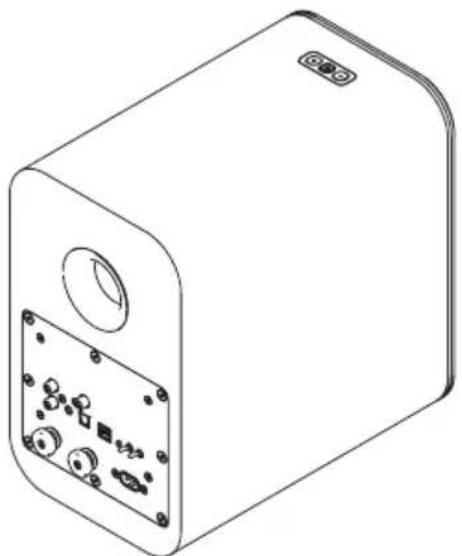
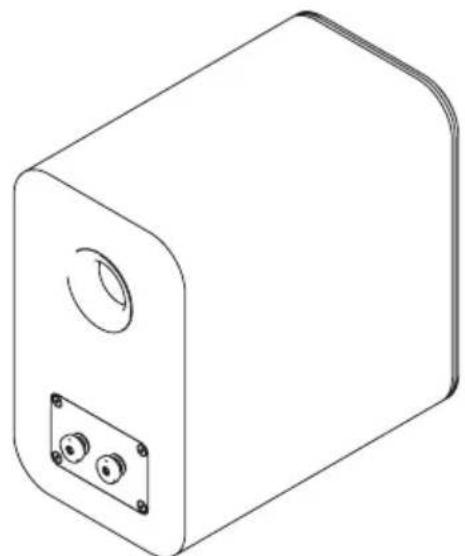
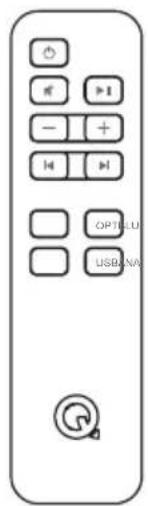
1 x Amplified speaker 1 x Passive speaker 1 x Remote
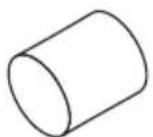
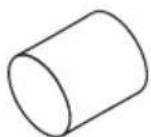
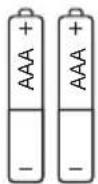
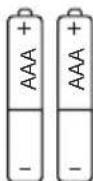
2 x Remote batteries
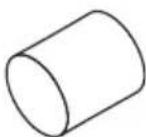
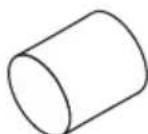
2 x Foam bungs
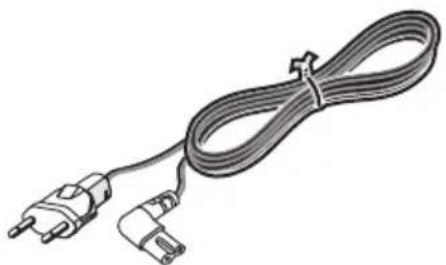
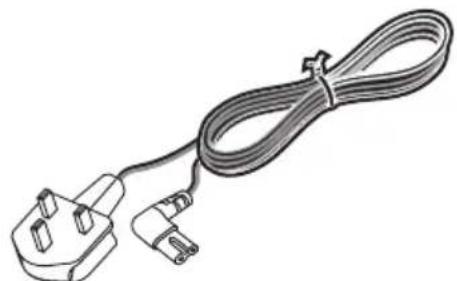
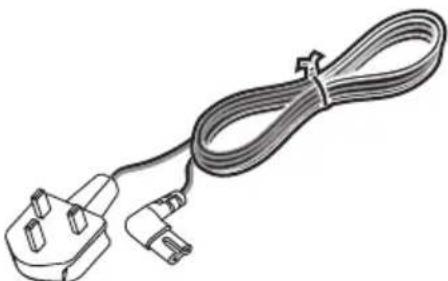
1 x UK power cable*

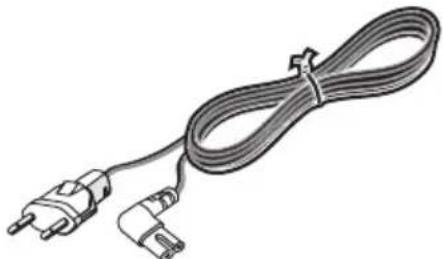
1 x EU power cable
Power cable(s) supplied may vary depending on market version.
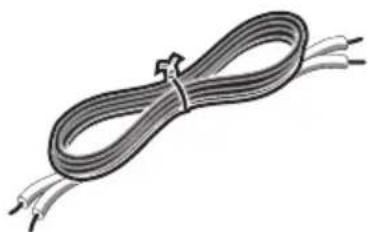
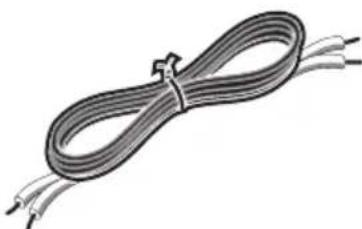
1 x 4m speaker cable
1 x Owner's Manual
Feature summary
Wired connectivity
- Analogue audio input - Stereo phono sockets or 3.5mm stereo jack allow a connection to an external analogue audio source such as a CD player
- Optical digital input - Allows connection to an external digital audio source such as a TV
- Speaker output - Stereo 4mm sockets, allowing connection from the amplified speaker to the passive speaker
- USB - A USB type B socket, allowing connection to a computer device
- Sub Out - A Phono subwoofer output for connection to an external subwoofer.
Wireless connectivity
- Bluetooth® HD - An international wireless connection used for streaming audio from all compatible devices.
AVRCP - A Bluetooth control protocol that synchronises your device control of Volume and Mute for easy integration of our Q Acoustics speaker.
Acoustic
Left / Right position switch - Enables the amplified speaker to be placed as the left or right speaker of the pair, whichever is closest to a mains outlet.
EQ switch - User control of EQ setting for best acoustic performance. This can be changed dependent upon speaker position, mounting, or user preference.
Remote batteries
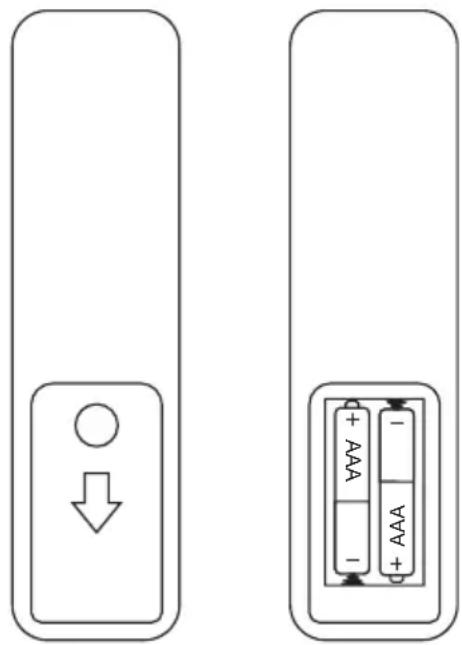
Fitting or replacing batteries
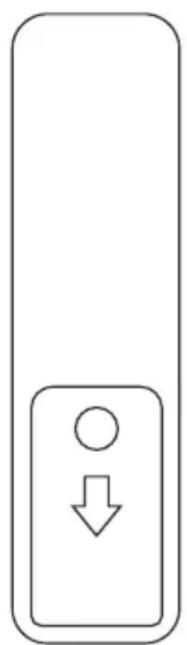
- Slide the battery cover off the remote control in the direction shown.
- Lift the cover off the remote control.
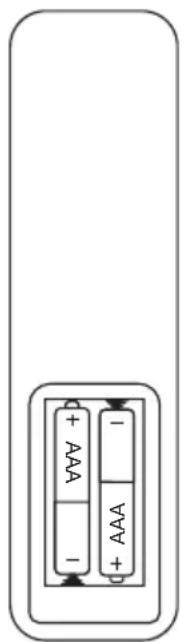
- Remove the expired batteries (if necessary).
- Fit new batteries observing polarity as shown.
When replacing the batteries, use only the same AAA type.
Alkaline batteries are recommended. Other types of battery may leak and cause damage.
Battery disposal
Dispose of used batteries with regard to the recycling regulations in your area. Do NOT short circuit batteries or throw them into water, the general rubbish or in a fire.
Speaker rear connections and controls
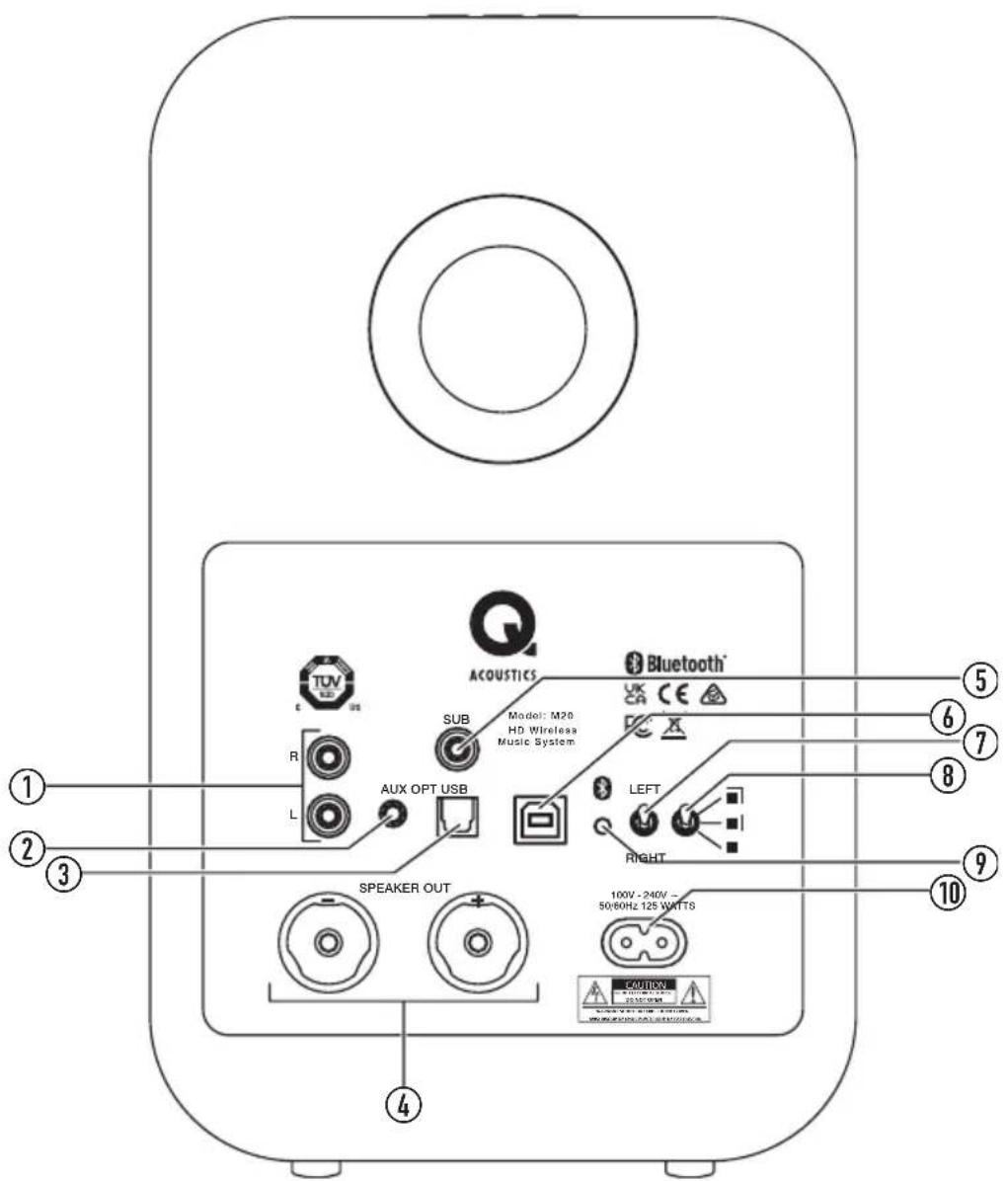
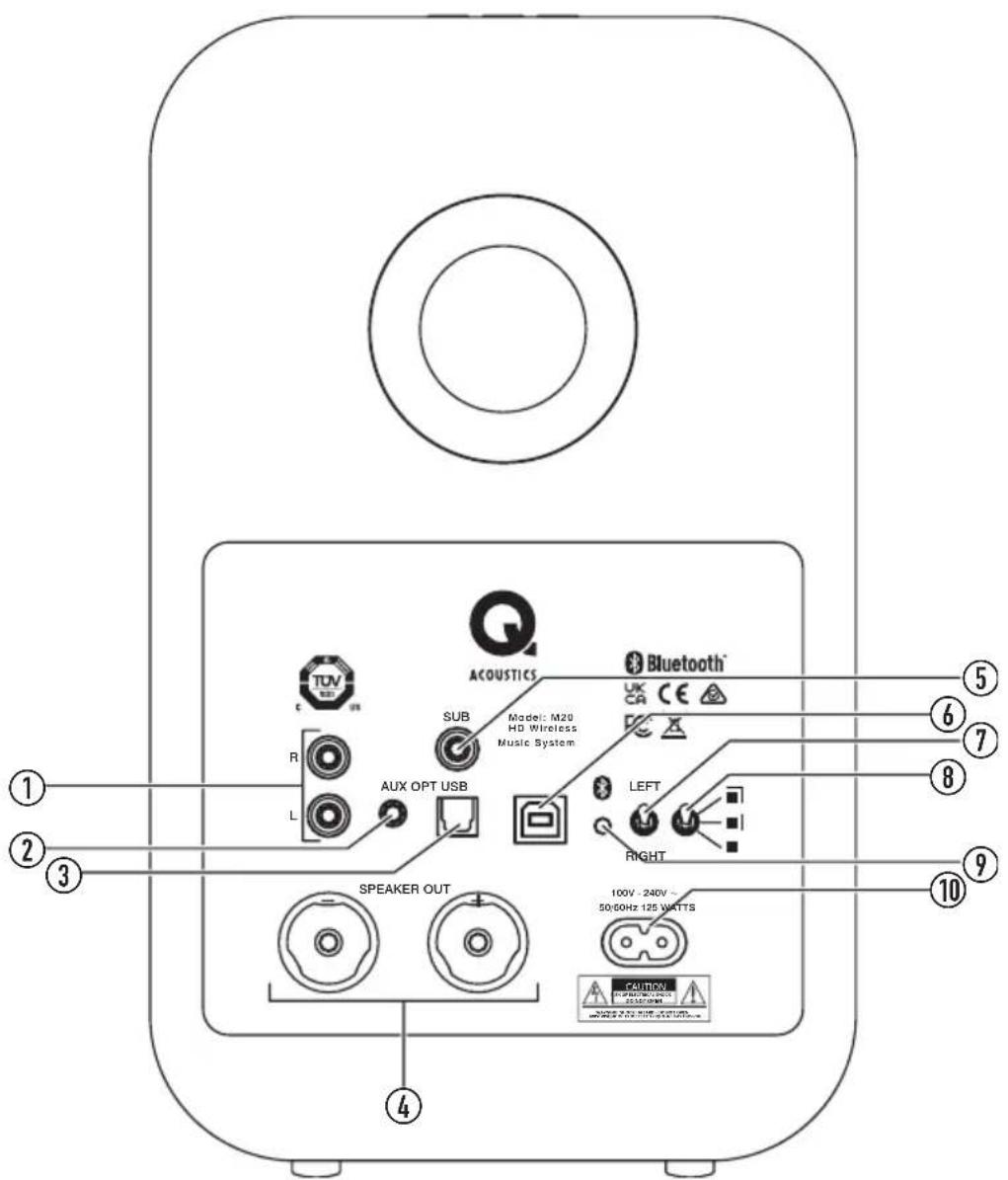
- Analogue phono
Connect analogue audio source
- Analogue 3.5mm jack
Connect analogue audio source (disables phono sockets)
- Optical Toslink
Connect digital optical audio source
- Speaker out
Connect passive speaker
- Sub
Connect optional external subwoofer
- USB
Connect computer audio source
- Speaker position
Select left or right position in the room from the listening position
- EQ switch
Adjusts the bass response of the speaker
- Bluetooth
Press to enter BT pairing mode
- AC Power
Connect to mains power 100v - 240v
Key
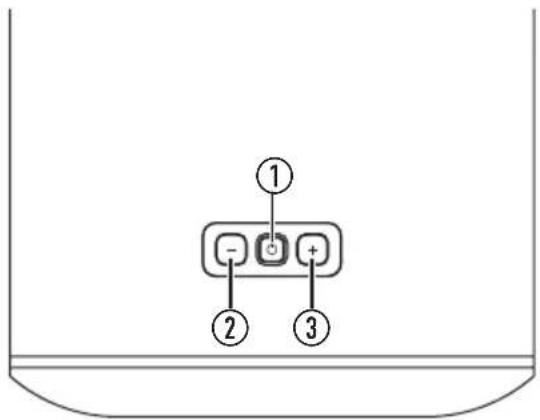
Speaker controls
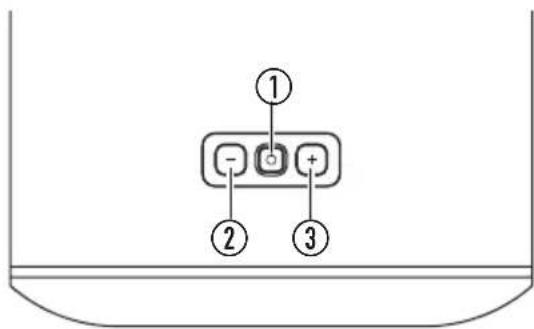
1. Standby / Source
Press to switch on, long press to set to standby Press to change source Very long press when in standby will enter deep standby

Press to decrease volume by a single step Press and hold to decrease volume continuously

Press to increase volume by a single step Press and hold to increase volume continuously
NOTE: Press and together to set volume to 20% .
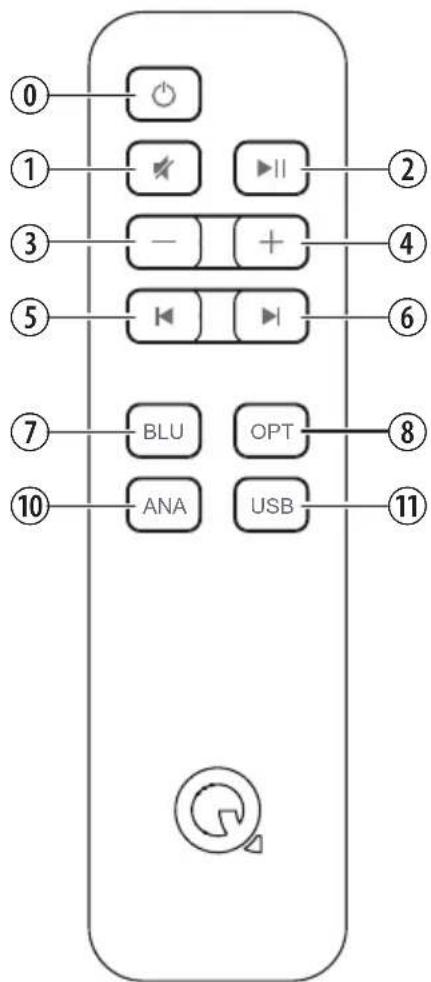
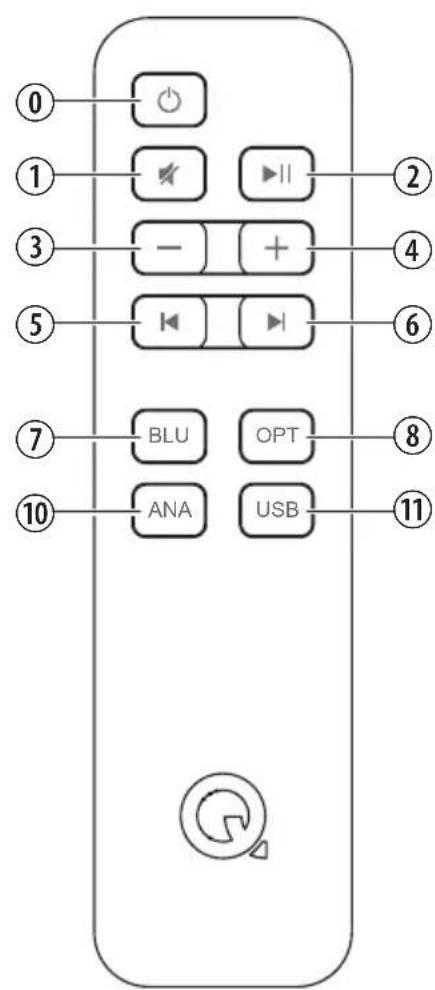
Remote control

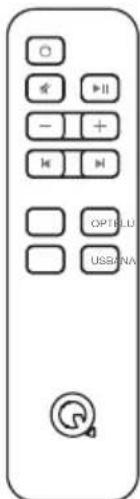
Puts system into standby, turns on to optical input

Mutes / unmutes the speakers

Pauses / plays the audio on Bluetooth or USB sources

Short press decreases the volume by one step Press and hold will continuously decrease the volume

Short press increases the volume by one step Press and hold will continuously increase the volume

Skipping a track back on Bluetooth or USB sources

Skips a track forward on Bluetooth or USB sources
8. BLU
Selects Bluetooth input, sets system into pairing mode with long press
9. OPT
Selects optical input
10. ANA
Selects analogue input
11. USB
Selects USB input
Operation
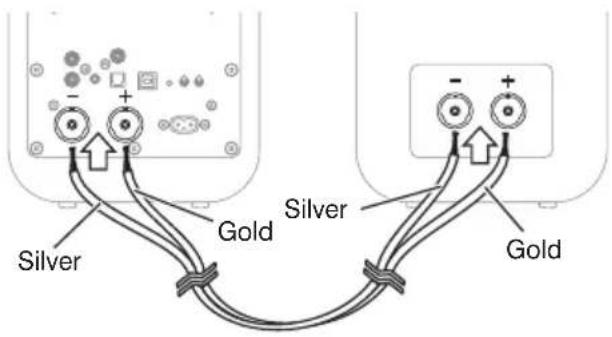
Connecting between the speakers
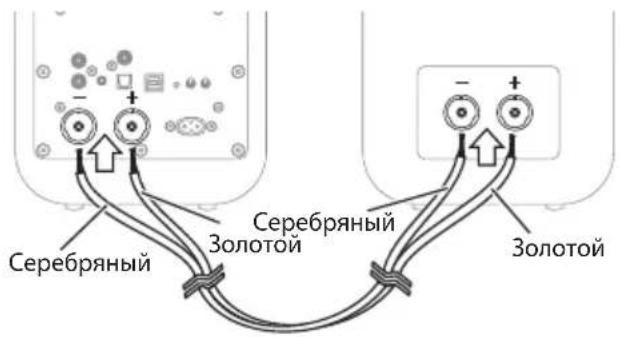
Firstly, connect the supplied speaker cable between the two speakers. The wires are coloured differently to identify + and - polarity. Ensure you always use the gold wire for + and silver wire for - at both ends.
Speaker positioning and assembly
Simply place the speakers either side of the main listening position on an appropriate flat surface, ideally about 2.0 - 4.0m (2-4 yards) apart.
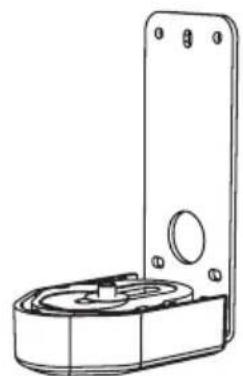
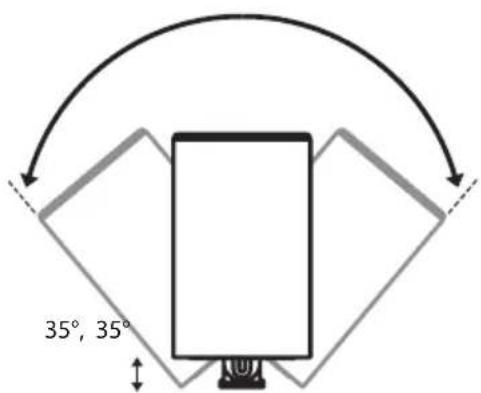
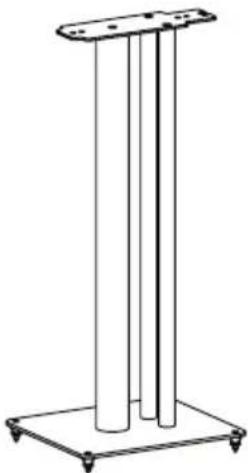
Alternatively you can use Q M 20 with the Q 3000FSi floor stand or Q 3000WB wall bracket (available separately), follow the instructions supplied with these.
- The amplified speaker can be placed in either the right or left position, simply set the left/right switch correctly. The switch sets left or right channel for the amplified speaker.
Adjusting the EQ switch
- You can adjust the bass response of the speakers to suit your desired bass level which is affected by the speaker position in relation to a wall, shelf, or corner. Try listening to your M 20 speakers in each of the three positions, selecting the one that you are most happy with.
This position will give the most bass output and is suited if the speakers are placed away from walls or corners.
This position will give a mid-point in bass output and is suited if the speakers are placed close to a wall or on a shelf.
This position will give the least level of bass output and is suited if the speakers are placed in corners of the room.
Optional subwoofer
A subwoofer may be connected to the SUB outlet as an option. The subwoofer should include level and crossover controls. With the subwoofer connected, play some music with good bass content and adjust the subwoofer controls for the sound you prefer.
Port damping
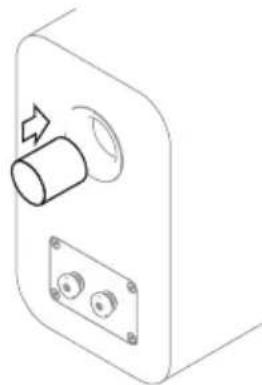
The Q M 20 speakers are rear ported and designed to work best with some space behind them i.e. 200mm or so away from a wall. If you position your speakers close to a wall / corner then the foam bungs should be inserted into the rear ports or there could be too much bass.
- Ensure the bungs are fitted snugly into the port without inserting them too far.
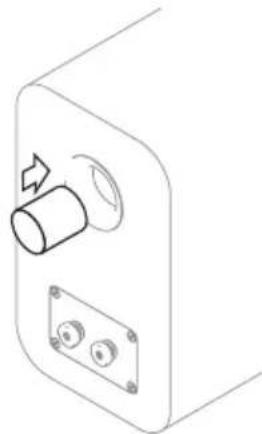
You will find the level of bass is reduced but definition and bass extension is increased. Experiment to see what you prefer and try making small changes to the position of the speaker to optimise the final result.
Powering on
- Connect the power cable to the amplified speaker and plug into a mains outlet. Once powered up the standby LED will be on red.
To switch the system on, press 6h the remote or the control panel. - To set the system to standby, press on the remote or long press on the control panel.
Auto standby
The Q M 20 system includes an energy saving auto standby feature. If no music has played for twenty minutes the system will automatically set to Standby.
Operation
Playing audio using Bluetooth
You can use many Bluetooth devices to play audio through the Q M 20 system. Firstly you will have to pair your Bluetooth device with the speaker using the following instructions.
- Press and hold the Bluetooth input button on the remote control until the blue LED flashes on the speaker. Alternatively, press the Bluetooth button on the back of the amplified speaker, the LED will flash blue.
- Select the Bluetooth settings on your device, and look for Q M 20 HD in devices.
- Select the Q M 20 HD device in the new Bluetooth device list.
Once connected, the LED will stop flashing and remain on blue.
- You can now play audio from your device.
Once you have paired a device, you can simply connect to the Q M 20 next time which will turn on and select the Bluetooth input.
When playing audio, you can use the device, the remote control or the buttons on the amplified speaker to alter the volume. You can also use the remote control to play, pause and skip tracks.
Clearing the Bluetooth pairing list
You can clear all the devices from the Bluetooth pairing list memory if required by using the following steps:
- Put the speakers into Bluetooth pairing mode with a long press of the BLU source button on the remote control, the LED will be flashing Blue.
- Press and hold the BLU source button on the remote control again, until the LED goes out and then flashes three times.
The Bluetooth pairing list is now cleared from the memory and devices must pair again in order to connect.
Playing audio using optical digital
Use a standard TOSLINK optical cable to connect your digital audio source to the amplified Q M 20 speaker.
- Press the OPT button on the remote control or press the Button on the speaker until the LED is on white.
You can use the remote control or the buttons on the amplified speaker to alter the volume.
Playing audio using analogue
- Use the phono sockets or the 3.5mm stereo jack socket to connect your analogue audio source. Press the ANA button on the remote control or press the button on the speaker until the LED is on green.
You can use the remote control or the buttons on the amplified speaker to alter the volume.
Playing audio using USB
Simply use a suitable USB A-B or USB C-B cable from your computer device to the M20 amplified speaker. The USB driver will load automatically and will be named 'SPDIF Out (Q Acoustics M20)' or similar, select this device as your speaker and audio will play through the M20 system.
M20 will automatically switch onto the USB input from standby or another source when the connected USB source becomes active. Automatic switching is not supported when connected via a powered USB hub or splitter.
M20 will automatically switch onto the USB input from standby when an active USB source (powered on) starts to play audio.
If your machine does not automatically install the driver then you can update it manually:
Download the correct USB driver from the Q Acoustics website here:
www.qacoustics.co.uk/m20drivers
Save the file on your computer, then follow these instructions for Windows 10
- Open 'Device manager'
- Select 'USB2.0 High-Speed True HD Audio' in 'Sound, video and game controllers'
- Select 'Driver' and then 'Update Driver'
- Select 'Browse my computer for drivers, then browse to the downloaded folder and select
- Windows will then update the driver
- Once finished, you can select 'SPDIF (USB2.0 High-Speed True HD Audio)' or 'SPDIF Out (Q Acoustics M20)' from the speaker selection.
- Open your music playing application and enjoy.
You can use the M20 remote control to adjust volume, and also play, pause or skip track on music playing applications that support this feature.
Operation
LED states
| Red System is in standby | |
| Dark red System is in deep standby | |
| White System is playing optical source | |
| White, flashing Adjusting volume | |
| White, double flash every 3 seconds The | optical input is receiving multichannel or dolby digital audio which cannot be played |
| Blue | System is playing Bluetooth source |
| Blue, slow pulse | No Bluetooth device connected |
| Blue flashing | Bluetooth pairing mode |
| Blue, triple flash | The Bluetooth pairing list has been cleared |
| Green | System is playing analogue source |
| Yellow | System is playing USB source |
| Source colour (white, blue, green, yellow) pulsing | Muted |
Specification
Amplifier performance
Power output (<1% THD) 2 x 32W/4Ω
THD (at 20W//4Ω) <0.2%
Freq resp (DSP set flat).....20Hz to 20kHz ± 0.5dB
S/N ratio (aux, A-Wtd, max vol, ref 1W) >81dB
Analogue input sensitivity (for 32W) 395mV
Analogue input overload. 2.2V
Minijack input sensitivity (for 32W) 220mV
Minijack input overload. 1.2V
Sub out (100Hz, at 32W main channels)……380mV
Optical in . Toslink
Optical in sample rate range. 24bit/192kHz
USB in sample rate range. 24bit/192kHz
Speakers
Enclosure type. 2-way reflex (ported)
Mid range driver. 125mm (5.0in)
Tweeter. 22mm (0.9in)
Crossover frequency. 2.4kHz
Freq resp (free, -6dB) 55Hz - 22kHz
Power
Supply voltage 100V - 240V, 50-60Hz
Maximum consumption 125W
Standby consumption. <0.5 Watts
Bluetooth®
Bluetooth specification . V5.0
Music enhancements...apt X, aptX HD® apt X Low Latency, SBC, AAC
Dimensions
(WxHxD) 170mm x 279mm x 296mm
61/16"×11"×115/8
Weight
Amplified speaker .5.5kg
12lb 2oz
Passive speaker 5.1kg
11lb 4 oz
Accessories
Q 3000WB wall bracket 35irc5 - 45mm 3000FSi floor stand
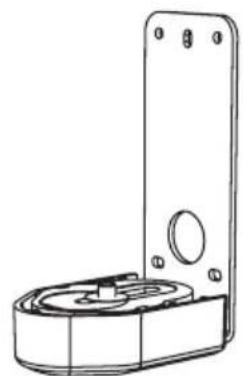
Dimensions (WxHxD):
70 × 159 × 99 mm
2³/4"×69/32"×37/8"
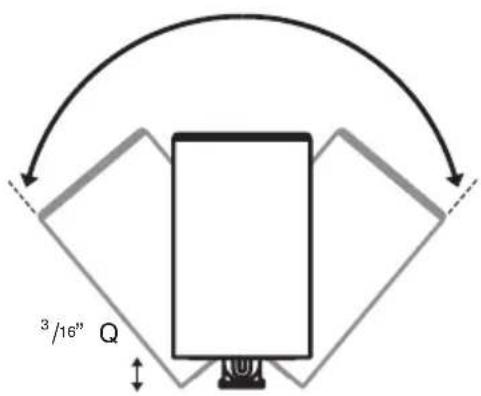
Q 3000WB adjustment angle
13/16
35irc
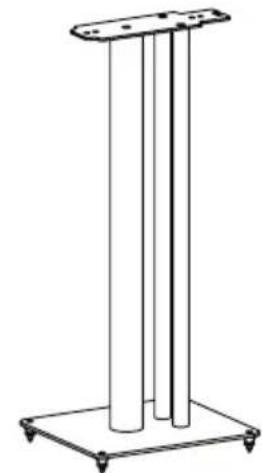
Dimensions (W× H× D)
250 × 682 × 290 mm
9/8"×2913/16"×117/16"
Warranty
The Q M 20 system is warranted free of defects in materials and workmanship for a period of 1 year from the date of purchase. During the warranty period Q Acoustics will, at its option, repair or replace any product found to be faulty after inspection by the company or its appointed distributor or agent.
Misuse and fair wear and tear are not covered by warranty.
Goods for repair should in the first instance be returned to the supplying dealer. If this is not possible contact Q Acoustics or their appointed distributor for your area to determine the correct warranty procedure. If possible the original packaging should be used to return the product as damage sustained during transit to the repair centre is not covered by the warranty. The warranty does not in any way affect your legal rights.
Warranty can be extended to 2 years by registering your product at -
www.qacoustics.co.uk/register.
Contact
Head office
Q Acoustics
Woodside 2
Dunmow Road
Bishop Stortford
Hertfordshire, UK
CM23 5RG
Knowledge base
For any additional info not contained within this manual, support questions and/or requests, please visit our on-line Knowledge Base Portal at:
support.qacoustics.co.uk
Service information
support@qacoustics.co.uk

ACOUSTICS
KABELLOSES SYSTEM M20 HD
Benutzerhandbuch
www.qacoustics.co.uk/m20drivers
www.qacoustics.co.uk/register.
Kontakt
Hauptgeschäftssitz
Q Acoustics
Woodside 2
Dunmow Road
Bishops Stortford
support@qacoustics.co.uk

ACOUSTICS
www.qacoustics.co.uk/m20drivers
Especification de Bluetooth. .5,0 V
www.qacoustics.co.uk/register.
Contacto
Oficinas centrales
Q Acoustics
Woodside 2
Dunmow Road
Bishops Stortford
Hertfordshire, Reino Unido
CM23 5RG
support@qacoustics.co.uk

ACOUSTICS
SYSTEME SANS FIL M20 HD
MANUEL DU PROPRIÉTAIRE
DECLARATION DE CONFORMITE CE
www.qacoustics.co.uk/m20drivers
Méodium 125 mm (5,0")
Tweeter. 22 mm (0,9")
support@qacoustics.co.uk

ACOUSTICS
SISTEMA WIRELESS M20 HD
MANUALE UTENTE
www.qacoustics.co.uk/register.
Contattaci
Sede
Q Acoustics
Woodside 2
Dunmow Road
Bishops Stortford
Hertfordshire, Regno Unito
CM23 5RG
support@qacoustics.co.uk

ACOUSTICS
M20 HD DRAADLOOS SYSTEEM
GEBRUIKERSHANDLEIDING
EG-CONFORMITEITS VERKLARING
www.qacoustics.co.uk/m20drivers
Middentoner. 125 mm (5,0 in)
Tweeter 22 mm (0,9in)
Crossoverfrequentie. 2.4 kHz
(BxHxD) 170mm x 279mm x 296mm
611/16"×11"×115/8"
Gewicht
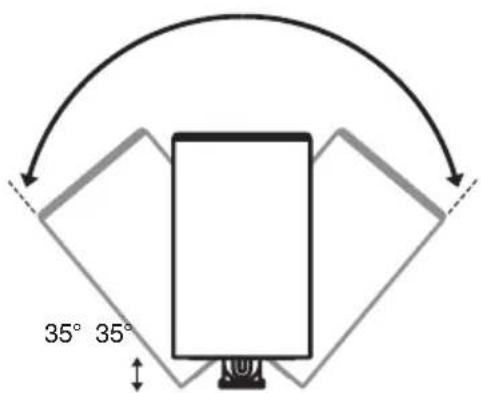
5-45mm
3/16" - 13/16"
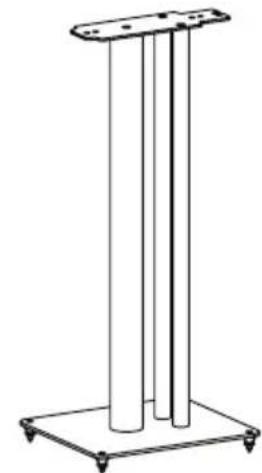
Afmetingen (B× H× D)
250 × 682 × 290 mm
9/8" x 2913/16" x 17/16"
Garantie
www.qacoustics.co.uk/register.
Contact
Hoofdkantoor
Q Acoustics
Woodside 2
Dunmow Road
Bishops Stortford
Hertfordshire, UK
CM23 5RG
Kennisbestand
support@qacoustics.co.uk

ACOUSTICS
SISTEMA SEM FIOS HD M20
MANUAL DO UTILIZADOR
DECLARACAO DE CONFORMIDADE CE
ObrigadoPGA.
Q Acoustics M20 HD.
www.qacoustics.co.uk/m20drivers
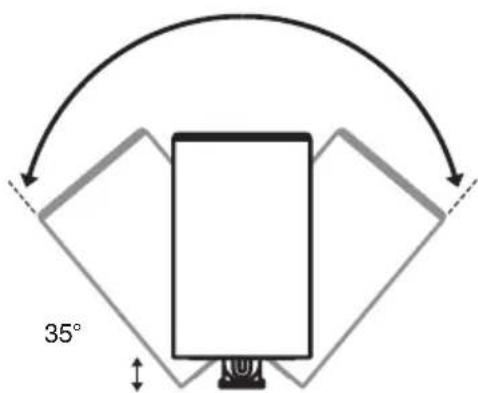
5-45mm 3/16"-113/16" 35°
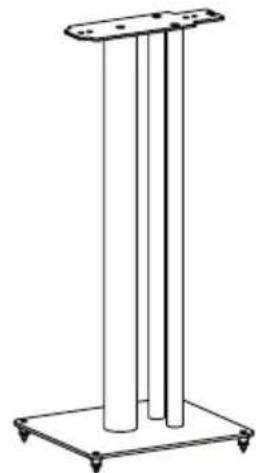
Dimensoes (L x A x D): 250 x 682 x 290 mm 9/8" x 2913/16" x 17/16"
Garantia
www.qacoustics.co.uk/register.
Contacto
support@qacoustics.co.uk

ACOUSTICS
M20 HD TRÄDLÖST SYSTEM
AGARMANUAL
EG-FORSAKRAN OM OVERENSSTAMMELSE
EU tradlost: SS-EN 300328, SS-EN 301489, IEC 62321
Steg 1 i bilaga II i Kommissionens forordering (ErP) EG nr 1275/2008

Bluetooth
www.qacoustics.co.uk/m20drivers
Bluetooth-specification . V5.0
Musikfürbättringar.....apt X, aptX HD® apt X lag latens, SBC, AAC
Matt
(BxHxD) 170 mm x 279 mm x 296 mm 611 / 16 tum x 11 tum x 115 / 8 tum
Vikt
www.qacoustics.co.uk/register.
Kontakt
Huvudkontor
Q Acoustics
Woodside 2
Dunmow Road
Bishops Stortford
support@qacoustics.co.uk

ACOUSTICS
www.qacoustics.co.uk/m20drivers
Midrange driver. 125 mm (5,0 in)
Tweeter 22 mm (0,9 in)
www.qacoustics.co.uk/register.
Kontakt
Siedziba glowna
Q Acoustics
Woodside 2
Dunmow Road
Bishops Stortford
Hertfordshire, GB
CM23 5RG
Baza wiedzy
support@qacoustics.co.uk

ACOUSTICS
БЕСПОННОДHAУДИОCTИСТEMA M20 CO 3BYKOM ВыICOKОЧETКОCTN
PYKOBODCTBOIOJb3OBATEJIa
DEKJIAPALUNO COOTBETCTBUN EC
M3dJIe M20 COOTBeTCTByET CnEduIouIIM DInpeKTeIbAM E3C, INX BCNOMORAteIbHbIM HOpMaTUBHbIM aKTAM I COOTBETCTBYIOUM CTaHdApTaM, rJe 3TO pPmEHMO:
DynekeTnBa CoBeTa EC 2004/108/EC no 3JNeKtpomarHHTHOI COBMeCTNMOCTN
PpmeHmblcTaHdapTbIC nonpaBkAmn:EN 55032,EN 55035
Диpeктпа EC 2006/95/EEC NO Hn3KOBObTHOMy O6OpydoBaHIO
PpmeHmblcTaNdapt c nonpaBkamn:EN 62368
CTaHapTbE Cn no 6ecnpoBdoHno nepedaue daHHbIX: EN 300328, EN 301489, IEC 62321
3tan 1 npnloxhen II K Pernaenty Komusccn EC Ne 1275/2008
CopepxaHne
HOpMaunnoTexnke6e3onacnoctn 1
BaxnHaI HOpMaunr— Heo6xOIMo BHmAteJbHO O3HaKOMTbcra. 1
IpaBnBna yTnIn3aunr 3TOrO npOdykTa 2
TexHnueckoe o6cnyKuBaHne 2
Baxhoe 3ameuahne dIy nonb3oBaTeJe B BeNko6puTahnn. 2
Ppimechnna 2
3aBHe FCC (nra nob3oBateJe n3 CUSA) 2
3aBHe He MInncTepcTa npMbIeHHOCTn KaHaDb (dna nOlb3oBaTepeN 13
Kanadbl) 4
Bvendeue 4
Copejkmoe ynaKOBKn 4
063op yHKu. 5
IpoBoJHoe IopKJIouHeHne 5
Becnpobodhoe nooknoueHne 5
Akyctnueckne yHKu.. 6
BatapeynyIbTaDnCTaHcIOHOynpabLeHna 6
0603nueHn 6
PaBembln 3neMeHbI ynpabHeHna 3aHne naHEn KOLOHKn.
3JIeMeHTbI ynpaBHeHnHa KOJOnHke 7
IyIbT dIcTaHcUHnHO ynpaBHeNna 7
3Kcnpnyatauia 8
CoeHHeHne Mekdy KoloHkAmn 8
Pa3meueHne n c6opka cnCTembl 8
AbTomatueckn nepexoB pexm oxndaHna. 9
Bocnpoun3BeDeHne 3Byka c nOmouB Bluetooth. 9
Ouictka cnncka coopjkeHHbix yctpoicTB Bluetooth. 9
Bocnpoun3BeDHeHne 3Byka Uepe3 onTtueckn cUΦpOBoB BXoJ 10
Bocnpoun3BeDeHne 3BykaYepe3 aHaIorOBbI BXoJ 10
Bocnpoun3BeHeHne 3Byka c ycTpoiCTBa, noKJIoueHHoro uepe3 USB.10
CocToHHa CBToIOHOrO HnDnKaTopa. 10
Texnueckne xapaKtepcntmki 10
XapakTepcntuynucnntela 10
Dinhamnki 10
Питане 10
Bluetooth 10
Pa3mepbl 10
Macca 10
PpinaJeeXHocTn 10
TapaHTna 10
KoHTaKTHaI HOpMaun 10
TnabHbI oΦnc. 10
Ba3a 3HaHn 10
HOpMaIaI OTexHueckOM 6cIyKbAHN. 10
BaxnHa HOpMaqna - Heo6xOaMnOBHmMaTeIbHo 03HaKOMITbcA

AaHbI CNMBO1 O3HaayeT, yTO B INHΦOpMaUNHOHHbIX NeaTHbIX MaTePnaJax K 3TOMy 06OpyDoBaHNIO coepKaTaCBAKhbIe Yka3aHnN NO 3KcNpyTaUIN N 06cLyKnBaHnIO.
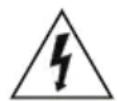
TOT CUMBOYka3bIBAeT,TOB ATOM n3dennnpncytCTByet OnaCHOe HnpanjKeHne,co3daiooeepNCNopakHeHNE 3JKeTpnuecknM TOKOM.

3To o6OpdyoBaHne npedctabnreT co60e 3NeKtpponp6op Klacca II nnn 3NeKtpponp6op c DboHOu H3OJIaue. OHO cnpoektnpoBaHO taKIM o6pa3OM, yTO He Tpe6yET 3aunTHoro 3NeKtpnucecko 3a3emJeHH.
Heo6xoDIMO npOueCTb n COxpaHnTb 3TN INHCTpyKUIN.
BaxHo 6paTaB BHMaHne Ha BCE npEynpeXeHnI n CLEIOBaTb BCem INHCTpyKUmM.
He nCnoIb3OBAbT bTO o6OpyDObaHne B6n3n BOdbI.
IpoTnpaTb TOnbKO cyXoM MaKoT KaHbJ.
He 3aKpbBaTb BeHTnJIaIIOHHbIe OTBepCTna.
06OpyOBAHHe HeoXoIMO yCTaHaBnBaTb B COOTBeTCTBn C yKa3AHmPiOn3BOJnteJI.
He yctaHaBnBaTb CNTEmy B6n3n uCTOuHKnOB TeNla, TaKnx KaK 6aTapei, perncTpbl OTOnnEHHra, KXYOHhIe NNtBi NIN dpyrooe o60pyoDaBHe (B TOM uCnE ycInnte), n3nyauOooTe TnNo.
He HacTyNaTb Ha 乌Hyp NHTaHn I He DOnyckaTb erO 3aUeMJIeHnI,OCo6eHHo B O6NaCTn BUNK,PO3eTKN IN B TOKe BBXODa N3 yCTpOJCTBa.
Heo6xoJMo NcNoIb3OaTb NCKJIOUHTeNbHO npncno6beHra/doonHnTeNbHoe 06OpydoBaHne, peKOMeHDoBAHHble pOn3BODITeMe.
ObopydobAHne Heo6xOJMo NcNoIb3OBA TbToIbKO C npIraIooUIMC K HEmy IIN peKOMeHDoBaHHbIMN npOn3BODNTeEM TeJeKKo, NOCTabKO, UTAuBOM, KpOHTeHOM IIN cTOLOM. PnncnoIb3OBaHm TEnEeKN dIpeMeueHn O6OpDobAHn Heo6xOJMo CO6JIoDaTb OCTopokHOCTb, TaK KaB Cnyae ee ONpOKiNbIBaHn MOXHO nOlyntb TpaBMY.
I3dene Heo6xOIMO OTCoeINHbOT cTeN BO BpeM rpo3bl, IIN KOrda OHO He NcNoJb3yeTcB TeueHne DOnrO BoBpeMeHN.
He HapywataB 6e3onacHyu KOHCTpyKunIO NOJAPHOB BUNKN IIN BNKN 3a3emnlaoero Tnna. PONApN3OBaHHaB BNKA IMeET DBA HOKeBbIX KOHTaKa pa3HOH 7npHNbI. BNka C 3a3emneneM IMeET DBA HOKeBbIX KOHTaKa N 3a3emnlaOuIIM TbIpB. 7npOKn KOnTAKT INN 3a3emnlaOuIIN TbIpB npedHa3haueHbI dNRA oecneueHn6e3onacHocTN. Ecnn BNkA npNJraEMO Whypa NITAHNA HE NOxDxOJT K NCNObl3yEmoP03eTKe, cJeDyET OpaNTbcR K 3JIeKTPNKy dNRA 3aMeHbI yCTapeBwei po3eTK.
He donyckaetca pa3MeaTaHa H3dennn NCTOHNKOTKpbIToro nAmehn, HanpIMep CBeuN.
3anpeaetcnoBepraBakymyIaTOPbIe 6aTapeu (BynakOBKe NIN B yCTaHOBJIeHHOM BIne) Ype3MepHOMy BO3dEChTBIO NCTOCHNKOB TeIIa, TaKnx KAK npMaBle COJHeHbIe LyuN,OTKpbTbI OROHb I dp.
Heo6xoJIMO npHIMMaTb K CBeJeHIO BCE npEdupeKJeHnHa yCTpoIcTB, IIN pEdoTbpaueHn ONaCHOCTN BO3HNKHOBEHn IOXapa IN NopaKeHn 3NeKTpuYeCKM TOKOM Hn Pn KaNX o6ctOraTeJIbCTBax 3Appeuaetcpa3bnpaTb n3dJIne IN CHIMTa KpbIuKN.
Pa6ouee Hnprjxehne nHTaHn DaHHoro n3dJIy uKa3aHO Ha Ta6NIuCe 3NEKTPoTeXnUeCKOrO n3dJIy, paCNOIOxHeHHO Ha 3aHHe nHaHEn. Npeep NOkIIOUeHEm n3dJIy K cETn Heo6xOIMo y6eINbCry, YTO yKa3aHHO Hnprjxehne COBnadaet C Hnprjxehnem nTtAOUe CEtn.
BHHMaHHe! N3MeHeHn B 06OpyDoBaHn, KOtOpbIe He 6blI nprMo Odo6peHbI npOn3BOJnteJeM, MOrTy IINHTb NOnb3OBaTeJI npaba 3KcNllyaTnpoBaTb DaHHoe 6OpyDoBaHne.
BhImaHHe! PnncNoIb3ObaHnn 3neMeHTOB ynpabHeHna, perynipOBok nn BblOnHeHH npOeUp, OTnUHbIX OT ONcaHHbIX B daHHOM DOKyMeHTe, NOIb3ObaTeNb MOKeT IOBepRaTcR onaChbIM BO3dEINCTBnM.
PpeynpekdeHne! Pa3bem BXoJa nepemehHoro ToKa nCNoIb3yeTcKak yctpoJcTBO 6e3onachoro OTKnIOueHn. OH doJIkeH 6bITb JERKO DOCTyNeH NocJe yCTaHOBKn.
PnpynpeJHnne! Bo n36eKahne BocnnameHeHHn nn ydapa 3JeKtpnueckm TOkOM He NOBepraTb O6opyDobAHne BO3deIcTBnIO DOxJa nn BNar. Ha npOyKT He DOnJXhbl nonaDaTb KaNN JxNdkoCTn. 3aNpeuaeTc CTaBnTb Ha n3Denne npEmdTebl, HAnONHeHHbIe XNdkoCTbIO, TaKne KaK Ba3a C kBETAMN.
Bo n36exahanoeonachoctn ydyueneHne06xmoXpaHnTb BCE noJNTnIeHOBbie naKeTbI ynaKOBKn B HeoctynHom dnn MnaedHeB nDeTe MeTe.
KacatEnbHO TpeBx NIIc: K obopydoBaHIO B cnyae erO nepeaun TpeTbeMy Nluy Heo6xoDmmo npnloKnTb daHHoe pykoBOdCTBO NO 3KcnIpyatauIN.
PpabnblbHa yTnln3aun 3TOr npoDyKta
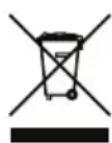
3Ta MapKnipOBKa O3HaayeT, Yo Ha Bcei TeppnTopnn EC 3Tot npOyKT He DOnJKeH yTNIn3NpOBAbCBA MecTe C ppyHMn 6bITOBbIMn OTxOaAMn. Yo6bl npeDorBpaTntb BO3MOXhBl BpeIg OkpykaOuie Cpebl NIN 3DOpOBbY eNoBeka ot HeKOHTpOJIpyEmoY yTNIn3aUIN
OTXODOB,OTHEcITcB OTBETCTBEHNO K Nepepa60TKe 3TOrO npOyKta,yTO6bl cNOC6CTBOBaTb yCTOuNBOMy NOBTOPHOMY nCnOJIb3OBAHnIO MaTePnaIbHbIX pEcypCOB.ДЯ BO3Bpata yCTpOJCTBa CNEdyET NcNoJIb3OBA Tb CNTeMb I Bo3Bpata IN c6opa nn O6paTntbca B TOpROByIO oprAHN3aUIO, rE OHO 6blno npNo6peTeHo.Tam 3TOT npOdyKT MoKeT 6bl Tb npHrT dnn EKOJOrnueckn 6eONaCHO nepepa60TKn.
Texnueckoe 06cIymbHne
Bce pa6oTbI no TexHnueckomy 06cnyKuBaHHIO DoJXHbI BblOnJIHrTbcra KBaIIuΦnUpOBAHHbIM TexHnueCKM nepcoHaIOM.
Texnuecko 06cnykmbaHne Tpe6yetcB cyuae nobpecken H3dien NIObIM cnoco6om, Hanpimep, ecnn 6bln nobpecken Hhyp NITAHN NIN BNIKA, Ha n3diene 6blna npoNTA XIKOCTb, INN B Hero nonan noctopOHnne npedMeTbI, n3diene NODBePrrnocb BO3deNCTBIO DOxJN INN BLnR, He pa6otaet HopMaNbHO nn nepeHeCNo naDeHne.
O6OpyDoBaHnne, noJnxKaaee TexHnueckomy 06cnyKbAHnIO, doJxHO 6bITb Bo3BpaIeHo DInNepy-NoCTaBunky NIN cepBnCHOMy aReHTy, DeIcTBByIOUeMy B perIOHe 3KcNpyatauIN o6OpyDoBaHnI.
Baxhoe 3ameaHne dnn noIb3OBaTeNe B Benko6pTuHaHn
CeteBOI shyp dJa BeINko6pntAHn Ocaaeh pa3peeHHoB BBeINko6pntAHn CeteBOI BUNKO C npedeoxpaHNTenem c HOMHaIOM 3 A.Ecnn Heo6xoJIMO 3aMeHNb npedeoxpaHNTeB, cJeNyET NcNoNb3OBA Tb Odo6peHHbI AccounaueNe IIO NCbTAHm TKAMN KOpOTKOrO 3aMbKaHNA (ASTA) nII BpuTahckm INHCTHTyTOM cTaHdapTOB (BSI) npedeoxpaHNTeB TnNa BS1362 c HomHaIOM 3 A.
PpimmeaHnA
3aBHeHc FCC (nnoB3oBaTeJe n3 CwA)
3To yctpoiCTBO COOTBeTCTByet qactn 15 npabun FCC. 3Kcnnyataa nOnyckaetc npn co6nJeHNn CneDyUuNX DByx ycIOBn: (1) daHHoe yctpoiCTBO He DOJXHO Co3DaBaTb BpeHbIe NOMEXn, (2) daHHoe yctpoiCTBO DoJXHO BblepkNBA Tb IIO6ble NOMEXn, BKNIQUaY nomexn, KOtOpbIe MOryt npnbEcbTn K c6oam B pa6ote.
ObopydobAHne npOBepHO npn3HaHO COOTBeCTBvUOUM OrpaHueHnM dIy cIpPoBbIX yCTpoiCTB KNaCCa B corNaCHO qACTn 15 npabIN FCC. 3Tn OrpaHueHn pa3pa6oTaHb I nI obecTeueHn HndexaIe 3auNTbI OT BpeHoro n3nyeHn npuycTAHOBE XKIIbIX NOMEeHnx. DaHHoe o6OpyDobAHne reHepepyet, uCNoIb3yET u MOKeT uNlyaTb paNIOaCTOThIE BOJIbI N, eCNI OHO YcTAHOBJeHO N uCNOb3yeTCr He B COOTBeTCTBUN C INCTpyKUeNE I NO kCNlNyatauN, MoKeT co3DaBaTB NOMEXI DnRA pAdnoCBa3N. OHaKO Het rapaHTn, TTO NOMEXI He 6ydt Bo3HnKaTb B Tex Nn INbIX ycIOBnX yCTaHOBKn. EcNI 3TO o6OpyDobAHne co3daET BpeHbIe NOMEXI DnI npMeMa paINO- nn TEncurHana (YTO MOxHO ONpeJeNTb, BBKIIouyIN u BKIIouyIN o6OpyDobAHne), peKOMeHdyETcR nonbTaTbc yCTpaHtB nx ODNIM INN HeCKONkIMN IN3 cNeDuOxxCnoc6OB:
- NpeopneHTnpoBaTb NN NpeMeCTNTb npnemHyIO aHTeHHy;
- yBEnuHTb paCCToHHe MeKdY o6OpyDoBaHNEm npueMHNUKOM;
- POKJIIOUHTb OobopyOBAHHe K PO3eTKe B CEHN, OTNIuHOnOT ToI, K KOTOpOI NOKJIIOUeH NpImeMHNK;
- 06patntbca 3a NOMOuBIO K DnIepy UIN ONbITHOMy CneuaNCTy NO Tene-N paDnOTexHKe.
BHIMAHHE!IIO6bIe N3MeHEnn IIN MoNΦKauuN, KOtOpBIE BHeceHb B 3TO yCTpoiCTBO, HO He Oo6peHb IPOUN3BOJNTeEM ABHbIM 06pa3OM, MOyT aHHyIpObaTb IpaBa NlNb3OBaTeJI Ha 3KcNpyatauio DaHHoro 06OpdyobAHna.
DaHHoe 60OpdyOBaHHe COOTBeTCTByET npedan MoUHOCTn paNIOuOACTOTHO rN3nyeHn, yCTaHOBJIeHHbIM FCC nI HeKoHTpONIpPyemO cpebl. Ppi yCTaHOBKe I KcCNIyataun 3TOrO 60OpdyOBaHn MExdY N3NYaTeJeM paNIOBOHN T eJOM NOnb3OBaTeJI DOJXHO 6bITb OecneJeHO paCtOAHHe He MeHee 20 cm.
3aBHeHne MmHcTepeCTBa npomblneHHocTn KaHaDbI (dnoNb3OBaTeNe n3 KaHaDbI)
CAN ICES-3 (B)/NMB-3(B)
YcTpoIcTB COOTBeCTByET NCKJIIOUeHINIO I3 HOpMaTINOB
PpOBepKHa COOTBeCTBNE Tpe6OBAHNIM, INIOJKeHHbIM B
pa3dene 2.5 RSS 102, INONHOCTbIO OTBeuAeT Tpe6OBAHNIM
RSS-102 RF. POnb3oBaTeIN MOrTy NOnyUHTb INHΦOpMaCIHIO
O Bo3dEiCTBnN paINOuCAtOT IN O COOTBeCTBUN OT
MmHInCTepCTBa pOMbIJIeHHOCTNu KaHaDbI.
3To yctpoictBO COOTBeTCTBye TcAHTapTy (CTAHapTaM) RSS MinHCTepCTBa npomblJeHHocTn KaHaDbHa o6OpyDoBaHne, He Tpe6yIOoee IInueH3nn. 3KcNpyaTuNa JOnyckaetc npn co6IIODeHnn CLeDyIOuX DByx ycIOBn:
- daHHoe yCTpoINCTBO He DoJXHO CO3daBaTb BpeHbIe NOMEX;
- daHHoe yCTpoINCTBO DOJXHO BbIDepKINBaT bIObIe NOMEXN, BKJIIOUaY NOMEXN, KOToPbIE MOrYT pINBeCTN K C6oAM Bpa6Ote.
BVeJeHne
Bnaoradapm 3a nokynky 6ecnpoBHOH akyctnuecko cnCTembl Q Acoustics M20 HD.
DaHHe pyKoBODCTBO npedHa3HaueHo Ira TORO,TO6bI NOMOy BAM OcyuieCTBtB yCTaHOBky HAcTPOyKy aKcTnuecko CnCTembl. OHO NOMoXeT oBeCneuTb ONTMaNbHbIe pa6Ouye XapaKTePncTNKn IpOdyKa.
YTO6bI oBecneuHb 6e3oNaChyU yOBoJIeTBOpHTbHyopap60Ty cnCTembl, nepey UcTaHOKoN I KcPnlyaTaeNeHoe6xOIMBOHNMaTeNbHO npOuHTaTb 3TO pyKOBoDCTBO, BaxHyU nHΦOpMaUIO O TexHnke 6e3oNaCHOCTN INpEduynpeXdEnHn.
CnCTema Q M20 o6ceueHbaet 63ynppeHoe KaueCTBO CTpeo3Byka, noepKnaeT yO6HbIe BO3MOXHOCTN NOKluoyehn OCHaSeHa BCTpoEHbIM ycINITeEM.
CopexHMOe ynaKOBKn
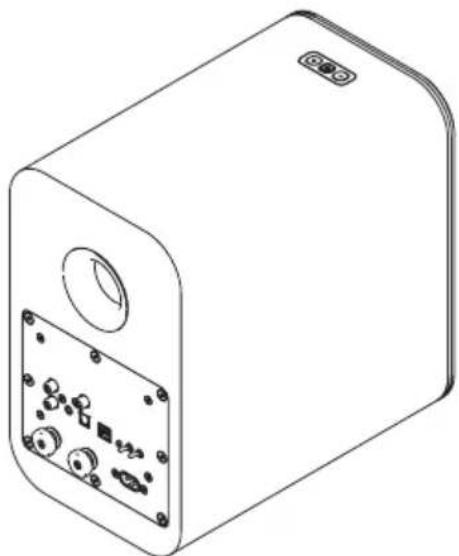
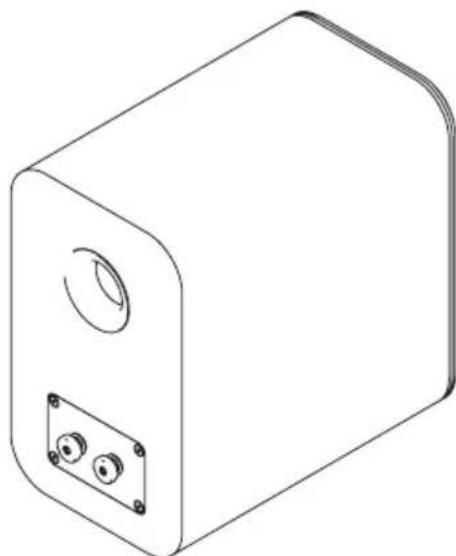
KoIohKa co BCTpoeHHbIM ycJInTeJeEM -1 wT. NaccNBHaKoIohKa -1 wT.
IyntdNCTaHcNOHnHO ynpabneHn-1wT.
IeHonnactoBa npo6ka -2 wT.
AkkymyIaTOpHbIe 6aTapeu IaIpyIbT dNCTaHcUHOHHOrO ynpabNeHnra-2Wt.
Cetebon ka6eIb (Bennko6pntaHn) 一 1 uT.
Cetbeonka6enb(EC)-1wT.
BvIcTeBOrO Ka6eJIra 3aBnCtOT BepCm CnCTEmbl Jn KOHKpeTHOROp bHka.
Akyctnueckn ka6eb,4M-1 1wT.
PykoBoOCTBO nIb3OBaTeJra-1wT.
O630pФункци
PpOboAoHoe noKnIOueHne
AHaIorOBbI ayDnOBxOJ. CTepeoOOhueckne pa3beMbI nn CtepeOrHe3do 3,5 MM N03B0JIaOT NODKNIOaTb CNCTEmy K BHeUHEmy aHaIorOBOMY NCTOCHNky 3ByKa, HApPIMep, K npOnIrpbIbATEIIO KOMNaKT-DnCKOB.
- OnTnueckn uΦpOBoB BXoN O3BOJReT NOkJIouaTb CnCTeMy KO BHeUHEmy uΦpOBoM y NCToUHKnY 3ByKa, HapPmep, K TeLeBu3Opy.
- BbIXoHa DNHAMK. Ctepeopa3beMbl 4 MM N03BOJIAOT NOdkJIIOaTb KOIOHky C yCUNNTeIeM K NaCCNBHOI KOJOHKe.
- USB - pa3bem USB Tnna B, no3BOLJIOUIN NOKJIHOaTb cnCTemy K KOMNbIOTepy.
- Sub Out — Hn3KoayactOThb BbIXoJ ca6Byepea nIy nodkNIOUeyH N BHeuHEmy ca6Byepey.
PekomeHnyeTcNcNoIb3OBAbT uEnoUHbIe 6aTapeN. BaTapeN dpyrNX BnIOB MOryT nPoTeKaTb N HaHocuTb yuepe6 yctpoiCTBy.
Ytun3aucna6atapei
NcnoB3ObaHHbIe 6aTape ndoXHbI yTNn3npoBaTbC B COOTBeTCTBm C npabnAmn nepepa60TK, DeiCTByuImn B perHOne NcNoB3ObaHn npoKyta. HE dOnyckaTb KOpOTKOrO 3ambKaHn 6aTape, HE 6pocatb nx B Body nn B OROhB, HE BB6pacbIBaTb nx C 6bITOBbIMn OTxOdaMn.
Pa3bEmbl 3nemEnTbI ynpabHeHna 3aHne nAHeN KOJOhKn
1.Ahanoorobbl ctepeofoHueckn pa3bem IokknoueHue KaHANO2OBOMU ucmouHuky 38ka.
2.AhanoorOoe rhe3do 3,5 MM IodkIoueHue aHaIo2oB02o ucmouHuka 38yka (cmepeofoHuueckue pa3bEmbl npu 3mOM omKnIOaIomca).
3. Ontuueckn BbIXoI Poiokluoyehue uphiobbx onmuueckux ucmouHuko6 38yka.
4. BbIXoHa nnHAMNK IooKIOUeHue naccubHOu KOONku.
5. Sub
Подклioченue
ca6bypepa. dononHumeNBHO2O 8NeuHes2O
- USB IodKJIIOUeHue KOMnbIomepa KaK UcmoUHka 38yka.
7.ПОLOXGEHNE KOLOHKn Bb6op pacnoIoxeHua 8 nomueHuu cneBa unu cnpaBa omHocumelbHo noLoxeHua npocnyuuaHua.
8.ПepeknIOuTeIb 3KbAlaH3epa OBeceueBaem Hacmpouky BoCnpou3BedeHua KOJHOHKAMU HU3KUX Yacmo - Bluetooth Ipebeod cucmembI b pexum ycmaHOBnHeu c83u mexdy ycmpoucmbaMu Bluetooth.
- Ntahne nepemehhoro Toka Podknoye nuhanu on cemu 100-240 B.
06o3haueHna
3nemtebl ynpabneHna KONOHKe
1. Pexmm OxuaHnBb6Op nCTOuHnKa
Iy BknoeHua Haxamb. Haxamb u ydepxueamb dna nepexoda bpekum okudun
HaxumambdIyBbIbopaucmouHuka
Haxambu donzo ydepkubam, kozda ycmpoucmbo haxodumc8 pexume okuudun, dna nepeboda ezo b znyboukupexum okuudun.
- Haxamb, ymo6bI yMeHbUmb epomKocmb Ha oduh wa.
Haxambu ydepkubamb,ymo6bl ymehbumb zpomkocmb Ha HeckoIbKO w208.
- Haxamb, ymo6bI yBenuuum b zpomkocmb Ha oduh wa2.
Haxambu yepxueamb,ymo6bI ybeenuumb zpomkocmb Ha HeCKoJIbKO w208.
ПРМЕЧАHЕ. Habtmeme odnopeMeHHO Khonku «« « +умобу усmaHOumb ypoBeH spOMKocMu ha 20%.
IybltdnctaHNOHHoroynpaBneHna
- ()
Ipebeod cucmemb6 pekum okudahue, 6knioeHue onmuuecko0bxoda.
2.
OmkHue/H8KIOueHue 3bYKa KOHOHK.
3.
Pay3a/8ocnpou3beDeHue 38yka npu npou2pb18auu yepe3 Bluetooth unu USB
4.
KpamKoe haxamue no380nem yMeHbWumb 2pOMKocmb Ha oduh wa.
InumelbHoe Haxamue no360nem yMeHbUumb 36yK Ha HeCKoJIbKO w208.
- +
KpamKoe Haxamue no360Jem yBenuumb 2pomKocmb Ha oduh wa.
IumelbHoe Haxamue no360nem yBenuumb zpomKocmb Ha HECKoJIbKO wJ2OB.
6.
Bo38pam K npedbyuemy mpeky npu npou2pb1aHu u cep3 Bluetooth unu USB
7.
Ipepexod K cneoyouemy mpeky npu npouapbibaHuu uepes Bluetooth unu USB
- BLU
Bb6op unhepeeca Bluetooth, dnumenbHoe haxamue nepebodum cucmemy b pekum ycmahOBHeu 683u Mekjdy ycmpoucmbamu Bluetooth.
- OPT
BbI6op onmuuecko2o 8xoDa.
- ANA
Bb6op aHaIao2o8o2o 6xoDa.
- USB
Bb16op bxa USB.
Eknnnyataua
CoeHHeHne MeKdy KOHOKaMn
Chaayala Heo6xOIMO COeINHITb KOJOHKn C NOMOuBIO akyCTnueckoro Ka6eJIa (BXODNT B KOMNIEKT NOCTABKN). IpoBODa IMeOT pa3hBn cBET dRn O603HaueHn IPOJPHocTt (艹 + 艹) n 艹 - 艹 ).Heo6xOIMO BCerda NcNoIb3OBaTb 30IOTOn IpoBOD dRn (艹 + 艹) n cepe6prHbI npOBd dRn (艹 - 艹) Ha o6eNX CTOPOHAX CoeINHeHn.
Pa3MeueHHe n c6OpKa cnCTembl
OoctatoUHO npocTo NOCTABnTB KOJONHKn no 06e CTOpOHbI OT OCHOBHOrO NONOKeHn IPOCnyuBaHnHa NOxODaHIO POBHyIO NOBepXHOCTb, ONTmAbHo — Ha pacctoHHN 2-4 M (2-4 npda) dpyrOT dpyra.
Takke Q M20 MOxHOb pa3MeCTNb Ha HanoJbHO CTouKe Q 3000FSi nnHa cTeHe C NOMOuBIO KpOHuTeHnHa Q 3000WB (npno6peTaetcra OTdeJIbHO), CneDy INHCTpyKUm, npedocTabIeMbIM C 3TUMn Akceccyapam.
-ПодкlioуehняКусиnteюКолонkapacnolaeraetc cnpaBa nnn cneBa. Bb6op pacnoIooKeHnO cUyseCTBnreTc nepeKIOuTaTeiMaN 《JIeBbI》 N «PpabByI»
Ynpablenne nepeknoatelem kBana3epa
XapakTePncTnBOCIpOn3BeHeH Nn3Knx YacOT MOxHO NOCTpOHTb NOI NOBepxHocTB, B6Jn3N KOtOpO paONaRaetc KOnOHKa. Bndi NOBepxHocTn: CteHa, ONka, yroI. PnpCnywaItec b K 3ByuHIO KOLOHKIN KaKdOM IN TpeX NonoKeHIn BBiepeNTe HAn6Ooney UDOBNetBopUTeNbHoe.
B 3mom nonoxehuu obecneuubaemc hau6onee noHoe bocnpou3beDeHue H3kux qacmom. Iodxodum dnyaee, k0da konohka pacnonaaemc Bdau om cmen u yeno.
B 3omom noloxehuu obecneyuabaemc ymepeHHoe Bocnpou3beHue H3kux Yacmom. Iodxodum dna Cnyaee, K02da k01oHa pacnona2aemc 6bnu3u cmehbl uHa nonke.
B əm o n o x e h u H u kue y a c m o m b i np u z ny w e h b i. Iodxodum dny cyuae, Ko2da KonoHka pacnona aemc8 y2ny kOmHambl.
DOnonHnteIbHbI ca6Byep
Ca6Byepe MoKHO NOIokNIOHTbYepe3rHe3do SUB. OH dONKeH 6bITb OCHAueH 3IemeHTAMn ynpabNeHn ypOBHe n KpocCOBepom. POKJIQUeHne ca6Byepa no3BOJnE t ClyuTa My3bIKy c KaueCTBeHHbIM BOCPOn3BeDeHnEM HxHx uactOT. YnpabJna HaCTPOJkAmn ca6Byepe, MoKHO IO6bTc npednoHTenbHOro 3ByaHn.
DEmnΦHpoBaHne npToB
KonoHKn Q M20 ochaueHb 3aHnHm npTAm nIyUwe BCero pa6oTaOT B yCIOBnX, KOrda 3a HnMn NMeETc HekOtOpoe npoctpaHCTBO,TO eCTb OKONo 20 cm Do CTeHb. EcIn KonoHKn pacnonaraIoTc 6IIN3KO K CTHe nnB yrny, Heo6xOdmo BCTaBtB 3aDnHe NOPbI NeHOnlactOBbie npo6Kn, INaYe MoKeT CO3DaBaTbcra CInWkOM BbICOKn yPOBeHb HIXHNx YACTOT.
CneyetyoctOBepntbca, TTO npO6Kn IIOIOTHO CnIATB OTBepCTnX HHe BCTaBJeHbI CnIwKOM fny6oko.
B pezylbname ypoebHnHXu Yacmom noHu3umc, Ho npu 3om nobbcumc yemKocmb u HuxHra 2paHuaHa Yacmoma.
Moxho no3Kcnepumemhupoambu doumbcnaeamzo 38yuaHua. JndoocmukeHua onmumabHOZO KOHeuHO2 pe3ymbama Moxho nonpo6oambHEMHHOz u3MeHUMb pacnoJooKeHue KONOHOK.
Bknouehne nTuHa
- PoiKJIIOHTb Ka6eIb NITaHnK KOJIOHKe C ycINNTeEM K cTeBOB po3eTke. Iocne noKIOUChuHn numAHn CbeMoDuO pexuma oXudahn Bydem Zopemb KpaChbM.
-ДяВКЛHOUeHnCnCTeMbHaKaTbBa nYnbTe DnCTaHcNoHHOrO ynpaBHeHn Nn yDepKmBaTb Hn NaHeNynpaBHeHn.
-ДяВКЛЮЧЕНССТЕМБI HAXKaTbBa nYnbTe DnCTaHcUHOHHOrO ynpabLeHnR NIN ydepxKuBaTb NaHeJIynpabLeHnR.
AbTomatnueckn nepexoB peKm OxuaHna
B cnteme Q M20 npedycmotpeha yHKnna aBTOMaTnueckoro nepexoDa B pekm OxndaHnra C uebIO kOHOOMN 3neKtpo3Heprn. Ecn My3bika He BOCpON3BOIDTCB TeueHne 20 MNHT, cNTeMa aBTOMaTnueckn nepexoNT B pekm OxndaHnra.
Eknpnyatauia o6opydobAHn
Bocpnoun3BeDenHe 3Byka c nOmoosblu Bluetooth
Дя BOCPON3BedeHЯ 3Byka uepe3 CnCTemy Q M20 MoXHO NcNoIb3OBAtB HeCKoIbKO yCTpoiCTB Bluetooth. ChaHaJa Heo6xOdIMo yCTaHOBITb COpRAJKeHHe yCTpoiCTBa Bluetooth c KOLOHCoI corNaCHO n3IOXeHHbIM HIXe INHCTpyKUINM.
www.qacoustics.co.uk/m20drivers
Heo6xoJIMO coXpaHnTb 3OT foAin Ha KOMnbTope n cIeObaTb HNCTpyKunn No yCTaHOBKe dJa Windows 10.
- OTKpbTb DmCneTpueyctpoCTB.
- B pa3dene «3BykoBbIe, irpoBbIe n BuJeOyctPoIcTBA» Bbl6paTb yCTpoIcTBo «USB 2.0 High-Speed True HD Audio».
- BbI6paTb BklaNky «ДpaIbep» И НжаТь «ОбнOBNTb ДраIbep».
- BbI6paTb BapnAHT «BbINONHnTb NOnCK dpaNBePoB Ha 3TOM KOMNbHOtepe» N BbI6paTb 3aRpyKeHHbI dpaNBeP.
- Windows BbInonHIT 6OBHeHne IpaBepa.
- Korda 6OBHbIeHne 3aBepuNTcra, B cnncKe ayDIOyCToPiCTb MoXHO 6yTeT bYbIpaTb yCTpoiCTBO «SPDIF (USB2.0 High-Speed True HD Audio)» nn SPDIF Out (Q Acoustics M20).
7.Далee MOxHOMOxHOTKpbITb npnloXeHne DnBOCppon3BeDeEHMy3bIKN HacnaJdaTbcra.
Moxhno nCnOJIb3OBaTb DnCTaHcNIOHHe ynpabIeHne ayuocntemM20dpepyIINPOBKn rPOMKoCTn, aTaKke dnn pOnrpbBaHn, npNoCTaHOBKn nn nepeKIOUeHn Mekdy TpeKaMn B pInIOXeHnx dNBAOCpON3BeDeHn My3bKn, noDepxNBAUoXs 3Tu yHKuHN.
CoctoHnCBeToDmoDHorO HnDnKaTopa
| Красный Система в рекиме ож Indiana | ||
| Темно-красный Система в гльбоком рекиме ож Indiana | ||
| Белный Система ВоспponзВODIT 3Byk | ИЗ Истонны, подлочenvу的老 Опту检кову снтгостую Спун�ды | |
| Белный (мiraюши) Perулировka Гомкоctу | ||
| Белный, мiraет два对接 кожды три секунда | Ha onтчески вхор noctуает многороча нальный поцфравов 3Byk в форmate Dolby Digital, kotopсы не может 6ытв ВоспponзВ这样的话 Спунный Система ВоспponзВODIT 3Byk | |
| Спунный Система ВоспponзВODIT 3Byk | ИЗ Истонны, подлочenvу的老 Опту检кову снтгостую Спун�ды Спунный Мiraюши | |
| Спун, меденhoe мiraанhoe Bluetooth-у Спунуш� | Спту检кову的老 Опту检кову Спунуш� Спунуш� Спунуш� Спунуш� Спунуш� Спунуш� Спунуш� Спунуш� Спунуш� Спунуш� Спунуш� Спунуш� Спунуш� Спунуш� Спунуш� Cп肃у Сп肃у Сп肃у Сп肃у Сп肃у Сп肃у Сп肃у Сп肃у Сп肃у Сп肃у Сп肃у Сп肃у Сп肃у Сп肃у Сп肃у Сп肃у Сп肃у Сп肃у Сп肃у Сп肃у Сп肃у Cп肃у Cп肃у Cп肃у Cп肃у Cп肃у Cп肃у Cп肃у Cп肃у Cп肃у Cп肃у Cп肃у Cп肃у Cп肃у Cп肃у Cп肃у Cп肃у Cп肃у Cп肃у Cп肃у Cп肃у Сп肃у Cп肃у Cп肃у Cп肃у Cп肃у Cп肃у Cп肃у Cп肃у Cп肃у Cп肃у Cп肃у Cп肃у Cп肃у Cп肃у Cп肃у Cп肃у Cп肃у Cп肃у Cп肃у Сп肃у Сп肃у Cп肃у Cп肃у Cп肃у Cп肃у Cп肃у Cп肃у Cп肃у Cп肃у Cп肃у Cп肃у Cп肃у Cп肃у Cп肃у Cп肃у Cп肃у Cп肃у Cп肃у Сп肃у Cп肃у Сп肃у Cп肃у Cп肃у Cп肃у Cп肃у Cп肃у Cп肃у Cп肃у Cп肃у Cп肃у Cп肃у Cп肃у Cп肃у Cп肃у Cп肃у Cп肃у Cп肃у Cп肃у Сп肃у Сп肃у Сп肃у Cп肃у Cп肃у Cп肃у Cп肃у Cп肃у Cп肃у Cп肃у Cп肃у Cп肃у Cп肃у Cп肃у Cп肃у Cп肃у Cп肃у Cп肃у Cп肃у Сп肃у Cп肃у Cп肃у Сп肃у Cп肃у Cп肃у Cп肃у Cп肃у Cп肃у Cп肃у Cп肃у Cп肃у Cп肃у Cп肃у Cп肃у Cп肃у Cп肃у Cп肃у Cп肃у Cп肃у Сп肃у Cп肃у Сп肃у Сп肃у Cп肃у Cп肃у Cп肃у Cп肃у Cп肃у Cп肃у Cп肃у Cп肃у Cп肃у Cп肃у Cп肃у Cп肃у Cп肃у Cп肃у Cп肃у Cп肃у Сп肃у Сп肃у Cп肃у Сп肃у Cп肃у Cп肃у Cп肃у Cп肃у Cп肃у Cп肃у Cп肃у Cп肃у Cп肃у Cп肃у Cп肃у Cп肃у Cп肃у Cп肃у Cп肃у Cп肃у Сп肃у Сп肃у Сп肃у Сп肃у Cп肃у Cп肃у Cп肃у Cп肃у Cп肃у Cп肃у Cп肃у Cп肃у Cп肃у Cп肃у Cп肃у Cп肃у Cп肃у Cп肃у Cп肃у Сп肃у Cп肃у Cп肃у Cп肃у Сп肃у Cп肃у Cп肃у Cп肃у Cп肃у Cп肃у Cп肃у Cп肃у Cп肃у Cп肃у Cп肃у Cп肃у Cп肃у Cп肃у Cп肃у Cп肃у Сп肃у Cп肃у Cп肃у Сп肃у Сп肃у Cп肃у Cп肃у Cп肃у Cп肃у Cп肃у Cп肃у Cп肃у Cп肃у Cп肃у Cп肃у Cп肃у Cп肃у Cп肃у Cп肃у Cп肃у Сп肃у Cп肃у Сп肃у Cп肃у Сп肃у Cп肃у Cп肃у Cп肃у Cп肃у Cп肃у Cп肃у Cп肃у Cп肃у Cп肃у Cп肃у Cп肃у Cп肃у Cп肃у Cп肃у Cп肃у Сп肃у Cп肃у Сп肃у Сп肃у Сп肃у Cп肃у Cп肃у Cп肃у Cп肃у Cп肃у Cп肃у Cп肃у Cп肃у Cп肃у Cп肃у Cп肃у Cп肃у Cп肃у Cп肃у Cп肃у Сп肃у Сп肃у Cп肃у Cп肃у Сп肃у Cп肃у Cп肃у Cп肃у Cп肃у Cп肃у Cп肃у Cп肃у Cп肃у Cп肃у Cп肃у Cп肃у Cп肃у Cп肃у Cп肃у Cп肃у Сп肃у Сп肃у Cп肃у Сп肃у Сп肃у Cп肃у Cп肃у Cп肃у Cп肃у Cп肃у Cп肃у Cп肃у Cп肃у Cп肃у Cп肃у Cп肃у Cп肃у Cп肃у Cп肃у Cп肃у Сп肃у Сп肃у Сп肃у Cп肃у Сп肃у Cп肃у Cп肃у Cп肃у Cп肃у Cп肃у Cп肃у Cп肃у Cп肃у Cп肃у Cп肃у Cп肃у Cп肃у Cп肃у Cп肃у Cп肃у Сп肃у Сп肃у Сп肃у Сп肃у Сп肃у Cп肃у Cп肃у Cп肃у Cп肃у Cп肃у Cп肃у Cп肃у Cп肃у Cп肃у Cп肃у Cп肃у Cп肃у Cп肃у Cп肃у Сп肃у Cп肃у Cп肃у Cп肃у Cп肃у Сп肃у Cп肃у Cп肃у Cп肃у Cп肃у Cп肃у Cп肃у Cп肃у Cп肃у Cп肃у Cп肃у Cп肃у Cп肃у Cп肃у Cп肃у Сп肃у Cп肃у Cп肃у Cп肃у Сп肃у Сп肃у Cп肃у Cп肃у Cп肃у Cп肃у Cп肃у Cп肃у Cп肃у Cп肃у Cп肃у Cп肃у Cп肃у Cп肃у Cп肃у Cп肃у Сп肃у Cп肃у Cп肃у Сп肃у Cп肃у Сп肃у Cп肃у Cп肃у Cп肃у Cп肃у Cп肃у Cп肃у Cп肃у Cп肃у Cп肃у Cп肃у Cп肃у Cп肃у Cп肃у Cп肃у Сп肃у Cп肃у Cп肃у Сп肃у Сп肃у Сп肃у Cп肃у Cп肃у Cп肃у Cп肃у Cп肃у Cп肃у Cп肃у Cп肃у Cп肃у Cп肃у Cп肃у Cп肃у Cп肃у Cп肃у Сп肃у Cп肃у Сп肃у Cп肃у Cп肃у Сп肃у Cп肃у Cп肃у Cп肃у Cп肃у Cп肃у Cп肃у Cп肃у Cп肃у Cп肃у Cп肃у Cп肃у Cп肃у Cп肃у Cп肃у Сп肃у Cп肃у Сп肃у Cп肃у Сп肃у Сп肃у Cп肃у Cп肃у Cп肃у Cп肃у Cп肃у Cп肃у Cп肃у Cп肃у Cп肃у Cп肃у Cп肃у Cп肃у Cп肃у Cп肃у Сп肃у Cп肃у Сп肃у Сп肃у Cп肃у Сп肃у Cп肃у Cп肃у Cп肃у Cп肃у Cп肃у Cп肃у Cп肃у Cп肃у Cп肃у Cп肃у Cп肃у Cп肃у Cп肃у Cп肃у Сп肃у Cп肃у Сп肃у Сп肃у Сп肃у Сп肃у Cп肃у Cп肃у Cп肃у Cп肃у Cп肃у Cп肃у Cп肃у Cп肃у Cп肃у Cп肃у Cп肃у Cп肃у Cп肃у Cп肃у Сп肃у Сп肃у Cп肃у Cп肃у Cп肃у Сп肃у Cп肃у Cп肃у Cп肃у Cп肃у Cп肃у Cп肃у Cп肃у Cп肃у Cп肃у Cп肃у Cп肃у Cп肃у Cп肃у Cп肃у Сп肃у Сп肃у Cп肃у Cп肃у Сп肃у Сп肃у Cп肃у Cп肃у Cп肃у Cп肃у Cп肃у Cп肃у Cп肃у Cп肃у Cп肃у Cп肃у Cп肃у Cп肃у Cп肃у Cп肃у Сп肃у Сп肃у Cп肃у Сп肃у Cп肃у Сп肃у Cп肃у Cп肃у Cп肃у Cп肃у Cп肃у Cп肃у Cп肃у Cп肃у Cп肃у Cп肃у Cп肃у Cп肃у Cп肃у Cп肃у Сп肃у Сп肃у Cп肃у Сп肃у Сп肃у Сп肃у Cп肃у Cп肃у Cп肃у Cп肃у Cп肃у Cп肃у Cп肃у Cп肃у Cп肃у Cп肃у Cп肃у Cп肃у Cп肃у Cп肃у Сп肃у Сп肃у Сп肃у Cп肃у Cп肃у Сп肃у Cп肃у Cп肃у Cп肃у Cп肃у Cп肃у Cп肃у Cп肃у Cп肃у Cп肃у Cп肃у Cп肃у Cп肃у Cп肃у Cп肃у Сп肃у Сп肃у Сп肃у Cп肃у Сп肃у Сп肃у Cп肃у Cп肃у Cп肃у Cп肃у Cп肃у Cп肃у Cп肃у Cп肃у Cп肃у Cп肃у Cп肃у Cп肃у Cп肃у Cп肃у Сп肃у Сп肃у Сп肃у Сп肃у Cп肃у Сп肃у Cп肃у Cп肃у Cп肃у Cп肃у Cп肃у Cп肃у Cп肃у Cп肃у Cп肃у Cп肃у Cп肃у Cп肃у Cп肃у Cп肃у Сп肃у Сп肃у Сп肃у Сп肃у Сп肃у Сп肃у Cп肃у Cп肃у Cп肃у Cп肃у Cп肃у Cп肃у Cп肃у Cп肃у Cп肃у Cп肃у Cп肃у Cп肃у Cп肃у Сп肃у Cп肃у Cп肃у Cп肃у Cп肃у Cп肃у Сп肃у Cп肃у Cп肃у Cп肃у Cп肃у Cп肃у Cп肃у Cп肃у Cп肃у Cп肃у Cп肃у Cп肃у Cп肃у Cп肃у Сп肃у Cп肃у Cп肃у Cп肃у Cп肃у Сп肃у Сп肃у Cп肃у Cп肃у Cп肃у Cп肃у Cп肃у Cп肃у Cп肃у Cп肃у Cп肃у Cп肃у Cп肃у Cп肃у Cп肃у Сп肃у Cп肃у Cп肃у Cп肃у Сп肃у Cп肃у Сп肃у Cп肃у Cп肃у Cп肃у Cп肃у Cп肃у Cп肃у Cп肃у Cп肃у Cп肃у Cп肃у Cп肃у Cп肃у Cп肃у Сп肃у Cп肃у Cп肃у Cп肃у Сп肃у Сп肃у Сп肃у Cп肃у Cп肃у Cп肃у Cп肃у Cп肃у Cп肃у Cп肃у Cп肃у Cп肃у Cп肃у Cп肃у Cп肃у Cп肃у Сп肃у Cп肃у Cп肃у Сп肃у Cп肃у Cп肃у Сп肃у Cп肃у Cп肃у Cп肃у Cп肃у Cп肃у Cп肃у Cп肃у Cп肃у Cп肃у Cп肃у Cп肃у Cп肃у Cп肃у Сп肃у Cп肃у Cп肃у Сп肃у Cп肃у Сп肃у Сп肃у Cп肃у Cп肃у Cп肃у Cп肃у Cп肃у Cп肃у Cп肃у Cп肃у Cп肃у Cп肃у Cп肃у Cп肃у Cп肃у Сп肃у Cп肃у Cп肃у Сп肃у Сп肃у Cп肃у Сп肃у Cп肃у Cп肃у Cп肃у Cп肃у Cп肃у Cп肃у Cп肃у Cп肃у Cп肃у Cп肃у Cп肃у Cп肃у Cп肃у Сп肃у Cп肃у Cп肃у Сп肃у Сп肃у Сп肃у Сп肃у Cп肃у Cп肃у Cп肃у Cп肃у Cп肃у Cп肃у Cп肃у Cп肃у Cп肃у Cп肃у Cп肃у Cп肃у Cп肃у Сп肃у Cп肃у Сп肃у Cп肃у Cп肃у Cп肃у Сп肃у Cп肃у Cп肃у Cп肃у Cп肃у Cп肃у Cп肃у Cп肃у Cп肃у Cп肃у Cп肃у Cп肃у Cп肃у Cп肃у Сп肃у Cп肃у Сп肃у Cп肃у Cп肃у Сп肃у Сп肃у Cп肃у Cп肃у Cп肃у Cп肃у Cп肃у Cп肃у Cп肃у Cп肃у Cп肃у Cп肃у Cп肃у Cп肃у Cп肃у Сп肃у Cп肃у Сп肃у Cп肃у Сп肃у Cп肃у Сп肃у Cп肃у Cп肃у Cп肃у Cп肃у Cп肃у Cп肃у Cп肃у Cп肃у Cп肃у Cп肃у Cп肃у Cп肃у Cп肃у Сп肃у Cп肃у Сп肃у Cп肃у Сп肃у Сп肃у Сп肃у Cп肃у Cп肃у Cп肃у Cп肃у Cп肃у Cп肃у Cп肃у Cп肃у Cп肃у Cп肃у Cп肃у Cп肃у Cп肃у Сп肃у Cп肃у Сп肃у Сп肃у Cп肃у Cп肃у Сп肃у Cп肃у Cп肃у Cп肃у Cп肃у Cп肃у Cп肃у Cп肃у Cп肃у Cп肃у Cп肃у Cп肃у Cп肃у Cп肃у Сп肃у Cп肃у Сп肃у Сп肃у Cп肃у Сп肃у Сп肃у Cп肃у Cп肃у Cп肃у Cп肃у Cп肃у Cп肃у Cп肃у Cп肃у Cп肃у Cп肃у Cп肃у Cп肃у Cп肃у Сп肃у Cп肃у Сп肃у Сп肃у Сп肃у Cп肃у Сп肃у Cп肃у Cп肃у Cп肃у Cп肃у Cп肃у Cп肃у Cп肃у Cп肃у Cп肃у Cп肃у Cп肃у Cп肃у Cп肃у Сп肃у Cп肃у Сп肃у Сп肃у Сп肃у Сп肃у Сп肃у Cп肃у Cп肃у Cп肃у Cп肃у Cп肃у Cп肃у Cп肃у Cп肃у Cп肃у Cп肃у Cп肃у Cп肃у Cп肃у Сп肃у Сп肃у Cп肃у Cп肃у Cп肃у Cп肃у Сп肃у Cп肃у Cп肃у Cп肃у Cп肃у Cп肃у Cп肃у Cп肃у Cп肃у Cп肃у Cп肃у Cп肃у Cп肃у Cп肃у Сп肃у Сп肃у Cп肃у Cп肃у Cп肃у Сп肃у Сп肃у Cп肃у Cп肃у Cп肃у Cп肃у Cп肃у Cп肃у Cп肃у Cп肃у Cп肃у Cп肃у Cп肃у Cп肃у Cп肃у Сп肃у Сп肃у Сп肃у Cп肃у Cп肃у Cп肃у Сп肃у Cп肃у Cп肃у Cп肃у Cп肃у Cп肃у Cп肃у Cп肃у Cп肃у Cп肃у Cп肃у Cп肃у Cп肃у Cп肃у Сп肃у Сп肃у Сп肃у Cп肃у Cп肃у Сп肃у Сп肃у Cп肃у Cп肃у Cп肃у Cп肃у Cп肃у Cп肃у Cп肃у Cп肃у Cп肃у Cп肃у Cп肃у Cп肃у Cп肃у Сп肃у Сп肃у Cп肃у Cп肃у Сп肃у Cп肃у Сп肃у Cп肃у Cп肃у Cп肃у Cп肃у Cп肃у Cп肃у Cп肃у Cп肃у Cп肃у Cп肃у Cп肃у Cп肃у Cп肃у Сп肃у Сп肃у C化青团 | ПЕТУ СИSTONYAETMногороть的老们 ФOTMOTYANOWHENHOTUOZHOUHOOHOOHOOHOOHOOHOOHOOHOOHOOHOOHOOHOOHOOHOOHOOHOOHOOHOOHOOHOOHOOHOOHOOHOOHOOHOOHOOHOOHOOHOOHOOHOOHOOHOOHOOHOOHOOHOOHOOHOOHOOHOOHOOHOOHOOHOOHOOHOOHOOHOOHoo |
Texhnueckne xapaKtepncTnkn
YnyuHHeNe KaueCTBa 3Byka .........KoJeKn aptX, aptX HD aptX Low Latency, SBC, AAC
Pa3mepbi
(× × ) 170x279x296 MM
61/16"×11"×1f/g
Macca
Kolonka c ycnntenem 5,5 K12yHTOB 2 yHcnn
PaccnBna KonoHa 5,1 Kr 11 yHTOB 4 yHcnn
PpHnHaIeXHoCTN
HacteHHbKpOHTeH NQ 3000WB YrOJ nobopoTa Q 3000WB HAnoBHaA cToKa Q 3000FSi
23 / 4 × 69 / 32 × 37 / 8
Pa3MepbI (U×B×Γ):70×159×99MM
5-45 MM
3/16" - 113/16"
Pa3Mepb(I×B×Γ):
250× 682× 290MM
9/8"×2913/16"×17/16"
TapaHTn
Ha cncTeMbQ M20 npedocabnreTc rapaHTnOTCyCTBnA DekeTob KaueCTBa MaepnaIOB n 3roTOBHeHn CpOKOM Ha 1 roC dAtb npno6peHn. B teueHne rapaHTnHoro cpoka KomnHn Q Acoustics o83yeTc npon3BeCTn peMOHT n3dEeHn nn 3ameHnt b erO, eCIn nocNe npOBedeHn npOBepKn OHa nn ee Ha3NaueHHb Dnctpn6bIOTop nn yONHMOUeHHn npedCTaBntelb 06hApjXkat deEKT B npedocTabHeHOM Ha npOBepKy n3dEHN.
TapaHTnHe paCnPoCTpaHReTcHa CnyuAn HEnpAunbHoro NCNOJb3OBaHnI N cTeCTBeHHORO n3HOca.
TobapbI DnpeMOHTa B nepByIO oupeBb DoJnxHb6blb Bo3BpaueHb NoCTabNBWeMy nx Dnnepy. Ecnn 3To HeBO3MOxHb, CBaxNtEcB C Q Acoustics nnn Ha3NaueHHbIM KOMpHaHne PernoHaJIbHbIM dNCTprN6bIoTOPom, 4TO6bl OnpeDentb HndLeKaUyO rapaHTnHyO npoeDpy. IIO BO3MOxHOCTn DnR BO3BpTa N3dEINr CNeDeYET NCNoJB3OBaTbOpunHaJIbHyO ynaKOBky, TAK KAK rapaHTnHe paCnpocTpapanetcHa yuep6, pnpuHHeHHbI BO Bpemr TpaHCnOpTnpOBKn B ceHTp peMOHTa. 3Ta rapaHTn HIKoM O6pa3OM He yuemIeT zakOHhIe Ppaba Notpe6nteI.
Cpok DeiCTBnra rapaHTn moXHO npOJNTb do 2 neT, 3apeHcTpnpOBab n3deJIne Ha caIte
www.qacoustics.co.uk/register.
KoHTaKTHaIHHOpMaun
TnabHbnofnc
Q Acoustics
Woodside 2
Dunmow Road
Bishops Stortford
Hertfordshire, Běnnko6pútána.
CM23 5RG
Ba3a 3HaHn
YTo6blNoJyUHTbDOnoJHHTeBHyIO HOpMaunIO, CBeJeHnO NoepKke N/nn OCTaBHT b3aBky,CneJyET nocTeNTb OHnaH-NopTaN 6a3b 3HaHH:
support.qacoustics.co.uk
HOpMaunO TeHNueckOM 6cnyKbAHN
support@qacoustics.co.uk

ACOUSTICS
M20 HD 无线系统
用户手册
目录
安全信息 1
www.qacoustics.co.uk/m20drivers
support@qacoustics.co.uk

ACOUSTICS
M20有源音箱
M 20 數位主動式喇叭
用户手册
限用物質含有情況標示
www.qacoustics.co.uk/m20drivers
61/16" x 11" x 115/8"
重量
擴大機揚聲器. 5.5kg 121b 2oz
www.qacoustics.co.uk/register.
聯絡方式
總公司
Q Acoustics
Woodside 2
Dunmow Road
Bishops Stortford
Hertfordshire, UK
CM23 5RG
知識庫
support@qacoustics.co.uk

ACOUSTICS
QACOUSTICS.CO.UK
- EC DECLARATION OF CONFORMITY
- Contents
- Correct disposal of this product
- Safety Information
- Service
- Important notice for UK users
- Notes
- FCC Statement (For US Customers)
- Industry Canada Statement (for Canadian Customers)
- Introduction
- Package contents
- Feature summary
- Wired connectivity
- Wireless connectivity
- Acoustic
- Remote batteries
- Fitting or replacing batteries
- Battery disposal
- Speaker rear connections and controls
- Key
- Standby / Source
- BLU
- OPT
- ANA
- USB
- Operation
- Connecting between the speakers
- Speaker positioning and assembly
- Adjusting the EQ switch
- Optional subwoofer
- Port damping
- Powering on
- Auto standby
- Playing audio using Bluetooth
- Clearing the Bluetooth pairing list
- Playing audio using optical digital
- Playing audio using analogue
- Playing audio using USB
- Specification
- Amplifier performance
- Speakers
- Power
- Bluetooth®
- Dimensions
- Weight
- Accessories
- Warranty
- Contact
- Head office
- Knowledge base
- Service information
- ACOUSTICS
- KABELLOSES SYSTEM M20 HD
- Kontakt
- Hauptgeschäftssitz
- Contacto
- Oficinas centrales
- SYSTEME SANS FIL M20 HD
- MANUEL DU PROPRIÉTAIRE
- DECLARATION DE CONFORMITE CE
- SISTEMA WIRELESS M20 HD
- MANUALE UTENTE
- Contattaci
- Sede
- M20 HD DRAADLOOS SYSTEEM
- GEBRUIKERSHANDLEIDING
- EG-CONFORMITEITS VERKLARING
- Gewicht
- Garantie
- Hoofdkantoor
- Kennisbestand
- SISTEMA SEM FIOS HD M20
- MANUAL DO UTILIZADOR
- DECLARACAO DE CONFORMIDADE CE
- Garantia
- M20 HD TRÄDLÖST SYSTEM
- AGARMANUAL
- EG-FORSAKRAN OM OVERENSSTAMMELSE
- Matt
- Vikt
- Huvudkontor
- Siedziba glowna
- Baza wiedzy
- БЕСПОННОДHAУДИОCTИСТEMA M20 CO 3BYKOM ВыICOKОЧETКОCTN
- DEKJIAPALUNO COOTBETCTBUN EC
- CopepxaHne
- BaxnHa HOpMaqna - Heo6xOaMnOBHmMaTeIbHo 03HaKOMITbcA
- PpabnblbHa yTnln3aun 3TOr npoDyKta
- Texnueckoe 06cIymbHne
- PpimmeaHnA
- 3aBHeHc FCC (nnoB3oBaTeJe n3 CwA)
- 3aBHeHne MmHcTepeCTBa npomblneHHocTn KaHaDbI (dnoNb3OBaTeNe n3 KaHaDbI)
- BVeJeHne
- CopexHMOe ynaKOBKn
- O630pФункци
- PpOboAoHoe noKnIOueHne
- Ytun3aucna6atapei
- 06o3haueHna
- 3nemtebl ynpabneHna KONOHKe
- Pexmm OxuaHnBb6Op nCTOuHnKa
- IybltdnctaHNOHHoroynpaBneHna
- Eknnnyataua
- CoeHHeHne MeKdy KOHOKaMn
- Pa3MeueHHe n c6OpKa cnCTembl
- Ynpablenne nepeknoatelem kBana3epa
- DOnonHnteIbHbI ca6Byep
- DEmnΦHpoBaHne npToB
- Bknouehne nTuHa
- AbTomatnueckn nepexoB peKm OxuaHna
- Eknpnyatauia o6opydobAHn
- Bocpnoun3BeDenHe 3Byka c nOmoosblu Bluetooth
- Texhnueckne xapaKtepncTnkn
- Pa3mepbi
- Macca
- PpHnHaIeXHoCTN
- TapaHTn
- KoHTaKTHaIHHOpMaun
- TnabHbnofnc
- Ba3a 3HaHn
- HOpMaunO TeHNueckOM 6cnyKbAHN
- 目录
- M20有源音箱
- M 20 數位主動式喇叭
- 重量
- 聯絡方式
Brand : Q-ACOUSTICS
Model : M20 HD
Category : Loudspeaker