USER MANUAL KD55X85K SONY
This TV comes with the following manuals. Please retain the manuals for future reference.
Setup Guide
- TV installation and setup.

Reference Guide (this manual) / Safety Documentation
- Safety information, remote control, troubleshooting, wall-mount installation, specification, etc.
Help Guide (On screen Manual)
- Settings, functions, Internet connection, troubleshooting, etc.
-
To open it, press input select) on the remote control and select [Help]. If [Help] does not exist, select [Edit] and add [Help].
-
You can refer to the Help Guide with your smartphone.

https://rd1.sony.net/help/ tv/jaep1/h_aep/
Note
- Before operating the TV, please read the "Safety Information".
- Read the supplied safety documentation for additional safety information.
- Images and illustrations used in the Setup Guide and this manual are for reference only and may differ from the actual product.
The "x"/"xx" that appears in the model name corresponds to a numeric digit, related to design, colour or TV system.
IMPORTANT NOTICE
Notice for Radio Equipment
Hereby, Sony Corporation declares that the radio equipment types KD-85X89K, KD-85X85K, KD-75X89K, KD-75X85K,
KD-65X89K, KD-65X85K, KD-55X89K, KD-55X85K, KD-50X89K, KD-50X85K, KD-43X89K, KD-43X85K are in compliance with Directive 2014/53/EU. The full text of the EU declaration of conformity is available at the following internet address: https://compliance.sony.eu
Hereby, Sony Corporation declares that the radio equipment types KD-85X89K, KD-75X89K, KD-75X85K, KD-65X89K, KD-65X85K, KD-55X89K, KD-55X85K, KD-50X89K, KD-50X85K, KD-43X89K, KD-43X85K are in compliance with the UK relevant statutory requirements.
The full text of the declaration of conformity is available at the following internet address: https://compliance.sony.co.uk
For this radio equipment, the following restrictions on putting into service or of requirements for authorization of use apply in AT, BE, HR, CY, CZ, DK, EE, FI, FR, DE, EL, HU, IE, IT, LV, LT, LU, MT, NL, PL, PT, SK, SI, ES, SE, UK, UK (NI), IS, LI, NO, CH, BG, RO, TR, AL, BA, MK, MD, RS, ME, Kosovo : 5150 - 5350 MHz band is restricted to indoor operations only.
Transporting
- Before transporting the TV set, disconnect all cables.
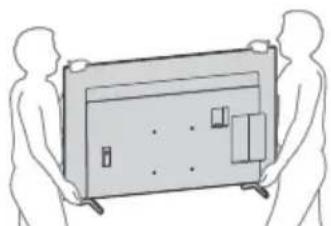
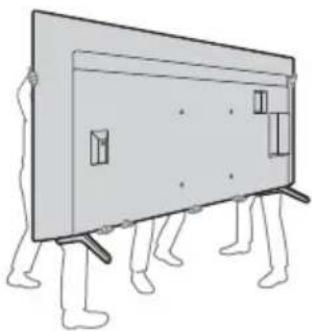
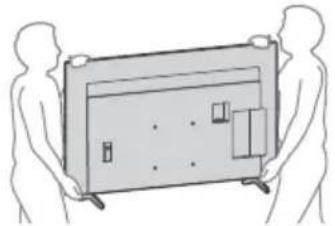
- Two or more persons (three or more persons for 214.8cm (85 inches) and above TV) are needed to transport a large TV set.
- When transporting the TV set by hand, hold it as shown below. Do not put stress on the panel and the frame around the screen.
- When lifting or moving the TV set, hold it firmly from the bottom.

KD-85X8xK
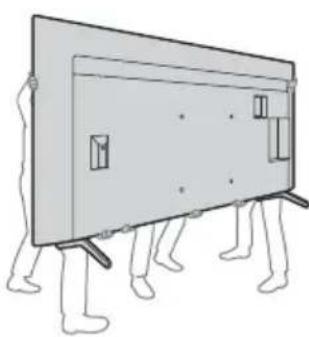
KD-75X8xK/65X8xK/55X8xK/50X8xK/43X8xK
-
When transporting the TV set, do not subject it to jolts or excessive vibration.
-
When transporting the TV set for repairs or when moving, pack it using the original carton and packing material.
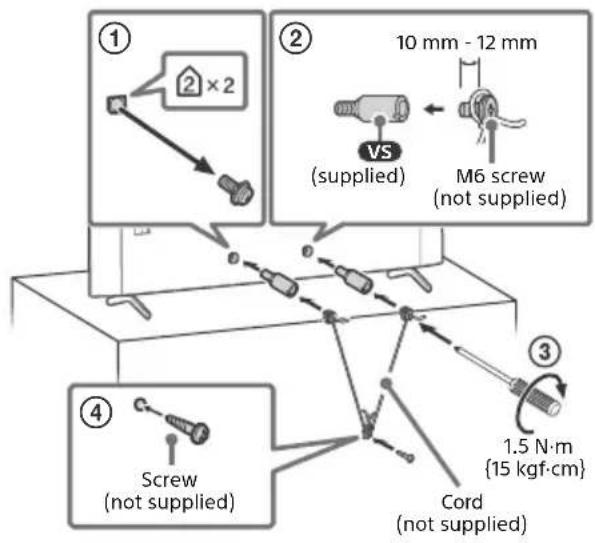
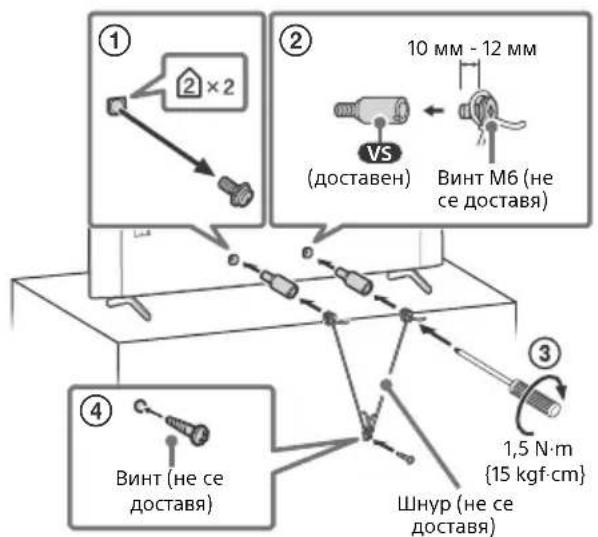
Topple prevention
Remote Control and TV
The remote control shape, layout, availability and function of remote control buttons may vary depending on your region/country/TV model/TV settings*1.
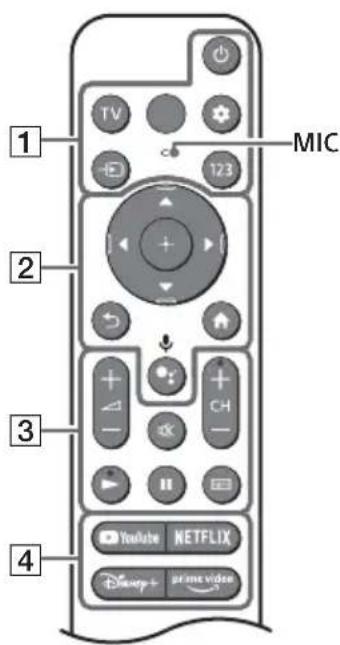
1 (Power)
TV: Display TV channel list or switch to input.
Quick settings): Display Quick Settings.
- (Input select): Display and select the input source, etc.
123 (Control menu): Display the Control menu.
2 ▲/▼/▲/▶/ ⊙: On screen menu navigation and selection.
Back)
(Home)
(Google Assistant) / (Microphone): Use Google Assistant*2*3 or voice search*3.
3 - (Volume)
(Mute)*4
$$
\mathrm {C H} + / - (\text {C h a n n e l})
$$
$$
\triangleright / \Vdash
$$
(Guide): Display the digital programme guide of TV or TV box*5.
4 App buttons
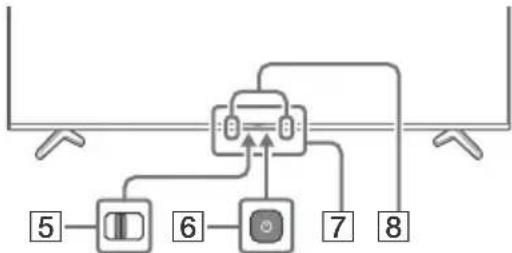
5 BUILT-IN MIC SWITCH?: Turn on/off the built-in MIC.
6 (Power)
Remote Control sensor / Light sensor / LED
Built-in MIC236: To enable the built-in MIC, press the Google Assistant/ microphone button on the remote control and follow the on-screen instructions.
1 For other remote control models, refer to the online Help Guide for details.
2 Only for limited region/country/model/language.
3 Google Assistant or voice search requires an Internet connection.
4 Accessibility shortcut is available by pressing and holding (Mute).
5 [TV box setup] setting is required.
6 Power consumption will increase when the built-in MIC is enabled as it is always listening.
GB

For more information, refer to the Help Guide.
Press (Input select) on the remote control and select [Help]. If [Help] does not exist, select [Edit] and add [Help].
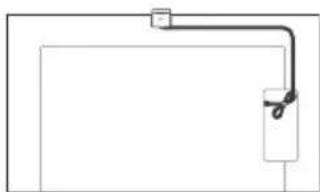
Optional Camera and Microphone Unit (not supplied) Cable Management
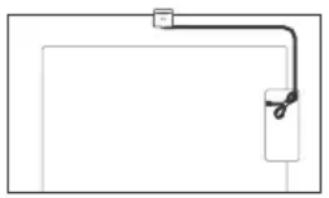
Troubleshooting
General troubleshooting for issues like: black screen, no sound, frozen picture, TV does not respond, or network is lost, do the following steps.
1 Restart your TV by pressing the power button on the remote control for about five seconds. The TV will restart. If the TV does not recover, try unplugging the mains lead then press the power button on the TV and release it. Wait for two minutes, and plug in the mains lead. Or, press the power button on the TV for about 40 seconds until the TV turns off.
2 Refer to the Help menu shown below.
3 Connect your TV to the Internet and perform a software update. Sony recommends you to keep your TV software updated. Software updates provide new features and performance improvements.
4 Visit Sony support website (information provided at the end of this manual).
When you plug in the TV, the TV may not be able to turn on for a while even if you press the power button on the remote control or the TV.
It takes time to initialize the system. Wait for about one minute, then operate it again.
The remote control does not function.
- Replace the batteries.
The parental lock password has been forgotten.
- Enter 9999 for the PIN and enter the new PIN.

For more information on troubleshooting, refer to the Help Guide.
Press (Input select) on the remote control and select [Help]. If [Help] does not exist, select [Edit] and add [Help].
Specifications
System
Panel system: LCD (Liquid Crystal Display) Panel, LED Backlight
TV system: Depend on your country/area selection/TV model
Analogue: B/G, D/K, I
Digital: DVB-T/DVB-C/DVB-T2
Satellite: DVB-S/DVB-S2
Colour system: PAL/SECAM/NTSC3.58 (Video only)/NTSC4.43 (Video only)
Channel coverage: Depend on your country/ area selection/TV model
Analogue: UHF/VHF/Cable
Digital: UHF/VHF/Cable
Satellite: Intermediate Frequency
950-2150 MHz
Sound output: 10W + 10W
Wireless technology
Protocol IEEE 802.11a/b/g/n/ac
Bluetooth® Version 4.2
| Frequency range Output power |
| Wireless LAN (TV) |
| 2400-2483.5 MHz | < 20.0 dBm |
| 5150-5250 MHz | < 23.0 dBm |
| 5250-5350 MHz | < 20.0 dBm |
| 5470-5725 MHz | < 20.0 dBm |
| 5725-5850 MHz | < 13.9 dBm |
| Bluetooth® (TV) |
| 2400-2483.5 MHz < 10.0 dBm |
| Bluetooth® (RMF-TX800U) |
| 2400-2483.5 MHz < 10.0 dBm |
Antenna (aerial)/cable
75 ohm external terminal for VHF/UHF
Satellite antenna
Female F Type Connector, 75 ohm.
DiSEqC 1.0, LNB 13 V/18 V & 22 kHz tone, Single
Cable Distribution EN50494.
AVIN
Video/Audio input (mini jack)
HDMI IN 1/2/3/4 (HDCP 2.3-compatible)
Video:
$$
4 0 9 6 \times 2 1 6 0 p (5 0, 6 0 \mathrm {H z}) ^ {\star 1 \star 2}, 4 0 9 6 \times 2 1 6 0 p
$$
$$
(2 4 \mathrm {H z}) ^ {\star 1}, 3 8 4 0 \times 2 1 6 0 \mathrm {p} (5 0, 6 0 \mathrm {H z}) ^ {\star 2},
$$
$$
3 8 4 0 \times 2 1 6 0 p (2 4, 2 5, 3 0 \mathrm {H z}), 1 0 8 0 p (3 0, 5 0,
$$
$$
6 0, 1 0 0, 1 2 0 \mathrm {H z}), 1 0 8 0 / 2 4 \mathrm {p}, 1 0 8 0 \mathrm {i} (5 0, 6 0 \mathrm {H z}),
$$
$$
7 2 0 p (3 0, 5 0, 6 0 \mathrm {H z}), 7 2 0 / 2 4 p, 5 7 6 p, 4 8 0 p,
$$
$$
P C F o r m a t s ^ {\star 3}
$$
$$
3 8 4 0 \times 2 1 6 0 p (1 0 0, 1 2 0 \mathrm {H z}) ^ {\star 2 \star 4}
$$
Audio:
In eARC (Enhanced Audio Return Channel)
mode
Refer to the online Help Guide for details.
Except eARC mode
5.1 channel linear PCM: 32/44.1/48/88.2/
96/176.4/192 kHz 16/20/24 bits, Dolby
Audio, Dolby Atmos, DTS
eARC/ARC (Enhanced Audio Return Channel/
Audio Return Channel) (HDMI IN 3 only)*5
In eARC mode
Refer to the online Help Guide for details.
In ARC mode
Two channel linear PCM: 48 kHz 16 bits,
Dolby Audio, Dolby Atmos, DTS
DIGITAL AUDIO OUT (OPTICAL)
Digital optical jack (Two channel linear PCM:
48 kHz 16 bits, Dolby Audio, DTS)
1,2(HDDREC)* 6
USB device port (2 USB HDD device for
REC feature)
USB port 1 supports High Speed USB (USB 2.0)
USB port 2 supports Super Speed USB (USB 3.2 Gen 1)
1
CAM (Conditional Access Module) slot
古 LAN
10BASE-T/100BASE-TX connector (Depending on the operating environment of the network, connection speed may differ. The
communication rate and quality are not guaranteed.)
Power, Product Fiche and others
Power requirements
220V-240VAC,50Hz
Screen size (measured diagonally) (Approx.)
KD-85X8xK: 214.8 cm / 85 inches
KD-75X8xK: 189.3 cm / 75 inches
KD-65X8xK: 163.9 cm / 65 inches
KD-55X8xK: 138.8 cm / 55 inches
KD-50X8xK: 125.7 cm / 50 inches
KD-43X8xK: 108.0 cm / 43 inches
Power consumption
In [Standard] mode
KD-85X8xK:242W
KD-75X8xK:225W
KD-65X8xK:181W
KD-55X8xK:137W
KD-50X8xK:94W
KD-43X8xK:79W
Standby power consumption**8
0.50 W (25 W in software/EPG update mode)
Display resolution (horizontal × vertical) (pixels)
3840 × 2160
Output rating
500 mA (for USB 1), 900 mA (for USB 2)
Dimensions (Approx.) (w× h× d) (cm)
with Table-Top Stand
KD-85X89K / 85X85K: 190.1 × 117.8 × 45.7
KD-75X89K / 75X85K: 167.5 × 104.1 × 41.2
KD-65X89K / 65X85K: 145.2 × 90.6 × 33.9
KD-55X89K / 55X85K: 123.3 × 78.3 × 33.9
KD-50X89K / 50X85K: 111.9 × 71.6 × 28.8
KD-43X89K / 43X85K: 96.4 × 62.9 × 28.8
without Table-Top Stand
KD-85X8xK: 190.1 × 109.0 × 7.3
KD-75X8xK: 167.5 × 96.2 × 7.3
KD-65X8xK: 145.2 × 83.6 × 7.2
KD-55X8xK: 123.3 × 71.1 × 7.2
KD-50X8xK: 111.9 × 64.9 × 7.0
KD-43X8xK: 96.4 × 56.3 × 6.9
Stand width (Approx.) (cm)
Standard position:
KD-85X89K / 85X85K: 153.2
KD-75X89K/75X85K:132.9
KD-65X89K / 65X85K: 120.9
KD-55X89K / 55X85K: 106.1
with Table-Top Stand
KD-85X89K/85X85K:46.2
KD-75X89K/75X85K:33.8
KD-65X89K / 65X85K:23
KD-55X89K / 55X85K: 18.1
KD-50X89K / 50X85K: 13.3
Optional accessories
Wall-Mount Bracket: SU-WL850
KD-75X8xK / 65X8xK / 55X8xK only)
Wall-Mount Bracket: SU-WL450
Screw diameter and length:
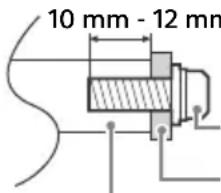
Screw (M6)
Wall-Mount Bracket
VS
Camera and Microphone Unit: CMU-BC1
Operating temperature: 0^ - 40^
Operating humidity: 10% -80% RH (noncondensing)
1 When 4096 × 2160p is input and [Wide mode] is set to [Normal], the resolution is displayed as 3840 × 2160p . To display 4096 × 2160p , set [Wide mode] setting to [Full 1] or [Full 2].
2 Refer to the on screen menu to set [HDMI signal format].
3 Refer to the online Help Guide for details.
4 HDMI IN 3 & 4 only. Use the Ultra High Speed HDMI Cable to connect.
5 Connect your audio system to the HDMI IN 3 to route TV audio to your audio system.
6 Function not available in Italy.
7 Specified standby power is reached after the TV finishes necessary internal processes.
8 Standby power consumption will increase when your TV is connected to the network.
Note
- Optional accessories availability depends on countries/region/TV model/stock.
- Design and specifications are subject to change without notice.
-
Subscriptions for services and applications may be required and additional terms, conditions and/or charges may apply when using Google Assistant.
-
Product fiche in this manual is for COMMISSION DELEGATED REGULATION (EU) 1062/2010. Refer to its website for (EU) 2019/2013 information.
Product registration number (COMMISSION DELEGATED REGULATION (EU) 2019/2013)
KD-85X89K (1034519), KD-85X85K (1034518),
KD-75X89K (1034517), KD-75X85K (1034516),
KD-65X89K (1034513), KD-65X85K (1034512),
KD-55X89K (1034511), KD-55X85K (1034507),
KD-50X89K (1034506), KD-50X85K (1034503),
https://rd1.sony.net/help/ tv/jaep1/h_aep/
Remarque
Analogue: UHF/VHF/Cable
2160p (24, 25, 30 Hz), 1080p (30, 50, 60, 100,
120 Hz), 1080/24p, 1080i (50, 60 Hz), 720p
(30, 50, 60 Hz), 720/24p, 576p, 480p,
Formats PC*3
3840 × 2160p (100, 120 Hz)24
Audio :
En mode eARC (Enhanced Audio Return Channel)
eARC/ARC (Enhanced Audio Return Channel/
Audio Return Channel) (HDMI IN 3 uniquely)*5
En mode eARC
KD-50X8xK:111,9×64,9×7,0
KD-43X8xK:96,4×56,3×6,9
https://rd1.sony.net/help/ tv/jaep1/h_aep/
Nota
Digital: UHF/VHF/Cable
eARC/ARC (Enhanced Audio Return Channel/
Audio Return Channel) (Solo HDMI IN 3)*5
En el modo eARC
DIGITAL AUDIO OUT (OPTICAL)
Toma digital optica (PCM lineal de dos canales: 48 kHz 16 bits, Dolby Audio, DTS)

1.2(HDDREC)*
6
https://rd1.sony.net/help/ tv/jaep1/h_aep/
Opmerkingen
2160p (24, 25, 30 Hz), 1080p (30, 50, 60, 100,
120 Hz), 1080/24p, 1080i (50, 60 Hz), 720p
(30, 50, 60 Hz), 720/24p, 576p, 480p,
Pc-formaten*
3840 × 2160p (100, 120Hz)^24
Audio:
In eARC (Enhanced Audio Return Channel)-modus
eARC/ARC (Enhanced Audio Return Channel/
Audio Return Channel) (alleen HDMI IN 3)*5 In eARC-modus
Tweekanaals lineaire PCM: 48 kHz 16 bits,
Dolby Audio, Dolby Atmos, DTS
DIGITAL AUDIO OUT (OPTICAL)
https://rd1.sony.net/help/ tv/jaep1/h_aep/
Hinweis
2160p (24, 25, 30 Hz), 1080p (30, 50, 60, 100,
120 Hz), 1080/24p, 1080i (50, 60 Hz), 720p
(30, 50, 60 Hz), 720/24p, 576p, 480p,
Computerformate*
3840 × 2160p (100, 120Hz)^24
Audio:
Im eARC (Enhanced Audio Return Channel)-
Modus
eARC/ARC (Enhanced Audio Return Channel/
https://rd1.sony.net/help/ tv/jaep1/h_aep/
Nota
2160p (24, 25, 30 Hz), 1080p (30, 50, 60, 100,
120 Hz), 1080/24p, 1080i (50, 60 Hz), 720p
(30, 50, 60 Hz), 720/24p, 576p, 480p,
Formatos PC*3
3840 × 2160p (100, 120 Hz)*2*4
Áudio:
No modo eARC (Enhanced Audio Return
Channel)
eARC/ARC (Enhanced Audio Return Channel/
Audio Return Channel) (Apenas HDMI IN 3)*
No modo eARC
DIGITAL AUDIO OUT (OPTICAL)
Tomada digital otica (PCM linear deinous canais: 48 kHz 16 bits, Dolby Audio, DTS)

- HDDREC*
6
Portado dispositivo USB (2-dispositivo
USB HDD para a funcionalidade REC)
A porta USB 1 suporta High Speed USB
(USB 2.0)
A porta USB 2 suporta Super Speed USB
(USB 3.2 Gen 1)

Anhura CAM (Modulo de Accesso Condiional)

LAN
https://rd1.sony.net/help/ tv/jaep1/h_aep/
Nota
2160p (24, 25, 30 Hz), 1080p (30, 50, 60, 100,
120 Hz), 1080/24p, 1080i (50, 60 Hz), 720p
(30, 50, 60 Hz), 720/24p, 576p, 480p, Formati PC*3
3840 × 2160p (100, 120 Hz)*2*4
Audio:
eARC/ARC (Enhanced Audio Return Channel/
Audio Return Channel) (Solo HDMI IN 3)*5
In modalità eARC
DIGITAL AUDIO OUT (OPTICAL)
https://rd1.sony.net/help/ tv/jaep1/h_aep/
Obs!
Se Hjalpguiden for mer information.
Bluetooth® (RMF-TX800U)
2400-2483,5 MHz < 10,0 dBm
Uttag for ingangar/utgangar
Antenn/kabel
75 ohms externt uttag for VHF/UHF
Satellitantenn
Honkontakt av F-Typ, 75 ohm.
DiSEqC 1.0, LNB 13 V/18 V & 22 kHz-ton,
Distribution via enkel kabel-TV EN50494.
AVIN
Video/Ljudingang (Mini Jack)
HDMI IN 1/2/3/4 (HDCP 2.3-kompatibel)
Video:
4096 × 2160p (50, 60 Hz) ^ 1 2 , 4096 × 2160p
(24Hz)^ 1 3840× 2160p (50, 60 Hz)*2, 3840 ×
2160p (24, 25, 30 Hz), 1080p (30, 50, 60, 100,
120 Hz), 1080/24p, 1080i (50, 60 Hz), 720p
(30, 50, 60 Hz), 720/24p, 576p, 480p,
PC-format*3
3840 × 2160p (100, 120 Hz)*2*4
Ljud:
I eARC (Enhanced Audio Return Channel)-
lage
eARC/ARC (Enhanced Audio Return Channel/
Audio Return Channel) (Endast HDMI IN 3)*5
I eARC-Iage
Se Hjalpguiden pa nätet for narnare detaljer.
IARC-lage
DIGITAL AUDIO OUT (OPTICAL)
500 mA (for USB 1), 900 mA (for USB 2)
Matt (Ca.) (b× h× d)(cm)
med bordstativ
KD-85X89K / 85X85K: 190,1 × 117,8 × 45,7
KD-75X89K / 75X85K: 167,5 × 104,1 × 41,2
KD-65X89K / 65X85K: 145,2 × 90,6 × 33,9
KD-55X89K / 55X85K: 123,3 × 78,3 × 33,9
KD-50X89K / 50X85K: 111,9 × 71,6 × 28,8
KD-43X89K / 43X85K: 96,4 × 62,9 × 28,8
utan bordstativ
KD-85X8xK: 190,1 × 109,0 × 7,3
KD-75X8xK: 167,5 × 96,2 × 7,3
KD-65X8xK: 145,2 × 83,6 × 7,2
KD-55X8xK: 123,3 × 71,1 × 7,2
KD-50X8xK: 111,9 × 64,9 × 7,0
KD-43X8xK:96,4×56,3×6,9
Stativets bredd (Ca.) (cm)
Standardposition:
KD-85X89K / 85X85K:153,2
KD-75X89K/75X85K:132,9
KD-65X89K / 65X85K: 120,9
KD-55X89K / 55X85K: 106,1
https://rd1.sony.net/help/ tv/jaep1/h_aep/
Bemaerk
Satellite:DVB-S/DVB-S2
Farvesystem: PAL/SECAM/NTSC3.58 (kun video)/NTSC4.43 (kun video)
2160p (24, 25, 30 Hz), 1080p (30, 50, 60, 100,
120 Hz), 1080/24p, 1080i (50, 60 Hz), 720p
(30, 50, 60 Hz), 720/24p, 576p, 480p,
Pc-formater*3
3840 × 2160p (100, 120 Hz)24
Lyd:
I eARC (Enhanced Audio Return Channel)-tilstand
eARC/ARC (Enhanced Audio Return Channel/
Audio Return Channel) (kun HDMI IN 3) ^5
I eARC-tilstand
DIGITAL AUDIO OUT (OPTICAL)
Digitalt optisk stik (to-kanals lineaer PCM:
48 kHz 16 bit, Dolby Audio, DTS)
1,2(HDDREC)
USB-port (2 USB HDD-enhed for
REC-funktion)
USB-port 1 understotter High Speed USB (USB 2.0)
USB-port 2 understotter Super Speed USB
(USB 3.2 Gen 1)

CAM (Conditional Access Module)-holder

LAN
I [Standard] tilstand
KD-85X8xK:242W
KD-75X8xK:225W
KD-65X8xK:181W
KD-55X8xK:137W
KD-50X8xK:94W
KD-43X8xK:79W
Strømforbrug i standby*7*8
0,50 W (25 W i software-/EPG- opdateringstilstand)
Skaermoplønsning (vandret × lodret) (pixels)
3840 × 2160
Udgangseffekt
500 mA (for USB 1), 900 mA (for USB 2)
Mäl (Ca.) (b × h × d) (cm)
Inkl. TV-fod
KD-85X89K / 85X85K: 190,1 × 117,8 × 45,7
KD-75X89K / 75X85K: 167,5 × 104,1 × 41,2
KD-65X89K / 65X85K: 145,2 × 90,6 × 33,9
KD-55X89K / 55X85K: 123,3 × 78,3 × 33,9
KD-50X89K / 50X85K: 111,9 × 71,6 × 28,8
KD-43X89K / 43X85K: 96,4 × 62,9 × 28,8
Uden TV-fod
KD-85X8xK: 190,1 × 109,0 × 7,3
KD-75X8xK: 167,5 × 96,2 × 7,3
KD-65X8xK: 145,2 × 83,6 × 7,2
KD-55X8xK: 123,3 × 71,1 × 7,2
KD-50X8xK: 111,9 × 64,9 × 7,0
KD-43X8xK:96,4×56,3×6,9
Stativets bredde (Ca.) (cm)
Standardposition:
KD-85X89K / 85X85K:153,2
KD-75X89K/75X85K:132,9
KD-65X89K / 65X85K: 120,9
KD-55X89K / 55X85K: 106,1
https://rd1.sony.net/help/ tv/jaep1/h_aep/
Huomautus
5 BUILT-IN MIC SWITCH
Bluetooth® (RMF-TX800U)
2400-2483,5 MHz < 10,0 dBm
2160p (24, 25, 30 Hz), 1080p (30, 50, 60, 100,
120 Hz), 1080/24p, 1080i (50, 60 Hz), 720p
(30, 50, 60 Hz), 720/24p, 576p, 480p,
PC-muodot*3
3840 × 2160p (100, 120 Hz)*2*4
Audio:
eARC (Enhanced Audio Return Channel)-tilassa
eARC/ARC (Enhanced Audio Return Channel/
Audio Return Channel) (Vain HDMI IN 3)*5
eARC-tilassa
DIGITAL AUDIO OUT (OPTICAL)
hurtiginnstillinger.
I eARC (Enhanced Audio Return
Channel)-modus
eARC/ARC (Enhanced Audio Return Channel/
Audio Return Channel) (Kun HDMI IN 3) ^5
I eARC-modus
DIGITAL AUDIO OUT (OPTICAL)
Digital optisk kontakt (tokenans lineär PCM:
48 kHz 16 biter, Dolby Audio, DTS)

1,2(HDDREC)* 6
M-spor (Conditional Access Module)

LAN
10BASE-T/100BASE-TX-kontakt
500 mA (for USB 1), 900 mA (for USB 2)
Mäl (ca.) (b × h × d) (cm)
med bordstativ
KD-85X89K / 85X85K: 190,1 × 117,8 × 45,7
KD-75X89K/75X85K:167,5×104,1×41,2
KD-65X89K / 65X85K: 145,2 × 90,6 × 33,9
KD-55X89K / 55X85K: 123,3 × 78,3 × 33,9
KD-50X89K / 50X85K: 111,9 × 71,6 × 28,8
KD-43X89K / 43X85K: 96,4 × 62,9 × 28,8
uten bordstativ
KD-85X8xK: 190,1 × 109,0 × 7,3
KD-75X8xK:167,5×96,2×7,3
KD-65X8xK: 145,2 × 83,6 × 7,2
KD-55X8xK: 123,3 × 71,1 × 7,2
KD-50X8xK: 111,9 × 64,9 × 7,0
KD-43X8xK:96,4×56,3×6,9
Stativbredde (ca.) (cm)
Standardplassering:
KD-85X89K / 85X85K: 153,2
KD-75X89K/75X85K:132,9
KD-65X89K / 65X85K: 120,9
KD-55X89K / 55X85K: 106,1
https://rd1.sony.net/help/ tv/jaep1/h_aep/
Uwaga
2160p (24, 25, 30 Hz), 1080p (30, 50, 60, 100,
120 Hz), 1080/24p, 1080i (50, 60 Hz), 720p
(30, 50, 60 Hz), 720/24p, 576p, 480p, formaty
komputerowe*3
3840 × 2160p (100, 120Hz)^2*4
Audio:
W trybie eARC (Enhanced Audio Return
Channel)
eARC/ARC (Enhanced Audio Return Channel/
Audio Return Channel) (tylko HDMI IN 3) ^5
W trybie eARC
https://rd1.sony.net/help/ tv/jaep1/h_aep/
Poznámka
5150-5250 MHz < 23,0 dBm
5250-5350 MHz < 20,0 dBm
5470-5725 MHz < 20,0 dBm
5725-5850 MHz <13,9 dBm
Bluetooth®(Televize)
2400-2483,5 MHz < 10,0 dBm
Bluetooth® (RMF-TX800U)
2400-2483,5 MHz < 10,0 dBm
Vstupni/Vystupni konektory
Antena/kabel
2160p (24, 25, 30 Hz), 1080p (30, 50, 60, 100,
120 Hz), 1080/24p, 1080i (50, 60 Hz), 720p
(30, 50, 60 Hz), 720/24p, 576p, 480p,
PC formaty*3
3840 × 2160p( 100,120 Hz) x^2x^4
Audio:
V režimu eARC (Enhanced Audio Return
Channel)
DIGITAL AUDIO OUT (OPTICAL)
KD-50X8xK:111,9×64,9×7,0
KD-43X8xK: 96,4 × 56,3 × 6,9
Sirka stojanu (pribl.) (cm)
Standardí poloha:
KD-85X89K / 85X85K: 153,2
KD-75X89K/75X85K:132,9
KD-65X89K / 65X85K: 120,9
KD-55X89K / 55X85K: 106,1
https://rd1.sony.net/help/ tv/jaep1/h_aep/
Poznámka
https://compliance.sony.eu
Pre toto radove zariadenie platia nasledujuce obmedzenia tykajce sa uvedenia do prevadzky alebo poziadaviek na autorizaciu pouzivania v krajinach AT, BE, HR, CY, CZ, DK, EE, FI, FR, DE, EL, HU, IE, IT, LV, LT, LU, MT, NL, PL, PT, SK, SI, ES, SE, UK, UK (NI), IS, LI, NO, CH, BG, RO, TR, AL, BA, MK, MD, RS, ME, Kosovo: Pasmo 5150 - 5350 MHz je obmedzene len na pouzitie v interieri.
DIGITAL AUDIO OUT (OPTICAL)
Sirka stojana (Pribl.) (cm)
Štandardná poloha:
KD-85X89K / 85X85K: 153,2
KD-75X89K/75X85K:132,9
KD-65X89K / 65X85K: 120,9
KD-55X89K / 55X85K: 106,1
https://rd1.sony.net/help/ tv/jaep1/h_aep/
Megjegyzés
2160p (24, 25, 30 Hz), 1080p (30, 50, 60, 100,
120 Hz), 1080/24p, 1080i (50, 60 Hz), 720p
(30, 50, 60 Hz), 720/24p, 576p, 480p,
PC formátumok*3
3840 × 2160p (100, 120Hz)^2*4
Audio:
eARC (Enhanced Audio Return Channel) Üzemmodban
eARC/ARC (Enhanced Audio Return Channel/
Audio Return Channel) (Csak HDMI IN 3)*5
eARC üzemmodban
DIGITAL AUDIO OUT (OPTICAL)
KD-43X8xK: 108,0 cm / 43 húvelyk
Teljesitmemyfeltel
[Normál] Üzemmódban
KD-85X8xK:242W
KD-75X8xK:225W
KD-65X8xK:181W
KD-55X8xK:137W
KD-50X8xK:94W
KD-43X8xK: 79 W
KD-50X8xK:111,9×64,9×7,0
KD-43X8xK: 96,4 × 56,3 × 6,9
https://rd1.sony.net/help/ tv/jaep1/h_aep/
Notă
Analogic: B/G, D/K, I
Digital: DVB-T/DVB-C/DVB-T2
Satelit: DVB-S/DVB-S2
Sistemculoare: PAL/SECAM/NTSC3.58 (Numai video)/NTSC4.43 (Numai video)
Analogic: UHF/VHF/Cablu
Digital: UHF/VHF/Cablu
Satelit: Frecventa intermediara 950-2150 MHz
lesire audio: 10 W + 10 W
Tecnologie wireless
Protocol IEEE 802.11a/b/g/n/ac Bluetooth® versiunea 4.2
| Gama de freventa Putere de iesire |
| LAN wireless (Televizor) |
| 2400-2483,5 MHz | < 20,0 dBm |
| 5150-5250 MHz | < 23,0 dBm |
| 5250-5350 MHz | < 20,0 dBm |
| 5470-5725 MHz | < 20,0 dBm |
| 5725-5850 MHz | < 13,9 dBm |
| Bluetooth® (Televizor) |
| 2400-2483,5 MHz < 10,0 dBm |
| Bluetooth® (RMF-TX800U) |
| 2400-2483,5 MHz < 10,0 dBm |
Mufe intrare/iesire
Audio: In modul eARC (Enhanced Audio Return
Channel)
Pentru detali, consulta Ghidul de asistenta online.
eARC/ARC (Enhanced Audio Return Channel/
Audio Return Channel) (Numai HDMI IN 3)*5
In modul eARC
Pentru detali, consultati Ghidul de asistenta online.
In modul ARC
PCM liniar pe doua canale: 48 kHz 16 biti,
Dolby Audio, Dolby Atmos, DTS
DIGITAL AUDIO OUT (OPTICAL)
Mufa optica digitala (PCM liniar pe doua canale: 48 kHz 16 biti, Dolby Audio, DTS)
1,2(HDDREC)* 6
Port dispositiv USB (2 dispositive HDD
https://rd1.sony.net/help/ tv/jaep1/h_aep/
3a6eJekka
-Ппдддддддддддддддддддддддддддддддддддддддддддддддддддддддддддддддддддддддддддддддддддддддддддддддддддд徳"
IpoyeTe TaHeTa DOKMeHtau 3a 6e3oNaCHOCT 3a DOnbHnTeHN CBeEHN 3a 6e3oNaCHOCTTa.
I3o6paHnTa n NIOCTpaunHe, H3NOJ3BaHN B PbKOBOCTBOTO 3a HAcTPOJka N B TOBa PbKOBOCTBO, Ca CaMO 3a CnpaKa M OMe Ja Ce pa3JIuYaBaT OT DeJCTBNTeJHHN npOdyKT.
3HaKbT“/”X”,KOHTO CE NOBBA B IMETO HA MOEJa, CbOTBeTCTBa Ha HOMep,Cbbp3aH CIN3aHa,CBetaNIN CNTeMaTa Ha TENEBnOpa.
BAKHA 3A6EJIEXKA
3a6eJekka 3a paIIO o6OpyDbaHe
C HactoToTo Sony Corporation deknapipa, che TnnoBete padnoooopdyBaHe KD-85X89K, KD-85X85K, KD-75X89K, KD-75X85K, KD-65X89K, KD-65X85K, KD-55X89K, KD-55X85K, KD-50X89K, KD-50X85K, KD-43X89K, KD-43X85K cboTBetCTBaT ha DinekTna 2014/53/EC. LioocTHnT TeKT Ha EC deknapaueta Ta 3a cbotBeTCTBne Moke da Ce HamepH Na CneHn HHTepHET aDpec:
https://compliance.sony.eu
3a ToBa paIIO oBOpyDbaHe BaxaT CneHnTe OOrpaHnHEn H3a BBExJaB E KcNlOATAuIN Nm 3a papeUeHne 3a yNoTpeBa B AT, BE, HR, CY, CZ, DK, EE, FI, FR, DE, EL, HU, IE, IT, LV, LT, LU, MT, NL, PL, PT, SK, SI, ES, UK, UK (NI), IS, LI, NO, CH, BG, RO, TR, AL, BA, MK, MD, RS, ME, Kocobo:
5150 - 5350 MHz QueToTa e orpaHnueHa cAmo 3a pa6Ota Ha 3aKpUTo.
HΦopMaζη 3a 6e3oNaCHOCT
PpeHacnE
-ПпддмсгтTeTseBn3Opa,ИЗКЛЮЧТБСИКи Ka6eHn OTO hero.
Heo6xOdmmCa DBe nnnoBoe neuca (TprnnnoBoe neua 3a TeBn3Opn OT nnnn HAD 214,8 cm (85 nHaa)) 3a TpaHCnOpTnpaHe Ha rOJAM TeBn3Op.
Korato MeCTIte TeneBn3opa Ha pBuze, npbXTe ro, KaKTo e nokazao no-doJy. He HATnCKaTne naHeLa n pamkata Okono ekpapa.
Korato noBnIrate nnn MeCTNTe TeneBn3opa, ro npbXTe 3npaBOOTdoJy.
KD-85X8xK

- Pn npnehahe He n3naarate Te TeneBn3opa Ha cbtpcehennn npekaneHn B6paun.
Korato npehacare TeeneBn3opa npnpemOH nI npncmHa Ha KINuieTo, NaKeTnpaTe ro, KaTO n3No3BaTe opnrHnHaHaTa onakOBka mATEpnaJn 3a NaKeTnpaHe.
PpeoTbpaTaBaHe Ha napaHe
HaTncHeTe (U36op Ha BxOД)
HaДиСТанцИоНHOTO
ynpabHeHne n 36epeTe
[ПOMои].Ак He cblseCTByBa
[NoMoUz], n36epeTe
[PeiaKtnpaHe]nIO6aBeTe
[ПOMOИ].
IoppeKdaHe Ha Ka6eHa Ha OIuHOHaHaTa KaMepa C MKNpOfoH (He Ce DoCTaB)
BxOJHO/n3XoJHn JAKOBe
AHTeHa/ka6eJ
75 OMa BbHsEn TepMnHaJI 3a VHF/UHF
CateJIHTHa aHTeHa
KoHeKTOp TnF,KeHcKn,75 oMa.
DiSEqC 1.0, LNB 13 V/18 V & 22 kHz TOH,
Pa3npedeJne no 1 ka6eJ EN50494.
AVIN
Bndeo/aydno BxOaD (MnHn KaK)
HDMI IN 1/2/3/4 (CbbMecTm c HDCP 2.3)
Bvdeo:
4096 × 2160p (50, 60 Hz)*1*2, 4096 × 2160p
(24Hz)^*1 3840× 2160p (50, 60 Hz)*2, 3840 ×
2160p (24, 25, 30 Hz), 1080p (30, 50, 60, 100,
120 Hz), 1080/24p, 1080i (50, 60 Hz), 720p
(30, 50, 60 Hz), 720/24p, 576p, 480p,
PCΦopMaTu*3
3840 × 2160p (100, 120 Hz) ^2 4
Aydno:
B peXm eARC (Enhanced Audio Return Channel)
3a noBue uHΦopMaun BnKTe OHJaH NOMOuHOTOp bkoBOdCTBO.
Cn3KJIIOUeHneHapeXm eARC
5,1 kaHaJIeH JInHeeH PCM: 32/44,1/48/
88,2/96/176,4/192 kHz 16/20/24 6nTa
Dolby Audio, Dolby Atmos, DTS
eARC/ARC (Enhanced Audio Return Channel/
Audio Return Channel) (camo HDMI IN 3)*5
BpekIM eARC
3a noBee HhOpMaun BnKTe OHJaH NOMOHTO pkoBOCTBO.
BpekmARC
DIGITAL AUDIO OUT (OPTICAL)
Lcnpob onTnueH jak (DBykaHaJIeH JInHeePCM:48 kHz 16 6nta,Dolby Audio, DTS)
1, 2(HDD REC)*
nopt 3a USB yctpoiCTBO (2USB HDD yctpoiCTBO 3aФункця REC)
USB npot 1 noDbpxa High Speed USB (USB 2.0)
USB npot 2 noДьрka Super Speed USB (USB 3.2 Gen 1)

CAM (MOyn 3a yCNoBEn IOCTbN) rHe3do
LAN
10BASE-T/100BASE-TX KOHEKTOP (B 3aBNCIMOCT OT yCJIOBnRA Ta Ha pa6Ota Ha MpeXkata, cKOpocTtHa npeHoc Ha daHHnTe MoKe Da ce pa3nUaBa. KaNaIteTbT N KaueCTBOTo Ha KOMyHNKaUraTa He ca rapaHTnpaHn.)
3axpaHbAhe, nHa npOdyKta nDpyrN
ИЗИСКВАнга 3a 3axpaHBAHeTo
220V-240VAC,50Hz
Pa3mep Ha ekpaHa (n3MepeH no nnaRoHaHa) (npu6n.)
KD-85X8xK:214,8cm/85 mHua
KD-75X8xK:189,3cm/75 nHua
KD-65X8xK:163,9cm/65nHua
KD-55X8xK:138,8 cm/55 nHua
KD-50X8xK:125,7cm/50 nHua
KD-43X8xK:108,0cm/43nHua
KohcymaunHa eHepnra
B [CtahapTeH]pexkIM
KD-85X8xK:242W
KD-75X8xK:225W
KD-65X8xK:181W
KD-55X8xK:137W
KD-50X8xK:94W
KD-43X8xK:79W
KohcymaunHa eHepnBpeknm
FOTOBHOCT*7*8
0,50 W (25 W B peKIM Ha aKtyaJIn3aunHa coΦTyep/EPG)
Pe3oIounHa DnCpIeR (no xOpN3OHTaJa × no BepTnKaJa) (nKceH)
3840 × 2160
I3XoHN HOMHaJIHN daHHN
500 mA (3a USB 1), 900 mA (3a USB 2)
Pa3mepn (npn6π.) (u × B × d) (cm)
C NOCTaBKa 3a Maca
KD-85X89K / 85X85K: 190,1 × 117,8 × 45,7
KD-75X89K / 75X85K: 167,5 × 104,1 × 41,2
KD-65X89K / 65X85K: 145,2 × 90,6 × 33,9
KD-55X89K / 55X85K: 123,3 × 78,3 × 33,9
KD-50X89K / 50X85K: 111,9 × 71,6 × 28,8
KD-43X89K / 43X85K: 96,4 × 62,9 × 28,8
6e3 nocTabka 3a Maca
KD-85X8xK: 190,1 × 109,0 × 7,3
KD-75X8xK: 167,5 × 96,2 × 7,3
KD-65X8xK: 145,2 × 83,6 × 7,2
KD-55X8xK: 123,3 × 71,1 × 7,2
KD-50X8xK: 111,9 × 64,9 × 7,0
KD-43X8xK: 96,4 × 56,3 × 6,9
UnpHa Ha cToKata (np6.) (cM)
CtaHdapTHo noloxHe:
KD-85X89K / 85X85K: 153,2
KD-75X89K / 75X85K: 132,9
KD-65X89K / 65X85K: 120,9
KD-55X89K / 55X85K: 106,1
KamepacMnKpooh:CMU-BC1
Pa6oTha TempepaTpa: 0^ - 40^
Pa60Tha BnaXHOCT: OTHOCHTeHbBnaXHOCT
10% - 80% (6e3 06pa3yBaHe Na KOHneH3)
^1 Korato ce nojaBa 4096 × 2160p u
[Иspokoekepanepekm] eHaCtpoeHa
[HopmaIeH],pe30JIouzIyTa ce noka3Ba KaTo 3840x
2160p. 3a noka3bahe Ha 4096 × 2160p cnojte Hacpoikata [UspokoekapaneH pekim] Ha
[Пьлел 1]Ил [Пьлел 2].
2 BuxTe ekpaHHTo MeHIO, 3a Na Hactponte [ΦopMaT Ha HDMI cnHana].
3 3a NOBue HNΦOpMaζη BνXkTe ΘHλnH
ΠΟΜΗΤΟ pΒΚΟΒΟДΤΒΟ.
4 Camo HDMI IN 3 & 4. Изольразулtpа Високо ckорocteн Кабел HDMI, за за с CBpbхete.
5 CbpxKeTe ayDnO cnCTeMaTa cn KbM HDMl IN 3, 3a Da HaCOuHTe TeJIeBUNHOHHna ayDnO cnHnKbMa BaWAta ayDnO cnCTema.
^6 ФункцяТа He e DoCTbNHa B VItaJIЯ.
*7 Yka3aHaTa KOHCyMaun Ha eHepnB BpeKIM TOTOBHOCT Ce IOCTnra CJeI KaTO TeJIeBN3OpBT npNKIOUH Heo6XODMNTe BbTpeHN IpOueCN.
^*8 KoHcyMaunraHa eHepnB B pexkM TOTOBHOCT ue Ce yBeNHy, KOraTO BaunrTeJeBUN3Op e Cbbp3AH KbM MpeXa.
3a6eJekka
HaJIuHHeTo Ha IOnbJIHNTeJIHn AkCECoApn 3aBnCn OT dIbPxAbaTa/perHOHa/MoDena Ha TeJeBu3opa n HAIINuHOCTTa.
-ДиЗаньTиСпeциФИКaциTe ПОДпжАТпрOMЯнБ63npEDynpEckdHne.
- Moxe da ce n3ncBaat aboHaMeHTn 3a ycIytn npinloKeHn y Morat da ce npinlarat dOnbHLHnteHN cPOKOB, ycIOBnN/INn TaKc NpN IN3no13BaHe Ha Google AcnCTeHT.
-ПюдуктobигфишВTOBApbkoBOIDCTBOe3aДЕЛEGИРANPEIJIAMEHT(EC)1062/2010HAKOMICNRTA.BnXTeye6caTAta nHΦOpMaциOTHOCHO(EC)2019/2013.
Pernctpaunohen Homep Ha npodykta (DEJIeIINPAH PEGLAMEHT (EC) 2019/2013 HA KOMNcnaTA)
KD-85X89K (1034519), KD-85X85K (1034518),
KD-75X89K (1034517), KD-75X85K (1034516),
KD-65X89K (1034513), KD-65X85K (1034512),
KD-55X89K (1034511), KD-55X85K (1034507),
KD-50X89K (1034506), KD-50X85K (1034503),
KD-43X89K (1034501), KD-43X85K (1034500).
https://rd1.sony.net/help/ tv/jaep1/h_aep/
Σημειωσ
Ipootouo eoeae aeitoupyia tyn tnleopaon, daaote nvyotnta "nnpoopoeic oxetkaeyn aoaaleia
Tia nepioootepe nnpopopiec oxetikae tyn aofoalea, avatpeTe otny evotnta "eyypan tekunpiwn oxetikae tny aofoaleia".
Oleikovec kai ta ypaakiou npaumoiovt a oTo O8nyo Ekyataoan cai oe auto to exyepidto npexovtau mvo ia loyouc avopac kai evexetal va diaepouv ano To npayatiko npoiov.
To ouuBoo "x"/xx"nou euaicetai oto ovotaou movteau avtioxei e eva apitikoynphi, nou oxietcetae to xedio,to xpwa n to ouotma tnlaepaaoc.
ZHMANTIKH ZHMEIΩΣH
https://rd1.sony.net/help/ tv/jaep1/h_aep/
Not
Dijital: UHF/VHF/Kablolu
Uydu: Ara Frekans 950-2150 MHz
Ses ciksi: 10 W + 10 W
2160p (24, 25, 30 Hz), 1080p (30, 50, 60, 100,
120 Hz), 1080/24p, 1080i (50, 60 Hz), 720p
(30, 50, 60 Hz), 720/24p, 576p, 480p,
PC Formatlari*3
3840 × 2160p (100, 120 Hz) ^2*4
Ses:
eARC (Enhanced Audio Return Channel)
modunda
eARC/ARC (Enhanced Audio Return Channel/
Audio Return Channel) (Sadece HDMI IN 3)*
eARC modunda
Ayrintilar icin cevrimi ci Yardim Kilavuzuna bakiniz.
ARC modunda
Iki kanal dogrusal PCM: 48 kHz 16 bit, Dolby
Audio, Dolby Atmos, DTS
DIGITAL AUDIO OUT (OPTICAL)
KD-43X8xK: 108,0 cm / 43 in
Guc tuketimi
[Standart] modunda
KD-85X8xK: 242 W
KD-75X8xK:225W
KD-65X8xK:181W
KD-55X8xK:137W
KD-50X8xK: 94 W
KD-43X8xK: 79 W
https://www.保养.eu/support