BDPC200 - Battery BLACK & DECKER - Free user manual and instructions
Find the device manual for free BDPC200 BLACK & DECKER in PDF.



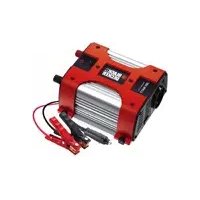
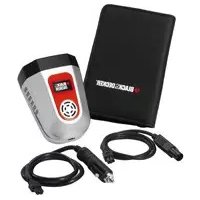
| Product Type | Power inverter 12V DC to 230V AC |
| Brand | Black & Decker |
| Model | BDPC200 |
| Input voltage | 12 V DC |
| Output voltage | 230 V AC |
| Continuous output power | 200 W |
| USB port | 5 V, 500 mA |
| Output waveform type | Modified sine wave |
| Weight | 0.84 kg |
| Undervoltage protection | Audible alarm at 11 V, automatic shutdown at 10.5 V |
| Overvoltage protection | Automatic shutdown at 15.5 V |
| Overload protection | Automatic shutdown above 200 W |
| Overtemperature protection | Automatic shutdown, 15 min cooling required |
| Short circuit protection | Internal/external fuse, shutdown |
| Maintenance | Clean with damp cloth, no solvent, do not immerse |
| Operating temperature | 4 °C to 40 °C (ideal 15 °C to 25 °C) |
| Warranty | 24 months |
| Included accessories | Battery clamps, 12 V DC accessory plug, ring terminals |
| Certifications | CE, EN60950 |
| Recycling | Do not dispose with household waste, take to a recycling center |
Frequently Asked Questions - BDPC200 BLACK & DECKER
User questions about BDPC200 BLACK & DECKER
0 question about this device. Answer the ones you know or ask your own.
Ask a new question about this device
Download the instructions for your Battery in PDF format for free! Find your manual BDPC200 - BLACK & DECKER and take your electronic device back in hand. On this page are published all the documents necessary for the use of your device. BDPC200 by BLACK & DECKER.
USER MANUAL BDPC200 BLACK & DECKER
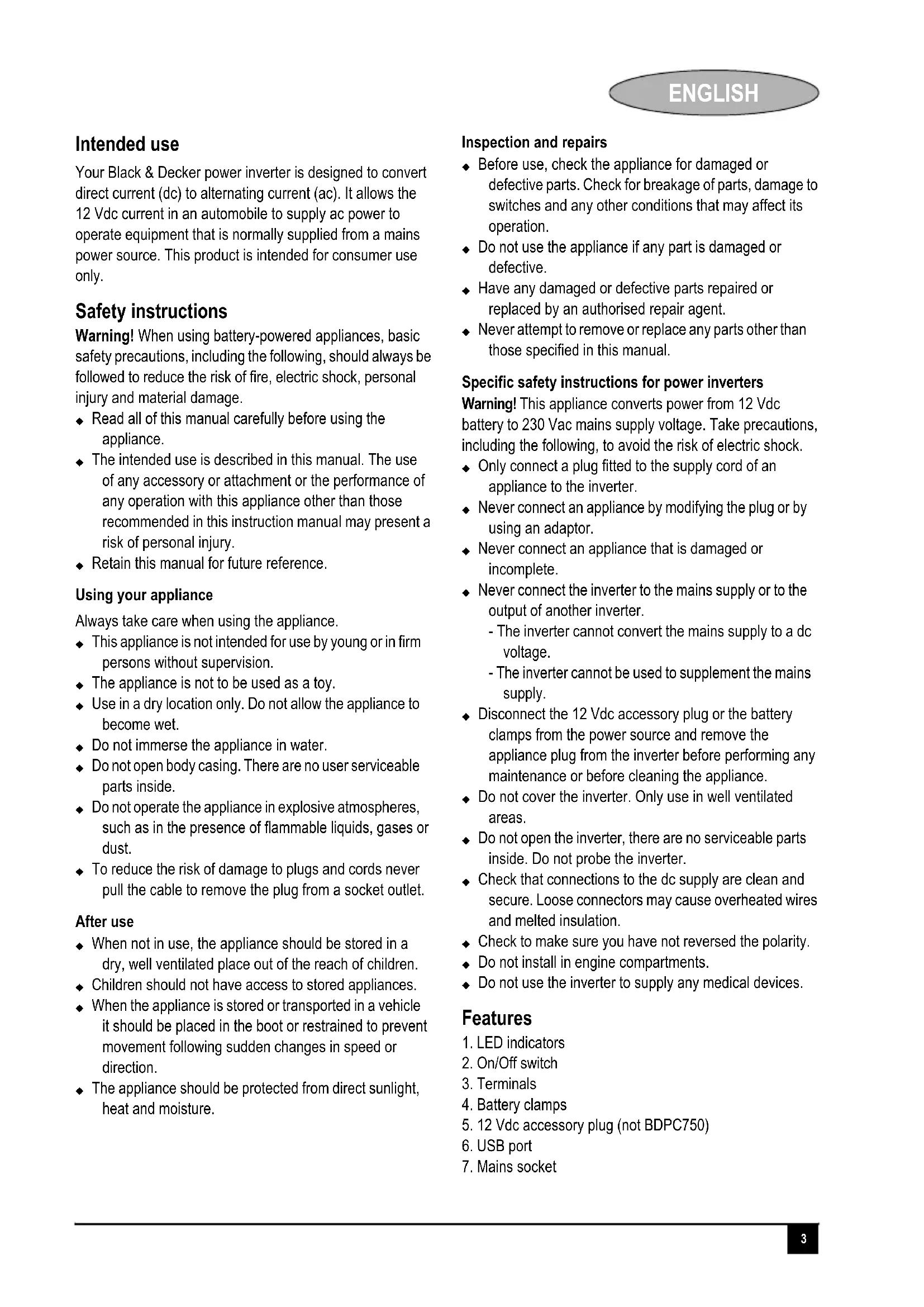
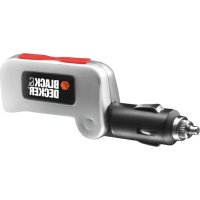
Your Black & Decker power inverter is designed to convert direct current (dc) to alternating current (ac). It allows the 12 Vdc current in an automobile to supply ac power to operate equipment that is normally supplied from a mains power source. This product is intended for consumer use only.
Safety instructions
Warning! When using battery-powered appliances, basic safety precautions, including the following, should always be followed to reduce the risk of fire, electric shock, personal injury and material damage.
Read all of this manual carefully before using the appliance.
- The intended use is described in this manual. The use of any accessory or attachment or the performance of any operation with this appliance other than those recommended in this instruction manual may present a risk of personal injury.
- Retain this manual for future reference.
Using your appliance
Always take care when using the appliance.
This appliance is not intended for use by young or in firm persons without supervision.
The appliance is not to be used as a toy.
Use in a dry location only. Do not allow the appliance to become wet.
Do not immerse the appliance in water.
Do not open body casing. There are no user serviceable parts inside.
Do not operate the appliance in explosive atmospheres, such as in the presence of flammable liquids, gases or dust.
To reduce the risk of damage to plugs and cords never pull the cable to remove the plug from a socket outlet.
After use
- When not in use, the appliance should be stored in a dry, well ventilated place out of the reach of children.
Children should not have access to stored appliances. - When the appliance is stored or transported in a vehicle it should be placed in the boot or restrained to prevent movement following sudden changes in speed or direction.
The appliance should be protected from direct sunlight, heat and moisture.
Inspection and repairs
Before use, check the appliance for damaged or defective parts. Check for breakage of parts, damage to switches and any other conditions that may affect its operation.
Do not use the appliance if any part is damaged or defective.
- Have any damaged or defective parts repaired or replaced by an authorised repair agent.
- Never attempt to remove or replace any parts other than those specified in this manual.
Specific safety instructions for power inverters
Warning! This appliance converts power from 12 Vdc battery to 230 Vac mains supply voltage. Take precautions, including the following, to avoid the risk of electric shock.
- Only connect a plug fitted to the supply cord of an appliance to the inverter.
- Never connect an appliance by modifying the plug or by using an adaptor.
- Never connect an appliance that is damaged or incomplete.
-
Never connect the inverter to the mains supply or to the output of another inverter.
-
The inverter cannot convert the mains supply to a dc voltage.
- The inverter cannot be used to supplement the mains supply.
Disconnect the 12 Vdc accessory plug or the battery clamps from the power source and remove the appliance plug from the inverter before performing any maintenance or before cleaning the appliance.
Do not cover the inverter. Only use in well ventilated areas.
Do not open the inverter, there are no serviceable parts inside. Do not probe the inverter.
Check that connections to the dc supply are clean and secure. Loose connectors may cause overheated wires and melted insulation.
- Check to make sure you have not reversed the polarity.
Do not install in engine compartments.
Do not use the inverter to supply any medical devices.
Features
- LED indicators
- On/Off switch
- Terminals
- Battery clamps
- 12 Vdc accessory plug (not BDPC750)
- USB port
- Mains socket
ENGLISH
How the power inverter works
The power inverter converts low voltage dc (direct current) from a battery or other power source to standard 230 Vac (alternating current) household power.
The power inverter output waveform
The ac output waveform of the power inverter is known as a "modified sine wave".
This type of waveform is suitable for most ac loads, including linear and switching power supplies used in electronic equipment, transformers and motors.
Operating instructions
Power source requirements
The power source must provide 12 Vdc and must be able to supply the necessary current to operate the load.
Warning! The power inverter must be connected only to batteries with a nominal output voltage of 12 Volts. The appliance will not operate from a 6 Volt battery and will sustain permanent damage if connected to a 24 Volt battery.
Connection to a power source.
The power inverter comes equipped with a 12 Vdc accessory plug (5) and/or battery clamps (4) for connection to a dc power source.
Note: For optimal performance make sure that the engine is running while operating the inverter. However, the power inverter may not operate while the engine is starting because the battery voltage can drop substantially during cranking.
Connecting to a power source using the 12 Vdc accessory plug (not model BDPC750)
Up to 100 W only
The 12 Vdc accessory plug (5) is suitable for operating the power inverter at power outputs up to 100 Watts only. The tip of the plug is positive (+) and the side contact is negative (-). Warning! Connect the ring terminals to the terminals (3) of the power inverter before connecting the accessory plug to the accessory outlet. Make sure that the On/Off switch (2) is turned off and that no flammable fumes are present in the installation area.
Connect the ring terminal of the red cable to the red terminal (3) marked (+) on the back of the power inverter.
- Connect the ring terminal of the black cable to the black terminal (3) marked (-) on the back of the power inverter.
Connect the power inverter to the power source by inserting the 12 Vdc accessory plug (5) firmly into the accessory outlet of a vehicle or other dc power source.
Set the On/Off switch (2) to on.
Plug the USB connector from the equipment you wish to operate into the USB port (6) and operate as normal.
Note: On some vehicles the accessory socket may only become live when the ignition key is in the accessory position.
Warning! Do not use with positive ground electrical systems, (i.e older vehicles).
Connecting to a power source using the cables (fig. C)
Above 100W
Use the cables and connect the appliance directly to the 12 Volt power source as follows:
Make sure the appliance power is turned off and that no flammable fumes are present in the installation area.
Connect the red cable to the red terminal (3) marked (+) on the back of the power inverter.
Connect the black cable to the black terminal (3) marked (-) on the back of the power inverter.
Connect the red battery clamp (4) to the positive terminal of the battery.
Connect the black battery clamp (4) to the negative terminal of the battery.
Make sure that all connections between the battery clamps (4) and the terminals (3) are secure.
Set the On/Off switch (2) to on.
Insert the plug from the the equipment you wish to operate into the mains socket (7) and operate as normal.
Warning! Loose connectors may cause overheated wires and melted insulation. Check to make sure you have not reversed the polarity. Damage due to reversed polarity is not covered by our guarantee.
Warning! A reverse polarity connection will result in a blown fuse and may cause permanent damage to the power inverter.
Connecting devices to your inverter (fig. A-C)
AC devices
The power inverter is equipped with a standard mains socket (7). Plug the cord from the equipment you wish to operate into the mains socket (7). Make sure that the wattage requirement of your equipment does not exceed the rated wattage indicated on the unit.
The appliance can be hard-wired to an application, however we recommend that you consult a qualified electrician for this type of installation.
Note: Some power supplies may not operate with this inverter due to the inrush currents required to start those devices. The inverter will shut down in overload mode.
USB devices
The power inverter is equipped with a standard USB port (6).
- Set the On/Off switch (2) to on and operate the appliance as normal.
Plug the USB connector from the equipment you wish to operate into the USB port (6) and operate as normal.
Warning! This appliance will not operate high wattage appliances or equipment that produce heat, such as hair dryers, microwave ovens and toasters.
Protective features of the power inverter
Your appliance monitors the following potentially hazardous conditions:
Low voltage protection. This condition is not harmful to the appliance but could damage the power source. The appliance will sound an alarm when the source voltage drops below 11V + / - 0.5Vdc and will automatically shut down when input voltage drops to 10.5 + / - 0.5Vdc . When the condition is corrected, turn the appliance off and then on again.
Over voltage protection. The power inverter will automatically shutdown when the input voltage exceeds 15.5 + / - 0.5Vdc . When the conditions are corrected, disconnect from the dc power source and reconnect.
Short circuit protection. A reverse polarity or short circuit condition may cause external or internal fuses to open and may cause irreversible damage to the appliance. Take extra care to insure a correct polarity connection.
Overload protection. The power inverter will automatically shut down when the continuous load exceeds the rated wattage. When the overload is removed, reset the appliance by turning it off then on again.
Over temperature protection. If the temperature inside the appliance is too high, the appliance will automatically shut down. Allow the appliance to cool for at least 15 minutes before restarting after a heat-related shutdown. Unplug the appliance while cooling.
Note: See 'Troubleshooting' section for LED indications.
Hints for optimum use
For best results, the appliance should be placed on a flat and/or solid surface. The appliance should only be used in locations that meet the following criteria:
DRY - Do not allow water or other liquids to come into contact with the appliance.
COOL - The surrounding air temperature should be between 4^ and 40^ (39°F and 105°F). Ideally between 15^ and 25^ (60°F and 80°F). Keep the appliance away from direct sunlight, when possible.
WELL VENTILATED - Keep the area surrounding the appliance clear to ensure free air circulation.
- Do not place items on or over the appliance during operation. The appliance will shut down if the internal temperature gets too hot.
SAFE - Do not use the appliance near flammable materials or in any locations that may accumulate flammable fumes or gases. This is an electrical appliance that can briefly spark when electrical connections are made or broken.
Warning! Rechargeable devices - Some rechargeable devices do not operate well from a modified sine wave inverter. They only operate correctly from a standard household outlet which provides a pure sine wave.
Therefore, the manufacturer recommends that you operate these type of devices from a standard household outlet only, not from the appliance.
This problem does not occur with the majority of battery operated equipment. Most of these devices use a separate charger or transformer that is plugged into an ac mains socket. The appliance is easily capable of running most chargers and transformers.
Troubleshooting
| LED indicator status LED Colour | |
| Normal condition Green | |
| Low Voltage protection/High Voltage protection | Yellow |
| Over temperature protection Green and | yellow |
| Overload protection/Short circuit protection Red | |
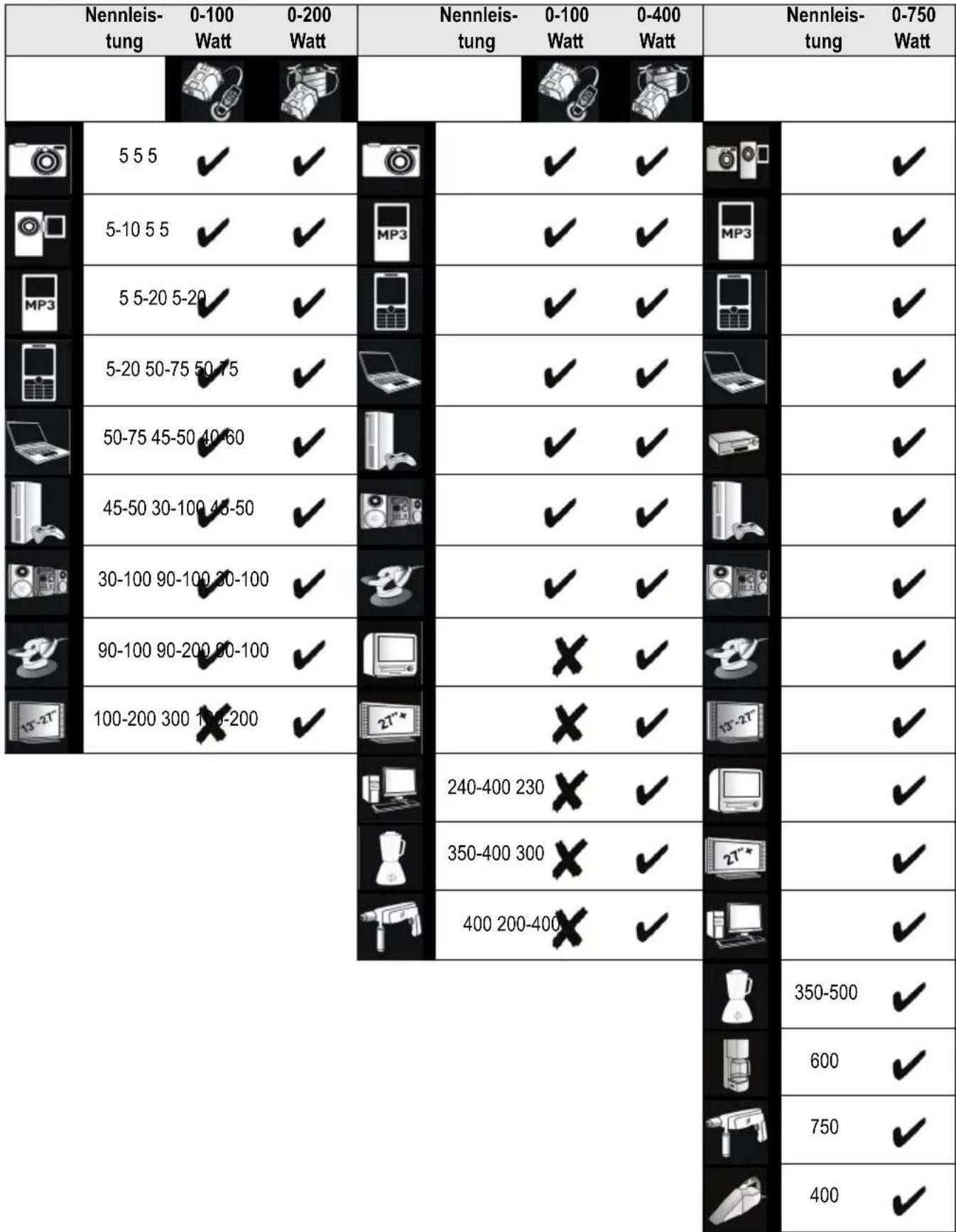
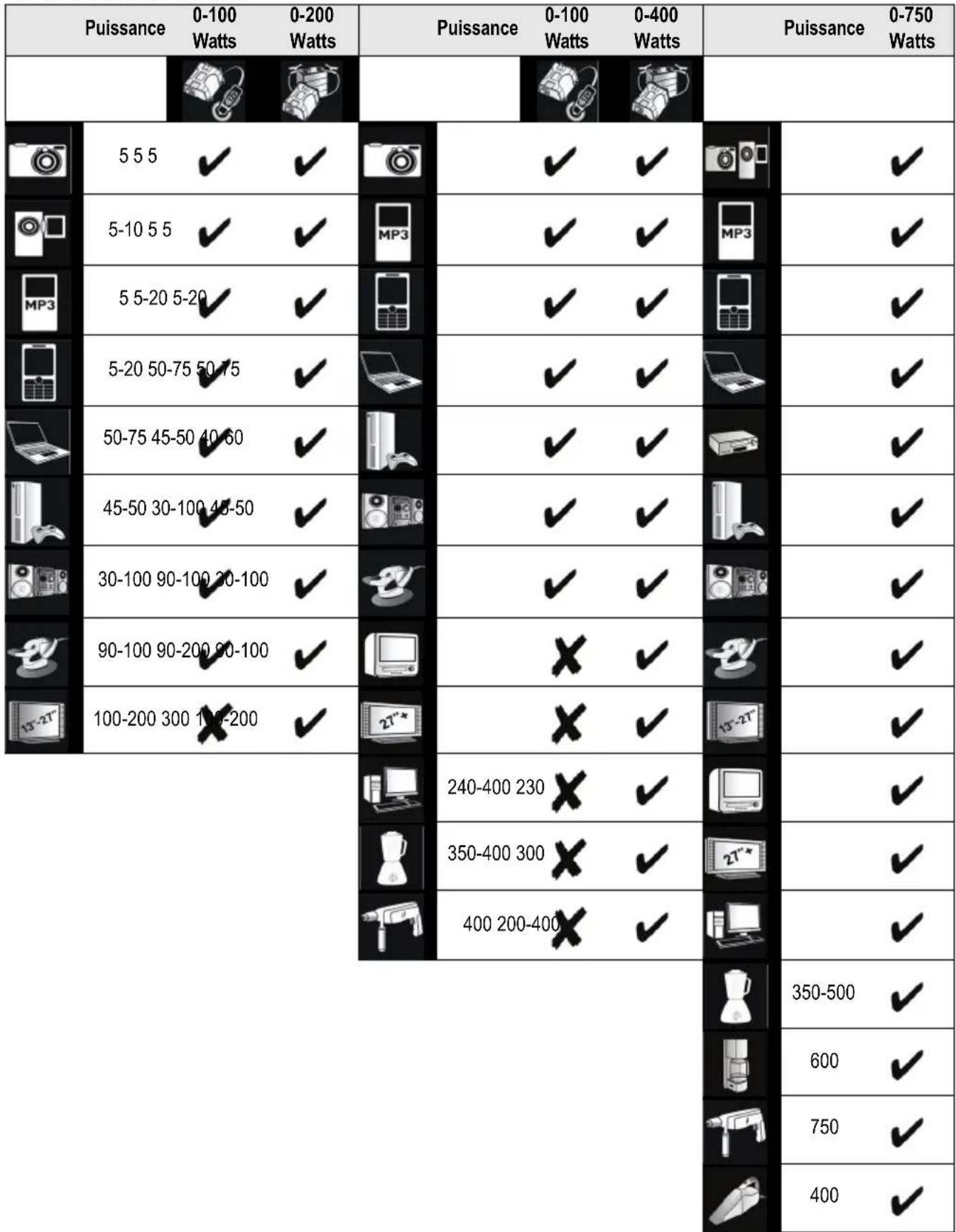
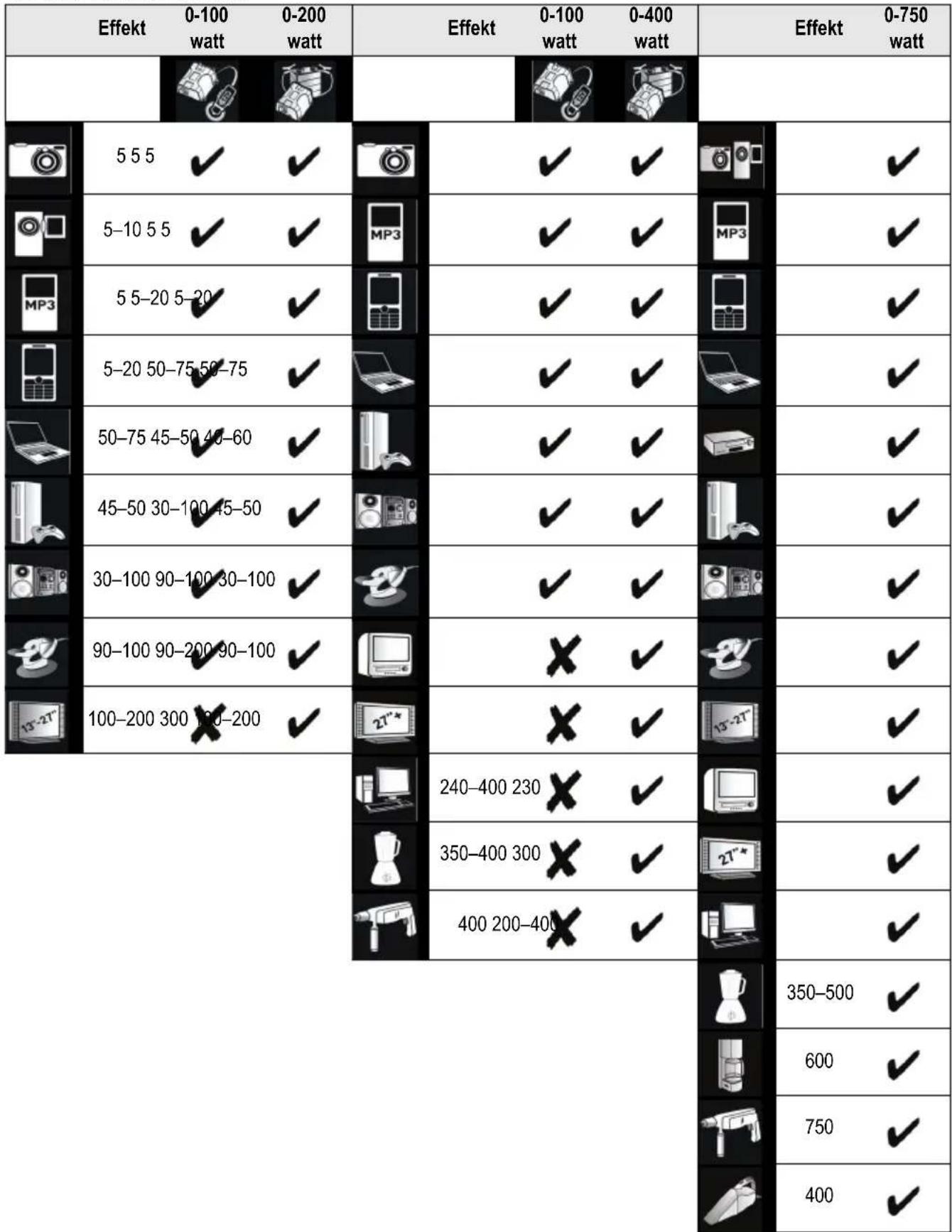
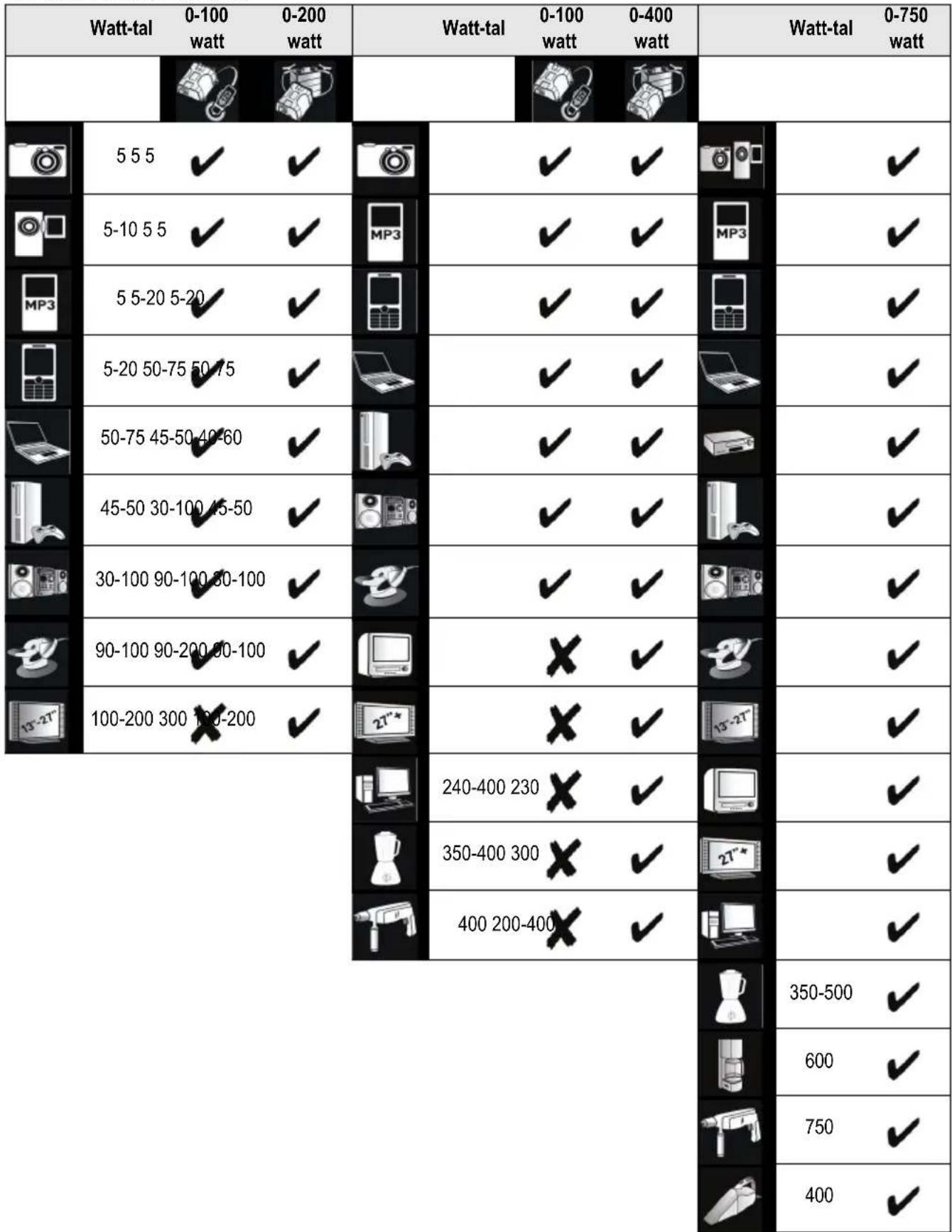
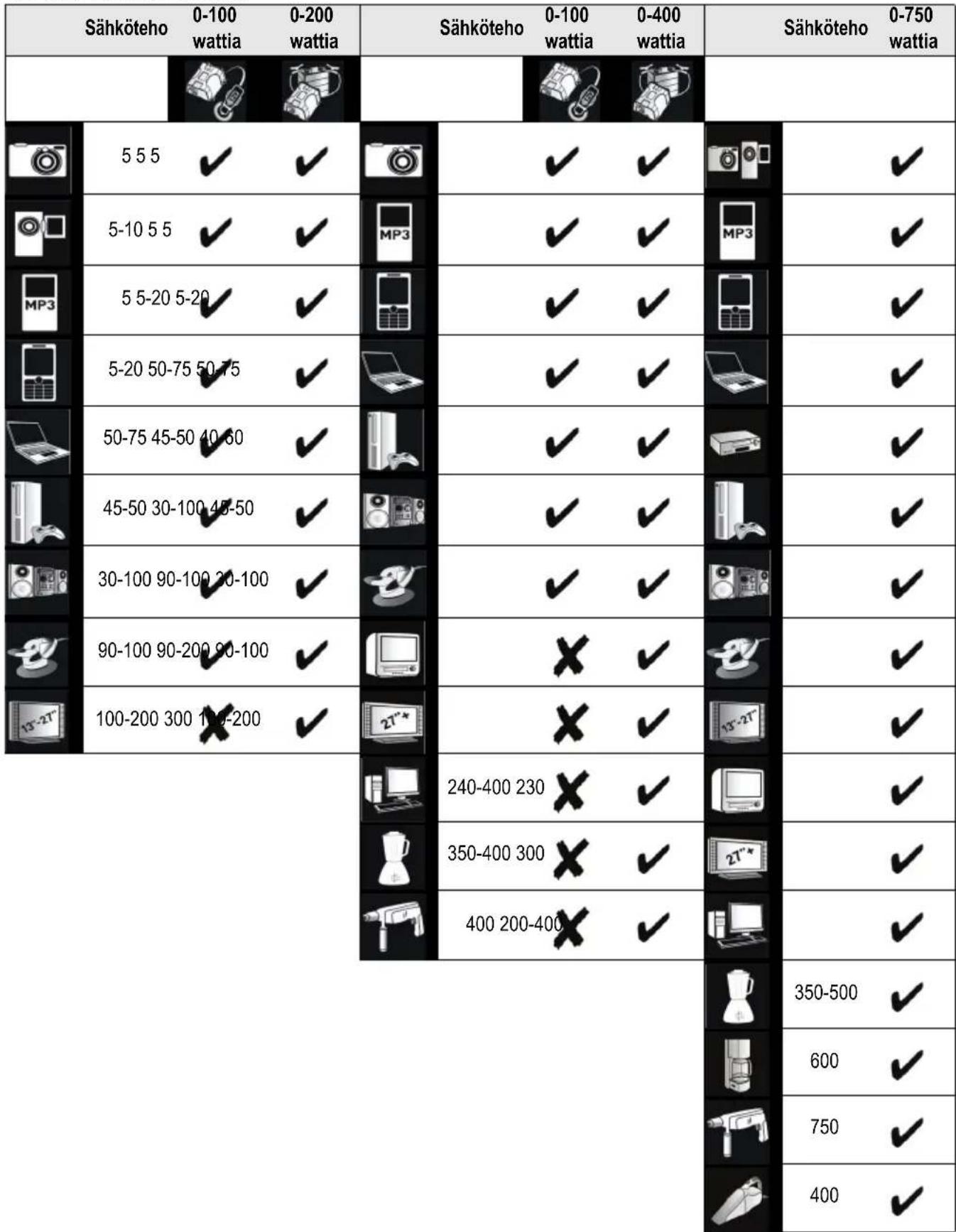
BDPC200 BDPC400 BDPC750
| Wattage | 0-100 Watts | 0-200 Watts | Wattage | 0-100 Watts | 0-400 Watts | Wattage | 0-750 Watts |
| 5 5 5 | ✓ | ✓ | ✓ | ✓ | ✓ | ||
| 5-10 5 5 | ✓ | ✓ | MP3 | ✓ | ✓ | MP3 | ✓ |
| 5 5-20 5-20 | ✓ | ✓ | ✓ | ✓ | ✓ | ||
| 5-20 50-75 50-75 | ✓ | ✓ | ✓ | ✓ | ✓ | ||
| 50-75 45-50-40-60 | ✓ | ✓ | ✓ | ✓ | ✓ | ||
| 45-50 30-100 45-50 | ✓ | ✓ | ✓ | ✓ | ✓ | ||
| 30-100 90-100 30-100 | ✓ | ✓ | ✓ | ✓ | ✓ | ||
| 90-100 90-200 30-100 | ✓ | ✓ | x | ✓ | ✓ | ||
| 100-200 300 x-200 | ✓ | ✓ | x | ✓ | ✓ | ||
| 240-400 230 | x | ✓ | ✓ | ||||
| 350-400 300 | x | ✓ | 2T* | ✓ | |||
| 400 200-400 | x | ✓ | ✓ | ||||
| 350-500 | ✓ | ||||||
| 600 | ✓ | ||||||
| 750 | ✓ | ||||||
| 400 | ✓ |
Television interference
The power inverter is shielded to minimise interference with TV signals. However, in some instances, some interference may still be visible, particularly with weak TV signals.
Maintenance
Your Black & Decker tool has been designed to operate over a long period of time with a minimum of maintenance.
Continuous satisfactory operation depends upon proper care and regular cleaning.
Warning! Before performing any maintenance or cleaning on the appliance, unplug the appliance.
From time to time wipe the appliance with a damp cloth. Do not use any abrasive or solvent-based cleaner. Do not immerse the appliance in water.
Replacing the fuse in the vehicle dc accessory plug
Remove the cap by turning it counter clockwise.
Remove the cap and centre pin.
Remove the fuse.
- Fit a new fuse of the same type and size (8A).
- Refit the cap and centre pin.
- Tighten the cap by turning clockwise onto the plug.
Protecting the environment

Separate collection. This product must not be disposed of with normal household waste.
Should you find one day that your Black & Decker product needs replacement, or if it is of no further use to you, do not dispose of it with household waste. Make this product available for separate collection.

Separate collection of used products and packaging allows materials to be recycled and used again. Reuse of recycled materials helps prevent environmental pollution and reduces the demand for raw materials.
Local regulations may provide for separate collection of electrical products from the household, at municipal waste sites or by the retailer when you purchase a new product.
Black & Decker provides a facility for the collection and recycling of Black & Decker products once they have reached the end of their working life. To take advantage of this service please return your product to any authorised repair agent who will collect them on our behalf.
You can check the location of your nearest authorised repair agent by contacting your local Black & Decker office at the address indicated in this manual. Alternatively, a list of authorised Black & Decker repair agents and full details of our after-sales service and contacts are available on the Internet at: www.2helpU.com.

Lead acid batteries can be recharged many times. At the end of their useful life, discard batteries with due care for our environment:
Do not dispose of the battery in fire, as this may result in an explosion.
Lead acid (Pb) batteries are recyclable. They must not be disposed of with household waste. The battery must be removed and disposed of in accordance with local regulations.
Do not short-circuit the battery terminals.
Be aware that the battery is heavy.
If possible, operate the appliance to run the battery down completely.
Place the battery in a suitable packaging to ensure that the terminals cannot be short-circuited.
Take the battery to your service agent or a local recycling station. Collected batteries will be recycled or disposed of properly.
Technical data
| BDPC200 BDPC400 BDPC750 | ||||
| Input voltage Vdc 12 12 12 | ||||
| Output voltage | Vac 230 230 230 | |||
| Input current (max) | A | 2 | 4 | 4 |
| Power output W 200 400 750 | ||||
| USB port 5 V 500 mA 5 V 500 mA 5 V 500 mA | ||||
| Weight kg 0.84 1.02 1.22 | ||||
ENGLISH
EC declaration of conformity
BDPC200 Type 1/BDPC400 Type 1/BDPC750 Type 1 Black & Decker declares that these products conform to: EN60950, 2006/95/EC
The undersigned is responsible for compilation of the technical file and makes this declaration on behalf of Black & Decker

Kevin Hewitt
Director of Consumer Engineering
Spennymoor, County Durham, DL16 6JG
United Kingdom
13-09-2008
Guarantee
Black & Decker is confident of the quality of its products and offers an outstanding guarantee. This guarantee statement is in addition to and in no way prejudices your statutory rights. The guarantee is valid within the territories of the Member States of the European Union and the European Free Trade Area.
If a Black & Decker product becomes defective due to faulty materials, workmanship or lack of conformity, within 24 months from the date of purchase, Black & Decker guarantees to replace defective parts, repair products subjected to fair wear and tear or replace such products to make sure of the minimum inconvenience to the customer unless:
The product has been used for trade, professional or hire purposes.
The product has been subjected to misuse or neglect.
The product has sustained damage through foreign objects, substances or accidents.
Repairs have been attempted by persons other than authorised repair agents or Black & Decker service staff.
To claim on the guarantee, you will need to submit proof of purchase to the seller or an authorised repair agent. You can check the location of your nearest authorised repair agent by contacting your local Black & Decker office at the address indicated in this manual. Alternatively, a list of authorised Black & Decker repair agents and full details of our after-sales service and contacts are available on the Internet at:
www.2helpU.com
Please visit our website www.blackanddecker.co.uk to register your new Black & Decker product and to be kept up to date on new products and special offers. Further information on the Black & Decker brand and our range of products is available at www.blackanddecker.co.uk.
BDPC200 BDPC400 BDPC750
DEUTSCH
Director of Consumer Engineering
Spennymoor, County Durham, DL16 6JG
BDPC200 BDPC400 BDPC750
FRANÇAIS
BDPC200 BDPC400 BDPC750
Spennymoor, County Durham, DL16 6JG
Royaume-Uni
13-09-2008
Garantie
BDPC200 BDPC400 BDPC750
| Wattaggio | 0-100 W | 0-200 W | Wattaggio | 0-100 W | 0-400 W | Wattaggio | 0-750 W | |||
| 5 5 5 | ✓ | ✓ | ✓ | ✓ | ✓ | |||||
| 5-10 5 5 | ✓ | ✓ | MP3 | ✓ | ✓ | MP3 | ✓ | |||
| MP3 | 5 5-20 5-20 | ✓ | ✓ | ✓ | ✓ | ✓ | ||||
| 5-20 50-75 50-75 | ✓ | ✓ | ✓ | ✓ | ||||||
| 50-75 45-50 40-60 | ✓ | ✓ | ✓ | ✓ | ||||||
| 45-50 30-100 45-50 | ✓ | 839 | ✓ | ✓ | ✓ | |||||
| 30-100 90-100 20-100 | ✓ | ✓ | ✓ | 839 | ✓ | |||||
| 90-100 90-200 20-100 | ✓ | X | ✓ | ✓ | ||||||
| 100-200 300 100-200 | ✓ | 21* | X | ✓ | 5-T | ✓ | ||||
| 240-400 230 | X | ✓ | ✓ | ✓ | ||||||
| 350-400 300 | X | ✓ | 21* | ✓ | ||||||
| 400 200-400 | X | ✓ | 350-500 | ✓ | ||||||
| 600 | ✓ | |||||||||
| 750 | ✓ | |||||||||
| 400 | ✓ | |||||||||
ITALIANO
Interferenze televise
BDPC200 BDPC400 BDPC750
Tensione in
ingresso V c.c. 12 12 12
Tensione
erogata V c.a. 230 230 230
Corrente in
Spennymoor, County Durham DL16 6JG
Regno Unito
13-09-2008
Garanzia
BDPC200 BDPC400 BDPC750
| Wattage | 0-100 Watt | 0-200 Watt | Wattage | 0-100 Watt | 0-400 Watt | Wattage | 0-750 Watt | |||
| 5 5 5 | ✓ | ✓ | ✓ | ✓ | ✓ | |||||
| 5-10 5 5 | ✓ | ✓ | MP3 | ✓ | ✓ | MP3 | ✓ | |||
| 5 5-20 5-20 | ✓ | ✓ | ✓ | ✓ | ✓ | |||||
| 5-20 50-75 50-75 | ✓ | ✓ | ✓ | ✓ | ✓ | |||||
| 50-75 45-50-40-60 | ✓ | ✓ | ✓ | ✓ | ✓ | |||||
| 45-50 30-100 45-50 | ✓ | ✓ | 839 | ✓ | ✓ | ✓ | ||||
| 30-100 90-100 30-100 | ✓ | ✓ | ✓ | ✓ | ✓ | |||||
| 90-100 90-200 30-100 | ✓ | ✓ | x | ✓ | ✓ | |||||
| 100-200 300 10-200 | ✓ | ✓ | 2T* | x | ✓ | 15-T* | ✓ | |||
| 240-400 230 | x | ✓ | ✓ | |||||||
| 350-400 300 | x | ✓ | 2T* | ✓ | ||||||
| 400 200-400 | x | ✓ | ✓ | |||||||
| 350-500 | ✓ | |||||||||
| 600 | ✓ | |||||||||
| 750 | ✓ | |||||||||
| 400 | ✓ | |||||||||
NEDERLANDS
BDPC200 BDPC400 BDPC750
Ingangsspanning Vdc 12 12 12
Director of Consumer Engineering
BDPC200 BDPC400 BDPC750
| Voltaje | 0-100 vatios | 0-200 vatios | Voltaje | 0-100 vatios | 0-400 vatios | Voltaje | 0-750 vatios | |||
| 5 5 5 | ✓ | ✓ | ✓ | ✓ | ✓ | |||||
| 5-10 5 5 | ✓ | ✓ | MP3 | ✓ | ✓ | MP3 | ✓ | |||
| 5 5-20 5-20 | ✓ | ✓ | ✓ | ✓ | ✓ | |||||
| 5-20 50-75 50-75 | ✓ | ✓ | ✓ | ✓ | ||||||
| 50-75 45-50-40-60 | ✓ | ✓ | ✓ | ✓ | ||||||
| 45-50 30-100 45-50 | ✓ | ✓ | ✓ | ✓ | ||||||
| 30-100 90-100 30-100 | ✓ | ✓ | ✓ | ✓ | ||||||
| 90-100 90-200 30-100 | ✓ | X | ✓ | ✓ | ||||||
| 100-200 300 X-200 | ✓ | X | ✓ | ✓ | ||||||
| 240-400 230 | X | ✓ | ✓ | |||||||
| 350-400 300 | X | ✓ | 2T* | ✓ | ||||||
| 400 200-400 | X | ✓ | ✓ | |||||||
| 350-500 | ✓ | |||||||||
| 600 | ✓ | |||||||||
| 750 | ✓ | |||||||||
| 400 | ✓ | |||||||||
Spennymoor, County Durham, DL16 6JG
Reino Unido
13-09-2008
Garantia
BDPC200 BDPC400 BDPC750
| Potência | 0-100 Watts | 0-200 Watts | Potência | 0-100 Watts | 0-400 Watts | Potência | 0-750 Watts |
| 5 5 5 | ✓ | ✓ | ✓ | ✓ | ✓ | ||
| 5-10 5 5 | ✓ | ✓ | MP3 | ✓ | ✓ | MP3 | ✓ |
| 5 5-20 5-20 | ✓ | ✓ | ✓ | ✓ | ✓ | ||
| 5-20 50-75 50-75 | ✓ | ✓ | ✓ | ✓ | |||
| 50-75 45-50-40-60 | ✓ | ✓ | ✓ | ✓ | |||
| 45-50 30-100 45-50 | ✓ | ✓ | ✓ | ✓ | |||
| 30-100 90-100 30-100 | ✓ | ✓ | ✓ | ✓ | |||
| 90-100 90-200 30-100 | ✓ | x | ✓ | ✓ | |||
| 100-200 300 x-200 | ✓ | x | ✓ | ✓ | |||
| 240-400 230 | x | ✓ | ✓ | ||||
| 350-400 300 | x | ✓ | 2T* | ✓ | |||
| 400 200-400 | x | ✓ | ✓ | ||||
| 350-500 | ✓ | ||||||
| 600 | ✓ | ||||||
| 750 | ✓ | ||||||
| 400 | ✓ |
PORTUGUES
Interferencia com a televisao
Spennymoor, County Durham, DL16 6JG
Reino Unido
13-09-2008
Garantia
BDPC200 BDPC400 BDPC750
| Effekt | 0-100 Watt | 0-200 Watt | Effekt | 0-100 Watt | 0-400 Watt | Effekt | 0-750 Watt | |||
| 5 5 5 | ✓ | ✓ | ✓ | ✓ | ✓ | |||||
| 5-10 5 5 | ✓ | ✓ | MP3 | ✓ | ✓ | MP3 | ✓ | |||
| 5 5-20 5-20 | ✓ | ✓ | ✓ | ✓ | ✓ | |||||
| 5-20 50-75 50-75 | ✓ | ✓ | ✓ | ✓ | ||||||
| 50-75 45-50 40-60 | ✓ | ✓ | ✓ | ✓ | ||||||
| 45-50 30-100 45-50 | ✓ | ✓ | ✓ | ✓ | ||||||
| 30-100 90-100 80-100 | ✓ | ✓ | ✓ | ✓ | ||||||
| 90-100 90-200 80-100 | ✓ | x | ✓ | ✓ | ||||||
| 100-200 300 100-200 | ✓ | x | ✓ | ✓ | ||||||
| 240-400 230 | x | ✓ | ✓ | |||||||
| 350-400 300 | x | ✓ | 2T* | ✓ | ||||||
| 400 200-400 | x | ✓ | ✓ | |||||||
| 350-500 | ✓ | |||||||||
| 600 | ✓ | |||||||||
| 750 | ✓ | |||||||||
| 400 | ✓ | |||||||||
SVENSKA
TV-interferens
BDPC200 BDPC400 BDPC750
Spanning Vdc 12 12 12
Utpanning VAC 230 230 230
Inström (max) A 24 45 86
Uteffekt W 200 400 750
Director of Consumer Engineering
Spennymoor, County Durham, DL16 6JG
Storbritannien
13-09-2008
Garanti
BDPC200 BDPC400 BDPC750
NORSK
TV-interferens
Strömomformeren er skjermet for a minimere interferens med TV-signaler. Imidertid kan man i visse tilfeller fremdeles se interferens, spesielt ved svake TV-signaler.
Vedlikehold
BDPC200 BDPC400 BDPC750
Inngangs-
spenning V DC 12 12 12
Utgangs
spenning V AC 230 230 230
Tilforselsström
(maks.) A 24 45 86
Spennymoor, County Durham, DL16 6JG
Storbritannia
13.9.2008
Garanti
Black & Decker er trygg på kvaliteten til sineprodukter og tilbyr en enestående garanti. Denne garantierklæringenkommen i tillegg til dine lovbestemterettigheter, og er ikke konflikt med disse. Garantien er gyldig i EU- og EFTA-medlemsstatene.
BDPC200 BDPC400 BDPC750
DANSK
Director of Consumer Engineering
Spennymoor, County Durham, DL16 6JG, Storbritannien 13-09-2008
Garanti
BDPC200 BDPC400 BDPC750
SUOMI
Director of Consumer Engineering
Spennymoor, County Durham, DL16 6JG
Iso-Britannia
13.9.2008
Takuu
BDPC200 BDPC400 BDPC750
| Ioçúnç | 0-100 Watt | 0-200 Watt | Ioçúnç | 0-100 Watt | 0-400 Watt | Ioçúnç | 0-750 Watt |
| 5 5 5 | ✓ | ✓ | ✓ | ✓ | ✓ | ||
| 5-10 5 5 | ✓ | ✓ | MP3 | ✓ | ✓ | MP3 | ✓ |
| 5 5-20 5-20 | ✓ | ✓ | ✓ | ✓ | ✓ | ||
| 5-20 50-75 50-75 | ✓ | ✓ | ✓ | ✓ | |||
| 50-75 45-50 40-60 | ✓ | ✓ | ✓ | ✓ | |||
| 45-50 30-100 45-50 | ✓ | ✓ | ✓ | ✓ | |||
| 30-100 90-100 30-100 | ✓ | ✓ | ✓ | ✓ | |||
| 90-100 90-200 30-100 | ✓ | X | ✓ | ✓ | |||
| 100-200 300 100-200 | ✓ | X | ✓ | ✓ | |||
| 240-400 230 | X | ✓ | ✓ | ||||
| 350-400 300 | X | ✓ | 2T* | ✓ | |||
| 400 200-400 | X | ✓ | ✓ | ||||
| 350-500 | ✓ | ||||||
| 600 | ✓ | ||||||
| 750 | ✓ | ||||||
| 400 | ✓ | ||||||
EAAHNIKA
Spennymoor, County Durham, DL16 6JG
Hvμévo Baσiλειo
13-09-2008
Eyyunon


- Safety instructions
- Using your appliance
- After use
- Inspection and repairs
- Specific safety instructions for power inverters
- Features
- ENGLISH
- How the power inverter works
- The power inverter output waveform
- Operating instructions
- Power source requirements
- Connection to a power source.
- Connecting to a power source using the 12 Vdc accessory plug (not model BDPC750)
- Up to 100 W only
- Connecting to a power source using the cables (fig. C)
- Above 100W
- Connecting devices to your inverter (fig. A-C)
- AC devices
- USB devices
- Protective features of the power inverter
- Hints for optimum use
- Television interference
- Maintenance
- Replacing the fuse in the vehicle dc accessory plug
- Protecting the environment
- EC declaration of conformity
- Guarantee
- www.2helpU.com
- DEUTSCH
- FRANÇAIS
- BDPC200 BDPC400 BDPC750
- Garantie
- ITALIANO
- Interferenze televise
- Garanzia
- NEDERLANDS
- Garantia
- PORTUGUES
- Interferencia com a televisao
- SVENSKA
- TV-interferens
- Garanti
- NORSK
- Vedlikehold
- DANSK
- SUOMI
- Takuu
- EAAHNIKA
- Eyyunon
Brand : BLACK & DECKER
Model : BDPC200
Category : Battery