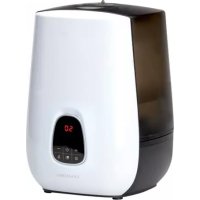
Notus - Humidifier LANAFORM - Free user manual and instructions
Find the device manual for free Notus LANAFORM in PDF.



| Product type | Cold and warm steam humidifier |
| Brand | Lanaform |
| Model | Notus |
| Tank capacity | 4.8 L |
| Maximum steam output | 500 ml/h |
| Autonomy at maximum output | Approximately 9.5 hours |
| Intensity levels | Low (120 ml/h), Medium (210 ml/h), High (300 ml/h), Turbo (500 ml/h), Automatic (400 ml/h), Sleep (300 ml/h) |
| Operating modes | Normal, Sleep, Turbo, Automatic |
| Timer | Programmable from 0 to 8 hours (in 1-hour increments) |
| Humidity setting | From 30% to 70% RH or continuous operation |
| Display | Touch LCD screen with indicators (time, humidity, cleaning, warm steam, modes, water shortage, intensity level) |
| Automatic shut-off | Yes, when the tank is empty |
| Hot/cold steam function | Selectable via button |
| Recommended water type | Fresh, distilled or demineralized water |
| Transducer cleaning | Every week with vinegar and a soft brush |
| Tank cleaning | Every 2 days, change water |
| Noise | ≤ 30 dB |
| Power supply | 220-240 V ~ 50/60 Hz |
| Warranty | 2 years against material and manufacturing defects |
Frequently Asked Questions - Notus LANAFORM
User questions about Notus LANAFORM
0 question about this device. Answer the ones you know or ask your own.
Ask a new question about this device
Download the instructions for your Humidifier in PDF format for free! Find your manual Notus - LANAFORM and take your electronic device back in hand. On this page are published all the documents necessary for the use of your device. Notus by LANAFORM.
USER MANUAL Notus LANAFORM
We thank you for purchasing the "NOTUS" cool-mist and warm-mist humidifier by LANAFORM®. The "NOTUS" humidifier helps you restore an appropriate level of humidity and eliminate the discomfort associated with dry air. The ventilation system diffuses water in the form of a cool or warm vapour thus providing the desired level of humidity. This vapour is characterised by a mist discharged through the diffusion nozzle.
PLEASE READ ALL THE INSTRUCTIONS BEFORE USING YOUR HUMIDIFIER, ESPECIALLY THESE FEW BASIC SAFETY RULES:
- This appliance is not intended for use by people, including children, with limited physical, sensory or mental abilities, or by people lacking experience or knowledge, unless they have been supervised or instructed beforehand on how to use the appliance by someone responsible for their safety. Children should be supervised to make sure they do not play with the appliance.
- Only use this appliance according to the instructions given in this manual.
- Check that your mains voltage is the same as that of your appliance.
- Always place the "NOTUS" humidifier on a hard, flat and level surface. Always keep it away from walls and heat sources such as stoves, radiators, etc.
Warning: The appliance may not work correctly if it is not placed on a level surface.
- Do not insert or remove the electric plug on the appliance with wet hands.
- If the power lead is damaged, it must be replaced by a similar lead available from the suppliers or their customer service department.
- Do not leave the appliance exposed to direct sunlight.
- Fill the tank with fresh, distilled or demineralised water.
- Do not dismantle the appliance as a whole, or even its base unit.
- Do not switch on the appliance when there is no water in the tank.
- Do not shake the appliance. This might make the water spill over into the base unit and prevent it from working.
- Never touch the water or components while the unit is in operation.
- If there is an unusual smell when it is being used as described in these manual, switch the appliance off, unplug it and have it examined by the suppliers or their customer service department.
- Do not use essential oils with this appliance.
- Do not pour hot water into the tank, i.e. at a temperature in excess of 40^ .
- Unplug the appliance before cleaning it or removing the tank.
- Do not wash the entire unit with water and do not immerse it in water. Refer to the cleaning instructions in this manual.
- Never scrape the transducer with a hard tool. The "NOTUS" humidifier must be cleaned regularly. To do this, refer to the cleaning instructions in this manual.
- Unplug an appliance that has fallen into water immediately before retrieving it.
- An electrical appliance must never remain plugged in without supervision. Disconnect it when you are not using it.
- Keep the power cable away from hot surfaces.
- Never use this appliance in a room where aerosol products (sprays) are used or in a room or where oxygen is being administered.
-
Do not put items of clothing or towels on top of the appliance. If the nozzle is obstructed, this may cause the appliance to malfunction.
-
When moving the appliance, lift it by the base and not by the water tank.
- Do not use the humidifier if the air in the room is already sufficiently humid (relative humidity of at least 50% ). The ideal relative humidity level for human comfort is in fact between 45% and 60% . Excess humidity shows up in the form of condensation on cold surfaces or cold walls in the room. To measure the room's humidity correctly, use a hygrometer available in most specialist shops and hypermarkets.
- The "NOTUS" humidifier is designed for indoor and domestic use only.
APPLIANCE COMPONENTS (SEE ILLUSTRATIONS, SCHEME 1):
(1) Diffuser sprinkler tip
(2) Water tank
(3) Demineralisation (filter) cartridge
(4) Water tank cap
(5) Appliance base
(6) Cleaning brush
APPLIANCE DISPLAY (SEE ILLUSTRATIONS, SCHEME 2):
(1) Time indicator
(2) Humidity indicator
(3) Cleaning indicator
(4) Warm mist indicator
(5) Automatic mode
(6) Turbo mode
(7) Sleep mode
(8) Low water indicator
(9) Output intensity level indicator
(10) "Less" button
(11) "On/Off" button
(12) "Warm/Cool" button
(13) Mode change button (Sleep, Turbo, Automatic, Normal)
(14) Programming button (timer, air humidity level)
(15) "More" button
The photographs and other images of the product in this manual and on the packaging are as accurate as possible, but do not claim to be a perfect reproduction of the product.
INSTRUCTIONS FOR USE
Features:
Cool-mist and warm-mist humidifier
LCD touch screen
Automatic ambient relative humidity sensing and display
- Programming capability for desired humidity level
- Timer: 8 hours with programming in 1-hour steps
- 3 vapour output level settings: low, medium, high
- 4 modes including 3 preprogrammed modes: sleep, turbo, automatic and 1 normal mode
Tank capacity: 4.8 litres
Maximum mist output: 500ml / h
- Approx. 9.5 hours of continuous diffusion at 500ml / h
Automatic cut-out device once tank is empty
- Silent operation (≤30 dB)
Functions:
Air humidifier
- Eliminates electrostatic charges
- Improves ambient air quality
Differences between warm mist and cool mist (advice on use):
- Early-age child/children
Give preference to using cool mist which is far less hazardous and will not cause burning/burns in the event of the appliance being dropped or tipped over.
- Maintenance
When diffusing cool mist the appliance requires cleaning with greater frequency than when diffusing warm mist. In actual fact, when producing warm mist, the water is heated passing through a heater that eliminates large quantities of bacteria.
Accordingly, since the NOTUS offers both these functions, it is most important that you refer to the maintenance instructions in this manual.
- Room in which the humidifier will be installed.
Cool mist will add a touch of freshness in a stuffy, dry and poorly ventilated room. As for warm mist, it will heat the air in a cool room.
- Power consumption
The warm mist function consumes more power since it needs to heat up the water to generate the warm mist.
Fitting the demineralisation filter:
Fasten the demineralisation filter to the inside surface of the tank cap by rotating it clockwise as shown in scheme 3, item (h).
Conversely, to remove the demineralisation filter, rotate it counter-clockwise.
Instructions for use (see illustrations, scheme 3):
1) Place the "NOTUS" humidifier in the room half an hour before switching it on to allow it to adapt to ambient temperature.
2) Make sure it is always placed on a hard, flat and level surface (a). Keep it slightly away from walls and heat sources such as stoves, radiators, etc.
3) Make sure the appliance is clean before starting to use it.
4) Remove the tank grasping its handle (e) and hold it upside down (f). Turn the tank cap anti-clockwise to open it. Next pour fresh, distilled or demineralised water into the tank. Replace the cap and rotate clockwise to seal it hermetically (g) (f). Finally, fit the tank correctly to the base of the appliance (e) (b, c, d).
5) Make sure your hands are completely dry when connecting and disconnecting the appliance and if they are not, then dry them.
6) Press the "On/Off" button (item 11, scheme 2). It will take approx. 1 second to start up, this time is required to check the water level. If the water level is sufficient, an audible signal will sound.
7) At this point the humidifier is operational. It will be operating in "normal mode" with warm mist, which is the default mode. It can take some ten minutes for warm mist to be generated depending on the ambient temperature in the room.
NORMAL MODE:
- If you wish to change the mist output level, press the "More" or "Less" button, as appropriate (items 15 & 10, scheme 2).
- If you wish to stop warm mist generation, press the "Hot/Cool" button (item 12, scheme 2) and the indicator will disappear.
- If you wish to programme a specific humidity level, press the programming button (item 14, scheme 2). Proceed likewise to programme the timer, i.e. press the programming button twice in succession and programme the timer up to maximum of 8 hours in 1 hour steps.
- If you wish to change modes and go into one of the 3 preprogrammed modes, all you need do is press the mode change button and select the desired mode (item 13, scheme 2).
SLEEP MODE:
- The mist output level setting can no longer be changed, it is set to 300ml / h
- If you had previously shut off warm mist generation, this will restart.
- The timer is programmed automatically to 8 hours.
- The brightness of the display reduces after approx. 1 minute.
TURBO MODE:
- The mist output level setting is programmed to 500ml / h automatically.
- Warm mist generation can be enabled or disabled. To do so, press the "Hot/Cool" button (item 12, scheme 2).
- The timer and the humidity level can still be programmed in this mode (item 14, scheme 2).
AUTOMATIC MODE:
- The mist output level setting is programmed to 400ml / h automatically.
- Warm mist generation can be enabled or disabled (item 12, scheme 2).
- The default programmed humidity level is 70% . The humidity level cannot be changed in this mode. The appliance will shut down once this humidity level has been reached.
- As for the timer, it can be programmed (item 14, scheme 2).
| Mist output level: | Low Medium High | Automatic | mode | Turbo mode | |
| 120 ml/h 210 ml/h | 300 ml/h 400 ml/h 500 ml/h |
8) When programming the humidity level (item 14, scheme 2)
All you need do is press the programming button once and select the desired mist output rate using the "More" and "Less" buttons. The chosen rate will continue to flash 5 seconds before returning to the home display screen.
Accordingly you will have the option of selecting a level between 30 and 70% or going beyond 70% , the "CO" function indicating "continuous".
9) When programming the timer (item 14, scheme 2)
You need to press the programming button twice. The time may be changed using the "More" and "Less" buttons. The chosen duration will continue to flash 5 seconds before returning to the home display screen.
Programming range for duration: between 0 and 8 hours.
Important notes:
- Use only fresh, distilled or demineralised water in order to prevent any malfunction.
- Do not pour water into the diffusing nozzle in order to prevent any malfunction or fire risk (the part of the appliance from which mist is discharged).
- Make sure the tank cap is sealed hermetically after filling so as to avoid leakage or potential electric shocks.
- The tank must be kept clean. If there is any dirt around the mist discharge nozzle, clean it with a brush or a damp cloth.
Warning: EVEN THOUGH THERE IS A SAFETY CUT-OUT THAT SWITCHES OFF THE TRANSDUCER, DO NOT LEAVE THE APPLIANCE SWITCHED ON WHILE YOU ARE NOT USING IT.
Maintenance and storage:
If the water contains too much calcium and too much magnesium, it may deposit a "white powder" in the appliance. If this sediment is deposited on the transducer (a white ceramic disc the generates ultrasound (i)), this will prevent the "NOTUS" humidifier from operating correctly.
Maintenance
We recommend:
1) Using fresh, distilled or demineralised water each time the appliance is used.
2) Cleaning the tank every 2 days and cleaning the transducer every week.
3) Changing the water in the tank every 2 days.
4) Cleaning the appliance (see explanations below) and making sure that all its parts are completely dry when it is not in use.
To clean the transducer (white ceramic disc (i)):
1) Pour 2 to 5 drops of vinegar onto its surface and leave them for 2 to 5 minutes.
2) Brush the sediment off the surface with a soft brush (j). Do not use a hard tool to scrape the surface.
3) Rinse out the base tank using clean water.
4) Do not use soap, solvent or spray cleaner to clean the transducer.
To clean the basin unit:
1) Clean the basin with water using a soft cloth and vinegar if there is any sediment or limescale deposit on the inside.
2) Rinse the basin in clean water.
To clean the mist discharge nozzle on the appliance:
1) Clean it with a brush or damp cloth.
2) Rinse the nozzle in clean water.
Storage
Having cleaned and dried the appliance, store it in a dry, cool place out of reach of children.
TROUBLESHOOTING
In the event of a malfunction, under normal conditions of use, please refer to the following chart:
| Effects Possible causes Solutions | ||
| No steam, no light showing. If there is no light. Check that the appliance is connected and that there has not been a mains power failure. | ||
| The water level in the tank is too low. Add water to the tank. | ||
| Water is leaking from the tank. Check that the tank has been fitted correctly. | ||
| The temperature of the unit is too low. Place the unit in a room at ambient temperature for half an hour prior to use. | ||
| Mist has an unusual smell. The water has been standing in the tank too long. | Clean the tank and fill it with fresh, distilled or demineralised water. | |
| Low output. | Too much/too little water in the tank. | Empty water out of the tank or top it up. |
| Sediment on the transducer. Clean the transducer. | ||
| The water is too cold. Use water that is at room temperature. | ||
| The water is not clean. Clean the tank and fill it with fresh, distilled or demineralised water. | ||
ADVICE REGARDING THE DISPOSAL OF WASTE
-
All the packaging is composed of materials that pose no hazard for the environment and which can be disposed of at your local sorting centre to be used as secondary raw materials. The cardboard may be disposed of in a paper recycling bin. The packaging film must be taken to your local sorting and recycling centre.
-
When you have finished using the device, please dispose of it in an environmentally friendly way and in accordance with the law.
LIMITED WARRANTY
LANAFORM® guarantees this product against any material or manufacturing defect for a period of two years from the date of purchase, except in the circumstances described below.
The LANAFORM® guarantee does not cover damage caused as a result of normal wear to this product. In addition, the guarantee covering this LANAFORM® product does not cover damage caused by abusive or inappropriate or incorrect use, accidents, the use of unauthorized accessories, changes made to the product or any other circumstance, of whatever sort, that is outside LANAFORM®'s control.
LANAFORM® may not be held liable for any type of circumstantial, indirect or specific damage.
All implicit guarantees relating to the suitability of the product are limited to a period of two years from the initial date of purchase as long as a copy of the proof of purchase can be supplied.
On receipt, LANAFORM® will repair or replace your appliance at its discretion and will return it to you. The guarantee is only valid through LANAFORM®'s Service Centre®. Any attempt to maintain this product by a person other than LANAFORM®'s Service Centre will render this guarantee void.
INTRODUCTION
BESCHRANKTE GARANTIE
YCTPOIcTBO INHdNkauu (CM. INJIIOCTPAuIN I PNC.2):
(1)NHДиКaTopВрemeHn
(2)ИнДиКаТорВlaжноCTN
(3)Индикатор oуntkn
(4)Индикатор ropayero napa
(5) ABToMaTnueckm peKIM
(6) Pekum Turbo
(7) Cπaιπη pεχιμ
(8) INHIMKATOPOTCYTCTBNA BODbI
(9)ИндикTopуовь IMTeHcBHOCTNINcapenHn
(10) KhoNka «MeNbSe»
(11) KhoNka «Вкл.//Вькл.»
(12)Khonka «Горачи/Хлобны»
(13) Khonka nepekIIOUeHnRA peXIMa (cIaI, Turbo, ABToMaTueckn, HopMaJIbHbI)
(14) Khonka npoqpaMMnpoBaHna (TaiMeP, BλaXHoCTb Bo3dyxa)
(15) KhoNka «BoJbSe»
OToTOrpaHnNpyrHe N3o6paXeHnI npOyKta, IcNoIb3yUoiNeC8 B DaHHom Iocobn Ha yNaKOBKe, MaKcImaJIbHO CXoIHbICOpuHaJIOM, He rapaHTnpy Ipn ATom a6COJIOTHoe Emy COOTBeTCTBVE.
HCHTPKUNIIO3KPNYATAUIN
XapakTePnCTnK:
- yBnaxKHTeIb Bo3dyXc rOpryM u XoNoHbIM npoM
- Cechcnphbl kK-ekpan
- ABTomatueckn KOHTpObl INHdNkaua OTHOCTebHO BnaXHoCTu BO3DyxA B NOMEeHN
- Bo3mOxHooCTb nporpaMMIpOBaHn Tpe6yeMoRo ypoBn BnaXHoCTn
-TaMEmp:BpeMa nporpaMMnpoBaHn Ha 8 qacB cwarom 1 qac - 3 yopOBHn HHTeHCNBHOCTn paccenBaHnna npa: cna6bni, cpeHni, BblcOKn
- 4 pexkma, n3 kotopbix 3 nporpaMMpyemble: cnauu, Turbo, abTomatueckn u 1 HopMaIbHbI peKIM
- Emkoctb pe3epByapa 4,8 n
- MaKcImaJIbHbI BbIXO npa: 500 MJI/4
+/-9,5 yacob HenpepbHbHO paCnblneHc npOn3BODnteNbHocTbO 500 mN/4 - yCTPOIcTBaOBaTOMaTHueCKoTO OCTaHOBa Ipiu OTCyTCTBm BObI Bpe3epByape
-Tuxaa pa60ta (≤30 db)
Ha3haueHne:
yBnaxKnHtEnb Bo3dyxa
CHATNE 3JNEKTPoCTaTHueCKNX 3apRdoB
yIyUeHneKaueCTBaB03dyXaB NOMEeHn
Pa3nue MeKdy ropaym n xoJodhbim napom (pekomeHdaun no nCnoJb3ObaHIO):
- ManolentHn(e)pe6eHoK/TeTn
IpeDnOHTnTbHo nCNoJIb3OBA Tb xOIOHbI nap, KOToPbIMeHee OaCeH I He BbI3bIBaET Oxora(OB) npi naDeHm nnOpOKnDbIbAHm yCTpOJCTBa.
-yxon
UcpoCTBO, paccenBaIOoee XOJIOHbI nap HjKdaETC B 6OJIe qaCTOn qNCTKe, qem UcpoCTBO, paccenBaIOoee ropnnap.3TO o6bChraTcTREM, yTO npn npON3BODCTBe ropayero npapa npONxOAnIT npouecc HArpeBa BObl, KOTOpBn P03BOJAreYnHTOKtB 6OJb7yU OACTb 6aKTePn. YuNTbIBaR, yTO B yBnaXHntE Bo3dyxa NOTUS mHeOTcObe fynKUn, cJeNyTeO63aTeBHO CNEoBOATb peKOMHeDaunm IOn CTKe, pndCTabNeHHbIM B HaCTOnqEm pyKOBoDCTBe. - TomeueHne, Tne npennoJaraetc yctahOBnBt yBnaXKnHTelb BO3dyxa
XoIOnHbI nap npnIaCT HOTky CBExeCTN B DuyHom, cyxOM IIOxo npOBeTpnaEMOM NOMEHIN. 1To Kacaetra ropyero napa, TO OH N03BOJNT NOHNrTb TEMNEpaTyB O3dyxA B XoIOnHOM NOMEHIN.
-ПOTpe6JIeHHe 3JIeKTeP03HeprnI
B pexime «Topayn nap» noTpe6IeHne 3heprn yBelenuBaetc, TaK KaK Heo6xOIMo IOnOrpeTb BDOy Ipn03BOJCTBa ropayero napa
YcTaHOBka demHepaun3aunOHnHO foHnbTpa:
YctaHOBuTE demHepaHa3auHbI hBHyTpHa BHyTpEHHeN NobepxHOCTn np6Kn pe3epByapa, 3akpyTIB no Yacoboi cTpeKe, kak noka3aHo Ha pnc. 3, no3. (h). Hao60pO, TTObI demoHTnpoBaT b demHepaHa3auHbI hHbTp, oTKpyTITe ero npOTNB uacoboi cTpeKn.
PykoBODTBO no 3Kcnnnyatauun (cm. nllnoctpaun, pnc. 3):
1) YcTaHOBtE yBnAaHHTeNb Bo3Dyxa NOTUS B nomuehen 3a nonuaca do hauana nCnoIb3ObaHna, TTo6bl OH aanTnpoBaJcK TempeType okpykaioero Bo3Dyxa.
2) CnEInTe 3a TeM, yTo6bI yCTpoIcTBO HaxoIINocb Ha TBepDoI, POBHO I RopN3OHTaIbHO NOBepXHocTn (a). YCTpoIcTBO DonJxHO paCOnJaTaBCra HA HeKOTOpOM paCtOHaHIO TCTeH INCTOCHIKOB TENa, TaKnx KaK Neu, paDnaTObpI n T. d.
3) 06ecneyte nuCTOTy yctpoiCTBa nepeHaayaIOM ero nCOnb3OBAHnA.
4) OToeHNHTpe3epByap c nOmoIbIO pyKn (e) I nepeBepHnte erO BBePx dHom (f).OTKpoTe npo6ky pe3epByapa, nobepHyB ee npotNB yacobOn CTpeJIKN. 3aTeM HaneIte B pe3epByap NITbeByIO, INCTnllnpOBaHHyIO nn DeMNHepaNtOBAHHyIO BDOy. YcTaHOblte npo6Ky Ha MeCTo I nobepHnte ee no YacobOn CTpeJIKe, UTO6bl repMeTNUHO 3akpbItb pe3epByap (g) (f).
Hakoneu, npabunbho yctaHOBITE pe3epByap Ha onophoe ochoBaHne ycTpoiCTBa (e) (b,c,d).
5) Pn noknueHnn n otKIOUeHN yCTpoiCTBa Heo6xOIMo, 706bl pykn 6bIIN cyxmmB npOTNBOM clyae Cne dyetnx BbITepTe.
6) Haxmte KhoNky BKn./BbKn. (no3.11, pnc.2). 3anyck yctpoctBa 3aHMaet +/- 1 cekyHy - 3TO Bpemr Heo6xOIMOn DnKoHTPOJyPoBn BObl. Ecn npoyBeHb BObl DOCTaTOeH, pa3daTc3 BYKOBoCirHan.
7) Tenepb yBnaXnTeB B03dyxA HaxoHITcB pa6OeM COCTOHN. IyoMOnuHaHIO yBnaXnTeB fYHKUHOHPyeT B «HopMaIbHOM peXnME», B KOToPOM npOn3BODITcRTopaNap. Ipouecc npOn3BODCTBa rOpayero Napa MoKet 3aHrTb OKoNo DecaTI MInHT B 3aBNCUMocTn OT TempepaTybl B O3dyxA B NOMEueHN.
HOPMAJIbHbI PEXUM:
- Ecln Bbl XOTnTe N3MeHnTB nHTeHCNBHOCTb paccenBaHnna npa, haxmnte KhoNky «BoJbSe» n «MeHbSe» (no3. 15 n 10, pnc. 2).
- EcnBbXoNTe PpeKpaTtB PpOu3BOcTBo rOpayero npapa, HaxMnte KhoNky «Topa/ToJnDhB» (no3. 12, pnc. 2) mHdNKATOPHaj lamNoyka norgchet.
- EcIN BbXOTIe 3aDaTb ONpeDeneHbI yPoBeH bIaNxHOCTn, HaxMITE KONKy npOrpaMMPOBaHn (no3.14, pnc.2). IapanneBHO BbINONHte npOrpAMMPOBAHn TaIMepa: HaxMITE Da pa3a KONKy npOrpaMMPOBAHn uYctaHOBT TaIMep Ha MaKcIMaBbHyIO npOJOnKHeJIbHOCTb 8 qacOB c Warom 1 qac.
- EcINBbXOTHTeN3MeHnTBpeKIM, BbI6paB OINH N3 Tpex IpeyCTaHOBJHEHHbIX peKIMMOB,IOCTaTOUHO HAXaTb KHOIIky N3MeHeHnpeKIMMa N BbI6paTb Tpe6yEmbl Bam peKIM (no3.13, pnc.2).
cnpaui PEKIM:
B 30m peKIMe NCKIOueHa BO3MOXHOCTb peryIINPOBKN INTEHCNBHOCTn paccenBaHnna napa - paCXoNnapa 3aDaHnvaPOBHe 300 mJ/4.
- EcnIyHKUINI pOnu3BODCTBa rOpueero npapa 6bJa paHee OtaHOBNeHa, B DaHHOM peXmme OHa BHOBb 6yDet BKJIOyeHa.
-TaMep aBTOMaTHUeCKN pOgPamMMpyeTcHa 8 yacOB.
-уpoBeHcBueHnIHdNkaUmYMeHbUHTcyee3+/-1MHyTu.
PEXKUM TURBO:
-уровьиHTEHCBHOCTNpaccenBaHnnapaabTomuYeCKyctaHaBnBaetcaHa500m/4.
-B3OMpeKIMPepaOtaETyHKUNBKKIOUeHnN BbIKIOUeHnN pON3BOcTBa rOpayero napa. IIN peAIN3aun 301 OYHKUN, HAKMITE KONKY «TOpau/oxoDhBn» (no3, 12, pnc. 2).
-BdaHHOMpeKIMEBbMOKeTeNoJIb3OBAtbcraFyHKUaMnTaIMepaNperyInpOBKnBlaXHocTn (no3.14,pc.2).
ABTOMATUYECKM PEXKIM:
- YPOBEHb INTEHCNBHOCTN paccenBaHnI npa aBTOMaTneCKN yCTaHABINBaEcTa Ha 400 mJ/4.
-B3OM pexKImpe6oTaet yHKnBkHIOeHn BbIKIOeHn IPOu3BOCTBa TOpueero npa (no3.12, pnc.2). - IyoymoIaHIO BnaJXHOCTb 3aIaeTcH a HypOBHe 70%.B 3OM peKIMe fYHKUrapeYImPOBKn BlaXHOCTn NCKJIHOueHa. YCTPOICTBO OTKIOHTcR KOJa 6VET DOCTMHVT 3aIaHHb VPOBEHb BlaXHOCTn.
-B3OMpeKIMe coXpHaHeHa VHKnI npOrpaMMPOBaHn TaMepa (no3.14, pnc.2).
HENCPPABHOCTN CNOCObI INX YCTPAHEHNA
B cnyae HeucnpabHoctn npn HopMaIbHbIX ycIOBnx KcNpyaTuCN cm. HxKecneDyUOuTo Ta6nu:
AWARIE I ICH NAPRAWY
aill clally sall jia
jaiill 13 jyogaaag aiaai bial gall jayalal y (4
S OBC = S COD + S_ BOC
Jallll yll l 1y j 1y j 1y j 1y j 1y j 1y j 1y j 1y j 1y j 1y j 1y j 1y j 1y j 1y j 1y j 1y j 1y j 1y j 1y j 1y j 1y j 1y j 1y j 1y j 1y j 1y
aill Lll jaiil abii (2)
jai jia jia jia jia jia jia jia jia jia jia jia jia jia jia jia jia jia jia jia jia jia jia jia jia jia jia jia jia jia jia jia jia jia jia jia jia jia jia jia jia jia jia jia
1
gill cally gai 1 abil (2
Aaiyaiyaiyaiyaiyaiyaiyaiyaiyaiyaiyaiyaiyaiyaiyaiyaiyaiyaiyaiyaiyaiyaiyaiyaiyaiyaiyaiyaiyaiyaiyaiyaiyaiyaiyaiyaiyaiyaiyaiyaiyaiyaiyaiyaiyaiyaiyaiyaiyaiyai
glulily 1
1
LANAFORM® paae aae aee aee aee aee aee aee aee aee aee aee
UVOD
KOrTo He To I3I0JI3BaTe.
- OτιαλeuaaBaiTe 3axpaHbAauiKa6eIOT ropeuIN nobbpxHOCTN.
- HnKora He n3noI3BaIte To3n UpeB B C7a, KbJeTo ce n3noI3BaT aepo30Hn npOdyKTn (cnpeHObE) nn KbJeTo ce noIABA DonbIHHTeJIEN KNCIOPOd.
He noctabrai Te npexn nnn Kbpnn Bbpxy ropha Taacr Ha ypea.Ako IIO3ata e 3anyuheHa, Moxe da npedn3Bnka Hen3npabHocr Ha ypea.
Korato npemecTbaTe ypea, xBaauTe ro n ro noBunraTe 3a ochBaTa, a He 3a pe3epBoapa 3a B0da. - He n3no3BaIte OBnaxHnten, aKo Bb3dYbT B NOMeHHeTo e DoCTaTbUHO BlaxKeH (nohe 50% oTHocTeHa BnaXhoCT). BcbuHocT, iDeaHATA OTHocTeHa BnaXHoCT 3a KOMΦOpTHO yceuaHe npxopTa e MeJxdy 45% u 60%. IpekomepHaTbNaXHoCT ce npoRBA ype3 KOHcH3aunB bPxy CTydeHIO NBbPxHOCTn IIN CTehn Ha CTydeHn CTan. 3a da onpeJeNTe npabUNHO BnaXHoCTTa Ha NOMEeHHeTo, n3no3BaIte XnrpoMeTbp. MoXete Da cn Kynnte TaKbB B NobeYeTO cneuaNImpaHIM MaraUnH IN CynepeMapKeTn.
OBnJaXnHTeYrT“NOTUS"e npEHa3NaueH eDInHCTBeHo 3a DomaHha ynoTppe6a.
CbCTABHn YACTn HA UPEda (BUXTE NJIIOCTPAUNTE, CXEMA 1):
(1)ДиФиьогнДиЗа
(2) Pe3epBoap 3a B0da
(3) NaTpoH (ΦnITbP) 3a DeMnHepaNImuPaHe
(4) Kanayka Ha pe3epBoapa 3a Boda
(5) Oснова на урета
(6) YeTka 3a noUcTbaHe
ДИСПЛЕМ HA YPEDA (BUXTE NJIIOCTPAUNTE, CXEMA 2):
(1)VIHdNkAToP3aBpeMeTo
(2)NHДиКaTOp 3a BλaXHoCTTa
(3)ИндикаТорзапочтваNETO
(4)Инданкатора госяцаяnapa
(5) ABToMaTmUeH pexKIM
(6) Typ60 pexmM
(7)PexnM3acbh
(8) INДиКaTOp 3a ЛИncaТа НВОдa
(9) INДиКaTOp 3a ИнTeH3nTeTa Ha pa3npbckBaHeTo
(10) BytoH «MmHyc»
(11) ByToH «BkI./M3KII.»
(12) Byton «Tpeuca/CTyena»
(13) ByToH 3a CmHa Ha pexKIma (CbH, Typ6o, ABToMaTuueH, HopMaJIeH)
(14) ByToH 3a nporpamupahe (TaMep, BnaXHOCT Ha Bb3dyxa)
(15) ByToH «ПиIOС»
ΦOTOrpaΦnnte N DpyrTe IpeIctaBraHnHa IpoDyKTA B ToBa pIbKOBoIcTBO N BbpxO NaKOBKaTa IOKa3BaT IpoDyKTa Bb3MoXHO HAI-TOUHO, Ho He MoKe Da Ce rapaHTupa nepΦeKTHa eHNaKBOCT C npOdyKTa.
ПРавиJA 3A ИЗПОЛ3BAHE
XapakTepeuCTnK
-OblaJaxHnTeI cBc CtyeHa n ropeuapa npa
LCDekpancbceH30pennaheI
- ABTomaTHUHOOTUYTHeH NOKa3BaHe Ha OTHOCuTeJIHaTa BNaXHOCT
Bb3MOxHc073 nporpaMpaHe Ha XeNaHaTa OTHocuTeHa BnAxAHOCT
-TaMep:8uaca cnporpaMnpaHe Na CTbNkno 1 uac
3 HnBa Ha INTeH3NTeTa Ha pa3npbckBaHe Ha npaTa: cna6, cpeDen, noBnueh - 4 pexkma, kaTo 3 oT Tx ca npenporpaMpyEmn: cbH, Typ6o, abTomatueH n 1 HopMaJeH pexkM
BMeCTHMOCTHa pe3epBoapa 4,81 - MaKcImaIeH Je6nt Ha napata: 500ml/h
+/-9,5 yaca HenpeKbchaTo pa3npbckBaHe npu 500ml/h - YcTpoIcTBo 3a aBToMaTHUHO cINpaHe, KOrTaPo pe3epBoapbT ce N3npaHn
-Tuxapa60ta (≤ 30dB)
Функцин:
OBJIaXHHTeHaBb3Dyxa
-ПремaxBa eнжтpoctaTnUHNTe 3apdN
-Пообрая КачесТВОТа НВьзДУХА ВпмшЕнeТО
Pa3nkn MeKdy ropeaata n ctyeHata npa (nHcptpykun 3a ynoTpe6a):
-Малкпдаца
IpeDnOHTaTe n3NoJI3BaHeTo Ha CTyDeHa npa, KOrTO e MHOrO No-6e3OnaHa N KOrTO He IpeDn3BnKBa N3rapAne B CnyaH a naDaHe nn ppeo6pbuane Ha ypea.
-0nDpBxka
Upebt, KOTo pa3npbckBa CTyeHa npa, Tpa6Ba da 6bJe noocntBaan no-peoBHO OT UpeDa, KOTo pa3npbckBa ropeua npa. BcbuHcT, NO BPeMa Ha npou3BOdCTBOTo HA ropeu npa, BOata ce Hapra, KaTo TaKa ce enmMnHpa rJlmo KOnueCTBO ot HAnuHnte 6akTePN. Taka npa pabota cOBnaKHTeN NOTUS, KOTo npednara Te3n daBa peXmua, ue 6bJe MHoro BaxHo Da ce cna3BaYka3aHnTa 3a NpdpbKka, 3aIncAH B TOBA pbKOBoCTBO.
CTaTa, B KOrTo Ue Ce NocTaBn OBnJaXHntEJIaT
CtyeHaTapa nape eOnepe npoxnaIa I CBexeCT B eHa 3aDyWHa N CyXa CTa CNoIa BEHTnlaunia. Uo ce OTHacr do ropeuata napa, Ta ue no3BOJn da Ce 3aToPnBb3dyxa B eHa CTyeHa CTa.
KohcymaunHa eJektpnueCTBO
Функцята 3a ropeца napa KOHcymipa NOBce eHeprna, 3aIoTO Tc CE HxKdae OT NODpRABaHe Ha BODaTa 3a Cb3daBaHe Ha ropeza napa.
IocTaeHaΦnITbpa3a demnhepaun3aun:
IocTaBeTe fHbpa 3a demnhepannaaou OKbM BbTppeHata CteHa Ha KaanuKaTa Ha pe3epBoap aye3 3abTpHe nO nocoka Ha yacobnkoBATA cTpeNka, KaTo e nokaaho Ha cxema 3, toka (h). B o6paTHn cnya, 3a da cBaNTe fHnTbpa 3a demnhepannaaoun, 3aBbptete ro o6paTHo Ha yacobnkoBATA cTpeNka.
PexHM Ha n3n013BaHe (BnKTe uHIOCTpaunnte, cxema 3):
1) IocTaBeTe OBnJHnTeJIY «NOTUS» B dAeHa CTaI NOOBn Hac npEi Da rO BKNoUHTe, 3a Da Ce aAnTnPa KbM cTaNHaTa TemnepaTypa.
2) BnHaRn BnHmAbaTe Da ro nocTabe Tbpy TbPda, paBHa N xOpu3oHTaHa NobbpxHocT (a). OTraJeuaBaTe ro JIeKo OT CTEH N I3TOUHN Ha TOPIINHa, KaTo HAnpImep NeCKn, paDnTopn np.
3)YBepTe Ce B uHCToTaHa ypeDa, npeDn Da 3aNoUHe TaTo N3NoJ3BaTe.
4) 3BaTepeepBoapa 3a B0da, KaTo rO XBaHeTe 3a DpbKkata My (e), nTo o6bPheTe o6paTHo (f). 3aBbPteTe KaNaUkata Ha pe3epBoapa B o6paTHa Ha YacOBHnKOBaTa CTpeIka NocKa, 3a Da rO OTBopITE. Cnei ToBa CnIe Tnpca, DecTnIpaHa IIN DeMnHepaIIuPaHa B0da B pe3epBoapa. NocTaBeTe OTHo BO KanaUkata I y 3aBbPteTe NO NocOka Ha YacOBHnKOBaTa CTpeIka, 3a Da 3aTBOpTE PJIbTHo pe3epBoapa (g) (f).
I hakpar noctabe Te npabunno pe3epboapa Bbpxo ochobaTa ha ypea (e) (b, c, d).
5) YBepTeCe,Ye pBueTe Bn ca cyuN, KOraTo BkIIOUBaTe N3KIIIOUBaTe ypeJa. Ako ca MoKpN, n36bpSeTe rN.
6) Hatnche 6ytoHa «Bkn./I3Kn.» (Toouka 11, cxema 2). IoproToBkata My 3a pa60Ta ige OTHEme OKoJIo 1 ckyHda. ToBa BpeMe
e Heo6xoJIMO 3a npOBepka Ha HnBOTo HA BODaTa. Ako HnBOTo Ha BODaTe e DoCTaTbUHO, Ue np03Byu 3ByKOB cunHAn.
7) Cera Beue ObnaXnHTeIe rToTb 3a pa6oTa. To pa6oTu B HopMaJIeH peXm C ropeUa npa nO npa36pahe.
POn3BOJCTBOTO Ha ropeuHa npa MoKe Da OTHEMe OKONo DeceTuHa MUHyTu B 3aBnCUMoCT OT TempePaTpaTa Ha NOMEueHneTo.
HOPMAJIEN PEXKUM:
-Ako Jxenaete Da npomeHnte HHTeh3nteHa pa3npbckBaHe Ha npaTa, haTnchTe 6yToHa ,PiHoc" nnn 6yToHa,MnHyc" (TOkN 15 n 10, cxema 2).
- Ako Jenaete da cnpeTe npOn3BODCTBOTo Ha ropeua napa, HATnCHete 6yToHa «FopeuA/CtyeHa» (Touka 12, cxema 2) INHJNKATOPbT Ie Vrache.
- Ako Jenaete Da nporpaMnpaTe TcHNO OTHOCHTENHaTBA NaxHOCT, HATNCHE6yToHa 3a nporpaMnpaHe (TOcKa 14, cxema2).IpanenHc TOBa nporpaMnpaTe TaMepa,T.e.HATNCHE6yToHa 3a nporpaMnpaHe DBA TbN NOcneDobatnHO 3daAte TaMepa Ha MaKcMaJIHOT My BpeMe OT 8 yaca Ipe3 CTbIKN OT IO 1 yac.
- Ako jxenaete da npomehnte pekima n da 3daaneTe eINH OT Tpnte npedbapntenHO nporpaunpaHn pekima, mokeTepocto da HATNCHTe 6yToHa 3a CMHa Ha pekima n da 36ebepTe keaHnpekim (TOka 13, cxema 2).
PEXIM 3A CbH:
- BTO3npeKMM He e Bb3MOXHO Da npomeHHTe HHTeH3NTeTa Ha pa3npbCKBaHe Ha npaTa, Toi e 3aJaDeH TBbpDo Ha 300ml/h.
-Ako npedn TOBA cTe cnpeI npOn3BOdCTBOTo Ha ropea napa, To ue 6bDe Bb3o6HOBeHo.
-TaMepbT aBOMaTHUHO ce nporpamupa 3a 8 yaca. - Cunata Ha CBeteHe Ha DnCInpeJe HamaJee CJIed OKOJIO 1 MNHyTa.
PEXKUM TYP60:
- INHTEH3NTeTbT Ha pa3nPbCKBaHe Ha npapaTa ABTomTuHc ce nporpamupa Ha 500ml/h.
Bb3MOxHO e da NcHete mnn Cnpete npOn3BOIDCTBTO Ha ropea napa. 3a da HnpaBNTe TOBa, HATNCHE6yToHa «Topeu/CTyDHeA» (TOUka 12, CXema 2). - PpOrpaHpaHTo Ha TaMepa N BlaXHOCTTa Ha Bb3dYxA e Bb3MOxHO B TO3N peKIM (TOyka 14, cxema 2).
ABTOMATNUEHPEXKIM:
- INHTeH3NTeTbT Ha pa3npbckBaHe Ha npapaTa ABToMaTuHc Ce nporpamupa Ha 400ml/h.
- Bb3moXHO e da npchTe nnn cnpTe npOn3BODCTBOTo Ha ropeua npa (Touka 12, cxema 2).
- IporpamupaHaTcToHocHT Ha OTHOCUHeHaBnAaXHoCT No NOpa36uPaHe e 70%. B To3n peXmE Bb3MoXHO da npomeHte OTHOCUHeHaBnAaXHoCT. YpeBt Ue cnpe pa6Ota CneI DoCTnraHe Ha XeNaHaTa BnAaXHoCT.
-TaMepbT MoKeJa 6bJe npOrpamupan (ToKa 14, cxema 2).
| Интуз不出来 на заимьскваны на pарата: | Слаб С体现在 Ровematicsakh dematуelines | lexem ABTomatуelines | реким | Турбожим |
| 120ml/h 210ml/h 300ml/h 400ml/h 500ml/h |
8) Korato nporpaumpate oTHocntenHaTbNaXHooCT (Toka 14, cxema 2),
Tp6Ba Da HaTncHe CaMo Edn NbT 6yToHa 3a PnOpaMnpaHe N da N36peTe XeJahata BnaXHOCT C NOMoTa Ha 6yToHtE «Pioc» I«MnHyc. N36paHnT npoeh TJe MmRa B npoBnKeHne Ha 5 cekyn, Ppei DnCnIeR Ta ce Bbphe KbMa HauanHH eKpaH.
NoTo3nHaunHmateBb3MOxHocTtA da 3aadaTe nn npoehmexdy 30 n 70% ,nnn HAd 70% ,t.e. yHKunra CO KOETO O3HaUBA HnepeKcbchata pa60Ta
9) Korato nporpamupaTe TaMepa (Toya 14, cxema 2),
Tp6Ba Da Ha Tnche Ta Bn 6yToHa 3a nporpaHpaHe. BpeMeTo ige moKe da 6bDe npomeHno C nomoTu Ha 6yToHte «Pioc» n «MnHyc». N36paHata npOdbnXitEnHoc tJe MmRa B npOdbnXeHne Ha 5 cekyn, npedn dinncnert da ce BbPhe KbM HauJIHH eKpaH.
Cne KaTo npeCTaHete Da I3N0I3BaTe yCTpoIcTBOTo, INXBbPJIeTe rO IIO HAuIN, KOITHO He BpeIN Ha OKONHaTa cpeA n E CBOTBeTCTBnE C N3NCKBaHHaTtHa 3aKOHoDaTeIcTBOTo.
OPAHnueHaTAPAHn
LANAFORM® rapaHTnpa, Ye To3n npOdyKT He npTExkaba MaTepnaHn H fo6pnHn DeEeKTu, CHTaHO OT DaTaHa 3akynBaHeTo My 3a nepoOd OT DBe rOUnHn, C n3KnIOueHne Ha yTOUHeHnTA No-dony.
IapauuTaLANAFORM He npknuBa uetnte, KOTo ca npunHeHn OT HopMaJIHO To 3HOCBaHe Ha npOdyKta. IapaHuaHa npOdyKta LANAFORM He npknuBa cBto n uetnte, KOTo ca npunHeHn OT HnpaBUNHO To n Hn HnOxOraTO My n3noJ3BaHe, KaTOn o TBCa dpyra HnpaBUNHa yNoTpe6a, 3lonoNyka, 3akpenBaHe Ha hepazpeweHn A KCEcoApn, m3MeHne, n3BbprEHO Bbpx npOdyKta, nIn npu BCaKO dpyro ycNObne, He3abucm0 OT HerOBOT eCTcBO, KoTo He MoKe da ce KOHTpOIpna ot LANAFORM
LANAFORM He Hocn OTROBOPHOCTa HNKaKbA DonbJIHHTeHa, NocleBaua nn CneuaJaHa eTa.
Bcya npyra mnnnntHa rapaunca 3a roohoc Ha npodykTa ce orpaHuaBa 3a nepnoD ot DBe roHH, cHTaHO OT daTataHa nbpBOHaayanHOTo My 3akynBaHe, cn3ncBaHe 3a npedctTabHe Ha Konne OTOKMeHtA, yOCTOBepRaU pOdaXbata.
CneI kaTo nOyuHn Baunu ypeD, LANAFORM 0e ro nonpaBUN NIO NOMeHN, B3aBcIMoCT O6CTOReTcTBata, u Ie Bu To BbPhe. FapAnuYraTe npInarA eINHCTBeHO NocpeDCTBOM CepBn3HNA CEHTbp Ha LANAFORM. BcKa daHocT no PoIdpbXkata Ha To3N IpOyKt, KoTo e Bb3IoXeHa Ha dpyro, pa3NIuHo OT CepBn3HNA CEHTbp Ha LANAFORM, Iiue, anHynpa HactoJata rapaHnur.
UVOD


- PLEASE READ ALL THE INSTRUCTIONS BEFORE USING YOUR HUMIDIFIER, ESPECIALLY THESE FEW BASIC SAFETY RULES:
- APPLIANCE COMPONENTS (SEE ILLUSTRATIONS, SCHEME 1):
- APPLIANCE DISPLAY (SEE ILLUSTRATIONS, SCHEME 2):
- INSTRUCTIONS FOR USE
- Features:
- Functions:
- Differences between warm mist and cool mist (advice on use):
- Fitting the demineralisation filter:
- Instructions for use (see illustrations, scheme 3):
- NORMAL MODE:
- SLEEP MODE:
- TURBO MODE:
- AUTOMATIC MODE:
- Important notes:
- Maintenance and storage:
- Maintenance
- Storage
- TROUBLESHOOTING
- ADVICE REGARDING THE DISPOSAL OF WASTE
- LIMITED WARRANTY
- INTRODUCTION
- BESCHRANKTE GARANTIE
- YCTPOIcTBO INHdNkauu (CM. INJIIOCTPAuIN I PNC.2):
- HCHTPKUNIIO3KPNYATAUIN
- XapakTePnCTnK:
- Ha3haueHne:
- Pa3nue MeKdy ropaym n xoJodhbim napom (pekomeHdaun no nCnoJb3ObaHIO):
- YcTaHOBka demHepaun3aunOHnHO foHnbTpa:
- PykoBODTBO no 3Kcnnnyatauun (cm. nllnoctpaun, pnc. 3):
- HOPMAJIbHbI PEXUM:
- cnpaui PEKIM:
- PEXKUM TURBO:
- ABTOMATUYECKM PEXKIM:
- HENCPPABHOCTN CNOCObI INX YCTPAHEHNA
- AWARIE I ICH NAPRAWY
- UVOD
- CbCTABHn YACTn HA UPEda (BUXTE NJIIOCTPAUNTE, CXEMA 1):
- ДИСПЛЕМ HA YPEDA (BUXTE NJIIOCTPAUNTE, CXEMA 2):
- ПРавиJA 3A ИЗПОЛ3BAHE
- XapakTepeuCTnK
- Функцин:
- Pa3nkn MeKdy ropeaata n ctyeHata npa (nHcptpykun 3a ynoTpe6a):
- -Малкпдаца
- -0nDpBxka
- IocTaeHaΦnITbpa3a demnhepaun3aun:
- PexHM Ha n3n013BaHe (BnKTe uHIOCTpaunnte, cxema 3):
- HOPMAJIEN PEXKUM:
- PEXIM 3A CbH:
- PEXKUM TYP60:
- ABTOMATNUEHPEXKIM:
- OPAHnueHaTAPAHn
Brand : LANAFORM
Model : Notus
Category : Humidifier