Cinemotion 510 - Hi-fi system MAGNAT - Free user manual and instructions
Find the device manual for free Cinemotion 510 MAGNAT in PDF.



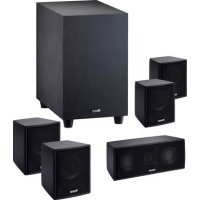
| Product type | Active 5.1 home cinema system with amplified subwoofer |
| Brand | Magnat |
| Model | Cinemotion 510 |
| Speaker configuration | 4 satellites (front/rear) + 1 center + 1 subwoofer |
| Power handling (RMS/Max) - Satellites | 50/100 W |
| Power handling (RMS/Max) - Center | 60/120 W |
| Output power (RMS/Max) - Subwoofer | 40/100 W |
| Frequency response - Subwoofer | 32 - 200 Hz |
| Adjustable crossover frequency | 50 - 150 Hz |
| Dimensions (W x H x D) - Satellites | 90 x 110 x 110 mm |
| Dimensions (W x H x D) - Center | 210 x 90 x 110 mm |
| Dimensions (W x H x D) - Subwoofer | 225 x 380 x 350 mm |
| Weight - Satellites | 0.9 kg |
| Weight - Center | 1.6 kg |
| Weight - Subwoofer | 7.7 kg |
| Power supply | Mains (subwoofer), 230 V / 50 Hz |
| Supplied accessories | Mains cable, speaker cables (not listed, but generally included) |
| Maintenance and cleaning | Dry, soft cloth; avoid chemical products or solvents |
| Safety | Do not open the enclosure; disconnect during thunderstorms or prolonged non-use |
| Speaker warranty | 5 years |
| Amplifier warranty | 2 years |
Frequently Asked Questions - Cinemotion 510 MAGNAT
User questions about Cinemotion 510 MAGNAT
0 question about this device. Answer the ones you know or ask your own.
Ask a new question about this device
Download the instructions for your Hi-fi system in PDF format for free! Find your manual Cinemotion 510 - MAGNAT and take your electronic device back in hand. On this page are published all the documents necessary for the use of your device. Cinemotion 510 by MAGNAT.
USER MANUAL Cinemotion 510 MAGNAT
At the end of the product's useful life, please dispose of it at appropriate collection points provided in your country.
Congratulations on your fine new loudspeakers and thank you very much for choosing MAGNAT! You have made an excellent choice. The high-quality speakers produced by MAGNAT are renowned all over the world.
Please study the instructions and information below carefully before using your new loudspeakers.

The triangle with a lightning symbol warns the user that high voltage is used within the device which can result in electric shock.

The triangle with an exclamation mark informs the user that important operating and maintenance instructions (repair) are contained in the accompanying instruction manual, which must be observed.

Do not open! Risk of electric shock!
CAUTION: In order to avoid electric shock do not open the speaker housing/mains adapters or remove the covers. The user is not to conduct any repairs him/herself. Repairs should only be conducted by qualified technicians! Do not use any sockets or extension cables that do not fully accommodate the plug of the device.
IMPORTANT SAFETY NOTICE
Please read through the instruction manual carefully before starting to use the device. This manual contains important information concerning operation and safety aspects. It is imperative you observe all of the information. Keep the manual in a safe location.
WARNING NOTICES: All of the warning symbols on the device, accessories and in the instruction manual itself must be adhered to.
- EXPOSURE TO HEAT: Only operate the device and accessories in a temperature range from 10^ to 40^ .
- The device should not be positioned near heat sources (heaters, ovens, radiant heaters, naked flames, etc.). When setting up close to an amplifier a minimum distance of 10cm must be maintained.
- No naked flame sources, such as lighted candles, should be placed on the device.
Pay attention to a sufficient ventilation of the device. The device may not be covered, e.g. by drapes, curtains. Maintain a distance of 20 cm to walls.
- EFFECT OF MOISTURE: The device should not be exposed to dripping or splash water. Neither should it be used to support vases or other containers filled with liquid. Do not expose the device to water or high levels of humidity. There is a danger of electric shock. In the event of contact with moisture or liquids remove the mains adapter immediately.
FOREIGN MATERIAL: Ensure that no foreign material enters through the device openings and into the interior. This could trigger short circuits and even result in electric shock and fire.
- CLEANING: Please use a soft, dry cloth with no cleaning agents, sprays or chemical solvents, as these could damage the surfaces.
- ELECTRICAL CONNECTION: Please note the voltage levels on the information signs. The mains adapter for the device should only be operated with the voltage and frequency values specified on the signs.
- LIGHTNING PROTECTION/PREVENTIVE MEASURES: If the device is not going to be used for a prolonged period (e.g. when on holiday), it should be disconnected from the mains by removing the plug. The device should also be disconnected from the mains in the event of a thunderstorm. Doing this will prevent damage caused by lightning and overvoltage.
- MAINS CABLE: The mains cable must always be suitable for operation and it should only ever be laid out in a manner that prevents it from being trodden on. It should not be pinched by objects either, as this can damage the cable. When using plugs and power strips it must be ensured that the cable is not kinked at the point where it emerges from the socket. Do not connect or remove the mains cable with damp hands.
- The mains plug is used as the disconnecting device. Disconnecting devices shall remain readily operable.
- OVERLOAD: Sockets, power strips and extension cables should not be overloaded. If an overload occurs, there is a risk of electric shock and fire.
- SETTING UP: Please read the installation instructions.
- The device should only be positioned or mounted on a solid surface and not on moving base frames, otherwise there is a risk of injury.
- Only use attachments/accessories specified by the manufacturer.
DAMAGE THAT MUST BE RECTIFIED BY A SPECIALIST:
If any of the following damage occurs, disconnect the device from the mains immediately and contact a specialist to conduct the repair work:
- The device should not continue to be operated if there is visible damage to the mains cable. A damaged cable should not be repaired, but must be replaced.
- Damage to the mains socket at the device.
If moisture or water has entered the device or foreign objects have fallen into the device. - If the device has fallen and the housing is damaged.
- If the device does not work properly, even though all of the information in the instruction manual has been observed.
Only those subsequent alterations approved by the manufacturer may be conducted.
Only original spare parts should be used for repair.
After conducting any repairs the safety of device should be checked to ensure it is functioning correctly and safely.
Repairs must always be conducted by qualified specialists, as you might otherwise be exposed to dangerous high voltage levels or other hazards.
INSTRUCTIONS FOR DISPOSAL
In accordance with European Directive 2012/19/EU all electrical and electronic appliances must be disposed of separately via local collection points. Please observe the local regulations and do not dispose of your old appliances with normal household waste.
GENERAL NOTES ON CONNECTING YOUR MAGNAT SATELLITE SPEAKERS
The connectors are located at the rear of the satellite speakers. They are equipped with a clamping mechanism for cables cross-sections of up to 1mm^2 . To connect the satellites, please use normally available 2× 0.75mm^2 - 2× 1mm^2 loudspeaker cables. The cables are to be cut to the required length, the ends stripped and the end of the wires twisted to make it easier to connect them to the terminals.
Always turn off the amplifier or receiver before connecting or disconnecting loudspeaker cables. For good sound the cables must be connected so that the speakers are "in phase". This means that the black negative terminals on the speakers (-) must be connected to the negative (-) terminals on the amplifier, the positive (+) speaker terminals to the positive (+) amplifier terminals.
Before switching on the system double-check all your connections and make sure that the terminal screws are tight and that there are no short circuits caused by stray wire filaments – this could cause serious damage to your amplifier!
POSITIONING
The centre, front and rear loudspeakers are marked on the back. The satellite connected to the centre output should be positioned on top of or beneath your TV set. The front satellites are placed to the left and the right of the TV set, preferably at equal distance and at ear-height. The satellites connected to the rear/surround outputs should be located to the left and right behind the listening position and slightly above ear-height.
Placement of the subwoofer is generally not critical. It should, if possible, be located near the front satellites.
CONNECTION TO AN AV RECEIVER
Connection of the system to an AV receiver is shown in figure 1 (receiver without a subwoofer output), figure 2 (receiver with low-level subwoofer output).
Note: In the receiver set-up, the front, centre, and rear loudspeaker channels should be set to 'small'. Some receivers also provide the option of setting the cross-over frequency between the subwoofer and satellites. If this is the case, please set this frequency to 150Hz or the frequency that comes closest to 150Hz . Please consult the user manual supplied with your receiver.
THE ACTIVE SUBWOOFER
Figure 3 shows the subwoofer's controls:
Mains connection (1)
The subwoofer is equipped with an integrated amplifier and needs to be connected to a mains outlet by means of the supplied mains cable.
Operating mode switch (6), operating state LED (7), power switch (2)
| Power switch ON Power switch OFF | ||
| Operating mode switch ON | Subwoofer is in permanent operation, the LED is green.Favourable setting for the reproduction of programmes with long quiet passages (this prevents the subwoofer from switching off unintentionally). | The subwoofer is switched off, LED is off.This is the setting for when subwoofer isn't used over long periods. |
| Operating mode AUTO | The automatic switching on/off is activated (recommended setting).The subwoofer switches on automatically when it receives a signal from the receiver, the LED turns green.It automatically switches to standby after receiving no signals for some minutes, the LED turns red. |
Line inputs (8)
For connecting to an AV receiver with low-level subwoofer output, see Fig. 2.
High-level inputs (9)
For connection to the high-level (speaker) outputs of the receiver/amplifier, refer to Fig. 1.
Level control (4)
This control is used to set the bass volume according to your preferences. Proceed as follows:
-
Set the bass control of your amplifier into its centre (linear) position.
-
Important: Set the level control to its left stop (lowest volume).
-
Now, play back some music and set the volume control of the amplifier to the desired level.
-
Set the subwoofer level control to the desired bass level.
Cross-over frequency control (3)
Used to set the upper limit of the subwoofer operating range. The cross-over frequency should be set to 50 to 150Hz when the system is used in combination with shelf loudspeakers or 50 to 100Hz when used with stand loudspeakers.
Phase switch (5)
In normal use the phase switch should be set to 0^ . However, in rare cases it may be advantageous to set the phase to 180^ (e.g. if the subwoofer is far away from the front loudspeakers or in the event of unfavourable acoustics in the room). Generally speaking: the setting where the lower base tone area has a fuller sound is the correct one.
HOW TO AVOID DAMAGE TO YOUR VALUABLE SPEAKERS
All Magnat loudspeakers are designed and built for optimum sound reproduction with the tone controls in the central position - i.e. with unaltered or "linear" amplifier output. Higher settings of the tone controls increase the amount of energy supplied to the loudspeakers. This may lead to speaker damage, at high volumes.
USE THE VOLUME CONTROL WITH CARE!
If the output of your amplifier is significantly higher than the rated power handling capacity of your speakers extremely high volumes can physically destroy your speakers. This doesn't actually happen often but you should be aware that it is possible.
Weak amplifiers with low output ratings can actually be more dangerous for your speakers at medium volumes. This sounds strange but the reason is quite simple: Weak amplifiers get overloaded much faster than powerful ones and this causes measurable and audible distortion, which is more dangerous for loudspeakers than anything else.
Always turn the volume down immediately as soon as you hear distortion! If you like listening to loud music make sure that your amplifier can deliver at least as much power as the speakers' power-handling rating.
SPECIFICATIONS
Front / Rear Centre
| Configuration: | Two-way | Two-way |
| Power handling capacity RMS / Max.: 50/100 watts | 60/120 watts | |
| Impedance: 4 - 8 ohm 4 - 8 ohm | ||
| Frequency range: 90 - 32 000 Hz | 80 - 32 000 Hz | |
| Cross-over frequency: 5000 Hz | 5000 Hz | |
| Recommended amplifier power: > 15 watts > 15 watts | ||
| Efficiency (2.8 V/1 m): 88 dB | 89 dB | |
| Dimensions (WxHxD): | 90 x 110 x 110 mm | 210 x 90 x 110 mm |
| Weight: | 0.9 kg | 1.6 kg |
| Subwoofer | ||
| Configuration: | bass reflex, downfire | |
| Output power RMS/Max.: | 40/100 watts | |
| Frequency range: 32 - 200 Hz | ||
| Cross-over frequency: 50 - 150 Hz, adjustable | ||
| Dimensions (WxHxD): | 225 x 380 x 350 mm | |
| Weight: | 7.7 kg | |
| Accessories: | mains cable | |
SUBJECT TO TECHNICAL CHANGE
Très cher client,
Impedance: 4-8 Ohm 4-8 Ohm
Bande passante: 90 - 32 000 Hz 80 - 32 000 Hz
Configuration: Bass reflex, Downfire
IyctaHOBKn ca6Byepa, KaN npabnIO, HNKAKNX cTpornx KpntepneB He NMeetcR, HO, NO BO3MOXHOCTN, ca6Byep cNeDyET pa3MeCTNb B6n3n fpoHTaJIbHbIX caTeJIINTOB.
IOKJIIOUOHEKAYNO-BNDEO PECNBEPY
IopKnIOueHne CnTeMbIK ayDIO-BnDeo pecNBepy (AV) noKa3aHO Ha pncyHke 1 (peCBep 6e3 BbIXOda dna ca6Byepa) nHa pncyHke 2 (peCBep c BbIXoJOM dna ca6Byepa Hn3KOrO ypOBHra.
BnmaHne:B nporpaMme setup pecnbepa Heo6xOJMo yCTaHOBtB fpoHTaJIbHbI, ceHTpaJIbHbI n TblIOBo KAHaIbI rPOMKOrOBOpnteHa 'small' nn Jke 'klein' (MaIbI'). Kpome TorO, y HeKOToPbIX pecNBepOB NMeETcE uEe I BO3MOXHOCTb peYIpOBKn IepexOJHOJ qACTOTb MeJky ca6ByΦepom I cATEJIITAMN. B 3TOM cIyuae Bam Heo6xOJMo yCTaHOBtB 3Tu qactOTy Ha 150 Tc, nn Ha qactOTy, Han6OJe 6JIn3KyU K 150 Tc. Ppr 3TOM Bam TaKKe Heo6xOJMo co6IIOdaTb pyKOBODCTBO no 3KcIIpyatau np pecNBepa.
AKTINBHBI I POMKOROBOPTEJIb IJN HN3KNX YACTOT (SUBWOOFER)
OTdJIbHbIe 3JIeMeHTbI CnCTembl ynpaBHeHna ca6Bypepa noka3aHbHa pncyKe 3:
PoiKIOUeHne K 3JIeKTPoCeTe (1)
Tak kak peyh ndet o ca6Bypepe co BCTpoeHHbIM ycHnnteJem, erO Heo6xOdmo NOdknouHTb K JInHnn 3JIeKTPocETN C NOMOuIPO npINIOXeHHoro CINIOBOrKa6eJra.
IpeeknioateJIb pexmOB (6),HndkaTOp pexmOB (7),BbIKIOaTeJIb nTaHna (2)
Bxodbl BbICOKoro ypoBn (9)
OTHOCHTeNbHO NOKIOUeHn K BbIXoam IaIpeyIaTopa BbICOKOr O ypOBHra (rpOMKOROBOpTeJIa) Ha pecuBepe/ycuNTeIe cMOtpn pucyHok 1.
Peryntop ypoBn4
C nmoaio 3Toro peyIaTopa moXHO yCTaHOBnTB rPOMKocTB B dnaNa3OHe Hn3Knx YactOT cOrnaCHO BaWemy xenAHIO cJeDyUoMm o6pa30M:
- PerynTop ypoBnaH Hn3Knx YactOT ycunnteJ npBecTn B cpeJHee noJoxHe (nnH.)
- Oueh Baxho: PerynTOp ypoBn noBepHyb do neBoro ynopa (cama Hn3Ka rPOMKoctb).
- BkIIOHTb My3bIKy n C NOMOuBIO peryJrTOpa ycINITeJIa NOBICNTb rPOMKoCTb do XeJaEMORO yPOBHJ.
- C nomoouperyIaTopa ypoBnYcTaHOBntb ypoBeHn3Knx YacToT Ha JeNaeMyIO rPOMKOCTb.
PerynTop pa3dienTeBHOuacToTbI (3)
C nomoIbHO 3Toro peRyIaTopa peKOMeHdyem yCTaHOBnTB caMyIO BbICOkyo YAcToTy, Ha KOTopoN ca6ByΦep MoKeT pa6oTaTb. B KombHaun C rPOMKOROBOpNTeYAMn dIra NOnOK, YAcToTy peKOMeHdyETcra YCTaHOBnTB ha 50r - 150r, ecnn Jpe PnIMeHryOTcra DInHAMNKdIra NoJa, To peKOMeHdyETcra yCTaHOBka ha 50r - 100 r.
Φa3OBbI nepeKIOUaTeNb (5)
O6bHNO paoB bI nepe KIOHATen DoJx H 6bIb yCTaHO B JEN Ha O°.OdHaOB peKnx Cnya X 6oJe e
eJeceoo6pa3HbIM MoKeT OKa3aTbcra YcTaHOBka pa3oBOrO nepeKIOUaTeJIa Ha 180° (Ha npimep, npi
6oJbwo OTdaJIeHHocTN ca6Bypepa OT pOHTaIbHbIX CATeJIITOB nII npn He6laonpnaTHbIX
akCyCTnuecknx CBOIcTBax NOMEuEHH).YHNBepcaIbHbIM AIBIeTcR npabIno: PpaBnIbHOI no3nuei
yBJIaETc Ta, pN KOTOpOI HIXHm Dnana3OH OCHOBbIX TOHOB IMeet HAn6OJe NOHoe 3ByaHne.
HECKOJIbKO COBETOB IJIY IPEIOTBPAUeHnI PEMOHTA
Bce rpoKorOBopnteH Magnat hactpoeHb Ha HanJyUwee Bo3MOxHOe KaueCTBO 3ByaHn, ecn peYyIaTOpbI Tem6pa HaxoIaTcB CpeIHeM IonoXeHN, T. e. npN LInHeHOM BocnpOn3BeDeHN ycunTeJI. Pp MaksmaJIbHOM IonoXeHN peryIaTOpOB Tem6pa K rpoMKOrOBopNTeJI M NOaETcB 6OJIbSe 3Heprn, KOtOpA, Pp 6OJIbIoR rpoMKoCTn, MoKeT npNBecT N kx pa3pyuWeHIO.
OBPAUATECBOCTOPOXHO C PEGYJATOPAMN TPOMKOCTI !!!
EcnBbI nCnObl3yete yCNlnteB, BbIXoHna MOUHO KOTOPOro 3HaHTeJIbHO IpEBbiJaaet DOYCTMMyu Hary3ky, yka3aHHyo Ha BaWei KOLOHKe, To OeyH bCNIbHra rPOMKOCT MoKET npUBecT N yHNHTOKeHHo BaHXr pOMKOrOBOpHTeNe - YTO, Ondako, CnyaETc DOBOJbHo peDKO.
YcHnTeJIx JKe CO CJIa60B BbIXOHO MOUHOCTbIO MOry T Oka3aTbCra DnRA BaInx DnHaMnKOB OnaChbIMN Uxke npn CpeDHe rPOMKocTN, TaK Kx MoXHO neperpy3NTb Rop3do 6bICTpee, Yem MoUHbIE ycHnTeJI. 3Ta neperpy3Ka Bbl3BaET IerKO 3aMeprEmbie N XopoIo CblIImMbie NCKaXeHn, KOToPbE KpaHHe onachbl dny BaInx rPOMKorOBOpnteJei.
IooTOMy Mbl peKoMeHdyem Bam npn HacTpOKe rPOMKOCTn Ha6JIHOaTb 3a NCKaXeHnA M, a npn IN NOBHeHn HemeDneHNO y6aBNTb rPOMKOCTb. KTo IIO6Nt OueHb rPOMKYo My3bIKy, TOT DOJKeH CJeINTb 3a TEM, YTO6bl BixOHaMaOuHCTb erO ycINHTeJIa No KpaIHHeMpe TaKoJ Xe, KaK MoUHOCTB, HA KOtopyIO paccHTaHa DoNyCTMaHa Harpy3ka KOLOHOK.
TEXHNUECKNE DAHHbIeS ΦpoHT/Tbl ΚeHTp
KoHpypa:2nonocb2nonocb
Донустимая Harpy3ka RMS / макс.: 50/100 BaTT 60/120 BaTT
IMpeHdaHc:4-8OM 4-8OM
PekomeHnyeMaMoHocbYcNITeJIa: >15BATT >15BaTT
KπD(2.8Batt/1m): 88d6 89d6
Pa3Mepbl (WxBxΓ.): 90x110x110MM 210x90x110MM
Bec: 0,9 Kr 1.6 Kr
Ca6ByΦep
KoHbIpya: bassreflex, downfire
BbIXoHna MoHocTb RMS/MaKc.: 40/100 BaTT
Congratulations! You have made a wise selection in becoming the owner of a MAGNAT HiFi equipment. Due to high quality MAGNAT HiFi products have earned an excellent reputation through the western world. And this high quality standard enables us to grant a 5-years warranty for MAGNAT HiFi speakers and a 2-years warranty for MAGNAT HiFi-electronic components.
The equipments are checked and tested continuously during the entire production process. In case you have problems with your MAGNAT HiFi equipment, kindly observe the following:
- The guarantee period commences with the purchase of the component and is applicable only to the original owner.
- During the guarantee period we will rectify any defects due to faulty material or workmanship by replacing or repairing the defective part at our discretion. Further claims, and in particular those for price reduction, cancellation of sale, compensation for damages or subsequent damages, are excluded. The guarantee period is not altered by the fact that we have carried out guarantee work.
- Unauthorized tampering with the equipment will invalidate this guarantee.
- Consult your authorized dealer first, if guarantee service is needed. Should it prove necessary to return the component to the factory, please insure that the component is packed in original factory packing in good condition - the quality control card has been filled out and enclosed with the component - your enclose your receipt as proof of purchase.
- Excld from the guaranty are: . Illuminates Wear parts . Shing damages, either readily apparent or concealed (claims for such damages must be lodged immediately with forwarding agent, the railway express office or post office). . Scatches in cases, metal components, front panels, etc. (You must notify your dealer directly of such defects within three days of purchase.) . Defects caused by incorrect installation or connection, by operation errors (see operating instructions), by overloading or by external force. Equipments which have been repaired incorrectly or modified or where the case has been opened by persons other than us. Consequential damages to other equipments. Reimbursement of cools, without our prior consent, when repairing damages by third parties.
F
Toutes nos félicitations!
Name and address of the dealer/stamp
Käufer/Customer
Name/Name
Straße/Street
PLZ, Ort /City
Land/Country
Kaufdatum/buying date
No warranty without receipt!