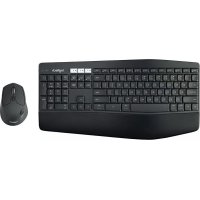
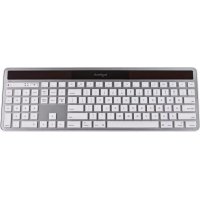
MK850 Performance - Gaming Keyboard LOGITECH - Free user manual and instructions
Find the device manual for free MK850 Performance LOGITECH in PDF.



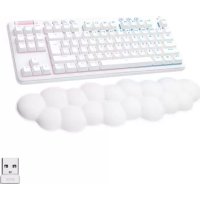
| Product Type | Wireless Gaming Keyboard |
| Brand | Logitech |
| Model | MK850 Performance |
| Connectivity | Bluetooth Smart and Unifying (USB receiver included) |
| Power Source | 2 AAA batteries (not included) |
| Estimated Battery Life | Up to 36 months |
| Dimensions (L x W x H) | 468 x 215 x 38 mm |
| Weight | 1.06 kg (with batteries) |
| Compatibility | Windows, macOS, Chrome OS, Android, iOS |
| Key Features | Easy-Switch (3 devices), multimedia keys, hyper-fast scroll wheel, dual connectivity, thumb button |
| Box Contents | Keyboard, Unifying receiver, AAA batteries, documentation |
| Software | Logitech Options (key customization) |
| Care and Cleaning | Clean with a soft, slightly damp cloth. Do not use abrasive products. |
| Safety | Do not expose to moisture or extreme temperatures. Do not disassemble. |
| Spare Parts and Repairability | Spare parts not available. Repair by authorized service only. |
| Warranty | 2 years (according to local legislation) |
Frequently Asked Questions - MK850 Performance LOGITECH
User questions about MK850 Performance LOGITECH
0 question about this device. Answer the ones you know or ask your own.
Ask a new question about this device
Download the instructions for your Gaming Keyboard in PDF format for free! Find your manual MK850 Performance - LOGITECH and take your electronic device back in hand. On this page are published all the documents necessary for the use of your device. MK850 Performance by LOGITECH.
USER MANUAL MK850 Performance LOGITECH
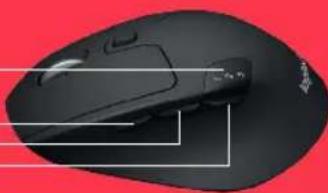
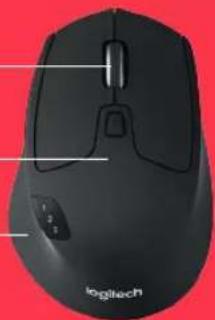
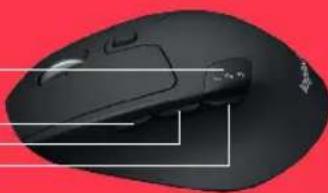
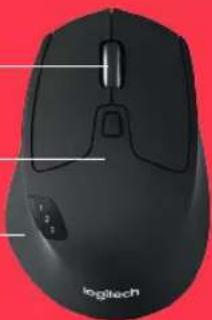
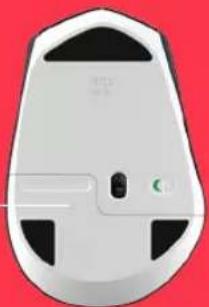
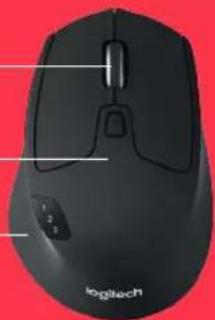
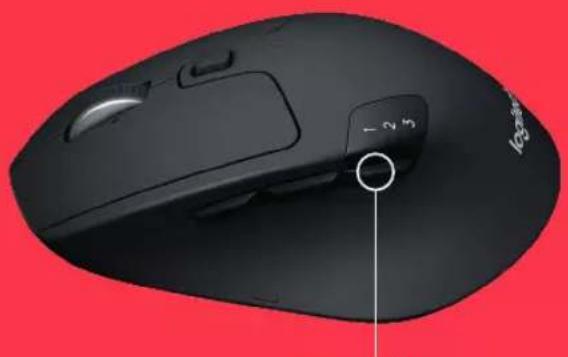
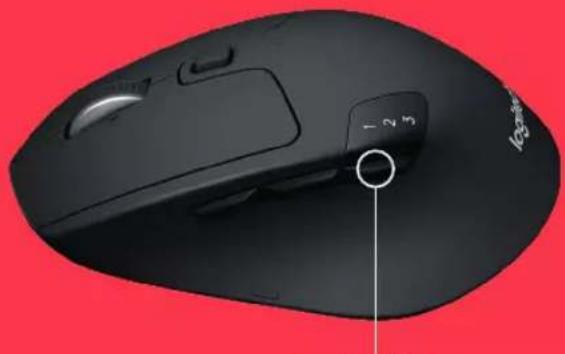
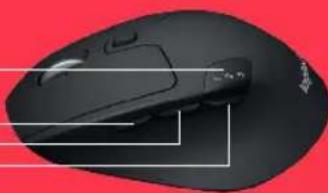
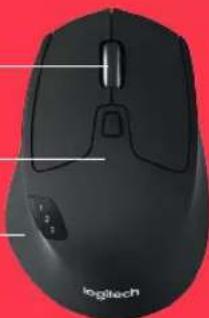
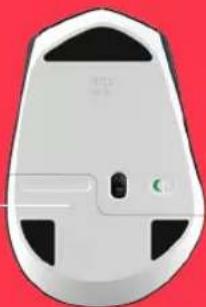
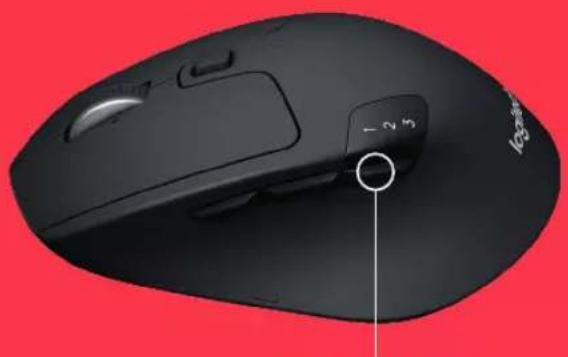
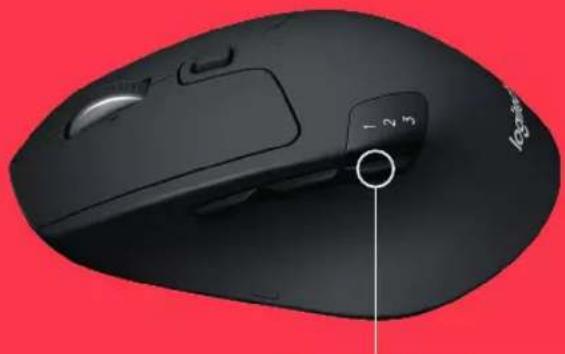
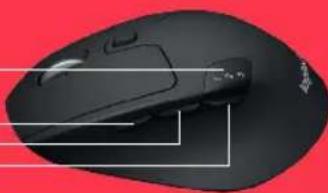
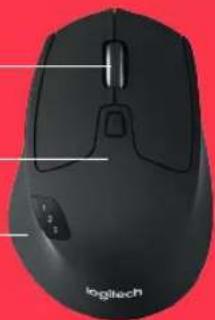
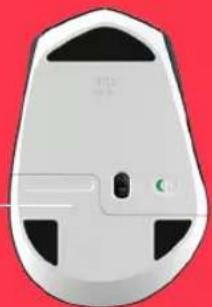
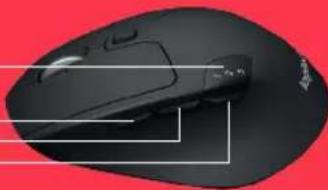
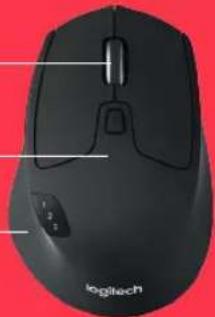
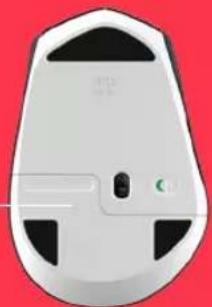
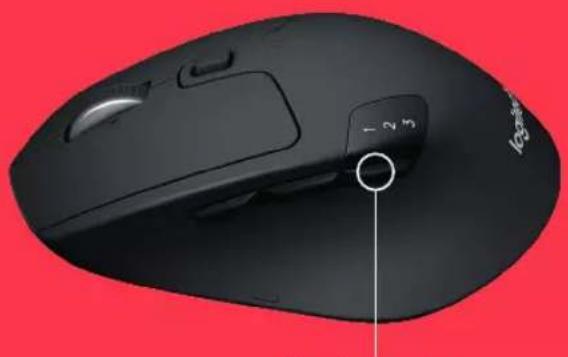
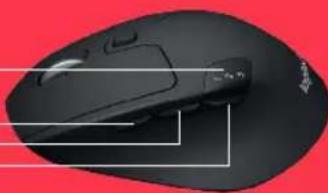
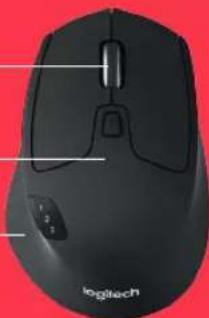
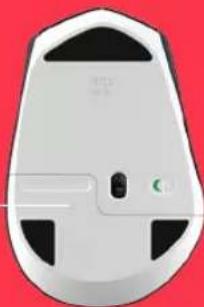
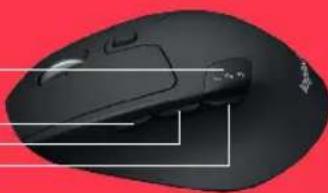
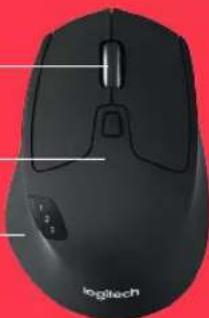
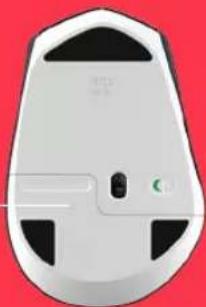
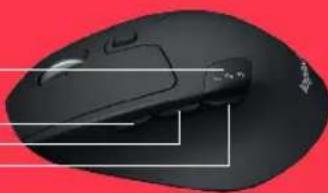
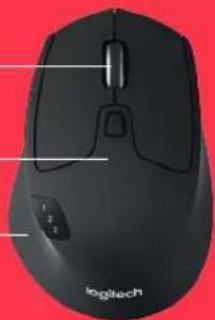
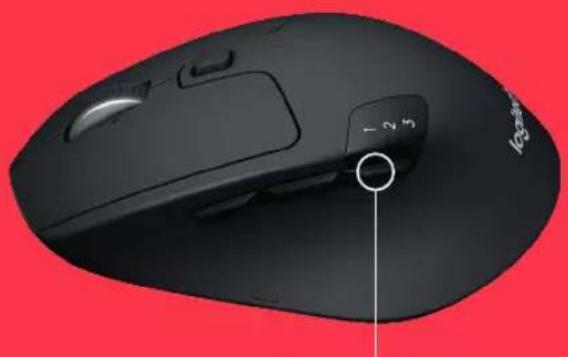
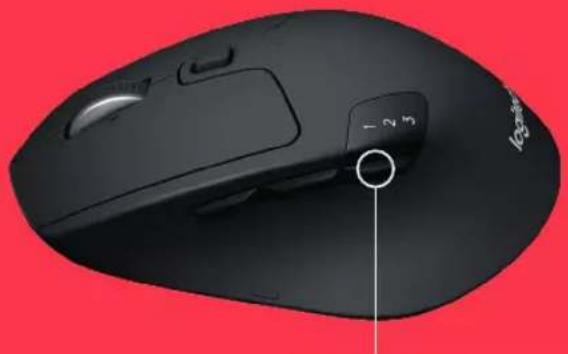
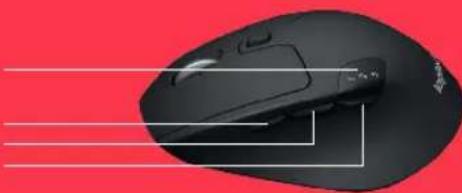
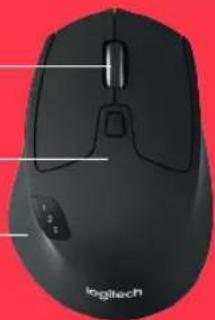
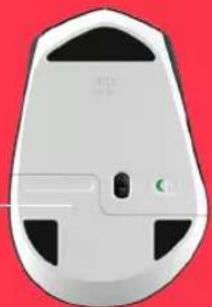
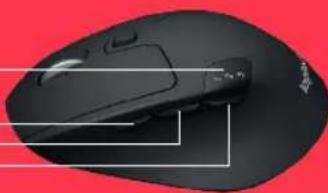
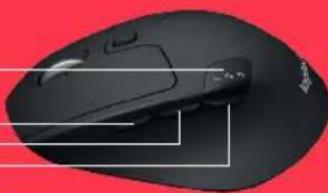
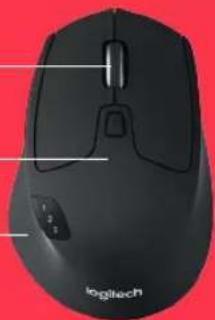
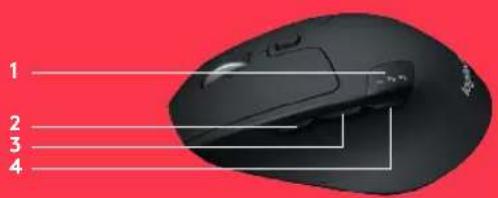
1 Easy switch
2 Forward button
3 Back button
4 Toggle & connect button
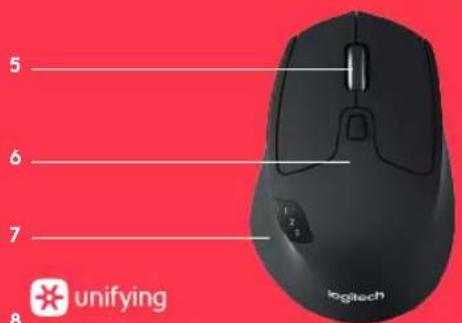
5 Hyper-fast scroll-wheel
6 Battery LED
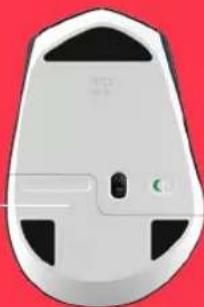
7 Thumb button
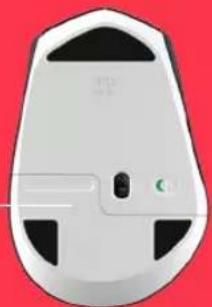
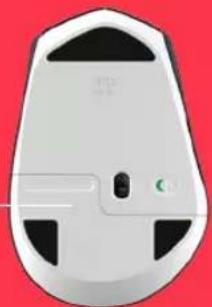
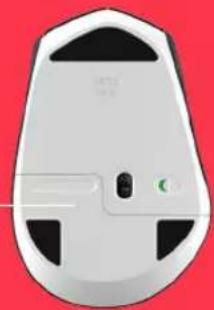
8 Dual Connectivity
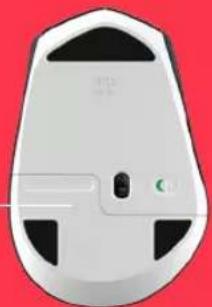
9 Battery & Receiver storage
1
2
4
5
6
7
8
unifying
BluetoothSMART
9
9
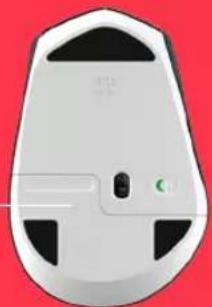
M720 Triathlon Mouse
GET STARTED
1 Remove pull tab
2 Select channel
3 Long press to pair
4 Plug receiver or open Bluetooth settings





0:03 Sec.


Bluetooth

www.logitech.com/m720

www.logitech.com/downloads Logitech Options
M720 Triathlon Mouse
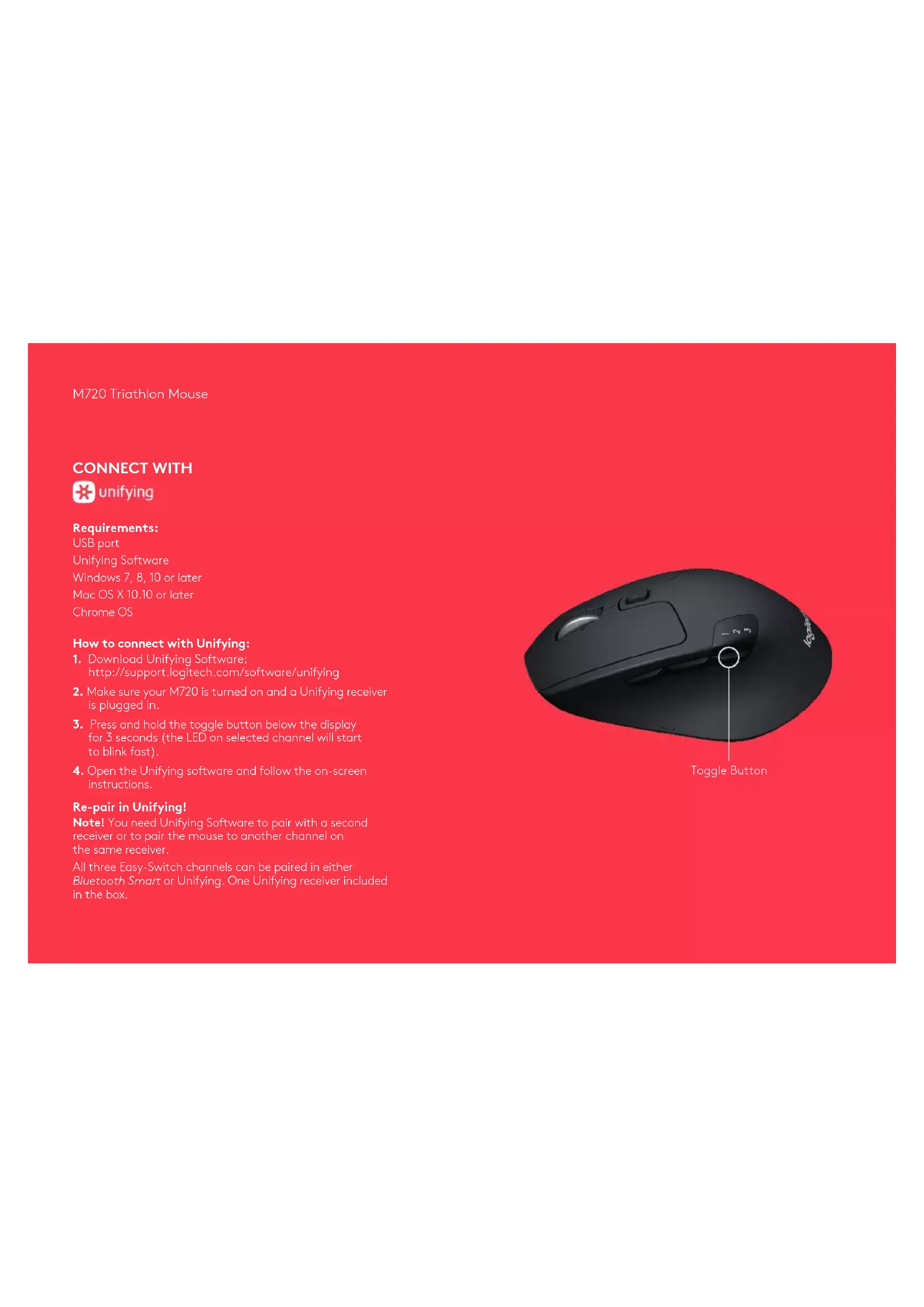
CONNECT WITH

unifying
Requirements:
USB port
Unifying Software
Windows 7, 8, 10 or later
Mac OS X 10.10 or later
Chrome OS
How to connect with Unifying:
- Download Unifying Software:
http://support.logitech.com/software/unifying - Make sure your M720 is turned on and a Unifying receiver is plugged in.
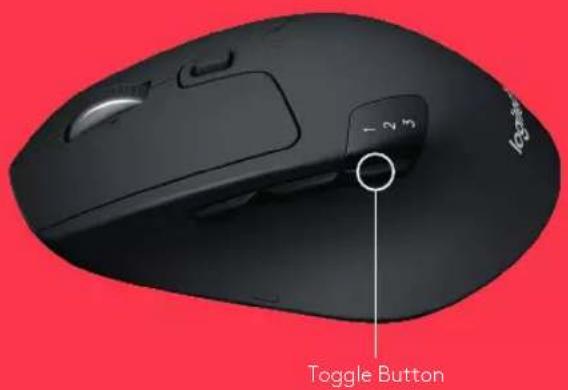
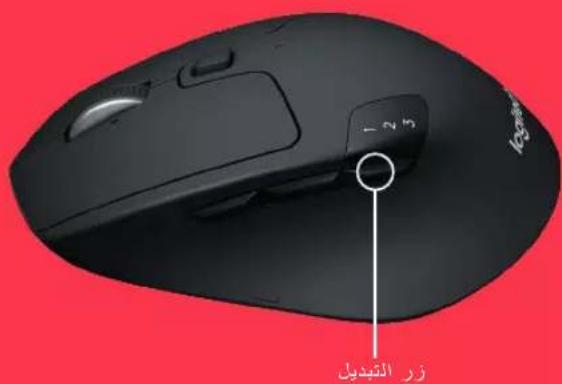
- Press and hold the toggle button below the display for 3 seconds (the LED on selected channel will start to blink fast).
- Open the Unifying software and follow the on-screen instructions.
Re-pair in Unifying!
Note! You need Unifying Software to pair with a second receiver or to pair the mouse to another channel on the same receiver.
All three Easy-Switch channels can be paired in either Bluetooth Smart or Unifying. One Unifying receiver included in the box.
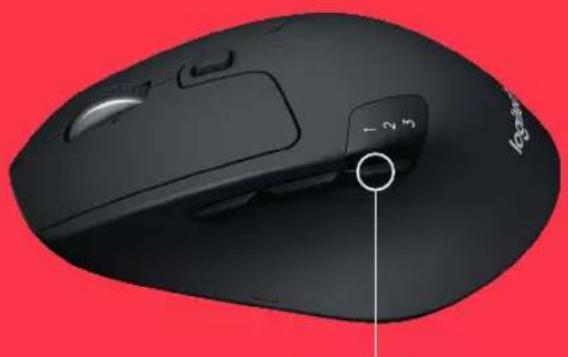
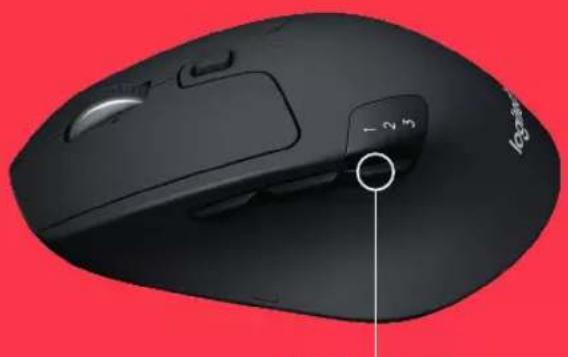
Toggle Button
M720 Triathlon Mouse
CONNECT WITH

Bluetooth
SMART
Requirements:
Your device has to support Bluetooth Smart
- Windows 8 or later
Mac OS X 10.10 or later
Android 5.0 or later
How to pair a Bluetooth device:
- Make sure your M720 is turned on
- Press and hold the toggle button below the display for 3 seconds (the LED on selected channel will start to blink fast)
- Open Bluetooth settings or Bluetooth device manager on your device and pair with "M720 Triathlon Mouse"
M720 Triathlon Mouse
LOGITECH OPTIONS
Unlock the full potential of your M720 by installing Logitech Options software. In addition to optimizing the mouse for your operating system, the software lets you customize buttons and actions to fit your needs.
Logitech Options software also enable gestures for managing media, panning, zoom, and rotation, plus custom tasks.
Mac | Windows

www.logitech.com/downloads
M720 Triathlon Mouse
PRODUKTFUNKTIONEN
www.logitech.com/downloads
M720 Triathlon Mouse
CARACTERISTIQUES DU PRODUIT
www.logitech.com/downloads
M720 Triathlon Mouse
CARATTERISTICHE
www.logitech.com/downloads
M720 Triathlon Mouse
CHARACTERISTICAS DEL PRODUCTO
www.logitech.com/downloads
M720 Triathlon Mouse
www.logitech.com/downloads
M720 Triathlon Mouse
PRODUCTFUNCTIES
unifying
Bluetooth
Bluetooth

9
9
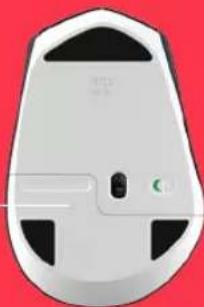
M720 Triathlon Mouse
AAN DE SLAG
Windows 7, 8, 10 of later
Mac OS X 10.10 of later
Chrome OS
Verbinding makes met Unifying:
www.logitech.com/downloads
M720 Triathlon Mouse
PRODUKTFUNKTIONER
anvanda gester for mediehantering, panorering,
www.logitech.com/downloads
M720 Triathlon Mouse
FUNKTIONER
3 Hold nede for at oprette binding
4 Saet madtageren i, ell er abn Bluetooth-indstillingerne.


www.logitech.com/m720

www.logitech.com/downloads Logitech Options
M720 Triathlon Mouse
OPRET FORBINDELSVIA

unifying
Kray:
USB-port
Unifying-software
Windows 7, 8, 10 erer nyere
Opret binding igen i Unifying.
www.logitech.com/downloads
M720 Triathlon Mouse
PRODUKTFUNKSJONER
1 Easy switch
2 Framover-knapp
3 Tilbake-knapp
4 Veksle- og tilkoblingsknapp
5 Superraskt scrollehjul
6 Batterilampe
7 Tommelknapp
8 Dobbeltikobling
Rom for batteri og mottaker
1
2
4
5
6
7
8
unifying
BluetoothSMART
M720 Triathlon Mouse
KOMIGANG
Bluetooth-innstillingene


www.logitech.com/m720

www.logitech.com/downloads Logitech Options
M720 Triathlon Mouse
KOBLE TIL MED

unifying
Kray:
USB-port
Unifying-programvare
Windows 7, 8, 10 erer nyere
Mac OS X 10.10 erer nyere
Chrome OS
www.logitech.com/downloads
M720 Triathlon Mouse
TUOTTEEN TOIMINNOT
www.logitech.com/downloads
Logitech Options
M720 Triathlon Mouse
YHDISTÄMISVAIHTOEHTO:

unifying
Vaatimukset:
USB-portti
Unifying-ohjelmisto
www.logitech.com/downloads
M720 Triathlon Mouse
XAPAKTHPIETIKA IPOIONTO
1 Easy-switch
2 Koumtjumpoc
3 Kounini niow
4 Koupiévaayngkaiouvean
5 Tpoxoc toxeliaq kuaianc
6 Evekuknuxvia pitapiac
7 Koumtavrtexipa
8 Duaipionouo
9 Ehkn mataapac kai xupoc aonBkeJeong, Sekm
1
2
4
5
6
7
8

unifying
Bluetooth
SMART
M720 Triathlon Mouse
ENAPH
1 Apaepore my tavla apopaleoc
2 EmAgyn KovAlic
3 THETE napateraevia vay aivtoai
4 SLUW86TE To 8eKTH N OVOIE TIC PUBOIOEiuBleotho


www.logitech.com/m720

www.logitech.com/downloads Logitech Options
M720 Triathlon Mouse
ΣYNΔEΣH ME

unifying
Anatnoetic:
Eupa USB
Aoyupko Unifying
Windows 7,8,10 volexpex
Mac OS X 10.10 v9eTapn ekdoon
Chrome OS
Tpontoc ouvdeonc meou Unifying:
- Kateβασετολογιρικό Unifying: http://support.logitech.com/software/unifying
- BeBaIouBeIe OTI TO M720 Eivai EvpyoToiHEvO KAI OTI ExTe ouVdoEoi Evia dKtn unifying.
- NIETE napatetaevv a na ta koumpia evaaync katw ano tv evdcln kavaiou yia 3 deutepoema ( n evoeiLED TOT EAYeueov KAVAIou Ta apxie va ava0obriva npyopa).
4.AvoIETe To Aoyouko Unifying kal aokaioutheta TIC oBnyieTIOU EuaovCovTAt OTN OBOvN.
EnavalnynavtoolxionpUnifying!
Snneiwn! ia va avtioxtoe To novtki ie seoteo ktn nyia va to avtioxtoe Te dao kavai oov unapxva tckn, xpece to ayqikko Unifying.
Ta Tpia kavaiia easy-switch umopov va avitooxiotov ete paw Bluetooth Smart site pow Unifying. 2tn ouokuaia nepaouBovetai evac dekntc Unifying.
Koupi evaayr
M720 Triathlon Mouse
ΣYNΔEΣH ME

Bluetooth
SMART
Anathoeic:
Houokunocipeneva unootnolca BluethoathSmart
-Windows8nveotepksoon
Mac OS X 10.10 n véotepn ékδocn
Android 5.0 n veotepn ekboon
Tponoc avtiotolxionmuac ouakeunc Blteoth:
- BeBarOeTeTo M720 eivai evpyorinpevo
- Pnote npateaetava to kouni evaaaync katw an tv Ev6eK Kavaiaou ia 3 deupeolema (n evacln LED tou EIAeVou Kavaiaou Ba apxoei va aovbaoyev ynpvopa)
- AvoiEtic pubuioic Bluetooth n in diaxepion ouokeuwu Bluetooth atn ouokeun oac kai avtiotoxite tny me th ouakeun M720 Triathlon Mouse"
Koupié vayy
M720 Triathlon Mouse
LOGITECH OPTIONS
Agionoiote nipwuc tic duvatotnttec tou M720 sykaBiotuwta to loyioiko Logitech Options, Ektoc an to Bnatoonion TOU Novtkiou yia To Aetoupyiok oac ouatma, to loyioikocac ENTPeTEIva npooapuOCTe Ta KOUJIA kai tic biapoeec evpeyeie c Eto, wote va avTANOKpivovTAt otic avaykec oac.
To loyopok Logitech Options everpyoioe, enianc tic kivnoic yia in diayepionmuow, tvn navopapuknpoBoa, to couk kal nynepioppon kauc, kal yia npaaupuaueve, epyaiec.
Mac | Windows

www.logitech.com/downloads
M720 Triathlon Mouse
ФУHKUUNYCTPOIUCTBA
1 Texionorma Easy-Switch - npocte nepeknouenme
2 Bnepei
3 Ha3a
4 KhoNka nokknoeHn/peeknoateB
5 Konecnko CBepx6bCTpo npokpyTK
6CBetodnDnHINNkAtOp ypoaHa3apHa6aTapei
7 KhoNka dna bOsbWoro nabua
8IouepkkaDByxTexHONnIOuKnHueHn
9 BaTapeHbIy otCEk co CnToTOM JINXpaHeHHN pInMeHmHa
1
2
4
5
6
7

Unifying
Bluetooth
SMART
8
9
BluethoutSMART
9
M720 Triathlon Mouse
HAYAJIO PA6OTbl
1 CINMMTE BAIUIIITYIO NIKHYK
2Babepeite kahan Haxwite yyjekmnaite,
3
TO6B1BBINOTHTB COTPXXCHC
4
BCTABTe TpEeMMNmNnOTKPOMe HACTPoMn BlcTooth









书
Bluetooth
- DNA

www.logitech.com/m720

www.logitech.com/downloads Logitech Options
M720 Triathlon Mouse
IIOKJIIOUeyHNE C NOMOUIbIO

unifying
Tpe6oBaHm
USB-nopt
NO Unifying
Windows 7, 8, 10 Windows 6 gone nozhen Bepcn
Mac OS X 10.10 mnn bongee no3nne Bepnu
OC Chrome OS
PnpdoK npdknouhen c nomoou Unifying
- CkaaHte nporpamHoe oecneueHnE cyTNIITOn Unifying: http://support.logitech.com/software/unifying.
2.YbEInTeBc,ToMbIbM720BKnOueHaN KHeN PNOKIOueH npEMnK Unifying. - HaxMMTe KhoNkY peKKnIOeHnno CoOTBcTCTByIOe UINpOu N yepKbBaTe ee B TeHHe 3 ceky-1 (NHJIKaTOp BbpaHOro KaHaHa NaHcyTbCTPO MmTaTb).
4.3anyctyIIOUnifyingnCneDyTeINHcTpyKuMaHaEkaHe
Nocnyuune cnpjkeHc nmooubUnifying
PnmeaHne. 106bl bInHNTb cnpKHeMeMbH
CDOONHNTBbHMnpEMHHKOMNINNEpeKNOHTbNCIOB3yEMbI npMeHHKHaDpyoRKaH, Tpe6yctrPOUnifying.
Bce TpN KaHana Easy-Switch MoKHO NOUKNIOHT JINo IO TEXHOIOTNn Bluetooth Smart, nIOO C NOMOIIIO npHMnKOB Unifying. B KOMnKeT NoCTaBN BKIOUeH OINn pMnEMNK Unifying.
Khoinka TnepeKUoyehn
M720 Triathlon Mouse
IIOKJIIOUOHENE C NOMOUIKO

Bluetooth
SMART
Tpe6obAHn
YCTPOINCTBO DOJNHO NOIDePcHbAaTbTexHONOrIO Bluetooth Smart
-Windows8mm60ee no3DHeBepn
Mac OS X 10.10 mnn bongee no3dneBepn
-Android 5.0 nii boine no3nHe Bepnn
PnpaOK noKIOUeHn KycTPOIcTBy cnDepkKn Bluetooth
1.Y6eNTecb.7TOMbIbM720BKnIOHeHa
2.HaMMTE KHOKky nepeKIOUeHnI NOI COOTBETCTBYOuei cnffpoN UyepKINBAITc ee B TeCHNE 3 CckHy (NHJNKATOP BBopaHnro KaHana HnHET BCTPO MMRtB)
3. OTKPOIte Ha NODKIIHOaEMOM YCTPOICTBE HAcTPOIKI BluTooth INIM DcNETHeP Bluteoth-yCTPOICTB IN BbINONHTe cOnpaKeHHe CMbIIbIO M720 Triathlon.
KhoNka nepeekuueHn
M720 Triathlon Mouse
LOGITECH OPTIONS
UcTaHOBHTIlogitech Options,HTO6bHNCIOJIb3OBaTB BCE BO3MOXHOCTM M720 B IIOHOM OObeme,3TO IPOgPAMMHoe oBeCNEeHne DaET BO3MOXHOCTb OTNIMNHPoBaTb pa6OTyMbHN B COOTBeCTBNN C ICNIOHBcEMON ONepaUNHOH CNCTcEMOn, a TaKae HaCTPoYee FyHKUN N KONKN B COOTBeCTBNN C BaWIMN INpEDNOHTEHARMI.
KpomeToro,IO Logitech Options nO30JHc TnmoUIO JXeCTOB ynpabTb BOCPONBDEHEnM MybTmEHa, NpOKpyuBaTb, NOBOPaHbTa, yBEINHbTaN yMeHbTaN 13O6paKeHHe Ha ekPaHc, a TaKc BblOnHbTa pA NlB3oBaTcBcknx 3a4u.
Mac | Windows

www.logitech.com/downloads
M720 Triathlon Mouse
CECHY PRODUKTU
http://support.logitech.com/software/unifying
www.logitech.com/downloads
M720 Triathlon Mouse
TERMÉKJELLEMZÖK
www.logitech.com/downloads
M720 Triathlon Mouse
FUNKCE PRODUKTU
1 Tlačitko Easy-switch
2 Tlacitko Vpred
3 Tlačitko Vzad
4 Tlacitko pro prepinani a pipojeni
5 Extra rychle rolovaci kolecko
6 Indikator baterie
7 Tlačitko pro ovladání palcem
8 Dualni pripojeni
9 Baterie a ulozny prostro pro prijima
1
2
4
5
6
7
8
unifying
Bluetooth
9
9
M720 Triathlon Mouse
ZACINAME
1 Odstraante vytahovaci prouzek

2 Vyberte kanoi Dlouze stisknete pro sparani Zapojte pijima nebo otevite


0:03s
4
nastaveni Bluetooth


Bluetooth
14/14

www.logitech.com/m720

www.logitech.com/downloads
Logitech Options
M720 Triathlon Mouse
PRIPOJEN POMOCI

unifying
Požadavky:
Port USB
Software Unifying
www.logitech.com/downloads
M720 Triathlon Mouse
CHARAKTERISTIKY VYROBKU
1 Tlacidlo Easy switch
2 Vpred
3 Spat
4 Tlacidlo na prepinanie a pripojenie
5 Extra rychle rolovacie koliesko
6 Kontrolka LED batérié
7 Tlačidio na ovladanie palcom
8 Duaine pripojenie
9 Bateria a ulozny priestor pre prilimac
1
2
4
5
6
7
8
unifying
Bluetooth
M720 Triathlon Mouse
ZACINAME
1 Vyberte vytohovaci pask
2 Vyberte kanal Dihym stlocenim sparujte 3apojte prijima alebo otvorte
4
nastavenia pre Bluetooth


www.logitech.com/m720

www.logitech.com/downloads Logitech Options
M720 Triathlon Mouse
PRIPOJTE POMOCOU

unifying
Poziadavky:
USB zásuvka
Softver Unifying
Windows 7, 8, 10 alebo navsi
Mac OS X 10.10 aleba novsi
Chrome OS
Ako sa pripojit k softveru Unifying:
- Stiahnite si softver Unifying:
http://support.logitech.com/software/unifying. - Skontrolujte, ci je zariadenie M720 zapnute
a di je zapojenj zjednocujuci prijima - Stlacte a podrzte tlacidlo prepinania pod displejom na 3 sekundy (kontrolka LED na vybranom kanali zacnerychlo blikat)
- Spustte softver Unifying a postupujte podlaPokynov na obrazovke.
Sparujte v softvri Unifying!
Poznamkal Na sparovanie mysi s druhym prijimaicom alebo s inym kanalom existujuceha prijimaica potrebujete softver Unifying.
Vsetky tri kanaly jednoducheho prepinania sa mozuspravovat v Bluetooth Smart alebo v softveri Unifying.
V'baleni sa nachadza jeder prijmauc Unifying
Tlacido prepinania
M720 Triathlon Mouse
PRIPOJTE POMOCOU

Bluetooth
SMART
Poziadavky:
Vase zariadenie musi podporovat technologiu Bluetooth Smart
-Windows 8 alebo novs
Mac OS X 10.10 alebo novsji
Android 5.0 alebo novsi
Spárovanie zariadenia Bluetooth:
- Skontrolujte, Č je zariadenie M720 zapnute
- Stlacte a podrzte tlacidlo prepinania pod displejom na 3 sekundy (kontrolka LED na vybranom kanali zaene rychlo blkat)
- Otvorte nastavenia Bluetooth alebo sprácvu zariadenia Bluetooth na svojom zariadeni a sparujte ho s mysou M720 Triathlon"
Tlacido prepinania
M720 Triathlon Mouse
LOGITECH OPTIONS
Öblokujte cely potencial svojej mysi M720 instalovanim softvero Logitech Options. Okrem optimalizacion mysi pre vaš operacny systém vám softver umožni prisposobit tlacidla a cinnosti tak, aby vyhovovali vašim potrebám.
Softver Logitech Options umozhne tiez pouzivat gesta pre spravovanie medii, panorama ticky pohyb, zaostrovanie a otacanie, plus vykonanvie vlastnych uloh.
Mac | Windows

www.logitech.com/downloads
M720 Triathlon Mouse
ФУHKUIIПРИСТЮ
1 Texionoria Easy-switch - npocte nepewikah H
2 Bnepei
3 Ha3a
KhoNka nikknoeHH/nepeMnkau
5 KoniataKo HaidWBkoTo npokpyybaHH
6 CattnojdnHn HnuKatop pBn 3apany batapei
7 KhoNka dna BenvKoro naNbca
8IITpIMKaDBOXTeHONorIIKIOHCHHH
9 batapeHHBjCk3i cnoTOMn836epiraHn npimaya
1
2
4
5
6
7
8

Bluetooth
SMART
9
9

ФУнкцПРСТРО 1 Text honoria Easy-switch -npocTe nepemkaHH 2 Bnepei 3 Hazad 4 Khonka nikloueHH / nepemkaay 5 KoluaTko HauBvKoro npokpyuBaHH 6 CbIIOIOHn IINkAToP pIBN 3apny batapei 7 Khonka dIa BEVIKoro naIbua 8 ПITpIMKa DBOx TexhONrII NkIIOUeHH 9 BatapeHH Bicik 3cNOTm Dn36epiraHH npimmaa
M720 Triathlon Mouse
NQATOKPOBOTI
1 31MTHaXnCiy nBky
23a6epitkaihan HAtncltlymyte
3 106 EMKCHATN CIOYHCH
4Плкюнгп римьа arch Bдрпупсп Н actpoikn Blctoith




0:03c

www.logitech.com/m720

www.logitech.com/downloads Logitech Options
M720 Triathlon Mouse
www.logitech.com/downloads
M720 Triathlon Mouse
TOOTE OSAD
1 Hoppliti
2 Edosi
3 Tagasi
4 Ümberlülitus- ja ühendusnupp
5 Ülkeire kerimisratos
6 Patareituli
7 Poidlanupp
8 Mitmikuhenduvus
9 Patareipesa ja vastuvotja hoidik
1
2
4
5
6
7
8

unifying

Bluetooth
SMART
M720 Triathlon Mouse
ALUSTAMINE
1 Eemaldoge valja-tommatav lipik.
www.logitech.com/downloads
M720 Triathlon Mouse
IERICESAPRAKSTS
www.logitech.com/downloads
M720 Triathlon Mouse
GAMINIO SAVYBES
www.logitech.com/downloads
M720 Triathlon Mouse
ФУHKUIM HA ПОДУКТА
1 Necno npesknoubahe
2 Hanpei
3 Ha3a
4 BytoH 3a npBbptAne CbBp3BaHe
5bytoH3aNkncnTeHNObbp3nopeBbPtaHe
6 CberdoiOn 3a 8atepina
7 MInHuaTiopeH CyTOH
8 DayyHKUHOJHOCabp3BaHe
9 OTepeHHe 3a 6atepuTnA n npEmnHa
1
2
4
5
6
7
8

unifying

Bluetooth
SMART
M720 Triathlon Mouse
HAJIO
1MnBaeTeNakpanika 3aMnDpBNBaHc
2 136epete kaian Hatici hete npotbikntoi
3 33 CDBOBAHC
Bknqupe npnemu kna ntn OTOpe Hactpoiknte Ha Bluetooth


www.logitech.com/m720

www.logitech.com/downloads Logitech Options
M720 Triathlon Mouse
CBP3BAHE C

unifying
N3nCKBaHm
USBnopT
06eHHBaaucoftypep(Unifying Software)
Windows7,8,10MIMIO-HOBBepcnn
Mac OS X 10.10 uHn nO-HOBv Bepcnn
Chrome OS
Cbbp3BaHcUnifying:
- Naterne Unifying Software:
http://support.logitech.com/software/unifying
2.YBepetece,yeM720eBKIOUcHAnYeO6eINHBAaIAT PmEMHHK E BKNIOUeHN B.
3.HaHCHETe 3aPbXte 6yToHa 3a npEeKIOuBaHe nO JnCnIe 3a 3cekyHn (LEDHa n36paHn KaHn ige 3aONHe 6b03 Da npmMra). - OTBOPeCoPfYepa Unifying n cIeBaiTe INCTpyKuHnTe Ha ekpaHa.
CboeTe oTHoBc Unifying!
3a6enexka! Heobxodm e coptyep Unifying 3a cboBaHe
HaMMKATA KbM BTOPIIPIHMHK HIN 3a Cbbp3BaHe Ha MMKATA KbMpyr KaHnHa CbIIECTByBaIIIMPiHMHK.
Bcuknite ToT neCHe 3a npeBkUoyBaHe KaHAn MoRat na ce CbBpKaTnn B Bluetooth Smart nn B Unifying. EHN Unifying npemHKe B KBNQeH B KOMNPKTA.
ByrOHaIpeBbptAHe
M720 Triathlon Mouse
CBP3BAHE C

Bluetooth
SMART
N3nckBaHna:
BawetoyoctpoenCTBOtpaBa da noDnbpka Bluetooth Smart
-Windows8mmno-HoBaBepcna
Mac OS X 10.10 mm no-HOBA Bepcna
Android 5.0 no-no-HoBa Bepcna
Kac da cBBOm Bluetooth yctpOCTBO:
- PpOBepeTe daNN M720 e BkHoueHa
2.HaTCHETeH3aDpBxTe6yToHa3a npEeKnOuBaHe noi 1nncnner 3a 3cekyHm(LED Ha n3bpaHn KaHaI ue 3anoHre 6bp3o da pnnmRBA) - OToBopTe Bluetooth Hactpoknite Anu Bluetooth MenuKbpa Ha BaueTo yCTPOK TBO NTO CBOteC "Mmka M720 Triathlon"
ByrOHaIpeBbptAHe
M720 Triathlon Mouse
ONUIMLOGITECH
OTKIOHETIbIHITNOTEHnHnHaM720KATOINCTANIPATE COOHTeP Logitech Options. BdoJIbHeHNE KBM ONTMMNHPaHTo HA MIIKKATA 3a BaaTa ONEpaONHCA NCTema,COOHTePbT NO3BONRA Da NEpcoHannHnPaTe ByTOHnE n DeiCTBnTA CnopeD BAaHTe ININBUNyAHH Hxknn.
CofTyep Logitech Options daba 3bMoXHOCTn 3a ynpaBeneHHe Ha MeDIN, nAhopamHo npuBvKBaHe, yBeNuaBaHe n 3aBbPtaHe nnIOc nepcoHaJIImpaHn 3aJauH.
Mac | Windows

www.logitech.com/downloads
M720 Triathlon Mouse
ZNACAJKE PROIZVODA
1 Jednostavno prebacivanje
2 Naprijed
3 Natrag
4 Preklopna tipka i tipka za povezivanje
5 Hiperbrz kotačić za listanje
6 LED indicator baterije
7 Tipka za palac
8 Dvostruko povezivanje
9 Spremnik baterije i prijemnika
1
2
4
5
6
7
8

一
一

unifying
Bluetooth
SMART
M720 Triathlon Mouse
POCETAK
1 Uklonite potezni otvarač
www.logitech.com/downloads
M720 Triathlon Mouse
FUNKCIJE PROIZVODA
1 Easy-switch (jednostavno prebaclvanje)
2 Unapred
3 Nazad
4 Dugme za izbor i za uspostavljanje veze
5 Točak za izuzetno brzo pomeranje
6 LED lampica baterije
7 Dugme za polac
8 Magućnost dvojnog povezivanja
9 Spremiste za bateriju i priemnik
1
2
4
5
6
7
8

Bluetooth
SMART

9
9
9
M720 Triathlon Mouse
POCETAK
1 Uklonite jezičak za pavlacenje
www.logitech.com/downloads
M720 Triathlon Mouse
FUNKCIJE IZDELKA
3 in pridrzite gumb.
www.logitech.com/downloads
M720 Triathlon Mouse
CHARACTERISTICILE PRODUSULUI
www.logitech.com/downloads
M720 Triathlon Mouse
URUN OZELLIKLERI
1 Easy-switch
2 Ileri dugmesi
3 Geridugmesi
4Gecisvebaglantutusu
5 Super hizli kayirdma tekerleigi
6 Pllisig
7 Parmok tusu
8 Cift Baglanti
9 Pil ve Aliyuvasi
1
2
4
5
6
7
8

unifying
Bluetooth
SMART
M720 Triathlon Mouse
BAŞLANGIÇ
www.logitech.com/downloads
M720 Triathlon Mouse
Ciiin C13a
1
2
3e
4. Jwss
5 a
6 1
( x,y) = ( x^ ( x) ,y^ ( y) )
8 = 2 ÷ 2016
j142g 3 j162g jds9

Bluetooth
SMART
M720 Triathlon Mouse
J
1
2
3 1
4 Bluetooth coml 1




A 0:03

Bluetooth

www.logitech.com/m720

www.logitech.com/downloads Logitech Options
M720 Triathlon Mouse
pssuJlui

unifying
:
USB
Unifying
10j8jWindows7
Mac OS X 10.10
Chrome OS
Unifying
:Unifying 1
http://support.logitech.com/software/unifying
unifying M720
3.
www.logitech.com/downloads
LOGITECH OPTIONS
Logitech Options M720
aaii aai iiaai iaaai
dialal 1j1j1 j
Iiluogd 8jL JcLogitech Options gai juy Ls
4 Bluetooth nnnn nn in






Bluetooth
0:03

www.logitech.com/m720

www.logitech.com/downloads Logitech Options
M720 Triathlon Mouse
nynnnnn

unifying
USB
Unifying main
ninnin Windows 7,8,10
ninnin Mac OS X 10.10
Chrome OS
Unifying yannn
Unifying non non .1
http://support.logitech.com/software/unifying
in Unifying 771 15 M720 2
aannnna nnnn 3n 3n nnnn nnnn nnnn nn nnnn nnnn nnnn nnnn nnnn nnnn nnnn nnnn nnnn nnnn nnnn nnnn nnnn nnnn nnnn nnnn nnnn nnnn nnnn nnnn nnnn nnnn nnnn nnnn nnnn nnnn nnnn nnnn nnnn nnnn nnnn nnnn nnnn nnnn
nannnnnnnnnnnun,Unifying nnnnnn.4
!Unifying-2 777
wn y nyn nn Unifying noon unnnn 1nyn
Bluetooth Smart 77777777777777777777777777777777777777777777777777777777777
M720 Triathlon Mouse
y
Bluetooth
BluetoothSmart-1nnn
-
-
:Bluetooth pnn by nyn yth
1.701M
x7 nnnn nn nnnn np by nnn 3 ynnn pnnnyn7.2
(annnnnnn nn n yea LED-n)
77777777777777777777777777777777777777777777777
"M720 Triathlon"
M720 Triathlon Mouse
Mac | Windows

www.logitech.com/downloads
LOGITECH OPTIONS
mnnn m720 w nnnn nn nnnn nnnn nn nnnn nn nnnn nn nnnn nn nnnn nn nnnn nn nnnn nn nnnn nn nnnn nn nnnn nn nnnn nn nnnn nn nnnn nn nnnn nn nnnn nn nnnn nn nnnn nn nnnn nn nnnn nn nnnn nn nnnn nn nnnn nn nnnn nn nnnn nn nnnn nn nnnn
nna nnnn nn nnnn Logitech Options nnnn nn nnnnnn nn nnnn nn nnnn nn nnnn nn nnnn nn nnnn nn nnnn nn nnnn nn nnnn nn nnnn nn nnnn nn nnnn nn nnnn nn nnnn nn nnnn nn nnnn nn nnnn nn nnnn nn nnnn nn nnnn nn nnnn nn nnnn nn nnnn nn nnnn nn nnnn nn nnnn nn
© 2016 Logitech. All rights reserved. Logitech, Logi and other Logitech marks are owned by Logitech and may be registered. The Bluetooth * word mark and logos are registered trademarks owned by Bluetooth SIG, Inc. All other trademarks are the property of their respective owners.
WEB-621-000745.003
- CONNECT WITH
- Requirements:
- How to connect with Unifying:
- Re-pair in Unifying!
- Bluetooth
- SMART
- How to pair a Bluetooth device:
- LOGITECH OPTIONS
- PRODUKTFUNKTIONEN
- CARACTERISTIQUES DU PRODUIT
- CARATTERISTICHE
- CHARACTERISTICAS DEL PRODUCTO
- PRODUCTFUNCTIES
- Verbinding makes met Unifying:
- PRODUKTFUNKTIONER
- FUNKTIONER
- OPRET FORBINDELSVIA
- Kray:
- Opret binding igen i Unifying.
- PRODUKTFUNKSJONER
- KOBLE TIL MED
- TUOTTEEN TOIMINNOT
- YHDISTÄMISVAIHTOEHTO:
- Vaatimukset:
- XAPAKTHPIETIKA IPOIONTO
- ΣYNΔEΣH ME
- unifying
- Anatnoetic:
- Tpontoc ouvdeonc meou Unifying:
- EnavalnynavtoolxionpUnifying!
- Anathoeic:
- Tponoc avtiotolxionmuac ouakeunc Blteoth:
- ФУHKUUNYCTPOIUCTBA
- IIOKJIIOUeyHNE C NOMOUIbIO
- Tpe6oBaHm
- PnpdoK npdknouhen c nomoou Unifying
- Nocnyuune cnpjkeHc nmooubUnifying
- IIOKJIIOUOHENE C NOMOUIKO
- Tpe6obAHn
- PnpaOK noKIOUeHn KycTPOIcTBy cnDepkKn Bluetooth
- CECHY PRODUKTU
- TERMÉKJELLEMZÖK
- FUNKCE PRODUKTU
- ZACINAME
- PRIPOJEN POMOCI
- Požadavky:
- CHARAKTERISTIKY VYROBKU
- PRIPOJTE POMOCOU
- Poziadavky:
- Ako sa pripojit k softveru Unifying:
- Sparujte v softvri Unifying!
- Spárovanie zariadenia Bluetooth:
- M720 Triathlon Mouse
- ФУHKUIIПРИСТЮ
- TOOTE OSAD
- ALUSTAMINE
- IERICESAPRAKSTS
- GAMINIO SAVYBES
- ФУHKUIM HA ПОДУКТА
- CBP3BAHE C
- N3nCKBaHm
- Cbbp3BaHcUnifying:
- CboeTe oTHoBc Unifying!
- N3nckBaHna:
- Kac da cBBOm Bluetooth yctpOCTBO:
- ONUIMLOGITECH
- ZNACAJKE PROIZVODA
- FUNKCIJE PROIZVODA
- FUNKCIJE IZDELKA
- CHARACTERISTICILE PRODUSULUI
- URUN OZELLIKLERI
- BAŞLANGIÇ
Brand : LOGITECH
Model : MK850 Performance
Category : Gaming Keyboard