EasyManual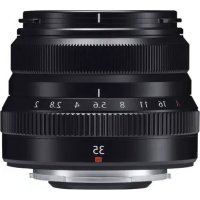
XF 35mm f2.0 R WR - Lens FUJIFILM - Free user manual and instructions
Find the device manual for free XF 35mm f2.0 R WR FUJIFILM in PDF.



| Technical Specifications | Focal length: 35mm, Maximum aperture: f/2.0, Minimum aperture: f/16, Optical construction: 9 elements in 6 groups, Angle of view: 44° |
|---|---|
| Usage | Ideal for street photography, portraits, and landscapes. Compatible with Fujifilm X-mount cameras. |
| Maintenance and Repair | Regular cleaning of the optics with a soft cloth, avoid shocks to prevent internal damage. |
| Safety | Use a UV filter to protect the front lens, avoid exposure to extreme temperatures. |
| General Information | Weight: 170g, Dimensions: 65mm x 50mm, Waterproof: Yes, Warranty: 2 years. |
Frequently Asked Questions - XF 35mm f2.0 R WR FUJIFILM
User questions about XF 35mm f2.0 R WR FUJIFILM
0 question about this device. Answer the ones you know or ask your own.
Ask a new question about this device
Download the instructions for your Lens in PDF format for free! Find your manual XF 35mm f2.0 R WR - FUJIFILM and take your electronic device back in hand. On this page are published all the documents necessary for the use of your device. XF 35mm f2.0 R WR by FUJIFILM.
USER MANUAL XF 35mm f2.0 R WR FUJIFILM
XF35mmF2 R WR/XF23mmF2 R WR
LENSZKJFFJFJFJFJFJFJFJFJFJFJFJFJFJFJFJFJFJFJFJFJFJFJFJ
絞りンダ
Be sure to read these notes before use
Safety Notes
Thank you for your purchase of this product. For repair, inspection, and internal testing, contact your FUJIFILM dealer.
Make sure that you use the lens correctly. Read these safety notes and the camera Owner's Manual carefully before use.
After reading these safety notes, store them in a safe place.
About the icons
The icons shown below are used in this document to indicate the severity of the injury or damage that can result if the formation indicated by the icon is ignored and the product is used incorrectly as a result.

WARNING
This icon indicates that death or serious injury can result if the information is ignored.

CAUTION
This icon indicates that personal injury or material damage can result if the information is ignored.
The icons shown below are used to indicate the nature of the instructions which are to be observed.

Triangular icons tell you that this information requires attention ("Important").

Circular icons with a diagonal bar tell you that the action indicated is prohibited ("Prohibited").

Filled circles with an exclamation mark indicate an action that be performed ("Required").


WARNING

Do not use in the bathroom or shower
Do not immerse in or expose to water. Failure to observe this precaution can cause a fire or electric shock.

Do not disassemble
Do not disassemble (do not open the case). Failure to observe this precaution can cause fire, electric shock, or injury due to product malfunction.
Should the case break open as the result of a fall or other accident, do not touch the exposed parts. Failure to observe this precaution could result in electric shock or in injury from touching the damaged parts. Remove the camera battery immediately, taking care to avoid injury or electric shock, and take the product to the point of purchase for consultation.

WARNING

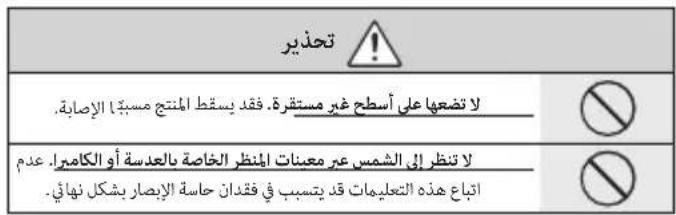
Do not place on unstable surfaces. The product may fall, causing injury.

Do not view the sun through the lens or camera viewfindex
Failure to observe this precaution can cause permanent visual impairment.

CAUTION

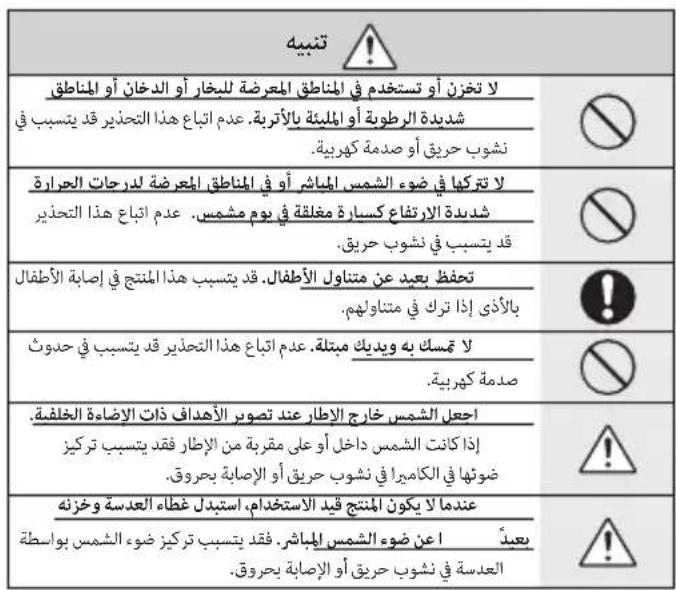
Do not use or store in locations that are exposed to steam, or smoke or are very humid or extremely dusty. Failure to observe this precaution can cause fire or electric shock.

Do not leave in direct sunlight or in locations subject to very high temperatures, such as in a closed vehicle on a sunny day.
Failure to observe this precaution can cause fire.

CAUTION

Keep out of the reach of small children. This product could cause injury in the hands of a child.

Do not handle with wet hands. Failure to observe this precaution can cause electric shock.

Keep the sun out of the frame when shooting backlit subjects. Sunlight focused into the camera when the sun is in or close to the frame can cause fire or burns.

When the product is not in use, replace the lens caps and store out of direct sunlight. Sunlight focused by the lens can cause fire or burns.

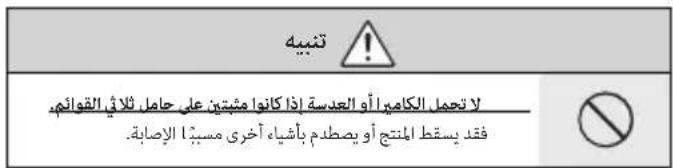
Do not carry the camera or lens while they are attached to a tripod. The product can fall or strike other objects, causing injury.
For Customers in the U.S.A.
Tested To Comply With FCC Standards FOR HOME OR OFFICE USE
FCC Statement: This device complies with Part 15 of the FCC Rules. Operation is subject to the following two conditions: (1) This device may not cause harmful interference, and (2) this device must accept any interference received, including interference that may cause undesired operation.
CAUTION: This equipment has been tested and found to comply with the limits for a Class B digital device, pursuant to Part 15 of the FCC Rules. These limits are designed to provide reasonable protection against harmful interference in a residential installation. This equipment generates, uses, and can radiate radio frequency energy and, if not installed and used in accordance with the instructions, may cause harmful interference to radio communications. However, there is no guarantee that interference will not occur in a particular installation. If this equipment does cause harmful interference to radio or television reception, which can be determined by turning the equipment off and on, the user is encouraged to try to correct the interference by one or more of the following measures:
Reorient or relocate the receiving antenna.
- Increase the separation between the equipment and receiver.

- Connect the equipment into an outlet on a circuit different from that to which the receiver is connected.
- Consult the dealer or an experienced radio/TV technician for help.
- You are cautioned that any changes or modifications not expressly approved in this manual could void the user's authority to operate the equipment.
Notes on the Grant: To comply with Part 15 of the FCC Rules, this product must be used with a Fujii Im-specific ed ferrite-core A/V cable, USB cable, and DC supply cord.
For Customers in Canada
CANICES-3(B)/NMB-3(B)
CAUTION: This Class B digital apparatus complies with Canadian ICES-003.
IMPORTANT SAFETY INSTRUCTIONS
- Read these instructions.
- Keep these instructions.
Heed all warnings. - Follow all instructions.
- Do not use this apparatus near water (excluding waterproof products).
Clean only with a dry cloth. - Do not block any ventilation openings. Install in accordance with the manufacturer's instructions.
- Do not install near any heat sources such as ra
diators, heat registers, stoves, or other apparatus (including amplifiers) that produce heat.
- Protect the power cord from being walked on or pinched particularly at plugs, convenience receptacles, and the point where they exit from the apparatus.
- Only use attachments/accessories specified by the manufacturer.
- Unplug this apparatus during lightning storms or when unused for long periods of time.
Refer all servicing to qualified service personal. Servicing is required when the apparatus has been damaged in any way, such as power supply cord or plug is damaged, liquid has been spilled or objects have fallen into the apparatus, the apparatus has been exposed to rain or moisture, does not operate normally, or has been dropped.
Disposal of Electrical and Electronic Equipment in Private Households
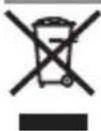
In the European Union, Norway, Iceland and Liechtenstein: This symbol on the product, or in the manual and in the warranty, and/or on its packaging indicates that this product shall not be treated as household waste. Instead it should be taken to an applicable collection point for the recycling of electrical and electronic equipment.
By ensuring this product is disposed of correctly, you will help prevent potential negative consequences to the environment and human health, which could otherwise be caused by inappropriate waste handling of this product.
The recycling of materials will help to conserve natural resources. For more detailed information about recycling this product, please contact your local city office, your household waste disposal service or the shop where you purchased the product.
In Countries Outside the European Union, Norway, Iceland and Liechtenstein: If you wish to discard this product, including the batteries or accumulators, please contact your local authorities and ask for the correct way of disposal.
Australian RCM

Before Using This Product
Some lens features are not available with older versions of the camera firmware. Be sure to update the camera firmware to the latest version. Instructions on viewing the camera firmware version and updating camera firmware are available from the following website:
http://www.fujifilm.com/support/digital Cameras/software/#firmware
If you do not have access to a computer, support is available from the local distributor listed in the "FUJIFILM Worldwide Network" material provided with your camera.
Product Care
- When using a lens hood, do not pick up or hold the camera using only the hood.
-
Keep the lens signal contacts clean.
-
Use a blower to remove dust and lint from the glass surfaces of the lens or fi iter. To remove smudges and fi ngerprints, apply a small amount of lens cleaner to a soft, clean cotton cloth or lens-cleaning tissue and clean from the center outwards using a circular motion, taking care not to leave smears or touch the glass with your fi ngers.
- Never use organic solvents such as paint thinner or benzene to clean the lens.
- Attach the front and rear caps when the lens is not in use.
- Store the lens and filter in cool, dry locations to prevent mold and rust. Do not store in direct sunlight or with naphtha or camphoc moth balls.
- Keep the lens dry. Rusting can cause irreparable damage. Wipe off rain and water droplets.
- Leaving the lens in extremely hot locations could cause damage or warping.
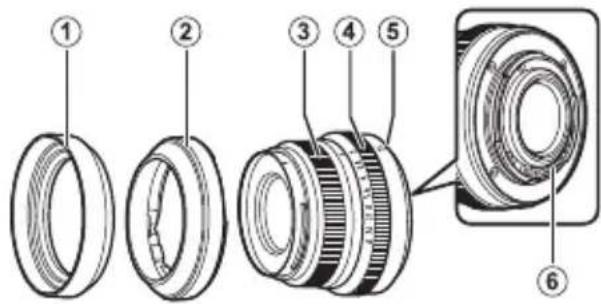
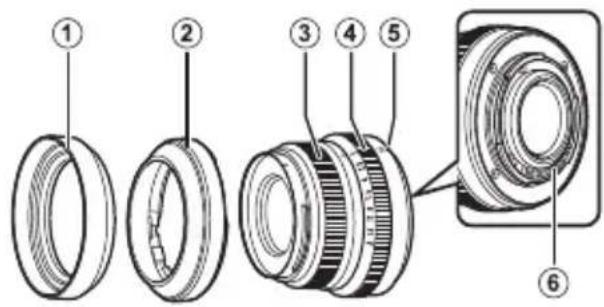
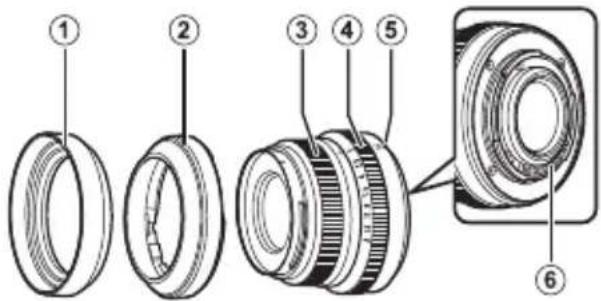
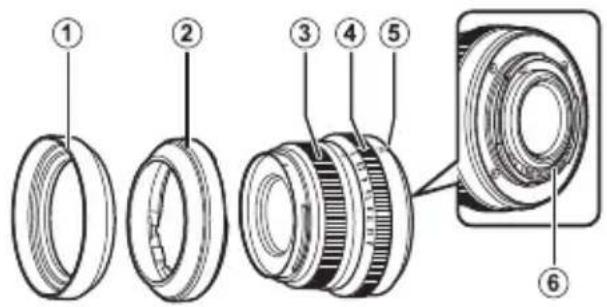
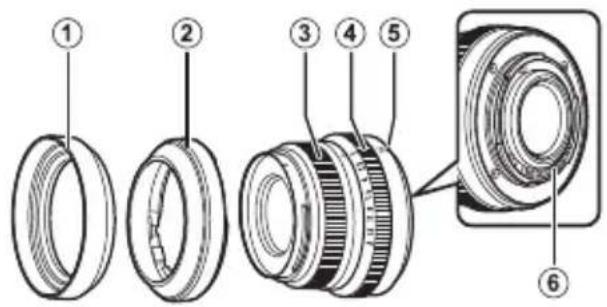
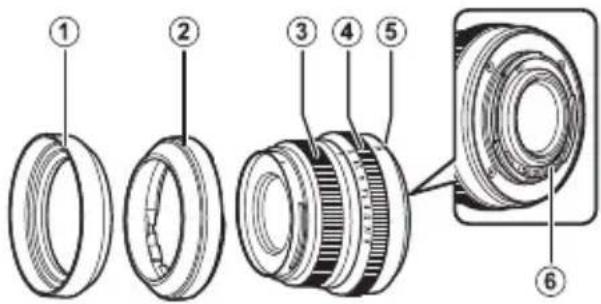
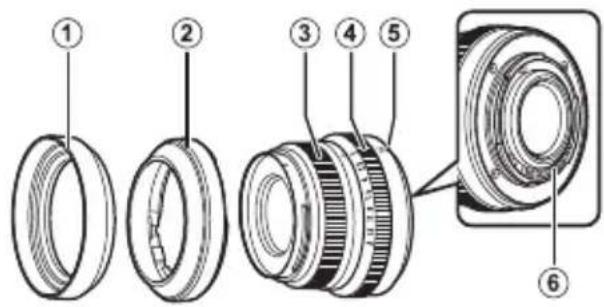
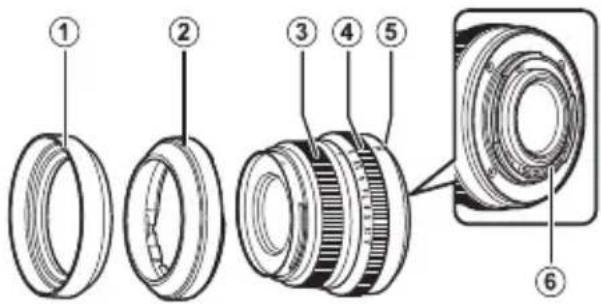
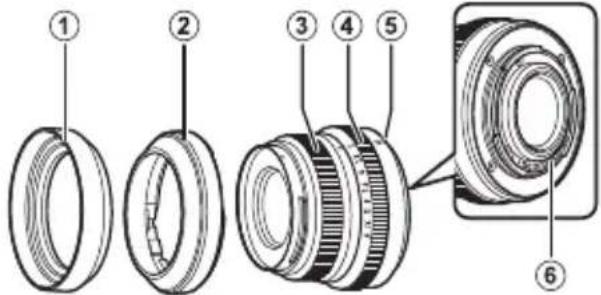
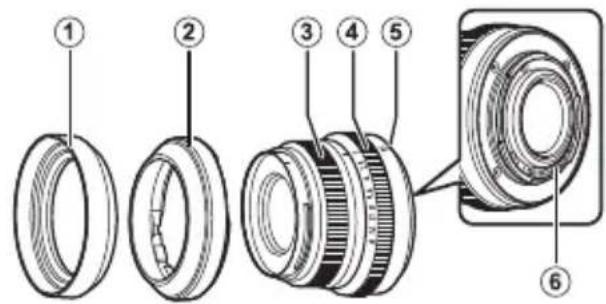
Parts of the Lens
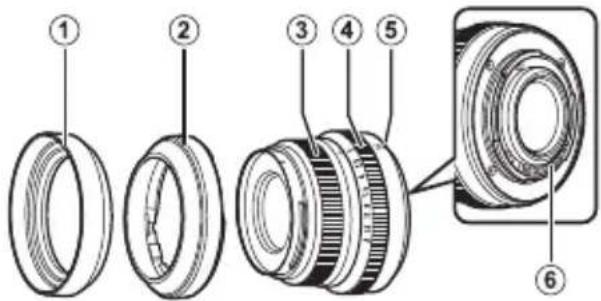
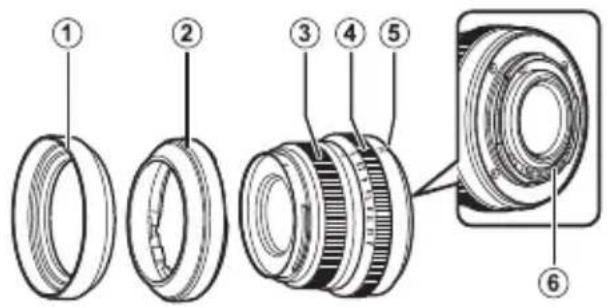
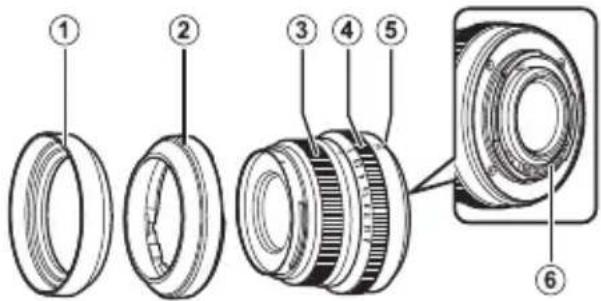
XF35mmF2 R WR/XF23mmF2 R WR
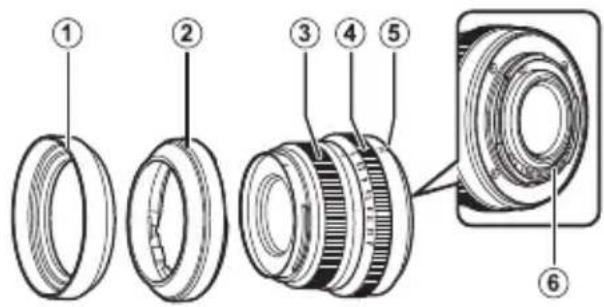
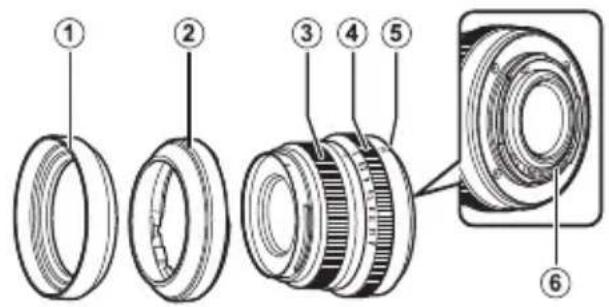
① Lens hood (XF35mmF2 R WR)
② Lens hood (XF23mmF2 R WR)
③ Focus ring
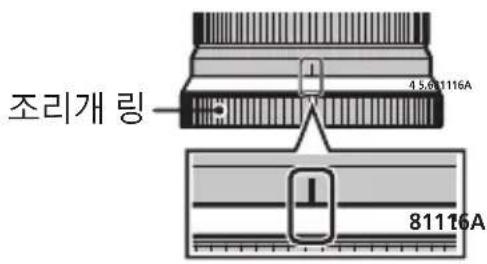
④ Aperture ring
⑤ Mounting marks (focal length)
(6) Lens signal contacts
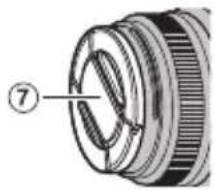
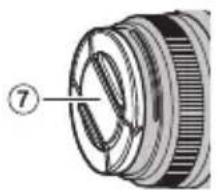
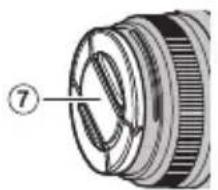
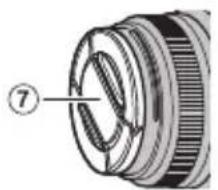
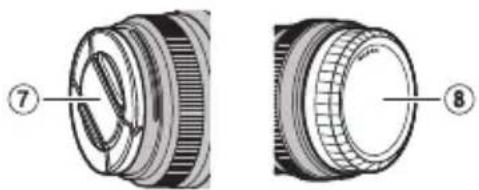
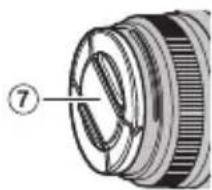
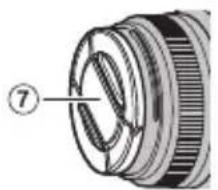
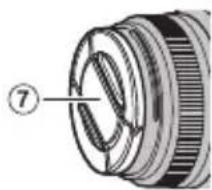
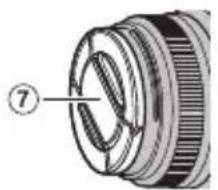
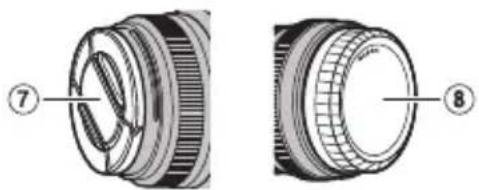
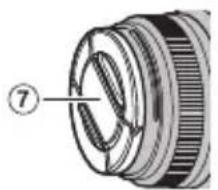
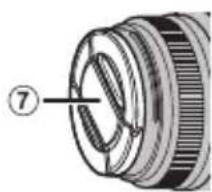
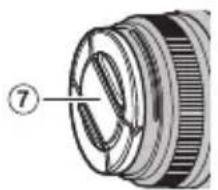
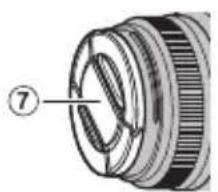
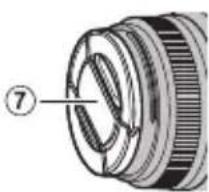
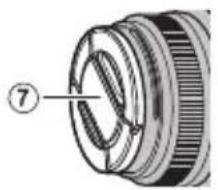
⑦Front lens cap
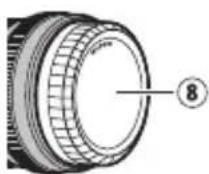
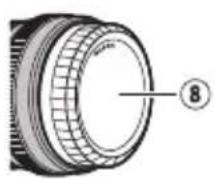
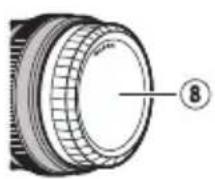
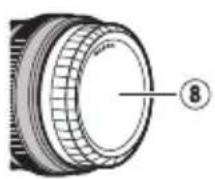
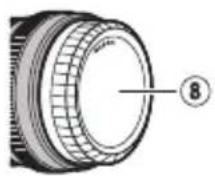
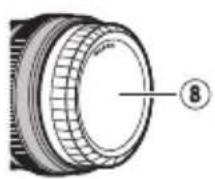
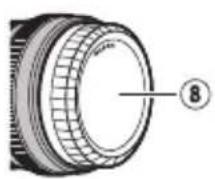
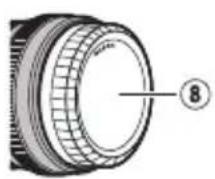
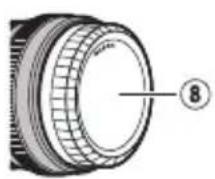
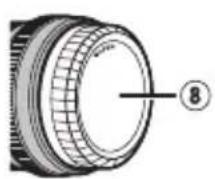
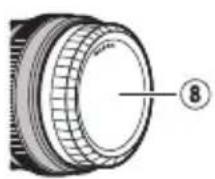
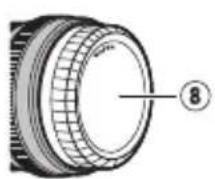
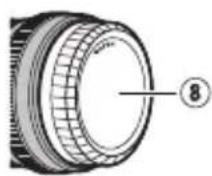
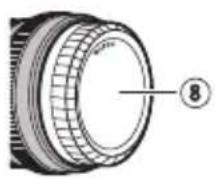
⑧ Rear lens cap
The lens mount includes a rubber ring to ensure that the lens remains dust- and splash-proof. The ring can be replaced for a fee at any FUJIFILM service center.
Supplied Accessories
-
Front lens cap
Rear lens cap -
Lens hood
- Cloth wrapping
Attaching the Lens
See the camera manual for information on attaching and removing lenses. Note that this product is not compatible with X mount fi lm cameras.
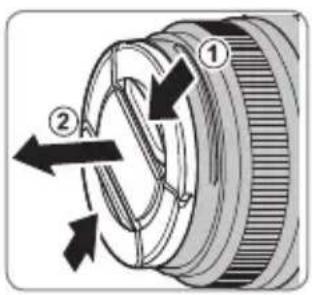
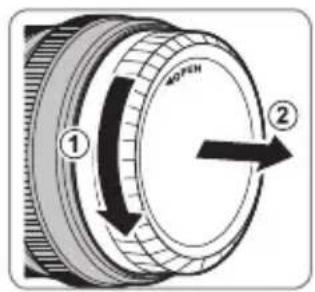
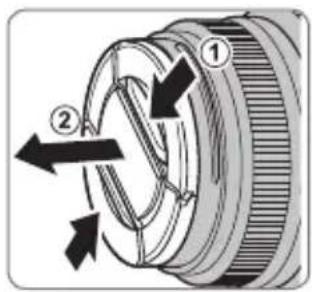
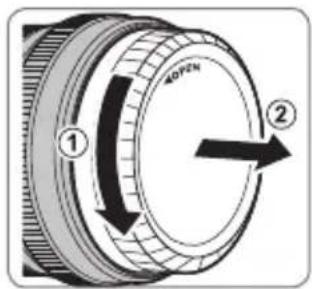
Removing the Caps
Remove the caps as shown.
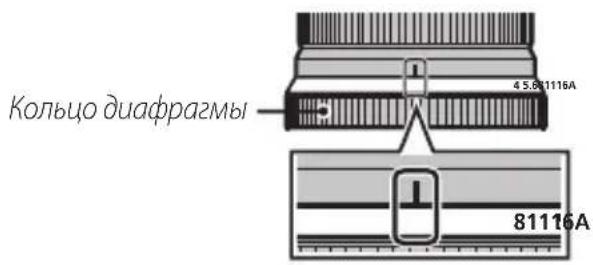
Aperture ring
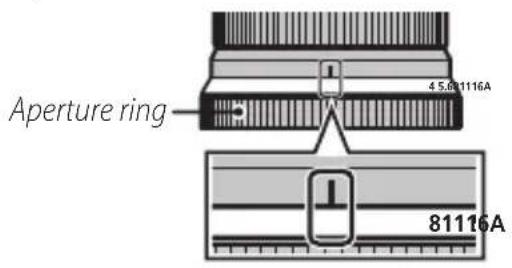
At settings other than A, you can adjust aperture by rotating the lens aperture ring (exposure modes A and M).
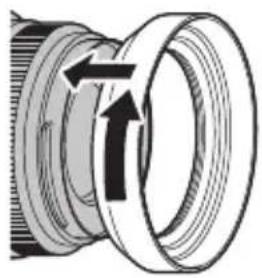
Attaching the Hood
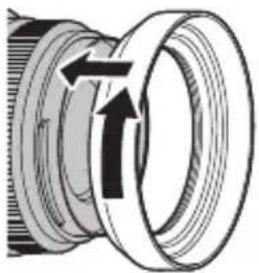
When attached, lens hoods reduce glare and protect the front lens element.
XF35mmF2 R WR

Warning
If you attach the hood too tightly after attaching a fi liter to the lens, the fi liter may remain stuck to the hood when the hood is removed. Do not attempt to forcibly separate the hood and fi liter, as the fi liter threads could injure your hands. Cover both the hood and fi liter with silicone jar openers or the like and unscrew them using the palms of your hands.
XF23mmF2 R WR
The lens cap attaches to the hood when the hood is in place.
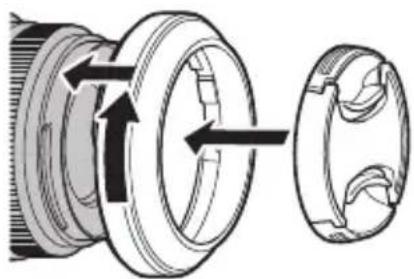
You may not be able to attach the hood over thick lens filters. Thin filters are recommended.
EN-7ENGLI
Specifications
| Type XF35mmF2 R WR XF23mmF2 R WR | ||
| Lens construction 9 elements in 6 groups (includes 2 aspherical elements) | 10 elements in 6 groups (includes 2 aspherical elements) | |
| Focal length (35 mm format equivalent) | f=35 mm (53 mm) | f=23 mm (35 mm) |
| Angle of view 44.2° 63.4° | ||
| Max. aperture f/2 f/2 | ||
| Min. aperture f/16 f/16 | ||
| Aperture control | ||
| Number of blades | 9 (rounded diaphragm opening) | 9 (rounded diaphragm opening) |
| Stop size | 1/3 EV (19 stops) | 1/3 EV (19 stops) |
| Focus range | 35 cm – infinity | 22 cm – infinity |
| Max. magnification | 0.135 × | 0.13 × |
| External dimensions: Diameter × Length* (approx.)* distance from camera lens mount flange | ∅60 × 45.9 mm | ∅60 × 51.9 mm |
| Weight* (approx.)* excluding caps and hoods | 170 g | 180 g |
| Filter size | ∅43 mm ∅43 mm | |
① Improvements may result in unannounced changes to specifications and appearance.
Owing to how this lens is constructed, the "Distance indicator" displayed by the camera may in some cases differ from the actual focus distance. Use the "Distance indicator" as a guide only.
Pour vous sécurité
http://www.fujifilm.com/support/digital Cameras/software/#firmware
XF35mmF2 R WR/XF23mmF2 R WR
http://www.fujifilm.com/support/digital Cameras/software/#firmware
XF35mmF2 R WR/XF23mmF2 R WR
http://www.fujifilm.com/support/digital Cameras/software/#firmware
XF35mmF2 R WR/XF23mmF2 R WR
http://www.fujifilm.com/support/digital Cameras/software/#firmware
XF35mmF2 R WR/XF23mmF2 R WR
A Zonnekap (XF35mmF2 R WR)
B Zonnekap (XF23mmF2 R WR)
C Scherpstelring
D Diafragmaring
E Bevestigingsmarkeringen (brandpuntsafstand)
F Lenssigmaalcontacten
G Voorste lensdop
H Achterste lensdop
http://www.fujifilm.com/support/digital Cameras/software/#firmware
Om duinte har tillgang till en dator, kan du hjalp hos den lokala aterforsalgare som listedi FUJIFILM Worldwide Network-materialalet, vilket medfoljer kameran.
Produktvård
XF35mmF2 R WR/XF23mmF2 R WR
①Motljusskydd(XF35mmF2RWR)
②Motljusskydd(XF23mmF2 R WR)
(3) Fokusring
④ Bländarring
(5) Monteringsmarkeringar (brännvidd)
⑥ Objektivsignkontakter
⑦ Främre objektivlock
Bakre objektivlock
http://www.fujifilm.com/support/digital Cameras/software/#firmware
XF35mmF2 R WR/XF23mmF2 R WR
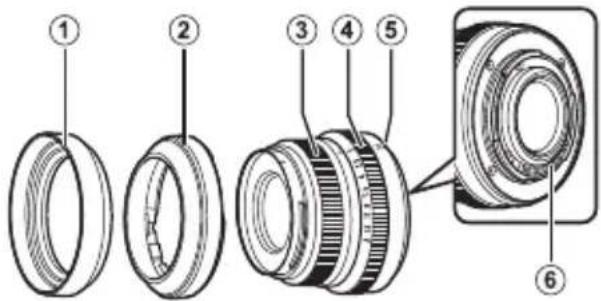
① Solblender(XF35mmF2 R WR)
② Solblender (XF23mmF2 R WR)
③ Fokusring
④ Blending
(5) Monteringsmerker (brennvidde)
⑥ Objektivets signalkontakter
⑦Fremre objektivdeksel
(8) Bakre objektivdeksel
http://www.fujifilm.com/support/digital Cameras/software/#firmware
XF35mmF2 R WR/XF23mmF2 R WR
He octohydroxymene a
bromomethyl 2a dihydro
He nozpykaum 6 body u He nodepzauim 6o3deumuio 600bl. HebblnoJIHeHne DaHHoro Tpe6ObaHnM MoKet npBecTN K Bo3ropaHIO NIN NopaxeHIO 3JIeKtpn-ueCKIM TOKOM.
| ПЕДУПЕЖDEHWE | |
| He pa36bpaüme | He pa36bpaüme (he omkbjaüme kopnyc). Hecobniode- нe 3TOI Меры пededocetopoxkhoctn может ппвс'tу К BO3ropaHniO, поалжени злелкгческm ТокOM Или BO3HKNHOBENIO TpAVM I3-3a He npabINbHOn разы n3delen. |
| He pa36bpaüme | E cIu K opNysca36bucra8pe3y m dpy2020чр36buaHIOZO npoucueceMbU. He mpozai- me omkpblte demani. HecobniodeHne 3TOI Меры педocetopoxkhoCTN может ппвс'tу K поалжени Злелкгческm TOKOM Или BO3HKNHOBENIO TpAVM, eCII Bb dotponheceb do nobpejdeHbX DeTanei. HemdiHIO BbHbTe batapeio Фотokampeby, co- бюдя octopoxkhoCTb, утоби Избекаь поуеня ТравM Или поалжени злелкгческm TOKOM, и OTHEcITE n3delenB в MECTO порбетенядд КО- суltalun. |
| He pa36bpaüme buHypnue demani | He knaDume ha HeycmoUchbe noBepxHocmu. Идддддддддддддддддддддддддддддддддддддддддддддддддддддддддддддддддддддддддддддддддддддддддддддддддддд徳 MOKET ynpactb, Bb3BaB TpABMy. |
| He smompeme na conHnce uepe3 obekmues ckamenu φomokampeby. HecobniodeHne данно меры педocetopoxkhoCTN может ппвс'tу K heobpatmo- My hapuusheniu 3peHnI. | |

IPEDOCTEPEXEHNE

Ko2da u3denue He ucnonb3yemc, 3akpoume Kpbuku
ob6ekmua, u xpaHume u3denue mam, 2e Ha Hezo He
nadaem npmaou conHehbu ceem. CoIHeuHb CBeT
CfOKycnupoBaHHb IOBeKTINBOM, MOKeT BbIBaTb BO3-
ropaHne INN OXORN.

He nepenocme fomokamepy uu oobekmue, kozda onu ymanoehehbl ha umamube. Hdene me mokey ynaCTb nui yapntbcr O pyrne npedMeTb, Bbl3BaB TpaBMy.
Ymuaa 3nekmpueeckozo u nekmpoHno o6opydoaun 6 domauhux ycnobux
BCTPAAH EBponeckoro coo3a, Hopbernn, NcaHnnn NixTeHneHe:
HaHHb CMBOB HA 3dEeNNB, BpyKOBODCTBE, H aPaHTNHOmTAHOne
N/INn Ha ynaKOBc Kya3BaBcT Ha To, YTO daHHoc HcNEHCnB3yTN
Hn3PobAtb BMeCte C6bTOBBMIO xOxODAMn. BMeCt 3TOI eO rHyHXo
OTHECnB P npeHMn IyHKNT O cOby, nepepaOBeN bT OToPHOMy
NCONb3OBAHNIO 2NeKTPCKeCKORIO 2NeKTPOHOrO 06OpdyOBAHnN.
PpabnHbA ytnm3aun NMOKET npedotBpaTntb noteHnabHbYe HeratnBHe NoCneCTBnI dN OKpyKaIOUe Cpebl 3DOpOBb HcOBeKa, KOTOpble MoryT B03- HNKHyTB pOyNbTaTO HCCooTBeCTBlyIOUe ytnn3aUN DaHHORu I3dEINNA.
IOBTOHOC NcONb3OBAHKe MaTePmAnOB NOMoKc ToxpaHnTb npnpOAnHbpeCypcBb.
IINIIOUYEHN DIOIOHNTEbHO HNOOPMaUN O6YTNINaUN DaHHORIO3ENIIIN
ObpaAaIETCb B MeCTHBe OpraHb BlactN, B CNYKbNo C6opy, nepepaOToKe I BTOPHNOMy NCIONb3OBAHIO OTXoOB MIM B Mara3MH, TBe BB npno6peHn IN3dEInne.
BCTPAAH3a npdenamn Ebponeckoro coo3a, Hopbernn, NcnaHm n JnxTeHneHa: Ecm HooxOIMmo yTMNImpoBaTa daHHoe n3dene, BkIOHOa 6aTapeen nn AKKMyrAToPi b, CBKNTCCb C MCCTHbIM BnCTAmu yTOCHTE PabINa yTNN3aUIN.
IpepeHcnoJb3ObaHnem daHHoro n3deJIa
HeKOTOpbIe yHKcIMN O6BeKTHBa HeOCTynHbIC 60Jee paHHmBepCnMn npoWNBKn fOTOKaMepbl.Ob3aTeJIbHO 6OBnTE npoWNBky fOTOKaMepbl Do nocJeHn BepCn. HnCTpyKcNn no npocMOTpy BepCn npoWNBKn fOTOKaMepbl n 6HOBLeHnIO npoWNBKn fOTOKaMepbl DOCTynHbI Ha cNeDyUoem Be6-caTte:
http://www.fujifilm.com/support/digital Cameras/software/#firmware
B cnyae, ecn y Bac Het doctyna K KOMnbIOTepy, 6bpatntecb 3a noDpeKko K MeCTHOMy DnCTPn6bIOTopy n3 cnNcKa "FUJIFILM Worldwide Network", noCTabJeHHoro c Baewe foToKaMepoi.
yxo3a n3eennem
-Прии Исторьанни 6леньды объektуна He 6e-pintecb 3a Фотокамеру и He Deржптей се Только 3a 6леньду.
He donyckaIte 3arpa3HeHnCnHaJIbHbIX KOHTaKToB O6beKtNbA.
- POnb3yInTeB rpywei dny ydaIeHnry nbIyn n nyxa co cTeKJIaHHbIX NOBepXHOCTeN OBeKTHBa nnf HnIbTpa. IyraJeHn IrTeH N OTneuat
KOB NaIbueB HaHeCnTe He6oJbIoe KOJIuYeCTBO XnIKOCTn IaYnCTKn OBeKeTnBOB Ha MmRKyU, YnCTyO XnONuATo6bymaxHyU TKaHb nn Can-FeTKy IaYnCTKn OBeKeTnBOB n IpOTpnte OBeKeTnB OT UeHTpa K Kpaam KpyrObblMn DnXeHNMaN, Co6JIouDa NcTOPOxKHOCTb, He OCTaBJa pa3BOoB N He KaCaRcB CTeKla NaIbuaMn.
- HnKOrJa He nCNoB3yIe dJa YnCTKn O6BeKTnBa opraHnueckne paCTbOpNTen, TaKne KaK pa36aBnTeNb dJa KpaCKn nn 6eH3nH.
3akpoTe KpbIuKy OBeKtNBa N KpbIuKy 6aNoHeTa OBeKtNBa, KOrDa OBeKtNB He NCIOJIb3yeTcR.
XpaHnTe 06bekTnB n 0nIbTp B npoxnaHbIX, cyxnx MeCTax, yTO6bl npeDoTbpaTntb 06pa3oBaHne pIeCEHN KoppOzHN. He xpaHnTe B MeCTax, rDe Ha Hero nonaAet npAMoN coJIHeuHbIN CBET, INN PAnOM CHaΦTaIIHHOBbIMN INN KaMΦOpHbIMN 7apNKamN OT MOIN. - Bepernte obBeKTHB OT Bnarn. Koppo3n MaKeT HaHeCTn HEnOppaBmbl yUep6. Ppi nonaHnn DoJxDeBbIX KaneIb nn 6pbI3r BObl nx CneDyET BbITepTeB.
- EcInn OBeKtNB OCTaBtB B MeCTax, NODBepraIOUxxCn BO3DeNCTBbIO BbICOKNX Tempeatyp, TO 3TO MoKeT NOBpeNTb INI DeOpMnpoBaTb erO.
Yactn o6bekTnBa
XF35mmF2 R WR/XF23mmF2 R WR
① běnǎo ǒběkmuā (XF35mmF2 R WR)
②BneHoa o6bekmu8a (XF23mmF2 R WR)
③Φokycupo8ouHoeKoJIbua
④KoIbUOduaΦpa2Mbl
⑤ Memku dny ycmahOBku (fokychoe paccmohue)
⑥CuzHaBbIe KOHmakmbI o6bekmuBa
⑦ Kpbliuoka oobekmuBa
(8)Kpbuuka 6aohema o6ekmuba
① KpeHHeNe 06bektNa IMeET pe3nHOoe KOIbuO, KOtOpoe 06ecneHBAet 3aunTy 06bektNa OT nbIn N 6pbI3r. KoIbuO MoXHo 3aMeHnTb B IIO6OM cepBnCHom cEHTpe FUJIFLM 3a OTdJIbHyIO PnAty.
IpnlaRaemble npHaDneXHoCTN
Kpbioka o6beKeTnBa
-Kpbiuka 6aioHeTa o6beKtNa
-БлендаобъektиВа
Tkaheba ynaKOBka
YcTaHOBka 06bekTnBa
CM. pykoBODCTBO NOIb3OBaTeJIa FOToKa-MepoI dI NaIyueHn IHHOpMauIN O6 yCTaHOBKe n ChrTn NObeKtNBa. ImeTe B BVdy, UTO daHHoe N3dJIne HecOBMeCTmO C FOToKampepAMN C 6aNoHETOM X.
ChaTne KpbIweK
Chnmte KpbIuK, KaK NOKa3aHo Ha puCyHKe.
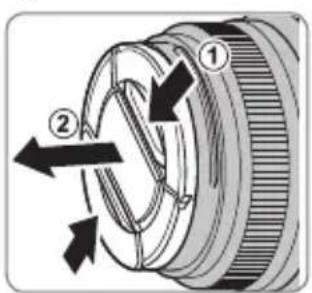
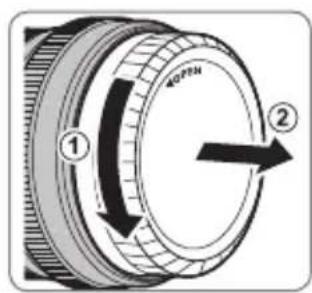
KolbocDnaΦparMbI
Pn Hactpoikax, OTnHbIX OT A, Bbl MoXeTe Hacptpntb dnaΦpaRmy, NOBOPaUNBa KaIbUO dnaΦpaRmbi (peKmbl 3KcNo-3nCnn A n M).
YCTaHOBka 6IeHdbI
http://www.fujifilm.com/support/digital Cameras/software/#firmware
XF35mmF2 R WR/XF23mmF2 R WR
http://www.fujifilm.com/support/digital Cameras/software/#firmware
XF35mmF2 R WR/XF23mmF2 R WR
http://www.fujifilm.com/support/digital Cameras/software/#firmware
XF35mmF2 R WR/XF23mmF2 R WR
http://www.fujifilm.com/support/digital Cameras/ software/#firmware
XF35mmF2 R WR/XF23mmF2 R WR
http://www.fujifilm.com/support/digital Cameras/ software/#firmware
XF35mmF2 R WR/XF23mmF2 R WR
http://www.fujifilm.com/support/digital Cameras/software/#firmware
CoujTtoLsHJFJIFLMWorldwideNetwork"JtJfLm"
新
- Renshurin
·Lenz sinho jiee to h an haoi
·隣羅者用者用者,法式之,不的用之,用之
XF35mmF2 R WR/XF23mmF2 R WR
A iJowf, RnZs JrIeRg toLer 4 A M
KO-6
华德本
部,
XF35mmF2 R WR
XF23mmF2 R WR
J
J
J
J
J
J
J
J
J
J
J
J
J
J
J
J
J
J
J
J
J
J
J
J
J
J
J
J
J
J
J
J
J
J
J
J
J
J
J
J
J
J
J
J
J
J
J
J
J
J
J
J
J
J
J
J
J
J
J
J
J
J
J
J
J
J
J
J
J
J
J
J
J
J
J
J
J
J
J
J
J
J
J
J
J
J
aololl jolil 100gol gogol y
gogjol jol lio: 1oalalgl g oolg jol g gol g oolg jol g
aagablaalglalgcllde alalw gublln no yauallalalalalalalal
yuaiae uayuugbblno valall aonss sgyiuyuayydyol
Jog Clogbblno yj.aaablls glg baoaallge plall alglblgdua
Cldalgln no galsgl gld yolall glblg kglkglkgl
J 1 J 1 1 1 1 1 1 1 1 1 1 1 1 1 1 1 1 1 1 1 1 1 1 1 1 1
Igoljoo
| .(“ola”)العربية الحرفية بع晗الله رزامن محيى | ! |
| عانيه أيرشان محيى بع晗الله رزامن محيى .("عانيه") | |
| ال plagued محيى بع晗الله رزامن محيى .("ال plagued") |