KD70XF8305 - TV SONY - Free user manual and instructions
Find the device manual for free KD70XF8305 SONY in PDF.


| Features | Details |
|---|---|
| Product type | 4K LED TV |
| Screen size | 70 inches |
| Resolution | 3840 x 2160 pixels (4K Ultra HD) |
| Display technology | HDR (High Dynamic Range) |
| Connectivity | 4 x HDMI, 3 x USB, built-in Wi-Fi, Ethernet |
| Audio | 2 x 10 W, Dolby Digital |
| Operating system | Android TV |
| Smart TV features | App access, built-in Chromecast |
| Energy consumption | Energy class A |
| Dimensions (W x H x D) | 156.2 x 90.2 x 35.2 cm (with stand) |
| Weight | 30 kg (with stand) |
| Maintenance | Clean screen with a soft cloth, software updates via menu |
| Safety | Avoid exposure to moisture, unplug during storms |
| General information | 2-year warranty, technical support available |
Frequently Asked Questions - KD70XF8305 SONY
User questions about KD70XF8305 SONY
0 question about this device. Answer the ones you know or ask your own.
Ask a new question about this device
Download the instructions for your TV in PDF format for free! Find your manual KD70XF8305 - SONY and take your electronic device back in hand. On this page are published all the documents necessary for the use of your device. KD70XF8305 by SONY.
USER MANUAL KD70XF8305 SONY
Parts and Controls 7
Controls and Indicators 7
Using Remote Control 8
Remote Control Parts Description. .8
Connection Diagram 10
Installing the TV to the Wall 12
Using the optional Wall-Mount Bracket . . . 12
Troubleshooting. 13
Troubles and Solutions. 13
Specifications 14
Internet Connection and Data Privacy
This product connects to the internet during initial setup as soon as a network is connected in order to confirm internet connection, and later to configure the Home screen. Your IP address is used in these and all other internet connections. If you do not want your IP address be used at all, do not set-up the wireless internet function and do not connect an internet cable. Please refer to the privacy information presented in the set-up screens for further details of internet connections.
Introduction
Thank you for choosing this Sony product.
Before operating the TV, please read this manual thoroughly and retain it for future reference.
Note
Before operating the TV, please read the "Safety Information" (page 3).
- Images and illustrations used in the Setup Guide and this manual are for reference only and may differ from the actual product.
- The "xx" that appears in the model name corresponds to a numeric digit, related to design, colour or TV system.
Attaching the Table-Top Stand to the TV
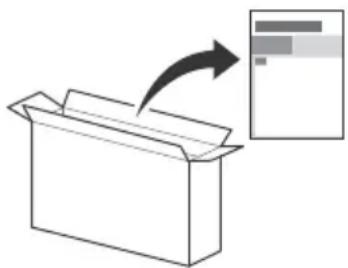
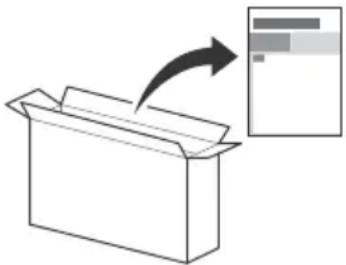
Refer to the Setup Guide on top of the cushion.
Help
Find more troubleshooting and other useful information directly from your TV. Press HELP on the remote control to display a list of topics, or to search by keyword.
Help Guide (Manual)
For more detailed information, select [Help Guide] from the Help menu on your TV. You can also check the Help Guide from your PC or smartphone (information provided on the back cover).
Location of the identification label
Labels for the TV Model No., Production Date (year/month) and Power Supply rating are located on the rear of the TV or package.
WARNING
TO PREVENT THE
SPREAD OF FIRE, KEEP
CANDLES OR OTHER OPEN FLAMES AWAY FROM THIS PRODUCT AT ALL TIMES.

NOTICE FOR CUSTOMERS IN THE UNITED KINGDOM
A moulded plug complying with BS1363 is fitted to this equipment for your safety and convenience.
Should the fuse in the plug supplied need to be replaced with the same rating of fuse approved by ASTA or BSI to BS 1362 (i.e., marked with or must be used.
If the plug supplied with this equipment has a detachable fuse cover, be sure to attach the fuse cover after you change the fuse. Never use the plug without the fuse cover. If you should lose the fuse cover, please contact your nearest Sony service station.
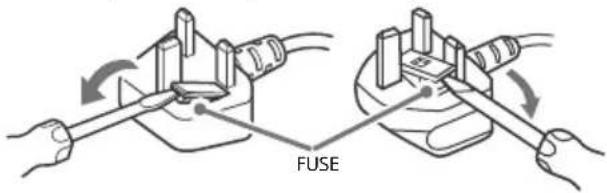
How to replace the fuse
Open the fuse compartment with a blade screwdriver, and replace the fuse.
Please refer to the illustration that actually equipped with the product.
IMPORTANT NOTICE
This product has been manufactured by or on behalf of Sony Visual Products Inc.
EU Importer: Sony Europe Limited.
Inquiries to the EU Importer or related to product compliance in Europe should be sent to the manufacturer's authorized representative, Sony Belgium, bijkantoor van Sony Europe Limited, Da Vincilaan 7-D1, 1935 Zaventem, Belgium.
Notice for Radio Equipment

Hereby, Sony Visual Products Inc. declares that the radio equipment types KD-70XF8305, KD-60XF8305 are in
compliance with Directive 2014/53/EU. The full text of the EU declaration of conformity is available at the following internet address: http://www.compliance.sony.de/
This radio equipment can be operated in the EU without infringing applicable requirements on the use of radio spectrum.
Notice for customers: the following information is only applicable to equipment sold in countries applying EU directives.
TV wireless system may be operated in following countries: AT, BE, HR, CY, CZ, DK, EE, FI, FR, DE, EL, HU, IE, IT, LV, LT, LU, MT, NL, PL, PT, SK, SI, ES, SE, UK, IS, LI, NO, CH, BG, RO, TR, AL, BA, MK, MD, RS, ME, Kosovo
This equipment can be operated in other non-European countries.
Safety Information
WARNING
Caution
Risk of explosion if the battery is replaced by an incorrect type. Batteries must not be exposed to excessive heat such as sunshine, fire or the like or extremely low air pressure that can result in an explosion or leakage of flammable liquid or gas.
Stability Hazard
The television set may fall, causing serious personal injury or death.
Never place a television set in an unstable location. A television set may fall, causing serious personal injury or death. Many injuries, particularly to children, can be avoided by taking simple precautions such as:
- Using cabinets or stands recommended by the manufacturer of the television set.
- Only using furniture that can safely support the television set.
- Ensuring the television set is not overhanging the edge of the supporting furniture.
- Not placing the television set on tall furniture (for example, cupboards or bookcases) without anchoring both the furniture and the television set to a suitable support.
- Not placing the television set on cloth or other materials that may be located between the television set and supporting furniture.
- Educating children about the dangers of climbing on furniture to reach the television set or its controls. If your existing television set is being retained and relocated, the same considerations as above should be applied.
Installation/Set-up
Install and use the TV set in accordance with the instructions below in order to avoid any risk of fire, electric shock or damage and/or injuries.
Apparatus connected to the protective earthing of the building installation through the mains connection or through other apparatus with a connection to protective earthing - and to a television distribution system using coaxial cable, may in some circumstances create a fire hazard. Connection to a television distribution system therefore has to be provided through a device providing electrical isolation below a certain frequency range (galvanic isolator, see EN 60728-11).
Installation
- The TV set should be installed near an easily accessible mains socket.
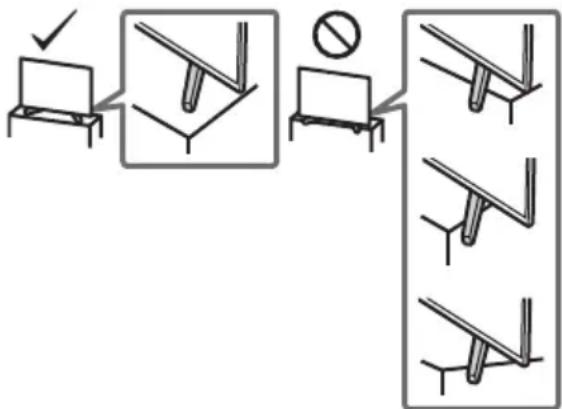
- Place the TV on a stable, level surface to prevent it from falling over and causing personal injury or property damage.
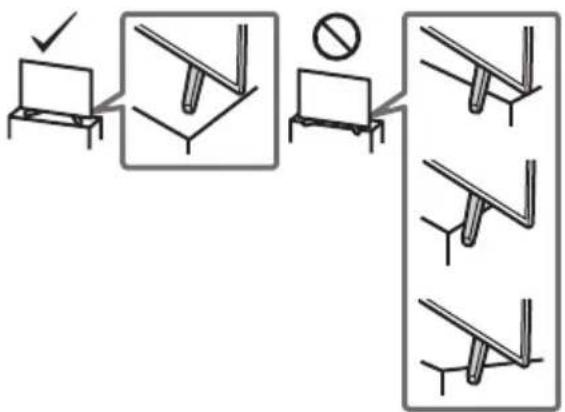
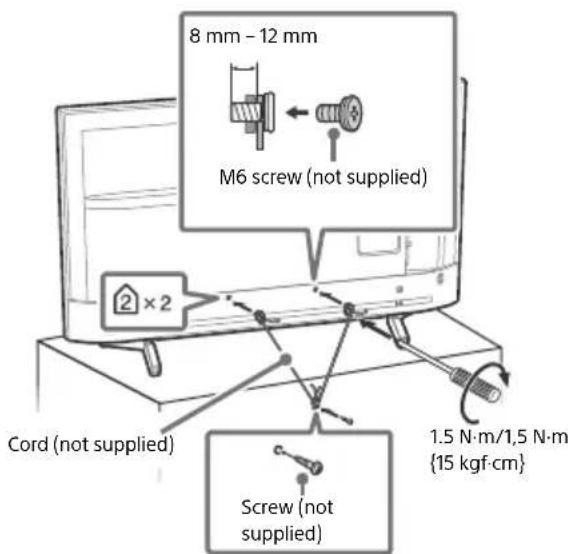
Install the TV where it cannot be pulled, pushed, or knocked over. - Install the TV so that the TV's Table-Top Stand does not protrude out from the TV stand (not supplied). If the Table-Top Stand protrudes out from the TV stand, it may cause TV set to topple over, fall down, and cause personal injury or damage to the TV.
- Only qualified service personnel should carry out wall-mount installations.
- For safety reasons, it is strongly recommended that you use Sony accessories, including:
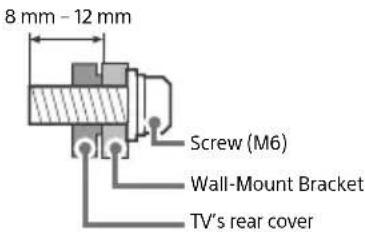
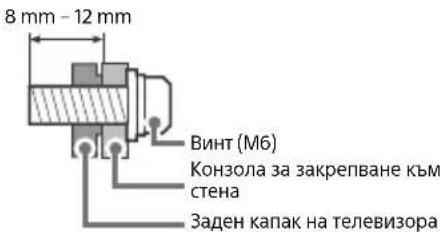
Wall-Mount Bracket SU-WL450 - Be sure to use the screws supplied with the Wall-Mount Bracket when attaching the Wall-Mount Bracket to the TV set. The supplied screws are designed as indicated by illustration when measured from the attaching surface of the Wall-Mount Bracket. The diameter and length of the screws differ depending on the Wall-Mount Bracket model.
Use of screws other than those supplied may result in internal damage to the TV set or cause it to fall, etc.
Transporting
- Before transporting the TV set, disconnect all cables.
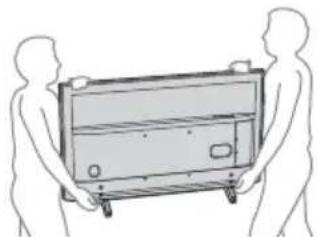
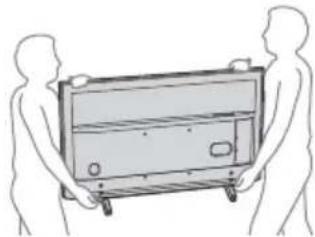
- Two or three people are needed to transport a large TV set.
- When transporting the TV set by hand, hold it as shown below. Do not put stress on the LCD panel and the frame around the screen.
- When lifting or moving the TV set, hold it firmly from the bottom.
- When transporting the TV set, do not subject it to jolts or excessive vibration.
- When transporting the TV set for repairs or when moving, pack it using the original carton and packing material.
Topple prevention
Ventilation
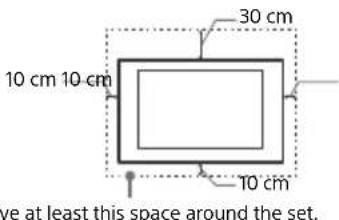
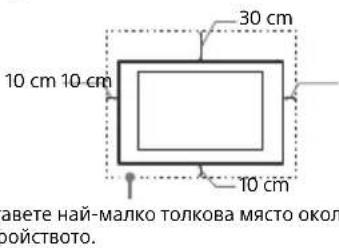
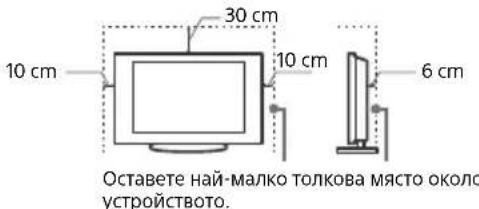
- Never cover the ventilation holes or insert anything in the cabinet.
- Leave space around the TV set as shown below.
- It is strongly recommended that you use a Sony Wall-Mount Bracket in order to provide adequate air circulation.
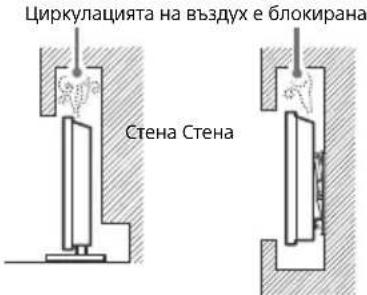
Installed on the wall
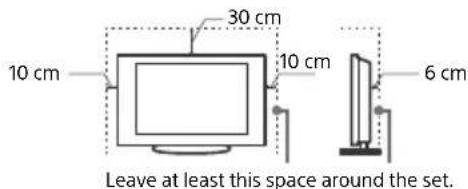
Installed with stand
To ensure proper ventilation and prevent the collection of dirt or dust:
- Do not lay the TV set flat, install upside down, backwards, or sideways.
- Do not place the TV set on a shelf, rug, bed or in a closet.
- Do not cover the TV set with a cloth, such as curtains, or items such as newspapers, etc.
- Do not install the TV set as shown below.
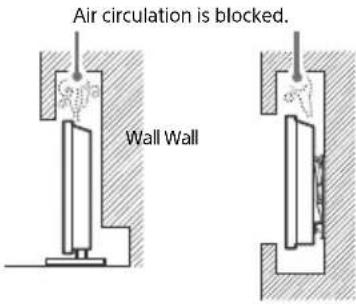
Mains lead
Handle the mains lead and socket as follows in order to avoid any risk of fire, electric shock or damage and/or injuries:
- Use only mains leads supplied by Sony, not other suppliers.
- Insert the plug fully into the mains socket.
- Operate the TV set on a 220 V - 240 V AC supply only.
- When wiring cables, be sure to unplug the mains lead for your safety and take care not to catch your feet on the cables.
- Disconnect the mains lead from the mains socket before working on or moving the TV set.
- Keep the mains lead away from heat sources.
- Unplug the mains plug and clean it regularly. If the plug is covered with dust and it picks up moisture, its insulation may deteriorate, which could result in a fire.
Note
- Do not use the supplied mains lead on any other equipment.
- Do not pinch, bend, or twist the mains lead excessively. The core conductors may be exposed or broken.
- Do not modify the mains lead.
- Do not put anything heavy on the mains lead.
- Do not pull on the mains lead itself when disconnecting the mains lead.
- Do not connect too many appliances to the same mains socket.
- Do not use a poor fitting mains socket.
Prohibited Usage
Do not install/use the TV set in locations, environments or situations such as those listed below, or the TV set may malfunction and cause a fire, electric shock, damage and/or injuries.
Locations:
- Outdoors (in direct sunlight), at the seashore, on a ship or other vessel, inside a vehicle, in medical institutions, unstable locations, near water, rain, moisture or smoke.
Environments:
- Places that are hot, humid, or excessively dusty; where insects may enter; where it might be exposed to mechanical vibration, near flammable objects (candles, etc.). The TV set shall not be exposed to dripping or splashing and no objects filled with liquids, such as vases, shall be placed on the TV.
Situations:
- Use when your hands are wet, with the cabinet removed, or with attachments not recommended by the manufacturer. Disconnect the TV set from mains socket and aerial during lightning storms.
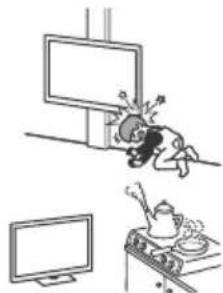
- Install the TV so that it sticks out into an open space. Injury or damage from a person or object bumping into the TV may result.
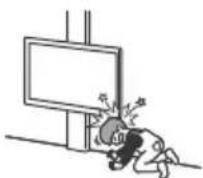
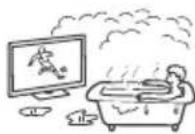
- Place the TV in a humid or dusty space, or in a room with oily smoke or steam (near cooking tables or humidifiers). Fire, electric shock, or warping may result.
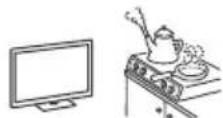
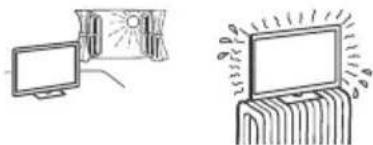
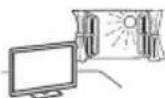
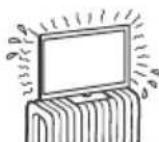
Install the TV in places subject to extreme temperature such as in direct sunlight, near a radiator or a heating vent. The TV may overheat in such condition which can cause deformation of the enclosure and/or TV malfunction.
GB
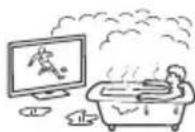
If the TV is placed in the changing room of a public bath or hot spring, the TV may be damaged by airborne sulfur, etc.
- For best picture quality, do not expose the screen to direct illumination or sunlight.
- Avoid moving the TV from a cold area to a warm area. Sudden room temperature changes may cause moisture condensation. This may cause the TV to show poor picture and/or poor colour. Should this occur, allow moisture to evaporate completely before powering the TV on.
Broken pieces:
- Do not throw anything at the TV set. The screen glass may break by the impact and cause serious injury.
- If the surface of the TV set cracks, do not touch it until you have unplugged the mains lead. Otherwise this may cause an electric shock.
When not in use
If you will not be using the TV set for several days, the TV set should be disconnected from the mains for environmental and safety reasons.
- As the TV set is not disconnected from the mains when the TV set is just turned off, pull the plug from the mains socket to disconnect the TV set completely.
- Some TV sets may have features that require the TV set to be left in standby to work correctly.
For children
- Do not allow children to climb on the TV set.
- Keep small accessories out of the reach of children, so that they are not mistakenly swallowed.
If the following problems occur...
Turn off the TV set and unplug the mains lead immediately if any of the following problems occur.
Ask your dealer or Sony service centre to have it checked by qualified service personnel.
When:
- Mains lead is damaged.
Poor fitting of mains socket. - TV set is damaged by being dropped, hit or having something thrown at it.
- Any liquid or solid object falls through openings in the cabinet.
About LCD TV Temperature
When the LCD TV is used for an extended period, the panel surrounds become warm. You may feel hot when touching there by the hand.
Precautions
Viewing the TV
View the TV in moderate light, as viewing the TV in poor light or during long period of time, strains your eyes.
- When using headphones, adjust the volume so as to avoid excessive levels, as hearing damage may result.
LCD Screen
- Although the LCD screen is made with high-precision technology and 99.99% or more of the pixels are effective, black dots may appear or bright points of light (red, blue, or green) may appear constantly on the LCD screen. This is a structural property of the LCD screen and is not a malfunction.
- Do not push or scratch the front filter, or place objects on top of this TV set. The image may be uneven or the LCD screen may be damaged.
- If this TV set is used in a cold place, a smear may occur in the picture or the picture may become dark. This does not indicate a failure. These phenomena disappear as the temperature rises.
- Ghosting may occur when still pictures are displayed continuously. It may disappear after a few moments.
- The screen and cabinet get warm when this TV set is in use. This is not a malfunction.
- The LCD screen contains a small amount of liquid crystal. Follow your local ordinances and regulations for disposal.
Handling and cleaning the screen surface/ cabinet of the TV set
Be sure to unplug the mains lead connected to the TV set from mains socket before cleaning.
To avoid material degradation or screen coating degradation, observe the following precautions.
- To remove dust from the screen surface/cabinet, wipe gently with a soft cloth. If dust is persistent, wipe with a soft cloth slightly moistened with a diluted mild detergent solution.
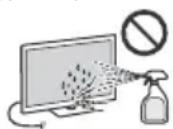
- Never spray water or detergent directly on the TV set. It may drip to the bottom of the screen or exterior parts and enter the TV set, and may cause damage to the TV set.
- Never use any type of abrasive pad, alkaline/acid cleaner, scouring powder, or volatile solvent, such as alcohol, benzene,
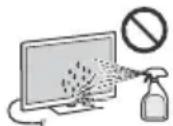
thinner or insecticide. Using such materials or maintaining prolonged contact with rubber or vinyl materials may result in damage to the screen surface and cabinet material.
- Do not touch the TV if your hand is covered in any chemical substance such as hand cream or sunblock.
Periodic vacuuming of the ventilation openings is recommended to ensure proper ventilation. - When adjusting the angle of the TV set, move it slowly so as to prevent the TV set from moving or slipping off from its table stand.
Optional Equipment
- Keep optional components or any equipment emitting electromagnetic radiation away from the TV set. Otherwise picture distortion and/or noisy sound may occur.
- This equipment has been tested and found to comply with the limits set out in the EMC Directive using a connection signal cable shorter than 3 meters.
- This equipment has been tested and found to comply with the limits set out in the EMC Directive using a RF cable shorter than 30 meters for terrestrial/satellite/CATV terminal.
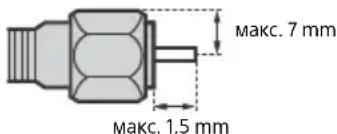
Recommendation of F type plug
Projection of the inner wire from the connection part must be less than 1.5mm
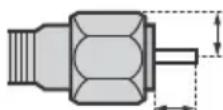
1.5 mm max.
7 mm max.
(Reference drawing of the F type plug)
Wireless Function of the unit
- Do not operate this unit near medical equipment (pacemaker, etc.), as this may result in the malfunction of the medical equipment.
- Although this unit transmits/receives scrambled signals, be careful of unauthorized interception. We cannot be responsible for any trouble as a result.
- This equipment should be installed and operated keeping a separation distance of 20cm or more between the antenna of this device and a person's body.
Caution about handling the remote control
- Observe the correct polarity when inserting batteries.
- Do not use different types of batteries together or mix old and new batteries.
- Dispose of batteries in an environmentally friendly way. Certain regions may regulate the disposal of batteries. Please consult your local authority.
- Handle the remote control with care. Do not drop or step on it, or spill liquid of any kind onto it.
- Do not place the remote control in a location near a heat source, a place subject to direct sunlight, or a damp room.
Disposal of the TV set
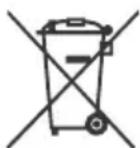
Disposal of old electrical & electronic equipment (applicable in the European Union and other countries with separate collection systems)
This symbol on the product or on its packaging indicates that this product shall not be treated as household waste. Instead it shall be handed over to the appropriate collection point for the recycling of electrical and electronic equipment.
By ensuring that this product is disposed of correctly, you will help to prevent potential negative consequences for the environment and human health, which could be caused by inappropriate waste handling of this product. The recycling of materials will help to conserve natural resources. For more detailed information about recycling of this product, please contact your local Civic Office, your household waste disposal service or the shop where you purchased the product.
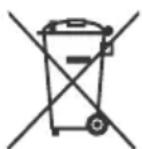
Disposal of waste batteries (applicable in the European Union and other countries with separate collection systems)
This symbol on the battery or on the packaging indicates that the battery provided with this product shall not be treated as household waste.
On certain batteries this symbol might be used in combination with a chemical symbol. The chemical symbol for lead (Pb) is added if the battery contains more than 0.004% lead. By ensuring that these batteries are disposed of correctly, you will help to prevent potentially negative consequences for the environment and human health which could be caused by inappropriate waste handling of the battery. The recycling of the materials will help to conserve natural resources. In case of products that for safety, performance or data integrity reasons require a permanent connection with an incorporated battery, this battery should be replaced by qualified service staff only. To ensure that the battery will be treated properly, hand over the product at end-of-life to the appropriate collection point for the recycling of electrical and electronic equipment. For all other batteries, please view the section on how to remove the battery from the product safely. Hand the battery over to the appropriate collection point for the recycling of waste batteries. For more detailed information about recycling of this battery, please contact your local Civic Office, your household waste disposal service or the shop where you purchased the product or battery.
Parts and Controls
Controls and Indicators
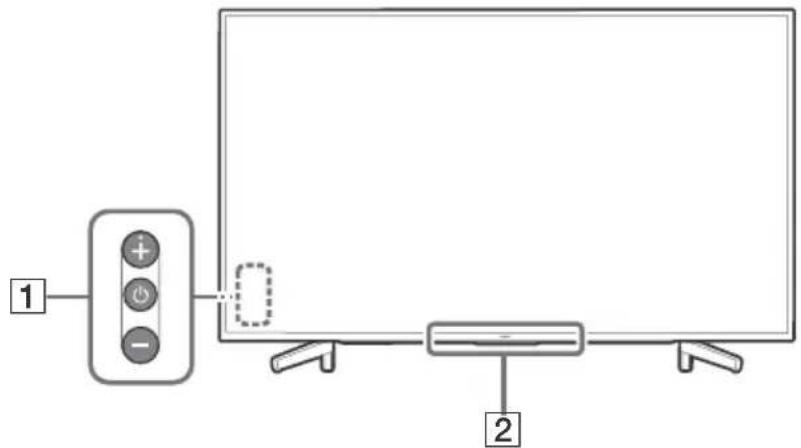
GB
1 (Power) / + / - When the TV is off,
Press to power on. When the TV is on,
Press and hold to power off. Press repeatedly to change the function, then press + or - button to:
- Adjust the volume.
- Select the channel.
- Select the input source of TV.
Remote Control sensor*/Light sensor*/Illumination LED
The illumination LED lights up or blinks according to the status of the TV. For more information, refer to the Help Guide.
- Do not place anything near the sensor.
Using Remote Control
Remote Control Parts Description
The remote control shape, location, availability and function of remote control buttons may vary depending on your region/country/TV model.
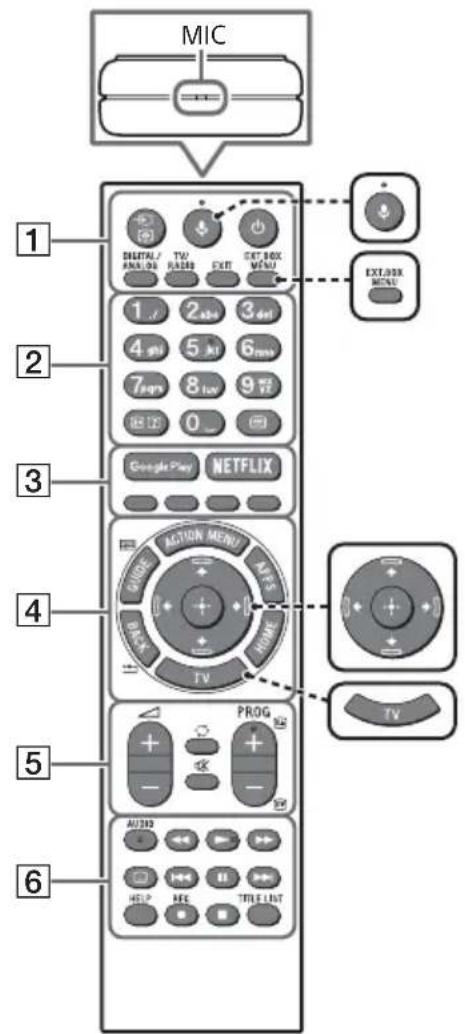

(Microphone)
Use Voice Search. (e.g., Search various content by voice.)

EXT.BOX MENU
Display the connected External Box (cable/satellite box) menu.
- For models with supplied IR Blaster, connect and set up the IR Blaster (page 11).
- The External Box menu may be displayed for some HDMI CEC compatible devices when the IR Blaster is not supplied/connected.
/ / / (Navigation D-Pad)
On screen menu navigation and selection.
TV
Switch to a TV channel or input and display the TV Menu Bar.
1 (Input select/Text hold)
In TV mode: Display and select the input source.
In Text mode: Hold the current page.
(TV standby)
Turn on or turn off the TV (standby mode).
DIGITAL/ANALOG
Switch between digital and analogue mode.
TV/RADIO
Switch between TV or RADIO broadcasts.
EXIT
Return to the previous screen or exit from the menu. When an Interactive Application service is available, press to exit from the service.
Number buttons

( Info / Text re v
Display information.
(Text)
Display text information.
3 Google Play
Access the "Google Play" online service.
NETFLIX (Only on limited region/ country/TV model)
Access the "NETFLIX" online service.
Colour buttons
Execute corresponding function at that time.
4 ACTION MENU
Display a list of contextual functions.
GUIDE/国
Display the digital programme guide.
APPS
Access various services and applications.
BACK/
Return to the previous screen.
HOME
Display the TV Home Menu.
5 +/-(Volume)
Adjust the volume.
(Jump)
Jump back and forth between two channels or inputs. The TV alternates between the current channel or input and the last channel or input that was selected.
(Muting)
Mute the sound. Press again to restore the sound.
PROG+/-/E/A/E
In TV mode: Select the channel.
In Text mode: Select the next (3) or previous (5) page.
6 AUDIO
Change the language for the programme currently being viewed.
<>/>>/1<>/
Operate media contents on the TV and connected BRAVIA Sync-compatible device.
(Subtitle setting)
Turn subtitles on or off (when the feature is available).
HELP
Display the Help menu. Help Guide can be accessed from here.
REC
Record the current programme with the USB HDD recording function.
TITLE LIST
Display the Title list.
Connection Diagram
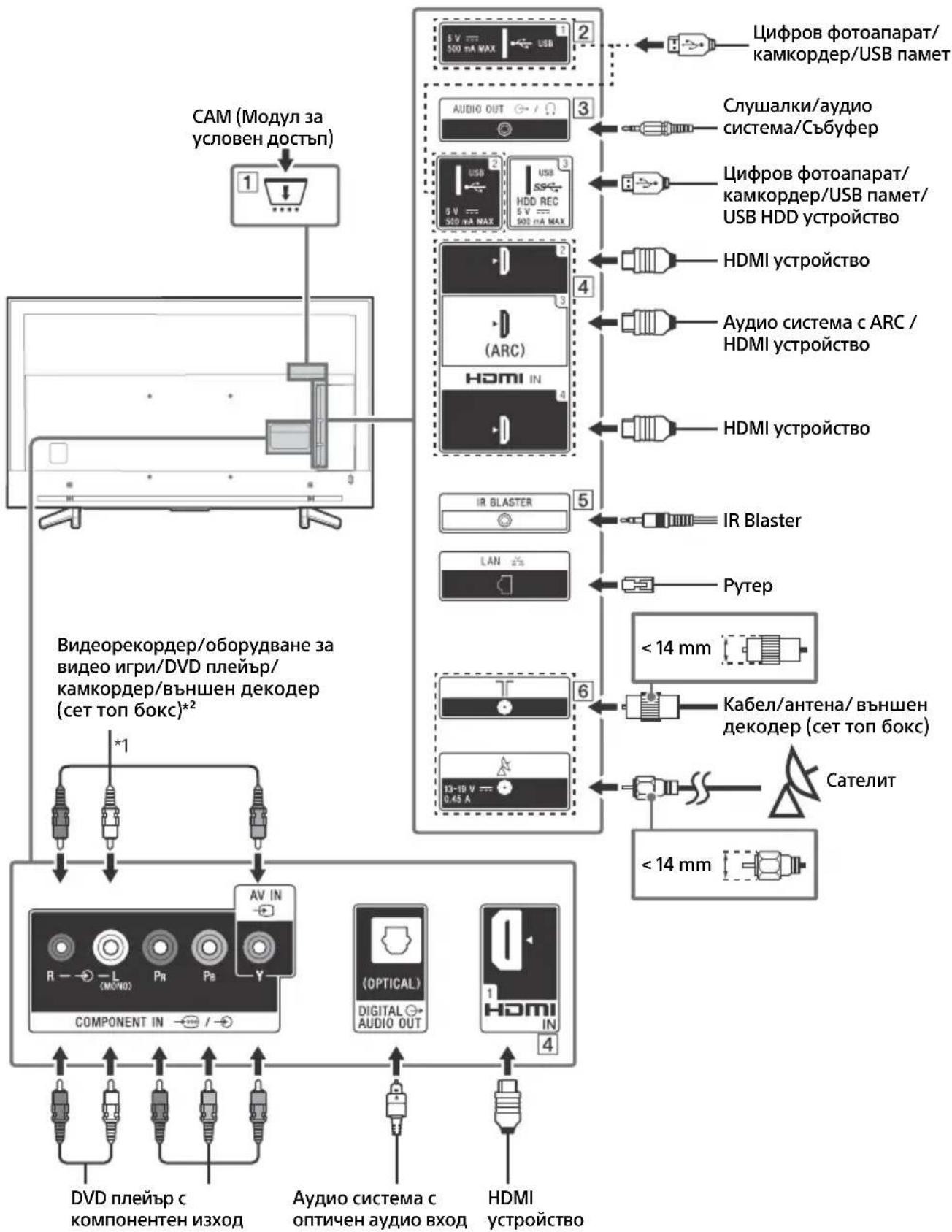
For more information on connections, refer to the Help Guide by pressing HELP on the remote control.
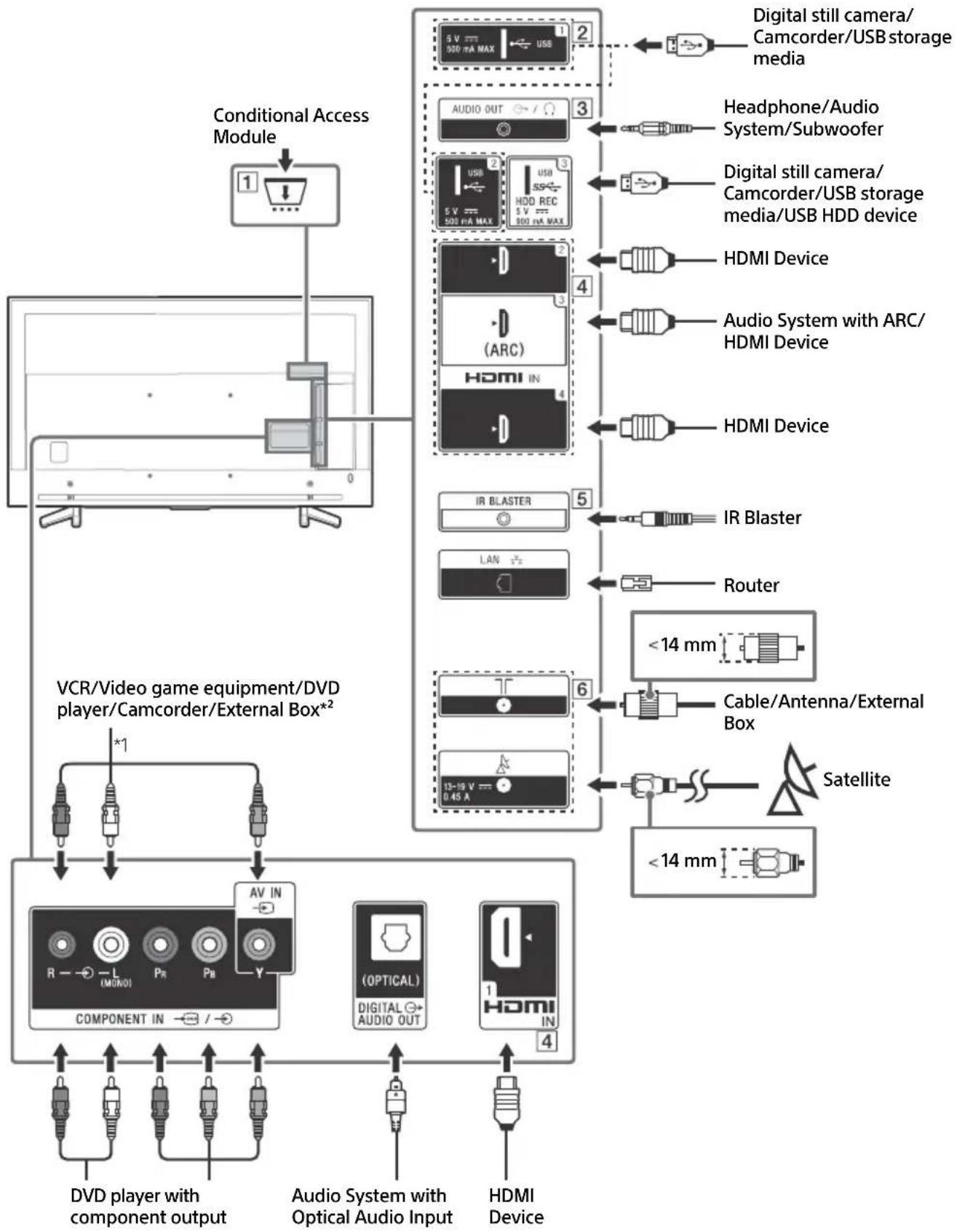
CAM (Conditional Access Module)
- Provides access to pay TV services. For details, refer to the instruction manual supplied with your CAM.
- Do not insert the smart card directly into the TV CAM slot. It must be fitted into the Conditional Access Module provided by your authorised dealer.
- CAM is not supported in some countries/ areas. Check with your authorised dealer.
- A CAM message may appear when you switch to a digital programme after using the Internet video.
2 USB1/2,USB3(HDDREC)* 3
- Connecting a large USB device may interfere with other connected devices beside it.
- When connecting a large USB device, connect to the USB 1 port.
- Connect a USB HDD device to the USB 3 port (blue).
3 AUDIO OUT
Supports 3-pole stereo mini jack only.
- To listen to the TV's sound through the connected equipment, press HOME. Select [Settings] [Sound] [Headphone/Audio out] and then select the desired item.
HDMI IN 1/2/3/4
- HDMI interface can transfer the digital video and audio on a single cable.
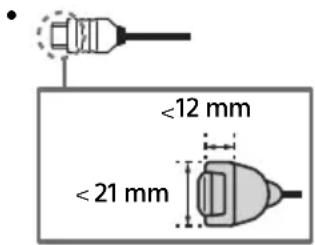
HDMI IN 2/3
To enjoy high quality 4K 50p/60p contents, connect a Premium High Speed HDMI cable to the HDMI IN 2/3 and set the [HDMI signal format] to [Enhanced format].
For details of supported formats, refer to the "Specifications" in this manual (page 14-15).
HDMI IN 3 ARC (Audio Return Channel)
Connect your audio system to the HDMI IN 3 to route TV audio to your audio system. An audio system that supports HDMI ARC can send video to the TV, and receive audio from the TV via the same HDMI cable. If your audio system does not support HDMI ARC, an additional connection with DIGITAL AUDIO OUT (OPTICAL) is necessary.
5 IR BLASTER
- Use your Sony remote control to control your External Box (cable/satellite box). Connect the IR Blaster Cable*3 to the IR Blaster port on your TV. Place one or both of the other two ends as shown below.
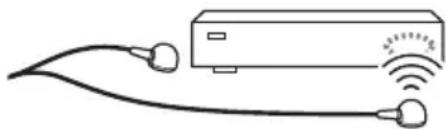
- To perform IR Blaster setup, press HOME and select [Settings] [External inputs] [IR Blaster setup].
6 (RF input), (Satellite input)
Connections for terrestrial/cable and satellite.
1 When connecting mono equipment, connect to the L (MONO) audio jack (socket).
2 For an external device which has only SCART AV OUT, use a SCART-RCA adaptor.
*3 Only on limited region/country/TV model.
Installing the TV to the Wall
Using the optional Wall-Mount Bracket
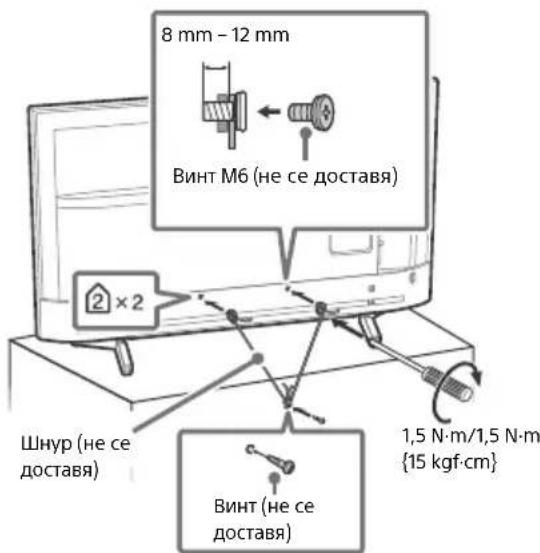
This TV's instruction manual only provides the steps to prepare the TV for Wall-Mount installation before it is installed on the wall.
To Customers:
For product protection and safety reasons, Sony strongly recommends that installation of your TV be performed by Sony dealers or licensed contractors. Do not attempt to install it yourself.
To Sony Dealers and Contractors:
Provide full attention to safety during the installation, periodic maintenance and examination of this product.
Sufficient expertise is required for installing this product, especially to determine the strength of the wall for withstanding the TV's weight. Be sure to entrust the attachment of this product to the wall to Sony dealers or licensed contractors and pay adequate attention to safety during the installation. Sony is not liable for any damage or injury caused by mishandling or improper installation.
Use the Wall-Mount Bracket SU-WL450 (not supplied) to install the TV to the wall.
When installing the Wall-Mount Bracket, also refer to the Operating Instructions and Installation Guide supplied with the Wall-Mount Bracket.
Note
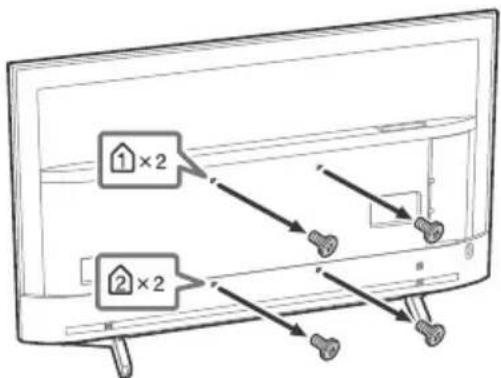
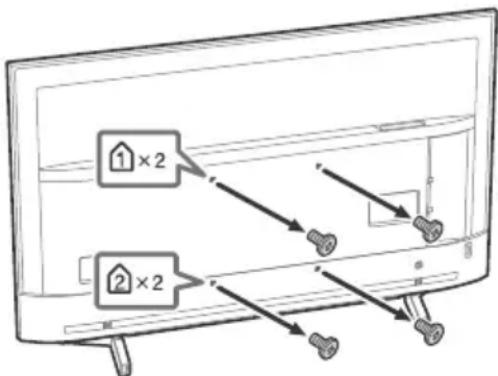
- Be sure to store the removed screws in a safe place, keeping them away from children.

For instructions on Wall-Mount Bracket installation, see the Installation Information (Wall-Mount Bracket) on the product page for your TV model. www.sony.eu/support/
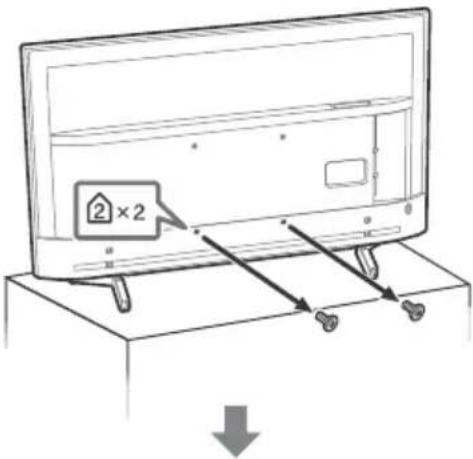
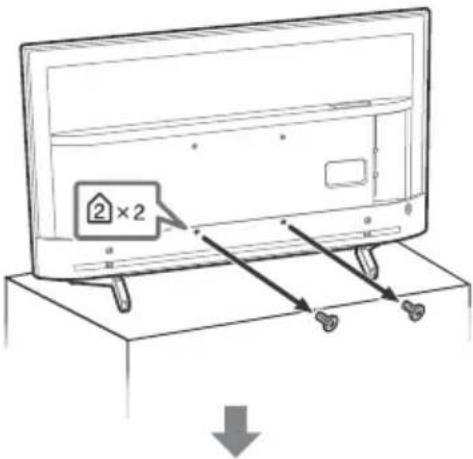
Remove the screws from the rear of the TV.
Troubleshooting
General troubleshooting for issues like: black screen, no sound, frozen picture, TV does not respond, or network is lost, do the following steps.
1 Restart your TV by pressing the power button on the remote control until a message appears. The TV will restart. If the TV does not recover, try unplugging the TV from the mains lead for two minutes and then plug it in again.
2 Refer to the Help menu by pressing HELP on the remote control.
3 Connect your TV to the Internet and perform a software update.
4 Visit Sony support website (information provided on the back cover).
When [A new TV system software update is available...] message is displayed.
Sony strongly recommends you to update the TV software by selecting [Update Now]. These software updates improve your TV performance or add new features.
The following screen with [Updating...] will appear and the illumination LED flashes white while software is updating.
![SONY KD70XF8305 - When [A new TV system software update is available...] message is displayed. - 1](/content/2026/03/437260/images/fd4b2e080e165e070825bc0ade214656aa08c6bd87acef40a08f5ee06c06f745.jpg)
Do not unplug the mains lead during the software update. If you do, the software update may not finish completely, and it may cause a software malfunction. Software updates can take up to 15 minutes.
When you plug in the TV, the TV may not be able to turn on for a while even if you press the power button on the remote control or the TV.
It takes time to initialize the system. Wait for about one minute, then operate it again.
Troubles and Solutions
When the illumination LED is flashing in red.
- Count how many times it flashes (interval time is three seconds).
Reboot the TV by disconnecting the mains lead for two minutes, then turn on the TV. If the problem persists, disconnect the mains lead, and contact your dealer or Sony service centre with the number of times the illumination LED flashes.
Terrestrial/cable service cannot be received.
- Check the antenna (aerial)/cable connection and booster settings.
- Select terrestrial/cable service by pressing DIGITAL/ANALOG on the remote control. If the broadcasting service is not displayed, press TV and then press DIGITAL/ANALOG.
- Terrestrial signal might be suppressed if there is a strong signal supplied nearby.
After moving to a new house or trying to receive new services, attempt a service search by selecting [Digital Tuning].
Satellite service cannot be received.
- Check the satellite cable connection.
- When [No signal. LNB overload detected...] message is displayed, unplug the mains lead. Then, ensure the satellite cable is not damaged and the satellite signal line is not short-circuited in the satellite connector.
The remote control does not function.
- Replace the batteries.
The EXT.BOX MENU button on the remote control does not work.
- Connect and set up the IR Blaster (models with supplied IR Blaster only) (page 11).
- Connect HDMI CEC compatible device (except models with supplied IR Blaster) and change to that input.
The parental lock for broadcast password has been forgotten.
- Enter 9999 for the PIN code and select [Change PIN code].
The TV surrounds become warm.
- When the TV is used for an extended period, the TV surrounds become warm. You may feel hot when touching there by the hand.
Specifications
System
Panel system
LCD (Liquid Crystal Display) Panel, LED Backlight
TV system
Depending on your country/area selection/TV model
Analogue: B/G, D/K, I
Digital: DVB-T/DVB-C
DVB-T2*
Satellite*: DVB-S/DVB-S2
Colour system
PAL/SECAM/NTSC3.58 (Video only)/NTSC4.43 (Video only)
Channel coverage
Depending on your country/area selection/TV model
Analogue: UHF/VHF/Cable
Digital: UHF/VHF/Cable
Satellite*: IF Frequency 950-2,150 MHz
Sound output
10W+10W
Wireless technology
Protocol IEEE802.11ac/a/b/g/n
(IEEE802.11ac may not be available depending on countries/regions.)
Bluetooth Version 4.1
Frequency band(s)
| Wireless LAN (IEEE802.11ac/a/b/g/n) | |
| Frequency range Output Power | |
| 2400-2483.5 MHz < 20 | .0 dBm |
| 5150-5250 MHz < 23.0 | dBm |
| 5250-5350 MHz < 20 | .0 dBm |
| 5470-5725 MHz < 20 | 0 dBm |
| 5725-5850 MHz < 13.9 | dBm |
| Bluetooth | |
| Frequency range Out | put Power |
| 2400-2483.5 MHz | < 10.0 dBm |
RMF-TX310E
| Bluetooth | |
| Frequency range Out | put Power |
| 2400-2483.5 MHz | < 10.0 dBm |
Software version
TV: PKG. EUA
Press HELP on the remote control to know the software version.
Remote control:
Press HOME, then select [Settings] [Voice]
Remote Control] [Software version].
Any updates of software/firmware for this equipment/accessories/components will never affect its conformity to Directive 2014/53/EU in future.
- Not all the TV sets have DVB-T2 or DVB-S/S2 technology or satellite antenna terminal.
Input/Output jacks
Antenna (aerial)/cable
75 ohm external terminal for VHF/UHF
Satellite antenna
Female F Type Connector, 75 ohm.
DiSEqC 1.0, LNB 13 V/18 V & 22 kHz tone, Single Cable Distribution EN50494.
C O M P O N E N T
YP_BPR (Component Video): 1080p (50, 60 Hz), 1080i (50, 60 Hz), 720p (50, 60 Hz), 576p, 576i, 480p, 480i
Audio input (phono jacks)

Video input (common phono pin with Y input)
HDMI IN 1/2/3/4 (support 4K resolution, HDCP
2.3-compatible)
Video:
4096 × 2160p (50, 60 Hz)*2, 4096 × 2160p
(24Hz)^ 1 3840× 2160p (50, 60 Hz)*2, 3840 ×
2160p (24, 25, 30 Hz), 1080p (30, 50, 60 Hz),
1080/24p, 1080i (50, 60 Hz), 720p (30, 50,
60 Hz), 720/24p, 576p, 576i, 480p, 480i, PC Formats*3
*1 When 4096 × 2160p is input and [Wide mode] is set to [Normal], the resolution is displayed as 3840 × 2160p . To display 4096 × 2160p , set [Wide mode] setting to [Full 1] or [Full 2].
*2 HDMI IN 2/3 only. To support 18 Gbps, set [HDMI signal format] to [Enhanced format].
*3 Refer to the Help Guide for details.
Audio:
5.1 channel linear PCM: 32/44.1/48/88.2/96/
176.4/192 kHz 16/20/24 bits, Dolby Digital, Dolby Digital Plus and DTS
ARC (Audio Return Channel) (HDMI IN 3 only)
(Two channel linear PCM: 48 kHz 16 bits, Dolby
Digital, Dolby Digital Plus, DTS)
DIGITAL AUDIO OUT (OPTICAL)
Digital optical jack (Two channel linear PCM: 48 kHz 16 bits, Dolby Digital, DTS)
Headphone, Audio output, Subwoofer
1,2-3(HDBREC)*
1
USB device port. (USB HDD device for REC feature)
USB port 1 and 2 support High Speed USB (USB 2.0)
USB port 3 supports Super Speed USB (USB 3.1)
Gen 1)

CAM (Conditional Access Module) slot

10BASE-T/100BASE-TX connector (Depending on the operating environment of the network, connection speed may differ. 10BASE-T/ 100BASE-TX communication rate and communication quality are not guaranteed for this TV.)
IR BLASTER*1
IR Blaster Cable input (mini jack)
Others
Optional accessories
Wall-Mount Bracket: SU-WL450
Operating temperature
0^ - 40^
Operating humidity
10% - 80% RH (non-condensing)
Power, Product Fiche and others
Power requirements 220 V - 240 V AC, 50
Energy Efficiency Class
KD-70XF83xx:A+
KD-60XF83xx: A
Screen size (measured diagonally) (Approx.)
KD-70XF83xx: 176.6 cm / 70 inches
KD-60XF83xx: 152.7 cm / 60 inches
Power consumption
In [Standard] mode
KD-70XF83xx:142W
KD-60XF83xx: 120 W
In [Vivid] mode
KD-70XF8305:274W
KD-60XF8305:230W
Average annual energy consumption*2
KD-70XF83xx:197 kWh
KD-60XF83xx:166kWh
Standby power consumption*3*4
0.50 W (27 W in software/EPG update mode)
Display resolution
3,840 dots (horizontal) × 2,160 lines (vertical)
Output Rating
USB1/2
5V=500mA MAX
USB3
5V=900mA MAX
Dimensions (Approx.) (w× h× d)
with Table-Top Stand
KD-70XF83xx: 156.8 × 97.8 × 37.1 ~cm
KD-60XF83xx: 136.0× 85.4× 31.5cm
without Table-Top Stand
KD-70XF83xx: 156.8 × 90.7 × 7.8 cm
KD-60XF83xx: 136.0 × 78.9 × 7.8 cm
Mass(Approx.)
with Table-Top Stand
KD-70XF83xx: 26.9 kg
KD-60XF83xx: 20.8 kg
without Table-Top Stand
KD-70XF83xx:25.6kg
KD-60XF83xx: 19.8 kg
*1 Only on limited region/country/TV model.
*2 Energy consumption per year, based on the power consumption of the television operating 4 hours per day for 365 days. The actual energy consumption will depend on how the television is used.
*3 Specified standby power is reached after the TV finishes necessary internal processes.
*4 Standby power consumption will increase when your TV is connected to the network.
Note
- Do not remove the dummy card from TV CAM (Conditional Access Module) slot other than to insert a smart card fitted in CAM.
- Optional accessories availability depends on countries/region/TV model/stock.
- Design and specifications are subject to change without notice.
Notes on Digital TV function
- Digital TV (DVB terrestrial, satellite and cable), interactive services and network functions may not be available in all countries or areas. Some functions might not be enabled or might not operate correctly with some providers and network environments. Some TV service providers may charge a fee for their services.
- This TV supports digital broadcasting using MPEG-2, H.264/MPEG-4 AVC and H.265/HEVC CODECs, but compatibility with all operator/service signals, which may change over time, cannot be guaranteed.
Trademark information
- The terms HDMI and HDMI High-Definition Multimedia Interface, and the HDMI Logo are trademarks or registered trademarks of HDMI Licensing Administrator, Inc. in the United States and other countries.
Manufactured under license from Dolby Laboratories. Dolby, Dolby Audio, and the double-D symbol are trademarks of Dolby Laboratories. - "BRAVIA", Band BRAVIA Sync are trademarks or registered marks of Sony Corporation.
- Gracenote, the Gracenote logo and logotype, "Powered by Gracenote" logo are either registered trademarks or trademarks of Gracenote, Inc. in the United States and/or other countries.
- Vewd® Core. Copyright 1995-2017 Vewd Software AS. All rights reserved.
- Google, Android TV, Google Play, Chromecast built-in, YouTube and other related marks and logos are trademarks of Google LLC.
- Wi-Fi®, Wi-Fi Alliance®, Wi-Fi Direct® and Miracast® are registered trademarks of Wi-Fi Alliance.
- Wi-Fi Protected Setup™ is a trademark of Wi-Fi Alliance.
- The Wi-Fi CERTIFIED™ Logo is a certification mark of Wi-Fi Alliance.
- For DTS patents, see http:// patents.dts.com. Manufactured under license from DTS, Inc. DTS, the Symbol, & DTS and the Symbol together are registered trademarks, and DTS Digital Surround is a trademark of DTS, Inc. © DTS, Inc. All Rights Reserved.
- The Bluetooth® word mark and logos are registered trademarks owned by the Bluetooth SIG, Inc. and any use of such marks by Sony Corporation is under license. Other trademarks and trade names are those of their respective owners.
- Netflix is a registered trademark of Netflix, Inc.
- DiSEqCTM is a trademark of EUTELSAT. This TV supports DiSEqC 1.0. This TV is not intended for controlling motorized antennas.
-
TUXERA is a registered trademark of Tuxera Inc. in the US and other countries.
-
USB-IF SuperSpeed USB Trident logo is a registered trademark of USB Implementers Forum, Inc.
- All other trademarks are the property of their respective owners.
Table des matieres
AVIS IMPORTANT. 3
AT, BE, HR, CY, CZ, DK, EE, FI, FR, DE, EL, HU, IE, IT, LV, LT, LU, MT, NL, PL, PT, SK, SI, ES, SE, UK, IS, LI, NO, CH, BG, RO, TR, AL, BA, MK, MD, RS, ME, Kosovo
6 (Entree RF), (Entree satellite)
Analogue: B/G, D/K, I
Analogue: UHF/VHF/Cable
ARC (Audio Return Channel) (HDMI IN 3 uniquely)
DIGITAL AUDIO OUT (OPTICAL)
10% - 80% HR (sans condensation)
AT, BE, HR, CY, CZ, DK, EE, FI, FR, DE, EL, HU, IE, IT, LV, LT, LU, MT, NL, PL, PT, SK, SI, ES, UK, IS, LI, NO, CH, BG, RO, TR, AL, BA, MK, MD, RS, ME, Kosovo
DIGITAL AUDIO OUT (OPTICAL)
Toma digital optica (PCM lineal de dos canales: 48 kHz 16 bits, Dolby Digital, DTS)
AUDIO OUT (minitoma estereo)
Auricular, Salida de audio, Altavoz de graves
1.2-3(HDDREC)*
10% - 80% RH (sin condensation)
AT, BE, HR, CY, CZ, DK, EE, FI, FR, DE, EL, HU, IE, IT, LV, LT, LU, MT, NL, PL, PT, SK, SI, ES, SE, UK, IS, LI, NO, CH, BG, RO, TR, AL, BA, MK, MD, RS, ME, Kosovo
2160p (24, 25, 30 Hz), 1080p (30, 50, 60 Hz),
1080/24p, 1080i (50, 60 Hz), 720p (30, 50,
60 Hz), 720/24p, 576p, 576i, 480p, 480i,
Pc-formaten*3
(Tweekanaals lineaire PCM: 48 kHz 16 bits, Dolby
Digital, Dolby Digital Plus, DTS)
DIGITAL AUDIO OUT (OPTICAL)
AT, BE, HR, CY, CZ, DK, EE, FI, FR, DE, EL, HU, IE, IT, LV, LT, LU, MT, NL, PL, PT, SK, SI, ES, SE, UK, IS, LI, NO, CH, BG, RO, TR, AL, BA, MK, MD, RS, ME, Kosovo
Satellite*: IF Freqenz 950-2.150 MHz
Tonausgänge
10W+10W
Wireless-Technologie
Protokoll IEEE802.11ac/a/b/g/n
2160p (24, 25, 30 Hz), 1080p (30, 50, 60 Hz),
1080/24p, 1080i (50, 60 Hz), 720p (30, 50,
60 Hz), 720/24p, 576p, 576i, 480p, 480i, Computerformate*3
DIGITAL AUDIO OUT (OPTICAL)
High-Speed-USB (USB 2.0)
AT, BE, HR, CY, CZ, DK, EE, FI, FR, DE, EL, HU, IE, IT, LV, LT, LU, MT, NL, PL, PT, SK, SI, ES, UK, IS, LI, NO, CH, BG, RO, TR, AL, BA, MK, MD, RS, ME, Kosovo
2160p (24, 25, 30 Hz), 1080p (30, 50, 60 Hz),
1080/24p, 1080i (50, 60 Hz), 720p (30, 50,
60 Hz), 720/24p, 576p, 576i, 480p, 480i,
Formatos PC*3
DIGITAL AUDIO OUT (OPTICAL)
Tomada digital otica (PCM linear deinous canais:
48 kHz 16 bits, Dolby Digital, DTS)
AUDIO OUT (Mini-tomada estéreo)
Auscultador, saía de audio, subwoofer
1,2,SS3(HDDREC)*1
Porta do disposicao USB. (disposicao USB HDD para a funcionalidade REC)
As portas USB 1 e 2 suportam High Speed USB (USB 2.0)
A porta USB 3 suporta Super Speed USB (USB 3.1 Gen 1)

Ranhura CAM (Modulo de Acesso Condiencial)
LAN
AT, BE, HR, CY, CZ, DK, EE, FI, FR, DE, EL, HU, IE, IT, LV, LT, LU, MT, NL, PL, PT, SK, SI, ES, SE, UK, IS, LI, NO, CH, BG, RO, TR, AL, BA, MK, MD, RS, ME, Kosovo
Pannello LCD (cristalli liquidi), Retroillumination a LED
Sistema TV
2160p (24, 25, 30 Hz), 1080p (30, 50, 60 Hz), 1080/24p, 1080i (50, 60 Hz), 720p (30, 50,
60 Hz), 720/24p, 576p, 576i, 480p, 480i, Formati PC*3
DIGITAL AUDIO OUT (OPTICAL)
EU-importor: Sony Europe Limited.
Fragor till EU-importoren aller fragor som rörprodukternas overensstammelse i Europa skall sändas till tillverkarens auktoriserade representant, Sony Belgium, bijkantoor van Sony Europe Limited, Da Vincilaan 7-D1, 1935 Zaventem, Belgien.
Meddelande for radioutrustning

AT, BE, HR, CY, CZ, DK, EE, FI, FR, DE, EL, HU, IE, IT, LV, LT, LU, MT, NL, PL, PT, SK, SI, ES, SE, UK, IS, LI, NO, CH, BG, RO, TR, AL, BA, MK, MD, RS, ME, Kosovo
Se Hjalpguiden for mer information.
- Placera ingenting nara sensorn.
Anvanda fjarrkontrollen
2160p (24, 25, 30 Hz), 1080p (30, 50, 60 Hz),
1080/24p, 1080i (50, 60 Hz), 720p (30, 50,
60 Hz), 720/24p, 576p, 576i, 480p, 480i,
PC-format*3
DIGITAL AUDIO OUT (OPTICAL)
EU Importor: Sony Europe Limited.
Foresp-orgsler til EU Importoren aller vedrorende overholdelse af Produktrgaranti i Europa skal sendes til fabrikantens representant, Sony Belgium, bijkantoor van Sony Europe Limited, Da Vincilaan 7-D1, 1935 Zaventem, Belgien.
/ / / (Navigering D-Pad)
Skaermmenunavigering og valg.
TV
2160p (24, 25, 30 Hz), 1080p (30, 50, 60 Hz),
1080/24p, 1080i (50, 60 Hz), 720p (30, 50,
60 Hz), 720/24p, 576p, 576i, 480p, 480i, Pc-formater*3
(to-kanals lineaer PCM: 48 kHz 16 bit, Dolby
Digital, Dolby Digital Plus, DTS)
DIGITAL AUDIO OUT (OPTICAL)
Digitalt optisk stik (to-kanals linear PCM: 48 kHz 16 bit, Dolby Digital, DTS)
AUDIO OUT (Stereo-minijack)
Hovedtelefon, lydudgang, subwoofer
1,2,SS3(HDDREC)*1
USB-port. (SSSUSB HDD-enhed for REC-funktion)
USB-port 1 og 2 understotter High Speed USB (USB 2.0)
USB-port 3 understotter Super Speed USB (USB 3.1 Gen 1)

CAM (Conditional Access Module)-holder
品LAN
10BASE-T/100BASE-TX-stik
2160p (24, 25, 30 Hz), 1080p (30, 50, 60 Hz),
1080/24p, 1080i (50, 60 Hz), 720p (30, 50,
60 Hz), 720/24p, 576p, 576i, 480p, 480i,
PC-muodot*3
DIGITAL AUDIO OUT (OPTICAL)
EU-importor: Sony Europe Limited.
Spørsmål til EU-importøren eller spørsmål vedrørende produits overensbestemmelse i Europa skal sendes til produsentens autoriserte representant, Sony Belgium, bijkantoor van Sony Europe Limited, Da Vincilaan 7-D1, 1935 Zaventem, Belgia.
Merknad for radioutstyr
Herved erklærer Sony Visual Products Inc. at radioutstyristypene KD-70XF8305,
AT, BE, HR, CY, CZ, DK, EE, FI, FR, DE, EL, HU, IE, IT, LV, LT, LU, MT, NL, PL, PT, SK, SI, ES, SE, UK, IS, LI, NO, CH, BG, RO, TR, AL, BA, MK, MD, RS, ME, Kosovo
Vis TV-ens home-meny.
5 +/-(Volum)
Jester volumet.
(Hopp)
(Teksting-innstilling)
Lydinngang (phonoplugger)

VIN
GITAL AUDIO OUT (OPTICAL)
Digital optisk kontakt (tokenals lineer PCM:
48 kHz 16 biter, Dolby Digital, DTS)
AUDIO OUT (minijack, stereo)
Hodetelefon, Iydutgang, subwoofer
1,2,SS3(HDDREC)*
The Heights, Brooklands
Weybridge, Surrey, KT 13 0XW
United Kingdom.
Importer w UE: Sony Europe Limited.
AT, BE, HR, CY, CZ, DK, EE, FI, FR, DE, EL, HU, IE, IT, LV, LT, LU, MT, NL, PL, PT, SK, SI, ES, SE, UK, IS, LI, NO, CH, BG, RO, TR, AL, BA, MK, MD, RS, ME, Kosovo
2160p (24, 25, 30 Hz), 1080p (30, 50, 60 Hz), 1080/24p, 1080i (50, 60 Hz), 720p (30, 50,
60 Hz), 720/24p, 576p, 576i, 480p, 480i, formaty
komputerowe*3
Port USB 3 obslugue standard Super Speed USB (USB 3.1 Gen 1)

AT, BE, HR, CY, CZ, DK, EE, FI, FR, DE, EL, HU, IE, IT, LV, LT, LU, MT, NL, PL, PT, SK, SI, ES, SE, UK, IS, LI, NO, CH, BG, RO, TR, AL, BA, MK, MD, RS, ME, Kosovo
Toto vybaveni muze byt pouzito vostatnich neevropskych zemich.
2160p (24, 25, 30 Hz), 1080p (30, 50, 60 Hz),
1080/24p, 1080i (50, 60 Hz), 720p (30, 50,
60 Hz), 720/24p, 576p, 576i, 480p, 480i, PC formaty
DIGITAL AUDIO OUT (OPTICAL)
2160p (24, 25, 30 Hz), 1080p (30, 50, 60 Hz),
1080/24p, 1080i (50, 60 Hz), 720p (30, 50,
60 Hz), 720/24p, 576p, 576i, 480p, 480i, Formáty PC*3
*1 Ked' je vstup 4096 × 2160p a [Siroký režim] je nastavené na [Standardný], rozlišenie sa zobrázi ako 3840 × 2160p. Na zobrazenie 4096 × 2160p vyberte nastavenie [Siroký režim] na [Plny 1] alebo [Plny 2].
DIGITAL AUDIO OUT (OPTICAL)
EU importor: Sony Europe Limited.
AT, BE, HR, CY, CZ, DK, EE, FI, FR, DE, EL, HU, IE, IT, LV, LT, LU, MT, NL, PL, PT, SK, SI, ES, SE, UK, IS, LI, NO, CH, BG, RO, TR, AL, BA, MK, MD, RS, ME, Kosovo
Teletext uzemmodan: A kovetkez (A)
2160p (24, 25, 30 Hz), 1080p (30, 50, 60 Hz),
1080/24p, 1080i (50, 60 Hz), 720p (30, 50,
60 Hz), 720/24p, 576p, 576i, 480p, 480i, PC formatumok*3
DIGITAL AUDIO OUT (OPTICAL)
Importer UE: Sony Europe Limited.
Intrebari catre importatorul UE sau referitoare la conformitatea produsului in Europa se trimit catre representantul autorizat al producatorului, Sony Belgium, bijkantoor van Sony Europe Limited, Da Vincilaan 7-D1, 1935 Zaventem, Belgia.
Observatie cu privire la echipamentul radio

Prin prezenta, Sony Visual Products Inc.
declara cà tipurile de echipament radio KD-70XF8305,
KD-60XF8305 sunt in conformitate cu Direactiva 2014/53/UE. Textul integral al declaratiei UE de conformitate este disponibile la urmatoarea adresa internet: http://www.compliance.sony.de/
Sistemul TV fara fir poate fi utilizes in urmatoarele tari: AT, BE, HR, CY, CZ, DK, EE, FI, FR, DE, EL, HU, IE, IT, LV, LT, LU, MT, NL, PL, PT, SK, SI, ES, SE, UK, IS, LI, NO, CH, BG, RO, TR, AL, BA, MK, MD, RS, ME, Kosovo
Analogic: B/G, D/K, I
Digital: DVB-T/DVB-C
DVB-T2*
Satelit*: DVB-S/DVB-S2
Sistemculoare
PAL/SECAM/NTSC3.58 (Numai video)/NTSC4.43 (Numai video)
Acoperire canale
Analogic: UHF/VHF/Cablu
Digital: UHF/VHF/Cablu
Satelit*: Frecventa IF 950 - 2.150 MHz
lesire audio
10W+10W
Tecnologie wireless
Protocol IEEE802.11ac/a/b/g/n
(Este posibil ca, in functie de tari/regiuni, protocolul IEEE802.11ac sa nu fié disponible.)
2160p (24, 25, 30 Hz), 1080p (30, 50, 60 Hz), 1080/24p, 1080i (50, 60 Hz), 720p (30, 50,
60 Hz), 720/24p, 576p, 576i, 480p, 480i, Formate PC*3
DIGITAL AUDIO OUT (OPTICAL)
Mufa optica digitala (PCM liniar pe doua canale: 48 kHz 16 biti, Dolby Digital, DTS)
AUDIO OUT /0 (mini mufa stereo)
Castei, iesire audio, subwoofer
1,2-3(HBDBREC)
Port disposizitiv USB. (Disposizitve HDD
N3NoJ3BaHe Ha NICTaHcNOHHO
ynpaBneHne 9
ДиctaHcNoHNo ynpaBneHne onncahne Ha chaTnTe 9
DnaarpamaHa Cbbp3BaHe 11
MOHTaX Ha TeIeBn3opa Ha CTeHa .13
I3noJ3BaHe Ha onuHaHaHaTa KoH3oJa 3a 3akpenBaHe KbM CTeHa .13
OctpaHraBaHe Ha Heu3npaBHOCTn. 14
PpO6JIeMn npEWeHnA 14
Cneunfoikaun 15
HHTepHET Bpb3Ka N 3aunTa Ha NnHHTe DaHHN
To3n npOdyKT Ce CbBp3Ba C nHTepHET NO BpeMe Ha
mbpBOHaaHnHa Ta HcTPOKa, BeDHa rCne KaTO Ce CbBpxe C
mpeka C ce La cnoTbBpDn DOctBa No nHTepHET, KaKTo n
no-KbCHO, 3a Da c KOHNpyupa Home ekpaHa. BaAunrIP
aJpcce Ce n3noN3Ba 3a Te3n N BCNUKn Dpyr n CbBp3BaHnC
nHTepHET. Ako He nCKaTe BaAunr IP aJpcce Da ce n3noN3Ba
n3o6Ioo, He NaCTpoBaIte FyHKnIra 3a 6e3xKHeH nHTepHET
n He CbBp3BaIte UpeDa C nHTepHET no Ka6en. 3a nobEe
NoJPOBoHocTN 3a nHTepHET Bp3KNITE, MOJI, BNKeTe
nHfOpMaUNrTa 3a NoBepNTeHNOCT, ppeCTabEHa B ekpaHnTE
3a HAcTPOKa.
BbBeDeHne
BnaOapm Bn 3a noKynkata Ha TOni Sony npOyKT.
Ppein da 3anoHete pa6oTa c TeleBn3opa, npOeTepeBKOIOCTBOTo H3aJIo n Ro 3ana3e Ta 6bDeu nCpABKn.
3a6eJekka
-Ппдддддддддддддддддддддддддддддддддддддддддддддддддддддддддддддддддддддддддддддддддддддддддддддддддддд徳а.TP.3
N3O6paKeHnTa NIIIOCTpaUHnTe, N3IOn3BaHN B PbKOBODCTBOTo 3a HAcTpoKa N B TOBa pbKOBODCTBO, Ca CaMO 3a CnpaBkA u MoKe Da ce pa3JIuHaBt OT DeIcTBnteJIHHn npoDyKT.
3HaKbT "XX"KOHTO CE NOBBA B NIMETO HA MOJENA, CbOTBeTCTBa HA HOMeP, CbBp3aH CIN3aHa, CbTeA INN CNTeMaTa HA TEJIeBN3Opa.
3akpenBaHe Ha nocTabKaTa 3a Maca KbM TeLeBu3opa
BnKTe PbKOBOcTBOTO 3a HacTPOKa Bbpxy CTnpOnopa.
NOMO
HaMepeTe DOnbHnHHeHa HhOpMaun3a OToTpaHraBaHe Ha Hne3PnABHOCTN nDpyra NoE3Ha HhOpMaun4npeKTHO OT BaWnA TeBn3Op. Hatnche HELP Ha NCTaHcNoHHTo YypaBnHe, 3a Da BnInTe CnCbKa C Temu Nn 3a Da TbPCnte NO KJIouOBA Dyma.
IOMOuHO pBkoBOdCTBO (PbH)
3a no-noipo6ha nHΦopMaunu n3bepeTe [NOMOHO pkoBOCTBO]OT MeHHTO NMOUHa BAaUNa TeneBn3Op. Moxete da npOBepnte NMOUHOTOPkoBOCTBO n OT BaUNa KOMHIOTpBm CmPTOH (HΦopMaun e npEOCTaBeHa Ha 3aHNAKAK).
MaToHaIeHTnKauNHOHHaETNKET
EtKeTte 3a HOpem Ha MoeIa, DaTa Ha npOn3BOdCTBO (roDHa/ Meceu) INKlaC Ha 3axpaHbAHe, ca pa3nOJKeHn Ha Tbp6a Ha TeNeBUNOPa INN OnaKOBKaTa.
PPEyIPEXKeHNE
3AДA

PPEIOTBPATNTE
N36YXBAHHE HA IOXAP,
BINHAN DpBXKTE CBEUN
NJIN DpyTN N3TOUHNHCNA
OfBN DAJECH OT TO3N
PPOyKT.
BAKHA 3A6EJIEXKA
To3n npOdyKT e npOn3BeDen OTo NIn OTo NMeTo Ha Sony Visual Products Inc.
Bbocnten B EC: Sony Europe Limited.
3aNTBaHnIO BHOCTeI NIN 3aNTBaHnCbBp3AHcBC cBoTBeCTBnTo HApOyKTNe CbflacHO 3aKOHOaTeNCTBOTo HA Ebponeckn Cb03, CneBa Da ce OTnpaBRT KbM ybnHomoiene npdctabuTeHa npOn3BoDnTeNa Sony Belgium, bijkantoor van Sony Europe Limited, Da Vincilaan 7-D1, 1935 Zaventem, Benrna.
3a6eIeKka 3a paINo o6OpyDbaHe

C HactoToTo Sony Visual Products Inc.
deknapura, Ye TINNOBe Ta pAnooBOpyDbaHe KD-70XF8305,
KD-60XF8305 cBoTBeCTBaH Na DnpeKtNa 2014/53/EC.
LioocTHnRrTeKT Ha EC DeknapaunraTa 3a CbTOBcTbne MoKe
da Ce HamePi Ha CteDNHa NHTepHe aDpec:
http://www.compliance.sony.de/
ToBa paIIO o6OpUyBaHe MoKe Ja ce I3IoiJI3Ba B EC, 6e3 Ja ce HApUJiBaT npIIOJXIMITE N3NCKBAHnOTHOCHO I3IoiJI3BaHeTO Ha paIIOueCTOTHnCNEKtbp.
3a6eKka 3a notpeBteHn: cneHaTaNHOpMaunCe OTHacr caMo 3a obopydBaHe, npoDaBaHO BCTpaH, KbTeTo ce npnlarat dupeKtNBte Ha EC.
Be3xuHaTa TeIeBn3HOnHa CnCTeMa MoKe Da ce I3No13Ba B CneJHITe DbpxAbi: AT, BE, HR, CY, CZ, DK, EE, FI, FR, DE, EL, HU, IE, IT, LV, LT, LU, MT, NL, PL, PT, SK, SI, ES, SE, UK, IS, LI, NO, CH, BG, RO, TR, AL, BA, MK, MD, RS, ME, Kocobo
ToBaOBOpyDbaHe MoKe Da ce 3nOJ3Ba BpyrH HeeBponeckn CTpaHn.
HΦopMaζηa 3a 6e3oNaCHOCT
PPEyPEXKDEHNE
Bhimahne
OnachocOT ekcnno3n, ako 6aTepyTa 6bJe noMeHeCa HnepaBwJen Tn6bTepy.
BaTePnIe He Tpr6Ba Da ce n3laRaT Ha npeKaHa ToNNHa, HnnpMep CbHueBa CBETNHa, ObrH NnIOo6Hn NnHa N3KIOuHTeNo HnCKo aTMocΦepHo HaJIraHe, KoTo MoKe Ja DOBeJe Do ekCnO3n Nn N3TuHa He 3aNaNIma TeHOCr IIN ra3.
Onachoct, Cbbp3aHa cbc cta6nHocCTTa
TeneBn3OpbT MoKe Da naHe n Da npuHn cepNo3Ho HapaHbAe nn Cmbpt.
HnKora He cnaarTe TeNeBn3Op Ha HecTabuHn NOBbpxHOCTN. TeNeBn3OpT MoKe Da naHe N da npuHHN cepno3Ho
HapaHbAHe Nm Cmbpt. Mhoro HapaHbAHH, OcObeNo npN Deza, Moat Da ce n3oerHaT, KaTo ce B3eMaT IpocTn PpeJa3HN MEpku KaTO:
-Ⅲπολ3BaHé Ha ωkaΦOBe n CTÖKN, npenOpbHaHn OT npoN3BOUnteNa Hα TeJIeBn3Opa.
-ИЗПОЛЗВАЕ самоHa Meбели,КОТTO могатБеЗОпасноДа n3дьржAT TeЖeCTTа HTeJIeBn3Opa.
-Да ce BHMaBa TeJIeBn3OpbT Да He N3JIIN3a N3BbH p6aHa Me6eJIte,Ha KOnTO e NOCTABeH.
TeIeBn3OpbT Da He Ce NocTabB BpXy BnCOKn Me6eNn (HanPnIMep ukaΦoBe nn 6n6nOteKn), 6e3 TeIeBn3OpbT n CbOTBeTHaTa Me6eN da 6bDaT PukpaHn KbM nOxOJaua onopa.
-Да He ce noctabn TeBnOpa Bbpx INaT nI npytn MaTePnIaN, KOnto MoRat Da ce HAmnPaT MeKdy TeBnOpa N MeBeIeNTe,Ha KOnTO e NoCTaBEH.
-Да ce obясгд На Deцata onachocHTe OT kATEpeH e Me6eNTe,3a Da ce DoCTnIgHe TeJIeBUN3OpbT NIN HerOBuTe opraHHN 3a ynpabLeHne.
Ako npn CmHa Ha JxnnuIeTo 3ana3nte Hactoianu cn TeNeBnOp, CneBa Da B3eMeTe npdBnD cbuNTe CbOpaXeHnA, KaT0 RopEnJIOXeHNTe.
HCTaJaua/HacrpoKa
HCTaInpaTe n 3n3oJI3BaIe Te TeneBUNOpA B cBoTBeTCTBne C IHCTpyKUInTE, ONmCAHN No-dOly, 3a Da n36BerHeTe pNCK OT NOxkap, TOKOB yAp nIN NOBpeDa n/NN HapaHABAHNA. YpeD, Cbbp3An KMb 3aUnHTOto 3a3EmBAHe Na crpaNdHaT IHCTaIauNype3 Bp3Ka C MpeXoBOTo eNEkTPO3aXpaHBAHe NlN Ype3 npTO yCtPOuCTBO C Bp3Ka KbM 3aUnHTOto 3a3EmBAHe, N KbM TeneBUNOHHa pa3npdeJInTeHnCa cnCTema, n3IOJ3BaUa KoAKcuaJeH Ka6En, MoKe npOnnpdeJEnn OcbToTETCTBa Da cb3dJeOnaCHOCTOT NOxkap. 3aTOBa Cbbp3BAHeTO KbM TeneBUNOHHa pa3npdeJInTeHnCa cnCTema Tpr8Ba da ce OCbUeCTBu4ye 3yctPoIcTBO, npEOCTABuIoo eNEkTpuecka I3OlaunNoI ON npDEpenHe HeCTOTeH dnaanazOH (ranbaHueh IN3oLaTop, Bk. EN 60728-11).
HCTaIau
TeBn3OpbT Tp6Ba Da 6bIe HcHCTaIIpaH 6m30 Do JeCHO DOCTbNEH KOHTK.
- NocstabeTe TeneBn30pa Ha Cta6unHna, paBa HnoBbpxHOCT, 3a da H3eBHeTe NaHETo My, KOeTo MoKeJa pNUnHn HapaHraBeHa HoBek nn NobpeDa Ha IMUyueCTBO.
- MoHTnpaIte TeJIeBn3Opa Ha MЯcTo, KbJTeTo He MoXe Da 6bJe DpbHAt, ByTHaT WIn Ppeo6bPHaT.
- NocTabeTe TelenB3Opa TaKa, Ye CToKKaTa 3a Maca Ha TB da He e CTbpyr O'T MacaTa, Ha KOrTo e NocTabeH TeLeBn3OpbT (He ce DoCTab). Ako CToKKaTa 3a Maca e n3daheHa HABbH cnpMo MacaTa, Ha KOrTo e NocTabeH TelenB3Opa, TOBa Moze Da DOpeDe do pneo6pbUaHe uNn NaJaHe Ha TelenB3Opa U da DOBeDe Do HapaHBAHe Ha YOBeK uNn NobPeDa Ha TelenB3Opa.
- MoHTaXbT Ha YcTpOuCTBToTO KbM CTeHaTa TpRABa Da Ce N3BbPm CaMO OT KbALINHnUpaH nepcoHaI.
- 3a no-TolmaBe30nAcHCTBnPnpOpbYBaMe Da n3non3BaTe opunHaHnTe aKceCoapn Ha Sony, BKIOHHTeNo: - KOn3OJa 3a 3akpenBaHe KbM cTeha SU-WL450
Ha BcKa ZaHa N3No13BaIte BnHTOBe TnpIoXeHbKbM KOH3OJaTa 3a 3aKpenBaHe KbM CTeHa, KoraTo 3aKaUaTe KOH3OJaTa 3a 3aKpenBaHe KbM CTeHa KbM TEJIeBn3opa.
PpIOJoxeHHe BVHTOBe Ca IpoeKTIpaHn KaKTO e NOKa3aHO Ha
NIOCTpaAurta, N3MEpBAHeTo e HAnPaBeHo CNpRAMO
3aKaHbAuaTa NOBbPXHOCT Ha KOH3OJaTa 3a 3aKpenBaHe KbM
CTeHa.
DnAmETbPbT NdIbIXnHaTa Ha BVHTOBeTe ce pa3JIuYabAT B
3aBNCIMoCT OT MoJeHa KOH3OJaTa 3a 3aKpenBaHe KbM
CTeHa.
IV3No13BaHETo Ha BVHTObe, pa3JIuYHr OT Te3N B KOMNJIeKTa Ha
KOH3OJaTa, MOKe Da IOBeDe IO BBTpEUn NOBpeDi Ha
TeJIeBN3Opa INI Da CTaHe pnpUHa 3a NaDaHETo My nT.H.
Ppehae
-ПпддмecTNTe TeneBn3opa,ИЗКЛЮЧЕВСИКи KaБELIOT HrO.
-ПпeнсангTo Ha rOJIaM TeIeBn3Op nIcKBa IbAm a NIOBeue DyUH.
Korato MeCTIte TENEBn3Opa Ha PbUe, DpbXTe Ro, KaKTo e noNo-dony. He HATNcKaIe LCD naHena n paMaKaTa OKOko ekpHa.
Korato NOBdIraTe IIN MecTne TeNeBn3opa,ro DpBXTe 3npaBOOTdoNY.
- Pnp npnehahe He n3naarate Te TeneBn3opa Ha cbtpcehennn npekaneHn B6paun.
Korato npehacare TeleBn3opa npi peMOHT nI npu cMaHa Ha KINUeTo, NaKeTnpaIte ro, KaTO n3NoJI3BaTe opuHnHaHnTa OnakOBka mATEpnaI 3a NaKeTnpaHe.
PpeoTbpaTaBaHe Ha naDaHe
Bentlaun
Hnkora He NOKpBaNte BeHTnlaOnHHnTe OTbOpn H BkapBaNte PpeMetn B KOpnyca.
Octabete Cbo6oJHO MRCTO OKOIO TEeBUN3Opa KaKTo e NOKa3aHO NO- DONY.
-Прелорьчтелноедаинольате opгurusнаннata KoH30Ja 3a 3akpenBaHe KbM cTeHa Na Sony,3a da ocunrypnte doctaTbUHa Upkynauu Ha Bb3dYxa.
HCTanauaHa cTeHa
HCTaIpaHe c nOMoTa Ha NoctBaKa
3a da noctnHte npabuHa BeHTunaucn 3a da npedOTbpaNTe C6bnpaHETo Ha npax uIN MPbcOTn:
He cnaarate Te neBn3opa nnerHan, He ro MoHTnpaTe o6bphat C rOpHnKpa HAnOly, Haonakn Nnn CTpaHnHO.
He cnaarTe TeneBn3opa Bbpxy pafoBe,KnIm,nerno nB DpeHHK.
He nokpmbaTe TeneBnOpa c napeta nnat, kato nepdeta nnC npDytn ppeMeTn, kato BcTHnU n dp.
He nHCTaInpaIte TeIeBn3opa, KaKTo e noka3aHo No-DoJy.
3axpaHbau Ka6eI
3a DnpeoTbpatnte pnc OT noxap, TokOB ydap, Nobpea n/ nnHapaHbAHe, pa6oTe cbc 3axpaHbAunna Ka6eJ KaKTo cnEba:
- 3n013BaIe cmo opuHaJeH 3axpaHbau Ka6en Ha Sony. He n3no3BaIe Dpyr MapKn.
BkapaTe 电encena NbTHO IN DOKpaB KOTaKTA.
BkIIOUbaIte TeIeBUN3Opa cMo KbM IpOMeHINIBOTOKOB 3axpaHbAHe oT 220V-240V.
Korato npokapbate Ka6e, 3a Ba7a 6e0nacnoct ce ybepeTe, ye Cte n3KnOuHnn 3axpaHbaunna Ka6e; BHNMaBauTe da He ce cnBHeTe B Ka6eJnte.
-ИЗКИПОЕТЯХАРВАДУКABELOTМРЕЖATAOT220V,npeIN DaMeCTIteHIMN3BbPWBATEOnepaUNHaTTeNEBUNOpa. - Pa3eTe 3axpaHbauЯ Ka6eJ DaJIeU OI N3ToUHnU Ha ToNIIHa.
Изкючeteхаразьшсякелигочьтpeпobн.Акохраньшеткелеэмбсенпрашениno HeroceобрауваBNara,илonaц�тMyMOждaceHApuNITOBaMOжддддддддддддддддддддддддддддддддддддддддддддддддддддддддддддддддддддддддддддддддддддддддддддддд徴п.
3a6eJekka
He 3n0n3BaIe npnloKeHnaXpaHbau Ka6e n c npyro o6opydBaHe.
He dyHte He orbBaiTe H He yCyKBaIe IpeKoMEpHO 3axpaHbuaaKa6en. BtpeuHInTe npOBoHNuMOrat da ce ORONAT NPipeKbCHaT.
He npenpaBnTe 3axpaHbuaKa6eJ.
He noctabraIte TeXkN IpeDMETn Bbpyx 3axpaHbaun Ka6eJ.
He IbpaTe camn 3axpaHbaU, Ka6eN, KOraTo r n3KIOuBaTe OT KOHTaTa.
He Cbbp3BaIe TBbpIe MHOrO yCTpoNCTBa KbM eINH IN CbIaIKOHtAKT.
He H3noJ3BaIe KOHTaKT, KOIT He 3axBaIa Cta6nHooencena.
3a6paheHa ynoTppe6a
He HnCTaIpaIe/Tn3NoJI3BaIte TeneBUN3opa Ha CneIeHInTe MeCtA nN B CNTaUcInTe,OnncAn no-DoNy.B npOTHBEN CNyau TeneBUN3OpbT MoKe Da ce NoBpeDn N da pnpuHn NOKap, TokOB yUpd, Ueta N/nnH HapaHraBAe.
MecToHaxOxJdeHne:
Ha oTKpIto (npKa CbHYeBa CBeTnHa), Ha MOpCKnB 6pR, Ha KopaO NIN Dpyr INaBaTeJeH CbD, BbB BbTpewHOCTra Ha npEBO3HO CpeDCTO, B MeUNHCKN 3aBeDeHnA, HnHeCTaBnHn NOBbPxHOCTn, 6n30 Do BOda, nIOKeH Ha DxKd, Bnara nnnywek.
OkoHa cpea:
- MecTa, KOnTo ca ropeu, BnaXHH uHn npeKaaneHo npaunH; TaM, KbTeTo MoKe Da Bn3aT HaceKOMu; KbTeTo MoKe Da 6bJe n3Noxeh Ha MexaHnHn Bn6paunu, B 6n3oCT Do 3anJAMn npedMeTu (Cbeunu np..) TeBeu3OpB Tp8Ba Da 6bJe npedNa3eH OT NoJIbAHe C TeUHOCT; He NoCTaBnTE B 6n3oCT Do yCTpoCTBOTo npedMeTu, NblHn C TeUHOCT, KaTO HanPnPmep Ba3H.
Cnryaunn:
He n3no3BaIte, aKO CTc m MOKpn pBuCe, KOrAto KaNakBt Ha yCTpoCTBOTo E CBANEHN C AkCECoApn, KOnTO He ca npenOpbauHn OTpOINBOUInTeJI. No Bpeme Ha rPbMoteBnuHn 6ypn N3KnIOuBaTte TneBn3Opa OKTaKTA nCbIo 13BaXJaTne aHTEHnna KabEn.
He MoHTnpaIte TeneBn3opa TaKa, Ye Da CTbpyu. MoKe Da Bb3HnKHe HapaHbAbe Nn NobpeDa OT c6bcbk Ha YOBeK Nm PnpDM B TeneBn3opa.
He nocTabaIte TebeBn3opaHa BnaJxHO IINI PpaHIO MRCTO, INN B CTaC Ma3EH DmM Nnnnapa (6n3o DO KxHHeCKN IIOTOBE INN OBnaxHnTeJI). MoKe Da Bb3HnKHe NOXap, enektpueckn ydap nn DeOpmaua.
He nocTabraTe TELBn30pa Ha MeCTa, nIIOKeHN Ha BnCOKTeMtnepatpyn, Hnnpmep DnpekTHa CbHueBa CBeTnHa, 6N13oDo paNaTOp nn OTonPiTeNo TAno. B TaKnaB yCNOBnTeLEBn3Opt MoKe Da npreee, KoTo Da npuHHNe DeopmaunHa Kopnyca N/nn NOBpeDa Ha TeBn3Opa.
-AKO TELEBUN3OpBT 6bDe NoCTaBeH B CbJIeKAJHn HA 05IeCTBeHa 6aHr NIN MNHePAHnBA 6aH,TELEBUN3OpBT MOnKe Da ce NOpeDnOT CpATA BB B3DyXu N D.
3a HauDobpo KaueCTBO Ha KaptnHata He 3nlaTaIe EkaPaHa Ha DnpeKTHO OCBETBaHE NIN CbHYeBa CBETIIHa.
-368raBaiTe npemecBaHeto Ha TebeN3Opa OCTyedeHO H TOIIO MRCTo. BHe3aHNHe TnpoMeHN B TempepaTpaHa CTaTA MoRt Da npuHnHT KOHeH3 Ha Blara. ToBa MoKeJa e pnuHnHa 3a NOKa3BaHe Ha NoTa KaPTNa H/INNoi NoiU nBeTOBE. B TakB CnyuA uN3uKaAte BnArata Da ce n3napn HAnbHNO, PpEn Da BKNIOUYe TeneBn3Opa.
CuyneHn napeta:
He XbprnIe HnO KbM TeNebN3opa.CbKJIoTO Ha ekpHaMoKe Da ce Cchyni N da EKCNIIOpa Pnp Ydapa N da npnHcepno3Hn HapAHBaHn.
Ako NOBbpxHOCTTa Ha DCINJNE Ce nponyka, He J DOKOCBAITE, KOaTO He NkIOHcTe 3axpaHbAunKa6eB. B npOTnBEH cnya ToBa MoKe Da npuHHN TOKOB yApd.
Korato He n3noJ3BaTe yCTpoNCTBOTO
IopapnnpuHn,Cbbp3aHn C6e30nacHocTtN OKoHaTa cpeDa,BIN npenopbUBaMe Da n3KnIOyBaTe TeNeBu3Opa OT MPexata, KOrato He INaHnPate Da rO n3NON3BaTe HKOJIko DnH.
TeIeBn3OpbT He n3KIOUcH eO MPekaT, KOraTo e N3KIOUcH eOT KOnyTe. 3a Da N3KIOUHTe HAnbHNo YCTPOIcTBOTo, N3KIOUcTe Ka6ena Ha 3axpaHbaHeTo OT eNEKtpueckaTa MPeka.
HЯко TeJIeBn3Op npITexKaBAt FyHKUIM, KOnTO n3NCKBaYCTPOIcTBOTO DA 6bJe OCTaBeHO B pexKIM IOTOBHOCT.
OTHOCHOeauata
- He no3B0JIaIbAaIte Ha da ce KaIbAT Bbpxy TeJeBn3Opa.
- Na3eTe MaKNTe aKcecoapn daJeu OT Deua, 3a Da He 6bDaT NOrbHaTH OTRX NO HEBHMaHHe.
Ako Bb3HnKHaT CneHnTe npo6IeMn...
He3a6abHNO n3KIOUeTe TeneBn30pa N3BaJeTe 3axpaHbuaia Ka6en B cIyau, Ye B3HNKHe HAKON OT CneDNITE npoBneMn. KOHCytnpaTne Ce bAunio DocTabuNK nn CepBu3EN CEHTbp Ha Sony dann e HANOIXnTeno TeneBn3OpBT da 6bJe npOBepeOn OT KBAHmPupan cepBn3.
Korato:
3axpaHbauT ka6eI e nobpeH.
- Ihe3dOTO Ha KOHTaKTA He 3axBaua cTa6nHIO uenceJa.
TeBnOpBt e nobpeDen, noHeKe e n3nyChaT, ydaen nn Heo e Xbplno no Hero.
TeuHn TbbpnppeMeTn ca nonaHaBn B OTBopnte Ha Kopnyca.
OTHOCHO TEMNEPATypata Ha LCD TeJeBu3opa
Korato LCD TeleBn3OpBT ce n3NoJ3Ba npOdbJnxTeJHb OBeMe, pAMKaTa OKoLo naHeNa ce 3aTOnJa. MoKe Da ycTeTne TOnJIHa, aKOkocheTe. MoKe da yCeTne TOnJIHa, KOraTo JdoKOcocheTe Cpbka.
PpeDn3HmepKn
TpeaHe Ha TeLeBnna
TneAaTe TeneBn3nB CpeDHOOCBeTeHa CTa, Tb KaTO TneAaHeTo Ha TeneBn3nB Cna6o OCBeTeHa CTa HATOBapBa DOnbHHTeHIO OHTe BN.
Korato n3non3BaTe cn7aJnK, HAcTpoTe cnIata Ha 3Byka Taka, Ye da npedotbpatnte yBpekdahe Ha cnya.
LCD ekpaH
BbnpeknueLCDekpaHbTe n3pa6oTeH no Bucoko-npeu3Ha texHOorrna N NOBEeOT 99,99% OT NIKCEJIte My ca eFeKTNBn, BByxU LCD ekpHa MoKe TpaHNo da ce NoBRT cepHN nn CBtTn TOckN (cepBeHH, CnHnn 3eNeHH).ToBa e cTyKtypHa oOc6eHocT Ha LCD ekpHa Hne npedctabraBA HEn3npaHbOCT.
HeHaTnCKaIeN HeIpaKaNte IpeHnA fUInTbp N He NoCTaBnTe IpeMeTu BpXy YcTpoIcTBoto. M3o6paKeHneTo MoKe Da e HepaBHOMepHO nn LCD ekpaHbT MoKe da ce NoBpeN.
Ako n3non3BaTe yCTpoIcTBOTO Ha CTyEHO MRCTO, KAPTuHaTAMOKe Da ce 3AmBfln Nnn Da cTaHe NO- TbMHa. ToBa He e Hen3npaBHOCT. To3n FehOMEH N3Ye3Ba, KOrato TemnepaTypaTaCe NobuNn
Korato Ha ekpaHa npOdbJnxTeHNO BpeMe ca noka3aHHeNoDBNXHn 306paKeHn, Bb3MOxHO e Da CE NOBRTocTaBHyn Oba3n. Te MoRaT da N3e3HaT CneI HRAKOJIOKcEkyHdN.
- EkpaHbT N KopnycBt ce 3aToTnIaT, KOraTO n3non3BaTe yCTpoIcTBOTo. TOBa He e HEm3npaBHOCT.
LCDekpaHbTcbDbpXaMaIKO KONIMeCTBO TeuHN KPNCTaII. CneBaIte MeCTHnTe npabUNa N3aKOHN 3aN3XBpJrHe Ha noDo6hOn OTnAduS.
IopdpbKka n nouHcTbaHe Ha nobbpxHocTTa Ha ekpaHa/Kopnyca Ha TeleBn3opa
YBepeTe ce, ye cTe N3KJIOUHIN CCBp3aHnKbM TeJIeBn3Opa 3axpaHbAa Ka6en, npEdu Da 3anOuHeTe nooCTBaHe.
3a da npedotbpaTne NOBpeHa Na NOKpntMeTo Ha ekpaHa, cIeDbaiTe IHCTpyKUnITE, IN36poEHn No-DOy.
3aJa npEmaxHeTe npaxoT O nobbpxHocTHa Ha ekpHa/Kopnyca, NoCTBaTcMeKo cyx Nape Nnat. AkoNoIeHNAnHrnpax He MoKe Da ce NoCTN, NoCTBaTBe ekpHa C MeKo Nape PnA, JeKO HABNaXHeNo Cbc Cnab NoCTBaU pa3TbOp.
Hnkora He npbckaIte Boda nn pa3TbOp dIpeKTHBbpxy TeNeBn3opa. No ekpaHa nn BbHnHTe qactN, MoKe da Ce o6pa3yBaT KaKN, KOnto Da noteKaT, da HabJe3Hat BdoJhata cact Ha TeNeBn3opa N da TNOBpejT.
- He n3non3BaIte rpanabn napyeTa nnat, nouchTbaa npenapan Ha aikalHa/KncelenHHa OCHOBa, nouCTBaU npaxoBe nIn pa3TbOpN, Kato HnnpMep aIKOXO1, 6eH30n, pa3peDntel nIn nHcKeTnUd. N3non3BaHeTo Ha TaKINBA BeUeCTBa nIN npOdbLnKTeHNrT KOHTKT C rYMa nIN BnHn moKe da NobpeDn NOBbpxHOCTTa Ha ekpaHa nIN NOBbpxHOCTTA Ha KOPNYCa HA YCTPOINCTBOTO.
He nnaTe TeneBn3opa, ako pbkata Bne nokpnta c xmnuHo BeueCTBO KaTo Kpem 3a pbue NnCbHcE3aunTeH Kpem.
-Преничы се nepinoино поочтбанс прахocmykaка на OTВОпITE 3a поветразынс сцел осигурванс Ha павилна вентILAця.
Korato perylnipate bIbHa Na TeleBnOpa, MeCTe 6aBHO yctpoicBTOto, 3a Da npoeTbAPnte N3MeCTBaHe Ha TeleBnOropa NNn PaDahe OT Macata NNn CTouKaTa.
DonblnHTeJHo 06OpyBaHe
He npbKTe 6n3o Do TeLeBn3opa DOnbHnTeHNte KOMHOHTN NNN KAKBO T Na e BnO oboOpdyBaHe, N3bYBaIoo EeKTPomarHTHN BbHN. B npOtHBn Cnyaeh Bb3MOXHO KApTnHa T N/NN 3ByKbT Da BdTa Cb CMyUeHHa
ToBaOBopyDbaHe e TectBaHO n CbOTBeTCTBa Ha N3NCKBaHnraHa DnpeKTHBa EMC, KaTO N3No13Ba Cbbp3BaU cnHaleh Ka6eNo-Kbc OT 3 MeTpa.
ToBaObOpyDbaHe e TecTbAo H CBoTBeTcTbHa Ha N3NCKBaHnraHa DnpeKTHBa EMC, KaTo n3NoJ3Ba RF Ka6eJ no-Kbc O 30 MeTp a 3a Ha3EmeH/cateIInTe/H/CATV n3BOD.
Ppenopbkn 3a KOHeKTop TnF
BbtpewHnT npoBDnK Tp6Ba Da e n3daen CnpraMo CBp3Baataa cht He noBeye ot 1,5 mm.
(ПpenopьчтелнахеманkoHEKTopTNF)
БeЗкчна Функцин Ha npodykTa
-He pa6oTeTcTo3n ypeB 6JIn3OCT Do MeuHckO
obopydahe(neimcmeKbp np.),TbKaToTOBaMOKe Da DOBeDe Do HEn3npaBHOCT Ha MeINHcKOTo OOBpyDaHe.
MaKap, YeTo3nYpeI npedeBa/npneMa KoDnpaHn cngHaHn,
BnMaBaIte 3a HeoTOpn3nPaHO npnxBaUaHe. Sony He HocN OTROBOPHOCT 3a Bb3HNKHaN B pe3yNTaT IpO6JIeMNI.
Toba obopydBaHe Tp86Ba da ce nHctaInpa u N3no3Ba TaKa, Ye
da mpa p3cTOnHne ot noHe 20 cm nnn nobce meKdy aHTeHaTa Ha TOBa yCTpoiCTBO N TAnOTo Ha YOBek.
BHHMaHHe np pa6Ota c nctaHcNoHHoTo ynpabLeHne
Cb6nOaBaTe npaBnHaTa nOJaPHOCT npn noCTaBHe Ha 6aTePNTE.
He 3n03BaTe CbBmecTHo 6aTePNn OT pa3JIuHcTIN, KaKTo n CTApN HOBn 6aTePNn.
I3XbPnIe n3pa3xOdbaHnTe 6atepn no 7aJauo OKoHaTa CpeDa HauH. B HkON HaceJeH MeCTa e Bb3MOxHO
n3XBpIHeTo Ha 6aTePunTe Da e perynupaHo HopMaTnBHO. KOHCyIupaIte Ce C MeCTHnTE Bnactn.
Pa6oTeBHHMaTeHNoCnCTaHcNOHOTo ynpaBneHne. He ro n3nyckaTHe,He CbIbAe BbpxHrO HnE HnIMBaTe HnKaBn
TeHuOCTN Bbpxy Hero.
He NoctabRte NCTaHtioHnHTo UynpaBJeHne B 6bn3OCT Do H3TOuHnI Ha ToPnHa, Ha PpKa CbHYeBa CBeTJNuHa NIN B CTa R CNOUWeHa BJaXHOch.
N3XbPnHe Ha TeJeBn3opa
I3XbpyHe Ha CTapn
eNEKtpnueckn n eNEKtpoHn
ypeNi (npnIOxMo B Ebponeckn
cbIO3 N dpyrN DbpKabN Cbc
cnCTem 3a pa3dJeHNo cb6upaHe Ha
OTnaDbu)
To3n CmBBOJ Bpxy NpoDyKtI INN Bpxy HOBaTa ONaKOBKa NOKa3Ba, Ye To3n npOdyKT He Tp8Ba Da ce TeTpina KaTO 6bTob OTNaDbK.
BmecTO ToBA ToI Tp8Ba Da 6bJe npedaeH B cBoTBeTHnna
cbipatehen PnyHK 3a peuKlnpaHe Ha eJekTpnecknHa
eJekTPOHH ypei. KaTo npdaTe To3n npOyKT Ha
npabNHO TO mCTo, Bne ue nomorHe 3a npedotBpaTaBaHe Ha
HeratNBHTe nocJeCTBn 3a OKONHata CpeaHa YOBeWKOTO
3dPabe, KOtO 6bXa Bb3HNKHAnn pni HENpabNHOto
n3XbPJIHe Ha To3n npOyKT. PeuKlnpaHeto Ha MaTePnaJIte
ue cnOMOrHe Da ce cbxpanrT npipOnHnte pecypcN. 3a
noDp0bHa INOpMaunr OTHOCHO peuKlnpaHeto Ha To3n
npOyKT MoKeTe Da Ce o6bPheNe Kbm MeCTHata rpaJaCa ynpaba,
Clyj6bata 3a cb6pAne Ha bIoBn OTNaDbu nn Mara3nHa,
OTkbDeTo CTe 3akynnnn npOykTa.
N3XbBpJHe Ha N3NoJ3BaHn
6aTePnn (npnIOxmo B
Ebponeckn CbO3 n dpyn
DbpxkABn Cbc CNCTeMn 3a pa3JeNHO
cbbupaHe Ha OTnaDbuNTe)
To3n CmBbON Bbpxy BaTepya nnBbpxy onaKOBkata nok3Ba, ye BaTepya.
npedocTabeHa c To3n npOyKT, He Tp8bBa Da ce TpeTupa KaTo
6bitOB OTNAbk. PnHAKON 6aTePUNTO3n CmB0J MoKe Da ce
n3NON3BA B KOM6nHauZn C O3NaueHHe Ha XmUneCKn EJeMeHT.
O3haeHneTo Ha XmUneCKn EJeMeHT ONoB (Pb) Ce DoBaB,
ako 6batepnTa cIbpxka Nooebe OT 0,004 % ONoB. KaTo
npedeTete Te3n 6batepnHa nPapBnHOTo MCTo, Bne Ue
nomorHeTe 3a npDoTbPaTBAHe Ha HeratNBHe TncLeDCTBnA
3a OkOHnTa cPeDa u NObEwKOTo 3dPabe, KOtO 6bnx MaORn Da
Bb3HNKaT pNn HEPaBnHOTo 3XbPJIeHa Ha 6batepnTa.
PeuNKInpaHTo Ha mATEpnaInte ue COnOMHe Ta Ce cbXpaHrt
npipOdoPtepcyn. 3a npOyKTH, KOtO OT rNeJaHo TocHa
6Be3ONACHOCT, PpANLEn HauHH Ha DeICTBNE MM UaNOCT Ha
daHHTE INsCKBaT NOCTOHN BA b3Ka C BRpaDEHa 6batepn, Ta3N
6batepnTRp8Ba Da 6bDe IOmEHa CaMo OT KBaINFUnPiPAh
cepBnEH NepcoHAn. 3a Da CTc SNpyH, Ye 6batepnTa ue 6bde
tpeTpapaHa npBnHIO, PpeDAIe CTapn I npOyKT B CbOTBEThn
cb6bpaTeHNyHKT 3a peuKInpApHe Ha eEKeTPnuCeKN i
eJeKTOPHN YuPeDN. 3a BCINKn OCTAHaN 6batepn, MOJN, BIXKe
pa3DeLa OTHOCh TOBa KaK Da IN3BaJNTe NO 6e3OnaceH HauHH
6batepnTa OT npOyKTA. PpeDAIe 6batepnTa B CbOTBEThN
cb6bpaTeHNyHKT 3a peuKInpApHe Ha IN3No13BAHN 6batepn.
3a no-nIOp6Ba HINΦOpMaunr OTOHO CpEuNKInPaHE To HA Ta3N
6batepnCe 06bpHeTe KbM MeCtHaTa rpaDcKa ynpaba, cnYk6Ta
3a cb6bPaHae Ha 6bitOBn OTNAdBuN INM Mara3Hn, OKkbTeO CTe
3akynnnnpOyoKta INN 6batepnTa.
- He nocTaBraIte HnIoo B 6bn3OCT Do ceH3opa.
I3noJ3BaHe Ha dNCTaHcNoHHO ynpabJeHne
IpeckaHa Ha3aHn HAnpeM MekDy Db KaHaJa nn BxOda.TeneBn3OpBT CMeHr TeKyuIIa KaHaJ nn BxOd C NocJIeHNr N36paH KaHaJ nn BxOd.
(3arnywaBaHe)
N3KJIIOUyBa 3ByKa. HaTnCHeTe OTHOBO, 3a Da Bb3CTaHOBnTE 3ByKa.
PROG+/-/E/A/E
B TB peKIm: IV36Op Ha KaHaJI.
BpejNIM TeKCT: N36npa CneIbAaata (A) nn npdeuHaTa (E) cTpaHnua.
6 AUDIO
ПROMЕня e3иka 3a nporpaMaTa, KOrTo rIeDaTe B MOMeHTa.

YnpabJIbRa MyNTmMeiHNo CbIbpxKaHne OT TeJeBn3Opa N CbIp3aHn CbBMeCTMnC BRAVIA Sync yctpoiCTBa.
(HactpoJaHa cy6TuTpnte)
BkHIOUBa nIIN n3KIOUBa cy6TuTpnte (Korato yHKcuaTa e HAnuHa).
HELP
Ioka3Ba NOMOuHO MeHIO. OT TYK MoXe da ce n3NoJ3Ba NOMOuHOTo pBKOBOdCTBO.
REC
3aNcBa TeKuTa nporpaMa c nOmoTuHa
fYHKUra 3a 3aNc USB HDD.
TITLE LIST
Poka3Ba cncbKa cbc 3auncaHn 3arnaBna.
Диагама на CBbp3BaHe
3a noBue He HhOpMaun 3a Bp3KnTe, BnXTe NOMOuHOTo pkoBOcTBO qpe3 HaTnCKaHe Ha 6yToHa HELP Ha nCTaHOnHOHOTo ynpabLeHne.
BG
1 CAM (Moyn 3a ycnoBEN doCTbn)
- PpeIOCTaBA IOCTbN Do nIaTeHN TB ycnyr. 3a noIpo6HocTn BuxTe PbKOBoIDcTBOTo 3a yNoTpe6a, DOCTaBeHo C Baunra CAM.
He nocTabrIe cMaprKapTaTaNapeKTHOB CAM cnota Ha TeJeBn3opa.Tra Tp8Ba da ce nocTabu B MOyJa 3a ycNoBeH DoCTbn, npedocTabeH OT Baun OepaTop. - CAM He ce noДьрЖa B HЯКоN ДьрЖaBn/pernoH. Поверete npu BaunonepaTOp.
Korato npebkIouHTe KbM uΦpOBA npoPama Cne KaTO rJeIaTe nHTepHET BnEo, MoKe Da ce IOBn CAM cbo6uHHe.
2 USB1/2,SSUSB3(HDDREC)\*3
Cbbp3BaHTo Ha roJAMo USB yCTpoiCTBO MoKe Da NOBnRe Ha pa6OtaTa Ha npYr CBbp3aHn yCTPOiCTBa B 6n30CT Do Hero.
Korato CBbp3BaTe roJMyo USB yCTpoIcTBO, CBbp3BaIe To KbM KyIyHra USB 1.
- CBbpxKeTe USB HDD yCTpoNCTBO KbM USB 3 nopTa (cH).
3 AUDIO OUT
-Подьржа самостею мни-жakс Трп NOJIQUCA.
3a da yBaTe 3Byka OT TeJeBn3Opa npe3 Cbbp3aHOTo O6OpyDbaHe, HATNCHeT HOME. N36epeTe [HaCTpOiKn] [3Byk] [CnyuAkn/aYdno u3XoJ], cNeI KoETo N36epeTe JeJaHn eJeMeHT.
4 HDMI IN 1/2/3/4
- INTeppeicbHDMI moKe da npehacr cnΦpOBO BnDeo n ayDnO no eDnKabEJ.

HDMI IN 2/3
3a da ce HacnaJdaBaTe Ha
BnCOKOKaueCTBeHo 4K 50p/60p
CbIbpxKaHne, CbIbpxKeTe KaueCTBeH
BnCOKOCKOpocTeH HDMI Ka6eJ KbM HDMI
IN 2/3 n 3aJaTe [OopMaT Ha HDMI
CnHaHa.] Ha [POno6peH fOpMaT].
3a NOBce HfOpMaun OTHOCHO
POnIbPxKaHte fOpMaTu BnXTe
"CneuNfKaun" B TOBa pBkoBOdCTBO
(cTp.15-17).
HDMI IN 3 ARC (Audio Return Channel)
Cbpxteaynno cnctemaTc KbM
HDMIN3,3a da hacounte
TeJeBn3NoHHna aynno CnHaJ KbM
BaWataaynno cnCTema.Aytno cnCTema,
KoTo noDlbpka HDMI ARC, moKe da
n3npaBaNdeo KbMa TeJeBn3opa n Da
NoLyuBa aynO OT TeJeBn3opa ype3
cbuHrHDMI Ka6eJ.AKO BaWataaynno
cnCTema He noDlbpka HDMI ARC,e
Heo6xOIMa DoonbHnTeJIHa Bpb3Ka C
DIGITAL AUDIO OUT (OPTICAL).
5 IR BLASTER
6 (RF BxOa, (CaTeInTe H Bxo)
Kynnyr 3a Ha3emHa/ka6eHa n caTeJnTHa TeJEuN3n.
1 Korato CBbp3BaTe MOHO obOpyDbaHe, CBbpXkTe KbM L (MONO) ayNo xak.
2 3a BBHshO yCTpOJCTBO, KOeTO mMa cMo SCART AV OUT, n3noJ3BaIte SCART-RCA aanTep.
^*3 Camo 3a onpeJeHn perNoHn/ctpaHn/MoJIeN TeIeBn3Opn.
MONTAX Ha TeJeBn3opa Ha CTeHa
I3noJI3BaHe Ha onuHaJHaTa KOH3OJa 3a 3aKpeINBaHe KbM CTeHa
B TOBa pKoBOOCTBO 3a yNtpe6a e NOKa3aHa cAmo NOnrTOBkata Ha TeJIeBu3Opa 3a MOHTaX Ha CTeHa, PpeiN ToJ da 6bJe MOHTnpaH Ha CTeHaTa.
Dn noTpe6nteJnte:
OT sbo6paekhen 3a 6e30nacnoct n 3a 3aunTa Ha npOyKta, Sony npenopbUba MOHTaXbT Ha Baunr TeIeBn3Op da 6bJe n3BbprweH OT dncTpnbTyop Ha Sony nn ot LnueH3npaH noDn3bLnHnt. He ce ONNTBaIte da rO MOHTnPate camn.
Do TbproBunTe N DoCTaBUnTe Ha Sony:
Noxode T noepTaHO BnMaHne KbM 6e3oNaChocTt Na BpeMe Ha MoHTaKa, nepnoNHaTa Ta NoDpBkKa n npOBepKaTa Ha To3n npOyKT.
3a MOtAka Ha To3n IpOdyKT Ce 3nCKBa 3HaunTeJeH OOnT, Oc6eHO 3a onpeJelHe Ha 3dpaBnHaTa Ha CTeHaT, KOrTo Tpr6Ba Da n3DbpxN TeXecTTa Ha TeLeBn3opa. Ha Bcra Ka ceHa NOBepTe 3akpenBaHeTo Ha TO3n IpOdyKT KbM CTeHa Ha DnCTp6yTopn Ha Sony nn LIneH3npaHn NODn3bLnHnTeIi N no BpeMe Ha MOtAka ObpHHe Oc6eHO BnImaHne Ha MepKnte 3a 6e3OpacHocT. Sony He Hocn OTROBOPHocT 3a NOBpeDn nn HapaHbAHn, PnUnHeHn OT He npabuHn MaHnPylaqnn nn MoTaxk.
Изпольвай Te Kohзола 3a 3akpenbahe кьм стeha SU-WL450 (He ce ДocТав), 3a Да моHTираTe Telenburgа на CTehaTa.
Korato MoHTnpaTe KoH3OJaTa 3a 3akpenBaHe KbM cTeHa, npooyTeTe cbso INHCTpykunnte 3a eknloatauia Yka3aHnra Ta 3a MOHTaK Ha KoH3OJaTa 3a 3akpenBaHe KbM cTeHa.
3a6eJekka
He nponyckaaiTe da 3ana3nTE cBaJIeHInTE BnHTOBe Ha cnIpyHO MxCTo, KaTO rI na3nTE OT Deua.

3a INCHtpyKuIN OTHOCHO MOHTnpaHeTo Ha KOH3OJaTa 3a 3akpenBaHe KbM CTeHa BVXTe VHHOpMaunra 3a MoHTax (KoH3OJa 3a 3akpenBaHe KbM CTeHa) Ha CtpaHnCaTa 3a Baunr MoJeI TeJIeBn3Op. www.sony.eu/support/
CbaIe BnHTOBTe OT 3aHata CtpaHa Ha TeJIeBn3opa.
BG
OTCTpaHЯBaHe Ha Hen3npaBHOCTN
3aOTCTpaHЯBaHe Ha 6uH HeN3npaBHOCTn KaTO:YepeH eKpaH,JIINca Ha 3ByK,3aMpb3HaHa KaPTHa,6IoknpaHe Ha TeJeBn3Op IIN 3aRy6a Ha MPexKa, IN3bJInHeTe CJIeHNHe CTbKN.
1 PecTapTnpaTe Baun TeJeBn3Op Upe3 HaTnCKaHe Ha 6yToHa 3a 3axpaHbAe Ha DnCTaHcNHOHTo ynpaBHeHne,doKaTo ce NOBn Cbo6uHne. TeJeBn3OpbT uce ce pectapTnpa.AKO TeJeBn3OpbT He Ce Bb3CTaHOBn, npoBaIte Da n3KJIouHtE TeJeBn3Opa OT 3axpaHbAuzna Ka6eB I npoDbJnxKeHne Ha DBe MInHTn i CJIeD TOBa Tg BKJIIOUcTe OTHOBO.
2 Bnxte NOMOHTO pkoBODCTBO qpe3 HaTnCKaHe Ha HELP Ha nctaHNoHHOTynpabJeHne.
3 CbpxKeTe CBOI TeJIeBn3Op C nHTepHET Ha npabTe aKtyaIINaI3aIHa coΦTyepa.
4 Nocete Ta 3a noDpBkKa Ha Sony (HOpMaTae npeOCTaBeHa Ha 3aHaTa Kopuca).
Korato ce noBn cbo6eHne [HaunuHa e HOBa Bepn Ha coftyepa Ha TB...].
Sony cnIHo npenOpbUba da akTyauN3npaTe cofoptyepa Ha TeJeBn3opa, kaTo n36peTe [O6HOBu cera]. Te3n cofoptyepn AkTuJn3aunnoo6pbarT npOn3BOundTeJIHOCTTa Ha TeJeBn3opa nn DoabAry T HOBn yHKun. DokaTo Tpae o6HOBraHeTo Ha cofoptyepa, CBetODIObT Ue MInr B 6yNo N Iue Ce NoRBN cIeHNrT ekpAn C [Updating...] (O6HOBraBe...).
![SONY KD70XF8305 - Korato ce noBn cbo6eHne [HaunuHa e HOBa Bepn Ha coftyepa Ha TB...]. - 1](/content/2026/03/437260/images/ff7de44b5caf16fa92726b671de500f0afeb178c80f4a68dcb329f2c30f01824.jpg)
He n3KIOUBAIte 3axpaHbauu na Ka6e IIO BpeMe Ha aKtyaIIN3aunraHa cofoTyepa.Ako ro HappaBITE,eBb3MOxHO aKtyaIN3aunraTa da He 3aBbpHn HApblHo, KOeTo Da IOBeDe Do HenpaBnHNo FOHKUOHNpaHe Ha cooTyepa. AKTyaIN3aunraHa cooTyepa MoKe da npOdbJnxDo 15 MNHyTN.
Korato BKJIOUHTe 3axpaHbauuKa6eHa TeLEBn3Opa,ToM MoKe Da He Ce BKJIOUH BeDHara,IOpN aKO HATNCHeTe 6yTOHa 3a BKJIOUVAHe Ha DCCTaHcNOHHOTO ynpabJIeHne IIN TELEBn3Opa.
HnuaHn3npaHTo Ha cncTeMaTa OTHEMA BpeMe. N3yakaTe 3a OKoNo eHa MNHyTa n ONNTaTe OTHOBO.
ПобLEMп решения
Korato cBeToNDoBt Mnra B cepBeHo.
-Ппеброче КОЛКО ПБТИ МИгА (ИНТЕРВАЛТ OT ВЕм e Тп СЕКУнДи). Pecтчарite TeJIeBn3Opa, KaTO rO n3KJIIOUHTe OT KOHTaKTA 3a ДBE MInHyTи, CJIeД KoETo rO BKNIOHcTe OTHOBO.
Ako npo6lneBt npoBnKn, n3KlnoyeTe 3axpaHbauu Kaebn I ce CbbpKeTe C Baunr DOCTaBvNK Nn cepBn3e H cHTbp Ha Sony KaTO NOCOHTe KOJIKO Nt MNa CBETOINOda.
He ce npnemaeepnha/ka6enHa ycnyra.
- PpOBepTe Bpb3KaTa c eΦnUpHaTa aHTeHa/ Ka6eIa n HAcTpOuKInTe Ha aHTeHHN yCUNBaTeJ.
-Изберетеefинра/кабелна услугачpe3 НатиckaHeHa DIGITAL/ANALOGHa ДистанционноупраВлесни.Акоиьчынота Услуга He ce noka3Ba,HaTиСHTe TVи СпeДТОВa НатиСHTe DIGITAL/ANALOG.
Ha3eMHnT CnHn MoKe Da 6bJe NOTuCHa, aKo NMa CnHeh CnHn, KOTo Ce n3JIbYBa B 6JIn3OCT.
CneI npemecBaHe B HOBA Kbua nn KOraTo TbpCnTe HOBN ycnyr, ONNTaNe TbpceHe Ha ycLyra KATO n36epete [UuΦpOBU NaCTpOKn].
He ce npneemat catelntn ycnyrn.
-Поберете сателпота кабелна Врька.
Korato ce noBc bO6eHne [Hma cHnA. OTeTeHO e npTeOBapBaHe Ha LNB...], n3BaTe 3axpaHbAsnKaBeJ.CIeTToBa ce yBepTe, ye caTeNtHnT KaBeJ He e NobpeDeH, a NInHraTa Ha caTeNtHnCnHaJI He e DaJa Ha KbCO B CaTeNtHnKOHEKTOp.
YeCTOTha(и)JIeHTa(и)
| БezемechEN LAN (IEEE 802.11ac/a/b/g/n) | |
| Чеб耗费иобхват Истячеса мошноct | Ддяца мошноct |
| 2 400-2 483,5 MHz < 2 | 0,0 dBm |
| 5 150-5 250 MHz < 23 | 0 dBm |
| 5 250-5 350 MHz < 20 | 0 dBm |
| 5 470-5 725 MHz < 20 | 0 dBm |
| 5 725-5 850 MHz < 13 | 9 dBm |
| Bluetooth | |
| Чебтейн обхвац范围内 | Для за мошноct |
| 2 400-2 483,5 MHz < 10,0 dBm | |
RMF-TX310E
| Bluetooth | |
| Чебтейн обхвац范围内 | Для за мошноct |
| 2400-2483,5 MHz < 10,0 dBm | |
CoΦTyepHa Bεpcn
HaTnChTe HELP HaДиCTaHcNoHHOTo
ynpabJIeHHe, 3a Da BnDInTe BepCnraTa Ha coΦTyepa.
ДиТаHиОнHoуnpaВлeнe::_..
HaTnuchTe HOME, cIeI KoTo n36epeTe
[Hactpoikn]→[IaocOBO nCTaHcNOHHO
ynpabBHeHne] [CoΦTyepHa Bepn:A].
HnTo eHa akTyaIinaZna Ha coOtfyep/foBpmyep
3a TOBa 6OpyDbaHe/ npHnHaIeJnxHoCTn/
KOMNHOENTHЯMaJa3aCerHe CbOTBeTCTBnETo mC DnpeKtNbA 2014/53/EC B6bDeue.
- He BCNUKU TELJEBUN3Opn NMAT DVB-T2NJN DVB-S/S2
TEXHONORI INI KOHEKTOp 3a CaTeJIHTHa aHTeHa.
BxOAnHO/IN3XoDnH JkaKOBe
AHTeHa/ka6eJ
75 OMa BbHsEh TepMnHaJ 3a VHF/UHF
CateJIHTHa aHTeHa
KoHEKTOp TnF,KeHcKn,75 Oma.
DiSEqC 1.0, LNB 13 V/18 V & 22 kHz TOH
PaznPepdienHe no 1 ka6eI EN50494.
COMPONENT IN
YPBPR(KOMnoHHTOBuDeo):1080p(50,60Hz),
1080i (50, 60 Hz), 720p (50, 60 Hz), 576p, 576i,
480p, 480i
AynoBxo(0HOxakOBe)
AVIN
2160p (24, 25, 30 Hz), 1080p (30, 50, 60 Hz), 1080/24p, 1080i (50, 60 Hz), 720p (30, 50,
60 Hz), 720/24p, 576p, 576i, 480p, 480i, PC opMaTn*3
*1 Korato ce nojaBa 4096 × 2160p n
[InpokoeKpaHeH pexn]eHaCTpoeH Ha [HopMaJIeH],pe3OJIIOUZraTc neoka3Ba KaTo
3840×216Op.3a nokaBaHe Ha 4096×216Op cnokete HactpoKaTa [UnpokoeKpaHepexm]Ha [PbJeH1]nn [PbJeH2].
*2 Camo HDMI IN 2/3. 3a подьрхане на 18 Gbps HabстpoиTe [Формат Ha HDMI сигнана.] на [Поббpenформат].
*3 3a NOBHeue INHΦOpMaζη BνXTe ΠOMOιHOT O pKOBODCTBO.
Aydno:
5,1 kaHaJIeH IInHeeH PCM: 32/44,1/48/88,2/96/
176,4/192 kHz 16/20/24 6nta, Dolby Digital,
Dolby Digital Plus n DTS
ARC (Audio Return Channel) (camo HDMI IN 3)
(Дыкален Ли老人家 PCM: 48 kHz 16 mbu, Dolby
Digital, Dolby Digital Plus, DTS)
DIGITAL AUDIO OUT (OPTICAL)
LHPOB ONTueH JAK (DBykaHaJIeH JInHeeH PCM: 48 kHz 16 6nta, Dolby Digital, DTS)
AUDIO OUT 念 / 念 (CTepeo MmHn JkaK)
CnyuapanK, Aynno n3xOa, Cb6yep
1,2-3(HBDREC)* 1
IopT 3a USB yctpOuCTBO. (SBSHDD
yctpoiCTBO3a yHKnREC)
USB nopT 1 n 2 noДьржat High Speed USB
(USB 2.0)
USB nopT 3 noДьрka Super Speed USB (USB 3.1
Gen 1)

CAM (moyn 3a ycIOBEN IOCTbN) rHe3do
品 LAN
10BASE-T/100BASE-TX KOHeKTop (B 3aBnCmOcT
OT yCIOBnraHa pa6Ota Ha MpeXkata, CKOpocTtA
Ha npeHoc Ha daHHnte MoKeJa ce pa3JIuHaBa.
10BASE-T/100BASE-TX 3a To3n TeJIeBn3Op He
RapaHTnpaCKOpOCTNkaueCTBOHa
KOMyHnKaZnTa.)
IR BLASTER*1
Bxod 3a IR Blaster ka6eJ (mHn JkaK)
Дугн
DonbHnTeJHHaKcecoapu
Koh3oJa 3a 3akpenBaHe KbM cTeHa: SU-WL450
Pa60Tha TempepaTpya
0^ - 40^
Pa6oTHa BnaJxHocT
OTHOCHTeHaBnaXHoCT 10% -80%(6e3
06pa3yBaHe Ha KOHdeH3)
3axpaHbaHe,ΦnshHa npOdyKta n dpyrn
Etoaywyeac otyn Eupwn : Sony Europe Limited.
Epwntoeic npoc tov eoaywya n oxetik a ne tvn
oumuopphiou nou pioiovtoc wc npoc tn vuo0eia tnc
Eupwtaikc Evwoanc 0 npentei va aneeuovovtai otov
Eouaioobotnevo knpoosito, Sony Belgium, bijkantoor van
Sony Europe Limited, Da Vincilaan 7-D1, 1935 Zaventem,
Bélyio.
Piéote npatoetαéva to yia
απενεργοποιησ.
YPBPR (BiVtEo Component): 1080p (50, 60 Hz), 1080i (50, 60 Hz), 720p (50, 60 Hz), 576p, 576i, 480p, 480i
Eioo0oc nXou (UIOOxEc RCA)
AVIN
EiooOoc EIOKovac (tunikoc akpoedekntc RCA uY) unoOxY
DIGITAL AUDIO OUT (OPTICAL)
1, 2, SS-3 (HDD REC)*
Upuooukeunc USB. (SS-3 yia ouokekun USB HDD yia tn Ieitoupyia ERTPAΦHΣ)
Ol Upec USB 1 ka1 2 unooptnpiouv High Speed USB (USB 2.0)
H Θúρα USB 3 uπoστηρίζει Super Speed USB (USB 3.1 Gen 1)
#
Dijital: DVB-T/DVB-C
DVB-T2*
Uydu*: DVB-S/DVB-S2
Renk Sistemi
PAL/SECAM/NTSC3.58 (Sadece video)/NTSC4.43
(Sadece video)
Kanal kapsami
Dijital: UHF/VHF/Kablolu
Uydu*: IF Frekansi 950-2.150 MHz
Se ciksi
10W+10W
2160p (24, 25, 30 Hz), 1080p (30, 50, 60 Hz),
1080/24p, 1080i (50, 60 Hz), 720p (30, 50,
60 Hz), 720/24p, 576p, 576i, 480p, 480i, PC
Formatari3
DIGITAL AUDIO OUT (OPTICAL)
Dijital optik jak (iki kanal dogrusal PCM: 48 kHz
16 bit, Dolby Digital, DTS)
AUDIO OUT (Stereo Mini Jak)
Masa Üstü Sehpasi Olmadan
KD-70XF83xx:25,6kg
KD-60XF83xx: 19,8 kg
http://rd1.sony.net/help/tv/faep1/h_aep/
Help Guide/Guide d'aide/Gui de ayuda/
Helpgids/Hilfe/Gui de ajuda/Guida/Hjalpguide/
For useful information about Sony products