AF 5085S - Digital photo frame AGFA - Free user manual and instructions
Find the device manual for free AF 5085S AGFA in PDF.



| Product type | Digital photo frame |
| Brand | Agfa |
| Model | AF 5085S |
| Dimensions (W×H×D) | 245 × 159 × 22 mm |
| Weight | 0.57 kg |
| Power supply | Input: 100-240 V ~ 50/60 Hz, Output: 5 V = 2 A |
| Display | 8-inch diagonal, resolution 480×220 pixels, aspect ratio 16:9 |
| Internal memory | 1 MB NAND |
| Compatible memory cards | SD, SDHC, MS, MMC |
| Supported image formats | JPEG |
| Ports | USB Host, memory card slot, network cable jack |
| Remote control | Yes, with batteries |
| Main functions | Automatic slideshow, rotation, format change (4:3/16:9), brightness/contrast adjustment, file copy/delete, random playback |
| Operating temperature | 10 to 40 °C |
| Relative humidity | 5 to 80% |
| Cleaning | With a soft, dry cloth |
| Safety | Use only the provided power adapter, avoid moisture, do not open, keep out of reach of children |
| Package contents | Frame, stand, remote control (with batteries), power adapter, USB cable, manual |
| Frame change | Yes, spare frame provided with magnetic attachment |
| Repairability | Do not repair yourself, contact an authorized specialist |
| General information | Private use, do not expose to heat or direct sunlight |
Frequently Asked Questions - AF 5085S AGFA
User questions about AF 5085S AGFA
0 question about this device. Answer the ones you know or ask your own.
Ask a new question about this device
Download the instructions for your Digital photo frame in PDF format for free! Find your manual AF 5085S - AGFA and take your electronic device back in hand. On this page are published all the documents necessary for the use of your device. AF 5085S by AGFA.
USER MANUAL AF 5085S AGFA
Digital Photo Frame AF 5085S
Copyright © 2008 Sagem Communications
Très cher client,
Supports mémoire photo
Thank you for purchasing our photo frame. Get ready to experience photography like never before!
High definition LCD screen
Your digital photo frame includes 1MB of built-in memory, a memory card slot and a USB port. Files on the built-in memory can be deleted and files on memory card and USB-disc can be copied.
The included remote control makes it simple to select photo files, change settings and more.
Supports browse mode (thumbnails of nine images per page at a time). Your digital photo frame supports photo rotate and stretch function.
An automatic, continuous slide show lets you enjoy all of your photos with ease.
We hope you enjoy your machine and its many functions!
About this User Manual
With the installation guide on the following pages, you can start using your machine quickly and easily. Detailed descriptions can be found in the following sections of this user manual.
Read the entire user manual carefully. Follow all safety instructions in order to ensure proper operation of your machine. The manufacturer accepts no liability if these instructions are not followed.
Symbols Used

Warns about dangers for people, damage to the device or other objects as well as possible loss of data. Injuries or damage can result from improper handling.

This symbol designates tips that will help you to use your machine more effectively and easily.

1 Safety Instructions and Recommendations
Do not make any changes or settings that are not described in this user manual.
Setting Up the Device
The device is exclusively for indoor use only. The device should rest securely on a stabile, flat surface. Position all cables in such a way that no one will stumble on them, thus avoiding possible injuries to persons or damage to the device itself.
Always handle the unit with care. Avoid touching the LCD screen. Never place heavy or sharp objects on the LCD panel, frame or power cord.
Protect the device against direct sunlight, heat, large temperature fluctuations and moisture. Do not place the device in the vicinity of heaters or air conditioners. Observe the information on temperature and humidity in the technical data.
In the event that the device becomes too hot, or if you see smoke coming from the device, you must immediately pull the power cable out of the power socket. Have your device examined by trained professionals at a technical service location. To prevent the spread of fire, open flames should be kept away from the device.
Do not plug in the device in moist rooms. Never touch the mains cable or the mains connection with wet hands.
Do not allow liquids to enter into the device. Disconnect the device from the power socket if liquids or foreign objects have entered the device and have your device examined by trained professionals at a technical service location.
Do not allow children to handle the device without supervision. The packing materials should be kept out of the hands of children.
Power Supply
Use only the enclosed power adapter (see chapter Appendix / Technical Data). Check whether the mains voltage of your device (indicated on the type label) matches the mains voltage available at the setup location. This equipment complies with the voltage type specified on the unit.
Never touch the power cable if the insulation is damaged.
Before cleaning the surface of your device, disconnect it from the power network. Never use liquid, gaseous or easily flammable cleansers (sprays, abrasives, polishes, alcohol).
Only clean the display with a dry, soft cloth. If the display breaks, a mildly corrosive liquid may escape. Avoid all contact with your skin and eyes.
Repairs
Do not make any repairs to the device yourself. Improper maintenance can result in injuries or damage to the device. Only have your device repaired by an authorised service centre.
Do not remove the type label from your device; this would void the warranty.
Photo Memory Media
Only use storage media that are compatible with the device. In order to prevent damage to the card or the unit, please turn off the power before removing or inserting the card.
Never pull out the memory card while the device is accessing it. This could cause data to be damaged or lost.
Batteries
CAUTION! RISK OF EXPLOSION IF BATTERY IS REPLACED BY ONE OF AN INCORRECT TYPE.
If the device is not used for a long time, take out the batteries. So you can prevent leakage and possible damage to the device.
The batteries used should be disposed of according to the recycling regulations of your country.
2 Overview
Symbols on the LCD Display
Using the keys on the back of the device, you can call up the corresponding function which is shown on the display.

If there is no operation within five seconds after pressing the button on the rear, the on-screen con will disappear.
Slide Show Mode
Return to the previous menu level
Move left
Move right
Starts or pauses the playback.
Brightness and contrast adjustment menu. Press the corresponding button on the rear of the frame to enter the adjustment menu. Repeatedly pressing the corresponding button to adjust the brightness and contrast.
Optional menu
to rotate the photo ()
changing aspect ratio ( )
to change the photo show delay time (5s),
Slideshow by sorted (1234),
Slideshow by Random (N97)
1 image slideshow (①)
4 images slideshow (4)
Photo Transition Effects (
Press the corresponding button on the rear of the frame to enter the options menu. Repeatedly pressing the corresponding button to get different effects.
Copy files to the internal memory
Delete the files from the internal memory
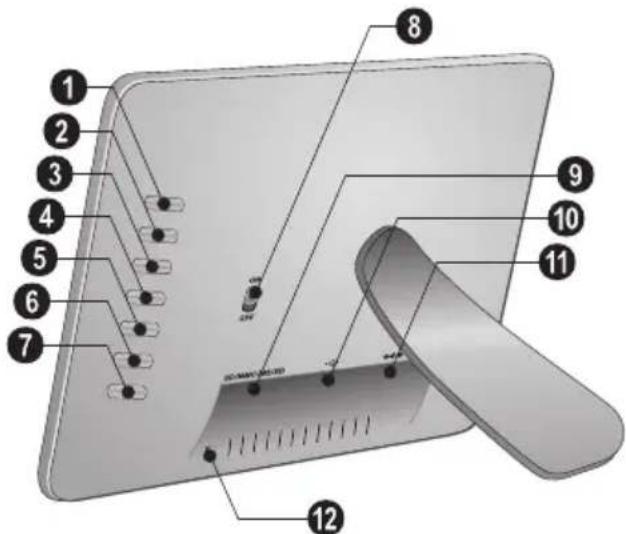
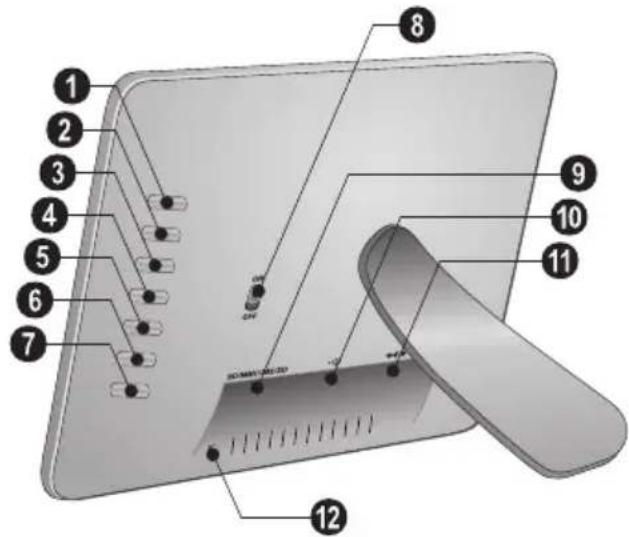
Device Overview
Using the keys on the back of the device, you can call up the corresponding function which is shown on the display.
1..7—Function Keys
ON/OFF—On/Off switch
SD/SDHC/MMC/MS—Slot for Memory card
socket—USB port
11 + Socket for mains cable
12-Button for changing the frame
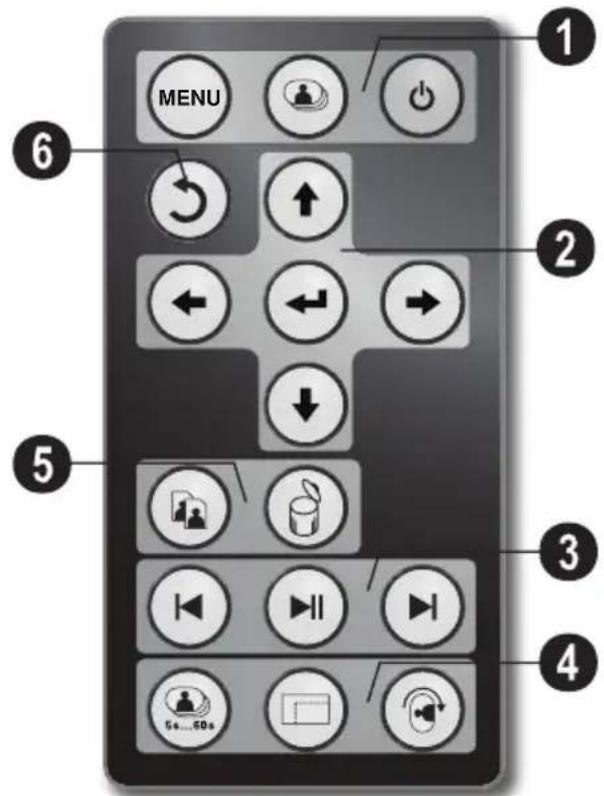
Remote Control
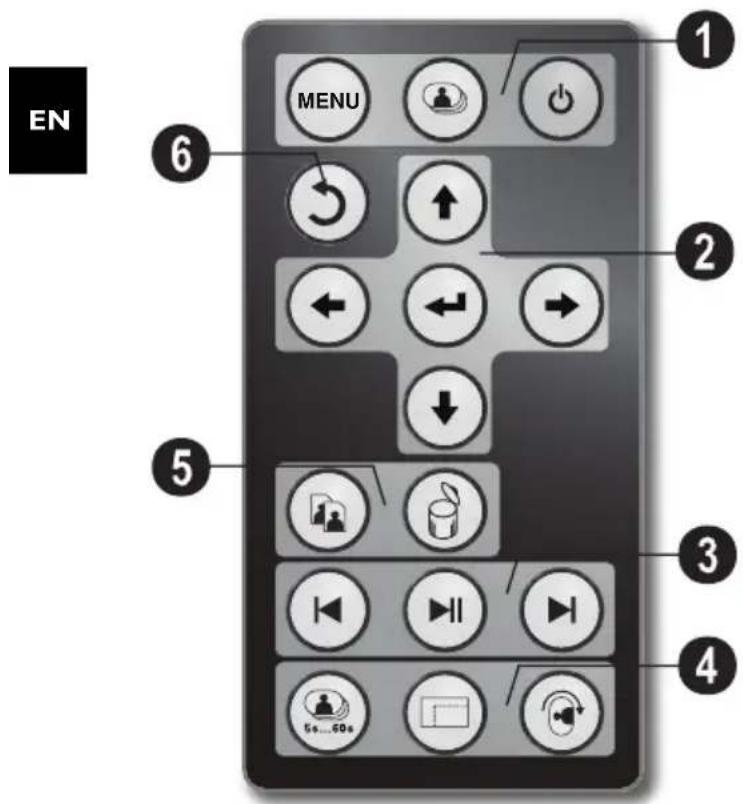
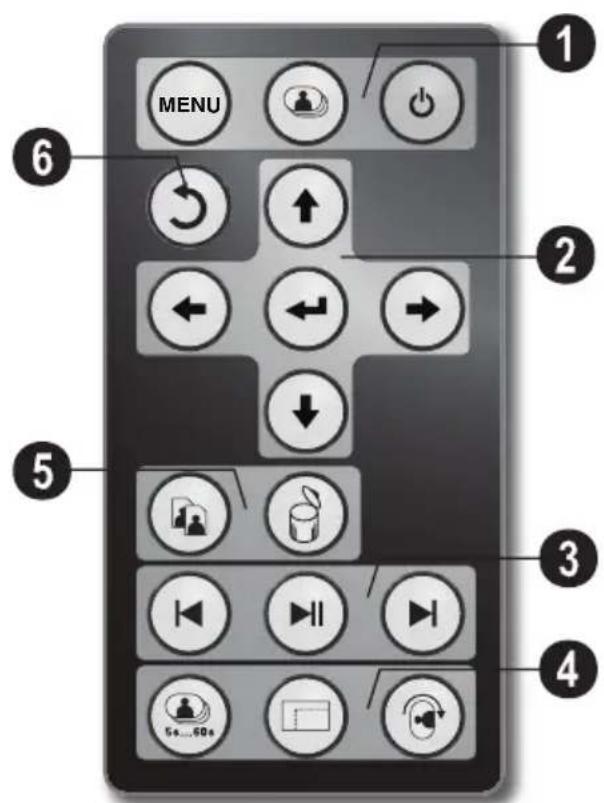
Calling the menu functions, Switching On and Off
Menu- Calling the menu functions
Switch the media among the memory card, USB, internal flash
- On/Off / Standby mode
2/6 Direction Buttons
/ / / —Navigating in the Menu / Select options
- Calling the menu functions / confirming input
- Return to the previous menu level
③ playback functions
While enjoy a single image: To the previous image file
-Starts or pauses the playback.
While enjoy a single image: To the next image file
4 Additional Functions
Press repeatedly: display of the various slide show speeds
—Switches aspect ratio (4:3 or 16:9)
To rotate the orientation of an image while enjoy a single photo or slide show with one image.
Copy/DeleteFiles
Copy Files
Delete Files
3 Initial Operation
Packing Contents
Digital photo frame with bracket
Interchangable frames
A remote control (with battery)
4 Power supply
USB cable
User Guide (not depicted)
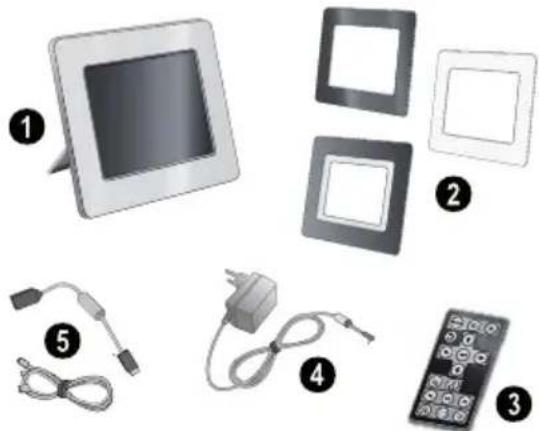

If one of the parts is missing or damaged, please contact your retailer or our customer service.
Mount the Bracket
Assemble the Photo Frame bracket on the back to prop the player up.
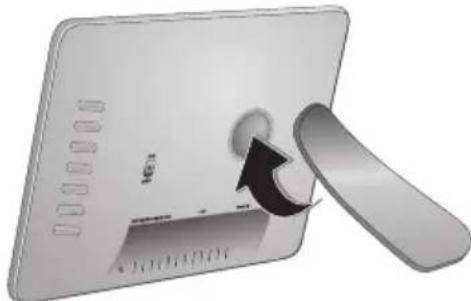
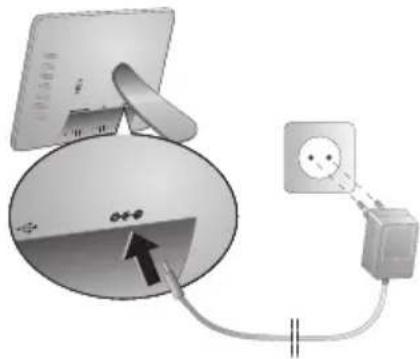
Connecting the Mains Cable

Check whether the mains voltage of your device (indicated on the type label) matches the mains voltage available at the setup location.
1 Insert the mains cable into the connection located on the rear side of the device. Connect the mains cable to the electrical socket. Do not switch on the device!
Inserting a Memory Card
1 Switch the device off using the on/off switch on the rear.
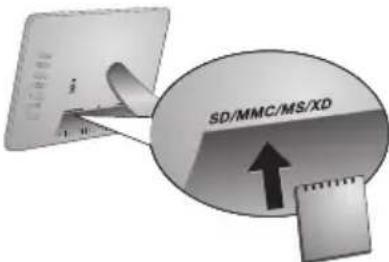
2 Insert a memory card into the appropriate card slot at the rear of the device. Your photo frame supports the following memory cards: SD/MMC/MS/XD.
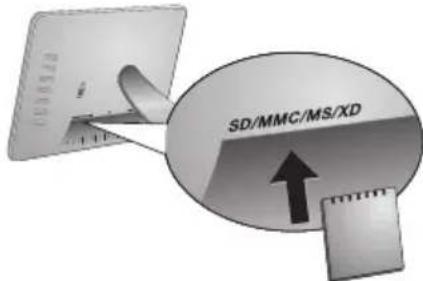

Only use storage media that are compatible with the device. In order to prevent damage to the card or the unit, please turn off the power before removing or inserting the card.
Never pull out the memory card while the device is accessing it. This could cause data to be damaged or lost.
3 Switch the device on using the on/off switch on the rear. The player will start slide show after the start screen be displayed. Press on the remote control to stop the slide show.

Installing or Changing the Batteries of the Remote Control
CAUTION! RISK OF EXPLOSION IF BATTERY IS REPLACED BY AN INCORRECT TYPE.
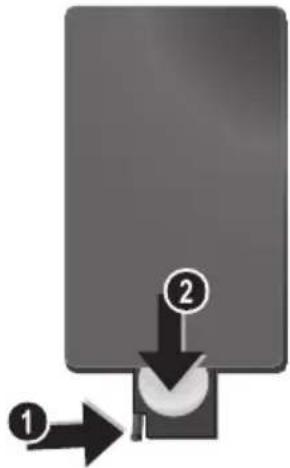
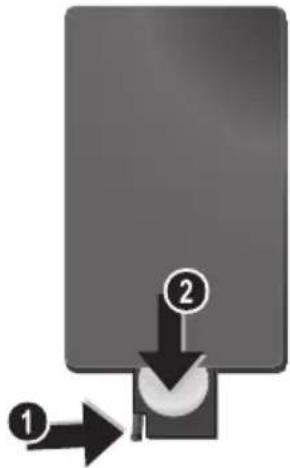
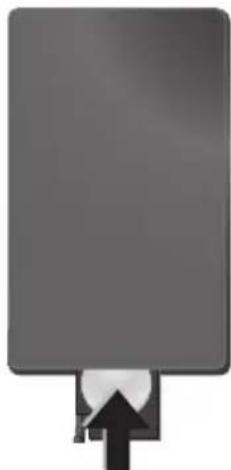
1 Take the battery compartment from the remote control by opening the locking mechanism (1) and pulling out the battery compartment (2).
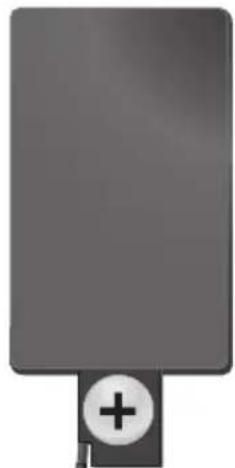
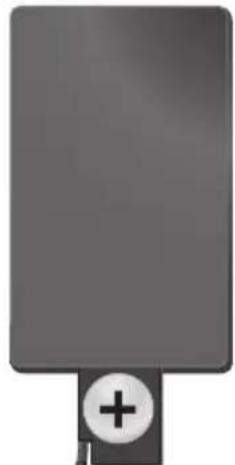
2 Insert the new batteries into the battery compartment with the positive and negative poles as shown on the back of the remote control. Make sure the polarities (+) and (-) are aligned correctly.
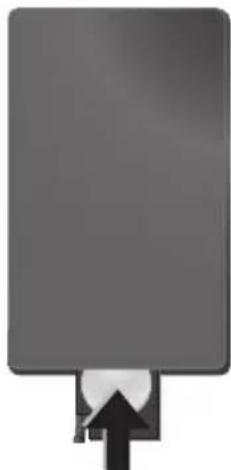
3 Push the battery compartment back into the remote control until the locking mechanism engages.

Normally the batteries will last for around one year. If the remote control does not work, please replace the batteries. If the player is not used for a long time, take out the batteries. So you can prevent leakage and possible damage to the remote control.
The batteries used should be disposed of according to the recycling regulations of your country.
Using the Remote Control
Point the remote control to the remote sensor on the front panel of the device. Its working limits is within an angle of 30 degrees and a distance of 2 meter. When using the remote control, no obstacle should be placed between the remote control and remote sensor.
4 Service
Changing the frame
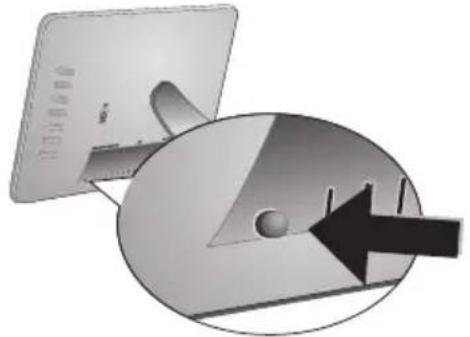
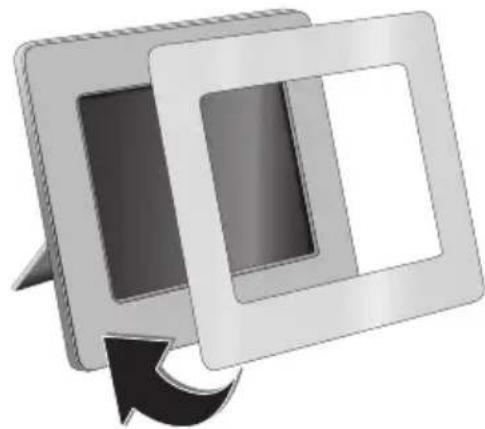
You can change the frame of the device using the picture frames supplied. The frames are held with magnets.
1 Press on the change frames button on the back of the device. Remove the frame.
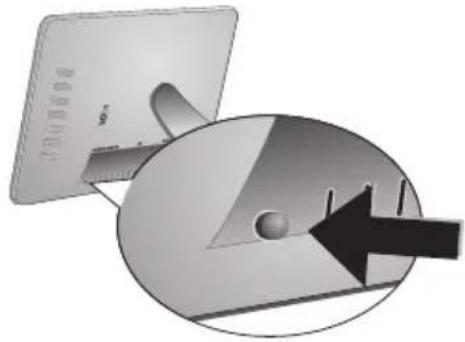
2 Place the picture frame onto the device until it engages on the magnets.
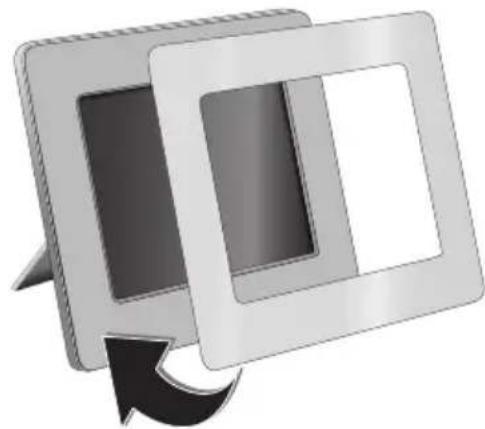
EN
Information
| Problems Solutions | |
| Photo Frame does not power on. Check that you connect the AC adapter to the frame prop-erly. | |
| Cannot save files Make sure that enough internal memory | is available. Re-start the picture frame and delete some files in order to free up memory space. |
| Memory card can not be recognized | Check whether you have used a compatible memory card and whether you have inserted the memory card correctly. Make sure the memory card is not damaged. Check that the photo format is supported |
5 Appendix

Technical Data
Model.. .AF 5085S
Dimensions (L× H× W) 245x159x22mm
Weight .057kg
Mains Connection....Input: 100 - 240V /50 - 60Hz Output: 5V = /2A
Recommended Ambient. 10-40°C
Relative humidity 5-80%
Display
Screen size 8
Aspect ratio. 16:9
Resolution 480x220 Pixel
Memory
Internal memory. 1MB-NAND-Memory
Connections
USB port.. USB-Host
Compatible Memory Cards .SD/SDHC/MS/MMC
Supported formats
Photo formats.....JPEG
All data are provided for reference purposes only.
AgfaPhoto reserves the right to make any changes without prior notice.
AgfaPhoto Holding GmbH: AGFAPHOTO is used under license of Agfa-Gevaert NV & Co.KG. Agfa-Gevaert NV & Co.KG does not manufacture these products or provide any product warranty or support.
Contact: www.agfaphoto.com
For service, support and warranty information, contact the distributor or manufacturer:sold and distributed by Sagem Communications.
Contact: www.sagem-communications.com

The CE marking certifies that the product meets the main requirements of the European Parliament and Council directive 1999/5/CE on telecommunications terminal equipment, regarding safety and health of users and regarding electromagnetic interference.
The declaration of compliance can be consulted on the site www.agfaphoto.com
Preservation of the environment as part of a sustainable development logic is an essential concern of AgfaPhoto. The desire of AgfaPhoto is to operate systems observing the environment and consequently it has decided to integrate environmental performances in the life cycle of this products, from manufacturing to commissioning use and elimination.

Packaging: The presence of the logo (green dot) means that a contribution is paid to an approved national organisation to improve package recovery and recycling infrastructures to facilitate. Please respect the sorting rules set up locally for this kind of waste.
Batteries: If your product contains batteries, they must be disposed of at appropriate collection points.

Product: The crossed-out waste bin stuck on the product means that the product belongs to the family of electrical and electronic equipment. In this respect, the European regulations ask you to dispose of it selectively;
- At sales points in the event of the purchase of similar equipment.
- At the collection points made available to you locally (drop-off centrc, selective collection, etc.).
In this way you can participate in the re-use and upgrading of Electrical and Electronic Equipment Waste, which can have an effect on the environment and human health.
This user manual was printed on recycled paper bleached without chlorine. This satisfies the highest standards for low environmental impact. The cardboard packaging used and the packaging inserts of paper and cardboard can be disposed of as waste paper. The plastic foil may be submitted for recycling or disposed of with waste not intended for recycling, depending on the requirements in your country.
Trademarks: The references mentioned in this manual are trademarks of the respective companies. The lack of the symbols * and * does not justify the assumption that these dedicated terms are free trademarks. Other product names used herein are for identification purposes only and may be trademarks of their respective owners. AgfaPhoto disclaims any and all rights in those marks.
Neither AgfaPhoto nor its affiliates shall be liable to the purchaser of this product or third parties for damages, losses, costs, or expenses incurred by the purchaser or third parties as a result of accident, misuse, or abuse of this product or unauthorized modifications, repairs, or alterations to this product, or failure to strictly comply with AgfaPhoto operating and maintenance instructions.
AgfaPhoto shall not be liable for any damages or problems arising from the use of any options or any consumable materials other than those designated as original AgfaPhoto products or AgfaPhoto approved products.
AgfaPhoto shall not be held liable for any damage resulting from electromagnetic interference that occurs from the use of any interface cables other than those designated as AgfaPhoto products.
All rights reserved. No part of this publication may be reproduced, stored in a retrieval system or transmitted in any form or by any means, electronic, mechanical, photocopying, recording, or otherwise, without the prior written permission of AgfaPhoto. The information contained herein is designed only for use with this product. AgfaPhoto is not responsible, if this information is applied to other devices. This user manual is a document that does not represent a contract.
Errors, printing errors and changes are reserved.
Copyright © 2008 Sagem Communications
Stimato cliente,
Copia/cancella i file
- copia file
- cancella file
Copyright © 2008 Sagem Communications
Geachte klant,
Copyright © 2008 Sagem Communications
Estimado cliente:
Copyright © 2008 Sagem Communications
Estimado cliente,
Copyright © 2008 Sagem Communications
PT
Bästa/bästekund,
Tack for du bestamde dig for vara digitala fotoramar. Gor dig redo for en helt ny fotoupplevelse!
Högkvalitets TFT-LCD bildskärn
Copyright © 2008 Sagem Communications
Vázeny zákazníku,
Copyright © 2008 Sagem Communications

Tiszelt vásárló!
Copyright © 2008 Sagem Communications
HU
Szanowy kliencie,
Copyright © 2008 Sagem Communications

Stimate client,
Vä multumim ca ati achizitionat Rama Foto digitala commercializata de compania noastr. Vä recomandam sa fiti pregatit fiindca vete experimenta arta fotografici asa cum nu ati mai facut-o pana acum!
Ecran de cristale lichide de inalta calitate
Copyright © 2008 Sagem Communications

Vázeny zákaznik,
dakujemc vam, zc st ci zakupili tento fotoramck. Pripravte sa zait fotografovanic tak, ako ste ho ste nikdy nevideli!
TFT LCD displeje s vysokym Rozliseinim
Copyright © 2008 Sagem Communications
Sayin musterimiz,
Copyright © 2008 Sagem Communications
AyannTe nελaTη,
Evxqoioptoupe noe ealeae to yipiaoxo wtoyoaoxio naiio to ts taipac .Etoipaaoteyiauvea ooyoxnepnsiqla!
YyNnns Nowotntac o0dvTNFT-LCD
To npiaxo wtooyoxio xiaio oacdelta 0et eowteuxn vnu n 1 MByte, evx axayovotn xqotov pvnhns n aaiouvdeon USB. Ta oxeyia npopovv dxayoxpoov axo tvseosotxivn nn vaxvnyoxpovv stc xqotes pvnhns n os USB stick.
Me to thexetoiotnoo nou npoxeyetau mnpoeite me euxolia v eniieete axeyia wtoyoqpiwv, v aaixcete niq othieic, xai noaix
Suvonpi npoeioxoo (noo3ooh mivatobg 9
woyopawv taotoxov).To npnpiao wotoyopino
Iaiio oac uoeotqiei th otqoh xau tyn aalayin qoqa
tns etovac.
Delta euonolia tC qwtooyoxpiec oac to autopato slideshow.
euxoane πolles euyaoitee epneigies me tn ouoxoe nui tis npnoaies letotovoyies tns!
Euynon 1 qwtoyogaxiac (D)
Euovn4wtooyaoov (4)
Eepepaavvns wotoyoxptov
Pntote to oxetno nto oioo eooc to wotoyopcoob naoiou vxa neoote o to evob qoioeov. Pntovtc enaveiunmuov to aaloyo npxtoo npoaaale ta dipogoepe.
Avtgyaoqn aoxeiow osnyeosotgmu
-△xayoxn oxeiov ano tvv sowteqni m
Σύνοψη συσκεύης
Me ta nnxtao oto niow eoc ts ouoneuic mtopeite va naleote tny axaloyn lautouoyia np0 0x npoabaaletau otyn o0dvyn.
1.7-Kovmuλsntovpywv
ON/OFF -
SD/SDHC/MMC/MS - Θα πεπασης γα κατα μνημης
10 -_Q USB
10+Ynoooyn-∑ovdeonμnxakawdo taoons
12 Pnxygo yia ty aaiaytnxogviCAs
Tnλexειροτήρο
Sagem Communications.
Eπaφή: www.sagem-communications.com

To oHua CE eyyuatai wC n ouoxeun autn aVtanoxqvetau
Otny Odyia 1999/5/EK to Evogwnaiob Koovoboiou
kai tov Suubouliou neqi tequatixou eoonlaoob
tnleixovovwov oov axogtayn axapaleia xai tyvai tO
xohotn kai ts naxtgoayntixes npgeBolcs.
Tn oouoogwoonuopeite vα tn oete stnv
toosel6x www.agfaphoto.com.
H AgfaPhoto 1ivei eynan onnaxia otn dxtonon too neqbetaalovtoa ot a naioue evoc oxediou biomega ng axantueng. H AgfaPhoto axooxonei otn leitouyia ouotnauw npou de bantouv to nepalov. Tao to loyo axoto n AgfaPhoto ngosideteynn onnaxia stny oixoloyin anodoo n ola t atodia tou poiobvtos, aoTnv npaywn Tou wcn Toeon Tou oeitougyia, tn xgnon knt ny ananxayh too.

Zuokuaia: To oax axo xataeovbe nog evas axaywqmuevoc 0vixoc ogayviouc eonpacte ouveipop yxa v baltioe tyn oaloyn ouxeauow kxtncotodopeg axanxwnos. Iaoaakooae vx oumuogpw0ite me tc tonuxes dxtalecs wqupouob tw oxbaawbavotav 0x xave taalayn ts ouoxeuaicns
Copyright © 2008 Sagem Communications
YBaXaEmbI NOKyNaTeA,b,
BaaOaapn Bae 3a IIpnooepteHHe AaHHo IIPOAkyiHn. IIpHIOTOBBTECB K 3aMeaATcABHOMy IHyTEIIECTBHO B MHP oTOIpaHn!
BbCOKOKaueCTBeHHbJKNAKOKPnCTaAANuecknAHCIIae
YCTPOHCTBO COAepKHT BCTPoeHHyIO IaAMTb 1 M6,CAOT AAY YCTaHOBKN KAPIT IaAMTH N USB HOpT. Bo3MOKHOCTb yAAATb aIbI CO BCTPOCHHOIIaAMTH,a TaKKC BO3MOKHOCTb KOIIHPoBAHII aIaOB C KapTH IIaMTH HAN USB-HOCNTCAJ
BXOABHII B KOMIIACKIIOCTABKN IAY IO3BOAIECT AETKO BHOHPaTB FOOTOPaCDHN, H3MeHHb HAcIPOKN H AeAATb MHOROE APYTOE.
IpeAbaHTeAHHII IPOCMOTp yMeHbIIeHHbIX H3O6paKeHH (IOKa3 AO AeBHTY MeHbIIeHHbIX H3O6paKeHH OAHOBpeMeHHO).UHDPoBOe ycTPOINCTBO-ΦOTopAMKa IO3BOAaret IOBOPaHHBaTB CTpaHHbI H H3MeHHTb IXΦOpMaT.
ABROMATINYCCKN 3aIyckacMbI pCKHM HPOCMOTpa H3O6paKCHH
MbHaAeemcraTO BbIOAuyHTe yAOBOABCTBHe OT paOTo c anIapaTOM H erO MHOOROHCAEHHbIX dyHKHIN!
O6 3TOM pyKOBOACTBe ПОАБ3OBaTeЯ
C HOMOIIbHO IIpHBCAeHHOrO AaAcc pyKOBOACTBa HO yCTAHOBKe BB CMOKete 6bIcIPO IIpHcTByNTb K 3KCHAYATAHH BAHIero aIHapata. IIOApO6Hoe OINCAHne YIKHNI INPBHeAEIO B IOCAeAToONHX pa3AeAax pyKOBOACTBa IIOAb3OBaTeA.
BHIMATEABHO 03HAKOMBTEcB C pyKOBOACTBOM IOAB3OBATEA. AAB O6ecIeueHH 6e3OIIacHoi pa6oTHa IINAPA T CO6HOAdTe BCE yKa3AHII IN TXHNIK 6e3OIIACHOCTII. H3ROTOBHTAEb HE Hecet OTBETCTBeHHOCTH B CAYAc HCC6AOChHH IIpaBn TXHNIK 6C3OIIACHOCTH.
NcnoAbyembIe 6o3HaueHn
PipeAynpeKaAeT 06 ONaHcOCTX AAn AIOAen, BO3MOKHOCTN IOBpeKAeHHn aHIIapata HAN APYTHX yCPOHCTB, a TaKKe O BO3MOKHOI NTePe AaHHbIX. HePpABHbHaN 3KcIIyAraHn MoKeT PnHBecTH K TpaBMAM HAn IOBpeKAeHHIO aHIIapata.
OTCHMBOA 06O3HaHaet COBETH, KOTOPbIE IOMORAOT HAnoOaee 4eKTHBHO HCIOAL3OBaTb aIINapar.
RU
1 Pekomehdaци по Тхнke 6e30napochtn
IHe BHOCHTe HHKaKNIX H3MeHeHHH II HaCTpoE, He OIIINCAHHbIX B 3TOM pyKOBOACTBE IIOAB3OBaTEA.
PpoceAypa Hactpoyn annapata
TO yCTPOIcTBO IpcHa3HaUcH OToA bKO AAR HANBnAYaABHO rNCHIOAB3OBAHIN. AnIapAT CAeAyET YCTaHOBBt Ha IIAOCKyO yTOIuHBYIO HOBCpxHOCTb. PaIOAraIc BCC IIHypBn KAcAn TaKHM O6pa3OM, YTOb HIKTO HC MOT HA HIX HAN CHOTKHcyr, 3TO HCKAIoHT Bo3MOKHOCTb TpaBMHpOBAHIN AHOe H IOBpeKAEHH CaMOrO aIIIapata.
YcpoiCBOIpcAHa3HaueCHO AAn 3KCIyAyaTauHH BHytpn IOMeHnn. He npKacaiTebc K KK-AnCnAeIO. Hpea3McuaIITc TkKaBle HAn OcTpbc IIpcAMetb Ha KK-3KpaHe, paMke HAn IIHype 3AeKTPOHHTAHN.
3aHHHaaTRe aHaparOT HONAAHIN HPMORO COAHeuHOro CBeta, BO3AeHCTBn HTeAA, pe3KHX HepeHaOB TEMepaTyb H BAAH. He pa3MeHaaTRe aHapar BOAH3H HarpeBaTeAeH KOHAHIOHEPOB BO3Ayxa.CMOTPHTE HOpMaHIO O AOYNCTHMOn TEHepaType H BAAKHOCTH BO3AYxa B TEXHNueCKHX XapaKTepHCnKax.
EcaH BaIaIaIapAT CAHIKOM CHABHO HAIPCCTc HAN BbYBHAITC BIXOADIIHIN H3 HCIO ABIM,TO HCMCAACHHOOTKAIOHTTE IIHYP CTeBOI OAKTPOIHHTAHIN H3 PO3CTKN.
OaIre BaII aIIIapAT AAM OCMOTpa KbaHΦHIIPOBaIIbM cIIeHAAHCTaM HAN B IIeHTp cepBHCIOO6cAYKBaHH. AAB IpeAOITbpAIIIEHH BO3ROPaHH 3aIIpeHaaETcH IOAHOCHTb K aIIIAPAty HCTOHHKIOKpbTTO HAaMeHH.
HIKORa He IIOKAHOaIte aIInapaT K ceTH N K TeAeOHHo AHHN B cbpIX NOMEIIeHHX. HIKORa He KacaITcB cTeBOB BHAKH N PO3cTKH TcAcOHHOr pa3bMa BAaKHBMn pykAMH.
He AOIyckaIte HIOHaAaHnH JNAKOcTe BHyTp b aIIIapata. EcAn BHytpb aIIIapata HIOHaA JNAKOCTb HAN IOCTOPOHHH IIpeAMET,HEMeAAeHHO OTKAIOHTe IIHyp 3AcKTPoIHITaHH II OTaAIte aIIIapAT AAR OCMOTpa KBAAHΦHIIIPOBaHIbIM CIEIIHaAHCTAM HAI B IeHTp ccpBHCHOOcAYKHBaHH.
He IO3BOAHTe AeTm IIOAB3OBAbC aIITapATOM 6e3 IIpHcMOIpa. He AOIIyCKaHTe AETe K yIiAKOBQHHM MATEPHaAM.
3Aektpnueckoe nHTaHne
HcIOAB3yIe TOABKO 6AOK HITAHINB BXOAAHHN B KOMIIAEKT NOCTABKN (CMOTpHTE PpHAAQKeHNHe / TexHHueCKHe AaHHBe).
PpOBepbTe, COOTBeCTByeT AN TIN 3AekTpOHTaHHBaIIIEr oIITapata (yKa3aH Ha IINHAHE) TINy3AekTpOHTaHHB MecTe yCTaHOBKn aIIIapata.
HaipjKeHBeHTIepeMeHHoro TOKa BcERaA OAnKHO COOTBeTCTBOBaTbYkA3aHHOMy Ha I3AcAHII.
Hc kacaTccb Hhypa 3AACKIPOINITAHN C IOBPCKACHHOHN30AAHNCii.
Ipea OYNCKoIOBepXIOCTn aHapara 063aTeABHOOTKAIOHTe eO OT cETn 0AekTPOITTAHH. He IIPHEHHe AAOYNCKn KNAKnx, rA3OO6pa3HBx INTOPOHX ONUCTTEAEi (aOp30An, a6pa3NBHe n IOAHpyIOIIne cpeACTBa, cINpT).
OuHuaTc AnCIIaen ToAIBKO MRAKoI cyXoi TKAHbFO.ECAHnCIAe Ha KHAkHX KpHCTaAAax 6yAcI pa30HT,TO H3 HCIO MOKCT BBITcY yMcpCHHO cKaAR KHAKOCtB.
H3OciAaTe AIOBOrO KOHTAKa KapIpaHAcI c BaIcN KOKeH IAA3AMH.
PemoHT
He IIITaeCB camoCTOReAeBHO peMOHTnPOBaT aIIIapAT. HeINpaBnABHbHpeMOHT MoKET IINHBecTH K TpaBMAM II IOBpeKdEHHIO aIIIapATA. BaII aIIIapAT MOKH O pCMOHTHPOBAbTOAIBO B yIOAHOMOCHHOM CcPBHCOM UcHTpc.
He CHHMaIe 3aBOACKo IIINABANK c aIIIapata, IIpH 3TOM OTMeHrHOITcRAPaHTHHbIC O83aTEABCTBa.
HocnteIb naMaTHn foToRpaΦn
HcIOAB3yIe TOABKO COBMECTHMbie c yCTPOINCTBOHOCHTCAH HΦOPMaIIH. BceTa OTKAHOaITe 3ACKTPOIHHTAHHC yCTPOINCTBa IIpcKAc, YCM H3BAChb N3HcTO KAPTy HAmTI BO H3OCKAHIN IOBpCKACHHaKPTb HAmTI ANOO yCTPOINCTBa.
HHKoAa He BbTaacknBaHTe KapTy IaMaTH, KOTOPaI HcIOAb3yETCB TeKyuINMOMeIT. TO MOKeT PpIBecTH KIOBpeKaEHHIO HAK yTpate AAHbIX.
AKKMyAToPbI
BHIMAHHE! B cayae Hcnoab3ObaHHaAeMeHTOB IIIraHHH HeIpaBnAbHO TnHa cyIecTByET BEPOHTHOCTb B3pHbA.
EcaH aIIIapaT He HcIOA3yETcB TeChHc AANTeABHO BPCMCHH, H3BAckHTc aKKMyAITOpHHC 6aTapcKn. BaIarOaapr 3tOMy OHn HC BHTCKyT Hc HOBpcAIT aIIIapata.
HcHOAb3OBAHHbIe aKKMyAHTOpHbIe 6aTapeKn HEOxOAMO yTHAN3HPOBaTb COAacIO AeHCTBYIOHM HAHOHaBbM IIpaBHAam H HopMaYTHAN3aHH.
2 O6иne cBeaehnna
-CTapr/Hay3aBOcHpON3BeAeHHN
-
MeHIO HAcTPOINK IN KIOHTpacta (O).HaKaTb COOTBeCTBYIOIyIO KHONKY HA 3aAHHe CTOpOHe H3AEANH AAM BXOAd B MEHIO HAcTpoE. PyTe IOCAeAOBATEABHO HAKHMAAH N COOTBECTBYIOIHX KHOIIOK HAcTPOITe IKPoCTb H KOHTpact.
-
McHIO oiiin
IOBOPOT H3O6paKCHHn (),H3MCHCHHC pa3pcIIINCHn 3kpaHa(
yctaHOBkBA BPCMCHN 3aAcpKn IIpH BOChIPOH3BCACHH H3O6paKeHH (5s),
IPOCMOTP OTCOPTHIOBAHHbIX H3O6paKeHHH (1234), IPOCMOTB CAYaHOM IOPAke (32)
Piocka3 1n3o6paKcHn(①)Piocka4n3o6paKcHn(4)
DΦΦCKTB HcpcxOa(
HaKaTb COOTBCTCTBYOIOIyIO KHOIIky Ha 3aHcH CTPOHc H3AeAH AAR BXoA B MCHHO OIIHH. IocAcAOBaTCABHO HAKHMATb COOTBCTCTBYOIOHC KHOIIKN Ha 3aHcH CTPOHc H3AeAH AAR peIyAnPObKn COOTBCTCTBYIOIIETO Hapametpa.
- KOINHOBAITaHHHe BO BHTpeHHIOI MaHTB
YaaAHITb aHHHC H3 BHYTPCHHcIIaAMTH
O63op annapata
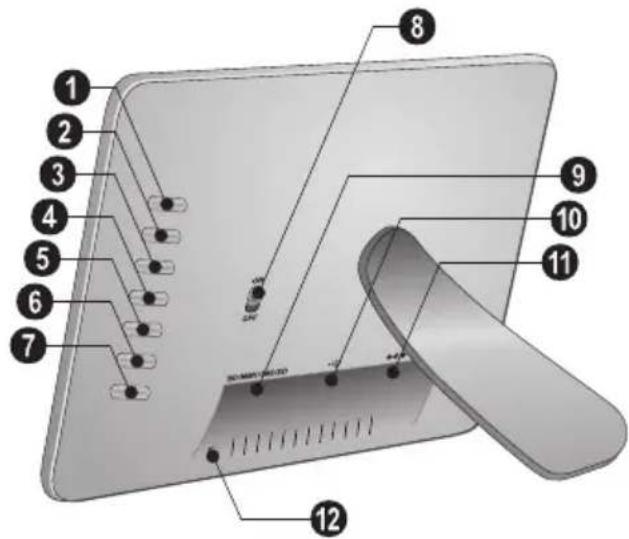
Pn HOMOHN KHOIOK Ha obaTHoI CTopoHe ycTPOHCTBa Bb6epHTe COOTBcETCYHOYIO FOyHKINHO, KOtOpA yAdet OTO6paKaCHa HA HNCIIAcc.
1..7-ФyTHKIIHOHAaBHeC KHOITK
ON/OFF-BbIKAIOpaTeAe
SD/SDHC/MMC/MS -CAOT AAR KAPT HAMRTH
10 -Pa3beM-USBIopTa
11- -Pa3bemAAKaeAeTPOINHTAHIN
12 KhoIIka cmchbpamKHi
IyAbT AnctaHcNoHHOrO ynpabAeHn
1 BbI3OB cyHKn MeHIO, BKIOueHne n BbIKAOueHne
MEH -Bb3OB TAABIOTOMEHIO
- IpeKIAOHeHHe MEKAY HCTOHHKAMn XpaHeHHaAHbIX (KapTaIaMTH, USB. BHyTpEHHaIaMHTb)
-BAFOCHHC/BBKAFOCHHC/PCKHM IOTOBHOCTH
2/6 HabnraunOHhie KhoNKM
1/0/0-HaBnraHnB McHIO/BbOop onnn
- Bb3OB cyHKnHm MeHO/ NOATBepKaeHHe BBOAa
-Bo3BpaT K IIpeAblAYIeMy yPOBHHo MEHFO
3ФyHKcHn BOCpOu3BeAeHn
-Bo BpcMn OAnHOyHOrO BOCIIPOH3BCACHI:K cAcayHouCfΦOTOPaΦIII
-CTapr/na3aBOcnpOn3BeAehn
BoBpeM OAnIOHOTOBocIpOn3BeAeINn:K npEaMyIeIΦoTOrpaΦHH
4 AOnoAHnTeaBhbIe FyHKuH
- HaKaTb HeCKoAaBko pa3: OTo6paKeHHe pa3HbIX 3HaueHH BpeMeHH 3aAepKKn B peKHMc cAaH-AIIOY
-13MCHCHCΦopMaTa 3KpaHa (4:3 HAn 16:9)
-IOBOPOT H3O6paKeHHn PnH PPOCMOTpe OHOH pOtorpaHH
KoHnpOBaHne/ydaAeHne paIaOB
- KOnPiPoBaHne paHa
-VAaAeHHe paHaa
YctaHOBKa KapTbI NaMRTN
1 BbIKAOHTHe yCTPOBCTBO IIH IOMOIIIBbIKAOATeA H a OpaTHoN CTopoHe.
2 BcTABbTe KapTy NAMrIN B COOTBeCTByHOHN CLOT HA 06paTHoH CTOpOHe yCtPoHCTBa. OHO IIOAaCpKHaBAt KAPHTI NAMrTH CAcEyFOHnX FOpMaTOB: SD/MMC/MS/XD.
HIOAByTE TOABKO COBMCCTHMBC CYTOIcTBOM HOCHTAH HOpMaHH. BceAa OTKAIOaHte 3AEKIPoIHHTAHNE yCtPOiCTBA IIpeKa, Yem H3BaChb H3 Hero KapTy NAMTH BO N36eKaHHN IOBpeKaIIHH KAPTB IAMTH ANO yCtPOiCTBA.
HnKOra He BtackBaTe KapTy NaMHTN, KOTOPa HcIOA3yETCB TekYHIM MOMENT. 3TO MOKeT IIpHBecTH N IOBpeKaeHHIO HAN K yTpate AaHHIX.
3 BKAHOHTC yTOIOCTBO Hn HOMOHN BHKAOHTCAHn O6paTHoI CTPOHe. IocAe HOBAAHn 3KpaHa-3aCTABKN 3aIIyCKaETc CAAH-A-HOy. HaKMITE HA NAY, TTObIOCTaHOBTb CAHA-HOY.
YcTaHOBKa HAn 3aMeHa 6aTapeek B PdY
BHIMAHHE! B cayyae Hcnoa3OBaHHN 0AeMeHIOB HHTaHHn HeIpaBnABHO TITa cyIIECTByET BEPOTHHOCTb BApBa.
1 AAB3aMCHb6aTapeckIADVOTKpoITcΦHKcatop (1) H3BACHTC 6AOKc6aTapeiKaAMH (2).
2 BCTABBTE IOBBIE 6aTapeKIN B 6AOK 6aTapeek, COBAIOA HJKYHO IOAHPHOCTb IOAKAOHIN HOAOKHTeABHbIX OTPHnATEABHbIX IOAIOCOB COAACHO CXEMe HA o6pAHOH CTOPoHE IAY. BcerAA COBAIOAaHTe IOAHPHOCTb!
3 BCTABBCT 6AOK 6aTAPCK B IAY AO IIICAAK aHkcatopa.

CpOK CAYK6b6aTapeH INH HOPMaABHHx yCAOBHX 3KcIIayatauHIN INH6AN3HTeAIBHO OAHN IAO. ECAH IADV He paOtaCT, 3aMeHNTe 6aTapeEO. ECAH FOtOpamKa H NCHIOAB3yETcB TEueHHe AAITTEABHOTOBpeMeHH, IN3BAeKHTe AKKMyAHTOpHBe 6aTapeKN. BAoAapr OTOMY OHn HE BHTeKYT H He IOBpeAHT PyABT ANCTAHINHOHHOT YIpaBAeHH.
HcnoA3OBAHHie aKKyMyAHTOPHIE 6aTapeKn HC06XoAHMO yTHAN3HpOBaTB COIACHO ACCTBYHOHN HAIOHOABHBM HpaBHaAM HOPMaYTHAN3aHH.
HcnoAb30BaHne pA
HaipabBte IAY Ha AATNH HA HepeAHe HnHEAH yctpoNCTBa.IAY KOppeKTHo paOtaeH na pacctoHHnAo 2 M OT yctpoNCTBa H nPiH yTAE, He npeBbHnAIOTHE 30 rpaAcob. Y6eAHTEcb, YTO HnKaKHe npeAmetb He 3aIopapKaHBAIO TPOCTpAHCTBO MeKAY IAY H II pIHHMaIOHcEM ceHCOPOM Ha H3AeAHN.

4 Texnueckoe o6cayxnbahne
N3meHeHne paMKn
Pamky yctpoicBa MOKHO MeHHTb Ha apTyIO, BXOAnyIO B KOMIIaekr IIOCTABKn. PAMKn YApcknBAHOITcN IIHOMOHN MAIHHTOB.
1IaKMHTc Ha 3aHcH cTOpOc yCTPOHCTBa KHOIIKy AAR CMeHb paMOK. CHMMHTe paMKy.
2 YcTAHOBHc CMCHHYo paMKy Ha ycIpoiCBO, TIOObI OHa 3aΦHKCHPOBaAacb Ha MaHTHrax.
PekomeHaaun
| Henschpabnochny UctpaheHne | |
| VcTpoIcTBNo He BKAIOUaETcY. V6eAHTecb, YTO 6AOK PIIHTaHn HIOAKAOUeH K yCtpoIcTBy | HcHcHcHcHcHcHcHcHcHcHcHcHcHcHcHcHcHcHcHcHcHcHcHcHcHcHcHcHcHcHcHcHcHcHcHcHcHcHcHcHcHcHcHcHcHcHcHcHcHcHd |
| Ile coXpaHJHOCTcY caiHb Y6eAHTecb B TOM, YTO BO BHyTPeH | HcHcHcHcHcHcHcHcHcHcHcHcHcHcHcHcHcHcHcHcHcHcHcHcHcHcHcHcHcHcHcHcHcHcHcHcHcHcHcHcHcHcHcHcHcHcHcHcHc HcHcHcHcHcHcHcHcHcHcHcHcHcHcHcHcHcHcHcHcHcHcHcHcHcHcHcHcHcHcHcHcHcHcHcHcHcHcHcHcHcHcHcHcHcHcHcHcHcHc HmEeTc CBOBODHOe MecTo. 3aIycTHTe φOTOpAMky 3aHOBOy H YAANITc HCKOTOPbIc φaHbIy, YTObIc OCOBOOADHTb MecTo B IaMHTH |
| He paClIO3HaETcKapTa IIaMHTH | ■ IPrOBePbTe, COBMeCTHMa AH 3Ta KapTa IIaMHTHc aIIIIapATOM H IIpaBHbHO AH Bb YCTAHOBHAn CC B THe3Ao.■ IPrOBePbTe, Ile KapTa IIaMHTH He IIoBpeKaIIHa.■ V6eAHTecb, YTO φOpMaT φaIAOB IIoAAePckHBaETcYcTPOIcTBOM. |
5 Ппуножке
TexHHueckne DaHHbIe
MoAeAb .AF 5085S
Ta6aprrtnbe pa3mepb (IIXxBxΓ) 245×159×22MM
Bec. 0,57K
Cetb 3AeKTPoTTaHH. BXoA: Iepem. ToK 100-240B-/50-60I
BbIXOa:IOCT.TOK5B-/2ΓH
PCKOMCHyCMbIC yCAOBHn 3KIIAYaTaNnN 10-40°C
OTHOCHTcHbHa BAaKHOCTb BO3aYxa .5-80%
Ancnaeem
Pa3mep IIO AnarOHaAN 8
Co0THIOHHe cTropoi 16:9
Pa3peIeIHe: 480x220 IHKceAbl
3aONMnHaIOoee yCTpoiCtBO
BHytpCHHHIaMITb....1McBOOHOIO IpoctpaHCTBa
HHTeppeicbi
Iopr USB.. USB-Host
COBMECTIMBIE KAPTBI NAMRTH ....SD/SDHC/MS/MMC
NoAdepKnBaemble opMaTbI
ΦOTOCOPMATHJ.....JPEG
BceAaHHbIe IIpHBeAcHb HCKAOHTcABHO CIIpaBOYbIX IcAIX.AgfaPhotoOCTaBAJET3aCOoI IIpaBO BHOCITb AIObIC H3MCHCHIN B KOHCTpyKINHO H3CAHN 6C3 IIpeABapHTaeBHOTo YBeAOMAEHH.
AgfaPhoto Holding GmbH: H3AeAma noA ToproBoi MapKo AGFAPHOTO npOn3BOaTcA no AnceH3nn Agfa-Gevaert NV & Co. KG.
Agfa-Gevaert NV & Co. KG He npOn3BOaHT DaHHoe H3eAne, a TaKKe He NoADepXnBaet rapaHTnHbIe HAN HbIe 063aTeAbCTBa B OTHoWeHn DaHHOROn3eAa. KOHTaKTHaJnHΦopMaun: www.agfaphoto.com
No BOpocam 06cayxHBaHHra pahTHn HAn NOAdepKKN H3DeAHA O6paauaTeEc b K BaWeMy AnCTpN6bIOTOpy HAn IPOH3BOaHTeALIO: PpoAky n c6bit ocyueCTBAeT Sagem Communications. KoHTaKTHa HhOpMaunr:
www.sagem-communications.com

MapKnpoBka CE yaoCTOBepaET, YTO ycTPOINCTBO COOTBeTCTByET OCHOBHbIM TpeOBAHHM AHPeKTBBI 1999/5/CE FbponeHKoTO NapAameHTa II CoBerta IIO TEAEKOMMyHHKaIHNOHIOMy TepMHIAABHOmy 06OpyaOBAHIO,KACAIOHHXC8e3OHaCHOCTH,3AOpOBBJ IOAB3OBaTeAEH II AEKTPOMaHHITbIX IOMex.
CcePTHΦHKATOM COOTBCTCBII MOXHO O3HAKOMITbCA hcaIte www.agfaphoto.com.
OxpaHa OKpyKaHOIIeI cpeAaK aactb paIIHOHaIbHO pa3paOtaHHOTIO IAAHA JBAACTcBAJHOI COCTABAAHOIIeI pa6oTb AgfaPhoto. AgfaPhoto pa3paOtaHbAeT KOAOITNHeI chCTembl. NoTOMy AgfaPhoto HHTERpHpyET AeHCTBn IO 3aIHITe OKpyKaIOIIeI cpeA b B KHN3HeHHn IIKA H3AEAH, OT IN pON3BOACTBa AO BBOa B 3KCIAYaTAIIHO, HCIOAB3OBAHIN II YTHAN3aIIHN.

YnaKOBka:HaAHnHe DaHHORO AOROTHnA (3eAeha ToKa) O3NaHaayet,TO BHeceBkAA B HauHOHaABHyIO opraHH3aHHIO IIO yAYHHeHHIO HHpactpykTypbI IO BTOPIHOMy HCIOAB3OBAHHIO yNtAKOBKn. IOnKaAyncta, CAeAyHTe MecTHbIM IIpaBnAM IIO yTHAN3aHHN YNAKOKN.
AkkmyaTOpbl: ECAH B yCTPOHCTBE HcIOAB3yOTcra AKKMyAITOPb, TO HOCAC HCTCCHN CPOKa HX 3KCHAYATAUNH HX HC06XOAHMO CaaBb B CICINHAHBHC IIYHKTBIIHPHEMA AAAAAbbHeHHe YTHAN3aHN.
IpoAkyT: H3o6paKCHHC IcpccpKHyTO KOp3HHb AAR Mycopa O3Haayet, YIO yCtPOHCTBO OTHOCHITcK KAteropHH 3AEKtpHueckoro H 3AEKtpOHIOO6opyAOBaHH. CorAacHO EbponeckHM HopmatHBAM yCtPOHCTBO HeoOxOAnMO yTHAN3HpOBaTB CAeAyoIHIM 0op3OM:
B TOPROBIX TOKAX IIH IIpHO6peTeHHaHaONHOrO 06OpYAOBAHH.
B MecTHbIX HhKtax Coopa (HaIIpHmep, HeITpax IIpHema OtpaOHTABIIIEO OOppyAOBaHH, HhKtAX BbIOOPOHOr IOpHema N Ap.).
PiOo6HbM 06pa3OM BMy MoKTe yAcTBOBaTb B
Iporpamme IIO Nepepa60tKe H IOBTOpHOMy
HCIOAB3OBaHHIO 3AeKTpHueCKORIO 3AeKToHHOrO
O6OpyaOBaHHIAHpaBAeHHOH Ha COxpaHeHne
OKpyKaHOIIe CpeAH N 3AOPOBBa AHOAEi.
TO pyKOBOACTBO HOAB3OBATCAH HAcataHO Ha BTOPNHOI IepepaOtaHHo 6yMaIC,OTcAChHO 6c3 IIPMHeHN XAOpa. TO yOBAeTBOpEe TpeOBAHNm CAMbIX CPOIHX CTaHaapTOB Hn3K0TO BO3AECTBHn HA KOAOITIO. HCIOABOaHnAR KAPTOHnAR YnAKOBKa H3AEANH HBIyTePi-H He 3aIIHTHBe KAPTOHnBE BKAAkH N3TOTOBaeHb H3 BTO-PNTHO 6yMaHn H MOYr BTOPNHO IepepaTaHBaTBcR, KaOobHnAe Myara. IaactNKOBBe IaKeTb MOxHO HApPABaTB Ha IpepaOtKY HAn YTHAH3HPoBaTb BMeCe c He Iepepa- TbBaemMH OTXoAMn COAacHO AeNCTBYIOHM PpaBHaam BaIIHe CIpaHb.
Toprobbie MapKn: Pa3AHHbIe Ha3BaHHa, yIOMHaEMBJe B OTOM pyKOBOACTBe, IBAHOTcR TOPROBMM MAPKAMH COOTBCCTByHOHx KOMHaHII. OTCYCTBNC CHMBOAOB H He 03HaayaeT, Yo AaHHHe TepMHH JBAHOTcH He 3apeHCTpHPOBAHHIMN TOPROBMH MAPKAMH. YIOMHaHHe B pKOBOACTBe Ha3BaHHdpyTHX HAcAaHO ToABKO AAA HACHTOkaHH, OH MOrYT 6bITb TOPROBMH MAPKAMH COOTBCCTBYOHH BAAcAusbC. KOMHaHn AgfaPhoto lotKa3bIbAcTcR oT KAKHX-AHOH ppab Ha TaKHc MAPKn.
Hn KOMIIAIIH AgfaPhoto, Hn ee OTAEeHN He HecyT
HINKAKoI OTBETCTBEHIOCTH HepeA NOKYHATEAEM 3TO1
H3AEHN HAN TpeTbe CTOPHOH 3a yINep6,
HOBpeKAEHHe, paCXOAB HAN 3aTpaTH, HIOHECEHbE
HOKYTAeAEM HAN TpeTbe CTOPHOH B pe3yABtate
HEcuaCTHO R CAYA, HEPaBHABHO R HAN HE
HaAeKaIIIEr OHCIOAB3OBAHHN 3TO1 H3AEAH HAN
BHECEHIN B HERO HecAHKNHOHPoBAHHIX H3MEHHN,
PEMOHTA HAN HepeDAkH 3TO1 H3AEAH HAN
HECOBAIOeHne Yka3aHN KOMIIAHN AgfaPhoto IIO
3KCTAYaTAAH IN TEXHHueCKOMY OBCAYKBHIIIO.
KOMHIN AgfaPhoto He Hecet HNKAKOHTBECTBHeHOCTn 3a AIO60yIepeo HAn Ipo6Aembl,BO3HHKAHOIIHE H3-3a HcIOAIB3OBAHIN AIObIXIpHaADACKHOCTcH HAN pacXOAHBx MaTcPHaAOB,OTAHHbIX OT TCX, KOTOpbc O603HauchH KAKOPHHaABHbIC H3CAHAgfaPhoto HAn H3CAHApCKOMCHAOBAHHbc KOMHaHNc AgfaPhoto.
KOMIIAHH AgfaPhoto He Hecet HUKAKOITOBETCTBEHHOCTH3a AIOBOI yIeP6, BO3HNIKAHOIH N3-3a 3AEKTPOMAHHTBIX IOMEX, CB83aHHbIX CHCIOAB3OBAHIEM AIObIX IIITEpeCCHbIX Ka6eAen, OTAHQAIOHXC8 OT Tex, KOToPBIE IIpeAHA3HaHeHb AAH3AEHIN KOMIIAHH AgfaPhoto.
Bce npaba 3aHHHHeH. IHKaKyO Yactb 3TOI IIy6AHHKAIIHH HeAB38 BOCIIPOH3BOADHT, XpaHITb B apXHBHO CHCTcME HAN IIpeCdaBaTb B AHO6OM φOpMaTC H AHO6BMn CpeACTBaAMn, B TOM YHCAC 3ACKTPOHHMn, MCxaHHUCCKHMn, IIYTCM φOTOKOIHPOBAHN, 3AIHN H AHO6BMn APYHMn BC3 IIpcABapHTCAhHO TOIAYChN INCBMCHHO pa3pcHEH N OT KOMHaHH AgfaPhoto. YKa3aHHa 3AcB HΦOPMaIIH N OTHCITG TOABoK K AaHHOMy H3AEAHIO. KOMHaHH AgfaPhoto He Hecet OTBETCTBEHHOCTH B CAYyae IIpHMeHeH N 3TOI HHΦOPMaIIH N APYHM H3ACAHM.
PyKOBOACTBO IOAB3OBaTeA RABAETCAOKyMeHTOM, KOtOpH Hn KaKoCTeIeHH HeA3paCCMaTpHBaTb B KaucctBe AOROBopa.
BO3MOKHO HAHUNC OIHcayOK, THIOIpaΦckHX OHH6OK H N3MeHeHH.
Copyright © 2008 Sagem Communications
RU
RU