AF 5089PS - Digital photo frame AGFA - Free user manual and instructions
Find the device manual for free AF 5089PS AGFA in PDF.


| Product type | Digital photo frame |
| Brand and model | Agfa AF 5089PS |
| Screen size (diagonal) | 8 inches (20 cm) |
| Aspect ratio | 4:3 |
| Display resolution | 800 x 600 pixels |
| Supported file formats | JPEG (*.jpg) |
| Storage media | Memory card (SD/SDHC/MMC/MS/XD), USB flash drive |
| Internal memory | Up to 500 photos (with internal copy function) |
| Connectivity | USB Host port |
| Power supply | AC/DC adapter 100-240 V~, 50/60 Hz, output 5 V == / 1 A |
| Power consumption (operating) | 4.81 W |
| Main functions | Slideshow, file copy, delete, image rotation, transition effects, screen settings (brightness, contrast, color), energy saving mode, calendar, clock, Fun Frame (custom frame) |
| Operating ambient temperature | 5 to 45 °C (recommended) |
| Relative air humidity | 20 % to 80 % |
| Maintenance and cleaning | Unplug before cleaning; use a soft, dry cloth; do not use liquid, gaseous or flammable products; for the screen, soft, dry cloth |
| Safety | Use only the supplied adapter; do not expose to moisture, temperature variations, direct sunlight; do not repair yourself; keep out of reach of children |
| Spare parts and repairability | Have the device checked only by an approved specialist; do not remove the rating plate |
| Package contents | Photo frame with stand, power adapter, quick start guide, warranty card |
Frequently Asked Questions - AF 5089PS AGFA
User questions about AF 5089PS AGFA
0 question about this device. Answer the ones you know or ask your own.
Ask a new question about this device
Download the instructions for your Digital photo frame in PDF format for free! Find your manual AF 5089PS - AGFA and take your electronic device back in hand. On this page are published all the documents necessary for the use of your device. AF 5089PS by AGFA.
USER MANUAL AF 5089PS AGFA
natural_image
Child watching a kite flying over clouds with a framed picture of a couple on a wooden deck (no text or symbols visible)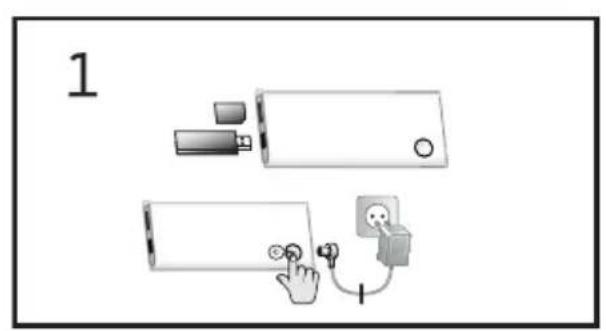
flowchart
graph LR
    A["3a"] --> B["MENU"]
    C["3b"] --> D["播放按钮"]
    B --> E["播放按钮1"]
    B --> F["播放按钮2"]
    B --> G["播放按钮3"]
    E --> H["OK按钮"]
    F --> I["OK按钮"]

flowchart
graph TD
    A["4a"] --> B["MENU"]
    B --> C["OK"]
    C --> D["4b"]
    D --> E["OK"]
    E --> F["4c"]
    F --> G["OK"]
Copyright © 2011 Sagemcom
Dimensions (L × H × P) 220 × 162 × 88 mm
Poids 0,517 kg
Consommation
Dimensions (L × H × P) 255 × 215 × 88 mm
Poids 0,760 kg
Consommation
Cartes mémoire photo SD/SDHC/MMC/MS/XD compatibles
Format Photo JPEG
Copyright © 2011 Sagemcom
General Safety Information
Do not make any changes or settings that are not described in this user manual. Physical injury or damage to the device or loss of data can result from improper handling. Take note of all warning and safety notes indicated.
The device is exclusively for indoor use. The device should be placed securely on a stable, flat surface. Position all cables in such a way that no one will stumble on them, thus avoiding possible injuries to persons or damage to the device itself.
Always handle the unit with care. Avoid touching the LCD screen. Never place heavy or sharp objects on the LCD panel, frame or power cord.
Protect the device against direct sunlight, heat, large temperature fluctuations and moisture. Do not place the device in the vicinity of heaters or air conditioners. Observe the information on temperature and humidity in the technical data.
The device should not be switched on immediately after being moved from a cold to a warm room or vice versa or into a cold room which has been quickly. In such cases, wait at least three hours until the device has adapted to the changed conditions (temperature, humidity...).
In the event that the device becomes too hot, or if you see smoke coming from the device, you must immediately pull the power cable out of the power socket. Have your device examined by trained professionals at a technical service location. To prevent the spread of fire, open flames should be kept away from the device.
Do not plug in the device in moist rooms. Never touch the mains cable or the mains connection with wet hands.
Do not allow liquids to enter into the device. Disconnect the device from the power socket if liquids or foreign objects have entered the device and have your device examined by trained professionals at a technical service location.
Do not allow children to handle the device without supervision. The packing materials should be kept out of the hands of children.
Use only the enclosed power adapter (see chapter Appendix / Technical Data). Check whether the mains voltage of the power supply matches the mains voltage available at the setup location. This equipment complies with the voltage type specified on the unit.
Never touch the power cable if the insulation is damaged. Replace damaged wires immediately. Use suitable cables only; if necessary please contact our technical customer service or your retailer.
Before cleaning the surface of your device, disconnect it from the power network. Use a soft, lint-free cloth. Never use liquid, gaseous or easily flammable cleansers (sprays, abrasives, polishes, alcohol). Do not allow any moisture to reach the interior of the device.
Only clean the display with a dry, soft cloth. If the display breaks, a mildly corrosive liquid may escape. Avoid all contact with your skin and eyes.
Do not make any repairs to the device yourself. Improper maintenance can result in injuries or damage to the device. Only have your device repaired by an authorised service centre.
Do not remove the type label from your device; this would void the warranty.
Only use storage media that are compatible with the device. In order to prevent damage to the card or the unit, please turn off the power before removing or inserting the card.
Never pull out the memory card while the device is accessing it. This could cause data to be damaged or lost.
Packing Contents
•) Digital photo frame with bracket
•) Power supply with exchangeable plugs
•) Quick Start Guide
• warranty up
Basic Operation (fig. 1)
- If there is a protective foil on the frame, please remove it before attempting to use.
- Insert a memory card or a USB storage medium into the appropriate slot at the rear of the device. Your device supports the following memory cards: SD/SDHC/MMC/MS/XD.

Take note of the correct insertion direction!
The memory card can only be inserted in one direction. Do not force the card into the slot.
- Insert the small plug of the power supply into the socket ⊖⊕ on the rear side of your device.
- Plug the power supply into the mains. The player will start slide show after the start screen be displayed.
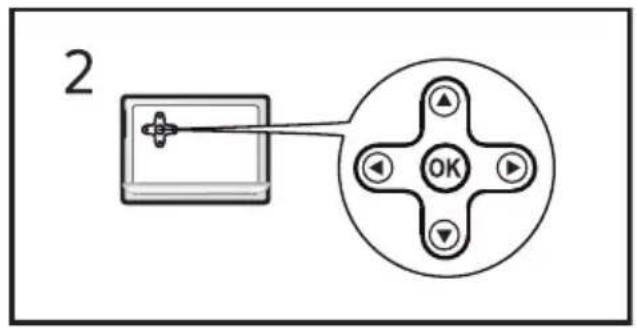
Buttons on the Reverse Side of the Device (fig. 2)
◀/▶—Navigating in the Menu / Skips to the previous or next image.
▲/▼—Navigating in the Menu
OK—Confirms the selection / Starting, interrupting the slide show
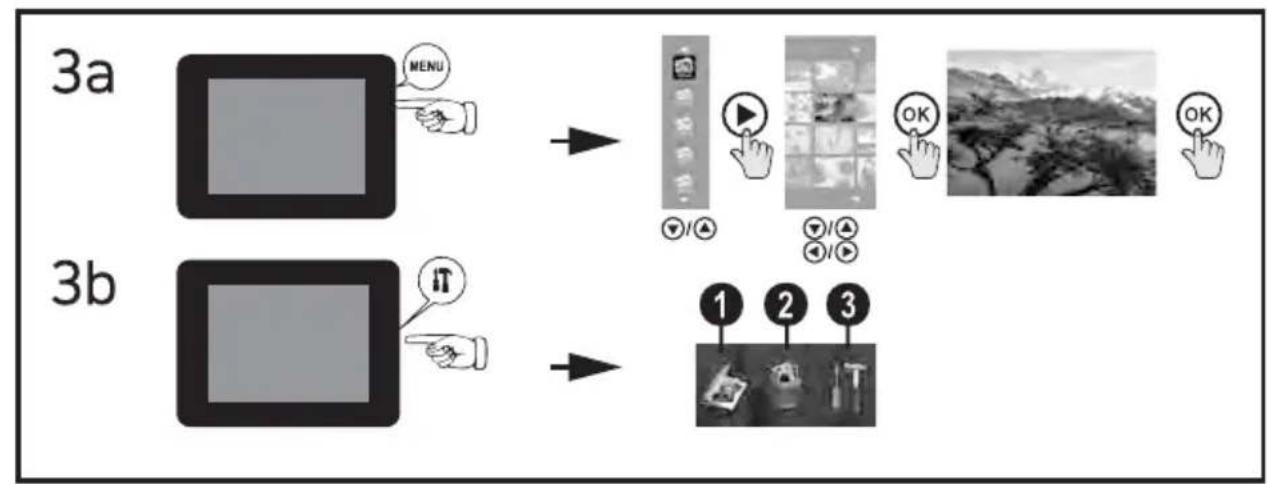
Menu Overview [Playback] (fig. 3a)
Using MENU you can switch between Preview-Mode and slide show.
Menu Overview (Settings) [fig. 3b]
Using the ⚫ key you call up the settings menu. Using ⏻/▶ select:
① Copy Files
② Delete Files
③ Basic Settings
Photo Playback [fig. 4a]
- Press MENU.
- Using ▲/▼ select a folder or source, and confirm with ▶.
- Use ▲/▼ or ◀/▶ to select the image from which to start the slide show an confirm using Ⓞk.
- Press ◀/▶ to skip to the previous or next image.
- Press Ⓞ to pause the slide show.
Copy Files (fig. 4b)
- Press IT.
- Using ◀/▶ select the symbol and confirm with OK.
- Using ▲/▼ select a folder or source, and confirm with ▶.
- Using ▲/▼ highlight the file you want to copy and confirm with OK.
- Mark further files using Ⓞk.
- Press ▶.
- Use ▲/▼ to select a folder and start copy using OK.

Creating new directory/album
a) Use ▲/▼ to select the album "NEW" and confirm with OK.
b) Use ▲/▼, ◀/▶ to select the desired character/letter and confirm with OK.
c) After setting the name, click "Enter" and confirm with OK.
Delete Files (fig. 4c)
- Press IT.
- Using ◀/▶ select the symbol and confirm with OK.
- Using ▲/▼ select a folder or source, and confirm with ▶.
-
Using ⚠/▼ highlight the file you want to delete and confirm with Ⓞk. (Press again Ⓤk to cancel the selection)
-
Press ▶ then OK.
- Use ◀/▶ to select √ to delete or ✗ to cancel.
- Confirm with Ⓞk.
Settings
- Press Ⅲ.
- Using ◀/▶ select the symbol and confirm with OK.
- Use ▲/▼ to select from the following settings:
Photo Settings (rotating image, slide show speed, transition effects, aspect ratio)
ECO Settings (Automatically switch on/off)
Display Settings (brightness, contrast, color saturation, backlight)
Setting the Fun Frame (personal frame)
Time (Setting the time)
1 Calendar (Setting of year, month, day)
Playback Mode of the slide show (Slideshow by sorted, slideshow by random)
⚠️ Factory default (Restore the settings to the factory default)
Technical Data AF5089PS
Dimensions (L×H×W) 220×162×88 mm
Weight 0,517 kg
Power Consumption
Device is switched on (slide show) 4.81W
Screen size 8" / 20cm
USB Port USB-Host
max. current load < 150 mA
Power supply
Manufacturer
1) Hon-Kwang Electric Co., Ltd; 2) Kuantech (Shenzhen) Co., Ltd
Model No. 1) HK-U-050A100-CP, 2)
KSAS0100500100D5
Input 100-240V\~/50/60Hz
Output 5V==/1A
Technical Data AF5109PS
Dimensions (L × H × W) 255 × 215 × 88 mm
Weight 0.760 kg
Power Consumption
Device is switched on [slide show] 5,34W
Screen size 10,4" / 26 cm
USB Port USB-Host
Power supply
Manufacturer
1) Hon-Kwang Electric Co., Ltd;
2) Kuantech (Shenzhen) Co., Ltd
Model No. 1) HK-AF-050A200-CP,
Technical Data AF5089PS / AF5109PS
Recommended Ambient 5–45°C
Relative Humidity 20–80%
Aspect ratio 4:3
Resolution 800 × 600 pixel
Internal memory
up to 500 photos (with internal copy function)
Compatible Memory Cards SD/SDHC/MMC/MS/XD
Photo formats JPEG
File format *.jpg
All data are provided for reference purposes only. Ag-faPhoto reserves the right to make any changes without prior notice.
AgfaPhoto is used under license of Agfa-Gevaert NV & Co. KG or Agfa-Gevaert NV. Neither Agfa-Gevaert NV & Co KG nor Agfa-Gevaert NV manufacture this product or provide any product warranty or support.
For service, support and warranty information, contact the distributor or manufacturer.
Contact: AgfaPhoto Holding GmbH, www.agfaphoto.com
Manufacturer: Sagemcom, www.sagemcom.com
The CE marking certifies that the product meets the main requirements of the European Parliament and Council directive 1999/5/CE on telecommunications terminal equipment, regarding safety and health of users and regarding electromagnetic interference.
The declaration of compliance can be consulted on the site www.agfaphoto.com


Packaging: To facilitate packaging recycling, please conform to your local selective recycling rules.
Batteries: Old batteries have to be deposited in designated collection areas.
Product: The crossed out dustbin logo on your product signifies it is classified as Electrical and Electronic Equipment covered by special disposal regulations.
To enforce recycling, recovery of The Waste Electrical and Electronic Equipment (WEEE) and to protect the environment and human health, European regulations requires that you selectively collect waste equipment using one of the following options:
- Your retailer will take your equipment back if you are buying a replacement product.
- Waste equipment can also be deposited in designated collection areas.
The paper and cardboard packaging used can be disposed of as recyclable paper. Have the plastic wrapping and Styrofoam packaging recycled or dispose of it in the non-recyclable waste, depending on the requirements in your country.
Copyright © 2011 Sagemcom
Dimensioni (L × A × P) 220 × 162 × 88 mm
Peso 0,517 kg
Potenza assorbita
Dimensioni (L × A × P) 255 × 215 × 88 mm
Peso 0,760 kg
Potenza assorbita
Modello N. 1) HK-AF-050A200-CP,
Copyright © 2011 Sagemcom
Apparaat is ingeschakeld [diashow] 4,81W
Apparaat is ingeschakeld (diashow) 5,34W
Fotodiagonaal 10,4" / 26 cm
Copyright © 2011 Sagemcom
Copyright © 2011 Sagemcom
Dimensões (L × A × P) 255 × 215 × 88 mm
Gramagem 0,760 kg
Consumo de energia
Copyright © 2011 Sagemcom
Copyright © 2011 Sagemcom
Copyright © 2011 Sagemcom
Copyright © 2011 Sagemcom
Copyright © 2011 Sagemcom
Copyright © 2011 Sagemcom
Copyright © 2011 Sagemcom
Ölçüler (G × Y × D) 220 × 162 × 88 mm
Ağırlık 0,517 kg
Elektrik tüketimi
Ölçüler (G × Y × D) 255 × 215 × 88 mm
Ağırlık 0,760 kg
Elektrik tüketimi
Model-No. 1) HK-AF-050A200-CP,
Copyright © 2011 Sagemcom
Copyright © 2011 Sagemcom
Copyright © 2011 Sagemcom
RU
AgfaPhoto is used under license of Agfa-Gevaert NV & Co. KG or Agfa-Gevaert NV. Neither Agfa-Gevaert NV & Co. KG nor Agfa-Gevaert NV manufacture this product or provide any product warranty or support. For service, support and warranty information, contact the distributor or manufacturer.
AF5089/5109PS
Booklet
253418699-A


- General Safety Information
- Packing Contents
- Basic Operation (fig. 1)
- Buttons on the Reverse Side of the Device (fig. 2)
- Menu Overview [Playback] (fig. 3a)
- Menu Overview (Settings) [fig. 3b]
- Photo Playback [fig. 4a]
- Copy Files (fig. 4b)
- Delete Files (fig. 4c)
- Settings
- Technical Data AF5089PS
- Power supply
- Technical Data AF5109PS
- Technical Data AF5089PS / AF5109PS
Brand : AGFA
Model : AF 5089PS
Category : Digital photo frame