AF 5135MS - Digital photo frame AGFA - Free user manual and instructions
Find the device manual for free AF 5135MS AGFA in PDF.



| Product Type | Digital Photo Frame |
| Brand | Agfa |
| Model | AF 5135MS |
| Dimensions (W × H × D) | 356 × 249 × 24 mm |
| Weight | 1,168 kg |
| Power Supply | Power adapter: input 100-240 V, 50/60 Hz; output 5 V, 2 A |
| Display | 13.3-inch diagonal, 16:9, resolution 1280 × 800 pixels |
| Internal Memory | 256 MB NAND |
| Memory Card Reader | SD/SDHC/MS/XD/MMC/CF |
| Compatible Photo Formats | JPEG |
| Compatible Music Formats | MP3 |
| Compatible Video Formats | Motion JPEG, MPEG-4 |
| PC Connection | USB OTG (USB cable included) |
| Main Functions | Slideshow with background music, photo rotation, format change (4:3/16:9), brightness/contrast/color settings, alarm, auto-off, auto-start, infrared remote control, interchangeable frame (2 frames included) |
| Care and Cleaning | Clean the screen with a soft dry cloth; do not use liquid or abrasive products |
| Safety | Do not open the device; use only the supplied power adapter; avoid humidity, excessive heat, and shocks |
| Spare Parts and Repairability | Remote control with battery (type CR2025), power adapter, USB cable, spare frames (2 included); repair by a qualified professional |
| General Information | Operating temperature: 10-45°C; relative humidity: 20-80%; warranty and support via www.agfaphoto.com |
Frequently Asked Questions - AF 5135MS AGFA
User questions about AF 5135MS AGFA
0 question about this device. Answer the ones you know or ask your own.
Ask a new question about this device
Download the instructions for your Digital photo frame in PDF format for free! Find your manual AF 5135MS - AGFA and take your electronic device back in hand. On this page are published all the documents necessary for the use of your device. AF 5135MS by AGFA.
USER MANUAL AF 5135MS AGFA
Copyright © 2008 Sagem Communications
Très cher client,
Supports mémoire photo
Sagem Communications.
Contact:www.sagem-communications.com
Copyright © 2008 Sagem Communications
Dear Customer,
Thank you for purchasing our photo frame. Get ready to experience photography like never before! The photo frame allows you to view photos, audio and video files—all without a computer.
High definition LCD screen
Your digital photo frame includes 256MB of built-in memory, a memory card slot and a USB port. Files on the built-in memory can be deleted and files on memory card and USB-disc can be copied.
The included remote control makes it simple to select photo-, music- and movies files, change settings and more.
Supports browse mode (thumbnails of nine images per page at a time). Your digital photo frame supports photo rotate and stretch function.
An automatic, continuous slide show with background music lets you enjoy all of your photos with ease.
Additional functions like time and date display, alarm clock and an automatic on and off switch are also available.
We hope you enjoy your machine and its many functions!
About this User Manual
With the installation guide on the following pages, you can start using your machine quickly and easily. Detailed descriptions can be found in the following sections of this user manual.
Read the entire user manual carefully. Follow all safety instructions in order to ensure proper operation of your machine. The manufacturer accepts no liability if these instructions are not followed.
Symbols Used


Warns about dangers for people, damage to the device or other objects as well as possible loss of data. Injuries or damage can result from improper handling.
This symbol designates tips that will help you to use your machine more effectively and easily.
1 Safety Instructions and Recommendations
Do not make any changes or settings that are not described in this user manual.
Setting Up the Device
The device is exclusively for indoor use only. The device should rest securely on a stabile, flat surface. Position all cables in such a way that no one will stumble on them, thus avoiding possible injuries to persons or damage to the device itself.
Always handle the unit with care. Avoid touching the LCD screen. Never place heavy or sharp objects on the LCD panel, frame or power cord.
Protect the device against direct sunlight, heat, large temperature fluctuations and moisture. Do not place the device in the vicinity of heaters or air conditioners. Observe the information on temperature and humidity in the technical data.
The device should not be switched on immediately after being moved from a cold to a warm room or vice versa or into a cold room which has been heated up quickly. In such cases, wait at least three hours until the device has adapted to the changed conditions (temperature, humidity...).
In the event that the device becomes too hot, or if you see smoke coming from the device, you must immediately pull the power cable out of the power socket. Have your device examined by trained professionals at a technical service location. To prevent the spread of fire, open flames should be kept away from the device.
Do not plug in the device in moist rooms. Never touch the mains cable or the mains connection with wet hands.
Do not allow liquids to enter into the device. Disconnect the device from the power socket if liquids or foreign objects have entered the device and have your device examined by trained professionals at a technical service location.
Do not allow children to handle the device without supervision. The packing materials should be kept out of the hands of children.
Power Supply
Use only the enclosed power adapter (see chapter Appendix / Technical Data). Check whether the mains voltage of your device (indicated on the type label) matches the mains voltage available at the setup location. This equipment complies with the voltage type specified on the unit.
Never touch the power cable if the insulation is damaged. Before cleaning the surface of your device, disconnect it from the power network. Never use liquid, gaseous or easily flammable cleansers (sprays, abrasives, polishes, alcohol).
Only clean the display with a dry, soft cloth. If the display breaks, a mildly corrosive liquid may escape. Avoid all contact with your skin and eyes.
Repairs
Do not make any repairs to the device yourself. Improper maintenance can result in injuries or damage to the device. Only have your device repaired by an authorised service centre.
Do not remove the type label from your device; this would void the warranty.
Photo Memory Media
Only use storage media that are compatible with the device. In order to prevent damage to the card or the unit, please turn off the power before removing or inserting the card.
Never pull out the memory card while the device is accessing it. This could cause data to be damaged or lost.
Batteries
CAUTION! RISK OF EXPLOSION IF BATTERY IS REPLACED BY ONE OF AN INCORRECT TYPE.
If the device is not used for a long time, take out the batteries. So you can prevent leakage and possible damage to the device.
The batteries used should be disposed of according to the recycling regulations of your country.
2 Overview
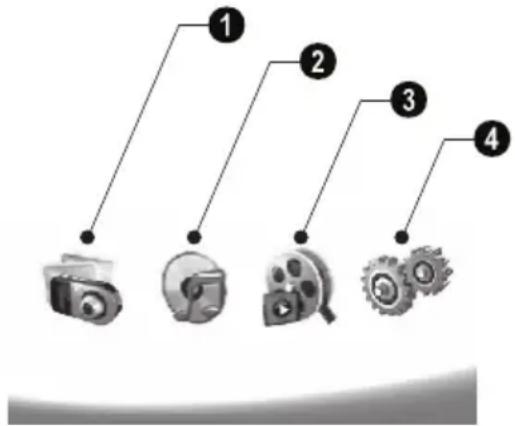
Overview of the Menu Functions
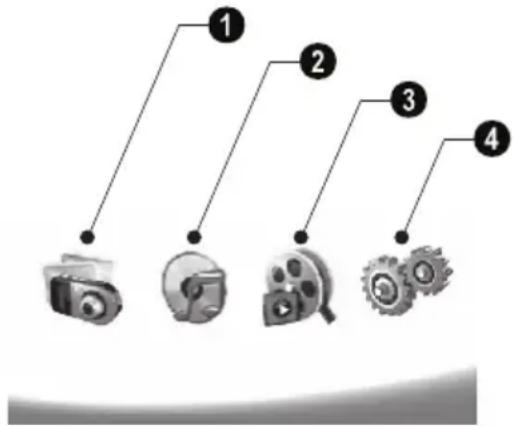
There are four items on the main menu.
Photo Menu
Music Menu
3 Video Menu
4 Settings
Navigating in the Menu
1 Press on the remote control.
2 Select the desired menu using / .
3 Confirm with
You can also call up the menus using the corresponding keys on the back of the device.
Call up menus directly
Press on the remote control to calling the photo menu.
Press on the remote control to calling the music menu.
Press on the remote control to calling the video menu.
Symbols on the LCD Display
Photo- / Music- / Movie- Mode
3—Return to the previous menu level
Move up
V—Move down
Move left
—Move right
--Delete the files from the internal memory
Copy files to the internal memory
- Confirms selection
Slide Show Mode
3—Return to the previous menu level
To the next photo file
To the previous photo file
Starts or pauses the playback.
Adjustment menu for Brightness (), contrast (Q) and color saturation (). Press the corresponding button on the rear of the frame to enter the adjustment menu. Repeatedly pressing the corresponding button to adjust the brightness, contrast and saturation.
- Optional menu to rotating the image ( ), to changing the aspect ratio ( ), to adjusting the slide show speed ( ) and displaying the time ( ). Press the corresponding button on the rear of the frame to enter the options menu. Repeatedly pressing the corresponding button to get different effects.
Background music setting menu
Music-/Movie-Playback Mode
3—Return to the previous menu level
To the next music or movie file
To the previous music or movie file
Starts or pauses the playback.
Adjust the volume
i—Shows current music or video title
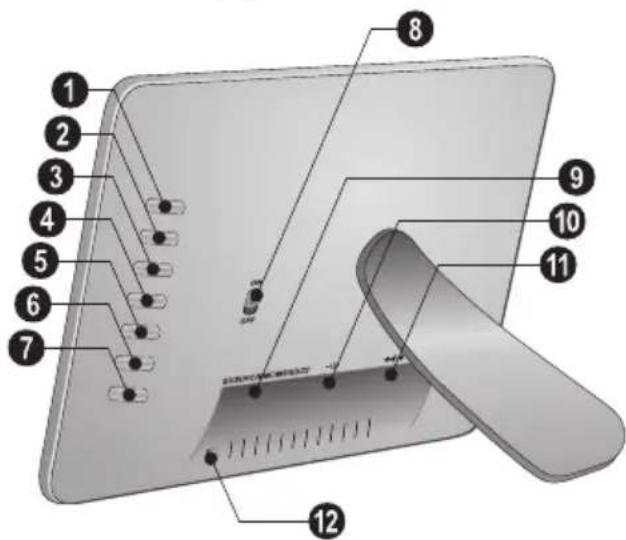
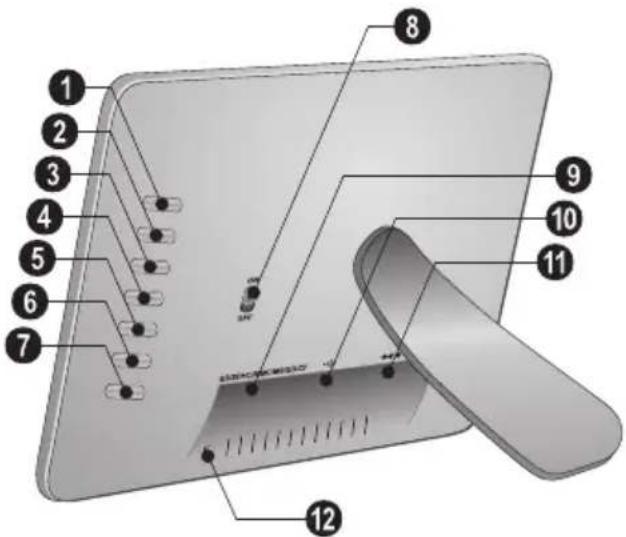
Device Overview
Using the keys on the back of the device, you can call up the corresponding function which is shown on the display.
1 3- Calling the menu functions / Return to the previous menu level
-Calling the menu functions / Navigating in the Menu / Skips to the next image, music or movie / Increase the brightness
3V- Calling the menu functions / Navigating in the Menu / Skips to the previous image, music or movie / Decrease the brightness
4 D—Calling the menu functions / Navigating in the Menu / Start or pauses the playback / Increase the contrast / To adjust the slide show delay
- Calling the menu functions / Navigating in the Menu / Enters the adjustment menu for brightness, contrast and colour saturation / Decrease the contrast / Increase the brightness.
6 /n—Calling the menu functions / Copy or delete the file / Enters options menu / Decrease the volume
7 Confirms the selection / Start slide show
ON/OFF - On/Off switch
SD/SDHC/MMC/MS/XD/CF-Slot for Memory card
-socket—USB port for PC
11 socket—Mains cable socket
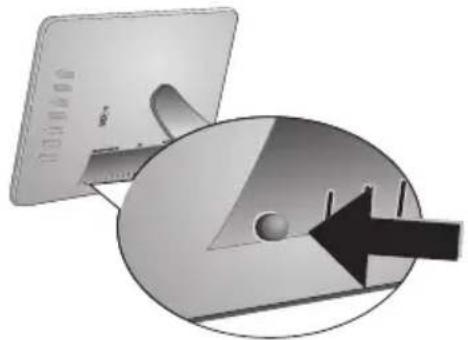
12 button for changing the frame
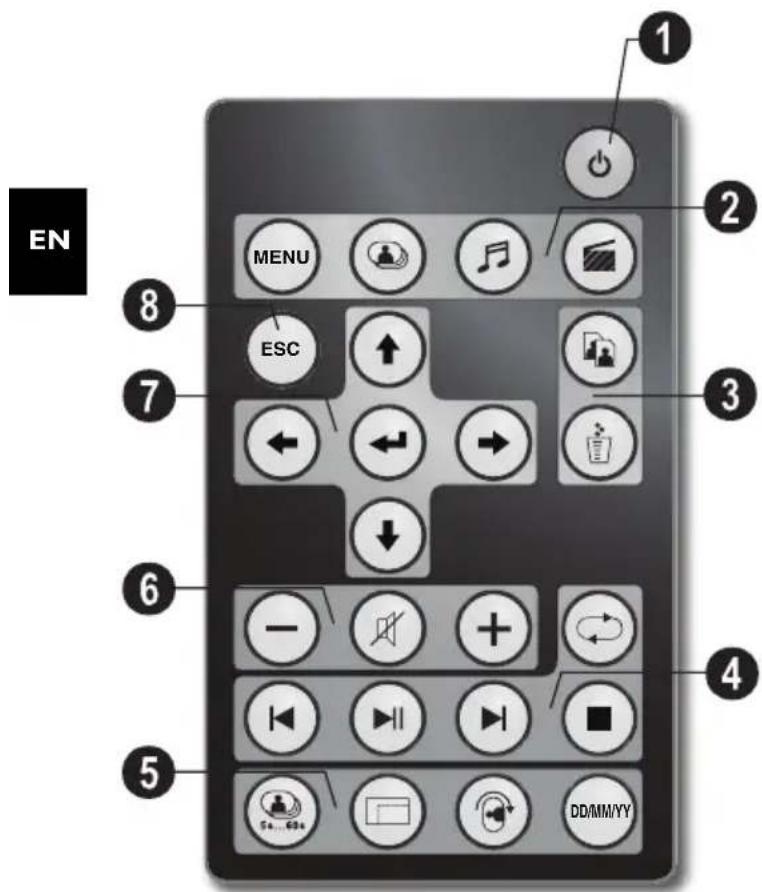
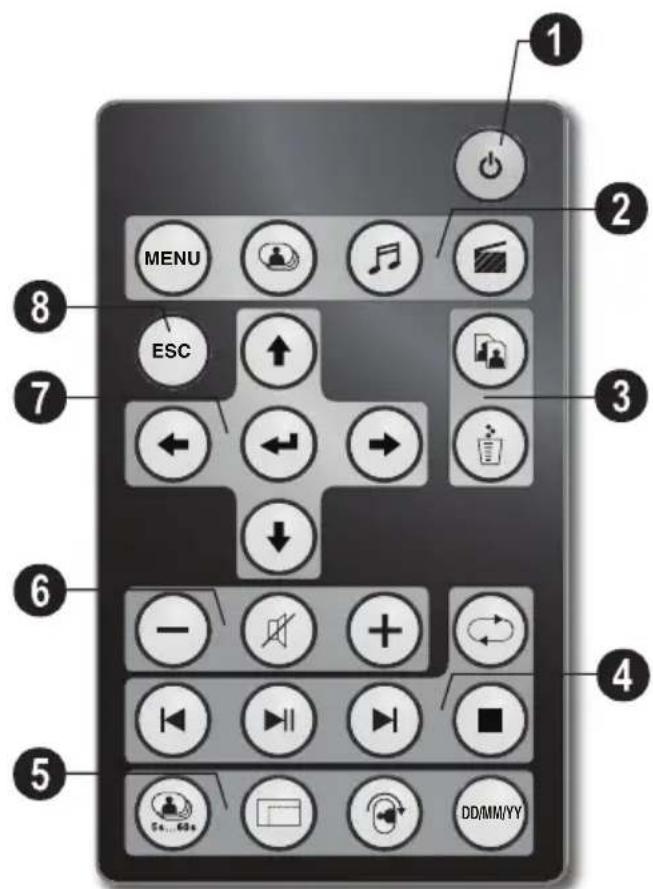
Remote Control
Switching On and Off
- On/Off / Standby mode
Calling the menu functions
- Calling the menu functions
- Calling the photo menu
—Calling the music menu
—Calling the video menu
Copy/DeleteFiles
- In the photo, music, video menu: copy files
- In the photo, music, video menu: delete files
4 playback functions
- While enjoy a single image, a music, a movie: To the previous image, music or movie file
-Starts or pauses the playback.
While enjoy a single image, a music, a movie: To the next image, music or movie file
-Stop playback / Return to the previous menu level
Repeat playback of image, music, video file
Additional Functions
Press repeatedly: display of the various slide show speeds
—Switches aspect ratio (4:3 or 16:9)
To rotate the orientation of an image while enjoy a single photo or slide show with one image.
During playback, press to display or hide the time information that you set on the setting menu.
Adjusting Volume Level
/ Adjust the volume
Mute mode
7/8 Direction Buttons
/ / / —Navigating in the Menu / Select options
-Calling the menu functions / confirming input
Esc Return to the previous menu level
3 Initial Operation
Packing Contents
Digital photo frame with bracket
Interchangeable Frames (standard version)
3 real wood frame (only with WOOD version) (wood frame, glass and passepartout (photo mount, paper) fixed with screws)
A remote control (with battery)
Power supply
USB-cable
User Guide (not depicted)
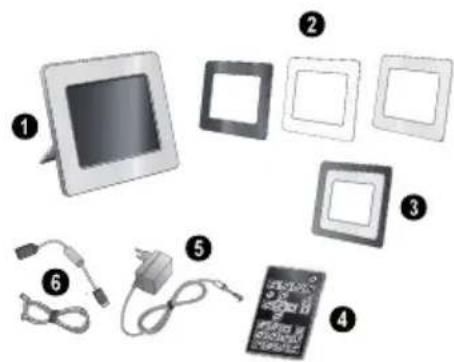

If one of the parts is missing or damaged, please contact your retailer or our customer service.
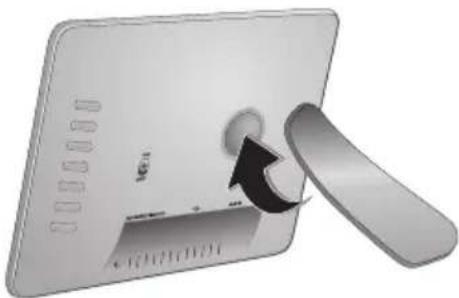
Mount the Bracket
Assemble the Photo Frame bracket on the back to prop the player up.
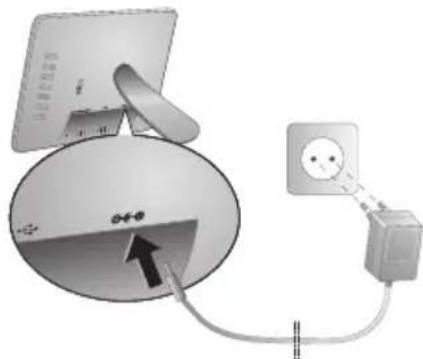
Connecting the Mains Cable

Check whether the mains voltage of your device (indicated on the type label) matches the mains voltage available at the setup location.
1 Insert the mains cable into the connection located on the rear side of the device. Connect the mains cable to the electrical socket. Do not switch on the device!
Connecting to a PC
Using the USB cable, you can connect your photo frame to a computer to transfer files between the internal memory and computer.

If you connected the photo frame to a computer, the inserted memory card can not be recognized.
1 Switch the device off using the on/off switch on the rear.
2 With the photo frame turned off, connect the small end of the cable to the frame and the large end to your computer.
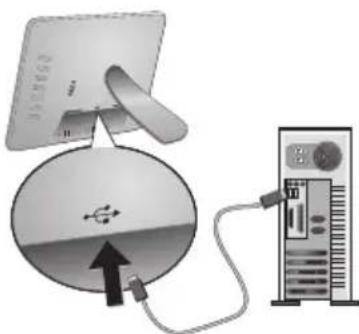
3 Switch the device on using the on/off switch on the rear. Allow the computer a few moments to recognize the new hardware. Compatible photo, music and video files can be copied using Explorer onto the internal memory

Inserting a Memory Card
1 Switch the device off using the on/off switch on the rear.
2 Insert a memory card into the appropriate card slot at the rear of the device. Your photo frame supports the following memory cards: SD/SDHC/MS/XD/MMC/ CF.
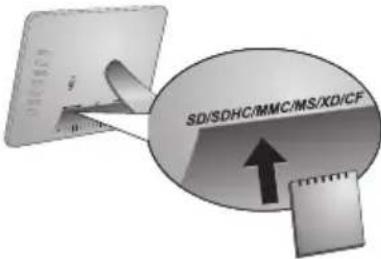
Only use storage media that are compatible with the device. In order to prevent damage to the card or the unit, please turn off the power before removing or inserting the card.
Never pull out the memory card while the device is accessing it. This could cause data to be damaged or lost.
3 Switch the device on using the on/off switch on the rear. The player will start slide show after the start screen be displayed. Press ESC on the remote control to stop the slide show.
Installing or Changing the Batteries of the Remote Control
CAUTION! RISK OF EXPLOSION IF BATTERY IS REPLACED BY AN INCORRECT TYPE.
1 Take the battery compartment from the remote control by opening the locking mechanism (1) and pulling out the battery compartment (2).
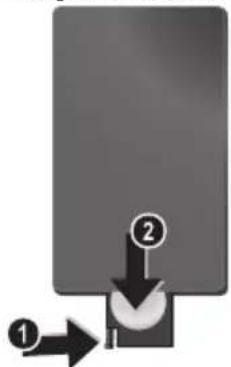
2 Insert the new batteries into the battery compartment with the positive and negative polcs as shown on the back of the remote control. Make sure the polarities (+) and -) are aligned correctly.
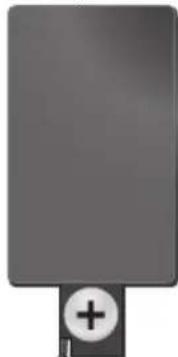
3 Push the battery compartment back into the remote control until the locking mechanism engages.
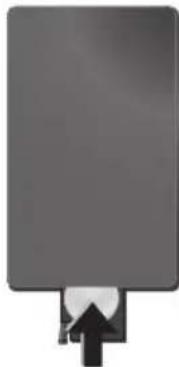
Normally the batteries will last for around one year. If the remote control does not work, please replace the batteries. If the player is not used for a long time, take out the batteries. So you can prevent leakage and possible damage to the remote control.
The batteries used should be disposed of according to the recycling regulations of your country.
Using the Remote Control
Point the remote control to the remote sensor on the front panel of the device. Its working limits is within an angle of 30 degrees and a distance of 2 meter. When using the remote control, no obstacle should be placed between the remote control and remote sensor.
4Playback
Photo Playback
1 Select the photo menu in the main menu and confirm using . A screen with memory type icons will appear.
You can call the photo menu also using on the remote control.
2 Follow the steps on the Internal Memory and Memory Card Slot section to select the memory type and press
3 Then the frame will display nine thumbnail images per page as below.
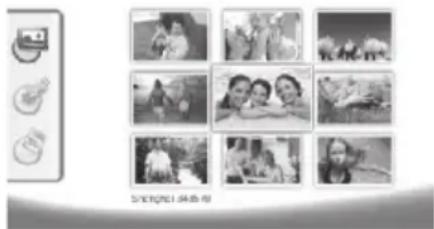
4 Select the image you want to view using /I or I on the remote control.
5 Press to start the slide show. During playback call up the menu using (MENU).
During a slide show, you can press to view a single image. Press to skip top the previous or next image.
Rotate Photos
When a single image is displayed, you can rotate the image using button on the remote and finally return to original image. Every time you press this button, the image rotates 90 degrees clockwise.
Switches the Aspect Ratio
The digital photo frame has a wide screen with 16:9 aspect ratio. However most of the consumer camera's take photo in 4:3 aspect ratio. You can alternate aspect ratios between 16:9 and 4:3 by repeatedly pressing on the remote control. If you change the display aspect ratio to 4:3, the images will appear in the middle of the screen with black bars on both sides.
Set up Slide Show
Adjust the slide show speed
The slide show speed can be changed using on the remote control. Repeatedly pressing this button will get different time delay such as 5s, 10s, 30s and 60s.
Setting the Background Music of the Slide Show
As background music, you can only use files that are stored together with the photos in the internal memory on the memory card or the USB connection.
1 Press on the symbol on the back of the device during a slideshow. The settings menu for the background music appears.
2 Presss to start the background music.
Using 12 +12 = set the volume. You can skip to the previous or next song by using the or button on the remote control.
MusicPlayback
1 Select the music menu in the main menu and confirm using . A screen with memory type icons will appear.
You can call the music menu also using on the remote control.
2 Follow the steps on the Internal Memory and Memory Card Slot section to select the memory type and press
3 Select the file you want to play back using / or / on the remote control.
4 Press to start playback. To stop press or on the remote control.
During playback, you can skip to the previous or next song by using / oder / on the remote control.
During playback, press the on the remote control to pause and to resume playback.
Using to select if the actual song is repeated, all songs are repeated or to switch off the repeat function.
Adjusting Volume Level
During playback you can adjust the volume using -1 / 4 on the remote control. Press or repeatedly to switch off the volume (mute function).
MoviePlayback
1 Select the movie menu in the main menu and confirm using . A screen with memory type icons will appear.

You can call the movie menu also using on the remote control.
2 Follow the steps on the Internal Memory and Memory Card Slot section to select the memory type and press
3 Select the file you want to play back using / or / on the remote control.
4 Press to start playback. To stop press or on the remote control.

During playback, you can skip to the previous or next song by using 1 / 2 oder 3 on the remote control.
During playback, press the on the remote control to pause and to resume playback.
Using to select if the actual song is repeated, all songs are repeated or to switch off the repeat function.
Adjusting Volume Level
During playback you can adjust the volume using - / + on the remote control. Press or repeatedly to switch off the volume (mute function).
5 Settings
Modifying the Settings
1 Select the settings menu in the main menu and confirm using
2 Use () / () to select the setting you would like to allocate.
3 Confirm with
You can allocate the following settings:
(Clock)—Setting the time and date. Press to display the time on the screen.
(Brightness, Contrast, Colour saturation)—This setting allows you to adjust the brightness, contrast, color saturation of the LCD screen.
(Transition Effects)—Allows you to choose different styles of slide show effects.
(Alarm & Power off)
Alarm: The alarm can be set to ring at a specific time each day. The hours and minutes are set in the same manner as used in setting the clock.
Power Off: Allows the frame to automatically power off at a particular time of the day. The Power icon must be set to .
(Auto Start)—Allows you to set different auto start playback item among Main Menu, Slide show with one image, Slide Show with four images and Play video). The photo frame will play the corresponding content after the start-up screen logo be displayed.
Default)--Select to restore the settings to the factory default.
4 Select the desired setting using / .
5 Confirm with
Press or to close the menu and return to the starting mode.
Copy / Delete Files
Images, music and video files in the internal memory can be deleted. Images, music and video files on the memory card or USB disk can be copied.
Copy Files
1 Highlight the file you want to copy.
2 Press on the remote control.
3 Highlight icon and press to start copying.
4 The screen will display the processing bar. After finish copying, you can find the image in the internal memory.
Highlight icon and press to exit the current operation menu.
Delete Files
1 Highlight the file you want to delete.
2 Press on the remote control.
3 Highlight icon and press to delete the file.
Highlight icon and press to exit the current operation menu.
Setting Music and time for the Alarm Function
Ensure that a memory card is inserted in the device or an USB connections to a computer exists.
1 Press on the remote control.
2 Using / select the USB connection or a memory card as the source.
3 Confirm with
4 Using / or / select the file that you would like to set as music for the alarm function.
5 Press _a on the remote control.
6 Select the symbol for the alarm function (图) using / .
7 Confirm with . The music will be copied to the internal memory and be set the as the alarm music.
8 Press on the remote control to highlight the setting symbol ().
9 Confirm with
10 Using / select
11 Follow the steps on the Setting the Alarm Time. The Alarm Mode must be set to MP3.
6 Service
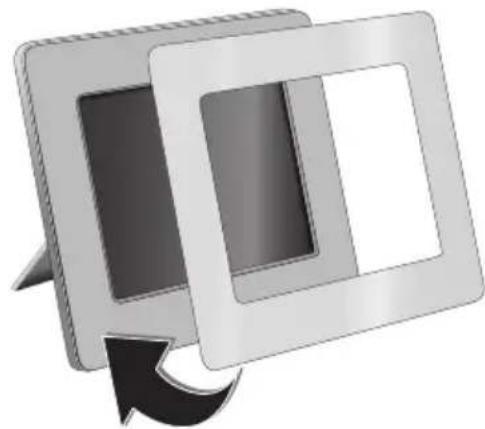
Changing the frame
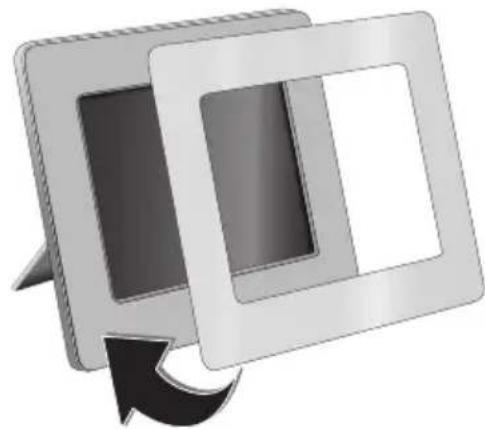
You can change the frame of the device using the picture frames supplied. The frames are held with magnets.
1 Press on the change frames button on the back of the device. Remove the frame.
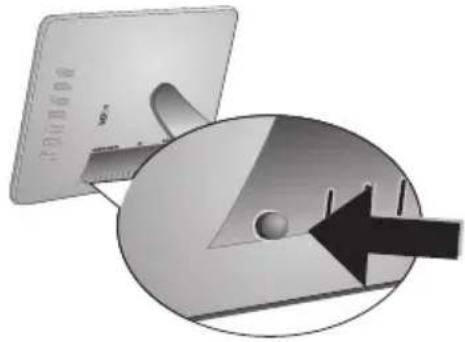
2 Place the picture frame onto the device until it engages on the magnets.
Information
| Problems Solutions | |
| Photo Frame does not power on. Check that you connect the AC adapter to the photo frame properly. | |
| Cannot save files Make sure that enough internal memory | is available. Re-start the picture frame and delete some files in order to free up memory space. |
| No sound Make sure the file format is supported, the computer and the frame are correct connected or the memory card is not damaged. | |
| Memory card can not be recognized | If you connected the photo frame to a computer, the inserted memory card can not be recognized. |
7 Appendix
Technical Data AF 5086MS
Overview
Dimensions (L× H× W) 232,5x192x22,5mm
Weight 0,575 kg
Mains Connection....Input: 100 - 240V /50 - 60Hz Output: 5V = - / 2A
Audio Output. 2× 1 W
Recommended Ambient. 10-45°C
Relative humidity 20-80%
Display
Screen size 8
Aspect ratio. 4:3
Resolution 800x600 Pixel
Memory
Internal memory. 256 MB-NAND-Memory
Connections
USB port.. USB OTG
Compatible Memory Cards.SD/SDHC/MS/XD/MMC/ CF
Supported formats
Photo formats..JPEG
Music formats.. MP3
Video formats........Motion Jpeg, Mpeg-4
Technical Data AF 5105MS
Overview
Dimensions (L× H× W) 293x200,5x23mm
Weight 0,74kg
Mains Connection....Input: 100 - 240V / 50 - 60Hz Output: 5V = /2A
Audio Output. 2× 1W
Recommended Ambient. 10-45°C
Relative humidity 20-80%
Display
Screen size 10,2
Aspect ratio. 16:9
Resolution 800x480 Pixel
Memory
Internal memory. 256 MB-NAND-Memory
Connections
USB port.. USB OTG
Compatible Memory Cards.SD/SDHC/MS/XD/MMC/ CF
Supported formats
Photo formats .JPEG
Music formats.. MP3
Video formats Motion Jpeg, Mpeg-4
Technical Data AF 5135MS
Overview
Dimensions (L× H× W) . 356× 249× 24mm
Weight. 1,168kg
Mains Connection ....... Input: 100 - 240V /50 - 60Hz Output: 12V = = /1,5A
Audio Output. 2× 1 W
Recommended Ambient. 10 - 45^
Relative humidity. 20-80%
Display
Screen size. 13,3
Aspect ratio. 16:9
Resolution. 1280x800 Pixel
Memory
Internal memory. 256 MB-NAND-Memory
Connections
USB port USB OTG
Compatible Memory Cards SD/SDHC/MS/XD/MMC/ CF
Supported formats
Photo formats .JPEG
Music formats.. MP3
Video formats Motion Jpeg, Mpeg-4
All data are provided for reference purposes only.
AgfaPhoto reserves the right to make any changes without prior notice.
AgfaPhoto Holding GmbH:
AGFAPHOTO is used under license of Agfa-Gevaert NV & Co.KG. Agfa-Gevaert NV & Co.KG does not manufacture these products or provide any product warranty or support.
Contact: www.agfaphoto.com
For service, support and warranty information, contact the distributor or manufacturer:sold and distributed by Sagem Communications.
Contact: www.sagem-communications.com
The CE marking certifies that the product meets the main requirements of the European Parliament and Council directive 1999/5/CE on telecommunications terminal equipment, regarding safety and health of users and regarding electromagnetic interference.
The declaration of compliance can be consulted on the site www.agfaphoto.com
Preservation of the environment as part of a sustainable development logic is an essential concern of AgfaPhoto. The desire of AgfaPhoto is to operate systems observing the environment and consequently it has decided to integrate environmental performances in the life cycle of this products, from manufacturing to commissioning use and elimination.

Packaging: The presence of the logo (green dot) means that a contribution is paid to an approved national organisation to improve package recovery and recycling infrastructures to facilitate. Please respect the sorting rules set up locally for this kind of waste.
Batteries: If your product contains batteries, they must be disposed of at appropriate collection points.

Product: The crossed-out waste bin stuck on the product means that the product belongs to the family of electrical and electronic equipment. In this respect, the European regulations ask you to dispose of it selectively;
- At sales points in the event of the purchase of similar equipment.
- At the collection points made available to you locally (drop-off centre, selective collection, etc.).
In this way you can participate in the re-use and upgrading of Electrical and Electronic Equipment Waste, which can have an effect on the environment and human health.
This user manual was printed on recycled paper bleached without chlorine. This satisfies the highest standards for low environmental impact. The cardboard packaging used and the packaging inserts of paper and cardboard can be disposed of as waste paper. The plastic foil may be submitted for recycling or disposed of with waste not intended for recycling, depending on the requirements in your country.
Trademarks: The references mentioned in this manual are trademarks of the respective companies. The lack of the symbols and does not justify the assumption that these dedicated terms are free trademarks. Other product names used herein are for identification purposes only and may be trademarks of their respective owners. AgfaPhoto disclaims any and all rights in those marks.
Neither AgfaPhoto nor its affiliates shall be liable to the purchaser of this product or third parties for damages, losses, costs, or expenses incurred by the purchaser or third parties as a result of accident, misuse, or abuse of this product or unauthorized modifications, repairs, or alterations to this product, or failure to strictly comply with AgfaPhoto operating and maintenance instructions.
AgfaPhoto shall not be liable for any damages or problems arising from the use of any options or any consumable materials other than those designated as original AgfaPhoto products or AgfaPhoto approved products.
AgfaPhoto shall not be held liable for any damage resulting from electromagnetic interference that occurs from the use of any interface cables other than those designated as AgfaPhoto products.
All rights reserved. No part of this publication may be reproduced, stored in a retrieval system or transmitted in any form or by any means, electronic, mechanical, photocopying, recording, or otherwise, without the prior written permission of AgfaPhoto. The information contained herein is designed only for use with this product. AgfaPhoto is not responsible, if this information is applied to other devices. This user manual is a document that does not represent a contract.
Errors, printing errors and changes are reserved.
Copyright © 2008 Sagem Communications
Stimato cliente,
Copia/cancella i file
Sagem Communications.
Contatti: www.sagem-communications.com
Copyright © 2008 Sagem Communications
Geachte klant,
Menu's direct opropen
Copyright © 2008 Sagem Communications
Estimado cliente:
Copyright © 2008 Sagem Communications
Estimado cliente,
Sagem Communications.
Contacto:
www.sagem-communications.com
Copyright © 2008 Sagem Communications
Bästa/bästekund,
Sagem Communications.
Kontakt: www.sagem-communications.com
Copyright © 2008 Sagem Communications
Vázeny zákazníku,
Copyright © 2008 Sagem Communications
jako
Tiszelt vásárló!
A membranous karyotype is a 10% of the total number of cases. A membranous karyotype is a 25% of the total number of cases. A membranous karyotype is a 30% of the total number of cases. A membranous karyotype is a 40% of the total number of cases. A membranous karyotype is a 50% of the total number of cases. A membranous karyotype is a 60% of the total number of cases. A membranous karyotype is a 70% of the total number of cases. A membranous karyotype is a 80% of the total number of cases. A membranous karyotype is a 90% of the total number of cases. A membranous karyotype is a 100% of the total number of cases.
Akkumulátorok
VIGYAZAT! NEM MEGFELELO TIPUSU ELEM HASZNALATA ESETEN AZ ELEM FELROBBANHAT.
A membranous cystitis (BSC) is a rare, non-specific, inflammatory disease of the bladder. It is characterized by the development of a cystic lesion in the bladder and its associated symptoms. The most common forms of BSC are:
Copyright © 2008 Sagem Communications
Szanowy kliencie,
© 2008 Sagem Communications

Stimate client,
Vä multumim ca ati achizitionat Rama foto digitala commercialata de compania noastr. Vä recomandam sa fiti pregatit fiindc va tje experimenta arta fotografici asacum nu ati mai facut-o pana acum! Noua D-voastr rama fotodigitala va permite sa vizualizati fotografii, filmele si sa ascultati muzica -toate acestea fara calculator
Ecran de cristale lichide de inalta calitate
Copyright © 2008 Sagcm Communications
Vázeny zákazník,
dakujeme vam, ze ste si zakupili tento fotoramcck. Pripravte sa zait fotografovanic tak, ako ste ho cste nikdy nevideli! Fotoramcck vam umoznue zobrazovat fotografic a prehravat zvukove a video suby bez poctaca.
Copyright © 2008 Sagem Communications

Sayin musterimiz,
Copyright © 2008 Sagem Communications
AyaanTe nελaTη,
EvxqoTobue noe axtae to yqaxo wtooyqxio naiotno ts eaoiaa .Etoupaeite yia u xvey qtooyoxnepntogia! Me to veo yqaxo wtooyqxio naiio oac npoeite va deite wtooyapies xai bivxo xai v axiiete mouoxh -wqic nestgovxovnooloyoiotn.
Copyright © 2008 Sagem Communications
YBaXaEmbI NOKyNaTeA,b,
BaIaOaapn BAc 3a IIpHObpeTeHHe AaHHo IIpoAkyuHII. IIpHIOTOBBTEcB K 3aMeHATEAbHOMy IIyTeHIECTBHO B MHP fOTOrpaΦH! BO3MOKHOCTb IIPOCMOTpa fOTOrpaΦH, BIAeOpAOHKO8, a TaKke IIPOCAUYINBAHHMy3bIKI 6e3 HcHOAB3OBAHII KOMTbIOTepa
BbCOKOKaueCTBeHHHJKNAKOKPnCTaAHuecknAHCnAe
YcIpoHCTBO COAcpKHT BcTPOCHHyHO HAMITb 256 M6, CAOT AA YcTaHOBKH KapTI HAMITn USB IOpT. BO3MOXHOCTb yAAATb caiAB Co BcTPOCHHOII HAMITn, a TAKKC BO3MOXHOCTb KOIHNPObAHN c KApTH HAMITH HAN USB-HOCHTCAJ
BXOABHIN B KOMHAEKT HOCTABKN IAY IO3BOAIEAERKO BbOpatb FOOTOPaOHN, My3bIKY, BNApOAnKH, H3MeHHb HaCTPOHN AeAaTB MIOFOE APyTOE.
IpeBapHTeALHbI IPOCMOTp yMeHBIIeHHbIX H3OpaKeHH (IOKa3 AO AeBHTI yMeHBIIeHHbIX H3OpaKeHH OHOBPcEmHo).LHΦPOBOc yCTpoIcTBo- φOTOPaMka IO3BOAerT IOBOPaHBA Tb CTpaHHbI H 3MCHTbHX φOpMaT.
PPOCMOTp fOToIpaΦHn B pCKHmec ABTOMATHECKOIO CAAHA-HIOY C MY3bKaAaHBM COIIPOBOKAEHHEM.
HMeIOrTaKke AOHOAHHTeABHBIE cyHKINH, HApPmep, HHAHKAHH BpeMeHH II AaTbI, 6yAHAbHHK, TaHmep BKAIOOeHHN BBkAIoOeHH.
MHaACMCRA,TO BbIOAuyHc yAOBOABCTBHCOT pa60tbc anIapatom H cRO MHOROHCACHHHx dyHKnn!
O6 3TOM pyKOBoACTBe NOAb3OBaTeA
C IOMOIBIO INHBeAeHHORO DaAee pyKOBOACTBa IO yCTAHOBKE Bn CMOKeTe 6bICTPO INpHcTyrHtB K EKIIAYaTIINn BaIIIErO aIITapTa. NoAPoHOe OIIHCAnHe YHKINI INPHEAEO B NOCAEyTOHINx pa3AeAAx pyKOBOACTBA IIoAB3OBATCAJ.
BHMMATCAbHO O3HaKOMBTECb C pyKOBOACTBOM IOAB3OBaTeA. AAR 06ecHueeHH H63OHaCHO paOTo b aIIIapata CO6AIoAAHTe BCE yKa3AHHH TEXHNK 6e3O1AACIOCTH. N3rTOBHTeAB IIIEcET OTBETCBIIIOCTH B CAYae IIEco6AIoAEHH INpABHA TEXHNK 6e3O1ACIOCTH.
NcnoA63yeMbIe 06o3HaueHn

PcayppckKaacr 06 OIIaHOCCTX AAR AIOACn, BO3MOKHOCTI IOBpCKAcHH aIIapata HAN APYHX ycipoiCTB, a TAKKC O BO3MOKHOITIOpe AaHHbIX. HCIPABHbHAR 3KCHAYaTAAH MOKET IIpHBECTH K TpaBMAM HAN IOBpeKAeHHIO aIIapata.

OT CHMBOA 063Haayact COBtH, KOTOPHE IOMORAOT HAnooace 9ofoKTHBHO HcIOAB3OBaTB aIIIapat.
1 Pekomehdaци lo Texnke 6e30napochtn
Hc BHOCHTC HIKAKHX N3MCHCHHII HAcIPOCK, HC OIHCAHHbIX B 3TOM PYKOBOACTBE IOAB3OBaTeA.
PpoceAypa HacTpoKn annapata
3TO yCTpOCTBO IpeHa3HaueHO TOABKO AHHHnBnAyaIbHOrO HCIOAb3OBaHHN. AnIapat cAeAyet YCTaHOBHTb HA IIoCKyIO yCToHNNyIO IOBepxHOCTb. PaioAraTe BCE HHPbI N Ka6cAn TaKIM O6pa3OM, YTOb HIKTO HC MOT Ha HIX HAN CNOTKHyCBs, 3TO HCKAOyAcT BO3MOJHOCTb TpaBMnPOBaHHAIOCh INIOBpcKACHH CaMOrO aIIIapara.
YcpoiCTBO IIpeAHA3HaueHO AAA KcHAYaTAHIN BHyTPH IOMeIIeHH. He IIpHKacaiTecb K KK-AHCIIeIO. He pa3McIaIITc TBKcABic HAn OCTpHc IIpcAMetb Ha KK-OKpaJIe, pAMKe HAN IIIHype OAEKTPOHTAHIIH.
3aHHHaaIte aIIapat OT IIOHaAHHI IPRMOrO COAHeYHOro CBeta, BO3AeHCTBnT TeIIAA, pe3KHX IIpeHnAOB TEMHePaTyHn BAAHn. He pa3MeHnIte aIIapat BOAn3H HArpeBaTeAeH N KOHAnHIOHePOB BO3AByXa. CMOTpHTe HfOpMaHIO O AOJIyCTHMOn TEIMepaType H BAaKHOCTH BO3AByXa B TEXHHueckHX xapaKTePcHCTIKax.
Ie BKAIOHAAITYeCTPOINCTBO Cpa3y IIOCAe IIEpeMeIIeHHN H3 IOMCIIICHH C Hn3KOITcMIICpATpyoB IIOMCIIICHHC C 6OACC BbICOKOI TcMIIEpATpyo HAN HAO6OpOT, a TaKKe IIOCAE 6bICTPOI IOAHIMaHH TcMIICpATpyb B IOMCIIICHHN. B TAKHX CIHTYAAHIX IOAOKAIITC HC MCHCC TPCX YAcOB, YTO6bI yCTPOINCTBO AaAHTPObAAOCB K H3MCHHBUNMCYCAOBHM (TcMIICpATpya, BAaKHOCtB BO3Ayxa).
ECAH BAIII aIIIapAT CAHIKOM CHABHO HArpeetc HAN BByBHTe BBXOAIIIIN H3 HeFO ABM, TO HeMeAAeHHOOTKAIOHTE IIHyp ceTeBOrO 0AEKTPOITAHN H3 PO3ETKII. OaIaHTe BAIII aIIIapAT AAn OCMOtpa KBAIINΦHIIIPoBAHHBM CIIeIHnAHCtAM HAN B IeHTp cepBnCHORO 06CAYKBaHHN. AIA IpeAOtbpAIIIEHHI BO3ROPaHHN 3aIIpeIIaETcH IOAHOCHTb K aIIIapATY HCTOHHKH OTKpHITOrO HAmEHII.
HIOKAHOaIc aHHapat K CcH N K TCAcOHHo AHHN B cbpHX IOMCHHIX. HKOHa HC KAaHTecb cTeBOB BHAKH N PO3eKN H TEAcOHHOpa3BeMa BAaKHBMn pyKaMII.
He AOnyckaIte IIOHaAHHH KHAKOCTe BHyTp b aIIapata. EcaH BHyTp b aIIapata IIOHaAa KHAKOCTb HAn IOCTOPOHHH IIpeAMET, HeMaAeHHO OTAIOTHTe IIIHyp 3AEKTPoIHITAHHH IOTAAHTE aHIAPAAT AAR OCMOTpa KBAANΦHINPObAHBBM CIEIIHAAHCTAM HAN B IEIITp cEPBHCHO OOCAYKBAHHH.
HcIO3BOAJIITC ACTI M IOAB3OBaTbC aIIIapATOM 6c3 IHPcMo1pa. Hc AOIIyCKaTTc ACTeii K yIIaKOBOuHBIM MaTepeHaAM.
3AeKtpnueckoe nHTaHne
HcnoA3yTe TOABKO 6oK HHTaHHB XOADHIN B KOMIAEKT IOCTABKN (CMOTpHTe PnHAOKHe / TexHHueckHe aHHHe).PObepbTe, COOTBeTcByet AH TNI 3AEKTPoIHHTAHBAIIero anIIapaTa (yKa3aH Ha IHHABHKe) TNIY 3AEKTPoIHHTAHNB McTe yCTaHOBKn anIIapata. IIanpJkeHne B cETN IIpeMeHHORTo KA BcERda AOAKHO COOTBCCTBOBAT yKa3aHHOMy HA IIIACAHII.
Hc kacaTecb Hhypa 3AeKIpOHTaHHc CIOBpcKAcHHo H3OAAHHei.
IpeA OYHCTKOIIOBepxHOCTHaIIHapataO63aTeABHOOTKAIOHTEeroOTceTNIAEKTPoHHTAHH. He IIPHEHnTE AAOHCTKN KNAKHX,ra3OO6pa3HBX INTOPOHX OYNCTHTeAeI (aOp030AH, a6pa3HBHe II IOANpyIOIIHe cpeACTBa, cIIHPT).
OuHuaIe AHCIAIe TOAIBKO MRAKOH cyXoN TKAHBIO.ECAH AHCIAIe Ha KHAKHX KPHCTAALAX 6yAcT pa30HT,TO H3 HCIO MOKCT BBTECb yMcpCHHO CAKAR KHAKOCt. H36ciAIc AHOOIO KOHTAKrA Kap1pNAKCh CBaICn KOKcH IAA3AMH.
PemoHT
Ie IIitaTeCb cMOCTOaTcABHO pEMOHIIPOBaTb aIIapat.
IIIpabHbHbHp MOHT MOKET IINBecTH K TpaBMAM H IOBpcKaChHHo aIInapaTa. BaIi aIInapaT MoKHO pCMOHIIPOBA Tb TOAbKO B yIOAHOMOCHHOM CcpBHCHOM UCHtpc.
He CHHMaIe 3aBOACKIOIINABANK caiIIapata, IIpH 3OTOM OTMeHHIOITcRAPaIHTHNbIE O83aTeABCTBa.
HocnteAb namrtn foToIpafo
HcIOAB3yIte TOABKO COBMECTHMBE c yCPOIeTBOM HOCHTeAN HΦopMaHH. BcerA OTKAIOaHTe 3ACKTPOIIHtAHc ycPoICBa IIpcKAc, YCM H3BAChb N3 HCIO KAPTy HAAMTH BO H3OcKaHH INOBpCKACHN KAPtBi HAAMTH AHOO yCPOIeTBa.
IIHKoIa He BbTACnBaHrTe KapTy HAMrTH, KOTopar HCIOAB3yETcB TEkyHIM MOMEHT. 2TO MOKeT IIHBecTH K IOBpeKaEHIO HAN K yTpate AHHbIX.
AKKMyAToPbI
BHIMAHHE! B cAyae HcIOAb3OBAHHaAeMeHTOB IIIaHH HeIpaBnAbHOro TIIa cyIecTByeT BePOrTHocTb B3pHbA.
EcaH aHapat Hc HcHIOAB3yCTcB TcYCHHC AHTCABHO BpcmH, 3BAckntc AKKMyAITOPHbC OaTapeKn. BaaOapr 3tOMy OH HC BBTEKyI Hc HOBpcAraT aHapata.
HcIOA3OBAaHbIe aKKMyAHTOpHbIe 6aTapeKII HEO6XoAMO yTHAN3HPOBaT cORAacHO AeHCTBYIOHM HAHOHaABHbIM PpABHaAM H HopMa yTHAn3aHIN.
2 O6uNe cBeAeHnA
O63op yHKnMehIO
I'ABHOE MEHIO COCTOHT H3 YeTbIpex IyHKTOB.
1 McHIO FOIO
2 MmIO My3bika
3 McHRO BuAco
HacrpoiKn
Habiracnno cncteme meHIO
1HaKMnTc HaPiΔV (m).
2 Bb6epHTe HyaHoe MeHIO c HOMOHTBIO /
3 IoATBepAHTe BbOop c HOMONIBIO KHOINK

MCHIO TAKKc MOKHO OTKpbBaTb IIH NMOIIN COOTBETCTBYIOIIHX KHOIOK HA OpaTHOH CTPOHE yCTPOINCTBa.
PpMaO DAocTyN K MeHIO
HaIy,TObOtKpHMeHHoΦOTO.
HaNtC Ha Nv, yToob OTkpBbMCHo My3bka.
HaKMHTe Ha IAY, YTO6bI OTKpBT MeHIO BnAeo.
CnMBOIHa3KpaHeAHCnAeJ LCD
PexnM OTo / My3blka / BnAeo
B-BO3BpaT K IIpcAblAdyIICMMy ypOBHIO MCHHO
±b - BBepx
V-Bm3
BcBO
Bipabo
YaaANTb aHHHbIe H3 BHyTpHeHn IaMHTN
- KOIIHPOBaTb aAHHbIc BO BHyTpCHHIOIaMHTb
-ПОАТВСРАNTБ ВБИБОР
Pexn m cAaHd-woy
B-BO3BPaT K HPCABIAIYIIICMY yPOBHHO MCHIO
- K caeAynmeiΦotorpaHn
- K npaeBbAuynei foToIpaΦHH
-CTapT/lay3a Bocpon3BcAchna
- MeHIO HAcIPOKNI KpOCTN (), KOHIpacta()HUBETHOCTH()。HaKaTb COOTBETCTBYIOHYIO KHOIIky Ha3aHEi CTopoHE H3AeAIIAA BxOaB MEHIO HAcTpoEK.ΠYTEM IOCAeAOBATEbHOI O HAJKHMaiHCOOTBETCYIOIIHX KHOIOK IAcTPOITe KpOCTb,KOHTpACTHIBETHOCTb.
- MeHIO OIIINI AAA BpaIeHHN I3OpaJaeHH (), H3MeHeHHΦopMATA CtpaHHII(),HAcTpoIKI BpEmHH 3aepKKN BpeKHMc CaaHd-IHOY ()HIOKA3 BpCMCHN()。HaKaTb COOTBCTCTBYIOUYo KHOIIky Ha 3aHCn CTOPOHc H3CAHn AAB BXODa B MCHNO OIIHN. IocACoBATEbHO HaKIMATb COOTBCTCTBYIOHNc KHOIIKN Ha 3aHCn CTOpOHc H3CAHn AAR pcIyAHPOBKN COOTBCTCTBYIOICTO HApaMcTa.
- Meio nactpoek oioboon my3bIKI
PeknM Bocpon3BeAeHna My3bIKN/BnAeo
B-Bo3BpaT K HPCaBlaAlyIcMcyyPOBHHo MCHHO
KcAeAyoHMeMy ayAHO-HAN BHAeOaH
-KIpcBIAyMCMyayHO-HHBNBACOaN
-CTapr/lay3aBOcippon3BcAchHn
Φ/0= -HactpoiKa rpoMkoCTN
- OTo6paKeHHe TekyIeero 3aROAOBka ayAHO- HAN BHaEOpaHaa
O63op annapata
Pn HOMOHN KHOHOK Ha 06paTHOH cTPOHc YEtPOHCTBa BBOpEPIIE COOTBCTCTByIOHyo FOYHKINHO, KOtOPa8yAcT OTOOpaKeHa HA ANCHAAe.
B-Bo3OB yHKm MeHIO/Bo3BpaT K npeAMyyPOBHO MEHIO
2△-Bb3OB cyHKnn MCHNO/HaBnraHnB MCHNO/ IepcxOA K CACAYIOICMY H3O6paKCHNO, ayHO- HAI BHAcoopaay/YBCAHueHHe RPKoCTH
Bb3OB cyHKHm MeHn/HaHnraHn B MeHn/ IepexoA K IIpcAByIcMcy H3O6paKcHnHO, ayAno- HnBnAoeaay/YMeIbIIeHHe npKocTH
- Bb3OB cyHKHm MeHIO/HaBHraBnB MeHIO/ 3aIyck HAn OCTaHOBka BocPOn3BeAeHHn/NoBbIIHeHne KOHTpacta/HacToPOKa BpeMeHH 3aAepKKn B peKHMcAAH-AHoy
-By3OB cyHKHmCHHO/HaBHnAHHB MCHHO/ OocIyK MCHHO HAcIPOCK KpOCTH, KOHTpACTH IIBCHTOCHIN/YMCHbIHCHNC KOHTpACTa/VBCAHCHNc IpKOCTH
6 10 -Bb3OB cyIHKIN MEIO/KoIIpOBAHIE HAN yaaeHne paAOB/AocTyIK MEIO OIOHN/YMeHbHHeHNE rPOMKCTI 3ByKa
7 -PiTaBepKdChnE Bb6opa/3aayck cAai-Ⅲoy
ON/OFF-BbIKAOyATcAb
SD/SDHC/MMC/MS/XD/CF - CAOT AAR KAPT IAMRTHI
- -Pa3bEM - HOpT USB AANI IOAKAOQeHHKOMITBIOTepa
10- Pa3bcm AAR KaocAeAACKTPOINrTaHn
12 KhoIIka CMeHbI paMKH
IyAbT AnctaHcNoHHOrO ynpabAeHn
1 BKAIOUeyHe N BBIAIOUoyHne
-BAIOueHHe/BbKaIOeHHe/PeKIMROTOBHOCTI
2 Bbl3OB yHKm MeHIO
BMB-BBIOBAAABHOTOMEHIO
Bb3OB MCHEOΦOTO
Bb3OB MCHIO My3bika
BbIOB MeIO BnAeO
KoHnpOBaHHe/yaAeHne paIIOB
B MeHIO ΦOTO, My3bIka HAn BHaeo: KOnnpoBaHne
B MCHIO ΦOTO, My3bKa HAN BnACo: YaaAChnc
4ΦyHKUHN BOCnpon3BeAeHn
Bo BpcMa OAnHOHOrO BOCIpON3BcAChn:K CAcAyIOIeI cfoTOrpaΦHH,ayHO-HAN BnAeOphiAly
-CTapr/nay3aBOcnpOn3BeAeHH
BoBpMaOAnHOHOroBOcIPOH3BeAeHHK npaayiCnΦoTOIpaΦHH,ayHO- Hn BnAcOpaA
OCTaHOBHTB OBCIpyON3BcAChHC/Bo3BpaT K IpeAByIeMy yPOBIO MOHIO
-IOBTOPTb BOCIIPOH3BEaEHHe IpeAHyIeH pOToRpaΦHH,ayHO-HH BN BHaeOpaa
5 AOnoAHnTeaHbHbe FyHKuHH
- HaKaTb NcKoAaBko pa3: OTo6paKeHHe pa3HbX 3HaueHH BpeMeIII 3aApKKII B peKHMe cAaH-A-IHOY
-13mchcnhncΦopMaTa əKpaHa(4:3 n11 16:9) - NoBopOT IIIo6paKeHHH INH INPOCMOTpe OAHOH
OTo6paKeHc 3aHaHHOro Bpcmchn BO BpcMBOCpPOn3BeAeHHN
6 HactpoJa rPOMKocTH
- HactpoHaKa rpoMkoCTH
-OTKAFOCHHc3BYKa
7/8 HaBnraζnoHHbIe KhoNkM
1/0/(-HaBnraHbMCHHO/BbOpOuHH
- Bb3OB yHINm MeIO/HOATBcPJAeHHe BBOAa
ESC -Bo3BpaT K IpcAbIaMy yPOBHHo MCHFO
HaIy,TO6bI IpHOCTaHOBTb HAn IPOAOAKHTB BOCIPoH3BeAeHHe.
Pn HOMOHN BIOcHrTe IOBTOpe KcyIero HAIMcHOBAHH, IOBTOp BCEX HAIMcHOBAHH HAN OTMcHy IOBTOpa.
HactpoKa rPOMKocTn
BOBpeMBOCpON3BeAeHHHnIaIAYnpINOMOHN
MOKHO peryAHPoBaTb rPOMKOCTb. HaKMHTe HAN IOBTOPO DAHIOAHORO BbKAIOyeHHa 3ByKa.
5 Hac tropon
N3MeHeHHe HaCTpoEK
1OTKpoHTe MeHIO HAcTpoEKB OCHOBHOM MeHIO H IOATBCpAHTC BbOOP IIpH IOMOIHN
2 HcIOAB3yNTc KaAaBHHIy AAA BbOpa HacIPOHKN, KOTOPYIO HCOOXoAHMO BbIOAHHTB.
3 IopAthepePHTBbOOp cHOMONBIO KIOHNK
MOKHO BbIOAHTB CACyOHNH NaTPOINK:
1 BbAeAHTe faH, KOtOpBn HEo6XoAHMO CKOINPOBaTb.
2 HaKMHTc Ha Y
3 BbAeAHTE CHMBOA Hn HAKMITE AAR 3aIycka IIPOHcApbKoIIHPOBaHH.
4Ha HNCIIAee NOBHTTC NOAOCa 06pa6OTK. IIO OKOHyAHHH KOHNPOBAHH qaiA 6yAEt COXpAHEN BO BHyTppeHHI MaHTN yCTPOHCTBa.
BbIACAHTC CHMBOA HHaKMHTC AAR BBIXOaH3 MCHHO6paBOTKn.
ydaaleHne paHa
1BbAeIITe qaH, KOTOpH HEO6XoAHMO yaaANTb.
2HaKMMre ma ①
3 BHaCAHITC CHMBOA HHaKMHTe AaYdaAeHHa
BbIACHTC CHMBOA H HAAKMHTC AAR BBIXOaH3 MCHNO 06pa6OTKII.
yCTaHOBNTb My3bIKy N BpeMa AIA 6yAnAbHnKa
Y6eAHITecbBTOM,TOBycIPOINCTBOyctaHOBAeHa KApTa IAMTH HAN OHOIOAKAOHcHOKKOMIIbOTepy YpeC3USB-pa3bcM.
1HaKMHTe Ha NAY
2 IIpn HOMOUMI INI BbIcpcHTE IOAKAOCHNC IIO HPOTOKOAY USB HAN Kapry IaMnB KaCCTBC NCTOUYHKa.
3 IoATBepaHTe BbOop C HOMOIOIOIO KHOIOIN
4IpnHIOMOIIHN HAN I BHOepHTe paH, KOITOpBn 6yAeT 3ByaTb IIpH cpaOaTBbaHHN 6yAHABHnKa.
5 HaKMHTc Ha Y (a).
6IpnHIOMOIHIN 10 BBiOepHTe CHMBOA yHKIIIN 6yAHABHIIKA (图).
7 IoATBepaHTe BIOOP C IOMOIIbIO KHOIIKN AyaHOpaHa KOHHpyeTcBO BHyTpeHHIOI NAMrTB H 3aAaeTcBAKeCTBe MY3bIKH DAA OyAHABHnKa.
8 HaKMNTc Ha Iy (M), YTOObI BbAcaHtB CHMBOA HacIpoNN ()
9 IoATBepaHTe BbOOP C HOMOINIOI KIOIINK
10 PpokpyTHRE AO yKa3aHHOIO IyHKTa C IOMOIIbIO KAabHIII
11 CAcayIc yka3aHnHm IIO HacIpOnKc BpcmHn cpa6atbIBaHH 6yAHABHHKa. PckHM 6yAHABHHKa AOAGCH 6bTb yCTaHOBACH Ha MP3.
6 TexHnueckoe o6cayxNbaHne
N3meHeHne paMKn
Pamky yctpoicBa MOKHO MeHHTb Ha apTyIO, BXOAnyIO B KOMIIaekr IIOCTABKn. PAMKII yApcknBAHOITcI INHOMOIN MAIHHTOB.
IHaKMHTc Ha 3aHcH cTOpOc yCTPOHcTBa KHOIIky AAR CMeHb paMOK. CHHMHTe paMKy.
2 YcTAHOBHc CMCHHYo paMKy Ha ycIpoiCTBO, TIOObI OHa 3aΦHKCHPOBaAacb Ha MaHTHrax.
PekomeHaaun
| Henschpabnoctn Uctpahe | |
| YcTpoIcTBNo He BKAIOUaETcN. VbEaHTecB, YTO bAOK PIIHTaH | |
| Ile coxpaHJOTcIy IaIbI YbEaHTecB B TOM, YTO BO BHyIpcH | HcIe IIaMByI YcTpoIcTBa HMeETcIcBOaHOc MecTo. 3aIpyETHe φOTopAMky 3aHObo H ydaAHTc HcKOTOpbIc φaIbI, YTObI OCoBOaOaHTb MecTo B IIaMByI |
| OcTyCTByET 3bYk VbEaHTecB B TOM, YTO φOpMaT φaIaOB | IIaAepJXHbAeTcIy ycTpoIcTBOM, a TAKKe B TOM, YTO φOTopAMka II KOMJIbIOTep COeAHIIeHb IaAeKaIIIM ObpaSOM II KapTa IIaMByI He NObpeKaHa. |
| He pacIIO3HaETc KApTa IIaMByI Prn IIoAKAIoo | eHIIN YcTpoIcTBa K KOMIIbIOTepy, ycTaHOBaeHHaB YcTpoIcTBc KaP Ta IIaMByI He ŷyAdet OIIIO3HaBaTbC. |
7 Ппуножке
TexHHueckne DaHHbIe AF 5086MS
06uhe cBeDeHHa
Ia6apHTHbpea3Mepu(IIxBx1).232,5×192×22,5MM
Bec. 0,575K
Cetb 3AeKtpoIIHTaHH. BxOa: Iepem. Tok 100-240B-/50-60I
BbIXOa:IOCT.TOK5B\~/2ΓI
AyIOBExOa. 2x1BT
PCKOMCHyCMbIC yCAOBHn 3KCHyataaHHn ...10-45oC
OTHOCTCAbHa BAaKHOCTb BO3aYxa 20-80%
Ancnaeem
Pa3Mep IIO AnarOHaAN 8
CoothonneHHe cToPOH. 4:3
Pa3peIIeHHe: 800x600 PnKceA
3aONMHaIOUe yCTpoIcTBO
BHytpCHHnIaMnTb 256 McBOOHOHO HPOCTpaHCTBa
HHTeppecbbl
Iopr USB.. USBOTG
COBmecTIMbIe KapTb IaMHTI ......SD/SDHC/MS/XD/MMC/CF
IopAdepKnBaemble oOpMaTbI
ΦoToΦopMaTHI.....JPEG
AyAnoΦopMaTbI MP3
BnAcoΦopMaTbM .Motion Jpeg, Mpeg-4
TexHHueckne DaHHbIe AF 5105MS
06uhe cBeDeHHa
Ia6apHTHbpepa3Mepe (IIIXxBx1')...... 293×200,5×23 MM
Bec. 0,74K
Cetb 3AeKtpoIIHTaHH. BxOa: IIpcm. ToK 100-240B-/
50-60ΓH BbIXOA:HOCT.TOK 5B\~/2ΓH
AyHOBBIXOA. 2x1B
PcKOMCHyCMbIC yCAOBHn 3KCHyataaHHn ...10-45°C
OTHOCTEABHARBAADKHOCTBBO3AByx. 20-80%
Ancnaeem
Pa3MeP IIO NaHOrHaAH 10,2
CoothoHHeHHe cToPOH. 16:9
Pa3peIIeHHe: 800×480 PnKceA
3anomnhaiooee yctpoiCTBO
BHytpchHnIaMnTb 256Mo cBOOHOHO HPOCTpaHCTBa
HHTeppeicbi
Iopr USBOTG
COBMECTIMBIE KAPTBI NAMPTT....SD/SDHC/MS/XD/
MMC/CF
NoAdepKnBaemble opMaTbI
ΦoToΦopMaTHJ .JPEG
Ayioopmatb... MP3
BnAcoΦopMaTHb Motion Jpeg, Mpeg-4
TexHHueckne daHHbIe AF 5135MS
06uhe cBeDeHHa
T6apHTbpea3MepbI (IIIXBxΓ)………356×249×24MM
Bec 1,168K
Cetb 3AeKTPoINITAHHH.BXOA: Iepm. ToK 100-240B/
50-60ΓⅡBbIXoA:IOCT.TOK12B\~/1,5Γ
AyHOBBIXOA. 2x1BT
PekomeHAYembIe yCAOBHn OKCIIAYaTaNH..10-45oC
OTHOCTeABHAR BAAKHOCTb BO3Ayx.20-80%
Ancnaeem
Pa3McP IIO AnarOHaAN 13,3
CoOHIOHcHc cTropOH 16:9
Pa3peIeHHc: 1280×800 IHKcAbl
3anomnhaiooee yctpoiCTBO
BHytpCHHnIaMHTb.256 McBOoHOIO npocipHaHCTBa
HHTeppecbi
Piopr USB USBOTG
COBmecTIMbIe KapTbI NAMSTH....SD/SDHC/MS/XD/
MMC/CF
NoAdepXnBaemble opMaTbI
ΦoToΦopMaTbI ....................................JPEG
Ayioopmatb MP3
BnacoopMaTbI Motion Jpeg, Mpeg-4
BceAaHHbIe HINBEAEHb HCKAOHTeABHO CHPaBOOHbIX
UcAAX.AgfaPhoto OCTABACT3a COoH IIpaBO BHOCHTB
AI06bIE N3MeIIeHn B KOIOCTpyKIIIO H3AeAHn 6e3
IIpeAbaHTeABIoTO YBeAOMAEHn.
Copyright © 2008 Sagem Communications
RU